O400HA - Earphones INTENSO - Free user manual and instructions
Find the device manual for free O400HA INTENSO in PDF.


User questions about O400HA INTENSO
0 question about this device. Answer the ones you know or ask your own.
Ask a new question about this device
Download the instructions for your Earphones in PDF format for free! Find your manual O400HA - INTENSO and take your electronic device back in hand. On this page are published all the documents necessary for the use of your device. O400HA by INTENSO.
USER MANUAL O400HA INTENSO
Bluetooth Verbinding (Multipoint)
Hybrid Active Noise Cancellation (Hybrid ANC)
Please read this manual carefully and observe and follow all the instructions mentioned in it to ensure a long service life and reliable use of the device. Keep this manual handy and pass it on to other users of the device.
USER MANUAL
Safety 2
Intended use. 2
Safety information 2
Declaration of conformity 3
Simplified declaration of conformity 4
Scope of delivery 4
User guidelines 4
Product overview 4
Turning On and Off 4
Battery 4
Bluetooth connection (multipoint) 4
Hybrid Active Noise Cancellation (Hybrid ANC) 5
Transparency Mode 5
Passive mode 6
Playback functions 6
Hands-free function 6
Voice assistant 6
Service/distributors 7
Disposal 7
7
Specifications 8
SAFETY
Intended use
This product is intended for the playback of audio content via a wireless or wired connection (Bluetooth or 3.5mm standard audio jack) to the audio source. Depending on the connected device, calls can also be made through the headphones. Please check whether your playback device supports the Bluetooth standard and how to establish a connection, if applicable, in the device's user manual or inquire with the manufacturer.
Any other use or use beyond this is considered improper use and can lead to damage and injury. This product is not designed for commercial use or for medical and special applications where failure of the product could cause injury, death or substantial material damage. Claims of any kind due to damage resulting from improper use or failure to follow safety instructions are excluded.
Changes can be made to firmware and/or hardware at any time without needing to give prior notice. It is therefore possible that parts of this manual, technical data and images contained herein may differ slightly from your product. All points described in this manual are for illustrative purposes only and do not necessarily correspond to your specific product. It is not possible to assert any legal claims on the basis of this manual.
Safety information
Dangers for children and persons with resticted physical, sensory or mental abilities:
Children often underestimate danger or fail to recognise it at all. This product is not designed to be used by persons (including children) with reduced sensory, physical or mental capabilities, or a lack of experience and/or knowledge, unless they have been given supervision or instruction on how to use the product by a person responsible for their safety and understand the hazards involved. Please keep the product out of reach of unsupervised children. Please make sure that children do not play with this product.
Danger of asphyxiation!
Children can put parts of the packaging or other small parts in their mouths and choke on them.
Risk of injury!
The product contains magnets and microwaves are emitted from a Bluetooth device. If you have a pacemaker or other technical implant, please consult your doctor or the manufacturer of the implant before using this product.
We do not recommend that you use the product in road traffic. This can cause listeners to react more carelessly to potential dangers, such as approaching vehicles, and increase the likelihood of an accident. Please also observe the legal regulations applicable to you!
Do not expose the device to open flames as the built-in battery may explode.
Do not attempt to wear the headphones without ear cushions or with damaged ear cushions. When folding the headphones, please be careful of your fingers to avoid pinching.
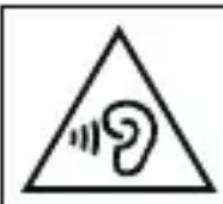
WARNING! Prolonged exposure to loud noise can cause temporary or permanent hearing damage or hearing loss. As a consequence, avoid listening for long periods at high volume and keep the volume at an appropriate setting.
Risk of short circuit!
Do not insert any objects that are not intended for use into the product's openings. Do not use the product with wet hands. This could result in injury due to an electrical short circuit and/or a resulting fire.
Do not use the product if it is visibly damaged or the USB cable is visibly damaged as this may result in injury or damage.
The product must not come into contact with water.
Do not place containers filled with liquid (vases, glasses or similar) on or in the immediate proximity of the product. You run the risk of knocking the container over and the spilled liquid impairing the product's electrical safety.
Damage!
Keep the device away from any type of moisture and avoid dust, heat and direct sunlight.
Do not use water or chemical solutions to clean the device, use only a dry cloth.
Do not open the housing of the device and do not disassemble it into its component parts. The battery is permanently installed and cannot be changed Do not try to repair it yourself. The guarantee expires in this case.
Be careful not to knock the product against a hard surface.
Do not subject the headphones to excessive pressure or weight to avoid deformation. The headphones contain magnets, so do not store credit cards or similar products with magnetic strips nearby, as this may lead to data loss.
Declaration of conformity

The CE marking says that this product meets the requirements of all EU Directives applicable for this product.

The UKCA marking says, that this product meets the requirements of all UK Directives applicable for this product.
Simplified declaration of conformity
Intenso International hereby declares that these radio installation type Intenso Overear Headphone O400HA comply with Directive 2014/53/EU. You can read the full text of the EU Declaration of Conformity by visiting the following site: www.intenso.de.
SCOPE OF DELIVERY

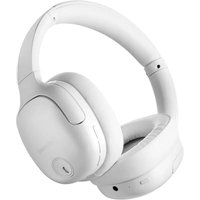
Intenso Overear Headphones O400HA
USB-C to tUSB-C cable

3.5 mm audio cable 1.5 m
Operating 3
Instructions
Please check that the contents of the packaging are complete and undamaged (see also the illustration at the start of this manual). If this is not the case, please contact the retailer or our service department: rma@intenso-international.de
User guidelines
Product overview
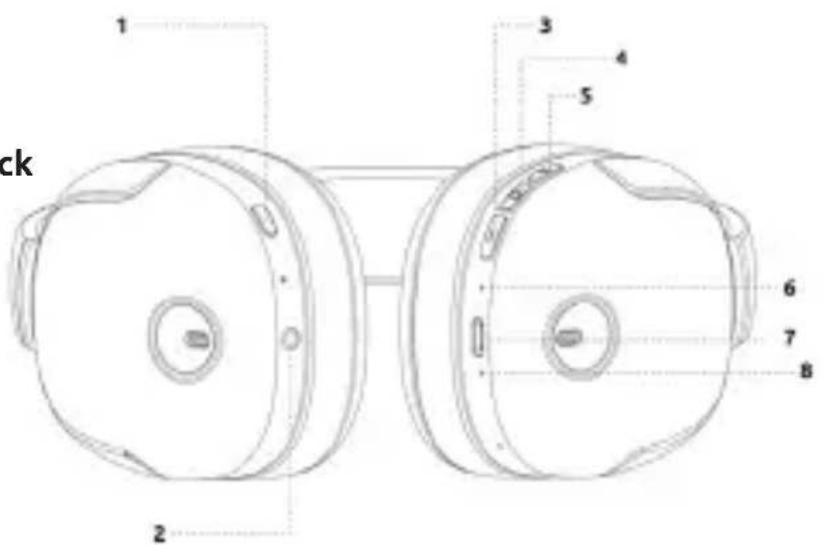
1 - Mode button
2 - 3.5 mm stadard audio jack
3 - Volume (-) button / previous track
4 - Function button
5 - Volume (+) button / next track
6 - Status LED
7 - USB-C In
8 - Mode LED
Turning On and Off
To turn on the headphones, press the function button for about 2 seconds. To turn them off, hold the function button for about 5 seconds.
Battery
The headphones feature a built-in battery. Please make sure to fully charge it before the first use. A full charge takes approximately 2 hours. To do this, simply connect one USB-C end of the included USB-C to USB-C cable to the headphones (USB-C In) and the other USB-C end to a suitable power source (5V-1A). The charging process is indicated by the status LED. During charging, it lights up red; when fully charged, the status LED turns blue.
During use, a low battery level (starting at around 5% remaining capacity) is also indicated by the status LED. In this case, it blinks red twice every 15 seconds, and you should recharge the battery soon. When fully charged, the battery lasts for approximately 75 hours of music playback (depending on volume, Bluetooth connection, and other factors). A 10-minute charge provides around 4 hours of playback time. Regardless of use, the headphones automatically turn off after 12 hours. Please recharge the headphones every 3 months when not in use to prevent deep discharge of the battery! You can also use the headphones in wired mode via the 3.5mm standard audio jack. In this passive mode, no power is required, so the device will function even with a depleted battery. In this case, full control is managed through the playback device.
Bluetooth connection (multipoint)
Before first use, the headphones must be paired with the playback device. Press the function button for about 2 seconds to turn on the headphones. The status LED will now blink alternately blue and red, and the headphones will be in pairing mode. For more details on pairing, please refer to the playback device's user manual. After 30 seconds, the status LED will turn off. Once a connection is established, the status LED will light up blue for about 15 seconds and then turn off. During each subsequent use, the headphones will automatically pair with the previously connected device.
These headphones feature multipoint Bluetooth, allowing them to be connected to two devices simultaneously. Depending on the device and usage scenario, the headphones will automatically switch between the devices. This process is determined by the connected devices, and the headphones have no influence over the switching of connections.
To delete the devices already paired with the headphones, press and hold the volume (+) and volume (-) buttons simultaneously for 5 seconds until the LED briefly flashes purple and the headphones turn off. The headphones must not be connected to any device via Bluetooth during this process.
Hybrid Active Noise Cancellation (Hybrid ANC)
These headphones feature Hybrid Active Noise Cancellation (Hybrid ANC), which reduces ambient noise. Two of the four integrated microphones, located on the outside, pick up surrounding sounds. The processors in the headphones analyze these sounds and determine the type of anti-noise needed to neutralize them as much as possible. The other two inner microphones monitor the sounds emitted by the speaker and report any remaining ambient noise to the processors, allowing for more targeted noise reduction.
Using the mode button, you can switch between ANC On, Transparency Mode, and ANC Off. When ANC is activated, the mode LED blinks green for 15 seconds.
Transparency Mode
The Transparency Mode allows ambient sounds to pass through while listening to music or other audio content. Ambient sounds are picked up by the microphones and played through the headphones, allowing you to hear announcements, for example, even while music is playing. You can switch between ANC On, Transparency Mode, and ANC Off using the mode button. When Transparency Mode is activated, the mode LED blinks rapidly green for 15 seconds.
Passive mode
You can also use the headphones in passive mode via the 3.5mm standard audio connection. In this case, the headphones do not have any active functions and only serve to play audio content from the playback device, which also handles full control.
Simply connect the included 3.5mm audio cable to the 3.5mm standard audio jack on the headphones and the other end to the standard audio input of the playback device.
Playback functions
During active playback, you can control various functions using the buttons on the headphones. To start or pause playback, press the function button once. To increase or decrease the volume, briefly press the volume (+) or volume (-) button. To skip to the next track or go to the previous track, hold the volume (+) or volume (-) button for about 1 second. In passive, wired mode, control is managed exclusively through the playback device.
Hands-free function
You can use the headphones as a hands-free device with your paired device. If the paired device supports it, you can answer, reject, and end calls. To answer a call or end an ongoing call, briefly press the function button once. To reject an incoming call, press the function button for about 2 seconds. You can also adjust the volume during a call using the corresponding buttons. In passive, wired mode, control is managed exclusively through the playback device.
Voice assistant
If your paired device has a voice assistant, you can activate it in active mode by double-pressing the function button briefly.
SERVICE/DISTRIBUTORS
INTENSO INTERNATIONAL GMBH | Kopernikusstraße 12-14 | D-49377 Vechta
Email (technical support): support@intenso-international.de
Email (RMA number): rma@intenso-international.de
Internet: www.intenso.eu
Telephone (technical support): +49 (0) 4441 - 999 111 (Mon.- Thurs. 09:00 a.m. - 4:30 p.m.;
Fri. 09:00 a.m.-2:00 p.m.)
DISPOSAL
| Disposal of used rechargeable batteries and used batteries: Devices marked with this symbol are subject to European Directive 2006/66/EC. Therefore, all used rechargeable batteries and used batteries must be disposed of separately from household waste via the designated governmental agencies. You will avoid harming the environment by disposing of them properly. | |
| Disposal of used electrical equipment: Devices marked with this symbol are subject to European Directive 2006/66/EC. Therefore, all used rechargeable batteries and used batteries must be disposed of separately from household waste via the designated governmental agencies. You will avoid harming the environment by disposing of them properly. | |
| Packaging: Packaging is raw material. The packaging material of this product is suitable for recycling and can be reused. Please follow local recycling regulations when disposing of any materials. |
OPERATING CONDITIONS
Only use the product at temperatures of between 0 and 40 degrees Celsius. If you do not use the product for a long time, store it between -10 and 45 degrees Celsius and charge it every three months to ensure it operates at its full performance.
SPECIFICATIONS
| Dimensions: 165 x 75 x 195 mm | |
| Weight: ~248 Gr. | |
| Bluetooth version: V5.3 | |
| Bluetooth operating frequency: 2402-2480MHz | |
| Bluetooth range: up to 15m (line of sight) | |
| Bluetooth profiles: A2DP, AVCTP, AVDTP, AVRCP, HFP, SPP, SMP, ATT, GAP, GATT, RFCOMM, SDP, 12CAP | |
| Bluetooth name: Intenso O400HA | |
| Supporting codec: SBC | |
| Maximum output: < 10 dBm | |
| Frequency range: 20Hz-20KHz | |
| Impedance: 32 ohm | |
| ANC: ~35 dB, dual microphone hybrid ANC | |
| Number of microphones: 4 | |
| Driver (diameter): 40mm | |
| Connections: USB-C In, 3.5 mm standard audio connection | |
| Battery: 600mAh (li-polymer) | |
| USB-C Input: | 5.0 V-1.0 A |
| Charging time: | ~2 hours |
| Battery life: | ~75 hours on single charge (dependent on various factors) |
| Operating temperature: | 0 °C - 40 °C |
| Storage temperature: | -10 °C - 45 °C |

Hybride Active Noise Cancellation (ANC hybride)
Hybride Active Noise Cancellation (ANChybridge) 6
Transparentiemodus 6
Passieve modus 6
Afspeelfuncties 6
Handsfree functie 6
Spraakassistent 7
Dienst/Drager 7
Verwijdering 7
Bluetooth verbinding (multipoint)
Hybride Active Noise Cancellation (ANC hybride)
Modo Transparency (Transparency Mode)
Hybrid Active Noise Cancellation (Hybrid ANC)
Tryb Transparency (Transparency Mode)
Bluetooth Veza (Multipoint)
Prilikom prve upotrebe, slušalice treba upariti s urežajem za reprodukciju. Pritisnite funkcijsku tipkuna otprilike 2 sekunde da biste uključili slušalice. Status-LED ce treptati naizmjenicno plavo i crveno, što označava da su slušalice u načinu uparivanja. Za detalje o uparivanju, molimo pogledajte upute za uporabu vaseg urežaja za reprodukciju. Nakon 30 sekundi, Status-LED ce se ugasiti. Kada je veza uspostavljena, Status-LED ce plaviti oko 15 sekundi i zatim se ugasiti. Svaki put kad koristite slušalice, one ce se automatski povezati s prethodno povezanim urežajem.
Ove slusalice imaju Multipoint Bluetooth, sto znači da se mogu povezati s dva uredaja istovremeno. Ovisno o uredaju i scenariju korištenja, slusalice ce automatski prelimaziti izmedu tih uredaja. Ovaj proce odreduju povezani uredaji, a slusalice nemaju utjecaja na promjenu veza.
Da biste izbrisali prethodno uparene uredaje koje su slusalice zapamtili, istovremeno drzite tipke za glasnoch (+) i glasnoch (-) 5 sekundi, dok LED krako ne zasvijetli ljubičasto i slusalice se isključe. Slusalice ne smiju biti povezane s nijednim uredajem putem Bluetooth-a.
Hybrid Active Noise Cancellation (Hybrid ANC)
Te slusalice imaju hibridnu aktivnu redukciju buke (Hybrid Active Noise Cancellation - Hybrid ANC). Kroz Hybrid ANC smanjuju se vanjske zvukove. Dva vanjska mikrofona od Četiri ugražena mikrofona preuzimaju vanjske zvukove, procesori u slusalicama analiziraju te zvukove i odreduju kakva vrsta protuzvuka je potrebna za njihovo najbolje neutraliziranje. Dva unutarnja mikrofona kontroliraju zvukove koje ispusta zvučnik i obavještavaju procesore o preostalim vanjskim zvukovima kako bi se ti zvukovi mogli preciznije smanjiti.
Pomocu tipke za način rada možete birati izmedu ANC uključen, Načini prozirnosti i ANC isključen. Kada je ANC aktiviran, LED za način rada trepće zeleno 15 sekundi.