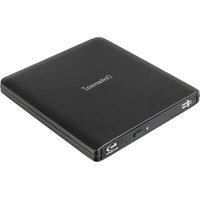
EOD 500BD Slim - Blu-ray player INTENSO - Free user manual and instructions
Find the device manual for free EOD 500BD Slim INTENSO in PDF.


| Product Type | External Blu-ray reader/burner |
| Brand | Intenso |
| Model | EOD 500BD Slim |
| Dimensions (L x W x H) | 148.0 x 142.0 x 16.2 mm |
| Weight | Approx. 200 g (estimated) |
| Power supply | Via USB port (Y-cable included) |
| Interface | USB Micro-B (compatible with USB 2.0/3.x) |
| Maximum read speed | CD : 24x, DVD : 8x, BD : 6x |
| Supported disc formats | BD-ROM/DL, BD-R/DL/XL, BD-RE/DL, DVD±R/DL, DVD-RAM, CD-R/RW, CD-ROM, CD-DA, Super Audio CD, M-Disc, etc. |
| Compatible operating systems | Windows 10 or later, macOS 10.x or later |
| Functions | Reading and writing (burning) of optical discs |
| Package contents | Drive, Y-cable USB Micro-B to USB-A/USB-C, user manual |
| Maintenance and cleaning | Clean with a dry, lint-free cloth; avoid moisture and chemicals |
| Safety | Class 1 laser product; do not open the casing; horizontal use; avoid shocks |
| Operating temperature | 5°C to 45°C |
| Operating humidity | 15% to 80% |
Frequently Asked Questions - EOD 500BD Slim INTENSO
User questions about EOD 500BD Slim INTENSO
0 question about this device. Answer the ones you know or ask your own.
Ask a new question about this device
Download the instructions for your Blu-ray player in PDF format for free! Find your manual EOD 500BD Slim - INTENSO and take your electronic device back in hand. On this page are published all the documents necessary for the use of your device. EOD 500BD Slim by INTENSO.
USER MANUAL EOD 500BD Slim INTENSO
natural_image
Line drawing of a rectangular electronic device with labeled components (no text or symbols beyond labels)Please read this manual carefully and observe and follow all the instructions mentioned in it to ensure a long service life and reliable use of the device. Keep this manual handy and pass it on to other users of the device.
OPERATING INSTRUCTIONS
SAFETY 2
Intended use 2
Laser classification 2
Safety information 2
SCOPE OF SUPPLY 4
USE....4
Device overview....4
System requirements....4
Connecting the device....4
Disconnecting the device....4
Using the product 5
Supported formats....5
SERVICE/DISTRIBUTOR 6
DISPOSAL 6
OPERATING CONDITIONS......6
TECHNICAL DATA 6
SAFETY
Intended use
This product is only intended for use as an optical drive for reading and writing (burning) compatible optical storage media. It can be connected to computers or other suitable devices via a USB interface, for data backup, media playback or archiving digital content. It may only be operated within the capacity limits specified in the technical data. Always follow the safety instructions for use.
Any other use or use beyond this is considered improper use and may result in damage and injury. This product is not designed for commercial use or for medical and special applications where failure of the product could cause injury, death or substantial material damage. The reproduction of copyrighted content without a relevant license is also not permitted and is considered improper use. Claims of any kind for damage resulting from improper use or failure to follow safety instructions are excluded.
Changes can be made to firmware and/or hardware at any time without needing to give prior notice. It is therefore possible that parts of these operating instructions, technical data, and images contained herein may differ slightly from your product. All the points described in these operating instructions are for illustrative purposes only and do not necessarily correspond to your specific product. It is not possible to assert any legal claims on the basis of these operating instructions.
Laser classification
This device is a Class 1 laser product in accordance with DIN EN 60825-1. The laser used in the device is fully integrated into the housing and is not accessible under normal operating conditions. The device is therefore considered safe within the meaning of the aforementioned standard.
Do not open the housing. Improper use may result in exposure to dangerous laser radiation.
Maintenance and repair work may only be carried out by authorised specialist personnel. Do not use the device if the housing is damaged.
Safety information
Dangers for children and persons with restricted physical, sensory or mental abilities:
Children often underestimate dangers or do not recognise them at all. This device is not intended to be used by persons (including children) with restricted sensory, physical or mental abilities or lack of experience and/or knowledge, unless they are supervised by a person responsible for their safety or received instructions from the person on how to use the device and they have understood the resultant dangers. Unsupervised children should not have access to the device. Make sure that children do not play with the device.
Danger of asphyxiation!
Children may put parts of the packaging or other small parts in their mouths and choke on them.
Risk of injury!
Only use the device in accordance with its intended use and in compliance with all safety information and within the technical capacity limits. Failure to follow these instructions may result in fatal electric shock!
Do not try to open the device. It does not require maintenance and must not be repaired by the user either. In this case, the warranty will be voided. If the device is damaged, do not continue to use it under any circumstances to avoid possible injury! You must also prevent other people from using the defective device.
Do not insert any objects that are not intended for use into the product's openings. This may result in life-threatening injuries due to an electrical short circuit and/or a subsequent fire.
Do not operate the device with wet hands to avoid injuries caused by an electrical short circuit. Connecting or disconnecting the cable is also considered, operating'.
If the device starts making strange noises, emits an odour or smoke, or is damp, disconnect it immediately and discontinue use.
Damage!
Keep the device away from any moisture, and avoid dust, heat, and direct sunlight. Do not use it in close proximity to heat sources, such as radiators.
Avoid shaking or dropping the product.
Do not place containers filled with liquid (vases, glasses or similar) on or in the immediate proximity of the product. You run the risk of knocking the container over and the spilled liquid impairing the product's electrical safety.
Please do not use any water- or chemical-based solutions to clean the product. Please only use a dry cloth for this purpose.
If the device is taken from a cold room into a warm one, do not use it straight away. This could result in condensation, which can lead to damage. Leave it for a reasonable period of time to allow it to reach room temperature.
Lay connected cables in a way that does not pose a trip hazard. Do not use damaged cables and do not crush or bend them.
Only operate the device in a horizontal position and do not place any objects on the housing.
Please remove the data carrier when the device is not in use, especially when transporting the device.
Take care not to insert any damaged data carriers into the device. In the event of cracks or similar damage, the data carrier may break as a result of the high rotational speed, and damage the device.
Do not use any data carriers that have been tagged with a sticker (e.g. for labelling purposes). This may result in an imbalance and damage the device.
Clean dirty data carriers with a soft, lint-free cloth before inserting them. Wipe from the centre outwards and in straight lines, not in a circular motion, so as not to damage the data structure.
Avoid using the device in strongly magnetised fields, such as in direct proximity to TV sets, loudspeakers, etc. to prevent data loss or other malfunctions.
The device must not be exposed to any vibrations or shocks when in operation, even minimal movements may result in damage to the storage medium or device.
Carry out data backups more frequently to avoid possible data loss. Data recovery is not covered by the warranty and cannot be carried out by our Service Centre!

CE marking says that this product meets the requirements of all EU Directives applicable for this product

The UKCA marking says, that this product meets the requirements of all UK Directives applicable for this product.
SCOPE OF SUPPLY
① Intenso Optical Disc Drive EOD 500BD Slim
Operating instructions
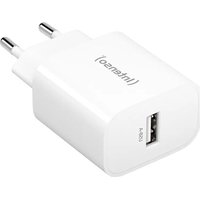
② Y-cable USB Micro B to USB-A / USB-C
Please check that the contents of the package (see also the diagram at the beginning of these operating instructions) are complete and undamaged. If this is not the case, please contact the retailer or our customer service team: rma@intenso.de
USE
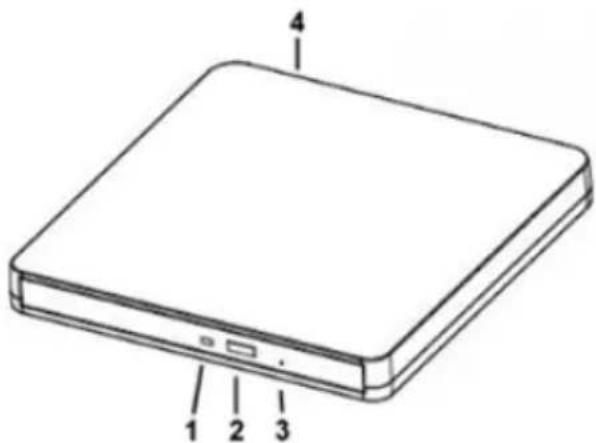
Device overview
1 - Status LED
2 - Eject button
3 - Manual ejection (emergency)
4 - USB Micro B port
natural_image
Line drawing of a rectangular electronic device with labeled ports (no text or symbols beyond labels)System requirements
This device is compatible with the following operating systems: Windows 10 or higher and macOS 10.x or higher.
A free USB2.0/3.x interface is required to operate this device.
Your PC's hardware configuration and the operating system you are using may affect the availability, compatibility, and transmission speed of this device.
*Trademarks: Windows is a registered trademark of Microsoft Corporation. MAC and macOS are registered trademarks of Apple Inc. All third-party trademarks and names are the property of their respective owners.
Connecting the device
To connect the device to your computer, please only use the Y-cable USB Micro B to USB-A/USB-C included in the scope of delivery.
Connect the USB Micro B plug to this device and the USB-A/USB-C plug to your computer.
A manual driver installation is not required; this is automatically installed by the computer's operating system when the device is connected. Wait until the driver installation is complete. You will then have access to an additional drive.
The LED will flash while data is being read or played back, or a burning process is running. If the drive is on standby, the LED will be off.
Disconnecting the device
Before disconnecting the device from your computer, please ensure that the drive is no longer in use. Once the Status LED has stopped emitting light, you can disconnect the USB cable from your computer. Please remove any data carriers beforehand if you do not intend to use the device for an extended period.
Using the product
Check that the device is not damaged and then connect it to your computer. Only operate the device in a horizontal position.
Inserting a data carrier:
Press the eject button on the drive or use the relevant function on the operating system to eject the tray. Where necessary, carefully pull this further out by hand until it is fully extended.
Now place an optical storage medium in the tray's recess. Make sure that the data carrier is neither dirty nor damaged before inserting it with its labelled side facing up. Carefully press it down in the centre until you hear or feel it click into place on the round catch. Avoid touching the underside of the data carrier when doing this. Dirt on the data carrier may result in reading and writing errors.
Now carefully push the tray back into the drive until you feel it click into place.
Next, launch the software you have selected (file explorer, burning software, media player, etc.) that you need for your project.
Removing a data carrier:
Before removing the data carrier, please ensure that the drive is no longer in use.
Press the eject button on the drive or use the relevant function on the operating system to eject the tray. Where necessary, carefully pull this further out by hand until it is fully extended.
Carefully take hold of the data carrier by its edges and lift it slightly until it releases from the recess in the centre.
As soon as you have removed the data carrier, carefully push the tray back into the drive until you feel it click into place. This prevents dust and other foreign objects from getting trapped in the drive.
Manually removing a data carrier (emergency removal):
If the drive fails to respond to inputs (e.g. in the case of a power outage or system error), the data carrier can be removed manually.
Start by disconnecting your computer. Now, take a thin, stable object, and carefully insert it into the opening for the manual ejection until you feel some resistance. The tray can now be unlocked manually by applying light pressure, allowing it to slide a little out of the drive. Carefully pull this out and remove the data carrier as usual. Finish by closing the drive again
Supported formats
Optical storage media with a diameter of 120mm and 80mm.
BD-R, BD-R (DL), BD-R (XL) BD-RE, BD-RE (DL), BD-ROM, BD-ROM (DL), DVD-ROM, DVD-R, DVD-R DL (Dual Layer), DVD-RW, DVD-RAM (Ver.2.2), DVD+R, DVD+R DL (Double Layer), CD-R / CD-RW, CD-ROM, CD-ROM XA, CD-I, Video CD, CD-Extra, CD-Text, CD-DA, Super Audio CD, Photo CD, M-Disc.
SERVICE/DISTRIBUTOR
INTENSO INTERNATIONAL GMBH | Kopernikusstraße 12-14 | D-49377 Vechta
Email (technical support): support@intenso.de
Email (RMA-number): rma@intenso.de
Internet: www.intenso.eu
Telephone (technical support): +49 (0) 4441 – 999 111 (Mon.- Thurs. 9:00 a.m. - 4:30 p.m.;
Fri. 9:00 a.m. - 2:00 p.m.)
DISPOSAL
 | Disposal of used rechargeable batteries and used batteries: Devices marked with this symbol are subject to European Directive 2012/19/EC. Therefore, all used rechargeable batteries and used batteries must be disposed of separately from household waste via the designated governmental agencies. You will avoid harming the envi-ronment by disposing of them properly. |
 | Packaging: Packaging is raw material. The packaging material of this product is suitable forrecycling and can be reused. Please follow local recycling regulations when disposing of any materials. |
OPERATING CONDITIONS
Operate the device at a temperature between 5 and 45 degrees Celsius. If you plan not to use the device for an extended period, store it between -20 and 60 degrees Celsius. Use and store it at a humidity of between 15 % and 80 %.
TECHNICAL DATA
| Designation: EOD 500BD $lim | |
| Dimensions (W/H/D): 148.0 x 142.0 x 16.2 mm | |
| Max. speed: CD: 24x | DVD: 8xBD: 6xx=150kb/s |
| Port: USB Micro B | |

Classification laser 2
Classification laser
Systeemeisen
MANUAL DE INSTRUÇÕES
SEGURANÇA....2
Systémové požadavky
Sistemski zahtjevi
Ovaj uređaj kompatibilan je s operativnim sustavima Windows 10 ili novijim i macOS 10.x ili novijim.
Za rad ovog uređaja potrebno je slobodno USB 2.0/3.x sučelje.


- OPERATING INSTRUCTIONS
- SAFETY
- Intended use
- Laser classification
- Safety information
- Dangers for children and persons with restricted physical, sensory or mental abilities:
- Danger of asphyxiation!
- Risk of injury!
- Damage!
- SCOPE OF SUPPLY
- USE
- Device overview
- System requirements
- Connecting the device
- Disconnecting the device
- Using the product
- Supported formats
- SERVICE/DISTRIBUTOR
- OPERATING CONDITIONS
- Classification laser
- Systeemeisen
- MANUAL DE INSTRUÇÕES
- Systémové požadavky
- Sistemski zahtjevi
Brand : INTENSO
Model : EOD 500BD Slim
Category : Blu-ray player