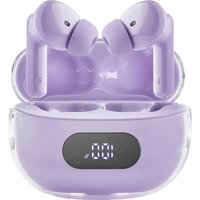
Buds Plus T313AE - Earplug INTENSO - Free user manual and instructions
Find the device manual for free Buds Plus T313AE INTENSO in PDF.


User questions about Buds Plus T313AE INTENSO
0 question about this device. Answer the ones you know or ask your own.
Ask a new question about this device
Download the instructions for your Earplug in PDF format for free! Find your manual Buds Plus T313AE - INTENSO and take your electronic device back in hand. On this page are published all the documents necessary for the use of your device. Buds Plus T313AE by INTENSO.
USER MANUAL Buds Plus T313AE INTENSO
natural_image
White handheld electronic device with a black plastic cover and metallic handle (no visible text or symbols)Version 1.0 (24/04)
natural_image
White 3D-printed medical device with a metallic connector, shown with two numbered labels (1 and 2) and a small inset of three vertical bars.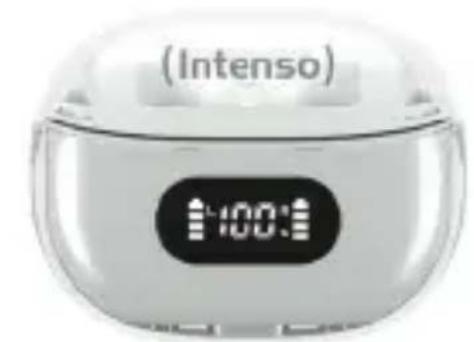
text_image
(Intenso) 100:00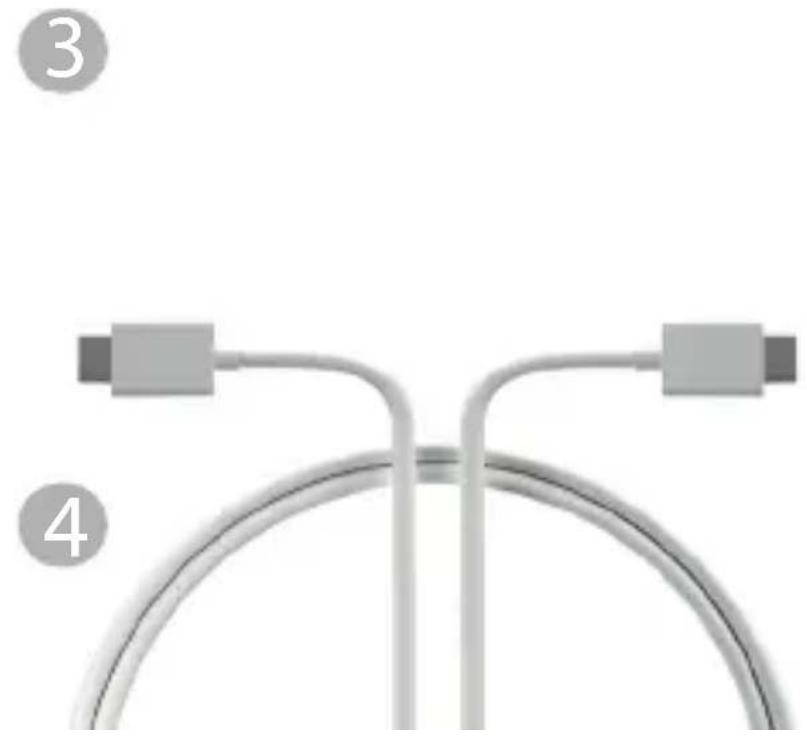
natural_image
Diagram of a curved pipe or tube with two connectors, labeled 3 and 4 (no text or symbols on the diagram itself)
natural_image
Icon of a person using a laptop inside a black circle (no text or symbols)natural_image
Icon of a person using a laptop inside a black circle (no text or symbols)Please read this manual carefully and observe and follow all the instructions mentioned in it to ensure a long service life and reliable use of the device. Keep this manual handy and pass it on to other users of the device.
USER MANUAL
Safety 2
Intended use.... 2
Safety information 2
Declaration of conformity 3
Simplified declaration of conformity 4
Scope of delivery 4
User guidelines 4
Product overview 4
Battery 4
Bluetooth connection 5
ENC function 5
Active Noise Cancellation (ANC) / transparency mode 5
Music and gaming modes.... 5
Hands-free function 6
Voice assistant 6
Video playback 6
Operation 6
Service/distributors 7
Disposal 8
Operating conditions 8
Specifications 9
SAFETY
Intended use
This product is designed to play audio content wirelessly via a Bluetooth connection to the audio source. You can also make calls using the headphones if the connected device supports phone calls. Please refer to the operating instructions for the respective product or contact the manufacturer to check whether your playback device supports the Bluetooth standard and learn about how to establish a connection.
Any other use or use beyond this is considered improper use and lead to damage and injury. This product is not designed for commercial use or for medical and special applications where failure of the product could cause injury, death or substantial material damage. Claims of any kind due to damage resulting from improper use or failure to follow safety instructions are excluded.
Changes can be made to firmware and/or hardware at any time without needing to give prior notice. It is therefore possible that parts of this manual, technical data and images contained herein may differ slightly from your product. All points described in this manual are for illustrative purposes only and do not necessarily correspond to your specific product. It is not possible to assert any legal claims on the basis of this manual.
Safety information
Dangers for children and persons with restcted physical, sensory or mental abilities:
Children often underestimate danger or fail to recognise it at all. This product is not designed to be used by persons (including children) with reduced sensory, physical or mental capabilities, or a lack of experience and/or knowledge, unless they have been given supervision or instruction on how to use the product by a person responsible for their safety and understand the hazards involved. Please keep the product out of reach of unsupervised children. Please make sure that children do not play with this product.
Danger of asphyxiation!
Children can put the packaging film or small parts in their mouths and choke on them.
Risk of injury!
The product contains magnets and microwaves are emitted from a Bluetooth device. If you have a pacemaker or other technical implant, please consult your doctor or the manufacturer of the implant before using this product.
The headphones are inserted into the ear with the help of ear pads (ear tips). Please take care when fixing the ear tips to the headphones. Otherwise they may detach from the headphones become stuck in the ear canal. If this does happen, do not try to remove them on your own using a sharp object as this may result in injury.
When inserting or removing the headphones, please do so carefully and slowly to avoid injury to the
ear and eardrum. Do not try to wear the headphones without the ear tips or if the ear tips are damaged.
We do not recommend that you use the product in road traffic. This can cause listeners to react more carelessly to potential dangers, such as approaching vehicles, and increase the likelihood of an accident. Please also observe the legal regulations applicable to you!
Do not expose the device to open flames as the built-in battery may explode.
WARNING! Prolonged exposure to loud noise can cause temporary or permanent hearing damage or hearing loss. As a consequence, avoid listening for long periods at high volume and keep the volume at an appropriate setting.
Risk of short circuit!
Do not insert any objects that are not intended for use into the product's openings. Do not use the product with wet hands. This could result in injury due to an electrical short circuit and/or a resulting fire.
Do not use the product if it is visibly damaged or the USB cable is visibly damaged as this may result in injury or damage.
The product must not come into contact with water.
Do not place containers filled with liquid (vases, glasses or similar) on or in the immediate proximity of the product. You run the risk of knocking the container over and the spilled liquid impairing the product's electrical safety.
Damage!
Keep the device away from any type of moisture and avoid dust, heat and direct sunlight.
Do not use water or chemical solutions to clean the device, use only a dry cloth.
Do not open the housing of the device and do not disassemble it into its component parts. The battery is permanently installed and cannot be changed Do not try to repair it yourself. The guarantee expires in this case.
Be careful not to knock the product against a hard surface.
Both the charging box and headphones contain magnets. That is why you should keep credit cards or other similar products with magnetic strips away from the product as contact with the product may result in a loss of data.
Declaration of conformity
The CE marking says that this product meets the requirements of all EU Directives applicable for this product.

The UKCA marking says, that this product meets the requirements of all UK Directives applicable for this product.
Simplified declaration of conformity
Intenso International hereby declares that these radio installation type Intenso Buds T310AE/T312AE/T313AE/T315AE comply with Directive 2014/53/EU. You can read the full text of the EU Declaration of Conformity by visiting the following site: www.intenso.de.
SCOPE OF DELIVERY
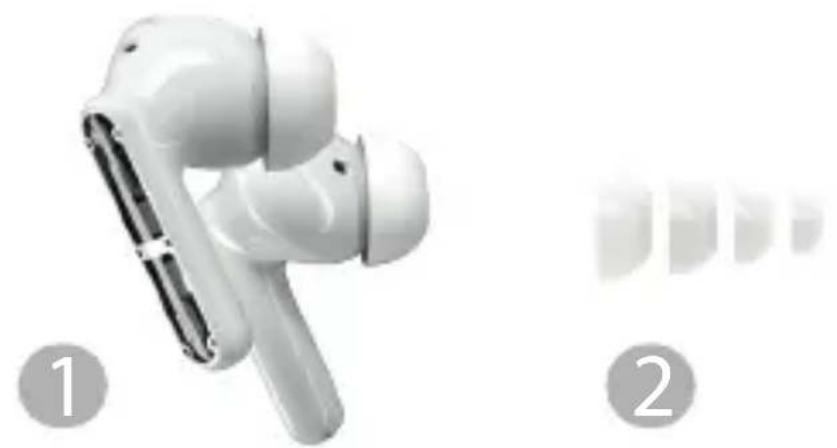
1 Intenso Buds Plus (2x)
USB-C to USB-C cable

2 Eartips in 4 different sizes
Operating Instructions
3 Charging case
Please check that the contents of the packaging are complete and undamaged (see also the illustration at the start of this manual). If this is not the case, please contact the retailer or our service department: rma@intenso-international.de
User guidelines
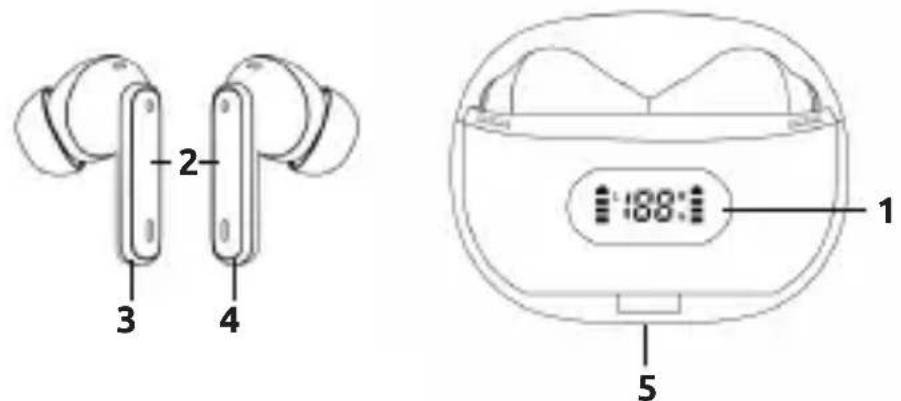
Product overview
1 - Status display
2 - Touch sensor
3 - Bud left
4 - Bud right
5 - USB-C input
text_image
2 3 4 1 188:1 5Battery
The charging box and the buds contain an integrated rechargeable battery. Please make sure that this is fully charged before first use. It takes approx. 1.5 hours to charge the buds inside the charging box and it will start automatically once inserted into the box. It takes approx. 2 hours to charge the charging box. Simply connect one USB-C port of the supplied USB-C to USB-C cable to a suitable power source (5V-1A) and the other USB-C port to the charging box (USB-C In). The current charge status is displayed on the three-digit numerical display as a percentage. Simply open the lid of the charging box. The last digit will flash when the charging box is being charged. When the buds are being charged inside the charging box, you will be able to see a charging animation on both sides. The animation will stop as soon as the ear bud has charged fully.
Once the buds are fully charged, the battery will last for approx. 7 hours of music playback (depending on volume, Bluetooth connection and other factors). The charging box capacity will allow you to charge the buds approx. 2.5 times, resulting in a total playback time of approx. 25 hours without a power source. Please charge the charging box, including the buds, every 3 months when not in use to prevent deep discharges.
Bluetooth connection
The buds must be paired with the playback device the first time they are used. Bluetooth is activated in pairing mode as soon as the charging box lid is opened. For more information on pairing, please refer to the operating instructions for the playback device. Each time the buds are used after first use, they will automatically pair with the previously connected device. If you wish to pair them with another device, please make sure you disconnect the previously connected device where possible, as the buds can only be paired with one device at a time.
ENC function
The buds are equipped with Environmental Noise Cancellation (ENC). This automatically activated technology uses additional microphones to detect disturbing background noise and filters it out using an algorithm before it is transmitted. This is particularly effective for high-frequency noises and improves voice quality during calls.
Active Noise Cancellation (ANC) / transparency mode
This product features Active Noise Cancellation (ANC) and a Transparency Mode. ANC reduces background noise. The integrated microphones pick up the background noise, processors inside the headphones analyse this noise and determine which counter-sound will best neutralise it.
The transparency mode allows background noise to filter through while you are listening to music or other audio content. Background noise is picked up by the microphones and played back using the headphones, allowing you to hear loudspeaker announcements even when music is playing.
Please see the "Touch sensor" section to learn how to activate/deactivate ANC or transparency mode.
Music and gaming modes
You can switch between Music Mode and Gaming Mode during playback. The Gaming Mode has a lower latency than the Music Mode. However, the Music Mode has a more sophisticated sound. Please see the “Touch sensor” section to learn how to activate/deactivate ANC or transparency mode.
Hands-free function
You can use your headphones as a hands-free product for your paired device. You can accept, reject and end calls provided that these functions are supported by the paired device. Please see the “Touch sensor” section for more information on how to use the product.
Voice assistant
If your paired device has a voice assistant, you can activate this function using the headphones. Please see the “Touch sensor” section for more information on how to use the product.
Video playback
You can usually adjust the sound quality during video playback by going to the settings for the paired device or the app you are using. You can also switch from Music Mode to Gaming Mode if the audio fails to sync with the video file. The lower latency may synchronise playback.
Operation
1. Switching on and off
The buds switch on automatically when you open the charging box lid and switch off again automatically when you place them back inside the charging box and close the lid. After switching them on, the headphones will sync and connect automatically. The headphones will switch off automatically after a few minutes if there is no Bluetooth connection and neither ANC nor Transparency Mode are activated. You can also switch the buds on and off manually. Please see the „Touch Sensor“ section for more information on this.
2. Touch sensor / functions
You manage the buds' different functions using the respective touch sensor on the surface of the buds. Depending on function, you will need to briefly tap or press and hold the left or right touch sensor (multiple times) until you hear confirmation that the action has been carried out.
| Turning on and off: The | buds switch on automatically using the charging box. Press and hold the touch sensor on one headphone for 5 seconds to switch both buds off manually. The buds are switched on independently of each other by pressing holding the sensor for 3 seconds. You can also press and hold the sensor in this way to reconnect the headphones, where necessary. |
| Play / pause: Tap the left or right touch sensor to pause / play audio. | |
| Previous/next Audio file: | Tap the left touch sensor twice to skip back one track. Tap the right touch sensor twice to skip to the next track. You can still skip to the next track when only the left bud is connected. |
| Answer/end phone call: | Tap the left or right touch sensor once to accept an incoming call. Tap the touch sensor again to end the call. |
| Reject phone call: Tap | the left or right touch sensor twice to reject an incoming call. |
| ANC / transparency mode: | Press and hold the right touch sensor for 2 seconds to switch between modes. The following modes are available: ANC activated, ANC deactivated and the Transparency Mode. |
| Music / gaming mode: | Gaming Mode has a lower latency than Music Mode. We therefore recommend that you switch to Gaming Mode for video playback. Music Mode has a more sophisticated sound. You can switch between the two modes by pressing and holding the left touch sensor for 2 seconds. You can still switch between ANC ON/OFF and Transparency Mode when only the left bud is connected. |
| Volume: Tap the right | touch sensor three times to increase the volume and the left touch sensor three times to decrease the volume. You can also increase the volume using the left bud when only the left bud is connected. |
| voice assistant: If your | playback device has an integrated voice assistant, you can activate this by briefly tapping the left or right touch sensor four times. |
SERVICE/DISTRIBUTORS
INTENSO INTERNATIONAL GMBH I Kopernikusstraße 12-14 | D-49377 Vechta
Email (technical support): support@intenso-international.de
Email (RMA number): rma@intenso-international.de
Internet: www.intenso.eu
Telephone (technical support): +49 (0) 4441 - 999 111 (Mon.- Thurs. 09:00 a.m. - 4:30 p.m.;
 | Disposal of used rechargeable batteries and used batteries: Devices marked with this symbol are subject to European Directive 2006/66/EC. Therefore, all used rechargeable batteries and used batteries must be disposed of separately from household waste via the designated governmental agencies. You will avoid harming the environment by disposing of them properly. |
 | Disposal of used electrical equipment: Devices marked with this symbol are subject to European Directive 2006/66/EC. Therefore, all used rechargeable batteries and used batteries must be disposed of separately from household waste via the designated governmental agencies. You will avoid harming the environment by disposing of them properly. |
 | Packaging: Packaging is raw material. The packaging material of this product is suitable for recycling and can be reused. Please follow local recycling regulations when disposing of any materials. |
OPERATING CONDITIONS
Only use the product at temperatures of between 0 and 40 degrees Celsius. If you do not use the product for a long time, store it between -10 and 45 degrees Celsius and charge it every three months to ensure it operates at its full performance.
SPECIFICATIONS
| Dimensions: Buds: 3.4 x 21.5 x 24.5 mm | Charging box: 51.3 x 65.8 x 28.5 mm |
| Weight: Buds: 2x ~ 3.6 Gr. | Charging box: ~ 41.7 Gr. |
| Bluetooth version: V5.4 | |
| Bluetooth operating frequency: 2402-2480MHz | |
| Bluetooth range: up to 15m (line of sight) | |
| Bluetooth profiles: A2DP V1.3.2, AVCTP V1.4, AVDTP V1.3, AVRCP V1.6.2, HFPV1.8, SPP V1.2, RFCOMM V1.1, PNP V1.3, HID V1.1.1, SDPCore 5.3, L2CAP Core 5.3 | |
| Bluetooth name: Intenso Buds Plus | |
| Supporting codec: SBC | |
| Maximum output: < 10 dBm | |
| Frequency range: 20Hz-20KHz | |
| Impedance: 32 ohm | |
| ANC: ~25 dB | |
| ENC: Dual microphone technology (2 microphones per ear bud) | |
| Driver (diameter): 13mm | |
| Battery: Buds: 2x 33mAh / Charging box: 300mAh (li-polymer) | |
| USB-C Input: 5.0 V-1.0 A | |
| Charging time: | Buds: ~1.5 hours/Charging box: ~2 hours |
| Battery life: | ~7.5 hours on single charge (dependent on various factors)~25 hours total battery life without power source |
| Operating temperature: | 0 °C - 40 °C |
| Storage temperature: | -10 °C - 45 °C |

natural_image
Icon of a person using a laptop inside a black circle (no text or symbols)Active Noise Cancellation (ANC) / Mode transparence 5
Active Noise Cancellation (ANC) / Mode transparence
natural_image
Icon of a person using a laptop inside a black circle (no text or symbols)natural_image
Icon of a person using a laptop inside a black circle (no text or symbols)Active Noise Cancellation (ANC) / transparency mode 5
Funcione ENC 5
natural_image
Icon of a person reading a book inside a black circle (no text or symbols)text_image
Warning symbol with a triangular triangle containing a stylized ear iconnatural_image
Icon of a person using a computer (no text or symbols)MANUAL DE INSTRUÇÕES
Segurança.... 2
natural_image
Symbol of a trash bin crossed with no text or numbers, representing waste sorting or disposal (no text present)natural_image
Icon of a person using a laptop inside a black circle (no text or symbols)natural_image
Icon of a person using a laptop inside a black circle (no text or symbols)natural_image
Symbol of a trash bin crossed with a diagonal line, no text or numbers present
Zbrinjavanje otpadnih punjivih baterija i otpadnih baterija:
Uređaji označeni ovim simbolom podliježu Europskoj direktivi 2006/66/EZ. Sve otpadne punjive baterije i otpadne baterije moraju se odlagati odvojeno od kućanskog otpada putem ovlaštenih državnih tijela. Ispravnim odlaganjem izbjeći ćete štetu okolišu
Zbrinjavanje otpadne električne i elektroničke opreme:
Uređaji označeni ovim simbolom podliježu Europskoj direktivi 2012/19/EZ. Sva otpadna električna i elektronička oprema mora se odlagati odvojeno od kućanskog otpada putem ovlaštenih državnih tijela. Ispravnim odlaganjem otpadne električne i elektroničke opreme izbjeći ćete štetu okolišu.