MS-A1004 - Receiver JBL - Free user manual and instructions
Find the device manual for free MS-A1004 JBL in PDF.


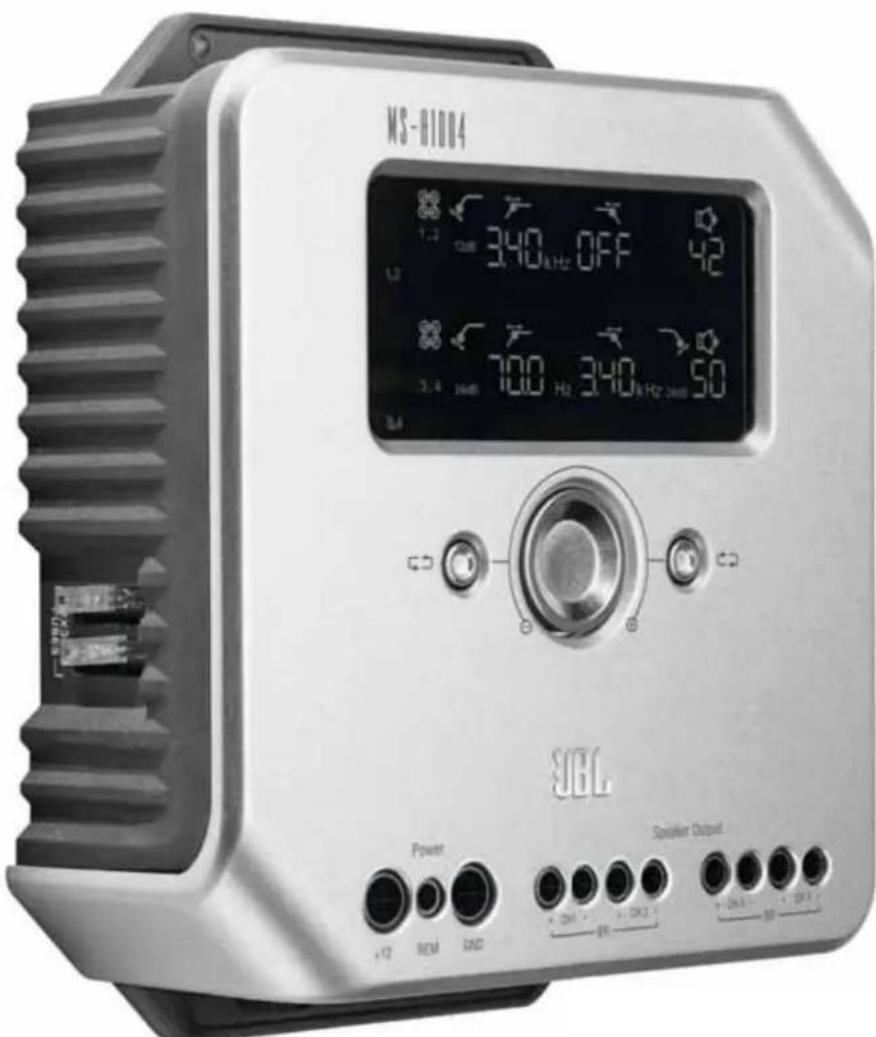
| Product Type | 4-channel Digital Signal Processor (DSP) Amplifier |
| Brand | JBL |
| Model | MS-A1004 |
| Output Power (RMS) | 4 × 75 W @ 4 Ω, 2 × 260 W bridged @ 4 Ω |
| Rated Supply Voltage | 14.4 V |
| Built-in Fuses | 2 × 20 A ATC type |
| Signal Processing | Built-in DSP with non-volatile memory |
| Audio Inputs | 4 RCA inputs; RCA-to-bare wire adapters for speaker-level included |
| Audio Outputs | 4 speaker outputs; 2 pass-through RCA outputs (sum of inputs 1+3 and 2+4) |
| Built-in Filters | High-pass, low-pass, bandpass; 98 frequencies from 20 Hz to 20 kHz; slopes 6/12/24 dB/octave |
| Digital Input Mixer | Input selection for each channel pair (1/2 and 3/4) |
| Power On | Signal sensing or optional wired remote input (5-12 V) |
| Wireless Bass Control | Compatible with MS-WBC (sold separately) |
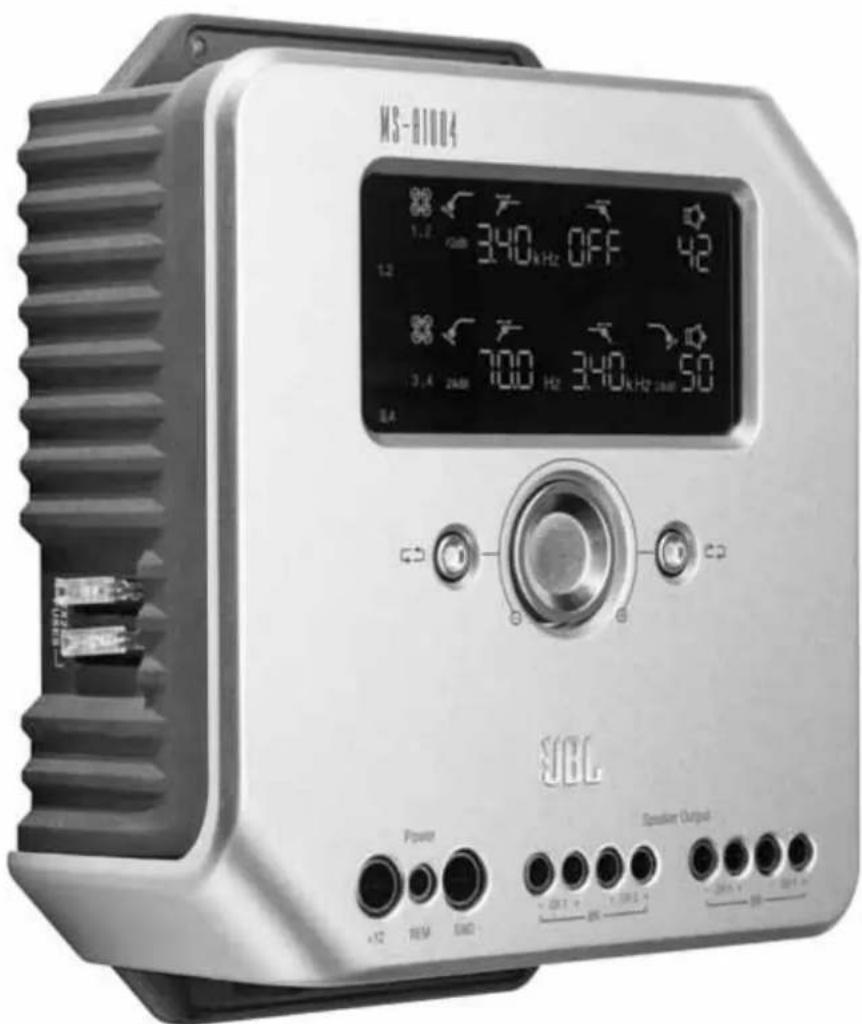
| Display | Display panels for channels 1/2 and 3/4 |
| User Settings | Rotary encoders; adjustment mode with auto lock |
| Dimensions (approx.) | 300 × 200 × 60 mm |
| Weight (approx.) | 2 kg |
| Box Contents | Amplifier, RCA-to-bare wire adapters, installation CD, user manual |
| Cleaning | Soft dry cloth; avoid chemicals or abrasives |
| Safety | Disconnect battery before installation; do not expose to moisture |
Frequently Asked Questions - MS-A1004 JBL
User questions about MS-A1004 JBL
0 question about this device. Answer the ones you know or ask your own.
Ask a new question about this device
Download the instructions for your Receiver in PDF format for free! Find your manual MS-A1004 - JBL and take your electronic device back in hand. On this page are published all the documents necessary for the use of your device. MS-A1004 by JBL.
USER MANUAL MS-A1004 JBL
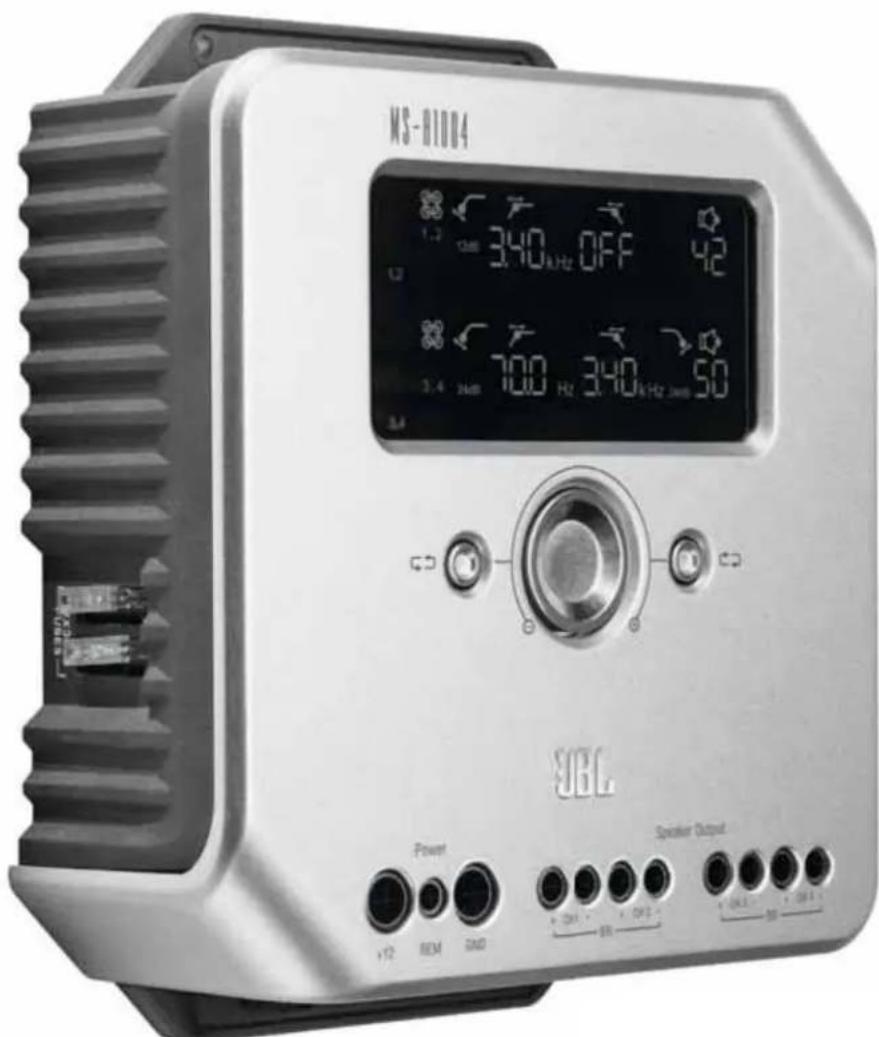
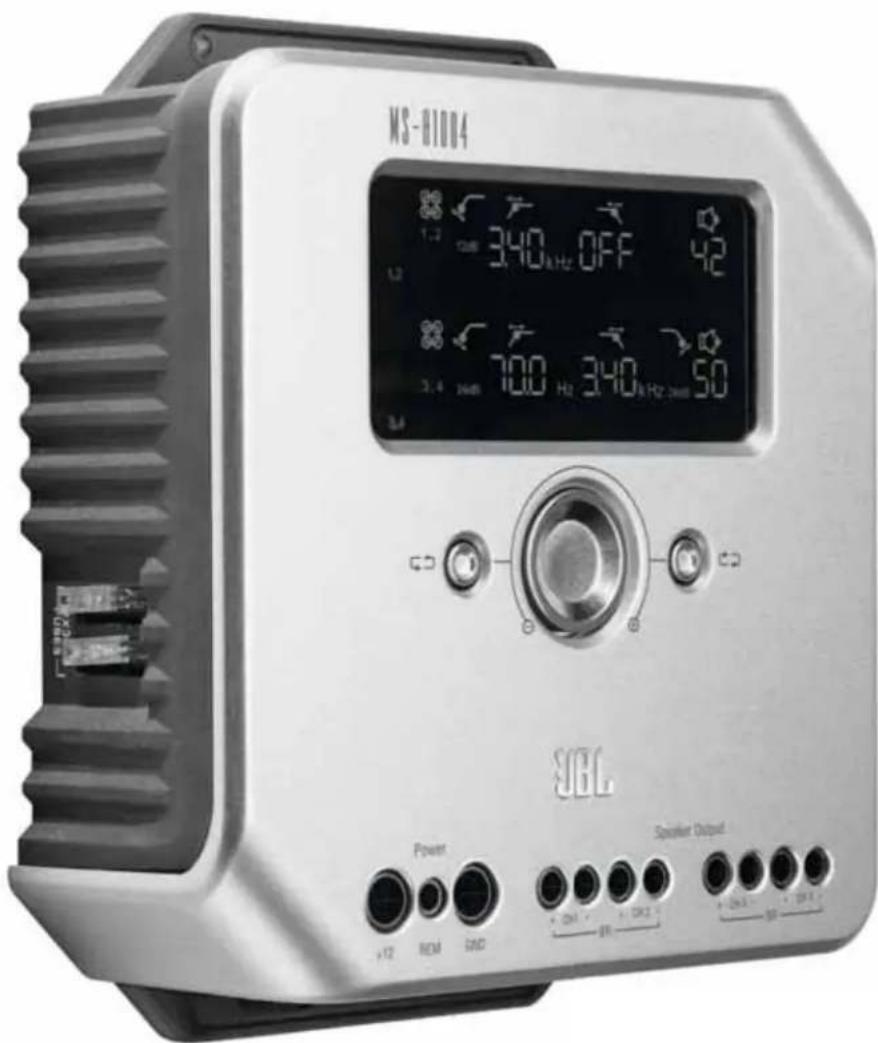
Digital signal processing amplifier
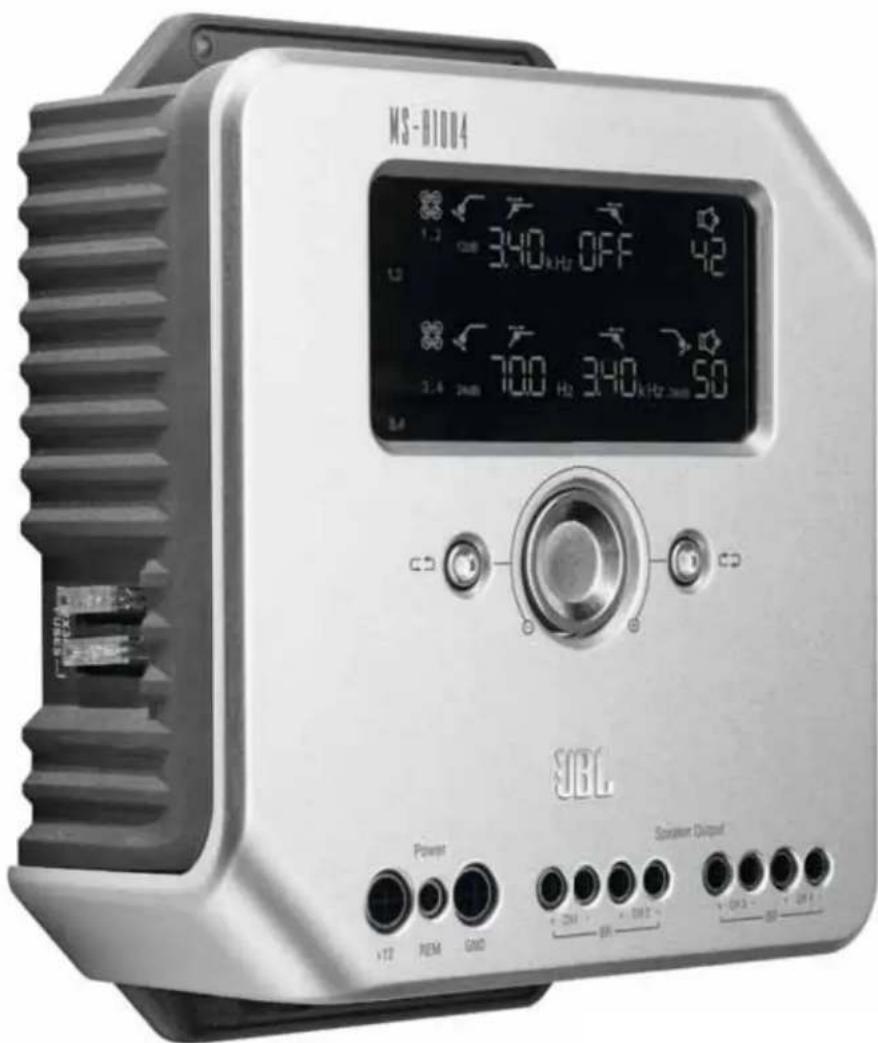

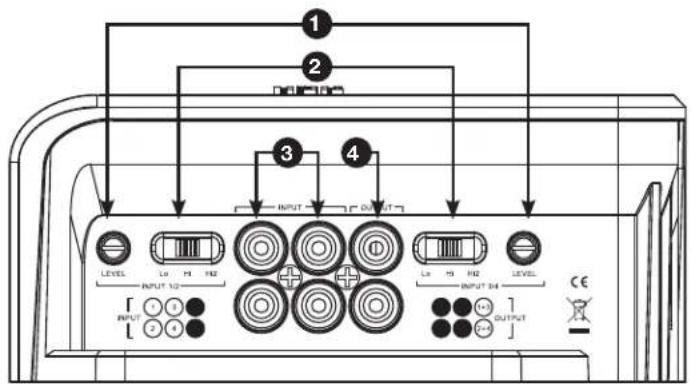

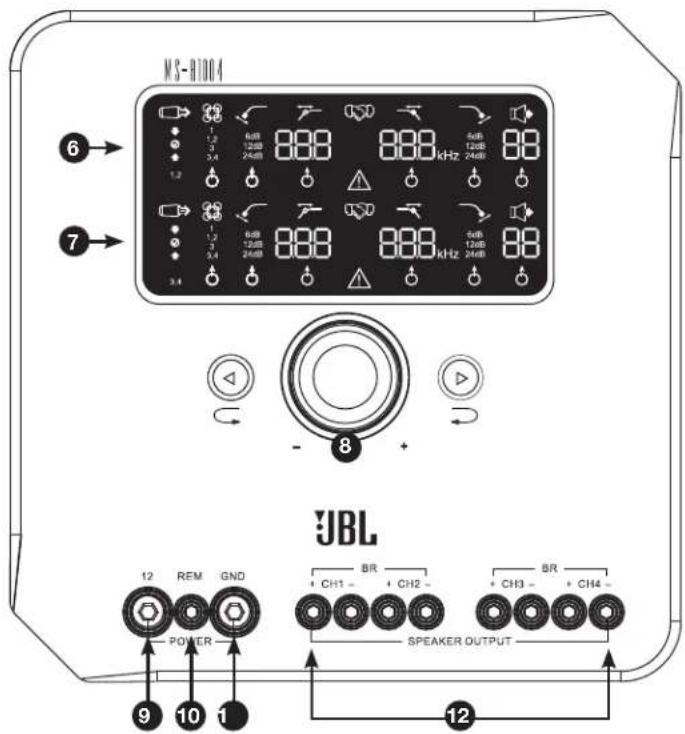
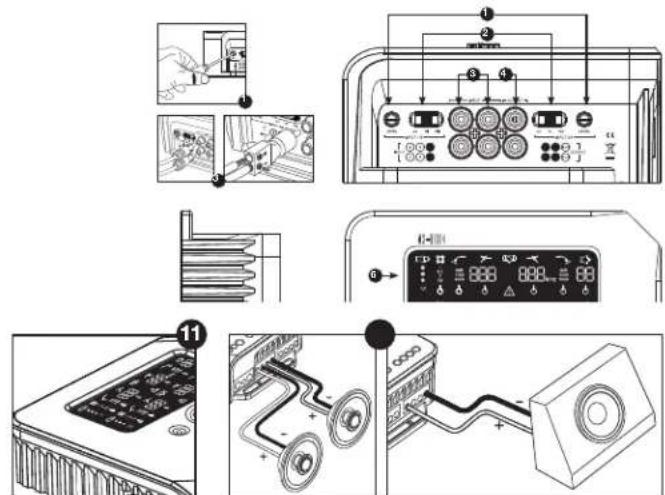
MS-A1004 FEATURES
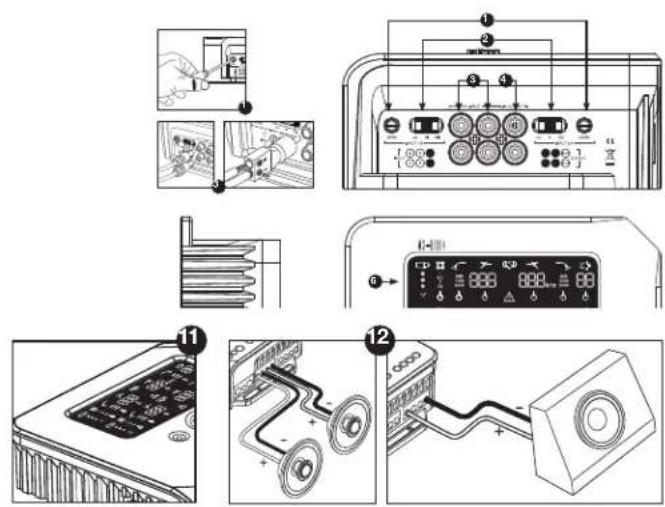
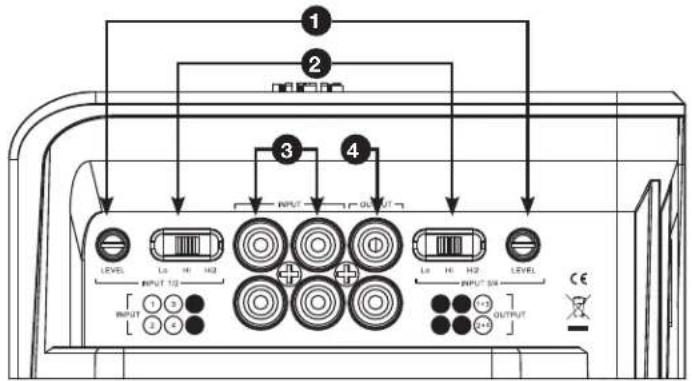
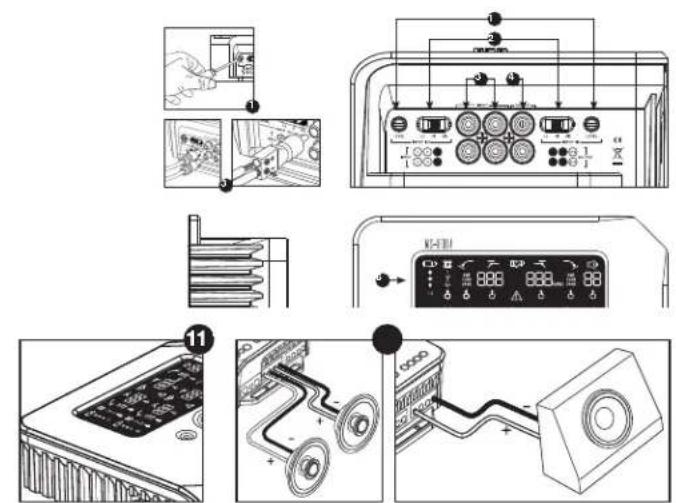
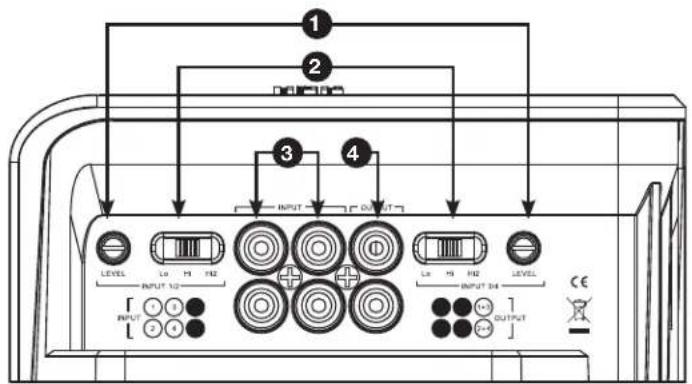
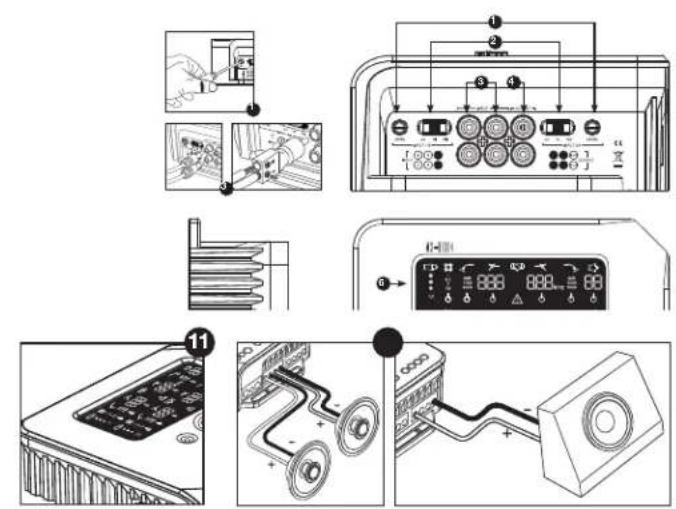
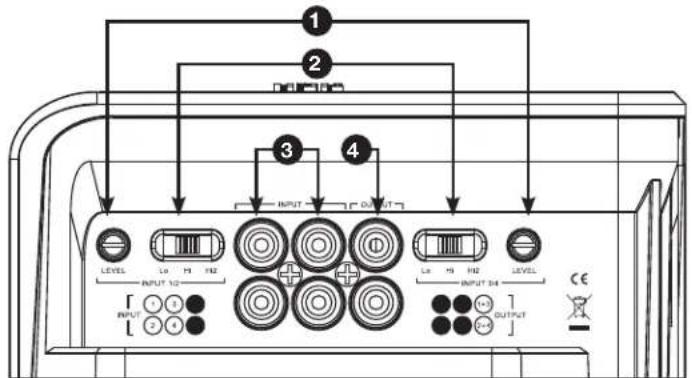
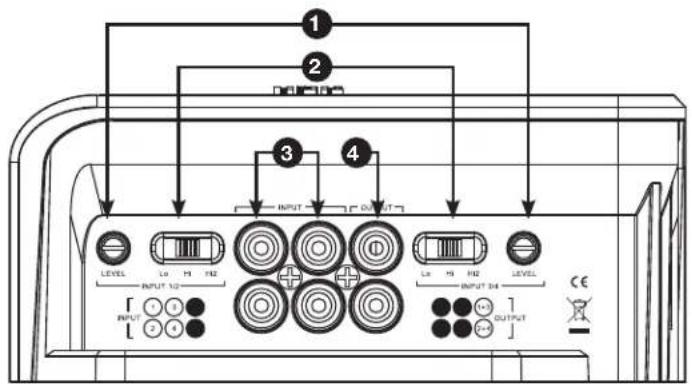
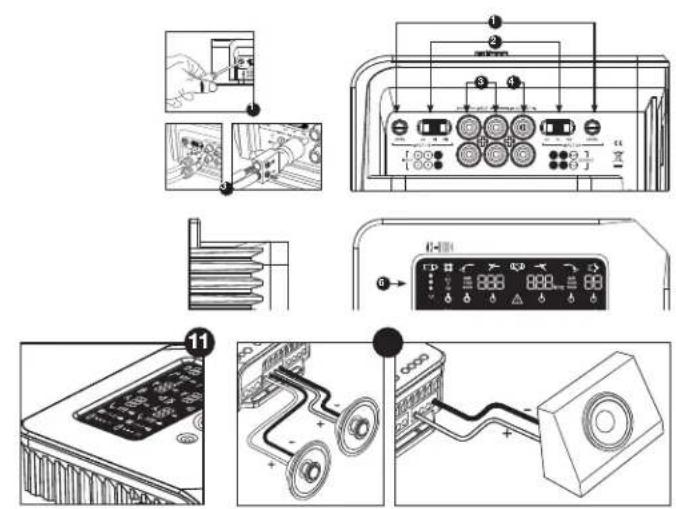
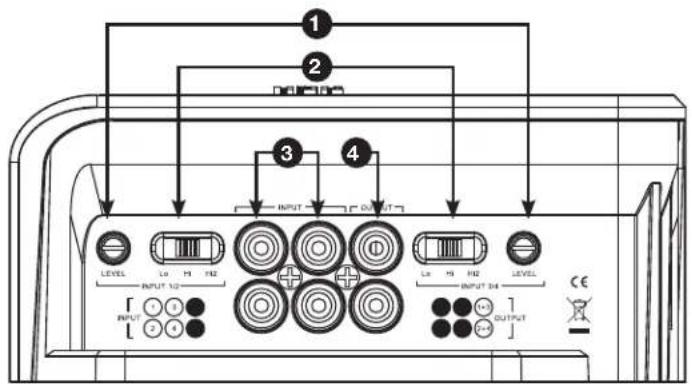
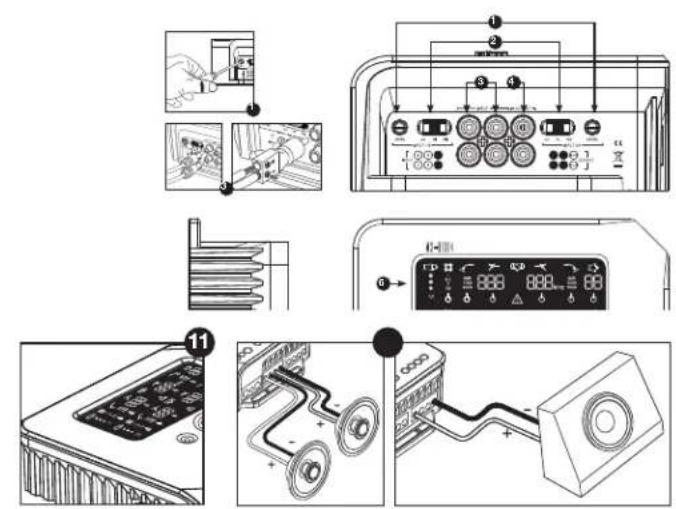
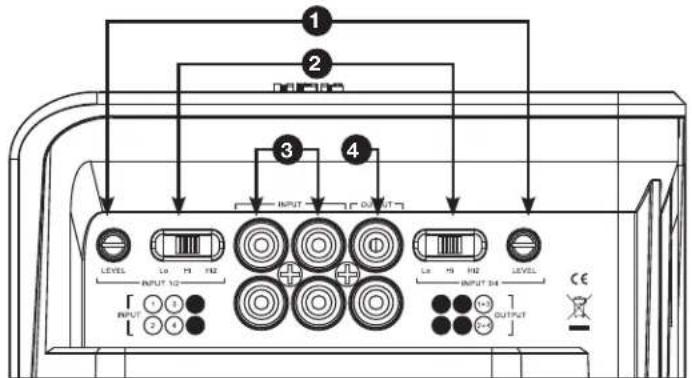
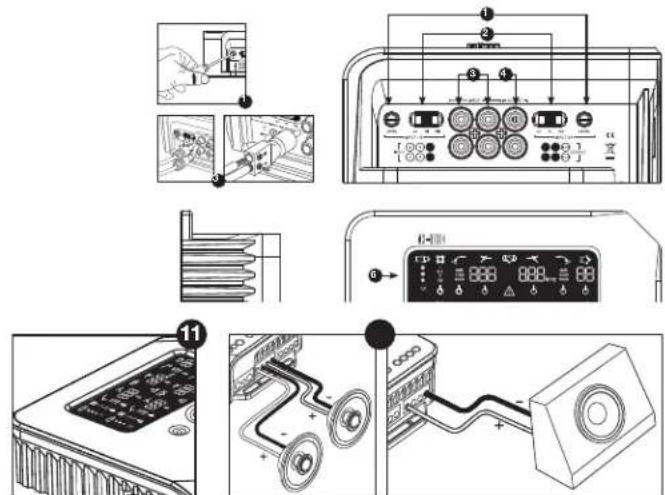
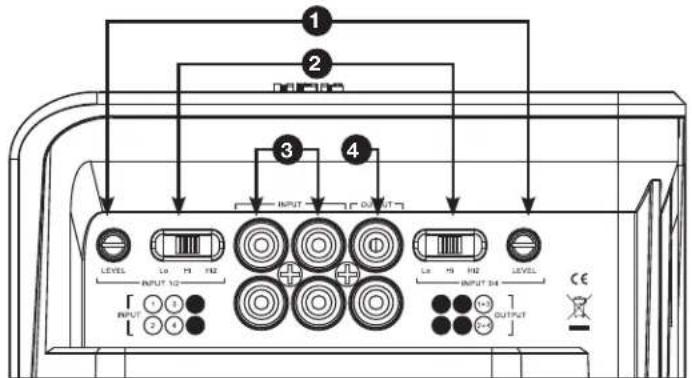
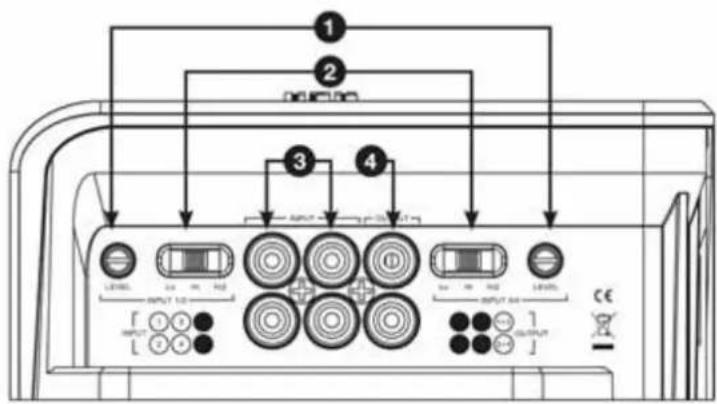
Input-Level Control
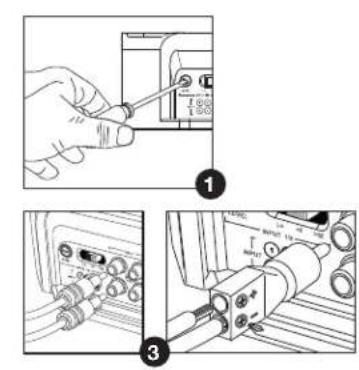
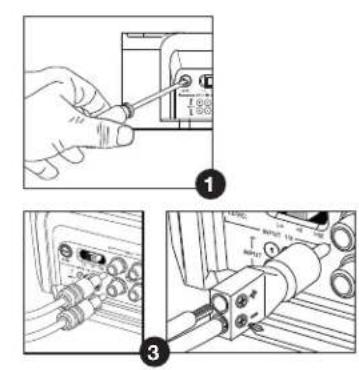
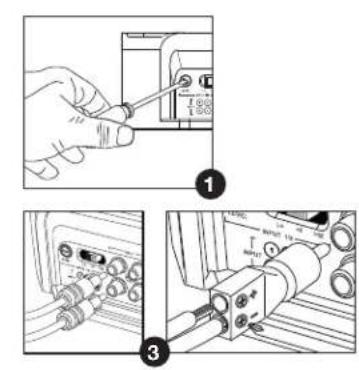
Used to match the input sensitivity to the signal voltage for proper analog-to-digital conversion. See "Setting the Input Level, and Enabling or Disabling Signal-Sensing Turn-On" for details. DO NOT use these controls for setting the relative output level of amplifier channels!
2 Input Signal Selector
Lo/Hi/Hi2 sets the input voltage and impedance range. See "Setting the Input Level, and Enabling or Disabling Signal-Sensing Turn-On" and "The factory-installed system in my car shows a 'speaker disconnected' message, or it fails to play when a speaker is disconnected or when an amplifier is connected to its output. What should I do?" for details.
Audio Inputs
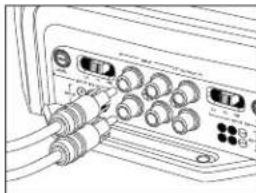
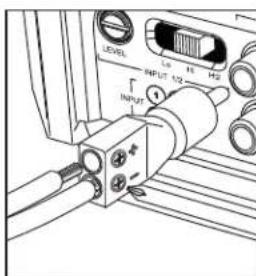
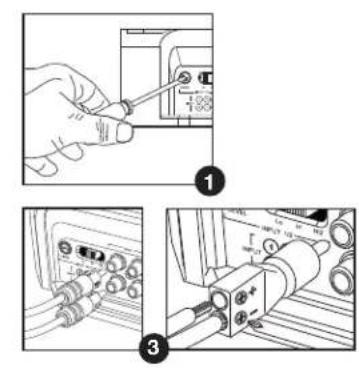
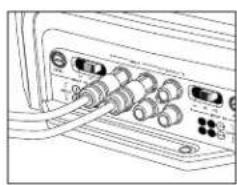
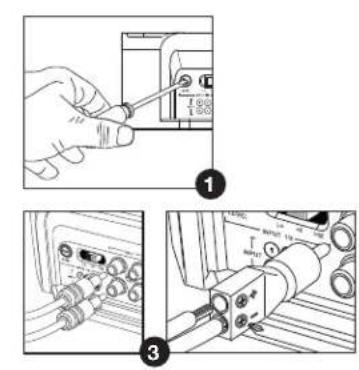
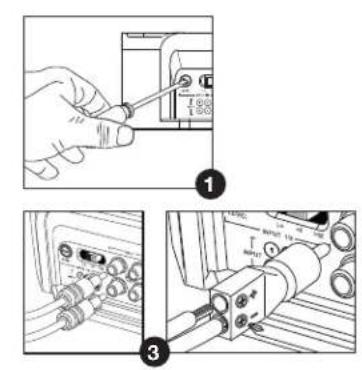
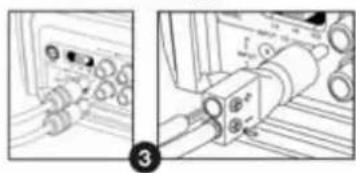
Use RCA audio cables for preamplevel connections or the included RCA-to-bare-wire adapters for speaker-level input connections.
Summed Pass-Through Outputs
Input channels 1 and 3 are combined and sent to one output. Inputs 2 and 4 are combined and sent to the other output.
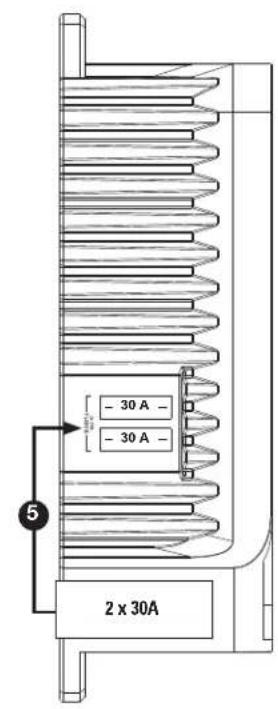
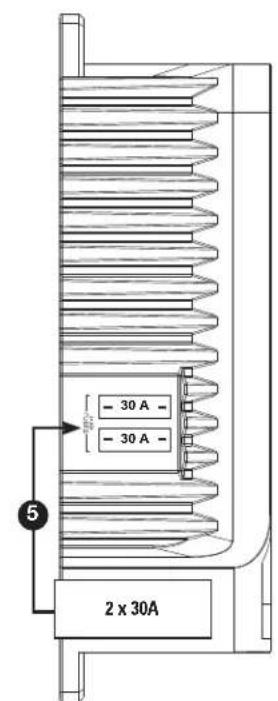
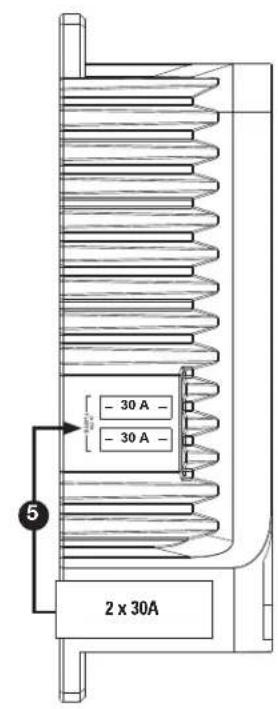
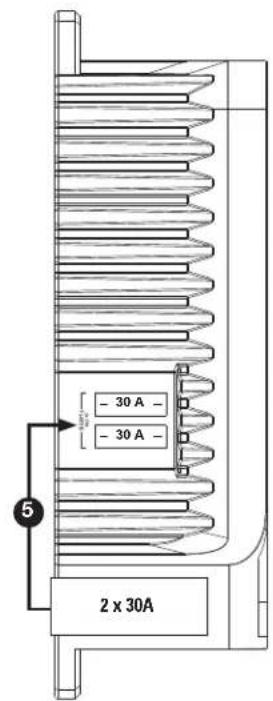
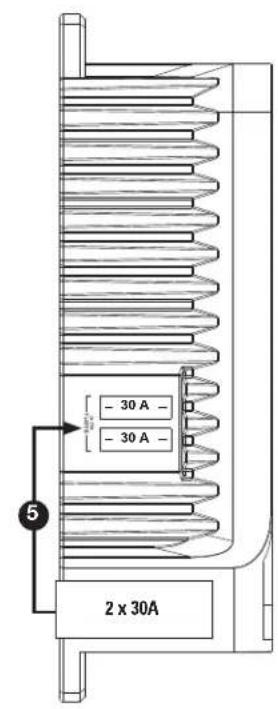
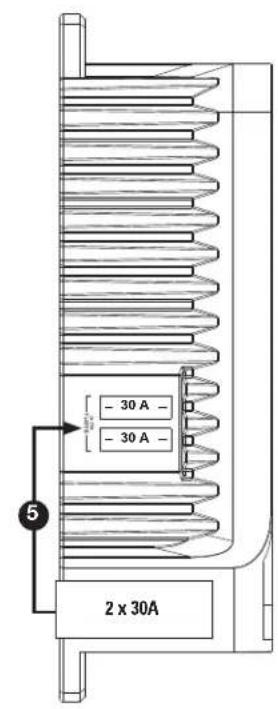
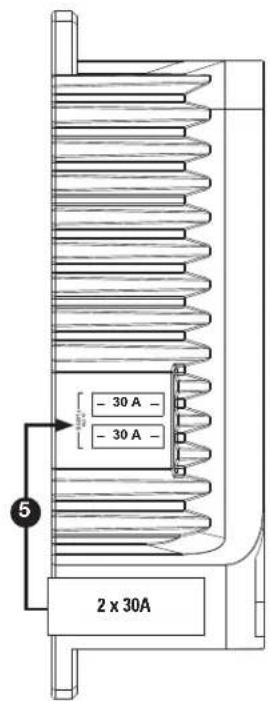
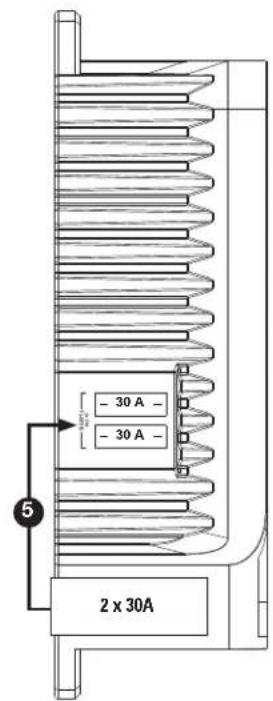
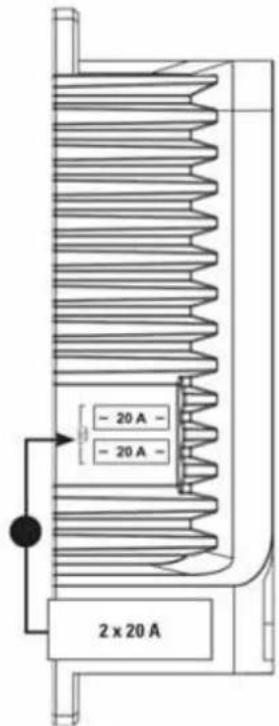
5 Onboard Fuses
2×30ATC type.
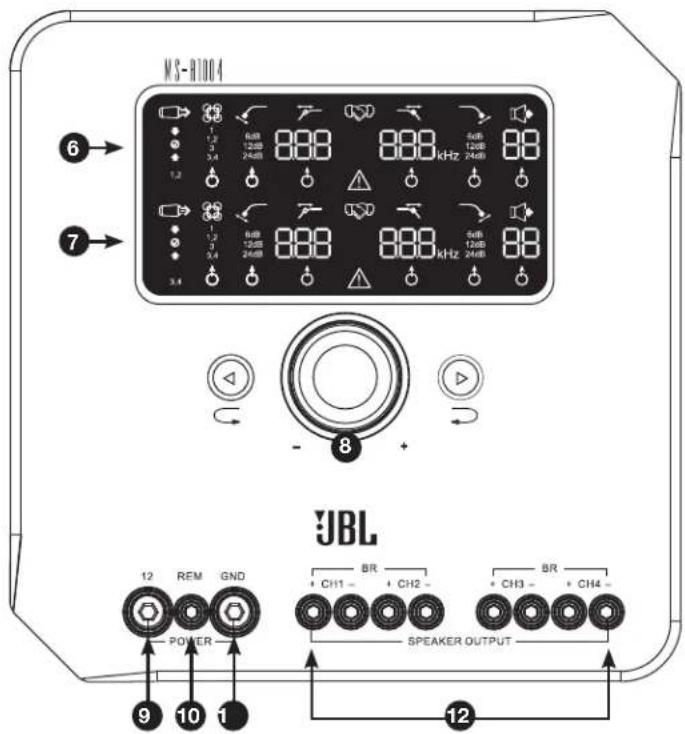
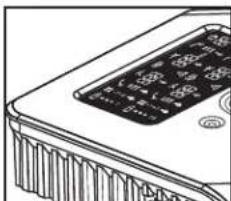
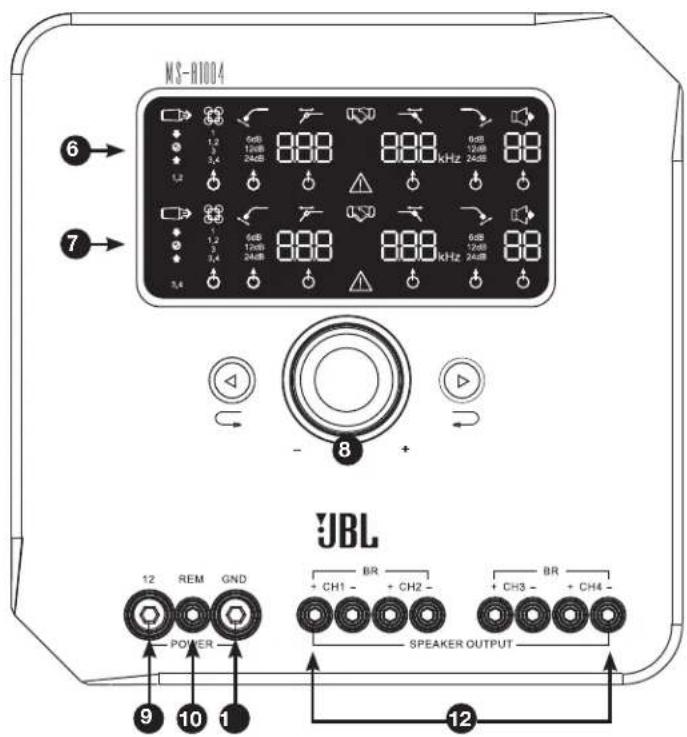
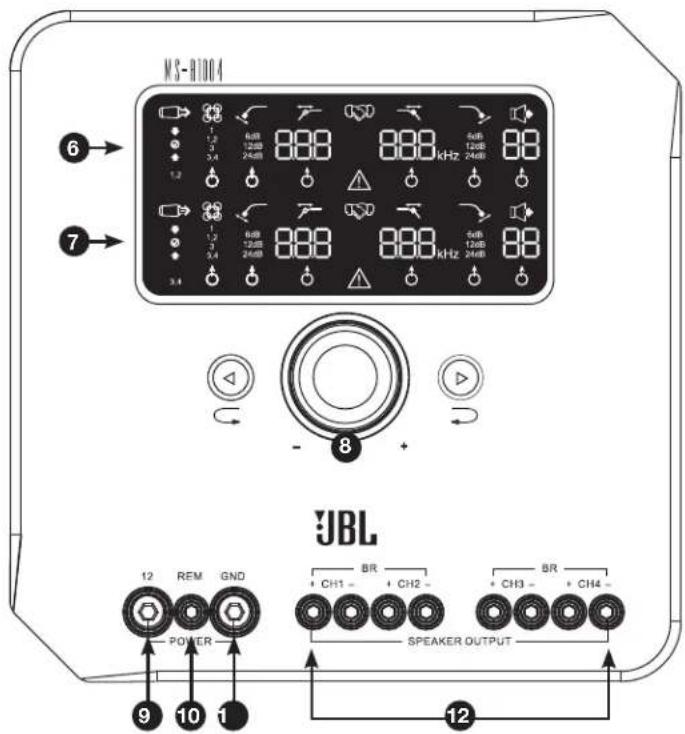
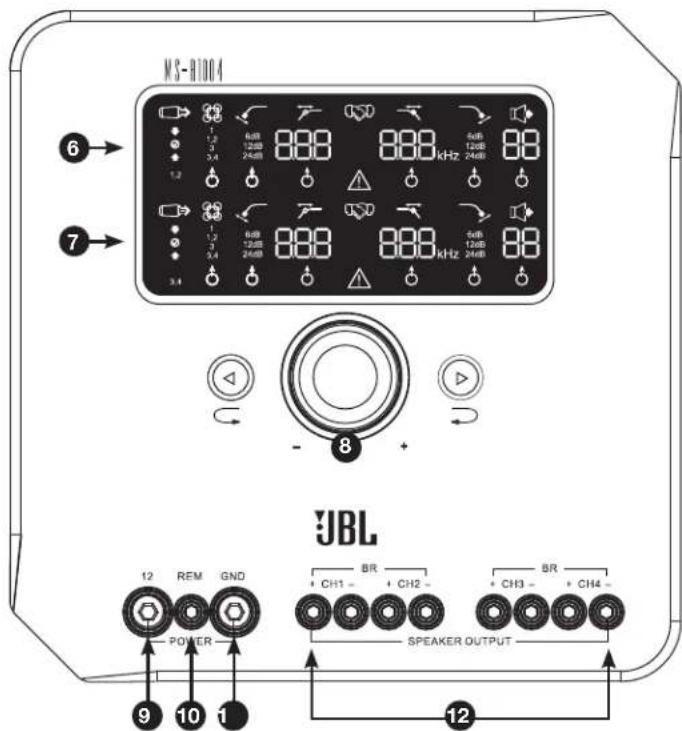
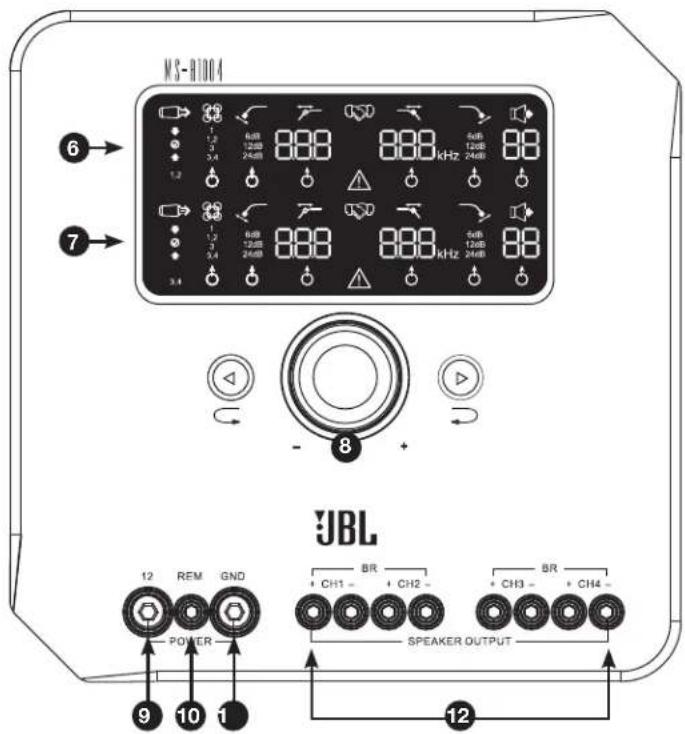
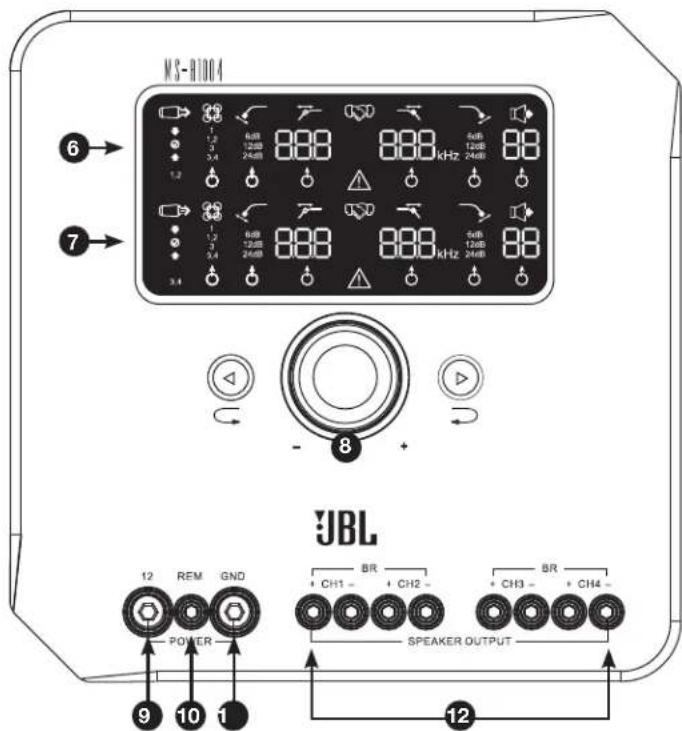
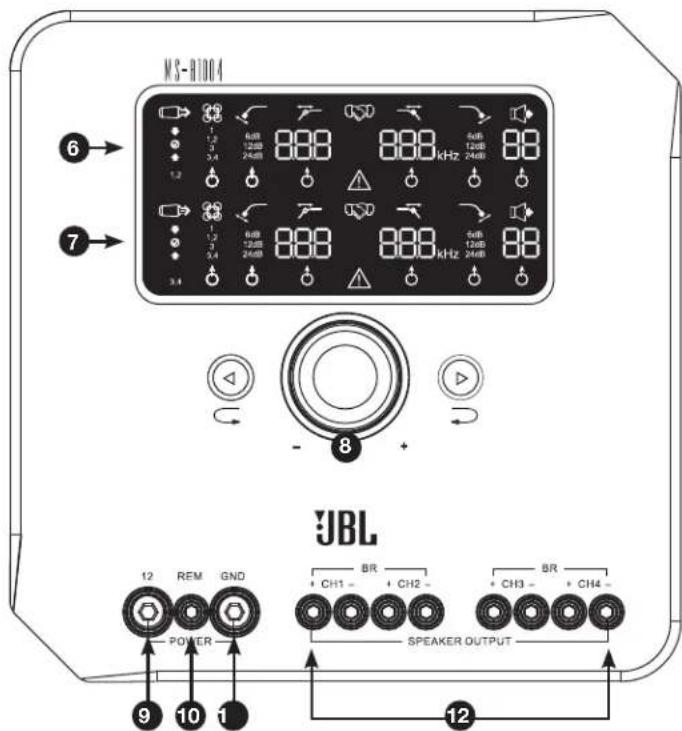
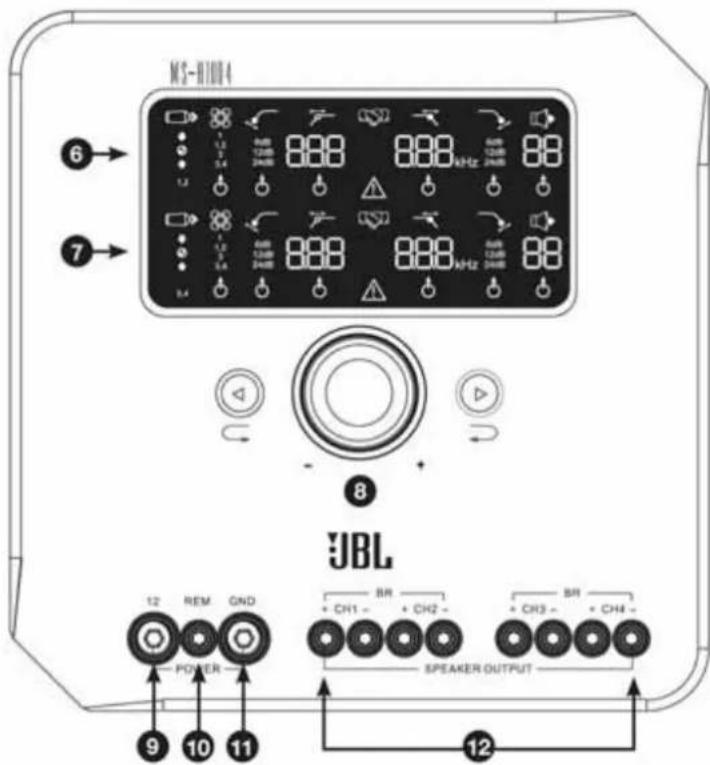
6 Channels 1 and 2 Display Panel
Displays the settings of channels 1, 2 and 3 of the amplifier.
7 Channels 3 and 4 Display Panel
Displays the settings of channels 3 and 4 of the amplifier.
Allows adjustment of amplifier settings. See "MS-A1004 User Controls" for details.
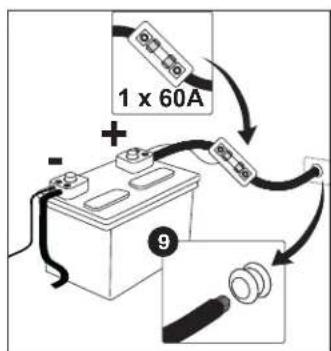
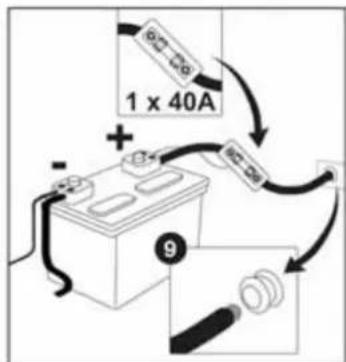
9 +12V Power Input
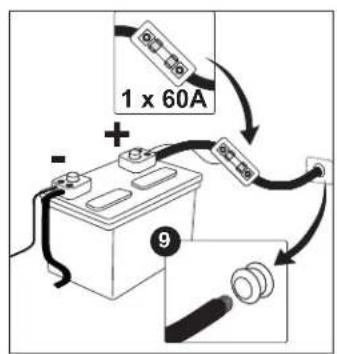
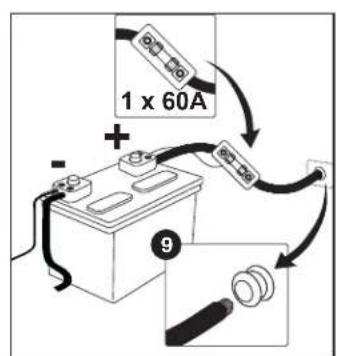
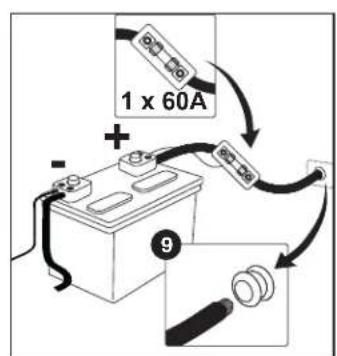
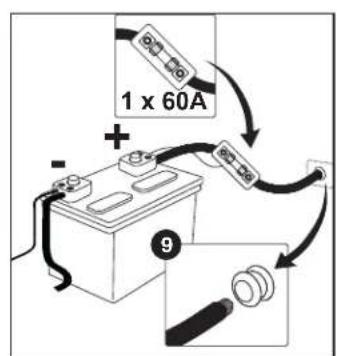
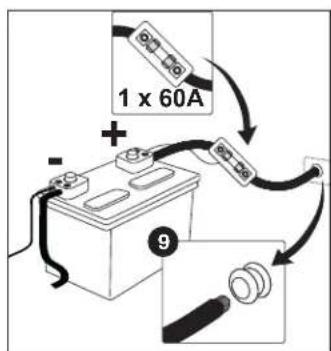
Connect to vehicle battery with a fuse within 18 inches (45.7cm) the positive battery terminal.
Remote Turn-On Input
Connect switched +5V to +12V . NOTE: The MS-A1004 also includes signal-sensing turn-on. You may choose the turn-on method during setup. See "How does the digital input mixer work?" and "MS-A1004 Connections" for details.
1 Chassis Ground Input
Connect to a paint-free spot on the cicle chassis.
2 Speaker Outputs
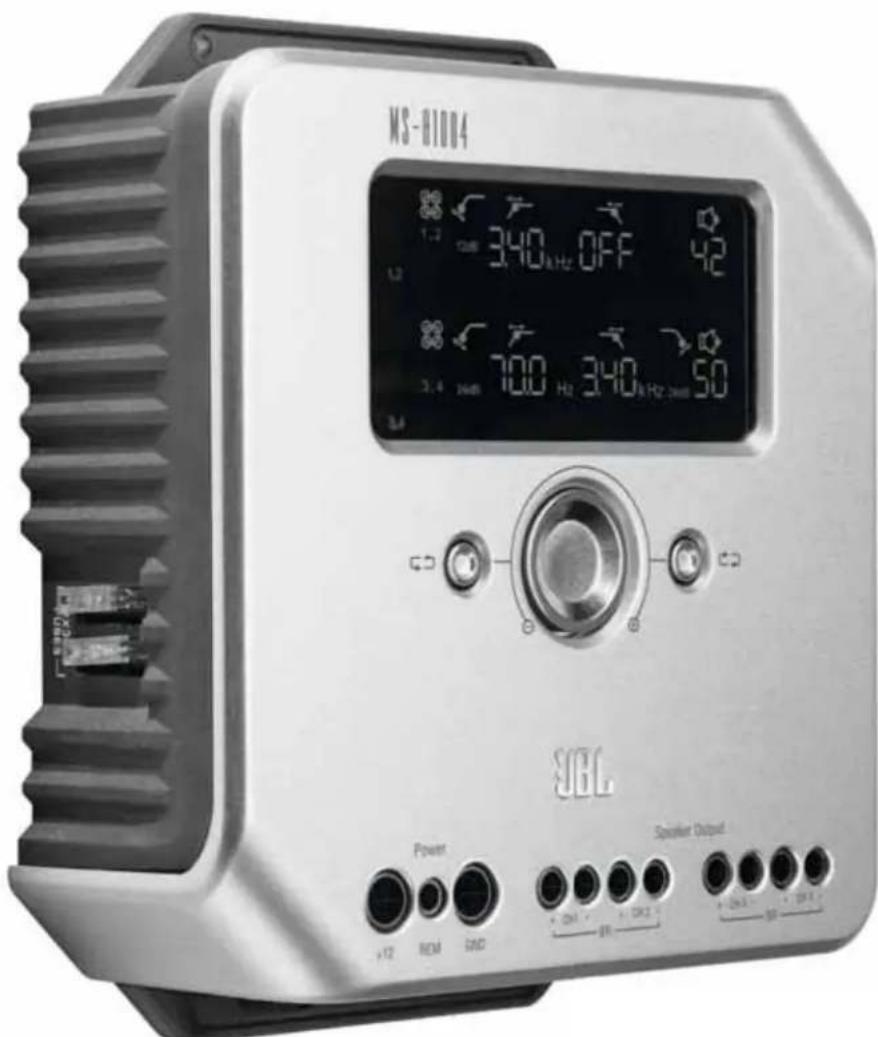
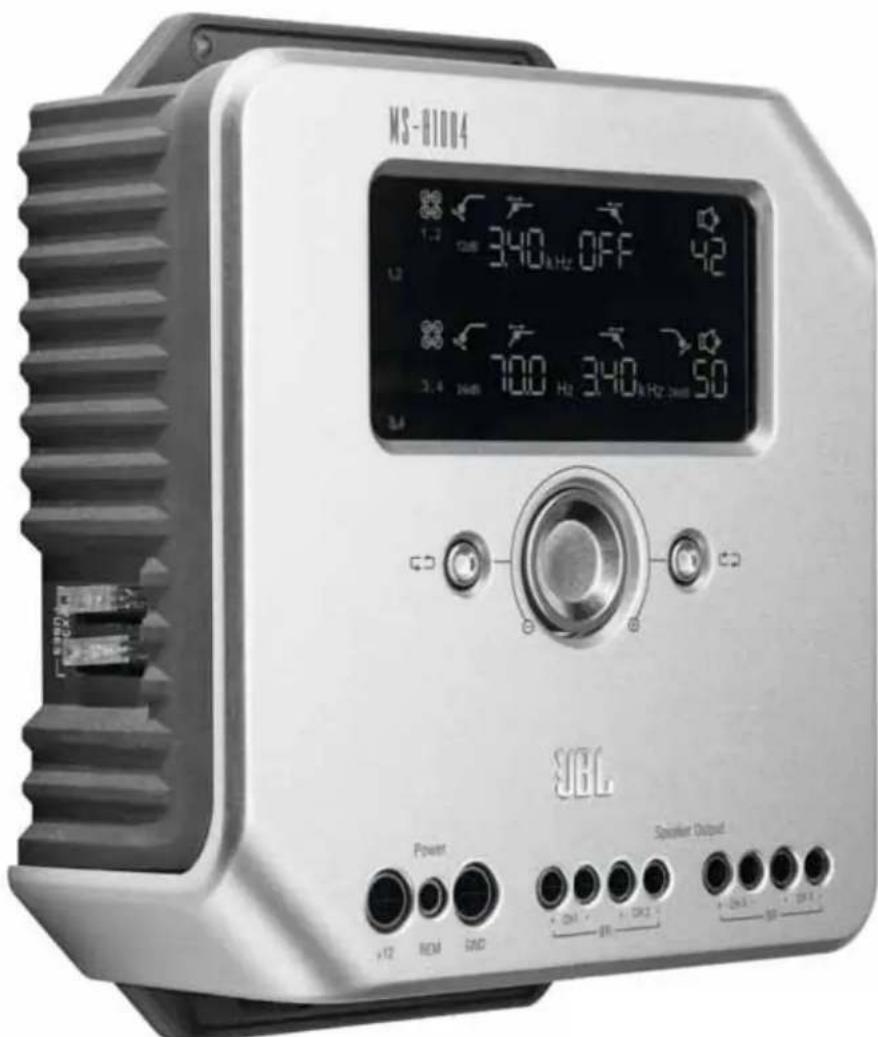
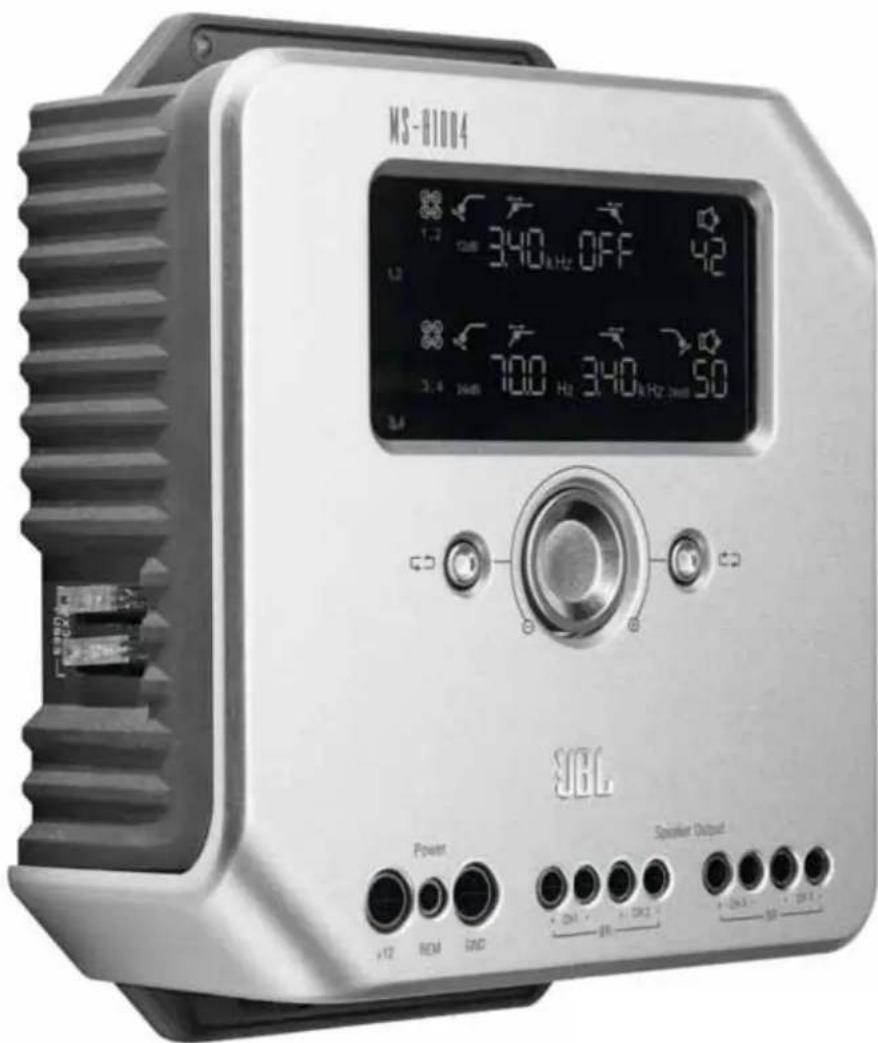
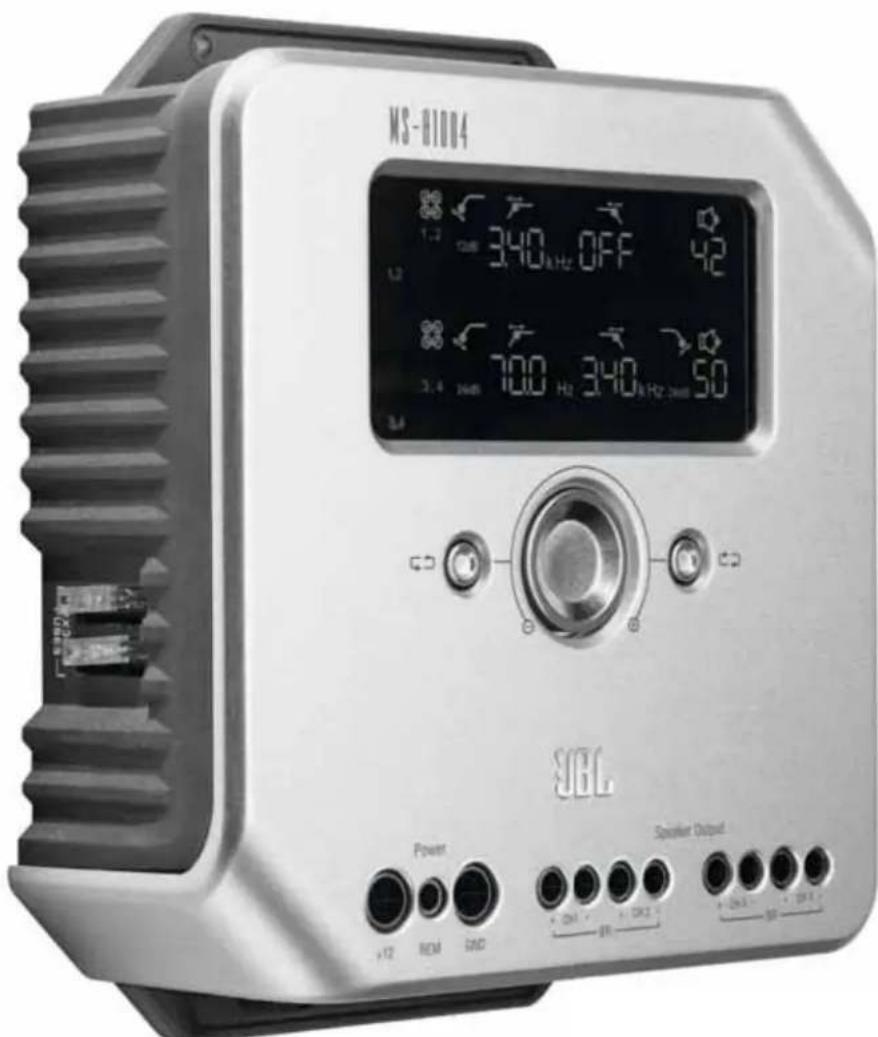
MS-A1004
DIGITAL SIGNAL PROCESSING AMPLIFIER
0 Use Controls
JBL® MS Series amplifiers include many features not found on conventional car audio amplifiers. Also, the setup procedure for MS Series amplifiers is different from that of conventional car audio amplifiers. The following overview of features and functions will help you plan a great system and make the best use of the MS-A1004's innovative features.
About the digital signal processing (DSP) included in MS Series amplifiers:
All of the signal processing in MS Series amplifiers is digital. Digital signal processing, along with the intuitive controls and display included in MS Series amplifiers, makes precise setup easy. Only the input-level controls are analog.
Will my settings be lost if I disconnect the amplifier or the car's battery?
No. All of the DSP settings are stored in nonvolatile memory, so no settings will be lost if power is removed from the amplifier.
Why are the input-level controls analog?
In order to provide the best signal-to-noise ratio and to maximize the resolution of the digital-to-analog conversion, the maximum input signal level to the analog-to-digital (A/D) converters must be precisely set. This must be an analog control. The included setup CD and the procedure described in this manual make setting the level simple and precise. Once the input-level control is set, the control should not be used to "tune" the system. Use the digital output-level control to adjust the relative level between amplifier channels to tune the system.
FCC REGULATIONS
Caution:
Changes or modifications not expressly approved by the party responsible for compliance could void the user's authority to operate the equipment.
Compliance statement:
1: This device is verified to comply with Part 15 of the FCC Rules. Operation subject to the following two conditions: (1) this device may not cause harmful interference, and (2) this device must accept any interference received, including interference that may cause undesired operation.
2: This equipment has been tested and found to comply with the limits for a Class B digital device, pursuant to Part 15 of the FCC Rules. These limits are designed to provide reasonable protection against harmful interference in a residential installation. This equipment generates, uses and can radiate radio frequency energy and, if not installed and used in accordance with the instructions, may cause harmful interference to radio communications. However, there is no guarantee that interference will not occur in a particular installation. If this equipment does cause harmful interference to radio or television reception, which can be determined by turning the equipment off and on, the user is encouraged to try to correct the interference by one or more of the following measures:
Reorient or relocate the receiving antenna.
- Increase the separation between the equipment and receiver.
- Connect the equipment into an outlet on a circuit different from that to which the receiver is connected.
- Consult the dealer or an experienced radio/TV technician for help.
Why are the signal inputs and speaker outputs numbered rather than labeled "left" and "right"?
MS Series amplifiers are designed to make integration into any system simple and straightforward. The amplifier includes a digital input-mixer control, which eliminates the need for Y adapters and allows any pair of output channels to be driven by a mono or stereo signal for maximum system-building flexibility. Labeling the channels "left" and "right" would be confusing in some applications.
How does the digital input mixer work?
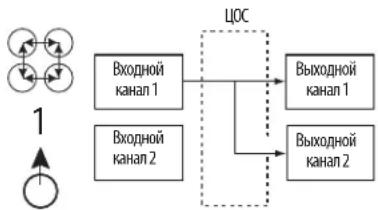
The signals from each of the RCA-type input connectors are converted into digital signals and sent to the digital signal processor. Inside the DSP, those signals are routed to the speaker output pairs, according to the selections in the input mixers. There's one input mixer for output channels 1 and 2 (upper display) and another mixer for channels 3 and 4 (lower display). For example, selecting "1" in the input mixer for channels 1 and 2 will send only the signal connected to Input Jack 1 to output channels 1 and 2 (see Figure 1). This is useful for sending a mono signal to a pair of channels.
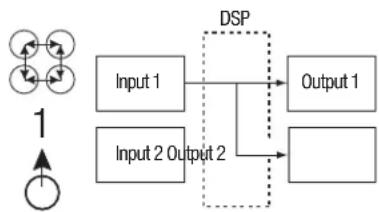
Figure 1.
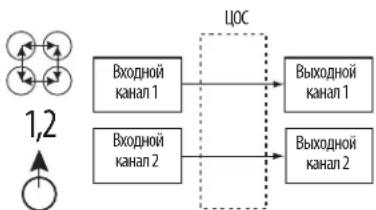
Selecting "1, 2" in the input mixer for channels 1 and 2 will send the signal that is connected to Input Jack 1 to Output 1 and the signal connected to Input Jack 2 to Output 2 (see Figure 2). This is designed for stereo signals.
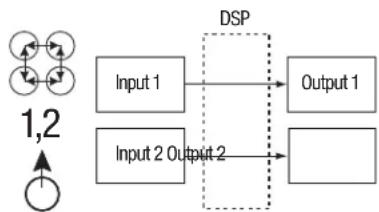
Figure 2.
If you want all four output channels to receive the same signal, connect that signal to Input Jack 1 (or 3) and select "1" (or "3") in both input mixers. If you want all four channels to receive separate signals, choose "1, 2" in one input mixer and "3, 4" in the other. Many system configurations are possible and Y adapters are never needed. See "System Diagrams" for more examples.
Does the amplifier include speaker-level and line-level inputs?
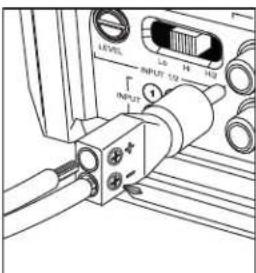
Yes, any input signal can be used with MS Series amplifiers. If your head unit includes RCA-type outputs, simply plug them into the RCA-type input jacks. If your head unit does not include RCA-type outputs (as is the case with all factory-installed systems), use the included RCA-to-bare-wire adapters. Be sure to observe proper polarity. The signal inputs are differential and will accept any signal from 100mV (low-level) to 15V (high-level). There's no need to use separate adapters or to precisely determine the signal voltage or type. MS Series amplifiers' onboard tools and the setup procedure described later in this manual will make optimizing the configuration simple.
The factory-installed system in my car shows a "speaker disconnected" message, or it fails to play when a speaker is disconnected or when an amplifier is connected to its output. What should I do?
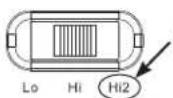
MS Series amplifiers include three Input Signal Selector positions: Lo, Hi and Hi2. The Hi2 position includes a circuit designed to fool the factory system into "seeing" a speaker connected to its output. If your car has one of these systems, set the Input Signal Selector to Hi2 and follow the rest of the setup instructions.
My factory-installed head unit does not include a remote-turn-on wire. What should I do?
MS Series amplifiers include signal-sensing turn-on. A remote-turn-on connection is never required. The amplifier will sense the presence of an audio signal at its inputs and turn on automatically. A few minutes after the signal stops or after the radio is turned off, the amplifier automatically will turn itself off. During the delay, the amplifier draws very little current so the vehicle's battery won't be drained.
What is the best procedure for choosing a crossover frequency and slope (see Figures 3a and 3b)?
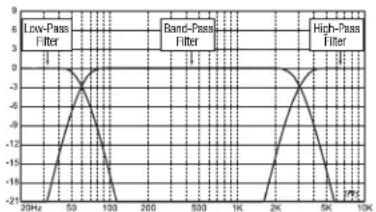
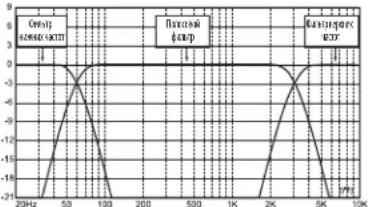
A crossover is a pair of filters that divide the audio signal into low frequencies (bass) and high frequencies (treble) so that only the appropriate signals are sent to speakers that are designed to reproduce a limited range. For example, a tweeter is designed to play only high frequencies, and too much bass can cause damage. A woofer is designed to make only low frequencies and does a poor job of reproducing high frequencies. A midrange speaker is designed to play frequencies in between bass and treble (midrange frequencies). Figure 3a shows how these speakers would be divided up across the 20Hz - 20kHz range, using the appropriate filters (crossovers).
Figure
3a.
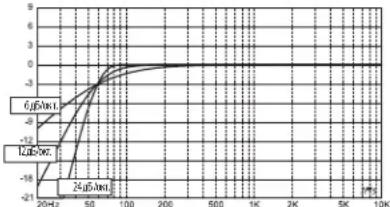
Figure
3b.
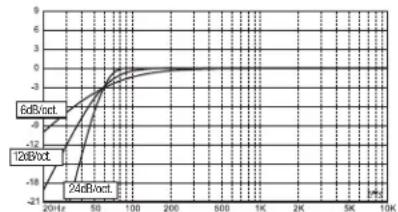
When setting a crossover between a low-frequency speaker and a high-frequency speaker, the high-pass filter (HPF) frequency should be chosen to keep the high-frequency speaker safe. The low-pass filter (LPF) should be set so that the hand-off provides smooth response in the region near the crossover frequency. When implementing a crossover between speakers, use steep (24dB/octave) slopes for both filters to maximize the amount of low frequencies that the high-frequency speaker can handle safely and to minimize the interaction of the sound between the low-frequency speaker and the high-frequency speaker. Figure 3b shows the differences of 6dB, 12dB and 24dB/octave filter slopes.
If I should use 24dB/octave slopes for crossovers, why do MS Series amplifiers include 6dB and 12dB/octave slopes too?
If your MS Series amplifier will be used to power a subwoofer in a vented (ported) box, use a 12dB/octave high-pass filter to protect the subwoofer from damage by limiting the amount of bass that's sent to the subwoofer below the tuned frequency of the box. A 6dB/octave high-pass filter can be useful in slightly limiting the amount of bass sent to full-range speakers in systems where no subwoofer will be used, limiting the amount of high frequencies sent to rear speakers.
Why does each pair of channels include a high-pass filter (HPF) and a low-pass filter (LPF)?
In some systems, it can be useful to limit the high frequencies and low frequencies that are sent to a loudspeaker. Use the HPF and the LPF together to create a band-pass filter for a midrange speaker in systems where the woofer, midrange and tweeters will be powered by individual amplifier channels. When using the filters to create a band-pass filter, the HPF can never be set to a higher frequency than the LPF. For example, if the LPF is set to 200Hz , the HPF can be set to any frequency below 190Hz . This protection prevents errors in setup.
Do MS Series amplifiers include a subsonic or infrasonic filter for use with vented enclosures?
Yes. If you want to use a subsonic or infrasonic filter with your subwoofer, configure the channel's crossover as a band-pass filter. The low-pass filter will limit the high frequencies that are sent to the subwoofer and the high-pass filter will be the infrasonic filter. Set the high-pass filter frequency about 10Hz below the frequency at which the enclosure is tuned and use a 12dB/octave slope (see Figure 4).
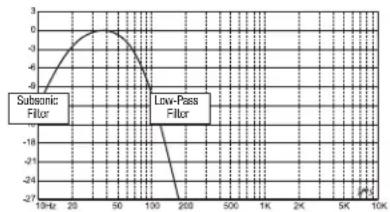
Figure 4.
About the MS-WBC wireless bass control (sold separately):
The MS-WBC wireless bass control is designed to make installation easy. The circuit is designed for long battery life, and a separate, wired connection to +12V is included for those who never want to replace the battery. No wired connection to the amplifier is necessary. The control sends a radio signal to the DSP in the amplifier, so the control may be mounted in a console or under the dashboard and the amplifier may be mounted in the trunk or hidden behind a panel.
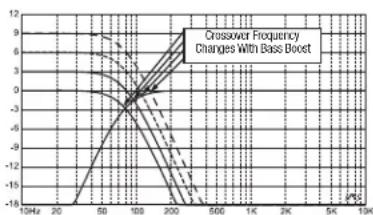
The amount of bass included in recordings varies greatly, and the ability to adjust the amount of bass between songs or albums is useful. Unlike conventional remote bass controls, the MS-WBC doesn't simply increase the level of the amplifier's channels that are connected to the subwoofer. Conventional bass controls adversely affect the crossover between the subwoofer and the mid-bass or midrange speakers any time they are adjusted. This causes the bass to sound boomy or muddy when it's boosted and draws the listener's attention to the location of the subwoofer (see Figure 5a).
Figure
5a.
Figure
5b.
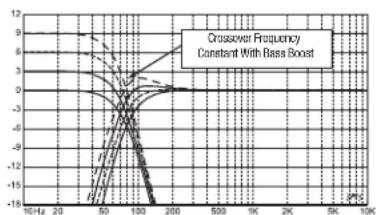
The bass-boost filter in the MS Series amplifiers is a shelf filter that boosts or cuts bass below 60Hz , but never above 160Hz . The range of adjustment is ± 10dB . Additionally, the bass boost or cut is sent to all the amplifiers with which the control is paired. The bass control works with the crossover filters to ensure that the proper amount of boost or cut is sent to the subwoofer and the mid-bass or midrange speakers, so the character and apparent location of bass sounds remain constant. See Figure 5b for the performance of the MS-WBC (as opposed to that of conventional bass controls, as shown in Figure 5a).
CAUTION: Installation of car audio components requires experience in performing mechanical and electrical procedures. If you feel you lack the required experience or necessary tools, please have your amplifier installed by a qualified professional technician.
CAUTION: Before installation, disconnect the negative (-) battery terminal to prevent the battery from being drained while you work on the car and also to prevent damage to the unit.
READ THIS BEFORE STARTING INSTALLATION!
- JBL MS Series amplifiers include many features not found on conventional car audio amplifiers. The setup procedure for MS Series amplifiers is different from that of conventional car audio amplifiers. Be sure to carefully read and understand these instructions before attempting installation.
- At the installation sites, locate and make a note of all fuel lines, hydraulic brake lines, vacuum lines and electrical wiring. Use extreme caution when cutting or drilling in and around these areas.
- Choose a mounting location for the amplifier inside the passenger or cargo area that will ensure no exposure to moisture. Never mount an amplifier outside the car or in the engine compartment.
- Make sure there is sufficient air circulation at the mounting location for the amplifier to cool itself.
- Mount the amplifier securely.
MS-A1004 CONNECTIONS
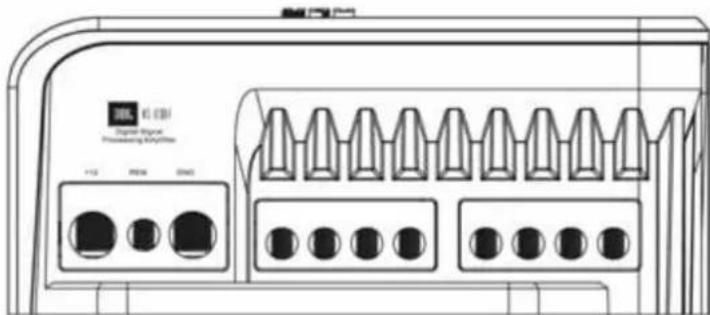
Power Inputs
1. +12V Power Input
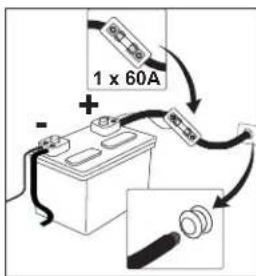
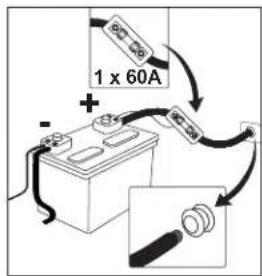
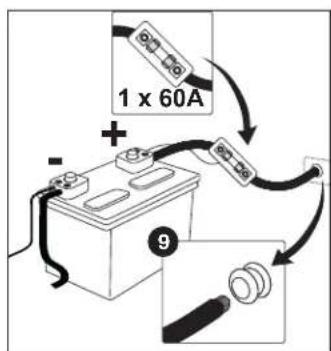
Connect the unit to the vehicle battery using a minimum size of 8 AWG (8mm²) wire with a 60A fuse placed within 18 inches (45.7cm) of the positive battery terminal. Be sure to use an insulation grommet at every location where the power wire will pass through metal.
2. Remote Turn-On Input (Optional to Connect)
No discrete remote-turn-on connection to the MS-A1004 is necessary. If your head unit includes a remote-turn-on lead and you wish to connect it, connect the unit to this terminal.
3. Chassis Ground Input
Using at least 8 AWG (8mm²) wire, connect this terminal to a nearby point of the vehicle's chassis (sheet metal). Scrape away the paint from the area to ensure a good connection. Do not ground the amplifier to the vehicle's frame.
Audio Inputs
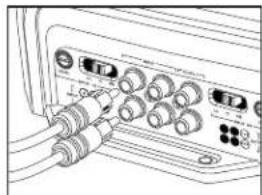
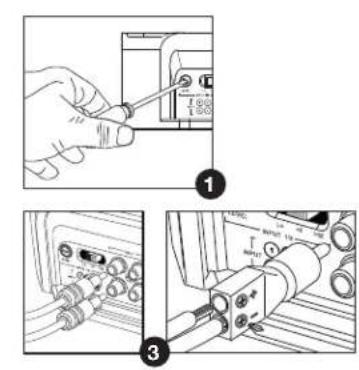
1. Using RCA Outputs
If the unit that precedes this amplifier in the signal chain includes RCA-type output connectors, connect them directly to the RCA inputs of this amplifier.
2. Using Speaker-Level Signals
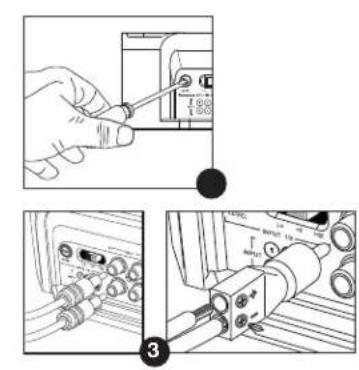
If the preceding equipment doesn't have RCA-type connectors, use the RCA-to-bare-wire adapters included with the MS-A1004. Connect the + signal to the terminal marked + and the - signal to the terminal marked -.
Pass-Through Audio Outputs (Full-Range)
Input channels 1 and 3 are summed and sent to the top RCA output. Inputs 2 and 4 are summed and sent to the bottom RCA output. Using these outputs, additional amplifiers can be easily added. For example: When using the MS-A1004 for front and rear speakers, you could use these outputs for a subwoofer amplifier. The outputs are full-range. No high-pass or low-pass filters are applied in the MS-A1004.
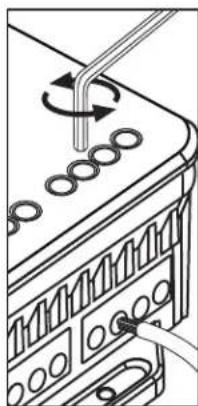
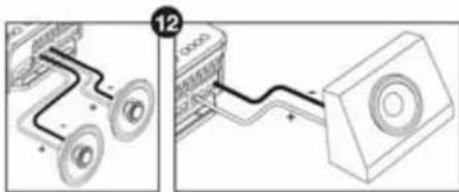
Speaker Outputs
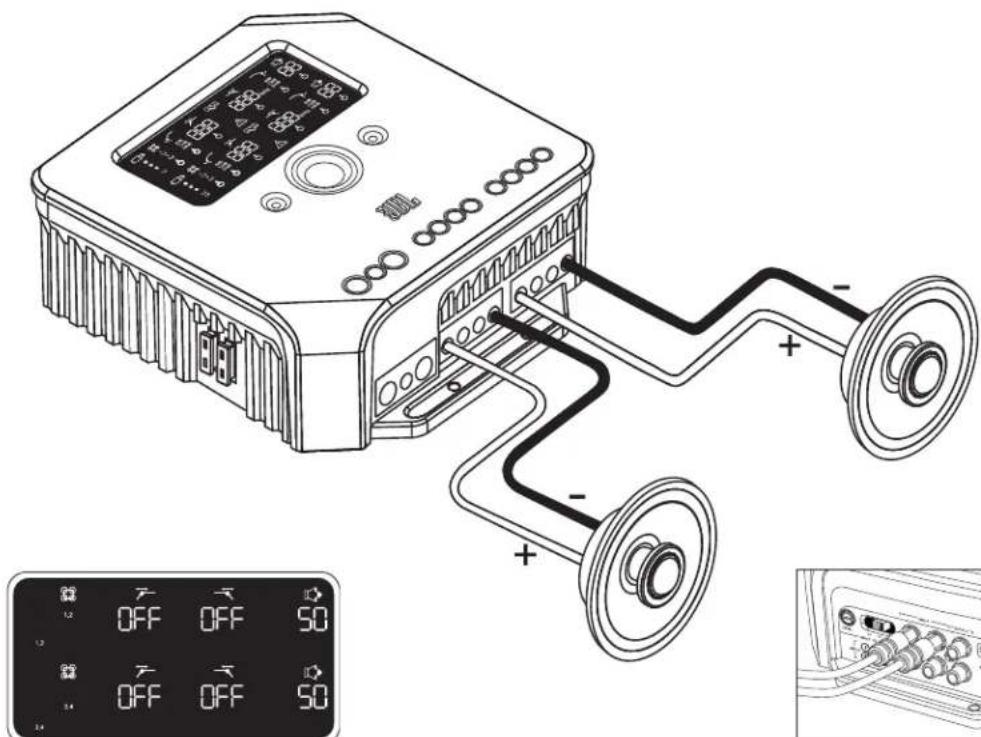
Connect each speaker to the amplifier channel that will correspond to the input used or how it's assigned. See "Setting the Input Mixer" to learn how to assign the input signals to the output channel pair. Be sure to observe proper polarity when connecting the speakers to the outputs.
1. Stereo Connection
Connect the left-channel loudspeaker(s) to the output terminals corresponding to the left-channel input. Connect the right-channel speaker(s) to the output terminals corresponding to the right-channel input.
2. Bridged Connection
Connect the positive terminal on the loudspeaker(s) to the positive (+) terminal on Channel 1 (or 3). Connect the negative terminal on the speaker(s) to the negative (-) terminal on Channel 2 (or 4).
See "System Diagrams" for examples of system configurations in which the amplifier is most commonly used.
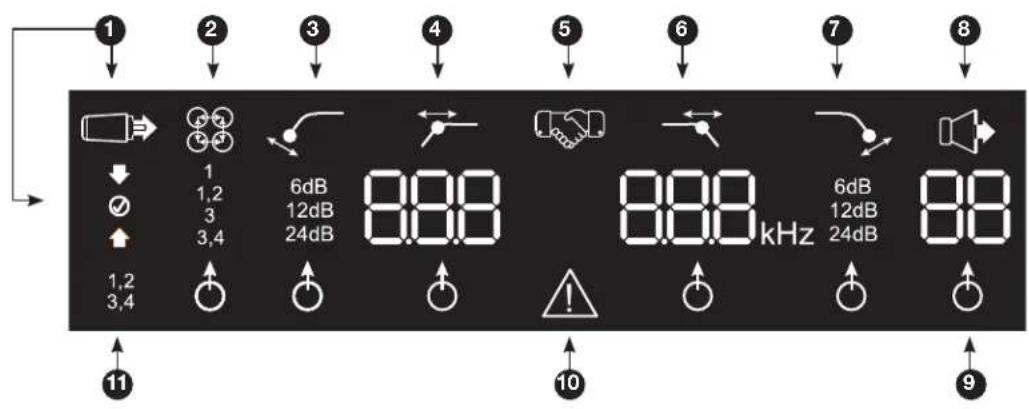
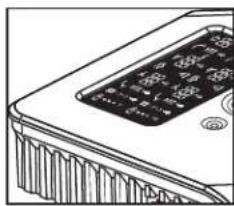
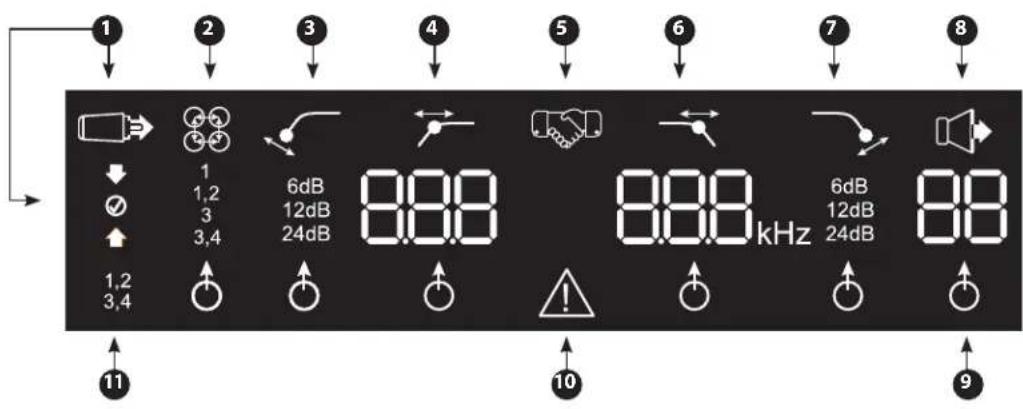
MS-A1004 DISPLAY ICONS
Input-Level Settings
Input Setup Mode Active
Input Sensitivity Too High
Input Sensitivity Correct
Input Sensitivity Too Low
Low-Pass Filter
6 Frequency


Hz
Slope

6dB
12dB
24dB
This setting
does not affect
pass-through
output.
Input Channel Mixer

Input Mixer
1 1,2 3 3,4
Indicates which signal inputs are selected to feed the channel pair's outputs
High-Pass Filter
Slope
4 Frequency


6dB 12dB 24dB
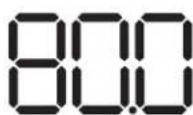
Hz
5
Pairing Confirmation
Bass-Level Controller Pairing*

*The MS-WBC wireless bass controller is an optional accessory.
Output Gain Adjustment

Output Gain Adjustment Active*

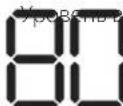
Output Gain Level (0 to 80)
*Muted when in "Setup Mode"
9 Adjustment-Selection Indicator

When lit, the paramater above is selected for adjustment.
10 Protection

Amplifier Protection Circuit Engaged
1 Channel ID
1,2 Indicates the amplifier channels
3,4 affected by the row of settings to the right in the display. (Channels 1, 2 use the upper display and channels 3, 4 use the lower display.)
MS-A1004 USER CONTROLS
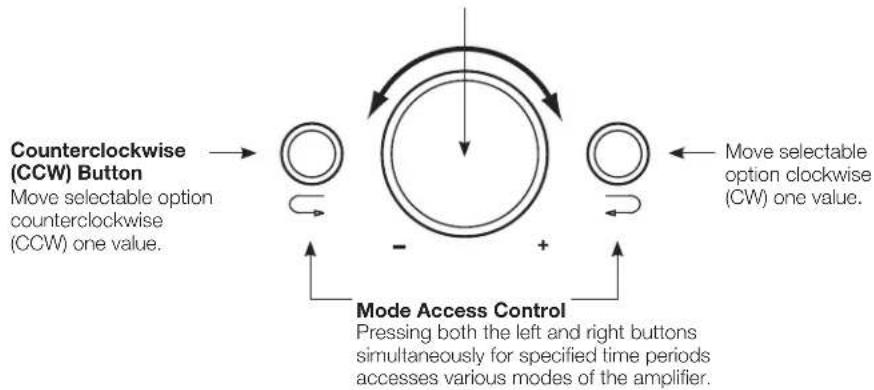
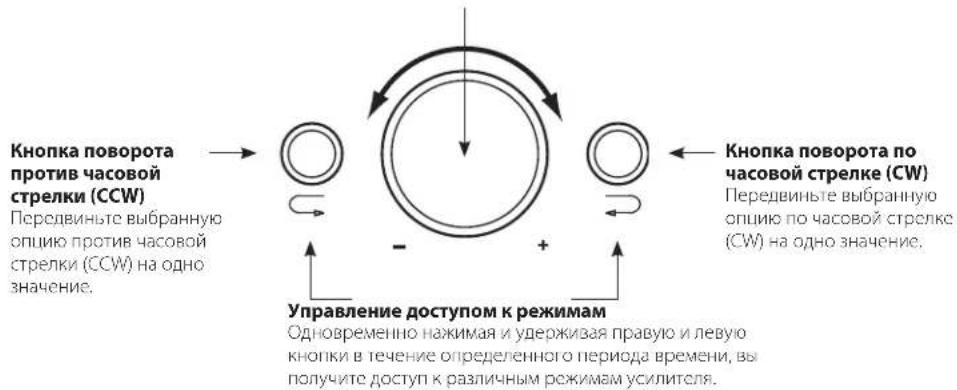
Rotary Encoder
Rotates clockwise (CW) and counterclockwise (CCW). Each detent represents a value increase (CW) or decrease (CCW).
MS-A1004 SETTINGSGUIDE
INITIAL SETUP
Activating the Controls
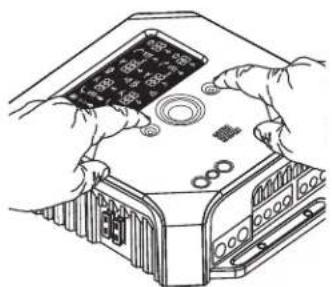
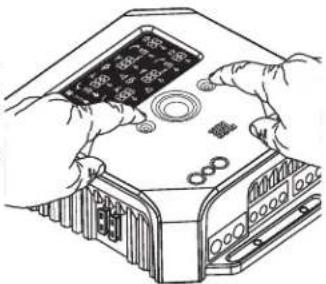
Press both CCW and CW buttons at the same time for less than three seconds and release, to activate the controls. The adjustment selector indicator will light. Use the CCW and CW buttons to move the indicator to the parameter you wish to adjust. After you've made your adjustments and the controls have been inactive for more than 30 seconds, the selection-indicator light will go out and the controls will become deactivated to prevent unintentional adjustment of the amplifier's controls.
Setting the Input Mixer


Once the controls are active, press the CW or CCW button until the input mixer is selected for channels 1 and 2 (in the upper display). Turn the rotary control to select the input connector(s) that will feed output channels 1 and 2. Press the CCW button once to move the selection indicator to the input mixer for channels 3 and 4 (in the lower display). Turn the rotary controller to select the input connector(s) that will feed output channels 3 and 4.
See "System Diagrams" for practical examples.
Setting the Input Level, and Enabling or Disabling Signal-Sensing Turn-On BEFORE YOU BEGIN
If the factory system to which you have connected your MS Series amplifier shows a "speaker disconnected" error message or fails to provide an output signal, move the Input Signal Selector to the Hi2 position. It may be necessary to turn the factory-installed head unit or the vehicle itself off and then back on, to reset the error message.
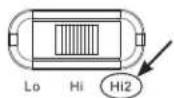
NOTE: The Hi2 setting should not be used with the RCA outputs of aftermarket head units!

To Set the Input Level:
- Move the switch for the Input Signal Selector to the Hi position (or Hi2, if you are connecting to a factory system with open-circuit protection).
- Set the bass, treble, balance and fader controls on your head unit to the center (or flat) positions. Set loudness to off. Defeat any sound-enhancement (such as DSP, surround sound or EQ) settings.
- Insert the setup CD into your head unit and verify that the CD is playing.
- Enter Setup mode by pressing CW and CCW buttons simultaneously for more than three seconds until the Input Level adjustment icon lights. The amplifier's output will be muted (the output-level indicator will show "..." in the display).
- Turn the head unit's volume control all the way up (to maximum output).
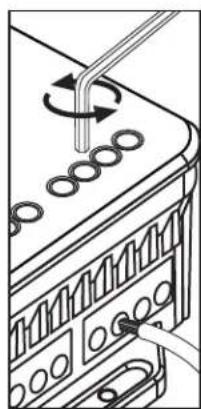
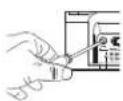
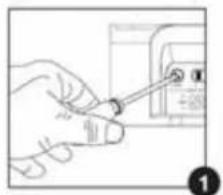
- Using a small screwdriver on the level-adjustment dial next to the Input Signal Selector switch, adjust the Input-Level Control up or down, while watching the icons on the amplifier's display panel.
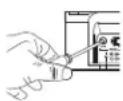
If the green "up" arrow
con is lit, turn the control clockwise until the id is lit.
If the red "down" arrow is lit.
icon is lit, turn the control counterclockwise until the icon

NOTE: If turning the control fully clockwise doesn't cause the on to light, move the switch for the Input Signal Selector to the Lo position and try again.
Once the on is lit, stop adjusting and repeat the procedure to set the input level on the other channels. When both check marks are lit, the input levels for each channel pair are set properly.
To Enable or Disable Signal-Sensing Turn-On:
- While in Setup mode, enable/disable signal-sensing turn-on by turning the rotary controller clockwise or counterclockwise to select SEn On or SEn OFF in the display. If you have connected a remote turn-on lead, set to SEn OFF.
- Turn the volume control on your head unit down and remove the setup CD. If you miss or circumvent this step, the audio system will reproduce a loud test signal that could damage speakers who
- Press and release the CW and CCW buttons simultaneously to exit Setup mode.
- Do not adjust the Input-Level Controls further. Use the Output Gain Control to balance the channel levels and to "tune" the system.
| Mode Function | |
| SEn On Signal Sensing is ON | |
| SEn OFF Signal Sensing is OFF |
SETTING THE FILTERS (CROSSOVERS)
There are 98 selectable frequencies for the low-pass and high-pass filter settings. The selectable frequencies are detailed in the table to the right.
Getting to the Crossover Settings
Press both CCW and CW buttons at the same time for less than three seconds and release, to activate the controls. Use the CCW and CW buttons to navigate to the preferred crossover-adjustment parameter.
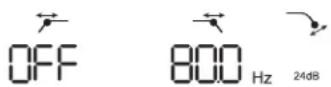
How to Set a High-Pass Filter
Navigate to the high-pass filter frequency parameter and, using the rotary encoder, select the desired cutoff frequency. Then navigate to the high-pass filter slope parameter and, using the rotary encoder, select the desired filter slope.
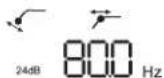
High-Pass Example
Use the CW and CCW buttons to navigate to the Low-Pass frequency parameter and set to OFF.

| Available Crossover Frequency Settings | ||||
| 20.0Hz | 95.0Hz | 260Hz | 1.40kHz | 4.80kHz |
| 22.5Hz | 100Hz | 270Hz | 1.50kHz | 5.00kHz |
| 25.0Hz | 105Hz | 280Hz | 1.60kHz | 5.50kHz |
| 27.5Hz | 110Hz | 290Hz | 1.70kHz | 6.00kHz |
| 30.0Hz | 115Hz | 300Hz | 1.80kHz | 6.50kHz |
| 32.5Hz | 120Hz | 350Hz | 1.90kHz | 7.00kHz |
| 35.0Hz | 125Hz | 400Hz | 2.00kHz | 7.50kHz |
| 37.5Hz | 130Hz | 450Hz | 2.20kHz | 8.00kHz |
| 40.0Hz | 140Hz | 500Hz | 2.40kHz | 8.50kHz |
| 42.5Hz | 150Hz | 550Hz | 2.60kHz | 9.00kHz |
| 45.0Hz | 160Hz | 600Hz | 2.80kHz | 9.50kHz |
| 50.0Hz | 170Hz | 650Hz | 3.00kHz | 10.0kHz |
| 55.0Hz | 180Hz | 700Hz | 3.20kHz | 12.0kHz |
| 60.0Hz | 190Hz | 750Hz | 3.40kHz | 14.0kHz |
| 65.0Hz | 200Hz | 800Hz | 3.60kHz | 16.0kHz |
| 70.0Hz | 210Hz | 900 Hz | 3.80kHz | 18.0kHz |
| 75.0Hz | 220Hz | 1.0kHz | 4.00kHz | 20.0kHz |
| 80.0Hz | 230Hz | 1.10kHz | 4.20kHz OFF | |
| 85.0Hz | 240Hz | 1.20kHz | 4.40kHz | |
| 90.0Hz | 250Hz | 1.30kHz | 4.60kHz | |
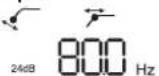
How to Set a Low-Pass Filter
Navigate to the Low-Pass Filter frequency parameter and, using the rotary encoder, select the desired cutoff frequency. Then navigate to the Low-Pass Filter slope parameter and, using the rotary encoder, select the desired filter slope.
Low-Pass Example
Use the CW and CCW buttons to navigate to the High-Pass frequency parameter and set to OFF.
How to Set a Band-Pass Filter
Band-Pass Example
To build a proper band-pass filter, the low-pass frequency must be greater than the high-pass frequency. The MS-A1004 will not allow you to set the low-pass filter frequency to a lower value than
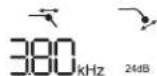
the high-pass filter frequency. To enable a band-pass filter, first select the High-Pass Filter frequency and slope, as indicated above. Next, select the low-pass filter frequency and slope. Once the settings are complete, the controls will time out after 15 seconds.
OUTPUT LEVELS
Setting the Output Level
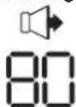
Use the Output Gain Control to adjust the balance between the subwoofer and the full-range speakers, between the front and rear speakers, or between the midrange, mid-bass or tweeters in a bi-amped or tri-amped (all active) system. The output level is adjustable in 0.5dB increments, with a display of 80 indicating maximum output. The lowest setting will mute the output and " w " will show in the display.
To set the output level, press the CW or CCW buttons to highlight the output-level parameter for adjustment, and turn the rotary controller to adjust the output level.
WIRELESS BASS CONTROL
Overview MS-WBC The MS-WBC (sold separately) is battery-powered and also includes a +12V plug that can be connected to a +12V source in the vehicle. The MS-WBC transmits a signal only when the control is rotated. The amplifier(s) must be on to receive and respond to the control, so adjustments made to the control when the amplifier(s) is/are off aren't recognized.


How to Pair the MS-WBC Wireless Bass Control with the MS-A1004
The optional MS-WBC wireless bass controller must be paired to the amplifier in order to be used. When the amplifier is first turned on, the amplifier is not paired with any controller.
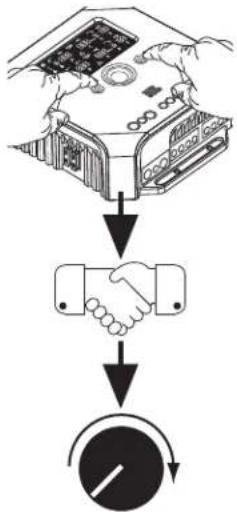
Press and hold both CCW and CW buttons simultaneously for more than three seconds and the amplifier will enter Setup mode. Continue pressing the buttons for four more seconds until the pairing indicator is illuminated. Release the CCW and CW buttons.
Pairing must occur within 15 seconds. The time remaining is indicated at the far right of the display. Turn the knob on the bass controller during this 15-second period. The wireless bass controller will be recognized by the amplifier and will automatically pair the two together.
After a successful pairing, the upper HP filter digits will display the bass controller version number for three seconds. Then the amplifier will return to the normal (RUN) mode.
If a valid pairing has not occurred, the amplifier will remain unpaired. After the 15-second countdown, the amplifier returns to the Setup mode.
If your system includes several MS Series amplifiers, pair them one at a time. Once all the amplifiers are paired and have returned to the normal (RUN) mode, turn the knob to synchronize all amplifiers.
SYSTEM DIAGRAMS
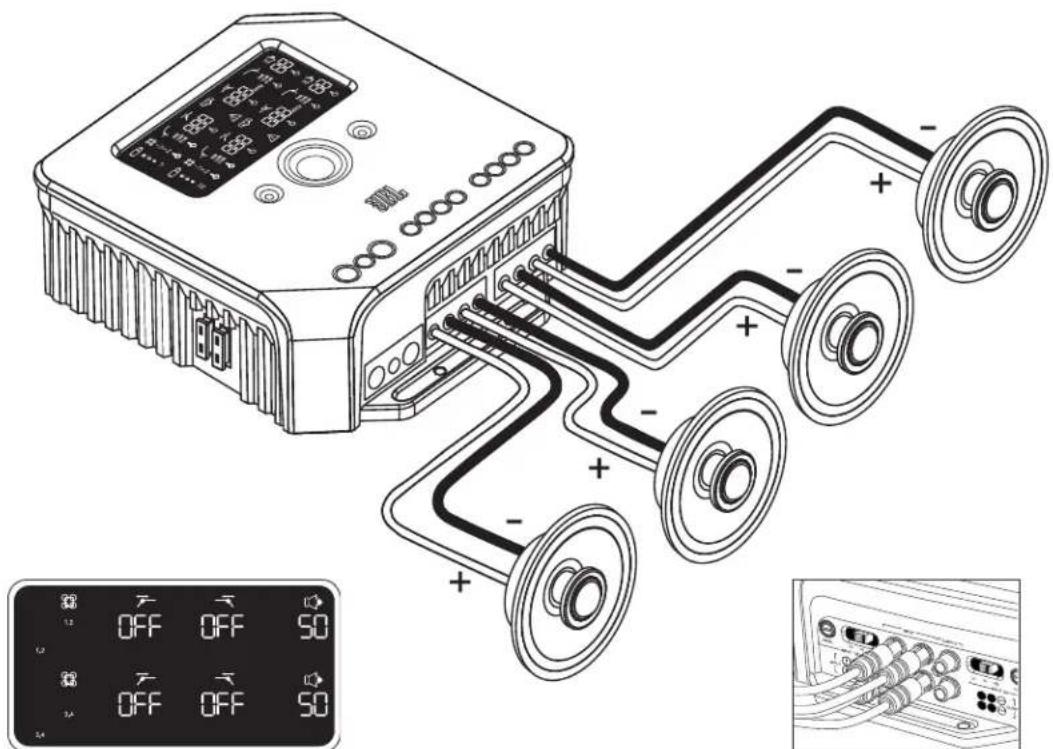
Example of filter and input settings for this configuration
Inputs on all four channels
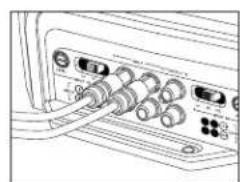
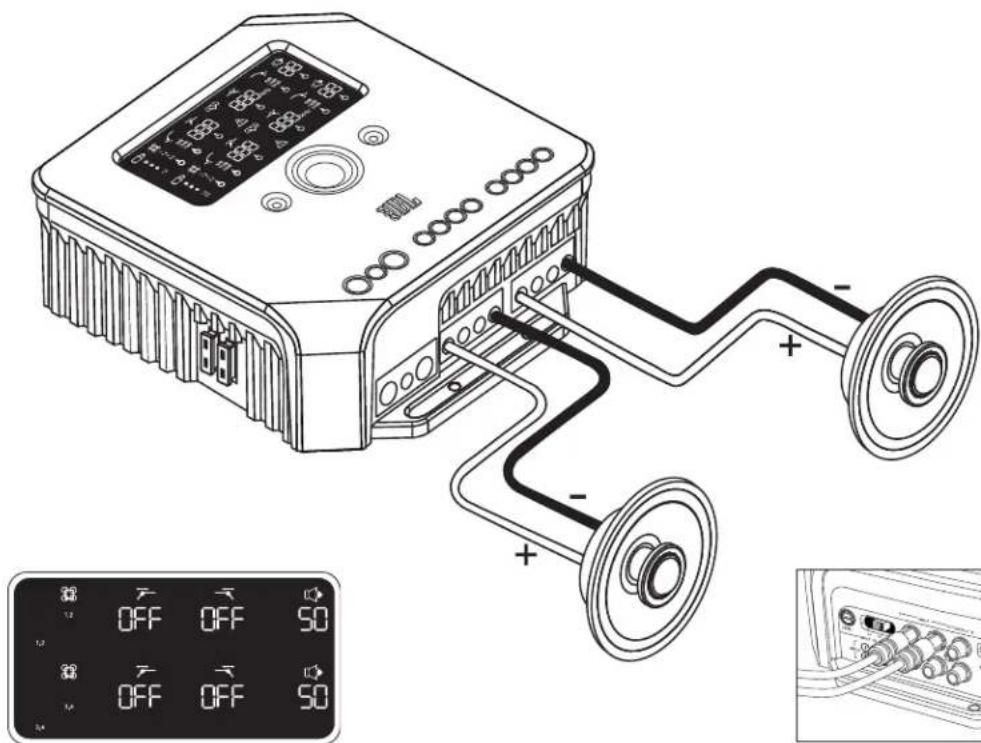
Inputs on channels 1 and 3
SYSTEM DIAGRAMS
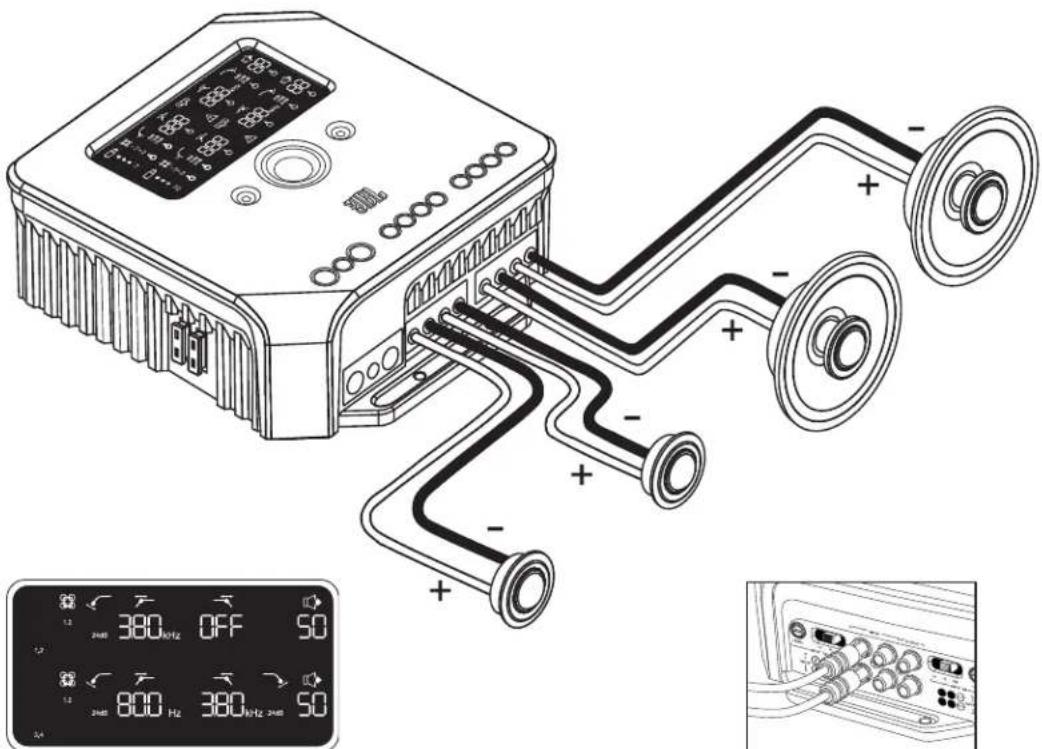
Example of filter and input settings for this configuration
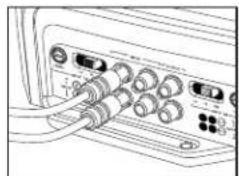
Inputs on channels 1 and 2
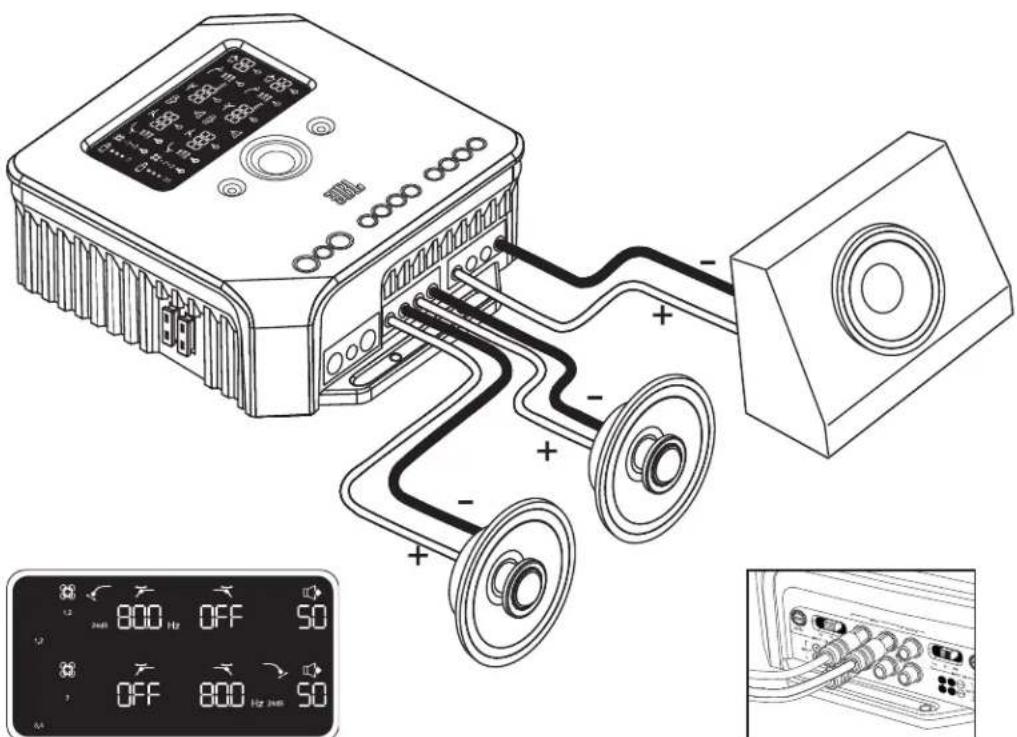
Example of filter and input settings for this configuration
Inputs on channels 1, 2 and 3
SPECIFICATIONS
Specification
Power output
CEA 2006
Bridged mode
Signal-to-noise ratio
Frequency response
Maximum input sensitivity
Maximum input voltage
Dimensions (L x W x H)
Weight
Beauty carton dimensions
Gross weight (with beauty carton)
100W RMS x 4 channels @ 4 ohms
100 W RMS x 4 channels @ 2 ohms
200 W RMS x 2 channels @ 2 ohms
80dB referenced to 1 watt
90dB referenced to rated power
10Hz-27kHz(-3dB)
100mV
20V
7-3/16"×8-1/4"×2-3/4"
183mm x 210mm x 70mm
5.57lb
2.53kg
13-15/16" x 11-9/16" x 10-5/16"
354mm x 294mm x 264mm
14.61lb
6.63kg


by HARMAN
© 2010 Harman International Industries, Incorporated. All rights reserved. JBL is a trademark of Harman International Industries, Incorporated, registered in the United States and/or other countries. CEA is a registered trademark of the Consumer Electronics Association. Features, specifications and appearance are subject to change without notice.
HARMAN
Harman Consumer, Inc. 8500 Balboa Boulevard Northridge, CA 91329 U
www.jbl.com
jb1 MS-A1004
AMPLIFICATEUR DE TRAITEMENT DE SIGNAL NUMÉRIQUE
CHARACTERISTIQUES DU MS-A1004
1Commandede niveaund'entree
HARMAN Consumer Inc.
8500 Balboa Boulevard
Northridge, CA 91329 USA
www.jbl.com
jbl MS-A1004

HARMAN Consumer Inc.
8500 Balboa Boulevard
Northridge, CA 91329 USA
www.jbl.com
jbl MS-A1004

4 Uscite pass-through sommate
Uscite audio pass-through (full-range)
HARMAN Consumer Inc.
8500 Balboa Boulevard
Northridge, CA 91329 USA
www.jbl.com
jbl MS-A1004
HARMAN Consumer Inc.
8500 Balboa Boulevard
Northridge, CA 91329 USA
www.jbl.com
jbl MS-A1004
HARMAN Consumer Inc.
8500 Balboa Boulevard
Northridge, CA 91329 USA
www.jbl.com
jbl MS-A1004
Pass-through audio-output (full-range)
HARMAN Consumer Inc.
8500 Balboa Boulevard
Northridge, CA 91329 USA
www.jbl.com
jbl MS-A1004

HARMAN Consumer Inc.
8500 Balboa Boulevard
Northridge, CA 91329 USA
www.jbl.com
jbl MS-A1004
Ycnilntel 3ByKObIX yactOT C uHΦpOBoI o6pa6tKoI cHnHaI
XAPAKTEPNUCTUKM MS-A1004
1 PerynTop ypOBH BxOaHbIX CnHaNoB
HcnoB3yctnDnCnOCTABHEH BxOHOH NHBCTNTNBOCTNC HANPINKHEOM CnHnA DnOBecneHHeHnDnEKAeero AanHOo-LnFpOBOI npeoobpaOBAHn. CMdONHnITbpyIO HnOPMaUIO B PaZdnc HAcTPOVkyoPBOHn BXOHyX CnHAnOB n pa6bNOKpOBKa n 6NoKpOBKa OyHKuN BkIOeHNe I npObApKyehn CnHana. HE cNoBsyte OT otone MeHTypabHeHnDn HAcTPOKn OTHOcTeBbHO BxOHOYpOBKa KaHnOB yCmInrE!
CenekTop BXoDhblxCnHaIOB
Lo/Hi/Hi2 HAcTpaBAt BxOHDHe HApRKeHne IaN3a3oH COnpOtnBeneHN.CPa3eI《HaCtpKaBXoHOrTo yPoBHn》,有Pa6bokpoBkaN bIoKPOBkByfHKuIN BKIOHOENH pIn O-HApYKCHNI CnHrAIA N CCTOMa 3BaBOJCKOy YCTAHOBKn B MoE ABOTMOBnNE NOKAsBaET COOOHEnIE JINHAMNKOTIKIOHEH IN He IponPpbBaET, KOrDA JINHAMNK OTIKIOHcN K BbXOITyJINHAMKc.
Aynobxo
IcnoiayteaymokabernRCA dnn CoenHnnpdyncnntepnnpaAio 1ueeK KOMNNEK TY aadTepb c nepeXoDMOT RCA HA HEnOIOPOBaHIIbe IpoBDAI INIIOKIOHBNBXOHN BIX CINHOJOBIMHAMIKOB.
CymMapHbIeCKB03HbIe BblXOdbI
BxOJIbIe KAHANI 1N3COBMeUeHbINOTCBNAIOCTBOIMNHbIXoD. BxOJIbIEKAHANBI 2N4COBMEUeHbINOTCBNAIOCTCHBIOYCNBBXOJ.
BcTpoeHHbIe npedeoxpaHnTeH
2 wt. no 20 ATuna ATC
6 Dnncnn Kahanob 1 u 2
V3o6paKaHnctpoKn KaHAnOB1n2 ycnntena.
7 Ducnnne KaHanOB 3 n4
V3o6paKaET HAcTpoKn KaHAnOB 3n4 ycnntena.
3 Θηνημανβλενησι
NoBnHOT perynpoBaHcTPOKn yunnteR. DononHtTebHyu INHpOmaIIO CM. B paDene (MS-A1004 3neMeHH TylnpaBChnH
BxOa3nEeKtpoNTAHHa+12B
CoenHETcAaKMyNTopOM MaHnHbCnpDoxpAHntcEm CCHIOI an. ToKa 40 AbpNcy45,7cm ot noJOKHTENBHO BIXoAaKKMyNTOpA
1DnCTaHNoHHbBxOaBKnIO-
CoeHnHnT nepeKnOuateNt +5
do+12B.PINMCEAHNE:Modenb
MS-A1004 TaKke BkIOaET yHkU
LIOB BKIOHENI PNI O6HApyHexHN
CnHnA. Bbl MoXe T BbOpTaB METoD
BKIOHENI BXOe YCTAHOBKN. D
NONHnTCNHy NHPopMaIcMo C.M.B
Pa3dene KKa paOtaet UnpPBOB
BXoHOH CMecntEn? N CoeHnHn
MS-A1004).
3a3eMHeHHBxOd nXoBOOyactn
CoCINHACTCNHCOKPAHCHHO 即CTBIOXOJBOOYCACTNABTOMOHN.
BbIXOaIduHnHaMnKOB
MS-A1004
YCINITEJIb 3BYKObbIX YACTOT C UΦPOBOI OBPABOTKÖ CNHJIA
OB3ATEJIbHO IPOUHTATb IPEED HauJlOM IcNoJIb3OBAHnI!
YcIINNTEN JBL. cepm MS BknoaIOT dyHKn, KOtopsie 06bHIO He npcyTCTbyIOT CTaHapTHbX ABTOMOBnHbX paHO-ycNInTeRy.
PtoMY pOeUpy aYcHOBK yCUNInTeRc cepm MS OTHAECH OT pOeUpy cyTAHOK BY CTAHApTHbX ABTOMOBnHbX paHO-
ycnInTeRy. PpOCTABNO DANCE KPOKAHO ONGAHNC XapaKTEPCTUK YdyKHN NOMOKET BAM CoaDtt OTHHHyO CNTCMY IN BOC- NOB3oBaTcBCEMNIHBOAIOHBMX XapaKTEPCTIKAMM MOeIM MS-A1004.
HΦopmaun o TexhONoru cΦpOBoN 6pa6oTK cnHana (LOC) ycHnTenei cepm MS:
O6pa0Ka CnHbA B yCnHnTea CpeM MS - CnpPobaa LcPpOBaa o6pa0Ka CnHana Bmte C npocBm 3neMeHTAMn yPpABeHHN aDnEeTae CpeM MS O6IeHaOT npoecc yCTaHOKc C cO6IOdeHM ToHOCn. TOnbKO CnHbHa Ha BXoDHOMPOBHE AIBIOHOTCA HAIJOROBIMN.
Byytn ytpaehb mon hactponk, cnnr oToceunHIO ycunntenb nnn AkkymnyarTop?
Het.Bce Hactpoikn LOC xpaHcraB 3heproHe3abCmO nnamT,6naorapA KOtopoB bHe ytpaTe CBOn HactpoKn npn OTKIOHEN NHTAHN YCUNTEI.
Noemy cunHanbHa BxOHom ypOBHe ABnTc aHAnorOBbIMn?
TObbOeBcHbHaHcyIe OTHoHHeNc CHTana-lyMa MAKCmMnPobatb paepieHne aHAnoro-HPoBOrpoepo3oBAHnA,MAKCNAMhblpOReBb BXoHOrO cRcHana B hAnoro-uaPobBe ppeoBaOBteu (Al)JOnKeH 6bbl3aHaN C ToHOCTb.0EMeHT ynpabHeN DOnKeH 6bbl BAnorOBbM. PpaNaOoiin CD-DnCK No yctAOBke npoeDpyb, ONCbBaembe B 3OM pyKBoBCTBe, NmORAOT bOeNeB TPOeCCyTAHOKn yPOBn COBIOCTN ToHOCTb. 3aDaB yPoBeBbxOHO rHana, HNCIOBByE tEmeH yPABInB HIN HACToPON CYCTeMb. HcIOJIbEy Te HNPoBOB BxOHOHN AHeMeH DIAHCTPOKN OTHCNTCBHOrO yPOBH MaKdy KaHANAMy CUNITCNIMMN DIAHCTPOKN CTCTMB.
Ipoemy BXOdbi CnHana N BbIXOdbi DnHAMIKOB npOHymepoBaHbI, a He 06o3HaueHbI cNoBaMn, HappMep, «PpaBbI» n «NeBbI»?
YCNNTNTM CEPNMS CTPOCKTPOBAHb TAKMOBAPCMAO,TOB6CNDATN HTERPAUH C NIO60CINTCMOH POCOTN HIOHTHOY CYNNTEB BKNQaHT LMPPOSOB BXODHO MCEUTENTB,TO YCTPAAHET NOEOXMOIMCTB BYAANTTEPAH NIO3BOJNETNIO3BOABt NIO6yI npy BxOXH BHXKAIHAET DMOHOI CTPEOEONHOB DAMKIMAMBHOH RIKOCTN PnO C03DAHHN CNTTEMBL OOOHAHEHVE KAHOAN KAKPABORI NLEGOFOMKET OK3A3BaCBIE COBCEM IOHTHBm B HEKOTOPBX INPANOHEHIX
Kak pa6oTaet uΦpOBoB BXoHOb cMeCNTeIb?
CnHnbln kaxdoro BxOHO rAeMa Tnra RCA npeoobayotcB uHpOBoBie CnHnbln OtcbnaTcB npoccpop obaKnL pOboXr CnHANOB. DyHKnLIuCBOCTbN HapPABNT CnHANBL K BxOxyDyHAMKO B COOTBCTBN C Bb6paHHMn HA cTPOkAMN BxOHO rCeMTen. CyueCTBY eON BxOHO CHmCmETen Dn KaHANOB 1 n 2 (BepxHN DnCnne) n BTPOI CMeCTENJ ANAOB 3 n 4 (HNNHnn DnCnne). HanPIMeP,OnNJN 1" BO BxOHO McmETen Dn KaHANOB 1 n 2 NOwnet CnHAnR He3da BxODA 1 B xOHDhle KaHANBI 1 n 2 (CM PncyHOK 1). 3Ta onUg yO6Ha dN OtnpabHeHHMOHCIRHAN 3 napy KaHANOB.
PucyHok 1.
Onu<1,2>BO BXoHOM CMEcntene nKahAnOB 1n 2 noWnet CnHrA rHe3da BXoJa 1B BbIXoHoi KaHan 1a CnHrA rHe3da BixOJa 2B BbXoHoi KaHaN 2 (CM.PcyHok 2).3To npEHaHaueHo nIcrepeocunHanob.
PucyHok 2.
EcnBbXoNTe, YO6bI Bce YcTbepe BxOaHbX KaHaJI NIOyAHH OIN H TOT KcHnH, CoeHNHe CnHnH cTH3OM BbxOg 1 (nnn 3) nB6CpTe onIOuio (Ynnn 3) B o60HX BxOaHbX CmecCTHEn. EcnBb XoNTe, YO6bI Bce YcTbepe CnHnH aONyAHH paAHnHbX paOHnHbX KOHNpyAHH CTCTMn, Y-ADnTepBbN HnHc Tpc6yOHT, IOnONHtEbnHbN pnpmPb npBeCNHb B paDnE <dIarpMaMbN CnCTEMb).
BxOaT nn B yCnntenb BxOdbI dAaHAmNKOB n IaIHHN?
Jia, niooB xOHOH CnHAN MOKc IcNOb cOBaTcBc yCunIe TnMI cepnn MS. Ecn Baa uYctAHoBA BKIOuAeT BxOoB TnNA RCA, npocTo BCTabBe IN BOX BAOHoe THE3do TnRA. ECn BAa UyCTAHoBA HE BKOuAeT BxOoB TnRA TnCA (KaK, HApnpMcp, B Cnyae Co BcEMN CnCTeMMAMn 3aBOck OYCTAHoBB), NCnoB3yTe npnaRaUeCCA KOMINK TY aadIepbOT rOCA K HeINsONIpOBaHOM npOBOyO.CobIoDAITE HADNEkAsyko nonpHOCTb. BxOoB CnHAnOB YBNHOCTD hΦpeEHuaNBbIMn npHHMAOT NIOoB CNHAN C HApPKeHNEM OT 100 MB (HIN3KOrO yPOBHB) DO 20 B (BICOKoR yPOBHB). Het Heo6xOIMOCTN BNCIOB3OHN OTdEhBx dAnIePbOB M IN B TOCHOM ONPeDEHeHn HApPKeHNr MII TnTA CmTHAI. BCTpoEHHbIE IHCTpyMeHTb ycNtTeJIeCE pinn MS IN PooJeDpy bYCTAHOBKn, ORnCaHHHe HNKe B DAHNOp yKoBOdCTBE, oBHeqAT OTITMN3AUIO KOHIFypaun.
CnCTema 3aBODCKOYCTAHOBKN B MOEABTOMOBNE NOKa3bIaBcET COo6eHne «DINHAMNK OTKIOHoeHb HN He npOnrpbIbAeT, KOrda DNHAMNK OTKIOUeH HN KOrda YCNNTeJIb NOKIOUeH K BbIXOy DNAMHKa.4To MHe CnDeyTeJeTa?
Ycnntenepn MS Bknoaotpn no3nnnepeknouateBxOHO rHana:Lo, Hi H12. No3nna H12 Bknoaet ceb, 4p3pa6oTahnyTO TAKM O6p3OM, 0706 By3cAHTbNCTCCTEMy 3a3oDCKOn yCTAHOBKn paocn3Haaba NIOJIQUHHe DHHAMKA K cee bHyox. EcnB Baaem AtonoBNCycTAHOHcHOnaHgN3 ENX CNTEm, yCTAHOBnTC yPOBcH BxOHO rHana Ha nO3nHIO H12) cnclnyte hncptkyrnnno oYCTAHOBKe dancse.
Mora 3aBODCKA yCTaHOBKa He BKNIOyaeT npoBOd IINCTaHcNHOHHOro BkIOueHn. YTo MHe CIneYet Denatb?
YcHnTeNcepm MS MeHOTyHKuIOB KBNIOUeHnnpoOBApHyKeHN CnHana. OHHe Tpe6byot CoedHHe nC npoBOOM dCTAHNOHOHO RKnIOUeHn. YcHnTeNb pacno3HaET npvCYTCTBNE ydNOCNIHnA H CBOEM BXOe N BKNIOHTCR ATOMATueck. Hepe3 HeCKoBKO MHTI NOCE OCTaHOBKn IOCTyJIeHn CnHnA IIN NOCE BkIIIOeHn paDIO ABTOMOBIVy cYNINTeB OKNIOHTCB ATOMATUcckn. B TcCHNC BpEmCHN 3aDCpxK INcYcHnCtBbNb 3abnpact NIIb HcBONllooc konMecCTBO TOKA, TaKM oBaP30 He papKaan AkkyMnyntop.
Kak lyuwe Bb6paTb qactoty KpoccoBepa n yron otcekn? (cm. Pucynk 3a n 3b)?
KpoccoBep-3to npapnibtpob,pa3eJIIOuXy aynOCHHaHbHa H3KoayctOTbte (6ac) n BbcokoyactOTbte (BepxHme cactotbl), 70bka Kaqdaan OIOcA cactot 6bHa HanpaBnCk A ToM yINHAMNKy, KOTOpB IpocDHA3aHcH en Iae pOnrPbBAHN. Hanpimcp, dNHAMNK JnBOCNPoVB3EHN BepxHnx 3ByOBHX CACTOT PpeDHA3HaeH TOnbKO IIN PPOrPbBAHN B1COOKHX cactot, n 6ac MoKeT erO NobpeDntb.ByepnpdHa3HaeH ToLbKO IINPONrPbBAHN H3KHX cactOT n NIOxo cnpabJraTeC BOCNPoNB3eHNBM B1COOKHX cactOT. CpeDHeCACTHOINHAMNK PpeDHA3HaeH IIN PPOrPbBAHN cactOT, BXODIUX B DnAna3OH MeKdy bAcOM n BepxHmN MactotAm (cpedHne YactOTbl). Ha pcyHke 3a NOKa3Ho, KAKIM o6pazom 3TN INHAMNK 6dy t pa3deJeHbI NO nnana3OHy 20 Tg-20 kF npnncnB3OBAHn COOTBCTCBYOxN xfipnbTOB (KpoccoBcPOB).
PucyHOK
3a.
PncyHOK
PnHAcTPOIKe KpOcOBepa MeKHy HNkOuACTOTbIM NINHAMKOM BbICOKoAChTbIM DInHAMKOM BbIepeTe AChToTpy HINbTaB PbxHXN XACTOT (DBU), KOTOPAN 6yET Be30nACHO JnBbICOKoAChTOHOrO DnHAMKa. HAcTPOIe FmNbTP HIXHXN XACTOT (QHU) TAKM O6pa3OM, YTO6bl PepeHoc 6bl pOBHbIM B DnAn3OHe CAtTOB KPCOCOBepa. HAcTpBaB NpOCCOBep MEKdy INHAMKAMn, INONBsyTe 6blwO yrON OTceKN (24 b/OKT.) IIO BOxN FmNbTPOB B CEJnx MAckMN3aUN CyMMb HN3KNX ACTOT, KOTOPAN 6yET 6BcONACHO JnBbICOKoAChT0HO DnHAMKa, N B CEJnx MINHMNA3Ma3BzMOeCTbVbEYKa HN3KOAcT0THORO N BICOKOCA-CT0THORO DnHAMKa. Ha pucyHKe 3b nok3aHa pa3Hnua yrrOB fnnbtp npn 6, 12 24 d5/OKT.
Ecn nncnbl3y0 yrlb otceKN dnn KpoccoBepob B 24 db/okT., noemy ycuiuTei cepH MS BKIOaIOT taKHe yrlb Ha 6 db n 12 db/okT.?
EcnBaa ycnntenb cepn MS noepknaet cab3yep 3 BeHTnnpyemom nuike, nnonb3yIte fepnx hactot Ha 12db/okt, qo6bi oecneutb 3auntycabxyepa oT nobpekneHm, noepxnbA obem bacno HypoeHHou actoH, kOtpyo ycnuNTenb noCbaJnact Bcayb0p. CnIbTp BepxNHNCT O 6 b/OKT. MoKET OKa3aTHCBnHBM HC3Ha cnHbTeBoropAHCHMnBACOB, KOTOpBE ycnuNTenb NoCBAeB NOHNOyHKUHOHANB EINHAMNK CNTEMB, He NCNONb3yOuue CaBcypebp, orpaHnHBAon b6bEm BcOKHX NaCTOT, KOtOpBE ycnuNTenb NoCBAeB T 3aDnHE NnHAMNK.
CKBO3HbIe aydnoOBbIXOdbI (nonHbI cNeKTp)
BxOHHbIe KaHbI 1 n 3 cmmpyIOCTn HocbIaIOCTB B cepXHn BbxoRCA. BxoHbIe KaHbI 2 n 4 cmmpyIOCTn HocbIaIOCTB HxHm BbxoRCA. Pnp NOMOuN 3nx BxOIOB MoXHO NERKO NOKHOHTB NOHNHTENbHe yCINNTEn. HanpIMep, npn IcNObBOAHm MOEN MS-A1004 dn3dHnx INepDHNX DnHAMMKOB BblMOKeTe NCIOB3OaTb OTB BxOIOB dna YcHInTEA ca6Bypepa. TNI BxOIOB RANIOCTCR NHOfHyKUHOHbHM. B moEIN MS-A1004 kTm BbxoAM He NDOcoEHNHOITCH Hn FbtpBcPbXHX qactOT, Hn fMlbPbHnHXHqactOT.
BbIXOaIuHaMnKOB
PnnpnKIOHcHnnnHnHnHnHnHnHnHnHnHnHnHnHnHnHnHnHnHnHnHnHnHnHnHnHnHnHnHnHnHnHnHnHnHnHnHnHnHnHnHnHnHnHnHnHnHnHnHnHnHnHn HNHOHNHOHNHOHNHOHNHOHNHOHNHOHNHOHNHOHNHOHNHOHNHOHNHOHNHOHNHOHNHOHNHOHNHOHNHOHNHOHNHOHNHOHNHOHNHOHNHOHNHOHNHOHNHOHNHOHNHOHNHOHNHOHNHOHNHOHNHOHNHOHNHOHNHOHNHOHNHOHNHOHNHOHNHOHNHOHNHOHNHOHNHOHNHOHNHOHNHOHNHO
1.CtepeocoeHHeHne
IIOKIOUOTTE DNHAMNK(-)NEBOTO KAHANA K BIXOJAM, CBA3AHBM C BXODM NEBOTKAHANA. IIOKIOUOTTE DNHAMNK(-)NpABOTO KAHANA K BIXOJAM, CBA3AHBM C BXODMPaBOTO KAHANA.
2. MoCTOBoe coeHHeHne
CoDHNHTe BmCTe NnONKNTENHbI npOBoB BxOIDA Ha DNHAMK(+) nONONNTENbI npOBoD (+) BxOIDA HA KAHAN 1 (xN3). CoDHNHTe BmCTe OtnpLaTeNbI npOcOd BxOIDA HA DNHAMK(-) I NTPOULeNBH pNOOz (-) BxOIDA HA KAHAN 2 (xN3).
PnnpmbhaHb6onee paacnpocpaHHbX KOHmpyaun CNTEmbl nHaHHoro ycnnten npBedeHb B Pa3ene EInarpamMb ciCTEmbl.
MS-A1004 INKOHKN DINCNJIER
HactpoKn BXoHOrO yPoBHa

XHMM HACTPOKIN BXOJA AKTNIBPOBAH

HcyBCBATEBHCXBOXGCAHKSOMBbCOKa

IyBCTBATEBHOCTb BXODa YCTHOBHNEHa BepHO

YyBCTBHTENHEOCTBXOXDAHIMKOMHM3KAR
2 MecnteIb BXoHbIX KaHaNoB

BxOHN cmecntenb
Yk3bIaTe,KakneBXOdbI
12 CnHana BbIpaHbI DnA
12 NDAuCNHnA B
BbIXOJIbl
ΦMbTp BepxHnx qactOT
3 yronotceukn
4 Yactota


6dB
12dB
24dB

Hz
5 NpOaTBePxKeHne o coeMHeHN
CoeHHHeHKe KOHTpOJIpeApYPOBnBa6aca

*BecnpoboHno KohtpOllne npOBnB 6aca
MS-WBCAIBIETCJDOONIHHTBHBIM
akCECCyapOM.
ΦnJBTp HxHxu xactOT
6 Yactota


7Yron otceku

6dB
12dB
24dB
8
PerynTop BbIXoHoro eΦmneHTa ycnneHna

Ka BblXOJHOrO KO3ΦN- ΚηEHTa yCUNeHnA kTINBnPOBaHa*
bIXOHOHO KO3ΦnUcN
eHTa yCunenHn (0-80)
*IpaabTaeTcBpeKIMe «Setup
Mode> (Pekn m yctaHOBKN)
9 VHP
PnCBTOBOMBbIeHIN
napamTp BbipaH dIa
HàCTPOKIN.
10
BkIoueHa

Cetb 3aUNTbl
YCINNTEN
1 ID kaHana
1.2
3.4
Yka3bBaet KaHaJIby YcNITeRHa
KOTOpble paCnpocpTaHnEeTcra
HaCTpoek Cnpaba OTrnCnne.(
kaHaoB 1,2 nCnoB3yETcBepx
HnDnCnne, a nla KaHaIob 3,4
IcNoJIb3YeTcR HxHnDcPnEi.)
MS-A1004 3JIEMEHTbI UYPABJEHNIA
Kpyrobo Koep
NoBopauBaTaTcNo yacobO CTpeKc (CW) n pOtnB yacobO CTpeKn (CCW).KaJla TaKCa npctTabTetcooYbEJIeHHe 3Haehn (CW) mI yMeHbEHe 3Haehn (CCW).
MS-A1004 PYKOBODTBO K HACTPOIKA M CXOJHAR YCTAHOBKA
Aktubauia 3neMeHOB ynpabHeHn
OHOBcHNO HAKMTK KONK Cw W yDcKnBaTc XW B TceHcHcYb MeCec 3 cckyHN OOTNCTNE KONK, YTObAaTKINBPOaB TaeCNHTy npaBcHn. 3aROpTcN INHkATOP peryINPOBCHACPToeepn NMOUQH KONOK CCW CW nepeBnBe tne INHkATOP Ha napaETp, KOtOBH BYXoTHe HAcPTocnb. NcCteTORK KaB bnpoaeTe HAcTPOky nocTe c6KeHN HeaTNBHoro pexkma HcNTb30BAHbIeMeHrTOB yPaaBHeHn, lamIOH kHHdKATOP aPCyInPOBCKIOTyHCT, anICNCHTbIy npaBcHnBBydyT dZAKITbIPoBHaB B UcNIX PpOToBAPuHCHn CnyAayHn HAcTPOky AnmCHTOB npyauHbNycUNTTen.
Hactpoika Bxodhoro Cmecntela
IocncknBauun ancmentob ynpabcnna Hkmmntc u depknbaTc kHONky CW nnn CCW, noka h 6ynet Bbpaan BxOHN cmCmTeN bna KaHANOB 1 n 2 (Ha sepxhem dncnnee) TObepnTe KpyroBO CenekTOBn BbBepNTe BxOHO KOHNEKTOB(-), KOTOpBE 6ydyt NpdaBaTB CNHA Jb BxOHO BKAHb 1 n 2. HkMMTE Ha KONky CCW cIN p3, YTOBnpeEBNHTb INKATOP HA BXOHO CmecTeN bna KaHANOB 3 n 4 (Ha HxHem dncnnee). TObepnTe KpyROB 1
1,2 cCnKTOP n Bb6pcntc BxOHO (-bC) KOHKeT0P(-), KOTOpBE 6ydyt NpdaBaTB CNHAI B BxOHO KaHAn 3 n 4.
3,4

Ppaktueckne npimepbl npBedeHb B pa3dene EaarpaMMb Cntemb
HactpoKa yPoBn BxOndbix CnHaIOB n pa36nokpOBKa n 6nokpOBKa fynKuM BKnIOeHHnn npo6hApuyKeHNm CnHana
NEPEDTEMKAKHAATb
ECN CYCTema 3aBODCKOYcTaHOBK, KKTOpoB BBy NIOKnHOuNN CBOy ycunTeNBcePN MS, NOk3bBaET Co06eHHe 6 OOnxEe Speakeer disconnected) (dNHAMNK OTKNOHEn) nHn He nOdaet BbxOHDON CnHAn, nepeBbHTBepeKNOATeN ypOBH BXoDhX CnTHAOB Ha nO3uHIO Hi2. Bam, BO3MOxHO, NTpeBcyTc BkKnOHTb ABTOMNOH Nn OTKNOHTy cTAHOXBKY aBOcKO rpoVABOCTBA, a3ATEM CHObA Hx BKNOHtB, T06bI c6pocNTb COOSeHHe 6 OOnxEe
PIMMEAHHE: HactpoKy Hi2 He cIeNyct IINb3OBaTb C BixOaAMRCA NOBtPOH yCTaHOBnHbX bAnrAcTcY cTaHOBok!

YTO6bI HAcTpOnTb BXOJHOy yPOBeHb:
- NpeBnIbte nepeKIOaTeB ceneKTopa BixOHO rCnHana B no3uHIO Hi (nnn H2, ecn nNoDcoeHNHeTecb KcCTMe 3abOcko yctaHOBN C pa3OMKHyToI ueTio).
- Noctabte HnndkaTOpb6aca, BepxHnxHactoB, danacn 3bykOMNKepeBa CEHTpAbHyIO (nnn nnockyo) no3uio.Bbknouite rpoMkoCTb.01KIOUHTe HIO6Be HACrOaIK 3ByKa (hanpmeP LOC, cIcTeMy surround sound nE).
3.BCTABTc CD-DCCK NO yCTaHOBc B CBOIO YCTaHOBky INPOBcPbTC,TO6bl CD-Dnck nponrpmbanr.
4.BoJNTeBpexnHAcTpoKnOHOBpeMeHHoHaKaHBaHKnOpKnCWuCCWuyepKnaBnxBteyeHne3ckyHn,noKaHe3aropntCnKOHKHaHCTPOKnBxOHorOypOBH BbXoHOnCuHAnycnInTeNbydTeKIOueH(HaDnCnnee noBnTCnHnKaTOp BbXoHOrOyobH - NOBEPHNTE IO KOHua peryIHTOP POMKOCTH HACBOeYCTAHOBKE (IO MAKCMaJIbHO OBbIXOHO CHTHAnA).
- PnHOMOHNHOBONIOHTBNHANePNOCMCpeKNUATENEM CNEKTOPBAxHOHoro CINHana HAcTPOIe peryHOTop BXODHOYPOBHNBBEPXNNBHN3,HA6N0DaN3aIKOHAMNAHDCNNEEYCINNTEN.
[cln3aropntc 3eneHaa cTpenka Bsepx] , nobeprHtepeyIaTOp no cacoBOn cTpeIke, noka He 3aropntc IKoHka
Ecn 3aropntc Kpaeh a TpeKKa Bn3, noBepHHTe peryIaTOp npOTNB acBOi cTpeKn, nKa He 3aropntc NOKHka

PIMMEAHVE: Ecnnoe noBopota perytnopa no cacoBo CTpeKe do npora, IKoHka He 3aorpyrca, nepeBnhte nepeKIOuATen bceKToPA BXoHOrO CmHana B No3Mllo «Lo» nnonpoyte ChBa.
IocTe TOrO KaKIKOHKa 3aoropnTc, nepctahBe npOnBDOHb HAcToPmNIOBtOpMte PpUeDpy HAcToPmN BxOHOyPOBnHa DpynxKaHAnax. KOrDa aaropTc obe ranONk, 3o Gdyet OehaHb, yTO BxOHe bypOBnI Ira KaKdoRrKaHana HAcToPbHbPiabMbNo.
TTo6bI 3a6noknpoBaT nn pa36nokpObaT fynKcNIO BKnIOeHnn npo6hApyeHHn CnHa:
- HaxopcB B pekHMe HacTPOKn, pa3bokpyTe/3abokpyTe fHKIO BKNQeHnI PmO6hApkyEHHnIHnA, NOEPyBHy KpYBOH KOHTPONep IIO YacOBn IMI pOITN BACoBn CTePNK, 106bblb6pTa peKM SEn ON IINN'SEN OFF] HA dncnne EcnB bI nococdHNnNkabCn Dn DnCTaHNOHnTO BKNQeHnI, yctAHoNEpe kMSEn OFF.
- NopBepHNTc pcrnyIHTOP rpoMKoCTN HCBoc yctAHOBK BHN iYdAaTne. CD-DCCK NO yctAHOBKE Ecnbl nponyctnte 30 neCTBNE,aydnocnCTMa BOcnpnsBeTe rpoMKn TeTOCBn CMHAn, KOTOpH MOKeT NOpeDINb BauIN DAHAMK INP BxXode n3 peKmE HAcPTPOK.
- HaxMMTe n OTnycTne KONKn CW n CCW oHOBpeMeHHo, uTo6b BbTu n3 peKmHa HAcTpOaKn.
10.He HactpaBnBe 3IeMeHbTKoHTPOIN BxOHOYO yOBHDAaee.Pn IOMOupepyTOpa BbXoHOKO3OOHNHeTA ycInEnHc6bAHCpYTOyOBH KAnOB INACToCmCTCMy.
MS-A1004 PYKOBOCTBO K HACTPOIKA HACTPOIKA ΦιβTPOB (KPOCCOBEPbl)
HactpoKn HnBPOB HxKHXn BepxHnx yactOT cyeeCTBye9 8yactoT. hctotbI npedctabHeh b Ta6nne cnpba.
IepexoK NaCTpoiKaM KpoccoBepa
OHOBpCMHNO HAKMNTC KHONK CCW N CW yDcPKHBaTE IN B TcCHMEyTB MeHee 3 cekHyD n OHTCYNE KONK, YTObA kTNBnPOBaT b AEMeHTbynpaBnCHN,VicnoB3yNTc KONK CCW n CW dna HABRAuN K xenaemomynapaMeTy HAcToPknK pcoCCoepa.
KaHacptponTb HnBtp BepxHux qactOT
Pepnnte Knapmtpy Tactotb fnnbtpa Bepnxh Xactot nnpnnoom Kpyroto KO npa Bbepnte Jcnaemycu Xactoty. 3atm npcnpniK npametpy yrrta oceK hnhtpa Bepnctpe Xactot - npn noomou m Kpyroboro Koepa BBepnnte Jcnaemmyy rton OceK HnftbpTa.
PpMepBepxHux qacTOT
Pnnoomoo KNHOOKCW NCCWnepeuNTKe npametpy TaOToBfHnBtpa HxNxactoTn yctaoBnTe cro Bn3mnnn 0FF(BbKJ).
PnMep BepxHnx qacTOT
PnnoomKHOONOKCW CCW nepeiDNTe KnapaMeTpY qactoTbI pHnBtpA HxactotN yctaHOBte erO Bno3uNN (OTF) (BbIKI).

KaHaCTpOuTb 0nBtp HxHnx YaCTOT
Pnmupe HxHx xactOT
Ipeynte K npamepty yra otcekn fnhbtpa Hxnnx hactot nnpn NMOU pKpyOBORO KOepa BbEpTe Xenaembl yton otceynk nnbtpa. 3atcm npnDNTe K npametpy -yrna otcekn hnbp Taon nnpn NMOU pKpyOBORO KOepa BbEpTe Xenaembl yton otcekn hnbpTa.
BxOuHbIe CmHaJIbHa BCEx HcTbIpex KaHaJax
PnMep Hactpoek fNbTpna BxOaHbx CnHaNoB Dn DaHHo KOnOHypauu
Bxohhie cyHahbHa KaHaanax 1n3
DAIAPAMMbICNCTEMbl
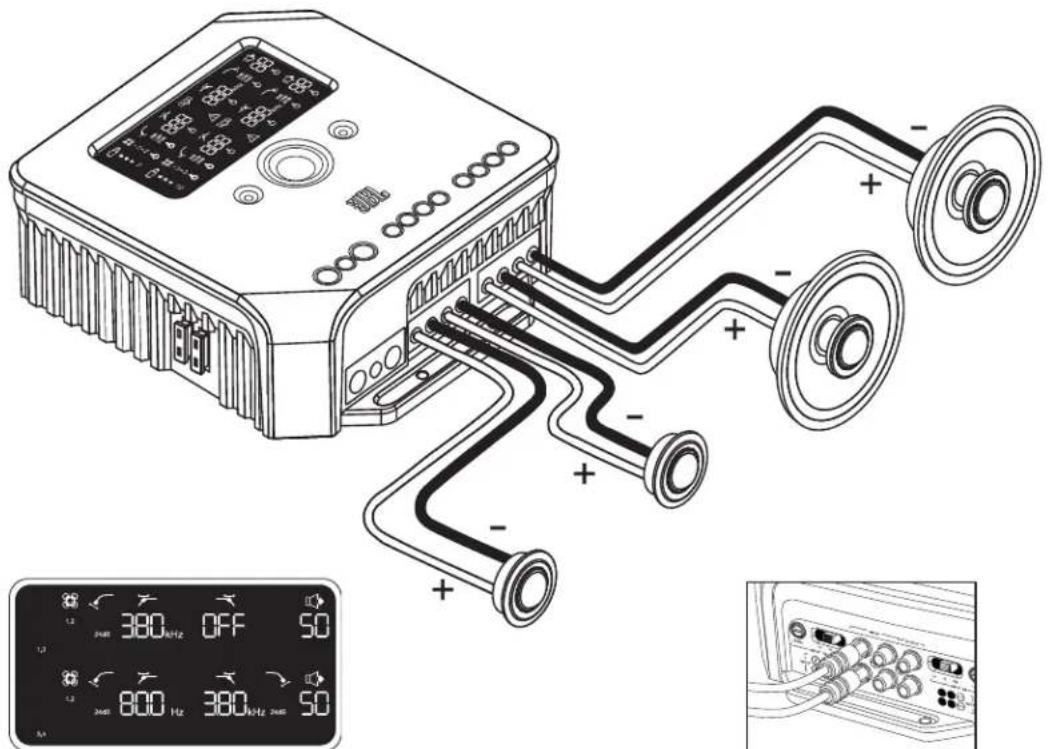
PnmeHacpckfBtpaBxDhBx CnHaIOB Dn DaHHoKoHpypaun
BxOHNbE CnHnHaHa KaHnax 1 n2
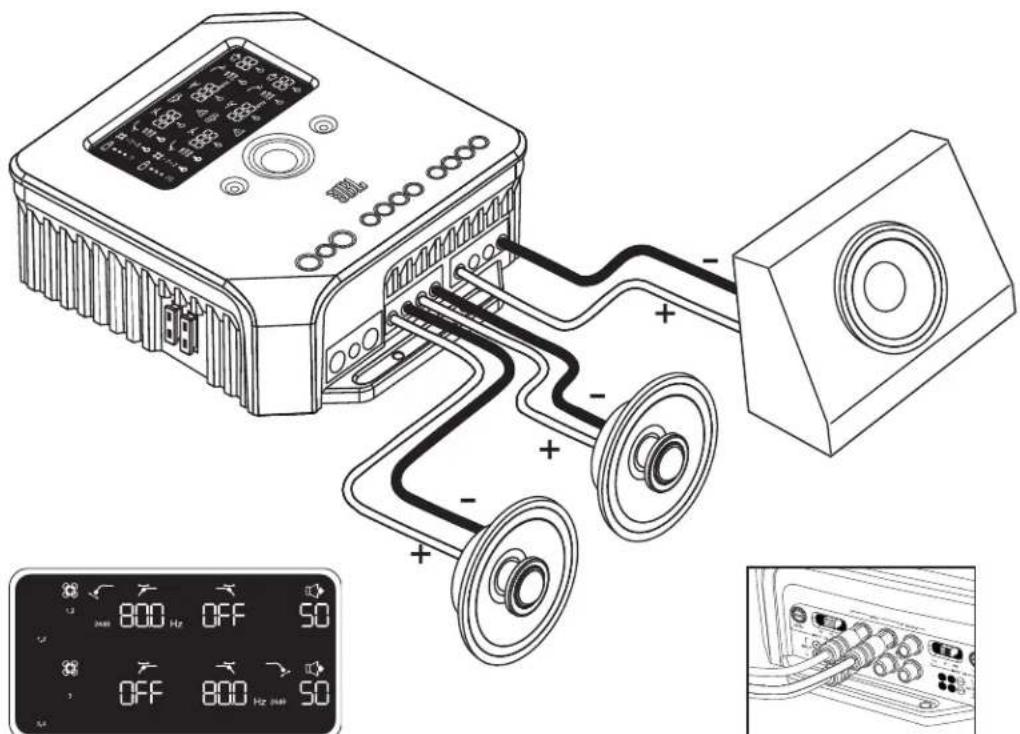
PnIMepHacptpoekfBbtpaBxOaDbx CnHaIOB Dn DaHHO KOHOpyaUIN
Bxodnble cinnahha kahanax1,2n3
TEXHUNECKNEXAPAKTEPNCTIKN
HOMHHaJIbHaH BIXOXINHaH MOUHOCTb-14,4B
(CEA-2006A)
4×75Bπp4Ω
4×75Brnp40
4×75Bπp4Ω
-2x260B7 npn 4 MoCTOBbIX CoeHHeHNX*
*IINONB3OBAHN B NOPJKE MOCTOBORO COEINHENI NCNONb3yIe KAHAN 1 (+) IN KAHAN 2 (-); IN KAHAN 3 (+) IN KAHAN 4 (-).


© 2010 HARMAN International Industries, Incorporated. Bce npaba 3aunueneb. JBL ABnTeTc TropBoo MapKoHARMAN International Industries, Incorporated, zapernctppoBaHHoB CoeHNHeHHbx Ltatax AmePKn N/nn Dpynx cTpaHax. CyHKmN, TexHnueckne XapaTepnTKn N BHeuHn BnM MoryT n3MeHARbC6e3 YBCOMnHnA.
HARMAN
HARMAN Consumer Inc.
8500 Balboa Boulevard
Northridge, CA 91329 USA
www.jbl.com
jbl MS-A1004
Wzmacniacz cyfrowy

PODREÇNIK UZYTKOWNIKA

FUNKCJE WZMACNIACZA MS-A1004
HARMAN Consumer Inc.
8500 Balboa Boulevard
Northridge, CA 91329 USA
www.jbl.com
jb1 MS-A1004
Förstärkare med digital signalbehanding
MS-A1004 EGENSKAPER
LAS DETTA INNAN INSTALLATIONEN PABORJASI!
HARMAN Consumer Inc.
8500 Balboa Boulevard
Northridge, CA 91329 USA
www.jbl.com
jbl MS-A1004
Dijital sinyal isleme anfisi

KULLANIM KILAVUZU
MS-A1004 ÖZELLIKLERI
HARMAN Consumer Inc.
8500 Balboa Boulevard
Northridge, CA 91329 USA
www.jbl.com
jbl MS-A1004
デジタル信号处理アング

一
MS-A1004の特徴
1大力レルコトロ一ルマミ
- 7.157.157.157.157.157.157.157.157.157.157.157.157.157.157.157.157.157.157.157.157.157.157.157.157.157.1
PAPLANG#F#A#E#F#A#E#F#A#E#F#A#E#F#A#E#F#A#E#F#A#E#F#A#E#F#A#E#F#A#E#F#A#E#F#A#E#F#A#E#F#A#E#F#A#E#F#A#E#F#A#E#F#
HARMAN Consumer Inc.
8500 Balboa Boulevard
Northridge, CA 91329 USA
www.jbl.com
jbl MS-A1004
数字信号处理放大器

用户指南
MS-A1004功能
输入电平控制器
HARMAN Consumer Inc.
8500 Balboa Boulevard
Northridge, CA 91329 USA
www.jbl.com
jb1 MS-A1004
數位訊號處理揚聲器
MS-A1004特色
输入零平控制器
HARMAN Consumer Inc.
8500 Balboa Boulevard
Northridge, CA 91329 USA
www.jbl.com