
SURGES - Keyboard BEHRINGER - Free user manual and instructions
Find the device manual for free SURGES BEHRINGER in PDF.


| Product Type | Eurorack Modular Filter |
| Brand | Behringer |
| Model | SURGES |
| Category | Eurorack Filter Module |
| Power Supply | Eurorack Bus (+12V / -12V) |
| Main Functions | Low-pass, high-pass, band-pass filters with 12/24 dB/octave slope, self-oscillating resonance, V/octave tracking |
| Controls | Frequency, Resonance, Slope, Input 1 Gain, Frequency CV Attenuator (with inversion) |
| Audio Inputs | 2 x 3.5 mm TS jacks (IN1, IN2) with signal LED |
| CV Inputs | FREQ CV IN, RESO CV IN, V/OCT (3.5 mm TS jacks, range -8V to +8V, V/OCT: -3V to +7V) |
| Audio Outputs | 3 x 3.5 mm TS jacks: LOW PASS OUT, HIGH PASS OUT, BAND PASS OUT |
| CV Output | LOW PASS LEVEL (3.5 mm TS jack, low-pass level control via CV) |
| Calibration | Internal trimmer for V/octave calibration (access via cover) |
| Safety | Read and follow instructions, avoid water, do not block openings, keep away from heat sources, operating temperature 5-45°C |
| Maintenance | Clean with a dry cloth only |
| Usage | Module designed for Eurorack systems, mounts on standard rails |
| Warranty | Limited Music Tribe warranty – see community.musictribe.com |
| Included Accessories | Eurorack power cable, mounting screws |
| Signal LED | Present on IN1 and IN2 inputs |
Frequently Asked Questions - SURGES BEHRINGER
User questions about SURGES BEHRINGER
0 question about this device. Answer the ones you know or ask your own.
Ask a new question about this device
Download the instructions for your Keyboard in PDF format for free! Find your manual SURGES - BEHRINGER and take your electronic device back in hand. On this page are published all the documents necessary for the use of your device. SURGES by BEHRINGER.
USER MANUAL SURGES BEHRINGER
SURGES
"Liquid" Multi-Mode Filter for Eurorack
EN Safety Instruction
- Please read and follow all instructions.
- Keep the apparatus away from water, except for outdoor products.
- Clean only with a dry cloth.
- Do not block any ventilation openings. Install in accordance with the manufacturer's instructions.
- Do not install near any heat sources such as radiators, heat registers, stoves or other apparatus (including amplifiers) that produce heat.
- Use only attachments/accessories specified by the manufacturer.
- Use only specified carts, stands, tripods, brackets, or tables. Use caution to prevent tip-over when moving the cart/ apparatus combination.
- Avoid installing in confined spaces like bookcases.
- Do not place near naked lame sources, such as lighted candles.
- Operating temperature range 5° to 45°C (41° to 113°F).
LEGAL DISCLAIMER
Music Tribe accepts no liability for any loss which may be suffered by any person who relies either wholly or in part upon any description, photograph, or statement contained herein. Technical specifications, appearances and other information are subject to change without notice. All trademarks are the property of their respective owners. Midas, Klark Teknik, Lab Gruppen, Lake, Tannoy, Turbosound, TC Electronic, TC Helicon, Behringer, Bugera Aston Microphones and Coolaudio are trademarks or registered trademarks of Music Tribe Global Brands Ltd. © Music Tribe Global Brands Ltd. 2024 All rights reserved
LIMITED WARRANTY
For the applicable warranty terms and conditions and additional information regarding Music Tribe's Limited Warranty, please see complete details online at community.musictribe.com/pages/support#warranty.
BESCHRÄNKTE GARANTIE
- FREQ – use this control to set the SURGES cutoff frequency.
- SLOPE – use this switch to set the cutoff slope for the low pass and band pass filters; up for 24 dB/octave, down for 12 dB/octave.
-
RESO – use this control to set the resonance level, emphasizing a band of frequencies around the cutoff point. At extreme settings the SURGES will self-oscillate.
-
INPUT 1 GAIN – use this control to set the gain for input one. Higher settings will cause the signal to be over-driven.
-
FREQ CV ATTENUVERTER – use this control to set the level, and to invert if required, the frequency control CV.
-
IN 1 – use this 3.5 mm TS jack socket to input an audio signal with adjustable level/overdrive from control 4. The LED above will light when a signal is present and grow brighter as the gain is increased.
-
FREQ CV IN – use this 3.5 mm TS jack socket to control the SURGES' cutoff frequency from an external CV source, via the attenuverter 5. Range is -8 V to +8 V.
-
RESO CV IN – use this 3.5 mm TS jack socket to control the SURGES' resonance level from an external CV source. Range is -8 V to +8 V.
-
V/OCT CALIBRATION – if the volt/octave tracking needs to be calibrated remove this cover and use a suitable screwdriver to adjust the trimmer below. Please note that this should only be carried out by competent personnel. See CALIBRATION below.
SURGES Controls
- IN 2 – use this 3.5 mm TS jack socket to input a second, clean, signal into the SURGES. The LED above will light if a signal is present. Both inputs can be used simultaneously.
- V/OCT – use this 3.5 mm TS jack socket to track the cutoff frequency at 1 volt/octave. Range is -3 V to +7 V.
- LOW PASS LEVEL – use this 3.5 mm TS jack to socket control the level of the low pass output from an external CV source. Range is 0 V (no output) through +5 V (unity) up to +7 V (compressed). If no external voltage is used then +7 V is applied internally.
- HIGH PASS OUT – use this 3.5 mm TS jack socket to access the high pass filter output.
- BAND PASS OUT – use this 3.5 mm TS jack socket to access the band pass filter output.
- LOW PASS OUT – use this 3.5 mm TS jack socket to access the low pass filter output.
All outputs can be used simultaneously.
CALIBRATION
- Disconnect all external CV controls, except a suitable calibrated 1 volt/octave keyboard connected to the v/oct input (11).
- Set the Freq control (1) to around its midway point, and the Reso control (3) to maximum.
- Either by ear, or using a tuner, adjust the trimmer (9) until playing notes one octave apart produces a correctly tuned octave output on the low pass output (15).
Power Connection
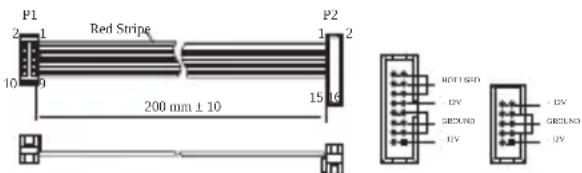
Connect end P1 to the module socket Connect end P2 to the power supply
The module comes with the required power cable for connecting to a standard Eurorack power supply system. Follow these steps to connect power to the module. It is easier to make these connections before the module has been mounted into a rack case.
- Turn the power supply or rack case power off and disconnect the power cable.
-
Insert the 16-pin connector on the power cable into the socket on the power supply or rack case. The connector has a tab that will align with the gap in the socket, so it cannot be inserted incorrectly. If the power supply does not have a keyed socket, be sure to orient pin 1 (-12 V) with the red stripe on the cable.
-
Insert the 10-pin connector into the socket on the back of the module. The connector has a tab that will align with the socket for correct orientation.
- After both ends of the power cable have been securely attached, you may mount the module in a case and turn on the power supply.
Installation
The necessary screws are included with the module for mounting in a Eurorack case. Connect the power cable before mounting.
Depending on the rack case, there may be a series of fixed holes spaced 2 HP apart along the length of the case, or a track that allows individual threaded plates to slide along the length of the case. The free-moving threaded plates allow precise positioning of the module, but each plate should be positioned in the approximate relation to the mounting holes in your module before attaching the screws.
Hold the module against the Eurorack rails so that each of the mounting holes are aligned with a threaded rail or threaded plate. Attach the screws part way to start, which will allow small adjustments to the positioning while you get them all aligned. After the final position has been established, tighten the screws down.
SURGES Controles

ES Controles
(DE) Bedienelemente
IT Controlli
Connect end P1 to the module socket Connect end P2 to the power supply

IT
SE Kontroller
Connect end P1 to the module socket Connect end P2 to the power supply
| Audio Input 1 | 3.5 mm TS jack, impedance 100 kΩ | Power supply Eurorack | |
| 35 mA on both +12 V and -12 V rails | |||
| Audio Input 2 | 3.5 mm TS jack, impedance 100 kΩ | Current draw | |
| Frequency CV | 3.5 mm TS jack, range -8 V to +8 V | Operating Temperature | 5°C - 45°C (41°F - 113°F) |
| Resonance CV | 3.5 mm TS jack, range -8 V to +8 V | Dimensions (H x W x D) | 129 x 40 x 41 mm (5.06 x 1.59 x 1.62") |
| Volt/octave | 3.5 mm TS jack, range -3 V to +7 V | Rack units 8 HP | |
| LPF output level | 3.5 mm TS jack range 0 V to +7 V | Weight 0.19 lb | |
| High Pass Filter | 3.5 mm TS jack, impedance 1 kΩ | ||
| Band Pass Filter | 3.5 mm TS jack, impedance 1 kΩ | ||
| Low Pass Filter | 3.5 mm TS jack, impedance 1 kΩ | ||
| Frequency | |||
| Resonance | |||
| Controls | Frequency CV Attenuverter | ||
| Input 1 Gain | |||
| Switches Filter Slope | |||
技术参数
Responsible Party Name: Music Tribe Commercial NV Inc.
Address:
122 E. 42nd St.1,
8th Floor NY, NY 10168, United States
Email Address: legal@musictribe.com
SURGES
This equipment has been tested and found to comply with the limits for a Class B digital device, pursuant to part 15 of the FCC Rules. These limits are designed to provide reasonable protection against harmful interference in a residential installation. This equipment generates, uses and can radiate radio frequency energy and, if not installed and used in accordance with the instructions, may cause harmful interference to radio communications. However, there is no guarantee that interference will not occur in a particular installation. If this equipment does cause harmful interference to radio or television reception, which can be determined by turning the equipment off and on, the user is encouraged to try to correct the interference by one or more of the following measures:
- Reorient or relocate the receiving antenna.
- Increase the separation between the equipment and receiver.
- Connect the equipment into an outlet on a circuit different from that to which the receiver is connected.
- Consult the dealer or an experienced radio/TV technician for help.
This equipment complies with Part 15 of the FCC rules. Operation is subject to the following two conditions:
(1) this device may not cause harmful interference, and (2) this device must accept any interference received, including interference that may cause undesired operation.
Important information:
Changes or modifications to the equipment not expressly approved by Music Tribe can void the user's authority to use the equipment.
CE
Hereby, Music Tribe declares that this product is in compliance with Directive 2014/30/EU, Directive 2011/65/EU and Amendment 2015/863/EU, Directive 2012/19/EU, Regulation 519/2012 REACH SVHC and Directive 1907/2006/EC.
Full text of EU DoC is available at https://community.musictribe.com/
EU Representative: Music Tribe Brands DK A/S Address: Gammel Strand 44, DK-1202 København K, Denmark
UK Representative: Music Tribe Brands UK Ltd. Address: 8th Floor, 20 Farringdon Street London EC4A 4AB, United Kingdom
Correct disposal of this product: This symbol indicates that this product must not be disposed of with household waste, according to the WEEE Directive (2012/19/EU) and your national law. This product should be taken to a collection center licensed for the recycling of waste electrical and electronic equipment (EEE). The mishandling of this type of waste could have a possible negative impact on the environment and human health due to potentially hazardous substances that are generally associated with EEE. At the same time, your cooperation in the correct disposal of this product will contribute to the efficient use of natural resources. For more information about where you can take your waste equipment for recycling, please contact your local city office, or your household waste collection service.
We Hear You
Brand : BEHRINGER
Model : SURGES
Category : Keyboard