
MS-1 MK II - Keyboard BEHRINGER - Free user manual and instructions
Find the device manual for free MS-1 MK II BEHRINGER in PDF.


| Product Type | Analog synthesizer with sequencer |
| Brand | Behringer |
| Model | MS-1 MK II |
| Category | Synthesizer keyboard |
| Number of keys | 32 full-size semi-weighted keys |
| Keyboard type | Semi-weighted, velocity sensitive |
| Power supply | External mains adapter (100-240 V, 50/60 Hz) |
| MIDI connectivity | MIDI In, Out, Thru (5-pin DIN), USB MIDI (type B) |
| Additional inputs/outputs | Line out (6.35mm jack), Headphone out, External audio in, CV/Gate in, CV/Gate out, Velocity out, Sync in, Hold (pedal) |
| Synthesis | Analog: VCO (saw, pulse, triangle), sub-oscillator, noise generator, VCF (resonant), VCA, ADSR envelope |
| Modulation | LFO with waveforms (triangle, square, sawtooth, random), VCO modulation, VCF modulation, pulse width |
| Built-in sequencer | 64 patterns, 8 banks of 8, up to 32 steps per pattern, step and keyboard modes |
| Arpeggiator | 8 modes (up, down, up/down, random, etc.) |
| Built-in effects | Glide, accent, swing, ratchet, tie |
| Handle | Included handle with pitch bend and modulation controls |
| Dimensions | Approximately 500 x 300 x 80 mm (estimated) |
| Weight | Approximately 4 kg (estimated) |
| Safety instructions | Do not expose to moisture, use only the supplied adapter, unplug before cleaning |
| Maintenance | Clean with a soft, dry cloth. Do not use solvents. |
| Repairability | No user-serviceable parts. Refer to qualified technician. |
| Warranty | Limited warranty, conditions available on Behringer website |
| Firmware update | Via SynthTribe app (USB connection) |
Frequently Asked Questions - MS-1 MK II BEHRINGER
User questions about MS-1 MK II BEHRINGER
0 question about this device. Answer the ones you know or ask your own.
Ask a new question about this device
Download the instructions for your Keyboard in PDF format for free! Find your manual MS-1 MK II - BEHRINGER and take your electronic device back in hand. On this page are published all the documents necessary for the use of your device. MS-1 MK II by BEHRINGER.
USER MANUAL MS-1 MK II BEHRINGER
Analog Synthesizer with 32 Full-Size Keys, 3340 VCO with 4 Simultaneous Waveforms, VCF, NovaMod FM Sources, 32-Step Sequencer, Arpeggiator and Live Performance Kit
2NIMKIIQckStnGae3
EN
EN Important Safety Instructions

ES
Termsta maried with this symbol carry electrical current of full cert. magnitude in comrable risk of fire. tris chile. the only high quality professional speaker cables with ^bT or notch-locking plugs are installed, all other installation or motif cathn is performed only by quality personnel.
This symbol, otherwise it appears, asks you to the presence of unattained dangerous voltage inside the enclosure - voltage that may be sufficient to constitute a risk of shock.
This symbol, wherever it appears, always you important operating and maintenance instructions in the accompanying literature. Please read the manual.
Caution To reduce the risk of electro shock, do not remove the top cover [or the wear section]. No user steatable parts inside. Refer to Serviing to quality of personnel.
Caution To reduce the risk of fire or an electric shock, do not expose this appliance to rain and moisture. The apparatus shall not be exposed to dropping or splashing injuries and no objects will be fired with liquids, such as syringes, shall be placed on the apparatus.
Caution These service instructions are for use by qualified service personnel only. To reduce the risk of electric shock do not perform any sending other than that contained in the operation instructions. Repairs have to be performed by qualified service personnel.
Warning Please refer to the information on the category of abortion endocrine for additional safety information before installing an operating the device.
-
Please read and follow all instructions and warnings. 2. Keep the sporesthus away from water (except for outdoor products).
-
Clean only with dry cloth.
- Do not stock/ventilate openings. Do not install in a confined space. Install only according to manufacturer's instructions.
-
Protect the power cord from damage, particularly at places and appliances socket.
-
Do not install any heat sources such as radiators, heat registers, towers or other apparatus including amplifier or fan that produce heat.
-
Do not defeat the safety purpose of the polished or grounding-type plug. A polished plug has two blades, with one wire rather than the other only for USA and Canada. A grounding-type plug has two blades and a third grounding plug. The wide blade on the third plug are provided for your safety. If the provided plug does not fit into your outlet, consult an electrician for replacement of the obwets outlet.
-
Use only attachments and accessories recommended by the manufacturer.

- Use only specified cars, trucks, trucks, buses, etc. Care caution to prevent top cover when moving the car? apparatus combination. 10. Unpiping during storms, or if not in use for
along period.
11. Any use of personnel for providing, especially after damage.
12. The apparatus with protective earthing terminal shall be connected to a MARS socket outlet with a protective earthing connection.
13. Where the MIRES plug an amplifier taught is used as the disconnect device, the disconnect device that remain mostly operable.
14. Stand installing in conduit net spaces like backstores.
15. Do not place rated flue source sources, such as lighted candles, on the apparatus.
16. Opening temperature range 5^ to 45^ (4^) to 113^ .
LEGAL DISCLAIMER
Music Tribe accepts no liability for loss which may be suffered by any person who relies either wholly or in part upon any description, photograph, or statement contained herein. Technical specifications, appearances, and other information are subject to change without notice. All trademarks are the property of their respective owners. Midas, Kark Teknik, Lab Gruppen, Licai, Tanor, Turbundau, TC Electronic, TC Helkon, Behiniger, Bongae, Axler Virumphanes and Ceduallan are trademarks or registered trademarks of Music Global Brand Goods Ltd. © Music Tribe Global Brands Ltd., 2024 All rights reserved.
LIMITED WARRANTY
For the applicable warranty terms and conditions and additional information regarding Black Tiger's Limited Warranty, please see complete details online at community.wustitec.com/support.
La teminales marcales con estimato transporto comnente eletronie del movatorio sul ciezo ora para comaritir un esigo de descarga eletrica. Utilize solo calores de alfoe prelaxiones y atte la calidad en
BESCHRANKTE GARANTIE
m = 311 ;
C.
■风险提示
ATP合成酶
AT BISQUEC
A
In both the United States and Canada, the most widely used work-related disability pension plan is 50-135 years, last unutilized and personal life ovee instants-of-frederiksen uiten.
A
engaging geotaxis learning: learning, pursuing the wonders of kina
iter quorum can create anisotropic shock best given the inhomogeneous endodont.
m personnel of women.
A
shikhen in hengxin, dirnule.
7.Hefbetweihlghdgoan de pcoonrarege of
geane stelher net up, en gepantende stelher heft
towe pennen wosran fien bredner is dan de andere jilfen ene 10000000000000000000000000000000000000000000000000000
Bnckcn on her vrohodoe sospont. teverangn.
aparatite:appetite at the ontopharyngoscope and would be a good host for small children who are not ready to
g. a. in, in, in, in, in, in, in, in, in, in, in, in, in, in, in, in, in, in, in, in, in, in, in, in, in, in, in, in, in, in, in, in, in, in, in, in, in, in, in, in, in, in, in, in, in, in, in, in, in, in, in badenbar silver.
-
Vamid installab in 50000 points 2015
-
Plate number of shipments, with breakdown
tive of wellbeing hieric Technische specificities
Tarny, Turbocound, TC Electronic, TCHekran
Bhringer, Bugera, Anton Macrophanes en Coaulain
2 Inhandsmenion of gesaponender handsmenion van Muis Tibia Globali Banda, Ltd. 2Muis Tibia Globali
Voor de tepeasseltig garantievoerwaarden en
amnificd: informatics metecereceiving to dc secection of the system. The system is a web-based tool for all users, community musictive support.
Viktiga
sakerhetsanvisningar
A
CA
R SK OF 50
50
ATR SQUEE
A
Utgmm
eotks
stars for artungbentaen risk forchck.
hi hich hich hich hich hich hich hich hich hich hich hich hich hich hich hich hich hich hich hich hich hich hich hich hich hich hich hich hich hich hich hich hich hich hich hich hich hich hich hich hich hich hich hich hich hich hich hich hich hich hich h.
kontaktor. All annan instalitering erer modifkation bbr
endustfions an competent personal.
A
Denmssyn
varnfor
spanning inad hijet - spanning sum ker
varitrackingforattugarenrskforstot
Den hir sybienen hisnur illitga
punkter am zinslting och undehinde
Vzckinon his hukawespon
A
Forn
Mnks
actaingtaawhojoctupptlplapparen
eetnrsnnrnnnne nnnnne
personal needs or preferences
A
Forn
- Hillappanents bota Iran written [i]en for
ubnnnusprounter.
-
Bengtendast meden tortrasa
-
Blockera integntiervnltionsoppingama. Inetalera inte
Ittingaitymen. ins
- Skydria natabein frn skder, sinnitvd konatke
achapparablanikten
e (m) for indred hyl tihd on tind
instruments , Dharma Model offers the following :
ll for n skeh, cnd mndEiande inite
passaridrtttag,ontaktaeneleekorferforattbyut
detfdnncnntagct.
8.Awandendasttilberothtilberorsm
recommenderasvilverbaren.
T
apparatombinationen
awards under lingred.
- Anand endast kvalif cead personal for service.
sinhithershat.
awards sum bankruptcy and/or clearing maste
F
the way system can go to dial for a description
(一)审议程序和表决情况
pki
A
Uwaga
Praee swnwse moag by wykponyine
edymie prn rukmalih tounmey parnel.
gca zgrzobla goraizbna prdennie nae
aehn mnnn nne nee
- 500 mm² clouty, midden wavy cloth gasket
- polyurethane wavy cloth tinsy personal technician.
IT
NI
SE
D
m = 311 ;
8M
- KEYBOARD - the keyboard has 32 semilight-weighted, full-size keys.
- TUNE - adjust the frequency of the main VCG of the synthesizer.
- POWER - turn the synthesizer on or off.
Make sure all the connections are made before turning on the unit. The LED shows when power is applied and the unit is turned on.
Modulator Section
-
LFO/CLK RATE - adjust the frequency of the modulation LFO. The LED binks at the current rate.
-
LFO Rate - select the frequency range of the LFO rate fader from Low, Medium, or High.
-
WAVEFORM - select the waveform from triangular, square wave, random, or noise. Random waveform is coded by external sync in [45].
VCO Section
-
MOD DEPTH - adjust the level of modulation of the VCO.
-
RANGE - select the overall frequency range [artical] of the VCI from 1e, 8e, 4e, and 2e.
- PULSEWIDTH - adjust the pulse width of the VCO when the pulse modulation source switch is set to Manual. For LTO and EPV, it adjusts the effect of the modulation.
- PULSE WIDTH MODULATION SOURCE: select from LFO triangular waveform, Manual, or Envelope.
Source Mixer Section
- PULSE - adjust the level of the pulse waveform.
SAIBW VAVE - adjust the level of the swattox waveform. - TRIANGULAR - adjust the level of the triangular waveguide.
- SUB OSCILLATOR - adjust the level of the sub oscillator.
- SUB DSC TYPE - select the type of sub oscillator, from 1 octave down, 2 octave down, or a narrower pulse width at 2 octave down.
- NOISE -adjust the level of noise.
- EXT AUDIO - adjust the level of Incoming audio from an external source.
Sequencer Section
SEQUENCES - see details on page 16 and 36.
VCE Section
- FREQ - adjust the cutoff frequency of the VGT. Frequencies above the cutoff are attenuated.
- RES - adjusts the amount of volume level boost (resonance) given at the cut-off frequency.
- ENV - adjust the amount of effect the envelope has on the VJ.
- MOD adjust the amount of effect the modulation has on the KF.
- KYBD - adjust the amount of effect the keyboard has on the VCF.
- FM SOURCE - select the source of FM modulation on the VCF from: pulse, sawtooth, 1 octave down square wave, 2 octaves down square wave, 2 octaves down pulse, and noise.
- FM AOUNT - adjust the effect of FM modulation on the VCI.
VCA Section
- ENVI/GATE - select if the VCA is affected by the envelope controls, or by gate.
Envelope Section
When applied to the VCA, the A4DS envelope is used to control the levels of the note being played over time. When applied to the VCA, the A4DS envelope is used to control the cut-off frequency of the filter for each note played over time. In addition, the A4DS envelope can also affect the VCD pulse width modulation.
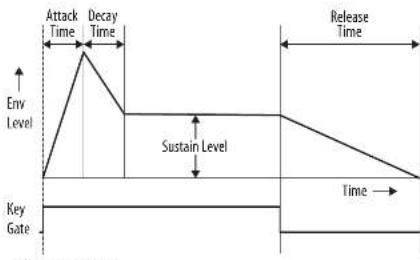
Note that the ATTACK, DECAY and RELEASE stages are measured in units of time, and the SUSTAIN stage is measured in units of level.
26. GATE + TBI - a new envelope is triggered at each key press.
GATE - when a new node is pressed, a new serogel is litigated after the current one is done
LFO the envelope is triggered by the LFO.
27. A-ATTACK - This adjusts the time for the level to reach maximum after a key is pressed.
28. D-DECAY - this adjusts the time to decay down to the SUSTAIN level after the attack time is over
29. S-SUSTAIN - this sets the sustain level reached after the attack and decay time are over.
30. R-RELEASE This adjusts the time it takes for the signal to decay once the key is released.
Control Section
-
VOLUME - adjust the volume level of the main output and headphones output. Turn this down before turning the power on, or before putting on headphones.
-
GIDE - adjust the amount of GIDE time (Portfolios) between notes on the keyboard.
-
Glide ON/AUTO-off - use this switch to switch to switch to glide [portamental] on or off. AUTO aids glide to notes programmed to glide in a sequence.
-
TRANSPOSE - adjust the keyboard in one octave steps, from Low, Medium, and High.
-
VCO FADER - adjust the effect of the breeder controls on the VCO.
-
VCI FADER - adjust the effect of the gender controls on the VCI.
-
LFO MOD FADER - adjust the amount of LFO modulation added when the MDP switch on the grip is pressed, or the BEROKH is moved up.
-
BENDER move left or right to adjust the frequency of the VCO and/or the cut off frequency of the VCT. The level of the effect depends on the setting of the nearby VCO and VCF faders. Move it up to add LFO modulation. The modulation effect depends upon the setting of the LFO WCD fader and other FO controls.
Rear Panel
- DC INPUT - connect the supplied DC power adapter here. The power adapter can be plugged into an AC outlet capable of supplying from 100V to 240V at 50Hz / 60Hz . Use only the power adapter supplied.
- MAIN OUTPUT - connect this output to the line-level inputs of mixers, keyboard amplifiers, or powered speakers for example
- PHONES - connect your headphones to this output. Make sure the volume is turned down before putting on headphones.
- EXT AUDIO INPUT - this input can be connected to the line level audio output from an external audio device. Adjust the level using the EXT AUDIO folder in the SOURCE MIBER section.
-
HOLD—an optional footswitch can be connected here, to hold or release any pattern playing in the Sequencer, and in normal performance.
-
VCF CV INPUT - the VCF can be controlled by an external control voltage connected here.
- SYNC INPUT - an external clock signal can be applied here.
- CV/GATE INPUT - these inputs allow the connection of control voltage and gate signals from compatible external devices such as modular synthesizer equipment.
- CV/GATE OUTPUT - these outputs allow the connection of control gate voltage and gate signals to compatible external devices such as modular synthesizer equipment.
- VELOCITY OUT - outputs a variable control voltage based on the key velocity.
lacks allow connections to other MII equipment in your system. 36. STRAP POINT 1 - connect one end of the supplied strap here.
MIDI IN - receives MIDI data from an external source. This will commonly be another MIDI keyboard, an external hardware sequencer a computer equipped with a MIDI interface, etc.
MIDI THRU - passes through MIDI data received at the MIDI input.
MIDI OUT sends MID data to an application - USB PORT - This USB type B jack allows connection to a computer. The MS-1 will show up as a class-compliant USB MID device, capable of supporting MID in and out.
USB MIDIM - accepts incoming MIDl data from an application.
USB MIDI OUT - sends MIDI data to an application. - GRIP/MOD - the connector of the live performance graph attaches her
- BENDER - adjusts the frequency of the VCO and/or the out-off frequency of the VCF. The level of the effect depends on the setting of the VCO and WCF Bender factors. This control only increases the frequency. The main unit bender can also be used at the same time.
- MOD - press and hold to add IFO manipulation.
The level of effect depends upon the setting of the IFO modal factor, and the other IFO controls.
54 CONNECTOR - fit into the GRIP and 3000 connectors in the main unit rear panel. - MOUNTING HOLES - fit the supplied screws in these holes to secure the handle to the left side of the main unit.
- STRAP POINT 1 - connect one end of the supplied strap here.
57 STRAP POINT 2 - secure this to the right side of the main unit with the suppplied servers. - STRAP - the supplied strap attaches to the 2 strap points.
Live Performance Kit
MS-1 MK II Controls
Sequencer Section
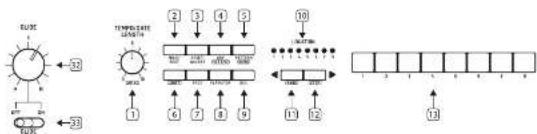
- TEMPO/GATE LENGTH - this knob controls the sequence and ARP tempo when using the internal clock source. During USE or MID clock use, it also controls the value of clock divisor. During step editing, it controls the gate length. IF SHIFT is held and the sequence played, then it also adjusts the setting. IF SHIFT is held and ARP played, then it also adjusts the MIP gate length.
- HOLD/REST - during keyboard play, this allows you to hold the last note played. In sequence, play this allows you to hold the current step. During step editing, it allows you to enter a new Press HOLD and APP to hold an apostrophe. When recording a sequence hold down a key then press the HOLD button to add glide to the step.
- RESET/ACCENT during playbook, this allows you to reset the pattern back to step 1. During step editing, you can add an accent to a step.
- ARP (SET END) in ARP mode, an aegypti will play, based on the held notes on the keyboard. Press it twice, or press HOLD and ARP, to hold the aegypti.
In Sequencer mode, pressing Shift and SET EO together, followed by a STEP switch, will allow that step to become the end of the current pattern. - PATTERN (BANK) - This switch is used to access either the current pattern, or bank number, as follows:
PATTERN: Press PATTERN, and one of the 8 LOCATION LEDs will show the current pattern number (from 1 to 8). To change to a different pattern number, keep the PATTERN switch held down and press any of the STEP switches (1 to 8), or press -CKBD to decrease, or STEP> to increase the pattern number.
BANK: Press SHIFT and PATTERN, and one of the 8.0LOCATION LEDs will show the current bank number (from 1 to 8). To change to a different bank number, keep both SHIFT and BANK held down, and press any of the STEP switches [1] or [8], or press <RBO to decrease, or STEP> to increase the bank number.
6. SHIFT - This is used to access the secondary features of some of the other sequences correctly, such as SET, BND, BANK, SWNG, KBD, and STEP. Hold down SHIFT and the other switch at the same time. For example SHIFT + PATTERN (B4&K) will show the current B4&K number in the LOCATOR LEDs.
7. PAGE - each pattern can be up to 32 steps in length. This switch allows you to show each of the 4 pages of 8 steps each. THE LOCATION LEDs 1 to 4, show which page you are on. If a pattern is paying, the STEP LEDs will show the steps in use on the current page.
8. PLAY/STOP - starts or stops the playback of the pattern. If SH1 is held at the same time, then this is the start of the pattern saving procedure, described below.
9. REc - press this to begin the recording of a new pattern. This is also used with Shift during the pattern saving procedure.
10. LOCATION-threemulti-colored LEDs show various details, such as the current PATTERN number, current BANK number, current PAGE,and GATE LENGTH.
1. KYBD = press SHFI - KYBD to change the sequence to keyocast mode.
12. STEP - press SHIFT + 4 STEP to change the sequencer to STEP mode.
- STEP SWITCHES these multi function switches allow you to view and select individual pattern steps, select a pattern number, select a pattern bank. They are used during recording of a pattern to show the current step. Active steps are illuminated with a steady red LED, and the current step flashes red.
-
- GLIDE - during step editing, this knob can be used to add a Batchf to splitting the current step into 1, 2, 3, or 4 parts. Held down SHIFT and turn the knob to split the current step into the number of parts shown by the LDCOR LEDs (yellow) 1 to 4. The GLIDE switch (33) does not have to be on for the Batchf to work.
MS-1 MK II Getting started
Step3: Getting started
OVERVIEW
This "getting started" guide will help you set up the KS-1 analog synthesizer and briefly introduce its capabilities.
CONNECTION
I connect the MS-1 to your system, please convert the connection guide earlier in this document.
Caution: Do not overkaid the 3.5 mm inputs. They can only accept the correct level of voltages as shown in the specification tables. The 3.5 mm outputs should only be connected to inputs capable of receiving the output voltages. Failure to follow these instructions may damage the VS-1 or external units.
SOFTWARE SETUP
The MS-1 is a USB Class Compliant MBI device, and so no driver installation is required. The MS-1 does not require any additional drivers to work with Windows and MacOS.
HARDWARE SETUP
Make all the connections in your system.
Apply power to the MS-1 using the supplied power adaptor only. Ensure your sound system is turned down. Turn on the MS-1 power switch.
WARM UP TIME
We recommend leaving 15 minutes or more time for the MS-1 to warm up before recording or live performance. (Longer if it has been brought in from the cold.) This will allow the precision analog circuits time to reach their normal operating temperature and tuned performance.
INITIAL SETUP
The following steps will help you get started making sound with the MS-1.
- With the power off, connect a pair of headphones, and turn down the volume knob.
- In the Source River section, turn up the sawtooth ladder and turn down all the others. (If all these ladders are down, then there will be no sources to listen to.)
- In the VSO section, turn up the FIEO fader, if the fader is down, then the cutoff frequency of the low pass filter may be too low.
- In the P6 section, set the switch to Gate. (If it is set to Envelope, then make sure to turn up the D (doc) pad or the S (sustain) pad).
QuickStart Guide
19

- Turn on the HS-1 and play notes on the keyboard as you adjust the volume level to a comfortable listening level.
- If you near no sound, hold SHIFT +
to make sure you are in keyboard mode and not Shift mode. Check the RIF switch ID 0.
SOURCE MIXER SECTION
The MS-1 has three waveforms, a sub oscillator, an internal noise generator, and an external source input. Each of these, and any combination, are used by the MS-1 to generate sound.
The Source Mix factors allow you to adjust the volume of each to create an overall mix.
VCO SECTION
Adjust the Range keys and you will hear the sound of the various octaves.
The MDDFA filler allows the WCI to be modulated by the LFO. Upon the MDD FA, and then adjust the modulator controls such as the Rate filler, and the Waveform selector.
The pulse width fader will adjust the pulse width if the switch is set to MAHUL. Turn up the Pulse fader in the Source Miter section to hear the oscillator. If the switch is set to LF (or enegy) then the pulse width is modulated by the LF and its controls; (or the envelope controls) and the pulse width fader varies the amount of effect.
VCF SECTION
Play with the Frequency fader, and Resonance, and listen to their effect on the sound.
The EDP filter will adjust the amount of effect the ADSR envelope controls have on the VCF.
The MSD factor adjusts the amount of modulation on the VCI. Vary the factor, and adjust the Modulator to I/O rate factors and the waveform.
The KYBD fader adjusts how much the VCF is affected by the pitch of notes played.
Select an FM Source and then turn up the FM. Amount knob to set. Listen to the various FM sources and their effect.
VCA SECTION
The VCA switch allows you to select if the VCA is affected by the envelope controls, or the keyboard gate signal.
MS-1 MK II Getting started
ENVELOPE SECTION
These faders adjust the VCA if the VCA switch is set to 1.
to EVN. In this case, there is no one of the above levels, and its variation with time
These faders also adjust the VCF if the VCF's DW is not adjusted.
factor is above minimum. In this case, their FIS is on the cutoff frequency and its variation with time.
The VCO pulse width can also be affected by the
`````````````````````````````````````````````````````````````````````````````````
CONTROLLERS SECTION
The GIDFck knob or on/off switch allow you to adjust the glide time between different played notes.
In order for the Bender and handle Bender to work, the nearly VCO and/or VCF bender faders have to be above minimum. The main Bender will change the VCO pitch and VCF in both directions,
while the handle Bender wheel will only increase.
Both sides are increased at the same rate.
Note that the pitchbend range for external control over MIDI and USB can be set using the Synth Tribe APP.
Press the MOB switch on the end of the handle, or move the main unit REORDER up, to add LFO modulation. The modulation effect depends upon the setting of the LFO MOB laser and other LFO controls.
ARPEGGIATOR
To use the aegyptiostat, press the AVP switch in the sequencer section:
- Press it once to play the apegqlator.
It stops when notes are released).
- Press it twice, in press IOLD and AHP, in hold position. (It continues when notes are received.)
The aegagglerate rate is set by the TEMPO/GATE LNDG101kmb.
The order in which the apeggator notes are played has 8 options, and this can be changed by pressing either <YBD or STEP> when the apeggator is playing. The LOCATION LED shows the current order! To 8:
1UP15UP21100
2.DOWN16.DOWN2[+10ct]
-
DOWN and UP 7. UP 3[-1 Oct]
-
RANDOM B. DOWN 3 (1 Oct)
ACCENT
If you are playing the keyboard, the accent is automatically triggered when the velocity exceeds the threshold. This accent velocity threshold can be adjusted, or this feature disabled, using the Synth Tool [APP].
To use accent while playing, press the
1.5
1. Press and H5 keys to the left of the screen
2. Press and H3 keys to the right of the screen
3. Release,
2. Press R twice to play and hold the accent status, [The LED flashes slowly].
NOTE PRIORITY
If more than one note is played at the same time, the note which is played (the note priority) depends on the setting of the slide switch in the EVELOPE section:
GATE+TRIG: the Last note is played.
GATE or IFO: the lowest note is played.
SEQUENCES
The sequence allows you to program up to 32 stages of notes and rest, and to save them as patterns. Up to 64 patterns can be recorded, saved, and recalled in 8 banks of 8 patterns.
The sequencer has two modes of operation: KEYBOARD mode, where you can create and store a pattern, and STEP mode, where you can interact while composing a pattern.
Details of the Sequencer operation are shown on page 16 and 36.
FIRMAWARE UPDATE
The Synthiast App is available as a free download from the MS-1 product page of our website: behringer.com.
The latest file can be downloaded and stored on your computer, and then used to update the K5S- if required.
HAVEFUN
The MS-1 has various gate and CV inputs and outputs that allow for further experimentation and expansion to other MS-1 units and modular synthesizer equipment.
With all these controls, the possibilities for musical creativity are endless. We hope that you will enjoy your new WS-1.
MS-1 MK II Sequencer Operation
OVERVIEW
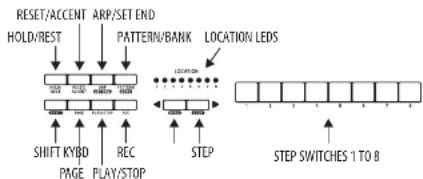
The following details show some of the basic operation of the sequencer. You can create a short pattern of 2 or 3 steps, before trying more complex patterns. Adjust a single parameter at a time, such as gate length, raldelt, accnt, glide, rest, ie, or swing, and then listen to its effect during passback.
It will help to choose a simple setting for the synthesizer, such as only one source, and no modulation of the VCO or VCI.
The length of the step notes can be adjusted using the procedure shown on page 24.
RECORDING A SIMPLE PATTERN 1. Press SHIFT and <XYBO to select the keyboard mode.
2. Initialize the current pattern by pressing SHIFT, REPEAT, and PATTERM at the same time. This will delete any previous steps of the current pattern.
3. Press REC, and the STEP 1 switch LED will begin flashing, indicating this is the current step about to be added and edited. (If you cannot select REC, then repeat step 1).
4. Press any note on the keyboard, or a crest as shown below.
5. To enter a rest instead of a note, press the HOLD/REST switch. When a rest is added, the LOCATOR LED will light.
6. Press further notes. The next STEP switch LEB will be flashing after each note or rest has been added.
7. The gate length of a step can be adjusted using the TEMP/GATE LENGTH control. The LOCATOR LEDs will turn red, showing the gate length from 1 to 8. If set to 8, this creates a line with the next step. If the next step is the same note, this creates a longer note, as the 2 steps are tied.
- To create a "Ratchet", hold SHIFT, and turn the GUILE control. The locator LEDs will show the number of ratchets from 1 to 4, in yellow. For example, with a setting of 6, the single step is split into 4 equal parts. When a ratchet is applied, the LOCATION-LED 6 will light.
- To turn the GUI on for a step, turn up the GUI control. To turn off, turn all the way down. When GUI is on for a step, the LOCATION LED 5 will light.
- To increase the brightness or accent, press the RESET/ACCEIT switch. When an accent is applied, the LOCATION/LCD 7 will light.
- Press RBC when you have finished creating the pattern. It is not saved yet, but it can be played back. Caution: Do not turn off the unit, or create a new pattern, or the current unsaved pattern will be lost.
PLAYING A PATTERN
- Press Play/STOP to listen to the current pattern.
- If you decide not to save it, you can repeat the recording steps above to record a new pattern. Alternatively, press PATTERN and RESET to recall the currently saved pattern, and discard any changes.
- If you decide to save the pattern, you must follow the "SAVING A PATTERN" procedure shown below, or it will not remain in memory if a new pattern is begun, or the power is turned off.
- Create a SWIM6 for this pattern, hold SHIFT and adjust the TEMP/GATE LENGTH control. In the center position, no swing is applied, if turned down, only the off-leats will play, and all the way up, only the on-leats will play. The SWIM6 setting for the pattern is saved when the pattern is saved as shown below.
Quick Start Guide

- While playing a pattern.
Press HOLD/REST to hold the current stop. Press RESET/ACCT to return to step 1.
PressShift and any STEP) and you can edit the gate length, rest, accent, ratchet, glide but not note. PressShift and the same STEP again to exit step edit. (If playback is paused, the same operation can edit the note as well.)
Press PAGE to view the pattern page from 1 to 4. Press SHIFT and PAGE to return to automatic page turning.
Press SHIFT and ARP;SET&END and a STEP to change the sequence end step. PLANSSTOP to pause playback. - Press PLAY/STOP.
SAVING A PATTERN
- Press and hold SHIFT + PLAYSTOP for 2 seconds until the LOCATOR LED of the current pattern number begins to flash green slowly.
- Press a STEP switch 1 to 8 to select the new desired pattern number.
- Press Pattern 4 STEP switch 1 to 8 to select the desired bank number.
- Press SHIFT REC to save the pattern and exit the save mode.
MS-1 MK II Sequencer Operation
RECALLING A SAVED PATTERN
- Press and hold PATTERN. The LOCATION LED will show the current pattern number. Use the
switches to move up and down through the patterns 1 to 8, or press a STEP switch 1 to 8. You can also do this while a pattern is playing. - Press and hold SHIFT and PATTERN. The LOCATION ED will show the current bank number. Use the
switches to move up and down through the banks 3 to 8, or press a STEP switch 1 to 8. You can also do this while a pattern is playing. - Press PLAYSTOT to play back the current pattern.
- During playback, the LOCATION LEDs will show the current page of the pattern (1 to 4), and the STEP Switch LEDs will show the steps moving.
LIVE PERFORMANCE
During playback, temporary adjustments can be made as follows. (None of these are used with the pattern).
1. To add ratchet to all steps of the pattern, press SHIFT and adjust the GUIDE control.
2. To add SWIGB prefix SHIFT and adjust the TEMP control.
3. To make the pattern, press SPLIT + HOLD:RESIST.
4. To add an accent to all steps, pressShift+RESET/ACCENT.
5. Use the TRANSPose switch to change the occlusion.
EDITING A PATTERN
- To edit a pattern in Keyboard mode, press REC. The STEP switch LEDs will light.
- Press PAGE to select the pattern page from 1 to 4 to be edited. The green LOCATION 1E0s 3 to 4 will show the current pace.
- Press SHIFT and the STEP switch you want to edit. You can enter a new note, or a rest, and adjust any of the other parameters such as ratchet, glide on/off, and so on.
- Press SHIFT and the next STEP switch to be edited. (The steps will not automatically advance to the next step in line; you can choose which steps to edit now.)
- Press RE to exit the editing mode.
- Press PLAY/STOP to listen to the edited pattern.
- Remember to save the pattern using the "SAVING A PATTERN" procedure above.
CREATING A PATTERN IN STEP MODE
- Press SHIFT and STEP> to select the Sequencer's STEP mode. The flashing location LED will turn from green (Keyboard mode) to yellow (Step mode).
- Initialize the current pattern by pressing SHIFT, RESET, and PATTERN at the same time. This will delete any previous steps of the current pattern. (If you want to use the current pattern instead, then do not initialize.)
- Press PAGE to move to a directed page of your pattern. Then press SET and a SIEP switch to choose the length of the pattern. For example, if you are on page 1 and press SET END -8, then the pattern lengths is 8 steps. If you press PAGE and reach page 4, and press SET END -8, then the pattern will be 32 steps long [4 pages of 8 steps each].
- When the desired SET END is selected, all the STEP switch LEDs up to that step will be on solid red.
- Press SHIFT and any one of the STEP switches at the same time. It will begin to flash, indicating it is the current step about to be edited. You can now add a note, or a rest, or any of the other functions described above in the Keyboard mode, such as Paste, Clide, Access, change gate length and so on.
- Press SHIFT and the current STEP switch to finish editing that step. It will stop flancing.
- Repeat procedure 5 and 6 above, until all your required steps are good.
B. Press PLAY/STOP to play the pattern. - While playing, you can add temporary adjustments as shown in the
LINEPERFORMANCE procedure above.
SAVING A PATTERN IN STEP MODE
- Patterns created in STEP mode are not saved in this mode.
- if you wanted to save it, first switch back to
KEYBOARDmodebypressingSHIFT+KyBD. - Caution: Do not turn off the unit, or create a new pattern, or the current insured pattern will be lost.
- Save the pattern using the "SAVING A PATTERN" procedure shown above for the KEYBOARD mode
QuickStep: Step

MS-1 MK II Parameters Select
CHANGING THE PARAMETERS
The parameters may be changed using the following procedure:
1. Press SHIFT + HOLD;REST + 8 to enter the setting mode. The LOCATION LED 1 will blink yellow.
2. Press
Page 1 allows you to select the MID input channel. 1 to 16.
2.2017年2月29日,公司收到中国证监会核准的《上市公司证券发行管理办法》(证监许可[2017]38号)
Page 3 allows you to select the clock source mode from 1 to 5: INTERNAL / MIDI DIN / MIDI USB / TUG / AUTO. When using AUTO,
the clock priority is:TRIG>NIIDI US8>NIIDI DIN>INTERNAL
Page 4 allows you to select the clock type mode, 1 to 4: (TPPS, 2PPQ, 24PPQN, 48PPQN).
Page 5 allows you to select the clock edge mode, 1 to 2: [Fall / Rise].
- Press STEP switches 1 to 8 to select numeric values from 1 to 8 . The current value is indicated by a green LOCATION LED.
To access values 9 to 16, press SHIFT + STEP switch 1 to 8. The current value is shown by a red LOCATION LED.
Note: if a setting is on the same LED number as the current pageLED, then the LED will flash alternately between the yellow page color and the green or red parameter color. - Press SHIFT + HCL D/RIST + R to exit the setting mode, and save any parameter changes.
- Move parameters can be changed using the Symlhtool App
ADSR Envelope
The stages of the ADSR envelope are shown in this simplified diagram below. The envelope can control the VCA level, the VCF cut-off frequency, and Pulse Width modulation of the VCO.
Key Pressed Key Released
2445-1 10kII Quick Start Guide 25
MIDI SysEx Messages
The following data format is used when creating a SysEx message, and the various items in this SysEx data string are described below:
| Frame start F0 | ManuID 00 20 32 | Device ID aa bbb cc | PRT dd | SPKT ee | Parameter D0 ... Dn-1 | Frame end F7 |
| Item Next Description | ||||||
| 00.20.12 Manufacturer: Sir.DD number: Shenzhen GRRRL | ||||||
| ### Device ID: 00037.22 for MS-1 | ||||||
| #### manufacturer type: PbE, PRT | ||||||
| ######### ##### ######: SPKT is required for some parts. | ||||||
| O...S... | Parameter value. | |||||
| Name Command Range(0,1,2) | J | |
| Set MIC Channel 40:30 12:00 12:00 F to Force value=0.01 | Dr. The value of MIC out channel is 0.00-0.01 - Channel 1-16Default Value: 0.00Dr. The value of MIC in channel 0.00-0.01 - Channel 1-16Default Value: 0.00 | Dr. The value of MIC out channel is 0.00-0.01 - Channel 1-16Default Value: 0.00Dr. The value of MIC in channel 0.00-0.01 - Channel 1-16Default Value: 0.00 |
| Set Security information | Dr. The value of security is 0.00-0.01 - 1-127 a fixed value of security, 0 dynamic validityDefault Value: 0.00Dr. The value of security is 0.00-0.01 - 1-127a fixed value of security, 0 dynamic validityDefault Value: 0.00Dr. The value of security is 0.00-0.01 - 0 Set, 1 Mod, 2 ModDefault Value: 0.00 | Dr. The value of security is 0.00-0.01 - 1-127a fixed value of security, 0 dynamic validityDefault Value: 0.00Dr. The value of security is 0.00-0.01 - 0 Set, 1 Mod, 2 ModDefault Value: 0.00 |
| Set Bit Rate Range | Dr. The value of bit rate range is 0.00-0.05 - Semilines 0-12Default Value: 0.05Dr. The value of bit rate range is 0.00-0.05 - Semilines 0-12Default Value: 0.05 | Dr. The value of bit rate range is 0.00-0.05 - Semilines 0-12Default Value: 0.05 |
| Set MIC Lock | Dr. The value of MIC lock is 0.00 - EnableDefault Value: 0.00 | Dr. The value of MIC lock is 0.00 - EnableDefault Value: 0.00 |
| Set Sequencer Auto Play | Dr. The value of clock source is 5.00-0.01 - 0.001FETD. The value of clock source is 5.00-0.01 - 0.001FETD. The value of clock source is 5.00-0.01 - 0.001FETD. The value of clock source is 5.00-0.01 - 0.001FETD. The value of clock source is 5.00-0.01 - DCLK-FFPCHDCLK-FFPCHDCLK-FFPCHDCLK-FFPCHDCLK-FFPCHDCLK-FFPCHDCLK-FFPCHDCLK-FFPCHDCLK-FFPCHDCLK-FFPCHDCLK-FFPCHDCLK-FFPCHDCLK-FFPCHDCLK-FFPCHDCLK-FFPCHDCLK-FFPCHDCLK-FFPCHDCLK-FFIPCHDCLK-FFIPCHDCLK-FFIPCHDCLK-FFIPCHDCLK-FFIPCHDCLK-FFIPCHDCLK-FFIPCHDCLK-FFIPCHDCLK-FFIPCHDCLK-FFIPCHDCLK-FFIPCHDCLK-FFIPCHDCLK-FFIPCHDCLK-FFIPCHDCLK-FFIPCHDCLK-FFIPCHDCLK-FFIPCHDCLK-FD-FFIPCHDCLK-FD-FFIPCHDCLK-FD-FFIPCHDCLK-FD-FFIPCHDCLK-FD-FFIPCHDCLK-FD-FFIPCHDCLK-FD-FFIPCHDCLK-FD-FFIPCHDCLK-FD-FFIPCHDCLK-FD-FFIPCHDCLK-FD-FFIPCHDCLK-FD-FFIPCHDCLK-FD-FFIP CHDCLK-FD-FFIP CHDCLK-FD-FFIP CHDCLK-FD-FFIP CHDCLK-FD-FFIP CHDCLK-FD-FFIP CHDCLK-FD-FFIP CHDCLK-FD-FFIP CHDCLK-FD-FFIP CHDCLK-FD-FFIP CHDCLK-FD-FFIP CHDCLK-FD-FFIP CHDCLK-FD-FFIP CHDCLK-FDL-FFIP CHDCLK-FDL-FFIP CHDCLK-FDL-FFIP CHDCLK-FDL-FFIP CHDCLK-FDL-FFIP CHDCLK-FDL-FFIP CHDCLK-FDL-FFIP CHDCLK-FDL-FFIP CHDCLK-FDL-FFIP CHDCLK-FDL-FFIP CHDCLK-FDL-FFIP CHDCLK-FDL-FFIP CHDCLK-FDL-FFIPCHDCLK-FDL-FFIP CHDCLK-FDL-FFIP CHDCLK-FDL-FFIP CHDCLK-FDL-FFIP CHDCLK-FDL-FFIP CHDCLK-FDL-FFIP CHDCLK-FDL-FFIP CHDCLK-FDL-FFIP CHDCLK-FDL-FFIP CHDCLK-FDL-FFIP CHDCLK-FDL-FFIP CHDCLK-FDL-FFIP CHDCLK-FDR-FFIP CHDCLK-FDR-FFIP CHDCLK-FDR-FFIP CHDCLK-FDR-FFIP CHDCLK-FDR-FFIP CHDCLK-FDR-FFIP CHDCLK-FDR-FFIP CHDCLK-FDR-FFIP CHDCLK-FDR-FFIP CHDCLK-FDR-FFIP CHDCLK-FDR-FFIP CHDCLK-FDR-FFIP CHDCLK-FDR-FFIPCHDCLK-FDR-FFIP CHDCLK-FDR-FFIP CHDCLK-FDR-FFIP CHDCLK-FDR-FFIP CHDCLK-FDR-FFIP CHDCLK-FDR-FFIP CHDCLK-FDR-FFIP CHDCLK-FDR-FFIP CHDCLK-FDR-FFIP CHDCLK-FDR-FFIP CHDCLK-FDR-FFIP CHDCLK-FDR-FFIP CHDCLK-FDL-FFIP CHDCLK-FDL-FFIP CHDCLK-FDL-FFIP CHDCLK-FDL-FFIP CHDCLK-FDL-FFIP CHDCLK-FDL-FFIP CHDCLK-FDL-FFIP CHDCLK-FDL-FFIP CHDCLK-FDL-FFIP CHDCLK-FDL-FFIP CHDCLK-FDL-FFIP CHDCLK-FDL-FFIP(CHDCLK-FDL-FFIP CHDCLK-FDL-FFIP CHDCLK-FDL-FFIP CHDCLK-FDL-FFIP CHDCLK-FDL-FFIP CHDCLK-FDL-FFIP CHDCLK-FDL-FFIP CHDCLK-FDL-FFIP CHDCLK-FDL-FFIP CHDCLK-FDL-FFIP CHDCLK-FDL-FFIP CHDCLK-FDL-FFIP CHDCLK-F DL-FFIP CHDCLK-FDL-FFIP CHDCLK-FDL-FFIP CHDCLK-FDL-FFIP CHDCLK-FDL-FFIP CHDCLK-FDL-FFIP CHDCLK-FDL-FFIP CHDCLK-FDL-FFIP CHDCLK-FDL-FFIP CHDCLK-FDL-FFIP CHDCLK-FDL-FFIP CHDCLK-FDL-FFIP CHDCLK-FDL-FFIP | Dr. The value of the value is 0.01 - enableDefault Value: 0.01 |
| Set Clock Type | Dr. The value of clock type is 0.00-0.01 - 0.02-0.03 - 0.04-0.05 - 0.06-0.07 - 0.08-0.09 - 0.10-0.11 - 0.12-0.13 - 0.14 - 0.15 - 0.16 - 0.17 - 0.18 - 0.19 - 0.20 - 0.21 - 0.22 - 0.23 - 0.24 - 0.25 - 0.26 - 0.27 - 0.28 - 0.29 - 0.30 - 0.31 - 0.32 - 0.33 - 0.34 - 0.35 - 0.36 - 0.37 - 0.38 - 0.39 - 0.40 - 0.41 - 0.42 - 0.43 - 0.44 - 0.45 - 0.46 - 0.47 - 0.48 - 0.49 - 0.50 - 0.51 - 0.52 - 0.53 - 0.54 - 0.55 - 0.56 - 0.57 - 0.58 - 0.59 - 0.60 - 0.61 - 0.62 - 0.63 - 0.64 - 0.65 - 0.66 - 0.67 - 0.68 - 0.69 - 0.70 - 0.71 - 0.72 - 0.73 - 0.74 - 0.75 - 0.76 - 0.77 - 0.78 - 0.79 - 0.80 - 0.81 - 0.82 - 0.83 - 0.84 - 0.85 - 0.86 - 0.87 - 0.88 - 0.89 - 0.90 - 0.91 - 0.92 - 0.93 - 0.94 - 0.95 - 0.96 - 0.97 - 0.98 - 0.99 - 1.00 - 1.01 - 1.02 - 1.03 - 1.04 - 1.05 - 1.06 - 1.07 - 1.08 - 1.09 - 1.10 - 1.11 - 1.12 - 1.13 - 1.14 - 1.15 - 1.16 - 1.17 - 1.18 - 1.19 - 1.20 - 1.21 - 1.22 - 1.23 - 1.24 - 1.25 - 1.26 - 1.27 - 1.28 - 1.29 - 1.30 - 1.31 - 1.32 - 1.33 - 1.34 - 1.35 - 1.36 - 1.37 - 1.38 - 1.39 - 1.40 - 1.41 - 1.42 - 1.43 - 1.44 - 1.45 - 1.46 - 1.47 - 1.48 - 1.49 - 1.50 - 1.51 - 1.52 - 1.53 - 1.54 - 1.55 - 1.56 - 1.57 - 1.58 - 1.59 - 1.60 - 1.61 - 1.62 - 1.63 - 1.64 - 1.65 - 1.66 - 1.67 - 1.68 - 1.69 - 1.70 - 1.71 - 1.72 - 1.73 - 1.74 - 1.75 - 1.76 - 1.77 - 1.78 - 1.79 - 1.80 - 1.81 - 1.82 - 1.83 - 1.84 - 1.85 - 1.86 - 1.87 - 1.88 - 1.89 - 1.90 - 1.91 - 1.92 - 1.93 - 1.94 - 1.95 - 1.96 - 1.97 - 1.98 - 1.99 - 2.00 - 2.01 - 2.02 - 2.03 - 2.04 - 2.05 - 2.06 - 2.07 - 2.08 - 2.09 - 2.10 - 2.11 - 2.12 - 2.13 - 2.14 - 2.15 - 2.16 - 2.17 - 2.18 - 2.19 - 2.20 - 2.21 - 2.22 - 2.23 - 2.24 - 2.25 - 2.26 - 2.27 - 2.28 - 2.29 - 2.30 - 2.31 - 2.32 - 2.33 - 2.34 - 2.35 - 2.36 - 2.37 - 2.38 - 2.39 - 2.40 - 2.41 - 2.42 - 2.43 - 2.44 - 2.45 - 2.46 - 2.47 - 2.48 - 2.49 - 2.50 - 2.51 - 2.52 - 2.53 - 2.54 - 2.55 - 2.56 - 2.57 - 2.58 - 2.59 - 2.60 - 2.61 - 2.62 - 2.63 - 2.64 - 2.65 - 2.66 - 2.67 - 2.68 - 2.69 - 2.70 - 2.71 - 2.72 - 2.73 - 2.74 - 2.75 - 2.76 - 2.77 - 2.78 - 2.79 - 2.80 - 2.81 - 2.82 - 2.83 - 2.84 - 2.85 - 2.86 - 2.87 - 2.88 - 2.89 - 2.90 - 2.91 - 2.92 - 2.93 - 2.94 - 2.95 - 2.96 - 2.97 - 2.98 - 2.99 - 3.00 - 3.01 - 3.02 - 3.03 - 3.04 - 3.05 - 3.06 - 3.07 - 3.08 - 3.09 - 3.10 - 3.11 - 3.12 - 3.13 - 3.14 - 3.15 - 3.16 - 3.17 - 3.18 - 3.19 - 3.20 - 3.21 - 3.22 - 3.23 - 3.24 - 3.25 - 3.26 - 3.27 - 3.28 - 3.29 - 3.30 - 3.31 - 3.32 - 3.33 - 3.34 - 3.35 - 3.36 - 3.37 - 3.38 - 3.39 - 3.40 - 3.41 - 3.42 - 3.43 - 3.44 - 3.45 - 3.46 - 3.47 - 3.48 - 3.49 - 3.50 - 3.51 - 3.52 - 3.53 - 3.54 - 3.55 - 3.56 - 3.57 - 3.58 - 3.59 - 3.60 - 3.61 - 3.62 - 3.63 - 3.64 - 3.65 - 3.66 - 3.67 - 3.68 - 3.69 - 3.70 - 3.71 - 3.72 - 3.73 - 3.74 - 3.75 - 3.76 - 3.77 - 3.78 - 3.79 - 3.80 - 3.81 - 3.82 - 3.83 - 3.84 - 3.85 - 3.86 - 3.87 - 3.88 - 3.89 - 3.90 - 3.91 - 3.92 - 3.93 - 3.94 - 3.95 - 3.96 - 3.97 - 3.98 - 3.99 - 4.00 - 4.01 - 4.02 - 4.03 - 4.04 - 4.05 - 4.06 - 4.07 - 4.08 - 4.09 - 4.10 - 4.11 - 4.12 - 4.13 - 4.14 - 4.15 - 4.16 - 4.17 - 4.18 - 4.19 - 4.20 - 4.21 - 4.22 - 4.23 - 4.24 - 4.25 - 4.26 - 4.27 - 4.28 - 4.29 - 4.30 - 4.31 - 4.32 - 4.33 - 4.34 - 4.35 - 4.36 - 4.37 - 4.38 - 4.39 - 4.40 - 4.41 - 4.42 - 4.43 - 4.44 - 4.45 - 4.46 - 4.47 - 4.48 - 4.49 - 4.50 - 4.51 - 4.52 - 4.53 - 4.54 - 4.55 - 4.56 - 4.57 - 4.58 - 4.59 - 4.60 - 4.61 - 4.62 - 4.63 - 4.64 - 4.65 - 4.66 - 4.67 - 4.68 - 4.69 - 4.70 - 4.71 - 4.72 - 4.73 - 4.74 - 4.75 - 4.76 - 4.77 - 4.78 - 4.79 - 4.80 - 4.81 - 4.82 - 4.83 - 4.84 - 4.85 - 4.86 - 4.87 - 4.88 - 4.89 - 4.90 - 4.91 - 4.92 - 4.93 - 4.94 - 4.95 - 4.96 - 4.97 - 4.98 - 4.99 - 5.00 - 5.01 - 5.02 - 5.03 - 5.04 - 5.05 - 5.06 - 5.07 - 5.08 - 5.09 - 5.10 - 5.11 - 5.12 - 5.13 - 5.14 - 5.15 - 5.16 - 5.17 - 5.18 - 5.19 - 5.20 - 5.21 - 5.22 - 5.23 - 5.24 - 5.25 - 5.26 - 5.27 - 5.28 - 5.29 - 5.30 - 5.31 - 5.32 - 5.33 - 5.34 - 5.35 - 5.36 - 5.37 - 5.38 - 5.39 - 5.40 - 5.41 - 5.42 - 5.43 - 5.44 - 5.45 - 5.46 - 5.47 - 5.48 - 5.49 - 5.50 - 5.51 - 5.52 - 5.53 - 5.54 - 5.55 - 5.56 - 5.57 - 5.58 - 5.59 - 5.60 - 5.61 - 5.62 - 5.63 - 5.64 - 5.65 - 5.66 - 5.67 - 5.68 - 5.69 - 5.70 - 5.71 - 5.72 - 5.73 - 5.74 - 5.75 - 5.76 - 5.77 - 5.78 - 5.79 - 5.80 - 5.81 - 5.82 - 5.83 - 5.84 - 5.85 - 5.86 - 5.87 - 5.88 - 5.89 - 5.90 - 5.91 - 5.92 - 5.93 - 5.94 - 5.95 - 5.96 - 5.97 - 5.98 - 5.99 - 6.00 - 6.01 - 6.02 - 6.03 - 6.04 - 6.05 - 6.06 - 6.07 - 6.08 - 6.09 - 6.10 - 6.11 - 6.12 - 6.13 - 6.14 - 6.15 - 6.16 - 6.17 - 6.18 - 6.19 - 6.20 - 6.21 - 6.22 - 6.23 - 6.24 - 6.25 - 6.26 - 6.27 - 6.28 - 6.29 - 6.30 - 6.31 - 6.32 - 6.33 - 6.34 - 6.35 - 6.36 - 6.37 - 6.38 - 6.39 - 6.40 - 6.41 - 6.42 - 6.43 - 6.44 - 6.45 - 6.46 - 6.47 - 6.48 - 6.49 - 6.50 - 6.51 - 6.52 - 6.53 - 6.54 - 6.55 - 6.56 - 6.57 - 6.58 - 6.59 - 6.60 - 6.61 - 6.62 - 6.63 - 6.64 - 6.65 - 6.66 - 6.67 - 6.68 - 6.69 - 6.70 - 6.71 - 6.72 - 6.73 - 6.74 - 6.75 - 6.76 - 6.77 - 6.78 - 6.79 - 6.80 - 6.81 - 6.82 - 6.83 - 6.84 - 6.85 - 6.86 - 6.87 - 6.88 - 6.89 - 6.90 - 6.91 - 6.92 - 6.93 - 6.94 - 6.95 - 6.96 - 6.97 - 6.98 - 6.99 - 7.00 - 7.01 - 7.02 - 7.03 - 7.04 - 7.05 - 7.06 - 7.07 - 7.08 - 7.09 - 7.10 - 7.11 - 7.12 - 7.13 - 7.14 - 7.15 - 7.16 - 7.17 - 7.18 - 7.19 - 7.20 - 7.21 - 7.22 - 7.23 - 7.24 - 7.25 - 7.26 - 7.27 - 7.28 - 7.29 - 7.30 - 7.31 - 7.32 - 7.33 - 7.34 - 7.35 - 7.36 - 7.37 - 7.38 - 7.39 - 7.40 - 7.41 - 7.42 - 7.43 - 7.44 - 7.45 - 7.46 - 7.47 - 7.48 - 7.49 - 7.50 - 7.51 - 7.52 - 7.53 - 7.54 - 7.55 - 7.56 - 7.57 - 7.58 - 7.59 - 7.60 - 7.61 - 7.62 - 7.63 - 7.64 - 7.65 - 7.66 - 7.67 - 7.68 - 7.69 - 7.70 - 7.71 - 7.72 - 7.73 - 7.74 - 7.75 - 7.76 - 7.77 - 7.78 - 7.79 - 7.80 - 7.81 - 7.82 - 7.83 - 7.84 - 7.85 - 7.86 - 7.87 - 7.88 - 7.89 - 7.90 - 7.91 - 7.92 - 7.93 - 7.94 - 7.95 - 7.96 - 7.97 - 7.98 - 7.99 - 8.00 - | Dr. The value of MIC lock is 0.01-0.01 + (the value of MIC in channel is 0.01-0.01 + (the value of MIC in channel is 0.01-0.01 + (the value of MIC in channel is 0.01-0.01 + (the value of MIC in channel is 0.01-0.01 + (the value of MIC in channel is 0.01-0.01 + (the value of MIC in channel is 0.10-0.11 + (the value of MIC in channel is 0.10-0.11 + (the value of MIC in channel is 0.10-0.11 + (the value of MIC in channel is 0.10-0.11 + (the value of MIC in channel is 0.10-0.11 + (the value of MIC in channel is 0.10-0.11 + (the values of MIC in channel is 0.10-0.11 + (the values of MIC in channel is 0.10-0.11 + (the values of MIC in channel is 0.10-0.11 + (the values of MIC in channel is 0.10-0.11 + (the values of MIC in channel is 0.10-0.11 + (the values of MIC in channel in is 0.10-0.11 + (the values of MIC in channel is 0.10-0.11 + (the values of MIC in channel is 0.10-0.11 + (the values of MIC in channel is 0.10-0.11 + (the values of MIC in channel is 0.10-0.11 + (the values of MIC in channel is 0.20-0.21 + (the values of MIC in channel is 0.20-0.21 + (the values of MIC in channel is 0.20-0.21 + (the values of MIC in channel is 0.20-0.21 + (the values of MIC in channel is 0.20-0.21 + (the values of MIC in channel is 0.20-0.21 + (the value of MIC in channel is 0.20-0.21 + (the values of MIC in channel is 0.20-0.21 + (the values of MIC in channel is 0.20-0.21 + (the values of MIC in channel is 0.20-0.21 + (the values of MIC in channel is 0.20-0.21 + (the values of MIC in channel in is 0.20-0.21 + (the values of MIC in channel is 0.20-0.21 + (the values of MIC in channel is 0.20-0.21 + (the values of MIC in channel is 0.20-0.21 + (the values of MIC in channel is 0.20-0.21 + (the values of MIC in channel is 0.19-0.20 + (the values of MIC in channel is 0.19-0.20 + (the values of MIC in channel is 0.19-0.20 + (the values of MIC in channel is 0.19-0.20 + (the values of MIC in channel is 0.19-0.20 + (the values of MIC in channel is 0.19-0.20 + (the values if the value is greater than or equal to the value in channel is greater than or equal to the value in channel is greater than or equal to the value in channel is greater than or equal to the value in channel is greater than or equal to the value in channel is greater than or equal to the value in channel is greater than or equal to the value in channel is greater than or equal to the value in channel is greater than or equal to the value in channel is greater than or equal to the value in channel is greater than or equal to the value in I channel is greater than or equal to the value in channel is greater than or equal to the value in channel is greater than or equal to the value in channel is greater than or equal to the value in channel is greater than or equal to the value in channel is greater than or equal to the value in channel is greater than or equal to the value in channel is greater than or equal to the value in channel is greater than or equal to the value in channel is greater than or equal to the value is channel is greater than or equal to the value is channel is greater than or equal to the value is channel is greater than or equal to the value is channel is greater than or equal to the value is channel is greater than or equal to the value is channel is greater than or equal to the value is channel is greater than or equal to the value is channel is greater than or equal to the value is channel is greater than or equal to the value is channel is greater than or equal to the value in channel is greater than or equal to the value is channel is greater than or equal to the value is channel is greater than or equal to the value is channel is greater than or equal to the value is channel is greater than or equal to the value is channel is greater than or equal to the value is channel is greater than or equal to the value is channel is greater than or equal to the value is channel is greater than or equal to the value in channel is greater than or equal to the value in channel is greater than or equal to the value is channel is greater than or equal to the value is channel is greater than or equal to the value is channel is greater than or equal to the value is channel is greater than or equal to the value is channel is greater than or equal to the value is channel is greater than or equal to the value is channel is greater than or equal to the value in channel is greater than or equal to the value is channel is greater than or equal to the value in channel is greater than or equal to the value is channel is greater than or equal to the value is channel is greater than or equal to the value is channel is greater than or equal to the value is channel is greater than or equal to the value is channel is greater than or equal to the value is channel is greater than or equal to the value is channel is greater than or equal to the value in channel is greater than or equal to the value in channel is greater than or equal to the value in channel is greater than or equal to the value is channel is greater than or equal to the value is channel is greater than or equal to the value is channel is greater than or equal to the value is channel is greater than or equal to the value is channel is greater than or equal to the value is channel is greater than or equal to the value in channel is greater than or equal to the value is channel is greater than or equal to the value is channel is greater than or equal to the value in channel is greater than or equal to the value is channel is greater than or equal to the value is channel is greater than or equal to the value is channel is greater than or equal to the value is channel is greater than or equal to the value is channel is greater than or equal to the value is channel is greater than or equal to the value in channel is greater than or equal to the value is channel is greater than or equal to the value in channel is greater than or equal to the value in channel is greater than or equal to the value is channel is greater than or equal to the value is channel is greater than or equal to the value is channel is greater than or equal to the value is channel is greater than or equal to the value is channel is greater than or equal to the value is channel is greater than or equal to the value in channel is greater than or equal to the value in channel is greater than or equal to the value is channel is greater than or equal to the value in channel is greater than or equal to the value is channel is greater than or equal to the value is channel is greater than or equal to the value is channel is greater than or equal to the value is channel is greater than or equal to the value is channel is greater than or equal to the value is channel is greater than or equal to the value in channel is greater than or equal to the value in channel is greater than or equal to the value in channel is greater than or equal to the value in channel is greater than or equal to the value is channel is greater than or equal to the value is channel is greater than or equal to the value is channel is greater than or equal to the value is channel is greater than or equal to the value is channel is greater than or equal to the value in channel is greater than or equal to the value is channel is greater than or equal to the value is channel is greater than or equal to the value is channel is greater than or equal to the value in channel is greater than or equal to the value is channel is greater than or equal to the value is channel is greater than or equal to the value is channel is greater than or equal to the value is channel is greater than or equal to the value is channel is greater than or equal to the value in channel is greater than or equal to the value is channel is greater than or equal to the value is channel is greater than or equal to the value in channel is greater than or equal to the value in channel is greater than or equal to the value is channel is greater than or equal to the value is channel is greater than or equal to the value is channel is greater than or equal to the value is channel is greater than or equal to the value is channel is greater than or equal to the value in channel is greater than or equal to the value is channel is greater than or equal to the value in channel is greater than or equal to the value is channel is greater than or equal to the value in channel is greater than or equal to the value is channel is greater than or equal to the value is channel is greater than or equal to the value is channel is greater than or equal to the value is channel is greater than or equal to the value is channel is greater than or equal to the value in channel is greater than or equal to the value is channel is greater than or equal to the value in channel is greater than or equal to the value in channel is greater than or equal to the value in channel is greater than or equal to the value is channel is greater than or equal to the value is channel is greater than or equal to the value is channel is greater than or equal to the value is channel is greater than or equal to the value is channel is greater than or equal to the value in channel is greater than or equal to the value in channel is greater than or equal to the value is channel is greater than or equal to the value is channel is greater than or equal to the value in channel is greater than or equal to the value is channel is greater than or equal to the value is channel is greater than or equal to the value is channel is greater than or equal to the value is channel is greater than or equal to the value is channel is greater than or equal to the value in channel is greater than or equal to the value in channel is greater than or equal to the value is channel is greater than or equal to the value in channel is greater than or equal to the value in channel is greater than or equal to the value is channel is greater than or equal to the value is channel is greater than or equal to the value is channel is greater than or equal to the value is channel is greater than or equal to the value is channel is greater than or equal to the value in channel is greater than or equal to the value in channel is greater than or equal to the value in channel is greater than or equal to the value is channel is greater than or equal to the value in channel is greater than or equal to the value is channel is greater than or equal to the value is channel is greater than or equal to the value is channel is greater than or equal to the value is channel is greater than or equal to the value is channel is greater than or equal to the value in channel is greater than or equal to the value in channel is greater than or equal to the value in channel is greater than or equal to the value in channel is greater than or equal to the value in channel is greater than or equal to the value is channel is greater than or equal to the value is channel is greater than or equal to the value is channel is greater than or equal to the value is channel is greater than or equal to the value in channel is greater than or equal to the value is channel is greater than or equal to the value is channel is greater than or equal to the value is channel is greater than or equal to the value is channel is greater than or equal to the value in channel is greater than or equal to the value is channel is greater than or equal to the value is channel is greater than or equal to the value is channel is greater than or equal to the value in channel is greater than or equal to the value in channel is greater than or equal to the value is channel is greater than or equal to the value is channel is greater than or equal to the value is channel is greater than or equal to the value is channel is greater than or equal to the value in channel is greater than or equal to the value is channel is greater than or equal to the value is channel is greater than or equal to the value in channel is greater than or equal to the value is channel is greater than or equal to the value in channel is greater than or equal to the value is channel is greater than or equal to the value is channel is greater than or equal to the value is channel is greater than or equal to the value is channel is greater than or equal to the value in channel is greater than or equal to the value is channel is greater than or equal to the value is channel is greater than or equal to the value in channel is greater than or equal to the value in channel is greater than or equal to the value in channel is greater than or equal to the value is channel is greater than or equal to the value is channel is greater than or equal to the value is channel is greater than or equal to the value is channel is greater than or equal to the value in channel is greater than or equal to the value is channel is greater than or equal to the value in channel is greater than or equal to the value is channel is greater than or equal to the value is channel is greater than or equal to the value in channel is greater than or equal to the value is channel is greater than or equal to the value is channel is greater than or equal to the value is channel is greater than or equal to the value is channel is greater than or equal to the value in channel is greater than or equal to the value is channel is greater than or equal to the value in channel is greater than or equal to the value is channel is greater than or equal to the value in channel is greater than or equal to the value in channel is greater than or equal to the value is channel is greater than or equal to the value is channel is greater than or equal to the value is channel is greater than or equal to the value is channel is greater than or equal to the value in channel is greater than or equal to the value is channel is greater than or equal to the value in channel is greater than or equal to the value in channel is greater than or equal to the value is channel is greater than or equal to the value in channel is greater than or equal to the value is channel is greater than or equal to the value is channel is greater than or equal to the value is channel is greater than or equal to the value is channel is greater than or equal to the value in channel is greater than or equal to the value is channel is greater than or equal to the value in channel is greater than or equal to the value in channel is greater than or equal to the value in channel is greater than or equal to the value in channel is greater than or equal to the value in channel is greater than or equal to the value in channel is greater than or equal to the value in channel is greater than or equal to the value in channel is greater than or equal to the value in channel is greater than or equal to the value i channel is greater than or equal to the value i channel is greater than or equal to the value i channel is greater than or equal to the value i channel is greater than or equal to the value i channel is greater than or equal to the value i channel is greater than or equal to the value i channel is greater than or equal to the value i channel is greater than or equal to the value i channel is greater than or equal to the value i channel is greater than or equal to the value in channel is greater than or equal to the value in channel is greater than or equal to the value in channel is greater than or equal to the value in channel is greater than or equal to the value in channel is greater than or equal to the value in channel is greater than or equal to the value in channel is greater than or equal to the value in channel is greater than or equal to the value in channel is greater than or equal to the value In Channel: No change in channel value will be made by this change in channel value and/or by any change in channel value will be made by this change in channel value and/or by any change in channel value will be made by this change in channel value and/or by any change in channel value will be made by this change in channel value and/or by any change in channel value will be made by this change in channel value and/or by any change in channel value will be made by this change in channel value and/or by any change in channel value will be made by this change in channel value and/ or by any change in channel value will be made by this change in channel value and/or by any change in channel value will be made by this change in channel value and/or by any change in channel value will be made by this change in channel value and/or by any change in channel value will be made by this change in channel value and/or by any change in channel value will be made by this change in channel value and/or by any change in channel value will be made by this change in channelvalue and/or by any change in channel value will be made by this change in channel value and/or by any change in channel value will be made by this change in channel value and/or by any change in channel value will be made by this change in channel value and/or by any change in channel value will be made by this change in channel value and/or by any change in channel value will be made by this change in channel value and/or by any change in channel value will be made by this changein channel value and/or by any change in channel value will be made by this change in channel value and/or by any change in channel value will be made by this change in channel value and/or by any change in channel value will be made by this change in channel value and/or by any change in channel value will be made by this change in channel value and/or by any change in channel value will be made by this change in channel value and/or by any change in channel value will be made bythis change in channel value and/or by any change in channel value will be made by this change in channel value and/or by any change in channel value will be made by this change in channel value and/or by any change in channel value will be made by this change in channel value and/or by any change in channel value will be made by this change in channel value and/or by any change in channel value will be made by this change in channel value and/or by any change in channel value will be make by this change in channel value and/or by any change in channel value will be made by this change in channel value and/or by any change in channel value will be made by this change in channel value and/or by any change in channel value will be made by this change in channel value and/or by any change in channel value will be made by this change in channel value and/or by any change in channel value will be made by this change in channel value and/or by any change in channel valuewill be made by this change in channel value and/or by any change in channel value will be made by this change in channel value and/or by any change in channel value will be made by this change in channel value and/or by any change in channel value will be made by this change in channel value and/or by any change in channel value will be made by this change in channel value and/or by any change in channel value will be made by this change in channel value and/or by any change inchannelvalue will be made by this change in channel value and/or by any change in channel value will be made by this change in channel value and/or by any change in channel value will be made by this change in channel value and/or by any change in channel value will be made by this change in channel value and/or by any change in channel value will be made by this change in channel value and/or by any change in channel value will be made by this change in channel value and/or by any changein channel value will be made by this change in channel value and/or by any change in channel value will be made by this change in channel value and/or by any change in channel value will be made by this change in channel value and/or by any change in channel value will be made by this change in channel value and/or by any change in channel value will be made by this change in channel value and/or by any change in channel value will be made by this change in channel value and/or byany change in channel value will be made by this change in channel value and/or by any change in channel value will be made by this change in channel value and/or by any change in channel value will be made by this change in channel value and/or by any change in channel value will be made by this change in channel value and/or by any change in channel value will be made by this change in channel value and/or by any change in channel value will be made by this change in channel value and/OR shall be made by this change in channel value and/or by any change in channel value will be made by this change in channel value and/or by any change in channel value will be made by this change in channel value and/or by any change in channel value will be made by this change in channel value and/or by any change in channel value will be made by this change in channel value and/or by any change in channel value will be made by this change in channel value and/or by any change in channels value will be made by this change in channel value and/or by any change in channel value will be made by this change in channel value and/or by any change in channel value will be made by this change in channel value and/or by any change in channel value will be made by this change in channel value and/or by any change in channel value will be made by this change in channel value and/or by any change in channel value will be made by this change in channel value and/or by any Change in channel value will be made by this change in channel value and/or by any change in channel value will be made by this change in channel value and/or by any change in channel value will be made by this change in channel value and/or by any change in channel value will be made by this change in channel value and/or by any change in channel value will be made by this change in channel value and/or by any change in channel value will be made by this change in channel value and/orby any change in channel value will be made by this change in channel value and/or by any change in channel value will be made by this change in channel value and/or by any change in channel value will be made by this change in channel value and/or by any change in channel value will be made by this change in channel value and/or by any change in channel value will be made by this change in channel value and/or by any change in channel value will be made by this change in channel valueand/or by any change in channel value will be made by this change in channel value and/or by any change in channel value will be made by this change in channel value and/or by any change in channel value will be made by this change in channel value and/or by any change in channel value will be made by this change in channel value and/or by any change in channel value will be made by this change in channel value and/or by any change in channel value will be made by this change inchannelvalue will be made by this change in channel value and/or by any change in channel value will be made by this change in channel value and/or by any change in channel value will be made by this change in channel value and/or by any change in channel value will be made by this change in channel value and/or by any change in channel value will be made by this change in channel value and/or by any change in channel value will be made by this change in channel value and/ or by anychange in channel value will be made by this change in channel value and/or by any change in channel value will be made by this change in channel value and/or by any change in channel value will be made by this change in channel value and/or by any change in channel value will be made by this change in channel value and/or by any change in channel value will be made by this change in channel value and/or by any change in channel value will be made by this change in channel value and/or By any change in channel value will be made by this change in channel value and/or by any change in channel value will be made by this change in channel value and/or by any change in channel value will be made by this change in channel value and/or by any change in channel value will be made by this change in channel value and/or by any change in channel value will be made by this change in channel value and/or by any change in channel value will be made by this change in channel value will be made by this change in channel value and/or by any change in channel value will be made by this change in channel value and/or by any change in channel value will be made by this change in channel value and/or by any change in channel value will be made by this change in channel value and/or by any change in channel value will be made by this change in channel value and/or by any change in channel value will be made by this change in channel value and /or by any change in channel value will be made by this change in channel value and/or by any change in channel value will be made by this change in channel value and/or by any change in channel value will be made by this change in channel value and/or by any change in channel value will be made by this change in channel value and/or by any change in channel value will be made by this change in channel value and/or by any change in channel value will be made by this change in channel-value will be made by this change in channel value will be made by this change in channel value will be made by this change in channel value will be made by this change in channel value will be made by this change in channel value will be made by this change in channel value will be made by this change in channel value will be made by this change in channel value will be made by this change in channel value will be made by this change in channel value will be made by this change in channel value will be made by this change in channel valuewill be made by this change in channel value will be made by this change in channel value will be made by this change in channel value will be made by this change in channel value will be made by this change in channel value will be made by this change in channel value will be made by this change in channel value will be made by this change in channel value will be made by this change in channel value will be made by this change in channel value will be made by this change in channel value willbe made by this change in channel value will be made by this change in channel value will be made by this change in channel value will be made by this change in channel value will be made by this change in channel value will be made by this change in channel value will be made by this change in channel value will be made by this change in channel value will be made by this change in channel value will be made by this change in channel value will be made by this change in channel value will bemade by this change in channel value will be made by this change in channel value will be made by this change in channel value will be made by this change in channel value will be made by this change in channel value will be made by this change in channel value will be made by this change in channel value will be made by this change in channel value will be made by this change in channel value will be made by this change in channel value will be made by this change in channel value will be madeby this change in channel value will be made by this change in channel value will be made by this change in channel value will be made by this change in channel value will be made by this change in channel value will be made by this change in channel value will be made by this change in channel value will be made by this change in channel value will be made by this change in channel value will be made by this change in channel value will be made by this change in channel value will be made bythis change in channel value will be made by this change in channel value will be made by this change in channel value will be made by this change in channel value will be made by this change in channel value will be made by this change in channel value will be made by this change in channel value will be made by this change in channel value will be made by this change in channel value will be made by this change in channel value will be made by this change in channel value will be made by thischange in channel value will be made by this change in channel value will be made by this change in channel value will be made by this change in channel value will be made by this change in channel value will be made by this change in channel value will be made by this change in channel value will be made by this change in channel value will be made by this change in channel value will be made by this change in channel value will be made by this change in channel value will be made by this changein channel value will be made by this changein channel value will be made by this changein channel value will be made by this changein channel value will be made by this changein channel value will be made by this changein channel value will be made by this changein channel value will be made by this changein channel value will be made by this changein channel value will be made by this changein channel value will be made by this changein channel value will be made by this changeinchannelvalue will be made by this changeinchannelvalue will be made by this changeinchannelvalue will be made by this changeinchannelvalue will be made by this changeinchannelvalue will be made by this changeinchannelvalue will be made by this changeinchannelvalue will be made by this changeinchannelvalue will be made by this changeinchannelvalue will be made by this changeinchannelvalue will be made by this changeinchannelvalue will be made by this changeinchannelvaluewill be made by this changeinchannelvalue will be made by this changeinchannelvalue will be made by this changeinchannelvalue will be made by this changeinchannelvalue will be made by this changeinchannelvalue will be made by this changeinchannelvalue will be made by this changeinchannelvalue will be made by this changeinchannelvalue will be made by this changeinchannelvalue will be made by this changeinchannelvalue will be made by this changeinchannelvalue willbe made by this changeinchannelvalue will be made by this changeinchannelvalue will be made by this changeinchannelvalue will be made by this changeinchannelvalue will be made by this changeinchannelvalue will be made by this changeinchannelvalue will be made by this changeinchannelvalue will be made by this changeinchannelvalue will be made by this changeinchannelvalue will be made by this changeinchannelvalue will be made by this changeinchannelvalue will bemade by this changeinchannelvalue will be made by this changeinchannelvalue will be made by this changeinchannelvalue will be made by this changeinchannelvalue will be made by this changeinchannelvalue will be made by this changeinchannelvalue will be made by this changeinchannelvalue will be made by this changeinchannelvalue will be made by this changeinchannelvalue will be made by this changeinchannelvalue will be made by this changeinchannelvalue will be madeby this changeinchannelvalue will be madeby this changeinchannelvalue will be madeby this changeinchannelvalue will be madeby this changeinchannelvalue will be madeby this changeinchannelvalue will be madeby this changeinchannelvalue will be madeby this changeinchannelvalue will be madeby this changeinchannelvalue will be madeby this changeinchannelvalue will be madeby this changeinchannelvalue will be madeby this changeinchannelvalue will be madebythis changeinchannelvalue will be madeby this changeinchannelvalue will be madeby this changeinchannelvalue will be madeby this changeinchannelvalue will be madeby this changeinchannelvalue will be madeby this changeinchannelvalue will be madeby this changeinchannelvalue will be madeby this changeinchannelvalue will be madeby this changeinchannelvalue will be madeby this changeinchannelvalue will be madeby this changeinchannelvalue will be madeby thischangeinchannelvalue will be madeby thischangeinchannelvalue will be madeby thischangeinchannelvalue will be madeby thischangeinchannelvalue will be madeby thischangeinchannelvalue will be madeby thischangeinchannelvalue will be madeby thischangeinchannelvalue will be madeby thischangeinchannelvalue will be madeby thischangeinchannelvalue will be madeby thischangeinchannelvalue will be madeby thischangeinchannelvalue will be madeby thischange inchannelvalue will be madeby thischangeinchannelvalue will be madeby thischangeinchannelvalue will be madeby thischangeinchannelvalue will be madeby thischangeinchannelvalue will be madeby thischangeinchannelvalue will be madeby thischangeinchannelvalue will be madeby thischangeinchannelvalue will be madeby thischangeinchannelvalue will be madeby thischangeinchannelvalue will be madeby thischangeinchannelvalue will be madeby thischangeinchdirvalue will be madeby thischangeinchdirvalue will be madeby thischangeinchdirvalue will be madeby thischangeinchdirvalue will be madeby thischangeinchdirvalue will be madeby thischangeinchdirvalue will be madeby thischangeinchdirvalue will be madeby thischangeinchdirvalue will be madeby thischangeinchdirvalue will be madeby thischangeinchdirvaluewill be madeby thischangeinchdirvalue will be madeby thischangeinchdirvalue will be madeby thischangeinchdirvalue will be madeby thischangeinchdirvalue will be madeby thischangeinchdirvalue will be madeby thischangeinchdirvalue will be madeby thischangeinchdirvalue will be madeby thischangeinchdirvalue will be madeby thischangeinchdirvalue willbe madeby thischangeinchdirvalue will be madeby thischangeinchdirvalue will be madeby thischangeinchdirvalue will be madeby thischangeinchdirvalue will be madeby thischangeinchdirvalue will be madeby thischangeinchdirvalue will be madeby thischangeinchdirvalue will be madeby thischangeinchdirvalue will be madeby thischangeinchdirvalue will bemadeby thischangeinchdirvalue will be madeby thischangeinchdirvalue will be madeby thischangeinchdirvalue will be madeby thischangeinchdirvalue will be madeby thischangeinchdirvalue will be madeby thischangeinchdirvalue will be madeby thischangeinchdirvalue will be madeby thischangeinchdirvalue will be madeby thischangeinchdirvalue will be made by thischangeinchdirvalue will be madeby thischangeinchdirvalue will be madeby thischangeinchdirvalue will be madeby thischangeinchdirvalue will be madeby thischangeinchdirvalue will be madeby thischangeinchdirvalue will be madeby thischangeinchdirvalue will be madeby thischangeinchdirvalue will be madeby thischangeinchdirvalue will be madebythischangeinchdirvalue will be madebythischangeinchdirvalue will be madebythischangeinchdirvalue will be madebythischangeinchdirvalue will be madebythischangeinchdirvalue will be madebythischangeinchdirvalue will be madebythischangeinchdirvalue will be madebythischangeinchdirvalue will be madebythischangeinchdirvalue will be madebythischangecntrlwill be madebythischangeinchdirvalue will be madebythischangeinchdirvalue will be madebythischangeinchdirvalue will be madebythischangeinchdirvalue will be madebythischangeinchdirvalue will be madebythischangeinchdirvalue will be madebythischangeinchdirvalue will be madebythischangeinchdirvalue will be madebythischangeinchdirvalue willbe madebythischangeinchdirvalue will be madebythischangeinchdirvalue will be madebythischangeinchdirvalue will be madebythischangeinchdirvalue will be madebythischangeinchdirvalue will be madebythischangeinchdirvalue will be madebythischangeinchdirvalue will be madebythischangeinchdirvalue will be madebythischangeinchdirvalue will bemadebythischangeinchdirvalue will bemadebythischangeinchdirvalue will bemadebythischangeinchdirvalue will bemadebythischangeinchdirvalue will bemadebythischangeinchdirvalue will bemadebythischangeinchdirvalue will bemadebythischangeinchdirvalue will bemadebythischangeinchdirvalue will bemadebythischangeinchdirvalue will bemade bythischangeinchdirvalue will bemadebythischangeinchdirvalue will bemadebythischangeinchdirvalue will bemadebythischangeinchdirvalue will bemadebythischangeinchdirvalue will bemadebythischangeinchdirvalue will bemadebythischangeinchdirvalue will bemadebythischangeinchdirvalue will bemadebythischangeinchdirvalue will bemadebyThisChangeIn Channel: No change in channel value will be made by these changes will be made by these changes will not have an effect on the overall performance of the system. |
MS-1 MK II MIDI
MIDI Channel Messages
| Item | Mild command | Remark |
| Noise at | #k# k## | kk=0c00~0x73 ###-0x02~2x71 |
| Noise at | S#k ## | kk=0c00~0x73 ###-0x02~2x71 |
| 40 mm noise off | #k# #k# | , |
| Ficknelord | C#nd k## | kk=0c00~0x73 ###-0x02~2x71 |
HnNtNttnnnn n 201
MIDI System Real-Time Messages
| Item | Mild command | Hanoi |
| Sqrt2 clock | ?8 | Timing Clock |
| Sqrt2 start?6 | Start | |
| Sqrt2 continue?6 | Continue | |
| Sqrt2 stop | ?6 | Stop |
SynthTribe
The SymthTool App is available as a free download from the MS-1 product page of our website.
- Connect your host computer to the MS-1 using the USB connection.
- Run the latest SynthTool, and the main menu will appear.
- Various parameters can be selected and adjusted.
- Synthofal also has a sequence section, and a system firmware update section.
| MIDChannel | 1 13.00 In |
| Pitch/Level | 1 13.00 Out |
| Velocity | 12 13.12 S###m###s |
| Sound Source | Dynamic Constant [1,127] |
| Sound Source | Soft - C###se |
| Clock Source | Internal |
| MID Check Out | 3 Stable - C###le |
| S###on### Auto-### | 0 Dep### - ### |
| Access Security Threshold | ### [1,127] |
26M51MK
MS-1 MK II Controles
[5] Paso 2: Controles
| MIDChannel | 1:13.10 In |
| 1:13.10 Out | |
| Pitch Band | 12:13.17 Genomics |
| Velocity | •Dynamic •Constant •[1,127] |
| Soft •Grave | |
| Clock Source | Internal • |
| MID Channel Out | •Double • enable |
| Squashcar auto-end | •Downstream •Arrows |
| Access Security Threshold | 98:0 [1,127] |
MS-1 MK II Reglages
FR Etape 2:Réglages
Section Source Mixer
'Application Synth Tool APP).
- DOWN and UP 7. UP 3(-10ct)
4.RANDGM.8.DOWN3-1Dct
ACCENT
Favor, veicilficate this www. website behinger.com regularamente para ocber atulazas de firmware para os vetters (Budger MS-1).
A equipoiro firmware may be sent to a hard drive or hard disk, no one can suspect, or even used for usatization in MS-1. He will then instruct instructions to install the proinstallation of usatization kit.
DIVIRTA-SE
O 1 M-31 term enviendes a sroide gate Cve Q que possibiltat many experimentatio e expansiona a autres unidosions (M5-1 e equipartmento de smethtador modular.
Com todos les ans contes contrats, au possibités de créatiféude musicals soin inféras. Espeance que que worsevraient le MS-1.
QuickStep: Step
MS-1 MK II Sequencer Operation

VISAO GERAL
MS-1 MK II Sequencer Operation
RECUPERANDO UMM PADRAOSALVO
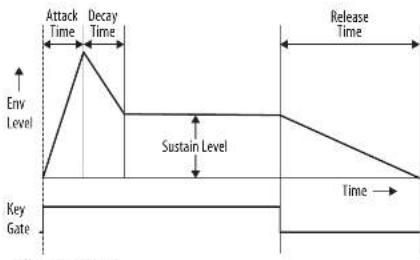
Key Pressed Key Released
Mensagens SysEx MIDI
| Name Command Range(0,1,2) | J | |
| Set MIC Channel 40:30 12:00 12:00-12:00 12:00-12:00 Fx: Force value:0.01 | Dr. The value of MIC out channel is 0.00-0.01 - Channel 1-16 Default Value: 0.00 Dr. The value of MIC in channel 0.00-0.01 - Channel 1-16 Default Value: 0.00 | |
| Set Security information | F:00:22 32:00 07:22 10:02-52:47 | Dr. The value of security is 0.00-0.01 - 1-127 a fixed value of security, dynamic security Default Value: 0.00 Dr. The value of the security is 0.00-0.01 - 1-127 a fixed value of security, dynamic security Default Value: 0.00 Dr. The value of security is 0.01-0.02 - 0 (Sok, 1 Mod, 2 Mod) Default Value: 0.00 |
| Set Bit Rate Range | 10:00:22 32:00 07:22 11:00 01:17 | Dr. The value of bit rate range is 0.00-0.00 - Semilines 0-12 Default Value: 0.00 Dr. the maximum value |
| Set MIC Lock | F:00:32 32:00 07:22 17:02 0.07 | Dr. 0x00 - Drive / Off - Enable Default Value: 0.00 |
| Set Sequencer Auto Play | F:00:22 32:00 07:22 18:02 0.07 | Dr. 0x00 - Drive / Off - Enable Default Value: 0.00 |
| Set Clock Source | F:00:22 32:00 07:22 18:02 0.07 | Dr. The value of clock source is 5.00-0.00 - 0.00-1 0.00-1.00 0.01-1.00 0.02-1.00 0.03-1.00 0.04-1.00 Default Value: 0.00 |
| Set Clock Type | F:00:23 32:00 07:22 18:02 0.07 | Dr. The value of clock type is 0.00-0.00 - 0.00 - 0.00 - 0.00 - 0.00 - 0.00 - 0.00 - 0.00 - 0.00 - 0.00 - 0.00 - 0.00 - 0.00 - 0.00 - 0.00 - 0.00 - 0.00 - 0.01 - 0.01 - 0.01 - 0.01 - 0.01 - 0.01 - 0.01 - 0.01 - 0.01 - 0.01 - 0.01 - 0.01 - 0.01 - 0.01 - 0.01 - 0.01 - 0.01 - 0. Default Value: 0.00 |
| Set Clock Hype | F:00:32 32:00 07:22 19:02 0.17 | Dr. The value of clock hyper is 0.00-1.00 - 0.00-1 0.00-1.00 0.01-1.00 0.02-1.00 0.03-1.00 Default Value: 0.00 |
| Set Acquire Bitfield | F:00:32 32:00 07:22 19:02 0.17 | Dr. The value of bit number is 0.00-0.01 - 12k-1-1 Enable value: 12k Default Value: 12k |
| Set Sequence Data | F:00:32 32:00 07:22 17:02 0.17 | Dr. The value of sequence number is 0.00-0.01 - 12k-1-1 Dr. The value of sequence number is 0.00-0.01 - 12k-1-1 Dr. The value of sequence number is 0.00-0.01 - 12k-1-1 Dr. The value of sequence number is 0.00-0.01 - 12k-1-1 Dr. The value of sequence number is 0.00-0,01 - 12k-1-1 |
| Set Sequence Cache | F:00:32 32:00 07:22 18:02 - On F7 | Dr. The value of cache number is 0.00-0.01 - 12k-1-1 Dr. The value of cache number is 0.00-0.01 - 12k-1-1 Dr. The value of cache number is 0.00-0.01 - 12k-1-1 Dr. The value of cache number is 0.00-0.01 - 12k-1-1 |
| Set Configuration Parameters | F:00:32 32:00 07:22 19:13 | MR |
| Set Configuration Parameters | F:00:32 32:00 07:22 18:02 - GHH | Dr. Dr. 288 channel set Dr. 288 channel set Dr. Dr. 288 channel set Dr. MLD chip access control Dr. Sequence activity exclusive control Dr. CLK output select Dr. CLK edge select Dr. Active thresholded |
| Reset Factory Setting | F:00:32 32:00 07:22 18:02 | MR |
MS-1 MK II MIDI
MIDI Channel Messages
| Item | Mild command | Remark |
| Noise at | #k# k## | kk=0c00~0x73 ### =0x02~2x71 |
| Noise at | S#k ## | kk=0c00~0x73 ### =0x02~2x71 |
| 40 mm noise off | #k# #k# | , |
| Ficknelord | C#nd k## | kk=0c00~0x73 ### =0x02~0x71 |
HnNtNttnnnn n 201
MIDI System Real-Time Messages
| Item | Mild command | Hanoi |
| Sqrt2 clock | ?B | Timing Clock |
| Sqrt2 start?G | Start | |
| Sqrt2 continue?B | Continue | |
| Sqrt2 stop | ?C | Stop |
SynthTribe
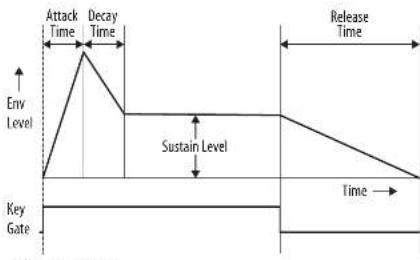
Key Pressed Key Released
74 NS-1 MK-1
MIDI Messages SysEx
| Name Command Range(0,1,2,3) | J | |
| Set MIC Channel 40:00 12:00 12:00 F to Force value=0 | Dr. The value of MIC out channel is 0x00-0x01 - Channel 1-16 Default Value: 0x00 Dr. The value of MIC in channel 0x00-0x01 = Channel 1-16 Default Value: 0x01 | |
| Set Security information | F:00:22:32:00:07 22:10:02-02:47 | Dr. The value of security is 0x00-0x01 - 1-127 a fixed value of security, dynamic validity Default Value: 0x00 Dr. The value of the security is 0x00-0x01 - 1-127a fixed value of security, 8 bits dynamic validity Default Value: 0x01 Dr. The value of security is 0x01-0x02 - 0 Sert, 1 Mod, 2 Mod Default Value: 0x02 |
| Set Bit Rate Range | 10:00:22:32:00:07 22:11:05:01:17 | Dr. The value of bit rate range is 0x00-0x00 - Semittimes 0-12 Default Value: 0x05 Dr. the maximum value |
| Set MIC Lock | F:00:32:32:00:07 22:17:02:07 | Dr. (0x01 - Denset / 0x01 - Exeble Default Value: 0x09) |
| Set Sequencer Auto Play | F:00:22:32:00:07 22:10:00:07 | Dr. 0x00 - Exeble 0x00 - Exeble Default Value: 0x01 |
| Set Clock Source | F:00:22:32:00:07 22:18:00:07 | Dr. The value of clock source is 0x00-0x01 - 0x00: FET 0x01: FET 0x02: FES 0x03: FST 0x04: FTO 0x05: FTO 0x06: FTO:00 |
| Set Clock Type | F:00:23:32:00:07 22:16:00:07 | Dr. The value of clock type is 0x00-0x00 - 0x00: FFS 0x01: FFS 0x02: FPGCH 0x03: FPPVW Default Value: 0x03 |
| Set Clock Hype | F:10:01:23:32:00:07 22:19:02:17 | Dr. The value of clock hyper is 0x00-0x01 - 0x00:721 0x01: FEST Default Value: 0x03 |
| Set Acquire Threshold | F:10:01:23:32:00:07 22:19:02:17 | Dr. The value of threshold is 0x00-0x01 - 0x01:1-3 Exeble value: 75 Default Value: 0x05 |
| Set Sequence Data | F:10:01:23:32:00:07 22:17:02:07:17 | Dr. The value of sequence number is 0x00-0x01 - 0x01:1-3 Dr. The value of sequence number is 0x00-0x01 - 0x01:1-3 Dr. the sequence data |
| Set Sequence Rate | F:10:01:23:32:00:07 22:18:02-0x17 | Dr. The value of sequence number is 0x00-0x01 - 0x01:1-3 Dr. The value of sequence number is 0x00-0x01 - 0x01:1-3 Dr. the sequence data |
| Set Configuration Parameters | F:10:01:23:32:00:07 22:15:03 | MR |
| Set Configuration Parameters | F:10:01:23:32:00:07 22:16:02-0x143 | Dr. the value of channel set Dr. the value of service Dr. the value of branch count Dr. the value of switch state Dr. the value of access control Dr. the value of type select Dr. the value of edge select Dr. the value of thresholded |
| Rethinking Factory Setting | F:10:01:23:32:00:07 22:16:02 | MR |
Quick Star Guide 75
MS-1 MK II MIDI
MIDI Channel Messages
| Item | Mild command | Remark |
| Noise at | #k# k## | kk=0c00~0x73 ### =0x02~2x71 |
| Noise at | S#k ## | kk=0c00~0x73 ### =0x02~2x71 |
| 40 mm noise off | #k# #k# | , |
| Ficknelord | C#nd k## | kk=0c00~0x73 ### =0x02~0x71 |
HnNtNttnnnn n 201
MIDI System Real-Time Messages
| Item | Mild command | Hanoi |
| Sqrt2 clock | ?B | Timing Clock |
| Sqrt2 start?G | Start | |
| Sqrt2 continue?B | Continue | |
| Sqrt2 stop | ?C | Stop |
SynthTribe
L'app SynthTool é disponible comme download gratuiteriala page del prodotto MS-1 del nestro site web.
NL Stap 2: Bediening
-
KEYBOARD - het keyboard heert 32
halfgewogen, volledige tafetsen. -
TUNE - de frequently van de hoofd
VCO van dc synthesiser instellen -
POWER - (aan uit) - de synthetiser in - ofutschakein. Contralier of alle andsuttingen zim gemaist, alvresen de unit in te schakein. De LGd ceut am wannercr strommoecovir is of de unit is ingeschakeid.
Modulation section
-
LFO/CLK RATE - pas de frequencer van de modulatie LFO aan. De LEO snipper op de huidige smelheid.
-
LFO-RATE - selector's list frequentisterekan di LFO frequentistader at Luang [L].Gremdeke [M]of Hong [H].
-
WAVEFORM - Selector de g疗效form s it dihoek, biogef, randof rusc. Willeckcoge g疗效form wont geldknot daortexte synchroniata in [45].
VCO-section
-
MOD DEPTH - sterh modulatianboucne van dc VCG in
-
RANGE (RANGE) Sécutive het globale frquenicebeine (in octaven) van de VCO, vintend van 164, & tot 2.
-
PULSEWIDTH - das gels prüblichkeit van de VCO kan als die schlekar zur pufbrechttemodulation op hardmating IMANI is eingestet. Bij ILO en LCV wert het effect van de modality ausgesamt.
-
PULSE WIDTH MODULATION SOURCE: liu LFO dendrochogelf, handmatig [M4h] of envelope.
Sectie bronmixer
- PULSE: hérômeau van de publique infirmis internet.
12.SAWAVE-Hetneveau van zaagendaftogovolien instellen. - TRIANGULAR - het rouvian de deindehoekogalorm instellen.
- SUB OSCILLATOR - het nivee van de subsolitior instellen.
- SUB OSC TYPE - Selecter het type subosillator (1 octafomlaag, 2 octaven omlaag of 2 octaven omlaag met en smalle pugspaig).
- NOISE : Hauvery das von da eigenerator instellen.
- EXT AUDIO - hét nivale von binnenkemonds audio von gen externe bron instellen.
Sequencer-sectile
m = 311
1
m = 311
12/14
USB MIDIN - lat emot inknoting
MIDin data from tianning.
USB MIDI OUT - skodar MIDI data till entilling.
HARDWARUNISTANDINGALLS: Gs all the ruking slits.
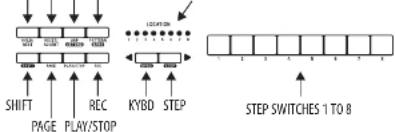
RESET/ACCENT ARP/SET END
HOLD/REST PATTERN/BANK LOCATION LEDs
OVERSIKT
Filjolae detcotale visn aigra av sequencens.
grundigdae fuiur nigrare.Dan kan skpa attkr mor.
mert mer 2 eier stegan im du pravr ker
komplea minister.Justre en parameteri ttaget, sismoc giri, lingi, raichel, acen, glidc, paus, bindinger elser swing, ochysana sedan pddess effekto under uppeening.
Detkommenara tawhui tali hijip at tajwa an enkel installing for SYTHTEZER, sismam cndat enkalla arch ingen moddering vCC oler VCE. Stegnotdingkan kan justar med hijip ao procedure um visas pada sidan 24.
INSPENING AV ETT ENKELT MONSTER 1. Trypsin SHIFT och-KYB0 for act kylta tangentordbisige.
2. Initiale du acculteur minétaire originat en:抗体d pSHIF, RESECH PATTERN SANTGHT. Dette commencer attroidre a tighegare est de acculteille minétaire.
3. Trypk RECH,och STEP 1-switchers I ED hisdar binita, vilket indikatera atitta der aetia stegmet scom haller at tlagas till och regides. (Om du mee kan vijya REC, uppuja step 1).
3. Try pəs nər' tæmpətʃ nəp tæmpətʃərd et ier en paʊ səm viːn ᵷən.
5. For attang ena panga isalot for e pa HIOLD-REST srtich. Nen pa cem kloster LOTER-LE ATT syta.
6. Try to get rid of the current. Nixia STEP switch LED moments attach when after vare jillicnng ton either pass.
7. Gate-lingsen ga stt eist kon jusem mei hdiy zu TEAPOW/ATG LENGTH LONCHIN. LOCTOR LeBra Imita chn och visar Glaunien fkn 1 t ill 8m. On instild ga sicasan on condming me na stig ga. Cmo nstaig eir sarma ton skupes en liangon ton effecrton do stie gocn bi arundin
- For attskapna "fitchplate", HillSHFT nettoptc och vid GLIDE-kontrollen. Locater-LEBAMA visar anlaitk ratacts frirn 1 ill4, iugil. Till ecompe, med en installang p34 delekets de stekstiga et in 1 klaidera. hare n eratihitllampas, kinner LOCATION LE0 6 at llya.
- At all nivea GLIDE for stt seg, vid GLIDE kontrllem upst. For stt aangs va nd den yeia negmint. Na GLIDE gpt for stt seg, kommcr LOCATION LED 5 at lya.
- Fix atbla lissj/kanlener accnten, truck a#
NEET/ACHT-switch. n/aen acnetll tllmas,
komer kloster LOCED 7 at lissj. - Tryp k REC nui du har aboslak skapandew monstreet.Det annte spat an,men det kan spelis upw.Vaming Stang ine v anehen etler skaup et nytt minste, amars gar dt austucla gpaarad monstres ffordat.
SPELA UPP ETT MONSTER
- Try pAAY/STP for artr tyra a pot det aktuna minred.
- D im dubstammer elg for atte nsta qat de kan du uppe aspingsteingsten oven aan spcla in etnnt minster. Alternatint, Irykpi PATTERN sRET for attesi st de aktuella sparinde minster on kassetia indirgana.
- 3m du bestemmerigdforta sappare ministre maste du foiajeprocedure "SAHINGA PATTERN" neman, anians komerir deli tafimus kvar immonn o emrty minestre plofias erer sthenimans standav.
- For at all kanga an Swigg for delta minnow, bld SHIT merykhtiok oj hostera TEPOWATGE LENGTH-controlled, Imtigatit tiakpans ieng swing; on der with wix nadal sputas bare off brats, on um den wix hell ungpat sputas bare on-beats. Swigg Instillations for imtotet
sparas air minnhat sputas sam vsna minat.
Quick Start Guide
- Under upscaling avt: monster Tyros pa HOLD-REST for ahlala d ackultske stegan.
6. Try playing a PLSYSTOP.
SPARA ETT MONSTER
1. Bail SHIFT - PLAP/STOP methystic 2 schuldier locating ALBden for der aktuelle mindest number bigger brinck Eingangt fängt.
2. Trypsen at STEP switch to 1:81B for all vijaya det nga skadne kasternummer.
1. Bryck P3A PATHWAY ^+ STEP-switch find a 118B for att vial de treet schadke banknummet.
4. Iyek paShift + RE for art para misteri och adviata gopathse.
MS-1 MK II Sekvenserdrift
ATERKALLA ETT SPARAT MONSTER
- FILL PATTERN: NEDPTC LOCATION, LOCATION ON VARIAR 设当拉赫马斯则重新计算。 Anand-KYBD after STEPS-SWITCHA for att gup och gen der menon primen 1 till 8, after trypk a in STEP-SWITCH fdn 1 till 8. Du kan ockst psieta delta aman st emer plesis.
- BHIT SHITACH PATTERN: NICKPOT, LOCATIONLEDON VISAM det aktuahkne bilnunmert.
Amend - KYBDR - others STEP- switchhorma for all gupppch are gen nanbemane 1 Tbil E,hertrypk on sFTH-switched tn 1 BIL. du kan ocks qora delta minant odd spezial marks. - Trypa PLAVYSTOP (For situations appds the activities instead).
- Under upspreading kummer LOCATION: LED: ama att via den aktualki sidan ay mindest (1 till 6),och STEP-switch LED:amakematt att via deirdrigg stegan.
LIVEUPPTRADANDE
Under: uppressing ran lillallga josternag gres enlnt huiande (pena deess spas mee monnster).
- Fit in IgG4 beta Richel (3) at a 50 mg/minute, 100 g pS3 PSH 18H antihistamine GDA-controlled.
- For attagga till SWING, tryck pl shift ech tester TEMPO controler.
- For attolonga as mlessted, tryp pi SHIT HODR-RESIST.
- For attiagil ti tci ci tci ai tsi ag, tryki p shft+RECIST/ACCT
- Annuit TRANSPOSE-switches for att alwa ktwktna.
REDIGERA ETT MÖNSTER
- Für all negativen ett misteri langenbordige, tracy prd REc STEP-sontch-LEBarna komerer attna.
- Tryak's PAGE for all vittary microinsecticides from 1 to 50 siskia digeogues. Do a location-LED camera at 1 to 50 siskia den actuallid skies.
- Tyskay SPILLOT on STEP- switchen du la viridigera. Du kan ange an ton etier en paus och juste nigran de la contra parametrana, saison rachitel, glid gilav, etc.
- Try a SHIFT och nata SEIT-schutz som skie regidera. (Steger konmen inte automatisk.) att gi viliare illinsta steg i jinyen du varilja vila steg som skie regidera himsly.
- Tryps pa RIC for atta vistata redigeringlaget.
-
Trypk p LPLAYSTOP for attya sna dc det regidering mindestreer.
-
Xen khat spata minastn med iya jao procepuo "SWING A PATTERN" oven
SKAPAETT MONSTERISTEGMOD
- Inkya pSHF on cSHP: for attva sequenceseqs.STGEM. Den binkante LOCATOR LD on anders frän background (tanspenstbarlage): till qil (STGEM).
- Intra: det alinai monodrug ove ttrnda pshT, RCtT and PATTNAMsildit. Deta kommert a trndra alla odigure steg it det alinai monodrug.Den davil vaidana det alinai monodrug, intra det total.
- Trypak PAGE for all typ ak till ered kida ay dert minister. Trytpak sedan p SET END achn S1EP-switch for att vala jangden p monstret. Till example, um do raia p 1och trykper SET END -8, am monstret sng 8 step, um do trykper p SET arch ulka dchtrykper SET END -8, kammer minster tatt uana 12 step langd (4 oedem 8 step vandera).
- 去网下载链接STFEND或支付宝,mmz 3STEP-SWITCH-LEDarup till the stage att. 250 mm.
- Trypsäd SHIFT och ena STP.
sylvanctamiang, de bingjärb bilink
och krediriter at aetie der acchella
steegt smalbrp al tregidras, du kana
nu liqgiu till on, cn pus elc nagerjon
de ndria functione som beswirv i
tangentbordisaget, stam ratchet, Gilde, Acont
andina gate-lung, ete. - Try to shift us with the knife. Step forward for us, and bring me in the step. Den slatize knife.
- Ugoepa stage 3 each wivanshende perecure til ulina dina brenkode stage Ir kiana.
B. Try to play the piano and use a computer.
C. Under pressure, make some more mistakes.
Justifying this work exemplifies procedure "THE PERFORMANCE."
SPARAETT NÖNSTER STEGMOD
- Minute skipade (STEGMD spurt into) detail:
- 0m du vill spara det, viera first tllbila till <tngbo.
- Varying: Sting inte er henshen vire cappa et nytmonster, anars gir det kubula coparande monsitet fritural.
- Spaceminted method to apply procedures "SAVING & PATTERN" even for tangentbolardogel.
QuickStep: Step
MS-1 MK II Parametrar Valj
ANDRA PARAMETRANNA
Parametramakan andras med hjdp afoiandpcodur
-
Trykpa SHIF + HOLDREST + 8 for at konma in instllngsigt, Lcation LED kcmmer at blina galt.
-
Trykpa
for att valia sida fran 1 tll S.Den gula LOCATION-LEDen vsar den aktualla sidan: -
Sida 1 latere dig wai MIDingingskanlan frn 1 tll 16.
- Sida 2 Kite cie gia MID-utingskanlan f1 1ill 16
- Sate 3 other dig vih kokkilkilngi lanes fari t 15: NTERVAL/ MIDI DBN/ MIDI USB/TRG/ AUTO / KAR AUTO vndes,
- Jkrkkld preribr TRG > MIDI USB > MIDI DBN > INTERAL
Sida 4 lnte ctg vila blocktpens (age frn 1 rll 4:1PPS/2PPS/24PPQN/4RPPQK). -
Sida Slaerig qyal klockkantstage fran 1 till 2: (Fall / Rose)
-
Tryck pa STEP-switchcharma fran 1 tll 8 for at villanumenika varden frn 1 till 8.Det akueia verdet indikeras aven grin LOCATION-LED
4.For at konmsa varden 19 tll 16,tryckpshift+STEP-swchfrn 1 tll B. Det aktuela vardenvas as aen ro locATION-LED
Obscrber:DeninstalingirpaaSAMLdenmersonsdakuaiaadLEDen,kommerLEDanstixaellmnndgusefzrgcnohdengralllrtdpaatcormfzrgn - Tryck p a SHFT + HCL D/REST + 8 for att Dama instaingstiget och spara enveuua pa paramete Gindringar.
- Fier parametrar kan andras med hilp a SythTribe appen.
ADSR Envelope
Fazenda IASR-encrypte vora als fett bewickel diagramm nedan. Envelopen kon strya VCA-eviden, VCA akummingsklenkungen auch publikdatumsdiktrineng in VCA.
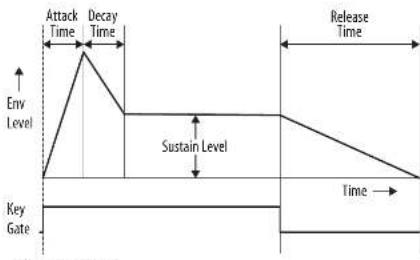
Key Pressed Key Released
94 MS-1 MK-1
Quick Star Guide 95
MIDI SysEx-meddelanden
SEQUENCER -Robar-1626: octrengly to ranoch 16-20 days
Selcjan VCF
- FREQ- dostosowne czebstwne oedicta UF. Czosttliwni powzry granicz zostaja yvolumnione.
-
RES-estrosovujie pozim mocimertia ghorod [rezenar] prey cestroviwov odjeica
-
ENV - dactonswuwe wypw obwienin na VCT
- MOD - dostosowuje wplyw modulaci na VCF.
- KYBD - dostonosuoge wylkylastroliyrtiy na YCF.
-
FM SOURCE -dostojavlje 7rodni modulacji FM na VCF spodji ulpu, plokstazmelj, prostojkutej 10 odustje zne, prostokutej 2 odustje mice, pubu 2 odustje mice grzeci smil
-
FM AMOUNT -dostosovce wyplo modelaci FM NA:WC
Sekda VCA
2.DOW16.DOWN2(+1oct)
3.D0NN and UP 7. UP 3-1 okt)
4.RANDOM8.DOWNT(-108t)
AKCENT
faily qany just jestnodocire were niy ben dweck, aldovzowcnd (priorywicny) safely oed.
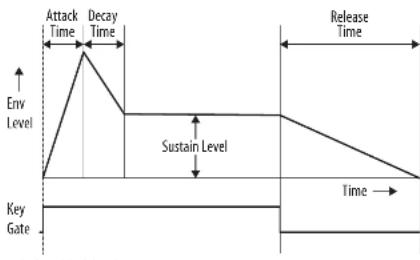
Key Pressed Key Released
MIDI SysEx Wiadomosci
The n -th subpart type table, SPIT, SPIT is absent for some parts.
D...S. Parametervalue.
SCHNCHannr 100023200073200D-02F De Forn value-0d91
D.The value of WIDout channel is 100-0ff -Channel 1-16
100
shurun
De: The value of note on velocity is 0.11-6.75+1-127 is a fixed value of velocity, So chronic velocity
DefintValue:100
100
The polar of the polyno is 0.02-0.02-0.05,1 Mcd.2 Hc
xnf7hur:160
D.The value of pitch bend range is 0.01-0.05 -5enrirnes 0-12
1
1.401
100010234567890
10
D0007Disbe/0017Enable
1
- The value of the source is 610-80
0
00
04:27
0
100
D.The value of clock type is 0.00-0.05
2
1.02.1709
A24.89%
Deh720:100
The value of cost rate is 100-100%
000541
图1
100
y
Visible 77
Default Value: 1
P The valds of bank number is 0.02-0.07→18
3:The value of pattern number is 0.00-0.007 + 7%er1-8
The biehchboknurctis00-006-18
D:Thealeofpaltermnntis000-007 -Pten1-8
D-10. Sequence data
一、本期业绩预增的主要原因
□□□
Sequenatoratopapaealecontrol
□适用√不适用
.
Benchure Factor Setting
002020012007
MS-1 MK II MIDI
MIDI Channel Messages
1000-0600-0678-0400-5271
H=0.60-0.78n=0.05-0.27f
40087001
Fichberd Gndy 0-0c0-0c7y-0c0-0c7
Note NEL input channel n=[2a,2f]
MIDI System Real-Time Messages
Sck 18 TimingClock
Start
s
y8f3n K Sip
SynthTribe
72 - 4 ≈ 2 7 ≈ 2
F-1A-2A-FJ-1FJ-1FJ-1FJ-1FJ-1FJ-1FJ-1FJ-1FJ-1FJ-1FJ-1FJ-1FJ-1FJ-1FJ-1FJ-1FJ-1FJ-1FJ-1FJ-1FJ-1FJ-1FJ-1FJ-1FJ-1FJ-1
志樂用時記云
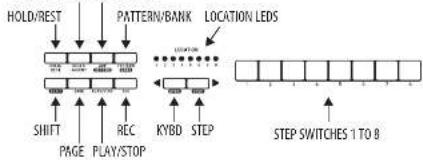
RESET/ACCENT ARP/SET END
摘要
1
| Item | Mild command | Hanoi |
| SqrtClock | ITB | Timing Clock |
| SqrtStart | ITB | Start |
| SqrtContinuous | Continue | |
| SqrtError | ITC | Stop |
SynthTribe
| Name Command Range(G1...D) | J | |
| SetMIDChannel(00:00:00:25:00:00) 16:00-16:01:17:Be hore value:0.00 | Is the value of MID out channel is 0.00-0.05 → Channel 1-16Default Value: 2:00Is the value of MID in channel is 0.00-0.05 → Channel 1-16Default Value: 2:00 | |
| Set Security information | F00:00:25:00:01 25:10:02-32:57 | Is the value of security is 0.00-0.05 - 1-127 a net value of setting, 3 dynamic velocity, Default Value: 2:00Is the value of state of reactivity is 0.00-0.05 - 1-127 b fixed value of reactivity, 3 dynamic velocity, Default Value: 2:00Is the value of activity curve is 0.00-0.05 - 1-127 A Mode, 2-128Default Value: 2:00 |
| Set Flash Band Range | F00:00:25:00:01 25:11:00:01:57 | Is the value of split band range is 0.00-0.05 → Semifine 6-12Default Value: 2:00Is the value of flash is 0.00-0.05 → Set Slock, 1-12Default Value: 2:00 |
| Set MLD Lock | F00:00:25:00:01 25:17:00:07 | Is the value of lock is 0.00-0.05 → BreakDefault Value: 2:00 |
| Set Sequencer Anti Plan | F10:00:25:00:01 25:10:00:17 | Is the value of clock count in 0.00-0.05 → Default Value: 2:00 |
| Set Clock Source | F00:00:25:00:01 25:10:00:07 | Is the value of clock count in 0.00-0.05 → Default Value: 2:00 |
| SetClockType | F00:00:25:00:01 25:14:00:07 | Is the value of clock type is 0.00-0.05 → Default Value: 2:00 |
| SetClockHge | F10:00:25:00:01 25:19:00:17 | Is the value of clock time is 0.00-0.05 → Default Value: 2:00 |
| Set Asset Blockers | F10:00:25:00:01 25:19:00:17 | Is the value of block id is 0-1-3-4-5-6-7-8-9-10-11-12Default Value: 2:00 |
| Get Steampattern Data | F00:00:25:33:00:01 25:16:77:00:01:67 | Is the value of fault number is 0.00-0.05 → Break 1-12Is the value of fault number is 0.00-0.05 → Break 1-12Is the value of fault number is 0.00-0.05 → Break 1-12Is the value of fault number is 0.00-0.05 → Break 1-12Is the value of fault number is 0.00-0.05 → Break 1-12 |
| Set Sequence Data | F10:00:25:33:00:01 25:78:02-36:17 | Is the value of fault number is 0.00-0.05 → Break 1-12Is the value of fault number is 0.00-0.05 → Break 1-12Is the value of fault number is 0.00-0.05 → Break 1-12 |
| Get Configure Parameters | F10:00:25:33:00:01 25:78:17 | NA |
| Set Configure Parameters | F10:00:25:33:00:01 25:78:25-78:17 | Is the value of fault select is 0-1-3-4-5-6-7-8-9-10-11-12Is the value of fault select is 0-1-3-4-5-6-7-8-9-10-11-12Is the value of fault select is 0.00-0.05 → Break 1-12Is the value of fault select is 0.00-0.05 → Break 1-12Is the value of fault select is 0.00-0.05 → Break 1-12 |
| Restore Factory Setting | F10:00:25:33:00:01 25:78:17 | NA |
Quick Start Guide 125
MS-1 MK II MIDI
MIDI通道消息
| Items | MIBI command | Remark |
| Noise shift | Enkiv kV | kk=0x00-0x23; v=-0x02-0x7F |
| Voice cat | Sokiv kV | kk=0x00-0x23; v=-0x02-0x7F |
| All voices shift | 3r 70 02 | \ |
| Flicker shift | Enkiv kV | kk=0x00-0x23; v=-0x02-0x7F |
注:NIR输入通道6-00时
MIDI系统实时消息
| Items | Mildly commanded | Remark |
| SystE clock | FB | Timing Clock |
| SystH start | FA | Start |
| SystE centerline FB | Continue | |
| SystH max | FC | Stop |
SynthTribe
NOTES: The simplified settings shown below will help you get started making sounds, with VCO-1 and VCO-2;
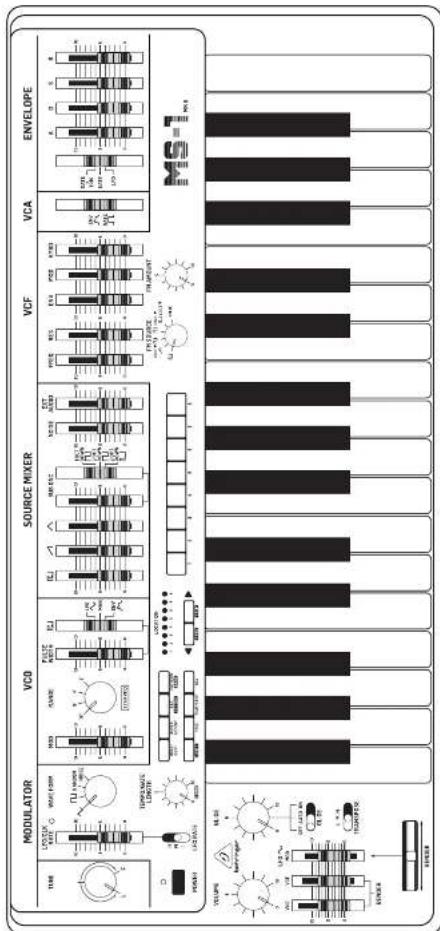
Quick Steg 127
128 NIS-MK1
Specifications
| Synthesizer Architecture | |
| Implementation/Analysis | |
| Keyboard | |
| Keys 32 semi-weighted, full size keys | |
| Keyboard sensing key and off velocity | |
| YOG Section | |
| Knobs | lune (±50 cent) |
| Range velocity [16°, 8°, 2°] | |
| Tacters | Modulation depth |
| Pulse width modulation [50% to minimum] | |
| SMTs PVM mode (LFC, manual, orientation) | |
| Modulator Section | |
| Knobs Waveform selector | (tiangular, square, random, noise) |
| Factors LFO/XK rate | |
| SMTs | LFQ/LKR rate selector low: [0.1 Hz to 30 Hz], medium [0.2- to 60 Hz], high [0.3- Hz to 100 Hz] |
| LFO rate indicator | |
| Source Mixer Section | |
| Factors | Pulse level |
| Sustainθ level | |
| Triangular level | |
| Sub oscillator level | |
| knee level | |
| External ripple level | |
| SMTs | Sub oscillator waveform selector: 1 octave down, 2 octave down, naive 2 octave down |
| YCF Section | |
| Factors | Cutoff frequency (70 Hz to 200 Hz) |
| Resonance [0 to self oscillation] | |
| Envelope depth | |
| Modulation depth | |
| Keyboard factor (0 to 100%) | |
| Knits | FM source selector (gain, saw, subcut: 1 octave down, 2 octave down, navel: 2 octave down, navel) |
| FM depth | |
| YCA Section | |
| SMTs Envelope, gate selection | |
| Envelope Section | |
| Factors | Attack time (2 ms to 4 s) |
| Delay time (2 ms to 10 s) | |
| Sustain level (0 to 100%) | |
| Release time (2 ms to 10 s) | |
| SMTs Gate-trigger selector | gate + trigger, gate, LFO |
| Controllers Section | |
| Sticks | Volume |
| Gait time [0 to 3 s] | |
| Switches | Gait on/off |
| Turnpore (low, medium, high) | |
| Endors | WCD bender sensitivity |
| WCI bender sensitivity | |
| LFO modulation | |
| Wheel lever Bends (with LTO/CCD switch) | |
| Handle Controls | LFO off/off switch |
| Bend/turn/bush/switch increase pitch only | |
| Sequences/Replacer Section | |
| Steps:32 steps maximum per pattern | |
| Number of patterns:64 patterns maximum | |
| Memory storage Banks with B patterns each | |
| Switches | Hold/rest, read/write, update end, pattern/ bank, shift, page, play-stone, record, keyboard mode, stop mode, steps 1-8. |
| Screw Tempo/plate length | |
| Commodity | |
| DC input/lock | 9 VDC, 600 mV |
| MBI (in/out) /thm | 5-pm EDR, 1/6 channels |
| USB (MDB) | USB 2.0, type B |
| Output | N° TS max. x 10-bit/s |
| Headphones | N° TBS max. x 2 dB max. 52 Chm |
| External audio input | in TS max. -20 dBu |
| Footswitch (optional) | Sequencer hold (N° TS) |
| 3.5 mm TS inputs | WC control voltage (0 to 7 V) |
| External clock (+2.9V or more) | |
| Control voltage (V Voltoase, 0 to 7 V) | |
| Gate (+2.5 V or more) | |
| 3.5 mm TS outputs | Control voltage (V Voltoase, 0.47 to 5 V) |
| Gate (off-0 V, on-10 V) | |
| Velocity [0m s-1] | |
| 3.5 mm Handle connection | Mrd, gnp |
| USB | |
| Type | Class compliant USB 2.0, type B |
| Supported operating systems | Windows 3 or higher |
| Max OS X 10.6.6 or higher | |
| Power Requirements | |
| External power adaptor | 9 VBD, 1700 m/s |
| Power consumption | 5.4 W maximum |
| Environmental | |
| Operating temperature range | 35°C to 45°C (10°C to 115°C) |
| Physical | |
| Dimension (in W x D) | 85 x 560 x 367 mm (1.4 x 22.4 x 10.6") |
| Weight | 4.5 kg (10.1 lbs) |
| Shipping weight | 7.3 kg (15.6 lbs) |
Quick Start Guide 129
技术参数
Other important information
EN Important information
- Register online. Please register your new Web site equipment rights after you purchase it by visiting www.mcs.com. Registering your purchase using our sample online form helps us to process your repair订单 more quickly and efficiently. Also, use the terms and conditions of customers, if applicable.
- Malfunction. Should your Music Tribe Authorised Reseller not be installed in your country, you may contact the Music Tribe Authorised Fulker for your country listed under "Support" at musicfitz.com. Should your country not be listed, please check if your problem can be dealt with by your "Online Support" which may also be found under "Support" at musicfitz.com. Alternatively, please submit an online warranty claim at musicfitz.com BEFORE returning the product.
- Power Connections. Before plotting the unit into a power outlet, please make sure you are using the correct male voltage for your particular model.
Family lines must be replaced with lines of the same type and rating without exception.
Responsible: Party Name: Music Tribe Commercial NV Inc.
Address: 122 E. 42nd St.,
8th Floor NY, NY 10168, United States
Email Address: legal@musictribe.com
MS-1 MKII
This equipment has been tested and found to comply with the limits for a Class 8 digital device, pursuant to part 15 of the RC Rules. These limits are designed to provide reasonable protection against harmful interference in a residential installation. This equipment generates, uses and can radiate radio frequency energy and, if not installed and used in accordance with the instructions, may cause harmful interference to radio communications. However, there is no guarantee that interference will not occur in a particular installation. If this equipment does cause harmful interference to radio or television reception, which can be determined by turning the equipment off and on, the user is encouraged to try to correct the interference by one or more of the following measures:
Rescriiortreelatethe receivingantenna
- Increase the separation between the equipment and receiver.
- Connect the equipment into an outlet on a circuit different from that to which the receiver is connected.
- Consult the dealer or an experienced radioTV technician for help.
The equipment complies with Part 15 of the FCC rules. Operation is subject to the following two conditions:
(1) this device may not cause harmful interference, and
(2) this device must accept any interference received, including interference that may cause undesired operation.
Important Information:
Changes or modifications to the equipment not expressly approved by Muskri Tribe can void the user's authority to use the equipment.
C
Herby Music Tribe declared that this product is in compliance with Directive 2014/35/EU, Directive 2014/30/EU, Directive 2014/65/EU and Amendment 2015/B/63/EU, Directive 2012/197/EU, Regulation 519/2012 IALACH S/HC and Directive 1970/2065E.
Full text of EEL DoC is available at https://community.musicscribe.com
EU Representative Music Tribe Brands DK A/S
Address: Gammel Strand 44, DK-1202 Kibenhavn K, Denmark
UK Representative: Music Tribe Brands UK Ltd.
Address: 8*Flane, 20 Farringdon Street London FC4 4AS, United Kingdom
Correct disposal of this product. This symbol indicates that this product must not be disposed of with household waste, according to the Waste Directive (2012/39/EEU) and your national law. This product should be taken to a collection center licensed for the recycling of waste electrical and electronic equipment (ETE). The mischandling of this type of waste could have a possible negative impact on the environment and human health due to potential contamination.
environment and human health due to potentially hazardous substances. The use of chemicals is generally not restricted to the site.
In the current sense of this product will contribute to the
effort, your conference in the region includes for-profit products and information on efficient use of natural resources. For more information about where you can take your waste equipment for recycling, please contact your local city office, or your household waste collection service.
Quick Start Guide 133
EN
We Hear You