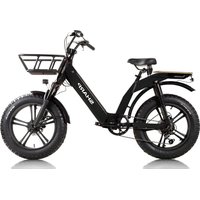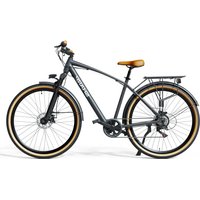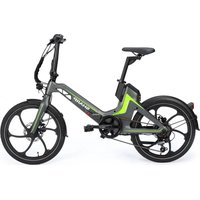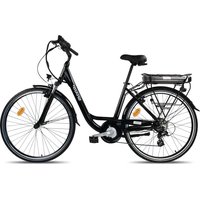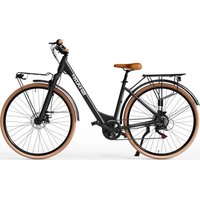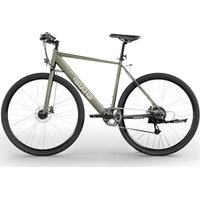
BK-GS03EG - Electric bike SHARP - Free user manual and instructions
Find the device manual for free BK-GS03EG SHARP in PDF.


| Brand | SHARP |
| Model | BK-GS03EG |
| Product type | Electric bicycle (e-bike) / Pedelec |
| Intended use | Urban, road |
| Maximum speed | 25 km/h (assistance up to 25 km/h) |
| Range | Up to 85 km (depending on conditions) |
| Total weight | 19.5 kg |
| Maximum supported load | 120 kg (rider + luggage) |
| Recommended rider height | 165–190 cm |
| Battery | 36V – 7.8 Ah (280.8 Wh), lithium-ion |
| Charger | 100-240V ~ 2A, intelligent charging, 4 hours |
| Motor | 36V – 250W, rear hub motor |
| Assistance | 5 PAS levels + walk mode (5 km/h) |
| Sensors | Cadence and torque sensor |
| Display | Color TFT LCD screen, IPX6 |
| Connectivity | Bluetooth, SHARP Life app |
| Brakes | Shimano disc brakes, 160 mm rotors |
| Tires | Kenda 700C x 35C |
| Frame | Aluminum alloy, 49 cm (19.3 inches) |
| Warranty | Limited, covers manufacturing defects |
Frequently Asked Questions - BK-GS03EG SHARP
User questions about BK-GS03EG SHARP
0 question about this device. Answer the ones you know or ask your own.
Ask a new question about this device
Download the instructions for your Electric bike in PDF format for free! Find your manual BK-GS03EG - SHARP and take your electronic device back in hand. On this page are published all the documents necessary for the use of your device. BK-GS03EG by SHARP.
USER MANUAL BK-GS03EG SHARP
BK-GS03EW, BK-GS03EG
Electric Bike

*Product images are for illustration purpose only. Actual product may vary.
Trademark:

Bluetooth®
The Bluetooth ^® word mark and logos are registered trademarks owned by Bluetooth SIG, Inc.
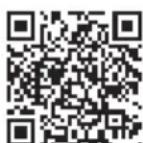
Use this Quick Guide to set up and start using your e-bike. For more detailed information on your model of e-bike, please refer to the on-line manual which can be found by following the link below or scanning the QR Code and searching by model name BK-GS03.

https://www.sharpconsumer.com/support/
0.08 inch (2mm) Allen Key
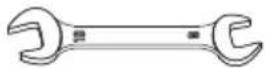
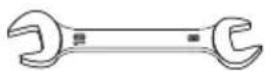
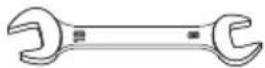
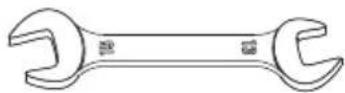
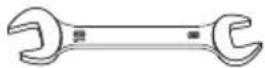
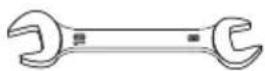
Open End Wrench 08-10
0.10 inch (2.5mm) Allen Key
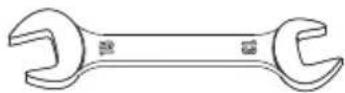
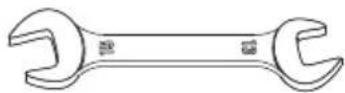
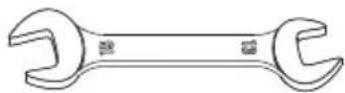
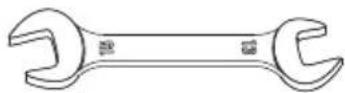
Open End Wrench 13-15
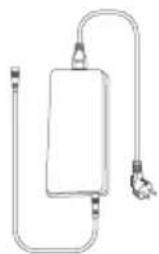
natural_image
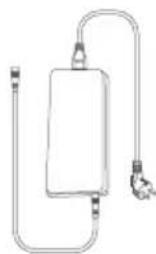
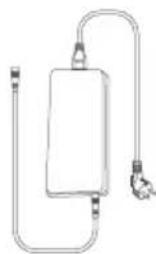
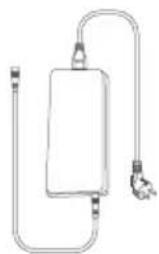
Simple line drawing of a rectangular device with a coiled cable and connector (no text or symbols)Charger
Quick start guide
0.16 inch (4mm) Allen Key

Phillips Screwdriver

Cable ties
Warranty guide
0.20 inch (5mm) Allen Key
0.24 inch (6mm) Allen Key


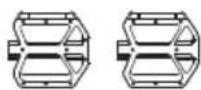
Pedals

Rubber Cap
Charger manual
natural_image
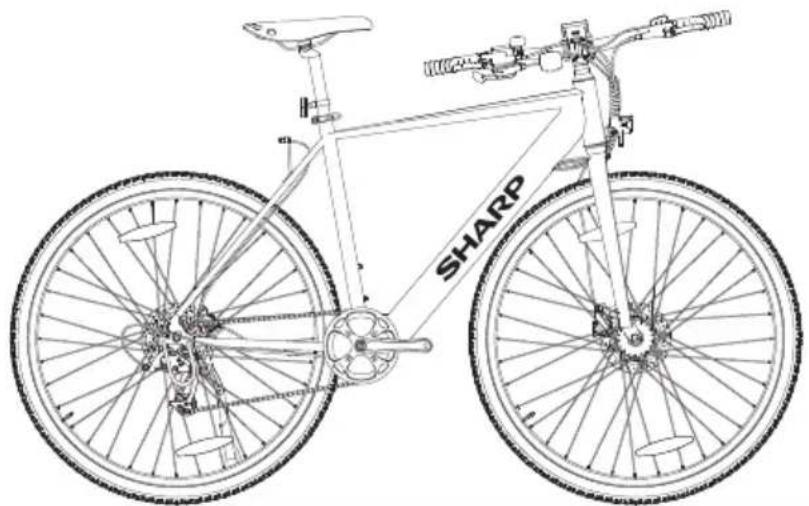
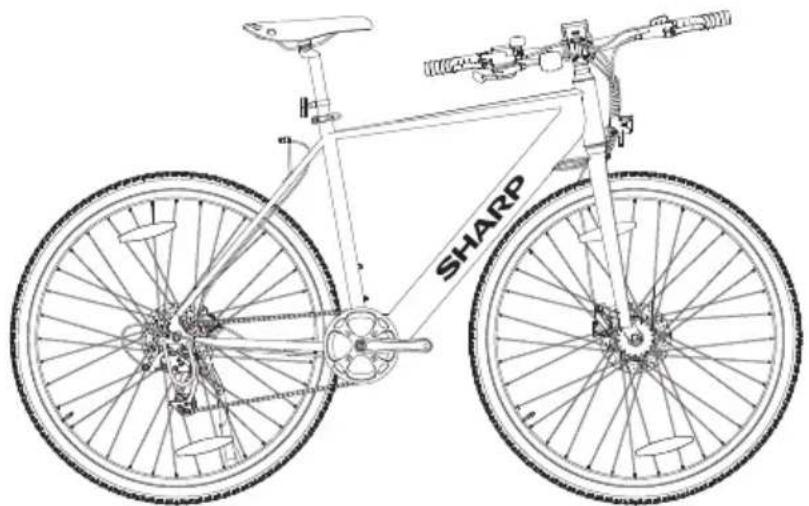
Line drawing of a bicycle with 'SHARP' branding on the front wheel (no additional text or symbols)Important safety instructions
Please, read these safety instructions and respect the following warnings before the appliance is operated:

The lightning flash with an arrowhead symbol, within an equilateral triangle, is intended to alert the user to the presence of uninsulated “dangerous voltage” within the product’s enclosure that may be of sufficient magnitude as to constitute a risk of electric shock to persons.

The exclamation point within an equilateral triangle is intended to alert the user to the presence of important operating and maintenance (servicing) instructions in the literature accompanying the appliance.

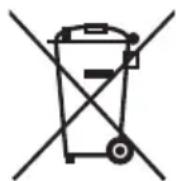
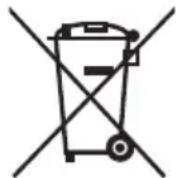
This symbol means that the product should be disposed of in an environmentally friendly manner and not with general household waste.

AC voltage

Class II equipment
In order to prevent fire always keep candles and other open flames away from this product.

IMPORTANT: Read the following carefully and keep it for future reference.
CAUTION: Wear a protective helmet!
To reduce the risk of injury, wear a suitable helmet when riding!
Risk of accident and injury
- Incorrect operation of the e-bike due to insufficient knowledge may cause an accident. Please familiarize yourself with the features of the e-bike before riding.
- Familiarize yourself with the brake lever in advance if you are not sufficiently aware of the front and rear brakes' placement. Please also adjust accordingly before riding.
- Please make sure the brakes are properly adjusted and function well.
CAUTION: Hardware may not be fully tightened, including but not limited to bolts, nuts, the front hub shaft, the rear wheel, steering mechanisms (handlebar, stem), the brake system, the driving system, pedals, etc.
To reduce the risk of injury, ensure that all bike hardware is locked tightly and correctly into position and that there is no loss of equipment, breakage, or other types of damage.
CAUTION: This bike is designed for adults. Children may only ride under the supervision of adults.
To reduce the risk of accident and injury, make sure that the bike and any of its structures are not within the reach of children under the age of 3.
CAUTION: Component breakage due to improper use of the bicycle may occur.


Risk of accident and injury!
- Do not ride over ramps or mounds with the bicycle.
- Do not ride this bicycle in cross-country cycling.
- Do not ride the bicycle over stairs, rocks, or other steps with a height greater than 15 cm.
Improper additions or alterations to the bicycle and incorrect accessories can cause the bicycle to malfunction.
To reduce the risk of accident and injury, do not add any extra accessories that are not purchased from the seller or without getting permission from the seller, including but not limited to child safety seats, trailers, etc.
CAUTION: Do not ride the bicycle in a risky way.
To reduce the risk of accident and injury, ride the bicycle only in the correct way. Make sure you are able to control the bike and do not try dangerous actions, including but not limited to riding with no hands, jumps, and wheelies.
DANGER: Lack of bicycle maintenance presents the risk of accident and injury.
Check the bike before every ride, including but not limited to brake function, tire wearing and PSI, bolt and nut condition, steering, and spokes tension.
If you hear any abnormal noise while riding, stop immediately and check the entire bike.
CAUTION: Ensure full compliance with local law.
Risk of fines and confiscation!
Before riding the bike, make sure the bike aligns with the standards of your local law.
Reflectors are not a substitute for required lights. Riding at dawn, at dusk, at night or at other times of poor visibility without an adequate bicycle lighting system and without reflectors is dangerous and may result in serious injury or death.
If your bicycle does not fit properly, you may lose control and fall.
Bolts that are too tight can stretch and deform.
Do not expose your battery to high temperatures.
Riding with improperly adjusted brakes or worn brake pads is dangerous and can result in serious injury or death.
Never inflate a tire beyond the maximum pressure marked on the tire's sidewall or the wheel rim. If the maximum pressure rating for the wheel rim is lower than the maximum pressure shown on the tire, always use the lower rating. Exceeding the recommended maximum pressure may blow the tire off the rim or damage the wheel rim, which could cause damage to the bike and injury to the rider and bystanders. The best and safest way to inflate a bicycle tire to the correct pressure is with a bicycle pump which has a built-in pressure gauge.
Applying brakes too hard or too suddenly can lock up a wheel, which could cause you to lose control and fall. Sudden or excessive application of the front brake may pitch the rider over the handlebars, which may result in serious injury or death.
Stop the charging procedure immediately if you notice a strange smell or smoke.
- SHARP is not responsible for injury/death caused by improper use.
- Sharp is not responsible if you do not comply with local regulations and restrictions.
- The warranty does not cover damages caused by improper use of the device, especially in case use for non-domestic purposes and alterations and / or adaptations necessary for countries or regions, for which it was not originally designed.
- Always abide by local traffic rules and national laws and regulations while using your e-bike.
- Always adhere to the local speed limit. DO NOT exceed the speed limit for your e-bike.
• Always wear safety protection equipment when in use.
• Always wear a safety helmet when riding your e-bike.
- Always ride with both hands holding the handles, never ride with one hand.
- Do not ride in bad weather.
- Do not use this e-bike to perform stunts or dangerous maneuvers. It is a bike designed for domestic use.
- Do not carry people or items such as bags.
- Ride slowly in crowded places.
- Ensure that all screws and fasteners are tight and normal before use.
- Make sure that the folding shaft enters the slot when unfolding the e-bike.
- Do not ride on uneven roads, water, oil or ice.
- Do not weave through traffic or make moves which are unpredictable to other people.
- Do not ride the e-bike if outside of the country's age limits.
- Do not ride the e-bike over the country's legal speed limit for e-bikes.
- Do not use the e-bike if it is damaged.
- Do not use the e-bike if the battery emits a peculiar smell and/or heats up.
- Do not use the e-bike if liquid leaks out of it, avoid contact and place out of the reach of children.
- Before use, ensure that the e-bike is not damaged. Do not ride if there is any damage.
- Ensure that you read all of this User Manual before using the e-bike.
- Learn how to ride your e-bike before using it in a public space.
- This e-bike can be identified by the model and serial number located on the rating plate.
- Propulsion is via an electric motor located in the driving wheel.
- Only one person may ride on the e-bike.
- Do not modify this e-bike in any way.
- Do not use any parts or accessories unless recommended or approved by SHARP.
- Ride the e-bike on level surfaces. Do not exceed the specified incline.
- Excessive use will reduce the lifetime of this e-bike.
- Caution, brakes and associated parts may become hot during use. Do not touch after use.
Battery and Charger Warnings
- Do not power on the e-bike while charging.
• After the battery is fully charged, disconnect the charging cable. - The battery indicator in the display will show the battery lifetime.
- When the battery is low, it may result in weakened electric power assistance. It is recommended that you start charging at 20 - 40% charge.
- Charge the battery after every use.
- If the e-bike is not used for a long time, charge it at least once a month. Note that if the battery is not charged for a long time, the battery will enter a self-protection state and will fail to charge. In this case, please contact your dealer.
- When charging, plug the charger into the charging port before plugging it into the wall socket.
- While charging the indicator light of the charger is red; this means the charging is normal. When the indicator light turns green, charging is complete.
- Only use the original charger to charge the battery.
- The charger has an overcharge protection function, if the e-bike is 100% fully charged, the charger will automatically stop charging.
- Dispose of batteries and e-bikes in compliance with the applicable regulations in your country.
Batteries
- Do not expose batteries to high temperatures and do not place them in locations where the temperature might increase quickly, e.g. near fire or in direct sunshine.
- Do not expose batteries to excessive radiant heat, do not throw them into the fire, do not disassemble them and do not try to recharge non-rechargeable batteries; they could leak or explode.
- Disposal of a battery into fire or mechanically crushing or cutting a battery can result in an explosion.
- Leaving a battery in an extremely high temperature surrounding environment can result in an explosion or the leakage of flammable liquid or gas.
- A battery subjected to extremely low air pressure may result in an explosion or the leakage of flammable liquid or gas.
- CAUTION: Risk of explosion or damage to equipment, if incorrect type batteries are used.
- Never use different batteries together or mix new and old batteries.
- Do not use any batteries other than those specified.
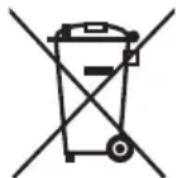
Disposal of this equipment and batteries
- Do not dispose of this product or its batteries as unsorted municipal waste. Return it to a designated collection point for the recycling of WEEE in accordance with local law. By doing so, you will help to conserve resources and protect the environment.
- Most of the EU countries regulate the disposal of batteries by law. A recycling symbol appears on electrical equipment, packaging and batteries to remind users to dispose these items correctly. Users are requested to use existing return facilities for used equipment and batteries. Contact your retailer or local authorities for more information.
Removal of battery for disposal
- The battery was hidden in the down tube below. The bottom of the tube has a cover and screws to hold the battery, the controller, and the cables. To remove the battery, remove all the screws at the bottom and side of the lower pipe, disconnect the cable, and open the dust plug at the charging port.
CE statement:
- Hereby, Sharp Consumer Electronics Poland sp. z o.o. declares that this equipment is in compliance with the essential requirements and other relevant provisions of RED Directive 2014/53/EU.
- The full text of the the EU Declaration of Conformity is available by following the link www.sharpconsumer.com and then entering download section of your model and choosing "CE Statements".

www.sharpconsumer.com/contact/

www.sharpconsumer.com/support/

www.sharpconsumer.com/documents-of-conformity/
Electric Pedal-Assist Bicycle (EPAC):
A pedelec is a type of bicycle equipped with electric pedal assist functionality. It can provide assistance up to a maximum speed of 25 km/h when pedaling. Depending on the model, activate the walk assistance mode and verify that the speed increases up to 5km/h maximum.
What's in the Box:
Quick Start Guide (this document)
E-Bike Parts
- 1 × E-bike
Accessories Box
- 1 × Manual
- 1 × Charger
- 1 × Charging Cable
- 6 × Allen Key
- 1 × Phillips Screwdriver
- 2 × Open End Wrench
- 2 × Cable ties
- 1 × Rubber cap
Accessories Box
(Refer to 1-on page 1)
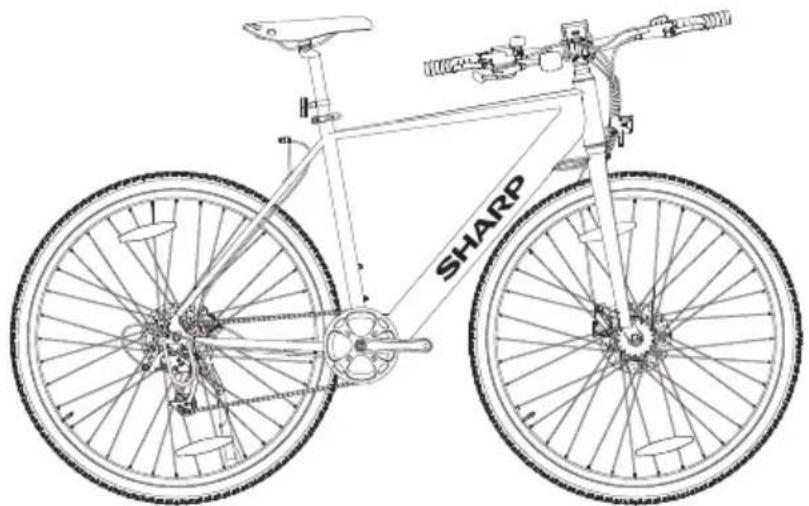
Bike Parts
(Refer to 2 on page 1)
Bike Frame Number
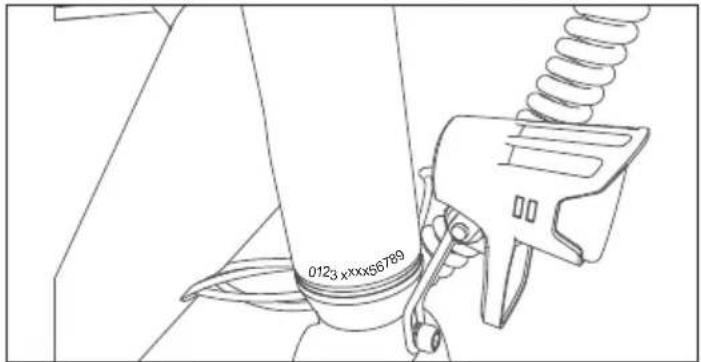
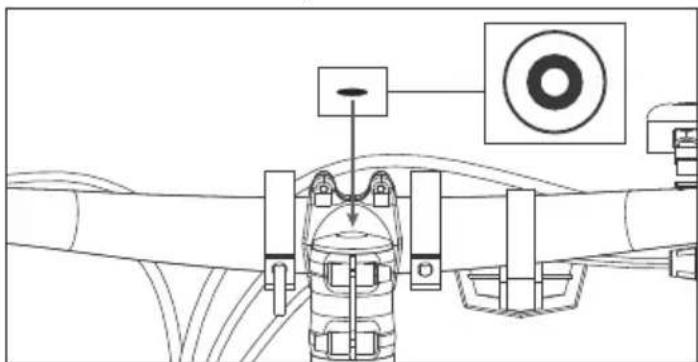
The bike frame number can be found stamped on the head tube, as shown in the figure. It is the unique identifier for your e-bike. When your bike is stolen, it's the serial number that gives you the biggest chance of getting it back. It would be a good idea to write it somewhere or take a picture.
Assembling the E-bike
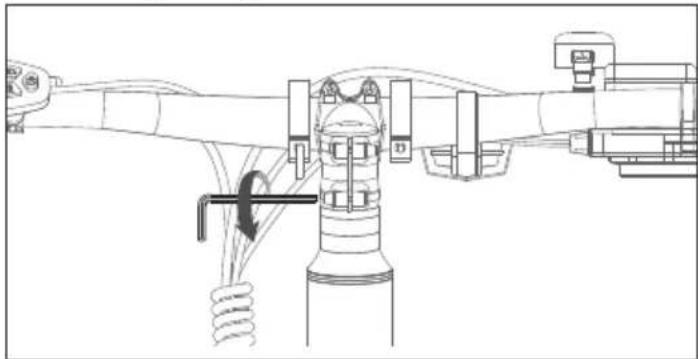
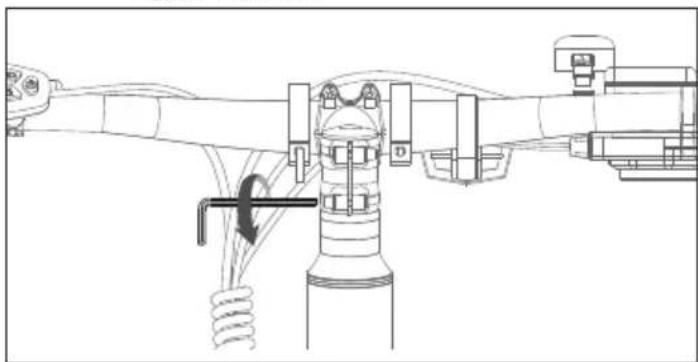
STEP 1: Install and adjust the handlebar
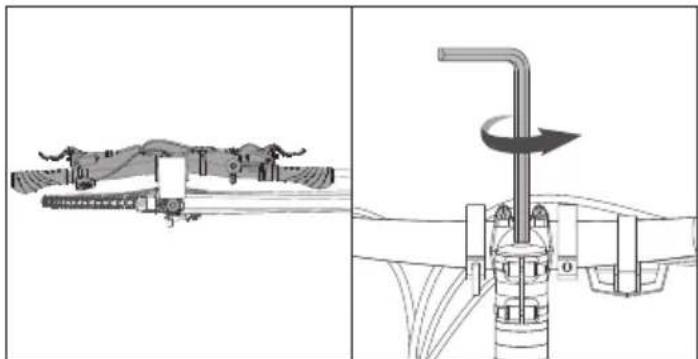
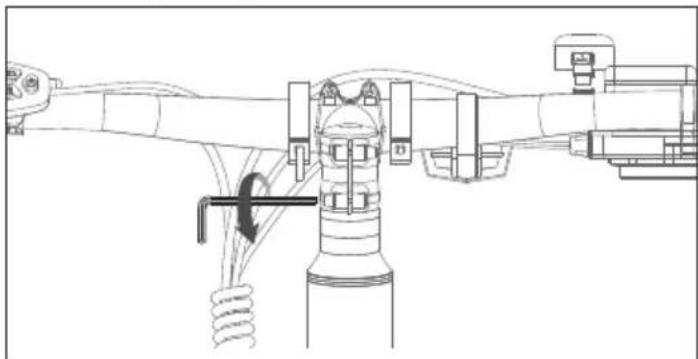
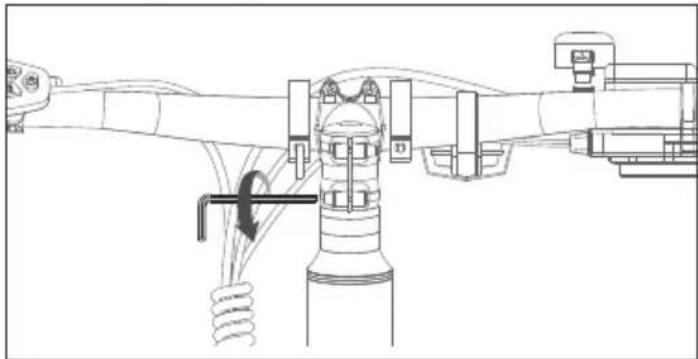
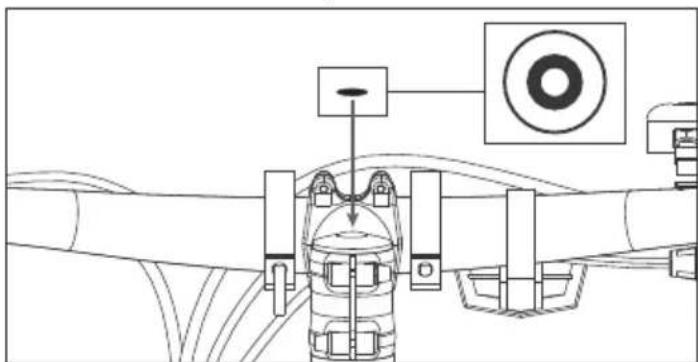
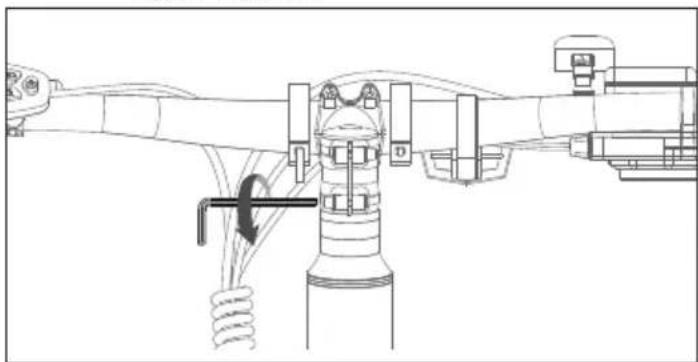
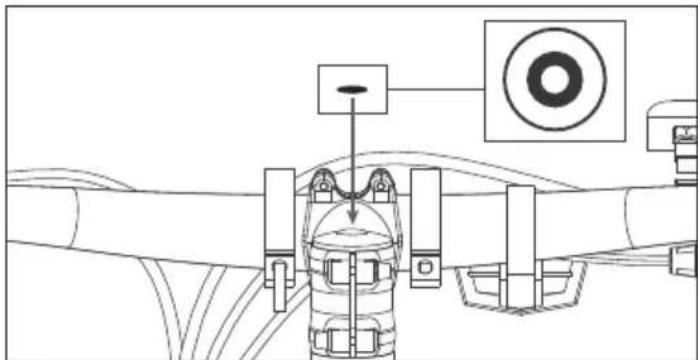
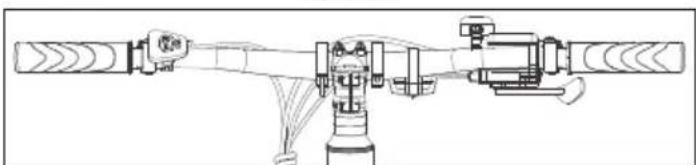
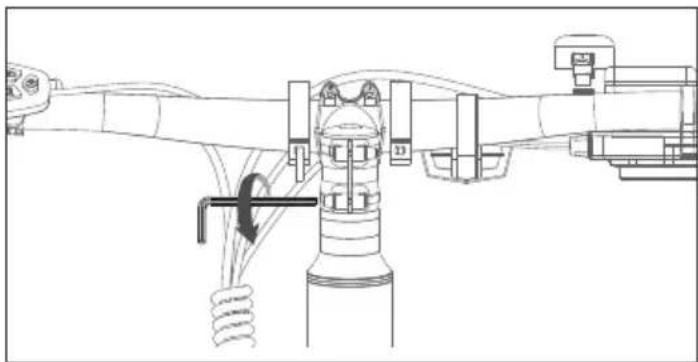
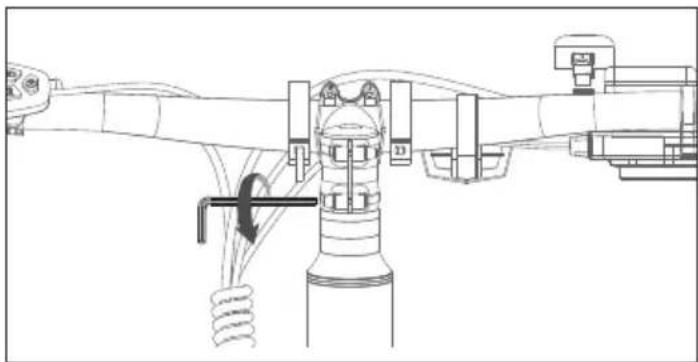
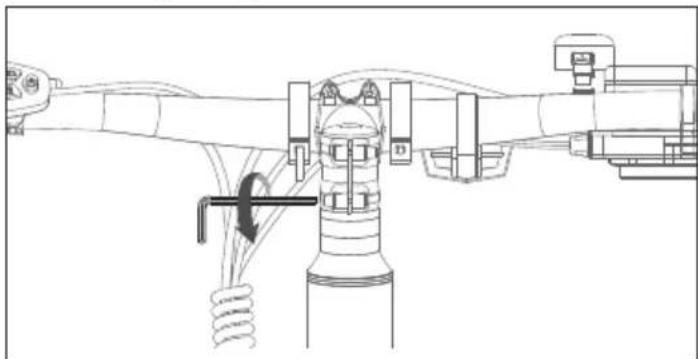
a. Use a 5mm Allen wrench to loosen the long screw on the top of the valve stem counterclockwise. Use a 4mm Allen wrench to loosen the 2 screws on the side of the valve stem. Rotate the handlebar 90°clockwise to keep the riser and upper tube in a horizontal line.
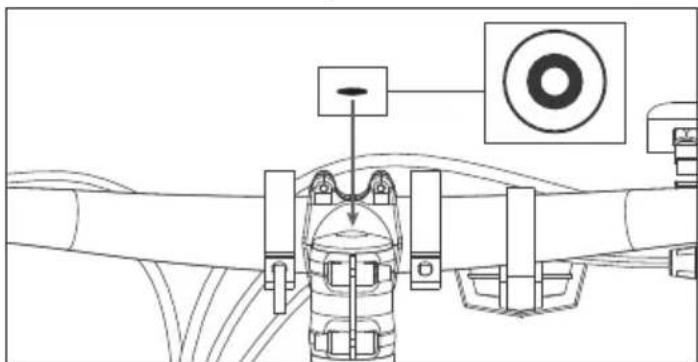
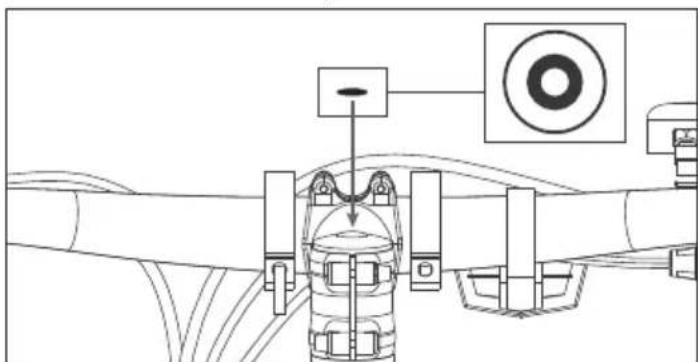
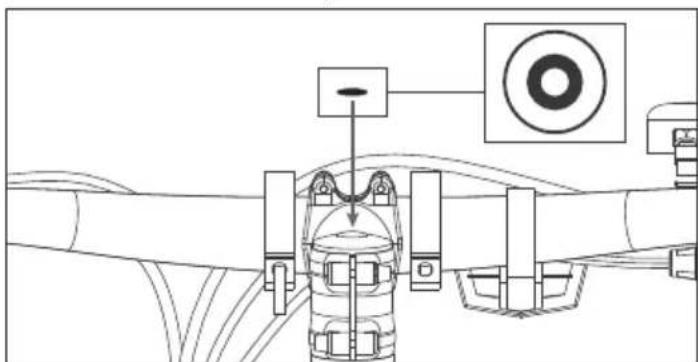
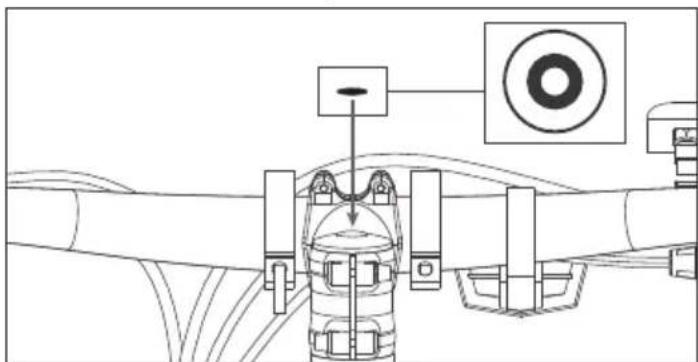
b. Retighten the screw clockwise. Put the rubber cap on the top of the
stem, as shown in (Figure 1-3, 1-4).
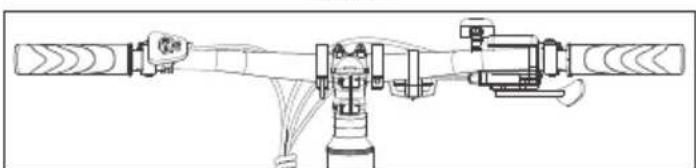
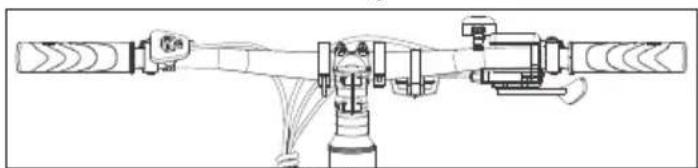
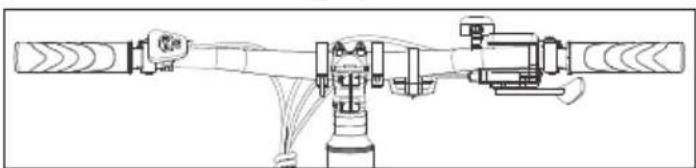
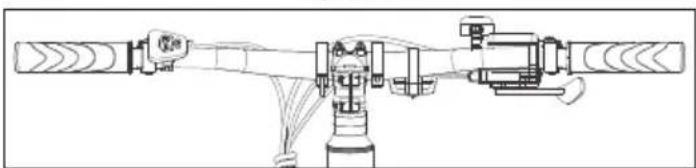
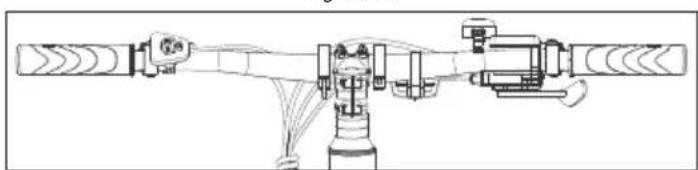
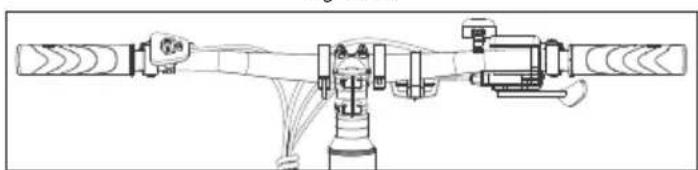
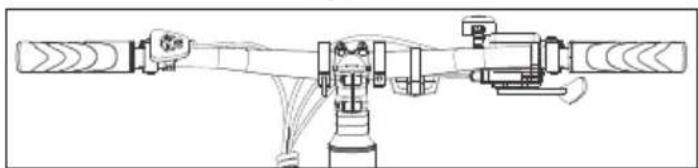
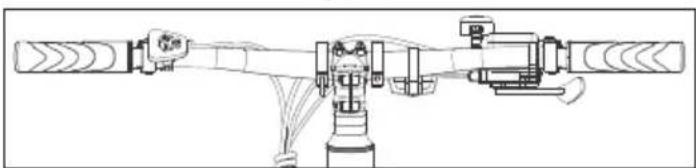
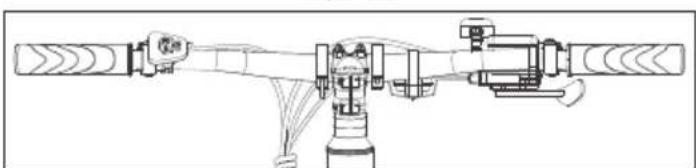
c. Adjust the instrument panel and reflector leveling to a horizontal position so that they are in a straight line, as shown in (Figure 1-5).
natural_image
Diagram showing two mechanical or agricultural setups with a tool and pipe assembly, no visible text or symbolsFigure 1-1 Figure 1-2
natural_image
Technical line drawing of a mechanical assembly with no visible text or symbolsFigure 1-3
natural_image
Technical diagram of a mechanical assembly with no visible text or symbolsFigure 1-4
natural_image
Technical line drawing of a mechanical assembly with no visible text or symbolsFigure 1-5
NOTE:
Make sure the torque of the screw on the top is about 5-6 N.m. Make sure the torque of the ones on the side is about 6 N.m.
STEP 2: Install the pedals
a. Use the 15 mm wrench to mount the pedals, as shown in (Figure 2-1).
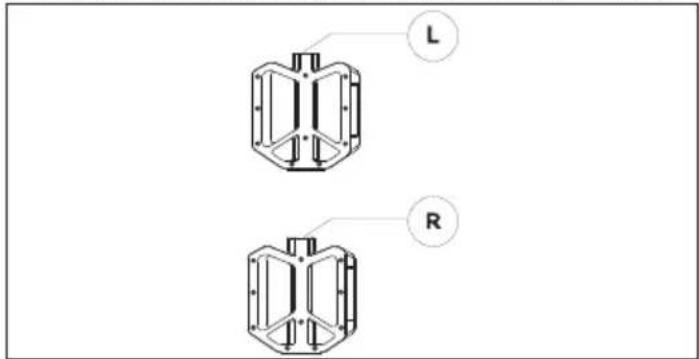
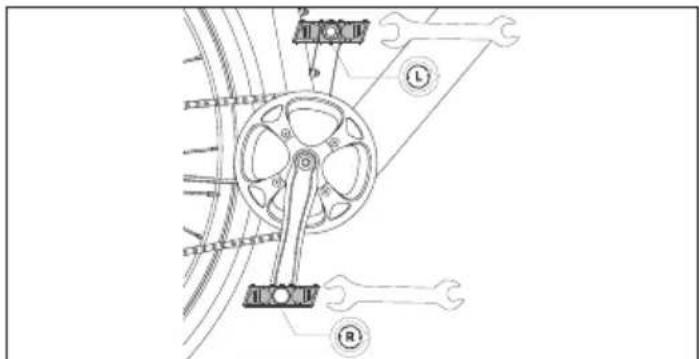
Figure 2-1
NOTES:
Check the end cap on both pedals to identify the left pedal and right pedal. Please note that the right pedal will tighten clockwise, while the left pedal will tighten counterclockwise. Make sure the torque is 18 N·m.
How to use the E-bike
Charge battery before first use.
How to charge
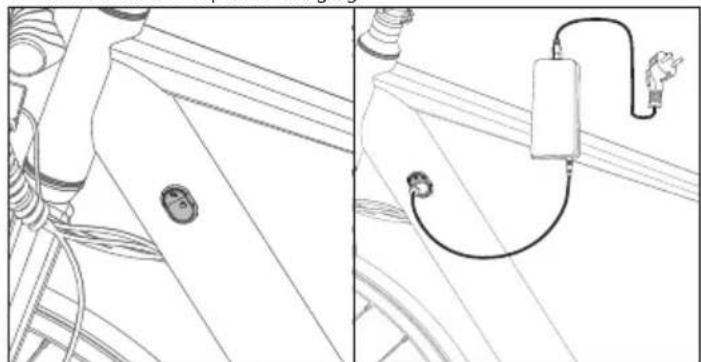
a. Open the rubber cap and plug the charger into the e-bike charge port (Figure 3-1). Make sure that the charger port is in the given direction, as shown in (Figure 3-2).
b. Plug the charger into the mains wall socket.
c. When connected to the battery charger, the battery will start to charge and the charge indicator on the charger will turn red.
d. After the charging is complete, the charge indicator will turn green. Remove the battery charger when fully charged.
e. Close the rubber cap after charging.
natural_image
Technical line drawing of a mechanical assembly with no visible text or symbolsFigure 3-1 Figure 3-2
How to start an E-bike
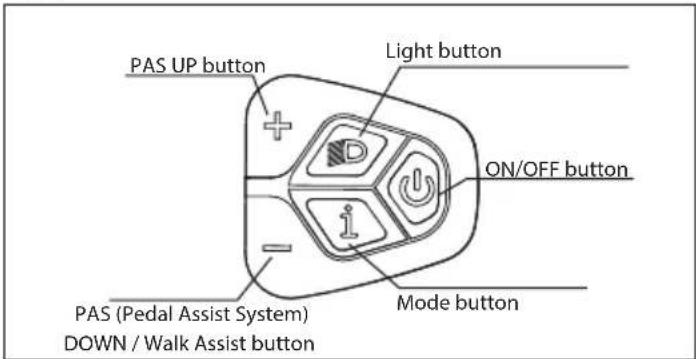
ON/OFF
Press and hold the power button ON/OFF for 3 seconds to turn on the display.
Pedal Assist Level
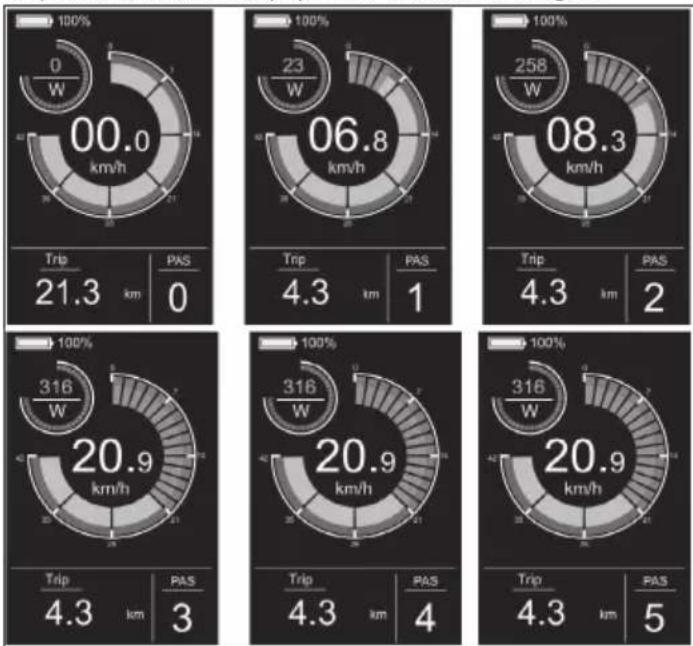
The Motor offers five Assist Modes: 0-5 Short press Up or Down to switch the pedal assist level. The display interface is shown in the figure.
pie
| Metric | Value | | :--- | :--- | | Speed (km/h) | 00.0 | | Passenger Volume (PAS) | 0 | | Trip Frequency (Trip) | 21.3 km | | Total Trip Frequency (Trip) | 4.3 km | | Total PAS (PAS) | 1 | | Speed (km/h) | 06.8 | | Passenger Volume (PAS) | 0 | | Trip Frequency (Trip) | 4.3 km | | Total Trip Frequency (Trip) | 4.3 km | | Total PAS (PAS) | 2 | | Speed (km/h) | 08.3 | | Passenger Volume (PAS) | 0 | | Trip Frequency (Trip) | 4.3 km | | Total Trip Frequency (Trip) | 4.3 km | | Total PAS (PAS) | 2 | | Speed (km/h) | 20.9 | | Passenger Volume (PAS) | 3 | | Trip Frequency (Trip) | 4.3 km | | Total Trip Frequency (Trip) | 4.3 km | | Total PAS (PAS) | 5 |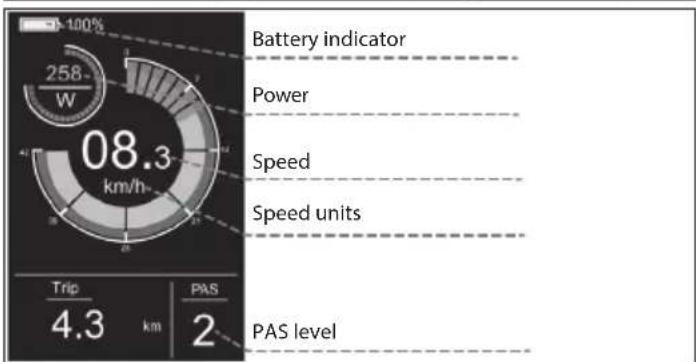
other
| Metric | Value | | ---------------- | ----- | | Battery indicator| 100% | | Power | 258 | | Speed | 08.3 | | Speed units | 4.3 | | PAS level | 2 |Light switch
Press the light button to turn on the light.
After turning on the light, the backlight brightness will decrease and the instrument will display the light identifier, as shown in the figure.
Press the light button again to turn off the lights.
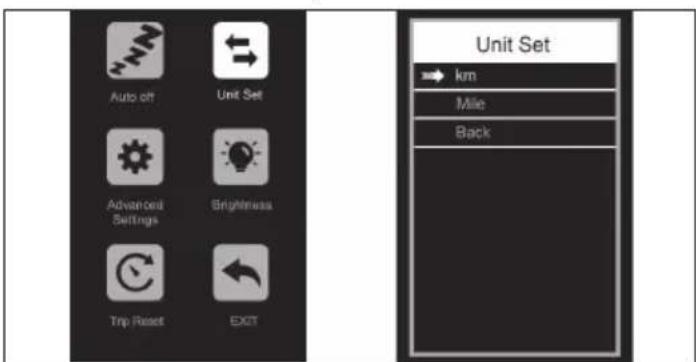
Settings Menu
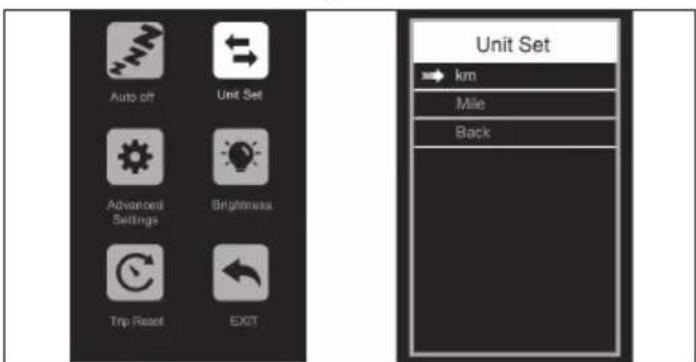
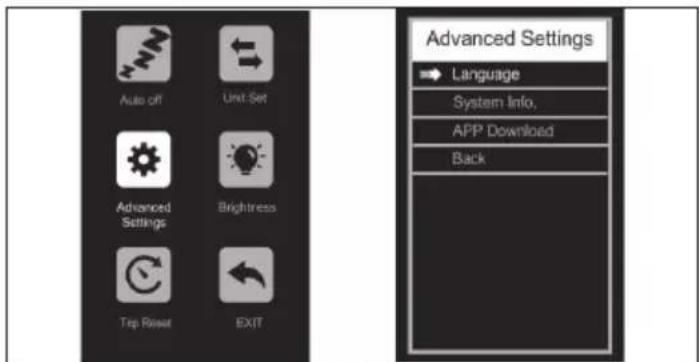
In the startup state, when the vehicle is stationary, hold on the and buttons for more than 2 seconds at the same time, and the instrument will enter the setting interface. The operation interface is shown in the figure.
All operations must be performed at speed 0.
Navigate/
enter to menu
Select or back to
main menu
Display Interface
By default, the meter displays real-time speed, mileage per trip (km), motor output power (W), and battery level (%). Press the Mode button to display information to switch between single mileage (km), total mileage (km), maximum speed (km/h), average speed (km/h), and riding time (min). The display interface is shown in the figure.
How to set
- Press the or button to switch and press the Mode button to enter setting.
- After entering the Settings, you can adjust the parameters by pressing the and button, and press the button to save and return to the upper-level Settings.
What can be set
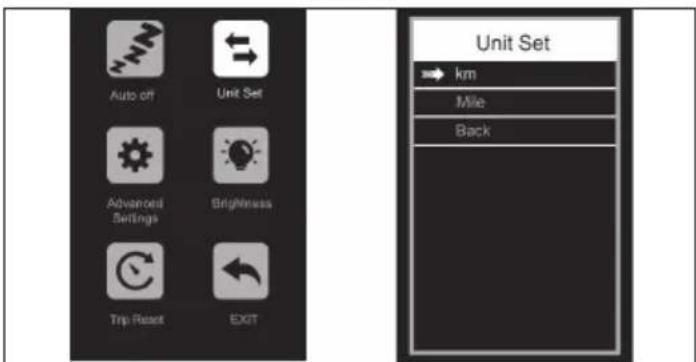
Auto Off: If you Enter this setting, you can adjust the automatic shutdown time, as shown in the (Figure 4-1).
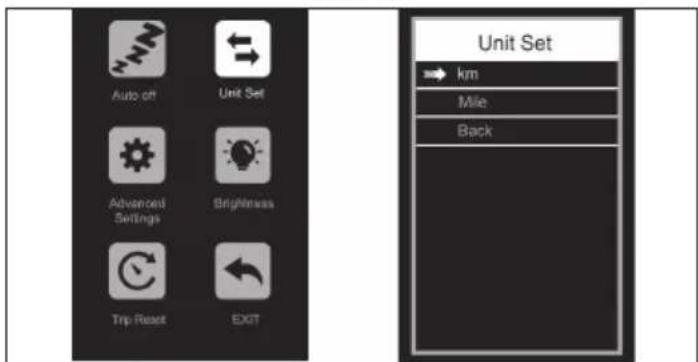
Unit set: If you Enter this setting, you can adjust the unit, as shown in the (Figure 4-2).
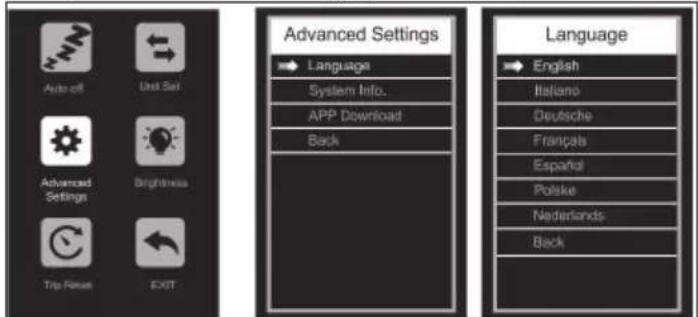
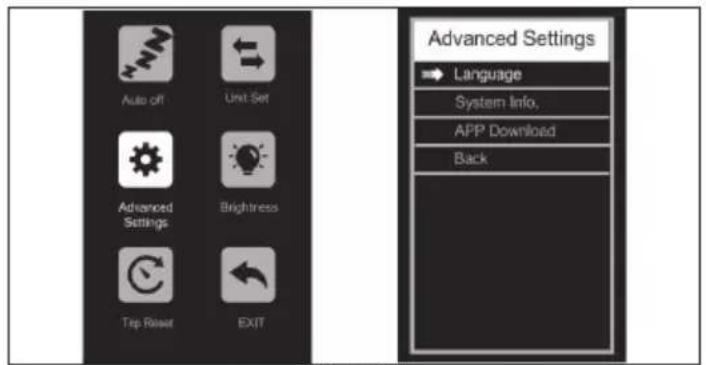
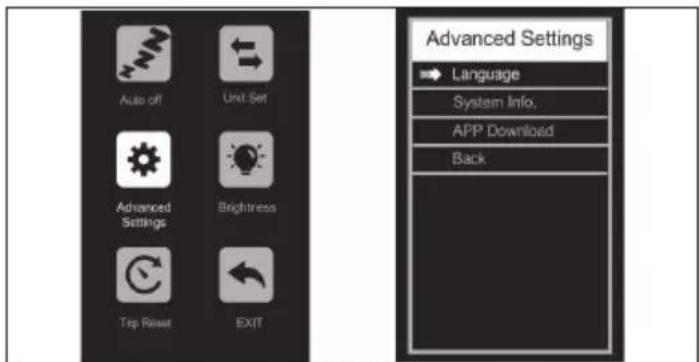
Advanced Settings: If you Enter the Settings, you can adjust the language Settings, view the product version information and download the APP, as shown in the (Figure 4-3).
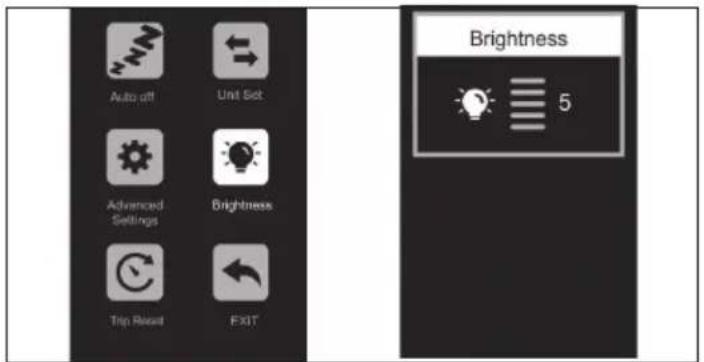
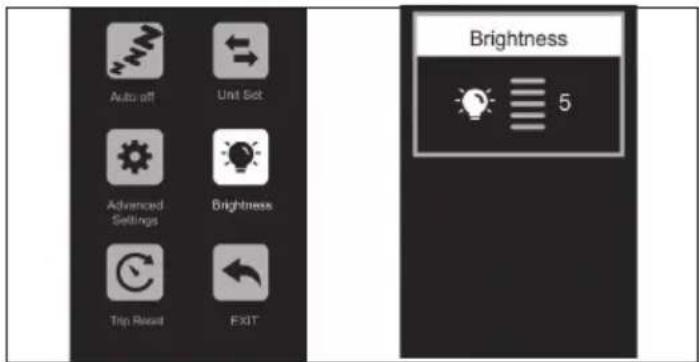
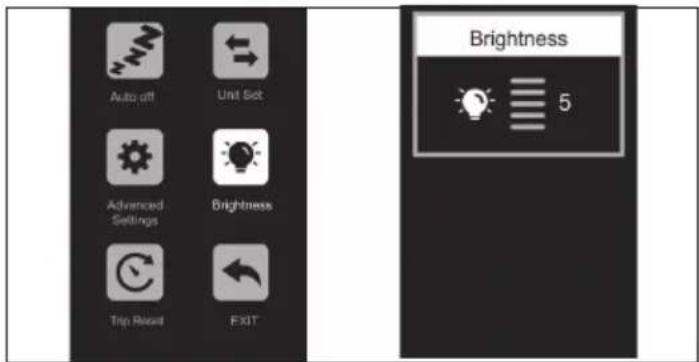
Brightness: If you Enter this setting, you can adjust the meter backlight brightness, as shown in the (Figure 4-4).
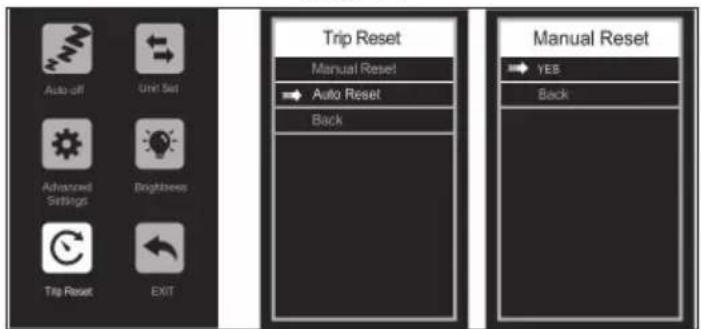
Trip Reset: If you enter this setting, you can clear single mileage data and adjust the mode of clearing single mileage, as shown in the (Figure 4-5).
Walk Assist
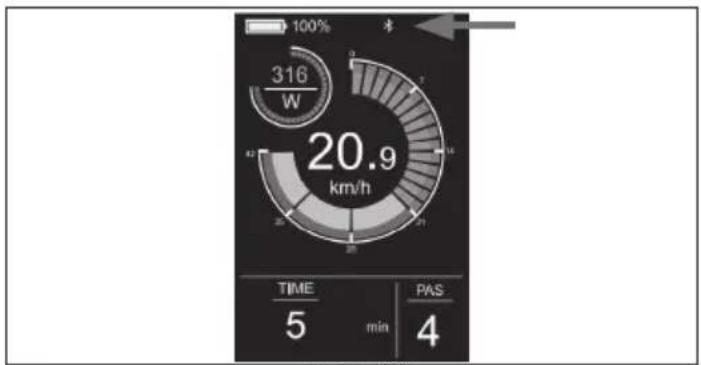
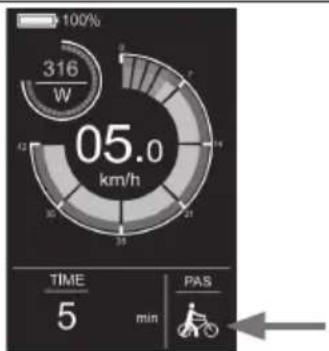
Pressing and holding the down DOWN button for 3 seconds activates Walk-Assist Mode. The e-bike will go at a speed of 5 km/h automatically. The display interface is shown in the figure.
Figure 4-1
Figure 4-2
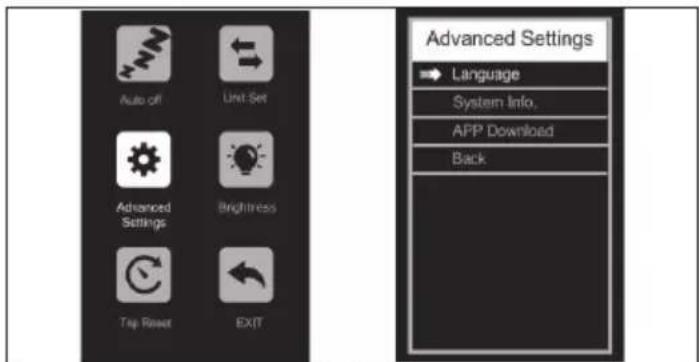
Figure 4-3
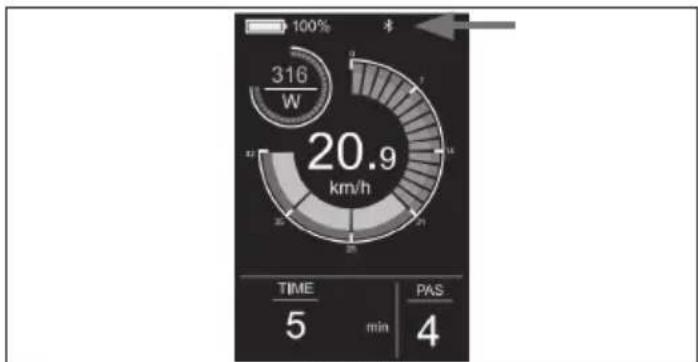
gauge
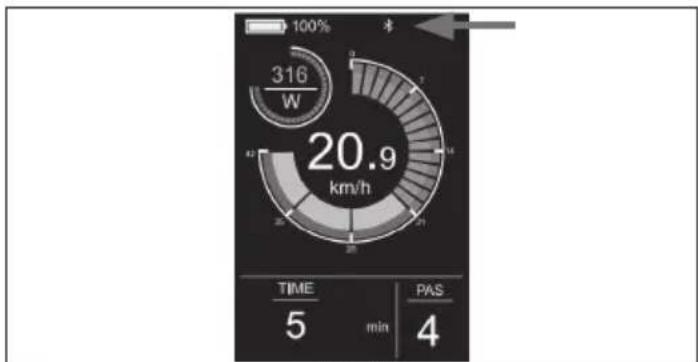
| Metric | Value | |--------|-------| | Time | 5 | | min | 4 | | PAS | 4 |Figure 4-7

Figure 4-4
Remove the connection
There are several ways to disconnect the APP from the product:
• Turn off Bluetooth on your phone
- Press and hold the 1 button and the button at the same time for 2 seconds, Then the meter will show "Bluetooth unbind"
- Select Remove device in the APP
• Power off E-bike
Language Setting
Select and enter the Advanced Settings interface.
Enter the language Settings and press the + or - button to select the desired language. To save the Settings, hold down the 1 button and return to the previous menu. The following figure shows the operation interface.
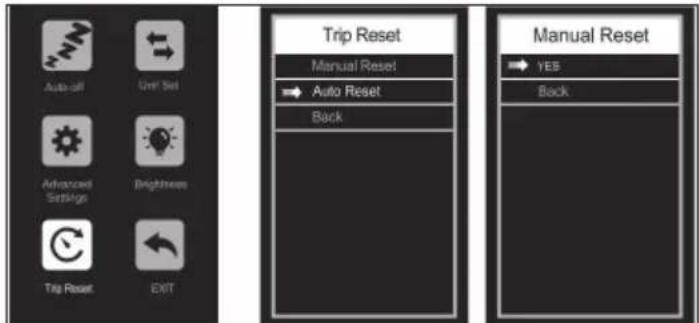
Figure 4-5
USB Charging Socket
For your convenience a USB charging socket is located on the display module. To access the socket, pull the socket cover to one side.
Connect to SHARP Life APP
Enter to menu press + and - button and enter the Advanced Settings interface, as shown in the (Figure 4-6).
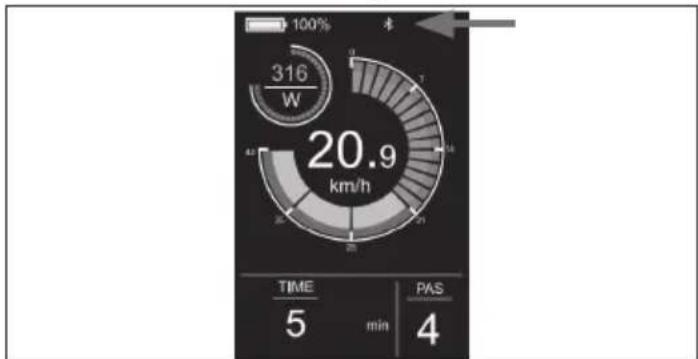
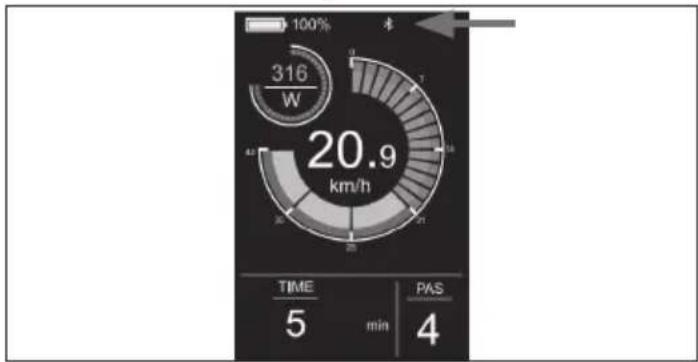
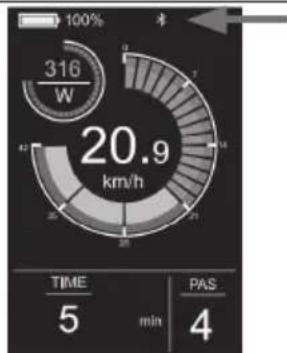
Select the APP Download and scan the QR Code to download the Sharplife APP on your phone. After the download is completed, turn on the Bluetooth of the mobile phone and enter the APP to search for the device to connect. When the instrument displays the Bluetooth icon as shown in the (Figure 4-7), the connection is successful.
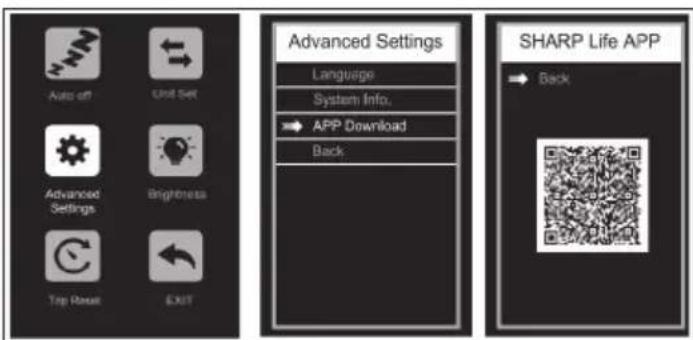
Figure 4-6
SHARP Life App
IMPORTANT:
Installing the app allows current software updates and thus continued improvements.
Add the SHARP Life app to your mobile device to start enjoying the benefits of additional functionality. This includes:
ū Speed monitoring on your device.
ū Changing the speed/distance units between kilometers and miles. Click on (Add Device), when the e-bike is turned on. Your device will scan automatically for your e-bike. Make sure that the Bluetooth function is enabled on your phone. Allow location services if requested.
Once the device is found, Bluetooth pairing is complete.
NOTE:
If you want to connect to the e-bike with a new account, there are two ways:
-
Remove device from previous account.
-
Press and hold the button 'i' Mode and the button '-' at the same time for 2 seconds to unbind the Bluetooth of the display, and then the new account can connect with it.
To add your e-bike to the app.

https://www.sharpconsumer.com/sharp-life-app
Maintenance
| Interval Inspect Service Replace | |||
| Weekly, 160-321km (100-200 mi) | Check hardware for proper torque.Check drivetrain for proper alignment and function (including the chain, freewheel, chainring).Check wheel trueness and for quiet wheel operation on (without spoke noise)Check condition of the frame for any damage. | Clean frame by wiping frame down with damp cloth.Use barrel adjuster(s) to tension derailleur/brake cables if needed.Clean and re-grease the chain | Replace any components confirmed by our product support or a certified reputable bike mechanic to be damaged beyond repair or broken. |
| Monthly, 402-1207 km (250-750 mi) | Check brake pad alignment, brake cable tension.Check belt stretch.Check brake and shifter cables for corrosion or fraying.Check spoke tension.Check accessory mounting (rack mounting bolts, fender hardware, and alignment). | Check crankset and pedal torque.Clean brake and shift cables.True and tension wheels if any loose spokes are discovered. | Replace brake and shift cables if necessary.Replace brake pads if necessary. |
| Every 6 Months, 1207-2011 km (750-1250 mi) | Inspect drivetrain (belt, chainring, freewheel).Inspect all cables and housings. | Standard tune-up by certified, reputable bike mechanic is recommended.Grease bottom bracket. | Replace brake pads.Replace tires if necessary.Replace cables and housings if necessary. |
If you use the bike under challenging conditions or ride more than 2,000 km/1,250 mi per year, shorten the inspection intervals and have an inspection carried out by bike service shop every 6 months.
Screw joints
- Check the vehicle regularly for loose screw connections according to the maintenance schedule and tighten loose screws with a torque wrench.
- Do not ride the bike if you find that any screw joints have loosened.
- Have loose screw joints checked by a professional if you lack the necessary expertise and required tools.
Frame and forks
- Check the frame and rigid fork for cracks, deformation, or discoloration.
- If the frame or the forks is cracked, deformed, or discolored, contact a professional immediately.
- Do not use the bike if you find any cracks, deformation, or discoloration.
Saddle
- Check whether you can twist the saddle.
- If you can twist the saddle, tighten the seat post clamp. Observe applicable torques.
- Check whether you can move the saddle horizontally in the direction of travel or the opposite direction.
- If you can move the saddle, adjust the saddle clamp.
Wheels
- Check whether the front or rear wheel can move sideways and whether the wheel nuts move.
- If the wheel nuts move, have a professional check the screw joints.
- If the quick-release axle moves, adjust the axle.
- If the front or rear wheel moves sideways, have a professional check the wheel.
- Check whether there is equal distance on both sides between the front wheel and the front fork and between the rear wheel and the frame.
- If the distances are not identical, have a professional check the front and rear wheels.
- Lift the bike and turn the front or rear wheel. Check whether the front or rear wheel swings sideways or outwards.
- If the front or rear wheel swings sideways or outwards, have a professional check the wheel.
- Check the front and rear rims for cracks, deformation, or color changes at regular intervals.
- Check whether the rim is under the inner tube and the rim tape.
-
Do not use the bike if the rim is cracked, deformed, or discolored.
-
Have a professional check whether there is any damage on the rim, materials, or aluminum.
- Squeeze the spokes together gently with your thumb and fingers to check whether the tension is the same for all spokes.
- If the tension varies or spokes are loose, have a professional check the spokes' tension.
Tires
- Check whether the tire pressure is correct according to the data on the tire side wall.
- Check whether the tires are free of cracks and damage from foreign bodies.
- Check whether you can clearly feel the tire tread.
- If a tire is cracked or damaged, or the tread depth is too low, have the tire replaced by a professional.
Lubrication
Lubrication is essential for the various components that move, in order to avoid corrosion Re grease the chain, brush the sprockets and chainrings and trickle a few drops of lubricant into the and derailleur cable sheaths.
Brake
It's important that you learn and remember which brake lever controls which brake (front/rear) in order to ensure your safety. To check which configuration your bike is set up with, squeeze one brake lever and see if the front or rear brake engages. Now do the same with the other brake lever. Remember this configuration. While you are testing the brake configuration, make sure that your hands can comfortably reach and squeeze the levers with no issues. If you experience any issues or discomfort when operating the brakes, please reach out to us before riding. Review the brake manufacturer's user manuals and be sure to properly maintain your brakes. It's your responsibility to be able to recognize when your brake pads need to be replaced.
Battery
It's essential to follow these instructions and safety tips in order to preserve the longevity of your battery's life and ensure proper performance.
- Fully charge the battery before each ride to ensure it is ready to go the entire trip. It will help reduce the chance of overdischarging the battery.
- If the battery becomes physically damaged or non-functional, if it has been dropped or involved in a crash, or if you notice that it is performing abnormally, please discontinue use and contact the seller immediately.
- Store the battery in a dry, climate-controlled indoor location at a temperature between 0°C and 45°C.
The voltage drops when the battery is low, which may result in weakened electric power assist. It's recommend that you start charging at 20-40% charge.
| Charge 80-1 | 00% 80% 60 | % 40% 20 | % 0-20% | ||
| Battery Voltage/V | 41.6 39 37.5 36 34.5 31 | ||||
Charging your battery
- The charger is rated for 100–240V. Be sure to check the charger, the charger cables, and the battery for damage before beginning each charge.
- Charging takes about 4–5 hours. On rare occasions, it may take longer to fully charge the battery, particularly when the bike is new or left unused for a long time.
- Only charge the battery with the supplied charger, as others may cause damage to the battery or increase the possibility of fire or explosion.
- While the charger is designed to automatically stop charging once the battery is full, do not leave it plugged in for more than 12 hours.
- Make sure your charger is isolated from liquids, dirt, and debris.
The range on one charge strongly depends on several circumstances, such as (but not limited to):
- Weather conditions, such as ambient temperature and wind;
- Road conditions, such as elevation and road surface;
- Bike conditions, such as tire pressure and maintenance level;
- Bike usage, such as acceleration and shifting;
- Rider and luggage weight;
• Amount of charge and discharge cycles;
• Age and condition of battery.
Charger notes
- The charger should only be used indoors in a cool, dry, well-ventilated area on a flat, stable, hard surface.
- Avoid exposing the charger to liquids, dust, debris, or metallic objects. Do not cover the charger with anything while in use.
- Store and use the charger in a safe area away from children.
- Charging the battery to full before each use helps to prolong its lifespan and reduces the risk of over discharge.
- Do not use any charger other than the original charger you received with your order or a charger designed specifically for the particular bike that you purchased directly from SHARP.
- This charger is designed for standard household AC power sockets with 110-240V 50/60 Hz input voltage, and it automatically detects and calculates the input voltage. Do not attempt to open the charger or modify the voltage input.
- Do not yank or pull on the charging cable. When unplugging, pull on the plastic plug to carefully remove the AC/DC cable.
- It is normal for the charger to become moderately warm during charging. If the charger is too hot to touch, or if you smell an odor or notice any other signs of overheating, stop using the charger and contact the SHARP Service Center.
- Keep the indicator facing up when using the charger. Do not invert the charger, as this can inhibit cooling and shorten its lifespan.
- Only use the original charger provided by SHARP or one designed for your specific bike model that is approved by SHARP. Do not use aftermarket chargers, which may cause damage, serious injury, or death.
- Not following the battery charging information listed here may cause unnecessary damage to the charging components, battery, or charger and may result in poor battery performance or failure to work properly. Battery damage incurred this way is not covered by warranty.
Balancing your battery
When you first receive your bike, it is important to follow these steps to ensure that your battery cells are properly balanced in order to keep them as efficiently as possible.
- For the first initial charge upon receiving your bike (or after prolonged storage time), be sure to charge the battery for at least 4 hours before riding.
NOTE: We recommend letting the battery charge for at least 4 hours for the first three charges to ensure that the cells balance properly.
- After the first three rides, you may begin routine charging procedures.
Checking the electric drive system
- Check all cables to ensure that there is no damage.
- Examine the display for cracks and damage. Check if it is firmly in place.
- Check the control unit for cracks and damage. Check if it is firmly in place.
- Check the rechargeable battery to ensure that there is no damage.
- Check that all plug contacts are correctly in place and reconnect them if necessary.
- Check the cable and the outer casing to confirm that there is no damage.
- Check the motor to ensure that there is no damage.
Cleaning
- Always turn the battery off and remove the charger from the charge port and wall socket before cleaning the battery or bicycle.
- Use a dry or slightly damp cloth for cleaning the battery or bicycle frame. If there is dirt in or around the charge port, trying using low air pressure or a soft brush to remove it. For instructions on how to clean drivetrain components, please refer to the drivetrain manufacturer's instructions.
- When cleaning, make sure the charge port on the bicycle is fully closed and no water comes into contact with the electrical components. If wet, leave the charge port open to dry out completely before connecting the charger.
- Be careful not to damage or expose electrical components to water. Do not pressure wash your battery, motor, or any other electrical components. Damaging electrical components or exposing them to water may start a fire which can result in serious injury or even death. Do not use or charge a battery you believe had water seep inside. Likewise, all connectors, including the charge port, must be completely dry and clean before using or charging the bicycle.
- Do not use alcohol, solvents, or abrasive cleaners to clean the charger. Instead, use a dry or slightly damp cloth. Surface cleaning the bike ONLY.
Service Info
WARNING
TECHNOLOGICAL ADVANCES HAVE MADE BICYCLES AND BICYCLE COMPONENTS MORE COMPLEX, AND THE PACE OF INNOVATION IS INCREASING.
IT IS IMPOSSIBLE FOR THIS MANUAL TO PROVIDE ALL THE INFORMATION REQUIRED TO PROPERLY REPAIR AND/OR MAINTAIN YOUR BICYCLE.
To help minimize the chances of an accident and possible injury, you must have any repair or maintenance, including those not specifically described in this manual, performed by a professional. Equally important is that your individual maintenance requirements will be determined by everything from your riding style to geographic location.
Consult a professional for help in determining your maintenance requirements.
WARNING
MANY BICYCLE SERVICE AND REPAIR TASKS REQUIRE SPECIAL KNOWLEDGE AND TOOLS.
Do not begin any adjustments or service on your bicycle until you have learned from a professional how to properly complete them. Improper adjustment or service may result in damage to the bicycle or in an accident
which can cause serious injury or death.
If you want to learn to carry out major service and repair work on your bike, you have three options:
- Ask the Service Center for copies of the manufacturer's installation and service instructions for the components on your bike or contact the component manufacturer.
- Ask the Service Center to recommend a book on bicycle repair.
- Ask the Service Center about the availability of bicycle repair courses in your area.
We recommend that you ask a professional to check the quality of your work the first time you work on something and before you ride the bike, just to make sure that you did everything correctly. Since that will require the time of a mechanic, there may be a modest charge for this service.
We also recommend that you ask a professional for guidance on obtaining spare parts, such as inner tubes, light bulbs, etc., as it would be useful once you have learned how to replace such parts when they require replacement.
Warranty Terms
LENGTH OF WARRANTY
- Every bicycle has a useful product lifespan. This limited warranty does not suggest or imply that the frame or components can never be broken or will last forever. This limited warranty covers manufacturing defects that occur within the normal lifespan and use of the product.
- Other components are covered by the stated warranty, if any, of their manufacturer, and they are not covered under this limited warranty.
WARRANTY CONDITIONS
- This limited warranty applies only to bicycles purchased in assembled and adjusted condition from authorized Sharp retailers.
- This limited warranty applies only to the original owner of the bicycle and is not transferable to subsequent owners.
- The original receipt of purchase is required to establish proof of purchase and must be provided to Sharp for any Sharp will require customers to complete a mandatory standard procedure for warranty claims that will involve media such as photos and videos to help Sharp fault with the product. Only the individual components themselves are covered by the warranty. The removal, assembly, and tuning requirements of the components are borne by the customer making the claim. The costs and inconvenience that result from a loss of use of the product are not covered whilst the warranty procedure takes place.
- Damage resulting from normal wear and tear, including the results of fatigue, is not covered. It is the owner's responsibility to regularly inspect and properly maintain his/her bicycle. Some items that typically exhibit damage from normal wear and tear include: Brake pads, Spokes, Tires, Tubes, Flywheel pinion, Saddle, Kickstand
- Paint fading caused by the effects of ultraviolet light (UV) or outdoor exposure is not covered by this limited warranty.
- All labor charges for warranty service, including the transfer of components and/or any installation of new components, are the responsibility of the bicycle owner.
- Due to product evolution and obsolescence (such as products that have been discontinued or are no longer kept in stock), some frames or components may not be available for older models. In these cases, Sharp may elect to provide a replacement that it determines to be the most nearly comparable model, but sourcing and paying for components is the responsibility of the bicycle owner.
- All determinations under this limited warranty will be made at the sole discretion of Sharp including but not limited to the decision to repair or replace a defective product and what replacement product is the most nearly comparable product then available.
WARRANTY EXCLUSIONS
This warranty does not cover:
- Damage or failure from abuse, neglect, misuse, or accident.
- Damage from stunt riding; ramp jumping; acrobatics; competitive events, such as bicycle racing, bicycle motocross racing, or similar activities; or any activity that is not consistent with the intended use of the product.
- Damage caused by excess exposure to the elements, such as water caused by not storing bikes indoors.
- Damages resulting from improper charging of the battery pack or use of any charger not supplied by Sharp.
All warranties are void if the bicycle is subjected to abuse, neglect, improper repair, improper assembly, lack of proper maintenance according to the owner's manual, alteration, modification, installation of incompatible parts, corrosion, an accident, or other abnormal, excessive, or improper use. Additionally, this warranty does not cover damage associated with commercial use.
Legal documentation
RoHS
- SHARP certifies that this product and its packing are in compliance with the 2017 Directive amending RoHS Directive on the Restriction of Hazardous Substances in Electrical and Electronic Equipment, commonly known as RoHS.
Storage
- Storing your battery.
- If you plan on storing your bike (or spare battery) for longer than two weeks, please be sure to follow these guidelines to maintain your battery's lifespan.
- Periodically check the battery and be sure to keep the charge up to at least 80%.
- Store your battery in a cool, dry place at a temperature between -20 °C–20 °C.
- Failure to follow proper battery care can result in unnecessary damage to the components, battery, and charger, leading to underperformance or malfunction. Loss of battery capacity is not covered by warranty.
Transport
- When shipping or transporting the battery over long distances, including air travel, the charge should be reduced to 50% or less in case it gets damaged during transit. Package it carefully. Never transport a damaged battery on an airplane.
- Transporting and/or shipping your battery may be subject to restrictions and may require special handling, labeling, and packaging. Inform yourself of applicable legal requirements and regulations in your country or state and check with your airline or carrier.
- Be aware that your electric bike may be significantly heavier than a bicycle without motor support.
Troubleshooting
Error Code
If something is wrong with the electrical system, it will show an error code on the display. Don't hesitate to get in touch with our service center to troubleshoot the problems.
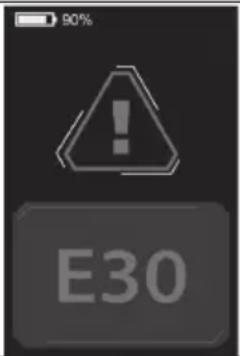
Here are definitions of the error codes.
| Error code Definition | |
| 21 Abnormal current | |
| 23 Motor out of phase | |
| 24 Motor Hall signal fault | |
| 25 Abnormal braking | |
| 30 Communication problem |
| Symptoms Possible Causes Most Common Solutions | ||
| The bike does not work. | 1. Insu cient battery power2. Faulty connections3. The battery is not fully seated in the tray4. Improper turn on sequence5. Brakes are applied | 1. Charge the battery2. Clean and repair connectors3. Install the battery correctly4. Turn on bike with proper sequence5. Disengage brakes |
| Irregular acceleration and/ or reduced top speed. | 1. Insu cient battery power | 1. Charge or replace battery |
| The motor does not respond when the bike is powered on. | 1. Loose wiring2. Loose or damaged motor plug wire3. Damaged motor | 1. Repair and or reconnect2. Secure or replace3. Repair or replace |
| Reduced range. | 1. Low tire pressure2. Low or faulty battery3. Driving with too many hills, headwind, braking, and/or excessive load4. Battery discharged for long period of time without regular charges, aged, damaged.5. Brakes rubbing | 1. Adjust tire pressure2. Check connections or charge battery.3. Assist with pedals or adjust route.4. Contact Product Support if range decline persists.5. Adjust the brakes |
| The battery will not charge. | 1. Charger not well connected2. Charger damaged3. Battery damaged4. Wiring damaged | 1. Adjust the connections2. Replace3. Replace4. Repair or replace |
| Wheel or motor makes strange noises. | 1. Loose or damaged wheel spokes or rim2. Loose or damaged motor wiring3. Rear derailleur not shifting | 1. Tighten, repair, or replace2. Reconnect or replace motor.3. Adjust rear derailleur |
Technical specification
Model BK-GS03E-W BK-GS03E-G
General
Colors White Grey
Size M M
Max Speed (EU/UK) 25 km/h 25 km/h
Mileage up to 85 km up to 85 km
Weight 19.5 kg 19.5 kg
Max Load 120 kg 120 kg
Rider height 165-190 cm
165-190 cm
Electronics
| Motor | 36V 250W | 36V 250W |
| Battery 36V 7.8Ah/280.8Wh | 36V 7.8Ah/280.8Wh | |
| Sensor | Cadence Sensor, Torque Sensor | Cadence Sensor, Torque Sensor |
| Display | IPX6 Waterproof TFT Color LCD Display | IPX6 Waterproof TFT Color LCD Display |
| Charger 100V-240V/2A Smart Charger | 100V-240V/2A Smart Charger | |
| Charging Time | 4 Hours | 4 Hours |
Frame Set
| Frame Aluminum Alloy Frame | Aluminum Alloy Frame | |
| Wheels | ||
| Tires | 700C × 35C Kenda® Tires | 700C × 35C Kenda® Tires |
| Rims | Aluminum Alloy Black | Aluminum Alloy Black |
| Front Hub | M9 × 13G × 36H Thru-Axle | M9 × 13G × 36H Thru-Axle |
| Spokes | Variable diameter 304 Stainless steel | Variable diameter 304 Stainless steel |
| Brakes | ||
| Brakes | Shimano® AMT 200JRRXRX155 Disc Brakes with 160mm rotors | Shimano® AMT 200JRRXRX155 Disc Brakes with 160mm rotors |
| Brake Levers | Shimano® AMT200JRRXRX155 | Shimano® AMT200JRRXRX155 |
Drivetrain
| Chainwheel | PIONEER-244A-5 1/2*3/32*44T*9/16*170 | PIONEER-244A-5 1/2*3/32*44T*9/16*170 |
| Chain | C8 1/2*3/32*108L | C8 1/2*3/32*108L |
| Crank | 170mm | 170mm |
| Pedals | HFbike® | HFbike® |
Components
| Saddle Black Saddle | Black Saddle | |
| Seat post | 27.2*2.3*350mm Aluminum Alloy | 27.2*2.3*350mm Aluminum Alloy |
| Handlebar | Aluminum Alloy, 680mm | Aluminum Alloy, 680mm |
| Stem | Aluminum Alloy | Aluminum Alloy |
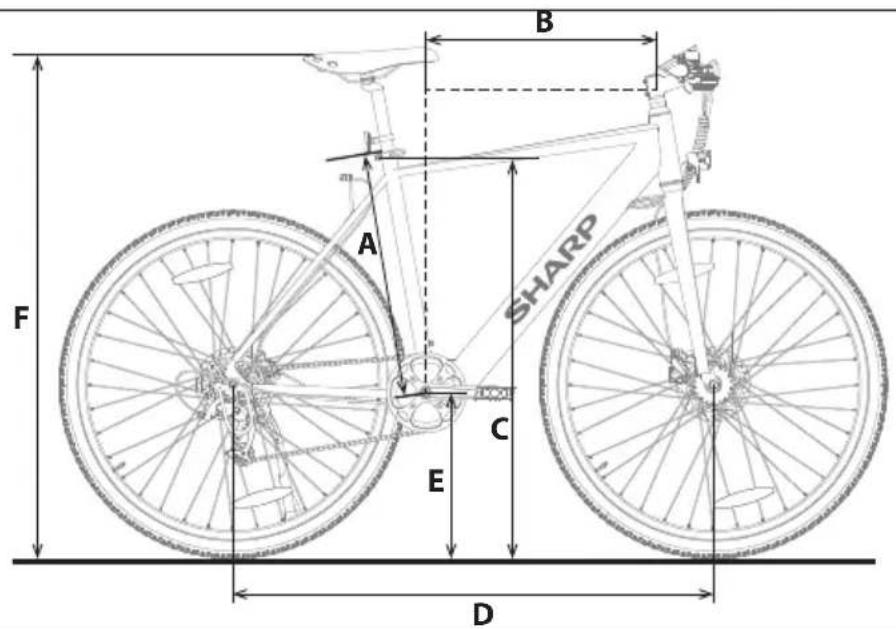
| Frame Size 19.3 inches (49 cm) | ||
| Suggested Rider Height 5'6"-6'3" 165 cm-190 cm | ||
| A Seat Tube Length 20.5 inches 520 mm | ||
| B Reach 13.4 inches 340 mm | ||
| C Stand over Height 31.1 inches 790 mm | ||
| D Wheelbase 40.2 inches 1020 mm | ||
| E Bottom Bracket Height 11.8 inches 300 mm | ||
| F Saddle Height 36.2 inches - 42.5 inches 920-1080 mm | ||
Warenzeichen:

Bluetooth®
https://www.sharpconsumer.com/support/
1
0,08 Zoll (2mm) Inbusschlüssel
0,10 Zoll (2,5mm) Inbusschlüssel
0,12 Zoll (3mm) Inbusschlüssel
0,16 Zoll (4mm) Inbusschlüssel
0,20 Zoll (5mm) Inbusschlüssel
0,24 Zoll (6mm) Inbusschlüssel
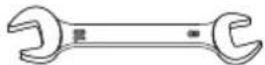
Gabelschlüssel 08-10
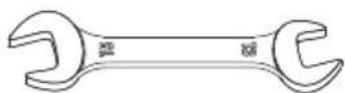
Gabelschlüssel 13-15
natural_image
Pure diagram of a mechanical or fluidic device with no text, numbers, or symbolsLadegerät

Kabelbinder
natural_image
Line drawing of a bicycle with front wheel, suspension frame, and visible 'SHARP' branding (no text beyond label)
www.sharpconsumer.com/contact/

www.sharpconsumer.com/support/
www.sharpconsumer.com/documents-of-conformity/

natural_image
Technical diagram showing a mechanical assembly with a rotating shaft and housing, no text or symbols present.natural_image
Technical line drawing of a mechanical assembly with no visible text or symbolsAbbildung 1-3
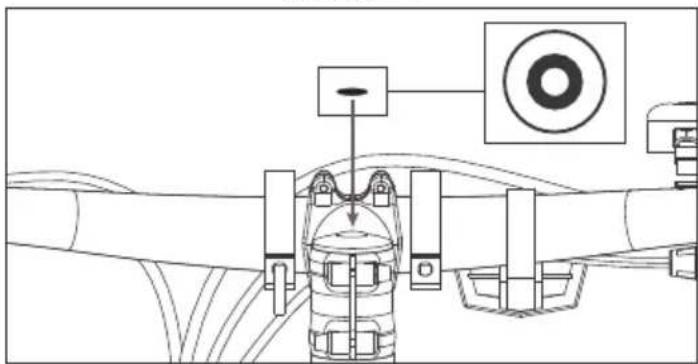
Abbildung 1-4
natural_image
Technical line drawing of a mechanical assembly with no visible text or symbolsAbbildung 1-5
HINWEIS:
Abbildung 2-1
NOTIZEN:
natural_image
Technical line drawing of a mechanical assembly with two views: one showing internal components and the other showing a connected piping system (no text or symbols)pie
| Metric | Value | |---|---| | Current (W) | 23 | | Trip Duration (km) | 4.3 | | PAS Score | 1 | | Total Energy Consumption (km/h) | 06.8 |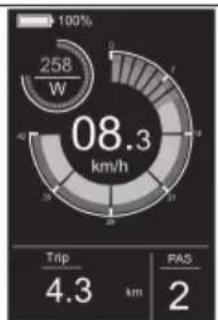
pie
| Metric | Value | | :--- | :--- | | Current (W) | 258 | | Trip Distance (km) | 4.3 | | PAS (km) | 2 |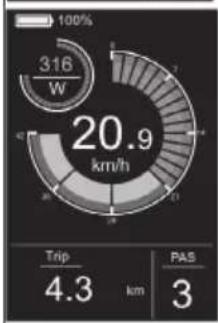
gauge
| Metric | Value | | :--- | :--- | | Speed (km/h) | 20.9 | | Trip Distance (km) | 4.3 | | PAS Score | 3 |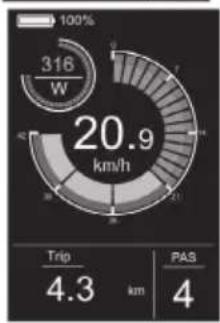
gauge
| Metric | Value | | :--- | :--- | | Current (W) | 316 | | Trip Distance (km) | 4.3 | | PAS (km) | 4 |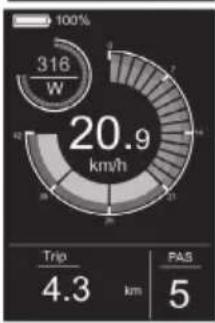
gauge
| Metric | Value | | :--- | :--- | | Current (W) | 316 | | Trip Distance (km) | 4.3 | | Passenger Count (passes) | 5 |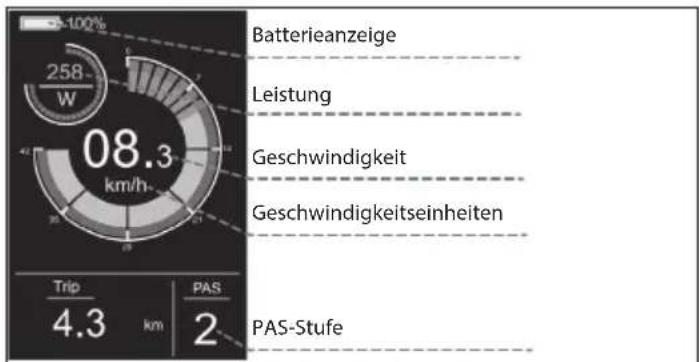
gauge
| Metric | Value | |---|---| | Trip | 4.3 | | PAS | 4 | | QDO | 24 | | PAS | 4 | | MAX | 34.9 | | PAS | 4 |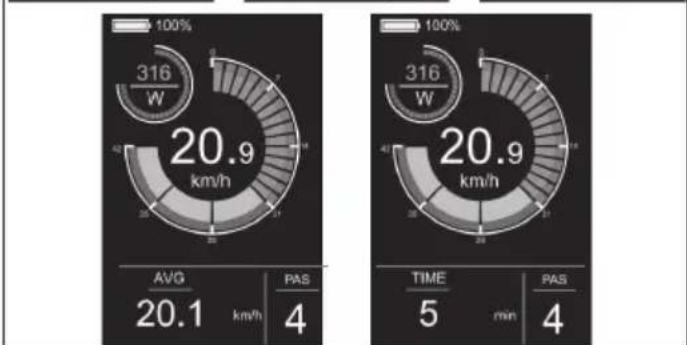
other
| Metric | Value | |---|---| | Power Consumption (W) | 316 | | Average Power (km/h) | 20.9 | | AVG (km/h) | 20.1 | | PAS (min) | 4 | | Time (min) | 5 | | PAS (min) | 4 |Gehhilfe
Abbildung 4-1

Abbildung 4-2
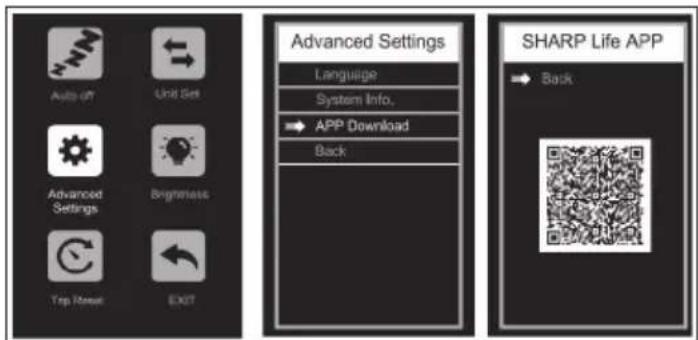
Abbildung 4-6
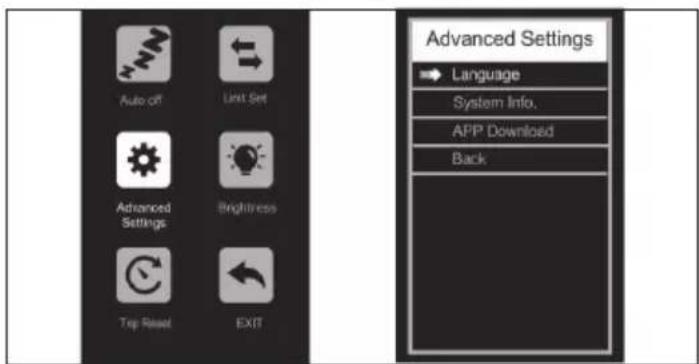
Abbildung 4-3
gauge
| Value | |---| | 316 W | | 20.9 km/h |Abbildung 4-7
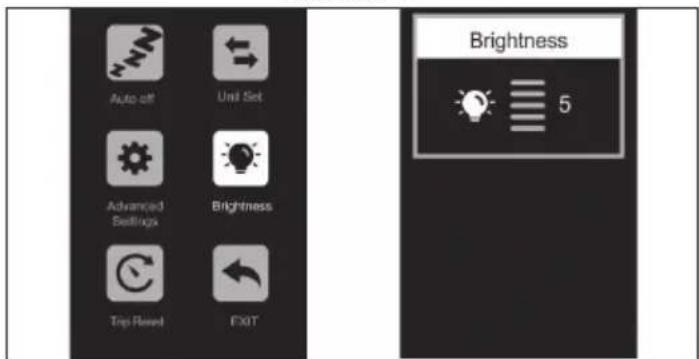
Abbildung 4-4
https://www.sharpconsumer.com/sharp-life-app
Wartung
https://www.sharpconsumer.com/support/
1
Llave Allen de 2 mm (0,08 pulgadas)
Llave Allen de 2,5 mm (0,10 pulgadas)
Llave Allen de 3 mm (0,12 pulgadas)
Llave Allen de 4 mm (0,16 pulgadas)
Clé Allen de 5mm (0,20 pouces)
Llave Allen de 6 mm (0,24 pulgadas)
Clé à Fourche 08-10
Clé à fourche 13-15

Tournevis Phillips


Pédales
natural_image
Simple line drawing of a rectangular device with a coiled cable and connector (no text or symbols)Chargeur

Serre-câbles

Capuchon en caoutchouc
natural_image
Line drawing of a bicycle with 'SHARP' branding on the front wheel (no additional text or symbols)natural_image
Two circular icons showing a shoe and helmet, no text or symbols presentvélo peut survenir.

www.sharpconsumer.com/contact/

www.sharpconsumer.com/support/

www.sharpconsumer.com/documents-of-conformity/

natural_image
Technical diagram showing a mechanical assembly and a valve mechanism (no text or labels)Figure 1-1 Figure 1-2
natural_image
Technical line drawing of a mechanical assembly with no visible text or symbolsFigure 1-3
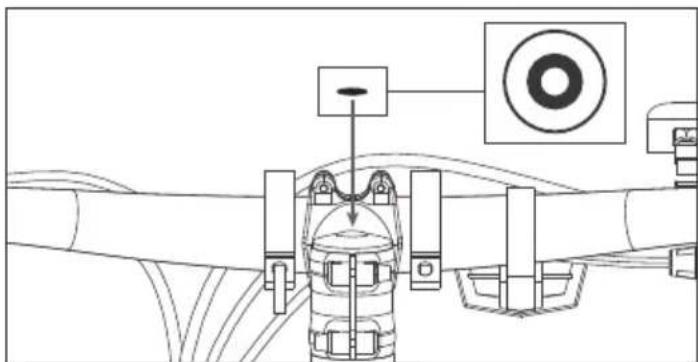
Figure 1-4
natural_image
Technical line drawing of a mechanical assembly with no visible text or symbolsFigure 1-5
REMARQUE:
Figure 2-1
NOTES:
natural_image
Technical line drawing of a mechanical assembly with two views: one showing internal components and the other showing a connected pipe or tube (no text or symbols present)Figure 3-1 Figure 3-2
pie
| Chart | Metric | Value | |---|---|---| | 1 | Power Consumption (W) | 00.0 | | 2 | Power Consumption (W) | 23 | | 3 | Power Consumption (W) | 06.8 | | 4 | Power Consumption (W) | 08.3 | | 5 | Power Consumption (W) | 258 | | 6 | Power Consumption (W) | 4.3 | | 7 | Power Consumption (W) | 4.3 | | 8 | Power Consumption (W) | 2 | | 9 | Power Consumption (W) | 316 | | 10 | Power Consumption (W) | 20.9 | | 11 | Power Consumption (W) | 20.9 | | 12 | Power Consumption (W) | 316 | | 13 | Power Consumption (W) | 4 | | 14 | Power Consumption (W) | 4.3 | | 15 | Power Consumption (W) | 4.3 | | 16 | Power Consumption (W) | 5 | | 17 | Power Consumption (W) | 0 | | 18 | Power Consumption (W) | 21.3 | | 19 | Power Consumption (W) | 0 | | 20 | Power Consumption (W) | 0 | | 21 | Power Consumption (W) | 0 | | 22 | Power Consumption (W) | 0 | | 23 | Power Consumption (W) | 0 | | 24 | Power Consumption (W) | 0 | | 25 | Power Consumption (W) | 0 | | 26 | Power Consumption (W) | 0 | | 27 | Power Consumption (W) | 0 | | 28 | Power Consumption (W) | 0 | | 29 | Power Consumption (W) | 0 | | 30 | Power Consumption (W) | 0 | | 31 | Power Consumption (W) | 0 | | 32 | Power Consumption (W) | 0 | | 33 | Power Consumption (W) | 0 | | 34 | Power Consumption (W) | 0 | | 35 | Power Consumption (W) | 0 | | 36 | Power Consumption (W) | 0 | | 37 | Power Consumption (W) | 0 | | 38 | Power Consumption (W) | 0 | | 39 | Power Consumption (W) | 0 | | 40 | Power Consumption (W) | 0 | | 41 | Power Consumption (W) | 0 | | 42 | Power Consumption (W) | 0 | | 43 | Power Consumption (W) | 0 | | 44 | Power Consumption (W) | 0 | | 45 | Power Consumption (W) | 0 | | 46 | Power Consumption (W) | 0 | | 47 | Power Consumption (W) | 0 | | 48 | Power Consumption (W) | 0 | | 49 | Power Consumption (W) | 0 | | 50 | Power Consumption (W) | 0 | | 51 | Power Consumption (W) | 0 | | 52 | Power Consumption (W) | 0 | | 53 | Power Consumption (W) | 0 | | 54 | Power Consumption (W) | 0 | | 55 | Power Consumption (W) | 0 | | 56 | Power Consumption (W) | 0 | | 57 | Power Consumption (W) | 0 | | 58 | Power Consumption (W) | 0 | | 59 | Power Consumption (W) | 0 | | 60 | Power Consumption (W) | 0 | | 61 | Power Consumption (W) | 0 | | 62 | Power Consumption (W) | 0 | | 63 | Power Consumption (W) | 0 | | 64 | Power Consumption (W) | 0 | | 65 | Power Consumption (W) | 0 | | 66 | Power Consumption (W) | 0 | | 67 | Power Consumption (W) | 0 | | 68 | Power Consumption (W) | 0 | | 69 | Power Consumption (W) | 0 | | 70 | Power Consumption (W) | 0 | | 71 | Power Consumption (W) | 0 | | 72 | Power Consumption (W) | 0 | | 73 | Power Consumption (W) | 0 | | 74 | Power Consumption (W) | 0 | | 75 | Power Consumption (W) | 0 | | 76 | Power Consumption (W) | 0 | | 77 | Power Consumption (W) | 0 | | 78 | Power Consumption (W) | 0 | | 79 | Power Consumption (W) | 0 | | 80 | Power Consumption (W) | 0 | | 81 | Power Consumption (W) | 0 | | 82 | Power Consumption (W) | 0 | | 83 | Power Consumption (W) | 0 | | 84 | Power Consumption (W) | 0 | | 85 | Power Consumption (W) | 0 | | 86 | Power Consumption (W) | 0 | | 87 | Power Consumption (W) | 0 | | 88 | Power Consumption (W) | 0 | | 89 | Power Consumption (W) | 0 | | 90 | Power Consumption (W) | 0 | | 91 | Power Consumption (W) | 0 | | 92 | Power Consumption (W) | 0 | | 93 | Power Consumption (W) | 0 | | 94 | Power Consumption (W) | 0 | | 95 | Power Consumption (W) | 0 | | 96 | Power Consumption (W) | 0 | | 97 | Power Consumption (W) | 0 | | 98 | Power Consumption (W) | 0 | | 99 | Power Consumption (W) | 0 | | Note: The actual values may vary due to the random nature of the data generation. The 'PAS' label indicates a specific metric or parameter related to the data generation process. The 'Trip' label is not present in the image.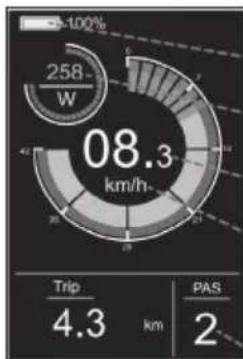
pie
| Metric | Value | | :--- | :--- | | Current (W) | 258 | | Trip Distance (km) | 4.3 | | PAS (km) | 2 |pie
| Category | Value | |---|---| | ODO | 24 | | PAS | 4 | | Total | 20.9 | | W (Estimated) | 316 |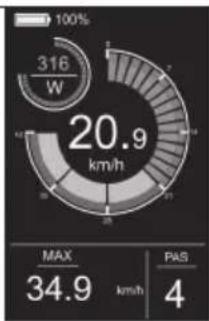
pie
| Metric | Value | |---|---| | Current | 316 W | | Max | 34.9 km/h | | PAS | 4 | | Total | 20.9 km/h |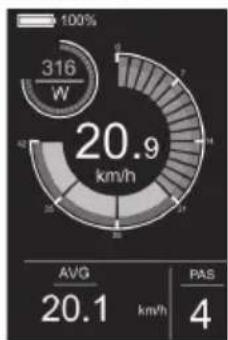
gauge
| Metric | Value | |---|---| | Current (W) | 316 | | Avg | 20.1 | | PAS | 4 |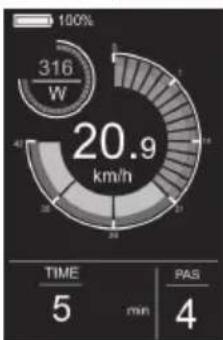
pie
| Metric | Value | |---|---| | Total Energy Consumption (W) | 316 | | Time (min) | 5 | | PAS (min) | 4 | | Percentage (%) | 100% | | Value (km/h) | 20.9 |Aide à la marche
Figure 4-1

Figure 4-2
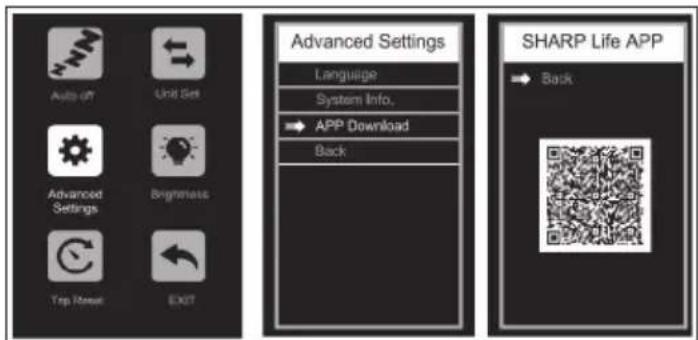
Figure 4-6
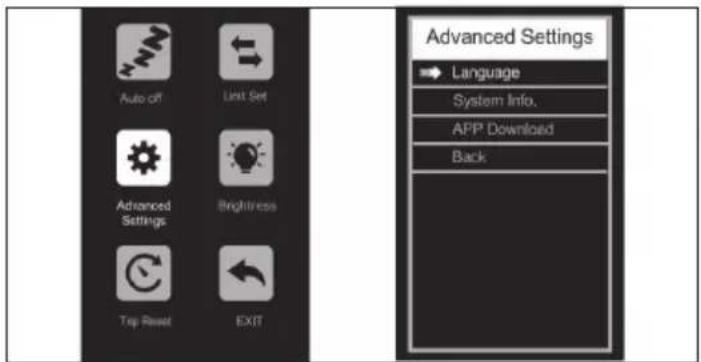
Figure 4-3

gauge
| Metric | Value | |---|---| | Speed (km/h) | 20.9 | | Time (min) | 5 | | PAS (min) | 4 |Figure 4-7
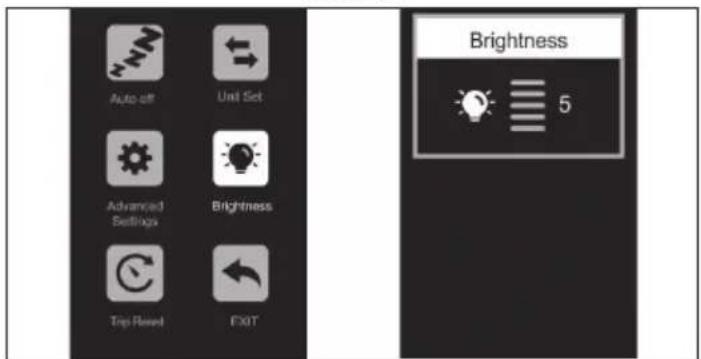
Figure 4-4
https://www.sharpconsumer.com/sharp-life-app
Entretien
CONDITIONS DE GARANTIE
EXCLUSIONS DE GARANTIE
https://www.sharpconsumer.com/support/
Chiave Allen da 0,08 pollici (2mm)
Chiave Allen da 0,10 pollici (2,5mm)
Chiave Allen da 0,12 pollici (3mm)
Chiave Allen da 0,16 pollici (4mm)
Chiave Allen lunga 0,20 pollici (5mm)
Chiave Allen da 0,24 pollici (6mm)
Chiave a forchetta 08-10
Chiave a forchetta 13-15

Cacciavite Phillips
natural_image
Simple line drawing of a rectangular device with a coiled cable and connector (no text or symbols)Caricabatterie

Fascette per cavi
Guida rapida
Guida alla garanzia
Pedali

Cappuccio di gomma
natural_image
Line drawing of a bicycle with 'SHARP' branding on the front wheel (no additional text or symbols)natural_image
Two circular icons showing a shoe and helmet, no text or symbols present
www.sharpconsumer.com/contact/

www.sharpconsumer.com/support/

www.sharpconsumer.com/documents-of-conformity/

natural_image
Diagram showing two mechanical or agricultural setups: one with a tractor and another with a curved pipe or valve (no text or symbols present)Figura 1-1 Figura 1-2
natural_image
Technical line drawing of a mechanical assembly with no visible text or symbolsFigura 1-3
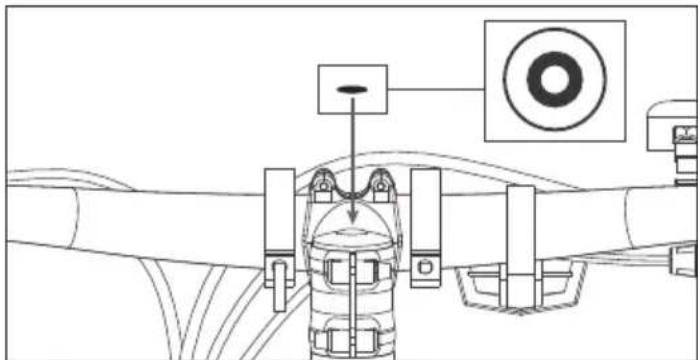
Figura 1-4
natural_image
Technical line drawing of a mechanical assembly with no visible text or symbolsFigura 1-5
NOTA:
Figura 2-1
NOTE:
natural_image
Technical line drawing of a mechanical assembly with no visible text or symbolsFigura 3-1 Figura 3-2
pie
| Segment | Value | |---|---| | Top Left | 23 W | | Middle Right | 06.8 km/h | | Bottom Left | 4.3 km | | Bottom Right | 1 | | Total | 100% |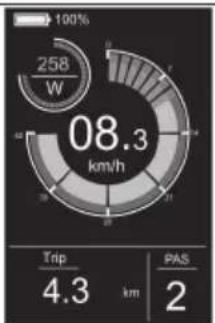
pie
| Metric | Value | |---|---| | Total Energy Consumption (W) | 258 | | Trip Distance (km) | 4.3 | | PAS Distance (km) | 2 |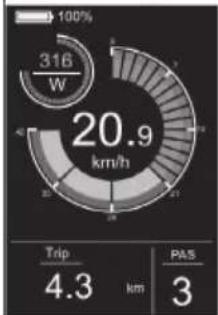
pie
| Metric | Value | |---|---| | Current (W) | 316 | | Trip (km) | 4.3 | | PAS (km) | 3 |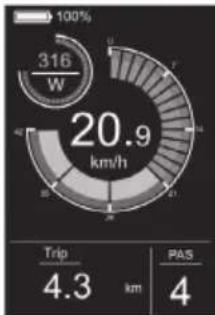
gauge
| Metric | Value | | :--- | :--- | | Current (W) | 316 | | Trip Duration (km) | 4.3 | | PAS Count (km) | 4 |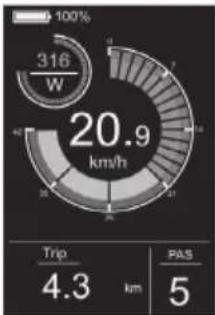
gauge
| Metric | Value | | :--- | :--- | | Current (W) | 316 | | Trip (km) | 4.3 | | PAS (km) | 5 |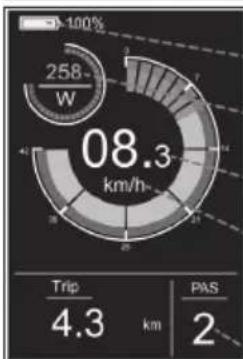
pie
| Metric | Value | |---|---| | Total Energy Consumption (km/h) | 08.3 | | Trip Distance (km) | 4.3 | | PAS Distance (km) | 2 |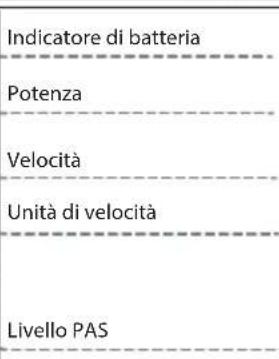
Figura 4-1
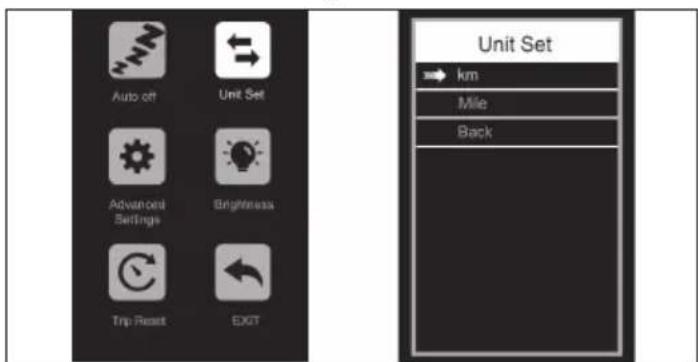
Figura 4-2
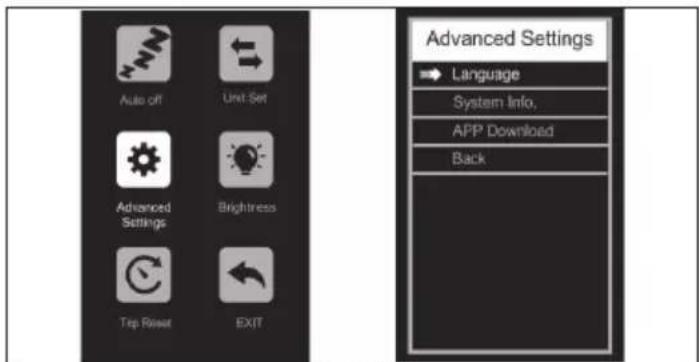
Figura 4-3
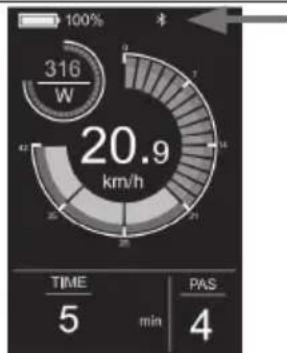
gauge
| Metric | Value | |---|---| | Time | 5 | | min | 4 | | PAS | 4 | | W | 316 | | km/h | 20.9 |Figura 4-7
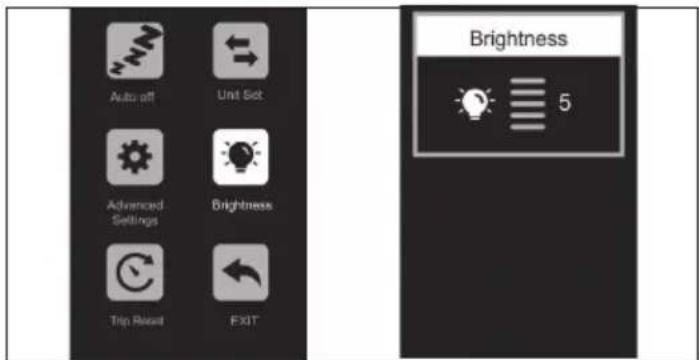
Figura 4-4
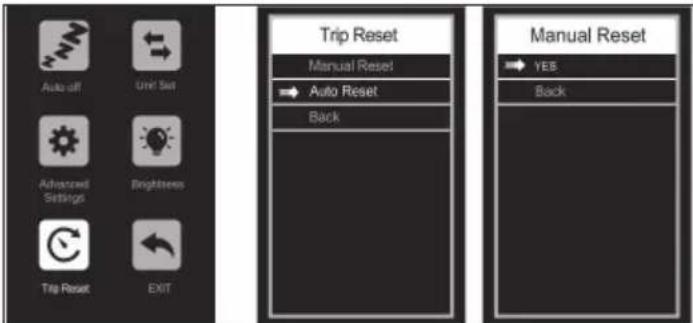
Figura 4-5
Figura 4-6
App SHARP Life
IMPORTANTE:
https://www.sharpconsumer.com/sharp-life-app
Manutenzione
https://www.sharpconsumer.com/support/
natural_image
Simple line drawing of a rectangular device with tubing and connectors (no text or symbols)Cargador
natural_image
Line drawing of a bicycle with 'SHARP' branding on the front wheel (no additional text or symbols)
www.sharpconsumer.com/contact/

www.sharpconsumer.com/support/
www.sharpconsumer.com/documents-of-conformity/

Montando la E-bike
natural_image
Diagram showing a mechanical assembly with a rotating shaft and housing, no text or symbols presentFigura 1-1 Figura 1-2
natural_image
Technical line drawing of a mechanical assembly with no visible text or symbolsFigura 1-3
natural_image
Technical line drawing of a mechanical assembly with no visible text or symbolsFigura 1-4
natural_image
Technical line drawing of a mechanical assembly with no visible text or symbolsFigura 1-5
NOTA:
Figura 2-1
NOTAS:
natural_image
Technical line drawing of a mechanical assembly with two views: one showing internal components and the other showing a connected pipe or tube (no text or symbols present)Figura 3-1 Figura 3-2
pie
| Metric | Value | |---|---| | Current (W) | 316 | | Trip Distance (km) | 4.3 | | PAS Score | 4 | | Total (km/h) | 20.9 |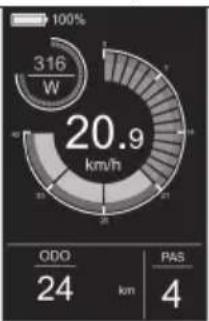
pie
| Category | Value | |---|---| | ODO | 24 | | PAS | 4 | | Total | 20.9 | | Current | 316 W |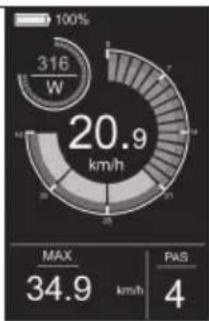
pie
| Metric | Value | |---|---| | Current (W) | 316 | | Max | 34.9 | | PAS | 4 |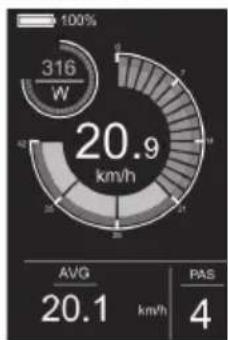
pie
| Metric | Value | |---|---| | Total Energy Consumption (W) | 316 | | Avg | 20.1 | | PAS | 4 |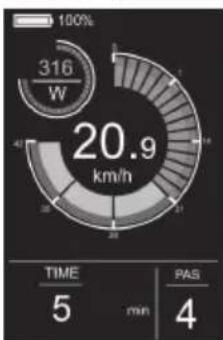
pie
| Metric | Value | |---|---| | Power Consumption (W) | 316 | | Total Power Consumption (km/h) | 20.9 | | TIME (min) | 5 | | PAS (min) | 4 |Figura 4-1
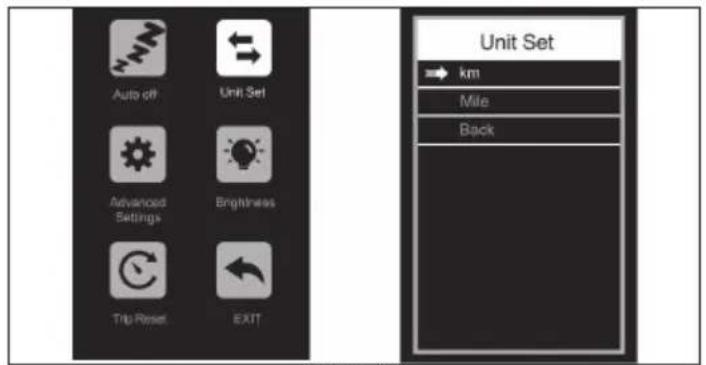
Figura 4-2
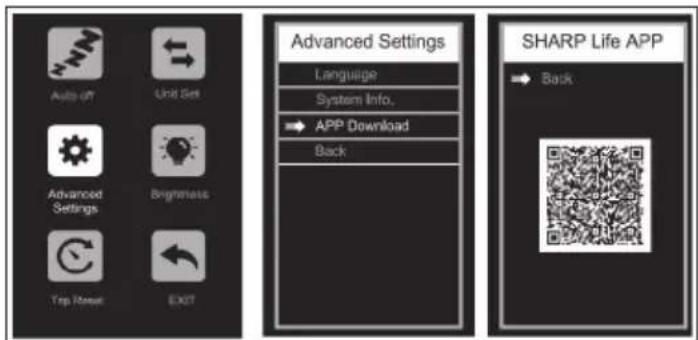
Figura 4-6
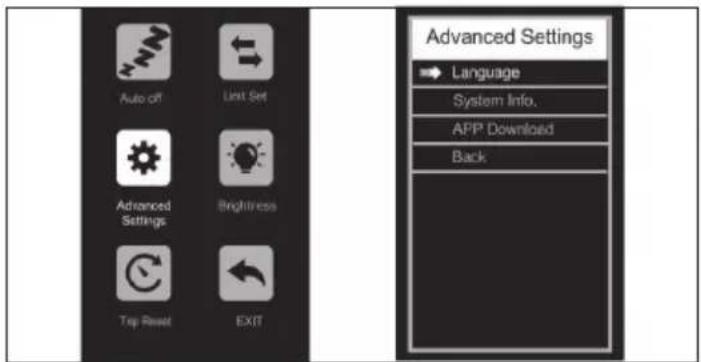
Figura 4-3
gauge
| Metric | Value | |---|---| | Speed (km/h) | 20.9 | | Time (min) | 5 | | PAS (min) | 4 |Figura 4-7
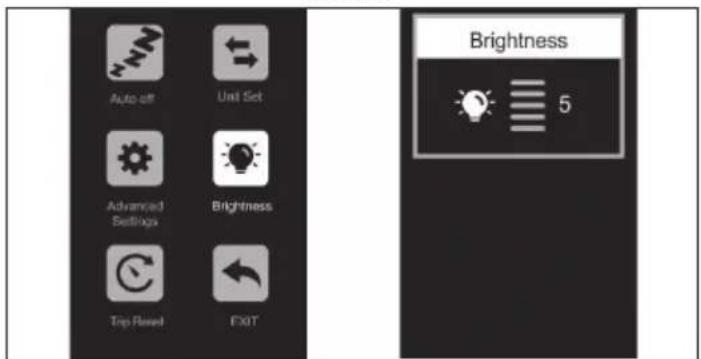
Figura 4-4
Retire la conexión
https://www.sharpconsumer.com/sharp-life-app
Mantenimiento
https://www.sharpconsumer.com/support/
1
natural_image
Simple line drawing of a rectangular device with a coiled cable and connector (no text or symbols)Carregador

Abraçadeiras de Cabo

Tampa de Borracha
natural_image
Line drawing of a bicycle with front wheel, suspension, and front-mounted mast (no text or symbols)
www.sharpconsumer.com/contact/

www.sharpconsumer.com/support/

www.sharpconsumer.com/documents-of-conformity/

natural_image
Diagram showing a mechanical assembly with a rotating shaft and housing, no text or symbols presentFigura 1-1 Figura 1-2
natural_image
Technical line drawing of a mechanical assembly with no visible text or symbolsFigura 1-3
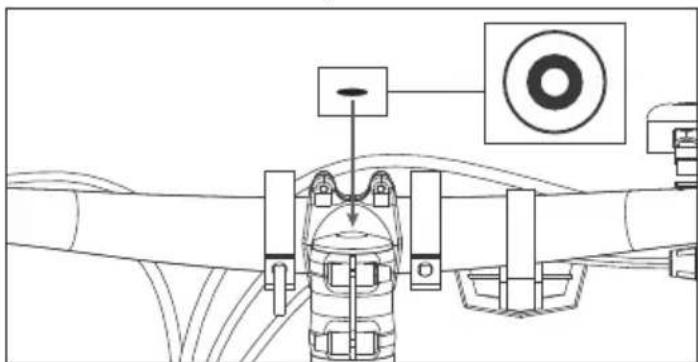
Figura 1-4
natural_image
Technical line drawing of a mechanical device with no visible text or symbolsFigura 1-5
NOTA:
Figura 2-1
NOTAS:
natural_image
Technical line drawing of a mechanical assembly with no visible text or symbolsFigura 3-1 Figura 3-2
gauge
| Metric | Value | |---|---| | Current (W) | 0 | | Speed (km/h) | 00.0 | | Trip Distance (km) | 21.3 | | PAS Value | 0 |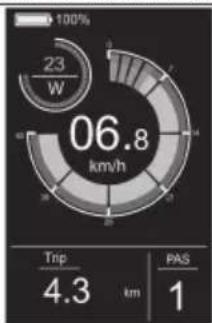
pie
| Metric | Value | |---|---| | Current (W) | 23 | | Trip Distance (km) | 4.3 | | PAS Score | 1 | | Total Energy Consumption (km/h) | 06.8 |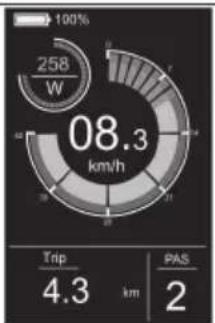
pie
| Metric | Value | |---|---| | Total Energy Consumption (W) | 258 | | Trip Distance (km) | 4.3 | | PAS Distance (km) | 2 |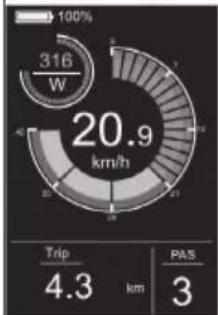
pie
| Metric | Value | |---|---| | Current (W) | 316 | | Trip (km) | 4.3 | | PAS (km) | 3 |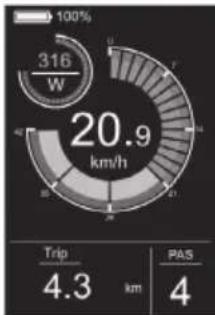
gauge
| Metric | Value | | :--- | :--- | | Current (W) | 316 | | Trip Duration (km) | 4.3 | | PAS Count (km) | 4 |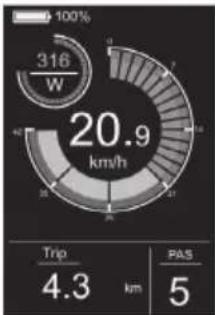
gauge
| Metric | Value | | :--- | :--- | | Current (W) | 316 | | Trip (km) | 4.3 | | PAS (km) | 5 |
pie
| Metric | Value | |---|---| | Total Energy Consumption (km/h) | 08.3 | | Trip Distance (km) | 4.3 | | PAS Distance (km) | 2 |pie
| Metric | Value | |---|---| | Power Consumption (W) | 316 | | Avg | 20.1 | | PAS | 4 |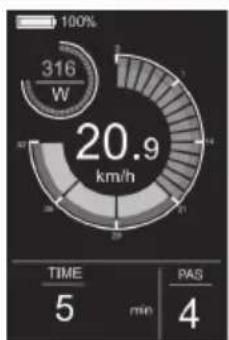
gauge
| Metric | Value | | :--- | :--- | | Power Consumption (W) | 316 | | Total Power Consumption (km/h) | 20.9 | | TIME (min) | 5 | | PAS (min) | 4 |Figura 4-1
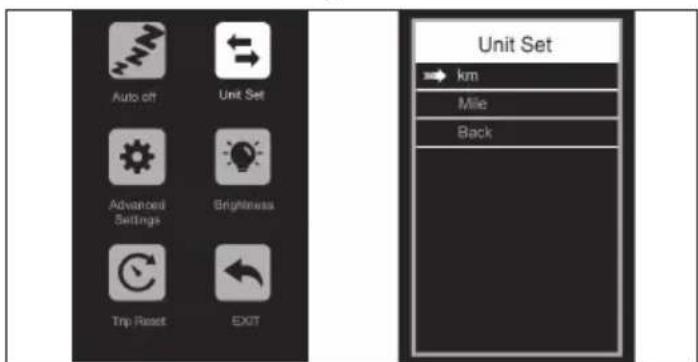
Figura 4-2

Figura 4-3
gauge
| Metric | Value | |---|---| | Percentage (%) | 100 | | Current (W) | 316 | | Time (min) | 5 | | PAS (min) | 4 | | Total (km/h) | 20.9 |Figura 4-7
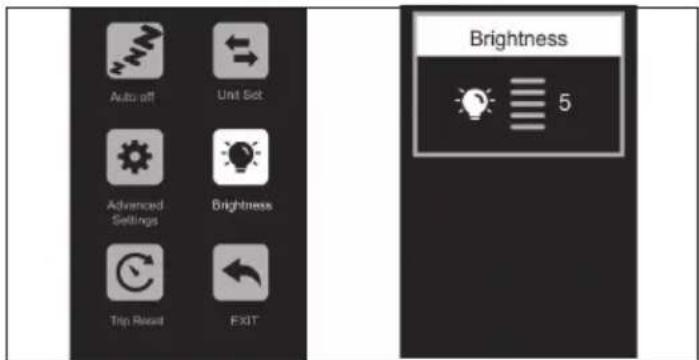
Figura 4-4
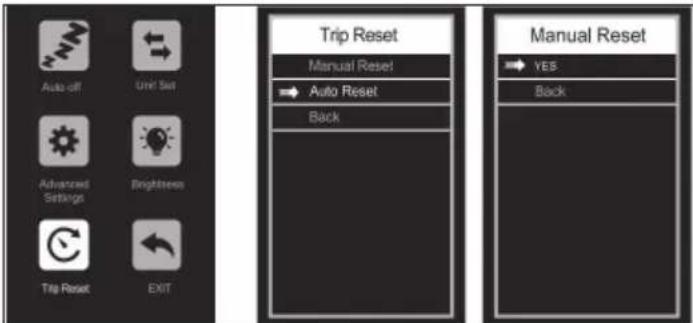
Figura 4-5
Ligar à APP SHARP Life
Figura 4-6
Remova a conexão
https://www.sharpconsumer.com/sharp-life-app
Manutenção
https://www.sharpconsumer.com/support/
0,08 inch (2mm) Inbussleutel
0,10 inch (2,5mm) Inbussleutel
0,12 inch (3mm) Inbussleutel
0,16 inch (4mm) Inbussleutel
0,20 inch (5mm) Inbussleutel
0,24 inch (6mm) Inbussleutel
Open Ringsleutel 08-10
Open Ringsleutel 13-15
natural_image
Simple line drawing of a rectangular device with a coiled tube and connector (no text or symbols)Oplader

Kabelbinders

Rubberen Dop
Snelstartgids
Garantiegids
Oplader handleiding
natural_image
Line drawing of a bicycle with 'SHARP' branding on the front wheel (no additional text or symbols)
www.sharpconsumer.com/contact/

www.sharpconsumer.com/support/

www.sharpconsumer.com/documents-of-conformity/

Snelstartgids (dit document)
E-Bike Onderdelen
- 1 × E-bike
Accessoiresdoos
- 1 × Handleiding
- 1× oplader
- 1 × Oplaadkabel
- 6 × Inbussleutel
• 1 × Phillips schroevendraaier - 2 × Open ringsleutel
- 2 × Kabelbinders
- 1 × Rubberen dop
Accessoiresdoos
(Zie 1-op pagina 1)
Fietsonderdelen
(Zie 2 op pagina 1)
Fiets Framenummer
natural_image
Technical diagram showing two mechanical assembly steps: one with a gear mechanism and the other with a rotating shaft (no text or labels)natural_image
Technical line drawing of a mechanical assembly with no visible text or symbolsFiguur 1-3
Figuur 1-4
natural_image
Technical line drawing of a mechanical assembly with no visible text or symbolsFiguur 1-5
LET OP:
Figuur 2-1
NOTITIES:
natural_image
Technical line drawing of mechanical components and wiring, no text or symbols presentpie
| Segment | Value | |---|---| | Top Left | 23 W | | Middle Right | 06.8 km/h | | Bottom Right | 4.3 km | | Bottom Left | 1 | | Total | 100% |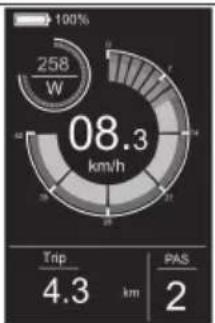
pie
| Metric | Value | | :--- | :--- | | Power Consumption (W) | 258 | | Current Power (km/h) | 08.3 | | Trip Distance (km) | 4.3 | | PAS (km) | 2 |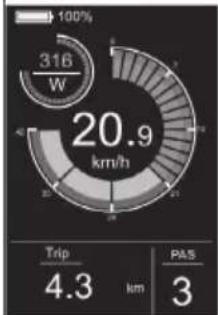
gauge
| Metric | Value | | :--- | :--- | | Current (W) | 316 | | Trip Distance (km) | 4.3 | | PAS Score | 3 |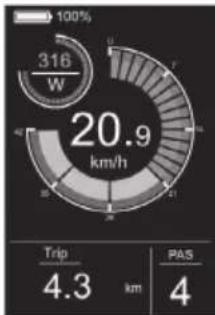
gauge
| Metric | Value | | :--- | :--- | | Current (W) | 316 | | Trip Duration (km) | 4.3 | | PAS Count (km) | 4 |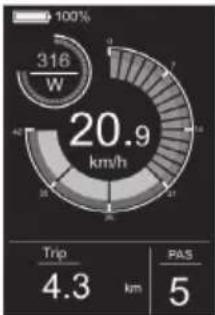
gauge
| Metric | Value | | :--- | :--- | | Current (W) | 316 | | Trip Duration (km) | 4.3 | | PAS (km) | 5 |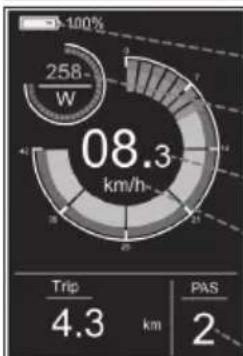
pie
| Metric | Value | |---|---| | Total Energy Consumption (km/h) | 08.3 | | Trip Distance (km) | 4.3 | | PAS Distance (km) | 2 |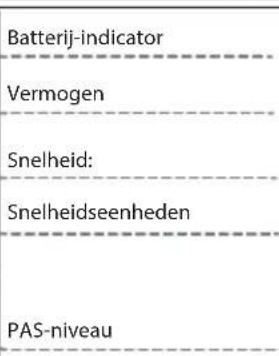
pie
| Metric | Value | |---|---| | Total Energy Consumption (W) | 316 | | Trip Distance (km) | 4.3 | | PAS Distance (km) | 4 |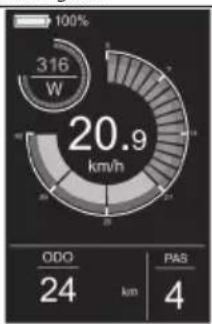
pie
| Metric | Value | | :--- | :--- | | Power Consumption (W) | 316 | | Total Power Consumption (km/h) | 20.9 | | ODO (km) | 24 | | PAS (km) | 4 |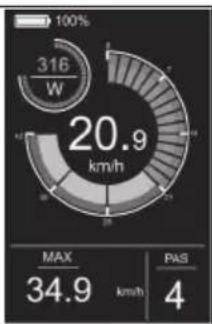
pie
| Metric | Value | |---|---| | Power Consumption (W) | 316 | | Total Power Consumption (km/h) | 20.9 | | MAX | 34.9 | | PAS | 4 |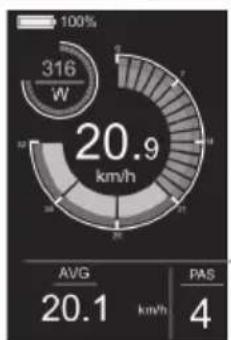
pie
| Metric | Value | |---|---| | Power Consumption (kW) | 316 | | Average Power Consumption (km/h) | 20.9 | | AVG (km/h) | 20.1 | | PAS (km/h) | 4 |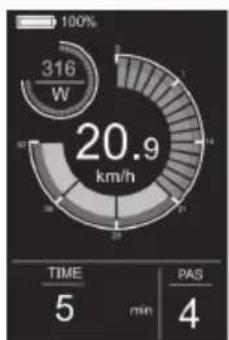
pie
| Metric | Value | |---|---| | Percentage (%) | 100 | | Time (min) | 5 | | PAS (min) | 4 | | Total (km/h) | 20.9 |Loopondersteuning
Figuur 4-1
Figuur 4-2
Figuur 4-3
Figuur 4-4
Figuur 4-5
Figuur 4-6
gauge
| Metric | Value | | :--- | :--- | | Speed (km/h) | 20.9 | | Time (min) | 5 | | PAS (4) | 4 |Figuur 4-7
https://www.sharpconsumer.com/sharp-life-app
Maintenance
https://www.sharpconsumer.com/support/
natural_image
Pure diagram of a mechanical or fluidic device with no text, numbers, or symbolsŁadowarka

Opaski zaciskowe

Gumowa nakrętka

www.sharpconsumer.com/contact/

www.sharpconsumer.com/support/

www.sharpconsumer.com/documents-of-conformity/
natural_image
Diagram showing a mechanical assembly with a rotating shaft and housing, no text or symbols presentnatural_image
Technical line drawing of a mechanical assembly with no visible text or symbolsRysunek 1-3
natural_image
Technical line drawing of a mechanical assembly with no visible text or symbolsRysunek 1-4

natural_image
Technical line drawing of a mechanical device with no visible text or symbolsRysunek 1-5
UWAGA:
Rysunek 2-1
NOTATKI:
natural_image
Technical line drawing of a mechanical assembly with no visible text or symbolspie
| Metric | Value | |---|---| | Power Level (W) | 0 | | Trip Distance (km) | 21.3 | | PAS Score | 0 |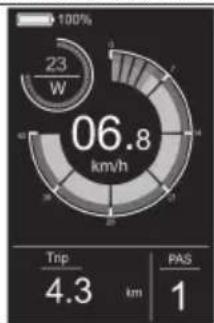
pie
| Segment | Value | |---|---| | Top Left | 23 W | | Middle Right | 06.8 km/h | | Bottom Right | 4.3 km | | Bottom Left | 1 | | Total | 100% |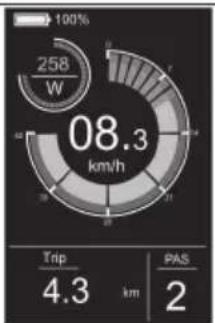
pie
| Metric | Value | |---|---| | Total Energy Consumption (W) | 258 | | Trip Distance (km) | 4.3 | | PAS Distance (km) | 2 |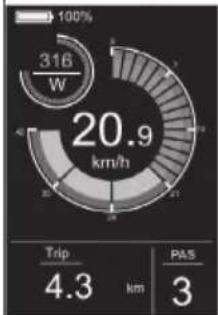
pie
| Metric | Value | |---|---| | Current (W) | 316 | | Trip (km) | 4.3 | | PAS (km) | 3 |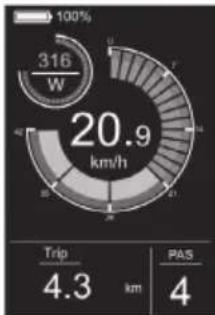
gauge
| Metric | Value | | :--- | :--- | | Current (W) | 316 | | Trip Duration (km) | 4.3 | | PAS Count (km) | 4 |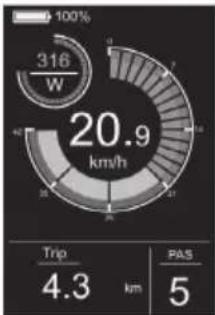
gauge
| Metric | Value | | :--- | :--- | | Current (W) | 316 | | Trip (km) | 4.3 | | PAS (km) | 5 |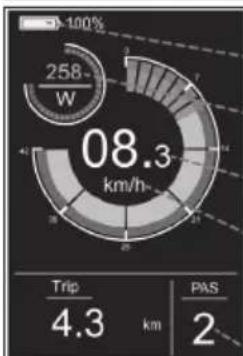
pie
| Metric | Value | |---|---| | Total Energy Consumption (km/h) | 08.3 | | Trip Distance (km) | 4.3 | | PAS Distance (km) | 2 |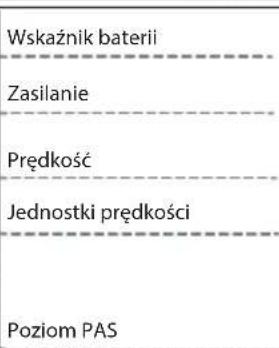
pie
| Metric | Value | |---|---| | Power Consumption (kW) | 316 | | Average Power Consumption (km/h) | 20.9 | | Average PAS (km/h) | 20.1 | | PAS Value | 4 |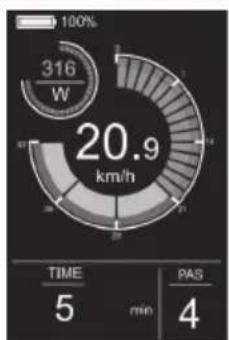
pie
| Metric | Value | |---|---| | Total Energy Consumption (W) | 316 | | Time (min) | 5 | | PAS (min) | 4 | | Percentage (%) | 100% | | Value (km/h) | 20.9 |gauge
| Metric | Value | |--------|-------| | Power Consumption (W) | 316 | | Time (min) | 5 | | PAS (min) | 5 | | Total Power Consumption (km/h) | 05.0 |Menu Ustawień
Rysunek 4-1
Rysunek 4-2
Rysunek 4-3

gauge
| Metric | Value | | :--- | :--- | | Speed (km/h) | 20.9 | | Time (min) | 5 | | PAS (min) | 4 | | Current (W) | 316 |Rysunek 4-7
Rysunek 4-4
Usuń połączenie
Rysunek 4-6

natural_image
Completely blank white image with no visible content, text, or symbols.https://www.sharpconsumer.com/sharp-life-app
Konserwacja
WYKLUCZENIA GWARANCJI
https://www.sharpconsumer.com/support/
1
0.08 tommer (2mm) unbrakonøkkel
0.10 tommer (2.5mm) unbrakonøkkel
0.12 tommer (3mm) unbrakonøkkel
0,16 tomme (4mm) Allen-nøkkel
0.20 tomme (5mm) Allen-nøkkel
0.24 tommer (6mm) unbrakonøkkel
Åpen ende nøkkel 08-10
Äpen ende nøkkel 13-15

Phillips skrutrekker


Pedaler
natural_image
Simple line drawing of a rectangular device with a coiled tube and connector (no text or symbols)Lader

Kabelbänd

Gummikappe
Hurtigstartguide
Garantiguide
Lader manuell
2
natural_image
Line drawing of a bicycle with 'SHARP' branding on the front wheel (no additional text or symbols)
www.sharpconsumer.com/contact/

www.sharpconsumer.com/support/

www.sharpconsumer.com/documents-of-conformity/
natural_image
Technical diagram showing a mechanical assembly and a valve mechanism (no text or symbols present)Figur 1-1 Figur 1-2
natural_image
Technical line drawing of a mechanical assembly with no visible text or symbolsFigur 1-3
Figur 1-4
natural_image
Technical line drawing of a mechanical device with no visible text or symbolsFigur 1-5
MERK:
Sørg for at momentet på skruen på toppen er omtrent 4-6 N·m.
TRINN 8: Installer pedalene
Figur 2-1
MERKNADER:
natural_image
Technical line drawing of a mechanical assembly with no visible text or symbolsFigur 3-1 Figur 3-2
Pedalassistansenivå
pie
| Metric | Value | |---|---| | Current (W) | 23 | | Trip Duration (km) | 4.3 | | PAS Ratio | 1 | | Total Energy Consumption (km/h) | 06.8 |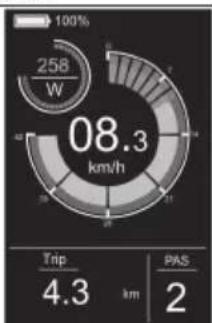
pie
| Metric | Value | |---|---| | Current Power Consumption (W) | 258 | | Trip Distance (km) | 4.3 | | PAS (km) | 2 |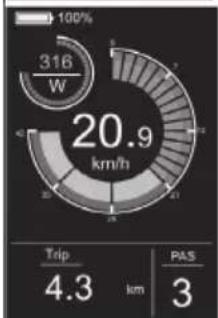
pie
| Metric | Value | |---|---| | Current (W) | 316 | | Trip (km) | 4.3 | | PAS (km) | 3 |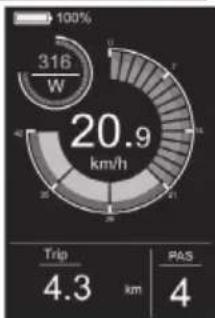
gauge
| Metric | Value | | :--- | :--- | | Speed (km/h) | 20.9 | | Trip Distance (km) | 4.3 | | PAS Distance (km) | 4 |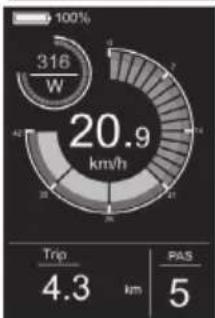
gauge
| Metric | Value | | :--- | :--- | | Current (W) | 316 | | Trip Distance (km) | 4.3 | | PAS (km) | 5 |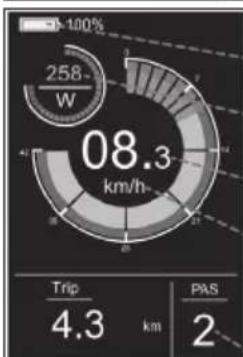
pie
| Metric | Value | | :--- | :--- | | Trip | 4.3 | | PAS | 2 | | Current (km/h) | 08.3 |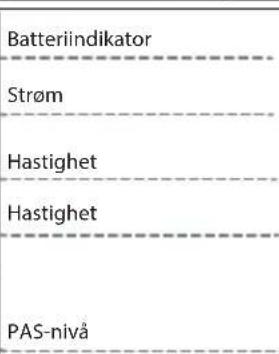
Lysbryter
gauge
| Metric | Value | | :--- | :--- | | Power (W) | 316 | | Speed (s) | 20.9 | | Time (min) | 5 | | PAS (min) | 4 | 100% SD (arrow) to 100%Displaygrensesnitt
gauge
| Metric | Value | |---|---| | Current (W) | 316 | | Trip (km) | 4.3 | | PAS (km) | 4 |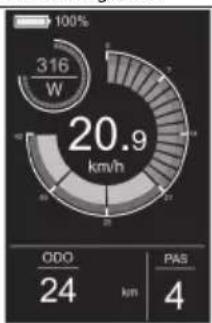
pie
| Metric | Value | |---|---| | Total Energy Consumption (W) | 316 | | ODO (km) | 24 | | PAS (km) | 4 | | Current (kW) | 20.9 |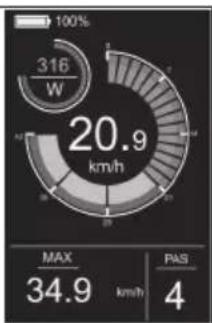
gauge
| Metric | Value | |---|---| | Current (W) | 316 | | Max (km/h) | 34.9 | | PAS | 4 |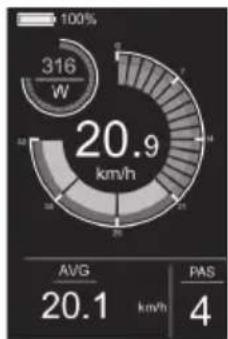
pie
| Metric | Value | |---|---| | Power Consumption (kW) | 316 | | Avg. Power Consumption (km/h) | 20.9 | | PAS | 4 | The chart displays the total power consumption of 316 W, with the average at 20.1 km/h and a PAS value of 4. The gauge scale indicates 100% for the current value.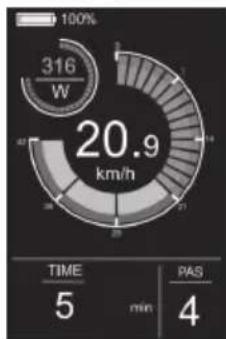
gauge
| Metric | Value | | :--- | :--- | | Power Consumption (W) | 316 | | Total Power Consumption (km/h) | 20.9 | | TIME (min) | 5 | | PAS (min) | 4 |Gangeassistent
Å trykke og holde inne NED-knappen i 3 sekunder aktiverer Gå-assistentmodus. E-sykkelen vil automatisk gå i en hastighet på 5 km/t. Skjermbildet vises i figuren.
radar
| Metric | Value | |--------|-------| | Time | 5 | | min | 100% | | PAS | 100% |Innstillingsmeny
Figur 4-1
Figur 4-2
Figur 4-3
gauge
| Metric | Value | | :--- | :--- | | Speed (km/h) | 20.9 | | TIME (min) | 5 | | PAS (min) | 4 |Figur 4-7
Figur 4-4
Fjern tilkoblingen
Figur 4-6
SHARP Life-appen
VIKTIG:
https://www.sharpconsumer.com/sharp-life-app
Vedlikehold
https://www.sharpconsumer.com/support/
0,08 tum (2mm) inexnyckel
natural_image
Simple line drawing of a rectangular device with tubing and connectors (no text or symbols)Laddare
Snabbstartsguide
0,12 tum (3mm) inexnyckel
0,16 tum (4mm) inexnyckel

natural_image
Line drawing of a bicycle with 'SHARP' branding on the front wheel (no additional text or symbols)natural_image
Two circular icons showing a sneaker and a helmet, no text or symbols present.
www.sharpconsumer.com/contact/

www.sharpconsumer.com/support/

www.sharpconsumer.com/documents-of-conformity/
Elektrisk cykel med pedalassistans (EPAC):
natural_image
Diagram showing a mechanical assembly with a rotating shaft and housing, no text or symbols presentFigur 1-1 Figur 1-2
natural_image
Technical line drawing of a mechanical assembly with no visible text or symbolsFigur 1-3
Figur 1-4
natural_image
Technical line drawing of a mechanical assembly with no visible text or symbolsFigur 1-5
OBS:
Figur 2-1
ANTECKNINGAR:
natural_image
Technical line drawing of a mechanical assembly with no visible text or symbolsFigur 3-1 Figur 3-2
gauge
| Metric | Value | |---|---| | Current (W) | 0 | | Speed (km/h) | 00.0 | | Trip Distance (km) | 21.3 | | PAS Value | 0 |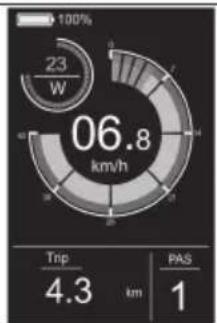
gauge
| Metric | Value | | :--- | :--- | | Current (W) | 23 | | Speed (km/h) | 06.8 | | Trip Distance (km) | 4.3 | | PAS Value | 1 |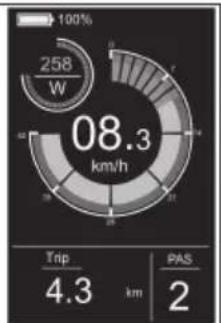
pie
| Metric | Value | | :--- | :--- | | Power Consumption (W) | 258 | | Current Power (km/h) | 08.3 | | Trip Distance (km) | 4.3 | | PAS (km) | 2 |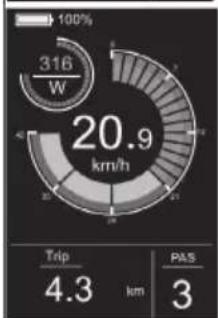
gauge
| Metric | Value | | :--- | :--- | | Current (W) | 316 | | Trip Duration (km) | 4.3 | | PAS Count | 3 |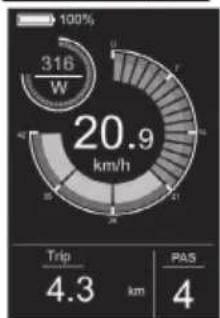
gauge
| Metric | Value | | :--- | :--- | | Current (W) | 316 | | Travel (km/h) | 20.9 | | Trip Distance (km) | 4.3 | | PAS Distance (km) | 4 |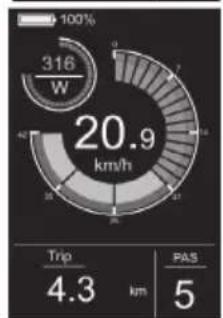
gauge
| Metric | Value | | :--- | :--- | | Current (W) | 316 | | Trip Distance (km) | 4.3 | | PAS (km) | 5 |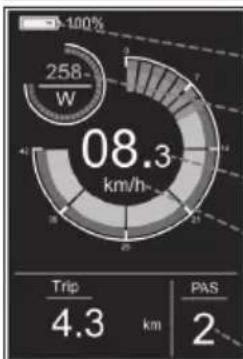
pie
| Category | Value | |---|---| | Trip | 4.3 | | PAS | 2 |Batteriindikator
Kraft
Hastighet
Hastighetsenheter
PAS-nivå
Ljusomkopplare
Figur 4-1
Figur 4-2
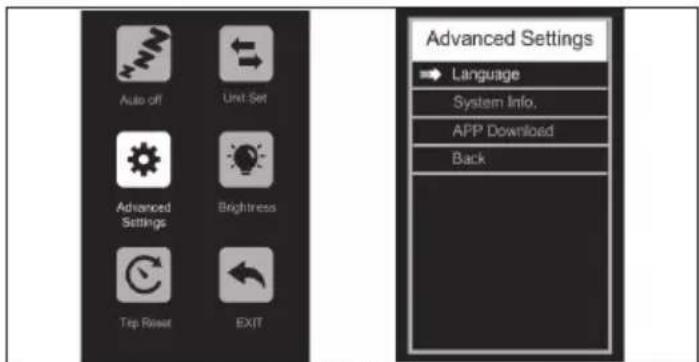
Figur 4-3
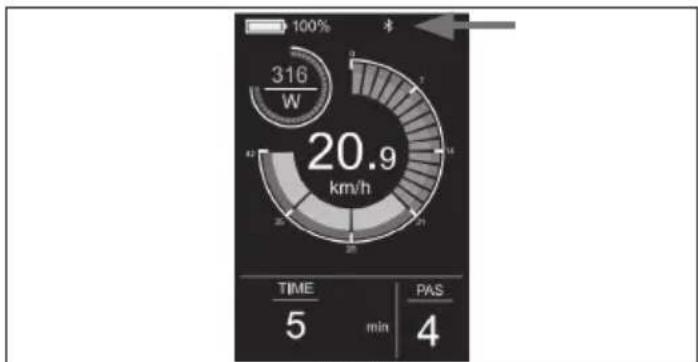
gauge
| Parameter | Value | |---|---| | Power Consumption (W) | 316 | | Time (min) | 5 | | PAS (min) | 4 | | Total (km/h) | 20.9 |Figur 4-7
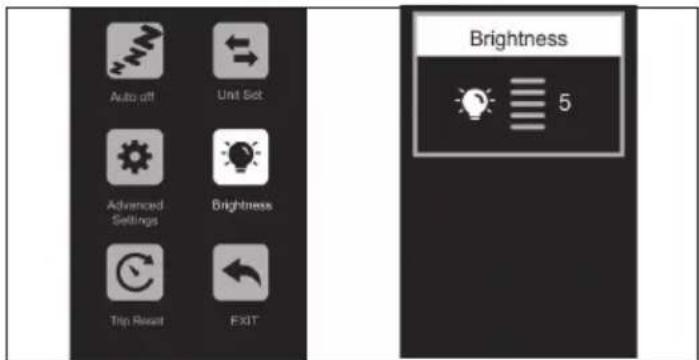
Figur 4-4
Figur 4-6
SHARP Life-appen
VIKTIGT:
https://www.sharpconsumer.com/sharp-life-app
Underhåll
https://www.sharpconsumer.com/support/
0,08 tomme (2mm) unbrakonøgle
0,10 tomme (2,5mm) unbrakonøgle
0,12 tomme (3mm) unbrakonøgle
0,16 tomme (4mm) unbrakonøgle
0,20 tomme (5mm) unbrakonøgle
0,24 tomme (6mm) unbrakonøgle
natural_image
Simple line drawing of a rectangular device with tubing and connectors (no text or symbols)Oplader

Kabelbinder

Gummihætte
Hurtig start guide
Garantiguide
Oplader manual
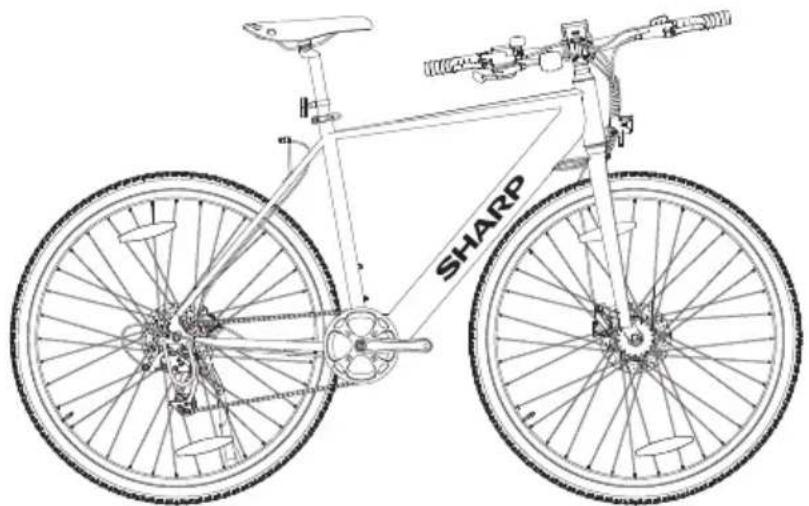
natural_image
Line drawing of a bicycle with 'SHARP' branding on the front wheel (no additional text or symbols)
www.sharpconsumer.com/contact/

www.sharpconsumer.com/support/
www.sharpconsumer.com/documents-of-conformity/

Elektrisk pedalassistentcykel (EPAC):
natural_image
Technical diagram showing a mechanical assembly and a rotating component (no text or symbols)Figur 1-1 Figur 1-2
natural_image
Technical line drawing of a mechanical assembly with no visible text or symbolsFigur 1-3
Figur 1-4
natural_image
Technical line drawing of a mechanical assembly with no visible text or symbolsFigur 1-5
BEMÄRK:
Figur 2-1
NOTER:
natural_image
Technical line drawing of a mechanical assembly with no visible text or symbolsFigur 3-1 Figur 3-2
pie
| Chart | Metric | Value | |---|---|---| | 1 | Power Consumption (km/h) | 00.0 | | 2 | Power Consumption (km/h) | 06.8 | | 3 | Power Consumption (km/h) | 08.3 | | 4 | Power Consumption (km/h) | 258 | | 5 | Power Consumption (km/h) | 21 | | 6 | Power Consumption (km/h) | 21 | | 7 | Power Consumption (km/h) | 21 | | 8 | Power Consumption (km/h) | 21 | | 9 | Power Consumption (km/h) | 21 | | 10 | Power Consumption (km/h) | 21 | | 11 | Power Consumption (km/h) | 21 | | 12 | Power Consumption (km/h) | 21 | | 13 | Power Consumption (km/h) | 21 | | 14 | Power Consumption (km/h) | 21 | | 15 | Power Consumption (km/h) | 21 | | 16 | Power Consumption (km/h) | 21 | | 17 | Power Consumption (km/h) | 21 | | 18 | Power Consumption (km/h) | 21 | | 19 | Power Consumption (km/h) | 21 | | 20 | Power Consumption (km/h) | 21 | | 21 | Power Consumption (km/h) | 21 | | 22 | Power Consumption (km/h) | 21 | | 23 | Power Consumption (km/h) | 21 | | 24 | Power Consumption (km/h) | 21 | | 25 | Power Consumption (km/h) | 21 | | 26 | Power Consumption (km/h) | 21 | | 27 | Power Consumption (km/h) | 21 | | 28 | Power Consumption (km/h) | 21 | | 29 | Power Consumption (km/h) | 21 | | 30 | Power Consumption (km/h) | 21 | | 31 | Power Consumption (km/h) | 21 | | 32 | Power Consumption (km/h) | 21 | | 33 | Power Consumption (km/h) | 21 | | 34 | Power Consumption (km/h) | 21 | | 35 | Power Consumption (km/h) | 21 | | 36 | Power Consumption (km/h) | 21 | | 37 | Power Consumption (km/h) | 21 | | 38 | Power Consumption (km/h) | 21 | | 39 | Power Consumption (km/h) | 21 | | 40 | Power Consumption (km/h) | 21 | | 41 | Power Consumption (km/h) | 21 | | 42 | Power Consumption (km/h) | 21 | | 43 | Power Consumption (km/h) | 21 | | 44 | Power Consumption (km/h) | 21 | | 45 | Power Consumption (km/h) | 21 | | 46 | Power Consumption (km/h) | 21 | | 47 | Power Consumption (km/h) | 21 | | 48 | Power Consumption (km/h) | 21 | | 49 | Power Consumption (km/h) | 21 | | 50 | Power Consumption (km/h) | 21 | | 51 | Power Consumption (km/h) | 21 | | 52 | Power Consumption (km/h) | 21 | | 53 | Power Consumption (km/h) | 21 | | 54 | Power Consumption (km/h) | 21 | | 55 | Power Consumption (km/h) | 21 | | 56 | Power Consumption (km/h) | 21 | | 57 | Power Consumption (km/h) | 21 | | 58 | Power Consumption (km/h) | 21 | | 59 | Power Consumption (km/h) | 21 | | 60 | Power Consumption (km/h) | 21 | | 61 | Power Consumption (km/h) | 21 | | 62 | Power Consumption (km/h) | 21 | | 63 | Power Consumption (km/h) | 21 | | 64 | Power Consumption (km/h) | 21 | | 65 | Power Consumption (km/h) | 21 | | 66 | Power Consumption (km/h) | 21 | | 67 | Power Consumption (km/h) | 21 | | 68 | Power Consumption (km/h) | 21 | | 69 | Power Consumption (km/h) | 21 | | 70 | Power Consumption (km/h) | 21 | | 71 | Power Consumption (km/h) | 21 | | 72 | Power Consumption (km/h) | 21 | | 73 | Power Consumption (km/h) | 21 | | 74 | Power Consumption (km/h) | 21 | | 75 | Power Consumption (km/h) | 21 | | 76 | Power Consumption (km/h) | 21 | | 77 | Power Consumption (km/h) | 21 | | 78 | Power Consumption (km/h) | 21 | | 79 | Power Consumption (km/h) | 21 | | 80 | Power Consumption (km/h) | 21 | | 81 | Power Consumption (km/h) | 21 | | 82 | Power Consumption (km/h) | 21 | | 83 | Power Consumption (km/h) | 21 | | 84 | Power Consumption (km/h) | 21 | | 85 | Power Consumption (km/h) | 21 | | 86 | Power Consumption (km/h) | 21 | | 87 | Power Consumption (km/h) | 21 | | 88 | Power Consumption (km/h) | 21 | | 89 | Power Consumption (km/h) | 21 | | 90 | Power Consumption (km/h) | 21 | | 91 | Power Consumption (km/h) | 21 | | 92 | Power Consumption (km/h) | 21 | | 93 | Power Consumption (km/h) | 21 | | 94 | Power Consumption (km/h) | 21 | | 95 | Power Consumption (km/h) | 21 | | 96 | Power Consumption (km/h) | 21 | | 97 | Power Consumption (km/h) | 21 | | 98 | Power Consumption (km/h) | 21 | | 99 | Power Consumption (km/h) | 21 | | Total: Trip = -3.0 km / PAST; Total: Trip = -3.0 km / PAS. Total: Trip = -3.0 km / PAS. Total: Trip = -3.0 km / PAS. Total: Trip = -3.0 km / PAS. Total: Trip = -3.0 km / PAS. Total: Trip = -3.0 km / PAS. Total: Trip = -3.0 km / PAS. Total: Trip = -3.0 km / PAS. Total: Trip = -3.0 km / PAS. Total: Trip < -3.0 km / PAS. Total: Trip = -3.0 km / PAS. Total: Trip = -3.0 km / PAS. Total: Trip = -3.0 km / PAS. Total: Trip = -3.0 km / PAS. Total: Trip = -3.0 km / PAS. Total: Trip = -3.0 km / PAS. Total: Trip = -3.0 km / PAS. Total: Trip = -3.5 km / PAS. Total: Trip = -3.5 km / PAS. Total: Trip = -3.5 km / PAS. Total: Trip = -3.5 km / PAS. Total: Trip = -3.5 km / PAS. Total: Trip = -3.5 km / PAS. Total: Trip = -3.5 km / PAS. Total: Trip = -3.5 km / PAS. Total: Trip = -3.5 km / PAS.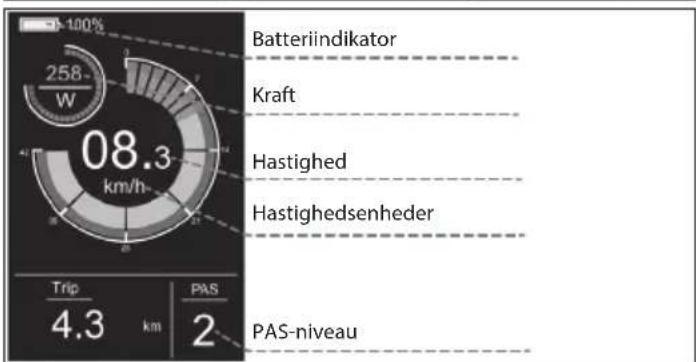
other
| Motor Model | Speed (km/h) | Trip Distance (km) | | --- | --- | --- | | Batteriindikator | 08.3 | 4.3 | | Kraft | - | - | | Hastighed | - | - | | Hastighedsenheder | - | - | | PAS-niveau | - | 2 |Lyskontakt
gauge
| Metric | Value | |---|---| | Current (W) | 316 | | Trip (km) | 4.3 | | PAS (km) | 4 |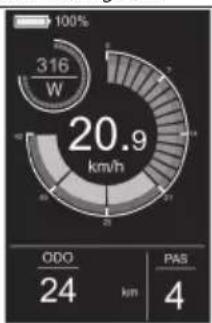
gauge
| Metric | Value | |---|---| | Total Energy Consumption (W) | 316 | | ODO (km) | 24 | | PAS (km) | 4 |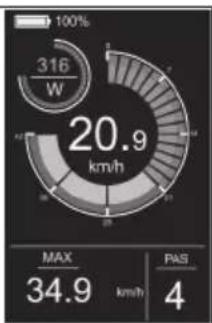
gauge
| Metric | Value | | :--- | :--- | | Current Power (W) | 316 | | Max | 34.9 | | PAS | 4 |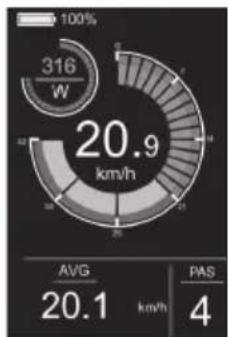
gauge
| Metric | Value | | :--- | :--- | | Power Consumption (kW) | 316 | | Average Power Consumption (km/h) | 20.9 | | Average PAS (km/h) | 20.1 | | PAS Value | 4 |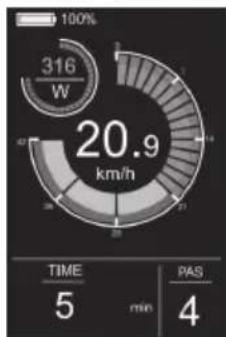
gauge
| Metric | Value | | :--- | :--- | | Power Consumption (W) | 316 | | Time (min) | 5 | | PAS (min) | 4 | | Total (km/h) | 20.9 |Gå-assistent
gauge
| Metric | Value | |--------|-------| | Power (W) | 316 | | Time (min) | 5 | | PAS (min) | 1 | | Current (km/h) | 05.0 |Indstillingsmenu
Figur 4-1
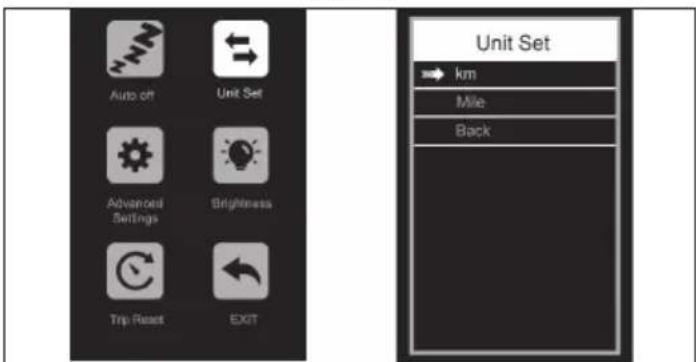
Figur 4-2
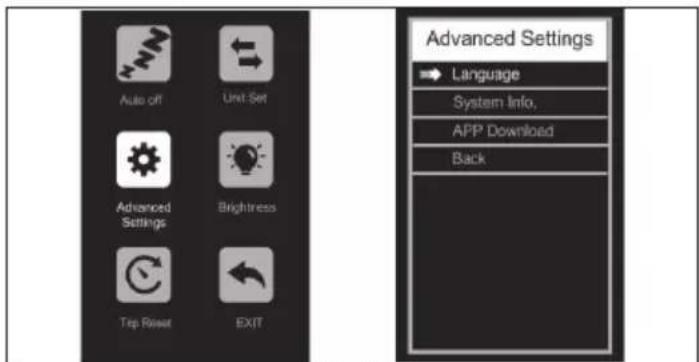
Figur 4-3
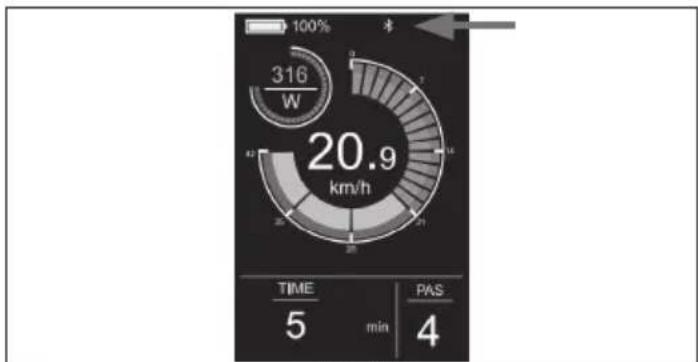
gauge
| Metric | Value | | :--- | :--- | | Speed (km/h) | 20.9 | | Time (min) | 5 | | PAS (min) | 4 | | Current (W) | 316 |Figur 4-7
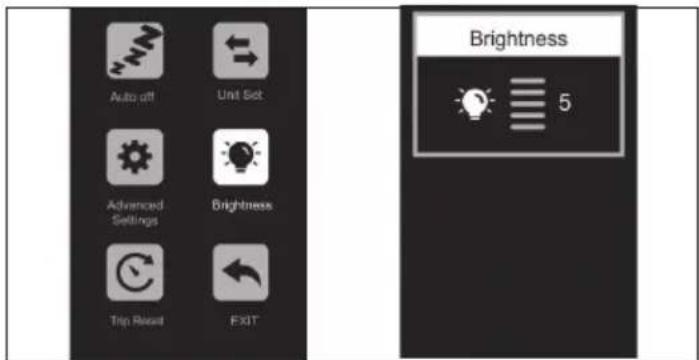
Figur 4-4
Fjern forbindelsen
Figur 4-6

natural_image
Completely blank white image with no visible content, text, or symbols.SHARP Life App
VIGTIGT:
https://www.sharpconsumer.com/sharp-life-app
Vedligeholdelse
https://www.sharpconsumer.com/support/
1
natural_image
Simple line drawing of a rectangular device with a coiled cable and connector (no text or symbols)Laturi

Nippusiteet

Kumikorkki
Pikaopas
Takuuopas
Laturin käyttöohje
2
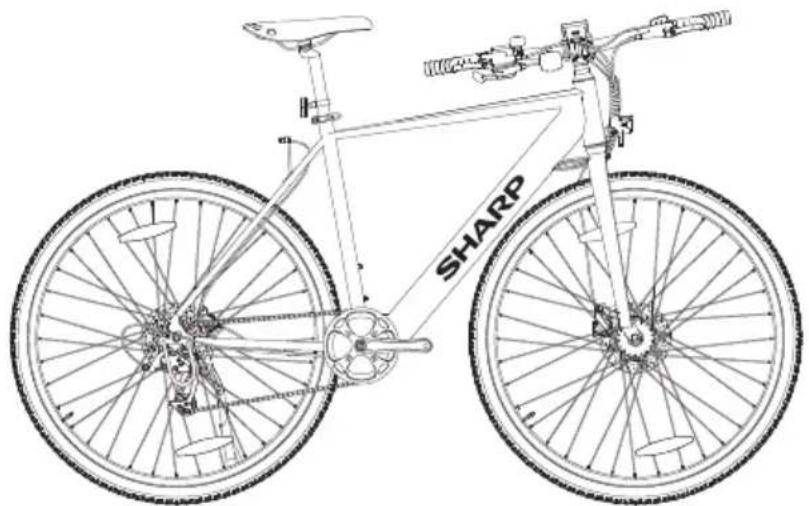
natural_image
Line drawing of a bicycle with 'SHARP' branding on the front wheel (no additional text or symbols)
www.sharpconsumer.com/contact/

www.sharpconsumer.com/support/

www.sharpconsumer.com/documents-of-conformity/

natural_image
Technical diagram showing a mechanical assembly and a valve mechanism (no text or labels)Kuvio 1-1 Kuvio 1-2
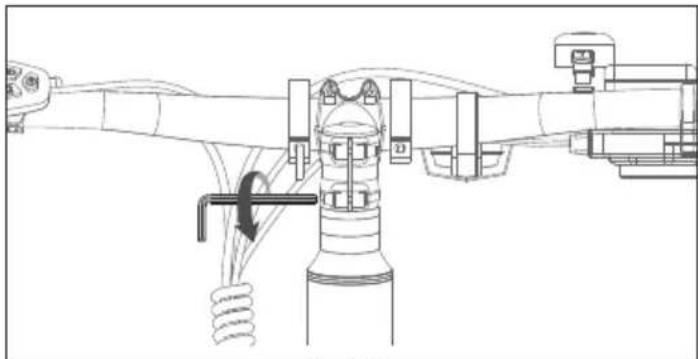
natural_image
Technical line drawing of a mechanical assembly with no visible text or symbolsKuvio 1-3
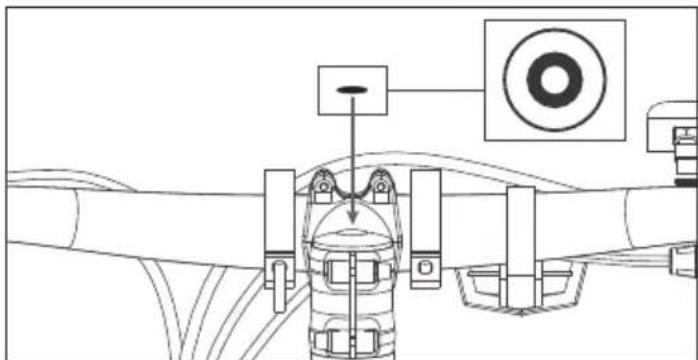
Kuvio 1-4
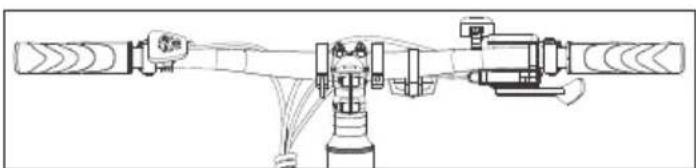
natural_image
Technical line drawing of a mechanical device with no visible text or symbolsKuvio 1-5
HUOMIO:
Kuvio 2-1
HUOMAUTUKSIA:
natural_image
Technical line drawing of a mechanical assembly with no visible text or symbolsKuvio 3-1 Kuvio 3-2
pie
| Metric | Value | |---|---| | Power Consumption (W) | 258 | | Trip Distance (km) | 4.3 | | PAS (km) | 2 |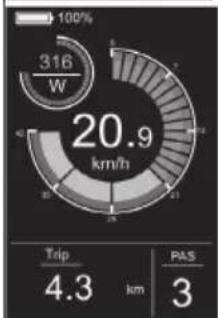
gauge
| Metric | Value | | :--- | :--- | | Current (W) | 316 | | Travel (km/h) | 20.9 | | Trip Distance (km) | 4.3 | | PAS Score | 3 |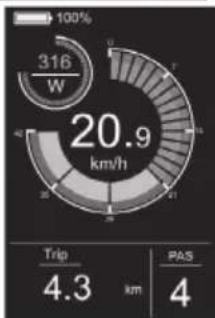
gauge
| Metric | Value | | :--- | :--- | | Current Speed (W) | 316 | | Trip Distance (km) | 4.3 | | PAS Distance (km) | 4 |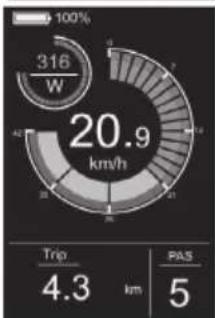
gauge
| Metric | Value | | :--- | :--- | | Current (W) | 316 | | Trip Duration (km) | 4.3 | | PAS Count | 5 |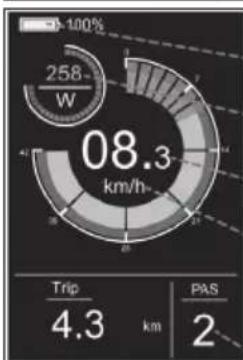
pie
| Metric | Value | |---|---| | Current (W) | 258 | | Trip Distance (km) | 4.3 | | PAS (km) | 2 |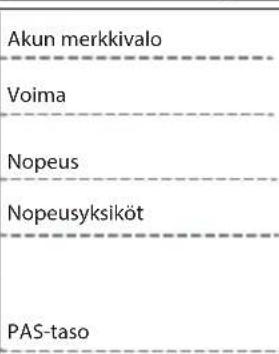
gauge
| Metric | Value | |---|---| | Current (W) | 316 | | Total Energy Consumption (km/h) | 20.9 | | ODO (km) | 24 | | PAS (km) | 4 |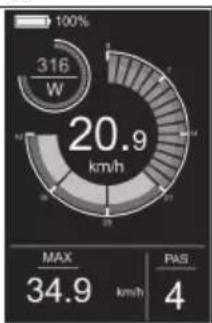
gauge
| Metric | Value | |---|---| | Current (W) | 316 | | Max | 34.9 | | PAS | 4 |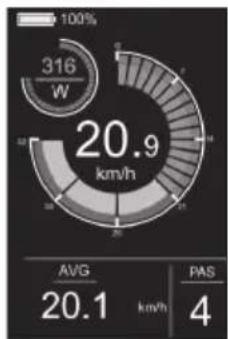
pie
| Metric | Value | |---|---| | Total Energy Consumption (W) | 316 | | Avg | 20.1 | | PAS | 4 |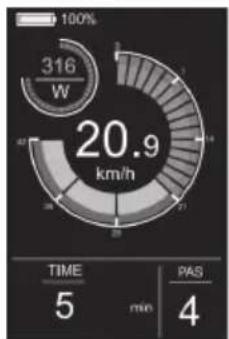
gauge
| Metric | Value | | :--- | :--- | | Power Consumption (W) | 316 | | Total Power Consumption (km/h) | 20.9 | | TIME (min) | 5 | | PAS (min) | 4 |Kävelyavustin
Kuvio 4-1
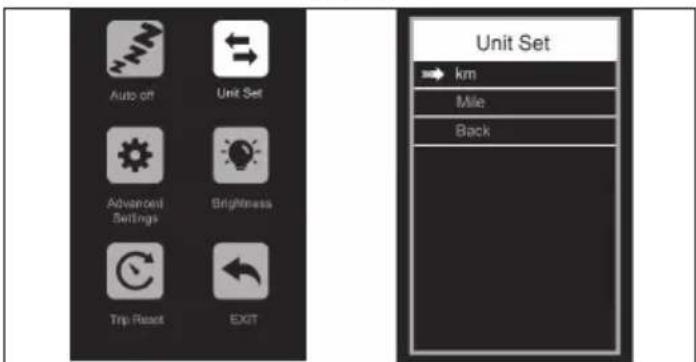
Kuvio 4-2
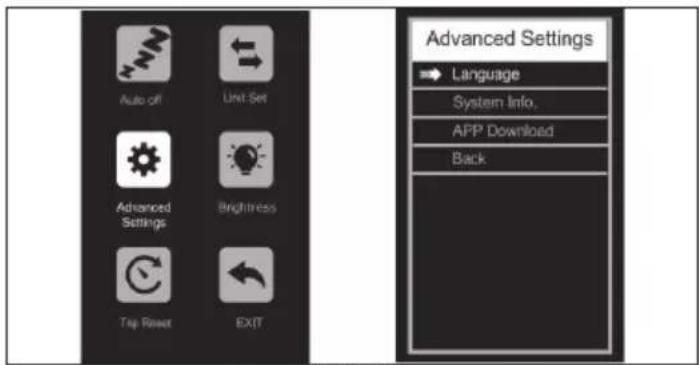
Kuvio 4-3
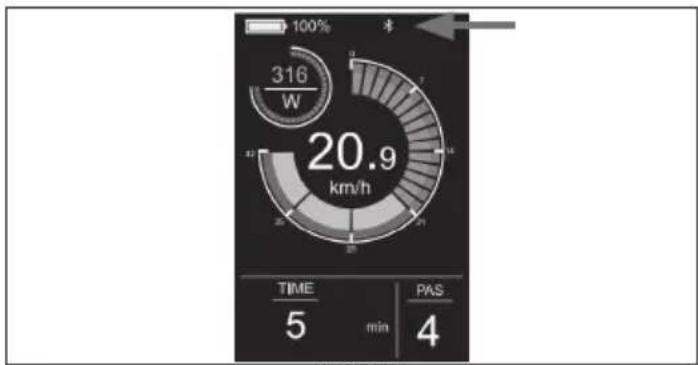
gauge
| Metric | Value | |--------|-------| | Time | 5 | | min | 4 | | PAS | 4 |Kuvio 4-7
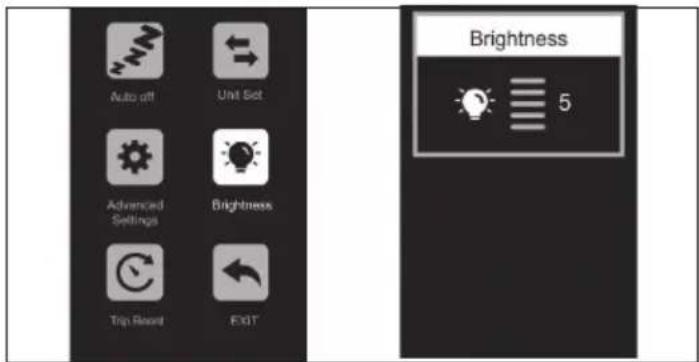
Kuvio 4-4
Poista yhteys
Kuvio 4-6
SHARP Life -sovellus
TÄRKEÄÄ:
https://www.sharpconsumer.com/sharp-life-app
Huolto
https://www.sharpconsumer.com/support/
natural_image
Pure electrical circuit lines without any symbolslkroviklis
natural_image
Line drawing of a bicycle with front wheel, suspension, and front-mounted mast (no text or symbols)
www.sharpconsumer.com/contact/

www.sharpconsumer.com/support/

www.sharpconsumer.com/documents-of-conformity/
Elektrinis pedalo pagalbos dviratis (EPAC):
natural_image
Diagram showing a mechanical assembly with a rotating shaft and housing, no text or symbols presentnatural_image
Technical line drawing of a mechanical assembly with no visible text or symbolsPaveiksle 1-3
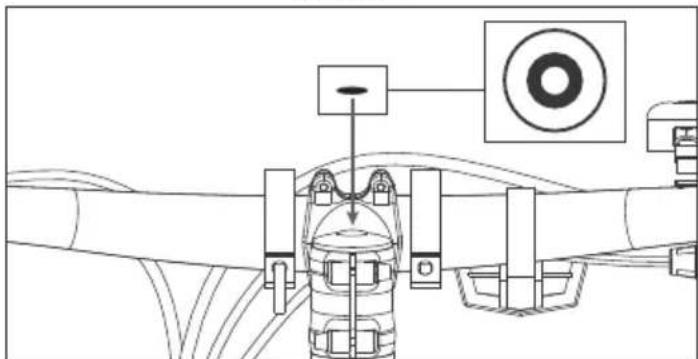
natural_image
Technical line drawing of a mechanical assembly with no visible text or symbolsPaveiksle 1-4
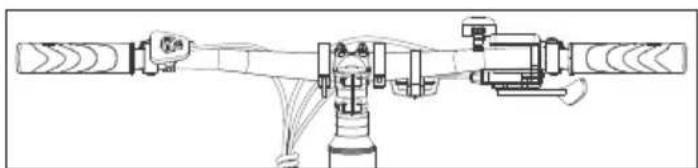
natural_image
Technical line drawing of a mechanical assembly with no visible text or symbolsPaveiksle 1-5
PASTABA:
Paveiksle 2-1
PASTABOS:
natural_image
Technical line drawing of mechanical components and wiring, no text or symbols presentpie
| Segment | Value | |---|---| | Top Left | 23 W | | Middle Right | 06.8 km/h | | Bottom Right | 4.3 km | | Bottom Left | 1 | | Total | 100% |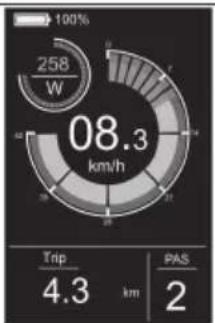
pie
| Metric | Value | | :--- | :--- | | Power Consumption (W) | 258 | | Current Power (km/h) | 08.3 | | Trip Distance (km) | 4.3 | | PAS (km) | 2 |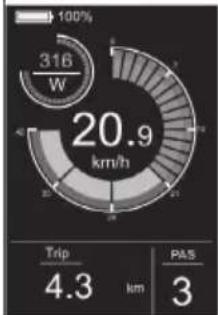
gauge
| Metric | Value | | :--- | :--- | | Speed (km/h) | 20.9 | | Trip (km) | 4.3 | | PAS (km) | 3 |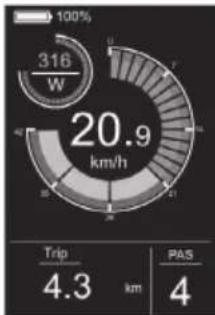
gauge
| Metric | Value | | :--- | :--- | | Current (W) | 316 | | Trip Duration (km) | 4.3 | | PAS Count (km) | 4 |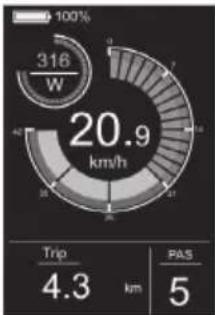
gauge
| Metric | Value | | :--- | :--- | | Current (W) | 316 | | Trip (km) | 4.3 | | PAS (km) | 5 |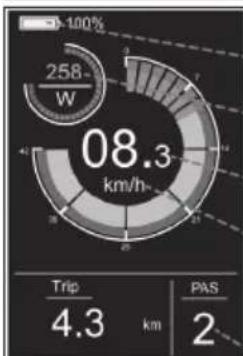
pie
| Metric | Value | |---|---| | Total Energy Consumption (km/h) | 08.3 | | Trip Distance (km) | 4.3 | | PAS Distance (km) | 2 |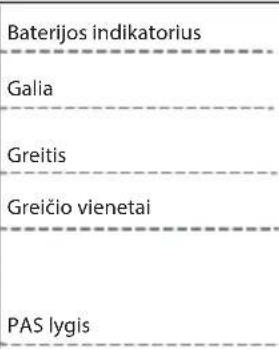
Paveiksle 4-3
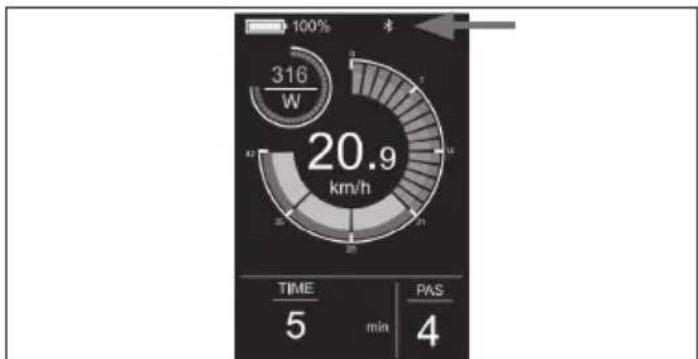
pie
| Metric | Value | |---|---| | Current (W) | 316 | | Total (km/h) | 20.9 | | Time (min) | 5 | | PAS (min) | 4 |Paveiksle 4-7
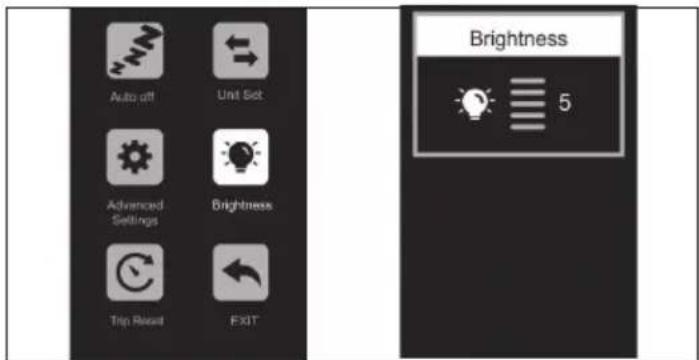
Paveiksle 4-4
Nuimkite ryši
Paveiksle 4-6

SHARP Life programèle
SVARBI INFORMACIJA.
https://www.sharpconsumer.com/sharp-life-app
Priežiūra
https://www.sharpconsumer.com/support/
0,08 collas (2mm) Allena atsléga
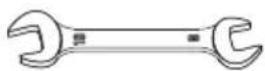
natural_image
Simple line drawing of a rectangular device with a coiled cable and connector (no text or symbols)Lādētājs
natural_image
Line drawing of a bicycle with 'SHARP' branding on the front wheel (no additional text or symbols)natural_image
Technical diagram showing a mechanical assembly and a valve mechanism (no text or labels)natural_image
Technical line drawing of a mechanical assembly with no visible text or symbolsAttēlā 1-3
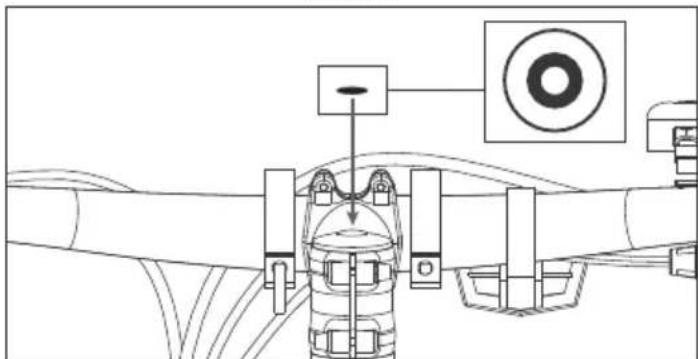
natural_image
Technical line drawing of a mechanical assembly with no visible text or symbolsAttēlā 1-4
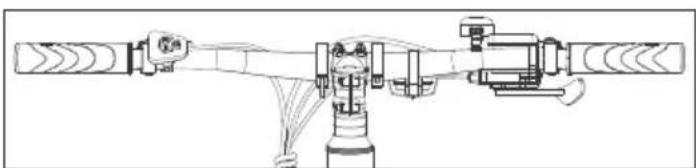
natural_image
Technical line drawing of a mechanical assembly with no visible text or symbolsAttēlā 1-5
PIEZIME:
Attēlā 2-1
PIEZIMES:
natural_image
Technical line drawing of a mechanical assembly with no visible text or symbolspie
| Metric | Value | |---|---| | Current (W) | 23 | | Trip Distance (km) | 4.3 | | PAS Value | 1 | | Total (km/h) | 06.8 |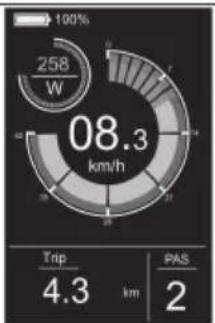
pie
| Metric | Value | |---|---| | Power Consumption (W) | 258 | | Current Power (km/h) | 08.3 | | Trip Distance (km) | 4.3 | | PAS (km) | 2 |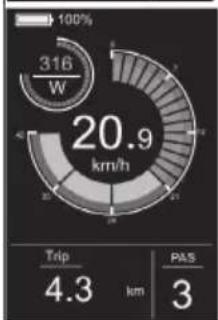
gauge
| Metric | Value | | :--- | :--- | | Current (W) | 316 | | Trip Duration (km) | 4.3 | | PAS Count | 3 | | Total Energy Consumption (km/h) | 20.9 |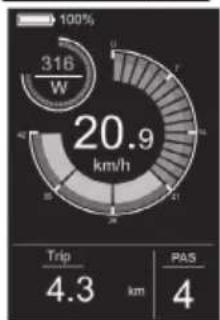
gauge
| Metric | Value | | :--- | :--- | | Current (W) | 316 | | Speed (km/h) | 20.9 | | Trip Distance (km) | 4.3 | | PAS Count | 4 |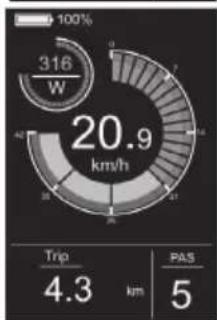
gauge
| Metric | Value | | :--- | :--- | | Current (W) | 316 | | Trip Duration (km) | 4.3 | | Pass (km) | 5 |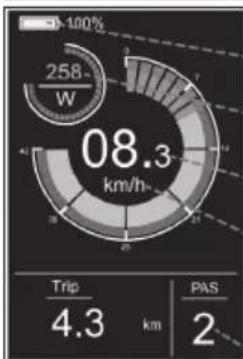
pie
| Category | Value | |---|---| | Trip | 4.3 | | PAS | 2 |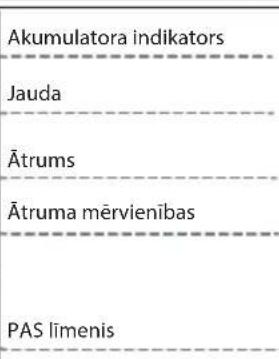
gauge
| Metric | Value | | :--- | :--- | | Power (W) | 316 | | Speed (s) | 20.9 | | Time (min) | 5 | | PAS (min) | 4 | 100% | 100% | | SD (second cycle) | 7 |Displeja interfeiss
pie
| Metric | Value | |---|---| | Power Consumption (kW) | 316 | | Average Power Consumption (km/h) | 20.9 | | Average PAS (km/h) | 20.1 | | PAS Value | 4 |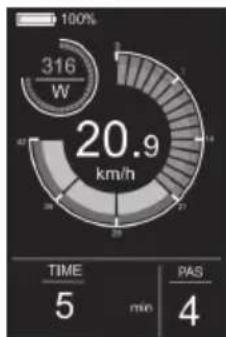
gauge
| Metric | Value | | :--- | :--- | | Power Consumption (W) | 316 | | Total Power Consumption (km/h) | 20.9 | | TIME (min) | 5 | | PAS (min) | 4 |Gājēja palīdzība
radar
| Metric | Value | |---|---| | Power Consumption (W) | 316 | | Time (min) | 5 | | PAS (min) | - |lestatījumu izvēlne
Attēlā 4-1
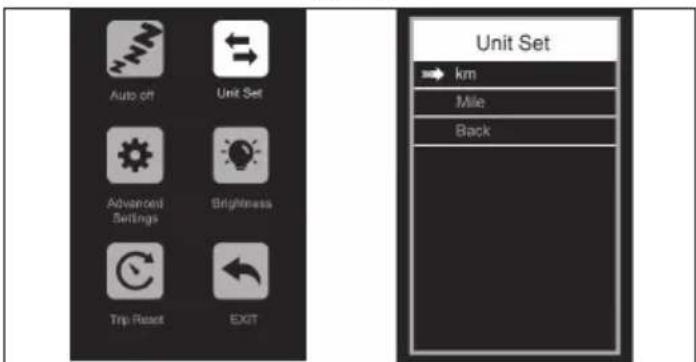
Attēlā 4-2
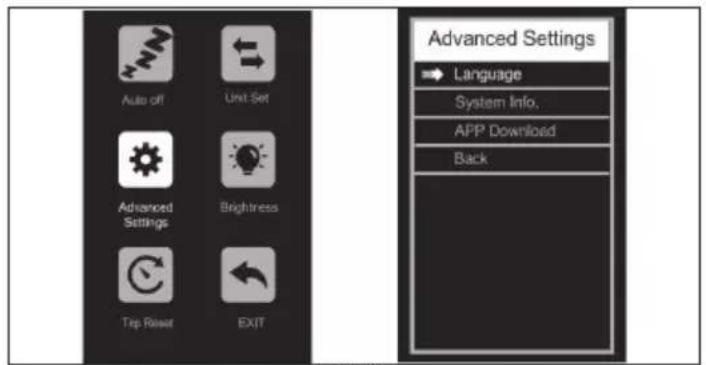
Attēlā 4-3
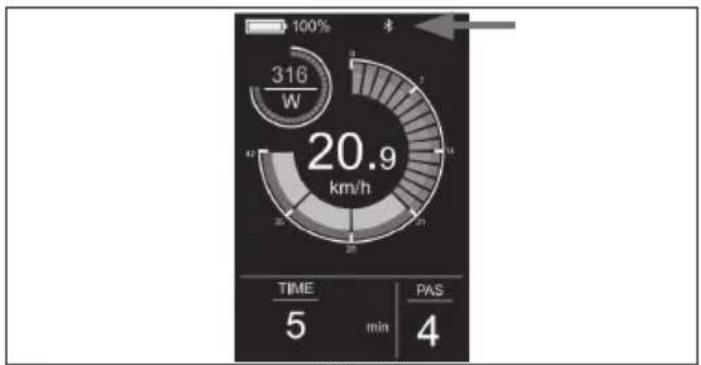
gauge
| Metric | Value | | :--- | :--- | | Speed (km/h) | 20.9 | | Time (min) | 5 | | PAS (4) | 4 |Attēlā 4-7
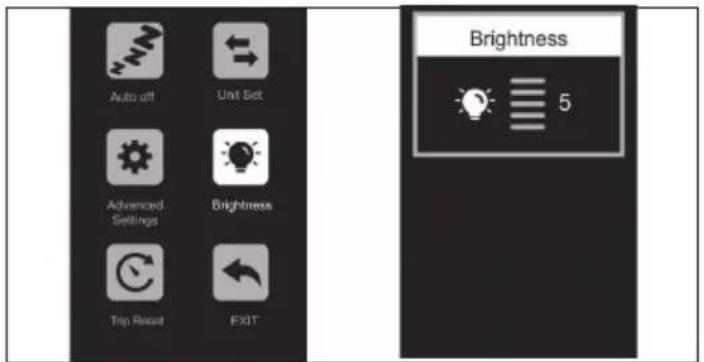
Attēlā 4-4
Nonemiet savienojumu
Attēlā 4-6
SHARP Life lietotne
SVARİGI!
https://www.sharpconsumer.com/sharp-life-app
Apkope
https://www.sharpconsumer.com/support/
natural_image
Simple line drawing of a rectangular device with tubing and connectors (no text or symbols)Laadija

Kaablisidemed

Kummikork
Kiirjuhend
Garantiijuht
natural_image
Line drawing of a bicycle with 'SHARP' branding on the front wheel (no additional text or symbols)Olulised ohutusjuhised
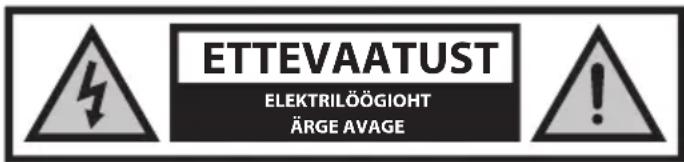
natural_image
Two circular icons showing a sneaker and a helmet, no text or symbols present.
www.sharpconsumer.com/contact/

www.sharpconsumer.com/toetus/

www.sharpconsumer.com/documents-of-conformity/
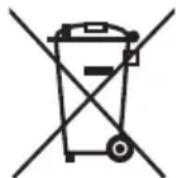
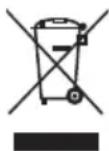

Joonisel 2-1
MÄRKUSED:
natural_image
Technical line drawing of a mechanical assembly with no visible text or symbolsJoonisel 3-1 Joonisel 3-2
Kuidas alustada E-rattaga
SEES/VÄLJAS
gauge
| Metric | Value | |---|---| | Current (W) | 0 | | Speed (km/h) | 00.0 | | Trip Distance (km) | 21.3 | | PAS Score | 0 |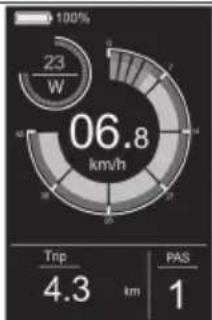
gauge
| Metric | Value | | :--- | :--- | | Current (W) | 23 | | Trip Distance (km) | 4.3 | | PAS Score | 1 |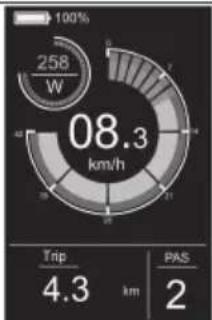
gauge
| Metric | Value | |---|---| | Current (W) | 258 | | Trip Distance (km) | 4.3 | | PAS Distance (km) | 2 |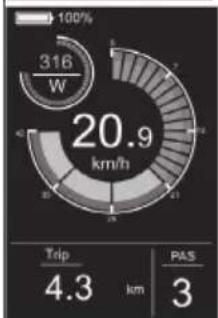
gauge
| Metric | Value | | :--- | :--- | | Speed (km/h) | 20.9 | | Trip (km) | 4.3 | | PAS (km) | 3 |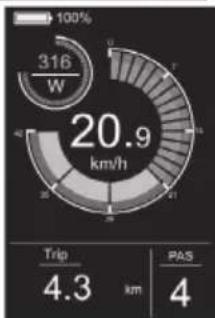
gauge
| Metric | Value | | :--- | :--- | | Current Speed (W) | 316 | | Trip Distance (km) | 4.3 | | PAS Distance (km) | 4 |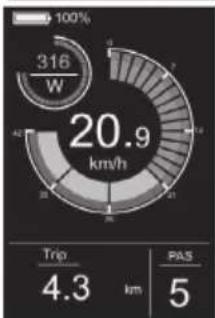
gauge
| Metric | Value | | :--- | :--- | | Current (W) | 316 | | Trip Duration (km) | 4.3 | | PAS Count | 5 |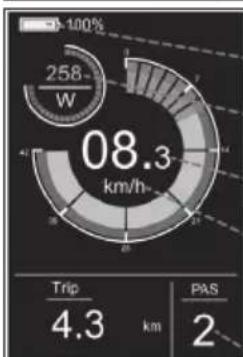
pie
| Metric | Value | | :--- | :--- | | Current (W) | 258 | | Trip (km) | 4.3 | | PAS (km) | 2 |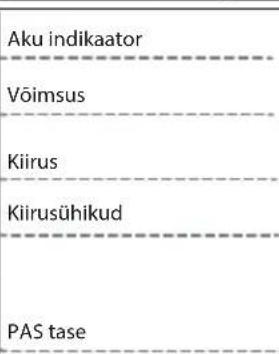
gauge
| Metric | Value | |---|---| | Current (W) | 316 | | Total Energy Consumption (km/h) | 20.9 | | ODO (km) | 24 | | PAS (km) | 4 |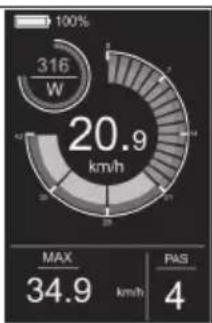
gauge
| Metric | Value | | :--- | :--- | | Current (W) | 316 | | Max (km/h) | 34.9 | | PAS | 4 |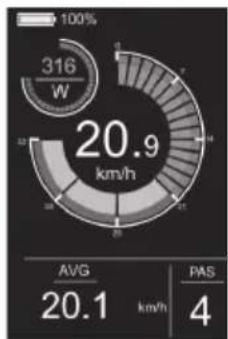
radar
| Metric | Value | | :--- | :--- | | Current Power (W) | 316 | | Average Power (km/h) | 20.9 | | PAS (km/h) | 4 | AVG: 20.1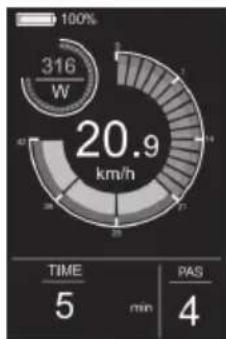
gauge
| Metric | Value | | :--- | :--- | | Power Consumption (W) | 316 | | Total Power Consumption (km/h) | 20.9 | | TIME (min) | 5 | | PAS (min) | 4 |Könniabi
gauge
| Metric | Value | |---|---| | Speed (W) | 316 | | Time (min) | 5 | | PAS (minutes) | min |Seadete menüü
Joonisel 4-1
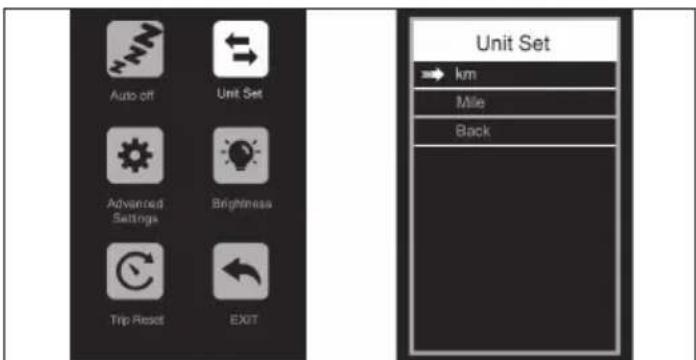
Joonisel 4-2
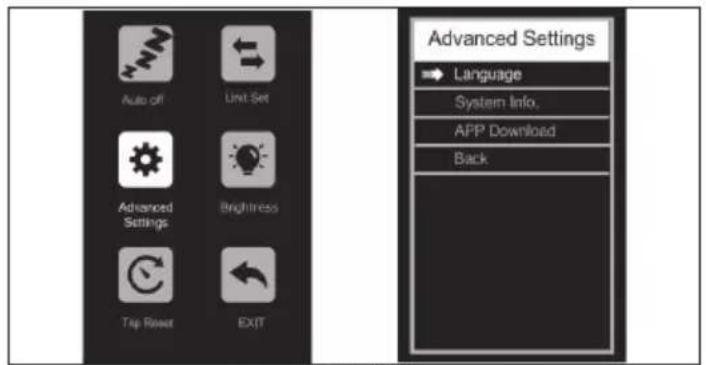
Joonisel 4-3
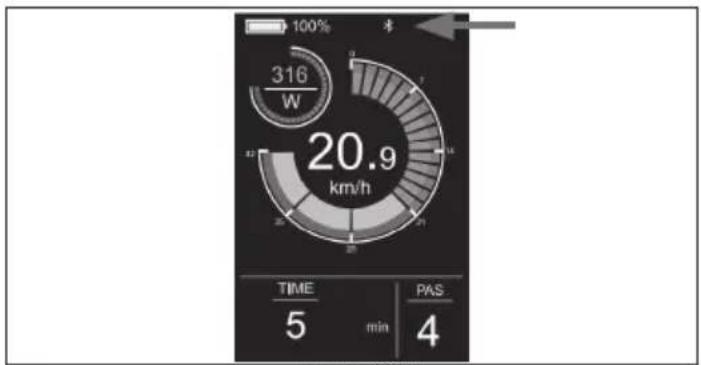
gauge
| Metric | Value | | :--- | :--- | | Speed (W) | 316 | | Time (min) | 5 | | PAS (4) | 4 |Joonisel 4-7
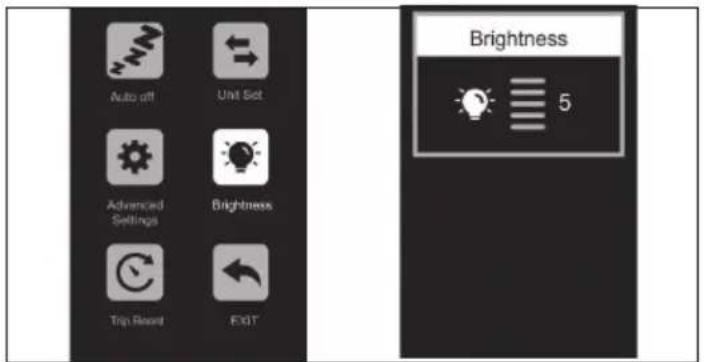
Joonisel 4-4
Eemaldage ühendus
Joonisel 4-6
SHARP Life rakendus
TÄHELEPANU:
https://www.sharpconsumer.com/sharp-life-app
Hooldamine
https://www.sharpconsumer.com/support/
Allen klíč 0,08 palce (2mm)
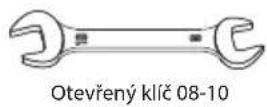
Allen klíč 0,10 palce (2,5mm)
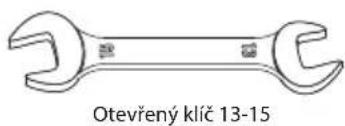
natural_image
Simple diagram of a device with tubing and connectors, labeled 'Nabiječka' below (no other text or symbols)
Allen klíč 0,12 palce (3mm)
Allen klíč 0,16 palce (4mm)
natural_image
Two circular icons showing a shoe and helmet, no text or symbols present
www.sharpconsumer.com/contact/

www.sharpconsumer.com/support/

www.sharpconsumer.com/documents-of-conformity/
Sestavení E-kola
natural_image
Technical diagram showing a mechanical assembly and a valve mechanism (no text or labels)natural_image
Technical line drawing of a mechanical assembly with no visible text or symbolsObrázek 1-3
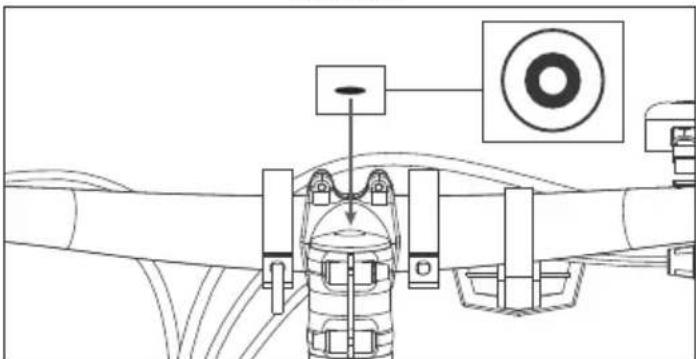
natural_image
Technical line drawing of a mechanical assembly with no visible text or symbolsObrázek 1-4
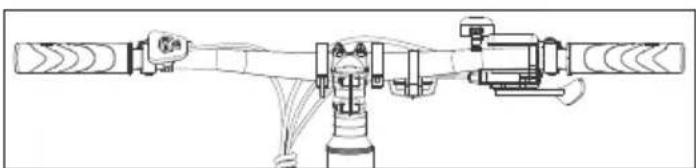
natural_image
Technical line drawing of a mechanical assembly with no visible text or symbolsObrázek 1-5
POZNÁMKA:
Obrázek 2-1
POZNÁMKY:
natural_image
Technical line drawing of a mechanical assembly with two views: front view and side view (no text or symbols)pie
| Metric | Value | |---|---| | Power Rating | 23 W | | Total Energy Consumption (km/h) | 06.8 | | Trip Distance (km) | 4.3 | | PAS Ratio | 1 |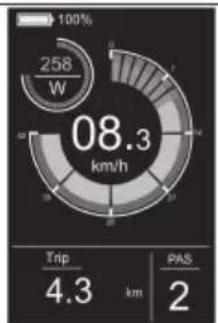
pie
| Metric | Value | |---|---| | Total Energy Consumption (W) | 258 | | Trip Distance (km) | 4.3 | | PAS (km) | 2 |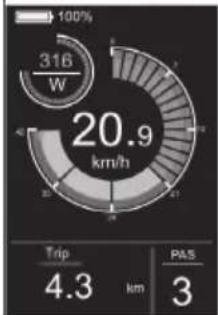
gauge
| Metric | Value | | :--- | :--- | | Current (W) | 316 | | Trip Duration (km) | 4.3 | | PAS Count | 3 | | Total Energy Consumption (km/h) | 20.9 |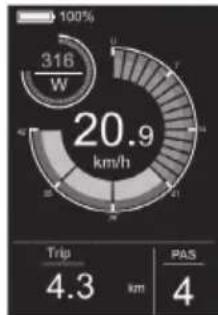
gauge
| Metric | Value | | :--- | :--- | | Current (W) | 316 | | Trip Distance (km) | 4.3 | | PAS Ratio | 4 |
gauge
| Metric | Value | | :--- | :--- | | Current (W) | 316 | | Travel (km/h) | 20.9 | | Trip Distance (km) | 4.3 | | PAS Score | 5 |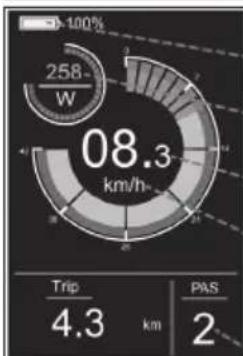
pie
| Category | Value | |---|---| | Trip | 4.3 | | Pass | 2 |Indikátor baterie
Napájení
Rychlost
Jednotky rychlosti
Úroveň PAS
Vypínač světla
pie
| Metric | Value | |---|---| | Total Energy Consumption (W) | 316 | | Trip Distance (km) | 4.3 | | PAS Distance (km) | 4 |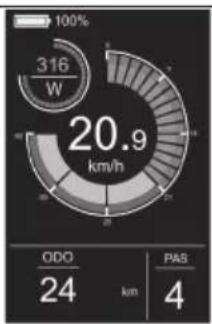
pie
| Metric | Value | | :--- | :--- | | Power Consumption (W) | 316 | | Total Power Consumption (km/h) | 20.9 | | ODO (km) | 24 | | PAS (km) | 4 |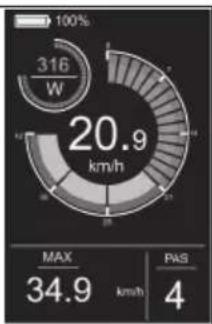
pie
| Metric | Value | |---|---| | Power Consumption (W) | 316 | | Max | 34.9 | | PAS | 4 |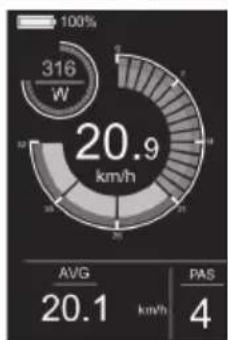
gauge
| Metric | Value | |---|---| | Power Consumption (W) | 316 | | Avg | 20.1 | | PAS | 4 |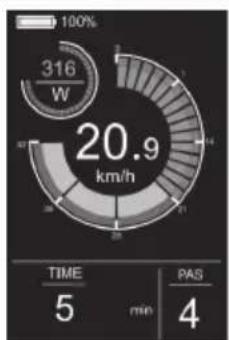
pie
| Metric | Value | | :--- | :--- | | Total Energy Consumption (W) | 316 | | Time (min) | 5 | | PAS (min) | 4 | | Value (km/h) | 20.9 |Asistence při chůzi
Obrázek 4-1
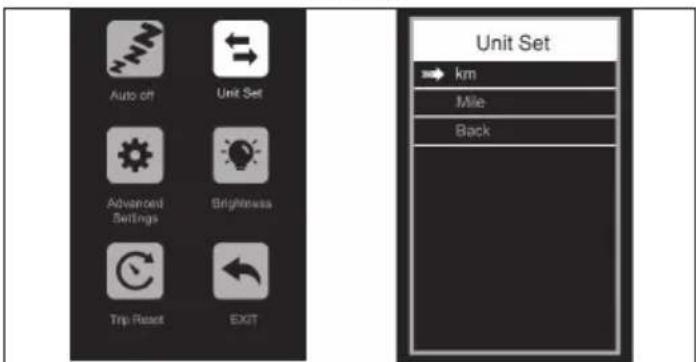
Obrázek 4-2
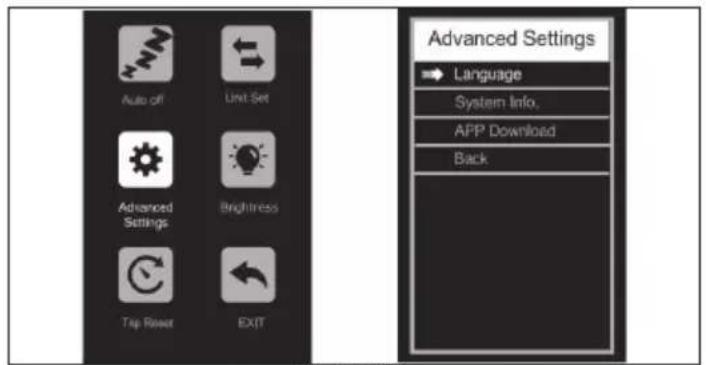
Obrázek 4-3
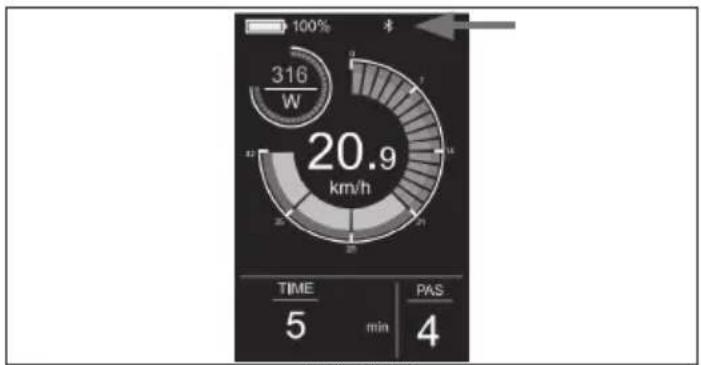
gauge
| Metric | Value | | :--- | :--- | | Speed (W) | 316 | | Time (min) | 5 | | PAS (4) | 4 |Obrázek 4-7
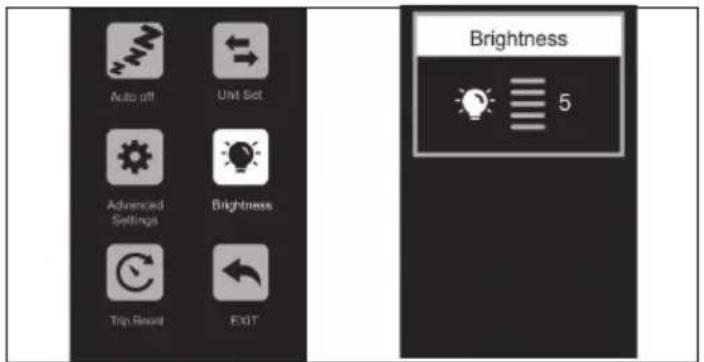
Obrázek 4-4
Odstraňte spojení
Obrázek 4-6
Aplikace SHARP Life
DŮLEŽITÉ:
https://www.sharpconsumer.com/sharp-life-app
Údržba
https://www.sharpconsumer.com/support/
1
natural_image
Simple line drawing of a rectangular device with tubing and connectors (no text or symbols)Nabíjačka

Kábelové zväzky

Gumový kryt
Stručná príručka
Príručka záruky
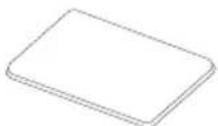
Manuál nabíjačky
2
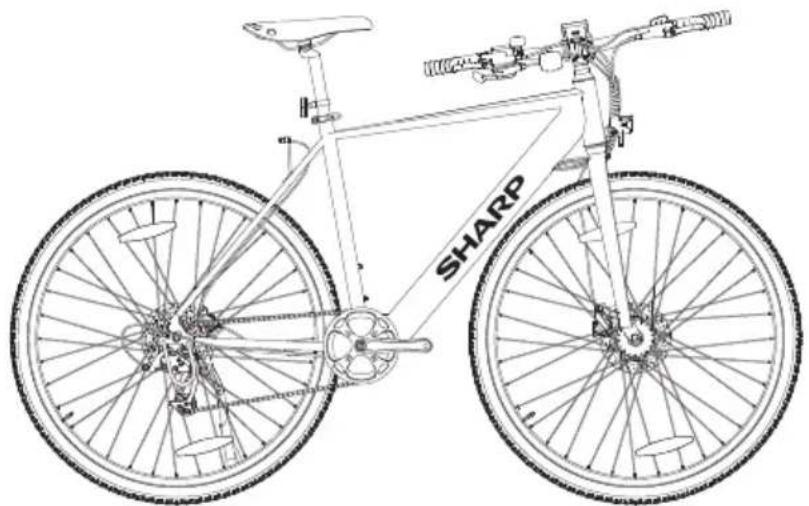
natural_image
Line drawing of a bicycle with 'SHARP' branding on the front wheel (no additional text or symbols)natural_image
Two circular icons showing a sneaker and a helmet, no text or symbols present.poškodeniu komponentov.
Riziko nehody a zranenia!

www.sharpconsumer.com/contact/

www.sharpconsumer.com/support/
Batérie

www.sharpconsumer.com/documents-of-conformity/
natural_image
Technical diagram showing a mechanical assembly and a valve mechanism (no text or labels)natural_image
Technical line drawing of a mechanical assembly with no visible text or symbolsObrázok 1-3
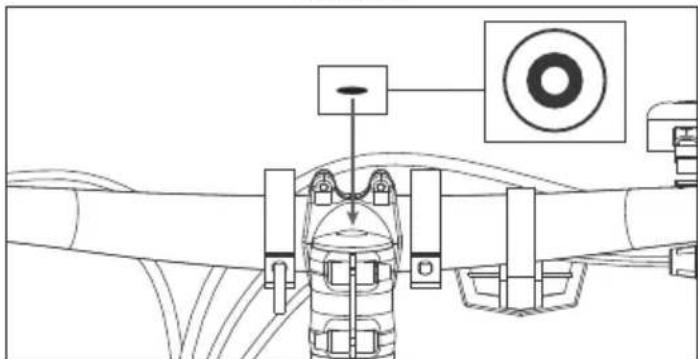
natural_image
Technical line drawing of a mechanical assembly with no visible text or symbolsObrázok 1-4
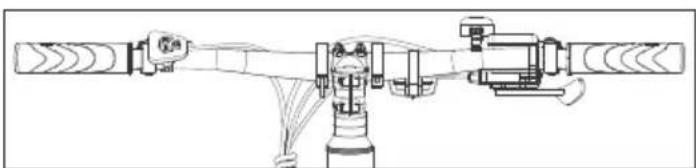
natural_image
Technical line drawing of a mechanical assembly with no visible text or symbolsObrázok 1-5
POZNÁMKA:
Obrázok 2-1
POZNÁMKY:
natural_image
Technical line drawing of a mechanical assembly with two views: front view and side view (no text or symbols)pie
| Metric | Value | |---|---| | Power Rating | 23 W | | Total Energy Consumption (km/h) | 06.8 | | Trip Distance (km) | 4.3 | | PAS Ratio | 1 |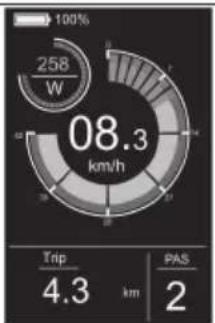
pie
| Metric | Value | |---|---| | Power Consumption (W) | 258 | | Current Power (km/h) | 08.3 | | Trip Distance (km) | 4.3 | | PAS (km) | 2 |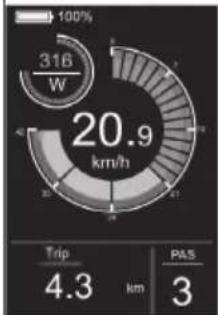
gauge
| Metric | Value | | :--- | :--- | | Current (W) | 316 | | Trip Duration (km) | 4.3 | | PAS Count | 3 | | Total Energy Consumption (km/h) | 20.9 |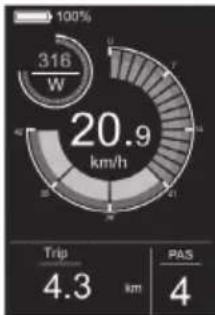
gauge
| Metric | Value | | :--- | :--- | | Current (W) | 316 | | Speed (km/h) | 20.9 | | Trip Distance (km) | 4.3 | | PAS Distance (km) | 4 |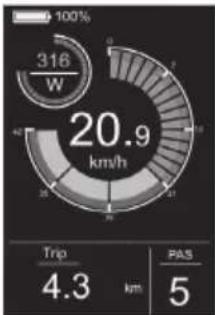
gauge
| Metric | Value | | :--- | :--- | | Current (W) | 316 | | Trip Duration (km) | 4.3 | | PAS (km) | 5 |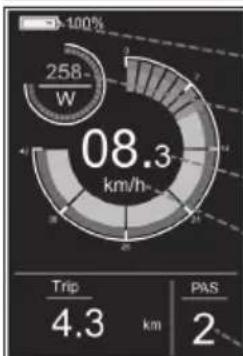
pie
| Metric | Value | |---|---| | Total Energy Consumption (km/h) | 08.3 | | Trip Distance (km) | 4.3 | | Pass Distance (km) | 2 |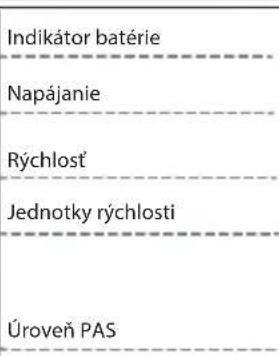
pie
| Metric | Value | |---|---| | Total Energy Consumption (W) | 316 | | Trip Distance (km) | 4.3 | | PAS Distance (km) | 4 |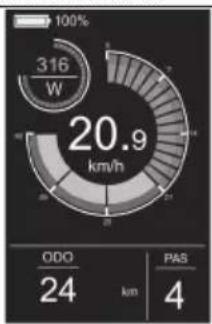
pie
| Metric | Value | | :--- | :--- | | Power Consumption (W) | 316 | | Total Power Consumption (km/h) | 20.9 | | ODO (km) | 24 | | PAS (km) | 4 |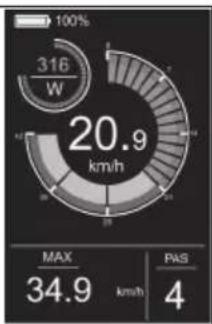
pie
| Metric | Value | | :--- | :--- | | Power Consumption (W) | 316 | | Power Output (km/h) | 20.9 | | MAX | 34.9 | | PAS | 4 |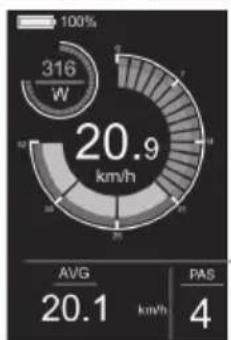
pie
| Metric | Value | |---|---| | Power Consumption (kW) | 316 | | Avg. Power Consumption (km/h) | 20.9 | | PAS | 4 | The chart displays the total power consumption of 316 W with an average of 20.9 km/h and a PAS value of 4. The gauge scale indicates the percentage from 100% to 100%.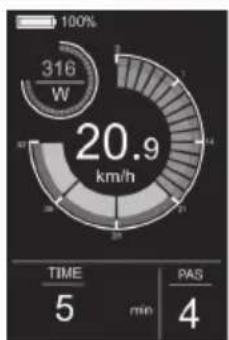
gauge
| Metric | Value | | :--- | :--- | | Power Consumption (W) | 316 | | Total Power Consumption (km/h) | 20.9 | | TIME (min) | 5 | | PAS (min) | 4 |Obrázok 4-1
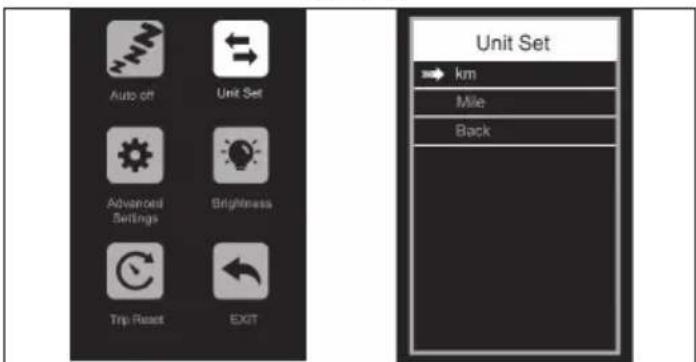
Obrázok 4-2
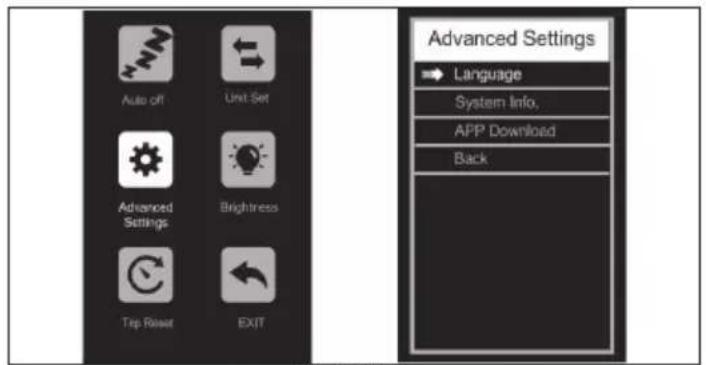
Obrázok 4-3
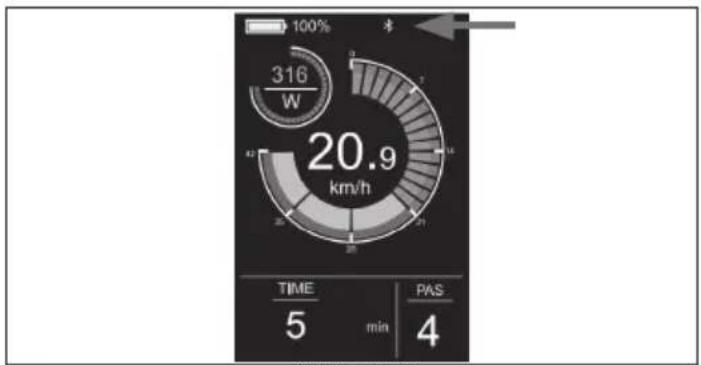
gauge
| Metric | Value | | :--- | :--- | | Speed (km/h) | 20.9 | | Time (min) | 5 | | PAS (4) | 4 |Obrázok 4-7
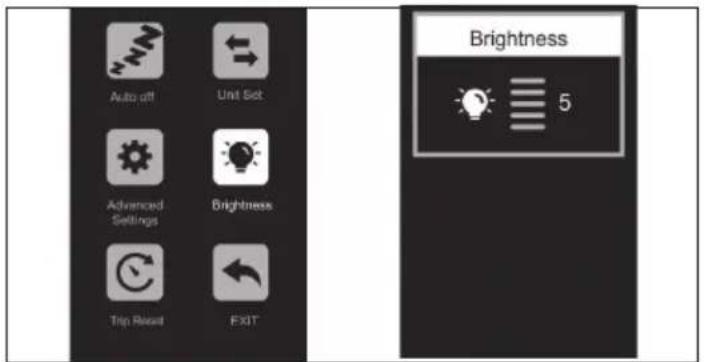
Obrázok 4-4
Obrázok 4-6
https://www.sharpconsumer.com/sharp-life-app
Údržba
https://www.sharpconsumer.com/support/
1
0,08 hüvelyk (2mm) Allen kulcs
0,10 hüvelyk (2,5mm) Allen kulcs
natural_image
Pure electrical circuit lines without any symbolsTöltő

Kábelkötegelők

Gumi sapka
natural_image
Two circular icons showing a sneaker and a helmet, no text or symbols present.
www.sharpconsumer.com/contact/

www.sharpconsumer.com/tamogatas/
www.sharpconsumer.com/documents-of-conformity/

natural_image
Technical diagram showing a mechanical assembly and a valve mechanism (no text or labels)Ábra 1-1 Ábra 1-2
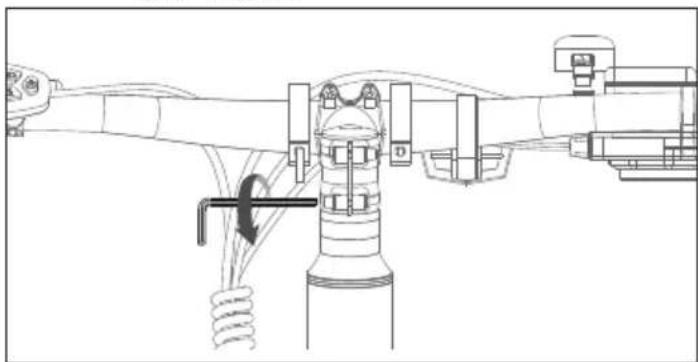
natural_image
Technical line drawing of a mechanical assembly with no visible text or symbolsÁbra 1-3
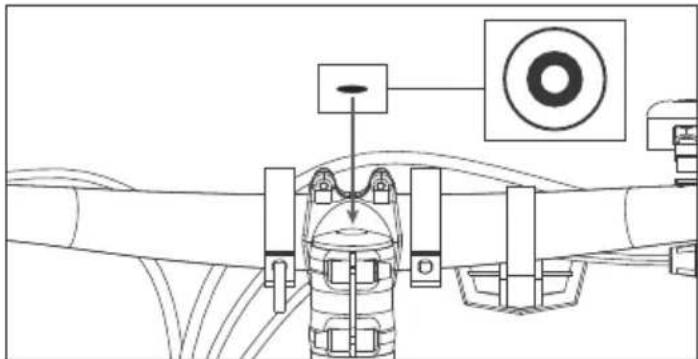
natural_image
Technical line drawing of a mechanical assembly with no visible text or symbolsÁbra 1-4
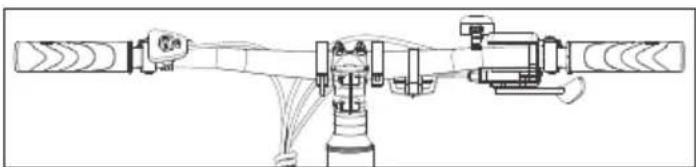
natural_image
Technical line drawing of a mechanical assembly with no visible text or symbolsÁbra 1-5
MEGJEGYZÉS:
Ábra 2-1
MEGJEGYZÉSEK:
natural_image
Technical line drawing of a mechanical assembly with no visible text or symbolsÁbra 3-1 Ábra 3-2
gauge
| Metric | Value | |---|---| | Power Level (W) | 0 | | Trip Distance (km) | 21.3 | | PAS Score | 0 |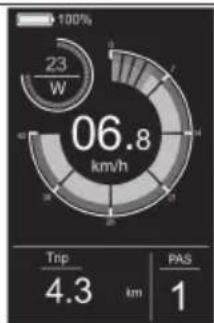
pie
| Metric | Value | |---|---| | Power Rating | 23 W | | Total Energy Consumption (km/h) | 06.8 | | Trip Distance (km) | 4.3 | | PAS Ratio | 1 |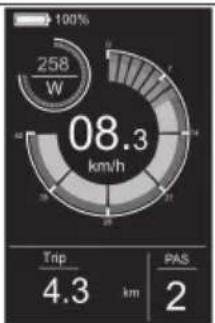
pie
| Metric | Value | | :--- | :--- | | Power Consumption (W) | 258 | | Current Power (km/h) | 08.3 | | Trip Distance (km) | 4.3 | | PAS (km) | 2 |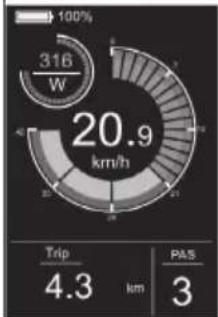
gauge
| Metric | Value | | :--- | :--- | | Current (W) | 316 | | Trip Duration (km) | 4.3 | | Passengers | 3 | | Percentage (%) | 100% | | Total (km/h) | 20.9 |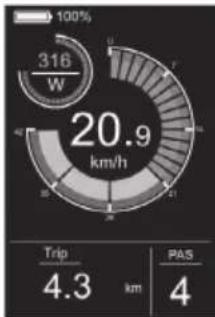
gauge
| Metric | Value | | :--- | :--- | | Current (W) | 316 | | Trip Duration (km) | 4.3 | | PAS Count | 4 |
gauge
| Metric | Value | | :--- | :--- | | Current Speed (W) | 316 | | Trip Distance (km) | 4.3 | | PAS Score | 5 |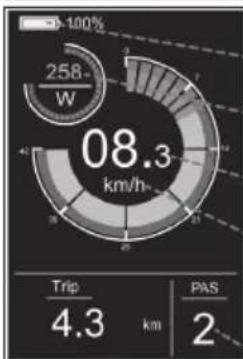
pie
| Metric | Value | |---|---| | Current (W) | 258 | | Total Energy Consumption (km/h) | 08.3 | | Trip Distance (km) | 4.3 | | PAS (km) | 2 |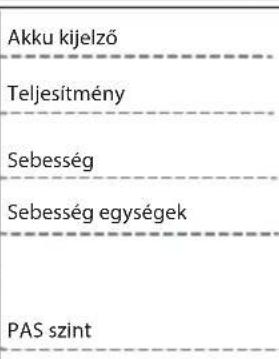
gauge
| Metric | Value | | :--- | :--- | | Power (W) | 316 | | Speed (s) | 20.9 | | Time (min) | 5 | | PAS (min) | 4 | 100% | 100% | | SD (second cycle) | 7 |Kijelző felület
gauge
| Metric | Value | |---|---| | Current (W) | 316 | | Trip (km) | 4.3 | | PAS (km) | 4 |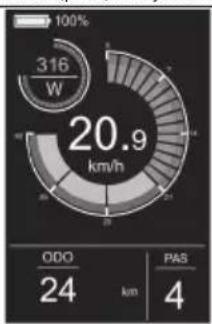
pie
| Metric | Value | |---|---| | Total Energy Consumption (W) | 316 | | ODO (km) | 24 | | PAS (km) | 4 | | Current (kW) | 20.9 |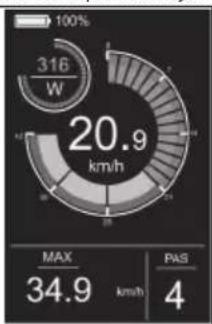
gauge
| Metric | Value | | :--- | :--- | | Current (W) | 316 | | Max | 34.9 | | PAS | 4 |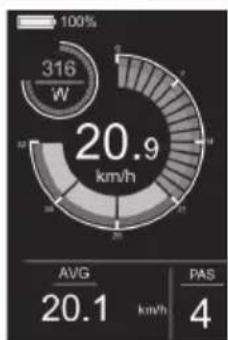
gauge
| Metric | Value | | :--- | :--- | | Power Consumption (W) | 316 | | Avg | 20.1 | | PAS | 4 |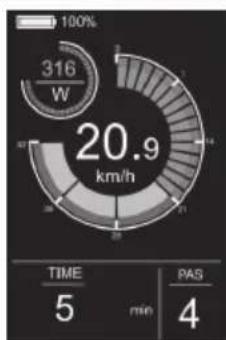
gauge
| Metric | Value | | :--- | :--- | | Current (W) | 316 | | Total (km/h) | 20.9 | | TIME (min) | 5 | | PAS (min) | 4 |Sétáló segítség
Ábra 4-2
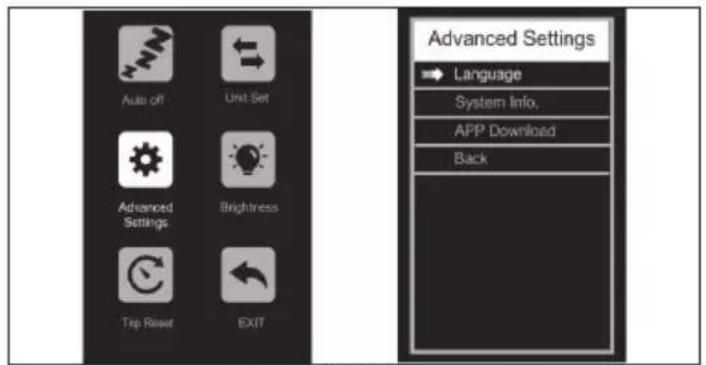
Ábra 4-3
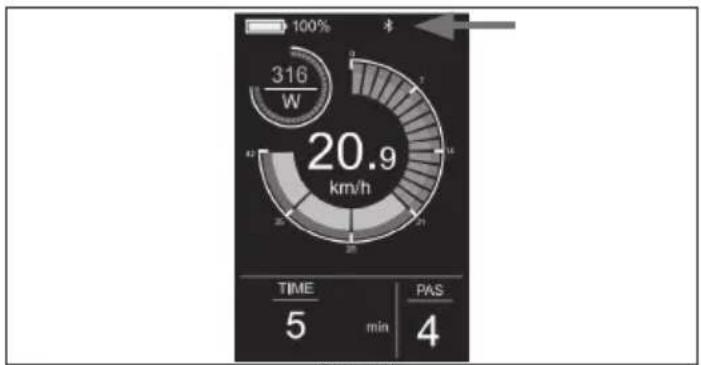
gauge
| Metric | Value | | :--- | :--- | | Speed (km/h) | 20.9 | | Time (min) | 5 | | PAS (4) | 4 |Abra 4-7
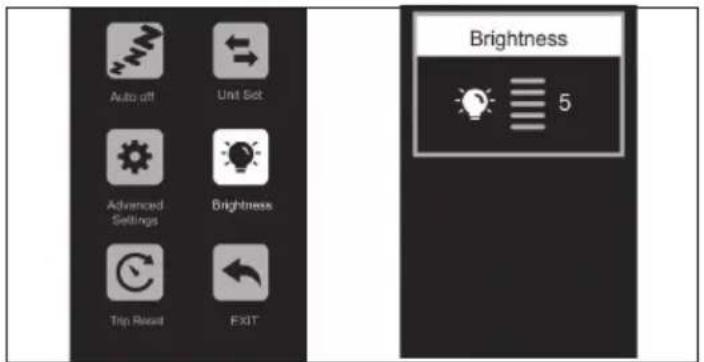
Ábra 4-4
https://www.sharpconsumer.com/sharp-life-app
Karbantartás
https://www.sharpconsumer.com/support/
Cheie Allen de 0,08 inch (2mm)
Cheie Allen de 0,10 inch (2.5mm)
Cheie Allen de 0,12 inch (3mm)
Cheie Allen de 0,16 inch (4mm)
Cheie Allen lungă de 0,20 inch (5mm)
Cheie Allen de 0,24 inch (6mm)
Cheie fixā 08-10
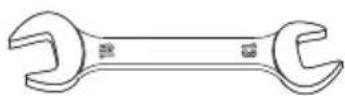
Cheie fixă 13-15

Şurubelniţă Phillips
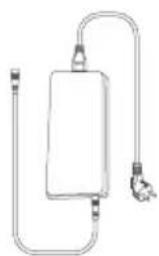
natural_image
Pure electrical circuit lines without any symbolsÎncârcător

Coliere de cablu
natural_image
Line drawing of a bicycle with 'SHARP' branding on the front wheel (no additional text or symbols)
www.sharpconsumer.com/contact/

www.sharpconsumer.com/support/

www.sharpconsumer.com/documents-of-conformity/
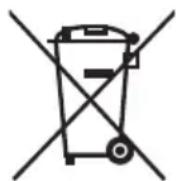
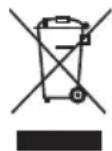

natural_image
Diagram showing two mechanical or industrial setups with no visible text, numbers, or symbols.Figura 1-1 Figura 1-2
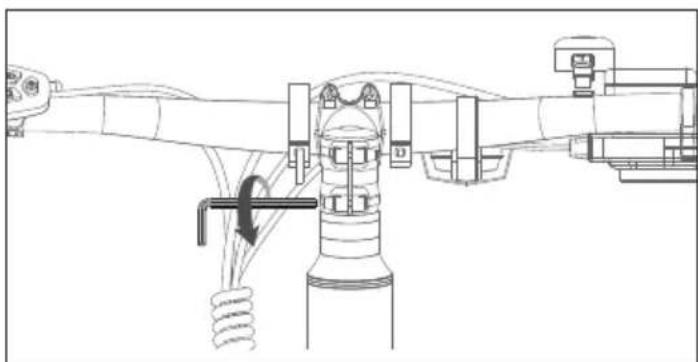
natural_image
Technical line drawing of a mechanical assembly with no visible text or symbolsFigura 1-3
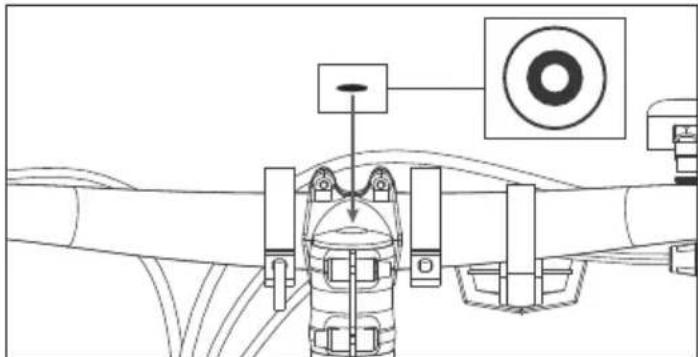
Figura 1-4
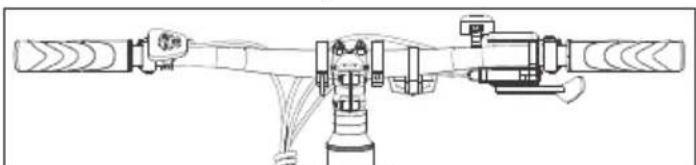
natural_image
Technical line drawing of a mechanical assembly with no visible text or symbolsFigura 1-5
NOTĂ:
Figura 2-1
NOTE:
natural_image
Technical line drawing of a mechanical assembly with no visible text or symbolsFigura 3-1 Figura 3-2
gauge
| Metric | Value | |---|---| | Power Level (W) | 0 | | Trip Distance (km) | 21.3 | | PAS Score | 0 |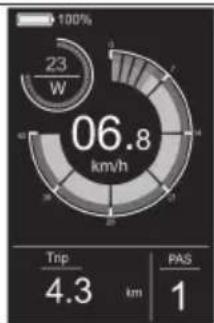
pie
| Segment | Value | |---|---| | Top Left | 23 W | | Middle Right | 06.8 km/h | | Bottom Right | 4.3 km | | Bottom Left | 1 | PAS: 1 Trip: 4.3 km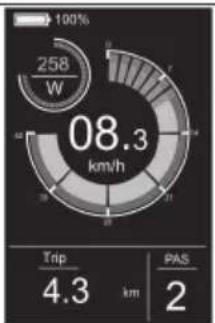
pie
| Metric | Value | |---|---| | Total Energy Consumption (W) | 258 | | Trip Distance (km) | 4.3 | | PAS Distance (km) | 2 |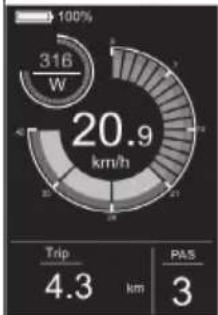
pie
| Metric | Value | |---|---| | Current (W) | 316 | | Trip (km) | 4.3 | | PAS (km) | 3 |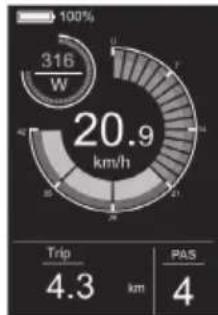
pie
| Metric | Value | | :--- | :--- | | Current (W) | 316 | | Trip Duration (km) | 4.3 | | PAS Count | 4 |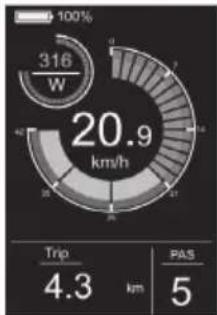
gauge
| Metric | Value | | :--- | :--- | | Current (W) | 316 | | Trip (km) | 4.3 | | PAS (km) | 5 |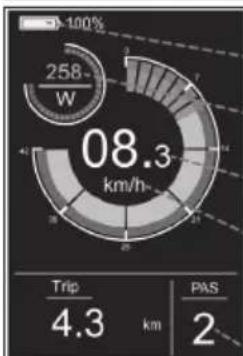
pie
| Metric | Value | |---|---| | Total Energy Consumption (km/h) | 08.3 | | Trip Distance (km) | 4.3 | | PAS Distance (km) | 2 |Indicator baterie
Putere
Viteză
Unități de viteză
Nivel PAS
Comutator de lumină
pie
| Metric | Value | |---|---| | Total Energy Consumption (W) | 316 | | Trip Distance (km) | 4.3 | | PAS Distance (km) | 4 |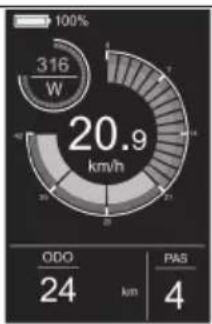
pie
| Metric | Value | | :--- | :--- | | Power Consumption (W) | 316 | | Total Power Consumption (km/h) | 20.9 | | ODO (km) | 24 | | PAS (km) | 4 |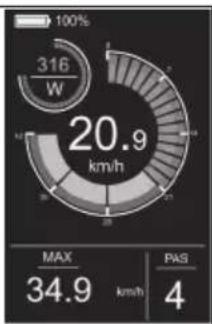
pie
| Metric | Value | | :--- | :--- | | Power Consumption (W) | 316 | | Max | 34.9 | | PAS | 4 |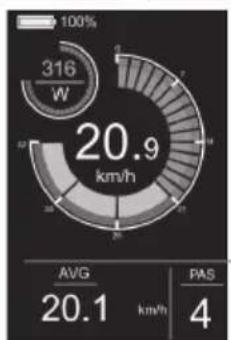
pie
| Metric | Value | |---|---| | Power Consumption (kWh) | 316 | | Avg. Power Consumption (km/h) | 20.9 | | PAS | 4 | The chart displays the total power consumption of 316 W, with the average at 20.9 km/h and a PAS value of 4. The gauge scale indicates 100% for the current value.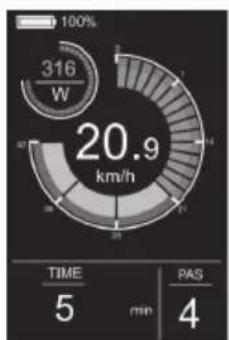
gauge
| Metric | Value | | :--- | :--- | | Time | 5 | | min | 4 | | PAS | 4 | | W (316) | 100% |Asistență la mers
Figura 4-1
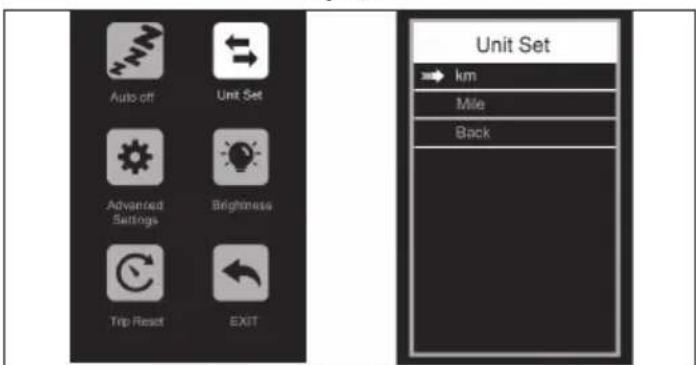
Figura 4-2
Figura 4-3
Figura 4-7
https://www.sharpconsumer.com/sharp-life-app
Întreținere
Încărcare 80-100% 80% 60% 40% 20% 0-20%
Tensiunea
bateriei/V
41.6 39 37.5 36 34.5 31
Model BK-GS03E-W BK-GS03E-G
General
Culori Alb Gri
Dimensiune M M
https://www.sharpconsumer.com/support/
natural_image
Simple line drawing of a rectangular device with a coiled cable and connector (no text or symbols)Зарядно устройство

Кабелни връзки
natural_image
Line drawing of a bicycle with 'SHARP' branding on the front wheel (no additional text or symbols)
www.sharpconsumer.com/contact/

www.sharpconsumer.com/support/

www.sharpconsumer.com/documents-of-conformity/
natural_image
Technical diagram showing a mechanical assembly and a valve mechanism (no text or labels)natural_image
Technical line drawing of a mechanical assembly with no visible text or symbolsФигура 1-3
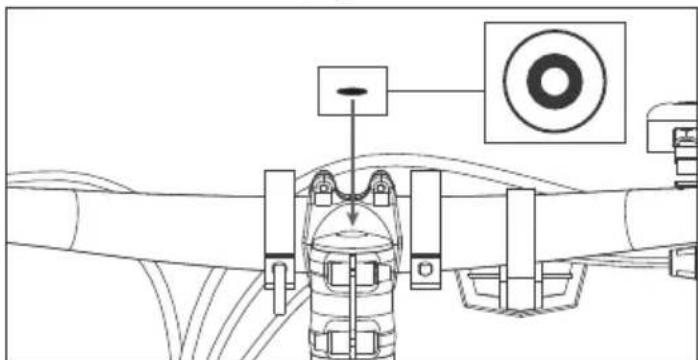
Фигура 1-4
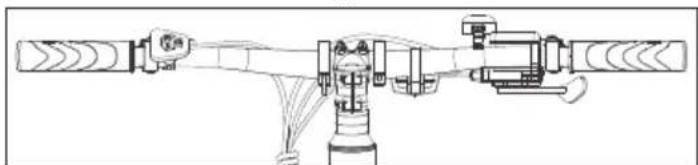
natural_image
Technical line drawing of a mechanical assembly with no visible text or symbolsФигура 2-1
БЕЛЕЖКИ:
Проверете капачката на края на двете педали, за да идентифицирате левия и десния педал.
natural_image
Technical line drawing of a mechanical assembly with two views: top shows internal components connected to a valve, bottom shows wiring and a plug inserted (no text or symbols)pie
| Metric | Value | |---|---| | Current (W) | 258 | | Trip Distance (km) | 4.3 | | PAS Count | 2 |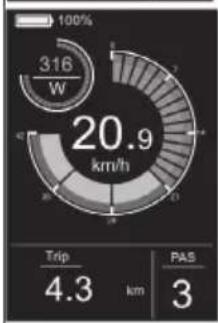
gauge
| Metric | Value | | :--- | :--- | | Trip | 4.3 | | PAS | 3 |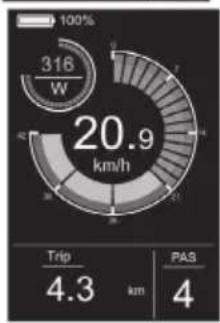
gauge
| Metric | Value | | :--- | :--- | | Current Speed (W) | 316 | | Trip Distance (km) | 4.3 | | Passenger Distance (km) | 4 |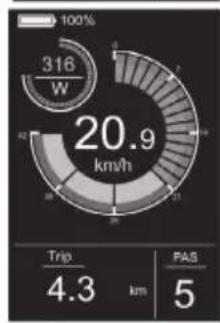
gauge
| Metric | Value | | :--- | :--- | | Current (W) | 316 | | Trip Duration (km) | 4.3 | | PAS Count | 5 |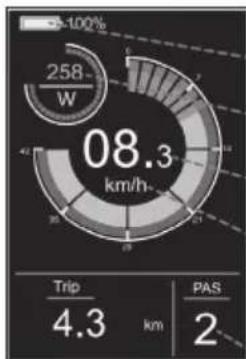
pie
| Segment | Value | |---|---| | Trip | 4.3 | | PAS | 2 |gauge
| Metric | Value | |---|---| | Power Consumption (W) | 316 | | Time (min) | 5 | | PAS (min) | 4 | | SD (right arrow) | ↑ 20.9 km/hgauge
| Metric | Value | | :--- | :--- | | Current Trip | 4.3 | | Current PAS | 4 | | Total | 316 | | Travel Rate (km/h) | 20.9 |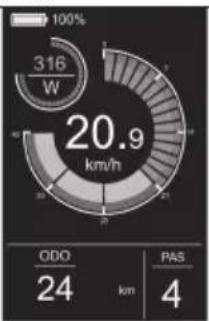
pie
| Category | Value | |---|---| | ODO | 24 | | PAS | 4 | | Total | 20.9 | | W (Estimated) | 316 |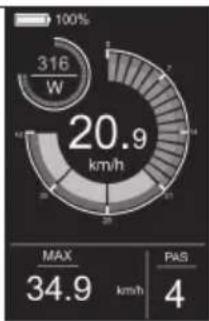
gauge
| Metric | Value | | :--- | :--- | | Currents (W) | 316 | | Max | 34.9 | | PAS | 4 |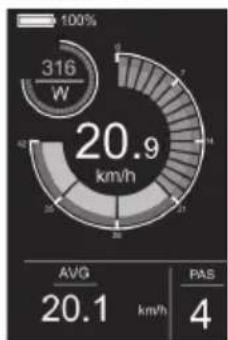
gauge
| Metric | Value | |---|---| | Current Power Consumption (W) | 316 | | Avg. Power Consumption (km/h) | 20.9 | | PAS | 20.1 | | PAS (4) | 4 |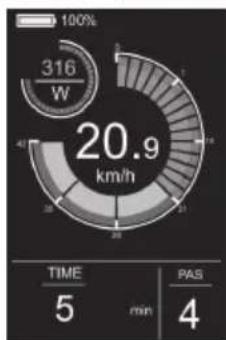
gauge
| Metric | Value | | :--- | :--- | | Power Consumption (W) | 316 | | Total Power Consumption (km/h) | 20.9 | | TIME (min) | 5 | | PAS (min) | 4 |Помощник при ходене
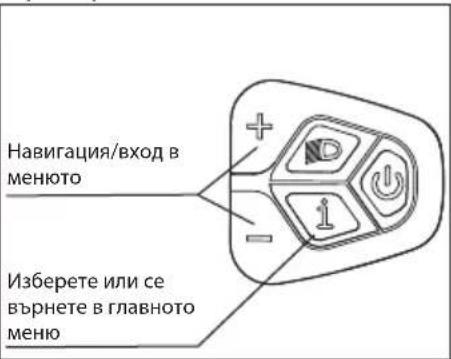
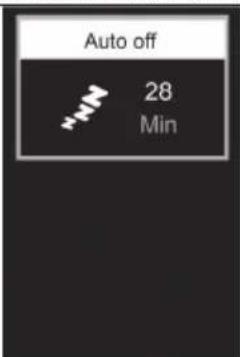
Фигура 4-1
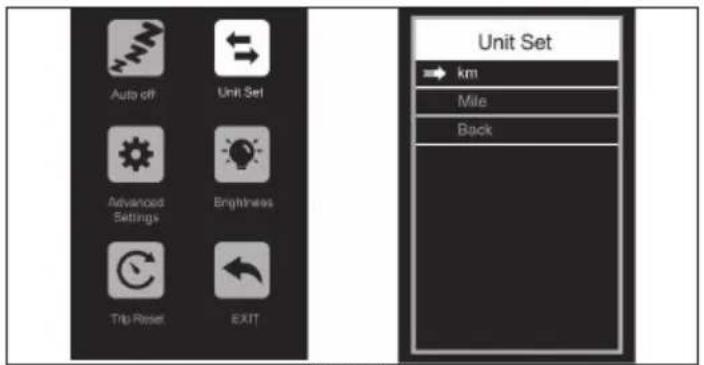
Фигура 4-2
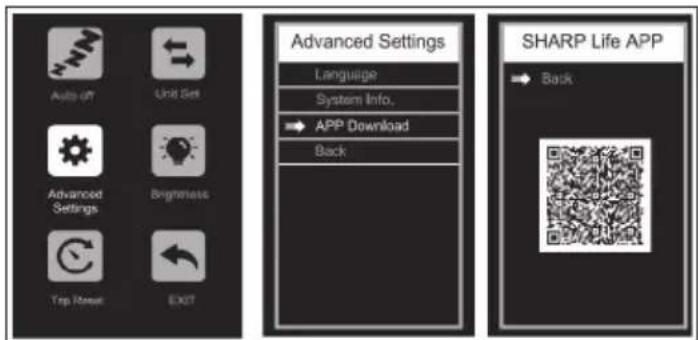
Фигура 4-6
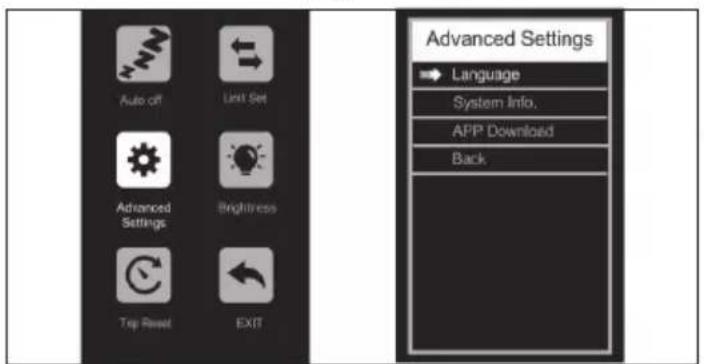
Фигура 4-3
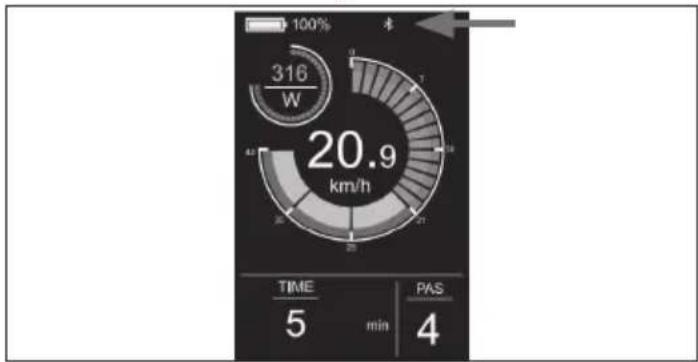
gauge
| Time | Power (W) | |------|-----------| | 0 | 316 | | 5 | 20.9 | | 10 | 20.9 | | 15 | 20.9 | | 20 | 20.9 | | 25 | 20.9 | | 30 | 20.9 | | 35 | 20.9 | | 40 | 20.9 | | 45 | 20.9 | | 50 | 20.9 | | 55 | 20.9 | | 60 | 20.9 | | 65 | 20.9 | | 70 | 20.9 | | 75 | 20.9 | | 80 | 20.9 | | 85 | 20.9 | | 90 | 20.9 | | 95 | 20.9 | | 100 | 20.9 |Фигура 4-7
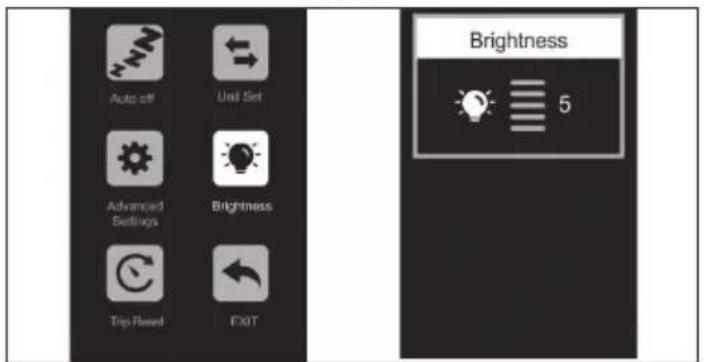
Фигура 4-4
Махнете връзката
https://www.sharpconsumer.com/sharp-life-app
Поддръжка
https://www.sharpconsumer.com/support/
0,08 inča (2mm) Imbus ključ
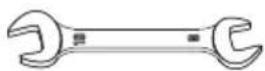
Ključ otvorenog kraja 08-10
0,10 inča (2,5mm) Imbus ključ
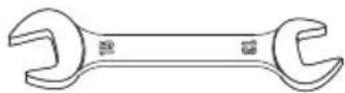
Ključ otvorenog kraja 13-15
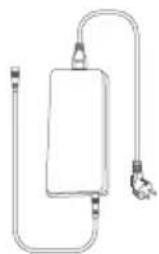
natural_image
Simple line drawing of a rectangular device with a coiled cable and connector (no text or symbols)Punjač
natural_image
Line drawing of a bicycle with 'SHARP' branding on the front wheel (no additional text or symbols)Važne sigurnosne upute
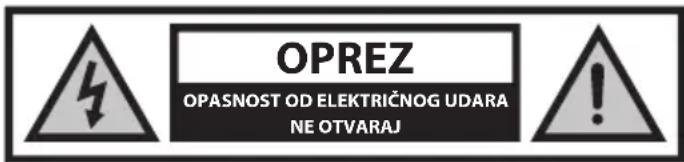
natural_image
Two circular icons showing a sneaker and a helmet, no text or symbols present.Neprimjerene dodatke ili izmjene na biciklu i neispravna dodatna oprema mogu uzrokovati kvar bicikla.
Da biste smanjili rizik od nesreće i ozljede, ne dodavajte dodatnu opremu koja nije kupljena od prodavatelja ili bez njegove dozvole, uključujući, ali ne ograničavajući se na, dječje sigurnosne sjedalice, prikolice, itd.
OPREZ: Ne vozite bicikl na rizičan način.
Da biste smanjili rizik od nesreće i ozljede, vozite bicikl samo na ispravan način. Provjerite možete li kontrolirati bicikl i ne pokušavajte opasne radnje, uključujući, ali ne ograničavajući se na vožnju bez ruku, skokove i podizanje prednjeg kotača.
OPASNOST: Nedostatak održavanja bicikla predstavlja rizik od nesreće i ozljede
Prije svake vožnje provjerite bicikl, uključujući, ali ne ograničavajući se na, funkciju kočnica, trošenje guma i PSI, stanje vijaka i matica, upravljanje i napetost žbica.

www.sharpconsumer.com/contact/

www.sharpconsumer.com/support/

www.sharpconsumer.com/documents-of-conformity/
natural_image
Technical diagram showing a mechanical assembly and a valve mechanism (no text or labels)Slika 1-1 Slika 1-2
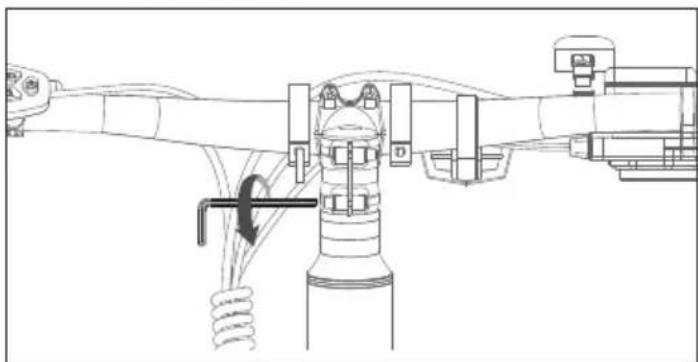
natural_image
Technical line drawing of a mechanical assembly with no visible text or symbolsSlika 1-3
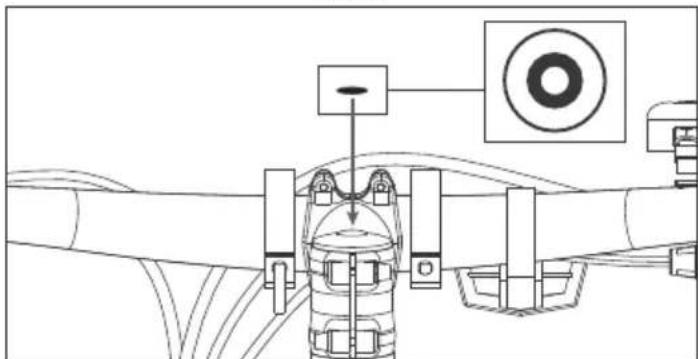
natural_image
Technical line drawing of a mechanical assembly with no visible text or symbolsSlika 1-4
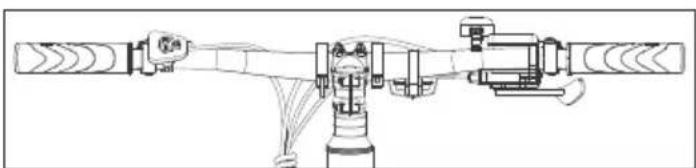
natural_image
Technical line drawing of a mechanical assembly with no visible text or symbolsSlika 1-5
NAPOMENA:
Provjerite je li okretni moment vijka na vrhu otprilike 4-6 N·m.
Pobrinite se da je okretni moment onih s boka otprilike 6 N·m.
KORAK 2: Instalirajte pedale
Slika 2-1
BILJEŠKE:
Pogledajte poklopce na svakom vijku pedale kako bi razlikovali ljevu i desnu pedalu.
natural_image
Technical line drawing of a mechanical assembly with no visible text or symbolsSlika 3-1 Slika 3-2
Kako pokrenuti E-bicikl
UKLJUČENO/ISKLJUČENO
gauge
| Metric | Value | | :--- | :--- | | Current (W) | 316 | | Trip Duration (km) | 4.3 | | PAS Count (km) | 4 |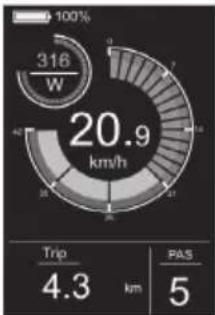
gauge
| Metric | Value | | :--- | :--- | | Current (W) | 316 | | Trip (km) | 4.3 | | PAS (km) | 5 |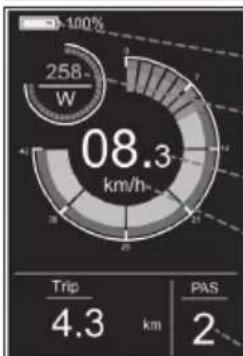
pie
| Metric | Value | |---|---| | Total Energy Consumption (km/h) | 08.3 | | Trip Distance (km) | 4.3 | | PAS Distance (km) | 2 || Indikator baterije |
| Energija |
| Brzina |
| Jedinice brzine |
| PAS razina |
Prekidač svjetla
gauge
| Metric | Value | | :--- | :--- | | Power (W) | 316 | | Speed (s) | 20.9 | | Time (min) | 5 | | PAS (min) | 4 | 100% | 100% | | SD (second cycle) | 7 |Sučelje digitalnog zaslona
Prema zadanim postavkama, mjerač prikazuje stvarnu brzinu, kilometražu po putovanju (km), snagu motora (W) i razinu baterije (%). Pritisnite tipku Mode da biste prebacili informacije i izmijenili prikaz između pojedinačne kilometraže (km), ukupne kilometraže (km), maksimalne brzine (km/h), prosječne brzine (km/h) i vremena vožnje (min). Sučelje zaslona prikazano je na slici.
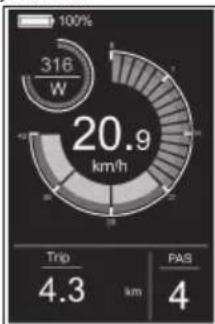
pie
| Metric | Value | |---|---| | Total Energy Consumption (W) | 316 | | Trip Distance (km) | 4.3 | | PAS Distance (km) | 4 |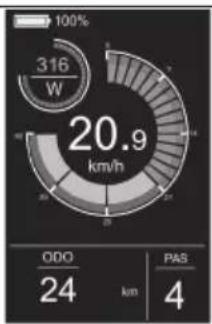
pie
| Metric | Value | | :--- | :--- | | Power Consumption (W) | 316 | | Total Power Consumption (km/h) | 20.9 | | ODO (km) | 24 | | PAS (km) | 4 |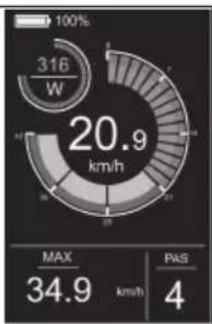
pie
| Metric | Value | | :--- | :--- | | Power Consumption (W) | 316 | | Power Output (km/h) | 20.9 | | MAX | 34.9 | | PAS | 4 |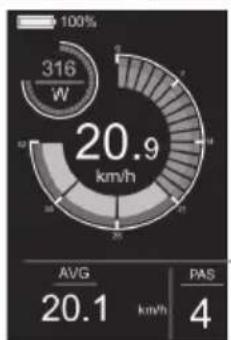
pie
| Metric | Value | |---|---| | Power Consumption (kW) | 316 | | Avg. Power Consumption (km/h) | 20.9 | | PAS | 4 | The chart displays the total power consumption of 316 W and its corresponding average (AVG) of 20.1 km/h and a PAS value of 4. The gauge scale indicates the percentage from 100% to 100%.
pie
| Metric | Value | |---|---| | Power Consumption (W) | 316 | | Time | 5 | | PAS | 4 | Time (min) | minPomoć pri hodanju
Pritiskom i držanjem tipke DOWN za smanjivanje 3 sekunde aktivira se način pomoći pri hodanju. E-bicikl će automatski ići brzinom do 5 km/h. Sučelje zaslona prikazano je na slici.
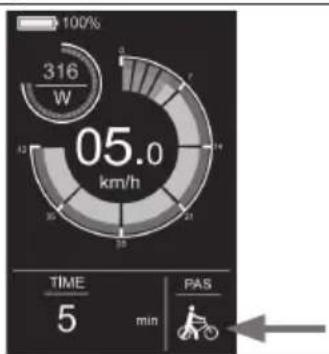
gauge
| Time | PAS | |------|-----| | 5 | 0 | | 12 | 316 |Izbornik postavki
U stanju pokretanja, kada je vozilo nepomično, držite pritisnute tipke UP i DOWN više od 2 sekunde istovremeno, a instrument će ući u sučelje postavki. Sučelje za rad prikazano je na slici. Sve operacije moraju se izvodlti na brzini 0.
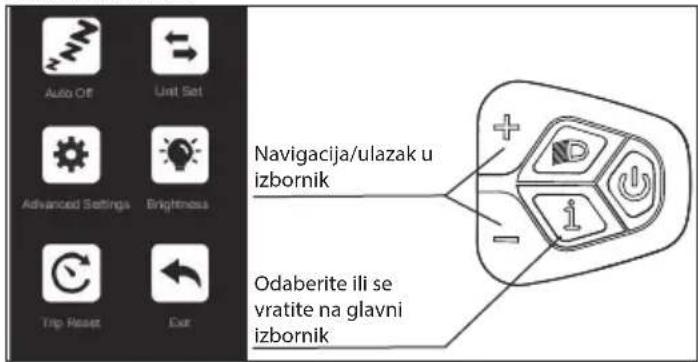
Kako postaviti
- Pritisnite gumb + ili za prebacivanje i pritisnite gumb Mode za ulazak u postavke.
- Nakon ulaska u Postavke, možete prilagoditi parametre pritiskom na gumb + i - te pritisnuti gumb zajspremanje i povratak na višu razinu Postavki.
Slika 4-1
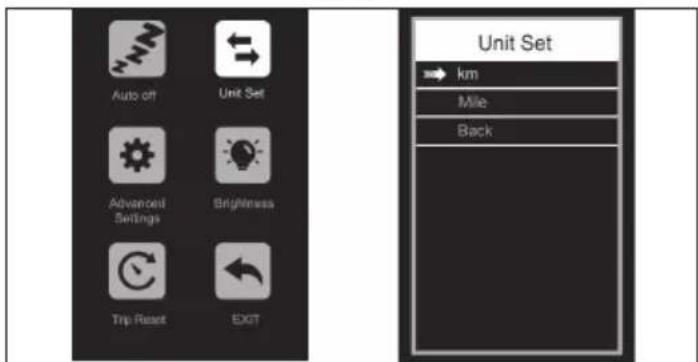
Slika 4-2
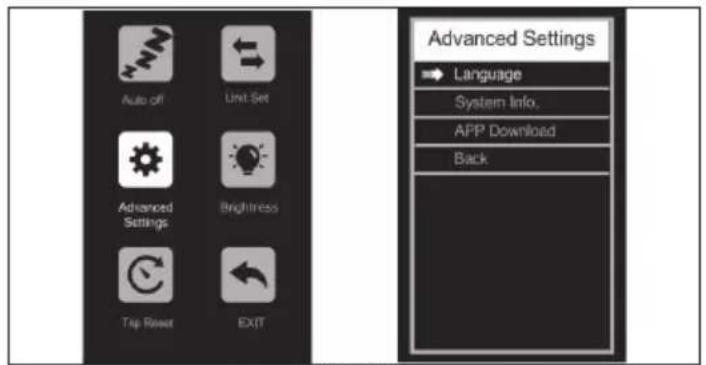
Slika 4-3
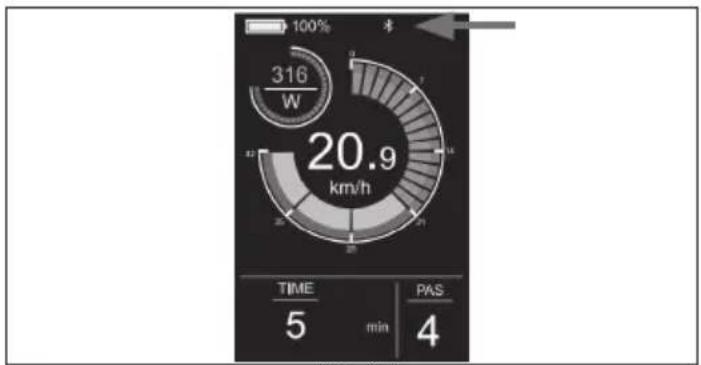
gauge
| Metric | Value | | :--- | :--- | | Speed (W) | 316 | | Time (min) | 5 | | PAS (4) | 4 |Slika 4-7
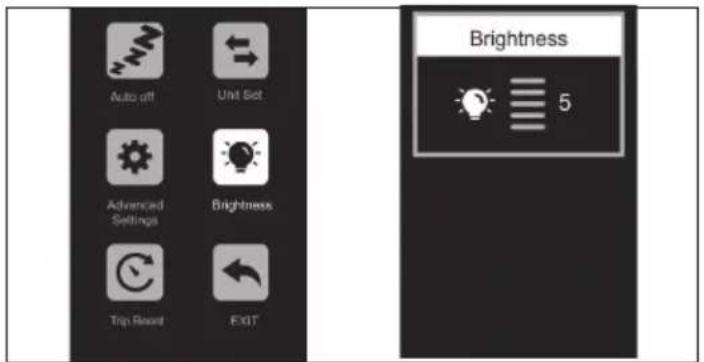
Slika 4-4
Uklonite vezu
Connect to SHARP Life APP
Slika 4-6
SHARP Life aplikacija
VAŽNO:
Instalacija aplikacije omogućuje ažuriranja trenutnog softvera i time kontinuirana poboljšanja.
Instalirajte aplikaciju SHARP Life na svoj mobilni uređaj kako biste uživali u dodatnim funkcijama. One obuhvaćaju:
https://www.sharpconsumer.com/sharp-life-app
Održavanje
https://www.sharpconsumer.com/support/
1
0.08 inča (2mm) Imbus ključ
0.10 inča (2.5mm) Imbus ključ
0.12 inča (3mm) Imbus ključ
0.16 inča (4mm) Imbus ključ
0.20 inča (5mm) Allen ključ
0.24 inča (6mm) Imbus ključ
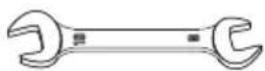
Ključ otvorenog kraja 08-10
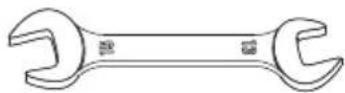
Ključ otvorenog kraja 13-15
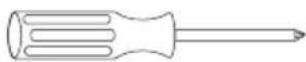
Phillips odvijač


Pedale
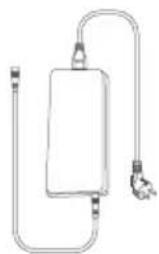
natural_image
Simple line drawing of a rectangular device with a coiled cable and connector (no text or symbols)Punjač

Kablovske vezice

Gumena kapica
natural_image
Line drawing of a bicycle with 'SHARP' branding on the front wheel (no additional text or symbols)natural_image
Two circular icons showing a sneaker and a helmet, no text or symbols present.
www.sharpconsumer.com/contact/

www.sharpconsumer.com/support/

www.sharpconsumer.com/documents-of-conformity/

natural_image
Diagram showing two mechanical or agricultural setups with a central pipe and directional arrow (no text or symbols)Slika 1-1 Slika 1-2
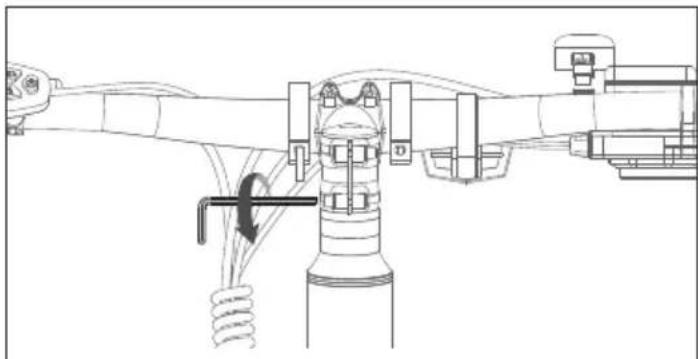
natural_image
Technical line drawing of a mechanical assembly with no visible text or symbolsSlika 1-3
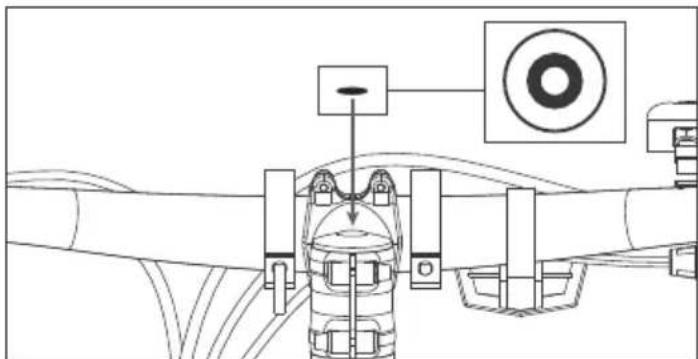
natural_image
Technical diagram of a mechanical assembly with no visible text or symbolsSlika 1-4
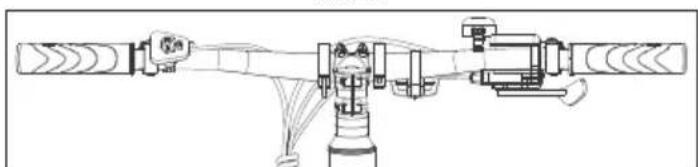
natural_image
Technical line drawing of a mechanical assembly with no visible text or symbolsSlika 1-5
NAPOMENA:
Proverite da je obrtni moment šrafa na vrhu oko 4-6 N·m.
Proverite da je obrtni moment onih sa strane otprilike 6 N·m.
KORAK 8: Instalirajte pedale
Slika 2-1
NAPOMENE:
natural_image
Technical line drawing of a mechanical assembly with no visible text or symbolsSlika 3-1 Slika 3-2
gauge
| Metric | Value | |---|---| | Power Level (W) | 0 | | Trip Distance (km) | 21.3 | | PAS Score | 0 |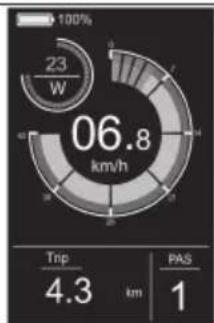
pie
| Metric | Value | |---|---| | Total Energy Consumption (W) | 23 | | Trip Distance (km) | 4.3 | | PAS (km) | 1 |
pie
| Metric | Value | | :--- | :--- | | Power Consumption (W) | 258 | | Current Power (km/h) | 08.3 | | Trip Distance (km) | 4.3 | | PAS (km) | 2 |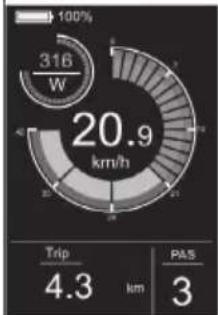
gauge
| Metric | Value | | :--- | :--- | | Speed (km/h) | 20.9 | | Trip (km) | 4.3 | | PAS (km) | 3 |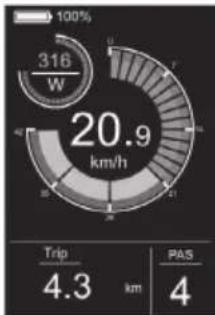
gauge
| Metric | Value | | :--- | :--- | | Current (W) | 316 | | Trip Duration (km) | 4.3 | | PAS Count (km) | 4 |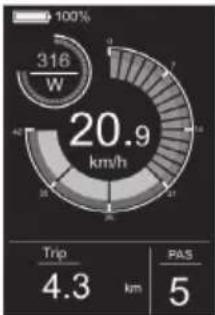
gauge
| Metric | Value | | :--- | :--- | | Current (W) | 316 | | Trip (km) | 4.3 | | PAS (km) | 5 |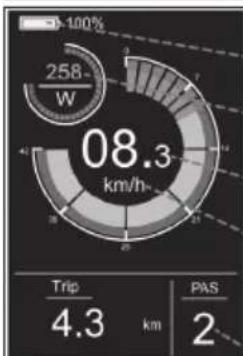
pie
| Metric | Value | |---|---| | Total Energy Consumption (km/h) | 08.3 | | Trip Distance (km) | 4.3 | | PAS Distance (km) | 2 || Indikator baterije |
| Snaga |
| Brzina |
| Jedinice brzine |
| PAS nivo |
Prekidač za svetlo
Pritisnite dugme za svetlo da uključite svetlo.
Nakon uključivanja svetla, osvetljenje pozadinskog svetla će se smanjiti i instrument će prikazati identifikator svetla, kao što je prikazano na slici. Pritisnite dugme za svetlo ponovo da ugasite svetla.
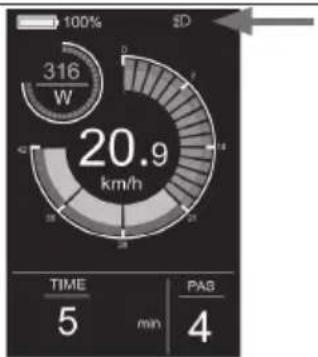
gauge
| Metric | Value | | :--- | :--- | | Power (W) | 316 | | Time (min) | 5 | | PAS (min) | 4 | | Speed (s) | 20.9 |Interfejs displeja
Podrazumevano, merac prikazuje stvarnu brzinu, kilometražu po putovanju (km), snagu motora (W) i nivo baterije (%). Pritisnite dugme Mode da biste prikazali informacije i prebacili se između pojedinačne kilometraže (km), ukupne kilometraže (km), maksimalne brzine (km/h), prosečne brzine (km/h) i vremena vožnje (min). Interfejs displeja je prikazan na slici.
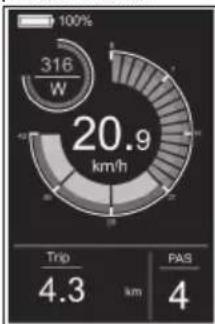
pie
| Metric | Value | |---|---| | Total Energy Consumption (W) | 316 | | Trip Distance (km) | 4.3 | | PAS Distance (km) | 4 |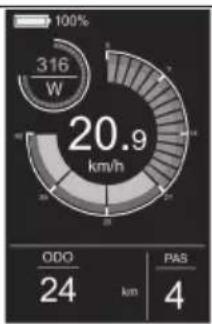
pie
| Metric | Value | | :--- | :--- | | Power Consumption (W) | 316 | | Total Power Consumption (km/h) | 20.9 | | ODO (km) | 24 | | PAS (km) | 4 |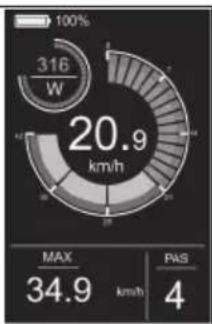
pie
| Metric | Value | |---|---| | Power Consumption (W) | 316 | | Max | 34.9 | | PAS | 4 |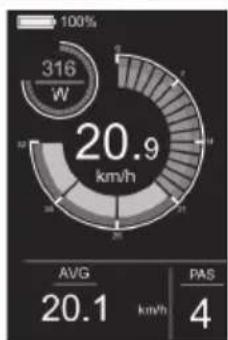
pie
| Metric | Value | |---|---| | Power Consumption (W) | 316 | | Avg | 20.1 | | PAS | 4 |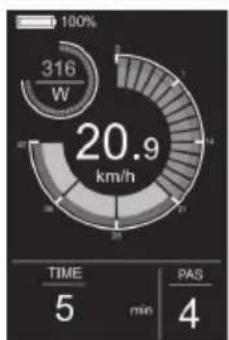
gauge
| Metric | Value | | :--- | :--- | | Power Consumption (W) | 316 | | Total Power Consumption (km/h) | 20.9 | | TIME (min) | 5 | | PAS (min) | 4 |Pomoć pri hodanju
Pritiskom i držanjem Dugmeta za spuštanje 3 sekunde aktivira se Mod za pomoć pri hodanju. E-bicikl će automatski ići brzinom do 5 km/h. Interfejs displeja je prikazan na slici.
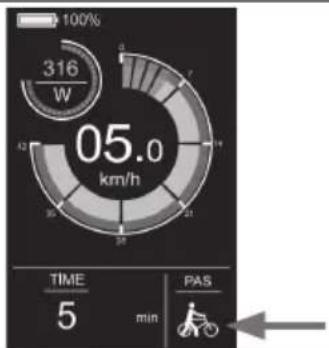
gauge
| Time | Power (W) | |------|-----------| | 0 | 316 | | 1 | 4 | | 2 | 7 | | 3 | 11 | | 4 | 15 | | 5 | 20 | | 6 | 25 | | 7 | 30 | | 8 | 35 | | 9 | 40 | | 10 | 45 | | 11 | 50 | | 12 | 55 |Meni Podešavanja
U početnom modu, kada je vozilo mirno, držite pritisnute + i dugmiće istovremeno duže od 2 sekunde, i instrument će se prebaciti na interfejs za podešavanje. Operativni interfejs je prikazan na slici. Sve operacije moraju bitl izvedene na brzini 0.
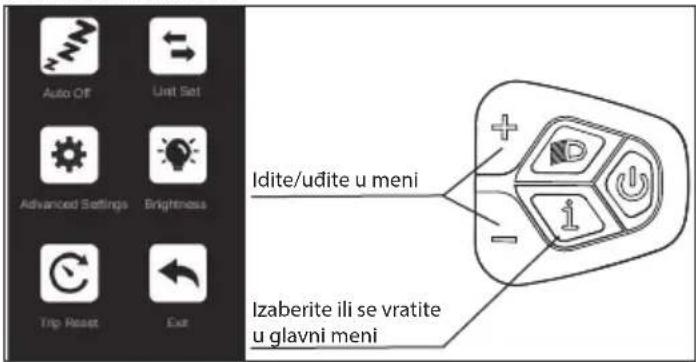
Kako podesiti
- Pritisnite dugme + ili - da prebacite i pritisnite dugme Mode da uđete u podešavanja.
- Nakon ulaska u postavke, možete prilagoditi parametre pritiskom na dugme i a pritiskom na dugme možete sačuvati i vratiti se na postavke višeg nivoa.
Slika 4-1
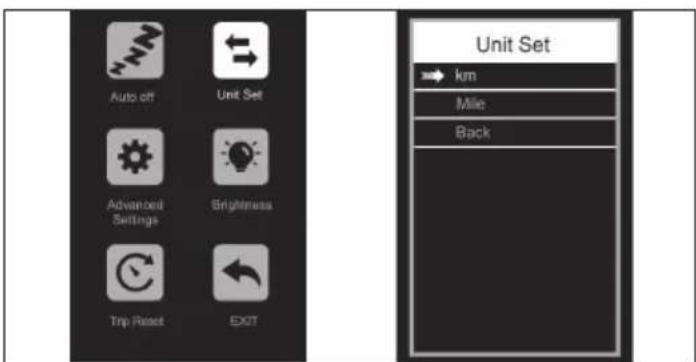
Slika 4-2
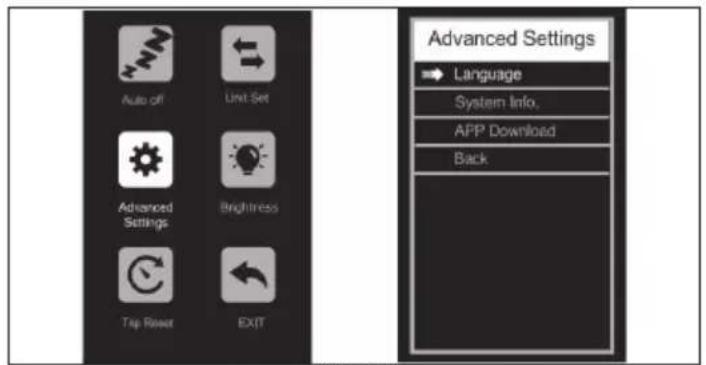
Slika 4-3
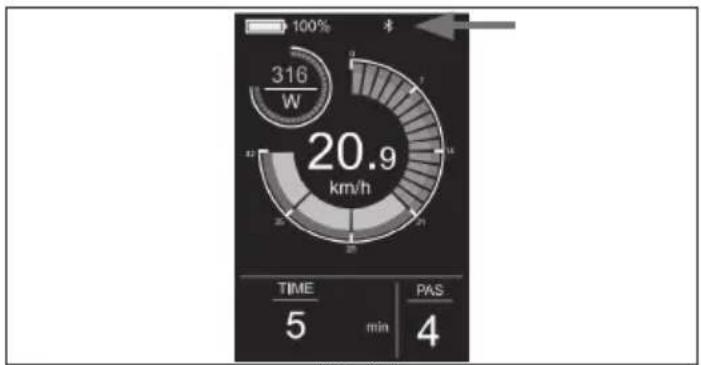
gauge
| Metric | Value | | :--- | :--- | | Speed (W) | 316 | | Time (min) | 5 | | PAS (4) | 4 |Slika 4-7
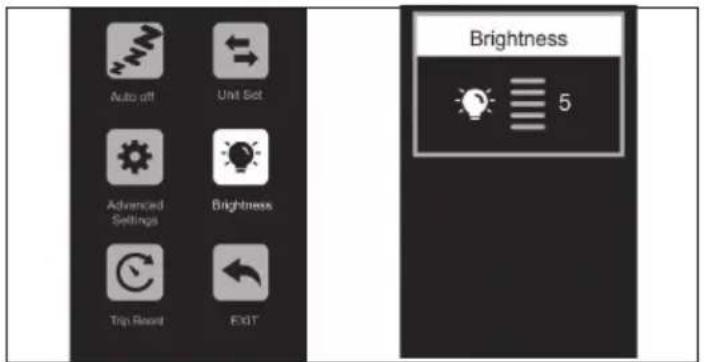
Slika 4-4
Uklonite vezu
Slika 4-6
SHARP Life aplikacija
VAŽNO:
Instalacija aplikacije omogućava trenutne nadogradnje softvera i time kontinuirana poboljšanja.
https://www.sharpconsumer.com/sharp-life-app
Održavanje
| Interval Pregledajte Servis Zamenite | |||
| Sedmično, 160-321km (100-200 mi) | Proverite hardver za pravilan obrtni moment. Proverite pogonski lanac da li je pravilno poravnan i funkcionalan (uključujući kaiš, slobodni točak, lančanik). Proverite ispravnost točka i tihi rad točka na (bez buke od žica) Proverite stanje rama za bilo kakva oštećenja. | Očistite ramu tako što ćete je obrisati vlažnom krpom. Koristite regulator(e) zatezanja za podešavanje kablova menjača/ kočnica ako je potrebno. | Zamenite sve komponente za koje naša podrška za proizvode ili sertifikovani pouzdani biciklistički mehaničar potvrdi da su oštećene do nepopravljivosti ili pokvarene. |
| Mesečno, 402-1207 km (250-750 km) | Proverite poravnanje kočionih pločica, nape- tost kočionog kabla. Proverite istezanje kaiša. Proverite kočione i menjačke kablove zbog korozije ili oštećenja. Proverite napetost žica. Proverite montažu dodataka (šrafovi za montažu nosača, hardver blatobrana i poravnanje). | Proverite obrtni moment pogona i pedale. Očistite kočione i menjačke kablove. Proverite i zategnite točkove ako otkrijete bilo kakve labave šipke. | Zamenite kočione i menjačke kablove ako je potrebno. Zamenite kočione pločice ako je potrebno. |
| Svakih 6 meseci, 1207-2011 km (750-1250 km) | Pregledajte pogonski sistem (remen, lančanik, slobodni točak). Pregledajte sve kablove i kućišta. | Preporučuje se standardni servis od strane sertifikovanog, ugled- nog mehaničara za bicikle. Podmažite donji nosač. | Zamenite kočione pločice. Zamenite gume ako je potrebno. Zamenite kablove i kućišta ako je potrebno. |
Ako koristite bicikl u izazovnim uslovima ili pređete više od 2.000 km/1.250 mi godišnje, skratite intervale inspekcije i obavite inspekciju u servisu za bicikle svakih 6 meseci.
Šrafovski spojevi
- Redovno proveravajte vozilo za labave veze sa šrafovima prema planu održavanja i zategnite labave šrafove sa dinamometričnim ključem.
- Ne vozite bicikl ako primetite da su se bilo koji vijci olabavili.
- Ako nemate potrebno znanje i neophodne alate, proverite labave spojeve šrafova kod profesionalca.
Okvir i viljuške
- Proverite ram i čvrstu viljušku za pukotine, deformacije ili promene boje.
- Ako je ram ili viljuška pukla, deformisana ili promenila boju, odmah kontaktirajte profesionalca.
- Ne koristite bicikl ako primetite bilo kakve pukotine, deformacije ili promene boje.
Sedlo
- Proverite da li možete da okrenete sedište.
- Ako možete da okrenete sedište, zategnite stezaljku za šipku sedišta. Poštujte primenljive obrtni momente.
- Proverite da li možete pomeriti sedište horizontalno u smeru kretanja ili suprotnom smeru.
- Ako možete pomeriti sedište, prilagodite stezaljku za sedište.
Točkovi
- Proverite da li prednji ili zadnji točak mogu da se pomeraju bočno i da li se matice točka pomeraju.
- Ako se točkovi matice pomeraju, angažujte profesionalca da proveri spojeve šrafova.
- Ako se brzo-oslobađajuća osovina pomera, podesite osovinu.
https://www.sharpconsumer.com/support/
1
0,08 palca (2mm) Imbus ključ
Odprti ključ 08-10
0,10 palca (2,5mm) Imbus ključ
0,12 palca (3mm) Imbus ključ
Odprti ključ 13-15

www.sharpconsumer.com/contact/

www.sharpconsumer.com/support/

www.sharpconsumer.com/documents-of-conformity/

Električno kolo z asistenco pri pedaliranju (EPAC):
Sestavljanje E-kolesa
KORAK 1: Namestite in prilagodite krmilo
natural_image
Technical diagram showing two mechanical assembly steps: one with a gear mechanism and the other with a curved tool inserted into a housing (no text or symbols present)Slika 1-1 Slika 1-2
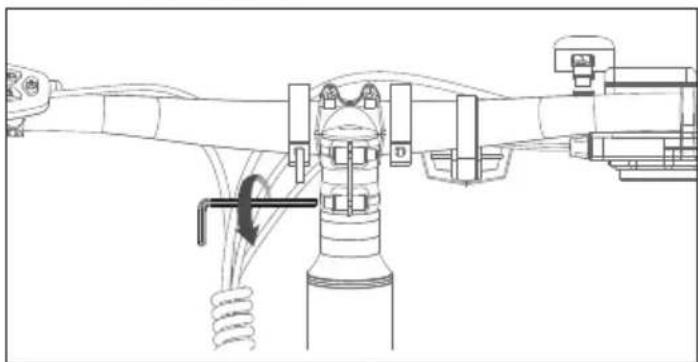
natural_image
Technical line drawing of a mechanical assembly with springs and components (no text or symbols)Slika 1-3
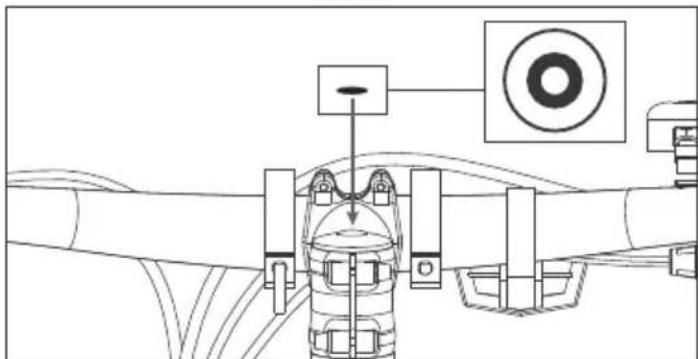
natural_image
Technical line drawing of a mechanical assembly with no visible text or symbolsSlika 1-4
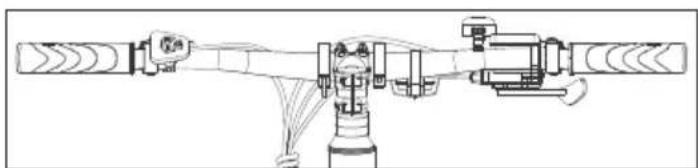
natural_image
Technical line drawing of a mechanical assembly with no visible text or symbolsSlika 1-5
OPOMBA:
Prepričajte se, da je navor vijaka na vrhu približno 4-6 N·m.
Prepričajte se, da je navor tistih na strani približno 6 N·m.
KORAK 8: Namestite pedala
Slika 2-1
OPOMBE:
Preverite končni pokrovček na obeh pedalih, da prepoznate levi in desni pedal. Upoštevajte, da se desni pedal zategne v smeri urinega kazalca, medtem ko se levi pedal zategne v nasprotni smeri urinega kazalca. Poskrbite, da je navor 18 N·m.
natural_image
Technical line drawing of a mechanical assembly with no visible text or symbolsSlika 3-1 Slika 3-2
gauge
| Metric | Value | |---|---| | Trip | 21.3 | | PAS | 0 | | Current (W) | 0 | | Scale (km/h) | 0.0 |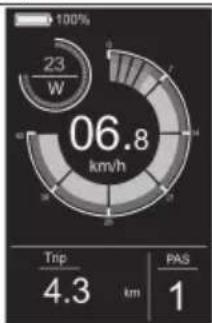
pie
| Metric | Value | |---|---| | Current (W) | 23 | | Trip Distance (km) | 4.3 | | PAS Score | 1 | | Total Energy Consumption (km/h) | 06.8 |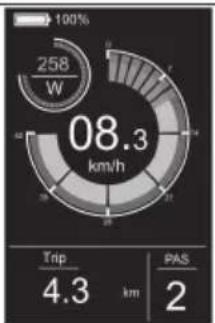
pie
| Metric | Value | | :--- | :--- | | Power Consumption (W) | 258 | | Current Power (km/h) | 08.3 | | Trip Distance (km) | 4.3 | | PAS (km) | 2 |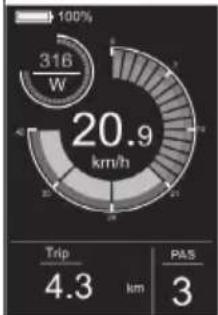
gauge
| Metric | Value | | :--- | :--- | | Speed (km/h) | 20.9 | | Trip (km) | 4.3 | | PAS (km) | 3 |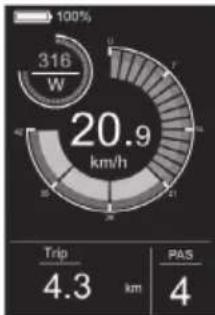
gauge
| Metric | Value | | :--- | :--- | | Current (W) | 316 | | Trip Duration (km) | 4.3 | | PAS Count (km) | 4 |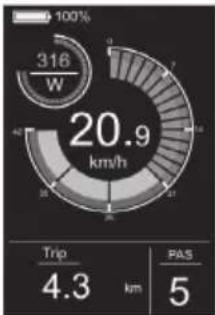
gauge
| Metric | Value | | :--- | :--- | | Current (W) | 316 | | Trip (km) | 4.3 | | PAS (km) | 5 |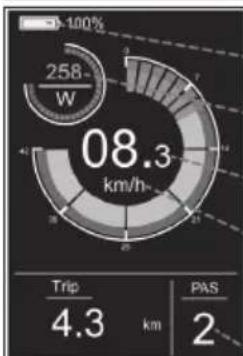
pie
| Metric | Value | |---|---| | Total Energy Consumption (km/h) | 08.3 | | Trip Distance (km) | 4.3 | | PAS Distance (km) | 2 |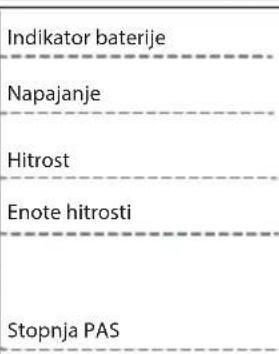
Stikalo za luč
Pritisnite gumb za luč, da vklopite luč.
gauge
| Metric | Value | | :--- | :--- | | Power (W) | 316 | | Speed (s) | 20.9 | | Time (min) | 5 | | PAS (min) | 4 | 100% | Dashed arrow indicates direction. The gauge displays a circular progress indicator at 20.9 km/h.Vmesnik za zaslon
gauge
| Metric | Value | |---|---| | Current (W) | 316 | | Trip (km) | 4.3 | | PAS (km) | 4 |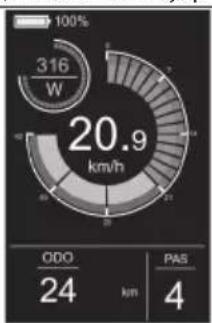
gauge
| Metric | Value | |---|---| | Total Energy Consumption (W) | 316 | | ODO (km) | 24 | | PAS (km) | 4 | | Peak Value | 20.9 |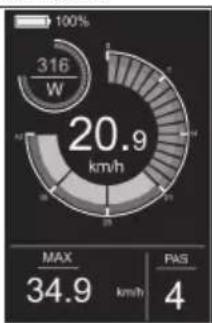
gauge
| Metric | Value | | :--- | :--- | | Current (W) | 316 | | Max (km/h) | 20.9 | | PAS (km/h) | 34.9 | | PAS (km/h) | 4 |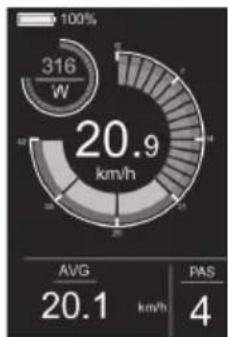
gauge
| Metric | Value | | :--- | :--- | | Power Consumption (kW) | 316 | | Average Power Consumption (km/h) | 20.9 | | AVG Power Consumption (km/h) | 20.1 | | PAS Value | 4 |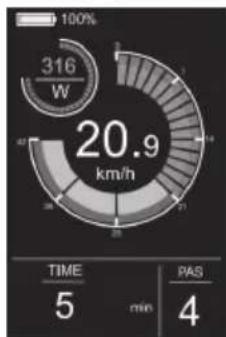
gauge
| Metric | Value | | :--- | :--- | | Power Consumption (W) | 316 | | Time (min) | 5 | | PAS (min) | 4 | | Total (km/h) | 20.9 |Pomoč pri hoji
radar
| Metric | Value | |---|---| | Power (W) | 316 | | Time (min) | 5 | | PAS | - |Meni nastavitev
Slika 4-2
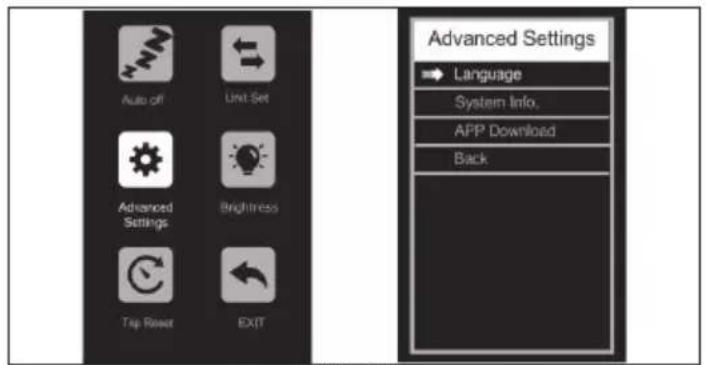
Slika 4-3
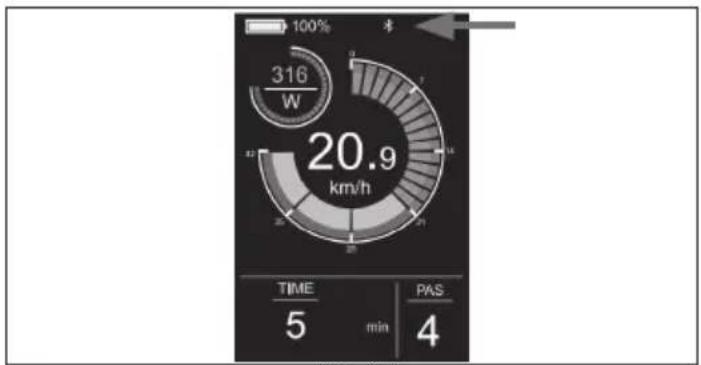
gauge
| Metric | Value | | :--- | :--- | | Speed (W) | 316 | | Time (min) | 5 | | PAS (4) | 4 |Slika 4-7
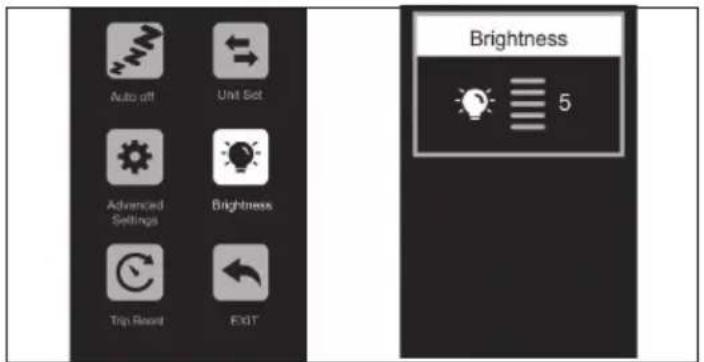
Slika 4-4
Odstranite povezavo
Slika 4-6
Aplikacija SHARP Life
POMEMBNO:
https://www.sharpconsumer.com/sharp-life-app
Vzdrževanje
https://www.sharpconsumer.com/support/
natural_image
Pure diagram of a U-shaped tube connected to a rectangular device with a connector (no text or symbols)Φορτιστής

Ζώνες καλωδίων

Καπάκι Ράμπας
natural_image
Two circular icons showing a shoe and helmet, no text or symbols present
www.sharpconsumer.com/contact/

www.sharpconsumer.com/support/

www.sharpconsumer.com/documents-of-conformity/
natural_image
Technical diagram showing a mechanical assembly with a rotating shaft and housing, no text or symbols present.Σχήμα 1-1 Σχήμα 1-2
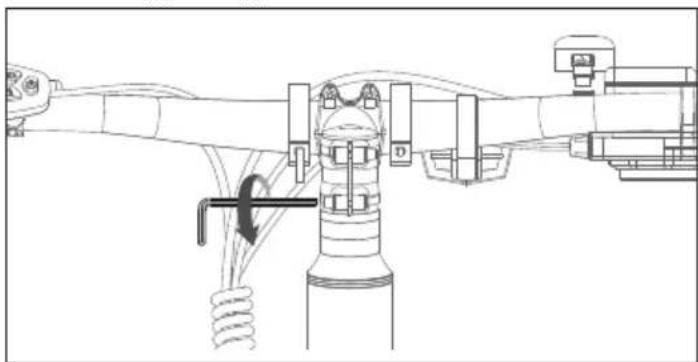
natural_image
Technical line drawing of a mechanical assembly with no visible text or symbolsΣχήμα 1-3
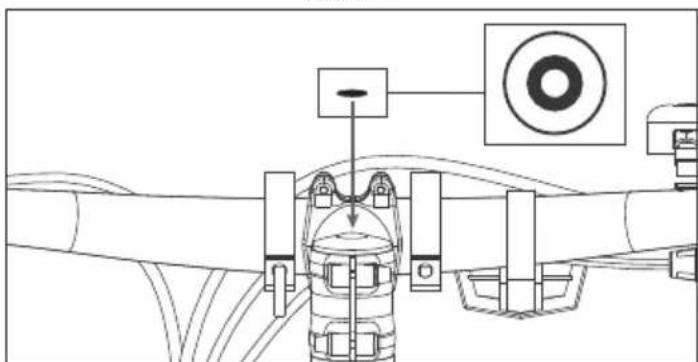
natural_image
Technical diagram of a mechanical assembly with no visible text or symbolsΣχήμα 1-4
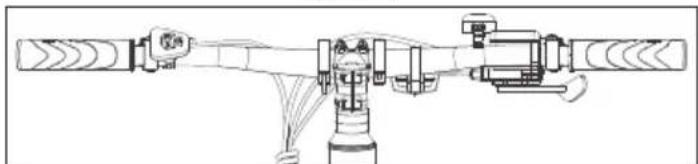
natural_image
Technical line drawing of a mechanical assembly with no visible text or symbolsΣχήμα 1-5
ΣΗΜΕΙΩΣΗ:
Σχήμα 2-1
ΣΗΜΕΙΩΣΕΙΣ:
natural_image
Technical line drawing of a mechanical assembly with two views: top shows wiring and valve, bottom shows connected tubing (no text or symbols)Σχήμα 3-1 Σχήμα 3-2
pie
| Chart | Metric | Value | |---|---|---| | 1 | Power Consumption (km/h) | 00.0 | | 2 | Power Consumption (km/h) | 06.8 | | 3 | Power Consumption (km/h) | 08.3 | | 4 | Power Consumption (km/h) | 21.3 | | 5 | Power Consumption (km/h) | 258 | | 6 | Power Consumption (km/h) | 23 | | 7 | Power Consumption (km/h) | 4.3 | | 8 | Power Consumption (km/h) | 4.3 | | 9 | Power Consumption (km/h) | 4.3 | | 10 | Power Consumption (km/h) | 2 | | 11 | Power Consumption (km/h) | 20.9 | | 12 | Power Consumption (km/h) | 20.9 | | 13 | Power Consumption (km/h) | 20.9 | | 14 | Power Consumption (km/h) | 20.9 | | 15 | Power Consumption (km/h) | 20.9 | | 16 | Power Consumption (km/h) | 20.9 | | 17 | Power Consumption (km/h) | 20.9 | | 18 | Power Consumption (km/h) | 20.9 | | 19 | Power Consumption (km/h) | 20.9 | | 20 | Power Consumption (km/h) | 20.9 | | 21 | Power Consumption (km/h) | 20.9 | | 22 | Power Consumption (km/h) | 20.9 | | 23 | Power Consumption (km/h) | 20.9 | | 24 | Power Consumption (km/h) | 20.9 | | 25 | Power Consumption (km/h) | 20.9 | | 26 | Power Consumption (km/h) | 20.9 | | 27 | Power Consumption (km/h) | 20.9 | | 28 | Power Consumption (km/h) | 20.9 | | 29 | Power Consumption (km/h) | 20.9 | | 30 | Power Consumption (km/h) | 20.9 | | 31 | Power Consumption (km/h) | 20.9 | | 32 | Power Consumption (km/h) | 20.9 | | 33 | Power Consumption (km/h) | 20.9 | | 34 | Power Consumption (km/h) | 20.9 | | 35 | Power Consumption (km/h) | 20.9 | | 36 | Power Consumption (km/h) | 20.9 | | 37 | Power Consumption (km/h) | 20.9 | | 38 | Power Consumption (km/h) | 20.9 | | 39 | Power Consumption (km/h) | 20.9 | | 40 | Power Consumption (km/h) | 20.9 | | 41 | Power Consumption (km/h) | 20.9 | | 42 | Power Consumption (km/h) | 20.9 | | 43 | Power Consumption (km/h) | 20.9 | | 44 | Power Consumption (km/h) | 20.9 | | 45 | Power Consumption (km/h) | 20.9 | | 46 | Power Consumption (km/h) | 20.9 | | 47 | Power Consumption (km/h) | 20.9 | | 48 | Power Consumption (km/h) | 20.9 | | 49 | Power Consumption (km/h) | 20.9 | | 50 | Power Consumption (km/h) | 20.9 | | 51 | Power Consumption (km/h) | 20.9 | | 52 | Power Consumption (km/h) | 20.9 | | 53 | Power Consumption (km/h) | 20.9 | | 54 | Power Consumption (km/h) | 20.9 | | 55 | Power Consumption (km/h) | 20.9 | | 56 | Power Consumption (km/h) | 20.9 | | 57 | Power Consumption (km/h) | 20.9 | | 58 | Power Consumption (km/h) | 20.9 | | 59 | Power Consumption (km/h) | 20.9 | | 60 | Power Consumption (km/h) | 20.9 | | 61 | Power Consumption (km/h) | 20.9 | | 62 | Power Consumption (km/h) | 20.9 | | 63 | Power Consumption (km/h) | 20.9 | | 64 | Power Consumption (km/h) | 20.9 | | 65 | Power Consumption (km/h) | 20.9 | | 66 | Power Consumption (km/h) | 20.9 | | 67 | Power Consumption (km/h) | 20.9 | | 68 | Power Consumption (km/h) | 20.9 | | 69 | Power Consumption (km/h) | 20.9 | | 70 | Power Consumption (km/h) | 20.9 | | 71 | Power Consumption (km/h) | 20.9 | | 72 | Power Consumption (km/h) | 20.9 | | 73 | Power Consumption (km/h) | 20.9 | | 74 | Power Consumption (km/h) | 20.9 | | 75 | Power Consumption (km/h) | 20.9 | | 76 | Power Consumption (km/h) | 20.9 | | 77 | Power Consumption (km/h) | 20.9 | | 78 | Power Consumption (km/h) | 20.9 | | 79 | Power Consumption (km/h) | 20.9 | | 80 | Power Consumption (km/h) | 20.9 | | 81 | Power Consumption (km/h) | 20.9 | | 82 | Power Consumption (km/h) | 20.9 | | 83 | Power Consumption (km/h) | 20.9 | | 84 | Power Consumption (km/h) | 20.9 | | 85 | Power Consumption (km/h) | 20.9 | | 86 | Power Consumption (km/h) | 20.9 | | 87 | Power Consumption (km/h) | 20.9 | | 88 | Power Consumption (km/h) | 20.9 | | 89 | Power Consumption (km/h) | 20.9 | | 90 | Power Consumption (km/h) | 20.9 | | 91 | Power Consumption (km/h) | 20.9 | | 92 | Power Consumption (km/h) | 20.9 | | 93 | Power Consumption (km/h) | 20.9 | | 94 | Power Consumption (km/h) | 20.9 | | 95 | Power Consumption (km/h) | 20.9 | | 96 | Power Consumption (km/h) | 20.9 | | 97 | Power Consumption (km/h) | 20.9 | | 98 | Power Consumption (km/h) | 20.9 | | 99 | Power Consumption (km/h) | 20.9 | | Note: The data is presented in a grid format with the same axes and labels for each chart.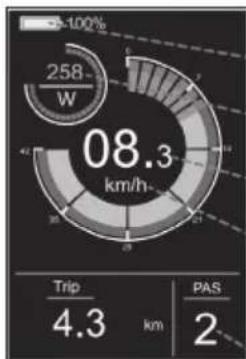
pie
| Metric | Value | | :--- | :--- | | Current (W) | 258 | | Trip Distance (km) | 4.3 | | PAS (km) | 2 |pie
| Metric | Value | |---|---| | Power Consumption (W) | 316 | | Average Power Consumption (km/h) | 20.9 | | PAS | 4 | AVG | 20.1 |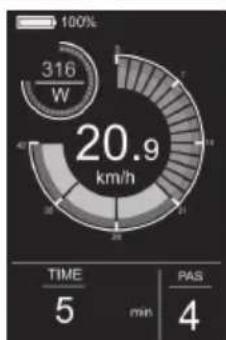
pie
| Metric | Value | | :--- | :--- | | Percentage (%) | 100 | | Time (min) | 5 | | PAS (min) | 4 | | Total (km/h) | 20.9 |pie
| Metric | Value | |---|---| | Power Consumption (W) | 316 | | Time (min) | 5 | | Power (PAS) | 100 |Μενού Ρυθμίσεων
Σχήμα 4-1
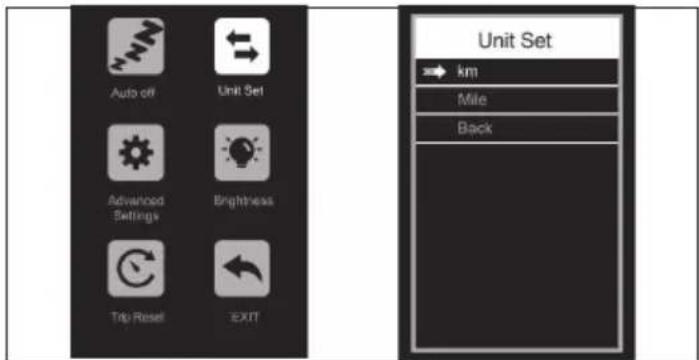
Σχήμα 4-2
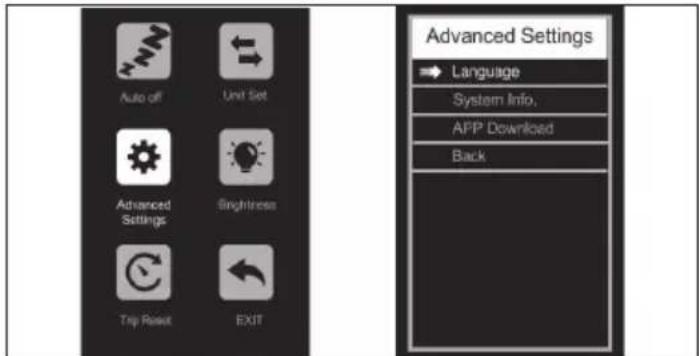
Σχήμα 4-3
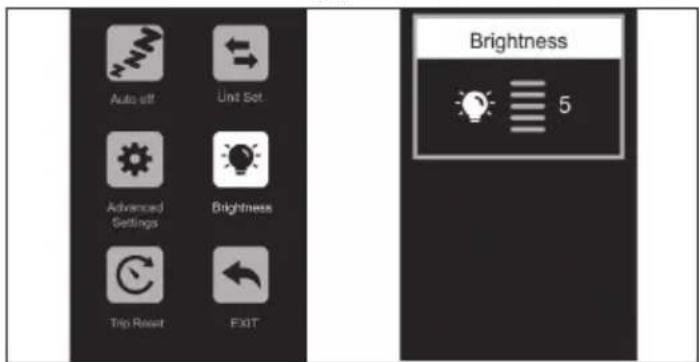
Σχήμα 4-4
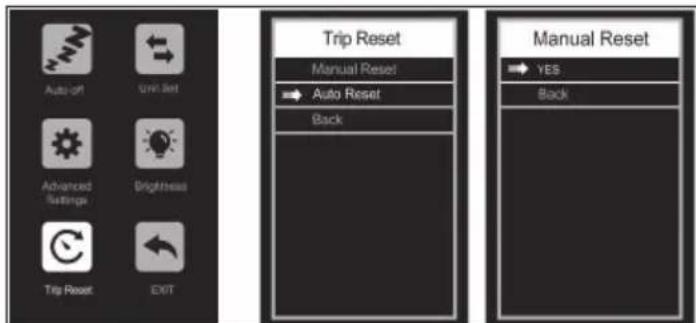
Σχήμα 4-5
Σχήμα 4-6
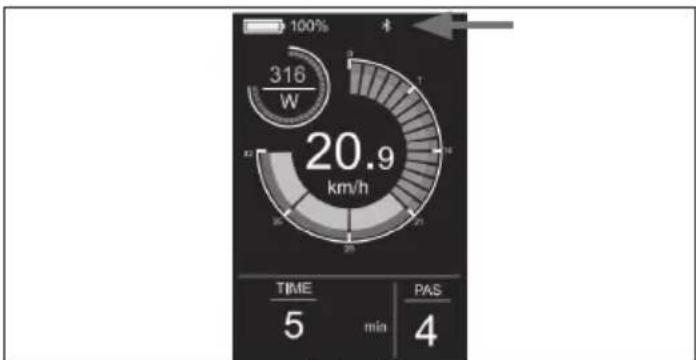
pie
| Metric | Value | | :--- | :--- | | Current Value | 316 W | | Total Value | 20.9 km/h | | Time | 5 min | | PAS | 4 |Σχήμα 4-7
https://www.sharpconsumer.com/sharp-life-app
Συντήρηση
https://www.sharpconsumer.com/support/
1
natural_image
Line drawing of a bicycle with visible dynamics and front wheel (no text or symbols)
www.sharpconsumer.com/contact/

www.sharpconsumer.com/support/
www.sharpconsumer.com/documents-of-conformity/
natural_image
Diagram showing two mechanical or industrial setups with a valve mechanism, no text or symbols present.natural_image
Technical line drawing of a mechanical assembly with no visible text or symbolsРисунок 1-3
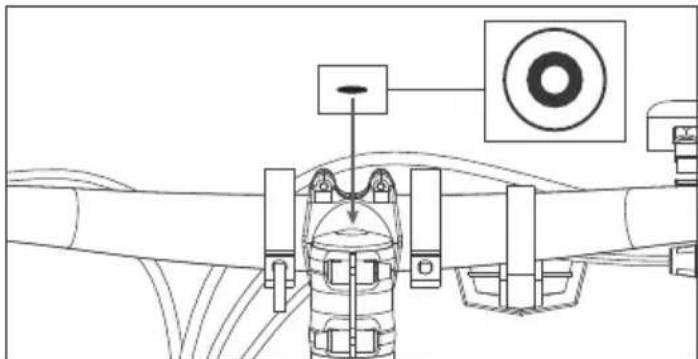
Рисунок 1-4
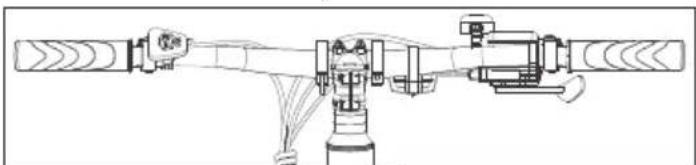
natural_image
Technical line drawing of a mechanical assembly with no visible text or symbolsРисунок 1-5
ПРИМИТКА:
Рисунок 2-1
ПРИМІТКИ.
natural_image
Technical line drawing of a mechanical assembly with two views: top shows wiring and valve, bottom shows connected tubing (no text or symbols)pie
| Chart | Metric | Value | |---|---|---| | 1 | Power Consumption (km/h) | 00.0 | | 2 | Power Consumption (km/h) | 06.8 | | 3 | Power Consumption (km/h) | 08.3 | | 4 | Power Consumption (km/h) | 21.3 | | 5 | Power Consumption (km/h) | 258 | | 6 | Power Consumption (km/h) | 23 | | 7 | Power Consumption (km/h) | 4.3 | | 8 | Power Consumption (km/h) | 4.3 | | 9 | Power Consumption (km/h) | 4.3 | | 10 | Power Consumption (km/h) | 2 | | 11 | Power Consumption (km/h) | 20.9 | | 12 | Power Consumption (km/h) | 20.9 | | 13 | Power Consumption (km/h) | 20.9 | | 14 | Power Consumption (km/h) | 20.9 | | 15 | Power Consumption (km/h) | 20.9 | | 16 | Power Consumption (km/h) | 20.9 | | 17 | Power Consumption (km/h) | 20.9 | | 18 | Power Consumption (km/h) | 20.9 | | 19 | Power Consumption (km/h) | 20.9 | | 20 | Power Consumption (km/h) | 20.9 | | 21 | Power Consumption (km/h) | 20.9 | | 22 | Power Consumption (km/h) | 20.9 | | 23 | Power Consumption (km/h) | 20.9 | | 24 | Power Consumption (km/h) | 20.9 | | 25 | Power Consumption (km/h) | 20.9 | | 26 | Power Consumption (km/h) | 20.9 | | 27 | Power Consumption (km/h) | 20.9 | | 28 | Power Consumption (km/h) | 20.9 | | 29 | Power Consumption (km/h) | 20.9 | | 30 | Power Consumption (km/h) | 20.9 | | 31 | Power Consumption (km/h) | 20.9 | | 32 | Power Consumption (km/h) | 20.9 | | 33 | Power Consumption (km/h) | 20.9 | | 34 | Power Consumption (km/h) | 20.9 | | 35 | Power Consumption (km/h) | 20.9 | | 36 | Power Consumption (km/h) | 20.9 | | 37 | Power Consumption (km/h) | 20.9 | | 38 | Power Consumption (km/h) | 20.9 | | 39 | Power Consumption (km/h) | 20.9 | | 40 | Power Consumption (km/h) | 20.9 | | 41 | Power Consumption (km/h) | 20.9 | | 42 | Power Consumption (km/h) | 20.9 | | 43 | Power Consumption (km/h) | 20.9 | | 44 | Power Consumption (km/h) | 20.9 | | 45 | Power Consumption (km/h) | 20.9 | | 46 | Power Consumption (km/h) | 20.9 | | 47 | Power Consumption (km/h) | 20.9 | | 48 | Power Consumption (km/h) | 20.9 | | 49 | Power Consumption (km/h) | 20.9 | | 50 | Power Consumption (km/h) | 20.9 | | 51 | Power Consumption (km/h) | 20.9 | | 52 | Power Consumption (km/h) | 20.9 | | 53 | Power Consumption (km/h) | 20.9 | | 54 | Power Consumption (km/h) | 20.9 | | 55 | Power Consumption (km/h) | 20.9 | | 56 | Power Consumption (km/h) | 20.9 | | 57 | Power Consumption (km/h) | 20.9 | | 58 | Power Consumption (km/h) | 20.9 | | 59 | Power Consumption (km/h) | 20.9 | | 60 | Power Consumption (km/h) | 20.9 | | 61 | Power Consumption (km/h) | 20.9 | | 62 | Power Consumption (km/h) | 20.9 | | 63 | Power Consumption (km/h) | 20.9 | | 64 | Power Consumption (km/h) | 20.9 | | 65 | Power Consumption (km/h) | 20.9 | | 66 | Power Consumption (km/h) | 20.9 | | 67 | Power Consumption (km/h) | 20.9 | | 68 | Power Consumption (km/h) | 20.9 | | 69 | Power Consumption (km/h) | 20.9 | | 70 | Power Consumption (km/h) | 20.9 | | 71 | Power Consumption (km/h) | 20.9 | | 72 | Power Consumption (km/h) | 20.9 | | 73 | Power Consumption (km/h) | 20.9 | | 74 | Power Consumption (km/h) | 20.9 | | 75 | Power Consumption (km/h) | 20.9 | | 76 | Power Consumption (km/h) | 20.9 | | 77 | Power Consumption (km/h) | 20.9 | | 78 | Power Consumption (km/h) | 20.9 | | 79 | Power Consumption (km/h) | 20.9 | | 80 | Power Consumption (km/h) | 20.9 | | 81 | Power Consumption (km/h) | 20.9 | | 82 | Power Consumption (km/h) | 20.9 | | 83 | Power Consumption (km/h) | 20.9 | | 84 | Power Consumption (km/h) | 20.9 | | 85 | Power Consumption (km/h) | 20.9 | | 86 | Power Consumption (km/h) | 20.9 | | 87 | Power Consumption (km/h) | 20.9 | | 88 | Power Consumption (km/h) | 20.9 | | 89 | Power Consumption (km/h) | 20.9 | | 90 | Power Consumption (km/h) | 20.9 | | 91 | Power Consumption (km/h) | 20.9 | | 92 | Power Consumption (km/h) | 20.9 | | 93 | Power Consumption (km/h) | 20.9 | | 94 | Power Consumption (km/h) | 20.9 | | 95 | Power Consumption (km/h) | 20.9 | | 96 | Power Consumption (km/h) | 20.9 | | 97 | Power Consumption (km/h) | 20.9 | | 98 | Power Consumption (km/h) | 20.9 | | 99 | Power Consumption (km/h) | 20.9 | | Note: The data is presented in a grid format with the same axes and labels for each chart.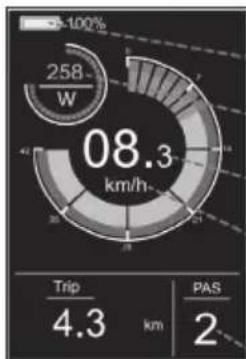
pie
| Metric | Value | |---|---| | Current (W) | 258 | | Trip Frequency (km) | 4.3 | | PAS Count | 2 | The chart displays the total energy consumption of 08.3 km/h, with trip frequency and PAS counts for the respective categories. The value is marked as -100%.pie
| Category | Value | |---|---| | ODO | 24 | | PAS | 4 | | Total | 20.9 | | W (Estimated) | 316 | The chart displays a single value for 'ODO' at 24 km, while 'PAS' is shown as 4 km.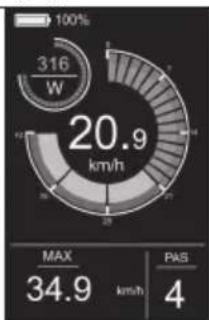
gauge
| Metric | Value | | :--- | :--- | | Current (W) | 316 | | Max (km/h) | 34.9 | | PAS | 4 |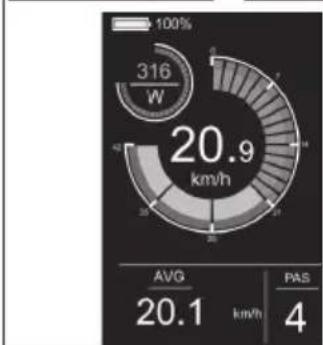
pie
| Metric | Value | |---|---| | Current (W) | 316 | | Avg | 20.1 | | PAS | 4 |
gauge
| Metric | Value | | :--- | :--- | | Power Consumption (W) | 316 | | Total Power Consumption (km/h) | 20.9 | | TIME (min) | 5 | | PAS (min) | 4 |Допомога при ходьбі
Рисунок 4-1
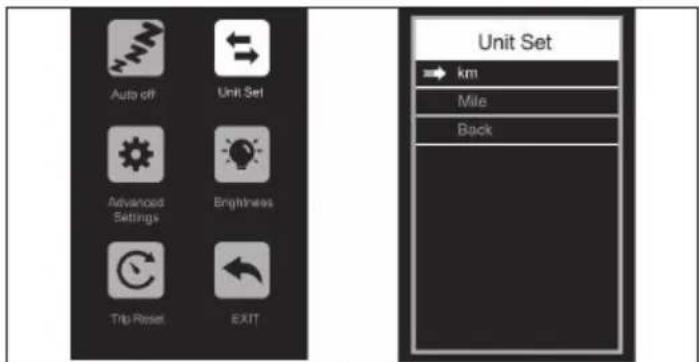
Рисунок 4-2
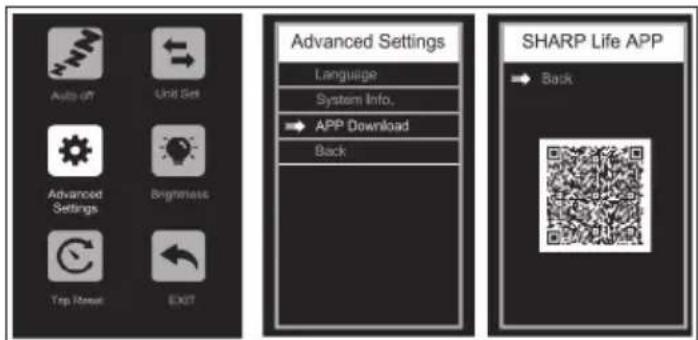
Рисунок 4-6
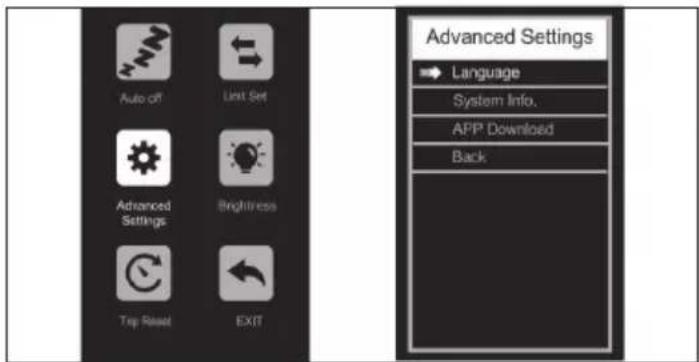
Рисунок 4-3
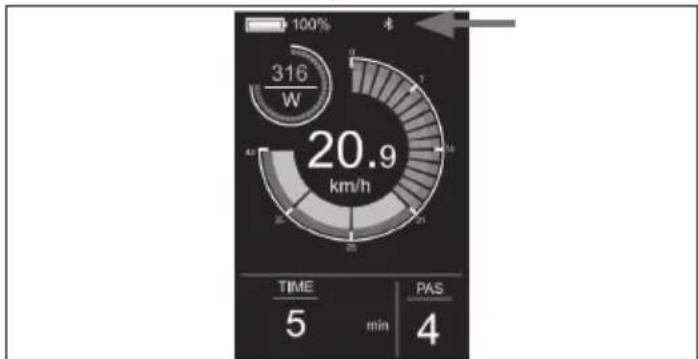
gauge
| Time | Value | |------|-------| | 5 | 20.9 | | min | 5 | | 4 | 4 |Рисунок 4-7
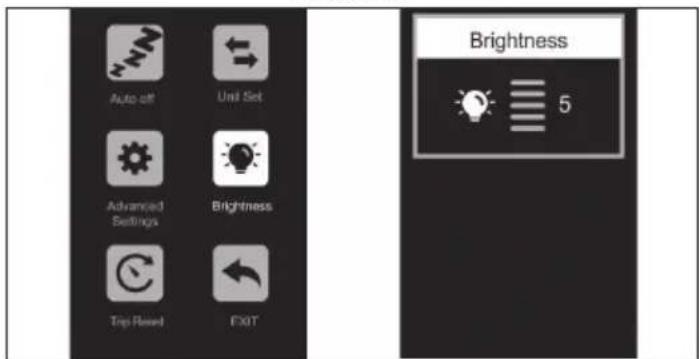
Рисунок 4-4
Видаліть з'єднання
https://www.sharpconsumer.com/sharp-life-app
Sharp Consumer Electronics Poland sp. z o.o.
Ostaszewo 57B, 87-148 Łysomice, Poland
SDA/MAN/0332
www.sharpconsumer.eu
SHARP