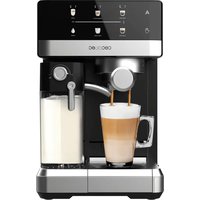
Power Espresso Touch ColdBrew - Coffee machine CECOTEC - Free user manual and instructions
Find the device manual for free Power Espresso Touch ColdBrew CECOTEC in PDF.


| Brand | Cecotec |
| Model | Power Espresso Touch ColdBrew |
| Product Type | Espresso coffee machine with Cold Brew function |
| Reference | 00269 |
| Power Supply | 220-240 V ~ 50 Hz, 1350 W |
| Main Functions | Espresso, Double Espresso, Americano, Cold Espresso, Steam for frothed milk |
| Control Panel | Touch screen with icons for each function and temperature/time display |
| Water Tank Capacity | Approximately 1.2 L (estimate) |
| Included Accessories | Portafilter, filters for 1 and 2 cups, measuring spoon with tamper, cup warmer tray, drip tray |
| Material | Stainless steel (filters, steam nozzle), plastic (body) |
| Safety | Automatic shut-off, overheating protection, hot surface indicator, portafilter lock |
| Maintenance and Cleaning | Clean filters and portafilter with water; descaling recommended with specific product; regular cleaning of steam nozzle and drip tray |
| Spare Parts and Repairability | Replaceable filters and portafilters; repairs by official Cecotec after-sales service |
| Warranty | Warranty compliance according to regulations; contact customer service at +34 9 63 21 07 28 |
| Country of Manufacture | Made in China, designed in Spain |
Frequently Asked Questions - Power Espresso Touch ColdBrew CECOTEC
User questions about Power Espresso Touch ColdBrew CECOTEC
0 question about this device. Answer the ones you know or ask your own.
Ask a new question about this device
Download the instructions for your Coffee machine in PDF format for free! Find your manual Power Espresso Touch ColdBrew - CECOTEC and take your electronic device back in hand. On this page are published all the documents necessary for the use of your device. Power Espresso Touch ColdBrew by CECOTEC.
USER MANUAL Power Espresso Touch ColdBrew CECOTEC
Cafeteras express /Espresso coffee machines
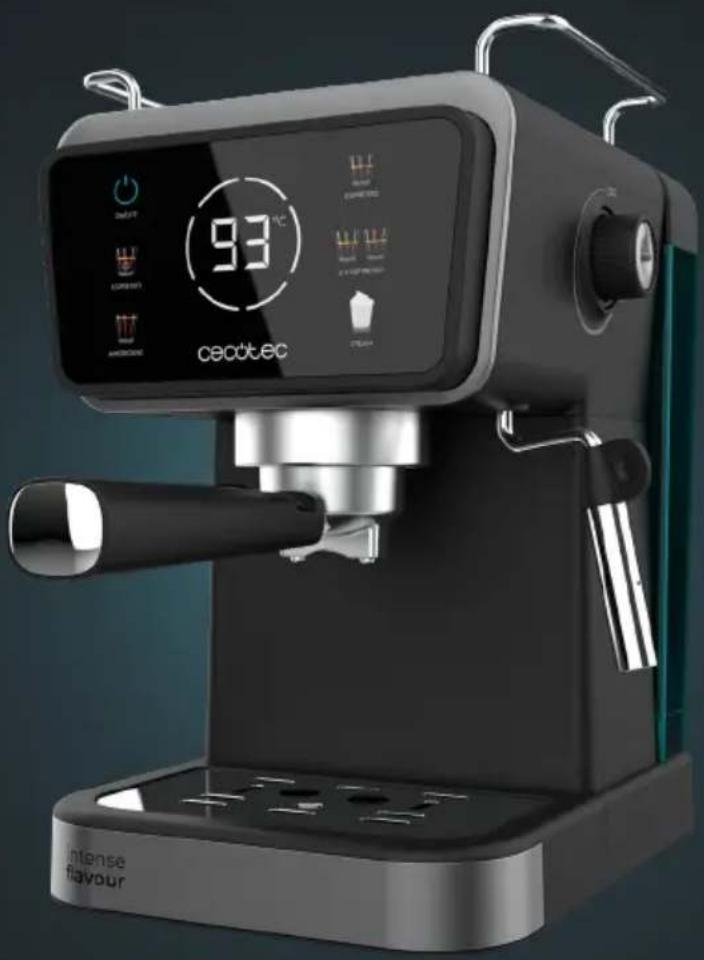
natural_image
Exterior view of a modern coffee machine with digital display and control buttons (no readable text or symbols)Safety instructions 7
-
Parts and components 40
-
Before use 40
-
Operation 41
-
Cleaning and maintenance 44
-
Troubleshooting 46
-
Technical specifications 47
-
Disposal of old electrical
and electronic appliances 47
-
Technical support and warranty 48
-
Copyright 48
SOMMAIRE
Read these instructions thoroughly before using the appliance. Keep this instruction manual for future reference or new users.
- All safety instructions must be closely followed when using the appliance.
- Incorrect or improper use can be dangerous for the user and damage the appliance.
- Ensure that the mains voltage matches the voltage specified
on the device rating label and that the plug is earthed.
- Place the appliance on a dry, stable, flat, heat-resistant surface.
- This appliance is designed for domestic use only and is not intended for bars, restaurants, farmhouses, hotels, motels, and offices.
- Do not immerse the cable, plug, or any other non-removable part of the device in water or any other liquid or expose electrical connections to water. Make sure your hands are dry before handling the plug or switching on the device.
- Do not use the appliance if its cable, plug, or housing are damaged, nor after it malfunctions or has been dropped or damaged in any way.
- Check the power cable regularly for visible damage. If the cable is damaged, it must be repaired by the official Cecotec Technical Support Service to avoid any type of danger.
- Do not try to repair the appliance by yourself. Contact the official Cecotec Technical Support Service for advice.
- Do not cover the appliance during operation and do not place heavy objects on it.
- Do not use the appliance under the following circumstances:
A. On or near a gas or electric hob, in heated ovens, or near open flames.
B. On soft surfaces (such as carpets) or where it may tip over during use.
C. Outdoors or in areas with high humidity levels.
- Do not use any accessory that has not been recommended or provided by Cecotec, as they might cause injuries or damage.
- CAUTION: hot surface. The temperature of accessible surfaces may be high while the appliance is in use and could cause burns. Do not touch hot surfaces during operation or immediately after.
- When filling the water tank, be careful to avoid spillage, especially on the cord and electrical parts of the appliance.
- Warning: the filling opening must not be opened during operation.
- Do not insert coffee while the machine is in operation.
- Do not operate the appliance without water.
- Do not move or turn the appliance off during operation.
- Do not let the cable hang over the edge of the working surface or worktop and prevent it from touching hot surfaces.
- Switch off the appliance and unplug it from the mains when not in use or when cleaning, before changing accessories, disassembling, or assembling the product. Allow it to cool down completely before attaching or removing parts and before cleaning the appliance.
- Never leave the device unattended during use. Unplug the device after use and when you leave the room where it is installed.
- Cleaning and maintenance tasks must not be carried out by children.
- The device is not intended to be used by children. Keep this appliance and its power cable out of their reach.
- This product can be used by children and people with reduced physical, sensory, or mental capabilities or lack of experience and knowledge, as long as they have been given supervision or instruction concerning the use of the appliance in a safe way and understand the hazards involved.
- Supervise children to prevent them from playing with the appliance. Close supervision is necessary when the appliance is being used by or near children.
- The device must not be submerged.
- Warning: this product has undergone a quality control previous to its commercialisation with the aim of ensuring
its correct operation. After the quality control testing, the appliance is cleaned thoroughly, therefore, although it is unlikely to occur, there could be rests of water drops.
INSTRUCTIONS DE SÉCURITÉ
- Water tank cover
- Water tank
- Steam knob
- Control panel
- Cup-warming tray
- Cup/mug tray
- Steamer
- Drio trav
- Double-coffee filter
- Portafilter
- Portafilter handle
- Measuring spoon with tamper
- Single-coffee filter
NOTE:
The graphics in this manual are schematic representations and may not exactly match the device.
2. BEFORE USE
Make sure all parts and components are included and in good conditions. If there is any piece missing or in bad conditions, contact the official Cecotec Technical Support Service immediately.
Box content
Espresso coffee machine
- Instruction manual
First cleaning
Warning: clean the coffee machine before using it for the first time to remove all possible manufacturing residues.
- Pour water into the water tank, do not exceed the "MAX" mark, and place the water tank in its correct position.
- Insert the portafilter and filter (empty) in their position.
-
Place a cup on the cup/mug tray. Make sure the steam knob is in the OFF position.
-
Connect the coffee machine to the mains and press the power icon. The other icons will light up.
- Press the 2X Espresso icon, it will flash indicating that the appliance is preheating. When the icon stops flashing and remains steady, the appliance is ready to brew coffee.
- Press the icon again for the machine to dispense water.
- Once the machine has finished dispensing water, throw away the remaining water and clean all containers thoroughly.
B. Now, the machine is ready to be used.
Warning: when activating the pump for the first time, the appliance may make some noises which will
disappear after 20 seconds. This is because the appliance is releasing air and is completely normal, it does not affect the operation.
3. OPERATION
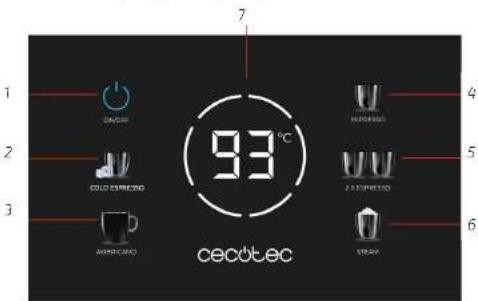
Control panel. Fig. 2
- Power icon
- Cold Espresso icon
- Americano Icon
- Espresso icon
- 2X Espresso icon
- Steam icon
- Display
Coffee preparation
- Make sure that the appliance is switched off and disconnected from the mains.
- Remove the water tank by pulling from it upwards. Fill the water tank with fresh water. DO NOT exceed the MAX. fill level line.
- Replace the water tank and make sure it is securely in place.
- Place the filter inside the portafilter.
- Fill the filter with ground espresso using the measuring spoon provided. The key to obtaining a quality espresso, in addition to the type of coffee used and the level of grinding, is to distribute and press it evenly in the filter with the tamper. It must also be ensured that the filter is always clean and free of coffee residues.
Note:
- If the grind is too fine, the coffee will be over-extracted, resulting in a bitter coffee, with an irregular, spotty crema.
- If the grind is too coarse, water will quickly pass through the ground coffee without being
ENGLISHENGLISH
properly extracted, resulting in coffee with little crema.
- If necessary, add more ground coffee until the filter is full.
- Re-compress the ground coffee with the tamper.
- Wipe any coffee residue from the rim of the portafilter to ensure that it is securely attached to the appliance head to prevent leakage.
- The pressing of ground coffee is a crucial part of the espresso preparation process.
- If pressed evenly and consistently, the espresso will be extracted slowly, and more crema will be produced.
- If not pressed compactly, the espresso will be extracted more quickly, and less crema will be formed.
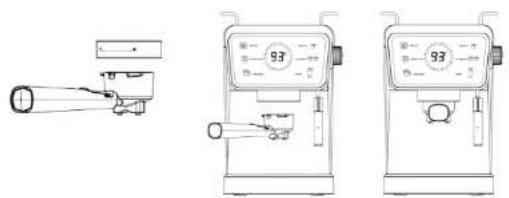
- Insert the portafilter into the machine head. Turn the portafilter handle slightly to the left and then turn it to the right to the lock position. Fig. 3
NOTE: make sure that the portafilter is securely in place and tilted slightly to the right.
- Place one or two pre-heated cups under the coffee spout.
- Once the appliance is plugged, press the power icon. All icons will light up.
- Both the temperature and the time required for each coffee will be shown on the display. Once the optimum brewing temperature has been reached, the extraction process will start, and the remaining time will be shown on the display.
Types of coffee
Cold Espresso
- To prepare a cold Espresso, add ice cubes to the water tank and press the Cold Espresso icon.
NOTE: the extraction process will take about 22 seconds.
- Once the desired amount of espresso has been extracted, you can stop the coffee output at any time by pressing the icon again.
Tip: for best results, always use cold water.
Espresso
- Press the Espresso icon to brew a single espresso coffee. The corresponding icon will start flashing, indicating that the appliance is preheating.
- When the icon stops flashing and remains steady, the appliance is ready to brew coffee. NOTE: the extraction process will take about 18 seconds.
2X Espresso
- Press the 2X Espresso icon to brew a double espresso coffee. The corresponding icon will start flashing, indicating that the appliance is preheating.
- When the icon stops flashing and remains steady, the appliance is ready to brew coffee.
NOTE: the extraction process will take about 29 seconds.
Tip:
- -A perfect extraction will result in a dark, hazelnut-coloured coffee with reddish hues.
- After preparing a hot espresso, allow the machine to cool down for 15 minutes before preparing a cold espresso.
Americano
- Press the Americano icon to prepare an Americano coffee. The corresponding icon will start flashing, indicating that the appliance is preheating.
- When the icon stops flashing and remains steady, the appliance is ready to brew coffee.
NOTE: the extraction process will take about 41 seconds.
Steam
- Steam has two main functions: to heat the milk and to incorporate air into it to froth it and therefore obtain a thin layer of crema on the espresso surface.
- Just as learning how to make a good espresso is possible with dedication and practice, making the perfect froth is an art that can be mastered.
To do so, follow the instructions below:
- Determine the amount of milk needed based on the number of cups to be prepared.
Tip: please note that when the milk is frothed, its volume and density will increase considerably.
- Fill a stainless steel jug 1/3 full with cold milk.
- Activate the steam function by pressing the steam icon. The corresponding icon will stop flashing and will remain steady when the preheating process is finished, and the appliance is ready for use.
- Before frothing milk, purge the steamer to remove any remaining condensed water. To do this, first position the steamer so that it is positioned over the drip tray and, then, turn the steam knob slowly to the ON position. Once the steamer has been purged, stop the water outlet by turning the steam knob to the OFF position.
- Move the steamer slightly to one side of the coffee machine so that it is easier to froth milk.
- Insert the steamer through the side of the jug approximately 1 cm deep into the milk and, at the same time, activate the steam function by turning the knob to the ON position.
- Tilt the jug so that the steamer rests lightly on the rim of the jug and insert the steamer until it is in contact with the milk. This will cause a layer of foam to form on the surface of the milk.
NOTE: do not let the steamer come out unevenly, otherwise the milk will start to bubble and will not froth properly. In case this happens, insert the steamer deeper into the milk.
B. As the steam heats and froths the milk, its volume will increase. When this happens, dip
ENGLISHENGLISH
the steamer further into the milk, tilting the jug so that a whirlpool forms.
- Once the milk has a frothy texture, move the jug until the steamer is in the centre of the milk.
Tip: the amount of froth required will vary depending on the type of coffee you wish to prepare. For example, a cappuccino needs more froth than a latte.
-
Stop the steam outlet by turning the knob to the OFF position. NOTE: do not boil the milk.
-
Remove the jug, wipe the steamer with a damp cloth and purge it with a steam shot to remove any residue.
Cooling function
- In order to be able to start brewing coffee again immediately after frothing milk or steaming, the machine must first be cooled down, because if the temperature is too high, the coffee may splash out and cause burns.
- To cool the appliance, follow the steps below:
- After frothing milk, deactivate the steam function by pressing the steam icon.
- Then, turn the steam knob to the ON position to dispense water through the steamer and cool down the appliance.
- Once the machine has cooled down, turn the steam knob to the OFF position so that no more water comes out and the machine can be used to prepare coffee again.
4. CLEANING AND MAINTENANCE
- Turn the machine off and unplug it from the mains socket before cleaning.
- Do not immerse the machine in water or any other liquid.
- To clean it, simply wipe it with a clean, damp cloth and dry it before storing it.
Cleaning the filters, portafilter and appliance head
After each use, clean the stainless steel filters and the portafilter with water to remove any coffee residue.
- To clean the portafilter, insert it into the machine head without ground coffee and activate the steam function to dispense hot water.
- To thoroughly clean the inside of the coffee machine head and remove coffee residues, use a clean, damp cloth.
Cleaning the outer housing and the cup-warming tray
- The outer housing and the cup-warming tray can be cleaned with a damp, soft cloth.
- Do not use detergents or abrasive cleaning products.
Cleaning the drip tray grille
- The drip tray should be removed, emptied and cleaned frequently, especially when it is full. To do this, remove the grille from the drip tray, wash it with warm soapy water and rinse it thoroughly.
- Do not use abrasive detergents or cleaning products, scouring pads or cloths that could scratch the surface.
Cleaning the drip tray
After removing the grille, remove the drip tray and clean it with a soft, damp cloth (do not use detergents or abrasive cleaners).
NOTE: do not put any of the parts or accessories in the dishwasher.
Cleaning the steamer
The steamer must be cleaned each time it is used to froth milk.
- First, clean the surface of the steamer with a damp cloth and then, with the steamer facing the drip tray. turn the steam function on by turning the knob to the ON position. This will remove any remaining milk from inside the steamer.
- Once the steamer is clean, turn the steam knob to the OFF position.
- Then, press the power icon to switch off the machine, unplug the power cord from the power socket and allow the machine to cool down.
NOTE: If the steamer is still clogged, insert a pin through the steam outlet.
Cleaning mineral deposits
- Fill the water tank to the MAX mark and descaler according to the proportions indicated by the manufacturer.
- Press the power button and wait for the indicator light to light up indicating that the appliance is hot.
- Press the coffee button for the machine to dispense 2 cups of water.
- Then, press the coffee button again to close the pump and wait for 5 seconds.
- Fully turn the steam knob counterclockwise and place a jug under the steamer.
- Press the coffee button again for the machine to dispense 2 more cups of water.
- Then, press the coffee button again to close the pump and wait for 5 seconds.
- Restart the coffee machine and repeat these steps until there is no more water left in the tank.
- Once the water tank is empty, prepare a coffee by filling the water tank again with tap water up to the MAX mark, but without coffee. Repeat the previous steps until there is no water left in the tank.
- This will help to remove any residues that may have been left in the water tank.
ENGLISHENGLISH
- TROUBLESHOOTING
| Problem Cause Solution | ||
| No water is coming out 1. | The water tank is empty, or it has not been installed correctly.2. No water has been pumped into the machine.3. The machine has not been preheated. | 1. Fill the water tank, connect the power cable and switch on the appliance.2. Use the hot water function so that the water flows into the pump and can exit through the steamer.3. The coffee machine needs to be preheated in order to prepare coffee. Wait for the coffee button indicator light to stop flashing and remain steady. |
| The filter lets less coffee through | The ground coffee is too coarse or not compact enough. | Change the type of ground coffee and use the measuring spoon to press it well. |
| No steam 1. The steam outlet is blocked.2. The steam function is not activated, or you have not let the preheating process finish. | 1. Insert a pin through the steam outlet.2. Clean the steamer with hot water after frothing the milk.3. Before using the steam function, wait for the preheating process to finish. | |
| Coffee takes a long time to brew or comes out in small quantities | There is too much or too little ground coffee in the filter. | The ground coffee should not be too coarse or too fine, it should be of standard quality and quantity (1 tablespoon of coffee for one cup and 2 tablespoons of coffee for two cups). If the ground coffee is too coarse, it will take longer to extract, and if it is too fine, it will affect the amount of coffee brewed. |
| The coffee machine does not froth milk well. | 1. You have not used whole milk.2. The steam function is activated when the machine is still cold. | 1. Use whole milk.2. You can only use the steam function when the corresponding indicator light stops flashing and remains steady. |
| No coffee comes out and the coffee and steam indicator lights are flashing | The temperature is too high after using the steam function. | Use the cooling function to cool down the machine. |
| Coffee comes out cold in | the preheating mode, the steam function is not deactivated. | Deactivate the steam function and turn the steam knob to the OFF position. |
6. TECHNICAL SPECIFICATIONS
Product reference: 00269
Product: Power Espresso Touch ColdBrew
Voltage: 220 - 240 V
Frequency: 50 Hz
Rated power: 1350 W
Technical specifications may change without prior notification to improve product quality. Made in China | Designed in Spain
7. DISPOSAL OF OLD ELECTRICAL AND ELECTRONIC APPLIANCES

This symbol indicates that, according to the applicable regulations, the product and/or batteries must be disposed of separately from household waste. When this product reaches the end of its shelf life, you should dispose of the cells/batteries/accumulators and take them to a collection point designated by the local authorities.
Consumers must contact their local authorities or retailer for information concerning the correct disposal of old appliances and/or their batteries. Compliance with the above guidelines will help protecting the environment.
ENGLISH
FRANÇAIS
8. TECHNICAL SUPPORT AND WARRANTY
Cecotec shall be liable to the end user or consumer for any lack of conformity that exists at the time of delivery of the product under the terms, conditions, and deadlines established by the applicable regulations.
It is recommended that repairs be carried out by qualified personnel.
If at any moment you detect any problem with your product or have any doubt, do not hesitate to contact the official Cecotec Technical Support Service at +34 963 210 728.
9. COPYRIGHT
The intellectual property rights over the texts in this manual belong to CECOTEC INNOVACIONES, S.L. All rights reserved. The contents of this publication may not, in whole or in part, be reproduced, stored in a retrieval system, transmitted, or distributed by any means (electronic, mechanical, photocopying, recording or similar) without the prior authorization of CECOTEC INNOVACIONES, S.L.
1. PIÈCES ET COMPOSANTS
Image 1
text_image
Technical diagram of a coffee machine with numbered parts and labeled control panelFig./Img./Abb./Afb./Rys./Obr.1
text_image
1 2 3 4 5 6 7 93°C CECOLEC COLD CIRCULO AMER GARD REDUSSO FRESHMETHO STRAWFig./Img./Abb./Afb./Rys./Obr.2
text_image
Technical line drawings of a three-step espresso machine with labeled control panel 93Fig./Img./Abb./Afb./Rys./Obr.3
www.cecotec.es