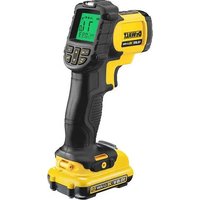
DCT414 - Measuring equipment DEWALT - Free user manual and instructions
Find the device manual for free DCT414 DEWALT in PDF.


| Brand | DeWalt |
| Model | DCT414 |
| Product type | Non-contact infrared thermometer |
| Weight (without battery) | 0.3 kg |
| Power supply | Li-Ion battery 10.8 V (DCB121) |
| Temperature range | -30 °C to 550 °C |
| Accuracy | +/-1.5% or +/-1.5 °C (whichever is greater) |
| Spot distance (D:S) | Approximately 12:1 |
| Adjustable emissivity | 0.1 to 1.0 in 0.01 steps |
| Laser | Class 2, < 1 mW, 620-690 nm |
| Main functions | Infrared measurement, alarms (LED and audible), Min/Max/Avg modes, °C/°F selection |
| Battery type | Li-Ion 10.8 V, 1.3 Ah (DCB121) |
| Charger | DCB100, 230 V, charging time ~40 min |
| Package contents | Thermometer, charger, battery, carry case, manual, exploded view |
| Maintenance and cleaning | Damp cloth with water and mild soap; do not immerse |
| Safety | Class 2 laser - do not stare into beam; use only DeWalt batteries |
| Spare parts and repairability | No user-serviceable parts; contact an authorized service center |
| Warranty | 1 year (material or manufacturing defects) |
Frequently Asked Questions - DCT414 DEWALT
User questions about DCT414 DEWALT
0 question about this device. Answer the ones you know or ask your own.
Ask a new question about this device
Download the instructions for your Measuring equipment in PDF format for free! Find your manual DCT414 - DEWALT and take your electronic device back in hand. On this page are published all the documents necessary for the use of your device. DCT414 by DEWALT.
USER MANUAL DCT414 DEWALT
English (original instructions)
Figure 1B
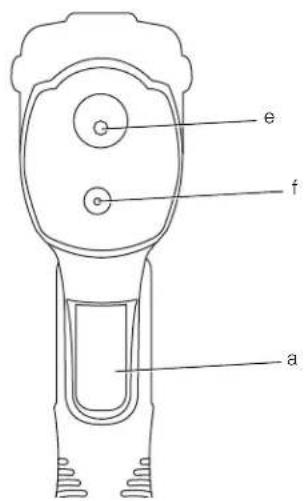
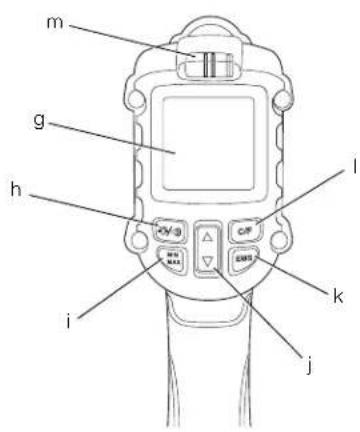
Figure 2
natural_image
Line drawing of a handheld electronic device with no visible text or symbolsFigure 3
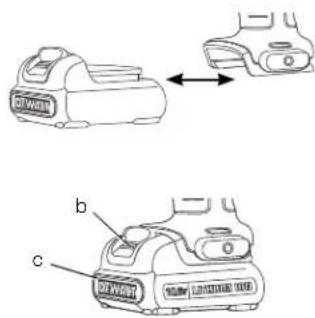
Figure 4
DANSK
10,8 V TRÅDL∅ST IR TERMOMETER DCT414
Tillykke!
advarselssymbol for laser
ADVARSEL: For at reducere

AFSTAND TIL PLET (FIG. 4)
You have chosen a DEWALT tool. Years of experience, thorough product development and innovation make DEWALT one of the most reliable partners for professional tool users.
Technical Data
| DCT414 | ||
| Voltage V | DC | 10.8 |
| Type 1 | ||
| Battery Type Li-Ion | ||
| Power output W 0.5 | ||
| Distance to spot D:S Approximately 12:1 | ||
| Temperature range | °C | -30°C to 550°C |
| Emissivity | 0.1 to 1 | |
| Emissivity adjustability | in 0.01 increments | |
| Accuracy | +/-1.5% or +/-1.5°C, whichever is greater on a black body source (EMS 0.95) | |
| Laser power | mW | <1, CLASS 2 LASER PRODUCT |
| Laser wavelength | nm | 620 – 690 |
| Weight (without battery pack) | kg | 0.3 |
| Battery pack | DCB121 | ||
| Battery type | Li-Ion | ||
| Voltage | V | DC | 10.8 |
| Capacity | A_h | 1.3 | |
| Weight | kg | 0.2 | |
| Charger | DCB100 | ||
| Mains voltage | V_AC | 230 | |
| Battery type | Li-Ion | ||
| Approx. charging time min | 40(1.3 Ah battery packs) | ||
| Weight | kg | 0.3 | |
| Fuses (Charger) | ||
| Europe | 230 V tools | 10 Amperes, mains |
| U.K. & Ireland | 230 V tools | 3 Amperes, in plugs |
LASER INFORMATION
The Infrared Thermometer (IR thermometer) is a Class 2 laser product and complies with 21 CFR 1040.10 and 1040.11 except for deviations pursuant to laser notice No. 50, dated June 24, 2007.
Definitions: Safety Guidelines
The definitions below describe the level of severity for each signal word. Please read the manual and pay attention to these symbols.

DANGER: Indicates an imminently hazardous situation which, if not avoided, will result in death or serious injury.

WARNING: Indicates a potentially hazardous situation which, if not avoided, could result in death or serious injury.

CAUTION: Indicates a potentially hazardous situation which, if not avoided, may result in minor or moderate injury.
NOTICE: Indicates a practice not related to personal injury which, if not avoided, may result in property damage.

Denotes risk of electric shock.

Denotes risk of fire.

WARNING: To reduce the risk of injury, read the instruction manual.
General Tool Safety Warnings

WARNING! Read all safety warnings and all instructions. Failure to follow the warnings and instructions may result in electric shock, fire and/or serious injury.
SAVE ALL WARNINGS AND INSTRUCTIONS FOR FUTURE REFERENCE
1) WORK AREA SAFETY
a) Keep work area clean and well lit.
Cluttered or dark areas invite accidents.
b) Do not operate tools in explosive atmospheres, such as in the presence of flammable liquids, gases or dust.
c) Keep children and bystanders away while operating a tool.
ENGLISH
2) PERSONAL SAFETY
a) Stay alert, watch what you are doing and use common sense when operating a tool. Do not use a tool while you are tired or under the influence of drugs, alcohol or medication. A moment of inattention while operating tools may result in serious personal injury.
b) Do not overreach. Keep proper footing and balance at all times. This enables better control of the tool in unexpected situations.
c) Do not allow persons unfamiliar with the tool or these instructions to operate the tool. Tools are dangerous in the hands of untrained users.
d) Maintain tools. Check for misalignment or binding of moving parts, breakage of parts and any other condition that may affect the tool's operation. If damaged, have the tool repaired before use. Many accidents are caused by poorly maintained tools.
3) BATTERY TOOL USE AND CARE
a) Recharge only with the charger specified by the manufacturer. A charger that is suitable for one type of battery pack may create a risk of fire when used with another battery pack.
b) Use tools only with specifically designated battery packs. Use of any other battery packs may create a risk of injury and fire.
c) When battery pack is not in use, keep it away from other metal objects like paper clips, coins, keys, nails, screws or other small metal objects that can make a connection from one terminal to another. Shorting the battery terminals together may cause burns or a fire.
d) Under abusive conditions, liquid may be ejected from the battery, avoid contact. If contact accidentally occurs, flush with water. If liquid contacts eyes, additionally seek medical help. Liquid ejected from the battery may cause irritation or burns.
4) SERVICE
a) Have your tool serviced by a qualified repair person using only identical replacement parts. This will ensure that the safety of the tool is maintained.
Additional Specific Safety Rules for IR Thermometers
WARNING: Laser Radiation

Exposure. Do not disassemble or modify the IR thermometers. There are no user serviceable parts inside. Serious eye injury could result.

WARNING: Hazardous Radiation.
Use of controls or adjustments or performance of procedures other than those specified herein may result in hazardous radiation exposure.
- Do not operate the IR thermometers in explosive atmospheres, such as in the presence of flammable liquids, gases, or dust. Tools create sparks which may ignite the dust or fumes.
- Use the IR thermometer only with the specifically designated DEWALT batteries. Use of any other batteries may create a risk of fire.
- Store the IR thermometer out of reach of children and other untrained persons. Lasers are dangerous in the hands of untrained users.
- Tool service must be performed only by qualified repair personnel. Service or maintenance performed by unqualified personnel may result in injury. Refer to the back cover for local service centres.
- Do not use optical tools such as a telescope or transit to view the laser beam. Serious eye injury could result.
- Do not place the IR thermometer in a position which may cause anyone to intentionally or unintentionally stare into the laser beam. Serious eye injury could result.
- Do not disassemble the IR thermometer. There are no user serviceable parts inside.
- Do not modify the IR thermometer in any way. Modifying the tool may result in hazardous laser radiation exposure.
- Do not operate the IR thermometer around children or allow children to operate the laser. Serious eye injury may result.
- Do not remove or deface warning labels. Removing labels increases the risk of exposure to radiation.
- Do not use IR thermometer for testing temperatures of cooked or uncooked food.
- Do not use for taking human body temperature.
CAUTION: Use of controls or adjustments or performance of procedures other than those specified herein may result in hazardous radiation exposure.
- To avoid damaging the IR Thermometer or the equipment under test, protect them from the following:
- EMF (electromagnetic fields) like from arc welders, induction heaters, etc.
- ESD (electrostatic discharge).
- Thermal shock (caused by abrupt ambient temperature changes – for highest accuracy, allow 30 minutes for thermometer to stabilize before use).
- The label on your tool may include the following symbols.
V volts
mW milliwatts
laser warning symbol
nm wavelength in nanometers
2 Class 2 Laser
3a Class 3a Laser
WARNING LABELS
For your convenience and safety, the following label is on your IR thermometer (fig. 1A).
WARNING: LASER RADIATION. DO NOT STARE INTO BEAM. CLASS 2 LASER PRODUCT. MAXIMUM OUTPUT POWER < 1 mW @ 620 - 690 nm.
Markings on Tool
The following pictograms are shown on the tool:

Read instruction manual before use.

Alarm Mode Button: Is used to select the type of alarm and to set the high (HAL) and low (LAL) temperature limits for the alarm.

Min/Max/Avg Mode Button: Displays either the lowest, highest or average temperature.

Adjustment Button: Used with each mode button to set desired value.

EMS Mode Button: Set emissivity value.

C/F Mode Button: Used to set temperature units of measure (Celsius or Fahrenheit).
DATE CODE POSITION
The Date Code, which also includes the year of manufacture, is printed into the housing surface that forms the mounting joint between tool and battery.
Example:
2010 XX XX
Year of Manufacture
Important Safety Instructions for All Battery Chargers
SAVE THESE INSTRUCTIONS: This manual contains important safety and operating instructions for the DCB100 battery charger.
- Before using charger, read all instructions and cautionary markings on charger, battery pack, and product using battery pack.

WARNING: Shock hazard. Do not allow any liquid to get inside charger. Electric shock may result.

CAUTION: Burn hazard. To reduce the risk of injury, charge only DEWALT rechargeable batteries. Other types of batteries may burst causing personal injury and damage.
NOTICE: Under certain conditions, with the charger plugged into the power supply, the charger can be shorted by foreign material. Foreign materials of a conductive nature such as, but not limited to, grinding dust, metal chips, steel wool, aluminum foil, or any buildup of metallic particles should be kept away from charger cavities. Always unplug the charger from the power supply when there is no battery pack in the cavity. Unplug charger before attempting to clean.
- DO NOT attempt to charge the battery pack with any chargers other than the ones in this manual. The charger and battery pack are specifically designed to work together.
• These chargers are not intended for any uses other than charging DEWALT rechargeable batteries. Any other uses may result in risk of fire, electric shock or electrocution.
ENGLISH
- Do not expose charger to rain or snow.
- Pull by plug rather than cord when disconnecting charger. This will reduce risk of damage to electric plug and cord.
- Make sure that cord is located so that it will not be stepped on, tripped over, or otherwise subjected to damage or stress.
- Do not use an extension cord unless it is absolutely necessary. Use of improper extension cord could result in risk of fire, electric shock or electrocution.
- Do not place any object on top of charger or place the charger on a soft surface that might block the ventilation slots and result in excessive internal heat. Place the charger in a position away from any heat source. The charger is ventilated through slots in the top and the bottom of the housing.
- Do not operate charger with damaged cord or plug — have them replaced immediately.
- Do not operate charger if it has received a sharp blow, been dropped, or otherwise damaged in any way. Take it to an authorised service centre.
- Do not disassemble charger; take it to an authorised service centre when service or repair is required. Incorrect reassembly may result in a risk of electric shock, electrocution or fire.
- In case of damaged power supply cord the supply cord must be replaced immediately by the manufacturer, its service agent or similar qualified person to prevent any hazard.
- Disconnect the charger from the outlet before attempting any cleaning. This will reduce the risk of electric shock. Removing the battery pack will not reduce this risk.
• NEVER attempt to connect 2 chargers together. - The charger is designed to operate on standard 230V household electrical power. Do not attempt to use it on any other voltage. This does not apply to the vehicular charger.
SAVE THESE INSTRUCTIONS
Chargers
The DCB100 charger accepts 10.8 V Li-Ion batteries.
These chargers require no adjustment and are designed to be as easy as possible to operate.
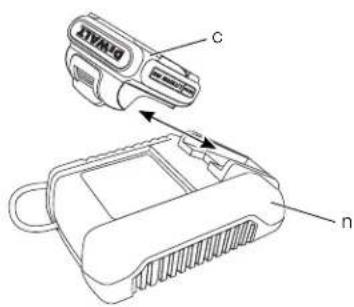
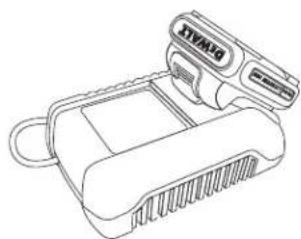
Charging Procedure (fi g. 2)
- Plug the charger (n) into an appropriate outlet before inserting battery pack.
- Insert the battery pack (c) into the charger. The red (charging) light will blink continuously indicating that the charging process has started.
- The completion of charge will be indicated by the red light remaining ON continuously. The pack is fully charged and may be used at this time or left in the charger.
NOTE: To ensure maximum performance and life of Li-Ion batteries, charge the battery for a minimum of 10 hours before first use.
Charging Process
Refer to the table below for the state of charge of the battery pack.
State of charge
| charging | - | - | - | - | |
| fully charged | —— | ||||
| hot/cold pack delay | — | - | — | ||
| replace battery pack | ●●●●●●●●●● | ||||
Hot/Cold Pack Delay
When the charger detects a battery that is too hot or too cold, it automatically starts a Hot/Cold Pack Delay, suspending charging until the battery has reached an appropriate temperature. The charger then automatically switches to the pack charging mode. This feature ensures maximum battery life.
Li-Ion BATTERY PACKS ONLY
Li-Ion batteries are designed with an Electronic Protection System that will protect the battery against overloading, overheating or deep discharge.
The tool will automatically turn off if the Electronic Protection System engages. If this occurs, place the Li-Ion battery on the charger until it is fully charged.
Important Safety Instructions for All Battery Packs
When ordering replacement battery packs, be sure to include catalog number and voltage.
The battery pack is not fully charged out of the carton. Before using the battery pack and charger, read the safety instructions below. Then follow charging procedures outlined.
READ ALL INSTRUCTIONS
- Do not charge or use battery in explosive atmospheres, such as in the presence of flammable liquids, gases or dust. Inserting or removing the battery from the charger may ignite the dust or fumes.
- NEVER force battery pack into charger. DO NOT modify battery pack in any way to fit into a non-compatible charger as battery pack may rupture causing serious personal injury. Consult the chart at the end of this manual for compatibility of batteries and chargers.
- Charge the battery packs only in D EWALT chargers.
- DO NOT splash or immerse in water or other liquids.
- Do not store or use the tool and battery pack in locations where the temperature may reach or exceed 40^ C ( 105^ F) (such as outside sheds or metal buildings in summer).

WARNING: Never attempt to open the battery pack for any reason. If battery pack case is cracked or damaged, do not insert into charger. Do not crush, drop or damage battery pack. Do not use a battery pack or charger that has received a sharp blow, been dropped, run over or damaged in any way (i.e., pierced with a nail, hit with a hammer, stepped on). Damaged battery packs should be returned to service centre for recycling.

N: When not in use, place tool on its side on a stable surface where it will not cause a tripping or falling hazard. Some tools with large battery packs will stand upright on the battery pack but may be easily knocked over.
SPECIFIC SAFETY INSTRUCTIONS FOR LITHIUM ION (Li-Ion)
- Do not incinerate the battery pack even if it is severely damaged or is completely worn out. The battery pack can explode in a fire. Toxic fumes and materials are created when lithium ion battery packs are burned.
- If battery contents come into contact with the skin, immediately wash area with mild soap and water. If battery liquid gets into the eye, rinse water over the open eye for 15 minutes or until irritation ceases. If medical attention is needed, the battery electrolyte is composed of a mixture of liquid organic carbonates and lithium salts.
- Contents of opened battery cells may cause respiratory irritation. Provide fresh air. If symptoms persist, seek medical attention.

WARNING: Burn hazard. Battery liquid may be flammable if exposed to spark or flame.
Battery Pack
BATTERY TYPE
The DCT414 operates on a 10.8 volt battery pack.
Storage Recommendations
- The best storage place is one that is cool and dry, away from direct sunlight and excess heat or cold. For optimum battery performance and life, store battery packs at room temperature when not in use.
NOTE: Li-Ion battery packs should be fully charged when stored.
- Long storage will not harm the battery pack or charger. Under proper conditions, they can be stored for up to 5 years.
Labels on Charger and Battery Pack
In addition to the pictographs used in this manual, the labels on the charger and the battery pack show the following pictographs:

Read instruction manual before use.


Battery charging.

Battery charged.

Battery defective.

Hot/cold pack delay.

Do not probe with conductive objects.

Do not charge damaged battery packs.

Use only with DEWALT battery packs; others may burst, causing personal injury and damage.

Do not expose to water.
ENGLISH

Have defective cords replaced immediately.

Charge only between 4°C and 40°C.

Discard the battery pack with due care for the environment.
LI-ION
Do not incinerate the battery pack.

See technical data for charging time.


Only for indoor use.
Package Contents
The package contains:
1 IR Therometer
1 Charger
1 Battery
1 Kit box
1 Instruction manual
1 Exploded drawing
NOTE: Battery packs and chargers are not included with N-models.
- Check for damage to the tool, parts or accessories which may have occurred during transport.
• Take the time to thoroughly read and understand this manual prior to operation.
Emissivity
Emissivity describes the energy-emitting characteristics of materials. Most organic materials and painted or oxidized surfaces have an emissivity of about 0.95, which is the default setting. It is recommended to compensate for inaccurate readings that may result from measuring materials with low emissivity values such as shiny metal surfaces. Cover these surfaces with masking tape or flat black paint (<148°C/300°F) and use the default (0.95) setting. Allow time for the tape or paint to reach the same temperature as the surface beneath it and then measure the temperature of the tape or painted surface.
If you cannot paint or use tape, then you can compensate your measurements with the emissivity selector. Even with the adjustable emissivity, it can be difficult to get a completely accurate infrared measurement of a target with a shiny or metallic surface. Experimentation may be required to benchmark temperatures, and experience will help you choose the best setting for specific measurements.
The thermometer has emissivity adjustable from 0.1 to 1.0 in increments of 0.01. Refer to the Nominal Emissivity Table in this manual. The reference to emissivity settings in the table are suggestions for typical situations and your particular situation may differ.
NOTE: Calibration of this product was performed at 0.95 emissivity.
Description (fi g. 1A, 1B, 2)

WARNING: Never modify the laser or any part of it. Damage or personal injury could result.
a. Measurement trigger
b. Battery release button
c. DEWALT 10.8 V Lithium-Ion battery
d. Main handle
e. IR sensor
f. Laser/pointer beam
g. LCD screen
h. Alarm mode button
i. Min/Max/Avg mode button
j. Adjustment button
k. EMS mode button
- C/F mode button
m. LED indicator
n. Battery charger
o. Belt hook
p. Screw
ALARM MODE BUTTON (h)
The alarm is used to select the type of alarm and to set the high (HAL) and low (LAL) temperature limits for the alarm.
Alarm 1 – temperature has reached the set limit, indicated by the red/blue LED (m)
Alarm 2 – temperature has reached the set limit, indicated by a beeper sound
Alarm 3 – temperature has reached the set limit, indicated by both the LED and the beeper
MIN/MAX/AVG MODE BUTTON (i)
The Min/Max/Avg mode button displays either the lowest, highest or average temperature.
ADJUSTMENT BUTTON (j)
The adjustment button: Used with each mode button to set desired value.
EMS MODE BUTTON (k)
The EMS mode button sets emissivity value.
C/F MODE BUTTON (I)
Used to set temperature units of measure (Celsius or Fahrenheit).
LED INDICATOR (m)
LED indicator is active in Alarm 1 and Alarm 3 modes.
Blue: serves as an alarm to show that temperature has reached the set minimum.
Red: serves as an alarm to show that temperature has reached the set maximim.
SCREEN ICONS
Hold – will display when you have released the trigger, to let you know that was the last temperature read.
Scan – will display when you hold the trigger down looking for differing temperatures.
Alarm setting – this icon will let you know what alarm you have chosen to display: color indicator, beep or both.
F or C - indicates units of measure for temperature.
Battery – will indicate how much charge is remaining on the battery.
NOTE: The low battery indicator is located directly above the temperature reading on the screen. The bars on the low battery indicator will indicate the strength of the battery. The IR Thermometer may continue to operate for a short time while the batteries continue to drain, but the beams will quickly dim. After fresh batteries are installed, and the IR Thermometer is turned on again, the IR Thermometer will return to its full brightness.
INTENDED USE
The IR Thermometer measures surface temperatures by measuring the amount of infrared emitted off the object. This type of measurement is a non-contact measurement of the surface's temperature. This tool comes fully assembled. This tool has been designed with features that allow for quick and easy set-up.
DO NOT use under wet conditions or in presence of flammable liquids or gases.
This IR Therometer is a professional tool.
DO NOT let children come into contact with the tool. Supervision is required when inexperienced operators use this tool.
Electrical Safety
The electric motor has been designed for one voltage only. Always check that the battery pack voltage corresponds to the voltage on the rating plate. Also make sure that the voltage of your charger corresponds to that of your mains.

Your DEWALT charger is double insulated in accordance with EN 60335; therefore no earth wire is required.
If the supply cord is damaged, it must be replaced by a specially prepared cord available through the DEWALT service organisation.
Mains Plug Replacement (U.K. & Ireland Only)
If a new mains plug needs to be fitted:
• Safely dispose of the old plug.
- Connect the brown lead to the live terminal in the plug.
- Connect the blue lead to the neutral terminal.
WARNING: No connection is to be made to the earth terminal.
Follow the fitting instructions supplied with good quality plugs. Recommended fuse: 3 A.
Using an Extension Cable
An extension cord should not be used unless absolutely necessary. Use an approved extension cable suitable for the power input of your charger (see technical data). The minimum conductor size is 1 mm ^2 ; the maximum length is 30 m.
When using a cable reel, always unwind the cable completely.
ASSEMBLY AND ADJUSTMENTS

WARNING: Prior to assembly and adjustment, always remove the battery pack. Always switch off the tool before inserting or removing the battery pack.

WARNING: Use only DEWALT battery packs and chargers.
ENGLISH
Inserting and Removing the Battery Pack from the Tool (fi g. 3)
WARNING: To reduce the risk of serious personal injury, turn tool off and disconnect battery pack before making any adjustments or removing/installing attachments or accessories.
NOTE: Make sure your battery pack (c) is fully charged.
TO INSTALL THE BATTERY PACK INTO THE TOOL HANDLE
- Align the battery pack with the rails inside the handle.
- Slide it firmly into place until you hear the lock snap into place.
TO REMOVE THE BATTERY PACK FROM THE TOOL
- Press the release button (b) and firmly pull the battery pack out of the tool handle.
- Insert battery pack into the charger as described in the charger section of this manual.
Belt Hook
(Optional Accessory, fi g. 1A)

JG: To reduce the risk of serious personal injury, turn tool off and disconnect battery pack before making any adjustments or removing/installing attachments or accessories.

JG: To reduce the risk of serious personal injury, DO NOT suspend tool overhead or suspend objects from the belt hook. ONLY hang tool's belt hook from a work belt.

NG: To reduce the risk of serious personal injury, ensure the screw holding the belt hook is secure.
IMPORTANT: When attaching or replacing the belt hook, use only the screw (p) that is provided. Be sure to securely tighten screw.
The belt hook (o) can be attached to either side of the tool using only the screw (p) provided, to accommodate left- or right-handed users. If the hook is not desired at all, it can be removed from the tool.
To move belt hook, remove the screw (p) that holds the belt hook in place then reassemble on the opposite side. Be sure to securely tighten screw.
OPERATION
Instructions for Use
WARNING: Always observe the safety instructions and applicable regulations.
WARNING: To reduce the risk of serious personal injury, turn tool off and disconnect battery pack before making any adjustments or removing/installing attachments or accessories.
Proper Hand Position (fi g. 4)
WARNING: To reduce the risk of serious personal injury, ALWAYS use proper hand position as shown.
WARNING: To reduce the risk of serious personal injury, ALWAYS hold securely.
Proper hand position requires one hand on the main handle as shown in figure 4.
Select Operating Mode (fi g. 1B)
Read the following steps before operating the IR thermometer.
CHOOSE UNITS OF MEASUREMENT
Turn the unit on by engaging the trigger. Once the screen comes on, push the C/F button until the unit of measurement is on the correct setting for the application.
CHOOSE EMISSIVITY
Turn the unit on by engaging the trigger; once the screen comes on push the EMS button for emissivity adjustment. When then EMS is flashing on the screen, use the up or down arrow buttons to choose the emissivity. Please refer to the chart in order to choose the correct emissivity. Remember, emissivity is adjustable by 0.01.
| NOMINAL EMISSIVITY TABLE | |||
| MATERIAL VALUE MATERIAL VALUE | |||
| Default**** 0.95 Lead* 0 | 50 | ||
| Aluminum* | 0.30 | Oil | |
| Asbestos 0.95 Paint | 0.93 | ||
| Asphalt | 0.95 Plastic** | 0.95 | |
| Brass* | 0.50 Rubber | 0.95 | |
| Ceramic | 0.95 | Sand | |
| Concrete | 0.95 Steel* 0.80 | ||
| Copper* | 0.60 | Water | |
| Glass (plate) | 0.85 Wood*** | 0.94 | |
| Iron* | 0.70 | ||
* Oxidized
** Opaque, over 20 mils
*** Natural
*** Factory Setting
CHOOSE ALARM SETTINGS AND HIGH/LOW TEMPERATURES
- Engage the trigger to turn the unit on.
- Push the ALM button.
- When the ALM is flashing on the screen use the up and down arrows to select the alarm type.
Alarm 1 – temperature has reached the set limit, indicated by the red/blue LED (m)
Alarm 2 – temperature has reached the set limit, indicated by a beeper sound
Alarm 3 – temperature has reached the set limit, indicated by both the LED and the beeper
- Push the ALM button again to confirm selection.
- The HAL (high alarm) will now flash. Use the up and down arrows to select the high temperature limit. When the temperature is exceeded, the alarm will activate.
- Push the ALM button. The LAL (low alarm) will now flash. Use the up and down arrows to select the low temperature limit. When the temperature has descended, the alarm will activate.
- Press ALM button again for the main screen.
- Temperature readings can now be taken.
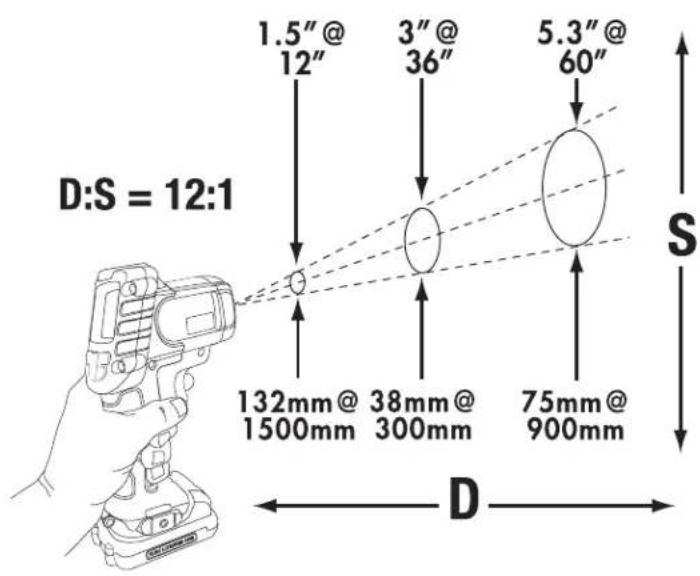
DISTANCE TO SPOT (FIG. 4)
IR Thermometers have a "Cone Effect" where the further the thermometer is from the object, the larger the area being measured. The IR Thermometer has a 12:1 distance to spot (12:1) ratio: for every 300mm away from the object it will measure 25 mm. The object that is being tested needs to be larger than the spot size to ensure accurate readings.
KEY NOTES IF HAVING TROUBLE TAKING MEASUREMENT
- Make sure to apply masking tape or flat black paint to surfaces that are highly reflective (use the default 0.95 emissivity setting).
- Make sure to have the correct emissivity for the material you are testing. Refer to Emissivity and Nominal Emissivity Table.
- Clean the material before testing if there is heavy dirt, grease, etc.
Operating Tips
- Use only the 10.8 V DEWALT lithium ion battery.
- Ensure batteries are in good working condition. If the low battery indicator light is flashing, the batteries need to be recharged.
- To extend battery life, release the IR Thermometer trigger when not taking temperature readings.
MAINTENANCE
Your DEWALT tool has been designed to operate over a long period of time with a minimum of maintenance. Continuous satisfactory operation depends upon proper tool care and regular cleaning.

VG: To reduce the risk of
serious personal injury, turn tool off and disconnect battery pack before making any adjustments or removing/installing attachments or accessories.
The charger and Infrared Thermometer are not serviceable. There are no serviceable parts inside the charger or Infrared Thermometer.
Troubleshooting
THE IR THERMOMETER DOES NOT TURN ON
• Make sure the 10.8 V battery is charged.
- While the IR Thermometer may be stored in temperatures up to 85°C (185°F), the IR Thermometer has a built-in protection circuit that will not allow it to operate at temperatures in excess of 40°C (104°F). If the IR Thermometer has been stored in extremely hot temperatures, allow it to cool. The IR thermometer will not be damaged by pressing the ON/OFF button before cooling to its proper operating temperature.

Lubrication
Your laser requires no additional lubrication.

Cleaning

VG: Never use solvents or other harsh chemicals for cleaning the non-metallic parts of the tool. These chemicals may weaken the materials used in these parts. Use a cloth
ENGLISH
dampened only with water and mild soap. Never let any liquid get inside the tool; never immerse any part of the tool into a liquid.
CHARGER CLEANING INSTRUCTIONS

JG: Shock hazard. Disconnect the charger from the AC outlet before cleaning. Dirt and grease may be removed from the exterior of the charger using a cloth or soft non-metallic brush. Do not use water or any cleaning solutions.
Optional Accessories

WARNING: Since accessories, other than those offered by DEWALT, have not been tested with this product, use of such accessories with this tool could be hazardous. To reduce the risk of injury, only DEWALT recommended accessories should be used with this product.
Consult your dealer for further information on the appropriate accessories.
Protecting the Environment
Separate collection. This product must not be disposed of with normal household waste.
Should you find one day that your DEWALT product needs replacement, or if it is of no further use to you, do not dispose of it with household waste. Make this product available for separate collection.

Separate collection of used products and packaging allows materials to be recycled and used again. Re-use of recycled materials helps prevent environmental pollution and reduces the demand for raw materials.
Local regulations may provide for separate collection of electrical products from the household, at municipal waste sites or by the retailer when you purchase a new product.
DEWALT provides a facility for the collection and recycling of DEWALT products once they have reached the end of their working life. To take advantage of this service please return your product to any authorised repair agent who will collect them on our behalf.
You can check the location of your nearest authorised repair agent by contacting your local DEWALT office at the address indicated in this manual. Alternatively, a list of authorised DEWALT repair agents and full details of our after-sales service and contacts are available on the Internet at: www.2helpU.com.

Rechargeable Battery Pack
This long life battery pack must be recharged when it fails to produce sufficient power on jobs which were easily done before. At the end of its technical life, discard it with due care for our environment:
- Run the battery pack down completely, then remove it from the tool.
- Li-lon cells are recyclable. Take them to your dealer or a local recycling station. The collected battery packs will be recycled or disposed of properly.
GUARANTEE
DEWALT is confident of the quality of its products and offers an outstanding guarantee for professional users of the product. This guarantee statement is in addition to and in no way prejudices your contractual rights as a professional user or your statutory rights as a private non-professional user. The guarantee is valid within the territories of the Member States of the European Union and the European Free Trade Area.
• 30 DAY NO RISK SATISFACTION GUARANTEE •
If you are not completely satisfied with the performance of your DEWALT tool, simply return it within 30 days, complete with all original components, as purchased, to the point of purchase, for a full refund or exchange. The product must have been subject to fair wear and tear and proof of purchase must be produced.
• ONE YEAR FREE SERVICE CONTRACT •
If you need maintenance or service for your DEWALT tool, in the 12 months following purchase, you are entitled to one service free of charge. It will be undertaken free of charge at an authorised DEWALT repair agent. Proof of purchase must be produced. Includes labour. Excludes accessories and spare parts unless failed under warranty.
• ONE YEAR FULL WARRANTY •
If your DEWALT product becomes defective due to faulty materials or workmanship within 12 months from the date of purchase, DEWALT guarantees to replace all defective parts free of charge or – at our discretion – replace the unit free of charge provided that:
• The product has not been misused;
- The product has been subject to fair wear and tear;
• Repairs have not been attempted by unauthorised persons;
• Proof of purchase is produced;
- The product is returned complete with all original components.
If you wish to make a claim, contact your seller or check the location of your nearest authorised DEWALT repair agent in the DEWALT catalogue or contact your DEWALT office at the address indicated in this manual. A list of authorised DEWALT repair agents and full details of our after-sales service is available on the Internet at: www.2helpU.com.
TERMÓMETRO INFRARROJO INALÁMBRICO DE 10,8 V DCT414
¡Enhorabuena!
Suspension de charge.

DISTANCE DU POINT (FIG. 4)
Batterie rechargeable
WAARSCHUWING: Blootstelling

CHUWING: Blootstelling
WAARSCHUWING: LASER-STRALING. NIET IN DE BUNDEL
KIJKEN. KLASSE 2 LASERPRODUCT. MAXIMAAL GELEVERD VERMOGEN
< 1 mW @ 620 - 690 nm.
1) SIKKERHET PÅ ARBEIDSOMRÅDET
ΚΟΥΜΠΙ ΛΕΙΤΟΥΡΓΙΑΣ ΕΛΑΧΙΣΤΗΣ/ΜΕΓΙΣΤΗΣ/ΜΕΣΗΣ ΘΕΡΜΟΚΡΑΣΙΑΣ (i)
natural_image
Pure horizontal line with endpoints and tick marks, no text or symbols present| Belgique et LuxembourgBelgië en Luxembourg | Black & Decker - DEWALTNieuwlandlaan 7, IZ Aarschot B156www.dewalt.be | Dutch Tel: +32 70 220 063French Tel: +32 70 220 062 | Fax: +32 70 225 585Fax: +32 70 222 441 |
| Danmark | DEWALTSluseholmen 2-42450 København SV | www.dewalt.dk | Tlf: 70201511Fax: 70224910 |
| Deutschland | DEWALTRichard Klinger Str. 1165510 Idstein | Fax: 06126-21-2770 | Tel: 06126-21-1www.dewalt.de |
| Ελλάς | Black & Decker (Ελλάς) A.E.Στράβωνος 7 & Bouλιαγμένης 159Γλυφάδα 16674, Αθήνα | Τηλ: +30 210 8981-616Service: +30 210 8981-616Φαξ: +30 210 8983-570 | www.dewalt.gr |
| España | DEWALTParque de Negocios “Mas Blau”Edificio Muntadas, c/Bergadá, 1, Of. A608820 El Prat de Llobregat (Barcelona) | Tel: 934 797 400Fax: 934 797 419www.dewalt.es | |
| France | DEWALT5, allée des hêtresBP 30084, 69579 Limonest Cedex | Tel: 04 72 20 39 20Fax: 04 72 20 39 00www.dewalt.fr | |
| SchweizSuisseSvizzera | DEWALTIn der Luberzen 408902 Urdorf | Tel: 01 - 730 67 47 | Fax: 01 - 730 70 67www.dewalt.ch |
| Ireland | DEWALTCalpe House Rock HillBlack Rock, Co. Dublin | Fax: 00353-2781811www.dewalt.ie | Tel: 00353-2781800 |
| Italia | DEWALTViale Elvezia 220052 Monza (M) | Fax: 039-2387592www.dewalt.it | Tel: 800-014353 |
| Nederlands | Black & Decker - DEWALT Tel: +31 164 283 063Joulehof 124600 AB Bergen Op Zoom | Fax: +31 164 283 200www.dewalt.nl | |
| Norge | DEWALTPostboks 4613, Nydalen0405 Oslo | Tel: 45 25 13 00Fax: 45 25 08 00 | www.dewalt.no |
| Österreich | DEWALTWerkzeug Vertriebsges m.b.HOberlaaerstrasse 248A-1230 Wien | Tel: 01 - 66116 - 0Fax: 01 - 66116 - 14www.dewalt.at | |
| Portugal | DEWALTCentro de Escritórios de Sintra Avenida AlmiranteGago Coutinho, 132/134, Edificio 142710-418 Sintra2710-418 Lisboa | Tel: 214 66 75 00 | Fax: 214 66 75 75www.dewalt.pt |
| Suomi | DEWALTTeknikantie 1202150 Espoo, Finland | Puh: 010 400 430Faksi: 0800 411 340www.dewalt.fi | |
| Sverige | DEWALTBox 94431 22 Mölndal | Tel: 031 68 61 00Fax: 031 68 60 08www.dewalt.se | |
| Türkiye | KALE Hirdavat ve Makina A.Ş.Defterdar Mah. Savaklar Cad. No:15Edirnekapı / Eyüp / İSTANBUL 34050 TÜRKİYE | Tel: 0212 533 52 55Faks: 0212 533 10 05www.dewalt.com.tr | |
| UnitedKingdom | DEWALT210 Bath Road; Slough, Berks SL1 3YD | Tel: 01753-56 70 55Fax: 01753-57 21 12 | www.dewalt.co.uk |
| Middle EastAfrica | DEWALTP.O. Box - 17164,Jebel Ali (South Zone), Dubai, UAE | Tel: +971 4 8863030www.dewalt.ae | Fax: +971 4 8863333 |
N062174
10/10