
MFL 2-18 - Lighting Kärcher - Free user manual and instructions
Find the device manual for free MFL 2-18 Kärcher in PDF.
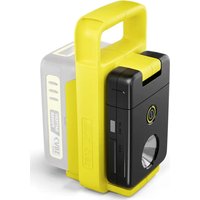


| Product type | Rechargeable multifunction lamp |
| Brand | Kärcher |
| Model | MFL 2-18 |
| Power supply | Kärcher Battery Power 18 V battery pack (not included) |
| Max luminous flux | 280 lm |
| Number of brightness levels | 2 |
| Color temperature | 4000 K |
| Charging interfaces | USB-A (0.5 A) and USB-C (2.0 A) |
| Dimensions (L x W x H) | 100 x 92 x 197 mm |
| Weight | 0.38 kg |
| Protection rating | IP20 (indoor use only) |
| Protection class | III |
| Articulation | Swiveling 0-315°, tilting up to 180° |
| Main functions | Mobile lighting, charging external devices via USB |
| Maintenance and cleaning | Damp cloth, no solvents, do not immerse |
| Safety | Do not expose to rain, do not aim at eyes, do not cover during operation |
| Spare parts and repairability | Battery pack and charger available via Kärcher dealer; light source not replaceable by user |
| Warranty | According to country conditions, contact your distributor |
Frequently Asked Questions - MFL 2-18 Kärcher
User questions about MFL 2-18 Kärcher
0 question about this device. Answer the ones you know or ask your own.
Ask a new question about this device
Download the instructions for your Lighting in PDF format for free! Find your manual MFL 2-18 - Kärcher and take your electronic device back in hand. On this page are published all the documents necessary for the use of your device. MFL 2-18 by Kärcher.
USER MANUAL MFL 2-18 Kärcher
Polish 70
Hungarian 75
Czech 79
Slovak 84
Slovenian 88
Romanian 93
Croatian 97
Serbian 102
Greek 106
Russian 111
Ukrainian 116
Kazakh 121
Bulgarian 127
Japanese 132
Arabic 137
A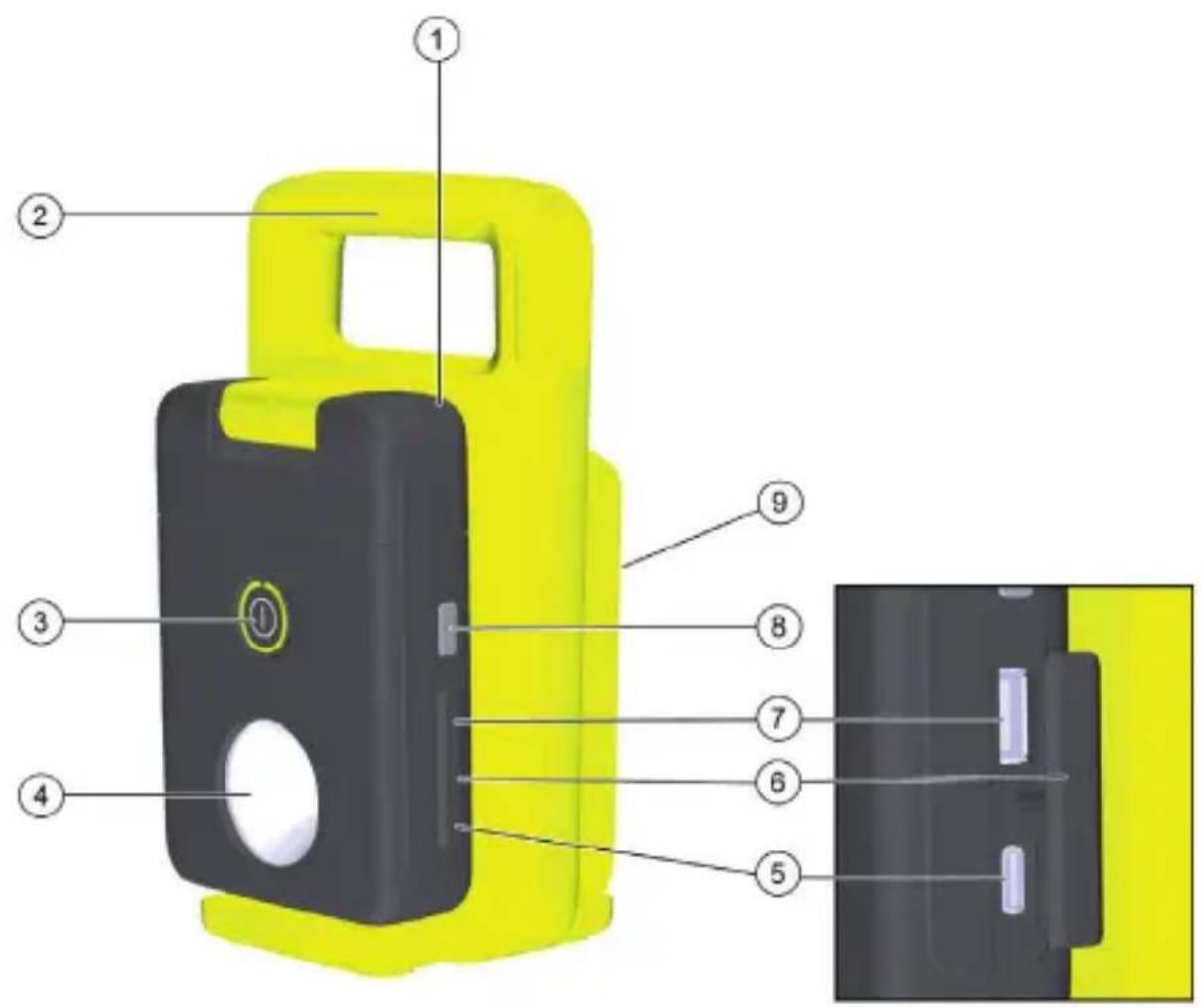
Contents
| Safety instructions...... | 8 |
| Intended use...... | 9 |
| Environmental protection...... | 9 |
| Accessories and spare parts...... | 9 |
| Scope of delivery...... | 9 |
| Safety devices...... | 10 |
| Symbols on the device...... | 10 |
| Description of the device...... | 10 |
| Installation...... | 10 |
| Operation...... | 10 |
| Finishing operation...... | 11 |
| Transport...... | 11 |
| Storage...... | 11 |
| Care and service...... | 11 |
| Troubleshooting guide...... | 12 |
| Warranty...... | 12 |
| Technical data...... | 12 |
Safety instructions
Read these original instructions and safety instructions as well as the original instructions and safety instructions supplied with the battery pack and charger before using the device for the first time. Act in accordance with them. Keep all operating instructions for future reference or for future owners. In addition to the notes in the operating instructions, you also need to take into consideration the general safety regulations and accident prevention guidelines applicable by law.
Hazard levels
⚠️ DANGER
- Indication of an imminent threat of danger that will lead to severe injuries or even death.
- Indication of a potentially dangerous situation that may lead to severe injuries or even death.
⚠ WARNING
△ CAUTION
Indication of a potentially dangerous situation that may lead to minor injuries.
ATTENTION
Indication of a potentially dangerous situation that may lead to damage to property.
Safety instructions for battery lamps
- The light source contained in this lamp may only be replaced by the manufacturer or its Customer Service or a similarly qualified person.
- Handle the battery lamp with care.
The battery lamp generates great heat, resulting in a heightened risk of fire and explosion.
- Do not work with the battery lamp in an explosive environment.
- Do not point the light beam at people or animals and do not look into the light beam yourself.
- Do not use the battery lamp in road traffic. The battery lamp is not approved for use in road traffic.
- Do not cover the battery lamp while it is in operation. The battery lamp heats up and can cause burns due to accumulated heat.
- Do not let children use the battery lamp. Children can unintentionally dazzle themselves or others.
Intended use
The battery lamp is intended for temporary, mobile, ambient illumination in indoor areas and is not suitable for general room lighting. The battery lamp can be used to charge external devices via the USB interfaces.
⚠ WARNING
Risk of electric shock. Protect the device from rain and moisture.
ATTENTION
Risk of damage
The device can be damaged by contact with dampness and humidity. Do not use the battery lamp in damp or wet places.
Do not expose the battery lamp to rain or snow.
Do not wash the battery lamp with water.
Rechargeable battery packs and chargers
Only use the device with battery packs and chargers from the KÄRCHER 18 V Battery Power (+) system.
Suitable battery packs and chargers are marked with the KÄRCHER 18 V Battery
Power (+) System symbol.
Suitable battery packs bear the designation "Battery Power 18/... and Battery Power+ 18/...".
Suitable chargers bear the designation "BC 18 V ...".
Environmental protection

The packing materials can be recycled. Please dispose of packaging in accordance with the environmental regulations.

Electrical and electronic devices contain valuable, recyclable materials and often components such as batteries,
rechargeable batteries or oil, which - if handled or disposed of incorrectly - can pose a potential danger to human health and the environment. However, these components are required for the correct operation of the device. Devices marked by this symbol are not allowed to be disposed of together with the household rubbish.
Notes on the content materials (REACH)
Current information on content materials can be found at: www.kaercher.de/REACH
Accessories and spare parts
Only use original accessories and original spare parts. They ensure that the appliance will run fault-free and safely.
Information on accessories and spare parts can be found at www.kaercher.com.
Scope of delivery
The scope of delivery for the appliance is shown on the packaging. Check the contents for completeness when unpacking. If any accessories are missing or in the event of any shipping damage, please notify your dealer.
tents for completeness when unpacking. If any accessories are missing or in the event of any shipping damage, please notify your dealer.
Safety devices protect the user and may not be taken out of operation or functionally circumvented.
Safety devices protect the user and may not be taken out of operation or functionally circumvented.
Adhere to the safety instructions in the chapters!
Description of the device
 | General warning symbol. |
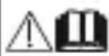 | Before the initial startup, read the operating instructions for the device, battery pack and charger, as well as all safety instructions. |
 | Only use the device indoors |
 | Protection class III |
See graphics page for illustrations Illustration A
See graphics page for illustrations, Illustration A
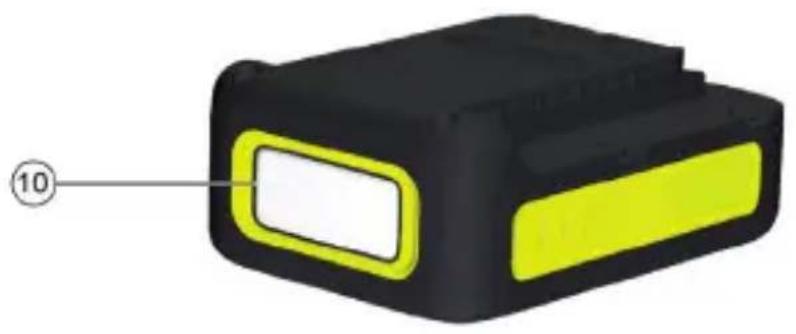
① Device (MFL means multifunction lamp) ② Carrying handle ③ ON/OFF switch ④ Lamp ⑤ USB-C interface, 2.0 A ⑥ USB interface cover ⑦ USB-A interface, 0.5 A ⑧ USB interface activation switch ⑨ Battery pack mount ⑩ Rechargeable battery pack * optional
The device can be operated with a 18V Kärcher Battery Power battery pack.
The device can be operated with an 18V Kärcher Battery Power battery pack.
Battery pack charging
Battery pack charging
- Charge the battery pack (see operating instructions and safety instructions for the battery pack and the charger).
Inserting the battery pack
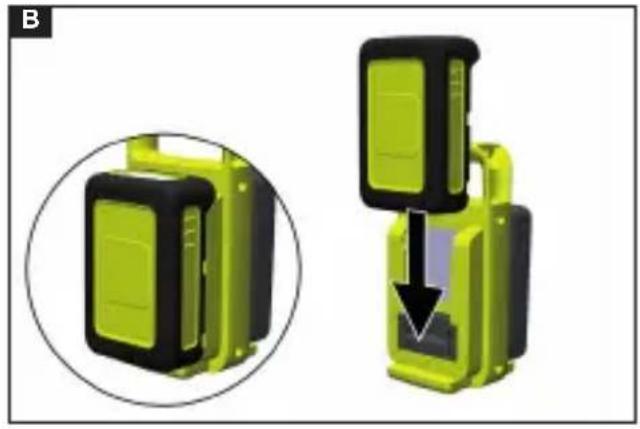
- Push the battery pack into the battery mount on the device until the battery pack latches into place.
Illustration B
Operation
Note
During operation of the device, the battery is discharged with small currents. This can lead to inaccuracies in the remaining run time on the battery display. To determine the battery capacity, briefly interrupt the current draw and read the battery capacity displayed in %.
Switching on the device
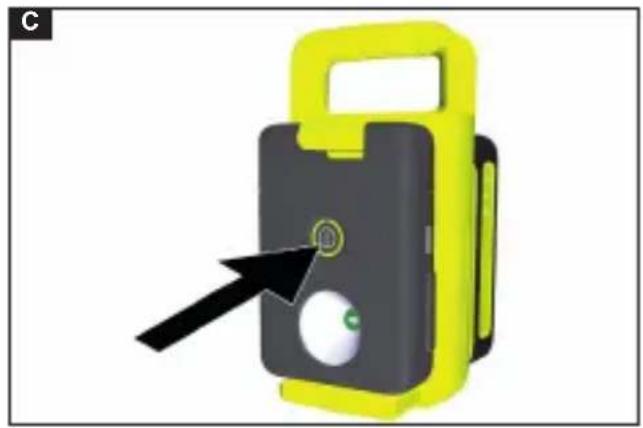
- Press the on/off switch.
Illustration C
The battery lamp lights up.
Setting the brightness level
- Set the brightness level by pressing the ON-OFF switch.
Illustration C
a Press once: Lamp lights up at the highest level (280 lm). b Press twice: Lamp lights up at the lowest level (80 lm). c Press three times: The lamp goes out.
Charging external devices
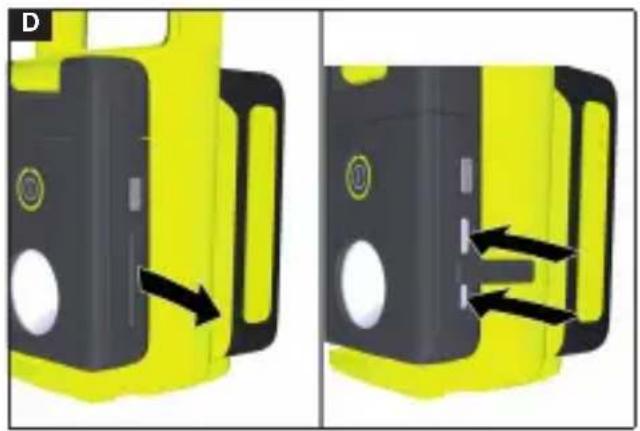
- Pull out the USB interface cover.
Illustration D
- Plug the USB charging cable (not included in the scope of delivery) into the corresponding USB interface.
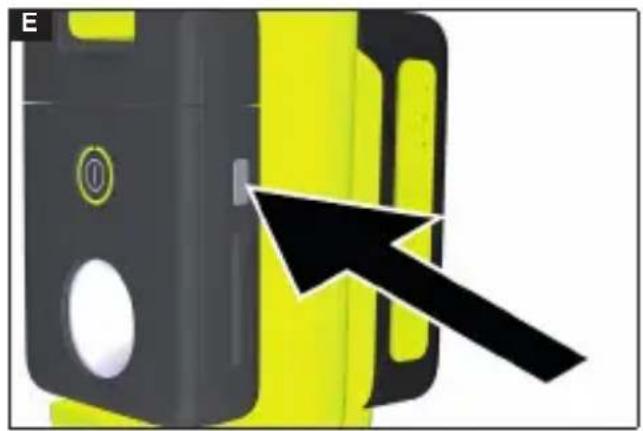
- Press the USB interface activation switch.
Illustration E
The external devices start charging.
Note
To avoid unnecessary battery discharge, the USB interfaces switch off automatically
after no power has been drawn from them for more than 30 seconds.
To reactivate them, the activation switch must be pressed.
The maximum charging current may be lower for some devices, depending on the USB device.
Depending on the USB device or USB cable, it may not be possible to charge the USB device.
Due to electromagnetic compatibility, it is recommended to use a USB charging cable of less than 0.5 metres in length.
Setting the angle
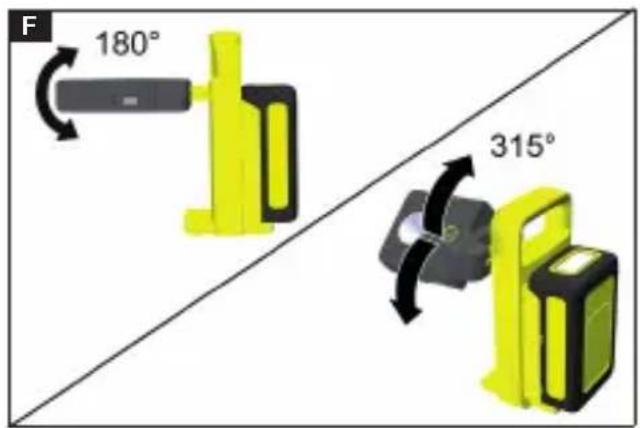
- Fold out the battery lamp.
- Fold out the battery lamp to the desired position (max. 180°) and turn it to the desired angle (max. 315°).
Illustration F
Note
The hinge can be turned between 0° and 315°. Do not turn beyond the stop.
Finishing operation
Switching off the device
- Press the ON/OFF switch several times if necessary, depending on the current brightness level.
Illustration C
The battery lamp goes out.
Removing the battery pack
Note
During longer work breaks, remove the battery pack from the device and secure it against unauthorized use.
- Switch off the battery lamp.
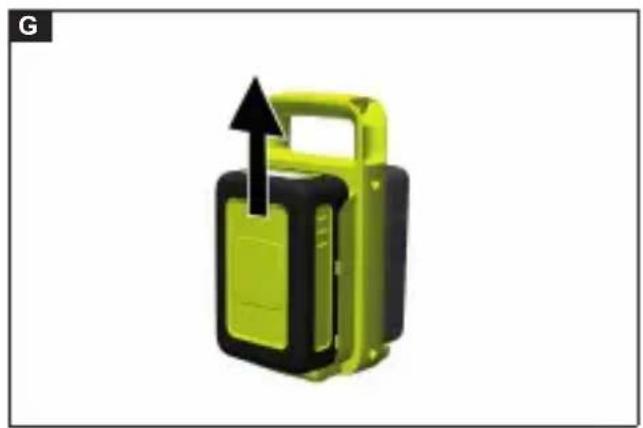
- Pull the battery pack out of the battery pack mount.
Illustration G
Transport
- Switch off the battery lamp
- Remove the battery pack from the device, see chapter Removing the battery pack.
⚠ WARNING
Switch the device off, allow it to cool down and remove the battery pack before storage or transportation.
Storage
- Switch off the battery lamp.
- Remove the battery pack from the device, see chapter "Removing the battery pack".
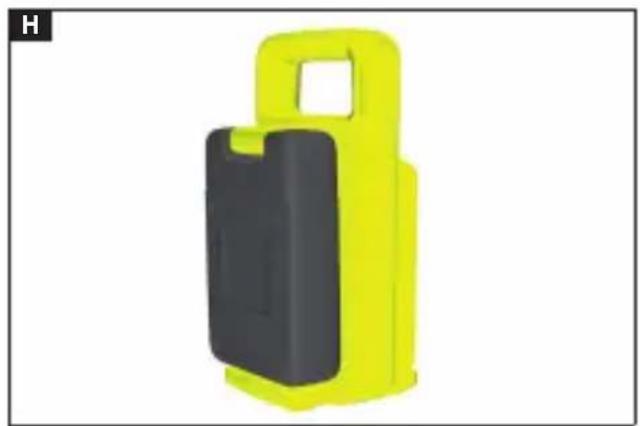
- Turn the battery lamp so that the LED points towards the device.
Illustration H
- Fit the USB interface cover on the USB interfaces.
ATTENTION
Risk of damage due to incorrect storage!
Incorrect storage can damage the device. Store the device in a dry and well-ventilated interior space.
Do not expose the device to direct sunlight for a long time.
Keep the device away from corrosive substances such as garden chemicals and deicing salts.
ATTENTION
Risk of damage due to incorrect storage!
Incorrect storage can damage the device. Store the device in a dark, dry and frost-free place, out of the reach of children.
⚠ WARNING
Switch the device off, allow it to cool down and remove the battery pack before storage or transportation.
Care and service
⚠️DANGER
Danger of electric shock
Injuries due to touching live parts. Switch off the device.
Remove the battery pack.
Cleaning the device
ATTENTION
Incorrect cleaning
Damage to the device. Clean the device with a damp cloth. Do not use solvent-based cleaning agents.
Do not immerse the device in water. Do not clean the device with a hose or high-pressure water jet.
- Allow the device to cool down.
- Clean the device with a soft brush or a clean cloth, moistened if necessary.
Troubleshooting guide
Malfunctions often have simple causes that you can remedy yourself using the following overview. When in doubt, or in the case of malfunctions not mentioned here, please contact your authorised Customer Service.
As the battery pack ages, even if it is looked after, its capacity reduces such that the full run time will no longer be reached when fully charged. This does not indicate a defect.
| Fault Cause Rectification | ||
| The device does not start up | Battery pack is empty ● Charge the battery pack. | |
| Battery pack is defective. ● Replace the battery pack. | ||
| Battery pack is not inserted correctly. | ● Push the battery pack into the mounting until it latches into place. | |
Warranty
The warranty conditions issued by our relevant sales company apply in all countries. We shall remedy possible malfunctions on your appliance within the warranty period free of cost, provided that a material or manufacturing flaw is the cause. In a warranty case, please contact your dealer (with the purchase receipt) or the next authorised customer service site. (See overleaf for the address) Further warranty information (if available) can be found in the service area of your local Kärcher website under "Downloads".
Technical data
| MFL2-18 | ||
| Device performance data | ||
| Nominal voltage V 18 | ||
| Luminous flux lm max. | 280 | |
| Number of brightness levels | 2 | |
| Amperage, USB-A interface | A | 0,5 |
| Amperage, USB-C interface | A | 2,0 |
| Voltage of USB-A interface | V | 5 |
| Voltage of USB-C interface | V | 5 |
| Protection class IP 20 | ||
| Colour temperature K 4000 | ||
| Ambient temperature (Ta) °C | 25 | |
| Dimensions and weights | ||
| Weight | kg 0,38 | |
| Length x width x height | mm | 100 x92 x197 |
Subject to technical modifications.
www.kaercher.com/jp/professional.html
THANK YOU!
Register your product and benefit from many advantages.
www.kaercher.com/welcome


Rate your product and tell us your opinion.
www.kaercher.com/dealersearch
Alfred Kärcher SE & Co. KG
Alfred-Kärcher-Str. 28-40
71364 Winnenden (Germany)


- CONTENTS
- SAFETY INSTRUCTIONS
- HAZARD LEVELS
- ⚠️ DANGER
- ⚠ WARNING
- △ CAUTION
- ATTENTION
- SAFETY INSTRUCTIONS FOR BATTERY LAMPS
- INTENDED USE
- RISK OF DAMAGE
- RECHARGEABLE BATTERY PACKS AND CHARGERS
- ENVIRONMENTAL PROTECTION
- NOTES ON THE CONTENT MATERIALS (REACH)
- ACCESSORIES AND SPARE PARTS
- SCOPE OF DELIVERY
- SAFETY DEVICES PROTECT THE USER AND MAY NOT BE TAKEN OUT OF OPERATION OR FUNCTIONALLY CIRCUMVENTED
- SEE GRAPHICS PAGE FOR ILLUSTRATIONS ILLUSTRATION A
- SEE GRAPHICS PAGE FOR ILLUSTRATIONS, ILLUSTRATION A
- THE DEVICE CAN BE OPERATED WITH A 18V KÄRCHER BATTERY POWER BATTERY PACK
- BATTERY PACK CHARGING
- INSERTING THE BATTERY PACK
- OPERATION
- NOTE
- SWITCHING ON THE DEVICE
- ILLUSTRATION C
- SETTING THE BRIGHTNESS LEVEL
- CHARGING EXTERNAL DEVICES
- ILLUSTRATION D
- ILLUSTRATION E
- SETTING THE ANGLE
- ILLUSTRATION F
- FINISHING OPERATION
- SWITCHING OFF THE DEVICE
- REMOVING THE BATTERY PACK
- ILLUSTRATION G
- TRANSPORT
- STORAGE
- ILLUSTRATION H
- RISK OF DAMAGE DUE TO INCORRECT STORAGE
- CARE AND SERVICE
- ⚠️DANGER
- DANGER OF ELECTRIC SHOCK
- CLEANING THE DEVICE
- INCORRECT CLEANING
- THANK YOU
Brand : Kärcher
Model : MFL 2-18
Category : Lighting