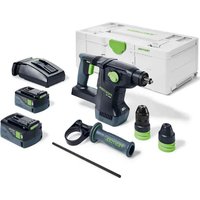
KHC 18 - Drill FESTOOL - Free user manual and instructions
Find the device manual for free KHC 18 FESTOOL in PDF.


| Product type | Cordless rotary hammer |
| Brand | Festool |
| Model | KHC 18 |
| Rated voltage | 18 V |
| No-load speed | 0 – 980 min⁻¹ |
| No-load impact rate | 0 – 4350 min⁻¹ |
| Impact energy | 2.6 J |
| Tool holder | SDS-plus |
| Max. drilling diameter (steel) | 13 mm |
| Max. drilling diameter (wood) | 30 mm |
| Max. drilling diameter (concrete) | 26 mm |
| Weight (without battery) | 3.4 kg |
| Compatible battery | Festool BP 18 series |
| Sound pressure level | 90 dB(A) |
| Sound power level | 101 dB(A) |
| Vibration value (chiseling) | 12 m/s² |
| Vibration value (concrete drilling) | 13 m/s² |
| LED lamp | Yes |
| KickbackStop | Yes |
| Additional handle | Included |
| Depth stop | Included |
| Scaffolding hook | Included |
| Keyless chuck | Included (max. 13 mm) |
| SDS chuck | Included |
| Functions | Drilling, hammer drilling, chiseling, screwdriving |
| Maintenance | Clean ventilation slots, do not use compressed air, keep contacts clean |
| Safety | Wear hearing protection, safety glasses, dust mask, gloves |
Frequently Asked Questions - KHC 18 FESTOOL
User questions about KHC 18 FESTOOL
0 question about this device. Answer the ones you know or ask your own.
Ask a new question about this device
Download the instructions for your Drill in PDF format for free! Find your manual KHC 18 - FESTOOL and take your electronic device back in hand. On this page are published all the documents necessary for the use of your device. KHC 18 by FESTOOL.
USER MANUAL KHC 18 FESTOOL
natural_image
Festool 180R3C-16 electric drill put tool with green handle and control buttons (no visible text or symbols on body)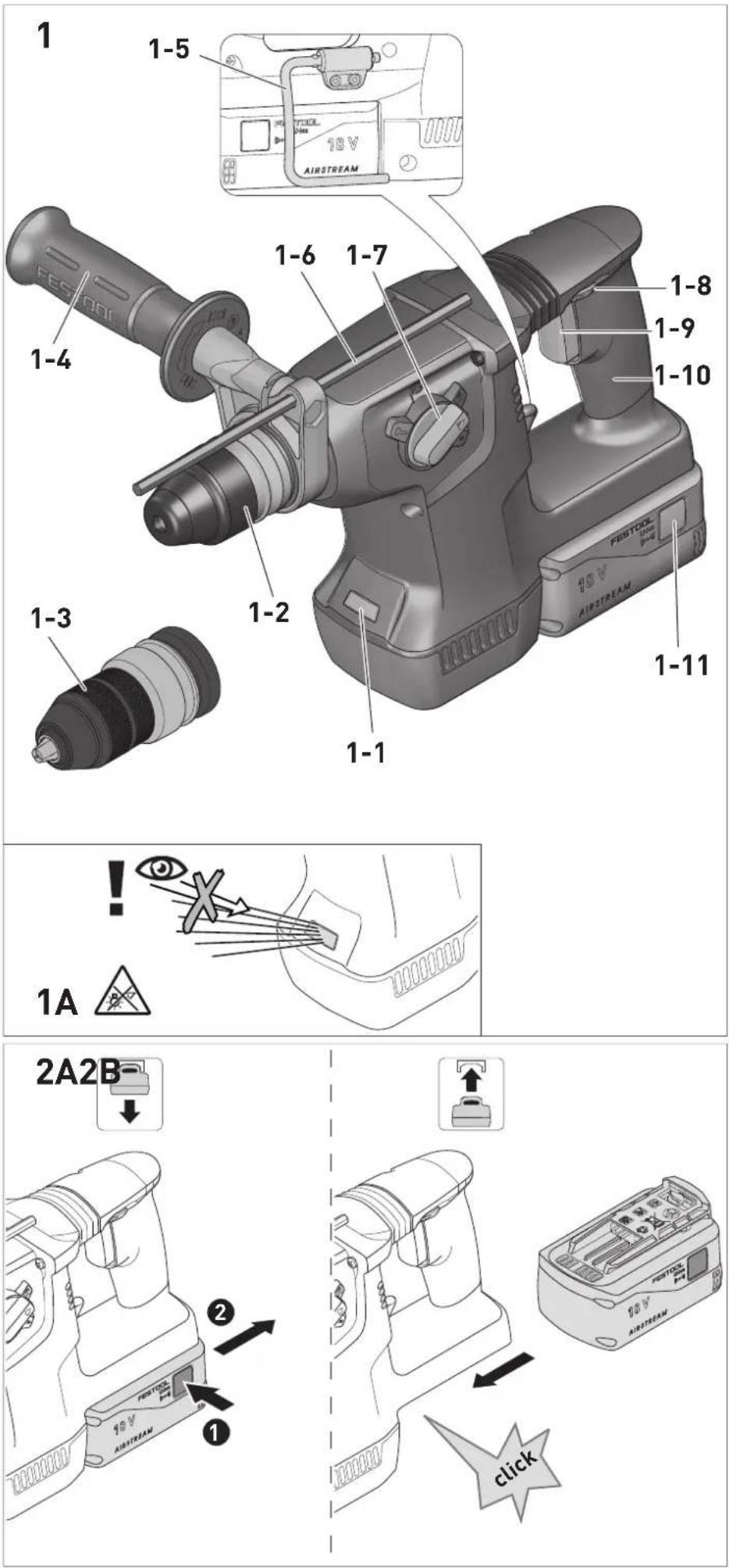
KHC 18 10672777
We as the manufacturer declare under our sole responsibility that the product(s) fulfill(s) all the relevant provisions of the following UK Regulations and are manufactured in accordance with the following designated standards:
S.I. 2008/1597 Supply of Machinery [Safety] Regulations 2008
S.I. 2016/1091 Electromagnetic Compatibility Regulations 2016
S.I. 2017/1206 Radio Equipment Regulations 2017
S.I. 2012/3032 Restriction of the Use of Certain Hazardous Substances
in Electrical and Electronic Equipment Regulations 2012
BS EN 62841-1:2015, BS EN IEC 62841-2-6:2020 + A11:2020, BS EN IEC 55014-1:2021,
BS EN IEC 55014-2:2021, EN 300 328 V2.2.2, EN 303 446-1 V1.2.1, EN 301 489-1 V2.2.3,
EN 301 489-17 V3.2.4, BS EN IEC 63000:2018

d on behalf of and in name of
Festool GmbH
Wertstr. 20, 73240 Wendlingen, GERMANY
Place and date of declaration: Wendlingen, 2023-08-21
Head of Research & Development Products
Tim Weber
Head of Product Compliance
^11 in the specified serial number range (S-Nr.) from 40000000 - 49999999
Akku-Bohrhammer
Seriennummer *
Cordless rotary hammer
Serial number *
Head of Research & Development Products

Tim Weber
Head of Product Compliance
9.1 SDS-Bohrfutter [7]
1 Symbols....15
2 Safety warnings....15
3 Intended use....17
4 Technical data.... 17
5 Parts of the device....17
6 Battery pack.... 17
7 Commissioning....17
8 Settings....18
9 Tool holder, attachments.....18
10 Working with the electric power tool.....19
11 Service and maintenance....19
12 Warning signals....19
13 Environment....20
14 General information....20
1 Symbols

Warning of general danger

Warning of electric shock

Read the operating manual and safety warnings.

Wear ear protection.

Wear a dust mask.

Wear protective goggles.

Wear protective gloves when changing tools!

Inserting the battery pack.

Remove the battery pack.

Do not dispose of it with domestic waste.

CE conformity marking

Tool contains a chip which stores data. See section 14.1

Tip or advice

Handling instruction

UKCA marking: Confirms the conformity of the product with UK regulations.
2 Safety warnings
2.1 General power tool safety warnings
WARNING! Read all safety warnings, instructions, illustrations and specifications provided with this power tool. Failure to follow all instructions listed below may result in electric shock, fire and/or serious injury.
Save all warnings and instructions for future reference.
Follow the operating manual for the charger and the battery pack.
2.2 Safety instructions for all operations
- Wear ear protectors. Exposure to noise can cause hearing loss.
- Use auxiliary handle(s), if supplied with the tool. Loss of control can cause personal injury.
- Hold the power tool by insulated gripping surfaces, when performing an operation where the cutting accessory or fasteners may contact hidden wiring. Cutting accessory contacting a "live" wire may make exposed metal parts of the power tool "live" and could give the operator an electric shock.
- Use appropriate detection devices to look for any hidden supply lines or consult your local utility company. If the insertion tool makes contact with live cables, it can result in fire and electric shock. Damage to a gas pipe can lead to an explosion. Penetration of a water pipe can result in damage to property.
- Keep the power tool away from magnetic fields. The power tool may switch on unexpectedly and cause injury.
- Harmful/toxic dust may be produced during your work (e.g. paint containing lead, certain types of wood or metals). Contact with or inhalation of this dust may pose a risk for the operating personnel or persons in the vicinity. Comply with the safety regulations that apply in your country.
- Wear suitable breathing protection to protect your health. In enclosed spaces, ensure that there is sufficient ventilation.
- Use a dust extractor when working with dust.

Wear suitable personal protective equipment: Ear protection, safety goggles, a dust mask for work that generates dust.

CAUTION! Power tool can jam and cause sudden kickback! Switch off immediately!
- Firmly hold the power tool with both hands, with one hand on the handle [1-10] and the other hand on the auxiliary handle [1-4]. Be prepared for a high reaction torque, which may cause the power tool to turn and lead to injury.
- Do not use the power tool in the rain or in damp surroundings. Moisture in the power tool may cause a short circuit and fire.
- Wait until the power tool has come to a complete halt before placing it down. The insertion tool can get caught and lead to a loss of control of the power tool.
- Avoid unintentional activation. Carrying the electric power tool with your fingers on the on/off switch can lead to accidents. When you are not using the power tool, set the switch for the transport lock [1-8] to the centre position.
- Do not manipulate or block controls, e.g. the on/off switch.
-
Do not use power supply units to operate cordless power tools. Only use the intended battery packs. Do not use third-party chargers to charge the battery packs. The use of accessories not expressly authorised by the manufacturer can result in electric shocks and/or serious accidents.
-
Warning of harmful light radiation. Do not look directly into the light beam. Do not direct the light beam towards other people or animals. Optical radiation can damage the eyes.
- Do not use any insertion tools or accessories that the manufacturer has not specially designed or recommended for this power tool. Just because you can attach accessories or insertion tools to your power tool does not guarantee that they can be used safely. This may increase the risk of injury, accelerate the wear on the power tool and decrease the quality of the working results.
- Depending on the type and use of the accessory, particles, the insertion tool or parts of the insertion tool could come loose. This can lead to increased exposure
to dust and to unexpected movements.
Wear suitable personal protective equipment. Be prepared for a high reaction torque, which may cause the power tool to turn and lead to injury.
2.3 Safety instructions when using long drill bits with rotary hammers
- Always start drilling at low speed and with the bit tip in contact with the workpiece.
At higher speeds, the bit is likely to bend if allowed to rotate freely without contacting the workpiece, resulting in personal injury. - Apply pressure only in direct line with the bit and do not apply excessive pressure.
Bits can bend causing breakage or loss of control, resulting in personal injury.
2.4 Emission levels
The levels determined in accordance with EN 62841 are typically:
Sound pressure level L _PA = 90 dB(A)
Sound power level L _WA = 101 dB(A)
Uncertainty K = 3 dB

CAUTION
Noise generated when working Risk of damage to hearing
▶ Always use ear protection.
Vibration emission level a_h (vector sum for three directions) and uncertainty K measured in accordance with EN 62841:
Chiselling a_h=12 m/s^2
$$ K = 1. 5 \mathrm{m} / \mathrm{s} ^ {2} $$
Hammer drilling in concrete a_h=13 m/s^2
$$ K = 1. 5 \mathrm{m} / \mathrm{s} ^ {2} $$
The specified emission levels (vibration, noise)
- are used to compare machines.
- They are also used for making preliminary estimates regarding vibration and noise load during operation.
- They represent the primary applications of the power tool.

CAUTION
The emission values may deviate from the specified values. This is dependent on how the tool is used and the type of workpiece being machined.
▶ Assess the actual load during the entire operating cycle.
▶ Depending on the actual load, suitable protective measures must be defined in order to protect the operator.
3 Intended use
Cordless rotary hammer suitable
- for hammer drilling and for light chiselling work in concrete, tiles and stone,
- for drilling without hammer action in wood, metal, ceramic and plastic,
- for screwing in and tightening screws.

The user is liable for damage and accidents caused by improper and non-inten-
ded use; this also includes damage and wear caused by continuous industrial operation.
4 Technical data
Cordless rotary hammer KHC 18
| Motor voltage 18V | |
| No-load speed | 0-980 rpm |
| Idle stroke rate | 0-4350 rpm |
| Compatible battery packs Festool BP 18 series | |
| Impact energy 2.6 J | |
| Collar 49.5 mm | |
| Tool holder SDS-plus | |
| Max. drill diameter: | |
| Steel 13 mm | |
| Wood 30 mm | |
| Hammer drilling in concrete | 26 mm |
| Weight with auxiliary handle and keyless chuck, without battery pack. | 3.4 kg |
5 Parts of the device
[1-1] LED light
[1-2] SDS drill chuck
[1-3] Keyless chuck
[1-4] Auxiliary handle
[1-5] Scaffold hook
[1-6] Depth stop
[1-7] Drilling/hammer drilling/chiselling/adjust chisel position selector switch
[1-8] Rotational direction switch and safety lock/transport lock
[1-9] On/off switch
[1-10] Handle
[1-11] Buttons to release the battery pack
Accessories shown or described are not always included in the scope of delivery.
The specified illustrations appear at the beginning of the Operating Instructions.
6 Battery pack
Before using the battery pack, check that the battery interface is clean. Any contamination of the battery interface may impair correct contact and lead to the contacts being damaged.
A faulty contact may result in the machine overheating or being damaged.
[2A]
Remove the battery pack.
[2B]

Insert the battery pack – until it clicks into place.
Further information about the charger and battery pack with capacity indicator can be found in the corresponding operating manual.
7 Commissioning

CAUTION
Risk of injury
▶ Only assemble when the power tool is switched off and the safety lock [1-8] is activated!
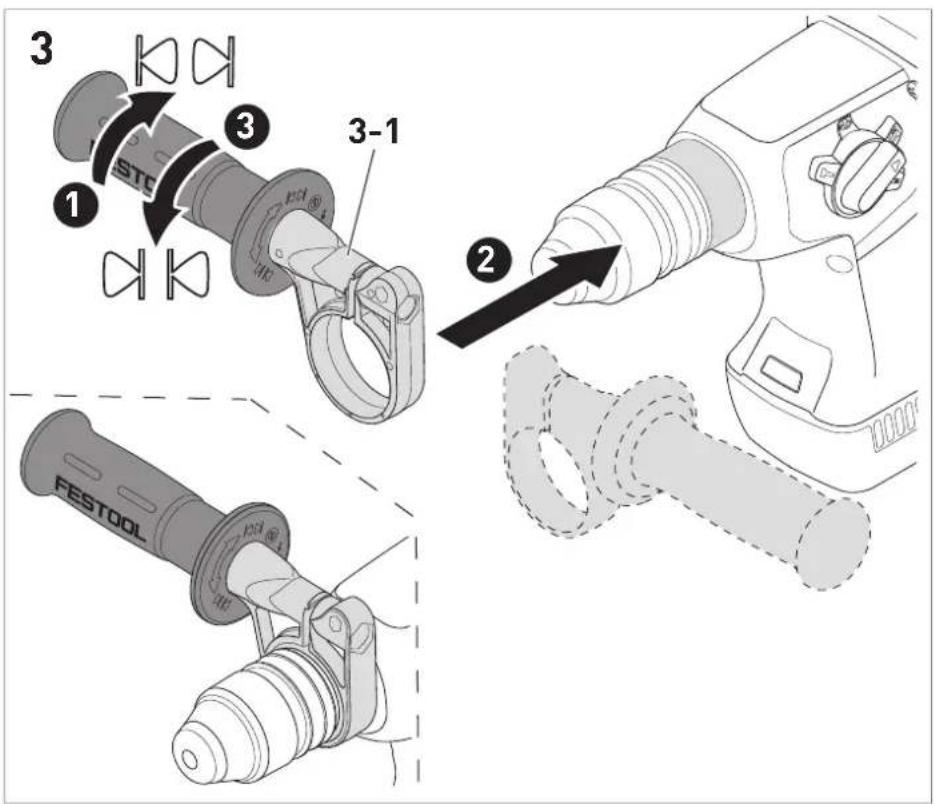
7.1 Fitting the auxiliary handle [3]
WARNING! Always use the auxiliary handle.
▶ Check that the auxiliary handle [3-1] is securely in place.
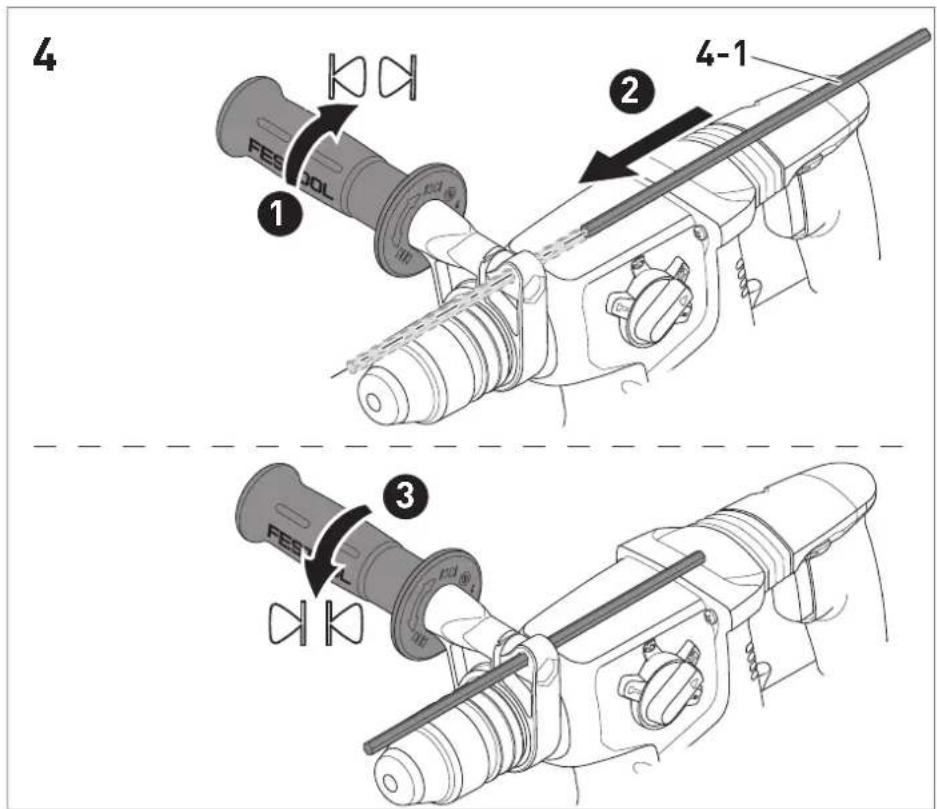
7.2 Inserting the depth stop [4]
The drilling depth can be adjusted using the depth stop [4-1].
7.3 Switching on/off [1-9]
CAUTION! Do not press the on/off switch [1-9] until the power tool has been moved into the working position.
▶ Release the locking mechanism for the rotational direction switch [1-8], see section 8.1.
▶ Press the on/off switch = ON
Release the on/off switch = OFF
▶ Set the rotational direction switch [1-8] to the centre position to lock the on/off switch.
The speed can be continuously adjusted, relative to the pressure applied to the on/off switch.
The LED light [1-1] lights up when the on/off switch [1-9] is pressed.
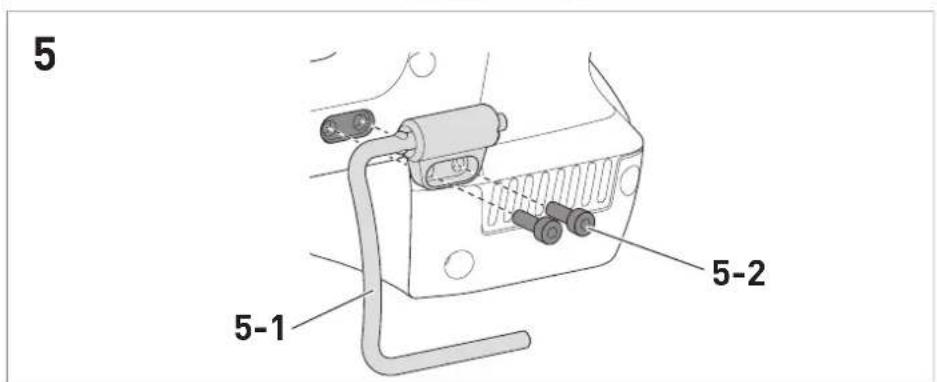
7.4 Removing/fitting the scaffold hook [5]
The power tool has a scaffold hook [5-1] pre-fitted ex works by which the power tool can be hung.
WARNING! Risk of injury. A power tool that is dropped may injure yourself and others. Before starting work, check whether the scaffold hook is secure.
Removing the scaffold hook
▶ Undo the screws [5-2].
▶ Remove the scaffold hook [5-1] and store it.
- For storage purposes, replace the screws and tighten them.
Fitting the scaffold hook
▶ Screw the scaffold hook [5-1] securely to the power tool with screws [5-2].
8 Settings

CAUTION
Risk of injury
▶ Only adjust settings when the power tool is switched off and the safety lock [1-8] is activated!
8.1 Changing direction of rotation [1-8]
- Switch to the left = clockwise rotation
- Switch to the right = counterclockwise rotation
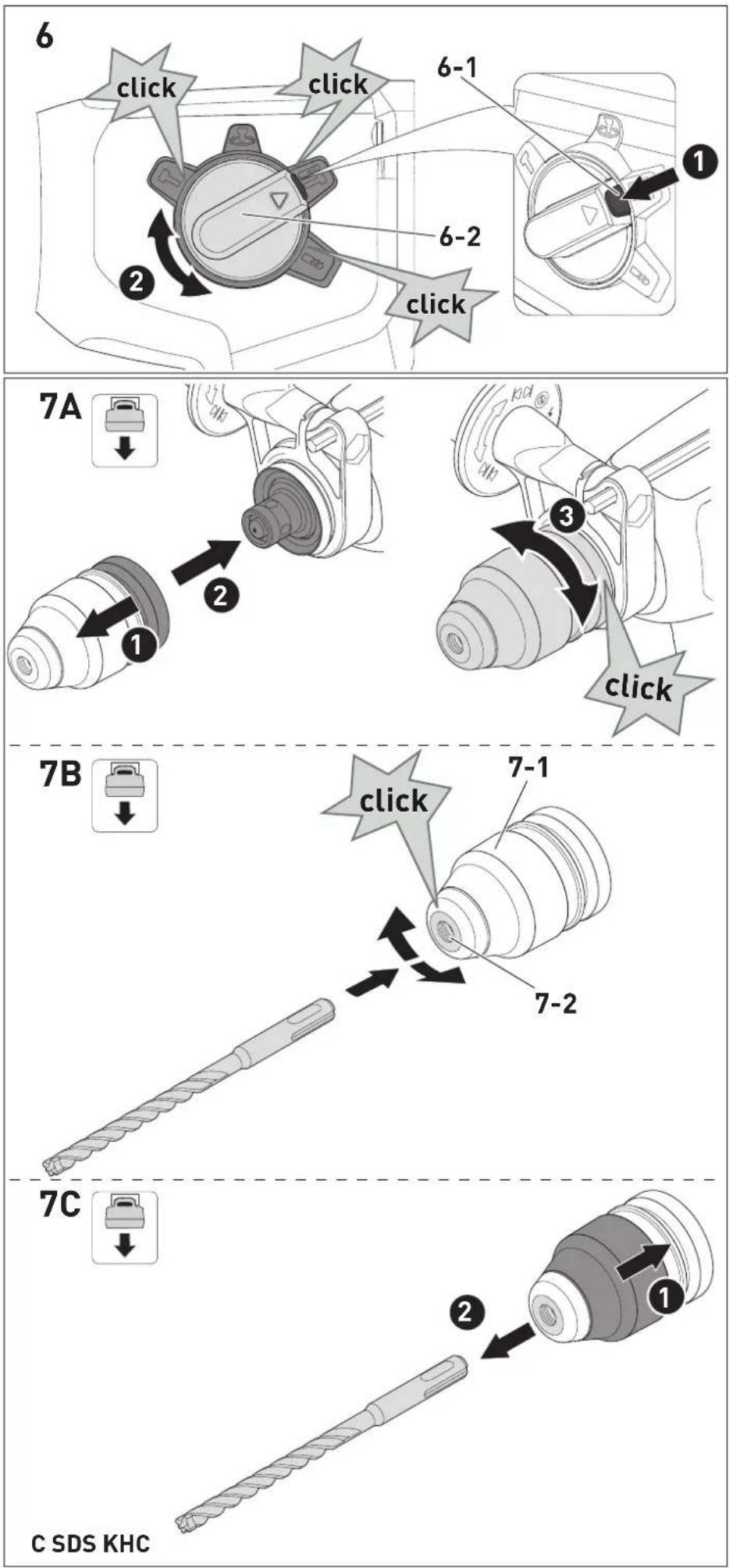
8.2 Setting the operating mode [6]
The operating mode may only be changed when the power tool is switched off.
▶ Press and hold the button [6-1] on the selector switch.
▶ ② Set the selector switch [6-2] to the required operating mode.
▶ Release the button on the selector switch.
![FESTOOL KHC 18 - Setting the operating mode [6] - 1](/content/2026/04/677036/images/6c03a2d45bd9529d4896d3fbbad3ba8baf03d111778ae3b0b7f971b75df2fe99.jpg)
Chiselling

Adjust chisel position, see section 8.3 (it is not possible to operate the power tool in this position)

Hammer drilling

Drilling/screwdriving
8.3 Adjusting the chisel position
▶ Move the selector switch [6-2] to the
symbol.
▶ Turn the chisel to achieve the appropriate angle.

9 Tool holder, attachments

WARNING
Risk of injury
- Remove the battery pack from the power tool before performing any work on the power tool.


CAUTION
Risk of injury from hot and sharp insertion tool
- Do not use any blunt or faulty insertion tools.
- Wear protective gloves when handling an insertion tool.
9.1 SDS drill chuck [7]
i Drills are clamped by means of the SDS-plus system without using a wrench.
Fitting the SDS drill chuck [7A]
▶ Make sure that you can hear the SDS drill chuck click into place.
Inserting the tool [7B]
- Clean the tool shank and apply a coating of multipurpose grease.
- Do not retract the release sleeve [7-1], but insert the tool in the tool holder [7-2] and turn until it reaches the rear stop. Make sure that the tool clicks into place.
▶ Check that the tool is securely in place.
Removing the tool [7C]
▶ Push the unlocking sleeve [7-1] back and remove the tool.
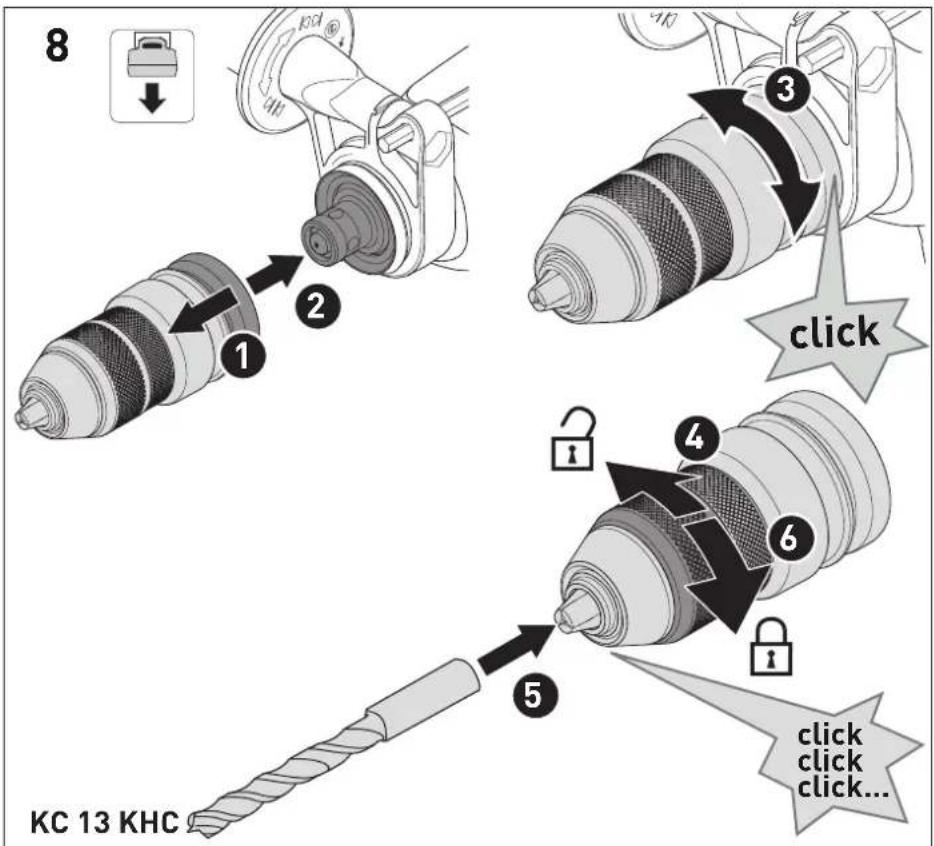
9.2 Keyless chuck [8]
For clamping drill bits and bits with a maximum shank diameter of 13 mm.
Never use the keyless chuck in the chiselling or hammer drilling operating mode.
▶ Make sure that you can hear the keyless chuck click into place.
▶ WARNING! Clamp the tool centrally in the chuck.
▶ Check that the tool is securely in place.
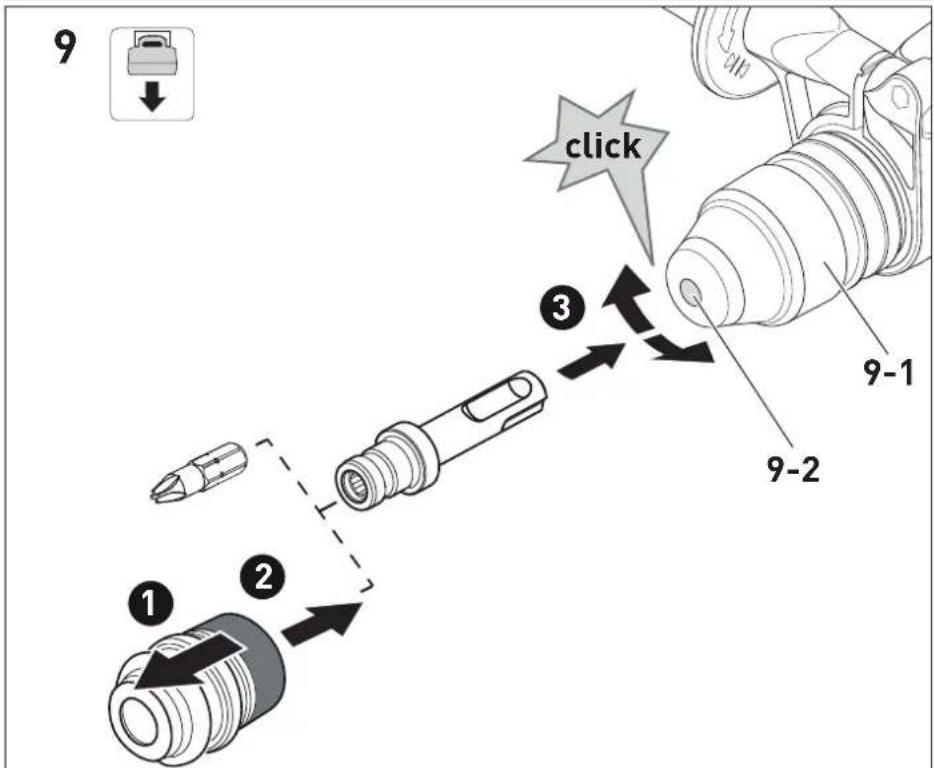
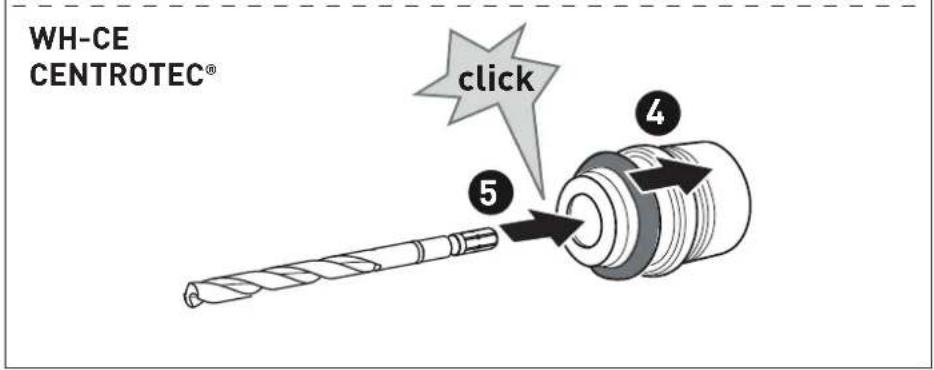
9.3 CENTROTEC tool chuck [9]
Fast changeover of tools with CENTROTEC shaft.
WARNING! Only clamp CENTROTEC tools in CENTROTEC tool chucks.
- Do not retract the release sleeve [9-1], but insert the adapter in the tool holder [9-2] and turn until it reaches the rear stop. Make sure that the adapter clicks into place.
▶ Check that the tool is securely in place.
▶ Before working, set the selector switch [1-7] to the drilling symbol.
9.4 Dust extraction
Comply with the safety regulations for dust that apply in your country. The relevant limit values must be adhered to at the workplace. A dust extractor may be required for corresponding dust exposure and depending on regulations. Festool offers a drilling dust nozzle or an extraction adapter in the accessories system.
10 Working with the electric power tool

WARNING
Risk of injury
▶ Only attach the power tool to the screw when it is switched off.
- Secure the workpiece in such a way that it cannot move during machining.
▶ Keep your hands away from the tool.

WARNING
Risk of injury from flying parts from a breach
▶ Before starting work on the side of a possible breach, take suitable protective measures.
10.1 KickbackStop

WARNING
Risk of injury
The KickbackStop does not guarantee complete protection against a kickback.
▶ Always concentrate on your work and refer to the safety instructions and warnings.

The KickbackStop is triggered if the tool jams, causing the power tool to rotate around the drilling axis suddenly and unexpectedly. The power tool beeps once and switches off.
After the KickbackStop has been triggered:
▶ Release the on/off switch [1-9].
▶ Eliminate the cause of the jam.
▶ Press the on/off switch again.
11 Service and maintenance

WARNING
Risk of injury, electric shock
▶ Always remove the battery pack from the power tool before performing any maintenance or service work.
▶ All maintenance and repair work which requires the motor housing to be opened should always be carried out by an authorised service workshop.
Customer service and repairs must only be carried out by the manufacturer or service workshops. You must only use original Festool spare parts.
Further information: www.festool.co.uk/service
Observe the following instructions:
▶ To ensure constant air circulation, always keep the cooling air openings in the housing clean and free of blockages.
▶ Do not clean the power tool with compressed air.
- Keep the contacts on the power tool, charger and battery pack clean.
12 Warning signals
Warning signals occur and the power tool switches off in the following operating states:
Signal Cause Action
| Beeps once. | Battery pack is empty. | Charge the battery pack. |
| Power tool has overheated. | Once it has cooled down, restart the power tool. | |
| Battery pack has overheated. | Once the battery pack has cooled down, restart the power tool or change the battery pack. | |
| Power tool is overloaded. | Reduce the load on the power tool. | |
| The power tool is faulty. | Contact the manufacturer to rectify the fault. | |
| Kickback-Stop triggered. | See section 10.1. |
13 Environment

Do not dispose of the device in the
household waste! Recycle devices, accessories and packaging. Observe appli-
cable national regulations.
Before disposal, users must remove discharged batteries, accumulators that are not enclosed by the device and lights that can be removed from the old device without causing damage, if these are present. The old batteries and rechargeable batteries can then be recycled systematically.
In accordance with the European Directive on waste electrical and electronic equipment and implementation in national law, used power tools must be collected separately and handed in for environmentally friendly recycling.
Information on collection points for proper disposal can be found at www.festool.co.uk/recycling.
Information on REACH: www.festool.co.uk/reach
14 General information
Imported into the UK by
Festool UK Ltd
1 Anglo Saxon Way
Bury St Edmunds
IP30 9XH
Great Britain
14.1 Information on data privacy
The power tool contains a chip which automatically stores machine and operating data. The data saved cannot be traced back directly to an individual.
The data can be read in a contactless manner using special devices and shall only be used by Festool for fault diagnosis, repair and warranty processing and for quality improvement or enhancement of the power tool. The data shall not be used in any other way without the express consent of the customer.
Sommaire
9.1 Portabrocas SDS [7]
9.3 Mandril CENTROTEC [9]
Borning/skruvdragning
Montera SDS-chuck [7A]
[1-2] SDS-borepatron
[1-3] Selvspændende borepatron
[1-4] Ekstra håndgreb
[1-5] Stilladskrog
[1-6] Dybdeanslag
[1-7] Omskifter boring/hammerbo-ring/mejsling/indstilling af mejselposition
9.1 SDS-borepatron [7]
[1-7] Omkoblingsbryter for boring/hammerboring/meisling/still inn meisel-stilling
Montere SDS-chuck [7A]

- SDS-Bohrfutter [7]
- Symbols
- Safety warnings
- General power tool safety warnings
- Safety instructions for all operations
- Safety instructions when using long drill bits with rotary hammers
- Emission levels
- CAUTION
- Noise generated when working Risk of damage to hearing
- The emission values may deviate from the specified values. This is dependent on how the tool is used and the type of workpiece being machined.
- Intended use
- Technical data
- Parts of the device
- Battery pack
- Commissioning
- Risk of injury
- Fitting the auxiliary handle [3]
- Inserting the depth stop [4]
- Switching on/off [1-9]
- Removing/fitting the scaffold hook [5]
- Removing the scaffold hook
- Fitting the scaffold hook
- Settings
- Changing direction of rotation [1-8]
- Setting the operating mode [6]
- Chiselling
- Hammer drilling
- Drilling/screwdriving
- Adjusting the chisel position
- Tool holder, attachments
- WARNING
- Risk of injury from hot and sharp insertion tool
- SDS drill chuck [7]
- Fitting the SDS drill chuck [7A]
- Inserting the tool [7B]
- Removing the tool [7C]
- Keyless chuck [8]
- CENTROTEC tool chuck [9]
- Dust extraction
- Working with the electric power tool
- Risk of injury from flying parts from a breach
- KickbackStop
- After the KickbackStop has been triggered:
- Service and maintenance
- Risk of injury, electric shock
- Observe the following instructions:
- Warning signals
- Environment
- Do not dispose of the device in the
- General information
- Imported into the UK by
- Information on data privacy
- Sommaire
- Portabrocas SDS [7]
- Mandril CENTROTEC [9]
- Montera SDS-chuck [7A]
- SDS-borepatron [7]
- Montere SDS-chuck [7A]
Brand : FESTOOL
Model : KHC 18
Category : Drill