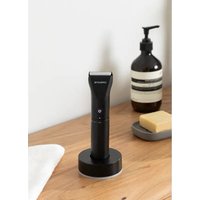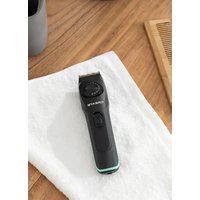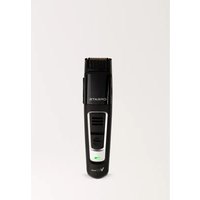
BARBER V800 ASPIRE - Shaver Create - Free user manual and instructions
Find the device manual for free BARBER V800 ASPIRE Create in PDF.


| Product type | Hair clipper with vacuum |
| Brand | Create |
| Model | BARBER V800 ASPIRE |
| Power supply | Built-in rechargeable battery + mains adapter |
| Input voltage | 100-240 V (mains adapter) |
| LED indicator | Yes (green/red for charging and battery level) |
| Cutting length | Adjustable from 1.5 to 16 mm (10 positions) |
| Vacuum function | Yes, with hair reservoir |
| Blades | Removable blade set, washable under water |
| Included accessories | Adjustable comb attachment, cleaning brush, lubrication oil, mains adapter |
| Use | Dry hair, household use only |
| Cleaning | Cleaning brush for residues, blade set washable under water, dry completely before reassembly |
| Maintenance | Lubricate blades after each use |
| Safety | Do not immerse, unplug before cleaning, keep away from children |
| Operating temperature | 5°C to 35°C |
| Max humidity | 85% RH |
| Repairability | Replaceable blade set, authorized service center for repairs |
| Compliance | EU 2012/19/EU, 2015/863/EU (WEEE) |
Frequently Asked Questions - BARBER V800 ASPIRE Create
User questions about BARBER V800 ASPIRE Create
0 question about this device. Answer the ones you know or ask your own.
Ask a new question about this device
Download the instructions for your Shaver in PDF format for free! Find your manual BARBER V800 ASPIRE - Create and take your electronic device back in hand. On this page are published all the documents necessary for the use of your device. BARBER V800 ASPIRE by Create.
USER MANUAL BARBER V800 ASPIRE Create
natural_image
Line drawing of a hairbrush with a digital display and handle (no text or symbols)Security instructions 7
Parts list 9
Before first use 9
Initial use 10
Cleaning and maintenance 12
Troubleshooting 13
PORTUGUÊS
Thank you very much for choosing our product. Before using the appliance, read these instructions carefully for its correct use.
The included safety precautions reduce the risk of electric shock, injury, or even death if strictly followed. Please keep this manual in a safe place for future reference, together with the completed product warranty card, the original product packaging and proof of purchase. If possible, pass these instructions on to the next owner of the appliance. Always follow basic safety precautions and accident prevention rules when using an appliance. We decline all responsibility derived from the non-compliance of these instructions by customers.
GENERAL INFORMATION
The following symbols and key words are used in this user manual, on the device, or on the packaging.
 | This symbol indicates further information on handling and use. |
 | The mains adapter is only suitable for indoor use. |
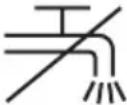 | This icon indicates that you cannot wash the hair clippers under running water. |
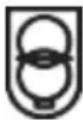 | A short circuit-proof isolation transformer is installed in the mains adopter of the hair clippers. |
The hair clippers are simple to use and intended only for cutting/trimming human body hair. Use the device on dry hair only.
The hair clippers are not intended for business or commercial use. Use the hair clippers solely for private purposes; any other use is deemed improper. In addition, the hair clippers must not be used outside or in regions with a tropical climate. Use the hair clippers solely for the purposes illustrated in this user manual. Only use the accessories recommended by the manufacturer. Use of non-recommended accessories may cause permanent damage to the device. This may invalidate your warranty.
This appliance meets all relevant norms and standards in conjunction with UL conformity standards. In the event of any modification to the appliance that was not approved by the manufacturer, compliance with these standards is no longer guaranteed. The manufacturer shall not be liable for any damages or faults arising as a result.
Please observe the national regulations and/or laws of the country in which the device is used.
When using any appliance, basic safety precautions should be followed at all times, including the following:
- Read all instructions carefully. To protect against risk of electric shock, do not immerse the appliance in water or any other liquid.
- Close supervision is required if the appliance is used by or near children.
- Unplug the appliance when not in use, before putting on or taking off parts and before cleaning.
- Do not operate the appliance if the cord or plug is damaged, after a breakdown or if it has been dropped or damaged in any way. Take the appliance to the nearest authorized service center for examination, repair or necessary electrical or mechanical adjustments.
- The use of accessories not recommended or sold by the manufacturer may cause fire, electric shock, or serious injury.
- Do not use it outdoors.
- Do not let the power cord hang over the edge of a table or counter.
- Batteries must not be disassembled, crushed, punctured, opened, or cut in any other way.
- The appliance must only be used with the supplied power supply.
- This appliance can be used by children over the age of eight, as well as by persons with reduced mental, sensory or physical capabilities or by persons with no prior knowledge or experience, provided they are supervised or trained in the safe use of the appliance and understand the potential hazards.
- Children must not play with the clipper. Cleaning and user maintenance tasks must not be carried out by children without supervision. Small parts can be deadly if swallowed.
- Keep the packaging film out of the reach of children due to the risk of suffocation. Keep the hair clipper and the connection cable out of the reach of children under eight years of age.
- Keep the clipper dry and protected from moisture and splashing water.
- Never use the clipper with wet hands.
- The hair trimmer and the mains adapter must not be immersed in water or other liquids, nor rinsed with tap water. If the trimmer falls into water, first disconnect the mains adapter from the power outlet, then remove it from the water. Have the clipper checked by a specialist before using it again.
-
If you use the clipper in the bathroom, unplug it from the outlet after use. The proximity of water represents a danger, even with the appliance turned off.
-
In case of visible damage to the hair trimmer or the mains adapter, do not use the appliance.
- You should only plug the mains adapter into a properly installed socket that is easily accessible at all times. The voltage of the power outlet must correspond to the specifications on the nameplate.
- Disconnect the mains adapter from the socket after each use, after charging, in the event of a fault and before cleaning the device.
- The clipper is not designed to operate with an external timer or separate remote control system.
- If you notice smoke, unusual noises or smells, turn off the appliance immediately and disconnect the mains adapter from the power outlet. If this happens, you should stop using the clipper until it has been checked by a specialist. Do not inhale the smoke that has been caused by burning the appliance. If you have inhaled this type of smoke, see a doctor as soon as possible. Inhaling this smoke can be harmful to your health.
- Make sure there are no open flames (eg lit candles) near the clipper. Use the clipper in a dry environment and never near flammable materials such as curtains or explosive or flammable gases or liquids.
• The clipper is designed for cutting human hair only. - All cables must be routed in such a way that they will not be stepped on or obstructed.
- Never use the clipper with a broken or defective accessory comb. An accessory comb with a broken tooth can cause injuries. Hold the cord by the plug and do not pull on the cord.
- Do not place furniture or other heavy objects on the cables. Make sure the wires are not crimped, especially at the plug and connector receptacles.
- Do not place the cables on hot objects, corners or sharp objects.
- The hair clipper is designed to work in rooms with a high level of humidity (for example, the bathroom), but not with an excessive amount of dust. Operating temperature and humidity range: 5^ to 35^ and 85% maximum relative humidity.
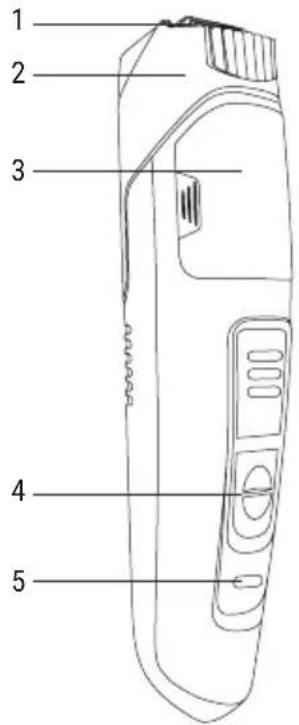
- Blades
- Adjustable head
- Deck
- Power button
- Led light
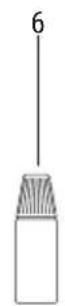
- Blade oil

natural_image
Simple line drawing of a comb with no text or symbols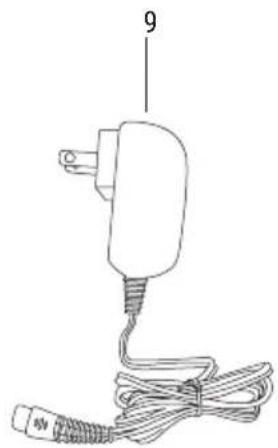
natural_image
Line drawing of a small electric plug with attached wires and a terminal connector (no text or symbols)- Accessory comb
- Cleaning brush
- Network adapter
BEFORE FIRST USE
• Take the clipper out of the packaging and completely remove all packing materials. Check for signs of damage to the clipper. If the clipper is damaged, do not use it.
LED control
The control LED provides you with information about the current operating status of the shaver when charging or during operation:
| Mode Led light Meaning | ||
| During charging | Green led light Battery is fully charged | |
| Red led light Battery is not fully charged | ||
| En modo batería | Green led light Battery is sufficiently charged | |
| Flashing green led light Battery level is low | ||
| The led light flashes red three times and the shaver does not turn on | Battery is almost completely drained | |
| Conectado a la red eléctrica | Green led light Mains operation | |
Charging the battery
Before initial use or when the built-in battery is not charged, charge the device as follows:
- First, connect the small plug on the cable of the mains adapter to the mains adapter port of the hair clippers and then connect the mains adapter to an easily accessible, live power socket.
- During the charging process, the control LED indicates the current battery charge level.
- The hair clippers can be used with a mains connection at any time regardless of the battery charge level.
Accessories
- Blade
After each cleaning, apply a few drops of blade oil to the cutter block to maintain the free movement of the cutter block.
- Cleaning Brush
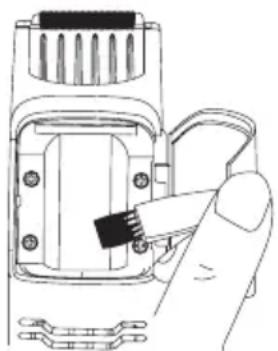
Use the cleaning brush to remove any remaining hair from the cutter block.
- Comb attachment
The comb attachment is adjustable in 10 steps. This lets you pre-set the remaining length of the cut hair between 1.5mm and 16mm. To do this, proceed as follows:
- Press and hold the locking mechanism of the comb attachment.
- Slide the comb attachment to the desired remaining length and release the locking mechanism.
The small arrow on the comb attachment points to the scale that indicates the current length setting.
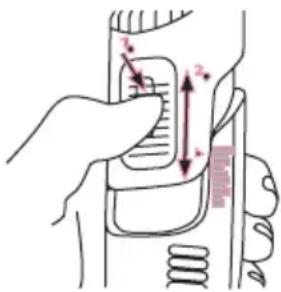
The hair clippers can also be used without the comb attachment.
To remove the comb attachment, press and hold the release mechanism and slide the comb attachment up out of its guide until you can take it off.
When mounting the comb attachment, make sure it sits correctly in the guide. Slide it down slowly until you hear it lock into place.
INITIAL USE
- The hair clippers have a vacuum function that draws the cut hair in after cutting and collects it in a hair reservoir.
- Please note that how well the vacuum function works largely depends on the length of the cut hair.
- It works best with short stubble.
Cutting Hair
The hair clippers can be used either in battery mode or with a mains adapter.
Take care when shaving areas of the body with thinner skin (for example, the armpits or pubic area). There is a risk of injury.
The hair being cut must be dry.
Depending on the cutting angle, the cutting length may deviate from the cutting length indicated.
- First familiarise yourself with the hair clippers and try to hold them so that the on/off button can be pressed at any time. Please make sure that you hold it securely in your hand.
- Comb the hair thoroughly first.
- Adjust the comb attachment to obtain the desired cutting length.
If you are not sure which cutting length is right for you, start with a long setting and then change to a smaller one if needed.
Switch on the hair clippers with the on/off button.
Always switch on the hair clippers first before you start cutting. This will prevent the blades from getting blocked.
Apply the hair clippers so the face of the cutter block can move parallel to the skin. Always move the hair clippers through the hair as evenly as possible.
To avoid injury or skin irritation when cutting in folds of the skin or areas with thinner skin, you should stretch the skin with your fingers.
- Start cutting the hair at the back of the neck or sides and cut towards the crown. Then cut the hair at the front, also towards the crown.
- Ideally you should cut against the direction of hair growth.
• To cut all of the hair, move the hair clippers over the same section of hair several times. - Combing through the hair occasionally is recommended.
- For cutting lengths longer than 0.47 inch (12mm), it is useful to move the hair clippers through the hair several times in different directions. This results in an even, homogeneous cut.
- You can also use the hair clippers without the comb attachment. Without the comb attachment the hair is cut close to the roots. This application is also suitable for cutting contours and trimming sideburns.
Cutting Contours
Apply the front edge of the cutter block at the desired height of the hairline. Now move the hair clippers down with in an even motion.
Beard Trimming
- Comb the beard in the direction of growth with the supplied comb.
- Trim the beard downward starting from the ear. first trim one side and then the other side.
- If you want to trim the beard very short, for trimming a moustache, or to cut contours, use the hair clippers without a comb attachment.
- Vary the cutting length as needed by adjusting comb attachment 11 accordingly.
- To trim the moustache, comb it straight down with the supplied comb. Start trimming in the middle over the mouth and work your way out from there to one side and then the other.
Emptying the Hair Reservoir
• To do so, flip open the hair reservoir cover to the right and empty.
- You can remove any remaining hair with the cleaning brush.
- Then close the hair reservoir cover to restore the vacuum function. You must hear the cover lock into place.
natural_image
Hand inserting a black cable into a device housing (no text or symbols visible)Always disconnect the mains adapter from the socket and the small plug of the mains adapter cable from the mains adapter port of the hair clippers before cleaning. Switch the hair clippers off.
WARNING: Never immerse the hair clippers in water or any other liquid.
• Take off the comb attachment if one is installed. The comb attachment can be cleaned using soapy water. Then dry it well.
- The casing of the hair clippers can be wiped using a slightly damp cloth; never use any aggressive cleaning agents.
- Remove any remaining hair from the cutter block and the hair reservoir using the cleaning brush.
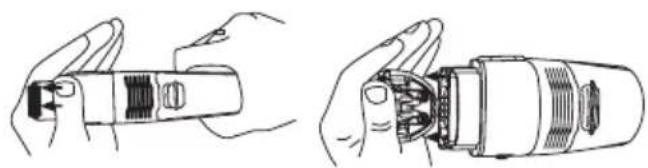
- For more intensive cleaning, you can remove the cutter block from the hair clippers. Use your thumb to press on the metal blade from the front until the cutter block is released from the head of the hair clippers. Remove the cutter block.
natural_image
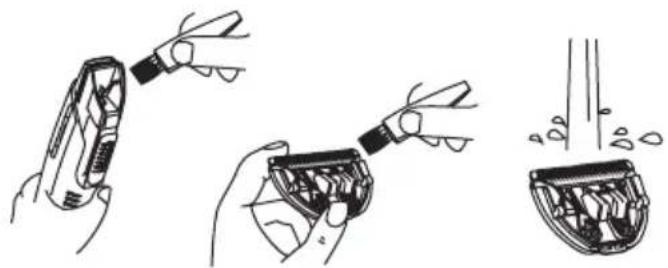
Illustration of hands holding a mechanical component, showing two views (no text or symbols)- Remove any remaining hair from the head of the hair clippers and the removed cutter block using the cleaning brush. Then the cutter block can be rinsed under running water. Dry the cutter block thoroughly after cleaning. Work carefully to avoid damaging the cutter block.
natural_image
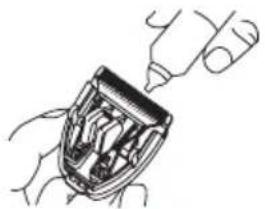
Illustration showing three steps of a tool application: adding a component, adding a component into a container, and adding a final container with liquid (no text or symbols present)- To ensure free movement of the cutter block, it must be oiled after cleaning. To do so, apply a few drops of blade oil to the blades of the cutter block.
natural_image
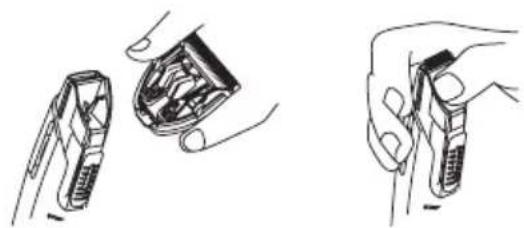
Line drawing of a hand inserting a small object into a device (no text or symbols)- Now reinstall the cutter block into the head of the hair clippers:
-
Set the cutter block onto the head of the hair clippers from above so that the guide lug of the cutter block engages in the groove on the head.
-
Push the cutter block into the head until it engages audibly and fits securely.
natural_image
Illustration of three hand gestures: holding a flip set, adjusting the internal structure, and opening a device (no text or symbols present)The cutter block of the hair clippers is subject to constant wear resulting from use. To reduce this wear to a minimum and keep the blades sharp, the cutter block should be cleaned and oiled after every use.
Storing the device when not in use
If the hair clippers are not going to be used for a long period of time, clean as described in the ‘Cleaning’ section.
To help maintain the battery performance, you should charge it at regular intervals. Store the hair clippers in a clean, cool, dry place.
TROUBLESHOOTING
| Problem Reason Solution | ||
| The hair clippers do not seem to be working | The built-in battery is empty. Charge the battery. | · Ensure that the power socket into which the mains adapter is plugged is receiving power.· Try another power socket which is definitely receiving power. |
| The cutting results are not satisfactory | The cutter block is dirty and/or not moving freely. | · Clean and oil the cutter block as described in the ‘Cleaning’ section. |
| The vacuum function is not working properly | How well the vacuum function works largely depends on the length of the cut hair.It works best with short stubble. | · The cut hair may be too long for the vacuum function. Cut the hair in several stages if necessary.· The shorter the hair clippings are, the more effectively the vacuum function works.· The hair reservoir is full. Empty it before using the hair clippers. |
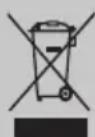
In compliance with Directives: 2012/19/EU and 2015/863/EU on the restriction of the use of dangerous substances in electric and electronic equipment as well as their waste disposal. The symbol with the crossed dustbin shown on the package indicates that the product at the end of its service life shall be collected as separate waste. Therefore, any products that have reached the end of their useful life must be given to waste disposal centres specialising in separate collection of waste electrical and electronic equipment, or given back to the retailer at the time of purchasing new similar equipment, on a one for one basis. The adequate separate collection for the subsequent start-up of the equipment sent to be recycled, treated and disposed of in an environmentally compatible way contributes to preventing possible negative effects on the environment and health and optimises the recycling and reuse of components making up the apparatus. Abusive disposal of the product by the user involves application of the administrative sanctions according to the laws.
natural_image
Simple line drawing of a comb with no text or symbols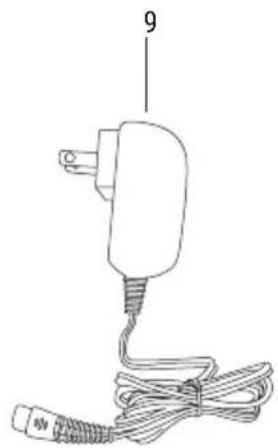
natural_image
Line drawing of a small electric plug with attached wires and a terminal connector (no text or symbols)natural_image
Hand inserting a small black tool into a device component (no text or symbols visible)natural_image
Illustration of hands holding a mechanical component, showing internal structure and assembly (no text or symbols)natural_image
Illustration of three-step cleaning process: tool application, mechanical assembly, and final inspection (no text or symbols)natural_image
Line drawing of a robotic hand holding a mechanical component (no text or symbols)natural_image
Three hand-drawn illustrations showing a device being handled, with no visible text or symbols.natural_image
Simple line drawing of a comb with no text or symbols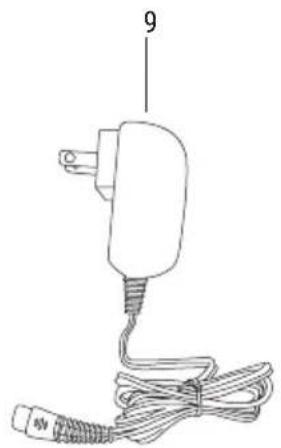
natural_image
Line drawing of a small electric plug with attached wires and a terminal block (no text or symbols)natural_image
Hand inserting a black cable into a device component (no text or symbols visible)natural_image
Illustration of hands holding a mechanical component, showing internal structure and assembly (no text or symbols)natural_image
Illustration of three-step cleaning process: tool application, internal inspection, and final inspection (no text or symbols)natural_image
Line drawing of a hand holding a device with internal components (no text or symbols)natural_image
Illustration of three hand gestures: holding a device, opening a device with internal components, and holding a tool (no text or symbols)natural_image
Simple line drawing of a comb with no text or symbols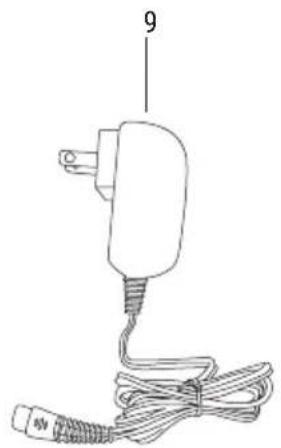
natural_image
Line drawing of a small electric plug with attached wires (no text or symbols)natural_image
Illustration of a hand pressing down on a device component with arrows indicating motion (no text or symbols)natural_image
Hand inserting a small component into a device housing (no text or symbols visible)natural_image
Illustration of hands holding a mechanical tool, showing internal components and assembly (no text or symbols)natural_image
Illustration of three-step cleaning process: tool, mechanical component, and final view (no text or symbols)natural_image
Line drawing of a hand holding a small mechanical component (no text or symbols)natural_image
Illustration of three hand gestures: holding a flipstick, opening a socket, and opening a screwdriver (no text or symbols)natural_image
Simple line drawing of a comb with no text or symbols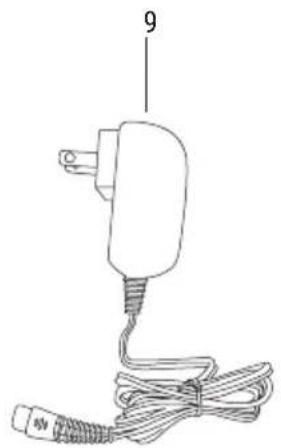
natural_image
Line drawing of a small electric plug with attached wires and a terminal connector (no text or symbols)natural_image
Illustration of a hand pressing down on a device component with arrows indicating motion (no text or symbols)natural_image
Hand inserting a black screw into a mechanical component (no text or symbols visible)natural_image
Illustration of hands holding a mechanical component, showing internal structure and assembly (no text or symbols)natural_image
Illustration of three-step cleaning process: tool tip, mechanical part with internal structure, and final cross-section (no text or symbols)natural_image
Line drawing of a hand holding a device with internal components (no text or symbols)natural_image
Three line drawings showing hands holding and adjusting a device component (no text or symbols)natural_image
Line drawing of a comb with no text or symbols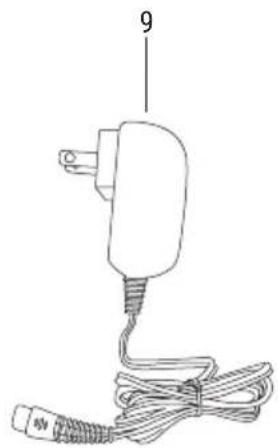
natural_image
Line drawing of a small electric plug with attached wires and a terminal connector (no text or symbols)natural_image
Hand inserting a small component into a device housing (no text or symbols visible)natural_image
Illustration of hands holding a mechanical component, showing internal structure and assembly (no text or symbols)natural_image
Illustration of three-step cleaning process: tool, mechanical part, and final bowl (no text or symbols)natural_image
Illustration of a hand inserting a device into a device housing (no text or symbols visible)natural_image
Illustration of three hand gestures: folding a device, holding a tray, and opening a device (no text or symbols present)natural_image
Simple line drawing of a comb with no text or symbols
natural_image
Line drawing of a small electric plug with attached wires (no text or symbols)- Péén accessoire
- Creinigingsborstel
- Anetwerkadapter