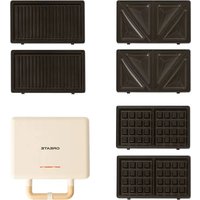
Stone Studio - Croque monsieur clip Create - Free user manual and instructions
Find the device manual for free Stone Studio Create in PDF.


| Product type | Sandwich/waffle maker |
| Brand | Create |
| Model | Stone Studio |
| Power supply | Electric (mains) |
| Functions | Cooking sandwiches, waffles and grills |
| Plates included | Grill, waffle, sandwich plates (interchangeable) |
| Safety lock | Yes |
| Closing handle | Yes |
| Plate release button | Yes |
| On/off button | Yes |
| Cooking surface | Non-stick |
| Indicator light | Indicates when temperature is reached (turns off after preheating) |
| Preheating time | Approximately 5 minutes |
| Cooking temperature | Maximum after preheating (not specified) |
| Maintenance | Clean with a damp cloth |
| Caution | Do not immerse in water |
| Do not use metal utensils | Yes, to preserve the non-stick surface |
| Spare parts | Replaceable plates |
| Assistance in case of breakdown | Contact the point of sale |
| Compliance | EU Directives 2012/19/EU and 2015/863/EU |
| Use by persons with reduced capacity | Requires supervision by a responsible adult |
Frequently Asked Questions - Stone Studio Create
User questions about Stone Studio Create
0 question about this device. Answer the ones you know or ask your own.
Ask a new question about this device
Download the instructions for your Croque monsieur clip in PDF format for free! Find your manual Stone Studio - Create and take your electronic device back in hand. On this page are published all the documents necessary for the use of your device. Stone Studio by Create.
USER MANUAL Stone Studio Create
Security instructions 6
Parts list 7
Instructions for use 8
Plate exchange 8
Cleaning and maintenance 8
PORTUGUES
Thank you for choosing our sandwich/waffle maker. Before using the appliance, and to ensure the best use, carefully read these instructions.
The safety precautions enclosed herein reduce the risk of death, injury and electrical shock when correctly adhered to. Keep the manual in a safe place for future reference, along with the completed warranty card, purchase receipt and package. If applicable, pass these instructions on to the next owner of the appliance. Always follow basic safety precautions and accident prevention measures when using an electrical appliance. We assume no liability for customer failing to comply with these requirements.
SECURITY INSTRUCTIONS
When using any appliance, basic safety measures must be respected at all times:
- Please read this manual carefully before using the product.
- Do not move the sandwich maker while it is in use.
- Do not allow children to use this product without adult supervision.
- Keep the appliance and its cord out of the reach of children.
- Place the sandwich maker on a stable and level table or surface for proper use.
- Keep it away from any source of fire, flammable or explosive product, and even from an electric oven.
- Do not use this product outdoors.
- Do not touch the plates of the sandwich maker or the heat zones during operation of the appliance before the surface cools down. Touch the handle when the temperature has dropped to avoid burns.
- The cooking tray of this product has a non-stick surface for easy cleaning. Therefore, do not use metal or abrasive utensils to clean the inside or outside of the appliance, or cook cakes to prevent residue from sticking to the surface of the plates.
- Unplug the sandwich maker after each use. Do not unplug by pulling on the cord, pull on the plug.
- To ensure safety, please do not disassemble the sandwich maker by yourself. In the event of any failure, contact your point of sale again to have it checked or repaired by a professional.
-
If the power cord is damaged, it must be replaced by the manufacturer, one of its agents, or a qualified person to prevent damage.
-
The temperature of accessible surfaces may be higher when the appliance is in operation.
- This appliance is not intended for use by persons (including children) with reduced physical, sensory or mental capabilities, or lack of experience or knowledge, unless they are supervised by a person responsible for their safety or who has been trained to do so. Use the device safely.
- This sandwich maker is not designed to be operated via an external timer or other remote control system.
- This electrical appliance contains a heating function. Surfaces, even those that do not have a cooking function, can reach high temperatures
- This appliance should be used with caution as each person perceives temperatures differently. Only specifically designed handles and gripping surfaces should be touched and heat protections such as gloves and other utensils should be used. To be able to touch the rest of the surfaces safely, you must wait a reasonable time until they cool down.
PARTS LIST
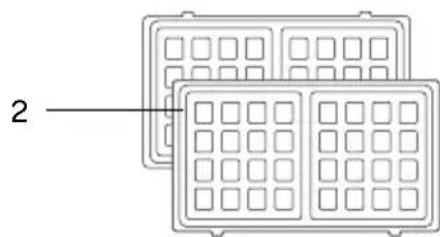
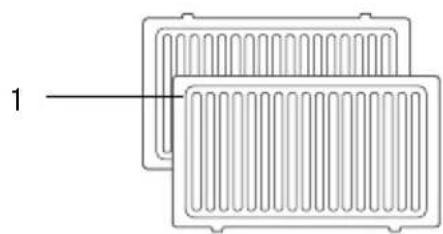
- Grill plates
- Waffle plates
-
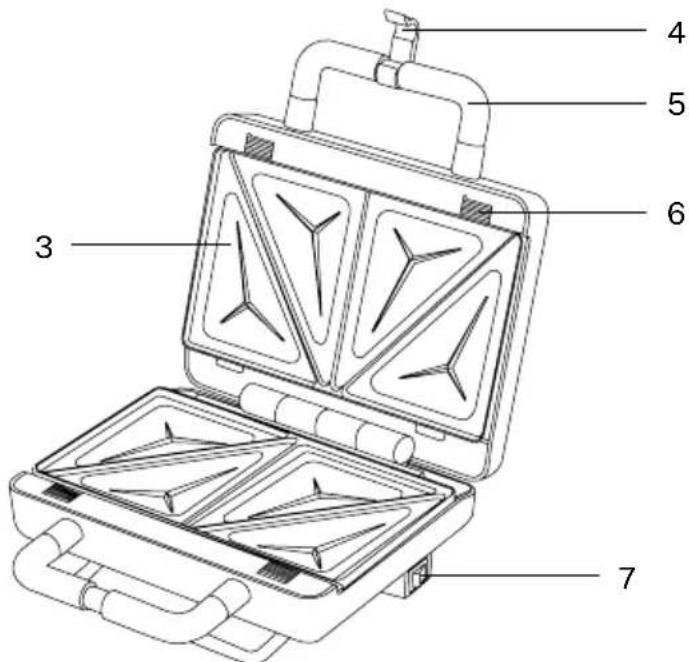
Sandwich plates
-
Safety lock
-
Closing handle
-
Plate release button
-
On/off switch
-
Choose the cooking plate you are going to use and insert it into the sandwich maker.
- Plug the sandwich maker into the power outlet and press the on/off button on the side of the product. The light will turn on and the sandwich maker will begin to heat.
- After 5 minutes the light will turn off to indicate that the sandwich maker has reached the maximum cooking temperature.
Note: The cooking surface will be hot, be careful.
- Place the ingredients on the plate, if you wish you can add a little oil depending on what you are going to cook or your personal preference.
- Close the lid and lock the handle to cook the ingredients.
ATTENTION. In the first uses this product may give off a slight odor and some smoke. Do not worry, it is something temporary and harmless. Make sure there is enough ventilation.
- After 3 minutes the light will turn on and off to indicate that the sandwich maker is holding at cooking temperature. The sandwich maker can continue cooking depending on your personal tastes or the recipe you are going to prepare.
- Take the food out when it has reached your chosen level of doneness.
Note: Be careful when you take the food out as it will be hot. Wait a few minutes for it to cool down a bit before eating it.
- Press the on/off button to turn off the sandwich maker. Unplug the power cord after cooking and allow the sandwich maker to cool down before moving, cleaning, or storing.
PLATE EXCHANGE
- Before replacing the plates, make sure they are completely cool.
- Press the plate release buttons.
- Once the tabs of the plate are pressed, they will be released and you will be able to extract it correctly.
- When inserting the desired plates, make sure they are properly installed and locked.
CLEANING AND MAINTENANCE
- Unplug the appliance after use and wait for it to cool down, then wipe the inside of the cooking tray with a damp cloth and make sure the appliance is left clean. You can also remove the cooking plate once it cools down to clean it.
- You can also clean the outer surface with a damp cloth.
- Do not rinse the sandwich maker by immersing it in water to avoid electrical currents or any other problem.
In compliance with Directives: 2012/19/EU and 2015/863/EU on the restriction of the use of dangerous substances in electric and electronic equipment as well as their waste disposal. The symbol with the crossed dustbin shown on the package indicates that the product at the end of its service life shall be collected as separate waste. Therefore, any products that have reached the end of their useful life must be given to waste disposal centres specialising in separate collection of waste electrical and electronic equipment, or given back to the retailer at the time of purchasing new similar equipment, on a one for one basis. The adequate separate collection for the subsequent start-up of the equipment sent to be recycled, treated and disposed of in an environmentally compatible way contributes to preventing possible negative effects on the environment and health and optimises the recycling and reuse of components making up the apparatus. Abusive disposal of the product by the user involves application of the administrative sanctions according to the laws.
Brand : Create
Model : Stone Studio
Category : Croque monsieur clip