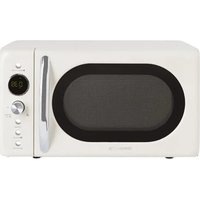
Microwave Retro - Microwave Oven Create - Free user manual and instructions
Find the device manual for free Microwave Retro Create in PDF.


| Brand | Create |
| Model | Microwave Retro |
| Product type | Microwave oven with grill function |
| Power | 6 power levels (100%, 80%, 60%, 40%, 20%, 0%) |
| Main functions | Microwave, Grill, Combi 1 and 2, Defrost by time or weight, 9 auto menus, Quick start, Clock, Child lock |
| Control panel | Rotary knob and touch keys |
| Display | LED screen |
| Turntable | Glass plate included |
| Included accessories | Glass plate, metal rack, rotating ring |
| Safety | Door safety lock, grounding, microwave protection |
| Maintenance | Clean with a damp cloth; plate and ring dishwasher safe |
| Repairability | Professional service only |
| Child lock | Automatic after 1 minute of inactivity |
| Standby mode | Automatic after 20 minutes, power consumption < 0.8 W |
Frequently Asked Questions - Microwave Retro Create
User questions about Microwave Retro Create
0 question about this device. Answer the ones you know or ask your own.
Ask a new question about this device
Download the instructions for your Microwave Oven in PDF format for free! Find your manual Microwave Retro - Create and take your electronic device back in hand. On this page are published all the documents necessary for the use of your device. Microwave Retro by Create.
USER MANUAL Microwave Retro Create
natural_image
Simple line drawing of a microwave oven with control panel and buttons (no text or symbols)Microwave Retro
User manual | Manual de instrucciones
CREATE CREATE CREATE ATE CREATE CREATE CRE CREATE CREATE CREATE ATE CREATE CREATE CRE CREATE CREATE CREATE ATE CREATE CREATE CRE CREATE CREATE CREATE CREATE CREATE CREATE CREATE CREATE CREATE CREATE CREATE CREATE CREATE CREATE CREATE CREATE CREATE CREATE ATE CREATE CREATE CRE CREATE CREATE CREATE ATE CREATE CREATE CRE CREATE CREATE CREATE ATE CREATE CREATE CRE CREATE CREATE CREATE ATE CREATE CREATE CRE CREATE CREATE CRE CREATE CREATE CRE CREATE CREATE CRE CREATE CREATE CRE CREATE CREATE CRE CREATE CREATE CRE
CREATE CREATE CREATE ATE CREATE CREATE CRE CREATE CREATE CREATE ATE CREATE CREATE CRE CREATE CREATE CREATE ATE CREATE CREATE CRE CREATE CREATE CREATE ATE CREATE CREATE CRE CREATE CREATE CREATE ATE CREATE CREATE CRE CREATE CREATE CREATE CREATE CREATE CREATE CREATE CREATE CREATE CREATE CREATE CREATE CREATE CREATE CREATE CREATE CREATE CREATE CREATE CREATE CREATE CREATE CREATE CREATE CREATE CREATE CREATE CREATE CREATE CREATE
INDEX
ENGLISH
Security instructions 6
Parts list 9
Installation Guide 9
Grounding instructions 10
Radio interference 10
Before calling technical service 10
Cooking techniques 11
Kitchen Utensils Guide 11
Control Panel 12
How to use 12
Cleaning and care 16
PORTUGUÊS
Installationshandbuch 64
Erdungshinweise 65
Funkstörungen 65
Thank you for choosing our microwave. Before using this appliance and to ensure its best use, please read the instructions carefully.
The safety precautions listed here reduce the risk of fire, electric shock, and injury when followed correctly. Please keep the manual in a safe place for future reference, as well as the warranty, sales receipt and box. If applicable, give these instructions to the future owner of the appliance. Always follow basic safety instructions and risk prevention measures when using an electrical appliance. The manufacturer will not be held responsible for any damage resulting from the failure of the user to follow these instructions.
SECURITY INSTRUCTIONS
When using any electrical appliance, the following basic safety precautions should always be observed.
- Use this appliance only for its intended use as described in this manual.
- This product is specifically designed to heat or cook food for domestic use. It is not intended for commercial, industrial, or laboratory use.
- Do not operate the microwave when it is empty.
- Do not use this appliance if the cord or plug is damaged, if it is not working properly, or if the microwave has been damaged or dropped. If the cord is damaged, it must be replaced by the manufacturer, a service agent, or a qualified person to prevent any damage.
- Microwaving beverages can cause delayed boiling, so care should be taken when handling the container.
- Do not use the microwave to fry food. Hot oil can damage the product's parts and utensils and even cause skin burns.
- Shell eggs and whole hard-boiled eggs should not be heated in microwave ovens, as they may explode even after heating is complete.
- Pierce foods with thick skins such as potatoes, whole squash, apples, and chestnuts before cooking.
- The contents of feeding bottles and baby jars should be shaken or stirred and the temperature checked before serving to avoid burns.
- This appliance is not intended for use by persons (including children) with reduced physical, sensory or mental capabilities, or lack of experience and knowledge, unless they have been given supervision or instruction concerning use of the appliance by a person responsible for their use. security.
- Children must be supervised to ensure that they do not play with the appliance.
- Cleaning and user maintenance must not be carried out by children unless they are over 8 years of age and supervised.
- Small children should be kept away from the microwave.
- The microwave is only used independently, it is not suitable for built-in use.
• The microwave must not be placed in a cupboard. - The door or the outer surface may become hot when the appliance is in operation.
- Utensils should be checked before use to ensure they are suitable for use in the microwave.
- During use, microwaves get hot. Care should be taken not to touch the heating elements inside the microwave.
- The temperature of the accessible surfaces may be high when the microwave is in operation.
- Do not use corrosive chemicals or vapors in this appliance.
- This microwave is not designed to be operated by means of an external timer or separate remote control.
- Never remove the spacer bracket from the back or sides, as it ensures a minimum distance from the wall for air circulation.
- Secure the turntable before moving the microwave to prevent damage.
Caution: It is dangerous for the user to repair or perform maintenance. They should only be performed by a specialist because in these circumstances the cover must be removed, which ensures protection against microwave radiation. This also applies to changing the power cord or lighting. Send the device in these cases to our service center.
- The microwave oven is designed for defrosting, cooking and steaming food only.
- Wear gloves if you remove any hot food.
- Use extra caution when opening lids or unwrapping aluminum foil as steam will escape and could burn you.
- If smoke is emitted, turn off or unplug the appliance and keep the door closed to smother the flames.
Avoid possible exposure to excessive microwave energy:
- Do not attempt to operate the oven with the door open, as use with the door open may result in harmful exposure to microwave energy. It is important not to defeat or tamper with security systems.
- Do not place any objects between the front face of the oven and the door or allow dirt or cleaner residue to accumulate on the sealing surfaces.
- The oven should not be adjusted or repaired by anyone except qualified personnel. Do not use the oven if it is damaged.
- It is very important that the oven door closes properly and that there is no damage to the door (including dents), hinges and latches (broken or loose), door seals, and sealing surfaces.
Reduce the risk of fire inside the oven:
- When heating food in plastic or paper containers, keep an eye on the oven as they can catch fire.
- Remove wire ties from paper or plastic bags before placing a bag in the oven.
- If you see smoke, turn off or unplug the appliance and keep the door closed to smother the flames.
- Do not use the interior of the oven for storage purposes. Do not leave paper products, kitchen utensils, or food inside when not in use.
- The microwave oven is designed to heat food and drinks. Drying clothing and heating heating pads, slippers, sponges, damp cloths, and the like may create a risk of injury, ignition, or fire.
- This product is a Group 2 Class B ISM equipment. The definition of Group 2, which contains all ISM (industrial, scientific and medical) equipment in which radio frequency energy is intentionally generated or used in the form of electromagnetic radiation for material treatment and EDM equipment. In the case of Class B equipment, it is equipment suitable for use in domestic installations and in establishments directly connected to a low voltage power supply network that supplies buildings used for domestic purposes.
Warnings:
- Liquids or other foods should not be heated in sealed containers, as they may explode.
- Do not install the microwave on a stove or other appliance that produces heat. If installed, it could be damaged and void the warranty.
- Accessible parts may become hot during use.
- If the door or door seal is damaged, the oven must not be used until it has been repaired by a competent person.
PARTS LIST
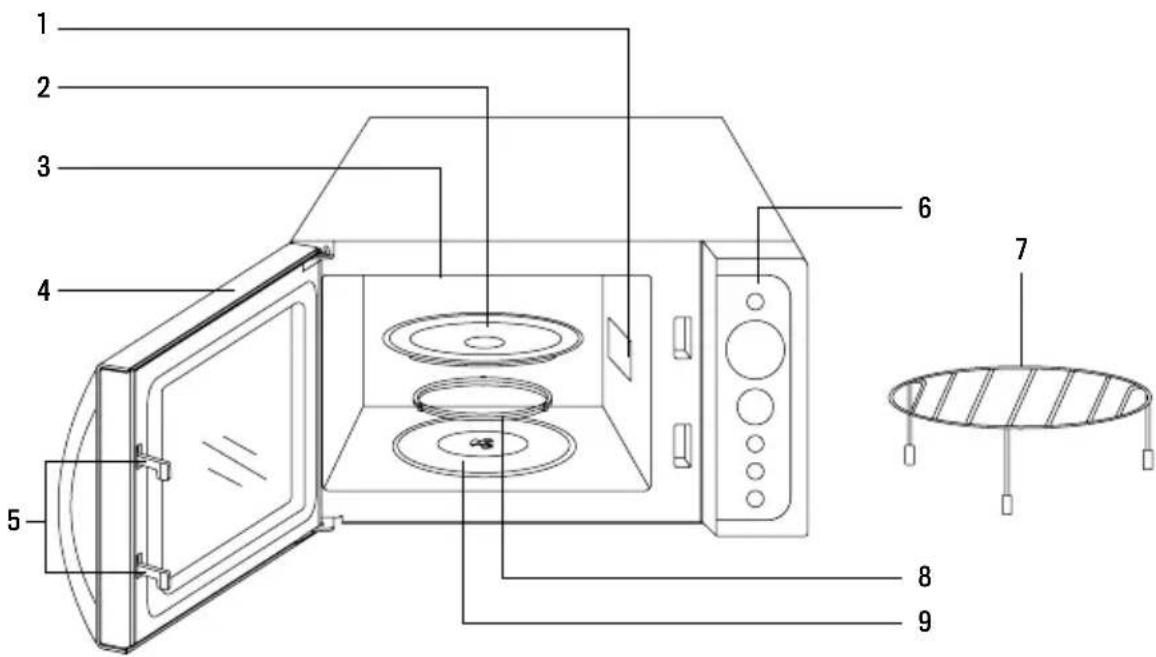
-
Waveguide (do not remove the mica plate covering the waveguide)
-
Glass tray
-
Grill
-
Door
-
Door security locking system
-
Control Panel
-
Metal grill for cooking
-
Rotating ring
-
Axis
INSTALLATION GUIDE
- Be sure to remove all packing materials from inside the door.
Warning: Check the microwave for damage, such as a misaligned or bent door, damaged door seals and sealing surface, broken or loose door hinges and latches, and dents inside the cavity or on the door. If there is any damage, do not use the microwave and contact qualified service personnel.
- This microwave should be placed on a flat, stable surface to support its weight and the heavier foods that may be cooked in the oven.
- Do not place the microwave where heat or moisture is generated, or near combustible materials.
- For proper operation, the microwave must have sufficient airflow. Leave a minimum of 20 cm of free space required above the top surface of the microwave and 5 cm on both sides. The back plate of the microwave should be placed close to the wall. Do not cover or block any openings on the appliance. Do not remove the legs.
- Do not use the microwave without the glass plate, support and shaft in their correct positions.
- Make sure the power cord is not damaged and does not pass under the microwave or over any hot or sharp surfaces.
- The plug should be easily accessible so that it can be easily unplugged in an emergency.
- Do not use the microwave outdoors.
- This appliance must be connected to a grounded outlet. The microwave is equipped with a power cord having a grounding wire and plug. It must be plugged into a wall outlet that is properly installed and grounded. In the event of an electrical short circuit, grounding reduces the risk of electric shock by providing an escape wire for the electric current. It is recommended that a separate circuit be provided serving only the oven. Using high voltage is dangerous and may cause a fire or other accident that may damage the microwave.
Warning: Improper use of the grounded plug may result in a risk of electric shock.
Note:
- If you have any questions regarding grounding or electrical instructions, consult a qualified electrician or serviceman.
- Neither the manufacturer nor the distributor can accept any responsibility for damage to the microwave or personal injury resulting from failure to comply with electrical connection procedures.
- The wires are colored according to the following code: Green and yellow = Ground / Blue = Neutral / Brown = Phase
RADIO INTERFERENCE
Microwave operation may cause interference to your radio, television or similar equipment. When interference occurs, it can be reduced or eliminated by taking the following measures:
- Clean the door and sealing surface of the microwave.
- Reorient the receiving antenna of the radio or television.
- Relocate the microwave relative to the receiver.
- Move the microwave away from the receiver.
- Plug the microwave into a different outlet so that the microwave and receiver are on different branch circuits.
BEFORE CALLING TECHNICAL SERVICE
Before calling for technical support, check the following aspects:
- Check that your microwave is plugged in properly. If not, remove the plug from the outlet, wait 10 seconds, and plug it back in.
- Check that no fuse has blown or that the main power switch has tripped. If everything seems to be working normally, check the outlet with another appliance.
- Make sure the control panel and timer have been programmed correctly.
- Check that the door closes properly by checking the safety locking system. If the door is not closed properly, the microwave energy will not operate inside.
If none of the above resolves the problem, contact a qualified technician. Do not attempt to adjust or repair the microwave yourself.
- Place the food carefully, with the thickest parts facing the edges of the plate.
- Be careful with cooking time. Cook your food in the shortest time indicated and add more if needed. Overcooked food may smoke or catch fire.
- Cover food while cooking. Covering it prevents splatters and helps the food cook evenly.
- Rotate food while cooking in the microwave to speed up cooking of foods such as chicken or burgers. Large dishes such as roasts should be turned at least once. Stir meatballs or similar dishes halfway through cooking to ensure even heating.
KITCHEN UTENSILS GUIDE
- Microwaves do not pass through metal. Use only utensils suitable for microwave use. Metal containers for food and drinks cannot be used during microwave cooking. Use only metal containers of the size and shape specified by the manufacturer that are suitable for microwave cooking.
- Metal utensils or plates with metal edges should not be used.
- Do not use recycled paper products for microwave cooking as they may contain small metal fragments that can cause fires or sparks.
- It is recommended to use round or oval plates instead of square or elongated ones since food tends to overcook.
- Narrow strips of aluminum foil can be used to prevent overcooking of exposed areas. But be careful not to use too much and keep a distance of at least 2.5 cm between the paper and the inside walls of the microwave.
- The following list is a general guide to help you select the appropriate utensils:
| KITCHEN UTENSIL MICROWAVE GRILL COC. COMBINED | |||
| Heat resistant glass Yeah Yeah Yeah | |||
| Non heat resistant glass No No No | |||
| Heat resistant ceramic Yeah Yeah Yeah | |||
| Microwave-safe plastic plate | Yeah | No | No |
| Kitchen paper | Yeah | No | No |
| Metal tray | No | Yeah | No |
| Metal shelf | No | Yeah | No |
| Aluminum foil and aluminum foil packaging | No | Yeah | No |
CONTROL PANEL
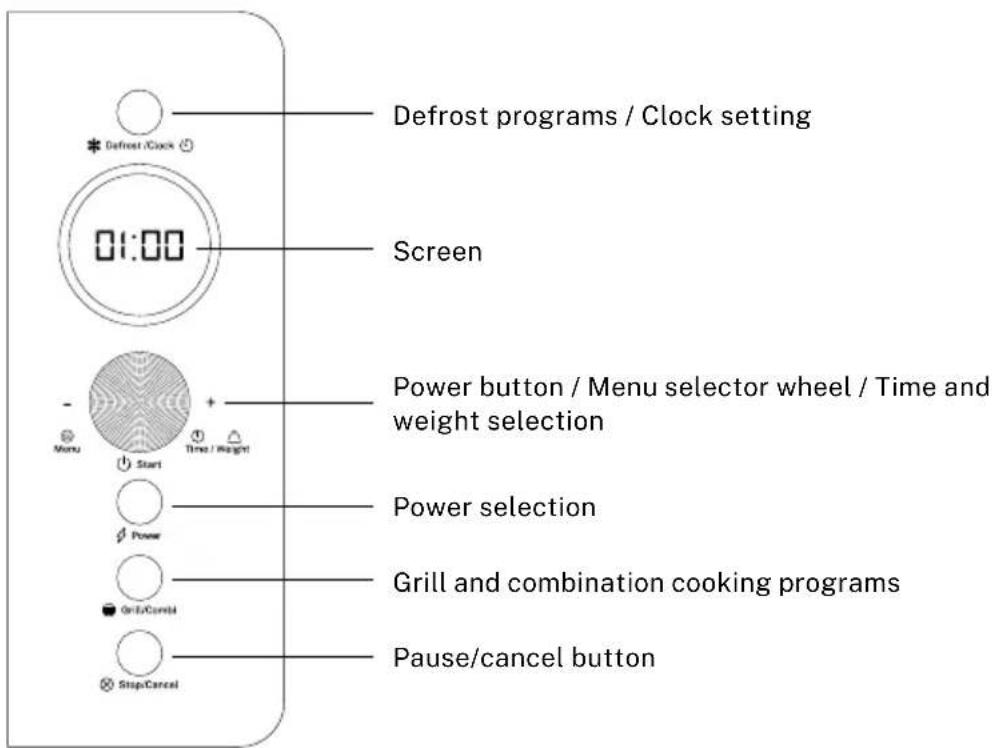
HOW TO USE
- When you plug the microwave in for the first time, you will hear a beep and the display will show "1:00" and a clock symbol.
- During setting mode, the system will return to standby mode if no action is taken within 20 seconds.
- When cooking is complete, the system will beep several times every two seconds to remind the user until any button is pressed or the door is opened.
- For all cooking modes whose time is longer than 2 minutes, when the door is opened or the program is stopped, the oven fan will continue to run for 3 minutes automatically to cool down the oven and prolong the life of the oven.
- The display shows cooking time, modes, power indicators and time. When the microwave is not in use it will display the set time.
SETTING THE CLOCK
- When the microwave is in standby mode, press and hold the DEFROST/CLOCK button for 3 seconds to choose the 12-hour clock. If you want the 24 hour clock, press the button again.
- Turn the MENU/TIME/WEIGHT dial to the right to set the hour.
- Press the DEFROST/CLOCK button to confirm.
- Turn the MENU/TIME/WEIGHT dial to the right to set the minutes.
- Press the DEFROST/CLOCK button again to confirm.
Note: If you want to check the current time during cooking, press the DEFROST/CLOCK button.
QUICK MODE
- Pressing the MENU/TIME/WEIGHT selector knob will start the microwave's quick start program. The time of 30 seconds will be displayed on the screen and the microwave will automatically start working at maximum power.
- If you press the MENU/TIME/WEIGHT selector wheel several times, the time will increase by 30 seconds. Once you stop pressing, the microwave will start working automatically.
- The maximum time you can select is 10 minutes.
SELECT TIME
- In standby state, turn the MENU/TIME/WEIGHT selector knob repeatedly to adjust the cooking time. The maximum time is 10 minutes.
- Press the selector knob to start the microwave at maximum power.
POWER
- To select the microwave power press the POWER button. This microwave has 6 different power settings.
- Once the power has been selected, turn the MENU/TIME/WEIGHT selector knob to the right to set the desired time. The maximum cooking time is 60 minutes.
- The oven will start working after pressing the selector knob.
| POWER BUTTON PRESSES COOKING POWER | |
| 1 time 100 % | |
| 2 times 80 % | |
| 3 times 60 % | |
| 4 times 40 % | |
| 5 times 20 % | |
| 6 times 0 % | |
Note: During cooking, you can check the current cooking power by pressing the POWER button.
DEFROST
With the DEFROST program you can defrost meat, fish and seafood. You can choose to defrost by time or by weight.
- DEFROST BY TIME
- In standby mode, press the DEFROST/CLOCK button once to use the time defrost program.
- Then select the desired time by turning the selector wheel to the right. The maximum time is 60 minutes.
- Press the selector wheel to start cooking.
• DEFROST BY WEIGHT
- In standby mode, press the DEFROST/CLOCK button twice to use the weight defrost program.
- Then select the desired weight using the selector wheel. The weight range of frozen food varies between 100 and 1800 g.
- Press the wheel to start.
Note: During the defrost program, the system will pause and beep several times as a reminder for the user to turn the food. Press the MENU/TIME/WEIGHT selector to reset it.
PRESET MENU
This microwave has 9 preset automatic cooking menus.
- To select the menu you wish to use, turn the MENU/TIME/WEIGHT selector knob to the left to select a food category or cooking mode.
-
Press the selector wheel to select the menu and then turn to the right to indicate the weight of the food to be cooked.
-
Press the wheel to start.
- The result of automatic cooking depends on external factors such as fluctuations in power supply, the shape and size of the food, your personal taste in terms of the degree of cooking of the food and even the way you arrange the food on the plate. If you are not satisfied with the result, try adjusting the cooking time a little longer.
| Menu Ingredients Quantity / min. | |||
| A-1 | Heat Milk / Coffee (200 ml/cup) | 11:40 | |
| 23:00 | |||
| 34:20 | |||
| A-2 Cooking rice | 150 g 21:00 | ||
| 300 g 24:00 | |||
| 450 g 27:00 | |||
| 600 g 30:00 | |||
| A-3 Cooking pasta | 100 g 25:00 | ||
| 200 g 30:00 | |||
| 300 g 35:00 | |||
| A-4 | Cooking pota-toes (230 g/unit) | 106:00 | |
| 210:00 | |||
| 314:00 | |||
| A-5 Reheat | 200 g 02:00 | ||
| 300 g 02:40 | |||
| 400 g 03:20 | |||
| 500 g 04:00 | |||
| 600 g 04:40 | |||
| 700 g 05:20 | |||
| 800 g 06:00 | |||
| Menu Ingredients Quantity / min. | |||
| A-6 | Cook fish | 200 g 04:00 | |
| 300 g 05:20 | |||
| 400 g 06:40 | |||
| 500 g 08:00 | |||
| 600 g 09:20 | |||
| A-7 | Heat up pizza | 150 g | 01:00 |
| 300 g 01:30 | |||
| 450 g 02:00 | |||
| A-8 | Popcorn of corn | 99 g | 03:10 |
| A-9 | Toasts (Baking tray/ unit) | 102:40 | |
| Note: For milk/coffee, potatoes or toast menus the display shows the number of servings instead of the weight. | |||
GRILL/COMBI
• COOKED WITH GRILL
Grilling is particularly useful for thin steaks, chops, kebabs, sausages and chicken pieces.
- Press the GRILL/COMBI button once to access the grill cooking function.
- Turn the MENU/TIME/WEIGHT selector knob to the right to set the desired time. The maximum preset time is 60 minutes.
- Press the MENU/TIME/WEIGHT knob to confirm and the microwave will start working.
• COMBINED COOKING 1
This mode is predominantly used for grilling, combined with micro-grilling. It is usually used for fish or gratins.
- Press the GRILL/COMBI button twice to select COMBI-1 mode.
- Turn the MENU/WEIGHT/TIME selector knob to the right to set the cooking time. The maximum time is 60 minutes.
- Press the MENU/TIME/WEIGHT knob to confirm and the microwave will start working.
• COMBINED COOKING 2
This mode is predominantly used for microwave cooking, combined with grilling. It is usually used for desserts, omelettes, baked potatoes and poultry.
- Press the GRILL/COMBI button three times to select COMBI-2 mode.
- Turn the MENU/TIME/WEIGHT selector knob to the right to set the cooking time. The maximum time is 60 minutes.
- Press the MENU/TIME/WEIGHT knob to confirm and the microwave will start working.
Note: Quick start, defrost and preset menu programs cannot be used with combination cooking programs.
STOP/CANCEL
- Press the STOP/CANCEL button to cancel the power level, cooking or defrosting times that have been previously programmed.
- During cooking, if you press the STOP/CANCEL button once or open the door, the program will pause. Press the MENU/TIME/WEIGHT selector knob to resume cooking.
- Press the STOP/CANCEL button twice to cancel the selected program.
ACTIVATE CHILD LOCK
The lock prevents children from using the microwave when unsupervised.
- Activate the lock: In standby mode, if no operation is performed for 1 minute, the oven will enter child lock state automatically. During this mode, no buttons on the microwave oven will function. A padlock will appear on the screen.
- Disable lock: When the microwave is in lock mode, open and close the door once to deactivate it.
STANDBY MODE
The microwave automatically enters standby mode after 20 minutes of non-use. In this state, when connected to the mains, the appliance has a power consumption of less than 0.8W. To optimise energy consumption, we recommend disconnecting the microwave from the mains after each use.
- Turn off the microwave and unplug it from the outlet before cleaning.
- Keep the inside of the microwave clean. When liquids have been splashed or spilled and stained the interior walls, wipe with a damp cloth. Mild soaps can be used if the appliance becomes very dirty. Avoid using spray or other harsh cleaners. They can leave stains or scratches on the surface of the door or make it look dull.
- The exterior of the microwave should be cleaned with a damp cloth. To avoid damage to the functional parts inside, you should not allow water to enter through the ventilation slots.
- Frequently wipe the door and door glass on both sides, door seals and adjacent parts with a damp cloth to remove splashes. Do not use abrasive cleaners.
- Do not allow the control panel to get wet. Clean it with a soft, damp cloth. When cleaning the control panel, leave the microwave door open to prevent it from turning on accidentally.
- If steam accumulates inside or around the appliance door, wipe it with a soft cloth. This can occur when the microwave is operated under high humidity conditions. It is a normal phenomenon.
- Sometimes it is necessary to remove the glass tray for cleaning. Wash the tray in warm, soapy water or in a dishwasher.
- The rotating ring and the inner base of the microwave should be cleaned regularly to avoid excessive noise. Simply clean the bottom surface with mild soap. The rotating ring should be washed in soapy water with a mild soap or in a dishwasher. When removing the rotating ring, be sure to return it to the correct position.
- Remove odors from your microwave with a combination of water and the juice or peel of a lemon in a microwave-safe container. Heat it for 5 minutes and then wipe the inside with a cloth and dry it.
- If the interior bulb burns out, please contact customer service for replacement.
- The microwave should be cleaned regularly. Remove any food residue from the inside. Poor maintenance and cleaning can result in deterioration of surfaces, which could negatively affect the life of the appliance and this deterioration could result in dangerous situations.
- Do not dispose of the appliance in household waste; it must be deposited in the disposal centres authorised for this purpose by your municipality.
- When the microwave with grill function is used for the first time, some smoke or strange smell may be produced. This is a normal phenomenon, because the microwave is made of a steel plate covered with lubricating oil, and smoke and odor are generated by burning the lubricating oil. This phenomenon will disappear after several uses.
In compliance with Directives: 2012/19/EU and 2015/863/EU on the restriction of the use of dangerous substances in electric and electronic equipment as well as their waste disposal. The symbol with the crossed dustbin shown on the package indicates that the product at the end of its service life shall be collected as separate waste. Therefore, any products that have reached the end of their useful life must be given to waste disposal centres specialising in separate collection of waste electrical and electronic equipment, or given back to the retailer at the time of purchasing new similar equipment, on a one for one basis. The adequate separate collection for the subsequent start-up of the equipment sent to be recycled, treated and disposed of in an environmentally compatible way contributes to preventing possible negative effects on the environment and health and optimises the recycling and reuse of components making up the apparatus. Abusive disposal of the product by the user involves application of the administrative sanctions according to the laws.


- INDEX
- ENGLISH
- PORTUGUÊS
- SECURITY INSTRUCTIONS
- Warnings:
- PARTS LIST
- INSTALLATION GUIDE
- Note:
- RADIO INTERFERENCE
- BEFORE CALLING TECHNICAL SERVICE
- KITCHEN UTENSILS GUIDE
- CONTROL PANEL
- HOW TO USE
- SETTING THE CLOCK
- QUICK MODE
- SELECT TIME
- POWER
- DEFROST
- • DEFROST BY WEIGHT
- PRESET MENU
- GRILL/COMBI
- • COOKED WITH GRILL
- • COMBINED COOKING 1
- • COMBINED COOKING 2
- STOP/CANCEL
- ACTIVATE CHILD LOCK
- STANDBY MODE
Brand : Create
Model : Microwave Retro
Category : Microwave Oven