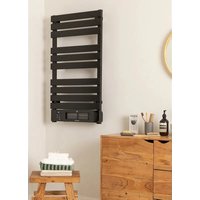
Warm Towel Pro - Towel racks Create - Free user manual and instructions
Find the device manual for free Warm Towel Pro Create in PDF.


| Product Type | Wall-mounted electric towel warmer |
| Brand | Create |
| Model | Warm Towel Pro |
| Dimensions (W x H) | 450 mm x 745 mm (mounting centers) |
| Estimated Weight | 5 kg |
| Power Supply | 220-240 V ~ 50 Hz |
| Heating Power | 800 W (estimated) |
| Temperature Range | 5 °C to 40 °C |
| Timer | 1 to 24 hours |
| Control | Touch panel, remote control and CREATE HOME mobile app |
| Connectivity | Wi-Fi (2.4 GHz) |
| Functions | On/off, low/high temperature mode, timer, child lock, LED display |
| Installation | Wall-mounted, at least 60 cm from a bathtub or shower, 15 cm from ceiling and floor |
| Material | Stainless steel or lacquered metal (not specified) |
| Protection Rating | IP24 (estimated for bathroom) |
| Maintenance and Cleaning | Clean with a soft damp cloth after cooling and unplugging |
| Safety | Child lock, shut-off at reached temperature, overheat protection |
| Spare parts | Support bars, wall brackets, decorative covers, screws, remote control |
| Repairability | Replace by official technical service if cable is damaged |
| General Information | Household use only, do not cover, do not immerse |
Frequently Asked Questions - Warm Towel Pro Create
User questions about Warm Towel Pro Create
0 question about this device. Answer the ones you know or ask your own.
Ask a new question about this device
Download the instructions for your Towel racks in PDF format for free! Find your manual Warm Towel Pro - Create and take your electronic device back in hand. On this page are published all the documents necessary for the use of your device. Warm Towel Pro by Create.
USER MANUAL Warm Towel Pro Create
natural_image
Line drawing of a multi-tiered air conditioner unit with no text or symbolsWarm Towel Pro
User manual | Manual de instrucciones
CREATE CREATE CREATE ATE CREATE CREATE CRE CREATE CREATE CREATE ATE CREATE CREATE CRE CREATE CREATE CREATE ATE CREATE CREATE CRE CREATE CREATE CREATE ATE CREATE CREATE CRE CREATE CREATE CREATE ATE CREATE CREATE CRE CREATE CREATE CREATE CREATE CREATE CREATE CREATE CREATE CREATE CREATE CREATE CREATE CREATE CREATE CREATE CREATE CREATE CREATE CREATE CREATE CREATE CREATE CREATE CREATE CREATE CREATE CREATE CREATE CREATE CREATE
CREATE CREATE CREATE ATE CREATE CREATE CRE CREATE CREATE CREATE ATE CREATE CREATE CRE CREATE CREATE CREATE ATE CREATE CREATE CRE CREATE CREATE CREATE ATE CREATE CREATE CRE CREATE CREATE CREATE ATE CREATE CREATE CRE CREATE CREATE CREATE CREATE CREATE CREATE CREATE CREATE CREATE CREATE CREATE CREATE CREATE CREATE CREATE CREATE CREATE CREATE CREATE CREATE CREATE CREATE CREATE CREATE CREATE CREATE CREATE CREATE CREATE CREATE
INDEX
ENGLISH
Security instructions 6
Parts list 7
Assembly instructions 7
Facility 8
How to use 9
Touch panel 9
Remote control 9
App connection 10
Cleaning 10
PORTUGUÊS
Thank you for choosing our towel rack. Before using the appliance, carefully read these instructions to ensure it is used correctly.
The safety precautions enclosed will reduce the risk of death, injury and electrical shock when correctly followed. Keep the manual in a safe place for future reference, along with the completed warranty card, purchase receipt and package. If applicable, pass these instructions on to the next owner of the appliance. Always follow basic safety precautions and accident prevention measures when using an electrical appliance. We assume no liability for customers failing to comply with these requirements.
SECURITY INSTRUCTIONS
When using any electrical appliance, basic safety precautions should always be observed.
- Make sure that the mains voltage matches the voltage stated on the rating label of the appliance and that the wall outlet is grounded.
- This appliance is intended for household use only. Do not use for industrial or commercial purposes.
- Check the power cord regularly for visible damage. If the cord is damaged, it must be replaced by the official Technical Support Service in order to avoid any type of danger.
- Do not cover the device in order to avoid overheating.
- The installation of this appliance on the wall of a bathroom always must be done at a distance where no person in the shower or in the bath may reach it.
- Do not place the appliance close to heat sources, flammable substances, wet surfaces where it can fall or be pushed into water or allow it to come into contact with water or other liquids. Do not operate outdoors.
- Do not place the appliance immediately below a power socket.
- Allow the device to operate at maximum temperature for 2-3 hours in a ventilated place in order for the device to eliminate all manufacturing wastes.
- The product's surface will reach high temperatures during operation. Avoid skin from getting in contact with it and use the handle to move it.
• Always use it with the fins in horizontal position. - Keep the packaging materials out of the reach of children, the could be dangerous.
- The appliance is not intended to be used by children under the age of 8. It can be used by children over the age of 8, as long as they are given continuous supervision.
- This appliance can be used by children aged 8 and above, and persons with reduced physical, sensory or mental capabilities or lack of experience and knowledge, as long as they have been given supervision or
instruction concerning the use of the appliance in a safe way and understand the hazards involved. Children shall not play with the appliance.
- Supervise young children to make sure that they do not play with the appliance. Close supervision is necessary when the appliance is being used by or near children.
Attention: never leave heater unattended.
• The importer retains his right to make changes in appearance and completeness of the item without preliminary notification to the customer.
• The item is for household use only.
Attention: The manufacturer does not assume any liability for any damage caused directly or indirectly by not following this instruction manual, general safety rules, or interference in the construction of the product
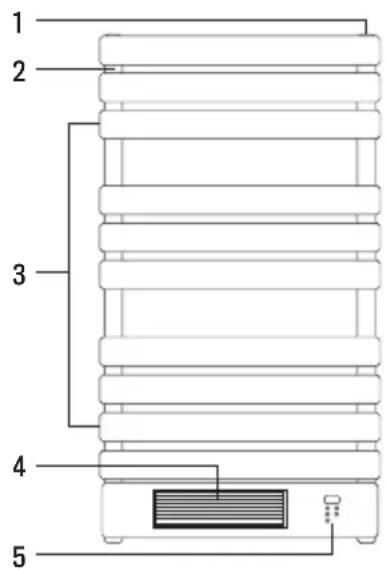
PARTS LIST
- Right bar support
- Left bar support
- Towel bars and heating element
- Heater
- Control panel
ASSEMBLY INSTRUCTIONS
Before installation, check the following:
- The control panel must be located at the bottom of the product.
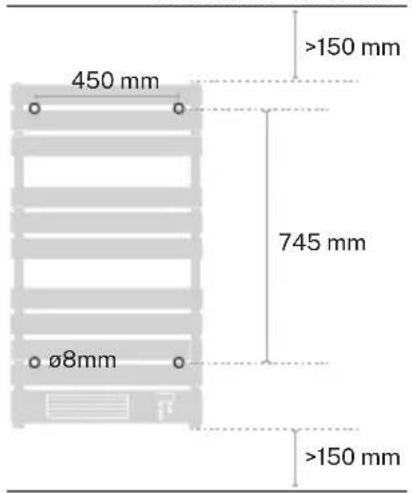
- The appliance must be placed at least 60 cm from a bathtub or shower.
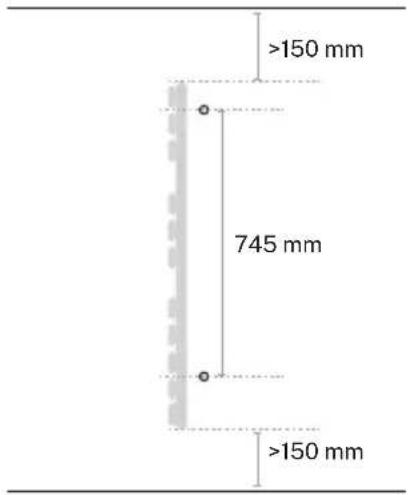
- The appliance must be located at least 15 cm from the ceiling and 15 cm from the floor.

- Mark on the wall the 4 holes to be made with the drill. The horizontal separation between the holes must be 450 mm and vertically 745 mm.
- Once the holes have been marked, drill the 4 holes of 8 mm diameter.
CEILING CEILING
FLOOR FLOOR
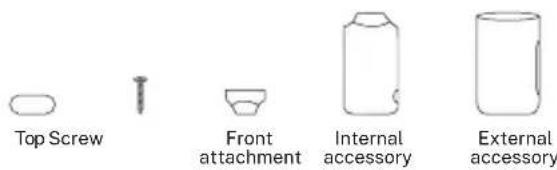
- Detach the wall brackets as shown in the image.
-
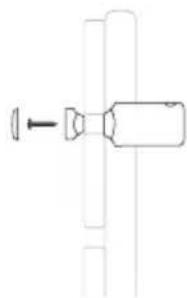
Fix the internal accessories and the 4 front accessories to the towel rack with the screws, then attach the decorative cover so that the screw is not visible.
-
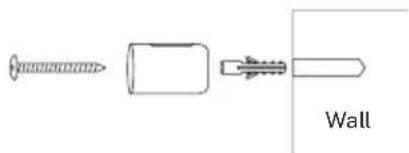
Insert the plug into the wall hole, then attach the outer accessory to the wall brackets and use the wall screw to fix the accessory properly. Repeat the step for the rest of the holes.
- Once the accessories are attached to the towel rack, insert the internal accessories to the external ones on the wall, adjust the distance you want and fix the fixing screws so that it is well secured.
natural_image
Pure mechanical component diagram without any text, numbers, or symbols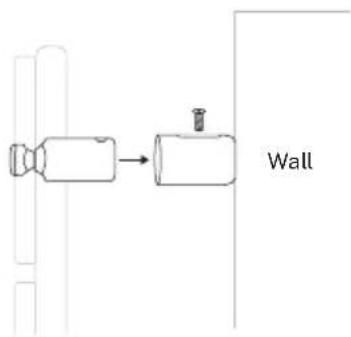
- Place the heater on a flat stable surface
- Plug into any 220-240V, 50Hz, AC source, then turn on the switch at side, you will hear a beep sound.
- Turn on the heater by pressing the power button ⏻, the LED display will show room temperature, then please use touch control or remote control to set power, temperature and time.
- If the appliance is not used for a long time, switch it off and plug the item out.
Attention: Do not cover the product. The convector should not be placed under a shower or in a swimming pool.
- The appliance emits a beep upon each operation setting.
TOUCH PANEL
- Display
- PR sensor / Wi-Fi signal control
- Power on / off
- Mode
- Temperature
- Timer
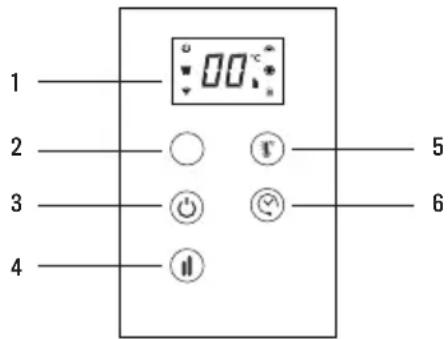
- POWER: When the product is on, press Power. The upper part of the display shows the temperature. The heater is working at low power heating conditions as default.
- MODE: Press Mode to regulate low, or high temperature power.
- TEMPERATURE: Press temperature button, the temperature can be set from 5°C to 40°C. Internal temperature is displayed every time the appliance is started up. The temperature can be set when the appliance is in stand-by or heating modes. When the room temperature reaches the set level, the high temperature power stops and the low temperature power remains active. When room temperature is 2 degrees over the set temperature, both the high and lower temperature powers will stop operating. The machine will begin operating again only when temperature decreases 2 degrees with respect to the set temperature.
- TIME: The timer button can be set to start or stop the appliance at the desired time, with a time interval between 1 hour and 24.
REMOTE CONTROL
- Power button
- Mode
- Temperature
- Timer
- Lock
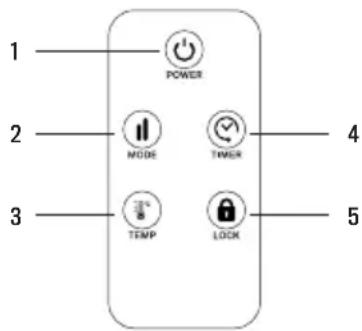
The touch screen buttons located on the product correspond to the remote control functions. The Child lock function can be found on the remote control:
CHILD LOCK: Press the child clock button for 3 seconds, the heater is locked and it can't be switched on. After pressing Child Lock button for 3 seconds again, the heater is unlocked.
APP CONNECTION
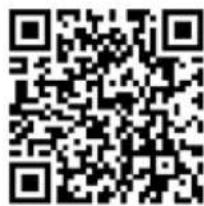
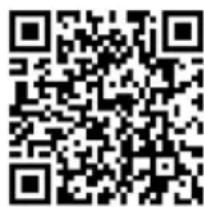
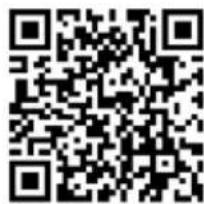
- CREATE HOME application is available for Android and iOS (look for the app on Google Play or App Store or scan the QR code below). Depending on the provider, there may be costs involved in downloading the app.
- This appliance allows you to operate the appliance via your home network. A prerequisite is a permanent WiFi connection to your router and the free app CREATE HOME.
• We recommend disconnecting the appliance from the power supply when you are away from home to prevent unintentional switching on while you are away.

iPhone OS Android OS
• Install the CREATE HOME app and create a user account.
- Select the time zone to enter the account and click to get the verification code.
- Enter the received verification code for verification.
- Set up a login password and log in the app.
- Click on "Add device" (+) and then on the category corresponding to the towel rack (heater).
- In the towel rack, press the temperature key ⚙ for approximately 5 seconds. The Wi-Fi connection indicator light ⚗ will start to flash rapidly.
- Click on "Confirm" while the device indicator light flashes rapidly.
- Enter the password of your Wi-Fi network and confirm.
- While connecting, make sure your router, mobile phone and device are as close as possible. Afterwards, your towel rack will be successfully added to your CREATE HOME app.
CLEANING
• Before cleaning the item wait until it cools down and plug it out.
- Do not use abrasives and solvents. Wipe the product with a soft wet cloth.
- It is necessary to remove dust from the surface regularly.
- You should not wash the item or place it in water.
- If you are not going to use the heater for a long time, wipe the surface and put the item in its box.
- It should be placed in a dry ventilated room. Avoid high humidity and mechanical impact on the item.
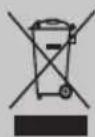
In compliance with Directives: 2012/19/EU and 2015/863/EU on the restriction of the use of dangerous substances in electric and electronic equipment as well as their waste disposal. The symbol with the crossed dustbin shown on the package indicates that the product at the end of its service life shall be collected as separate waste. Therefore, any products that have reached the end of their useful life must be given to waste disposal centres specialising in separate collection of waste electrical and electronic equipment, or given back to the retailer at the time of purchasing new similar equipment, on a one for one basis. The adequate separate collection for the subsequent start-up of the equipment sent to be recycled, treated and disposed of in an environmentally compatible way contributes to preventing possible negative effects on the environment and health and optimises the recycling and reuse of components making up the apparatus. Abusive disposal of the product by the user involves application of the administrative sanctions according to the laws.
natural_image
Pure mechanical diagram showing a lever and shaft assembly without any text or symbolsiPhone OS

Android OS
natural_image
Pure mechanical component diagram without any text, numbers, or symbols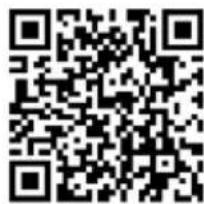
iPhone OS Android OS
natural_image
Pure mechanical diagram showing a lever and shaft assembly without any text, numbers, or symbols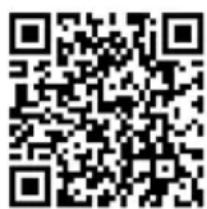
iPhone OS Android OS
natural_image
Pure mechanical component diagram without any text, numbers, or symbols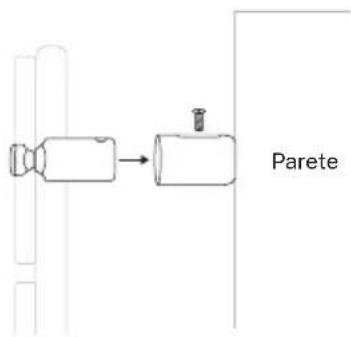

iPhone OS Android OS
natural_image
Pure mechanical diagram showing a lever and shaft assembly without any text, numbers, or symbols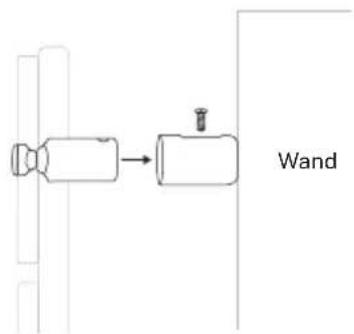
iPhone OS Android OS
natural_image
Pure mechanical component diagram without any text, numbers, or symbols
iPhone OS Android OS
OBIEKT
natural_image
Pure mechanical component diagram without any text, numbers, or symbols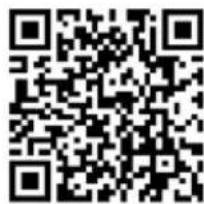
iPhone OS Android OS

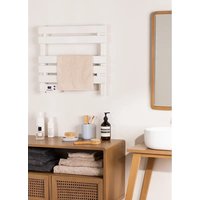
Brand : Create
Model : Warm Towel Pro
Category : Towel racks