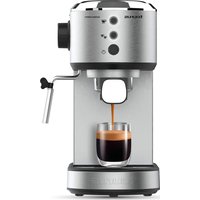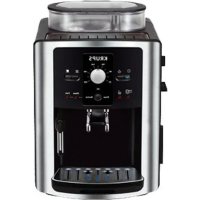
Accento Latte - Coffee machine TAURUS - Free user manual and instructions
Find the device manual for free Accento Latte TAURUS in PDF.


| Product Type | Automatic coffee machine with built-in grinder |
| Brand | Taurus |
| Model | Accento Latte |
| Water Tank Capacity | Approx. 1.4 liters (MAX marking) |
| Bean Container Capacity | 200 g maximum |
| Grind Adjustment | 15 levels (1 = fine, 15 = coarse) |
| Coffee Outlet Height | 85 to 115 mm |
| Pump Pressure | 15 bar (standard) |
| Coffee Functions | Single espresso, double espresso, americano, cappuccino, latte, manual froth |
| Additional Functions | Hot water, manual cleaning, bean emptying, energy saving mode |
| Milk System | Milk frother, removable milk container |
| Usable Coffee Type | Whole coffee beans (no pre-ground coffee) |
| Power Supply | 230 V ~ 50 Hz |
| Power | Approx. 1250 W |
| Weight | Approx. 8 kg |
| Dimensions (W x D x H) | Approx. 300 x 450 x 350 mm |
| Cleaning and Maintenance | Manual cleaning, automatic descaling, cleaning of coffee unit |
| Safety | Thermal protection, automatic shutdown after 28 min of inactivity |
| Included Accessories | Cleaning brush, milk container, milk tube |
Frequently Asked Questions - Accento Latte TAURUS
User questions about Accento Latte TAURUS
0 question about this device. Answer the ones you know or ask your own.
Ask a new question about this device
Download the instructions for your Coffee machine in PDF format for free! Find your manual Accento Latte - TAURUS and take your electronic device back in hand. On this page are published all the documents necessary for the use of your device. Accento Latte by TAURUS.
USER MANUAL Accento Latte TAURUS
natural_image
Line drawing of a modern kitchen or oven with a grater and side dish (no text or symbols)EN. Instructions for use
FR. Mode d'emploi
ES
CAFETERA AUTOMÁTICA ACCENTO LATTE
DESCRIPCIÓN
English (Original instructions)
AUTOMATIC COFFEEMAKER ACCENTO LATTE
DESCRIPTION
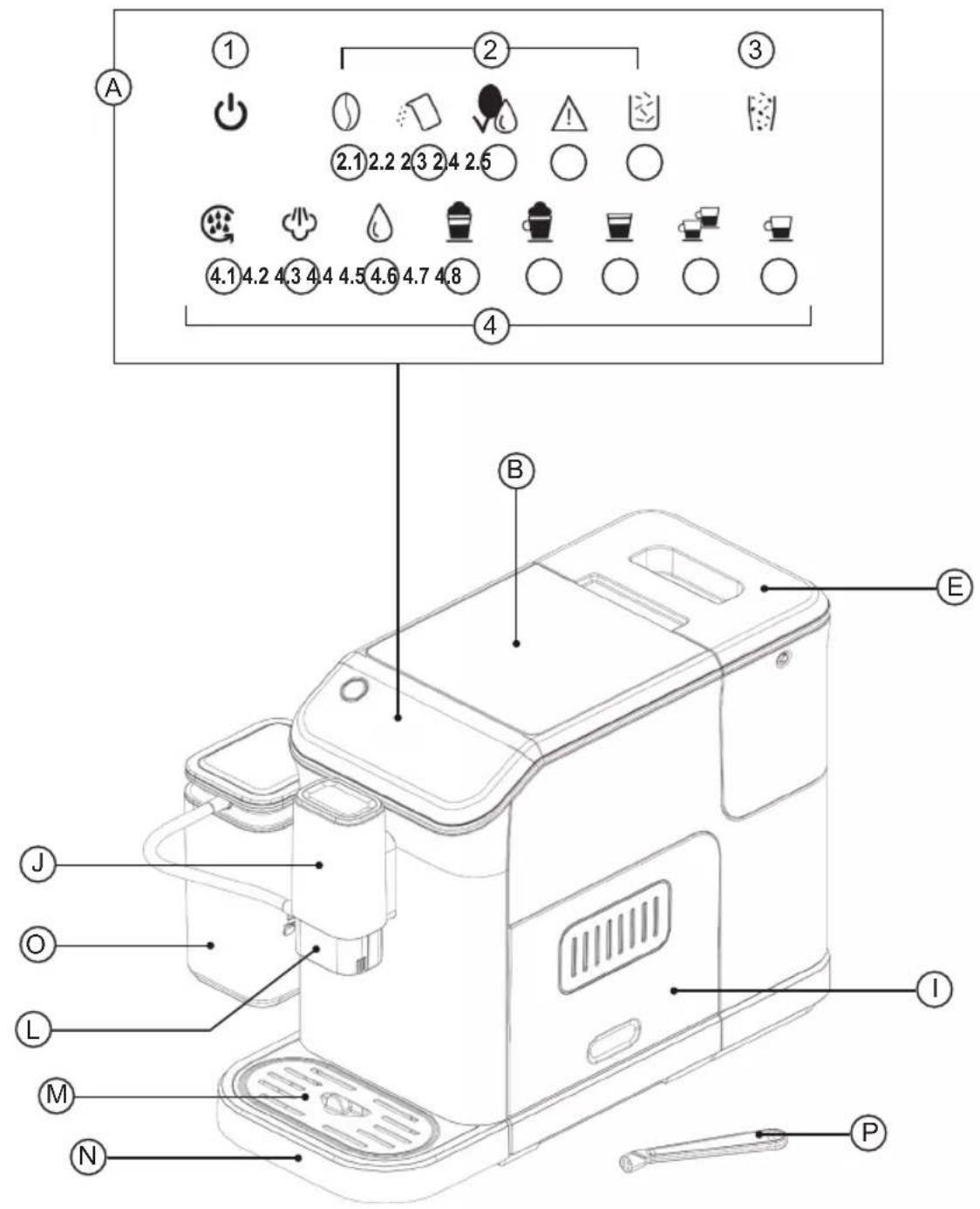
A Control panel
B Bean tank cover
C Bean tank
D Grind setting knob
E Water tank
F Coffee brewer
G Residue box
H Inner drip tray
I Lateral door
J Coffee outlet
K Milk frother
L Coffee outlet cover
M Drip tray cover
N Drip tray
O Detachable milk tank
P Cleaning brush
CONTROL PANEL
1 Power switch
2 Notification panel
2.1 No bean in bean tank
2.2 Refill water
2.3 Brewer unit cleaning indicator
2.4 Warning indicator
2.5 Residue tank full indicator
3 Manual bean emptying function
4 Actions panel
4.1 Manual clean
4.2 Manual milk frothing
4.3 Hot water
4.4 Latte
4.5 Cappuccino
4.6 Americano
4.7 Double-cup espresso
4.8 Single-cup espresso
If the model of your appliance does not have the accessories described above, they can also be bought separately from the Technical Assistance Service.
USE AND CARE
- Do not use the appliance if its accessories are not properly fitted.
- Do not use the appliance if the on/off switch does not work.
- Do not move the appliance while in use.
- Do not use the appliance if it is tipped up, and do not turn it over.
- Do not turn the appliance over while it is in use or connected to the mains.
- The usage and storage environment of the product should be more than 10^ .
- Respect the MAX and MIN levels on the water tank.
- Disconnect the appliance from the mains when not in use and before undertaking any cleaning task.
- Unplug the appliance from the mains before refilling the water tank.
- Store this appliance out of reach of children and/or persons with physical, sensory or reduced mental or lack of experience and knowledge.
- The use of bottled mineral water adapted for human consumption is recommended.
- Never leave the appliance connected and unattended if it is not in use. This saves energy and prolongs the life of the appliance.
INSTRUCTIONS FOR USE
BEFORE USE
- Please read the "Safety advice and warnings" booklet carefully before first use.
- Make sure that all the product's packaging has been removed.
- Check that all accessories are complete and the unit is not damaged.
- Check and understand all the parts and their functions. It is recommended to keep the original packaging for future use. And then follow the operations below.
- Before using for the first use, please remove the water tank, detachable milk tank, brewer, and milk frother and rinse them with clean water.
- Check and make sure all the removable parts are installed well in place.
WATER TANK (E)
- Fill the water tank with fresh water up to Max mark and then reassemble it into the unit and make sure it is properly assembled. Then close the water tank lid.
MILK FROTHER (K)
- Open the coffee outlet cover and make sure the milk frother is installed well in place.
- If the milk frother is installed well in place, please close the coffee outlet cover and then insert the connecting tube.
- Insert the other end of the connecting tube into the detachable milk tank.
DETACHABLE MILK TANK (M)
- It is important to follow this instructions if you want to use the latte, milk froth or cappuccino functions:
- Move the milk tube from its space in the lid and then insert one end into the detachable milk tank lid hole.
- Insert the milk tube into the hole of the milk frother at the side of the coffee outlet.
- Install the detachable milk tank and its lid well in place.
- The milk tube can be folded. Install it firmly by yourself if it is loose.
- Also, ensure once connected that the milk tube is not cramped.
GRIND SETTING KNOB (D)
- Turn the grind setting knob bracket counterclockwise.
- Cover the grind setting knob according to the specified position.
- Select the grinding setting clockwise.
NOTE: When the new coffee machine is used for the first time, it is suggested that the grind setting higher than setting 8 shall be selected. The adjustable grind settings range between 1 (finest) and 15 (coarsest). The number on the grind setting knob pointed by the arrow is the actually selected grind setting.
CAUTION: We suggest adjusting one notch at one time to avoid damage.
CAUTION: Once the grinder has been filled with coffee, it's important if you want to adjust the grind setting, you will need to do it when the grinder is in operation.
COFFEE OUTLET (J)
- The adjustable height of the coffee outlet ranges between 85 and 115mm , with the base properly fitted.
COFFEE BREWER (F)
- Open the door and check whether the coffee brewer is installed well in place.
- Check whether the arrow of the coffee brewer is aligned with the arrow of the upper bracket.
-
An audible click indicates that the assembling of the brewer is correct.
-
The warning indicator (2.4) will light solidly if the brewer is not installed in place.
- Close the door.
- The whole door and body are on the same horizontal plane.
- The warning indicator (2.4) will flash if the door is not closed properly.
INNER DRIP TRAY AND RESIDUE-COLLECTION CONTAINER
- Open the door and check whether the drip tray is installed in place.
- Open the door and check whether the residue-collection container is installed in place.
- If the inner drip tray will not be installed well in place, the warning indicator (2.4) will flash, and the machine can not work if there is a foreign object at the front of the residue-collection container.
DRIP COVER
- Place the drip cover on the drip tray. The drip cover must be installed well in place so that the container can be placed on it to hold coffee, milk, or hot water.
- Insert the drip tray into the appliance.
NOTE: The drip tray collects the water from the dispensing spout during each rinse & self-cleaning, as well as coffee that might be spilt during brewing. So clean and empty the drip tray every day.
BEAN TANK
- Fill the bean box with the proper amount of fresh coffee beans, 200 g at most, and then close the bean box cover.
CAUTION: If the grinding blade is removed, please make sure that the grinding blade has been installed well in place before filling the bean box with coffee beans.
CAUTION: Use natural coffee always in order to preserve the life of the grinding element.
USE
- This appliance is a multifunctional coffee machine. It has different functions, and we will review them one by one.
NOTE: The appliance will perform cleaning automatically to make preparation for operation when it is started each time.
NOTE: The coffee will come out drip by drip at the beginning (2-3 seconds after the brewing is started) and at the end (6-8 seconds before the brewing is completed) during the brewing process. This is normal.
POWER ON, RINSE AND PREHEAT FUNCTIONS
- Connect the appliance to the mains.
- Place a container under the coffee outlet to get all the water for preheating and rinse functions.
- Press the power switch (1), and the coffee machine will enter a self-check status.
NOTE: Please refer to the section «Troubleshooting» if any warning appears in this state.
- The manual clean indicator (4.1) will illuminate, and the power on the switch will flash. The machine will enter into the self-cleaning and preheating state.
• After doing this process, the single-cup coffee, double-cup coffee, americano icons and manual bean emptying will light up.
• After some seconds, the other functions will light up, indicating both heating elements of the machine (brewing and steam) are ready to be operated normally.
• The machine goes into standby mode.
BREWING YOUR KIND OF COFFEE
- All the following steps indicate how to brew your coffee selection properly.
BREWING SINGLE-CUP ESPRESSO
- Place a coffee cup under the coffee outlet.
- Check and make sure the plug of the milk frother is closed well in place.
- Press the single-cup espresso button (4.8). The appliance will start to brew a single cup of espresso. The indicator of the single-cup espresso button (4.8) will illuminate solidly during the process of brewing a single cup of espresso.
• After brewing a single cup of espresso, the appliance goes into standby mode automatically. - During the process, press the single-cup espresso button (4.8) again if you need to cancel the function.
BREW DOUBLE-CUP ESPRESSO
- Place 1 cup or 2 cups aligned with the coffee outlet.
- Check and make sure the plug of the milk frother is closed well in place.
- Press the double-cup espresso button (4.7). The appliance will start to brew a double cup of espresso. The indicator of the double-cup espresso button (4.7) will illuminate solidly during the process of brewing a double cup of espresso.
NOTE: The double-cup espresso is achieved by brewing two cycles of single-cup espresso continuously, so please do not remove the coffee container during the brewing process.
• After brewing the double-cup espresso, the appliance goes into standby mode automatically.
- During the process, press the double-cup espresso button (4.7) again if you need to cancel the function.
BREW AMERICANO
- Place a coffee container under the coffee outlet.
- Check and make sure the plug of the milk frother is closed well in place.
- Press the americano button (4.6). The appliance will start to brew americano coffee. The indicator of americano (4.6) will illuminate solidly during the process of brewing americano.
• After brewing an americano, the appliance goes into standby mode automatically. - During the function, press the americano button (4.6) again if you need to cancel the function.
BREW CAPPUCCINO
- Place a coffee mug under the coffee outlet.
- Fill the milk tank with the appropriate amount of cold milk.
NOTE: It is recommended that the temperature of the milk should be 5-10 °C, and the protein content of milk should be at least 3%.
NOTE: The milk filled in the milk reservoir should not exceed the MAX mark on the milk reservoir.
- Insert the milk tube well in place as explained in the milk tank section in the «Before use» section of this manual.
- Press the cappuccino button (4.5). The appliance will start to brew a cappuccino.
• After brewing a cappuccino, the appliance goes into standby mode automatically. - During the function, press the cappuccino button (4.5) again if you need to cancel the function.
NOTE: After each use, if there is still milk in the milk reservoir, please store it in the refrigerator, but the silicone tube and milk frother should be cleaned in time, as it is explained in the «Cleaning» section of this manual.
NOTE: It is recommended to use a high cup to prevent the frothed milk from splashing.
- Proceed to clean the milk frothing system, as explained in the «Cleaning» section.
BREW LATTE
- Place a coffee mug under the coffee outlet.
- Fill the milk tank with the appropriate amount of cold milk.
NOTE: It is recommended that the temperature of the milk should be 5-10 °C, and the protein content of milk should be at least 3%.
NOTE: The milk filled in the milk reservoir should not exceed the MAX mark on the milk reservoir.
- Insert the milk tube well in place as explained in the milk tank section in the «Before use» section of the manual.
- Press the Latte button (4.4). The appliance will start to brew a Latte.
• After brewing a Latte, the appliance goes into standby mode automatically. - During the function, press the Latte button (4.4) again if you need to cancel the function.
NOTE: After each use, if there is still milk in the milk reservoir, please store it in the refrigerator, but the silicone tube and milk frother should be cleaned in time, as it is explained in the «Cleaning» section of this manual.
NOTE: It is recommended to use a high cup to prevent the frothed milk from splashing.
- Proceed to clean the milk frothing system as explained in the «Cleaning» section.
MAKE HOT WATER
- Place a water container under the coffee outlet.
NOTE: The capacity of the water container should be more than 120 ml.
- Check and make sure the plug of the milk frother is closed well in place.
- Press the hot water button (4.3). The appliance will start to make hot water.
• After making hot water, the appliance goes into standby mode automatically. - During the function, press the hot water button (4.3) again if you need to cancel the function.
NOTE: Please do not touch the water container with your hands while making hot water.
CAUTION: After making some water, there could be a little steam coming out of the machine. When taking the mug, ensure your hand don't go under the coffee outlet.
MANUAL FROTH
NOTE: After the Manual froth function is conducted, the overheating protection mechanism for the boiler will be activated. At that time, if you need to conduct the hot water function, the appliance should be rested for about 3-5 minutes, and then the hot water function can be activated.
- Place a mug under the coffee outlet.
NOTE: The capacity of the milk container should be more than 160 ml.
- Fill the milk tank with the appropriate amount of cold milk.
NOTE: It is recommended that the temperature of the milk should be 5-10 °C, and the protein content of milk should be at least 3%.
NOTE: The milk filled in the milk reservoir should not exceed the MAX mark on the milk reservoir.
- Insert the milk tube well in place as explained in the milk tank section in the «Before use» section of the manual.
- Press the manual froth button (4.2). The appliance will start to brew a manual froth.
• After brewing the manual froth, the appliance goes into standby mode automatically. - During the function, press the manual froth button (4.2) again if you need to cancel the function.
NOTE: After each use, if there is still milk in the milk reservoir, please store it in the refrigerator, but the silicone tube and milk frother should be cleaned in time, as it is explained in the «Cleaning» section of this manual.
NOTE: It is recommended to use a high cup to prevent the frothed milk from splashing.
- Proceed to clean the milk frothing system as explained in the «Cleaning» section.
MANUAL CLEAN
- Place a water container under the coffee outlet.
- Press the manual clean button (4.1). The appliance will start to conduct the manual clean function.
• After cleaning, the appliance goes into standby mode automatically. - Press the manual clean button (4.1) again if you need to cancel the function.
EMPTY THE COFFEE BEANS LEFT
NOTE: This function is used for emptying the beans in the bean box. Please use it carefully to avoid waste. In this way, you can ensure to change the coffee beans with letting minimal residue possible on the grinder and coffee beans tank.
- Press the bean-emptying button (3). The appliance will start to conduct the bean-emptying function. At that time, the indicator of the bean-emptying button (3) illuminates solidly while other functional indicators turn off.
- Remove the residue-collection container and empty the ground coffee in it.
• After working, the appliance goes into standby mode automatically. - During the function, press the bean-emptying button for at least 0,3 seconds again if you need to cancel the function.
NOTE: The bean-emptying function only lasts for 15 seconds each time. Please repeat the above operation if there are many coffee beans left in the bean box.
ENERGY-SAVING MODE
- Press the power switch (1) for at least 0,2 s, and then the appliance goes into sleep mode. At that time, all the indicators turn off, and all the functions are invalid.
- The appliance will go into sleep mode if there is not any operation within 28 minutes. At that time, all the indicators turn off and all the functions are invalid.
- During sleep mode, press the power switch (1) for at least 0,2 seconds, and then the appliance will conduct a self-check, preheat and return to standby mode.
NOTE: When the appliance is powered on continuously, hold and press the power switch (1) for at least 0,2 seconds to activate the appliance after more than 4 hours, and the auto-clean function of the appliance will be activated.
NOTE: If the appliance is powered off, the auto-clean function will be activated after holding and pressing the power switch (1) for at least 0.2 seconds.
NOTE: Please refer to the section «Power on, rinse and preheat functions» for details.
SET THE COFFEE-DISPENSING AMOUNT AND MILK-DISPENSING AMOUNT
OPERATION FOR SETTING THE COFFEE-DISPENSING AMOUNT:
- When the coffee dispenses from the appliance, hold and press the selected functional key for 2 seconds, the buzzer beeps and the corresponding indicator of the selected functional key flashes.
- The appliance goes into the mode for setting the coffee-dispensing amount. As soon as the coffee in the cup reaches the required level, release the selected functional key, then the appliance stops working, and the newly-set coffee-dispensing amount is saved.
-
The range of coffee-dispensing amounts is as below:
-
Single-cup espresso: 30-100 ml
- Double-cup espresso: 30-100 ml (x 2 times)
- Americano: 110-180 ml
OPERATION FOR SETTING THE MILK-DISPENSING AMOUNT:
- When the milk dispenses from the appliance, hold and press the selected functional key for 2 seconds. The buzzer beeps, and the corresponding indicator of selected functional key flashes.
- The appliance goes into the mode for setting the milk-dispensing amount. As soon as the milk in the cup reaches the required level, release the selected function key. The appliance stops working, and the newly-set milk-dispensing amount is saved.
- The operation for setting the milk-dispensing amount is only applicable for the functions of cappuccino and Latte.
-
And the range of milk-dispensing amounts is as below:
-
cappuccino: Coffee: 30-100 ml + Milk: 10-40 seconds
- Latte: Coffee: 30-100 ml + Milk: 10-40 seconds
FACTORY RESET
- Hold and press the single-cup espresso (4.8) and double-cup espresso (4.7) for 2 seconds at the same time. Then all the parameters are recovered to the factory default setting.
ONCE YOU HAVE FINISHED USING THE APPLIANCE
- Unplug the appliance from the mains.
SAFETY THERMAL PROTECTOR
- The appliance has a safety device which protects the appliance from overheating.
- When the appliance switches itself on and off repeatedly, for reasons other than the thermostat control, check to ensure that there are no obstacles that impede correct air entry or expulsion.
- If the appliance turns itself off and does not switch itself on again, disconnect it from the mains supply and wait for approximately 15 minutes before reconnecting. If the machine does not start again, seek authorised technical assistance.
CLEANING
- Disconnect the appliance from the mains and allow it to cool before undertaking any cleaning task.
- Clean the equipment with a damp cloth with a few drops of washing-up liquid and then dry it.
- Do not use solvents or products with an acid or base pH, such as bleach, or abrasive products, for cleaning the appliance.
- Wipe the outer surface of the product with a soft damp cloth to remove stains, but avoid using abrasive cleaning tools as they will scratch the product. Do not use alcohol or solvent cleaners.
- Water droplets may build up in the area above the drip plate or countertop during brewing. To control the dripping, wipe off the area with a clean, dry cloth after each use of the product.
- The brewer, water tank, milk reservoir, drip tray, drip plate, inner drip tray, residue-collection container and door can not be put into the dishwasher for cleaning.
- The water in the drip plate and drip tray, as well as the coffee grounds in the inner drip tray and residue-collection container need to be emptied, and they shall be cleaned well.
- Clean the parts by following the description and operation below. Check in the table the usual timing for cleaning operations.
| Detachable parts When to clean | |
| Residue-collection container | For single-cup espresso, Latte and cappuccino, conduct once every 8 brewing cycles. For double-cup espresso, conduct once every 4 brewing cycles. It is recommended to clean it on the same day if it is not used for a long time. |
| Coffee Brewer | For single-cup espresso, Latte and cappuccino, conduct once every 8 brewing cycles. For double-cup espresso, conduct once every 4 brewing cycles. It is recommended to clean it on the same day if it is not used for a long time. |
| Water tank Once every week | |
| Milk tank | After every use, or finishing milk if stored in the refrigerator |
| Milk frother After every use | |
| Drip tray | Empty the drip tray every day and clean it once every week. |
| Grinder Clean it once every week | |
| Fixed parts When to clean | |
| Powder-dispensing channel | Check it once a week |
| Brewing base Check it | once a week |
| Brewing system bracket | Check it once a week |
HOW TO CLEAN THE RESIDUE-COLLECTION CONTAINER
- Open the door. Remove the residue collection container from the machine.
- Empty the coffee puck into the residue-collection container and rinse it under the tap water.
• Install the residual-collection container into the appliance. - Close the door, and the cleaning is completed.
HOW TO CLEAN THE BREWER
- Open the door and remove the brewer.
- Rinse the brewer under the tap water.
• Install the brewer into the appliance. - Close the door, and the cleaning is completed.
HOW TO CLEAN THE WATER TANK
- Remove the water tank from the coffee machine.
- Rinse the water tank under the tap water.
HOW TO CLEAN THE MILK RESERVOIR
- Remove the connecting tube from the appliance after every use.
- Rinse the milk reservoir under the tap water.
- Store the milk reservoir well after cleaning.
HOW TO CLEAN THE MILK FROTHER
- Remove the coffee outlet cover and remove the milk frother from the coffee outlet.
- Rinse the milk frother under the tap water.
• Install the milk frother well, and make sure the part with the plug should be kept on the left. - Install the coffee outlet cover, and the cleaning is completed.
HOW TO CLEAN THE DRIP TRAY
- Remove the drip tray.
- Add some cleaning solution and rinse the drip tray under the tap water. Then dry it with some cloth.
• After cleaning, install the drip tray again.
HOW TO CLEAN THE GRINDER
- After emptying the bean tank with the manual bean emptying button (3), dispose of the ground coffee:
- Remove the grind setting knob counterclockwise.
- Remove the internal grinding wheel counterclockwise.
- Clean the grinding wheel with the cleaning brush and empty the ground coffee at the gap.
-
Clean the grinding chamber with the cleaning brush.
-
Do not install the grinding wheel, and install the grind setting knob well in place again.
- Press the button on the grinder.
- Let the grinder keep running to remove the remaining powder in the grinding chamber (please repeat the operation of steps 3 and 4 if there is coffee powder left).
- Remove the grind setting knob counterclockwise.
• Install the grinding wheel clockwise. - Install the grind setting knob clockwise, and the cleaning is completed.
HOW TO CLEAN THE BREWING SYSTEM BRACKET
- When the appliance is powered on, hold and press the manual clean key (4.1) and double-cup espresso (4.7) for 1 second to enter into the mode for cleaning the dead corner, behind the brewer group.
• After entering the brewer-cleaning function, the brewer moves to the bottom.
• After the brewing door is opened (the appliance stays in the safe protection state), the dead corner of the brewer can be cleaned.
• After cleaning, close the brewing door. - Hold and press the manual clean key (4.1) and double-cup espresso (4.7) for 1 second to exit from the cleaning function.
HOW TO CLEAN THE POWDER-DISPENSING CHANNEL
- Hold and press the bean-emptying key (3) and single-cup espresso key (4.8) for 0,2 seconds at the same time. Their corresponding indicators flash, and the door is opened.
- Open the door and loosen the ground coffee in the power-dispensing channel with the cleaning brush, and then close the door when there is ground coffee falls.
- Hold and press the bean-emptying key (3) and single-cup espresso key (4.8) at the same time again for at least 0,1 seconds, then their corresponding indicators extinguish, and the door is closed.
HOW TO CLEAN THE BREWING SYSTEM AND FROTHING SYSTEM MANUALLY
- Fill the water tank with an appropriate amount of room-temperature water, which shall not exceed the MAX water level, and then close the water tank lid.
• Install the brewer assembly into the brewing chamber of the appliance and then close the door of the brewing chamber. - Put the drip plate on the drip tray and then place a container on the drip plate.
- Activate the manual clean function to clean the brewing system and milk-frothing channel. After preheating, all the functional indicators illuminate solidly, and the appliance goes into standby mode. Hold and press the manual clean (4.1) for at least 0,2 seconds. The appliance will enter the manual clean process.
NOTE: If you need to clean the milk-frothing channel, please install the milk reservoir and fill the milk reservoir with home-clean water instead of milk. If you do not need to clean the milk-frothing channel, please close the plug of the milk frother well in place.
• After cleaning, the appliance goes into standby mode automatically.
- Open the door of the brewing chamber and clean the coffee grounds in the brewing system with the cleaning brush.
HOW TO DEAL WITH LIMESCALE INCRUSTATIONS
- The appliance needs to be descaled when the indicators of hot water (4.3) and manual clean (4.1) will flash at the same time.
- Fill the water tank with water and descaler to the MAX level as indicated on the water tank. Follow the instruction of your descaler product in order to know the ratio between water:descaler needed. You may also use citric acid instead of the descaler (one hundred parts of water and three parts of citric acid).
- Put a liquid container on the drip plate.
- Hold and press hot water (4.3) and manual clean (4.1) for 1 second at the same time, and the appliance starts the descaling procedure.
- The whole descaling procedure lasts for about 10 minutes. The function indicators flash slowly from left to right.
• After the descaling is completed, the indicators of hot water (4.3) and manual clean (4.1) stop flashing.
NOTE: The number of the coffee-brewing cycle will be zeroed and recounted after a complete descaling is finished. And the descaling prompt will occur when the appliance has brewed 500 cycles of coffee cumulatively again.
TROUBLESHOOTING
| Problem Cause Solution | ||
| The Refill indicator (2.2) flashes. | The water tank lacks water. | Refill the water tank with water.Please contact the service department if the problem can not be solved. |
| The warning indicator (2.4) flashes. | The grind setting knob, door and inner drip tray are not installed well in place. | Install the grind setting knob, door and inner drip tray well in place.Please contact the service department if the problem can not be solved. |
| The warning indicator (2.4) illuminates solidly. | The brewer or inner drip tray is not installed well in place. | Install the brewer or inner drip tray well in place.Please contact the service department if the problem can not be solved. |
| The No bean indicator (2.1) illuminates solidly. | The bean box lacks coffee beans. Fill the bean box with coffee beans and then run the coffee machine to brew coffee. Then the no-bean warning can be cancelled. | |
| The Residue full indicator (2.5) illuminates solidly. | The residue-collection container needs to be cleaned. | Remove the residue-collection container and inner drip tray for cleaning. After 2 seconds, the Residue full indicator (2.5) turns off.Please contact the service department if the problem can not be solved. |
| The Brewer cleaning indicator (2.3) illuminates solidly. | The brewer needs to be cleaned. Remove the brewer for cleaning. After 2 seconds, the Brewer cleaning indicator (2.3) turns off.Please contact the service department if the problem can not be solved. | |
| The single-cup espresso (4.8) and warning indicator (2.4) flash at the same time. | The grinding motor does not work normally. | Turn off the appliance and restart it.Please contact the service department if the problem can not be solved. |
| The No bean indicator (2.1) and warning indicator (2.4) flash at the same time. | It means that the appliance has performed the bean-grinding for 16 cycles continuously, and the time for each grinding is less than 5 minutes. And then, the grinding system will be forced to be cooled down for 5 minutes. At that time, all the functions are invalid. | The appliance will rest for 5 minutes or turn off the appliance and restart it.2. Please contact the service department if the problem can not be solved. |
| The indicator of hot water (4.3) and warning indicator (2.4) flash at the same time. | The flow meter has no signal, and the water dispensing is abnormal. | Fill the water tank with water.Please contact the service department if the problem can not be solved. |
| The indicator of the Latte (4.4) and warning indicator (2.4) flash at the same time. | The heating element has no signal, and the brewing motor does not work normally. | Turn off the appliance and restart it. Please contact the service department if the problem can not be solved. |
| The cream is not rich. The ground coffee | is too coarse. Turn the grind setting knob | clockwise to select the proper setting. |
| The type of coffee bean used is wrong. | Use coffee beans which are suitable for brewing espresso. | |
| Coffee comes out slowly or comes out drip by drip. | The ground coffee is too fine. Turn the | grind setting knob anticlock- wise to select the proper setting. |
| Coffee does not come out of the coffee outlet. | The coffee outlet is blocked. Clean the | coffee outlet with a tooth- pick. |
| The machine can not be activated. The | power plug has not been con- nected well in place. | Connect the power plug to the main power supply of the machine. |
| The power source is not connected well. | Connect the power source of the machine. | |
| The On/Off button is not turned on. Turn on the On/Off button. | ||
| The brewer can not be removed. The m | machine is not turned off cor- rectly. | Turn off the machine and then turn it on again to make the brewer reset. Please contact the after-sales depart- ment if the problem can not be solved. |
| The brewer is blocked. Contact the after- sales department. | ||
| The milk foam is too large or sprays from the milk outlet. | The milk is not cold enough or the milk used is not suitable for being frothed. | It is recommended that the tempera- ture of the milk should be 5-10°, and the protein content of milk should be at least 3%. |
| The milk frother is too dirty. Clean the milk frother. | ||
| Both the residue full indicator and brewer cleaning indicator illuminate. | You may empty the residue-collection container and clean the brewer when the coffee machine is turned off. | Please always empty the residue-col- lection container and clean the brewer when the coffee machine is turned on. And install them again after waiting for at least 3 seconds. |
| The residue-collection container is not full, but the machine prompts you to empty the residue-collection container or clean the brewer. | The counter is not reset after empty- ing the residue-collection container or cleaning the brewer. | After replacing the residue-collection container or the brewer, always wait for about 3 seconds to make the counter reset to zero. Always empty the resi- due-collection container and clean the brewer when the coffee machine is turned on. The counter will not be reset if the residue-collection container is emptied or the brewer is cleaned when the coffee machine is turned off. |
| The coffee machine can grind coffee beans, but there is no coffee coming out. | Please check the deeply-roasted coffee beans for the oil on the surface. The powder-dispensing channel will be blocked if the coffee beans are dampened, or there is too much oil on the surface. | Hold and press the bean-emptying key (3) and single-cup espresso key (4.8) for 2 seconds at the same time. The door is opened, and their corresponding indicators flash.After the door is opened, loosen the ground coffee in the power-dispensing channel with the cleaning brush, and then close the door when there is ground coffee falls down.And then, hold and press the bean-emptying key (3) and single-cup espresso key (4.8) for at least 0.3 seconds again, and their corresponding indicators extinguish, and the door is closed. |
| The coffee machine makes large noise. | It is normal for the coffee maker to make noise during operation. | If the coffee machine starts to make another kind of noise, please lubricate the brewing system and contact the after-sales department. |
FR
ABNEHMBARER MILCHTANK (M)
ملحوظة: borders cannot be determined, because I am not to be determined. Except from the boundary of the boundary, I am not to be determined. Except from the boundary of the boundary, I am not to be determined. Except from the boundary of the boundary, I am not to be determined. Except from the boundary of the boundary, I am not to be determined. Except from the boundary of the boundary, I am not to be determined. Except from the boundary of the boundary, I am not to be determined. Except from the boundary of the boundary, I am not to be determined. Except from this boundary is determined by the boundary of the boundary.