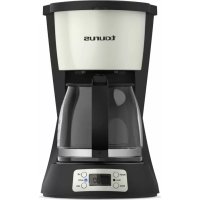
Vintage Digital Cream - Coffee machine TAURUS - Free user manual and instructions
Find the device manual for free Vintage Digital Cream TAURUS in PDF.


| Product type | Drip coffee maker |
| Brand | Taurus |
| Model | Vintage Digital Cream |
| Power supply | 220-240 V ~ 50/60 Hz (estimated) |
| Power | 1000 W (estimated) |
| Water tank capacity | 1.5 L (max) |
| Carafe capacity | 12 cups (estimated) |
| Dimensions (L x W x H) | 25 x 20 x 35 cm (estimated) |
| Weight | 2 kg (estimated) |
| Materials | Plastic, glass, stainless steel |
| Filter | Removable permanent filter |
| Main functions | Delay programming, keep warm, automatic shut-off, anti-drip system |
| Display | LCD screen with clock and timer |
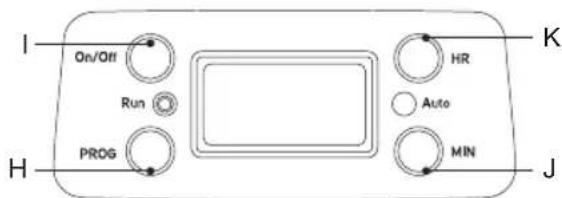
| Control | ON/OFF button, PROG, HOURS, MIN keys |
| Cleaning | Filter and carafe dishwasher safe (gentle cycle) |
| Safety | Automatic shut-off after 40 minutes, anti-drip system, overheat protection |
| Maintenance | Regular descaling with suitable descaling product |
| Warranty | Legal warranty (according to applicable legislation) |
| Included accessories | Glass carafe, permanent filter, measuring spoon |
| Repairability | After-sales service via http://taurus-home.com/ |
Frequently Asked Questions - Vintage Digital Cream TAURUS
User questions about Vintage Digital Cream TAURUS
0 question about this device. Answer the ones you know or ask your own.
Ask a new question about this device
Download the instructions for your Coffee machine in PDF format for free! Find your manual Vintage Digital Cream - TAURUS and take your electronic device back in hand. On this page are published all the documents necessary for the use of your device. Vintage Digital Cream by TAURUS.
USER MANUAL Vintage Digital Cream TAURUS
natural_image
Exterior view of a taurus coffee maker with digital display and control buttons (no text or symbols on the device itself)EN. Instructions for use
FR. Mode d'emploi
natural_image
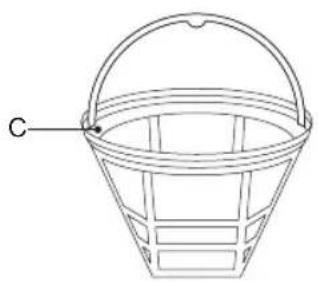
Line drawing of a basket with handle and labeled point C (no text or symbols on the diagram itself)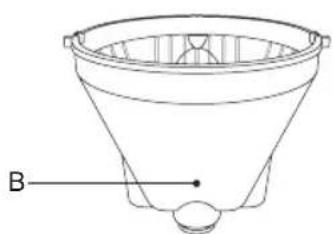
natural_image
Line drawing of a funnel-shaped object with a labeled point B (no text or symbols on the object itself)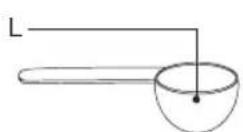
ES
(Original instructions)
PROGRAMABLE COFFEE MACHINE VERONA DIGITAL
DESCRIPTION
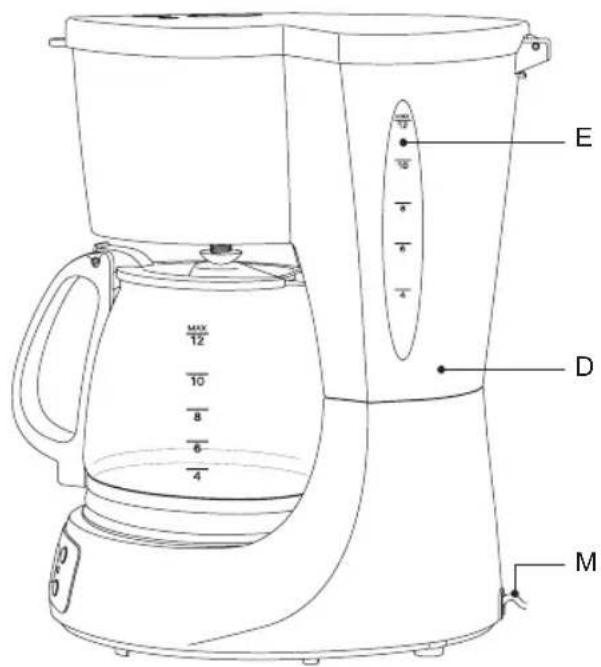
A Lid
B Filterholder Funnel
C Permanent Filter
D Water Diposit
E Water Level
FGlassJug
G Keep Warm Plate
H PROG Button (Program)
I ON/OFF Button (ON/OFF)
J MIN Button (Minutes)
K Hours Button (Hours)
L Spoon
M Supply cord
USE AND CARE
Fully unroll the appliance's power cable before each use.
Do not use the appliance without its filter(s) correctly in place.
Do not switch the appliance on without water.
Do not use the appliance if the on/off switch does not work.
Do not move the appliance while in use.
Respect the MAX and MIN levels.
Disconnect the appliance from the mains when not in use and before undertaking any cleaning task.
Unplug the appliance from the mains before refilling the water tank.
Store this appliance out of reach of children and/or persons with physical, sensory or reduced mental or lack of experience and knowledge.
Do not store the appliance if it is still hot.
Only use water with the appliance.
Never leave the appliance connected and unattended if is not in use. This saves energy and prolongs the life of the appliance.
CAUTION: Do not use the appliance if the glass is cracked or broken.
INSTRUCTIONS FOR USE BEFORE USE
Make sure that all products' packaging has been removed.
Before using the product for the first time, we recommend running it just with water.
FILLING WITH WATER
You must fill the water compartment before turning on the appliance.
Open the cover (A).
Fill the deposit (D) taking care to observe the MAX level. (E) with as many cups of water as cups of coffee you would like to make.
Close the lid (A).
FILLING WITH COFFEE
Open the lid (A) of the filter holder (B).
Remove the permanent filter (C) from the Filterholder (B).
Fill the removable filter (C) with ground coffee (use 67 grams of ground coffee for each cup to be made).
Check that the removable filter is correctly placed in the filter holder.
You can use the measuring spoon (L) to add coffee.
USE
BEFORE THE FIRST USE
To ensure excellent coffee from the first cup, we recommend rinsing with warm water as follows
Pour 1.5L of water into the tank (D).
Place the Permanent Filter (C) in the funnel (B), empty, without coffee and close the lid (A) of the coffee machine.
Place the jug (F) on the hotplate (G).
Connect to the mains. It will be displayed on the screen 12:00.
Press ON/OFF button, the red (RUN) indicator is illuminated,
The water will start to come out in a few seconds.
When the water stops flowing, empty the jug, clean the permanent filter (C) and the funnel
(B).
The machine is ready to make coffee.
If you would like to stop the machine, press ON/OFF and the machine will stop.
TO MAKE COFFEE DIRECTLY, WITHOUT PROGRAMMING
Fill the tank (D) with cold water according to the "Water Filling" Section.
Add ground coffee according to the "Coffee Filling" section.
Place the jar (F) on the hotplate.
Connect to the mains. It will be displayed on the screen 12:00.
Press ON/OFF button, the red (RUN) indicator is ON.
The coffee will start to come out in a few seconds.
The jug (F) can be removed while the coffee is being made. The antidrip system prevents the coffee from dripping when the jug is not in position. However, time can not exceed 30 seconds, otherwise the filter may overflow from the edge of funnel.
When you finish making coffee, you can stop the machine.
If you would like to stop the machine, press ON/OFF twice, and the machine will stop.
If not, the coffeemaker will automatically switch to Keep Warm and after 40 minutes, the coffee machine will switch off automatically.
TO MAKE PROGRAMMING COFFEE
Set the clock and Schedule automatic startup
First you have to set the clock.
Previously you must press ON / OFF twice and the blue light turns on.
Press the PROG button.
CLOCK appears on the LCD screen. Press the HOUR key and the MIN key to determine the current time, between 0:00 and 23:59.
Press the PROG button again.
After setting the time, when you release the buttons, in 8 seconds, the screen will return to clock automatically.
TIMER appears in the LCD Screen, press the HOUR key and the MIN key to set the
automatic start time, between 0:00 and 23:59.
The digits on the LCD screen will flash for 15 seconds. When they stop blinking, the time will be set.
Press the ON / OFF key once.
The red light (RUN) is ON, it is in a state of making coffee directly. Coffee starts coming out in a few seconds.
If you press the ON / OFF button twice.
With the blue light (AUTO) on, the coffee machine enters automatic preparation status.
The machine will start making coffee when the reserved time arrive with red light (RUN) ON.
If you press the ON / OFF key 3 times, the set program will be cancelled. The coffee machine will be on normal standby status.
When the machine is making coffee, Press ON/OFF twice to Stop.
WARNING: Do not leave the coffee machine unattended while making coffee.
ONCE THE APPLIANCE IS FINISHED,
Stop the appliance.
You can press ON/OFF to stop, or you can just leave it and it will turn off automatically after 35 minutes.
Unplug the appliance from the main.
Clean the device.
CLEANING
Disconnect the appliance from the mains and allow it to cool before undertaking any cleaning task.
Clean the equipment with a damp cloth with a few drops of washingup liquid and then dry.
Do not use solvents, or products with an acid or base pH such as bleach, or abrasive products, for cleaning the appliance.
If the appliance is not in good condition of cleanliness, its surface may degrade and inexorably affect the duration of the appliance's useful life and could become unsafe to use.
To clean the permanent filter, empty it and rinse it with running water.
The following pieces may be washed in a dishwasher (using a soft cleaning program): Jug.
Then dry all parts before its assembly and storage.
HOW TO DEAL WITH LIME SCALE INCRUSTATIONS
For the appliance to work correctly it should be kept free of limescale or magnesium incrustations caused by the use of hard water.
A specific antilime scale product should be used on this kind of product.
FR
H Bouton PROG (Programmation)
J Bouton MIN (Minutes)
K Bouton HOURS (Heures)
L Cuillère doseuse
I Buton ON/OFF (Pornit/Oprit)
J Buton MIN (Minute)
K Buton Hours (Ore)
L Lingură
M Cablu de alimentare
UTILIZARE ŞI İNGRIJIRE:
PENTRU PROGRAMAREA PREPARĂRII CAFELEI
This product enjoys the recognition and protection of the legal guarantee in accordance with current legislation. To enforce your rights or interests you must go to any of our official technical assistance services.
You can find the closest one by accessing the following web link: http://taurus-home.com/
You can also request related information by contacting us.
You can download this instruction manual and its updates at http://taurus-home.com/
Français
GARANTIE ET ASSISTANCE TECHNIQUE
COUNTRY ADDRESS PHONE
| Algeria Zone d'Activite, N° 62, Constantine 213770777756 | ||
| Argentina Av. del Libertador 1298,(B1638BEY), Vicente López (Pcia. Buenos Aires) | 541153685223 | |
| Belgium Mariëndonkstraat 5, 5154 EG, Elshout 31620401500 | ||
| Bulgaria | 265,Okolovrasten Pat, Mladost 4, 1766, Sofia | 35929211120 / 35929211193 |
| Congo (Republic of) 98 Blvd General Charles de Gaulle, Pointe Noire 242066776656 | ||
| Cyprus 20, Bethlehem Str. / P.O.Box 20430, 2033, Strovolos | 35722711300 | |
| Czech Republic Milady Horakove 357/4, 568 02, Svitavy 420 461 540 130 | ||
| Equatorial Guinea | SN Av Patricio Lumumba y C/ Jesus B, Bata | 00240 333 082958 / 00240 333 082453 |
| Equatorial Guinea | Calle de las Naciones Unidas, PO box 762, Malabo | 240333082958 / 240333082453 |
| España | Avda Barcelona, S/N, 25790 Oliana (Lleida) atencioncliente@taurus.es | 902 118 050 |
| France | Za les bas musats 18, 89100, Malay-le-Grand | 03 86 83 90 90 |
| Ghana | Ederick Place, Accra-Ghana | 302682448 / 302682404 |
| Gibraltar | 11 Horse Barrack Lane, 54000, Gibraltar | 00350 200 75397 / 00350 200 41023 |
| Greece Sapfous 7-9, 10553, Athens | +30 21 0373 7000 | |
| Hong Kong | Unit H,13/F., World Tech Centre, Hong kong | (852) 2448 0116 / 9197 3519 |
| Hungary | Késmárk utca 11-13, 1158, Budapest | +36 1 370 4519 |
| India | C-175, Sector-63, Noida, Gautam Budh Nagar - 201301, Delhi | (+91) 120 4016200 |
| Ivory Coast 01 Rue Des Carrossiers-Zone 3, B.P 3747, Abidjan 01 (RCI) | 22521251820 / 225 21 353494 | |
| Luxembourg Mariëndonkstraat 5, 5154 EG, Elshout 31620401500 | ||
| Marruecos Big distribution society 4 Rue 13 Lot. Smara Oulfa, Casablanca | (+212) 522 89 40 21 | |
| Mauritania 134 Avenue Gamal Abdener Ilot D, Nouakchott 2225254469 / 2225251258 | ||
| Mexico Rosas Moreno N° 4-203 Colonia de San Rafael C.P. 06470 – Delegación Cuauhtémoc, Ciudad de México | (+52) 55 55468162 | |
| Montenegro Rastovac bb, 81400, Niksic +382 40 217 055 | ||
| Netherlands Mariëndonkstraat 5, 5154 EG, Elshout 31620401500 | ||
| Nigeria 8, Isaac; John Str,G.R.A Ikeja Lagos 23408023360099 | ||
| Paraguay Denis Roa 155 c/ Guido Spano, Asunción 21665100 | ||
| Peru Calle los Negocios 428, Surquillo, Lima (511) 421 6047 | ||
| Portugal | Avenida Rainha D. Amélia, n°12-B, 1600-677, Lisboa | +351 210966324 |
| Romania | Dudesti Pantelimon 23, 410554, Bucharest | 031.805.49.58 |
| Serbia | Rastovac bb, 81400, Niksic +382 40 217 055 | |
| Slovakia | Milady Horakove 357/4, 568 02, Svitavy | 420 461 540 130 |
| Southafrica | Unit 25 & 26, San Croy Office Park, Die Agora Road, Croydon, Kempton Park, 1619, Johannesburg | (+27) 011 392 5652 |
| Tunisia | 2, Rue de Turquie, Tunis | 21671333066 |
| Ukraine | Block 6, Ap Housing Estate Topol-2, B, 49000, Dnepropetrovsk | 380563704161 / 380563704161 |
| Uruguay | Luis Alberto de Herrera 3468, 11600, Montevideo | 598 2209 28 00 |
| Vietnam | Lot 7 Ind. Zone for, Ha Noi | 84437658111 / 84437658110 |


taurus
www.taurus-home.com
- ES
- PROGRAMABLE COFFEE MACHINE VERONA DIGITAL
- DESCRIPTION
- USE AND CARE
- INSTRUCTIONS FOR USE BEFORE USE
- FILLING WITH WATER
- FILLING WITH COFFEE
- USE
- BEFORE THE FIRST USE
- TO MAKE COFFEE DIRECTLY, WITHOUT PROGRAMMING
- TO MAKE PROGRAMMING COFFEE
- ONCE THE APPLIANCE IS FINISHED,
- CLEANING
- HOW TO DEAL WITH LIME SCALE INCRUSTATIONS
- FR
- UTILIZARE ŞI İNGRIJIRE:
- PENTRU PROGRAMAREA PREPARĂRII CAFELEI
- Français
- GARANTIE ET ASSISTANCE TECHNIQUE
- taurus
Brand : TAURUS
Model : Vintage Digital Cream
Category : Coffee machine