Mercucio - Coffee machine TAURUS - Free user manual and instructions
Find the device manual for free Mercucio TAURUS in PDF.


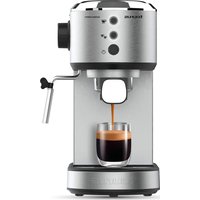
| Product type | Espresso coffee machine with steam wand |
| Brand | Taurus |
| Model | Mercucio (CM850X) |
| Power supply | 220-240 V ~ 50/60 Hz |
| Power | Approximately 1200 W |
| Water tank capacity | 1,2 L (estimated) |
| Pump pressure | 15 bar (estimated) |
| Main functions | Espresso 1 or 2 cups, hot water, steam for cappuccino |
| Volume customization | Yes, programmable for 1 or 2 cups |
| Automatic shut-off | Yes, after a few minutes of inactivity |
| Cup warming surface | Yes, on top |
| Usable coffee type | Ground coffee (natural roast recommended) |
| Included filters | Filter for 1 cup, filter for 2 cups |
| Provided accessories | Filter holder, measuring spoon, steam wand |
| Maintenance and cleaning | Regular cleaning of the filter holder, tank and steam tube; periodic descaling |
| Safety | Automatic shut-off, do not use without water, unplug before cleaning |
| Spare parts and repairability | Tank, filter holder, filters, spoon, steam tube; authorized Taurus technical support |
| Warranty | In accordance with applicable legislation |
| Country of origin | Not specified |
Frequently Asked Questions - Mercucio TAURUS
User questions about Mercucio TAURUS
0 question about this device. Answer the ones you know or ask your own.
Ask a new question about this device
Download the instructions for your Coffee machine in PDF format for free! Find your manual Mercucio - TAURUS and take your electronic device back in hand. On this page are published all the documents necessary for the use of your device. Mercucio by TAURUS.
USER MANUAL Mercucio TAURUS
natural_image
Line drawing of a standard espresso machine with handle and control panel (no text or symbols)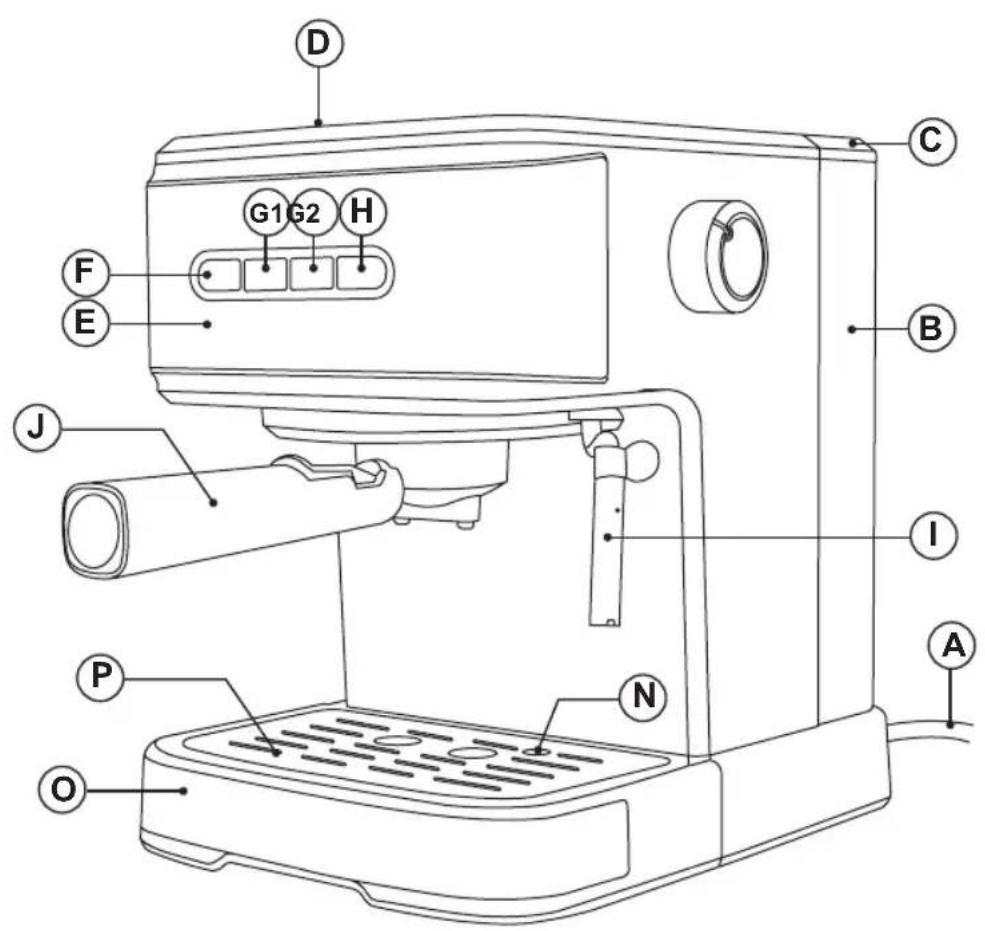
Español
CM850X MERCUCIO
- Do not use the appliance if its accessories are not properly fitted.
- Do not switch the appliance on without water.
- Do not use the appliance if the on/off switch does not work.
- Do not move the appliance while in use.
- Respect the MAX and MIN levels.
- Disconnect the appliance from the mains when not in use and before undertaking any cleaning task.
- Unplug the appliance from the mains before refilling the water tank.
- Store this appliance out of reach of children and/or persons with physical, sensory or reduced mental or lack of experience and knowledge.
- Do not store the appliance if it is still hot.
- Only use water with the appliance.
- The use of bottled mineral water adapted for human consumption is recommended.
- Never leave the appliance connected and unattended if is not in use. This saves energy and prolongs the life of the appliance.
- Do not remove the filter holder when coffee is being made, as at that time it is under pressure.
DESCRIPTION
A Supply cable
B Water tank
C Water Tank Lid
D Hot plate for warming cups
E Control panel
F ON/OFF Button
G1 One Coffee Button
G2 Two Coffee Button
H Steam heating Button
I Steamer pipe
J Filter holder
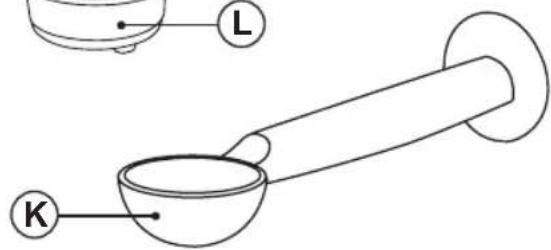
K Measuring spoon
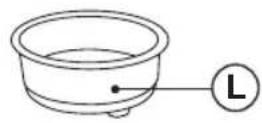
L Ground coffee filter (1 cup)
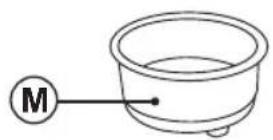
M Ground coffee filter (2 cups)
N Drip tray level
O Drip tray
P Tray grill
R Steam knob
INSTRUCTIONS FOR USE
BEFORE USE:
- Make sure that all the product's packaging has been removed.
- Before using this product for the first time, it is advisable to test it only with water.
- Before using the product for the first time, clean the parts that will come into contact with food in the manner described in the cleaning section.
- Before connecting the machine, check that the steam control (R) is closed by turning clockwise.
PRIMING THE CIRCUIT:
- This simple operation ensures optimum dispensing and must be carried out:
- When first starting:
- When the machine has been out of use for a long time (1 or 2 weeks)
- After making steam
- When the tank has run out of water.
- Fill the receptacle taking care to observe the MAX level
- Connect the appliance to the mains.
- Press the on/off button (F) Power indicator is illuminated.
- The indicators of 1 cup of coffee and 2 cup of coffee flash, the machine begins heating, after all indicators are solidly ON. The preheating is completed
- Without fitting the filter holder (or with the filter holder fitted, but without coffee), place a recipient under the steam pipe (I)
- Open the steam knob (R) by turning counterclockwise
- Press the G2 Coffee Button.
- Water will exit through the steam pipe. Wait until approximately one cupful has exited
-
First time you will use the machine, there is no water on the boiler, so it could be possible you need to repeat this operation before getting water
-
To finish serving, as quantity of liquid is programmed, it will stops automatically, but you always can stop when desired. To do it, push again over coffee button to stop and close the steam knob (R) by turning clockwise
- This will complete the priming operation.
FILLING WITH WATER:
- The tank must be filled with water before turning the appliance on.
- Remove the water tank.
- Fill the tank taking care to observe the MAX level
- Replace the tank in its housing, ensuring that it is well fitted.
FILLING OF COFFEE:
- Remove the filter holder.
- Position the ground chosen coffee filter (L ó M) in the filter holder
- We recommend using natural toast coffee, as using roasted coffee may affect the operation of the machine.
- Fill the removable filter with ground coffee (6 to 7 gr per cup to be prepared).
- If you wish to make 1 coffee, use 1 filter coffee, fill the ladle (1 spoonful) and take the capacity of the measuring spoon as the measure for one coffee.
- For 2 coffees, use 2 cups filter (M), and put in 2 spoonfuls.
- Next lightly press down the ground coffee with the back of the spoon.
- Fit the filter holder in the appliance once more.
- Position the filter holder in the coffee assembly by inserting the assembly from below to inserting position and turning it from left to right until it locks.
USE
MAKING ESPRESSO
- Before connecting the machine, check that steam control (R) is closed, turning clockwise.
- Connect the appliance to the mains.
- Turn the appliance ON pushing the on/off button(F).
-
The indicators of 1 cup of coffee and 2 cup of coffee flash, the machine begins preheating.
-
After indicators are solidly on. It means right temperature is reached.
- Place one or two pre-heated cups at the filter holder outlet.
- Press the coffee Button (G1 or G2). The coffee infusion will begin to exit.
- The coffee will stop automatically when reached the standard quantity.
TO CUSTOMIZE THE VOLUME OF COFFEE
- Press and hold 1-cup button for 3 seconds, 1-cup button flashes, entering setting mode, press 1-cup button again to start dispensing coffee, when the specified time is reached, press 1 cup button to complete setting which can be memorized by the unit. You can do same for 2 cups button.
- Once serving has finished, wait a few seconds and remove the cups with the coffee.
- Remove the filter holder and empty the grounds from it.
- Wash the filter holder with running water and dry it well.
- Check that the removable filter is perfectly fitted into the filter holder.
- Fit the filter holder in the appliance once more.
GETTING HOT WATER:
- Put the device in ON situation, pressing the button ON/OFF (F).
- The indicators of 1 cup of coffee and 2 cup of coffee flash, the machine begins preheating. After all indicators are solidly on, the preheating is completed. This situation indicates that the water has reached the right.
- Place a container under the nozzle.
- Open the steam control (R), turning him to the left, counterclockwise.
- Press one of coffee outlet button (G1-G2).
- Please refer to the operation described in the section of "Making Espresso" when need to adjust the working time for making hot water.
- The hot water began to come out of the vaporizer.
- Once obtained the desired amount of hot water, press the coffee outlet button (G1 or G2) again, which stops the pump.
- Close The turning knob (R) to the right, clockwise.
OBTAINING STEAM:
- The steam is used to foam milk for cappuccino, and also to heat other liquids.
- Turn the appliance on using the on/off button.
- The indicators of 1 cup coffee button and 2-cup coffee button flash, the machine begins preheating, until indicators are solidly ON. The right temperature for coffee is reached.
- For Steam, press the Steam heating button (H), with Steam icon flashing, and continue heating until the steam temperature has been reached.
- The Steam light will illuminate steady, indicating that the water has reached the necessary temperature for generating steam.
- Note: During operation, the indicator in the steam selector will cycle on and off to maintain to desired temperature.
- Place a recipient under the steam tube.
- Open Steam knob (R) anticlockwise
- Steam only will begin to exit.
- When you have enough, close the control and remove the recipient.
IMPORTANT
- When you finish doing steam, you must replace the water used to make steam and at the same time, recover the temperature (lower) to make coffee.
- To do this, with the steam knob open, pushing previously over Steam Icon to stop heating, push coffee / water button (G1 or G2), which will activate the pump.
- Put a container under the tube
- When water starts to flow through the steam pipe, it means that it has recovered the coffee temperature and the boiler has been filled. Now you can close Steam knob and to push coffee button (G) to Stop position
AUTO-OFF FEATURE:
- The TAURUS machines are designed to save energy.
- To that end, after some minutes from the last operation, the unit switches to energy saving mode.
-
To return to normal operation you should just Switch ON the connect button (F).
-
Once you have finished using the appliance:
- Turn the appliance off, using the on/off switch (F) for a few seconds
- Unplug the appliance to the mains.
- Remove the water from the water tank.
- Clean the appliance
CLEANING
BASIC CLEANING
- Disconnect the appliance from the mains and let it cool before undertaking any cleaning task.
- Clean the equipment with a damp cloth with a few drops of washing-up liquid and then dry.
- Do not use solvents, or products with an acid or base pH such as bleach, or abrasive products, for cleaning the appliance.
- Do not let water or any other liquid get into the air vents to avoid damage to the inner parts of the appliance.
- Neither parts of this appliance are suitable for cleaning in the dishwasher.
- After washing, dry all the parts before fitting them together and storing.
CLEANING THE FROTHING WAND
- CAUTION! The frothing wand, and frothing sleeve may be VERY HOT.
- It is recommended to purge and wipe the frothing wand after steaming milk to prevent deposits of dirt and before turning off the machine.
- To do this, pull the frothing sleeve down and clean under warm running water.
- Fill a cup with a bit of water, immerse the frothing wand into the water.
- Drain hot water through the pipe, following the instructions "Obtaining hot water".
- Use a cloth to dry the frothing wand and replace the frothing sleeve.
- In case no steam comes out of the frothing wand, hardened milk blocks its path. Carefully use a needle to loosen the milk residue from the opening of the frothing tip to remove any blockage,
- Once clean, rinse with running water from the tap and reassemble it. Then steam again.
HOW TO DEAL WITH LIME SCALE INCRUSTATIONS:
- For the appliance to work correctly it should be kept free of lime scale or magnesium incrustations caused by the use of hard water.
- To prevent this kind of problem, we recommend the use of water with low lime or magnesium mineralisation.
- However, if it is not possible to use the kind of water recommended above, you should periodically remove the lime scale from the appliance:
- Every 6 weeks if the water is "very hard".
- Every 12 weeks if the water is "hard".
- To do so, we recommend the use of a specific Decal product for this kind of machine which can be found in specialised shops and authorised technical services.
- Homemade solutions are not recommended in the de-scaling of this appliance, such as the use of vinegar.
ANOMALIES AND REPAIR
- If you detect any anomalies, refer to the following table:
| Anomaly Possible cause Solutions | ||
| Water flows out of the side of the holder | The filterholder is not fitted correctly. The Edge of the sieve is covered coffee. The brewing group is dirty. | See Section "filling coffee". Clean the sieve around the edge and clean the brewing of coffee group Clean With a damp cloth. |
| No coffee comes out | There is no water. The water tank is not properly placed. The filter holes are clogged, the coffee is ground too fine or has been pressed too much. | Fill the water tank. Make sure the tank is properly seated. Empty the filter basket and clean with water. Clean the brewing unit with a damp cloth. Fill the sieve again and press the coffee slightly. |
| The coffee comes out slowly or drop by drop | The coffee grinding is too fine or too pressed. | Make sure grinding is OK and it's not too pressed. |
| The coffee comes without cream | The used Coffee is out of date. The Coffee has not been pressed enough. The Ground coffee is too coarse. | Use Fresh coffee and once opened store in an airtight container. Press slightly the coffee. Grind finer the coffee. |
| The coffee comes out too fast | The ground coffee is too coarse. There is not enough coffee in the sieve. The Coffee has not been pressed enough. | Grind coffee finer. Ensure that it's the right amount of coffee in the sieve. Press slightly the coffee. |
| No steam escapes from the evaporator tube | The Tube is clogged. Clean the steam tube with a damp cloth to remove any traces of milk have dried and unblock holes using a needle. Press the corresponding switch and remove “hot water” until it goes out continuously. | |
Français
CM850X MERCUCIO
UTILISATION ET PRÉCAUTIONS :
ESPRESSO KOFFIE ZETTEN.
PRODUCTIE VAN WARM WATER:
NIEPRAWIDŁOWOŚCI I NAPRAWA
This product enjoys the recognition and protection of the legal guarantee in accordance with current legislation. To enforce your rights or interests you must go to any of our official technical assistance services.
You can find the closest one by accessing the following web link: http://taurus-home.com/
You can also request related information by contacting us.
You can download this instruction manual and its updates at http://taurus-home.com/
Français
GARANTIE ET ASSISTANCE TECHNIQUE
COUNTRY ADDRESS PHONE
| Algeria Zone d'Activite, N° 62, Constantine 213770777756 | ||
| Argentina Av. del Libertador 1298,(B1638BEY), Vicente López (Pcia. Buenos Aires) | 541153685223 | |
| Belgium Mariëndonkstraat 5, 5154 EG, Elshout 31620401500 | ||
| Benin 359 Av. Steinmetz, 1930, Cotonou 0299-21313798 | ||
| Bulgaria | 265,Okolovrasten Pat, Mladost 4, 1766, Sofia | 35929211120 / 35929211193 |
| Burkina Faso Avenue Bassawarga, 01 BP915, Ouagadougou 226 25301038 | ||
| Congo (Republic of) 98 Blvd General Charles de Gaulle, Pointe Noire 242066776656 | ||
| Cyprus | 20, Bethlehem Str. / P.O.Box 20430, 2033, Strovolos | 35722711300 |
| Czech Republic | Milady Horakove 357/4, 568 02, Svitavy | 420 461 540 130 |
| Democratic Republic of the Congo | AV. Pont Canale N° 3440, Kinshasa | 00243-991223232 |
| Equatorial Guinea | SN Av Patricio Lumumba y C/ Jesus B, Bata | 00240 333 082958 / 00240 333 082453 |
| Equatorial Guinea | Calle de las Naciones Unidas, PO box 762, Malabo | 240333082958 / 240333082453 |
| España Avda Barcelona, S/N, 25790 Oliana (Lleida) atencioncliente@taurus.es | 902 118 050 | |
| Ethiopia Lideta Sub City Kebele 10 H.NO 124, Addis Ababa | +251 11 5518300 | |
| France | Za les bas musats 18, 89100, Malay-le-Grand | 03 86 83 90 90 |
| Gabon | BP 574, Port-Gentil Centre-ville | 24101552689 / 24101560698 |
| Ghana | Ederick Place, Accra-Ghana | 302682448 / 302682404 |
| Gibraltar | 11 Horse Barrack Lane, 54000, Gibraltar | 00350 200 75397 / 00350 200 41023 |
| Greece Sapfous 7-9, 10553, Athens | +30 21 0373 7000 | |
| Guinea BP 206, GN, Conakry | (224) 622204545 | |
| Hong Kong | Unit H,13/F., World Tech Centre, Hong kong | (852) 2448 0116 / 9197 3519 |
| Hungary | Késmárk utca 11-13, 1158, Budapest | +36 1 370 4519 |
| India | C-175, Sector-63, Noida, Gautam Budh Nagar - 201301, Delhi | (+91) 120 4016200 |
| Ivory Coast 01 Rue Des Carrossiers-Zone 3, B.P 3747, Abidjan 01 (RCI) | 22521251820 / 225 21 353494 | |
| Jordan | 28 Basman St Down town, Amman +962 6 46 222 68 | |
| Kuwait | P.O. BOX 3379 hawally, 32034, Hawally | +965 2200 1010 |
| Lebanon | Damascus Highway; Sciale Building, Jamhour | 9615922963 |
| Luxembourg | Mariëndonkstraat 5, 5154 EG, Elshout 31620401500 | |
| Mali | BP E2900, Dravela Bolibana | 223227216 / 223227259 |
| Marruecos Big distribution society 4 Rue 13 Lot. SmaraOulfa, Casablanca | (+212) 522 89 40 21 | |
| Mauritania 134 Avenue Gamal Abdener Ilot D, Nouakchott 2225254469 / 2225251258 | ||
| Mexico Rosas Moreno N° 4-203 Colonia de San RafaelC.P. 06470 – Delegación Cuauhtémoc, Ciudad de México | (+52) 55 55468162 | |
| Montenegro Rastovac bb, 81400, Niksic +382 40 217 055 | ||
| Netherlands Mariëndonkstraat 5, 5154 EG, Elshout 31620401500 | ||
| Nigeria 8, Isaac; John Str,G.R.A Ikeja Lagos 23408023360099 | ||
| Paraguay Denis Roa 155 c/ Guido Spano, Asunción 21665100 | ||
| Peru Calle los Negocios 428, Surquillo, Lima (511) 421 6047 | ||
| Portugal Avenida Rainha D. Amélia, n°12-B, 1600-677,Lisboa | +351 210966324 | |
| Romania | Dudesti Pantelimon 23, 410554, Bucharest | 031.805.49.58 |
| Serbia | Rastovac bb, 81400, Niksic +382 40 217 055 | |
| Slovakia Milady Horakove 357/4, 568 02, Svitavy | 420 461 540 130 | |
| Southafrica | Unit 25 & 26, San Croy Office Park, Die Agora Road, Croydon, Kempton Park, 1619, Johannesburg | (+27) 011 392 5652 |
| Tunisia | 2, Rue de Turquie, Tunis | 21671333066 |
| Ukraine | Block 6, Ap Housing Estate Topol-2, B, 49000,Dnepropetrovsk | 380563704161 / 380563704161 |
| United Arab Emirates | P.O.BOX 8543, Dubai | 14506246200 |
| Uruguay | Luis Alberto de Herrera 3468, 11600, Montevideo | 598 2209 28 00 |
| Vietnam | Lot 7 Ind. Zone for, Ha Noi | 84437658111 / 84437658110 |


taurus
Avda. Barcelona, s/n
25790 Oliana
Spain