USER MANUAL AST 350 E Alpha Tools
natural_image
Line drawing of a mechanical device with no visible text or symbols
AST 350E

© Bitte vor Montage und Inbetriebnahme die Betriebsanleitung aufmerksam lesen
Please read the operating instructions carefully before assembling and using
⑤ Veuillez lire attentivement ce mode d'emploi avant de procéder au montage et à la mise en service
E Sirvase a leer atentamente estas instrucciones antes del montaje y de la puesta en servicio
⑤ Var god läs bruksanvisningen noggrant före montering och driftstart
Læs driftsvejledningen grundigt inden montage og idrifttagning
Pyydämme Teltä lukemaan käyttöohjeen tarkkaavaisesti ennen asennusta ja käyttöönottoa
Před montáží a uvedením do provozu si prosím pozorně přečtěte návod k obsluze
A összeszerelés és hasz nálatba vétel előtt kérjük a használati utasítást figyel mesen átolvasni.
⑥ Molimo da prije montaže i upotrebe pažljivo pročitate naputak za uporabu
Proximo, da pred montažo in prvim zagonom pazljivo preberete navodila za upor abo.
Lütfen kullanma kılavuzunu tam okuyun ve özellikle güvenlik uyarlarına dikkat edin. Kullanma kılavuzunu matkapla birlikte saklayın.
© Seite 4 - 6
Page 7 - 9
⑤ Page 10 - 12
© Página 13 - 15
⑤ Sidan 16 - 18
Side 19 - 21
⑧ Sivu 22 -24
© Strana 25 - 27
④ Oldal 28 - 30
© Stranice 31 - 33
© Strani 34 - 36
⑰ Sayfa 37 - 39
3
D
Beschreibung
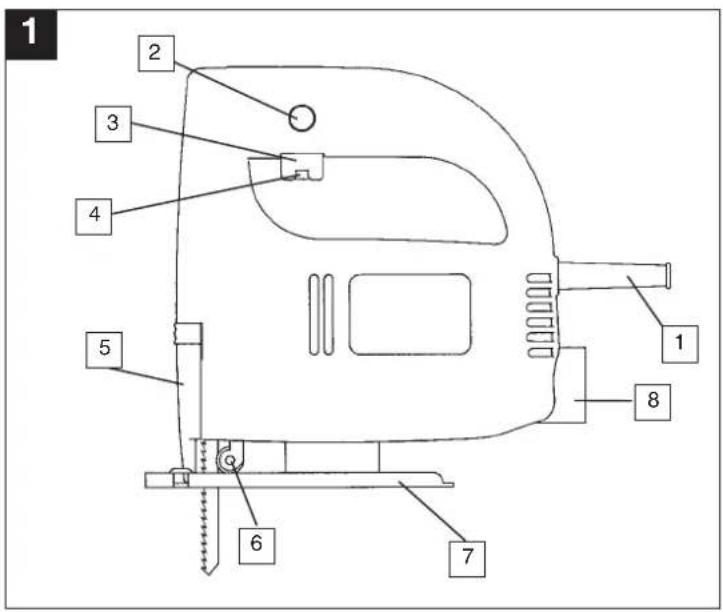
1 Netzkabel
2 Feststellknopf
3 Ein/Ausschalter
natural_image
Technical line drawing of a mechanical device with a close-up inset showing a component (no text or symbols)
4
natural_image
Technical line drawing of a mechanical device with no visible text or symbols
6
Description
1 Power cable
2 Locking button
3 On/Off switch
4 Knurled screw for regulating the speed
5 Inspection guard
6 Guide roller
7 Adjustable base
8 Dust extractor socket
General safety and accident prevention regulations
To work safely with this machine and to prevent accidents it is imperative to read the following safety regulations and operating instructions in full and to put all the information into practice.
● Always check the machine, the power cable and the plug before use. Only ever use the machine if it is in perfect, undamaged condition. Damaged parts are to be repaired or replaced immediately by a qualified electrician.
● Always pull the plug out of the power socket before carrying out any work on the machine, before changing the tool and in periods of non-use.
● Always run the power cable away from the back of the machine to guard it from damage.
- For outdoors work use only suitably approved extension cables with a minimum conductor cross section of 1.5mm2 . The plug connectors must have earthing contacts and be rain-water-proof.
- Keep the machine in a safe place and out of the reach of children.
● Always wear goggles, safety gloves and ear muffs when grinding, brushing and cutting. Wear a breathing mask on dusty jobs.
● Never leave any tool keys or adjustment spanners in position on the machine. Before switching on, check that all keys and adjustment spanners have been removed.
- Secure the workpiece (with a clamp) so that it cannot slip.
- It is imperative to use a dust extractor when working on stone (cutting or grinding). Make sure the dust extractor is approved for stone dust.
- It is prohibited to use the machine on asbestos materials. Please note the accident prevention regulations in force in your country.
● Use only original spare parts.
● Repairs are to be carried out by qualified electricians only.
GB
● The level of noise at the workplace may exceed 85 dB(A). In this case you will need to introduce noise protection measures for the user. The noise produced by this electric tool is measured in accordance with IEC 59 CO 11, IEC 704, DIN 45635 Part 21, NFS 31-031 (84/537/EEC).
● Make sure of your footing. Avoid abnormal working positions.
- Keep your electric tool out of the rain. Never use electric tools in wet or damp conditions, and never use them near inflammable liquids.
● Never carry the machine by its power cable. Keep the power cable safe from damage. Oil, solvent and sharp edges can damage cables.
- Keep your workplace tidy.
● Make sure the power switch is off before inserting the plug in the socket.
● Wear suitable clothing. Never wear loose-fitting clothes or jewelry. Use a hair-net on long hair.
- For your own safety, use only the manufacturer's accessories and attachments.
- Use only sharp saw blades that are in perfect condition. Replace bent and cracked saw blades immediately.
● After switching off the jigsaw, do not press against the side of the blade to bring it to a halt.
● Always cut at a steady rate of progress. This will prevent accidents and prolong the life of your jigsaw and the blade.
GB
Operating instructions for the electronic jigsaw
STARTING UP
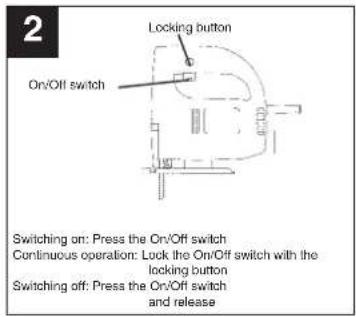
Instant response operation (Figure 2)
Switching on: Press the On/Off switch
Switching off: Release the On/Off switch
Continuous operation
Switching on: Press the On/Off switch, keep pres
sed and lock with the locking button
Switching off: Press the On/Off switch and release
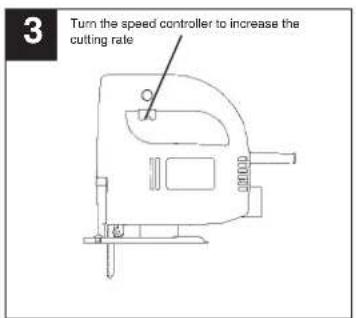
Using the knurled screw on the On/Off switch you
can pre-set any speed. Tum the knurled screw in
PLUS direction for a higher speed and turn it in MINUS direction for a lower speed. The oracle
MINOS direction for a lower speed. The ideal cutting rate depends on the specific material and working conditions.
The general rules for tool speed in cutting operations apply.
Switch off the jigsaw and remove the plug from the power socket before changing the blade or carrying out any other work on the jigsaw.
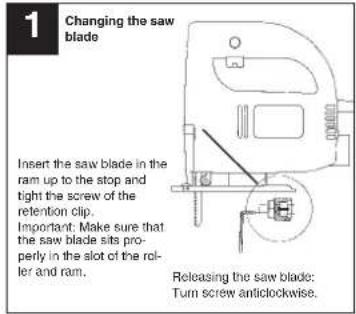
Use the supplied hexagon-socket spanner to undo the two screws on the ram (Figure 1). Slide the saw blade into the guide slot and up to the stop between the piston rod and the retention clip. Use the supplied hexagon-socket spanner to tighten the two screws. The teeth of the saw blade must face in cutting direction. Make sure that the saw blade sits properly in the guide slot of the ram and roller.
Adjusting the base
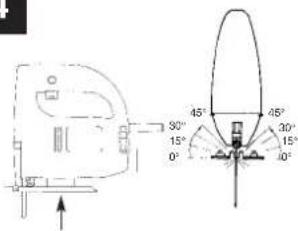
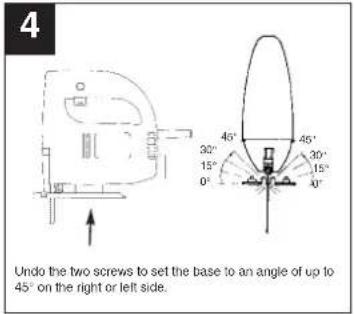
(for mitering and sawing near edges, Figure 4)
For mitre and bevel cuts you can swivel the base by up to 45irc in either direction after undoing the two screws on the bottom. The angles 15irc , 30irc and 45irc are marked but you can adjust the saw to any angle between these markings as required.
To adjust the cutting angle, undo the two screws
(Figure 4) until you can just about move the blade.
Adjust to the required angle and re-tighten the two
screws
To enable you to saw right up to the edge, the base
can be pushed backward. To do so, undo the two screws underneath (Figure 4) and push the base to the back. Re-tighten the two screws.
The jigsaw is equipped with a dust extractor socket. Any vacuum cleaner can be connected to the socket at the rear of the jigsaw. If you require a special adapter, please contact the manufacturer of your vacuum cleaner.
TECHNICAL DATA
| Nominal voltage: 230 V ~ 50 Hz |
| Power consumption: 350 W |
| Cutting rate: infinitely variable, max. 400-2600strokes/min. |
Stroke height: 18 mm
Cutting depth in wood: 55 mm
Cutting depth in plastic: 10 mm
Cutting depth in iron: 5 mm
Mitre cuts: up to 45° (left and right)
Sound pressure level LPA: 87,5 dB(A)
Sound power level LWA: 100,5 dB(A)
| Vibration aw | 6,3 m/s a |
| Double isolation II / 1 | |
| Weight 1,6 Kg | |
Vibration measured on the handle acc. to ISO 5349.
GB
F
Description
natural_image
Line drawing of a mechanical device with no visible text or symbols
12
Descripción
natural_image
Technical line drawing of a mechanical device with no visible text or symbols
S
Beskrivning
natural_image
Technical line drawing of a mechanical device with no visible text or symbols
Popis
natural_image
Technical line drawing of a mechanical device with no visible text or symbols
30
HR
Opis uređaja
natural_image
Technical line drawing of a mechanical device with no visible text or symbols
SLO
Opis
1 e lektrični kabel
2 zaskočni (fiksimi) gumb
natural_image
Line drawing of a mechanical device with no visible text or symbols
36
TR
Açıklama
natural_image
Pure technical line drawing of a mechanical component without any text, numbers, or symbols
natural_image
Technical line drawing of a mechanical device with no visible text or symbols
D EG Konformitätserklärung
GB EC Declaration of Conformity
F Déclaration de Conformité CE
NL EC Conformiteitsverklaring
E Declaracion CE de Conformidad
P Declaração de conformidade CE
⑤ EC Konformitetsförklaring
FIN EC Yhdenmukaisuusilmoitus
N EC Konfirmitetserklæring
RUS EC Заявление о конформности
HR Dichiarazione di conformità CE
RO Declaratie de conformitate CE
TR AT Uygunluk Deklarasyonu
The undersigned declares in the name of the company that the product is in compliance with the following guidelines and standards.
The image contains a single, solid horizontal line. According to the instructions, specifically the rule for ignoring such lines, there is no actual text content to extract or convert under these specific rules. Therefore, the correct OCR output is an empty string.
(No text to output)
97/23/EG
×
89/336/EWG
□
90/396/EWG
The image contains a single, solid horizontal line. According to the instructions, specifically the rule for ignoring such lines, there is no actual text content to extract or convert under these specific rules. Therefore, the correct OCR output is an empty string.
89/686/EWG
ISC GmbH
Eschenstraße 6
D-94405 Landau/Isar
The Ground Truth image displays a single, solid horizontal line. According to Rule 2 (UNDERSCORE & LINE RULES), this is a stylistic or background line, not a placeholder underscore. Therefore, the OCR result must ignore it and output nothing or only meaningful text. The provided OCR content is "____", which consists of four underscores. This is an incorrect interpretation of the line as a placeholder, violating the rule that stylistic lines must be ignored. The OCR has hallucinated underscores where none should exist based on the GT's visual context. Hence, the OCR result is inconsistent with the Ground Truth.
87/404/EWG
R&TTED 1999/5/EG
□
2000/14/EG: LWM dB(A); LWA dB(A)
EN 50144-1; EN 50144-2-10; EN 55014-1; EN 55014-2; EN 61000-3-2; EN 61000-3-3
Landewiser, den 01.12.2003
Brunhölzl
The product described in these instructions comes with a 6-year warranty covering defects. This 5-year warranty period begins with the passing of risk or when the customer receives the product.
For warranty claims to be accepted, the product has to receive the correct maintenance and be put to the proper use as described in the operating instructions. Your statutory rights of warranty are naturally unaffected during these 5 years.
This warranty applies in Germany, or in the respective country of the manufacturer's main regional sales partner, as a supplement to local regulations. Please note the details for contacting the customer service center responsible for your region or the service address listed below.
© CERTIFICADO DE GARANTIA
© An. Mayrofideopoulos S.A.
Technical & Commercial Company
12, Papastratou & Asklipiou Str.
GR 18545 Pirásus
Tel 0210 4136155, Fax 0210 4137692
④5 Bermas
Altufyevskoye shosse. 2A
RUS 127273 Moscow
Tel 095 7870179, Fax 095 5401750
LT Dirbila
Metalo str. 23
LT2038 Vilnius
Tel 05 2395769, Fax 05 2395770
EST AS Baltoil
Roiu, Haaslava vald
EE 62102 Tartumaa
Tel 07 301710, Fax 07 301701
Halai Trading Co. LLC
POB 9282, Nakheel Rd. Deira, Shop No. 15
UAE Dubai
el./Fax 04 2279554
IR Alborz Abzar Co. Ltd
No. 111, Bastan Passage Imam Khomeini Ave.
IR 11146 Teheran
Tel. 021-6716073
Tel 021-6710072, Fax 021-6727177
K2 I.B.G.
Belinskij-str. 102
KZ 486008 Chimkent
Tel 03252 518461, Fax 03252 570743
FIS d.o.o
Poslovni Centar 96
BIH 87000 Vitez
Tel 030-715-267, Fax 030-715-320
© MANIMEX d.o.o
Uzicke republike 93
CS 31000 Uzice
Tel 031 551 393, Fax 031 601 539
D
The reprinting or reproduction by any other means. In whole or in part, of documentation and papers accompanying products is permitted only with the express consent of ISC GmbH.
F