Simply Zen - Baby monitors BEABA - Free user manual and instructions
Find the device manual for free Simply Zen BEABA in PDF.

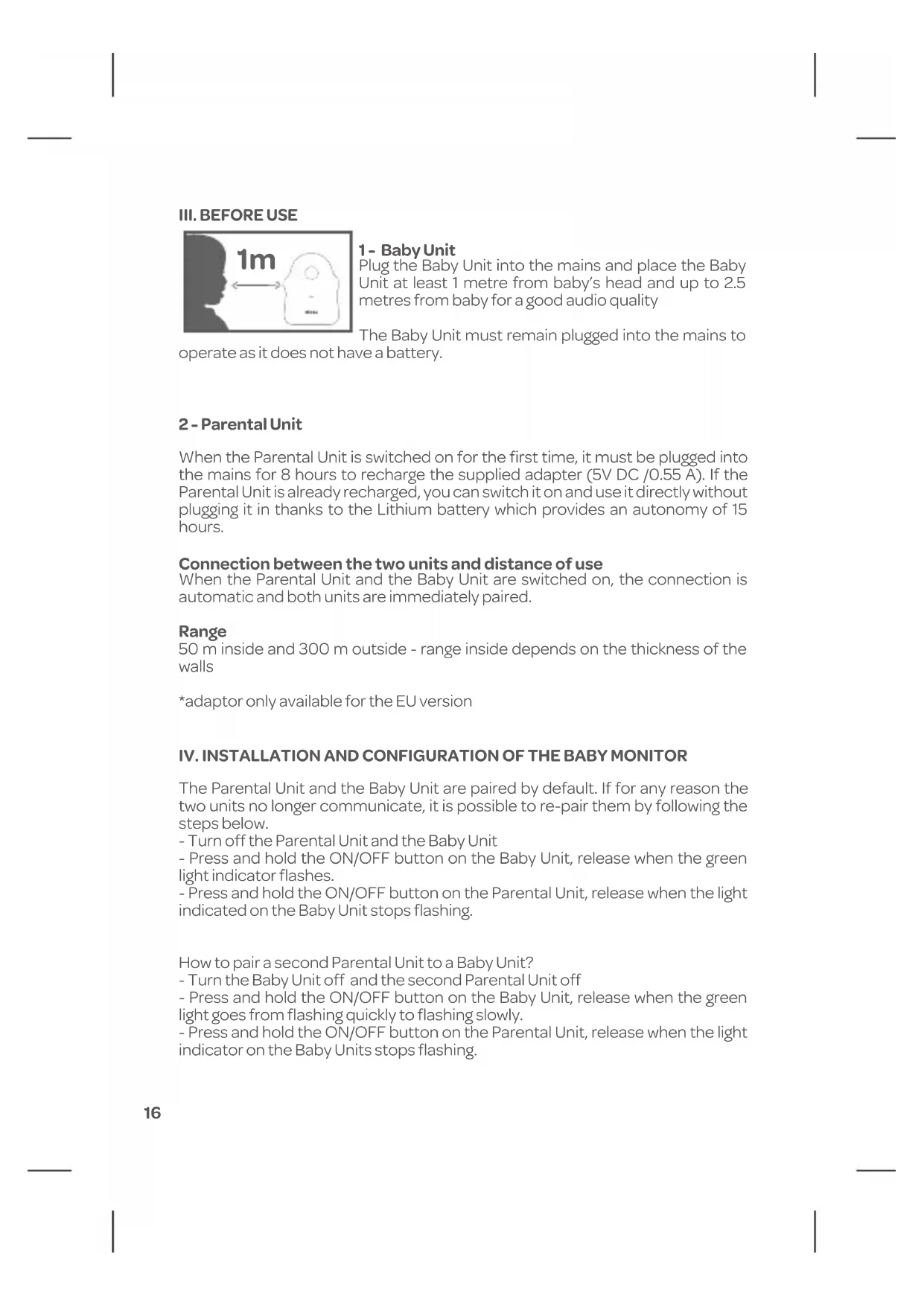


| Product type | Baby audio monitor |
| Brand | BEABA |
| Model | Simply Zen |
| Indoor range | 50 meters |
| Outdoor range | 300 meters |
| Frequency | 2.4 GHz |
| Baby unit power supply | Mains via USB adapter (5V DC, 0.5 A minimum) |
| Parent unit power supply | Rechargeable lithium battery (3.7 V, 750 mAh) or mains via micro USB (5V DC, 0.5 A) |
| Parent unit battery life | Approximately 15 hours |
| Parent unit charging time | 8 hours (first charge) |
| Walkie-talkie function | Yes |
| Night light | Yes, control from parent or baby unit |
| Night mode | Yes, cuts off wave emissions in silence |
| VOX mode | 2 sensitivities: Low and High |
| Out of range alarm | Yes, beep every 2 seconds (disabled in night mode) |
| Low battery alarm | Yes, beep every 30 seconds and red LED |
| LED indicators | Green (charging), Red (low battery), Orange (night mode) |
| Cleaning and maintenance | Clean with a damp cloth only. Do not use chemical products. |
| Operating temperature | 10°C to 35°C |
| Warranty | 2 years |
| Compliance | Directive 2014/53/EU |
| Spare parts and repairability | Battery replaceable via after-sales service. Adapter available upon request. |
| Safety | Place the baby unit at least 1 meter away from the baby. Do not immerse in water. Do not cover. |
Frequently Asked Questions - Simply Zen BEABA
User questions about Simply Zen BEABA
0 question about this device. Answer the ones you know or ask your own.
Ask a new question about this device
Download the instructions for your Baby monitors in PDF format for free! Find your manual Simply Zen - BEABA and take your electronic device back in hand. On this page are published all the documents necessary for the use of your device. Simply Zen by BEABA.
USER MANUAL Simply Zen BEABA
III. AVANT UTILISATION

1 - Unité bébé
NULLITE DE LA GARANTIE
I - WARNINGS AND PRECAUSTIONS FOR USE 13
1 -Warnings 13
2 - Precautions for use 13
II - PRODUCT OVERVIEW 14
III - BEFORE USE 16
1 - Baby Unit. 16
2 - Parental Unit 16
3 - Connection between the two units and distance of use 16
IV -INSTALLATION AND CONFIGURATION OF THE BABY MONITOR......16
1 - Use of the Parental Unit and the Baby Unit 16
V-PARENTAL UNIT MENU 17
1 -Use of the function buttons 17
2 - Parental Unit functions ...... 17
VI - CLEANING AND MAINTENANCE 18
VII - ENVIRONMENT AND RECYCLING 18
VIII - GUARANTEE 19
IX - PROBLEM SOLVING - TROUBLESHOOTING- FAQ 20
WELCOME
Thank you for purchasing our SIMPLY ZEN Baby Audio Monitor, you will soon be able to listen to your baby from a distance. To use our product in the best possible conditions, we invite you to carefully read this instruction manual and to keep it for further reference.
I. WARNINGS AND PRECAUSTIONS FOR USE
Read and keep these instructions. Heed to the warnings.
1. WARNINGS
TO AVOID ANY RISK OF STRANGULATION, IT IS ESSENTIAL TO CHECK THAT THE ADAPTOR CABLE IS NEVER WITHIN A CHILD'S REACH. PLACE THE ADAPTOR AT LEAST 1 METRE FROM THE CHILD.
WARNING: to avoid any risks of explosion, electrical shock, short-circuit or overheating:
- Never immerse the Parental Unit or Baby Unit or the charger in water or clean under running water.
- Keep the battery away from any excessive heat source, such as radiators, heating, ovens, cooking surfaces or other appliances producing heat.
- To avoid overheating, never cover the Baby Monitor with a towel, blanket, or any other object.
Do not touch the contacts of the plug with pointed or metallic objects.
When in constant use, the adaptor of the Baby Unit may become warm to the touch. This
is a common effect and not a defect.
2. Precautions for use
- This appliance must only be used for the purpose described in this manual.
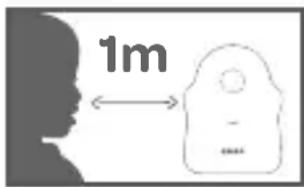
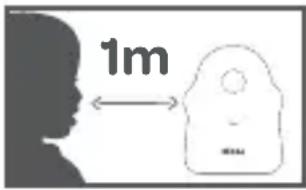
- Place the Baby Unit beyond a child's reach, on a flat surface and at least 1 m from the child's head.
- For the best performance of your Audio Baby Monitor and to reduce interferences, it is not recommended to plug other electrical appliances into the same electrical socket as your Baby Monitor. (Do not use a multi
socket).
- Before plugging the Baby Monitor into the mains, check that the voltage indicated on the Baby Monitor adaptors is consistent with the mains voltage.
- If the appliance is not in use, turn it off using the OFF button.
- The product must be installed by adults. Keep small components away from children during assembly.
Adult supervision
- The Baby Monitor provides assistance and added peace of mind. It should not be used as a medical appliance nor as a substitute for adult supervision. In no circumstances can it replace responsible and appropriate supervision on behalf of an adult: it is strongly recommended that an adult supervises baby regularly as well as through the audio Baby Monitor.
- Never leave the home if your child is alone, even for a short time.
- Never place the Baby Unit inside the cot, bed or playpen.
- For their safety, never let children play with the Baby Monitor.
Storing precautions
- Use and store the Baby Monitor in a place where the temperature is between 10°C and 35°C.
- Keep the Baby Monitor away from direct sunlight.
- If you think that the battery is damaged, remove it from the battery well and stop using the product. Contact BEABA Consumer Services. Never use a damaged battery.
- Never put the adaptor cable in a place where it could be damaged (humidity/heat etc.).
Replacement parts
- Use the supplied batteries for the Parental Unit. Only use the accessories supplied by the
Manufacturer: if the battery is damaged, it must be replaced by the manufacturer via Consumer Services:
You can contact the BEABA Consumer Services for technical assistance and avoid any risks.
- If needed, you can use the same type of adaptor as the one supplied.FR
II. PRODUCT OVERVIEW

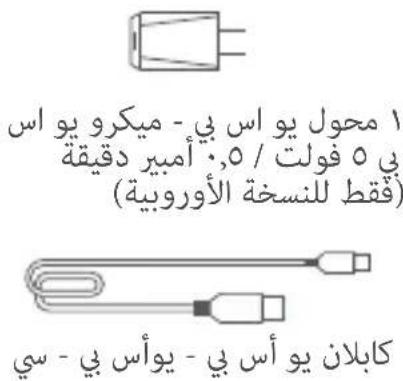
1 adaptor USB 220V - 5V USB (0.5A min)
(For the European version only)
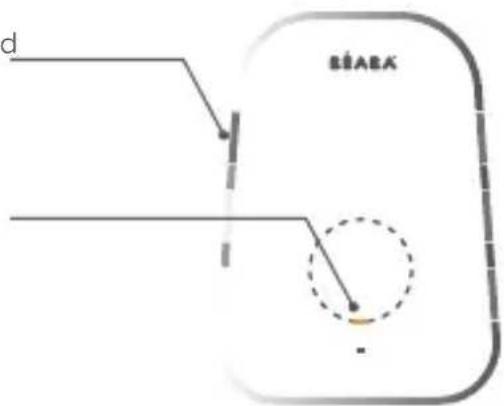
Transmitter (Baby Unit)

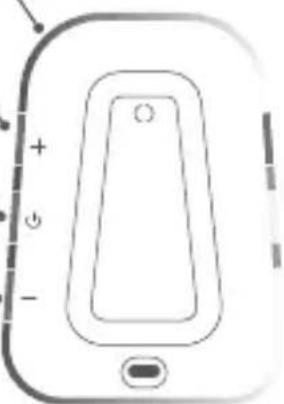
Receiver (Parental Unit)
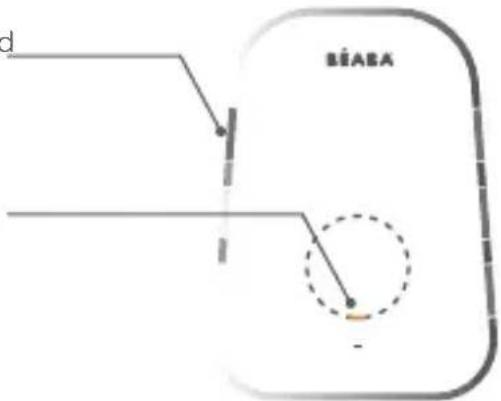
PUSH TO TALK: Press and hold the button to talk to baby
Function Indicator :
- Green flash: CHARGING
• Red flash: LOW BATTERY
• Orange: NIGHT MODE

III. BEFORE USE

1 - Baby Unit
Plug the Baby Unit into the mains and place the Baby Unit at least 1 metre from baby's head and up to 2.5 metres from baby for a good audio quality
The Baby Unit must remain plugged into the mains to
operate as it does not have a battery.
2 - Parental Unit
When the Parental Unit is switched on for the first time, it must be plugged into the mains for 8 hours to recharge the supplied adapter (5V DC /0.55 A). If the Parental Unit is already recharged, you can switch it on and use it directly without plugging it in thanks to the Lithium battery which provides an autonomy of 15 hours.
Connection between the two units and distance of use
When the Parental Unit and the Baby Unit are switched on, the connection is automatic and both units are immediately paired.
Range
50 m inside and 300 m outside - range inside depends on the thickness of the walls
*adaptor only available for the EU version
IV. INSTALLATION AND CONFIGURATION OF THE BABY MONITOR
The Parental Unit and the Baby Unit are paired by default. If for any reason the two units no longer communicate, it is possible to re-pair them by following the steps below.
- Turn off the Parental Unit and the Baby Unit
- Press and hold the ON/OFF button on the Baby Unit, release when the green light indicator flashes.
- Press and hold the ON/OFF button on the Parental Unit, release when the light indicated on the Baby Unit stops flashing.
How to pair a second Parental Unit to a Baby Unit?
- Turn the Baby Unit off and the second Parental Unit off
- Press and hold the ON/OFF button on the Baby Unit, release when the green light goes from flashing quickly to flashing slowly.
- Press and hold the ON/OFF button on the Parental Unit, release when the light indicator on the Baby Units stops flashing.
V. PARENTAL UNIT MENU
Use of the PARENTAL UNIT function buttons
PUSH TO TALK: Press and hold the button to talk to baby
Function Indicator :
- Green flash: CHARGING
• Red flash: LOW BATTERY
• Orange: NIGHT MODE
Parental Unit functions

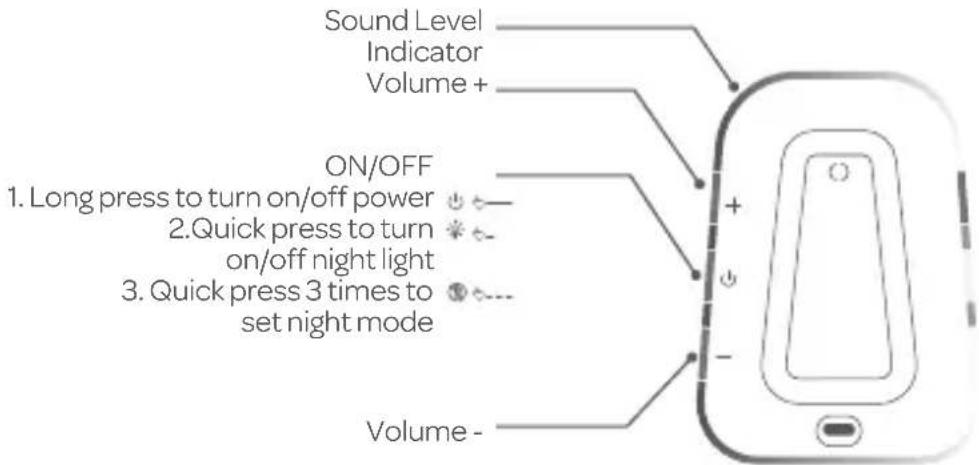
Night mode - 0 waves: once activated, it cuts all wave emissions when the Baby Unit does not detect noise. In «night» mode the signal loss alarm does not work. The night mode is activated when the light indicator on the Parental Unit is orange
WALKIE-TALKIE FUNCTION: press and hold this button to communicate with the Baby Unit. The Baby Unit volume can be adjusted by using the +/- buttons while holding the talk back button

Night-light function: the night-light can be turned off and on from the Parental Unit (quick press on the ON/OFF button) or from the Baby Unit (3 quick presses on the ON/OFF button). When the night-light is on, the light indicator on the Parental Unit is stronger.

Function Vox - 2 available modes: Adjust the sensitivity of the VOX mode according to your needs. The 2 available modes regulate the sensitivity of the VOX (50-60 dB) to adapt it to baby's environment. In a very calm environment, favour the Hi (H) setting, if the Baby Unit emits background noises when baby sleeps, use the Low (L) setting
Parental Unit 'find' function: when the BABY Unit is turned on, briefly press the ON/OFF button once to make the PARENTAL Unit ring (the PARENTAL Unit must also be turned on)

Volume control: use the +/- buttons to adjust the volume of the Parental Unit. On the minimum level the Parental Unit will be on silent mode: the light-emitting diodes show the intensity of the detected sounds.
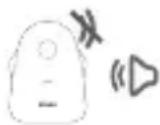
Out of range alert: the BABY Unit is switched off or if the PARENTAL Unit is out of range, the PARENTAL Unit will beep every two seconds. This mode is not active in night mode

Low battery alert: when the battery is nearly flat, the Parental Unit will beep every 30 seconds and the warning light will be red.
VI. CLEANING AND MAINTENANCE
Warning
Never use chemical detergent, sprays or liquid detergent.
- Before cleaning, all the adaptors must be unplugged
- Hands must be dry before inserting or replacing the battery
- Clean the Baby Audio Monitor with a damp cloth only.
VII. ENVIRONMENT AND RECYCLING
- This appliance has been designed and made with materials and components of high quality such as Lithium batteries which are recyclable and reusable.
- Do not throw this product away with ordinary household waste. Enquire about the rules in effect in your region concerning the selective collection of electric and electronic appliances.
Take this product to a collection point for the recycling of electrical and electronic appliances.
VIII. GUARANTEE
The ZEN+ Baby Audio Monitor from BEABA is guaranteed for 24 months from the date of purchase. During this period, we guarantee that any defects resulting from materials or construction will be repaired free of charge. This guarantee is submitted for final evaluation from the importer.
If you need assistance or further information, please consult the Béaba Website or contact the Beaba Consumer Services.
If you find a defect, first consult the instruction manual.
- Failing a clear response in the instruction manual, contact the supplier of the Baby Audio Monitor via the website www.beaba.com.
INVALIDITY OF THE GUARANTEE
- In the case of inappropriate use, plugging in error and/or bad positioning of the battery, use of non-original parts or accessories, negligence as well as defects caused by humidity, fire, flood, lightening or natural catastrophes;
• In the case of modifications and/or repairs carried out by non-authorized third parties;
• In the case of inappropriate transport without adequate packaging as well as in the case
of the absence of the present guarantee card and proof of purchase.
The guarantee does not cover connecting cables, plugs and batteries. All other responsibility, notably in terms of indirect damage is excluded.
TECHNICAL CHARACTERISTICS:
Parental Unit
• Battery: 3.7V / 750mA
• USB - USB- C micro port for parent Unit (5V DC)
Baby Unit
- Wireless connection with 2.4 Ghz frequency
• USB - USB- C micro port for Baby Unit (5V DC)
Adaptor 220V - 5V USB (0.5A min)
Only available for European version
PROBLEM SOLVING-TROUBLESHOOTING-FAQ
The status LED does not light up
• Make sure that both units are switched on.
- Check the connection of the mains adapter to the wall power socket and the unit.
- Exchange the batteries and/or check the polarity
The status LED flashes green
• The parent unit receives sounds. Turn up the volume on the parent unit to make sure that you hear the sounds from your baby.
The status LED flashes red
- Long flashin: Batteries are flat. Replace the batteries or connect the unit to the power supply.
- Short flashing: maximum range is exceeded. Reduce the distance between the baby and the parent unit.
No sound transmission despite established connection
- The volume is set too low. Press the + button to increase the volume.

EU DECLARATION OF CONFORMITY
We,:
Business Name: BEABA
Address: 37 rue de Liège, 75008 PARIS
Country: FRANCE
declare under our sole responsibility for the equipment:
Equipment name: Simply Zen
Model or type: Simply Zen - 930325 - 930326
Object :

To which this declaration relates is in conformity with the following harmonized standards
EN 300 328 V2.2.2 (2019-07) // EN 301 489-1 V2.2.3 (2019-11) // EN 301 489-17 V3.1.1 (2017-02)
EN 55032: 2015
· EN 55035: 2017
EN 50663:2017
· EN 62368-1: 2014 + A11:2017
· EN 55032:2015+A11:2020
· EN 55035: 2017
· EN61000-3-2:2019
· EN61000-3-3:2013+A1:2019
Following the provisions of
Directive 2014/53/EU
EMC Directive 2014/30/EU
Place and date of issue (of this DoC): Bellignat, 13th October 2020
Name: Alicia Ganeval
Function: Product Certification Manager
BEABA
21 rue du Moulin
01100 BELLIGNAT
T61:0474 12 09 10 - Fax:0474 12 09 11
RCS 8 352 604 377 - Code NPE 518 M
Code TVA FR 35 952 684 317
www.beaba.com
37, Rue de Liège - 75006 PARIS - France - 161 +33 (04.74.12.09.10) / Fax: +33 (04.74.12.09.11
S.A.S. au capital de 2 058 750 € - SIEN, B 352 604 377 PARIS - Code IVA TR35 152 604 377
Groupe PEEK-A-BOO
IT
SOMMARIO
III. ANTES DE USARLO

1 - Unidad bebé
III. PRZED UŻYCIEM

Ⅲ. 使用前
1 - 婴儿端
Индикатор работы:

وظäft وحدة الوالدين
الوضع اللي = موجات:


- AVANT UTILISATION
- UNITÉ BÉBÉ
- NULLITE DE LA GARANTIE
- WELCOME
- WARNINGS AND PRECAUSTIONS FOR USE
- WARNINGS
- PRECAUTIONS FOR USE
- ADULT SUPERVISION
- STORING PRECAUTIONS
- REPLACEMENT PARTS
- FUNCTION INDICATOR
- BEFORE USE
- BABY UNIT
- PARENTAL UNIT
- CONNECTION BETWEEN THE TWO UNITS AND DISTANCE OF USE
- RANGE
- INSTALLATION AND CONFIGURATION OF THE BABY MONITOR
- PARENTAL UNIT MENU
- CLEANING AND MAINTENANCE
- WARNING
- ENVIRONMENT AND RECYCLING
- GUARANTEE
- INVALIDITY OF THE GUARANTEE
- TECHNICAL CHARACTERISTICS
- PROBLEM SOLVING-TROUBLESHOOTING-FAQ
- THE STATUS LED DOES NOT LIGHT UP
- THE STATUS LED FLASHES GREEN
- THE STATUS LED FLASHES RED
- NO SOUND TRANSMISSION DESPITE ESTABLISHED CONNECTION
- EU DECLARATION OF CONFORMITY
- IT
- SOMMARIO
- ANTES DE USARLO
- UNIDAD BEBÉ
- PRZED UŻYCIEM
- Ⅲ. 使用前
- 婴儿端
- ИНДИКАТОР РАБОТЫ
Brand : BEABA
Model : Simply Zen
Category : Baby monitors