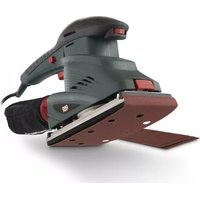
POWP5020 - Sander PowerPlus - Free user manual and instructions
Find the device manual for free POWP5020 PowerPlus in PDF.



| Product type | Finishing sander |
| Brand | PowerPlus |
| Model | POWP5020 |
| Rated voltage | 230 V |
| Rated frequency | 50 Hz |
| Rated power | 250 W |
| No-load speed | 6000 - 11000 min⁻¹ |
| Oscillation speed | 12000 - 22000 min⁻¹ |
| Sanding surface | 90 x 187 mm |
| Abrasive paper dimensions | 93 x 187 mm - 93 x 230 mm |
| Cable length | 4 m |
| Sound pressure level (LpA) | 77 dB(A) |
| Sound power level (LwA) | 88 dB(A) |
| Vibration level (aw) | 7.1 m/s² (K=1.5 m/s²) |
| Protection class | Class II (double insulation) |
| Paper fixation system | Hook-and-loop and clamping supports |
| Dust bag included | Yes |
| Speed adjustment | Variable, 6 positions (1 to 6) |
| Continuous operation lock | Yes |
| Weight (approx.) | Approx. 1.6 kg |
| Compatible materials | Wood, plastic, similar materials (no plaster, no magnesium) |
| Warranty | Warranty against material and manufacturing defects, excludes normal wear, transport at customer's expense |
Frequently Asked Questions - POWP5020 PowerPlus
User questions about POWP5020 PowerPlus
0 question about this device. Answer the ones you know or ask your own.
Ask a new question about this device
Download the instructions for your Sander in PDF format for free! Find your manual POWP5020 - PowerPlus and take your electronic device back in hand. On this page are published all the documents necessary for the use of your device. POWP5020 by PowerPlus.
USER MANUAL POWP5020 PowerPlus
natural_image
Exterior view of a PowerPlus electric power tool with red handle and black body (no text or symbols on the device itself)NL | FR | EN | DE | ES | IT | PT | NO | DA | SV | FI
EL | HR | SR | CS | SK | RO | PL | HU | RU | BG
POWP5020

POWERPLUS
NL NEDERLANDS VERTAALDE VERSIE VAN DE ORIGINELE HANDLEIDING
FR FRANÇAIS TRADUCTION DU MODE D'EMPLOI D'ORIGINE
EN ENGLISH ORIGINAL INSTRUCTION MANUAL
natural_image
Green power tool with red handle and black base, no visible text or symbols on the device itselfFig. 2
natural_image
Green PowerPlus electric shaver with red buttons and a black strap, shown without any text or symbols on the device itself.Fig. 3
natural_image
Close-up of a green power tool with red buttons, no visible text or symbols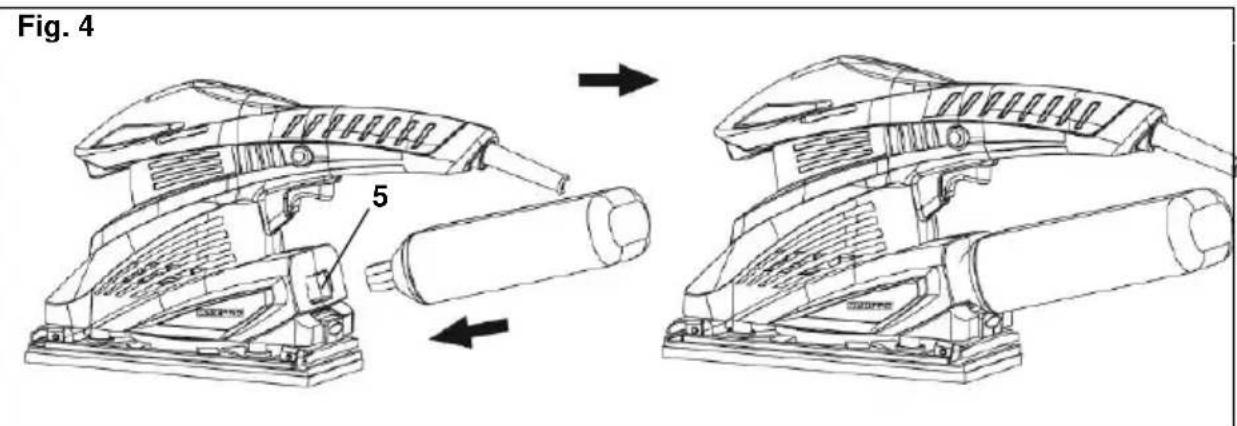
Fig. 5

natural_image
Technical line drawing of a mechanical device with no visible text or symbolsPOWERPLUS POWP5020 NL
1 BEOOGD GEBRUIK 2
2 BESCHRIJVING (FIG. A)....2
3 INHOUD....2
4 TOELICHTING VAN DE SYMBOLEN....3
5 ALGEMENE VEILIGHEIDSVOORSCHRIFTEN ....3
5.1 Werkplaats....3
5.2 Elektrische veiligheid....3
5.3 Veiligheid van personen....4
5.4 Zorgvuldige omgang met en gebruik van elektrisch gereedschap....4
5.5 Service....5
6 BIJZONDERE VEILIGHEIDSVOORSCHRIFTEN ....5
7 MONTAGE 5
7.1 Een vel schuurpapier aanbrengen....5
7.1.1 Klittenbandsysteem (Fig. 1)....5
7.1.2 Met klemmen (Fig. 2) 5
8 GEBRUIK....6
8.1 Werking van de aan / uit schakelaar (Fig. 3)....6
8.2 Geleidingshandgreep....6
8.3 Gebruik van de stofzak (Fig. 4)....6
8.4 Snelheidsregelwieltje (Fig. 5)....6
9 REINIGING EN ONDERHOUD 6
9.1 Reiniging 6
10 TECHNISCHE GEGEVENS....7
11 GELUID 7
12 GARANTIE....8
13 MILIEU....8
14 CONFORMITEITSVERKLARING....9
POWERPLUS POWP5020 NL VLAKSCHUURMACHINE 250W POWP5020
1 BEOOGD GEBRUIK
2 BESCHRIJVING (FIG. A)
POWERPLUS POWP5020 NL
4 TOELICHTING VAN DE SYMBOLEN
POWERPLUS POWP5020 NL
POWERPLUS POWP5020 NL
POWERPLUS POWP5020 NL
POWERPLUS POWP5020 NL
POWERPLUS POWP5020 NL
12 GARANTIE
POWERPLUS POWP5020 NL
14 CONFORMITEITSVERKLARING


VARO – VIC. VAN ROMPUY N.V. - Joseph Van Instraat 9 - BE2500 Lier - BELGIUM, verklaart dat,
Product: VLAKSCHUURMACHINE 250W
Handelsmerk: POWERplus
Model: POWP5020
POWERPLUS POWP5020 FR
POWERPLUS POWP5020 FR
POWERPLUS POWP5020 FR
POWERPLUS POWP5020 FR
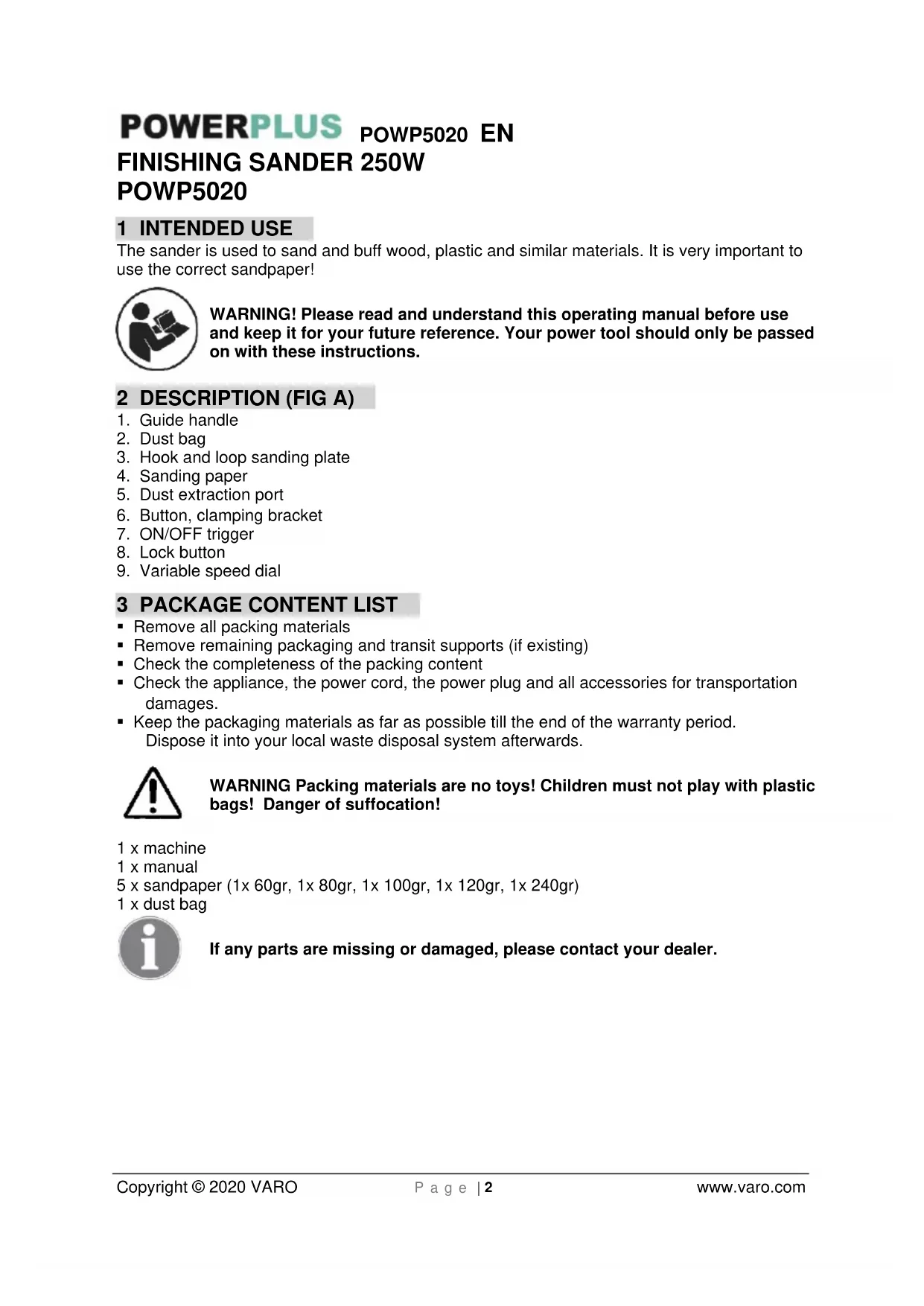
The sander is used to sand and buff wood, plastic and similar materials. It is very important to use the correct sandpaper!

WARNING! Please read and understand this operating manual before use and keep it for your future reference. Your power tool should only be passed on with these instructions.
2 DESCRIPTION (FIG A)
- Guide handle
- Dust bag
- Hook and loop sanding plate
- Sanding paper
- Dust extraction port
- Button, clamping bracket
- ON/OFF trigger
- Lock button
- Variable speed dial
3 PACKAGE CONTENT LIST
■ Remove all packing materials
■ Remove remaining packaging and transit supports (if existing)
- Check the completeness of the packing content
- Check the appliance, the power cord, the power plug and all accessories for transportation damages.
- Keep the packaging materials as far as possible till the end of the warranty period. Dispose it into your local waste disposal system afterwards.

WARNING Packing materials are no toys! Children must not play with plastic bags! Danger of suffocation!
1 x machine
1 x manual
5 x sandpaper (1x 60gr, 1x 80gr, 1x 100gr, 1x 120gr, 1x 240gr)
1 x dust bag

If any parts are missing or damaged, please contact your dealer.
4 SYMBOLS
In this manual and/or on the machine the following symbols are used:
 | Denotes risk of personal injury or damage to the tool. |  | Read manual before use. |
 | In accordance with essential safety standards of applicable European directives. |  | Class II - The machine is double insulated; Earthing wire is therefore not necessary. |
 | Mandatory use of eye protection. |  | Wear gloves. |
5 GENERAL POWER TOOL SAFETY WARNINGS
Read all safety warnings and all instructions. Failure to follow all warnings and instructions may result in electric shock, fire and/or serious injury. Save all warnings and instructions for future reference. The term "power tool" in the warnings refers to your mains operated (corded) power tool or battery operated (cordless) power tool.
5.1 Work area
- Keep work area clean and well lit. Cluttered and dark areas invite accidents.
- Do not operate power tools in explosive atmospheres, such as in the presence of flammable liquids, gases or dust. Power tools create sparks which may ignite the dust or fumes.
- Keep children and bystanders away while operating a power tool. Distractions can cause you to lose control.
5.2 Electrical safety

Always check that the power supply corresponds to the voltage on the rating plate.
- Power tool plugs must match the outlet. Never modify the plug in any way. Do not use any adapter plugs with earthed (grounded) power tools. Unmodified plugs and matching outlets will reduce risk of electric shock.
- Avoid body contact with earthed or grounded surfaces such as pipes, radiators, ranges and refrigerators. There is an increased risk of electric shock if your body is earthed or grounded.
- Do not expose power tools to rain or wet conditions. Water entering a power tool will increase the risk of electric shock.
- Do not abuse the cord. Never use the cord for carrying, pulling or unplugging the power tool. Keep cord away from heat, oil, sharp edges or moving parts. Damaged or entangled cords increase the risk of electric shock.
- When operating a power tool outdoors, use an extension cord suitable for outdoor use. Use of a cord suitable for outdoor use reduces the risk of electric shock.
- If operating a power tool in a damp location is unavoidable, use a residual current device (RCD) protected supply. Use of an RCD reduces the risk of electric shock.
POWERPLUS POWP5020 EN
5.3 Personal safety
- Stay alert, watch what you are doing and use common sense when operating a power tool. Do not use a power tool while you are tired or under the influence of drugs, alcohol or medication. A moment of inattention while operating power tools may result in serious personal injury.
- Use safety equipment. Always wear eye protection. Safety equipment such as dust mask, non-skid safety shoes, hard hat, or hearing protection used whenever conditions require will reduce personal injuries.
- Avoid accidental starting. Ensure the switch is in the off position before plugging in. Carrying power tools with your finger on the switch or plugging in power tools that have the switch on invites accidents.
- Remove any adjusting key or wrench before turning the power tool on. A wrench or a key left attached to a rotating part of the power tool may result in personal injury.
- Do not overreach. Keep proper footing and balance at all times. This enables better control of the power tool in unexpected situations.
- Dress properly. Do not wear loose clothing or jewellery. Keep your hair, clothing and gloves away from moving parts. Loose clothes, jewellery or long hair can be caught in moving parts.
- If devices are provided for the connection of dust extraction and collection facilities, ensure these are connected and properly used. Use of these devices can reduce dust related hazards.
5.4 Power tool use and care
- Do not force the power tool. Use the correct power tool for your application. The correct power tool will do the job better and safer at the rate for which it was designed.
- Do not use the power tool if the switch does not turn it on and off. Any power tool that cannot be controlled with the switch is dangerous and must be repaired.
- Disconnect the plug from the power source before making any adjustments, changing accessories, or storing power tools. Such preventive safety measures reduce the risk of starting the power tool accidentally.
- Store idle power tools out of the reach of children and do not allow persons unfamiliar with the power tool or these instructions to operate the power tool. Power tools are dangerous in the hands of untrained users.
- Maintain power tools. Check for misalignment or sticking of moving parts, breakage of parts and any other condition that may affect the power tool's operation. If damaged, have the power tool repaired before use. Many accidents are caused by poorly maintained power tools.
- Keep cutting tools sharp and clean. Properly maintained cutting tools with sharp cutting edges are less likely to stick and are easier to control.
- Use the power tool, accessories and tool bits etc., in accordance with these instructions and in the manner intended for the particular type of power tool, taking into account the working conditions and the work to be performed. Use of the power tool for operations different from intended could lead to a hazardous situation.
5.5 Service
- Have your power tool serviced by a qualified repair person using only identical replacement parts. This will ensure that the safety of the power tool is maintained.
6 MACHINE-SPECIFIC SAFETY WARNINGS
■ Always wear safety-goggles and a dust-mask during your work with the finishing-sander.
■ Always secure the workpiece by clamps to avoid slipping away.
■ Always keep the holes in the baseplate clean from dust.
- Observe the applicable regulations when sanding painted surfaces.
■ Whenever possible, use a vacuum extractor for dust collection.
POWERPLUS POWP5020 EN
- Remove dust and other waste matter in an environmentally safe way.
■ Take special care when sanding lead based paint: - All persons entering the work area must wear a mask specially designed for protection against lead paint dust and fumes.
■ Children and pregnant women must not enter the work area. - Do not eat, drink or smoke in the work area.
7 ASSEMBLY

Do not sand plaster surfaces, (WARNING: In this case your guarantee becomes void) this may clog the motor (brushes, ball bearings,...).
7.1 Fitting the sanding sheets
7.1.1 Hook-and-loop system (Fig. 1)
■ To attach sand paper (4), first remove all dirt or foreign matter from the sanding plate (3).
- Then attach the sand paper to the sanding plate, using the hook-and-loop system of the sand paper and the sanding plate.
- Make sure the perforations in the paper coincide with those on the sanding plate, to ensure optimal dust collection.
- The sand paper should rest flush on the sanding plate and must not come loose.

WARNING: When removing the sanding paper, follow the above procedure in reverse order.
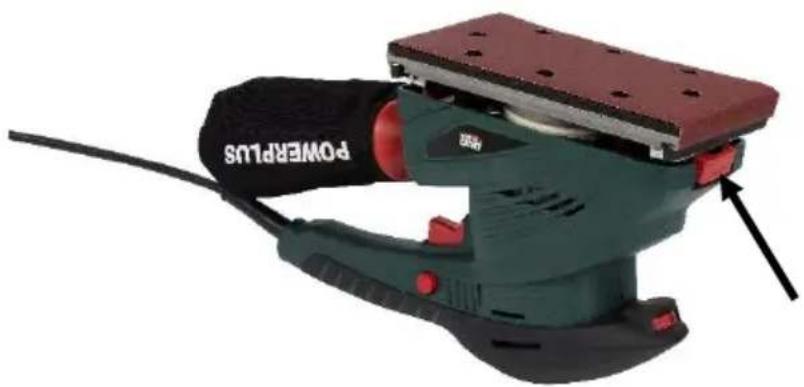
7.1.2 With clamping brackets (Fig. 2)
Choose the sanding paper (4) according to the material being worked. Use sanding paper (4) with a 40 resp, 60 grain for rough sanding and on uneven surfaces. Use the finder grain of 120 for smoother finish.
- Press the button (6) inwards in order to lift up the clamping bracket.
- Attach the sanding paper (4) on the sanding plate (3) and make sure the holes on the sanding paper (4) fit with openings on the base plate (3). Only this way the sanding dust can be extracted through suction ducts in the sanding plate (3).
- Firmly press sanding paper (4) down on the sanding plate (3).

Attention: This finishing sander is not suitable for wet sanding jobs.
WARNING: The sand paper must be fitted firmly on sanding plate and should not come loose.
8 OPERATION
8.1 Switch on and off (Fig. 3)
- To switch on the machine press the on/off switch.
■ To switch off the machine, release the on/off switch. - To switch the machine to continuous mode, you keep the on/off switch fully pressed and simultaneously press the loch button. And subsequently release the on/off switch.
POWERPLUS
POWP5020 EN
- To switch off continuous mode, press the on/off switch again.

WARNING: Never use the machine for sanding magnesium work piece.
8.2 Guide handle
This tool has a guide handle (1) on the front of this tool which should be used only with both handles.
8.3 Using the dust bag (Fig. 4)
Use always the supplied dust bag (2) in importance of your health when you work with the machine
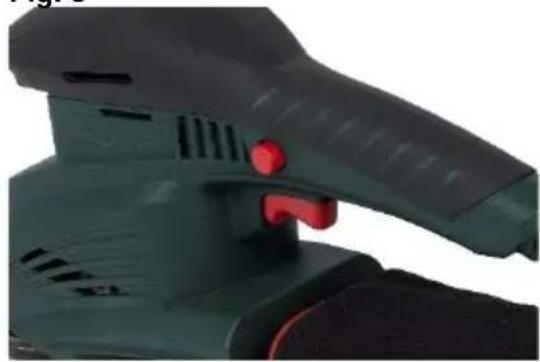
8.4 Variable speed dial (Fig. 5)
With the speed controller (9) you can adjust the speed according to application. Select the appropriate speed setting and make sure the sander does not become overloaded and stops running. Turn the speed controller (9) steplessly to the desired setting to increase or decrease the speed. The controller can be adjusted from 1-6. The speed rate can be changed during operation as well.
Hint: The required speed rate for sanding a workpiece depends on the material that you are going to process. For best performance, make some practical tests.
9 CLEANING AND MAINTENANCE

Attention! Before performing any work on the equipment, pull the power plug.
9.1 Cleaning
- Keep the ventilation slots of the machine clean to prevent overheating of the engine.
- Regularly clean the machine housing with a soft cloth, preferably after each use.
- Keep the ventilation slots free from dust and dirt.
- If the dirt does not come off use a soft cloth moistened with soapy water.

Never use solvents such as petrol, alcohol, ammonia water, etc. These solvents may damage the plastic parts.
10 TECHNICAL DETAILS
| Rated Voltage | 230V |
| Rated Frequency | 50Hz |
| Rated Power | 250W |
| Rotation speed | 6000-11000min ^-1 |
| Cable length | 4m |
| Sanding surface | 90x187 mm |
| Sandpaper | 93x187 – 93x230 |
| Oscillation speed | 12000-22000min ^-1 |
| Soft grip | Yes |
| Hook & loop system | Yes |
| Self-dust function | Yes |
11 NOISE
Noise emission values measured according to relevant standard. (K=3)
Acoustic pressure level LpA
77dB(A)
Acoustic power level LwA
88dB(A)

aw (Vibration)
ATTENTION! Wear hearing protection when sound pressure is over 85 dB(A).
7.1m/s²
K = 1,5m / s^2
12 WARRANTY
- This warranty covers all material or production flaws excluding : batteries, chargers, defective parts subject to normal wear & tear such as bearings, brushes, cables, and plugs, or accessories such as drills, drill bits, saw blades, etc. ; damage or defects resulting from maltreatment, accidents or alterations; nor the cost of transportation.
- Damage and/or defects resulting from inappropriate use also do not fall under the warranty provisions.
- We also disclaim all liability for any bodily injury resulting from inappropriate use of the tool.
- Repairs may only be carried out by an authorised customer service centre for Powerplus tools.
- You can always obtain more information at the number 00 32 3 292 92 90.
- Any transportation costs shall always be borne by the customer, unless agreed otherwise in writing.
- At the same time, no claim can be made on the warranty if the damage of the device is the result of negligent maintenance or overload.
- Definitely excluded from the warranty is damage resulting from fluid permeation, excessive dust penetration, intentional damage (on purpose or by gross carelessness), inappropriate usage (use for purposes for which the device is not suitable), incompetent usage (e.g. not following the instructions given in the manual), inexpert assembly, lightning strike, erroneous net voltage. This list is not exhaustive.
- Acceptance of claims under warranty can never lead to the prolongation of the warranty period nor commencement of a new warranty period in case of a device replacement.
- Devices or parts which are replaced under the warranty therefore remain the property of Varo NV.
- We reserve the right to reject a claim whenever the purchase cannot be verified or when it is clear that the product has not been properly maintained. (Clean ventilation slots, carbon brushes serviced regularly, etc.).
- Your purchase receipt must be kept as proof of date of purchase.
- Your appliance must be returned undismantled to your dealer in an acceptably clean state, (in its original blow-moulded case if applicable to the unit), accompanied by proof of purchase.
13 ENVIRONMENT

Should your appliance need replacement after extended use, do not discard it with the household rubbish but dispose of it in an environmentally safe way.
Waste produced by electrical machine items should not be handled like normal household rubbish. Please recycle where recycle facilities exist. Check with your Local Authority or retailer for recycling advice.
POWERPLUS POWP5020 EN
14 DECLARATION OF CONFORMITY
CE

VARO – VIC. VAN ROMPUY N.V. - Joseph Van Instraat 9 - BE2500 Lier - BELGIUM, declares that,
Product: Finishing Sander 250W
Trade mark: PowerPlus
Model: POWP5020
is in conformity with the essential requirements and other relevant provisions of the applicable European Directives, based on the application of European harmonized standards. Any unauthorized modification of the apparatus voids this declaration.
European Directives (including, if applicable, their amendments up to the date of signature);
2011/65/EU
2006/42/EC
2014/30/EU
European harmonized standards (including, if applicable, their amendments up to the date of signature);
EN62841-1:2015
EN62841-2-4:2014
EN55014-1:2017
EN55014-2:2015
EN IEC61000-3-3 : 2019
EN61000-3-3:2013
Keeper of the Technical Documentation : Philippe Vankerkhove, VARO – Vic. Van Rompuy N.V.
The undersigned acts on behalf of the company CEO,,
Mertens Ludo
Ludo Mertens
Regulatory Affairs – Compliance Manager
11/09/20
POWERPLUS POWP5020 DE
Regulatory Affairs – Compliance Manager
11/09/20
POWERPLUS POWP5020 PT
POWERPLUS POWP5020 PT
POWERPLUS POWP5020 PT
7.1 Instalar as folhas de lixa
7.1.1 Sistema de velcro (Fig. 1)
POWERPLUS POWP5020 PT
POWERPLUS POWP5020 DA
1 TILSIGTET BRUG....2
2 BESKRIVELSE (FIG. A) 2
3 MEDF∅LGENDE INDHOLD 2
4 SYMBOLER 3
5 GENERELLE SIKKERHEDSFORSKRIFTER 3
5.1 Arbejdsområde....3
5.2 Elektrisk sikkerhed ....3
5.3 Personlig sikkerhed....4
5.4 Omhyggelig håndtering og anvendelse af el-værktøjer....4
5.5 Service....4
6 SPECIFIKKE SIKKERHEDSFORSKRIFTER....5
7 MONTERING....5
7.1 Montering af slibepapir....5
7.1.1 Krog-og-løkke-system (Fig. 1)....5
7.1.2 Med spændebeslag (Fig. 2) ....5
8 ANVENDELSE 6
8.1 Start og slukning (Fig. 3)....6
8.2 Styrehåndtag....6
8.3 Brug af støvopsamlingsposen (Fig. 4)....6
8.4 Hastighedsregulator (Fig. 5)......6
9 RENG∅RING OG VEDLIGEHOLDELSE 6
9.1 Rengøring....6
10 TEKNISKE DATA 7
11 ST∅J 7
12 GARANTI 7
13 MILJ∅ 8
14 KONFORMITETSERKLÆRING 8
POWERPLUS POWP5020 DA
SLIBEMASKINE 250W POWP5020
1 TILSIGTET BRUG
POWERPLUS POWP5020 DA
4 SYMBOLER
POWERPLUS POWP5020 DA
POWERPLUS POWP5020 DA
6 SPECIFIKKE SIKKERHEDSFORSKRIFTER
POWERPLUS POWP5020 DA
8 ANVENDELSE
POWERPLUS POWP5020 DA
3 FÖRPACKNINGSINNEHÅLL
POWERPLUS POWP5020 HR
1 NAMJENA....2
2 OPIS (SL. A) 2
3 POPIS SADRŽAJA PAKETA 2
4 SIMBOLI....3
5 OPĆA UPOZORENJA O SIGURNOSTI RUKOVANJA
ELEKTRIČNIM ALATIMA....3
5.1 Radno mjesto....3
5.2 Električna sigurnost....3
5.3 Osobna sigurnost .... 4
5.4 Uporaba i održavanje električnog alata ....4
5.5 Servis....4
6 SIGURNOSNA UPOZORENJA ZA STROJ 5
7 SKLAPANJE 5
7.1 Postavljanje listova brusnog papira 5
7.1.1 Sustav brusne ploče za čičak brusni papir (Sl. 1)....5
7.1.2 Sa steznim nosačima (Sl. 2)....5
8 RAD....6
8.1 Uključivanje/Isključivanje (Sl. 3)......6
8.2 Ručka vodilice....6
8.3 Korištenje vrećice za prašinu (Sl. 4)....6
8.4 Kotačić za promjenu brzine (Sl. 5)....6
9 ČIŠĆENJE I ODRŽAVANJE....6
9.1 Čišćenje....6
10 TEHNIČKI PODACI....7
11 BUKA 7
12 JAMSTVO 8
13 OKOLIŠ 8
14 IZJAVA O SUKLADNOSTI 9
POWERPLUS
POWP5020 HR
BRUSILICA ZA ZAVRŠNU OBRADU 250W POWP5020
1 NAMJENA
Brusilica se koristi za brušenje i poliranje drva, plastike i sličnih materijala. Vrlo je važno koristiti brusni papir odgovarajuće finoće!

UPOZORENJE! Prije uporabe alata, a radi vaše vlastite sigurnosti pažljivo pročitajte ovaj priručnik i opće upute o sigurnosti. Ove upute čine sastavni dio opreme električnog alata, pa i u slučaju prodaje drugom vlasniku.
2 OPIS (SL. A)
- Ručka vodilice
- Vrećica za prašinu
- Brusna ploča za čičak brusni papir
- Brusni papir
- Izlaz za prašinu
- Tipka, stezni nosač
- Sklopka za uključivanje/isključivanje
- Gumb za blokadu
- Kotačić za promjenu brzine
3 POPIS SADRŽAJA PAKETA
POWERPLUS POWP5020 HR
POWERPLUS POWP5020 SR
1 NAMENJENA UPOTREBA....2
2 OPIS (SL. A) 2
3 SPISAK SADRŽAJA PAKOVANJA....2
4 SIMBOLI 3
5 OPŠTA BEZBEDNOSNA UPUTSTVA ZA ELEKTRIČNE ALATE...3
5.1 Radna oblast ....3
5.2 Električna bezbednost .... 3
5.3 Lična bezbednost....4
5.4 Korišćenje i održavanje električnog alata....4
5.5 Servisiranje....5
6 DODATNI BEZBEDNOSNI SAVETI ZA BRUSILICE ....5
7 SKLAPANJE 5
7.1 Nameštanje brusnih listova....5
7.1.1 Sistem čičak (Sl. 1) 5
7.1.2 Sa stezačima (Sl. 2)....5
8 RAD....6
8.1 Uključivanje/isključivanje (Sl. 3)....6
8.2 Vodeći rukohvat....6
8.3 Upotreba vreće za prašinu (Sl. 4)....6
8.4 Brojčanik za promenljivu brzinu (Sl. 5)....6
9 ČIŠĆENJE I ODRŽAVANJE....6
9.1 Čišćenje....6
10 TEHNIČKI PODACI....7
11 BUKA 7
12 GARANCIJA 7
13 ŽIVOTNA SREDINA....8
14 IZJAVA O USKLAĐENOSTI....8
POWERPLUS
POWP5020 SR
BRUSILICA ZA ZAVRŠNU OBRADU 250W POWP5020
1 NAMENJENA UPOTREBA
Ova brusilica za završnu obradu se koristi za fino brušenje i glačanje drveta, i plastičnih i sličnih materijala. Veoma je važno da se koristi odgovarajući brusni papir!

POWERPLUS POWP5020 SR
- Ako ste primorani da električne alate koristite na vlažnom mestu, koristite napajanje sa zaštitnim uređajem diferencijalne struje (ZUDS). Upotreba ZUDS sklopke smanjuje rizik od električnog udara.
POWERPLUS POWP5020 SR
5.5 Servisiranje
POWERPLUS POWP5020 SR
Čvrsto pritisnite brusni papir (4) na brusnu ploču (3).

POWERPLUS POWP5020 SR
■ Morate čuvati račun i garantni list kao dokaz o datumu kupovine.
- Nerasklopljen alat prodavcu morate vratiti u prihvatljivo čistom stanju unutar originalne kutije od duvane plastike (ako je prikladno za jedinicu), zajedno sa dokazom o kupovini.
13 ŽIVOTNA SREDINA

POWERPLUS POWP5020 CS
POWERPLUS POWP5020 CS
POWERPLUS POWP5020 CS
5.5 Servis
POWERPLUS POWP5020 CS
POWERPLUS POWP5020 CS
POWERPLUS POWP5020 SK
1 ZAMÝŠL'ANÉ POUŽITIE....2
2 POPIS (OBR. A)....2
3 OBSAH BALENIA....2
4 SYMBOLY 3
5 VŠEOBECNÉ BEZPEČNOSTNÉ VAROVANIA PRE ELEKTRICKÉ NÁRADIE ....3
5.1 Pracovná plocha ....3
5.2 Elektrická bezpečnost'....3
5.3 Osobná bezpečnost......4
5.4 Používanie elektrického náradia a starostlivost' oň....4
5.5 Servis....5
6 DOPLNKOVÉ BEZPEČNOSTNÉ POKYNY PRE BRÚSKY .....5
7 MONTÁŽ 5
7.1 Inštalácia brúsnych listov....5
7.1.1 Systém so suchým zipsom (obr. 1)....5
7.1.2 So zvieracími svorkami (obr. 2)....5
8 PREVÁDZKA 6
8.1 Zapnutie a vypnutie (obr. 3)....6
8.2 Vodiaca rukovät......6
8.3 Používanie vrecka na prach (obr. 4)....6
8.4 Ovládač rýchlosti (obr. 5)....6
9 ČISTENIE A ÚDRŽBA 6
9.1 Čistenie....6
10 TECHNICKÉ ÚDAJE 7
11 HLUK....7
12 ZÁRUKA....7
13 ŽIVOTNÉ PROSTREDIE....8
14 VYHLÁSENIE O ZHODE 8
POWERPLUS POWP5020 SK VIBRAČNÁ BRÚSKA 250W POWP5020
1 ZAMÝŠL'ANÉ POUŽITIE
POWERPLUS POWP5020 SK
POWERPLUS POWP5020 SK
5.5 Servis
POWERPLUS POWP5020 SK
■ Pevne pritlačte brúsny papier (4) na brúsnu dosku (3).

POWERPLUS POWP5020 SK
POWERPLUS POWP5020 HU
POWERPLUS POWP5020 HU
POWERPLUS POWP5020 HU
POWERPLUS POWP5020 HU
POWERPLUS POWP5020 HU
12 JÓTÁLLÁS
natural_image
Green power tool with red handle and 'POWERPLUS' label, no visible text or symbols on the device itself
WWW.VARO.COM
DESIGNED AND MARKETED BY VARO
©copyright by varo
VARO - VIC. VAN ROMPUY nv
JOSEPH VAN INSTRAAT 9 - 2500 LIER - BELGIUM
OFFICES:



- POWERPLUS
- POWERPLUS POWP5020 NL
- POWERPLUS POWP5020 NL VLAKSCHUURMACHINE 250W POWP5020
- BEOOGD GEBRUIK
- BESCHRIJVING (FIG. A)
- TOELICHTING VAN DE SYMBOLEN
- GARANTIE
- CONFORMITEITSVERKLARING
- POWERPLUS POWP5020 FR
- DESCRIPTION (FIG A)
- PACKAGE CONTENT LIST
- SYMBOLS
- GENERAL POWER TOOL SAFETY WARNINGS
- Work area
- Electrical safety
- POWERPLUS POWP5020 EN
- Personal safety
- Power tool use and care
- Service
- MACHINE-SPECIFIC SAFETY WARNINGS
- ASSEMBLY
- Fitting the sanding sheets
- OPERATION
- POWP5020 EN
- Guide handle
- Using the dust bag (Fig. 4)
- Variable speed dial (Fig. 5)
- CLEANING AND MAINTENANCE
- Cleaning
- NOISE
- ATTENTION! Wear hearing protection when sound pressure is over 85 dB(A).
- WARRANTY
- ENVIRONMENT
- DECLARATION OF CONFORMITY
- CE
- POWERPLUS POWP5020 DE
- POWERPLUS POWP5020 PT
- Instalar as folhas de lixa
- Sistema de velcro (Fig. 1)
- POWERPLUS POWP5020 DA
- SLIBEMASKINE 250W POWP5020
- TILSIGTET BRUG
- SYMBOLER
- SPECIFIKKE SIKKERHEDSFORSKRIFTER
- ANVENDELSE
- FÖRPACKNINGSINNEHÅLL
- POWERPLUS POWP5020 HR
- POWP5020 HR
- BRUSILICA ZA ZAVRŠNU OBRADU 250W POWP5020
- NAMJENA
- OPIS (SL. A)
- POPIS SADRŽAJA PAKETA
- POWERPLUS POWP5020 SR
- POWP5020 SR
- NAMENJENA UPOTREBA
- Servisiranje
- ŽIVOTNA SREDINA
- POWERPLUS POWP5020 CS
- Servis
- POWERPLUS POWP5020 SK
- POWERPLUS POWP5020 SK VIBRAČNÁ BRÚSKA 250W POWP5020
- ZAMÝŠL'ANÉ POUŽITIE
- POWERPLUS POWP5020 HU
- JÓTÁLLÁS
Brand : PowerPlus
Model : POWP5020
Category : Sander