POWEB4020 - Sander PowerPlus - Free user manual and instructions
Find the device manual for free POWEB4020 PowerPlus in PDF.


Pick your language and provide your email: we'll send you a specifically translated version.
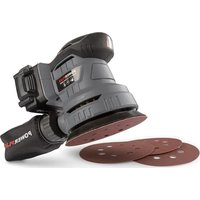
| Product type | Orbital sander |
| Brand | PowerPlus |
| Model | POWEB4020 |
| Power supply | Corded, 230 V ~ 50 Hz |
| Rated power | 600 W |
| No-load speed | 10,000 - 25,000 rpm (variable) |
| Orbit diameter | 2.5 mm |
| Sanding surface | 220 x 220 mm (triangular pad) |
| Dimensions (L x W x H) | 25 x 12 x 15 cm |
| Weight | 1.5 kg |
| Noise level | 82 dB(A) (uncertainty K=3 dB) |
| Vibration level | < 7.5 m/s² |
| Dust collection system | Built-in dust bag, adaptable to vacuum cleaner |
| Abrasive paper attachment mechanism | Clamping by staples or hook-and-loop (Velcro) |
| Main functions | Sanding, stripping, polishing of flat surfaces |
| Maintenance and cleaning | Clean the housing and ventilation slots with a damp cloth; empty the bag regularly; replace worn carbon brushes |
| Safety | On/off switch with lock, non-slip coating, double electrical insulation |
| Spare parts and repairability | Carbon brushes, sanding pads, switch, power cable available from after-sales service |
| General information | Domestic use; protection class II; IP20 protection rating |
Frequently Asked Questions - POWEB4020 PowerPlus
How to change the abrasive paper on the POWEB4020 sander?
Hold the sander steady. For the Velcro system, peel off the used paper and apply the new one aligning the holes. For staples, release the levers, insert the paper and close.
The sander vibrates abnormally: what to do?
Check that the pad is securely attached and the abrasive paper is correctly installed. Tighten the pad screws if necessary. If the problem persists, the carbon brushes may be worn.
Can I use the sander without a dust bag?
Yes, but it is not recommended because dust damages the motor and reduces efficiency. Always use the bag or a vacuum cleaner connected to the designated outlet.
How to adjust the sander speed?
Turn the adjustment knob on the handle. Use a low speed (< 12,000 rpm) for fine sanding and a high speed (> 20,000) for stripping.
What is the power of the POWEB4020 sander?
The rated power is 600 W, which is suitable for intensive sanding work on wood, metal or painted surfaces.
The power cable is damaged: can I replace it?
Yes, but have it done by a professional or PowerPlus after-sales service. Never use the tool with a damaged cable due to risk of electric shock.
How to clean the sander after use?
Unplug it. Empty the dust bag and brush the ventilation slots. Wipe the housing with a slightly damp cloth; do not use solvents.
The sander heats up a lot: is this normal?
Moderate heating is normal during prolonged use. If it becomes too hot to touch, stop it and let it cool down. Check that the vents are not blocked.
Where to buy spare parts such as brushes or pad?
Parts are available from PowerPlus after-sales service or authorized dealers. Always use original parts to ensure safety.
What type of abrasive paper to use?
Use abrasive paper of 220 x 220 mm (triangular shape) with holes for suction. The grit depends on the job: coarse grit (40-60) for stripping, fine (120-240) for finishing.
User questions about POWEB4020 PowerPlus
0 question about this device. Answer the ones you know or ask your own.
Ask a new question about this device
No questions yet. Be the first to ask one.
Download the instructions for your Sander in PDF format for free! Find your manual POWEB4020 - PowerPlus and take your electronic device back in hand. On this page are published all the documents necessary for the use of your device. POWEB4020 by PowerPlus.
USER MANUAL POWEB4020 PowerPlus


Manual assistant
Powered by Anthropic
Waiting for your message
Product information
Brand : PowerPlus
Model : POWEB4020
Category : Sander