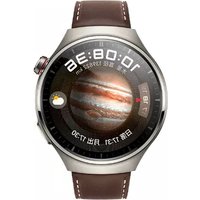
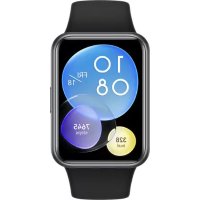
WATCH 4 Pro - Smartwatch HUAWEI - Free user manual and instructions
Find the device manual for free WATCH 4 Pro HUAWEI in PDF.



| Product Type | Smartwatch |
| Brand | Huawei |
| Model | WATCH 4 Pro |
| Category | Connected watch |
| Power | Integrated lithium-ion battery, wireless charging (CW03 charger included) |
| Battery life | Up to 4.5 days of typical use (depending on usage) |
| Display | AMOLED color touchscreen |
| Water resistance | IP68 (IEC 60529 compliant) – resistant to swimming and showering |
| Connectivity | Bluetooth, Wi-Fi 2.4 GHz, NFC, GPS, LTE (multiple bands) |
| Sensors | Heart rate (optical), accelerometer, gyroscope, barometer, temperature, SpO2, electrode |
| Health functions | Heart rate, SpO2, sleep, stress, ECG (with electrode), skin temperature |
| Sports functions | Over 100 sports modes, built-in GPS, activity tracking |
| Operating system | HarmonyOS / LiteOS |
| Compatibility | Android and iOS (requires Huawei Health app) |
| Buttons | Up button (power on/off/restart), Down button |
| Speaker and microphone | Built-in (calls, voice interactions) |
| Charging | Dedicated wireless charger, alignment on back charging zone |
| Operating temperature | 0 °C to 35 °C |
| Storage temperature | -20 °C to +55 °C |
| Care and cleaning | Keep clean and dry; clean with a soft cloth; dry after exposure to water |
| Safety | Do not use with medical devices without medical advice; avoid excessive heat and liquids; do not disassemble the battery |
| Spare parts and repairability | Non-user-replaceable integrated battery; interchangeable bands; repair by Huawei or authorized service |
| Box contents | Watch, wireless charger, quick start guide |
| Regulatory information | SAR head 0.57 W/kg, limb 2.56 W/kg, trunk 1.26 W/kg; multiple frequency bands |
Frequently Asked Questions - WATCH 4 Pro HUAWEI
User questions about WATCH 4 Pro HUAWEI
0 question about this device. Answer the ones you know or ask your own.
Ask a new question about this device
Download the instructions for your Smartwatch in PDF format for free! Find your manual WATCH 4 Pro - HUAWEI and take your electronic device back in hand. On this page are published all the documents necessary for the use of your device. WATCH 4 Pro by HUAWEI.
USER MANUAL WATCH 4 Pro HUAWEI
Quick Start Guide....1
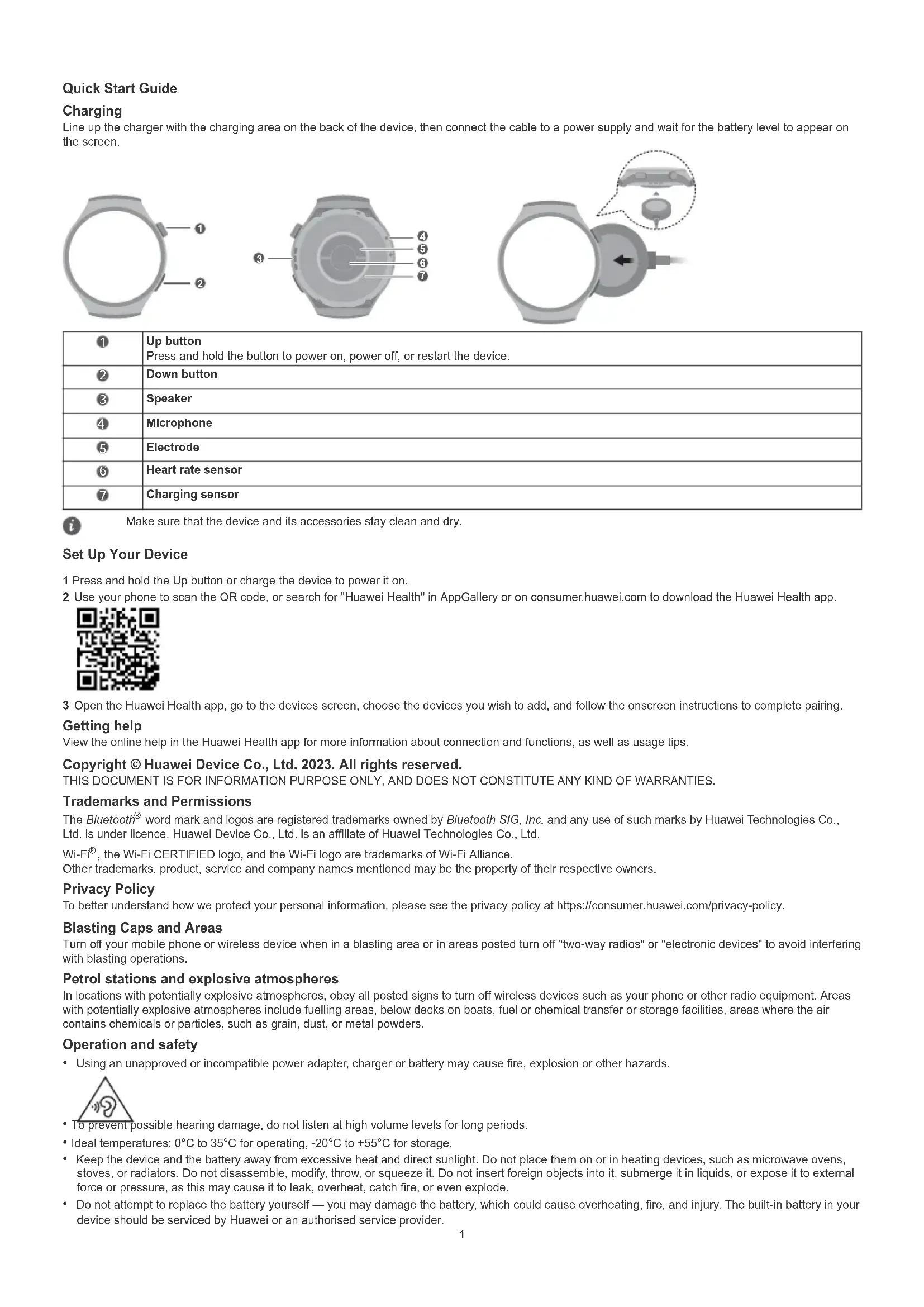
Line up the charger with the charging area on the back of the device, then connect the cable to a power supply and wait for the battery level to appear on the screen.
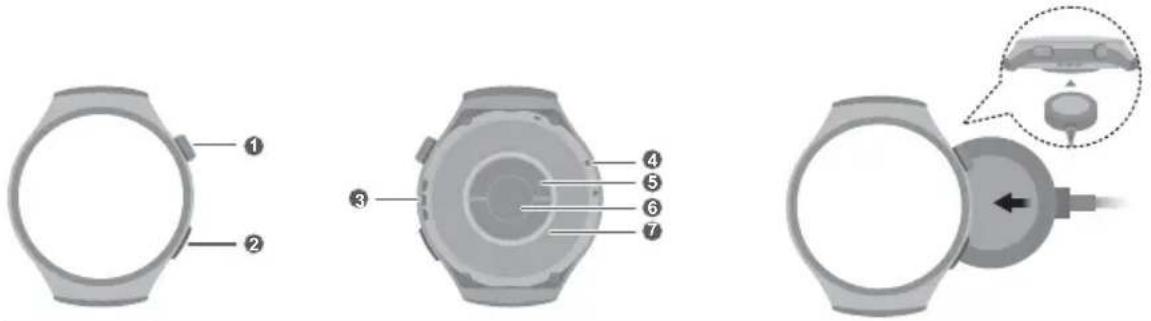
| 1 | Up buttonPress and hold the button to power on, power off, or restart the device. |
| 2 | Down button |
| 3 | Speaker |
| 4 | Microphone |
| 5 | Electrode |
| 6 | Heart rate sensor |
| 7 | Charging sensor |

Make sure that the device and its accessories stay clean and dry.
Set Up Your Device
1 Press and hold the Up button or charge the device to power it on.
2 Use your phone to scan the QR code, or search for "Huawei Health" in AppGallery or on consumer.huawei.com to download the Huawei Health app.

3 Open the Huawei Health app, go to the devices screen, choose the devices you wish to add, and follow the onscreen instructions to complete pairing.
Getting help
View the online help in the Huawei Health app for more information about connection and functions, as well as usage tips.
Copyright © Huawei Device Co., Ltd. 2023. All rights reserved.
THIS DOCUMENT IS FOR INFORMATION PURPOSE ONLY, AND DOES NOT CONSTITUTE ANY KIND OF WARRANTIES.
Trademarks and Permissions
The Bluetooth® word mark and logos are registered trademarks owned by Bluetooth SIG, Inc. and any use of such marks by Huawei Technologies Co., Ltd. is under licence. Huawei Device Co., Ltd. is an affiliate of Huawei Technologies Co., Ltd.
Wi-Fi ^® , the Wi-Fi CERTIFIED logo, and the Wi-Fi logo are trademarks of Wi-Fi Alliance.
Other trademarks, product, service and company names mentioned may be the property of their respective owners.
Privacy Policy
To better understand how we protect your personal information, please see the privacy policy at https://consumer.huawei.com/privacy-policy.
Blasting Caps and Areas
Turn off your mobile phone or wireless device when in a blasting area or in areas posted turn off "two-way radios" or "electronic devices" to avoid interfering with blasting operations.
Petrol stations and explosive atmospheres
In locations with potentially explosive atmospheres, obey all posted signs to turn off wireless devices such as your phone or other radio equipment. Areas with potentially explosive atmospheres include fuelling areas, below decks on boats, fuel or chemical transfer or storage facilities, areas where the air contains chemicals or particles, such as grain, dust, or metal powders.
Operation and safety
• Using an unapproved or incompatible power adapter, charger or battery may cause fire, explosion or other hazards.
• To prevent possible hearing damage, do not listen at high volume levels for long periods.
- Ideal temperatures: 0^ to 35^ for operating, -20^ to +55^ for storage.
- Keep the device and the battery away from excessive heat and direct sunlight. Do not place them on or in heating devices, such as microwave ovens, stoves, or radiators. Do not disassemble, modify, throw, or squeeze it. Do not insert foreign objects into it, submerge it in liquids, or expose it to external force or pressure, as this may cause it to leak, overheat, catch fire, or even explode.
- Do not attempt to replace the battery yourself — you may damage the battery, which could cause overheating, fire, and injury. The built-in battery in your device should be serviced by Huawei or an authorised service provider.
- Please consult your doctor and the device manufacturer to determine if operation of your device may interfere with the operation of your medical device.
- This product is not designed to be a medical device, and is not intended to diagnose, treat, cure or prevent any disease. All data and measurements should be used for personal reference only.
- If you experience skin discomfort when wearing the device, take it off and consult a doctor.
- Your device meets requirements of IP68 (IEC 60529).
- Avoid placing metal objects on the surface of the wireless charging cradle, as they could cause the equipment to heat up and malfunction. Only use the wireless charging cradle in environments with an ambient temperature ranging from 0^ to 35^ .
• If the ambient temperature is too high, the wireless charger may stop working. If this occurs, you are advised to stop wireless charging. - To keep the wireless charger in good condition, avoid using it inside a vehicle.
- Adult supervision is advised if children are to use or come into contact with this product.
- Switch off your wireless device when requested to do so in hospitals, clinics or health care facilities. These requests are designed to prevent possible interference with sensitive medical equipment.
• Some wireless devices may affect the performance of hearing aids or pacemakers. Consult your service provider for more information. - Pacemaker manufacturers recommend that a minimum distance of 15cm be maintained between a device and a pacemaker to prevent potential interference with the pacemaker.
• If using a pacemaker, hold the device on the side opposite the pacemaker and do not carry the device in your front pocket. - Observe local laws and regulations while using the device. To reduce the risk of accidents, do not use your wireless device while driving.
• To prevent damage to your device's parts or internal circuits, do not use it in dusty, smoky, damp or dirty environments or near magnetic fields. - Do not use, store or transport the device where flammables or explosives are stored (in a gas station, oil depot, or chemical plant, for example). Using your device in these environments increases the risk of explosion or fire.
- Dispose of this device, the battery, and accessories according to local regulations. They should not be disposed of in normal household waste. Improper battery use may lead to fire, explosion, or other hazards.
- If the battery leaks, ensure that the electrolyte does not make direct contact with your skin or eyes. If the electrolyte touches your skin or splashes into your eyes, immediately flush with clean water and consult a doctor.
- When charging the device, make sure the power adapter is plugged into a socket near the devices and is easily accessible. Unplug the charger from the electric socket and from the device when the device is not used for a long time.
- Do not place sharp metal objects, such as pins, near the microphone. The microphone may attract these objects and result in injury.
- Wireless devices may interfere with the airplane's flight system. Do not use your device where wireless devices are not allowed according to the airplane company's regulations.
- Switch off your wireless device whenever you are instructed to do so by airport or airline staff. Consult the airline staff about the use of wireless devices on board the aircraft, if your device offers a 'flight mode' this must be enabled prior to boarding an aircraft.
- To ensure the best audio performance of your device's microphone, use a cloth to wipe the area of the microphone which has been exposed to water. Do not use the microphone until the wet areas are totally dry.
- Protect the wearable and its accessories from strong impact, strong vibration, scratches, and sharp objects, these may damage the device.
- Make sure that the wearable and its accessories stay clean and dry. Do not wear the wearable too loosely or tightly during workouts. Clean your wrist and device after the workout. Rinse and dry the device to clean it before putting it back on.
- If the wearable is built for swimming and showering, make sure to regularly clean the strap, dry your wrist and the device before wearing it again.
- Loosen the strap for a little bit during the day to let your skin breathe. If wearing it starts to feel uncomfortable, take off your wearable and let your wrist have a rest. If it still feels uncomfortable, stop wearing it and seek medical advice as soon as possible. You can also purchase straps made from other materials and with different designs from the official Huawei website.
- The device has undergone testing and has demonstrated water resistance in certain environments.
- Ensure that the power adapter meets the requirements of IEC/EN 62368-1 and has been tested and approved according to national or local standards.
- Warning! Not suitable for children under 3 years. Contains small parts. Swallowing small parts may present a choking hazard. Seek immediate medical attention if small parts are swallowed.

WARNING:
- This device contains small size cell battery. Do not ingest battery, Chemical Burn Hazard.
- If the small size cell battery is swallowed, it can cause severe internal burns in just 2 hours and can lead to death.
- Keep new and used batteries away from children. If the battery compartment does not close securely, stop using the product and keep it away from children. If you think batteries might have been swallowed or placed inside any part of the body, seek immediate medical attention.
Disposal and recycling information

The crossed-out wheeled-bin symbol on your product, battery, literature or packaging reminds you that all electronic products and batteries must be taken to separate waste collection points at the end of their working lives; they must not be disposed of in the normal waste stream with household garbage. It is the responsibility of the user to dispose of the equipment using a designated collection point or service for separate recycling of waste electrical and electronic equipment (WEEE) and batteries according to local laws.
Proper collection and recycling of your equipment helps ensure electrical and electronic equipment (EEE) waste is recycled in a manner that conserves valuable materials and protects human health and the environment, improper handling, accidental breakage, damage, and/or improper recycling at the end of its life may be harmful for health and environment. For more information about where and how to drop off your EEE waste, please contact your local authorities, retailer or household waste disposal service or visit the website https://consumer.huawei.com/en/.
Reduction of hazardous substances
This device and its electrical accessories comply with local applicable rules on the restriction of the use of certain hazardous substances in electrical and electronic equipment, such as EU REACH regulation, RoHS and Batteries (where included) directive. For declarations of conformity about REACH and RoHS, please visit the website https://consumer.huawei.com/certification.
UK regulatory conformance
Hereby, Huawei Device Co., Ltd. declares that this device MDS-AL00 is in compliance with the relevant statutory instruments in the UK. The full text of the declaration of conformity is available at the following internet address: https://consumer.huawei.com/certification.
EU regulatory conformance
RF exposure requirements
As recommended by international guidelines, the device is designed to comply with the limits established by the market that the device will be placed on. For the countries that adopt the SAR limit of 2.0 W/kg(Head) and 4.0 W/kg(Limbs) over 10 grams of tissue. The device complies with RF specifications when the device is worn on the wrist and at a distance of 1.0 cm from your face.
Highest reported SAR value:
Head SAR: 0.57 W/kg.
Limbs SAR: 2.56 W/kg.
Statement
Hereby, Huawei Device Co., Ltd. declares that this device MDS-AL00 is in compliance with the essential requirements and other relevant provisions of Directive 2014/53/EU.
The most recent and valid version of the DoC (Declaration of Conformity) can be viewed at https://consumer.huawei.com/certification.
This device may be operated in all member states of the EU.
Observe national and local regulations where the device is used.
This device may be restricted for use, depending on the local network.
Frequency bands and power
(a) Frequency bands in which the radio equipment operates: Some bands may not be available in all countries or all areas. Please contact the local carrier for more details.
(b) Maximum radio-frequency power transmitted in the frequency bands in which the radio equipment operates: The maximum power for all bands is less than the highest limit value specified in the related Harmonised Standard.
The frequency bands and transmitting power (radiated and/or conducted) nominal limits applicable to this radio equipment are as follows: WCDMA Band I/III/VIII: 24.2dBm, LTE Band 1/3/7/8/20/28/34/38/40: 24.2dBm, Wi-Fi 2.4GHz: 16.5dBm, Bluetooth 2.4GHz: 14.5dBm, NFC 13.56MHz: 42 dBμA/m at 10m, Watch Wireless Charger: 110-119KHz: 42dBμA/m at 10m, 119-135KHz: 66 descending 10 dB/dec above 119KHz at 10m, 135-140KHz: 42dBμA/m at 10m, 140-148KHz: 37.7dBμA/m at 10m, UWB 7737.6 MHz - 8236.8 MHz: -2dBm/50MHz.
Accessories and Software Information
It is recommended that the following accessories should be used:
Charging cradle:CW03
The product software version is 3.1.0.44(SP6C900E44R99P39).
Software updates will be released by the manufacturer to fix bugs or enhance functions after the product has been released. All software versions released by the manufacturer have been verified and are still compliant with the related rules.
All RF parameters (for example, frequency range and output power) are not accessible to the user, and cannot be changed by the user.
For the most recent information about accessories and software, please see the DoC (Declaration of Conformity) at
https://consumer.huawei.com/certification.
Please visit https://consumer.huawei.com/en/support/hotline for recently updated hotline and email address in your country or region.
Please go to Settings > About > Regulatory information on the device to view the E-label screen.
Restrictions in Norway
Use of this radio equipment is not allowed in the geographical area within a radius of 20 km from the center of Ny-Ålesund, Svalbard.
https://consumer.huawei.com/certification.
https://consumer.huawei.com/certification.
| 1 | Taster za gorePritisnite i držite taster radi uključivanja, isključivanja ili ponovnog pokretanja uređaja. |
| 2 | Taster za dole |
| 3 | Zvučnik |
| 4 | Mikrofon |
| 5 | Elektroda |
| 6 | Senzor pulsa |
| 7 | Senzor punjenja |

| 1 | Tipka GorePritisnite i držite tipku za uključivanje, isključivanje ili ponovno pokretanje uređaja. |
| 2 | Tipka Dolje |
| 3 | Zvučnik |
| 4 | Mikrofon |
| 5 | Elektroda |
| 6 | Senzor pulsa |
| 7 | Senzor punjenja |

Pobrinite se da su uređaj i njegovi dodaci čisti i suhi.
Postavljanje uređaja
https://consumer.huawei.com/certification.
https://consumer.huawei.com/certification.
DETTE DOKUMENT ER KUN TIL INFORMATION OG UDG∅R INGEN FORM FOR GARANTI.
https://consumer.huawei.com/certification.
https://consumer.huawei.com/tr/support/warranty-policy/
https://consumer.huawei.com/tr/legal/privacy-policy/
No.2 of Xincheng Road, Songshan Lake Zone, Dongguan, Guangdong 523808, P.R. China
E-mail: mobile.tr@huawei.com
Adres: Güngören, Tozkoparan Mah. General Ali Riza Gürcan Cad.No.29/Z İstanbul
Kvk Teknik Servis
Telefon: 02164528054
Adres: Yeni Mah. Soğanlik C.Kanat San. Sit. No:32- 2/1 Kartal/İstanbul
Single Contact Point: Huawei Technologies (Netherlands) B.V.
IE: Huawei Technologies (Ireland) Co., Ltd.
Mespil Court, Mespil Road, Ballsbridge,
Dublin 4, D04 E516
NL: HUAWEI DEVICE (HONG KONG) CO., LTD.
Huawei Technologies (Netherlands) B.V.
Elimaenkatu 17-19 7th floor, 00510 Helsinki, Finland
NO:Huawei Technologies Norway As
Snaroyveien 30 C3e, NO-1360 Fornebu, Norway
SK:Huawei Technologies (Slovak) s.r.o.
Einsteinova 23 Bratislava 851 01
SE:Huawei Technologies Sweden AB
Kronborgsgrand 21, 16446 Kista, Sweden
Other:HUAWEI DEVICE (HONG KONG) CO., LTD.
Huawei Technologies (Netherlands) B.V.
- Set Up Your Device
- Getting help
- Copyright © Huawei Device Co., Ltd. 2023. All rights reserved.
- Trademarks and Permissions
- Privacy Policy
- Blasting Caps and Areas
- Petrol stations and explosive atmospheres
- Operation and safety
- WARNING:
- Disposal and recycling information
- Reduction of hazardous substances
- UK regulatory conformance
- EU regulatory conformance
- RF exposure requirements
- Statement
- Frequency bands and power
- Accessories and Software Information
- Restrictions in Norway
- Postavljanje uređaja
Brand : HUAWEI
Model : WATCH 4 Pro
Category : Smartwatch