USER MANUAL Watch GT 5 Pro HUAWEI
English
Before using the device, review and download the latest Quick Start Guide at https://consumer.huawei.com/en/support/.
Set Up Your Device
- Press and hold the Up button or charge the device to power it on.
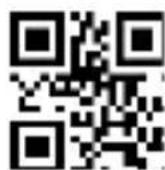
- Use your phone to scan the QR code on the first page, or search for "Huawei Health" in AppGallery or on consumer.huawei.com to download the Huawei Health app.
- Open the Huawei Health app, go to the devices screen, choose the devices you wish to add, and follow the onscreen instructions to complete pairing.
Blasting Caps and Areas
Turn off your mobile phone or wireless device when in a blasting area or in areas posted turn off "two-way radios" or "electronic devices" to avoid interfering with blasting operations.
Petrol stations and explosive atmospheres
In locations with potentially explosive atmospheres, obey all posted signs to turn off wireless devices such as your phone or other radio equipment. Areas with potentially explosive atmospheres include
fuelling areas, below decks on boats, fuel or chemical transfer or storage facilities, areas where the air contains chemicals or particles, such as grain, dust, or metal powders.
Operation and safety
- To prevent possible hearing damage, do not listen at high volume levels for long periods.
- Ideal temperatures: -20^ to +45^ for operating, -20^ to +55^ for storage.
- Keep the battery away from fire, excessive heat, extremely low air pressure and direct sunlight. Do not place it on or in heating devices. Do not disassemble, modify, throw, or squeeze it. Do not insert foreign objects into it, submerge it in liquids, or expose it to external force or pressure, as this may cause it to leak, overheat, catch fire, or even explode.
- Do not attempt to replace the battery yourself — you may damage the battery, which could cause overheating, fire, and injury. The built-in battery in your device should be serviced by Huawei or an authorised service provider.
-
Adult supervision is advised if children are to use or come into contact with this product.
-
Please consult your doctor and the device manufacturer to determine if operation of your device may interfere with the operation of your medical device.
- Pacemaker manufacturers recommend that a minimum distance of 15 cm be maintained between a device and a pacemaker to prevent potential interference with the pacemaker. If using a pacemaker, hold the device on the side opposite the pacemaker and do not carry the device in your front pocket.
- This product is not designed to be a medical device, and is not intended to diagnose, treat, cure or prevent any disease. All data and measurements should be used for personal reference only. If you experience skin discomfort when wearing the device, take it off and consult a doctor.
- Switch off your wireless device when requested to do so in hospitals, clinics or health care facilities. These requests are designed to prevent possible interference with sensitive medical equipment.
-
Switch off your wireless device whenever you are instructed to do so by airport or airline staff. Consult the airline staff about the use of wireless devices on board the aircraft, if your device offers a ‘flight mode’ this must be enabled prior to boarding an aircraft.
-
Ensure that the power adapter meets the requirements of IEC/EN 62368-1 and has been tested and approved according to national or local standards.
- To prevent damage to your device's parts or internal circuits, do not use it in dusty, smoky, damp or dirty environments or near magnetic fields.
- WARNING: This device contains a coin, button, or small-sized cell battery. Do not swallow the battery, as it constitutes a chemical burn hazard.
- If the coin, button, or small size cell battery is swallowed, it can cause severe internal burns in just 2 hours and can lead to death.
- Keep new and used batteries away from children. If the battery compartment does not close securely, stop using the product and keep it away from children. If you think batteries might have been swallowed or placed inside any part of the body, seek immediate medical attention.
- Your device meets requirements of IP68 (IEC 60529) and complies with the 5ATM-rated resistance level.
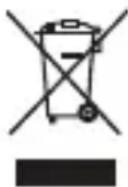
The symbol on the product, battery, literature, or packaging means that the products and batteries should be taken to separate waste collection points designated by local authorities at the end of the lifespan. This will ensure that EEE waste is recycled and treated in a manner that conserves valuable materials and protects human health and the environment. For more information, please contact your local authorities, retailer, or household waste disposal service or visit the website https://consumer.huawei.com/en/.
Hereby, Huawei Device Co., Ltd. declares that this device VLI-B29 is in compliance with the following Directive: RED 2014/53/EU, RoHS 2011/65/EU.
The full text of the EU declaration of conformity and most recent information about accessories & software are available at the following internet address: https://consumer.huawei.com/certification.
Hereby, Huawei Device Co., Ltd. declares that this device VLI-B29 is in compliance with the relevant statutory instruments in the UK. The full text of the declaration of conformity is available at the following internet address: https://consumer.huawei.com/certification.
UK PSTI Compliance
This product meets the relevant security requirements specified in Schedule 1 of the Product Security and Telecommunications Infrastructure (Security Requirements for Relevant Connectable Products) Regulations 2023. The full text of the PSTI Statement of Compliance is available at the following website: https://consumer.huawei.com/certification.
RF exposure requirements
As recommended by international guidelines, the device is designed to comply with the limits established by the market that the device will be placed on.
For the countries that adopt the SAR limit of 2.0 W/kg(Head) and 4.0 W/kg(Limbs) over 10 grams of tissue. The device complies with RF specifications when the device is worn on the wrist and at a distance of 1.0 cm from your face.
Highest reported SAR value: Head SAR: 0.02 W/kg; Limbs SAR: 0.4 W/kg.
Frequency bands and power
Frequency bands in which the radio equipment operates: Some bands may not be available in all countries or all areas. Please contact the local carrier for more details.
Wi-Fi 2.4GHz: 17 dBm, Bluetooth 2.4GHz: 15 dBm, NFC 13.56MHz: 42dBμA/m at 10 m, Watch Wireless Charger: 110.5 kHz-119 kHz: 42dBμA/m at 10 m, 119 kHz-135 kHz: 66 descending 10 dB/dec above 119 kHz at 10 m, 135 kHz-140 kHz: 42dBμA/m at 10 m, 140 kHz-148 kHz: 37.7dBμA/m at 10 m.
Please go to Settings > About > Regulatory information on the device to view the E-label screen.
Français européen
https://consumer.huawei.com/certification.
https://consumer.huawei.com/it/support/.
https://consumer.huawei.com/certification.
https://consumer.huawei.com/certification.
https://consumer.huawei.com/certification.
https://consumer.huawei.com/en/.
Atitiktis ES reglamentams
https://consumer.huawei.com/certification.
https://consumer.huawei.com/certification.
https://consumer.huawei.com/en/.
https://consumer.huawei.com/en/.
Kızılay Mah., Fevzi Çakmak 1 Street, Oran Apartment No: 15/B
08502221585
Pazartesi - Cuma 09:00-18:00
KVK Teknik Servis İzmir
İsmet Kaptan Mah. 1365 Sok. No: 7B
02324895959
Pazartesi - Cuma 08:30 - 18:00
KVK Teknik Servis Trabzon
Single Contact Point: Huawei Technologies (Netherlands) B.V.
IE: Huawei Technologies (Ireland) Co., Ltd.
Mespil Court, Mespil Road, Ballsbridge,
Dublin 4, D04 E516
NL: HUAWEI DEVICE (HONG KONG) CO., LTD.
Huawei Technologies (Netherlands) B.V.
Eksportues: Huawei Devices (Hong Kong) Co., Ltd.
Importues: Huawei Technologies Macedonia DOOEL Shkup
NO:Huawei Technologies Norway AS
Huawei Technologies (Netherlands) B.V.
.https://consumer.huawei.com/certification:
תְרָה בַרִי הַלְא
И 038 24
19110229_01
VLI-B29