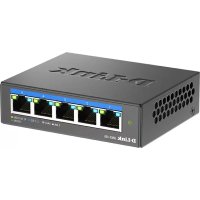
DMS105 - Switch D-LINK - Free user manual and instructions
Find the device manual for free DMS105 D-LINK in PDF.



| Product Type | Network Switch |
| Brand | D-Link |
| Model | DMS105 |
| Number of Ports | 7 |
| Port Types | 5 ports 1000BASE-T (ports 1-5), 2 ports 2.5GBASE-T (ports 6-7) |
| Switching Speed | 10/100/1000 Mbps on ports 1-5, 2.5 Gbps on ports 6-7 |
| Power Supply | External power adapter (included) |
| Installation | Plug and Play, no configuration required |
| LED Display | Power indicator, Link/Act LED per port (color indicates speed) |
| Maintenance | Unplug before cleaning, use a dry lint-free cloth |
| Safety | Do not expose to water, do not disassemble, avoid heat sources |
| Recycling | Do not dispose of with household waste, take to a collection point |
| Environment | Operating temperature: not specified; humidity: not specified |
| Technical Support | Refer to the complete manual online or contact D-Link |
Frequently Asked Questions - DMS105 D-LINK
User questions about DMS105 D-LINK
0 question about this device. Answer the ones you know or ask your own.
Ask a new question about this device
Download the instructions for your Switch in PDF format for free! Find your manual DMS105 - D-LINK and take your electronic device back in hand. On this page are published all the documents necessary for the use of your device. DMS105 by D-LINK.
USER MANUAL DMS105 D-LINK
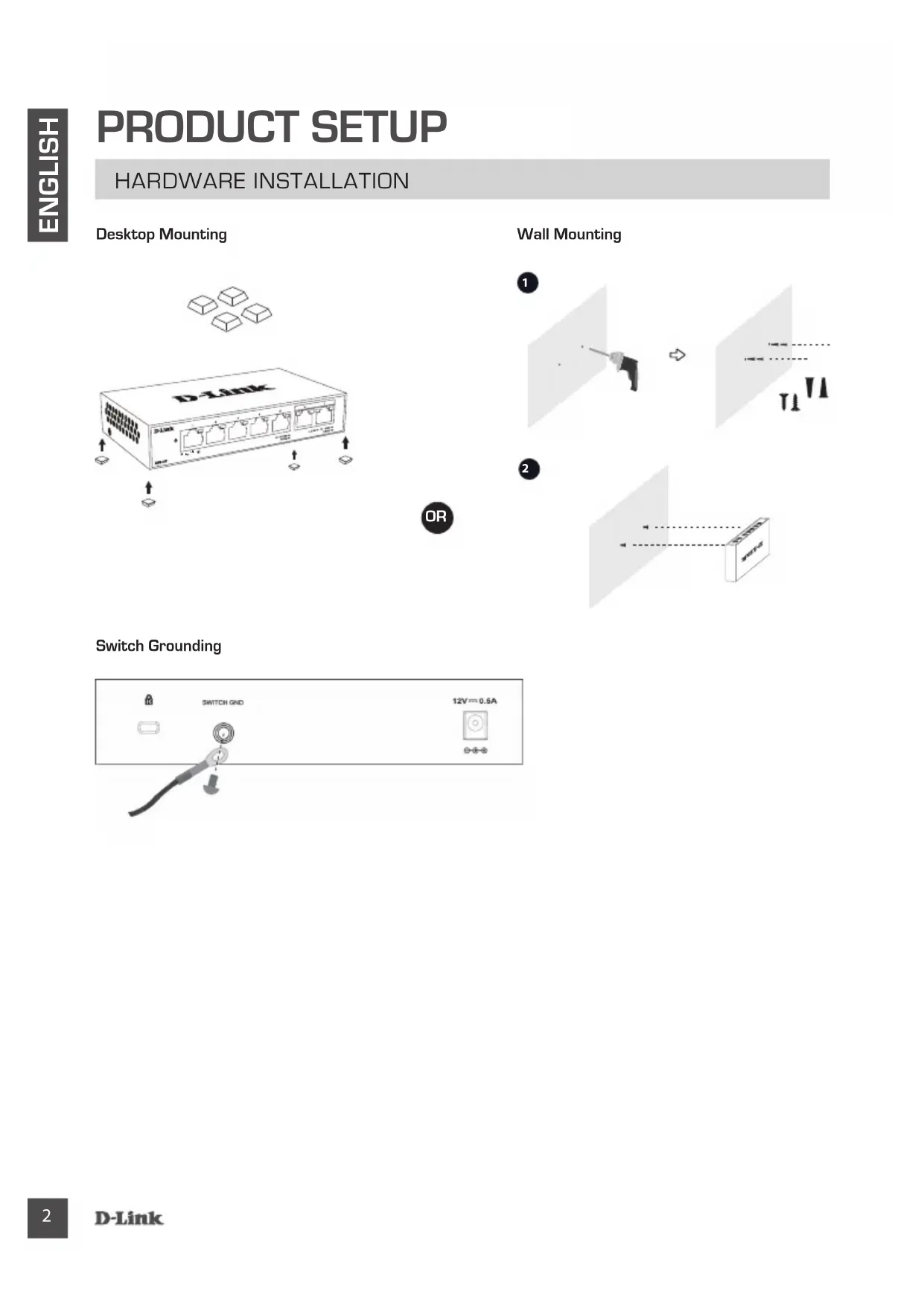
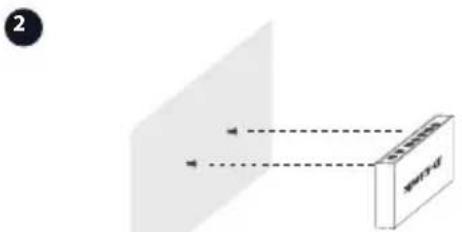
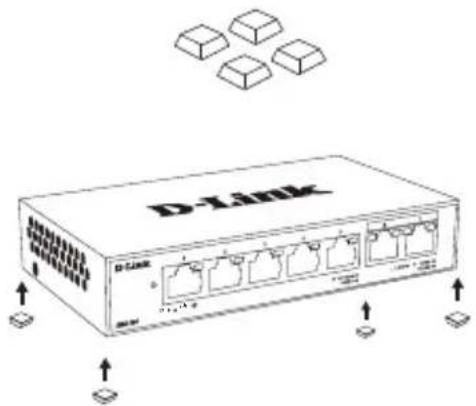
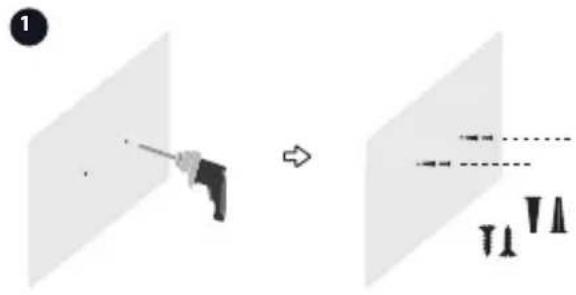
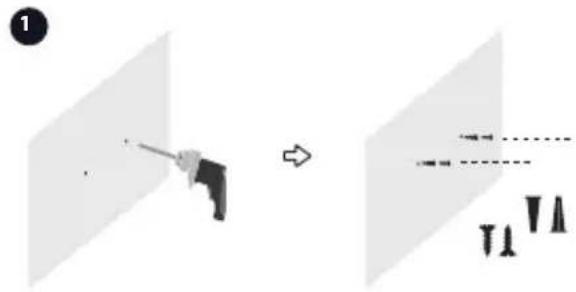
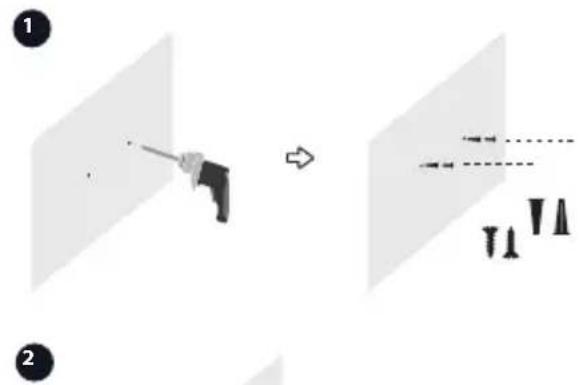
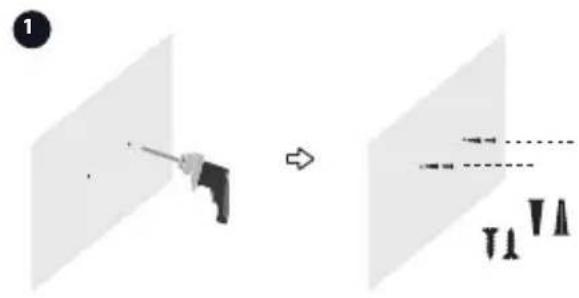
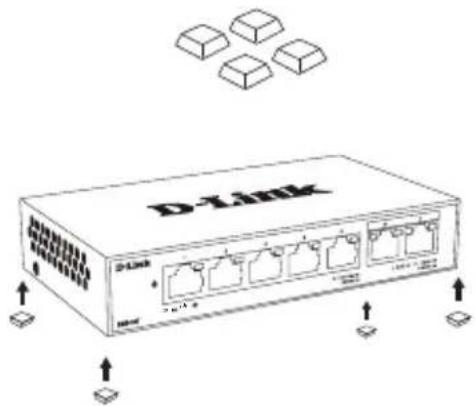
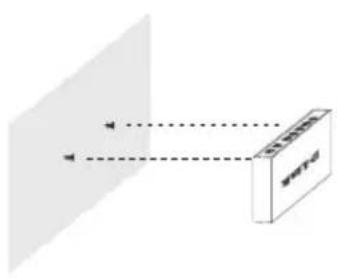
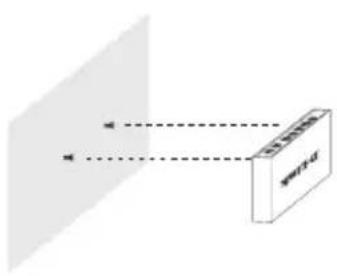
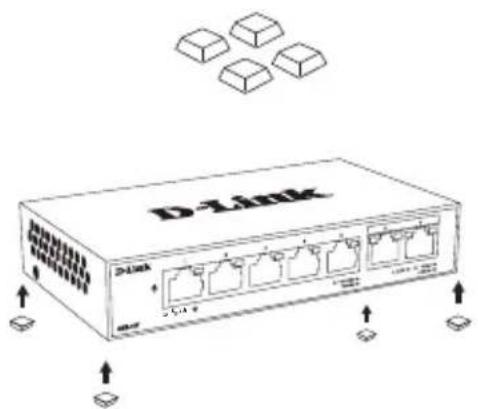
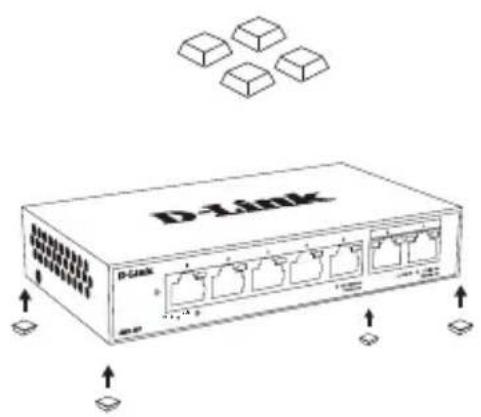
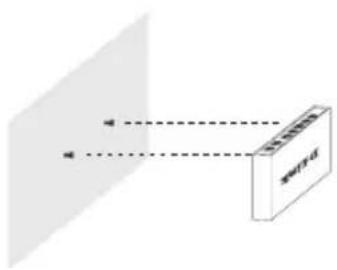
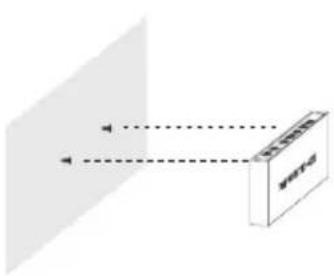
Wall Mounting

natural_image
Diagram showing a person using a tool to interact with a target, with arrows indicating direction (no text or symbols)
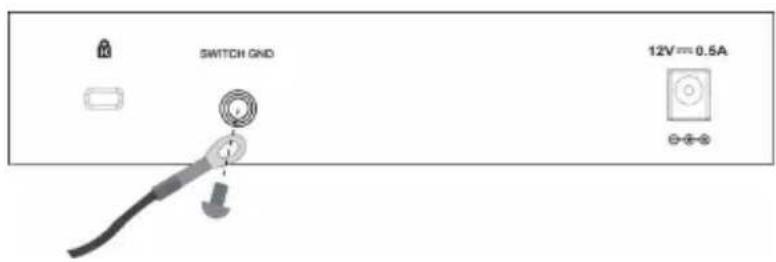
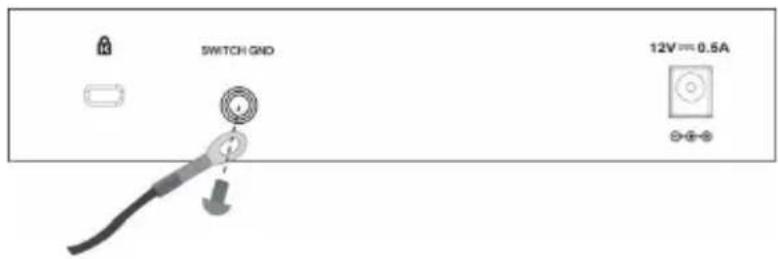
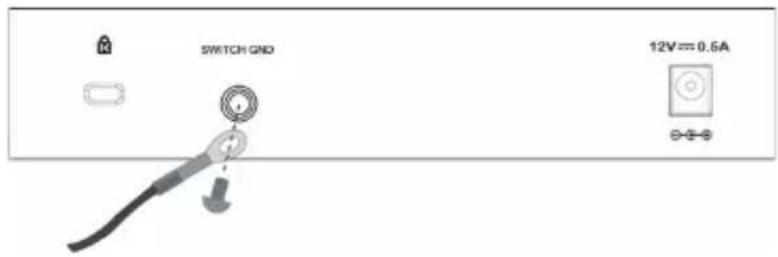
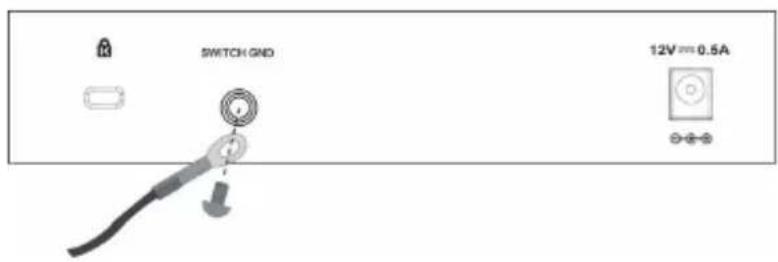
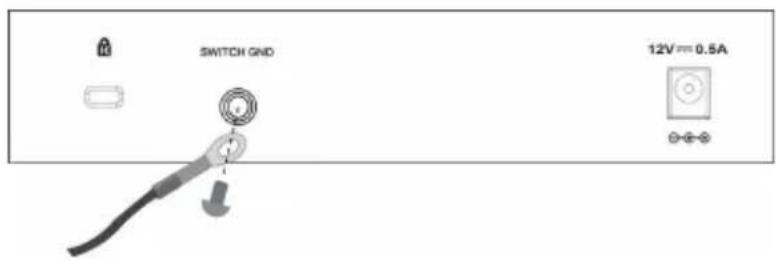
Switch Grounding
PRODUCT SETUP
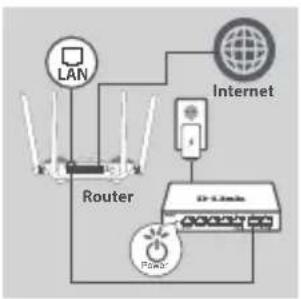
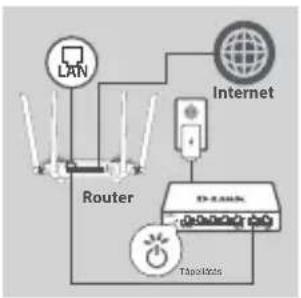
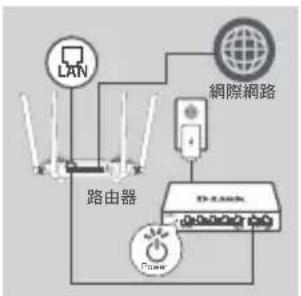
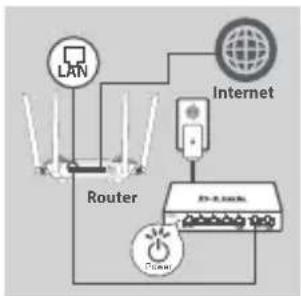
SWITCH SET-UP
flowchart
graph TD
    A["Router"] --> B["LAN"]
    A --> C["Internet"]
    A --> D["DR Link"]
    D --> E["Power"]
    E --> A
Step 1
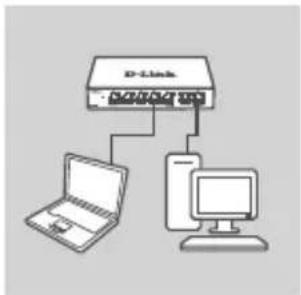
Plug the power adapter into a free wall socket, then plug the other end of the power adapter cable into the power port of the switch. The power LED will light up, confirming that the device is powered up successfully.
flowchart
graph TD
    A["D-Link"] --> B["Laptop"]
    A --> C["Computer"]
Step 2
Use a LAN cable to connect your network device to one of the 7 ports on the switch.
Step 3
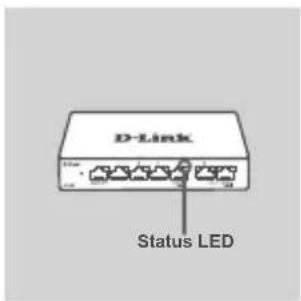
Check the Link/Act lights(LEDs) on the switch to verify a proper connection.
PORT LED CONNECTION SPEED
Link/Act LED INDICATORS
| Location Color Status | Description | ||
| LED Per 1000 BASE-T Port (Port 1-5) | Green | Solid 1000M | Connection |
| Blinking Data transmission/Activity | |||
| Amber | Solid 10/100M | Connection | |
| Blinking Data transmission/Activity | |||
| Off Light off | No link | ||
| LED Per 2.5G BASE-T Port (Port 6-7) | Blue | Solid 2.5G Connection | |
| Blinking Data transmission/Activity | |||
| Green | Solid 1000M | Connection | |
| Blinking Data transmission/Activity | |||
| Amber | Solid 10/100M | Connection | |
| Blinking Data transmission/Activity | |||
| Off Light off | No link | ||
TROUBLESHOOTING
SETUP AND CONFIGURATION PROBLEMS
1. WHAT TO DO IF THE POWER LED IS NOT LIT UP?
Check if the power adapter is properly connected to a wall socket and the back of the switch.
2. WHAT TO DO IF A CONNECTED DEVICE IS NOT DETECTED?
First check if the Port LED is flashing. If the Port LED is not illuminated, try connecting the device using a different LAN cable.
TECHNICAL SUPPORT


http://www.dlink.com/support
natural_image
Diagram showing a tool interacting with a target plane, with no visible text or symbols
Erdung

http://www.dlink.com/support
CONFIGURATION DU PRODUIT
INSTALLATION DU MATÉRIEL
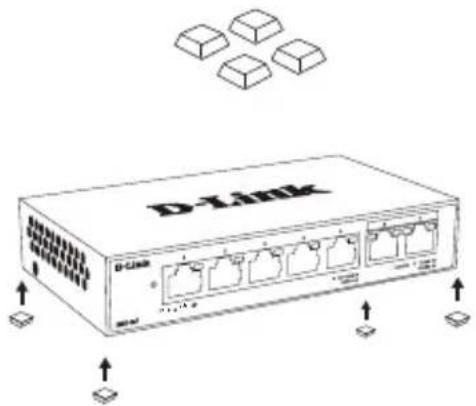
Montage sur bureau

Montage mural

natural_image
Two diagrams showing a person holding a tool and another with dashed lines, no text or symbols present.
CONFIGURATION DU PRODUIT
CONFIGURATION DU COMMUTATEUR

flowchart
graph TD
    A["LAN"] --> B["Router"]
    C["Internet"] --> D["Power Source"]
    D --> E["Router"]
    F["Power Source"] --> G["Router"]
    H["Power Source"] --> I["Router"]
Étape 1
INDICATEURS LED Link/Act

http://www.dlink.com/support


http://www.dlink.com/support
natural_image
Diagram showing light rays interacting with a rectangular object labeled 'WHT-U' (no text or symbols on the object itself)Messa a terra
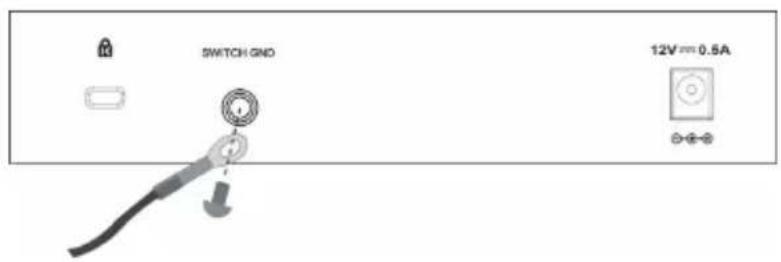
Fase 3
INDICATORI LED Link/Act

http://www.dlink.com/support
PRODUCTINSTALLATIE
HARDWARE INSTALLATIE
Desktop montage

Wandmontage
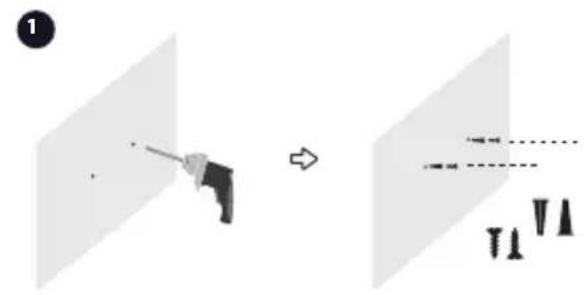
2
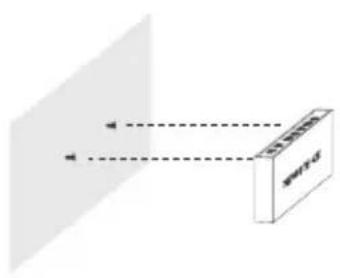
natural_image
Diagram showing light rays interacting with a rectangular device (no text or symbols)
http://www.dlink.com/support
KONFIGURACJA PRODUKTU
INSTALACJA SPRZĘTU
Montaż na biurku

LUB
Montaż na ścianie

2

natural_image
Diagram showing light rays reflecting off a screen with a rectangular object, no text or symbols presentWSKAŹNIKI LED Link/Act

http://www.dlink.com/support
NASTAVENÍ PRODUKTU
INSTALACE HARDWARU
Montáž na stůl

Montáž na stěnu

natural_image
Diagram showing a tool interacting with a screen and a separate view of a screen with arrows indicating direction (no text or symbols)2

natural_image
Diagram showing light rays interacting with a rectangular object labeled 'SWITH' (no text or symbols on the object itself)Uzemnění přepínače

NASTAVENÍ PRODUKTU
NASTAVENÍ PŘEPÍNAČE
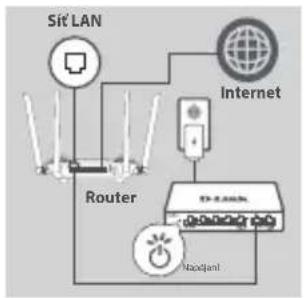
flowchart
graph TD
    A["Sit LAN"] --> B["Router"]
    B --> C["Internet"]
    C --> D["Power Switch"]
    D --> E["Net"]
    style A fill:#f9f,stroke:#333
    style B fill:#ccf,stroke:#333
    style C fill:#cfc,stroke:#333
    style D fill:#fcc,stroke:#333
    style E fill:#cff,stroke:#333
Krok č. 1
LED KONTROLKY Link/Act

http://www.dlink.com/support
TERMÉKBEÁLLÍTÁS
HARDVER BEÜZEMELÉSE
Asztalra szerelés

Falra szerelés
2

natural_image
Diagram showing light rays interacting with a rectangular device labeled 'WHT-U' (no text or symbols on the device itself)Switch földelése
TERMÉKBEÁLLÍTÁS
A SWITCH BEÁLLÍTÁSA
flowchart
graph TD
    A["LAN"] --> B["Router"]
    B --> C["Internet"]
    C --> D["TapitWatts"]
    D --> E["Power Supply"]
    style A fill:#f9f,stroke:#333
    style B fill:#ccf,stroke:#333
    style C fill:#cfc,stroke:#333
    style D fill:#fcc,stroke:#333
    style E fill:#ffc,stroke:#333
1. lépés

http://www.dlink.com/support
PRODUKTOPPSETT
MASKINVAREINSTALLASJON
Bordmontering

Veggmontering
natural_image
Diagram showing a mechanical component before and after assembly, with no visible text or symbols2

natural_image
Diagram showing light rays passing through a rectangular block with label 'WNT-0' (no other text or symbols)Jordingsbryter
PRODUKTOPPSETT
KONFIGURERING AV SVITSJ

flowchart
graph TD
    A["Router"] --> B["LAN"]
    B --> C["Internet"]
    C --> D["Power Hub"]
    D --> E["Power Source"]
    E --> F["Power Switch"]
Trinn 1

http://www.dlink.com/support
OPSÆTNING AF PRODUKT
INSTALLATION AF HARDWARE
natural_image
Diagram showing a person using a tool to interact with another person, both in a light background (no text or symbols)

Jordforbindelse i stik

OPSÄETNING AF PRODUKT
OPSAETNING AF SWITCH

flowchart
graph TD
    A["Router"] --> B["LAN"]
    B --> C["Internet"]
    C --> D["Switch"]
    D --> E["Network switch"]
    style A fill:#f9f,stroke:#333
    style B fill:#ccf,stroke:#333
    style C fill:#cfc,stroke:#333
    style D fill:#fcc,stroke:#333
    style E fill:#cff,stroke:#333
Trin 1
TILSLUTNINGSHASTIGHED
Link/Act LED-INDIKATORER
| Sted Farve Status Beskrivelse | |||
| LED Per 1000 G BASE-T Port (Port 1-5) | Grøn | Konstant 1000M-forbindelse | |
| Blinker Dataoverførsel/aktivitet | |||
| Gul | Konstant 10/100M-forbindelse | ||
| Blinker Dataoverførsel/aktivitet | |||
| Afbrudt Lys slukket Ingen forbindelse | |||
| LED Per 2,5 G BASE-T Port (Port 6-7) | Blå | Konstant 2,5 G-forbindelse | |
| Blinker Dataoverførsel/aktivitet | |||
| Grøn | Konstant 1000M-forbindelse | ||
| Blinker | Dataoverførsel/aktivitet | ||
| Gul | Konstant 10/100M-forbindelse | ||
| Blinker | Dataoverførsel/aktivitet | ||
| Afbrudt Lys slukket Ingen forbindelse | |||
FEJLFINDING
PROBLEMER VED OPSÆTNING OG KONFIGURATION
1. HVAD G∅R JEG, HVIS STR∅M-LED'EN IKKE LYSER?
Kontrollér, at strømadapteren er korrekt tilsluttet til en stikkontakt og til omskifterens bagside.
2. HVAD G∅R JEG, HVIS EN TILSLUTTET ENHED IKKE REGISTRERES?

http://www.dlink.com/support
TUOTTEEN KÄYTTÖÖNOTTO
LAITTEISTON ASENNUS
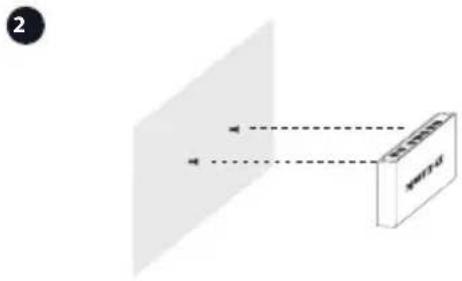
Asennus työpöydälle

Asennus seinälle
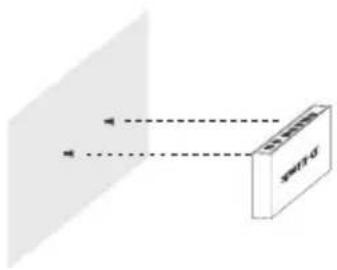
natural_image
Diagram showing light rays interacting with a rectangular object labeled 'SPT-0' (no text or symbols beyond label)Kytkimen maadoitus

TUOTTEEN KÄYTTÖÖNOTTO
KYTKIMEN ASENNUS
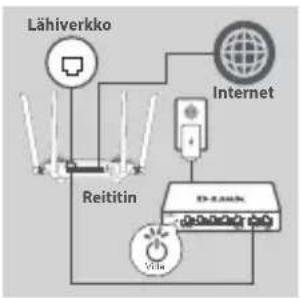
flowchart
graph TD
    A["Lähiverkko"] --> B["Reitin"]
    C["Internet"] --> D["Voia"]
    B --> E["Network"]
    D --> E
    E --> F["Power Supply"]
Vaihe 1
Link/Act-MERKKIVALOT

http://www.dlink.com/support
PRODUKTINSTALLATION
MASKINVARUINSTALLATION
Bordsplacering

Väggmontering

natural_image
Diagram showing a tool interacting with a screen and a separate view of a screen with arrows indicating motion (no text or symbols)
Jordning av switch
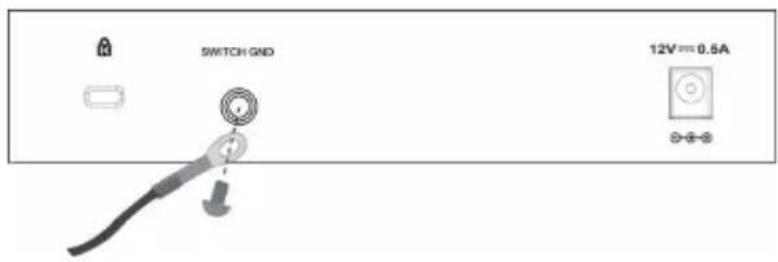
PRODUKTINSTALLATION
SWITCHKONFIGURATION

flowchart
graph TD
    A["LAN"] --> B["Router"]
    C["Internet"] --> D["Network Interface"]
    B --> E["8Kcm Power Input"]
    D --> E
    E --> F["Output"]
Steg 1
PORTLYSDIOD FÖR ANSLUTNINGSHASTIGHET
Länk-/akt.lampor (LYSDIODER)

http://www.dlink.com/support
INDICADORES LED Link/Act

http://www.dlink.com/support
Γείωση μεταγωγέα

ENΔEIΞEIS LED Link/Act

http://www.dlink.com/support
POSTAVLJANJE PROIZVODA
INSTALACIJA HARDVERA
Montaža na stol

Montala na zid
natural_image
Diagram showing a tool interacting with a screen and a separate view of a screen with arrows indicating direction (no text or symbols)2

natural_image
Diagram showing light rays interacting with a rectangular device labeled 'w14-0' (no text or symbols on the device itself)Uzemljenje preklopnika

POSTAVLJANJE PROIZVODA
POSTAVLJANJE PREKLOPNIKA

flowchart
graph TD
    A["LAN"] --> B["Internet"]
    B --> C["Usmjernik"]
    C --> D["Nasajana"]
    D --> E["Device 1"]
    D --> F["Device 2"]
    D --> G["Device 3"]
1. korak
Jedan kraj kabela adaptera napajanja priključite u slobodnu zidnu utičnicu, a drugi kraj kabela priključite u strujnu utičnicu napajanja preklopnika. Zasvijetlit će kontrolna LED lampica napajanja, označavajući da je uređaj ispravno uključen.

flowchart
graph TD
    A["D-Link"] --> B["Laptop"]
    A --> C["Desktop Computer"]
2. korak
3. korak
KONTROLNE LAMPICE AKTIVNE VEZE (Link/Act)
| Lokacija Boja Status Opis | |||
| LED Per 1000 BASE-T Port (Priključci 1-5) | Zelena | Postojana 1000M veza | |
| Trepće Prijenos podataka/aktivnost | |||
| Žuta | Postojana 10/100M veza | ||
| Trepće Prijenos podataka/aktivnost | |||
| Isključeno Lampica ne svijetli Nema veze | |||
| LED Per 2,5G BASE-T Port (Priključci 6-7) | Plava | Postojana 2,5G veza | |
| Trepće Prijenos podataka/aktivnost | |||
| Zelena | Postojana 1000M veza | ||
| Trepće Prijenos podataka/aktivnost | |||
| Žuta | Postojana 10/100M veza | ||
| Trepće Prijenos podataka/aktivnost | |||
| Isključeno Lampica ne svijetli Nema veze | |||
OTKLANJANJE POT EŠKOĆA
PROBLEMI S POSTAVLJANJEM I KONFIGURACIJOM
1. ŠTO DA RADIM AKO LED LAMPICA NAPAJANJA NE SVIJETLI?
Provjerite da li je adapter napajanja pravilno priključen u zidnu utičnicu i u stražnji dio preklopnika.
2. ŠTO DA RADIM AKO SE NE DETEKTIRA PRIKLJUČENI UREĐAJ?

http://www.dlink.com/support
NAMESTITEV IZDELKA
NAMESTITEV STROJNE OPREME
Namizna montaža
ALI
Stenska montaža

natural_image
Diagram showing a person using a tool to interact with another person, both in a 2D coordinate system (no text or symbols present)2

http://www.dlink.com/support
CONFIGURAREA PRODUSULUI
INSTALARE HARDWARE
Montare desktop

Montare pe perete

2
natural_image
Diagram showing light rays interacting with a rectangular device labeled 'w14-0' (no text or symbols on the device itself)Pasul 3
INDICATOARE LED Link/Act

http://www.dlink.com/support
НАСТРОЙКИ НА ПРОДУКТА
МОНТАЖ НА ХАРДУЕРА
Монтаж на бюро

Монтаж на стена

natural_image
Diagram showing a person holding a tool in front of two planes, with a dashed line and arrows indicating motion or movement (no text or symbols)

http://www.dlink.com/support
INŠTALÁCIA PRODUKTU
INŠTALÁCIA HARDVÉRU
Upevnenie na stôl
Upevnenie na stenu

natural_image
Diagram showing a person holding a tool interacting with a device, before and after an operation (no text or symbols present)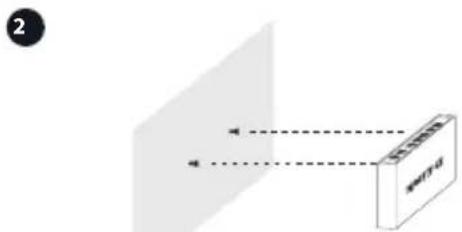

Uzemnenie spínača

INŠTALÁCIA PRODUKTU
INŠTALÁCIA PREPÍNAČA

flowchart
graph TD
    A["LAN"] --> B["Smerovač"]
    C["Internet"] --> D["Network"]
    D --> E["Nasgranic"]
    B --> F["Power Supply"]
    style A fill:#f9f,stroke:#333
    style C fill:#f9f,stroke:#333
    style B fill:#ccf,stroke:#333
    style D fill:#ccf,stroke:#333
    style E fill:#cfc,stroke:#333
1. krok
Zapojte napájací adaptér do volnej elektrickej zásuvky, potom zapojte druhý koniec kábla napájacieho adaptéra do portu napájania na prepínači. LED kontrolka napájania sa rozsvieti, signalizuje tak, že je zariadenie úspešne napájané.

flowchart
graph TD
    A["D-Link"] --> B["Laptop"]
    A --> C["Computer"]
2. krok
Káblom siete LAN pripojte siet'ové zariadenie k jednému zo 7 portov na prepínači.


http://www.dlink.com/support
Год: C - 2012, D - 2013, E - 2014, F - 2015, G - 2016, H - 2017, I - 2018, J - 2019, 0 - 2020, 1 - 2021, 2 - 2022.
Uphill Towers Residence A/99
Ataşehir /ISTANBUL
Tel: +90 (216) 492-99-99
Email: info.tr@dlink.com.tr
natural_image
Diagram showing light rays interacting with a rectangular object labeled 'SWITH' (no text or symbols on the object itself)natural_image
Diagram showing a person using a tool to interact with a target, before and after a presentation (no text or symbols present)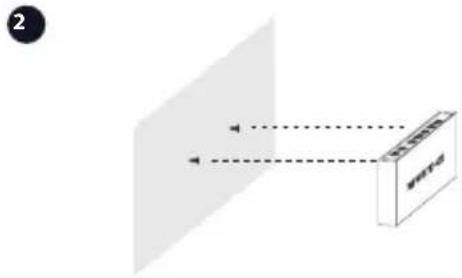
natural_image
Diagram showing a person using a tool to interact with another person, both in a 3D coordinate system (no text or symbols)2
接地
產品安裝
交換器設定
flowchart
graph TD
    A["LAN"] --> B["路由器"]
    C["网際網路"] --> D["网络设备"]
    B --> E["Power Switch"]
    D --> E
    E --> F["终端设备"]
    style A fill:#f9f,stroke:#333
    style C fill:#f9f,stroke:#333
    style B fill:#ccf,stroke:#333
    style D fill:#ccf,stroke:#333
    style E fill:#cfc,stroke:#333
步驟一
natural_image
Diagram showing a tool interacting with a target plane, before and after (no text or symbols)2

natural_image
Diagram showing light rays interacting with a rectangular device labeled 'w14-0' (no text or symbols on the device itself)Switch Grounding

SETUP PRODUK
SET-UP SWITCH
flowchart
graph TD
    A["LAN"] --> B["Router"]
    C["Internet"] --> D["Power"]
    D --> E["Router"]
    F["Global Network"] --> G["Internet"]
Langkah 1
INDIKATOR LED Link/Act
| Lokasi Warna Status | Deskripsi | ||
| LED Per 1000 BASE-T Port (Port 1-5) | Hijau | Solid Koneksi | 1000M |
| Blinkin Transmisi Data/Aktivitas | |||
| Amber | Solid Koneksi | 10/100M | |
| Blinking Transmisi Data/Aktivitas | |||
| Off Lampu Mati Tidak ada link | |||
| LED Per 2.5G BASE-T Port (Port 6-7) | Biru | Solid Koneksi | 2.5G |
| Blinking Transmisi Data/Aktivitas | |||
| Hijau | Solid Koneksi | 1000M | |
| Blinking Transmisi Data/Aktivitas | |||
| Amber | Solid Koneksi | 10/100M | |
| Blinking Transmisi Data/Aktivitas | |||
| Off Lampu Mati Tidak ada link | |||
KENDALA SETUP DAN KONFIGURASI
1. APA YANG HARUS DILAKUKAN JIKA LED TIDAK MENYALA?
natural_image
Diagram showing a tool interacting with a screen and a separate view of a screen with arrows indicating direction (no text or symbols)

スイッチの接地

製品設定
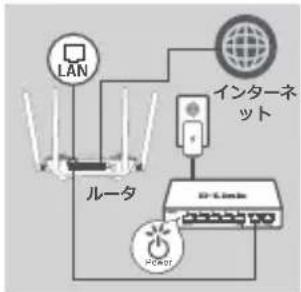
スイッチ設定
flowchart
graph TD
    A["LAN"] --> B["ルータ"]
    B --> C["インターネット"]
    C --> D["PC-Link"]
    D --> E["POWER"]
    E --> F["PC-NT"]
ステップ1
Appendix-Regulatory Statements
CE Mark Warning:
This is a Class B product. In a domestic environment, this product may cause radio interference, in which case the user may be required to take adequate measures.
FCC statement
This equipment has been tested and found to comply with the limits for a Class B digital device, pursuant to part 15 of the FCC Rules. These limits are designed to provide reasonable protection against harmful interference in a residential installation. This equipment generates, uses and can radiate radio frequency energy and, if not installed and used in accordance with the instructions, may cause harmful interference to radio communications. However, there is no guarantee that interference will not occur in a particular installation. If this equipment does cause harmful interference to radio or television reception, which can be determined by turning the equipment off and on, the user is encouraged to try to correct the interference by one or more of the following measures:
—Reorient or relocate the receiving antenna.
—Increase the separation between the equipment and receiver.
—Connect the equipment into an outlet on a circuit different from that to which the receiver is connected.
—Consult the dealer or an experienced radio/TV technician for help
Innovation, Science and Economic Development Canada (ISED) Statement
This Class B digital apparatus complies with Canadian ICES-003.
Japan Voluntary Control Council for Interference Statement
Japan Voluntary Control Council for Interference Statement
This is a Class B product based on the standard of the VCCI Council. If this is used near a radio or television receiver in a domestic environment, it may cause radio interference. Install and use the equipment according to the instruction manual.
SAFETY INSTRUCTIONS
The following general safety guidelines are provided to help ensure your own personal safety and protect your product from potential damage. Remember to consult the product user instructions for more details.
- Static electricity can be harmful to electronic components. Discharge static electricity from your body (i.e. touching grounded bare metal) before touching the product.
- Do not attempt to service the product and never disassemble the product. For some products with a user replaceable battery, please read and follow the instructions in the user manual.
- Do not spill food or liquid on your product and never push any objects into the openings of your product.
- Do not use this product near water, areas with high humidity, or condensation unless the product is specifically rated for outdoor application.
- Keep the product away from radiators and other heat sources.
• Always unplug the product from mains power before cleaning and use a dry lint free cloth only.
This symbol on the product or packaging means that according to local laws and regulations this product should be not be disposed of in the household waste but sent for recycling. Please take it to a collection point designated by your local authorities once it has reached the end of its life, some will accept products for free. By recycling the product and its packaging in this manner you help to conserve the environment and protect human health.
D-Link and the environment
At D-Link, we understand and are committed to reducing any impact our operations and products may have on the environment. To minimise this impact D-Link designs and builds its products to be as environmentally friendly as possible, by using recyclable, low toxic materials in both products and packaging.
D-Link recommends that you always switch off or unplug your D-Link products when they are not in use. By doing so you will help to save energy and reduce CO2 emissions.
To learn more about our environmentally responsible products and packaging please visit www.dlinkgreen.com.
DEUTSCH DE

natural_image
Symbol of a trash bin crossed with no text or labels, accompanied by a black rectangular block below (no readable text or symbols)natural_image
Symbol of a trash bin crossed with no text or numbers, representing waste sorting or disposal (no text present)- PRODUCT SETUP
- SWITCH SET-UP
- Step 1
- Step 2
- Step 3
- PORT LED CONNECTION SPEED
- TROUBLESHOOTING
- WHAT TO DO IF THE POWER LED IS NOT LIT UP?
- WHAT TO DO IF A CONNECTED DEVICE IS NOT DETECTED?
- TECHNICAL SUPPORT
- CONFIGURATION DU PRODUIT
- Étape 1
- Fase 3
- PRODUCTINSTALLATIE
- HARDWARE INSTALLATIE
- KONFIGURACJA PRODUKTU
- INSTALACJA SPRZĘTU
- NASTAVENÍ PRODUKTU
- NASTAVENÍ PŘEPÍNAČE
- Krok č. 1
- TERMÉKBEÁLLÍTÁS
- A SWITCH BEÁLLÍTÁSA
- lépés
- PRODUKTOPPSETT
- KONFIGURERING AV SVITSJ
- Trinn 1
- OPSÆTNING AF PRODUKT
- OPSÄETNING AF PRODUKT
- OPSAETNING AF SWITCH
- Trin 1
- TILSLUTNINGSHASTIGHED
- FEJLFINDING
- HVAD G∅R JEG, HVIS STR∅M-LED'EN IKKE LYSER?
- HVAD G∅R JEG, HVIS EN TILSLUTTET ENHED IKKE REGISTRERES?
- TUOTTEEN KÄYTTÖÖNOTTO
- KYTKIMEN ASENNUS
- Vaihe 1
- PRODUKTINSTALLATION
- SWITCHKONFIGURATION
- Steg 1
- PORTLYSDIOD FÖR ANSLUTNINGSHASTIGHET
- POSTAVLJANJE PROIZVODA
- INSTALACIJA HARDVERA
- POSTAVLJANJE PREKLOPNIKA
- korak
- korak
- korak
- OTKLANJANJE POT EŠKOĆA
- ŠTO DA RADIM AKO LED LAMPICA NAPAJANJA NE SVIJETLI?
- ŠTO DA RADIM AKO SE NE DETEKTIRA PRIKLJUČENI UREĐAJ?
- NAMESTITEV IZDELKA
- CONFIGURAREA PRODUSULUI
- Pasul 3
- INDICATOARE LED Link/Act
- НАСТРОЙКИ НА ПРОДУКТА
- INŠTALÁCIA PRODUKTU
- INŠTALÁCIA PREPÍNAČA
- krok
- krok
- 產品安裝
- 交換器設定
- 步驟一
- SETUP PRODUK
- SET-UP SWITCH
- Langkah 1
- APA YANG HARUS DILAKUKAN JIKA LED TIDAK MENYALA?
- 製品設定
- スイッチ設定
- ステップ1
- Appendix-Regulatory Statements
- CE Mark Warning:
- FCC statement
- Innovation, Science and Economic Development Canada (ISED) Statement
- Japan Voluntary Control Council for Interference Statement
- SAFETY INSTRUCTIONS
- D-Link and the environment
- DEUTSCH DE
Brand : D-LINK
Model : DMS105
Category : Switch