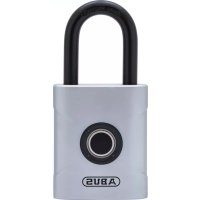
Touch 57 - Lock ABUS - Free user manual and instructions
Find the device manual for free Touch 57 ABUS in PDF.



| Product Type | Fingerprint Lock |
| Brand | ABUS |
| Model | Touch 57 |
| Power Supply | 1 CR2 3V lithium battery (850 mAh) |
| Number of recordable fingerprints | Up to 20 fingerprints (2 administrators + 18 users) |
| Sensor Resolution | 508 DPI |
| False Rejection Rate (FRR) | Approx. 5% |
| False Acceptance Rate (FAR) | Less than 0.002% |
| Detection Time | Less than 200 ms |
| Operating Temperature | -10°C to +50°C |
| Administrator Function | Yes (first 2 registered fingerprints) |
| Low Battery Warning | Audible SOS signal (3 short, 3 long, 3 short) after opening |
| Factory Reset | Possible via administrator |
| Sensor Cleaning | Wipe with a dry, lint-free cloth |
| Usage Conditions | Do not expose to extreme temperatures or prolonged sunlight |
| Safety Instructions | Keep out of reach of children; do not use in panic areas |
| Compliance | Directives 2014/30/EU and 2011/65/EU |
| Recycling | WEEE and battery directive: do not dispose of with household waste |
Frequently Asked Questions - Touch 57 ABUS
User questions about Touch 57 ABUS
0 question about this device. Answer the ones you know or ask your own.
Ask a new question about this device
Download the instructions for your Lock in PDF format for free! Find your manual Touch 57 - ABUS and take your electronic device back in hand. On this page are published all the documents necessary for the use of your device. Touch 57 by ABUS.
USER MANUAL Touch 57 ABUS
GB Thank you for choosing this ABUS product! Icon explanation
| Symbol | Signal word | Remark |
 | Warning | Security note indicating a risk of injury or health hazards. Failure to observe these warnings can lead to death or serious injury. |
 | Caution | Security note indicating a risk of injury or health hazards. Failure to observe these warnings can lead to injury. |
 | Attention | Warning about possible damage to the device. Failure to observe these warnings can lead to material damage or malfunctions. |
Safety information
Please read and observe these safety instructions. Non-observance of these instructions could lead to fire, injury to persons and/or device damage!

Warning
• This product contains a 3 V lithium battery (CR2).
- Batteries must be kept out of reach of children. Children can put batteries in their mouths and choke. This can cause serious injury. Seek immediate medical attention in this event!
- Batteries must be inserted with the correct polarity (+ and -).
- Empty batteries must be removed or replaced immediately (→ page 27).
- The battery terminals must not be short-circuited.
- Contact with expired or damaged batteries may cause chemical burns! In these cases, use suitable protective gloves and clean the battery compartment with a dry cloth.
- Batteries must not be dismantled, pierced, damaged, short-circuited, heated or thrown into an open fire (risk of explosion!).
- Do not use the lock in areas that have to be accessed under stress or panic: In case of stress certain areas as for example medicine- or defibrillator cabinets, chains, weapons, emergency doors and similar cannot be accessed fast enough or at all, because of sweaty fingers.

Attention
- Keep packaging material away from children: Danger of suffocation!
- Do not use or store the product in areas where
the temperature could reach below -10^ or above +50^ . Do not expose the product to direct sunlight for long periods of time.
- Since this is an electronic product, please consider the wanted environment of use similar to the one of your smartphone.
- The product may only be used for its intended purpose. Any modification to the product is prohibited.
Informative note on operation
- When delivered and after a reset, the lock can be opened with each touch of the sensor.
- Up to 20 different fingers can be stored. The first two saved fingers are administrator, the other fingers are users without administrator rights.
- We recommend storing prints from at least two fingers. Should you however be the only user of this lock, it is recommended to save every finger. Please note / write down the stored fingers (→ next page).
- The fingerprint sensor is a sensitive component and should always be kept clean, dry and free from grease to ensure optimal function.
- The finger that touches the sensor should also be clean, dry and free from grease. Finger injuries or skin abrasions may result in the fingerprint affected not being recognised.
- Place your finger on the sensor in various positions and at various angles (finger flat, tip, right side, left side) when recording. For the fingerprint to be saved, the finger must be read correctly ten times.
- The fingerprints also remain stored if the battery power runs low or the batteries need to be changed.
- It is not necessary to re-programme following a
battery change.
- To open the lock, the finger may have to be applied several times, e.g. if the fingertip shows changes compared to the teach-in due to dryness, moisture or skin cream.
- It is not possible to save or delete fingerprints, when the battery is low.
Notes/stored fingers
First fingerprint record
1st and 2nd Finger = Admin

Place finger for approx. 3 sec., release

Place finger at least 10x displaced
blue: stored, red: not stored
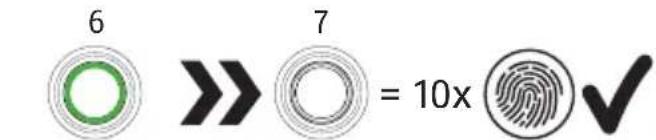

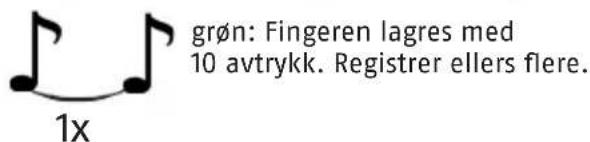
green: Finger with 10 prints stored. If not, record further prints of the finger
Record 2. administrator and more fingerprints Only the administrator (first two fingers) can authorise more fingerprints

Place admin finger for approx. 3 sec., release
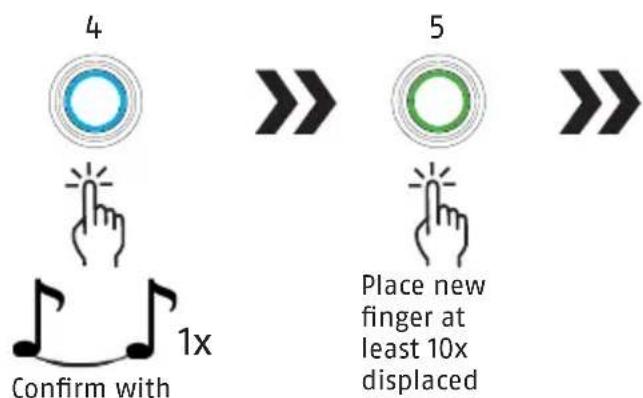

blue: stored, red: not stored
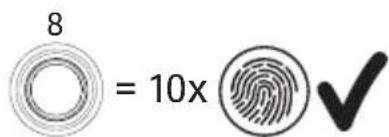
green: Finger with 10 prints stored. If not, record further prints of the finger
Attention: Do not save the administrator fingerprints repeatedly, since they will then not be recognised as administrator anymore. Fingerprints can then not be saved or deleted.
Delete all stored fingerprints (factory reset)
Only the administrator (first two fingers) can delete the stored fingerprints
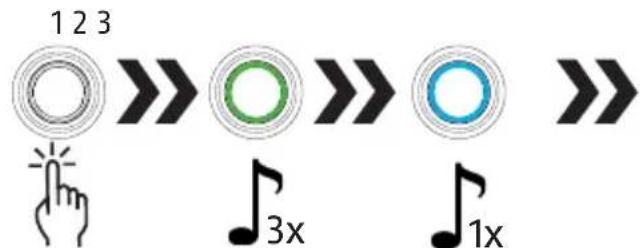
Place admin finger for approx. 6-10 sec.

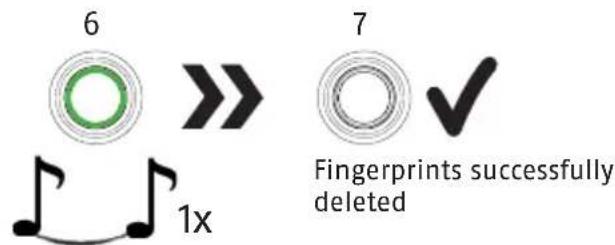
Low battery
When the lock states an S.O.S. (3x short, 3x long, 3x short) warning after opening, the battery must be replaced ( see page 3).
The lock will not be able to be closed after a few warnings until the batterie is changed because of lock out reasons.
Only use high-quality brand-name batteries, for example Varta or Panasonic.
Technical data
| Resolution 508DPI | |
| False rejection rate approx. | 5 % (FRR) |
| False acceptance rate <0,002% (FAR) | |
| Recognize time <200 ms | |
| Operating temp. range -10°C to +50°C | |
| Battery type 1x CR2 (850 mAh) | |
EU Declaration of Conformity
ABUS August Bremicker Söhne KG, Altenhofer Weg 25, 58300 Wetter hereby declares that the device Touch™ 57 is in compliance with the essential requirements and other relevant provisions of Directives 2014/30/EU and 2011/65/EU. The full EU Declaration of Conformity can be requested at: info@abus.de.
UK Declaration of Conformity
Hereby, ABUS August Bremicker Söhne KG declares that the product Touch™ 57 is in compliance with the Electromagnetic Compatibility Regulations 2016 and the Restriction of the Use of Certain Hazardous Substances in Electrical and Electronic Equipment Regulations 2012. The full text of the UK declaration 26 27
of conformity can be requested at: info@abus.de
Disposal
It is your responsibility to delete all stored personal data prior to disposal of the product.
This product contains valuable raw materials.
At the end of its service life, dispose of the product in accordance with the applicable legal requirements.
Electrical appliances, rechargeable batteries and batteries must not be disposed of with household waste. Disposal must be carried out in accordance with Directive 2012/19/EU on waste electrical and electronic equipment (WEEE), or Directive 2006/66/EC on batteries and accumulators and waste batteries and accumulators. Batteries must be removed from electrical appliances and disposed of separately before disposal.
Dispose of the packaging according to type. Separate the cardboard, foil and plastic elements for recycling.
Please contact the local authority responsible for disposal if you have any queries.
You can obtain information on collection points for your old appliances, for example, from the local municipal or city administration, the local waste disposal companies, or your specialist dealer.

ABUS products are designed, manufactured and tested in accordance with applicable regulations with great care. The warranty exclusively covers faults that are caused by material or manufacturing defects. If a material or manufacturing defect
can be proven, the product will be repaired or replaced at the discretion of the warrantor. In such cases, the warranty ends with the termination of the original warranty period. Any further claims are expressly excluded. ABUS assumes no liability for defects or damage that has been caused by external influences (e.g. transport, external forces), improper use, normal wear and tear or non-compliance with this operating and installation instructions document. If a warranty claim is asserted, the product must be returned with the original receipt with date of purchase and a brief written description of the fault.
No liability for mistakes and printing errors.
1^ e 2^ dito = Admin
123


ABUS August Bremicker Söhne KG D 58292 Wetter | Germany.
Tel.: +49 (0) 23 35 63 40 |
www.abus.com | info@abus.de
- GB Thank you for choosing this ABUS product! Icon explanation
- Safety information
- Warning
- Attention
- Informative note on operation
- Notes/stored fingers
- First fingerprint record
- Record 2. administrator and more fingerprints Only the administrator (first two fingers) can authorise more fingerprints
- Low battery
- EU Declaration of Conformity
- UK Declaration of Conformity
- Disposal
Brand : ABUS
Model : Touch 57
Category : Lock