IPCA34512B - Surveillance Camera ABUS - Free user manual and instructions
Find the device manual for free IPCA34512B ABUS in PDF.


Pick your language and provide your email: we'll send you a specifically translated version.
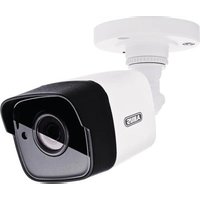
| Product Type | Surveillance Camera |
| Model | IPCA34512B |
| Brand | ABUS |
| Resolution | 1920 x 1080 (Full HD) |
| Frame Rate | Up to 30 fps |
| Lens | 2.8 mm fixed |
| Field of View | 100° horizontal |
| Night Vision | IR LEDs up to 20 m |
| Power Supply | PoE (IEEE 802.3af) or 12V DC |
| Protection Rating | IP67 |
| Operating Temperature | -30°C to 50°C |
| Dimensions | 70 x 70 x 150 mm |
| Weight | 500 g |
| Storage | microSD card up to 128 GB (optional) |
| Motion Detection | Yes, with push notification |
| Audio | Built-in microphone |
| App Compatibility | ABUS Link Station |
| Warranty | 2 years |
| Maintenance | Clean lens with soft cloth; avoid moisture |
| Safety | Complies with CE, RoHS |
| Spare Parts & Repairability | Contact ABUS support for service |
Frequently Asked Questions - IPCA34512B ABUS
How do I connect the IPCA34512B camera to my network?
Connect the camera via PoE (Power over Ethernet) using a PoE switch or injector, or use a 12V DC power adapter. Then plug an Ethernet cable into your router. Use the ABUS Link Station app to scan the QR code on the camera and follow the setup.
Can I access the camera remotely from my smartphone?
Yes, you can access the camera remotely using the ABUS Link Station app on your smartphone, or via a web browser by entering the camera's IP address. Ensure the camera is connected to the internet and you have created an account.
What is the night vision range of this camera?
The camera features IR LEDs with a range of up to 20 meters in complete darkness. The image will be black and white in night mode.
How do I reset the camera to factory defaults?
Locate the reset button on the camera (usually a small pinhole). Use a paperclip to press and hold the button for about 10 seconds until the LED indicators blink. The camera will reboot with factory settings.
What is the maximum microSD card size supported?
The camera supports microSD cards up to 128 GB (Class 10 or higher recommended). Insert the card into the slot inside the camera housing for local recording.
Is the camera weatherproof?
Yes, the IPCA34512B has an IP67 rating, meaning it is dust-tight and can withstand immersion in water up to 1 meter for 30 minutes. It is suitable for outdoor use.
Does the camera support audio?
Yes, the camera has a built-in microphone for audio capture. Note that audio recording may be subject to local privacy laws.
Can I use this camera with an NVR from another brand?
The camera supports the ONVIF standard (Profile S), making it compatible with many third-party NVRs that support ONVIF. Check your NVR's compatibility list.
What is the field of view of the camera?
The camera has a 100° horizontal field of view with its fixed 2.8 mm lens, providing a wide-angle perspective suitable for monitoring large areas.
How do I update the firmware of the camera?
Firmware updates can be performed via the ABUS Link Station app or the camera's web interface. Go to the settings menu, check for updates, and follow the on-screen instructions. Keep the camera powered during the update.
User questions about IPCA34512B ABUS
0 question about this device. Answer the ones you know or ask your own.
Ask a new question about this device
No questions yet. Be the first to ask one.
Download the instructions for your Surveillance Camera in PDF format for free! Find your manual IPCA34512B - ABUS and take your electronic device back in hand. On this page are published all the documents necessary for the use of your device. IPCA34512B by ABUS.
USER MANUAL IPCA34512B ABUS

Manual assistant
Powered by Anthropic
Waiting for your message
Product information
Brand : ABUS
Model : IPCA34512B
Category : Surveillance Camera