IPCA54512A - Surveillance Camera ABUS - Free user manual and instructions
Find the device manual for free IPCA54512A ABUS in PDF.


Pick your language and provide your email: we'll send you a specifically translated version.
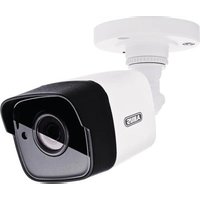
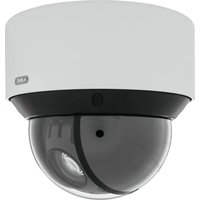
| Product Type | IP Surveillance Camera |
| Model | IPCA54512A |
| Image Sensor | 1/2.8" Progressive Scan CMOS |
| Resolution | 5 MP (2592 x 1944) |
| Frame Rate | Up to 25 fps |
| Video Compression | H.265, H.264, MJPEG |
| Lens | 2.8 mm fixed, F1.6 |
| Field of View | Horizontal: 105°, Vertical: 77°, Diagonal: 138° |
| Night Vision | IR LEDs, up to 30 m |
| Audio | Built-in microphone |
| Network Interface | RJ45 10/100 Base-T, PoE |
| Power Supply | PoE (IEEE 802.3af) or 12 V DC |
| Power Consumption | ≤ 6 W |
| Operating Temperature | -30°C to 60°C |
| Ingress Protection | IP67 |
| Impact Rating | IK10 |
| Dimensions (Ø x H) | 110 mm x 90 mm |
| Weight | Approx. 480 g |
| Mounting | Ceiling or wall mount (bracket included) |
| Storage | MicroSD slot (up to 256 GB), NAS, NVR |
| Main Functions | Motion detection, tamper alarm, privacy mask, WDR |
| Maintenance & Cleaning | Clean lens with soft dry cloth; avoid harsh chemicals |
| Safety | Install per manual; use PoE or compliant power supply |
| Spare Parts & Repairability | Contact ABUS service; do not attempt self-repair |
| General Information | Brand: ABUS; Model: IPCA54512A; Category: Surveillance Camera |
Frequently Asked Questions - IPCA54512A ABUS
How do I install the ABUS IPCA54512A camera?
Mount the camera securely using the included bracket. Connect to a PoE switch or use the optional 12 V DC power adapter. Then configure via web browser or ABUS IP installer software.
Does this camera support PoE (Power over Ethernet)?
Yes, the IPCA54512A supports IEEE 802.3af PoE. It can be powered directly via a PoE switch or injector, simplifying cabling.
What is the night vision range?
The camera features built-in IR LEDs with a range of up to 30 meters in complete darkness, providing clear black-and-white video.
Can I record video locally on the camera?
Yes, the camera has a MicroSD card slot supporting up to 256 GB for local recording. It also works with NVRs and NAS systems.
How do I access the camera remotely?
After connecting to your network, use the ABUS IP Cam Secure app or the camera's web interface. Ensure port forwarding is set up or use P2P for easy remote access.
What video compression formats are supported?
The camera supports H.265, H.264, and MJPEG compression. H.265 reduces bandwidth and storage usage while maintaining high quality.
Is the camera weatherproof?
Yes, it has an IP67 rating for dust and water protection, and an IK10 impact rating, making it suitable for outdoor installations.
How do I reset the camera to factory settings?
Press and hold the reset button on the camera (near the cable) for about 10 seconds while powered on. The camera will reboot with default settings.
What is the warranty period for ABUS cameras?
ABUS typically offers a 2-year warranty for this model. Check the included warranty card or contact support for details.
Can I use the camera with third-party NVRs?
Yes, the camera supports ONVIF Profile S and RTSP, ensuring compatibility with many third-party NVRs and software.
User questions about IPCA54512A ABUS
0 question about this device. Answer the ones you know or ask your own.
Ask a new question about this device
No questions yet. Be the first to ask one.
Download the instructions for your Surveillance Camera in PDF format for free! Find your manual IPCA54512A - ABUS and take your electronic device back in hand. On this page are published all the documents necessary for the use of your device. IPCA54512A by ABUS.
USER MANUAL IPCA54512A ABUS

Manual assistant
Powered by Anthropic
Waiting for your message
Product information
Brand : ABUS
Model : IPCA54512A
Category : Surveillance Camera