PPDF17100 - Surveillance Camera ABUS - Free user manual and instructions
Find the device manual for free PPDF17100 ABUS in PDF.


Pick your language and provide your email: we'll send you a specifically translated version.
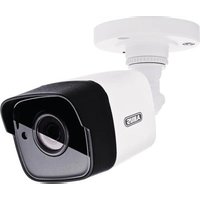
| Product Type | Indoor/Outdoor Security Camera |
| Model | PPDF17100 |
| Brand | ABUS |
| Dimensions | Approx. 120 mm x 80 mm |
| Weight | Approx. 350 g |
| Power Supply | PoE (802.3af) or 12V DC, 1A |
| Resolution | 1920 x 1080p (Full HD) |
| Field of View | 90° (H) x 50° (V) |
| Night Vision | IR LEDs up to 20 m |
| Compression | H.264, H.265 |
| Main Functions | Motion detection, remote access, two-way audio, ONVIF compliant |
| Storage | microSD card (up to 128 GB) or NVR |
| Weather Protection | IP66 |
| Operating Temperature | -20°C to 50°C |
| Cleaning | Clean with soft dry cloth; avoid solvents |
| Security | Encrypted transmission (HTTPS, SSL), user access control |
| Spare Parts & Repairability | Contact ABUS support for parts; repair by authorized service |
| General Information | CE, RoHS compliant; 2-year warranty |
Frequently Asked Questions - PPDF17100 ABUS
How do I reset the ABUS PPDF17100 to factory settings?
Press and hold the reset button on the back of the camera for 10 seconds using a paper clip until the LED blinks rapidly. The camera will reboot and restore default settings.
Can the camera be used outdoors?
Yes, the PPDF17100 has an IP66 rating, making it waterproof and dust-tight, suitable for outdoor use.
How do I find the IP address of the camera?
Use the ABUS IP installer tool or check your router's DHCP client list. The default IP is often 192.168.1.100.
Does the camera support PoE (Power over Ethernet)?
Yes, the camera supports PoE 802.3af. Simply connect an Ethernet cable from a PoE switch to power and transmit data.
How do I set up night vision?
Night vision is automatic. When ambient light drops below a threshold, the IR LEDs turn on, providing black-and-white footage up to 20 meters.
Is the camera compatible with third-party software?
Yes, the camera supports the ONVIF standard, so it can work with many third-party VMS and NVR systems.
How can I access the camera remotely?
Download the ABUS Link Station app or use a web browser. Ensure port forwarding is set up on your router for remote access.
What storage options are available?
You can insert a microSD card (max 128 GB) directly into the camera or record to an NVR via network.
How do I clean the camera lens?
Use a soft, dry microfiber cloth. For stubborn dirt, slightly dampen the cloth with water. Never use abrasive cleaners.
What is the warranty period?
ABUS offers a 2-year warranty from the date of purchase. Register your product online for extended support.
User questions about PPDF17100 ABUS
0 question about this device. Answer the ones you know or ask your own.
Ask a new question about this device
No questions yet. Be the first to ask one.
Download the instructions for your Surveillance Camera in PDF format for free! Find your manual PPDF17100 - ABUS and take your electronic device back in hand. On this page are published all the documents necessary for the use of your device. PPDF17100 by ABUS.
USER MANUAL PPDF17100 ABUS

Manual assistant
Powered by Anthropic
Waiting for your message
Product information
Brand : ABUS
Model : PPDF17100
Category : Surveillance Camera