RT62K7115BS - Fridge SAMSUNG - Free user manual and instructions
Find the device manual for free RT62K7115BS SAMSUNG in PDF.


User questions about RT62K7115BS SAMSUNG
0 question about this device. Answer the ones you know or ask your own.
Ask a new question about this device
Download the instructions for your Fridge in PDF format for free! Find your manual RT62K7115BS - SAMSUNG and take your electronic device back in hand. On this page are published all the documents necessary for the use of your device. RT62K7115BS by SAMSUNG.
USER MANUAL RT62K7115BS SAMSUNG
User servicing manual
- You can check where to buy replacement parts at http://samsung.com
- Visit the part purchase site and enter the model code of your product to check the parts available for purchase. The model code is labelled on the outer side of your product.
- You can check the model code and version on the barcode label at the bottom left of the product.
- For replacement parts, make sure the part name matches that of the illustration in this manual.
- User-serviceable parts are limited to handles (some models only), gaskets, drawers, and hinges.
NOTE
Following the repair by a non-authorised service provider, self-repair or non-professional repair of the product, Samsung is not liable for any damage to the product, any injury or any other product safety issue caused by any attempt to repair the product which does not carefully follow these repair and maintenance instructions. Any damage to the product caused by an attempt to repair the product by any person other than a Samsung certified service provider will not be covered by the warranty.
CAUTION
- The part name listed on the site may differ from that in this manual. Please make sure you choose the right part name.
- Replacing hinges requires extreme caution because it involves detaching the door.
- Be sure to wear safety gloves while making repairs.
English
The actual image and provided parts of the refrigerator may differ, depending on the model and the country.
text_image
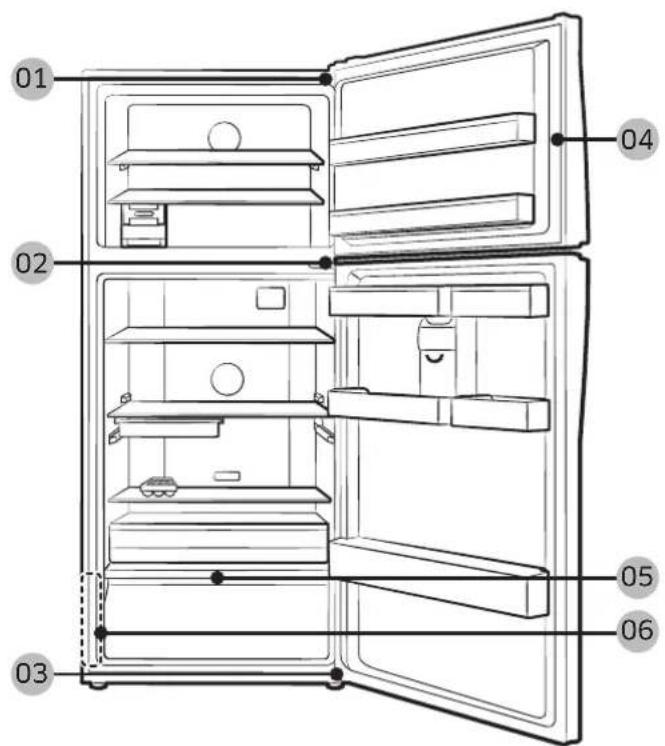
01 02 03 04 05 0601 Hinge Up 02 Hinge Mid
03 Hinge Low 04 Gasket
05 Drawer 06 Barcode label
English
Handle replacement

CAUTION
- When replacing the door handle, take care not to scratch the front of the door.
- Firmly press the handles at the supports. Make sure there is no gap between the supports and the door.
- Tightly fasten the screws when attaching the handle.
- Check that the handle is firmly attached before using the product.
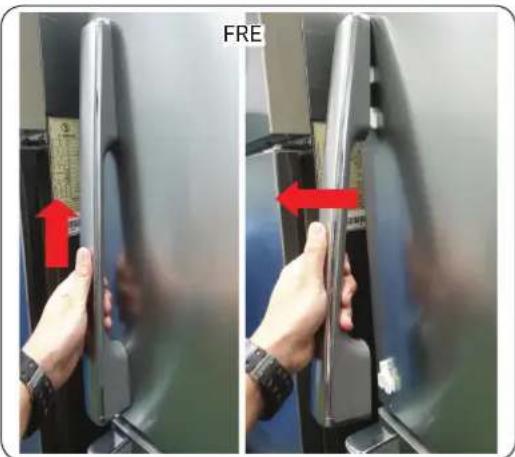
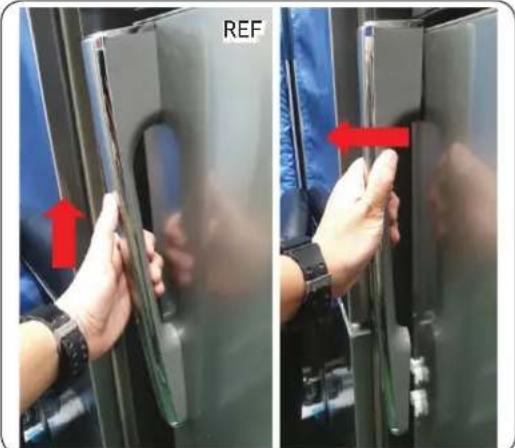
To detach the handles

NOTE
This procedure applies to both the fridge and freezer compartment.
text_image
FRE- Pull out the handle and hit the handle vertically. When the handle is released from the lock To pull the handle toward you(Refer to the picture)

CAUTION
- Be careful not to scratch.
- When disassembling, make sure the unit turned off if you want to assembly fellow the reverse order.
natural_image
Two-panel photo showing hands holding a device with red arrows indicating movement, no visible text or symbolsEnglish
Gasket replacement

CAUTION
Make sure you firmly attach the gasket. Otherwise, cold air from the refrigerator may leak.
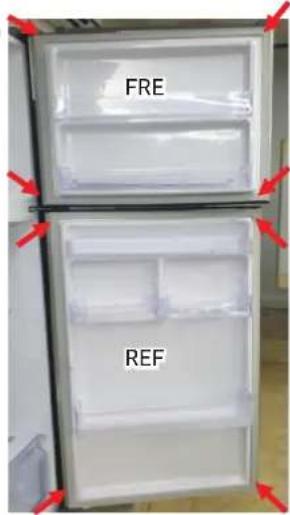
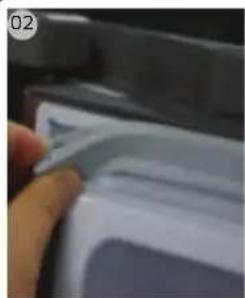
To remove the gasket
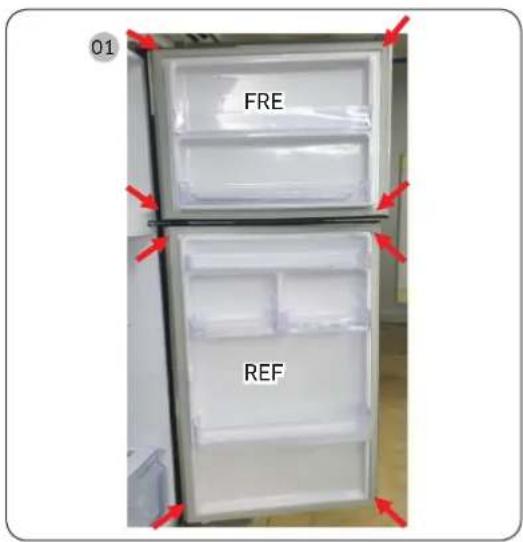
01
text_image
FRE REF- Pull the 4 corners of gasket Fre & Ref.
natural_image
Close-up of a hand holding a white object with a blue border, possibly part of a device or tool (no visible text or symbols)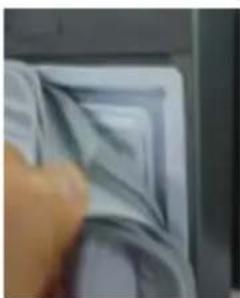
natural_image
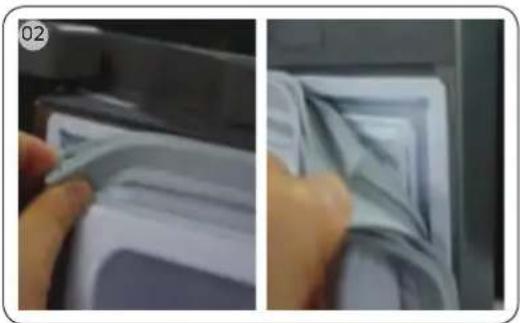
Close-up of a hand pressing down on a textured surface (no visible text or symbols)- Pull the center of gasket.
To replace the gasket
Attach a new gasket to the refrigerator door. Make sure there is no gap between the new gasket and the door.
English
Drawer replacement

CAUTION
Check that the drawer is inserted properly into the rail during assembly.
To remove the drawer
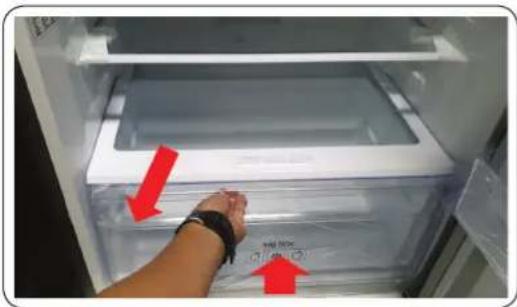
natural_image
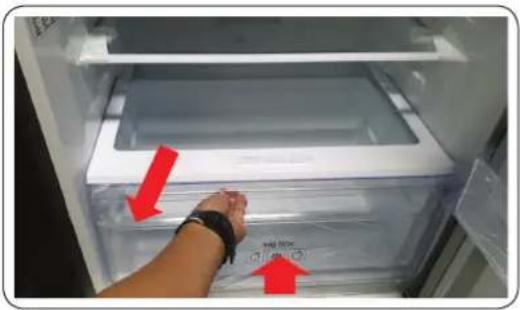
Interior view of a refrigerator with a hand adjusting the lid (no visible text or symbols)- Remove the drawer by pulling the roller part and lifting it up.
To reattach the drawers
Reattaching the drawers follows the reverse order of their respective removal steps.
Hinge replacement
To replace the hinges, you must remove the doors first.

CAUTION
- When removing the doors, take extreme caution because the doors are heavy.
- Before replacing the hinges, put a soft pad such as cardboard on the floor to prevent scratches on the door when you place the doors down.
- As the hinges must be handled carefully and replaced by two or more persons, we recommend you to call for professional technical service.
- If you remove the hinge without holding the door, the door may fall and cause injury.
- Ensure that the shaft is firmly tightened on the hinge.
- Check that the hinge is firmly attached to the cabinet.
• Make sure the wire connectors are connected properly. - Be careful not to damage the wires when fastening the top cover.

WARNING
- Tilting/laying the refrigerator requires a minimum of 2 people.
- Disconnect the power cord before reversing the doors.
English
Tools required (not provided)
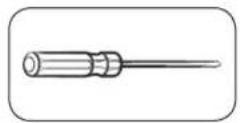
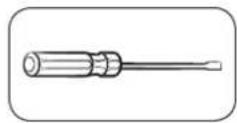
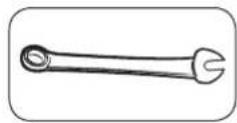
Phillips screwdriver Flat-head screwdriver 11 mm spanner
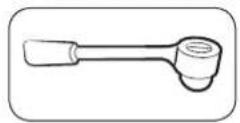
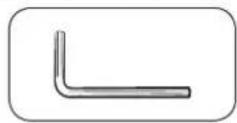
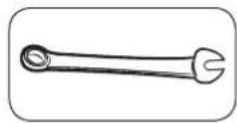
10 mm socket wrench Allen wrench (5 mm) 10 mm spanner
Reversing the door
Hinge Up
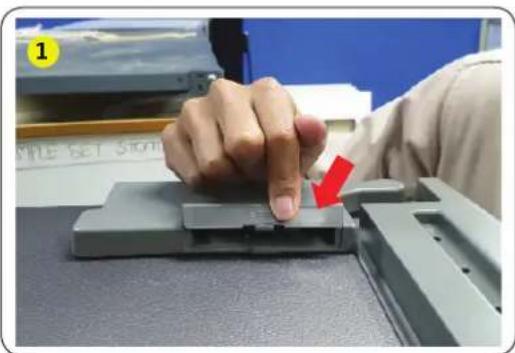
natural_image
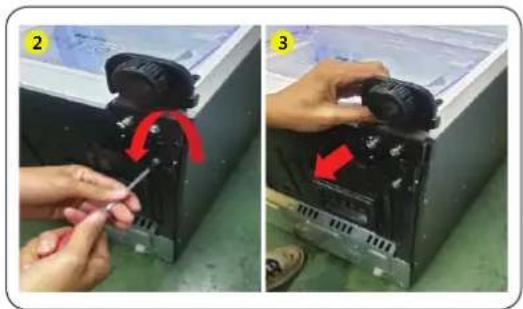
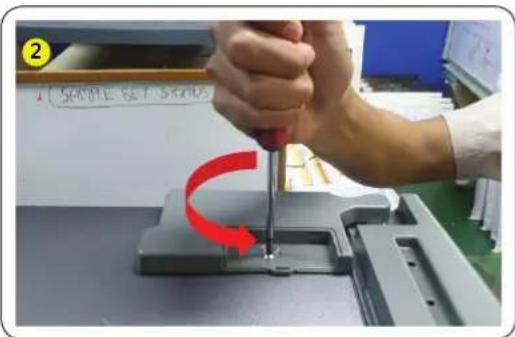
Close-up of a hand pressing down on a gray electronic component with a red arrow indicating the process (no visible text or symbols)- Remove cap cover hinge.
text_image
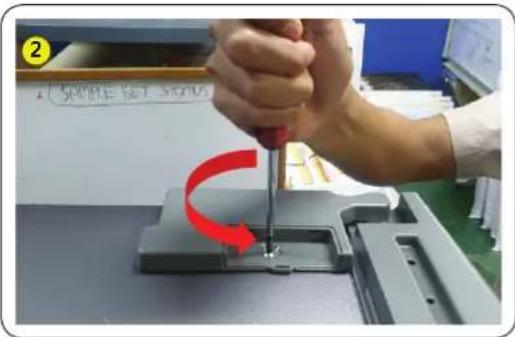
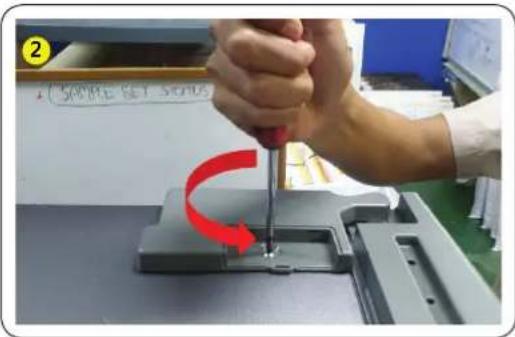
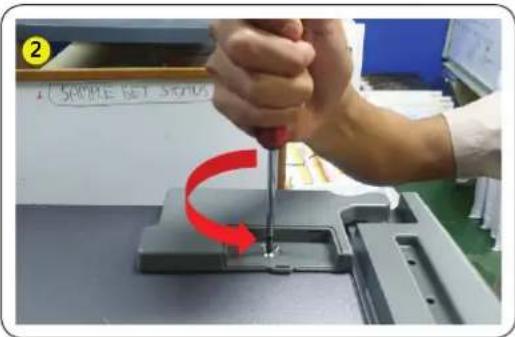
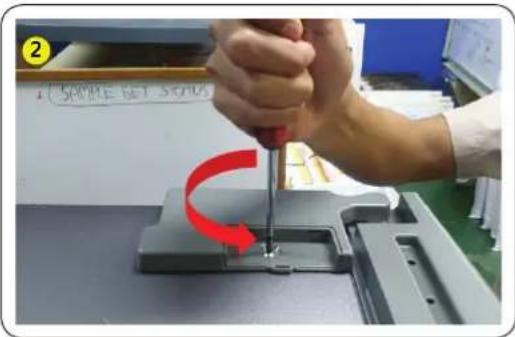
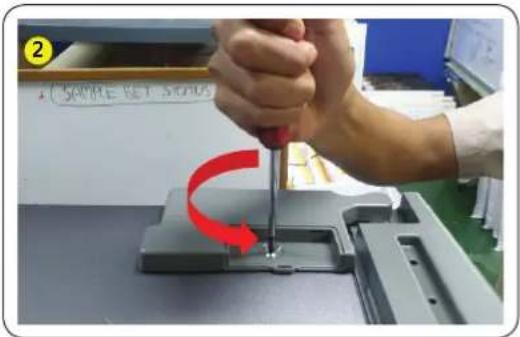
2 SAMPLE 1:5.5400- Remove screw 1 ea Cover hinge with the (+) screwdriver and Open.
text_image
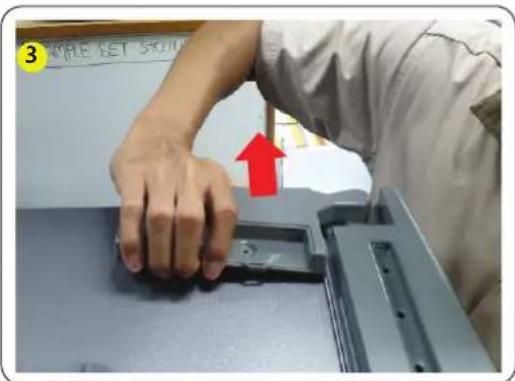
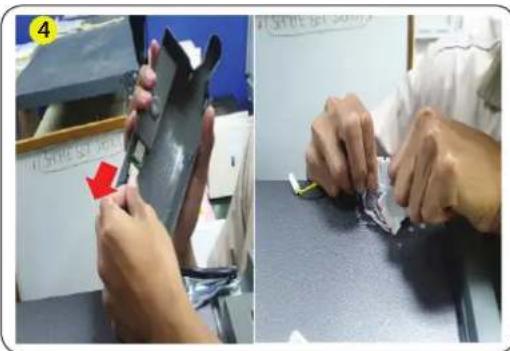
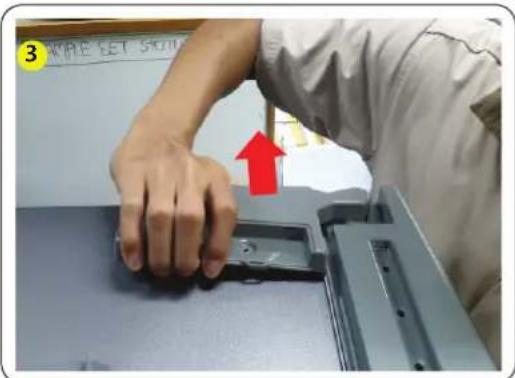
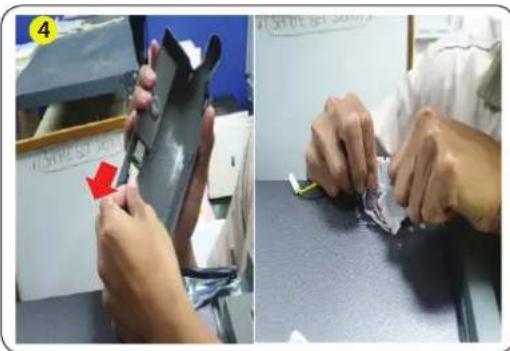
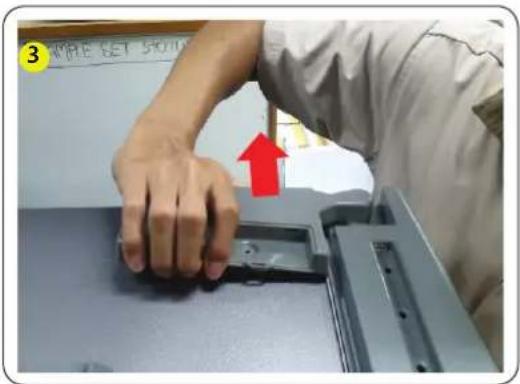
3 WRITE SET SCHOOL- Pull the hooks and lift Cover hinge.
English
natural_image
Two-panel image showing hands assembling or repairing a mechanical component; no visible text or symbols.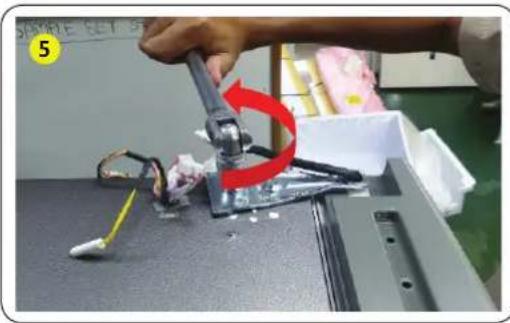
natural_image
Close-up of a robotic arm gripping a small electronic component, with a red curved arrow indicating rotation (no text or symbols visible)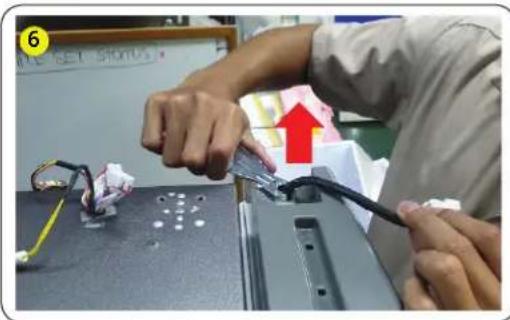
text_image
Person assembling electronic components with visible wiring and a red upward arrow indicating a process step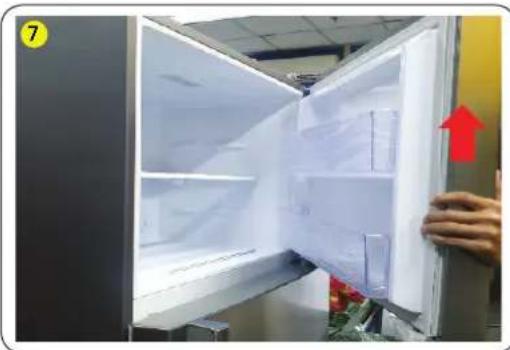
natural_image
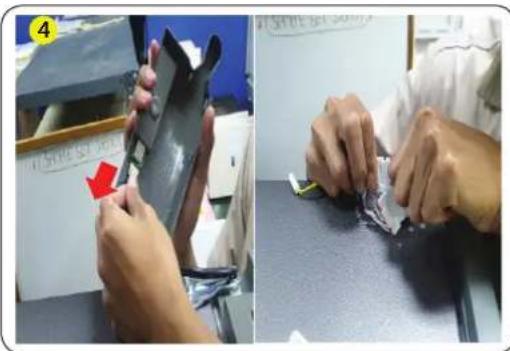
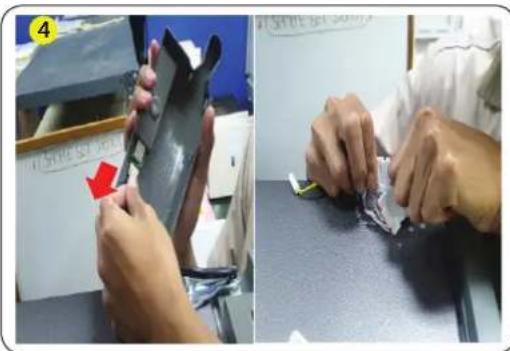
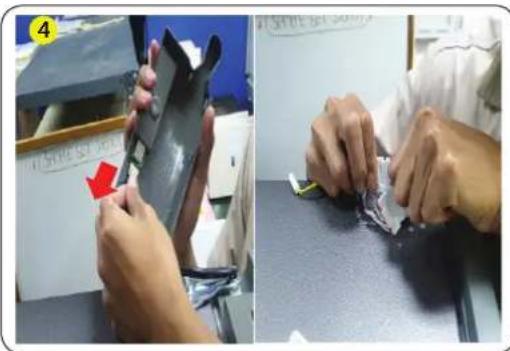
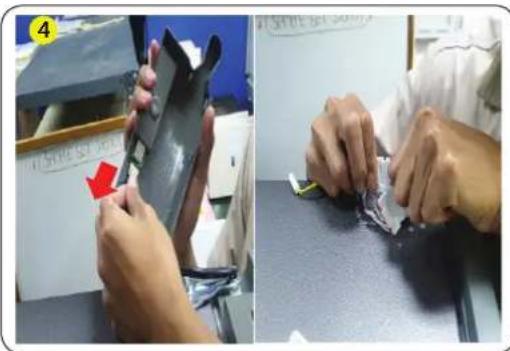
Interior view of a refrigerator with open doors and a hand holding the door, showing interior shelves and a red upward arrow (no text or symbols visible)- Disconnect the wire connector on the hinge up.
CAUTION
Be sure to unplug the power cord before performing the operation above.
-
Remove the 2 hex bolts that hold the hinge on the top of the refrigerator with the 10mm socket wrench.
-
Remove Hinge up R/L.
-
Remove Door.
CAUTION
Must working more than 2 people. One person grab the door to prevent falling door.
English
Hinge Mid
natural_image
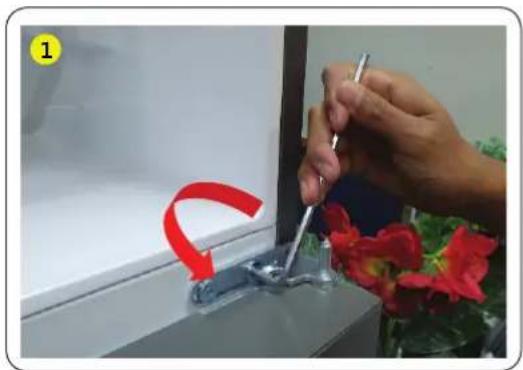
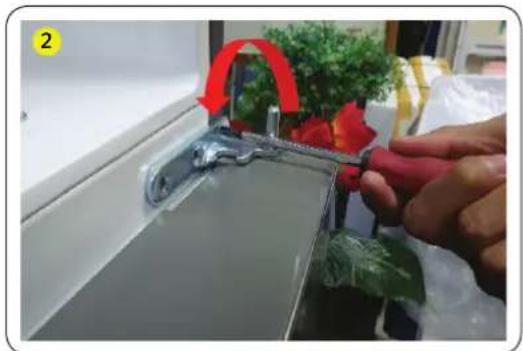
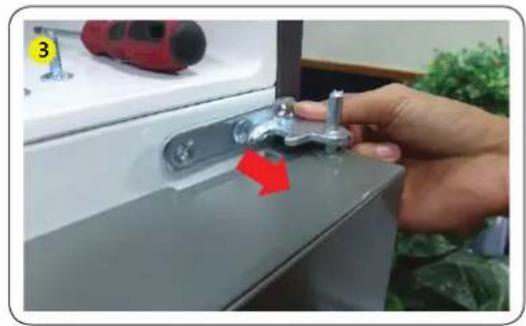
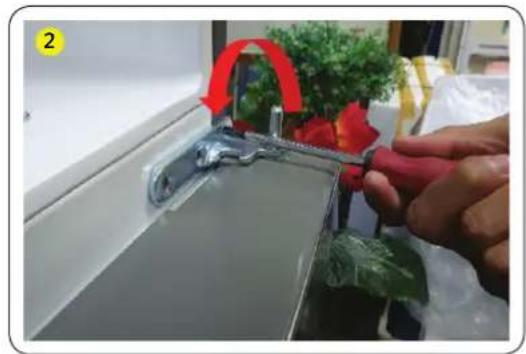
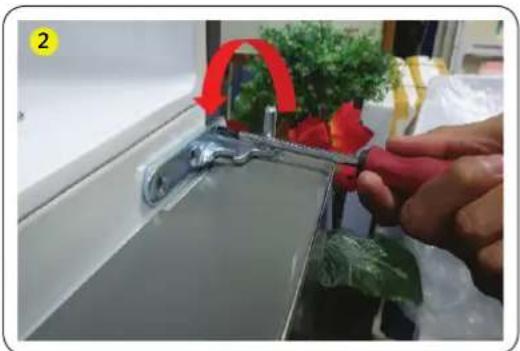
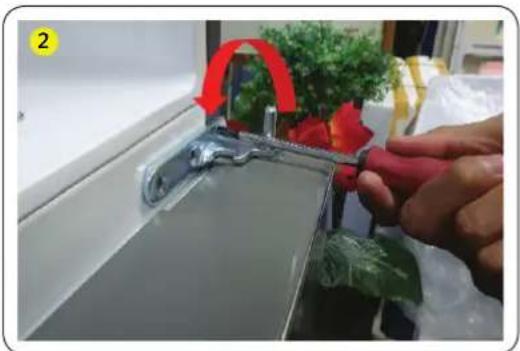
Person using a tool to adjust or install a small component near a window, with red arrows indicating motion (no text or symbols visible)- Remove the 2 hex bolts screw by Hexagon wrench.
natural_image
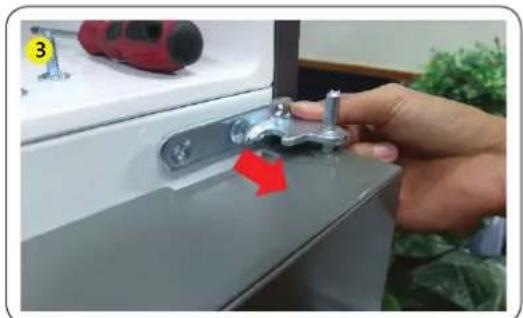
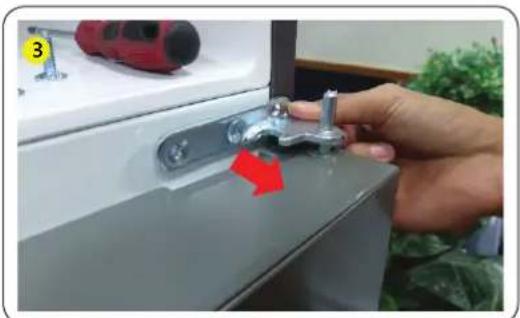
Close-up of a hand using a tool to clean or store items on a kitchen sink, with greenery and plastic bags in the background (no visible text or symbols)- Remove the screw 1 ea the hinge With (+) screwdriver.
natural_image
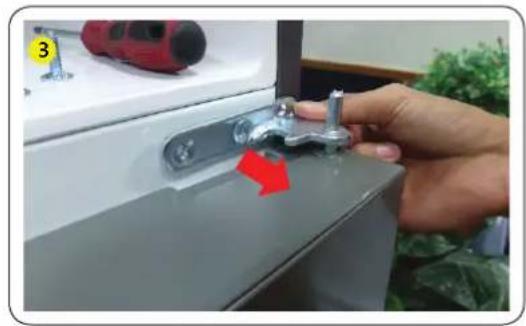
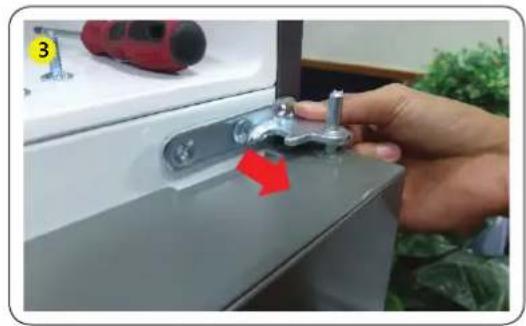
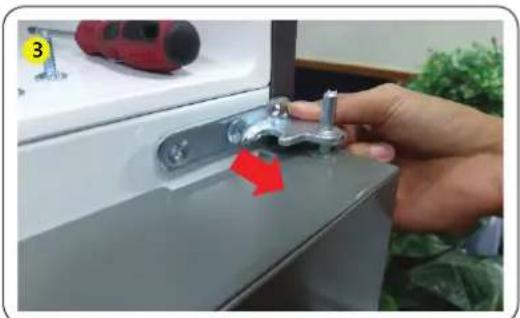
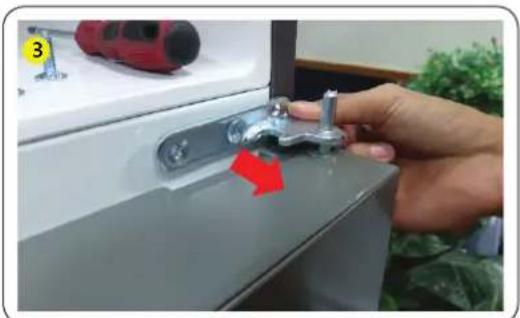
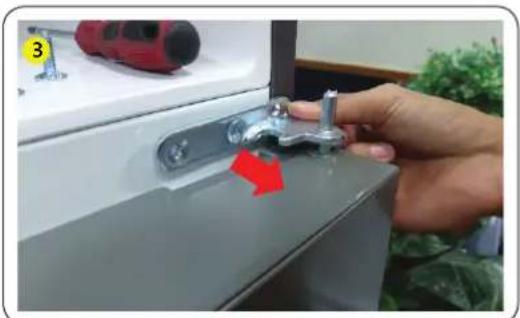
Hand holding a metallic switch with a red arrow pointing to the handle (no text or symbols visible)- Diassembly hinge mid from door ref up.
CAUTION
- Must working more than 2 people.
- Be sure to unplug the power cord before performing the operation above.
English
Hinge Low
natural_image
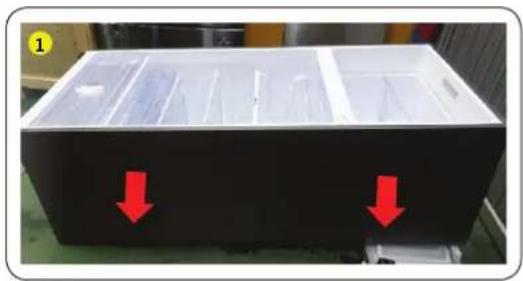
Black plastic tray with red arrows pointing downward, no visible text or symbols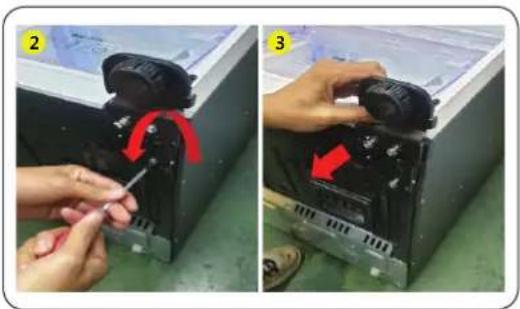
natural_image
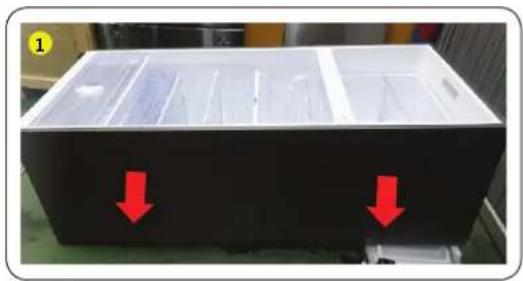
Two-step installation of a mechanical device with a tool, showing red arrows indicating rotation or adjustment (no text or symbols present)- Lay down product (Refer picture).
CAUTION
- Must to a pad underneath to protect the back of the product from being damaged.
- Must working more than 2 people.
-
Be sure to unplug the power cord before performing the operation above.
-
Remove the 3 hex bolts that hold the hinge with the 8 mm socket Wrench or using (+) screwdriver.
-
Remove Hinge Low.
-
Reassemble in the opposite order of disassembly after replacing the top, middle, and/or bottom hinge.
CAUTION
• Make sure the wire connectors are connected properly.
- Be careful not to damage the wires when fastening the top cover.
English
Guide de réparation
natural_image
Close-up of a hand holding a white plastic clip, no visible text or symbols
natural_image
Close-up of a hand pressing down on a textured surface (no visible text or symbols)natural_image
Interior view of a refrigerator with a hand adjusting a tray, showing red arrows pointing to the interior (no text or symbols visible)text_image
1 APPLE SET STONItext_image
3 APPLE GET 50.00natural_image
Two-panel image showing hands assembling or repairing a mechanical component; no visible text or symbols.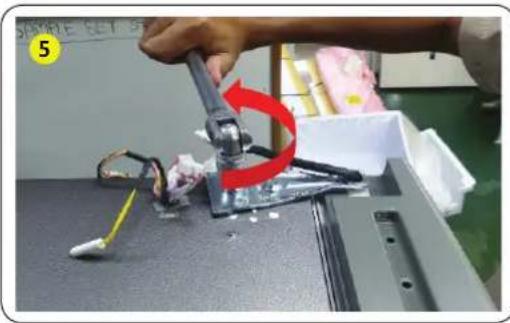
natural_image
Close-up of a robotic arm gripping a small electronic component, with a red curved arrow indicating rotation (no text or symbols visible)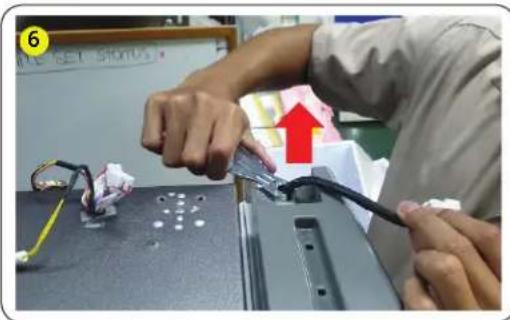
text_image
Person assembling electronic components with visible wiring and a red upward arrow indicating a process step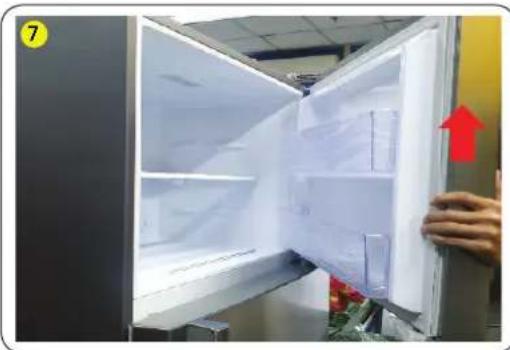
natural_image
Interior view of a refrigerator with open doors and a hand holding the door, showing interior shelves and a red upward arrow (no text or symbols visible)natural_image
Person using a brush to apply red paper flowers near a glass table, with a red curved arrow indicating motion (no text or symbols visible)natural_image
Person using a tool to clean or store plastic, no visible text or symbolsnatural_image
Hand installing a wall-mounted tool with a red arrow indicating the step (no text or symbols visible)natural_image
Black plastic tray with red arrows pointing downward, no visible text or symbols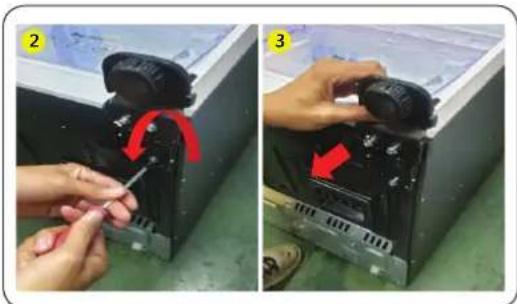
natural_image
Two-step installation of a mechanical device with a tool, showing red arrows indicating rotation (no text or symbols present)natural_image
Two-panel photo showing hands holding a device with red arrows pointing to the right side of the door (no text or symbols visible)Italiano
natural_image
Two-panel photo showing hands cleaning a printer's cover with paper sheets (no text or symbols visible)natural_image
Interior view of a refrigerator with a hand adjusting a wrist strap, showing internal compartments and a hanging control panel (no text or symbols visible)natural_image
Close-up of a hand pressing down on a gray electronic component with a red arrow indicating the process (no visible text or symbols)text_image
3 WRITE SET SCHOOLnatural_image
Two-panel image showing hands assembling or repairing a mechanical component; no visible text or symbols.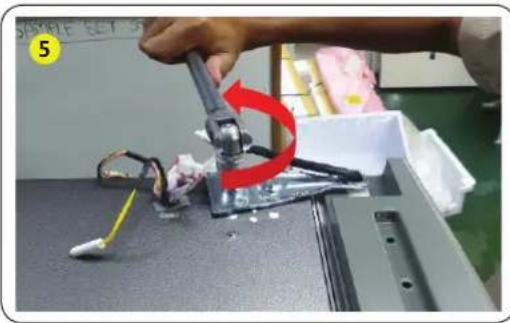
natural_image
Close-up of a robotic arm gripping a mechanical component, with a red curved arrow indicating motion (no text or symbols visible)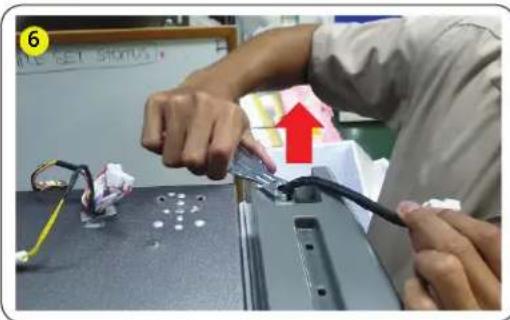
text_image
6 ALL SET STOPUS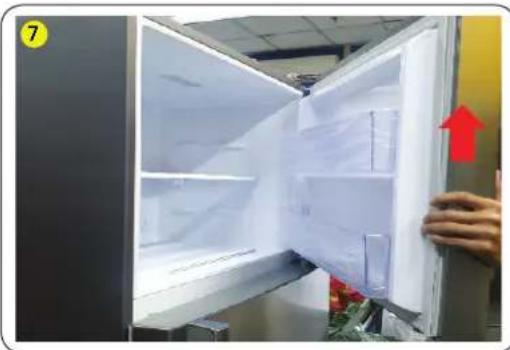
natural_image
Interior view of a refrigerator with open doors and a hand holding the door, showing interior shelves and a red upward arrow (no text or symbols visible)natural_image
Close-up of a hand holding a pen near a glass clip, with red curved arrow and red flowers in foreground (no text or symbols)natural_image
Close-up of a hand using a tool to cut a plastic bag on a kitchen sink (no text or symbols visible)natural_image
Hand holding a metal switch with a red arrow pointing to the handle (no text or symbols visible)natural_image
Black plastic container with red arrows pointing downward, no visible text or symbols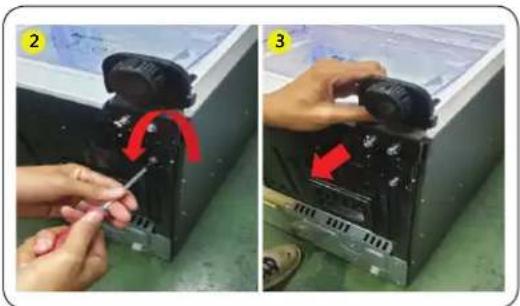
natural_image
Two-step installation of a mechanical device with a wrench and red arrow indicating rotation (no text or symbols present)natural_image
Two-panel photo showing hands installing or adjusting a device on a door, with red arrows indicating movement (no text or symbols)Deutsch
natural_image
Two-panel photo showing hands cleaning a white object with a cloth, next to a close-up of the fabric being placed (no text or symbols visible)natural_image
Interior view of a refrigerator with a hand adjusting a tray, showing red arrows pointing to the interior (no text or symbols visible)natural_image
Close-up of a hand pressing down on a gray electronic component with a red arrow indicating the process (no visible text or symbols)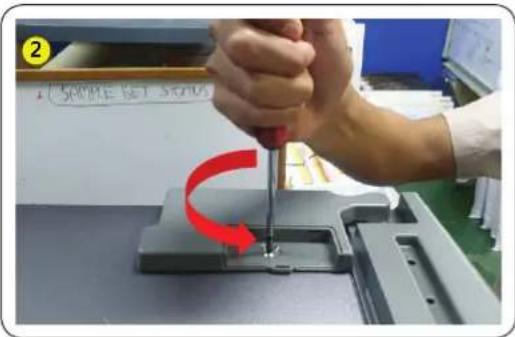
text_image
2 500PE SET 500A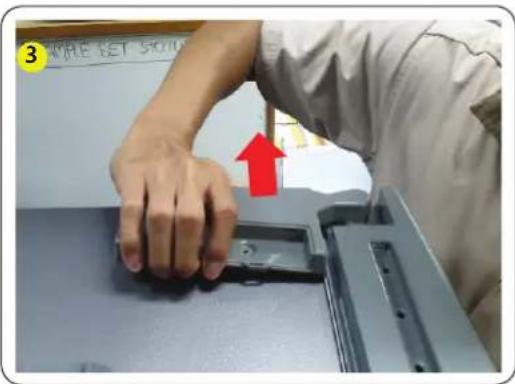
text_image
3 WRITE SET SCHOOLnatural_image
Two-panel image showing hands assembling a black plastic sheet on a workbench, with no visible text or symbols.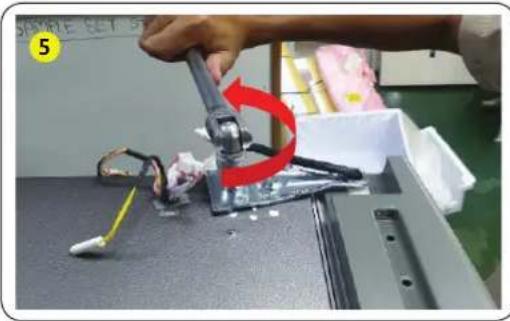
natural_image
Close-up of a robotic arm gripping a small electronic component, with a red arrow indicating rotation (no text or symbols visible)
natural_image
Person assembling electronic components on a device, with a red arrow indicating the upward movement (no text or symbols visible)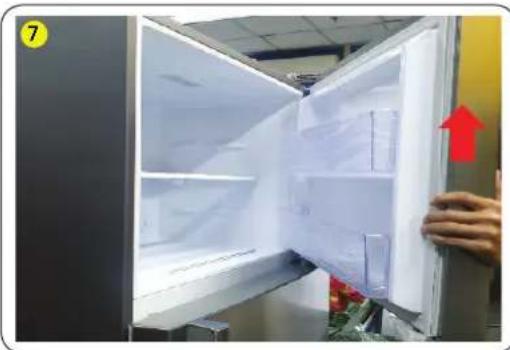
natural_image
Interior view of a refrigerator with open doors and a hand holding the door, showing interior shelves and a red upward arrow (no text or symbols visible)natural_image
Close-up of a hand holding a pen near a small metal clip, with red curved arrow and red flowers in foreground (no text or symbols)natural_image
Person using a tool to clean or store items on a window, with a red arrow highlighting the process (no visible text or symbols)natural_image
Hand holding a metallic switch with a red arrow pointing to it, next to a white appliance (no visible text or symbols)natural_image
Black plastic container with red downward arrows indicating internal flow or movement (no text or symbols visible)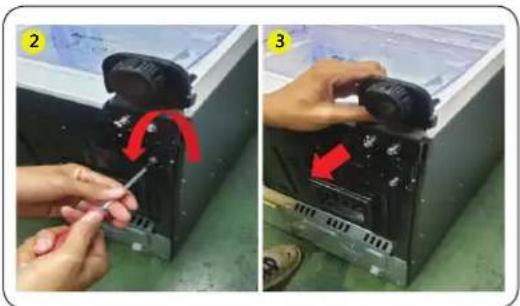
natural_image
Two-panel photo showing hands assembling a device with a red arrow indicating rotation (no text or symbols present)natural_image
Two-panel photo showing hands cleaning a white object with a cloth (no text or symbols visible)natural_image
Interior view of a refrigerator with a hand adjusting a tray, showing red arrows pointing to the interior (no text or symbols visible)text_image
1 MILE SET STOINtext_image
3 WRITE SET 5010- Trek de hakken en til de paneelscharnier op.
Nederlands
natural_image
Two-panel image showing hands assembling or repairing a mechanical component; no visible text or symbols.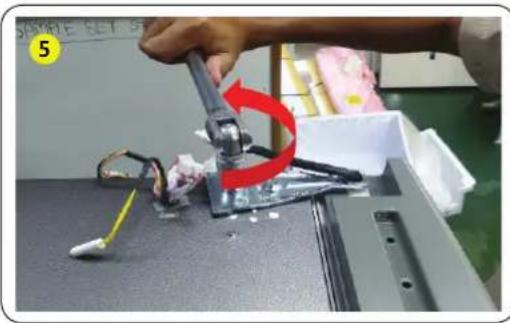
natural_image
Close-up of a robotic arm gripping a small electronic component, with a red curved arrow indicating rotation (no text or symbols visible)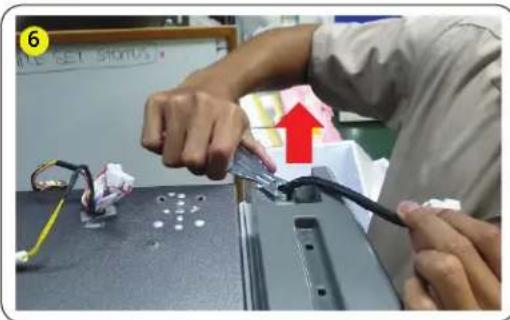
text_image
Person assembling electronic components with visible wiring and a red upward arrow indicating a process step
natural_image
Interior view of a refrigerator with open doors and a hand holding the door, showing interior shelves and a red upward arrow (no text or symbols visible)natural_image
Person using a tool to adjust a metal bracket with red curved arrow indicating motion (no text or symbols)natural_image
Close-up of a hand using a tool to clean or store items on a kitchen sink, with greenery and plastic bags in the background (no visible text or symbols)natural_image
Hand holding a metallic switch with a red arrow pointing to the handle, next to a white door (no text or symbols visible)- Demonteer de middelste scharnier van de bovenste koelkast deur.
LET OP
natural_image
Black plastic tray with red downward arrows indicating a measurement or inspection (no text or symbols visible)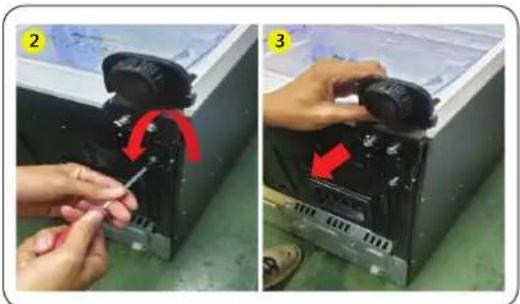
natural_image
Two-panel photo showing hands installing or adjusting a device component, labeled 2 and 3 with red arrows indicating rotation (no text or symbols present)natural_image
Two-panel image showing a hand inserting a paper into a device, with no visible text or symbols.natural_image
Interior view of a refrigerator with a hand adjusting a wrist strap, showing internal compartments and a hanging control panel (no text or symbols visible)natural_image
Close-up of a hand pressing a button on a gray electronic device component, with a red arrow indicating the action (no visible text or symbols)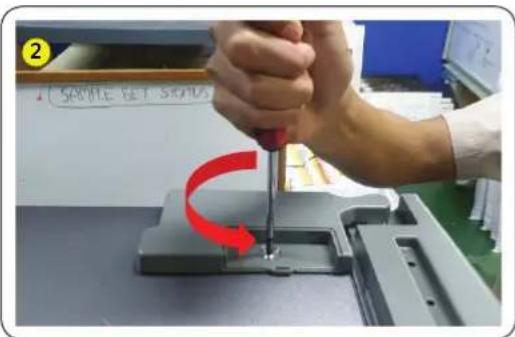
text_image
2 SAMPLE SET STRONG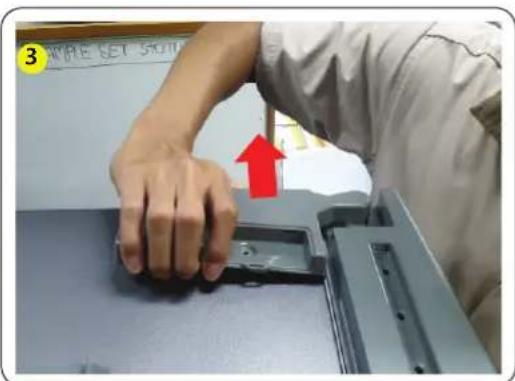
text_image
3 SAMPLE SET SCHOnatural_image
Two-panel image showing hands assembling or repairing a mechanical component; no visible text or symbols.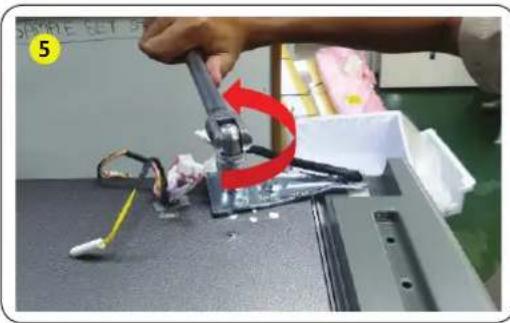
natural_image
Close-up of a robotic arm gripping a small electronic component, with a red curved arrow indicating rotation (no text or symbols visible)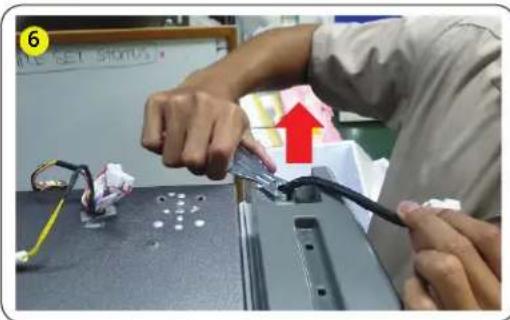
text_image
Person assembling electronic components with visible wiring and a red upward arrow indicating a process step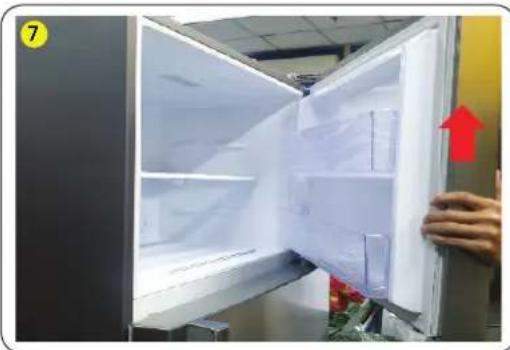
natural_image
Interior view of a refrigerator with open doors and a hand holding the door, showing interior shelves and a red upward arrow (no text or symbols visible)natural_image
Person using a brush to apply red paper flowers near a glass table with a white panel (no text or symbols visible)natural_image
Person using a tool to clean or store plastic, no visible text or symbolsnatural_image
Hand installing a wall-mounted tool with a red arrow indicating the step (no text or symbols visible)natural_image
Black plastic container with red downward arrows indicating internal flow or movement (no text or symbols visible)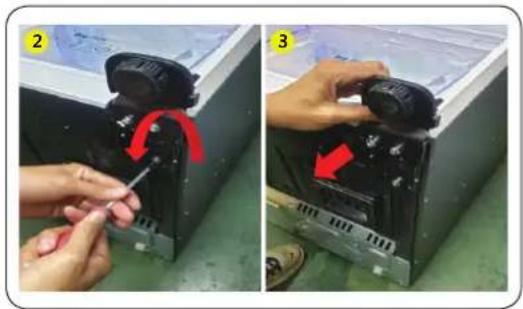
natural_image
Two-step installation of a mechanical device with a tool, showing red arrows indicating rotation or adjustment (no text or symbols present)natural_image
Two-panel photo showing a person adjusting a refrigerated door panel, with red arrows indicating movement or change (no text or symbols)Português
natural_image
Close-up of a hand holding a white object with a gray handle, possibly part of a device or tool (no visible text or symbols)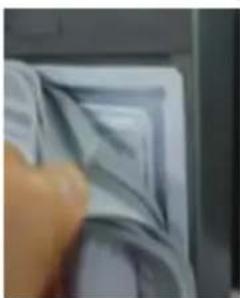
natural_image
Close-up of a hand holding a textured surface with no visible text or symbolsnatural_image
Interior view of a refrigerator with red arrows pointing to the door panel and control buttons (no text or symbols visible)text_image
1 MILE SET STOINtext_image
3 WRITE SET 5010natural_image
Two-panel image showing hands assembling a black plastic sheet on a workbench, with no visible text or symbols.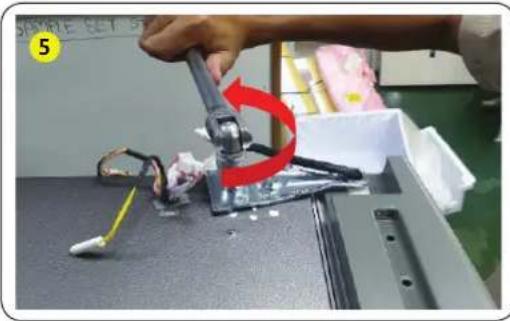
natural_image
Close-up of a robotic arm gripping a small electronic component, with a red arrow indicating rotation (no text or symbols visible)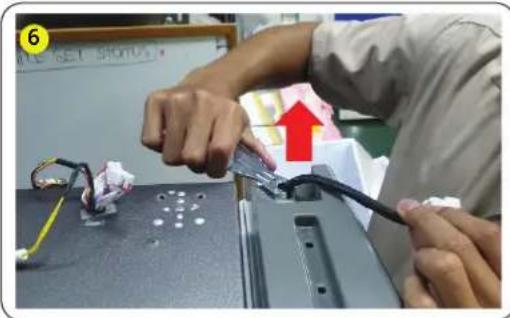
natural_image
Person assembling electronic components on a laptop keyboard, with a red arrow indicating the process (no visible text or symbols)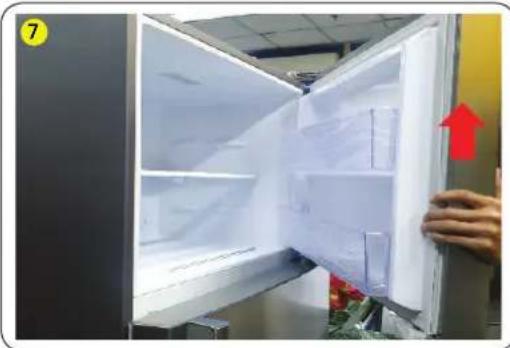
natural_image
Interior view of a refrigerator with open doors and a hand holding the door, showing interior shelves and a red arrow indicating direction (no text or symbols visible)natural_image
Person using a brush to apply red paper flowers near a glass table with a white panel (no text or symbols visible)natural_image
Person using a tool to clean or store plastic, no visible text or symbols- Remova 1 parafuso na dobradiça com a chave de fendas (+).
natural_image
Hand installing a wall-mounted tool with a red arrow indicating the step (no text or symbols visible)natural_image
Black plastic container with red downward arrows indicating internal flow or movement (no text or symbols visible)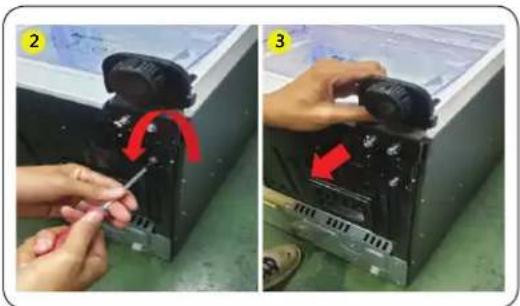
natural_image
Two-step installation of a mechanical device with a wrench and red arrow indicating rotation (no text or symbols present)natural_image
Close-up of a hand holding a white object with a curved edge, possibly part of a printer or scanner (no visible text or symbols)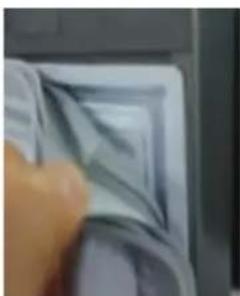
natural_image
Close-up of a hand holding a textured, layered object with no visible text or symbolsnatural_image
Interior view of a refrigerator with red arrows pointing to the door panel (no text or symbols visible)natural_image
Close-up of a hand pressing a component on a mechanical part, with a red arrow indicating the motion (no visible text or symbols)text_image
SAMPLE SET STRATUSnatural_image
Two-panel image showing hands assembling a black plastic sheet on a workbench, with no visible text or symbols.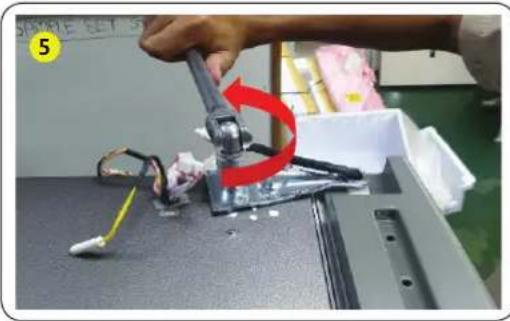
natural_image
Close-up of a robotic arm gripping a small electronic component, with a red curved arrow indicating rotation (no text or symbols visible)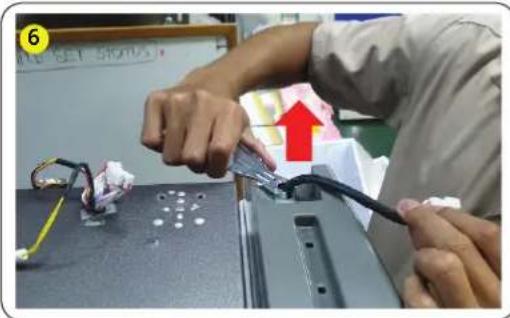
natural_image
Person assembling electronic components on a table, with wires and a red arrow indicating the process (no visible text or symbols)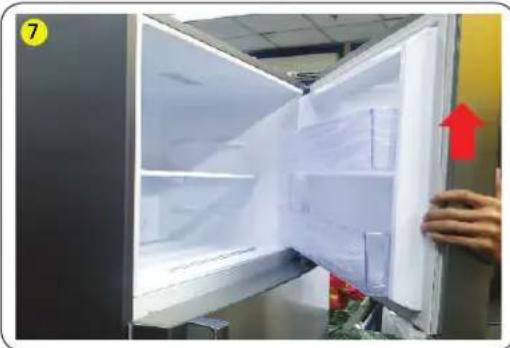
natural_image
Interior view of a refrigerator with open doors and a hand holding the door, showing no visible text or symbols.natural_image
Close-up of a hand holding a pen near a white frame with red ribbon and flowers in the foreground (no text or symbols visible)natural_image
Person using a tool to clean or store items, with a red arrow indicating the process (no visible text or symbols)natural_image
Hand holding a metallic switch with a red arrow pointing to it, next to a white cabinet (no visible text or symbols)natural_image
Black plastic enclosure with red arrows pointing to internal compartments (no text or symbols visible)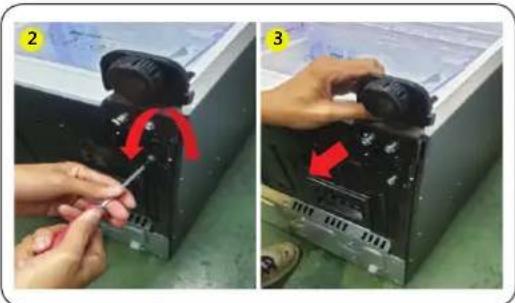
natural_image
Two-panel photo showing hands assembling a device with a red arrow indicating rotation (no text or symbols visible)text_image
01 FRYS KYLnatural_image
Two-panel photo showing hands cleaning a white plastic sheet with a cloth (no text or symbols visible)natural_image
Interior view of a refrigerator with a hand adjusting the lid (no visible text or symbols)text_image
1 APPLE SET STONItext_image
3 WRITE SET 500natural_image
Two-panel image showing hands assembling or repairing a mechanical component; no visible text or symbols.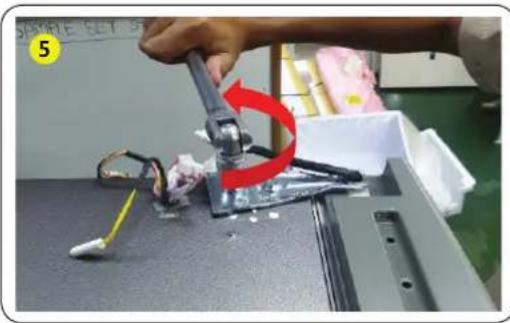
natural_image
Close-up of a robotic arm gripping a small electronic component, with a red curved arrow indicating rotation (no text or symbols visible)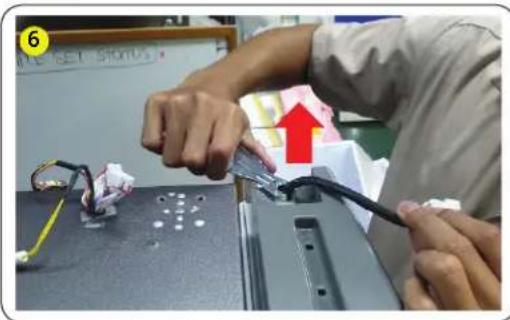
text_image
Person assembling electronic components with visible wiring and a red upward arrow indicating a process step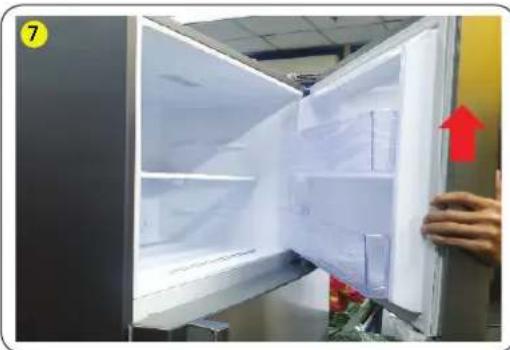
natural_image
Interior view of a refrigerator with open doors and a hand holding the door, showing interior shelves and a red upward arrow (no text or symbols visible)natural_image
Close-up of a hand using a tool to clean or store items, with red arrows indicating a curved motion (no text or symbols visible)natural_image
Close-up of a hand using a tool to clean or store items on a kitchen sink, with greenery and plastic bags visible (no text or symbols)natural_image
Hand holding a metallic switch with a red arrow pointing to the handle, next to a white cabinet (no text or symbols visible)natural_image
Black plastic tray with red downward arrows indicating a measurement or inspection (no text or symbols visible)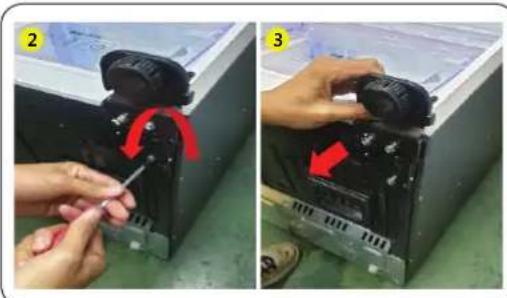
natural_image
Two-panel photo showing hands adjusting a mechanical component with red arrows indicating rotation (no text or symbols visible)natural_image
Close-up of a hand holding a white object with a curved edge, possibly part of a printer or scanner (no visible text or symbols)
natural_image
Close-up of a hand holding a printed document with visible page lines (no readable text or symbols)natural_image
Interior view of a refrigerator with red arrows pointing to the door panel (no text or symbols visible)natural_image
Close-up of a hand pressing a button on a gray electronic device component, with a red arrow indicating the action (no visible text or symbols)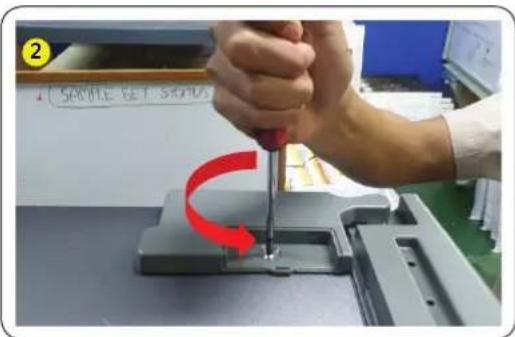
text_image
2 SAMPLE SET STRONG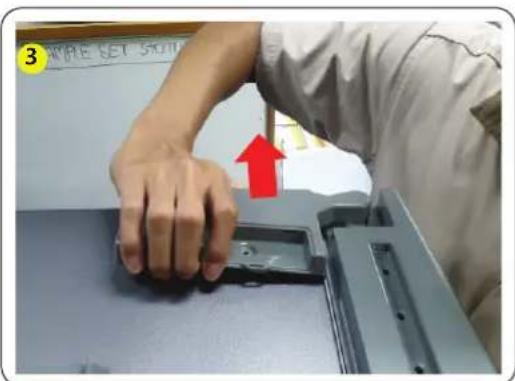
text_image
3 SAMPLE SET SCHOnatural_image
Two-panel image showing hands assembling or repairing a mechanical component; no visible text or symbols.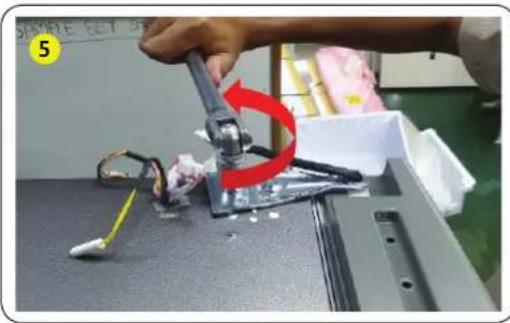
natural_image
Close-up of a robotic arm gripping a small electronic component, with a red curved arrow indicating rotation (no text or symbols visible)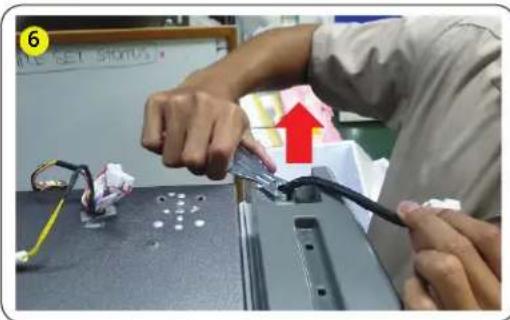
text_image
Person assembling electronic components with visible wiring and a red upward arrow indicating a process step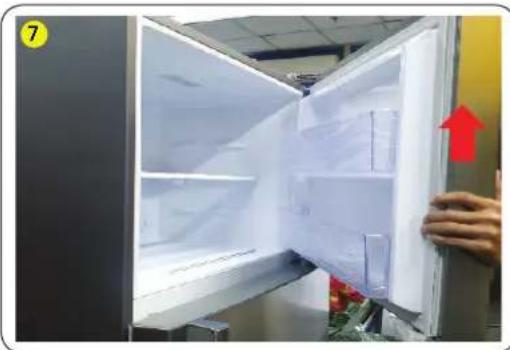
natural_image
Interior view of a refrigerator with open doors and a hand holding the door, showing interior shelves and a red upward arrow (no text or symbols visible)natural_image
Close-up of a hand using a tool to clean or store items, with red arrows indicating a curved motion (no text or symbols visible)natural_image
Close-up of a hand using a tool to clean or store items on a kitchen sink, with greenery and plastic bags visible (no text or symbols)natural_image
Hand holding a metallic switch with a red arrow pointing to a gray handle, next to a white door (no text or symbols visible)natural_image
Black plastic container with red downward arrows indicating internal flow or movement (no text or symbols visible)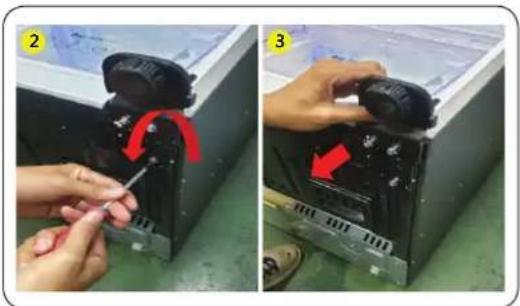
natural_image
Two-panel image showing hands assembling a device with a red arrow indicating rotation (no text or symbols present)natural_image
Close-up of hands installing or adjusting a device panel, showing red arrows indicating movement (no text or symbols visible)Norsk
text_image
FRYS KJ∅Lnatural_image
Close-up of a hand holding a white object with a curved edge, possibly part of a device or tool (no visible text or symbols)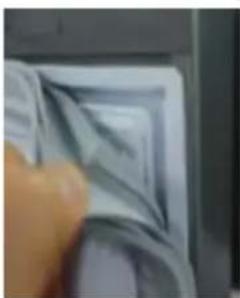
natural_image
Close-up of a hand holding a small, textured object with no visible text or symbols- Trekk midten av pakningen.
natural_image
Interior view of a refrigerator with a hand adjusting the drawer (no visible text or symbols)natural_image
Close-up of a hand pressing down on a gray electronic component with a red arrow indicating the process (no visible text or symbols)text_image
3 MATE SET SODInatural_image
Two-panel image showing hands assembling or repairing a mechanical component; no visible text or symbols.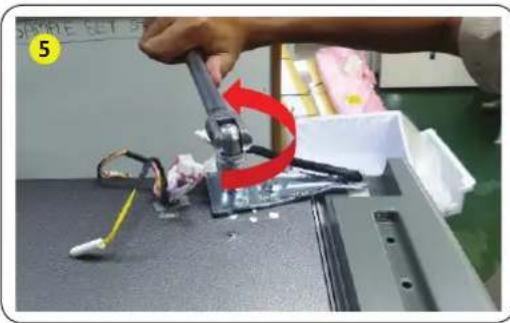
natural_image
Close-up of a robotic arm gripping a small electronic component, with a red curved arrow indicating rotation (no text or symbols visible)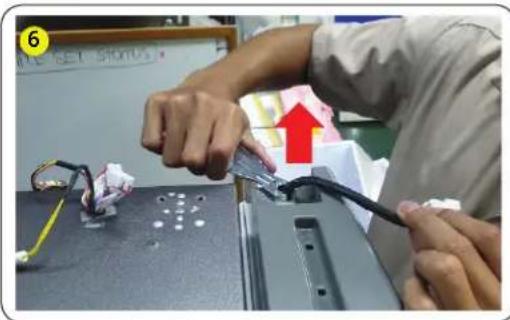
text_image
Person assembling electronic components with visible wiring and a red upward arrow indicating a process step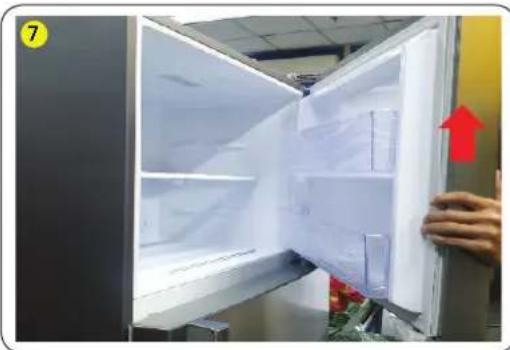
natural_image
Interior view of a refrigerator with open doors and a hand holding the door, showing interior shelves and a red upward arrow (no text or symbols visible)natural_image
Person using a tool to clean or store items near a window, with red curved arrow and flowers in foreground (no text or symbols)- Fjern de to unbrakoboltene med unbrakonøkkelen.
natural_image
Person using a tool to clean or store plastic, no visible text or symbols- Fjern skruen, en stk, på hengslet med stjerneskrutrekker.
natural_image
Hand installing a wall-mounted tool with a red arrow pointing to the component (no text or symbols visible)natural_image
Black plastic tray with red arrows pointing downward, no visible text or symbols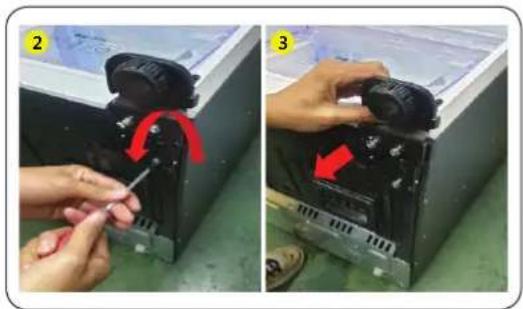
natural_image
Two-step installation of a mechanical device with a tool, showing red arrows indicating rotation or adjustment (no text or symbols present)natural_image
Close-up of a hand pressing down on a white plastic bag (no visible text or symbols)
natural_image
Close-up of a hand pressing down on a textured surface (no visible text or symbols)natural_image
Interior view of a refrigerator with a hand adjusting a tray, showing red arrows pointing to the lid (no text or symbols visible)natural_image
Close-up of a hand pressing down on a gray electronic component with a red arrow indicating the process (no visible text or symbols)text_image
3 WRITE SET SCHOOLnatural_image
Two-panel image showing hands assembling or repairing a mechanical component; no visible text or symbols.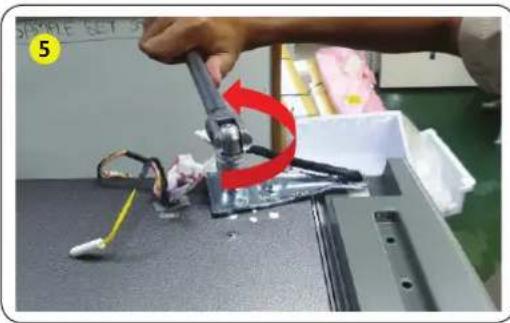
natural_image
Close-up of a robotic arm gripping a mechanical component, with a red curved arrow indicating motion (no text or symbols visible)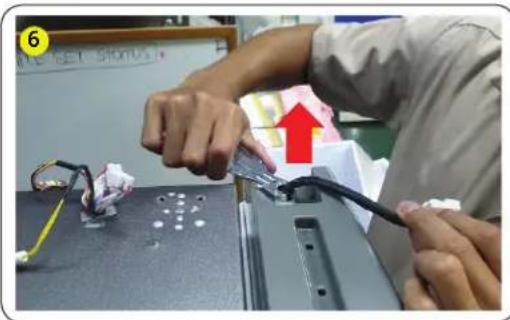
text_image
6 ALL SET STOPUS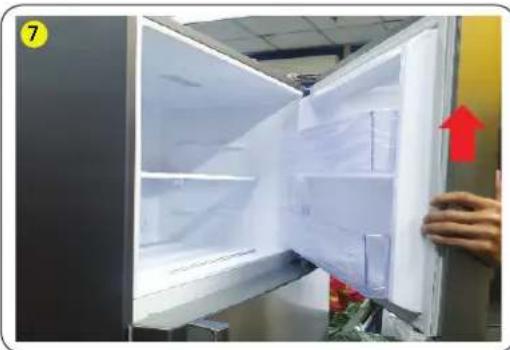
natural_image
Interior view of a refrigerator with open doors and a hand holding the door, showing a red upward arrow (no text or symbols visible)natural_image
Person using a brush to apply red paper flowers near a glass fixture (no text or symbols visible)natural_image
Close-up of a hand using a tool to clean or store plastic, with a red arrow indicating the process (no text or symbols visible)- Irrota saranan 1 ruuvi (+) ruuvimeisselin avulla.
natural_image
Hand holding a metallic tool on a silver door, with a red arrow pointing to the handle (no text or symbols visible)natural_image
Black plastic container with red downward arrows indicating internal flow or movement (no text or symbols visible)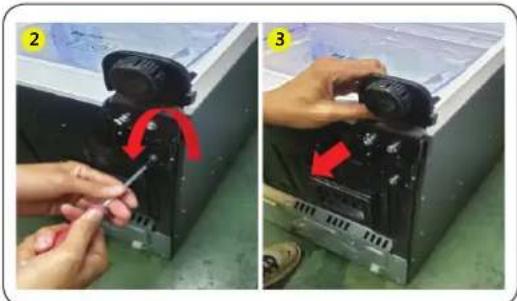
natural_image
Two-panel photo showing hands installing or adjusting a device component, labeled 2 and 3 with red arrows indicating rotation (no text or symbols present)natural_image
Two-panel photo showing hands cleaning a white sheet with visible texture (no text or symbols)natural_image
Interior view of a refrigerator with a hand adjusting a tray, showing red arrows pointing to the interior (no text or symbols visible)natural_image
Close-up of a hand pressing down on a gray electronic component with a red arrow indicating the process (no visible text or symbols)text_image
3 #MILE SET SKInatural_image
Two-panel image showing hands assembling or repairing a mechanical component; no visible text or symbols.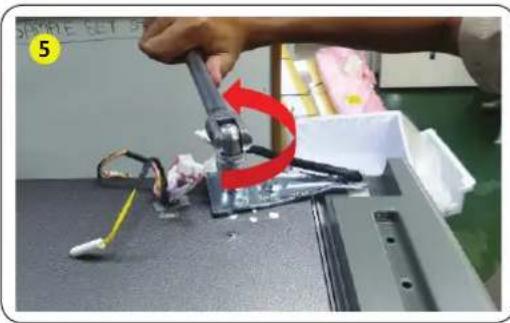
natural_image
Close-up of a robotic arm gripping a small electronic component, with a red curved arrow indicating rotation (no text or symbols visible)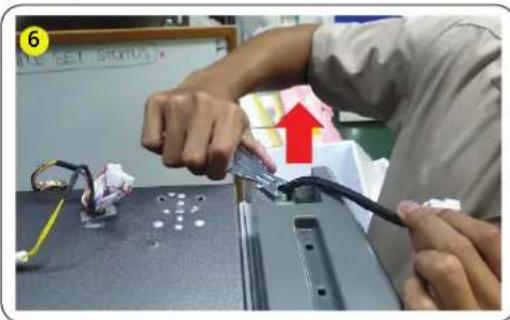
text_image
Person assembling electronic components with visible wiring and a red upward arrow indicating a process step
natural_image
Interior view of a refrigerator with open doors and a hand holding the door, showing interior shelves and a red upward arrow (no text or symbols visible)natural_image
Person using a brush to apply red paper flowers near a glass table, with no visible text or symbols.natural_image
Person using a tool to clean or store plastic, no visible text or symbolsnatural_image
Hand installing a wall-mounted tool with a red arrow indicating the step (no text or symbols visible)natural_image
Black plastic container with red arrows pointing downward, no visible text or symbols
natural_image
Two-panel image showing hands assembling a device with a red arrow indicating rotation (no text or symbols present)natural_image
Two-panel photo showing hands holding a refrigerator door, with red arrows indicating movement or change (no text or symbols visible)natural_image
Close-up of a hand holding a white object with a curved edge, possibly part of a device or tool (no visible text or symbols)
natural_image
Close-up of a hand pressing down on a textured surface (no visible text or symbols)natural_image
Interior view of a refrigerator with a hand adjusting a tray, showing red arrows pointing to the interior (no text or symbols visible)natural_image
Close-up of a hand pressing down on a gray electronic component with a red arrow indicating the process (no visible text or symbols)text_image
3 WRITE SET SCHOOLnatural_image
Two-panel image showing hands assembling or repairing a mechanical component; no visible text or symbols.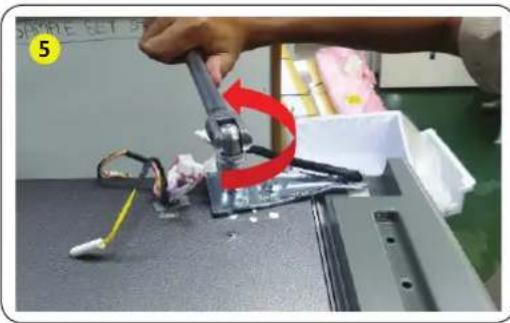
natural_image
Close-up of a robotic arm gripping a small electronic component, with a red curved arrow indicating rotation (no text or symbols visible)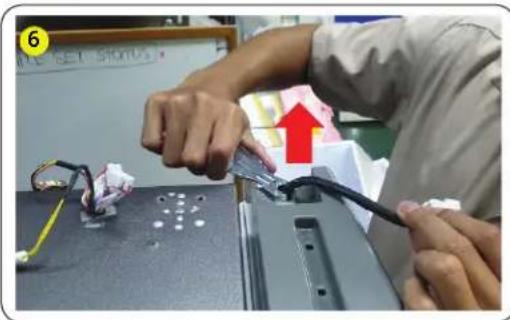
text_image
Person assembling electronic components with visible wiring and a red upward arrow indicating a process step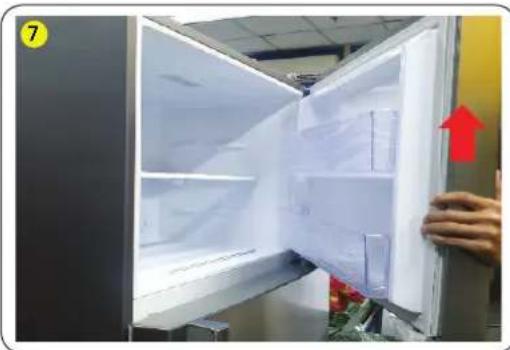
natural_image
Interior view of a refrigerator with open doors and a hand holding the door, showing interior shelves and a red upward arrow (no text or symbols visible)natural_image
Close-up of a hand using a tool to clean or store items, with red arrows indicating a curved motion (no text or symbols visible)natural_image
Close-up of a hand using a tool to clean or store items on a kitchen sink, with greenery and plastic bags visible (no text or symbols)natural_image
Hand holding a metallic switch with a red arrow pointing to the handle, next to a white cabinet (no text or symbols visible)natural_image
Black plastic container with red downward arrows indicating internal flow or movement (no text or symbols visible)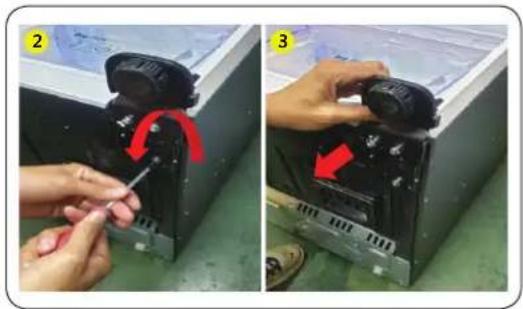
natural_image
Two-step installation of a mechanical device with a tool, showing red arrows indicating rotation or adjustment (no text or symbols present)natural_image
Two-panel image showing a hand inserting or removing a document into a machine (no visible text or symbols)- Potiahnite stred tesnenia.
Osadenie tesnenia
natural_image
Interior view of a refrigerator with red arrows pointing to a closed drawer (no visible text or symbols)natural_image
Close-up of a hand pressing down on a gray mechanical component with a red arrow indicating the press direction (no text or symbols visible)- Demontujte kryt pántu.
text_image
2 SAMPLE SET SERIEStext_image
3 WRITE SET 5010natural_image
Two-panel image showing hands assembling or repairing a mechanical component; no visible text or symbols.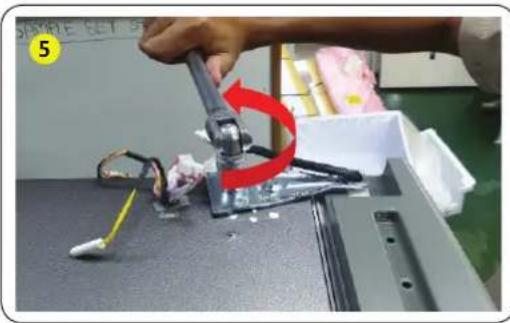
natural_image
Close-up of a robotic arm gripping a small electronic component, with a red curved arrow indicating rotation (no text or symbols visible)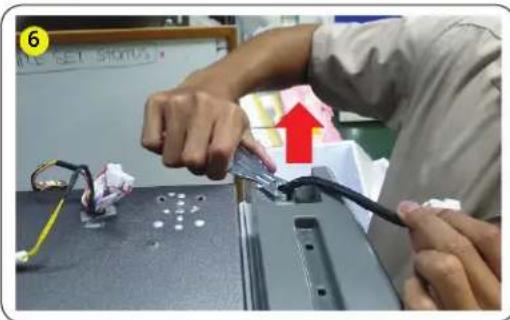
text_image
Person assembling electronic components with visible wiring and a red upward arrow indicating a process step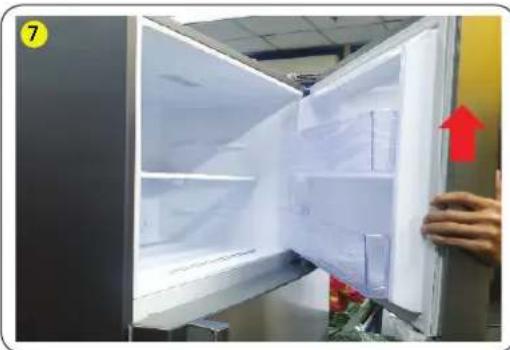
natural_image
Interior view of a refrigerator with open doors and a hand holding the door, showing interior shelves and a red upward arrow (no text or symbols visible)natural_image
Close-up of a hand using a tool to clean or store items, with red arrows indicating a curved motion (no text or symbols visible)natural_image
Close-up of a hand using a tool to clean or store items on a kitchen sink, with greenery and plastic bags visible (no text or symbols)natural_image
Hand holding a metallic switch with a red arrow pointing to the handle, next to a white cabinet (no text or symbols visible)natural_image
Black rectangular container with transparent lid and two red downward arrows pointing to its side (no text or symbols visible)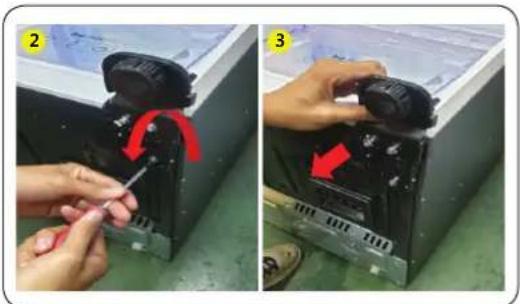
natural_image
Two-step photo showing hands installing or adjusting a device component, labeled 2 and 3 with red arrows indicating rotation (no text or symbols present)natural_image
Two-panel photo showing a person holding a device with red arrows indicating movement, no visible text or symbolsRomână
natural_image
Close-up of a hand holding a white object with a gray tab, next to a dark rectangular object (no visible text or symbols)
natural_image
Close-up of a hand pressing down on a dark surface with a triangular pattern (no text or symbols visible)natural_image
Interior view of a refrigerator with a hand adjusting the drawer (no visible text or symbols)natural_image
Close-up of a hand pressing down on a gray electronic component with a red arrow indicating the process (no visible text or symbols)text_image
3 MATE SET SODInatural_image
Two-panel image showing hands assembling or repairing a mechanical component; no visible text or symbols.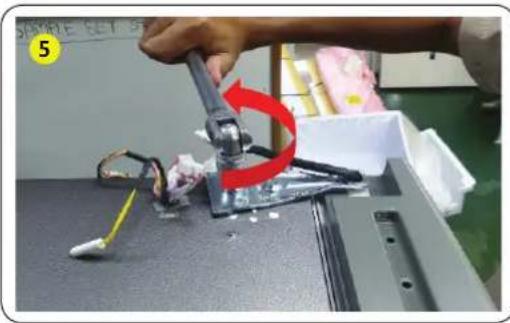
natural_image
Close-up of a robotic arm gripping a small electronic component, with a red curved arrow indicating rotation (no text or symbols visible)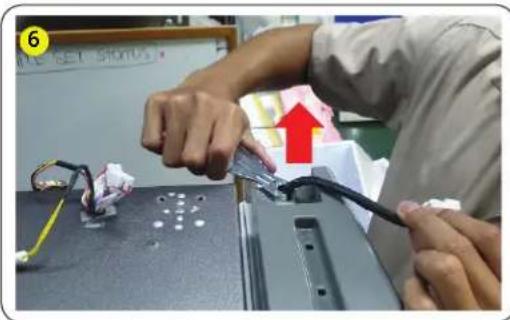
text_image
Person assembling electronic components with visible wiring and a red upward arrow indicating a process step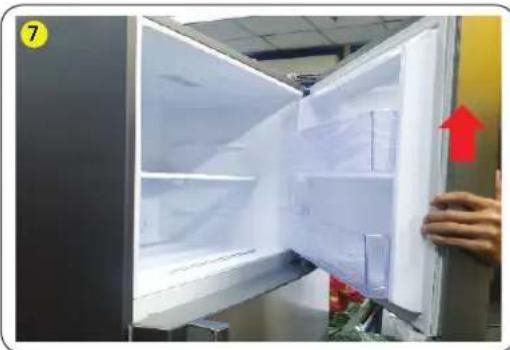
natural_image
Interior view of a refrigerator with open doors and a hand holding the door, showing interior shelves and a red upward arrow (no text or symbols visible)natural_image
Person using a brush to apply red paper flowers near a glass table with a white panel (no text or symbols visible)natural_image
Person using a tool to clean or store plastic, no visible text or symbolsnatural_image
Hand installing a wall-mounted tool with a red arrow indicating the step (no text or symbols visible)natural_image
Black plastic container with red downward arrows indicating internal flow or movement (no text or symbols visible)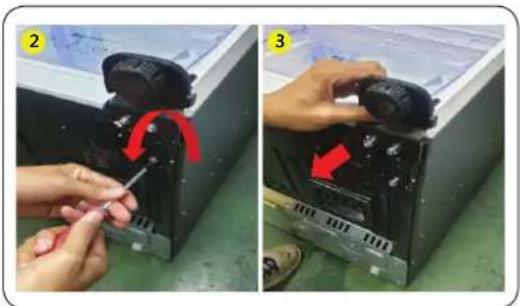
natural_image
Two-panel image showing hands assembling a device with a red arrow indicating rotation (no text or symbols present)- Puneti produsul jos (vezi poza).
ATENTIE
natural_image
Close-up of a hand pressing down on a white plastic sheet with a curved edge (no text or symbols visible)
natural_image
Close-up of a hand holding a textured, patterned object (no visible text or symbols)natural_image
Interior view of a refrigerator with a hand adjusting the door panel and red arrows pointing to the interior (no text or symbols visible)natural_image
Close-up of a hand pressing a component on a mechanical device (no visible text or symbols)text_image
3 #MPLE SET SPEEDnatural_image
Two-panel image showing hands assembling a black plastic sheet with a red arrow and a yellow tool, no visible text or symbols.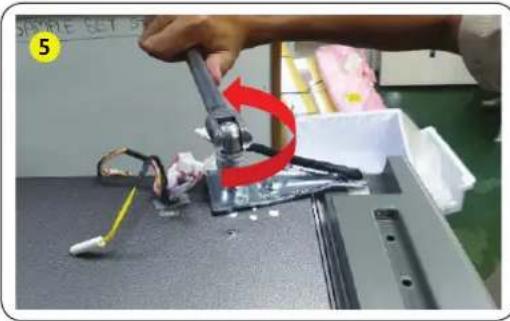
natural_image
Close-up of a robotic arm gripping a small electronic component, with a red curved arrow indicating motion (no text or symbols visible)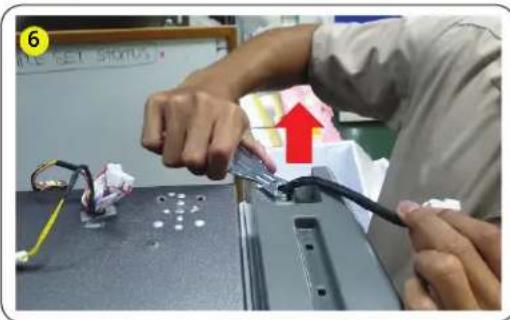
natural_image
Person assembling electronic components on a table, with a red arrow indicating the upward movement (no text or symbols visible)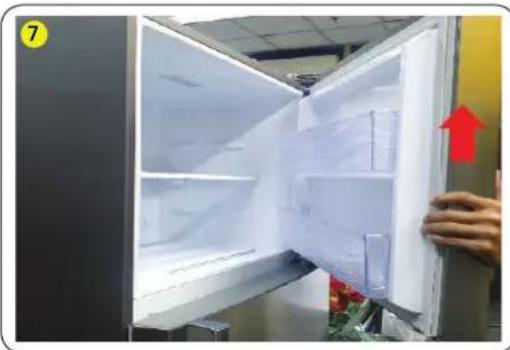
natural_image
Interior view of a refrigerator with open doors and a hand holding the door, showing a red upward arrow (no text or symbols visible)natural_image
Close-up of a hand holding a pen near a window with red curved arrow indicating rotation (no text or symbols)natural_image
Close-up of hands using a tool to clean or store items, with red arrows indicating a process (no visible text or symbols)natural_image
Hand holding a metallic switch handle with a red arrow pointing to it, next to a white cabinet (no text or symbols visible)natural_image
Black plastic tray with red downward arrows indicating a reduction or drop in space (no text or symbols visible)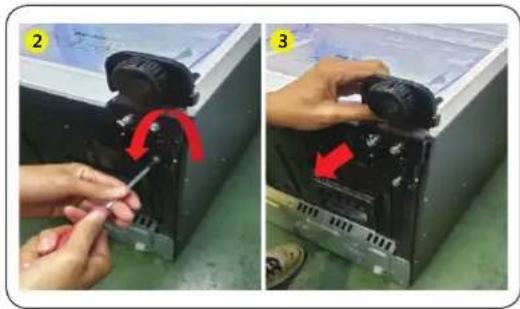
natural_image
Two-panel photo showing hands installing a mechanical component with red arrows indicating rotation (no text or symbols visible)natural_image
Two-panel photo showing hands cleaning a white paper sheet with a green leaf (no text or symbols visible)natural_image
Interior view of a refrigerator with red arrows pointing to the door panel (no text or symbols visible)natural_image
Close-up of a hand pressing down on a gray electronic component with a red arrow indicating the process (no visible text or symbols)text_image
3 WRITE SET SCHOOLnatural_image
Two-panel image showing hands assembling or repairing a mechanical component; no visible text or symbols.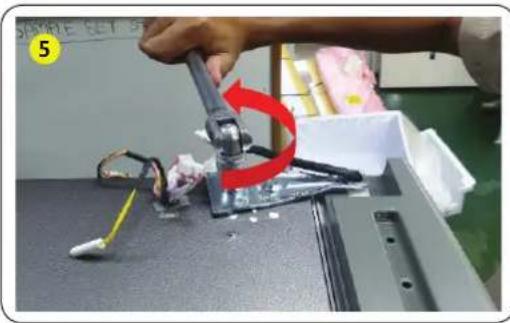
natural_image
Close-up of a robotic arm gripping a small electronic component, with a red curved arrow indicating rotation (no text or symbols visible)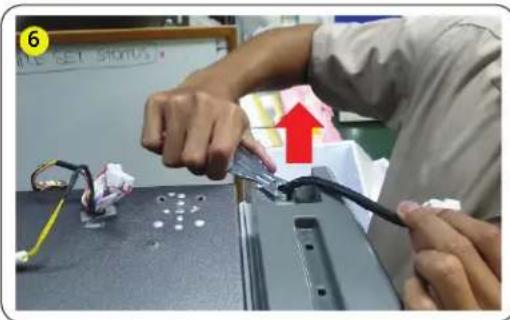
text_image
Person assembling electronic components with visible wiring and a red upward arrow indicating a process step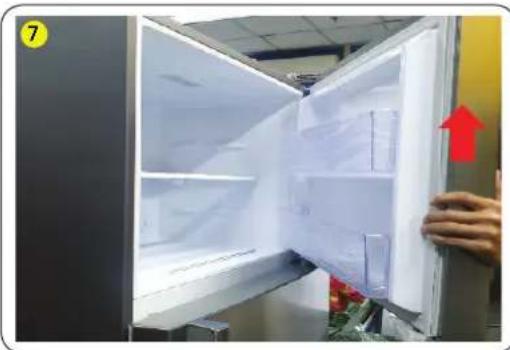
natural_image
Interior view of a refrigerator with open doors and a hand holding the door, showing interior shelves and a red upward arrow (no text or symbols visible)natural_image
Person using a brush to apply red paper flowers near a glass table with a white panel (no text or symbols visible)natural_image
Close-up of a hand using a tool to clean or store plastic, with a red arrow indicating the process (no text or symbols visible)natural_image
Hand installing a wall-mounted tool with a red arrow indicating the step (no text or symbols visible)natural_image
Black rectangular container with transparent lid and two red downward arrows pointing to its side (no text or symbols visible)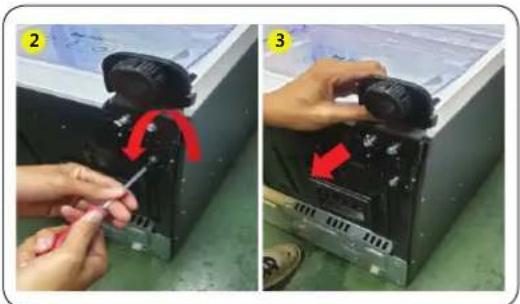
natural_image
Two-step photo showing hands installing a mechanical component with red arrows indicating rotation (no text or symbols present)natural_image
Two-panel image showing a hand cleaning a white object with a dark fabric, no visible text or symbols- Povucite sredinu zaptivne gume.
Da biste zamenili zaptivnu gumu
Postavite novu zaptivnu gumu na vrata frižidera. Uverite se da između nove zaptivne gume i vrata nema razmaka.
Srpski
Zamena fioke

OPREZ
Tokom postavljanja, proverite da li je fioka pravilno umetnuta u vodice.
Da biste skinuli fioku
natural_image
Interior view of a refrigerator with a hand adjusting a wrist strap, showing clear plastic casing and red arrows indicating movement (no text or symbols)- Uhvatite zaobljeni deo fioke i podignite ga da biste je izvadili.
Da biste vratili fioke
natural_image
Close-up of a hand pressing down on a gray electronic component with a red arrow indicating the process (no visible text or symbols)- Skinite poklopac sa šarke.
text_image
2 SAMPLE 1:5.5400text_image
3 WRITE SET SCHOOL- Povucite kukice i podignite poklopac šarke.
Srpski
natural_image
Two-panel image showing hands assembling or repairing a mechanical component; no visible text or symbols.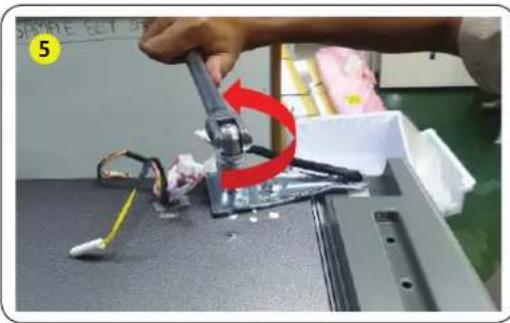
natural_image
Close-up of a robotic arm gripping a small electronic component, with a red curved arrow indicating rotation (no text or symbols visible)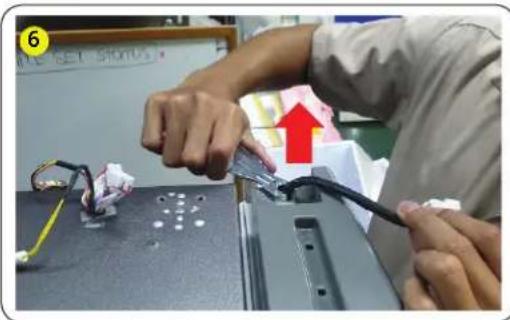
text_image
Person assembling electronic components with visible wiring and a red upward arrow indicating a process step
natural_image
Interior view of a refrigerator with open doors and a hand holding the door, showing interior shelves and a red upward arrow (no text or symbols visible)- Isključite konektor za žicu na gornjoj šarci.
OPREZ
Obavezno isključite kabl za napajanje pre nego što započnete ovaj postupak.
-
Skinite 2 vijka sa šestougaonom glavom koji pričvršćuju šarku na vrhu frižidera pomoću nasadnog ključa od 10 mm.
-
Skinite gornju desnu i levu šarku.
-
Skinite vrata.
OPREZ
natural_image
Close-up of a hand using a tool to clean or store items, with red arrows indicating a curved motion (no text or symbols visible)- Izvadite 2 šestougaona vijka pomoću imbus ključa.
natural_image
Close-up of a hand using a tool to clean or store items on a kitchen sink, with greenery and plastic bags visible (no text or symbols)- Skinite zavrtanj na šarci pomoću (+) odvijača.
natural_image
Hand holding a metallic switch with a red arrow pointing to the handle (no text or symbols visible)- Srednja šarka se rasklapa na isti način kao i gornja.
! OPREZ
- Za ovo su potrebne najmanje tri osobe.
- Obavezno isključite kabl za napajanje pre nego što započnete ovaj postupak.
Srpski
Donja šarka
natural_image
Black plastic tray with red arrows pointing downward, no visible text or symbols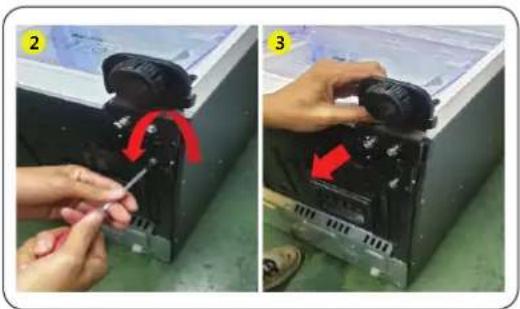
natural_image
Two-step installation of a mechanical device with a tool, showing red arrows indicating rotation or adjustment (no text or symbols present)- Položite uredaj (pogledajte sliku).
OPREZ
- Postavite neku podlogu na pod da se poledina uređaja ne bi oštetila.
- Za ovo su potrebne najmanje tri osobe.
-
Obavezno isključite kabl za napajanje pre nego što započnete ovaj postupak.
-
Skinite 3 šestougaona vijka kojima je pričvršćena šarka pomoću nasadnog ključa od 8 mm ili (+) odvijača.
-
Skinite donju šarku.
-
Postavljanje izvršite suprotnim redosledom od redosleda skidanja, nakon zamene gornje, srednje i/ili donje šarke.
OPREZ
• Proverite da li su konektori kablova pravilno priključeni.
- Pazite da ne oštetite kablove dok pričvršćujete gornji poklopac.
Srpski
natural_image
Two-panel photo showing hands holding a refrigerated door, with red arrows indicating movement or change (no text or symbols)Hrvatski
Zamjena brtve

OPREZ
Pobrinite se da čvrsto pričvrstite brtvu. U suprotnome bi hladan zrak iz hladnjaka mogao izlaziti van.
Za uklanjanje brtve
text_image
01 FRE REF- Povucite 4 kuta brtve Fre i Ref.
natural_image
Two-panel photo showing hands cleaning a white object with a cloth, next to a close-up of the fabric being placed (no text or symbols visible)- Povucite sredinu brtve.
Za zamjenu brtve
natural_image
Interior view of a refrigerator with a hand adjusting a tray, showing red arrows pointing to the lid (no text or symbols visible)- Uklonite ladicu tako da povučete dio s kotačićima i podignete ga prema gore.
Ponovno postavljanje ladica
natural_image
Close-up of a hand pressing down on a gray electronic device component, with a red arrow pointing to the button (no visible text or symbols)- Uklonite poklopac šarke.
text_image
2 SAMPLE SET STRAVA- Uklonite vijak 1 ea poklopca šarke s pomoću (+) odvijača i otvorite.
text_image
3 MAKE LET SHOT- Povucite kuke i podignite poklopac šarke.
Hrvatski
natural_image
Two-panel image showing hands assembling or repairing a mechanical component; no visible text or symbols.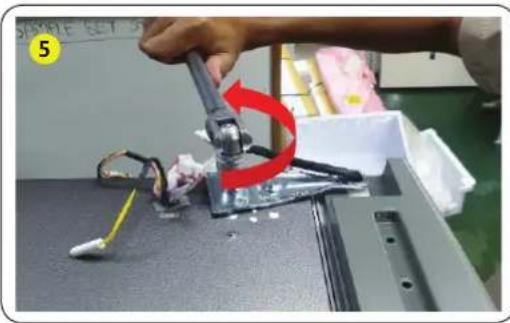
natural_image
Close-up of a robotic arm gripping a mechanical component, with a red curved arrow indicating motion (no text or symbols visible)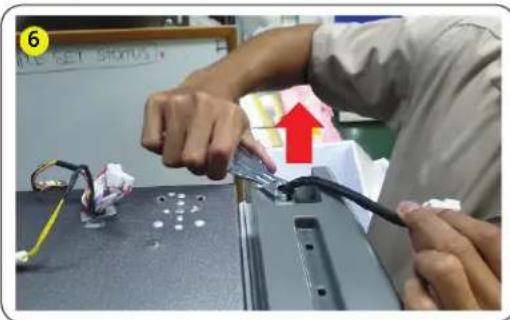
text_image
6 ALL SET STOPUS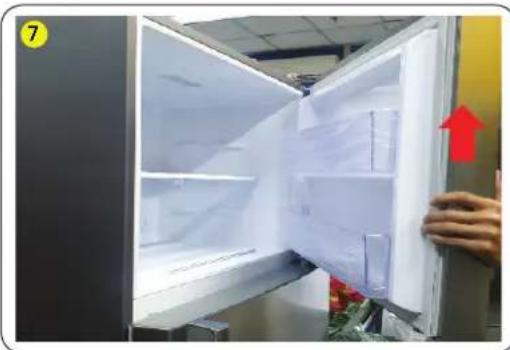
natural_image
Interior view of a refrigerator with open doors and a hand holding the door, showing a red upward arrow (no text or symbols visible)natural_image
Person using a tool to clean or store items, with red arrows indicating a curved motion (no text or symbols visible)- Uklonite 2 imbus vijka imbus ključem.
natural_image
Close-up of a hand using a tool to clean or store items on a window, with greenery and plastic bags visible (no text or symbols)- Uklonite vijak 1 ea šarke (+) odvijačem.
natural_image
Hand holding a metallic switch with a red arrow pointing to a gray handle, next to a white door (no text or symbols visible)- Rastavite srednju šarku vrata.
OPREZ
natural_image
Black rectangular container with transparent lid and two red downward arrows pointing to its side (no text or symbols visible)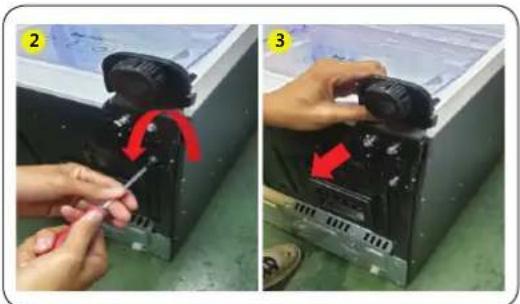
natural_image
Two-step photo showing hands installing or adjusting a device component, labeled 2 and 3 with red arrows indicating rotation (no text or symbols present)- Polegnite proizvod (pogledajte sliku).
OPREZ
natural_image
Two-panel photo showing hands cleaning a printer's cover with paper sheets (no visible text or symbols)- Tërhiqni qendrën e guarnicionit.
natural_image
Interior view of a refrigerator with a hand adjusting the lid (no visible text or symbols)natural_image
Close-up of a hand pressing down on a gray electronic component with a red arrow indicating the process (no visible text or symbols)text_image
3 APPLE SET 5000natural_image
Two-panel image showing hands assembling or repairing a mechanical component; no visible text or symbols.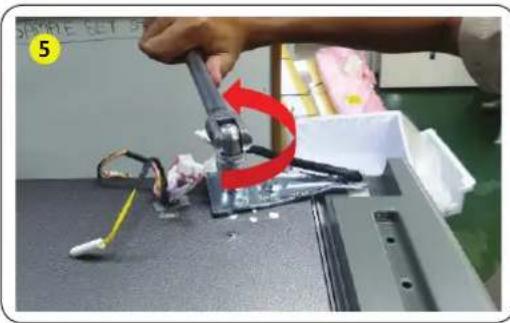
natural_image
Close-up of a robotic arm gripping a small electronic component, with a red curved arrow indicating rotation (no text or symbols visible)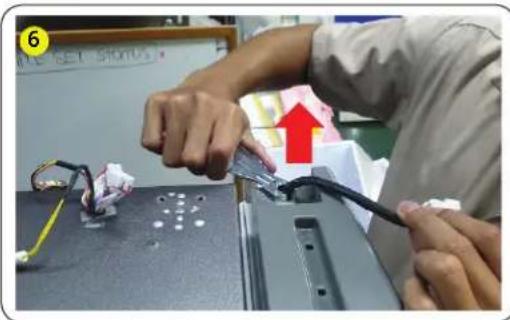
text_image
Person assembling electronic components with visible wiring and a red upward arrow indicating a process step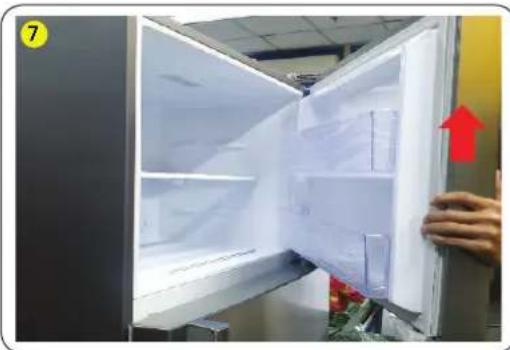
natural_image
Interior view of a refrigerator with open doors and a hand holding the door, showing interior shelves and a red upward arrow (no text or symbols visible)natural_image
Close-up of a hand holding a pen near a small metal clip, with red curved arrow and red flowers in foreground (no text or symbols)natural_image
Person using a tool to clean or store items on a window, with a red arrow highlighting the process (no visible text or symbols)natural_image
Hand holding a metallic switch with a red arrow pointing to it, next to a white appliance (no visible text or symbols)natural_image
Black plastic tray with red downward arrows indicating internal compartments or features (no text or symbols visible)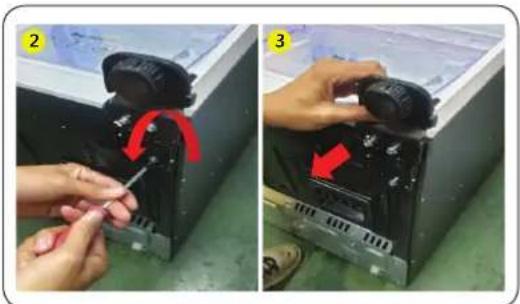
natural_image
Two-panel photo showing hands installing or adjusting a device component, labeled 2 and 3 with red arrows indicating rotation (no text or symbols present)natural_image
Close-up of a hand pressing down on a white plastic sheet (no visible text or symbols)
natural_image
Close-up of a hand pressing down on a textured surface with a triangular pattern (no visible text or symbols)natural_image
Interior view of a refrigerator with a hand adjusting a black strap, showing clear glass panels and red arrows pointing to the interior (no text or symbols visible)natural_image
Close-up of a hand pressing down on a mechanical component with a red arrow indicating the process (no visible text or symbols)text_image
3 APPLE GET SHOUnatural_image
Two-panel image showing hands assembling a black plastic sheet on a workbench, with no visible text or symbols.
natural_image
Close-up of a robotic arm gripping a small electronic component, with a red arrow indicating rotation (no text or symbols visible)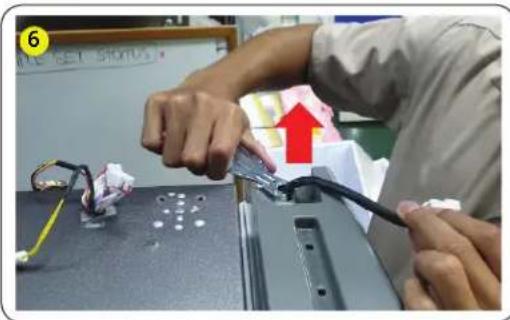
text_image
6 LE SET STANDS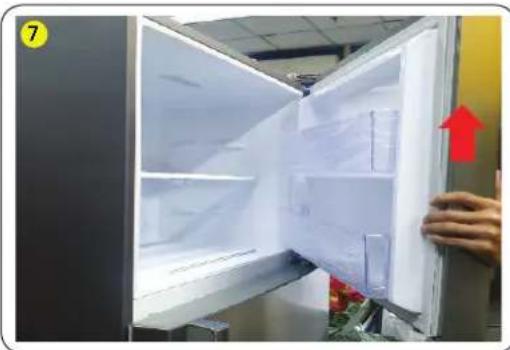
natural_image
Interior view of a refrigerator with open doors and a hand holding the door, showing interior shelves and a red upward arrow (no text or symbols visible)natural_image
Hand holding a tool near a window with red curved arrow indicating rotation (no text or symbols)natural_image
Close-up of a hand using a tool to clean or store plastic, with red arrows indicating a process (no text or symbols visible)natural_image
Hand holding a metallic switch with a red arrow pointing to it, next to a white door (no text or symbols visible)natural_image
Black rectangular container with transparent lids and two red downward arrows pointing to its sides (no text or symbols visible)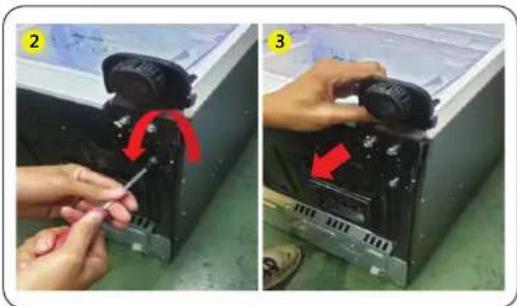
natural_image
Two-panel photo showing hands using a screwdriver to adjust or install a device in a storage unit (no visible text or symbols)natural_image
Two-panel photo showing hands cleaning a white object with a cloth, no visible text or symbols- Tõmmake tihendi keskosa.
natural_image
Interior view of a refrigerator with a hand adjusting the drawer (no visible text or symbols)natural_image
Close-up of a hand pressing down on a gray electronic component with a red arrow indicating the process (no visible text or symbols)- Eemaldage hingekattekork.
text_image
2 SAMPLE 1:5.5400text_image
3 WRITE SET SCHOOLnatural_image
Two-panel image showing hands assembling or repairing a mechanical component; no visible text or symbols.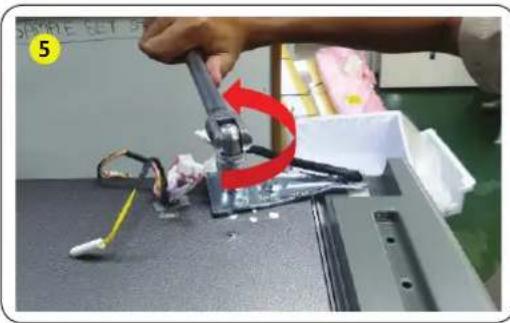
natural_image
Close-up of a robotic arm gripping a small electronic component, with a red curved arrow indicating rotation (no text or symbols visible)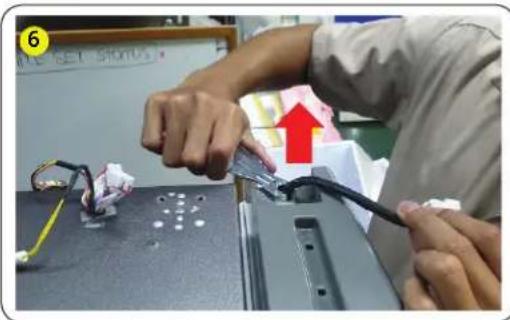
text_image
Person assembling electronic components with visible wiring and a red upward arrow indicating a process step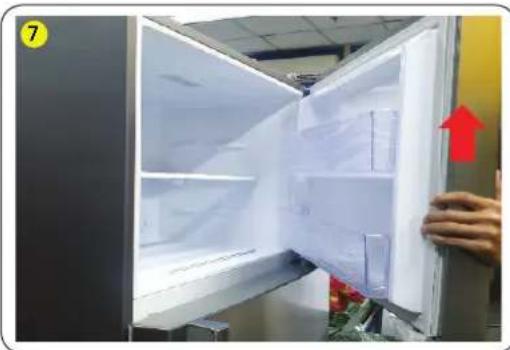
natural_image
Interior view of a refrigerator with open doors and a hand holding the door, showing interior shelves and a red upward arrow (no text or symbols visible)natural_image
Person using a brush to apply red paper flowers near a glass table, with no visible text or symbols.natural_image
Person using a tool to clean or store plastic, no visible text or symbolsnatural_image
Hand installing a wall-mounted tool with a red arrow indicating the step (no text or symbols visible)natural_image
Black plastic container with red downward arrows indicating internal flow or movement (no text or symbols visible)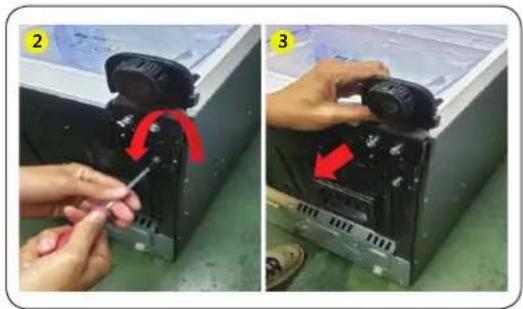
natural_image
Two-step installation of a mechanical device with a tool, showing red arrows indicating rotation or adjustment (no text or symbols present)- Asetage toode pikali (vt pilti).
ETTEVAATUST!
text_image
ŠALDYTUVASLietuvių kalba
Tarpinės keitimas

DÊMESIO
natural_image
Two-panel photo showing hands cleaning a white plastic sheet with a cloth (no text or symbols visible)natural_image
Interior view of a refrigerator with a hand adjusting the drawer (no visible text or symbols)natural_image
Close-up of a hand pressing down on a mechanical component with a red arrow indicating the press direction (no text or symbols visible)- Nuimkite lanksto dangtelj.
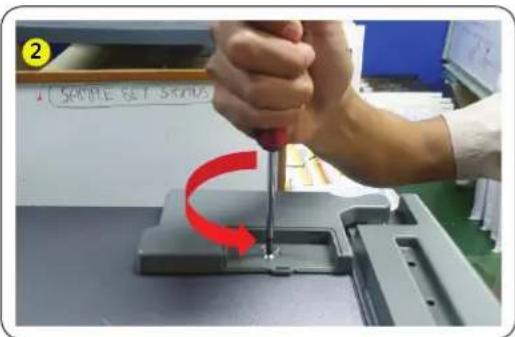
text_image
2 SAMPLE SET STRAVAtext_image
3 MAKE SET SKINnatural_image
Two-panel image showing hands assembling or repairing a mechanical component; no visible text or symbols.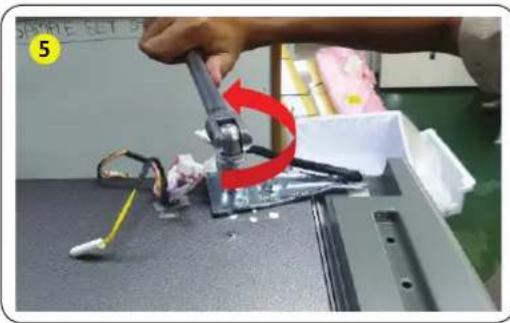
natural_image
Close-up of a robotic arm gripping a small electronic component, with a red curved arrow indicating rotation (no text or symbols visible)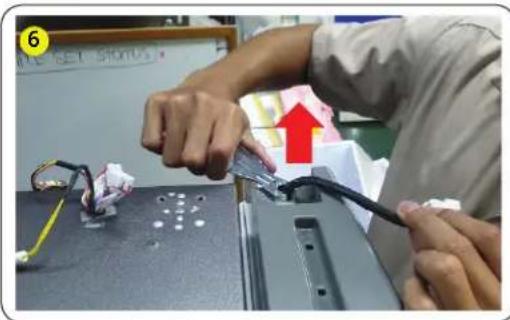
text_image
Person assembling electronic components with visible wiring and a red upward arrow indicating a process step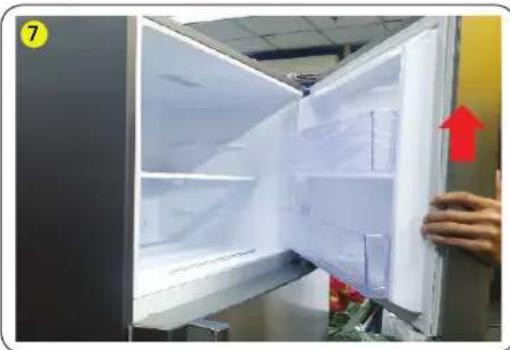
natural_image
Interior view of a refrigerator with open doors and a hand holding the door, showing interior shelves and a red upward arrow (no text or symbols visible)natural_image
Close-up of a hand holding a pen near a small metal clip, with red curved arrow and red flowers in foreground (no text or symbols)natural_image
Person using a tool to clean or store items on a window, with a red arrow highlighting the process (no visible text or symbols)natural_image
Hand holding a metallic switch with a red arrow pointing to it, next to a white appliance (no visible text or symbols)natural_image
Black plastic container with red downward arrows indicating internal flow or movement (no text or symbols visible)
natural_image
Two-step photo showing hands installing or adjusting a device component, labeled 2 and 3 with red arrows indicating rotation (no text or symbols present)natural_image
Two-panel photo showing a person holding a device with red arrows pointing to the door panel, labeled 'LED.' (no text or symbols on the device itself)Latviešu
Blīves nomaina

UZMANĪBU!
natural_image
Two-panel image showing a hand inserting a card into a printer (no visible text or symbols)natural_image
Interior view of a refrigerator with red arrows pointing to a closed drawer (no visible text or symbols)- Iznemiet atvilktni, pavelkot rulliša dalu un pacelot to uz augšu.
natural_image
Close-up of a hand pressing down on a mechanical component with a red arrow indicating the press direction (no text or symbols visible)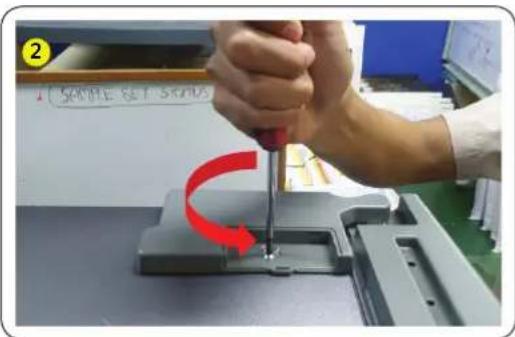
text_image
2 SAMPLE SET STRAVA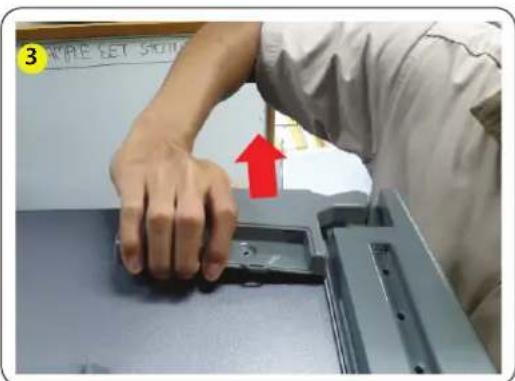
text_image
3 APPLE SET SHO-
Nonemiet enges pârsega vâciņu.
-
Nonemiet enges pârsega skrūvi 1 ea ar (+) skrūvgriezi un atveriet.
-
Pavelciet ākus un paceliet pārsega eṉgi.
Latviešu
natural_image
Two-panel image showing hands assembling or repairing a mechanical component; no visible text or symbols.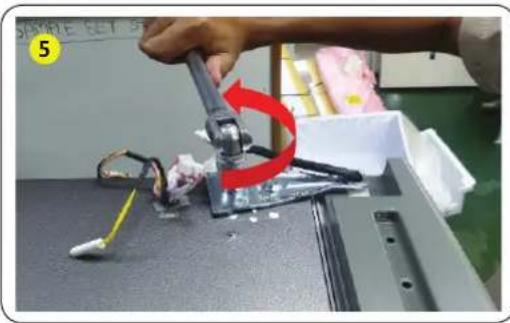
natural_image
Close-up of a robotic arm gripping a small electronic component, with a red curved arrow indicating rotation (no text or symbols visible)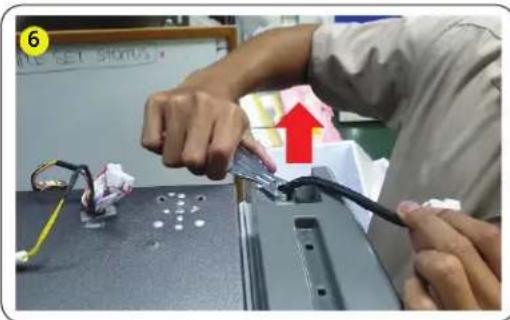
text_image
Person assembling electronic components with visible wiring and a red upward arrow indicating a process step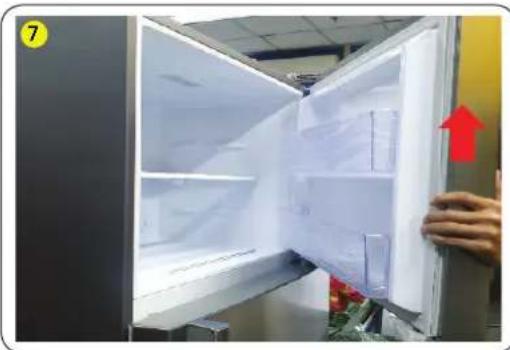
natural_image
Interior view of a refrigerator with open doors and a hand holding the door, showing interior shelves and a red upward arrow (no text or symbols visible)natural_image
Close-up of a hand using a tool to clean or store items, with red arrows indicating a curved motion (no text or symbols visible)natural_image
Close-up of a hand using a tool to clean or store items on a kitchen sink, with greenery and plastic bags visible (no text or symbols)- Iznemiet enges skrūvi 1 ea ar (+) skrūvgriezi.
natural_image
Hand holding a metallic switch with a red arrow pointing to the handle, next to a white cabinet (no text or symbols visible)natural_image
Black plastic container with red downward arrows indicating internal flow or movement (no text or symbols visible)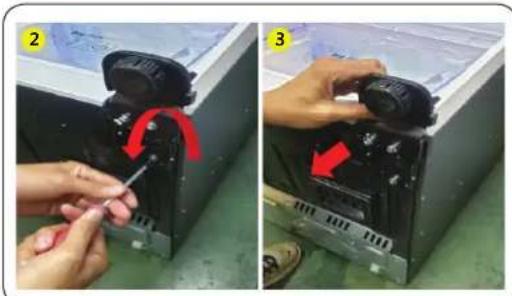
natural_image
Two-panel photo showing hands adjusting a device with a red arrow indicating rotation (no text or symbols visible)natural_image
Two-panel photo showing hands holding a refrigerated door, with red arrows indicating movement or change (no text or symbols)Slovenščina
Zamenjava tesnila

PREVIDNO
natural_image
Two-panel image showing hands cleaning a white object with a dark fabric, no visible text or symbolsnatural_image
Interior view of a refrigerator with red arrows pointing to the door panel and control buttons (no text or symbols visible)- Odstranite predal tako, da povlečete del valjčka in ga dvignete.
Ponovna namestitev predala
text_image
1 APPLE SET STONI- Odstranite pokrov tečaja.
text_image
2 Sample Set Screw- Odstranite vijak 1 ea pokrova tečaja s (+) izvijačem in ga odprite.
text_image
3 APPLE GET 5010- Povlecite zatiče in dvignite tečaj pokrova.
Slovenščina
natural_image
Two-panel image showing hands assembling or repairing a mechanical component; no visible text or symbols.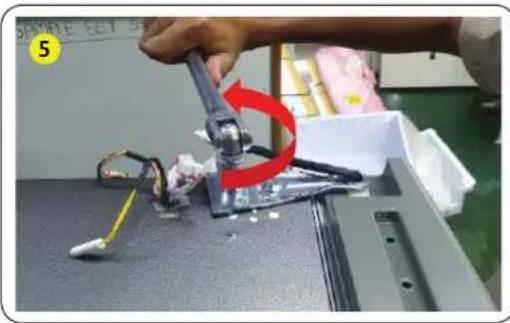
natural_image
Close-up of a robotic arm gripping a small electronic component, with a red curved arrow indicating rotation (no text or symbols visible)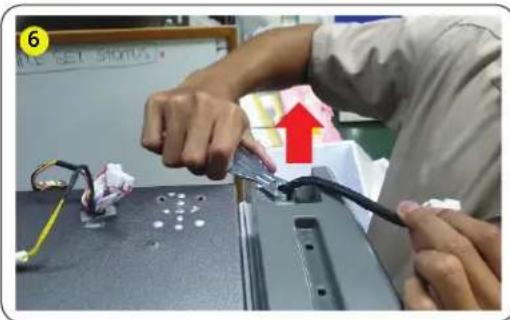
text_image
Person assembling electronic components with visible wiring and a red upward arrow indicating a process step
natural_image
Interior view of a refrigerator with open doors and a hand holding the door, showing interior shelves and a red upward arrow (no text or symbols visible)natural_image
Close-up of a hand using a tool to clean or store items, with red arrows indicating a curved motion (no text or symbols visible)natural_image
Close-up of a hand using a tool to clean or store items on a kitchen sink, with greenery and plastic bags visible (no text or symbols)- Odstranite vijak 1 ea tečaja s (+) izvijačem.
natural_image
Hand holding a metallic switch with a red arrow pointing to the handle, next to a white cabinet (no text or symbols visible)- Razstavite srednji tečaj od vrat hladilnika navzgor.
PREVIDNO
natural_image
Black plastic tray with red arrows pointing downward, no visible text or symbols