EBO635L - E-reader DENVER - Free user manual and instructions
Find the device manual for free EBO635L DENVER in PDF.
| Product type | E-reader (e-book reader) |
| Brand | Denver |
| Model | EBO635L |
| Screen | E-ink screen, backlit (adjustable) |
| Dimensions (approx.) | Approximately 170 x 125 x 10 mm |
| Weight (approx.) | Approximately 250 g |
| Power | Rechargeable battery via USB (USB cable included) |
| Battery life | Several weeks under normal use (varies with usage) |
| Storage capacity | Internal memory (capacity not specified) + microSD card (up to 32 GB) |
| Supported file formats | PDF, EPUB, MOBI, FB2, RTF, TXT, HTML, JPEG, BMP, GIF, PNG (image viewing) |
| Connectivity | USB 2.0 for file transfer and charging |
| Main functions | E-book reading, library navigation, bookmarks, favorites, text search, font adjustment, PDF zoom, screen rotation, auto-scroll, night mode (color inversion) |
| Additional functions | Calendar, games (Sokoban, Puzzle), image viewer, file manager, Adobe DRM support (via Adobe Digital Editions) |
| Available languages | Multilingual (including French, English, Danish, German, Spanish, Italian, Dutch, Norwegian, Polish, Portuguese, Swedish, Finnish, etc.) |
| Care and cleaning | Clean with a dry soft cloth. Do not use chemicals. Protect from moisture and extreme temperatures (0-40°C). |
| Safety | Do not open the device. Keep out of reach of children. Do not expose to water, heat, or direct sunlight. Use only the supplied cable. |
| Spare parts and repairability | No user-serviceable parts. Reset via a reset hole on the back. For repairs, contact a qualified service. |
| General information | Operating temperature: 0 to 40°C. Recyclable. CE compliant. |
Frequently Asked Questions - EBO635L DENVER
User questions about EBO635L DENVER
0 question about this device. Answer the ones you know or ask your own.
Ask a new question about this device
Download the instructions for your E-reader in PDF format for free! Find your manual EBO635L - DENVER and take your electronic device back in hand. On this page are published all the documents necessary for the use of your device. EBO635L by DENVER.
USER MANUAL EBO635L DENVER
natural_image
Abstract geometric logo with a stylized white letter 'D' inside a black hexagon (no text or symbols)denver
text_image
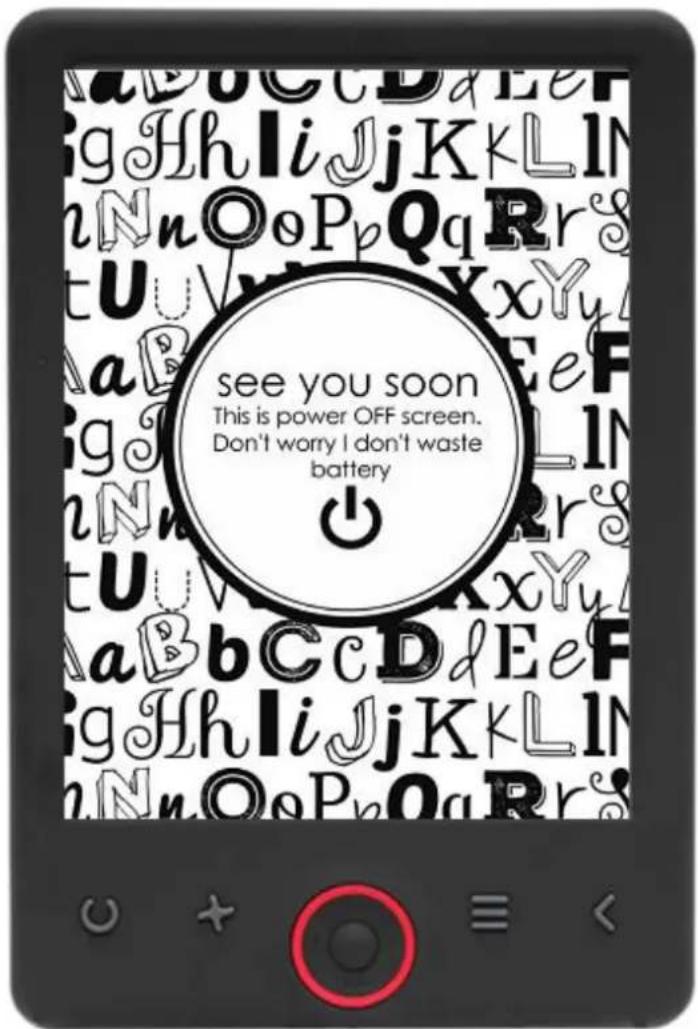
see you soon This is power OFF screen. Don't worry I don't waste batteryUSER'S MANUAL
EBO-635L
www.denver.eu

FR
Please read the safety instructions carefully before using the product for the first time and keep the instructions for future reference.
- This product is not a toy. Keep it out of reach of children.
- Keep product out of the reach of children and pets to avoid chewing and swallowing.
- Product operating and storage temperature is from O degree Celsius to 40 degree Celsius. Under and over this temperature might affect the functions.
- Never open the product. Repairs or service should only be performed by qualified personnel.
- Do not expose to heat, water, moisture, direct sunlight!
- The unit is not waterproof. If water or foreign objects enter the unit, it may result in fire or electric shock. If water or a foreign object enters the unit, stop use immediately.
Introduction
text_image
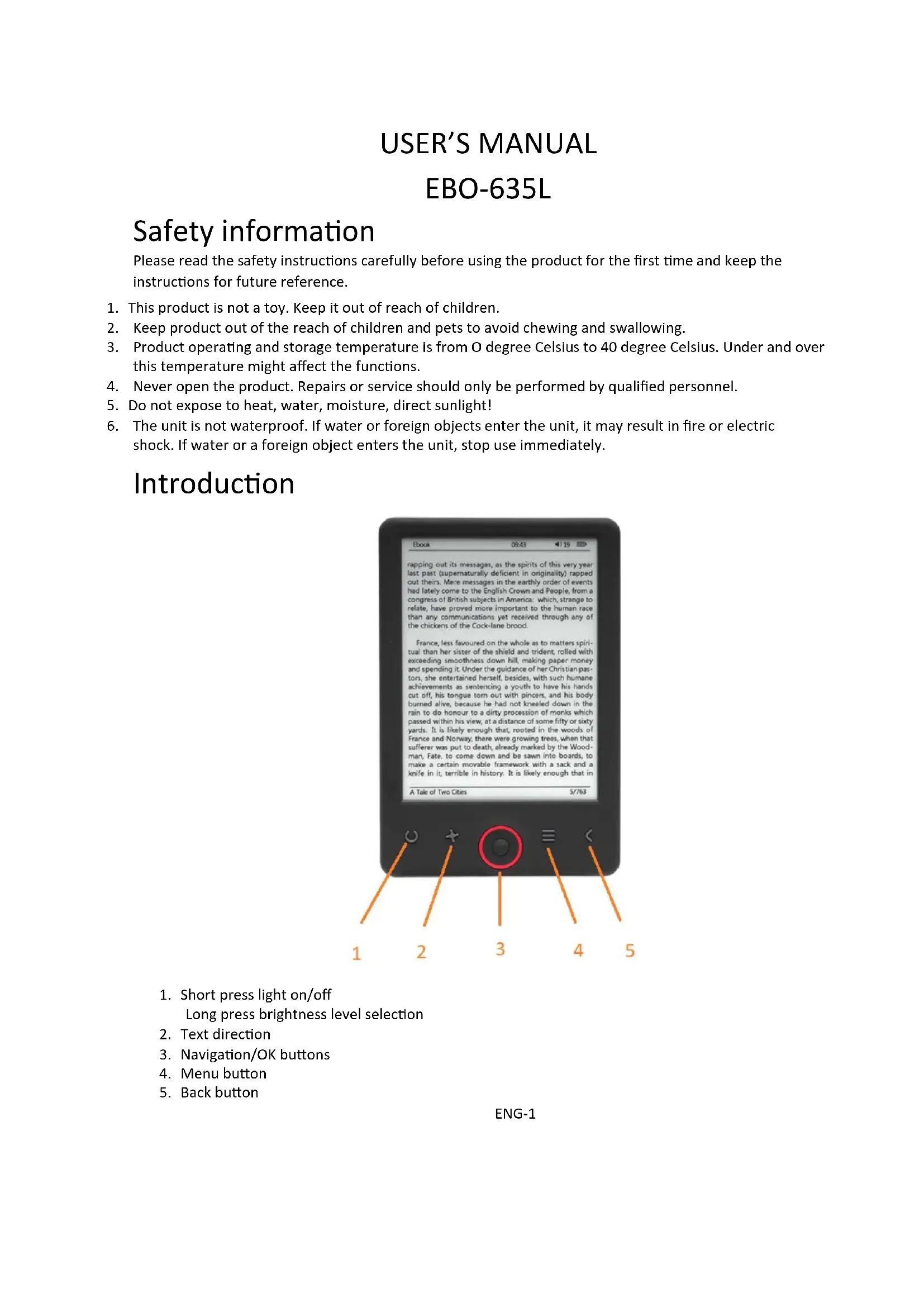
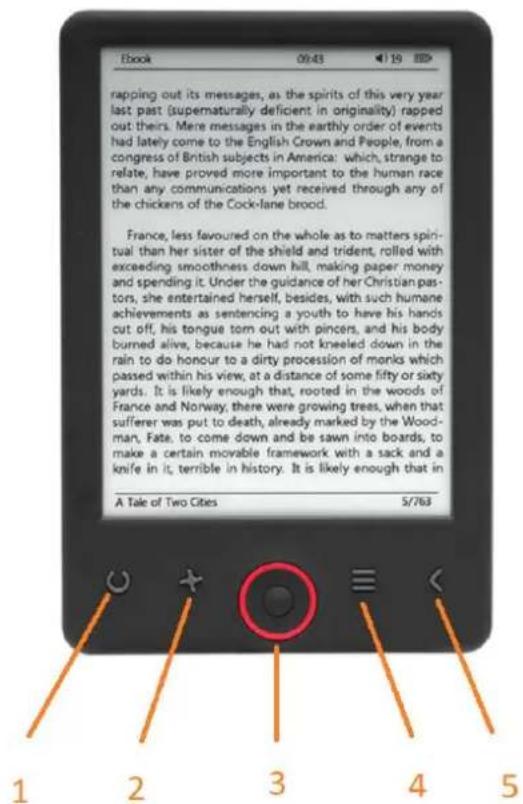
rapping out its messages, as the spirits of this very year last past (supernaturally deficient in originality) rapped out theirs. More messages in the earthly order of events had lately come to the English Crown and People, from a congress of British subjects in America: which, strange to relate, have proved more important to the human race than any communications yet received through any of the chickens of the Cock-lane brood. France, less favoured on the whole as to matters spiritual than her sister of the shield and trident, rolled with exceeding smoothness down hill, making paper money and spending it. Under the guidance of her Christian pastors, she entertained herself, besides, with such humane achievements as sentencing a youth to have his hands cut off, his tongue torn out with pincers, and his body burned alive, because he had not kneeled down in the rain to do honour to a dirty procession of monks which passed within his view, at a distance of some fifty or sixty yards. It is likely enough that, rooted in the woods of France and Norway; there were growing trees, when that sufferer was put to death, already marked by the Woodman, Fate, to come down and be sawn into boards, to make a certain movable framework with a sack and a knife in it, terrible in history. It is likely enough that in A Tale of Two Cities 5/763 1 2 3 4 5- Short press light on/off Long press brightness level selection
- Text direction
- Navigation/OK buttons
- Menu button
- Back button
text_image
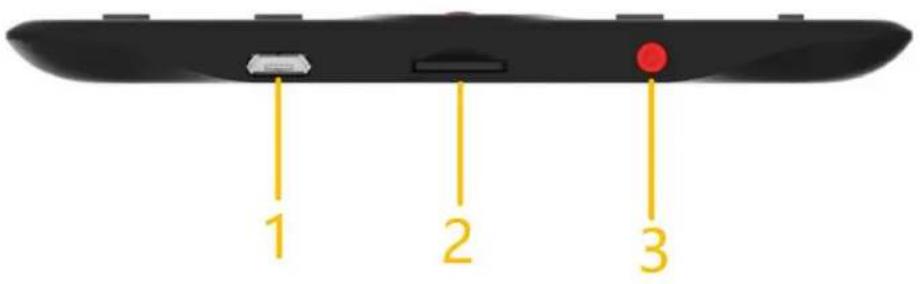
1 2 3-
USB cable connection for charging and transferring files.
-
MicroSD card reader.
-
Power ON / Power OFF
Configuration and use
Turn ON / Turn OFF
Hold down the power button for 5 seconds
Charge the Ebook reader
You must first charge it for 8 hours before its first use. When the battery is low, charge it by connecting the supplied USB cable between the PC and Ebook reader. Do charge it by power adapter.
Copy files to the ebook reader
Connect the ebook reader to the PC using the supplied USB cable. The device will act like USB storage device.
Basic concepts
Use the Navigation buttons to scroll to the item you want from the list.
Press the OK button to confirm the selection.
Press the Menu button to open the options menu.
Press the Back button to cancel selection or return to previous menu or press repeatedly to return to the main menu.
Home screen
The recently read section displays the 3 most recently opened e-books. The newly added section displays the 4 last added e-books.
Library
Enter the Library section to display all e-books on the reader (both in the internal memory and the microSD if inserted). On the right hand side of the title, the file's format is displayed. In the Library submenu, the user can display the list of favorite e-books, search for books, sort by title/author/recently read/newly added and choose how to display files (list or thumbnails — cover).
1. Submenu while reading
The options submenu can be opened while reading an e-book. Press the Menu button while an e-book file is currently opened to display possible options. Please note, the reading menu options are different when reading e-books in different formats, as not every option is available for every file format.
1.1.Add bookmark — add a bookmark in the book you are reading.
1.2.Bookmarks — displays saved bookmarks.
1.3.Table of contents — displays table of contents, if available; (not available in .txt file format).
1.4.Add to favorites — add currently read book to the favorite list.
1.5.Go to page — choose a page to jump to.
1.6. Search — search for particular words in the currently read book.
1.7 Zoom size — zoom in/out on the file (only available in .pdf file format).
1.8.Font size — increase/decrease the font size of the currently read text; (not available in .pdf file format).
1.9.Font type — change the font type of the text (only available in .txt/.html/.fb2/.rtf/.mobi file formats).
1.10.Line spacing — change spacing between lines (only available in .txt/.html/.fb2/.rtf/.mobi file formats).
1.11. Margin — change the margins of the book.
1.12.Text only — the user can change between displaying file in .pdf format in its original form or as a text only (only available in .pdf format).
1.13. Rotate screen — rotate screen 90° clockwise or counterclockwise.
1.14.Invert colors — invert display colors (by default, the background is white and the letters are black; when inverted, the background is black and the letters are white); (not available in .pdf file format).
1.15. Auto turning — enable automatic page turning: 10 seconds/20 seconds/30 seconds/1 minute/2 minutes.
1.16.Refresh mode — select the screen's refresh frequency settings: after each page/every 3 pages/every 5 pages.
1.17.About book — displays information about the currently opened e-book: title, author, publisher and format (if available).
1.18.Exit — exit submenu (the user can also exit by pressing the Previous button).
1.19. Set link on — displays endnotes list (if available); (option only available for PDF, ePUB, mobi file formats). To display endnotes included in an e-book:
1.19.1 Go to the page where the endnote anchor is in the main text, press the Menu button to enter the submenu and enable the Set Link On option. A mouse icon will appear in the upper right corner of the screen, which means the function is enabled.
1.19.2 Press the OK button, the reader will display the list of endnotes.
1.19.3 To move to another endnote, use the "Up"/"Down" buttons and press the "OK" button. The reader will jump to the page containing the selected note. To go back to the list of endnotes, press the "OK" button.
1.19.4. Press the "Previous" button to go back to the main text (the cursor icon will disappear, which means the function is disabled).
2.Fonts
The device does not guarantee the proper display of every file on this device. Correct display of fonts, especially of diacritical marks, on this reader is solely dependent on the e-book file format and whether it has been prepared to be displayed on an e-book reader. For files in .txt format, we suggest to make sure that the file is in UTF format for an optimal display of fonts. When reading e-books in .rtf/.txt/.fb2/.mobi formats in a language with diacritical marks, we suggest not to use the default font for an optimal display of fonts.
Pictures
Open the section to display all pictures (both in the internal memory and the microSD card if inserted). To view the available functions when opening a picture, press the Menu button to open the picture submenu. The first page of the submenu offers the following options: setting the picture as screensaver, restoring default screensaver, setting the picture as idle screen, restoring default idle screen, rotating the picture, zooming in/out. Press the "Left"/"Right" buttons to display the second page of the submenu, where you can set the slideshow interval: off/5 sec/10 sec/20 sec/30 sec/1 minute, as well as display information about the picture (name and format), and exit the submenu.
Explorer
Enter the Explorer tab to display the reader's file browser. While in the memory subfolder, press the "Menu" button to display a list of additional options: search, delete and view the content of the internal or external memory.
Search
Enter the Search tab. The screen will display the search menu.
Use the directional buttons to enter a search phrase, press DONE and press OK to begin the search. The device will display all available e-books containing the search term. You can search for files by file name and author.
Other
The Other section consists of 2 submenus: Calendar and Game tabs.
1. Calendar
Enter this tab to display the calendar. The calendar will open at the current month, with the current day marked (remember to set the correct date in Settings).
2. Game
Two games are preinstalled on the reader: Sokoban and Jigsaw.
Settings
1.Refresh mode
Enter this tab to set the display's refresh frequency: after each page/every 3 pages/every 5 pages.
2. Power settings
Enter this tab to set the auto shutdown time and standby time.
2.1. Auto shutdown
The user can either disable the auto shutdown function or set it to 1/2/3/4 hours (the device will automatically turn off after set time to save energy). Note: the user can customize the idle screen according to his or her needs: open a preloaded picture, press the Menu button and select "Set as idle screen".
2.2.Standby
Disable or select 5/10/15/30 minutes/1 hour. When enabled, the function switches the reader to standby mode to save energy. Note: the user can customize the screensaver according to his or her needs: open a preloaded picture, press the "Menu" button and select "Set as screensaver".
3. Date & time
On the Home screen, the week, day and date appear in the lower left corner of the display and the time appears in the lower right corner. When reading a book, the time is displayed in the upper right corner of the screen. To change the date and time, enter Settings, go to Date & Time and enter the corresponding tab. In the time settings, use the "Left"/"Right" buttons to switch between hour/minute/format and the "Up"/"Down" buttons to change the digits and select between 24h format/am/pm. In the date settings, use "Left"/"Right" buttons to switch between day (DD)/month (MM)/year (YY) and the "Up"/"Down" buttons to change the digits.
4. Language setting
In order to change the language, go to Settings and select Language. A pop up window with available languages will appear. Choose the appropriate language and press the "OK" button to confirm.
5.Format device
The user can format the device in this tab. Please keep in mind that during formatting, all data saved on the internal memory will be deleted! Back up your important data! We suggest to remove the memory card from the device before formatting it.
6. Default settings
In order to restore the reader's default settings, enter this tab, select OK and press the "OK" button to confirm. The default settings will be restored, and a language selection prompt will be displayed on the screen. Device information. Enter this tab to display software version, device model number, used and total capacity of the internal memory as well as used and total capacity of the external memory.
7.Device information
Enter this tab to display software version, device model number, used and total capacity of the internal memory as well as used and total capacity of the external memory.
Data transfer
There are two ways to transfer files:
-
Insert a microSD card with preloaded files into the device's memory slot.
-
Connect the reader to a PC with the USB cable provided. A prompt indicating successful USB connection will be displayed on the screen. You may now copy files to the device or memory card. Note: Do not disconnect the reader from the computer during data transfer, as you could damage the device's memory.
Reset
In case of the reader being e.g. frozen, the user can reset the device. Insert a thin tool into the reset hole at the back of the device, and press and hold the button to restart the device.
Transferring DRM copy protected Ebooks to your DENVER EBO-635L
DENVER EBO-635L can read DRM protected Ebooks. To do this you need transfer from a PC via Adobe Digital Editions.
Transferring via Adobe Digital Editions
Download the program from this link: http://www.adobe.com/dk/products/digital-editions/download.html Choose if you want to download for Windows or Macintosh.
Adobe Digital Editions Home / D
Oversigt Features Tech specs FAQ Release Notes Download
Adobe Digital Editions 3.0 Installers
Locate your preferred platform and click on it to download the installer. Then i Editions.
Download Digital Edition 3.0 Macintosh (16.9 MB)
Download Digital Edition 3.0 Windows (5.9 MB)
Additional Downloads
Getting Started with Adobe Digital Editions eBook
The Getting Started eBook is pre-installed with Adobe Digital Editions 3.0; how admin user). If it is not installed or if you happen to remove it, you can downlo
Download Getting Started with Adobe Digital Editions (EPUB, 5S KB)
Download Digital Edition 2.0.1 here
Sample eBook Library
Download sample eBooks for viewing in Digital Editions
- Now you download the install file to your PC/Mac. Please make sure to save it a place you can find again. (Eg. in "Downloads" or on "Desktop")
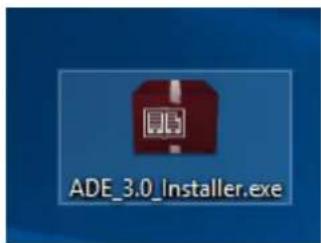
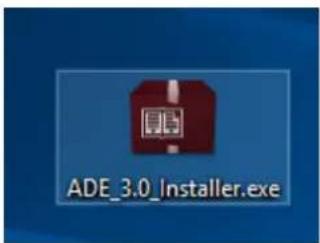
- Double click on the installation file to start the installation of Adobe Digital Editions.
text_image
ADE_3.0_Installer.exe- When the installation has been completed you will have a shortcut for Adobe Digital Editions on your desk top. Double click on the icon to open the program.
- Authorize Adobe ID
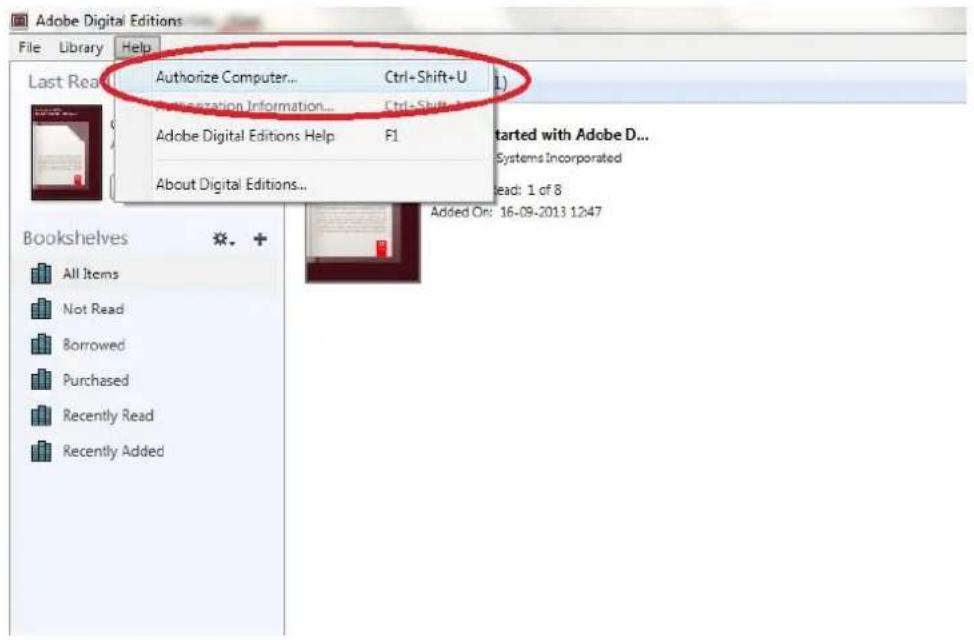
- Open Adobe Digital Editions and click "Help" and choose "Authorize Computer"
text_image
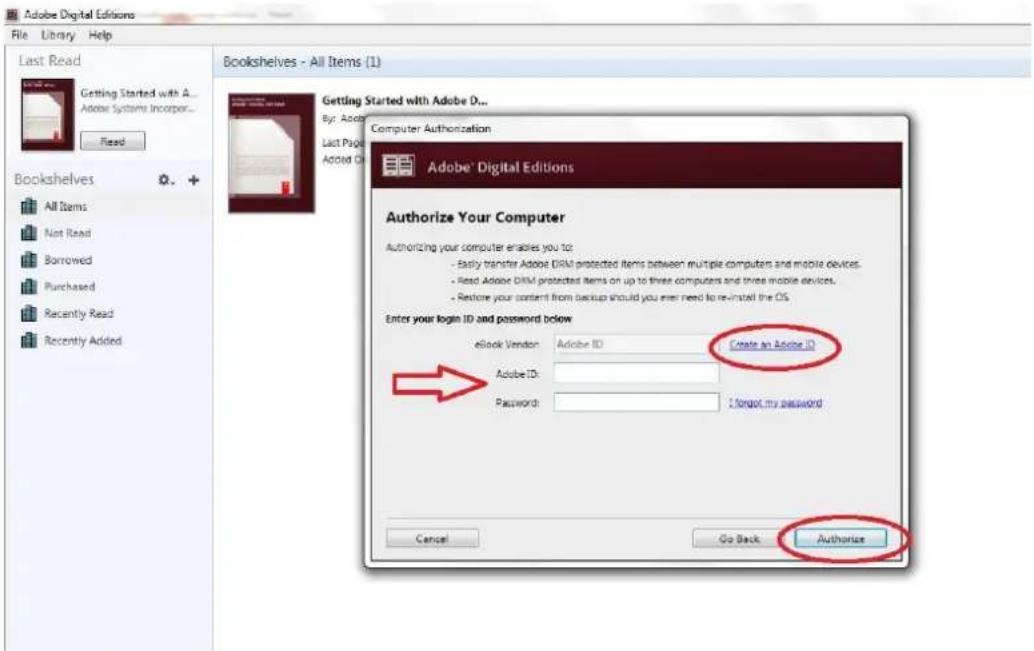
Adobe Digital Editions File Library Help Last Read Authorize Computer... Ctrl+Shift+U Authorization Information... Ctrl+Shift+ Adobe Digital Editions Help F1 About Digital Editions... Bookshelves All Items Not Read Borrowed Purchased Recently Read Recently Added Added On: 16-09-2013 12:47 started with Adobe D... Systems Incorporated Read: 1 of 8- If you already have ADOBE ID. You just need to fill out user name and password. If you don't have this, then you can create this by choosing. "Create an Adobe ID".
- Click on "Authorize" when you have entered the required information.
text_image
Adobe Digital Editions File Library Help Last Read Getting Started with A... Adobe Systems Incorporated... Fixed Bookshelves All Items Not Read Borrowed Purchased Recently Read Recently Added Bookshelves - All Items (1) Getting Started with Adobe D... By: Adobe Computer Authorization Last Page Added Ch Adobe® Digital Editions Authorize Your Computer Authorizing your computer enables you to: - Easily transfer Adobe DRM protected items between multiple computers and mobile devices. - Reset Adobe DRM protected items on up to three computers and three mobile devices. - Restore your content from backup should you even need to re-install the OS. Enter your login ID and password below eBook Vendor: Adobe ID Create an Adobe ID Adobe ID: Password: I forgot my password Cancel Go Back Authorize- Now Adobe Digital Editions is authorized.
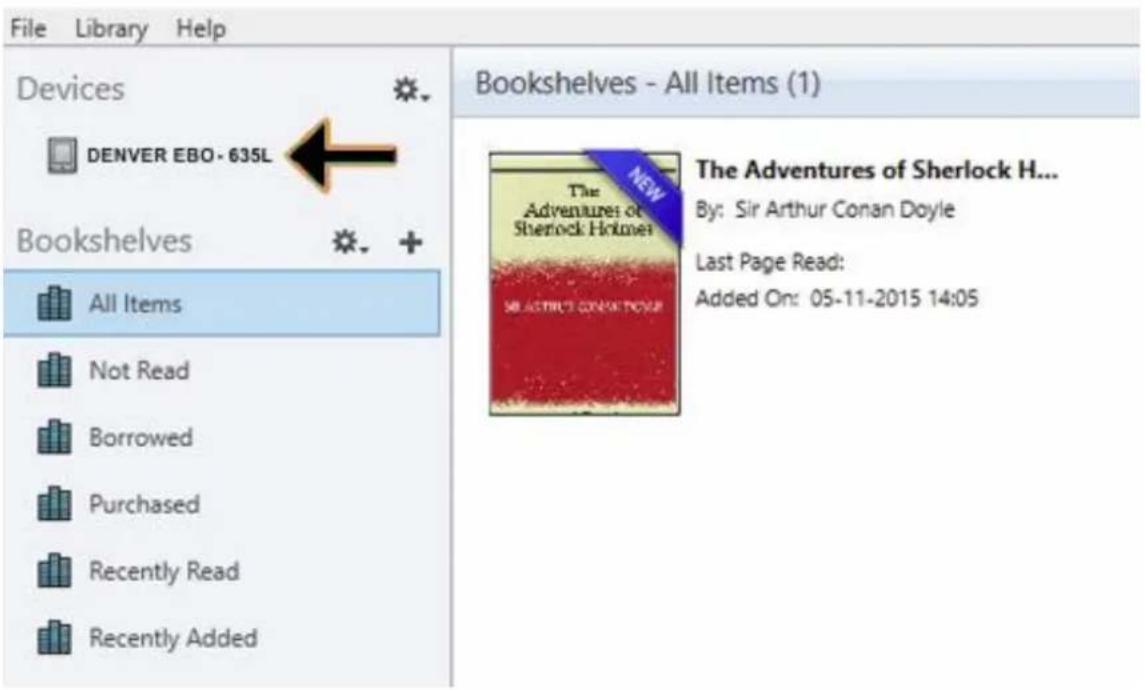
- Please make sure that your DENVER EBO-635L is powered on and then connect USB cable between Ebook reader and your PC and press OK when it shows a message on the screen. Now a new icon for DENVER EBO-635L is visible on left side of Adobe Digital Editions user menu.
Adobe Digital Editions
text_image
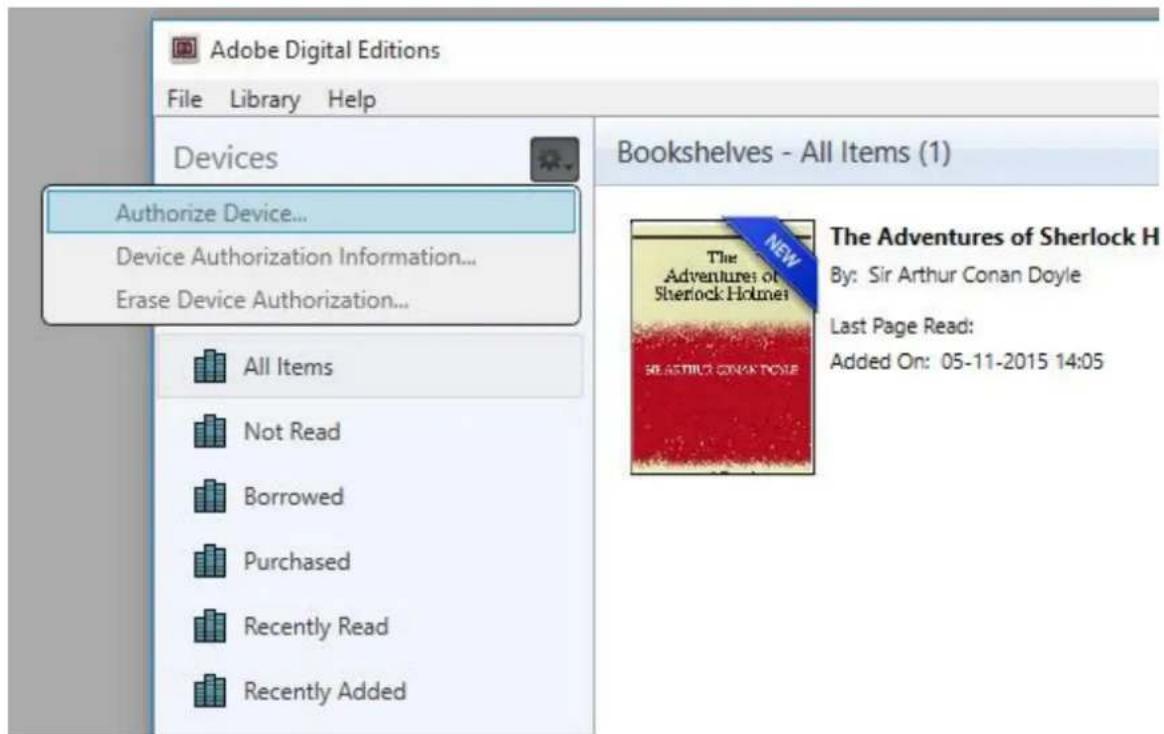
File Library Help Devices DENVER EBO- 635L Bookshelves All Items Not Read Borrowed Purchased Recently Read Recently Added Bookshelves - All Items (1) The Adventures of Sherlock H... By: Sir Arthur Conan Doyle Last Page Read: Added On: 05-11-2015 14:05- Sometimes it can be necessary to authorize DENVER EBO-635L. This can be done by clicking on the Gear icon right beside the Devices and choose "authorize device".
text_image
Adobe Digital Editions File Library Help Devices Authorize Device... Device Authorization Information... Erase Device Authorization... All Items Not Read Borrowed Purchased Recently Read Recently Added Bookshelves - All Items (1) The Adventures of Sherlock H By: Sir Arthur Conan Doyle Last Page Read: Added On: 05-11-2015 14:05- Now you can add the desired ebooks by clicking "File" and choose "Add to Library". Now the ebook can be seen in the "Library" overview.
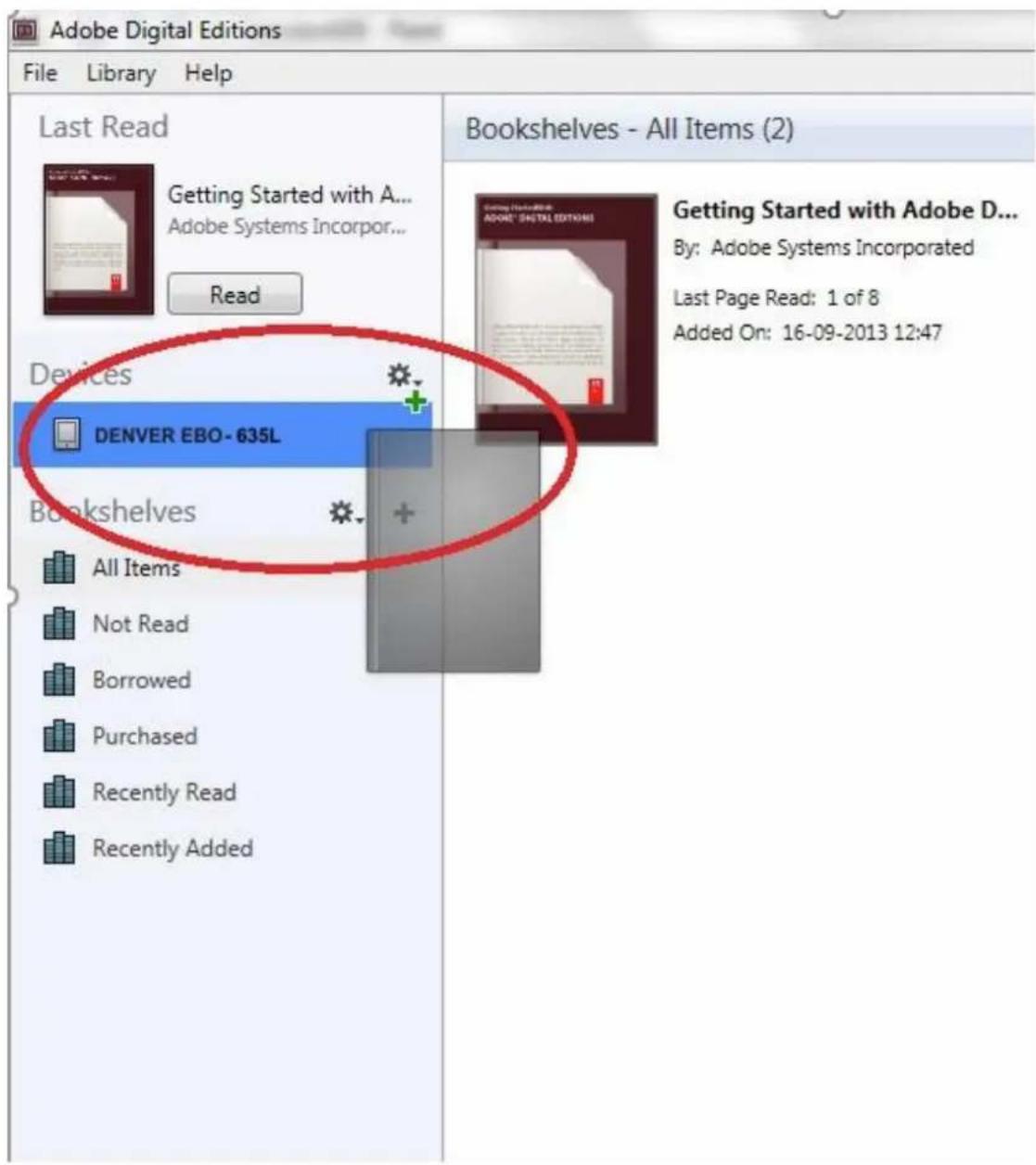
- Now you drag the Ebook to Denver EBO-635L and notice there is a small green +. This is an indication that you can drop the Ebook. Now the Ebook is copied to your DENVER EBO-635L device.
text_image
Adobe Digital Editions File Library Help Last Read Getting Started with A... Adobe Systems Incorpor... Read Devices DENVER EBO- 635L Bookshelves All Items Not Read Borrowed Purchased Recently Read Recently Added Bookshelves - All Items (2) Getting Started with Adobe D... By: Adobe Systems Incorporated Last Page Read: 1 of 8 Added On: 16-09-2013 12:47- When you have copied all the books you can disconnect the USB cable and you are ready to read the book.
Please notice - All products are subject to change without any notice. We take reservations for errors and omissions in the manual.
ALL RIGHTS RESERVED, COPYRIGHT DENVER A/S

text_image
denverwww.denver.eu

text_image
CE —Electric and electronic equipment and included batteries contains materials, components and substances that can be hazardous to your health and the environment, if the waste material (discarded electric and electronic equipment and batteries) is not handled correctly.
Electric and electronic equipment and batteries is marked with the crossed out trash can symbol, seen below. This symbol signifies that electric and electronic equipment and batteries should not be disposed of with other household waste, but should be disposed of separately.
As the end user it is important that you submit your used batteries to the appropriate and designated facility. In this manner you make sure that the batteries are recycled in accordance with legislature and will not harm the environment.
All cities have established collection points, where electric and electronic equipment and batteries can either be submitted free of charge at recycling stations and other collection sites, or be collected from the households. Additional information is available at the technical department of your city.
DENVER A/S
Omega 5A, Soeften
DK-8382 Hinnerup
Denmark
www.facebook.com/denver.eu
text_image
rapping out its messages, as the spirits of this very year last past (supernaturally deficient in originality) rapped out theirs. More messages in the earthly order of events had lately come to the English Crown and People, from a congress of British subjects in America: which, strange to relate, have proved more important to the human race than any communications yet received through any of the chickens of the Cock-lane brood. France, less favoured on the whole as to matters spiritual than her sister of the shield and trident, rolled with exceeding smoothness down hill, making paper money and spending it. Under the guidance of her Christian pastors, she entertained herself, besides, with such humane achievements as sentencing a youth to have his hands cut off, his tongue torn out with pincers, and his body burned alive, because he had not kneeled down in the rain to do honour to a dirty procession of monks which passed within his view, at a distance of some fifty or sixty yards. It is likely enough that, rooted in the woods of France and Norway, there were growing trees, when that sufferer was put to death, already marked by the Woodman, Fate, to come down and be sawn into boards, to make a certain movable framework with a sack and a knife in it, terrible in history. It is likely enough that in A Tale of Two Cities 5/763 1 2 3 4 5Locate your preferred platform and click on it to download the installer. Then Editions.
Download Digital Edition 3.0 Mocintosh (16.9 MB)
Download Digital Edition 3.0 Windows (5.9 MB)
Additional Downloads
Getting Started with Adobe Digital Editions eBook
The Getting Started eBook is pre-installed with Adobe Digital Editions 3.0; how admin user). If it is not installed or if you happen to remove it, you can download
Download Getting Started with Adobe Digital Editions (EPUB, SS KB)
Download Digital Edition 2.0.1 here
Sample eBook Library
Download sample eBooks for viewing in Digital Editions
text_image
Adobe Digital Editions File Library Help Last Read... Authorize Computer... Ctrl+Shift+U Authorization Information... Ctrl+Shift+U Adobe Digital Editions Help F1 About Digital Editions... Bookshelves All Items Not Read Borrowed Purchased Recently Read Recently Added Added On: 16-09-2013 12:47 Started with Adobe D... Systems Incorporated Read: 1 of 8text_image
Adobe Digital Editions File Library Help Last Read Getting Started with A... Adobe Systems Incorpor... Read Bookshelves All Items Not Read Borrowed Purchased Recently Read Recently Added Bookshelves - All Items (1) Getting Started with Adobe D... By: Adobe® Computer Authorization Last Page Added Or Adobe® Digital Editions Authorize Your Computer Authorizing your computer enables you to: - Easily transfer Adobe DRM protected items between multiple computers and mobile devices. - Read Adobe DRM protected items on up to three computers and three mobile devices. - Restore your content from backup should you ever need to re-install the OS. Enter your login ID and password below eBook Vendor: Adobe ID Create an Adobe ID Adobe ID: Passwords: I forgot my password Cancel Go Back AuthorizeBookshelves - All Items (1)

text_image
NEW THE ADVENTures of Sherlock Holmes IN THE TWENT LEAVES TO BEATThe Adventures of Sherlock H...
By: Sir Arthur Conan Doyle
Last Page Read:
Added On: 05-11-2015 14:05
text_image
Adobe Digital Editions File Library Help Devices Authorize Device... Device Authorization Information... Erase Device Authorization... All Items Not Read Borrowed Purchased Recently Read Recently Added Bookshelves - All Items (1) The Adventures of Sherlock H By: Sir Arthur Conan Doyle Last Page Read: Added On: 05-11-2015 14:05text_image
Adobe Digital Editions File Library Help Last Read Getting Started with A... Adobe Systems Incorporar... Read Devices DENVER EBO-635L Bookshelves All Items Not Read Borrowed Purchased Recently Read Recently Added Bookshelves - All Items (2) Getting Started with Adobe D... By: Adobe Systems Incorporated Last Page Read: 1 of 8 Added On: 16-09-2013 12:47text_image
CE No. 7-text_image
rapping out its messages, as the spirits of this very year last past (supernaturally deficient in originality) rapped out theirs. Mere messages in the earthly order of events had lately come to the English Crown and People, from a congress of British subjects in America: which, strange to relate, have proved more important to the human race than any communications yet received through any of the chickens of the Cock-lane brood. France, less favoured on the whole as to matters spiritual than her sister of the shield and trident, rolled with exceeding smoothness down hill, making paper money and spending it. Under the guidance of her Christian pastors, she entertained herself, besides, with such humane achievements as sentencing a youth to have his hands cut off, his tongue torn out with pincers, and his body burned alive, because he had not kneeled down in the rain to do honour to a dirty procession of monks which passed within his view, at a distance of some fifty or sixty yards. It is likely enough that, rooted in the woods of France and Norway, there were growing trees, when that sufferer was put to death, already marked by the Woodman, Fate, to come down and be sawn into boards, to make a certain movable framework with a sack and a knife in it, terrible in history. It is likely enough that in A Tale of Two Cities 5/763 1 2 3 4 5Locate your preferred platform and click on it to download the installer. Then i Editions.
Download Digital Edition 3.0 Macintosh (16.9 MB)
Download Digital Edition 3.0 Windows (5.9 MB)
Additional Downloads
Getting Started with Adobe Digital Editions eBook
The Getting Started eBook is pre-installed with Adobe Digital Editions 3.0; how admin user). If it is not installed or if you happen to remove it, you can downlo
Download Getting Started with Adobe Digital Editions (EPUB, SS KB)
Download Digital Edition 2.0.1 here
Sample eBook Library
Download sample eBooks for viewing in Digital Editions
- Download installationsfilen, og gem den på din PC/Mac. Gem filen et sted, hvor du kan finde den igen (F.eks. i mappen "Downloads" eller på "Skrivebordet").
- Dobbeltklik på installationsfilen for at starte installation af programmet Adobe Digital Editions.
text_image
ADE_3.0_Installer.exetext_image
Adobe Digital Editions File Library Help Last Read... Authorize Computer... Ctrl+Shift+U Authorization Information... Ctrl+Shift+ Adobe Digital Editions Help F1 About Digital Editions... Bookshelves All Items Not Read Borrowed Purchased Recently Read Recently Added Added On: 16-09-2013 12:47 Started with Adobe D... Systems Incorporated Read: 1 of 8text_image
Adobe Digital Editions File Library Help Last Read Getting Started with A... Adobe Systems Incspor... Read Bookshelves All Items Not Read Borrowed Purchased Recently Read Recently Added Bookshelves - All Items (1) Getting Started with Adobe D... By: Adobe Last Page Added On Computer Authorization Adobe® Digital Editions Authorize Your Computer Authorizing your computer enables you to: - Easily transfer Adobe DRM protected items between multiple computers and mobile devices. - Read Adobe DRM protected items on up to three computers and three mobile devices. - Restore your content from backup should you ever need to re-install the OS. Enter your login ID and password below eBook Vendor: Adobe ID Create an Adobe ID Adobe ID: Password: I respect my password Cancel Go Back Authorizetext_image
File Library Help Devices DENVER EBO- 635L Bookshelves All Items Not Read Borrowed Purchased Recently Read Recently Added Bookshelves - All Items (1) The Adventures of Sherlock H... By: Sir Arthur Conan Doyle Last Page Read: Added On: 05-11-2015 14:05text_image
Adobe Digital Editions File Library Help Devices Authorize Device... Device Authorization Information... Erase Device Authorization... All Items Not Read Borrowed Purchased Recently Read Recently Added Bookshelves - All Items (1) The Adventures of Sherlock H By: Sir Arthur Conan Doyle Last Page Read: Added On: 05-11-2015 14:05text_image
Adobe Digital Editions File Library Help Last Read Getting Started with A... Adobe Systems Incorpor... Read Devices DENVER EBO- 635L Bookshelves All Items Not Read Borrowed Purchased Recently Read Recently Added Bookshelves - All Items (2) Getting Started with Adobe D... By: Adobe Systems Incorporated Last Page Read: 1 of 8 Added On: 16-09-2013 12:47text_image
rapping out its messages, as the spirits of this very year last past (supernaturally deficient in originality) rapped out theirs. Mere messages in the earthly order of events had lately come to the English Crown and People, from a congress of British subjects in America: which, strange to relate, have proved more important to the human race than any communications yet received through any of the chickens of the Cock-lane brood. France, less favoured on the whole as to matters spiritual than her sister of the shield and trident, rolled with exceeding smoothness down hill, making paper money and spending it. Under the guidance of her Christian pastors, she entertained herself, besides, with such humane achievements as sentencing a youth to have his hands cut off, his tongue torn out with pincers, and his body burned alive, because he had not kneeled down in the rain to do honour to a dirty procession of monks which passed within his view, at a distance of some fifty or sixty yards. It is likely enough that, rooted in the woods of France and Norway, there were growing trees, when that sufferer was put to death, already marked by the Woodman, Fate, to come down and be sawn into boards, to make a certain movable framework with a sack and a knife in it, terrible in history. It is likely enough that in A Tale of Two Cities 5/763 1 2 3 4 5Locate your preferred platform and click on it to download the installer. Then i Editions.
Download Digital Edition 3.0 Macintosh (16.9 MB)
Download Digital Edition 3.0 Windows (5.9 MB)
Additional Downloads
Getting Started with Adobe Digital Editions eBook
The Getting Started eBook is pre-installed with Adobe Digital Editions 3.0; how admin user). If it is not installed or if you happen to remove it, you can download
Download Getting Started with Adobe Digital Editions (EPUB, S5 KB)
Download Digital Edition 2.0.1 here
Sample eBook Library
Download sample eBooks for viewing in Digital Editions
text_image
Adobe Digital Editions File Library Help Last Read Authorize Computer... Ctrl+Shift+U Authorization Information... Ctrl+Shift+U Adobe Digital Editions Help F1 About Digital Editions... Bookshelves All Items Not Read Borrowed Purchased Recently Read Recently Added Added On: 16-09-2013 12:47 Last Updated with Adobe D... Systems Incorporated read: 1 of 8text_image
Adobe Digital Editions File Library Help Last Read Getting Started with A... Adobe Systems Incorpor... Read Bookshelves All Items Not Read Borrowed Purchased Recently Read Recently Added Bookshelves - All Items (1) Getting Started with Adobe D... By: Adobe Last Page Added Or Computer Authorization Adobe® Digital Editions Authorize Your Computer Authorizing your computer enables you to: - Easily transfer Adobe DRM protected items between multiple computers and mobile devices. - Read Adobe DRM protected items on up to three computers and three mobile devices. - Restore your content from backup should you ever need to re-install the OS. Enter your login ID and password below ebook Vendor: Adobe ID Create an Adobe ID Adobe ID: Password: I forget my password Cancel Go Back AuthorizeBookshelves - All Items (1)

text_image
NEW THE Adventures of Sherlock Holmes NEASTHUS GONK TOURThe Adventures of Sherlock H...
By: Sir Arthur Conan Doyle
Last Page Read:
Added On: 05-11-2015 14:05
text_image
Adobe Digital Editions File Library Help Devices Authorize Device... Device Authorization Information... Erase Device Authorization... All Items Not Read Borrowed Purchased Recently Read Recently Added Bookshelves - All Items (1) The Adventures of Sherlock H By: Sir Arthur Conan Doyle Last Page Read: Added On: 05-11-2015 14:05text_image
Adobe Digital Editions File Library Help Last Read Getting Started with A... Adobe Systems Incorpor... Read Devices DENVER EBO- 635L Bookshelves All Items Not Read Borrowed Purchased Recently Read Recently Added Bookshelves - All Items (2) Getting Started with Adobe D... By: Adobe Systems Incorporated Last Page Read: 1 of 8 Added On: 16-09-2013 12:47text_image
rapping out its messages, as the spirits of this very year last past (supernaturally deficient in originality) rapped out theirs. More messages in the earthly order of events had lately come to the English Crown and People, from a congress of British subjects in America: which, strange to relate, have proved more important to the human race than any communications yet received through any of the chickens of the Cock-lane brood. France, less favoured on the whole as to matters spiritual than her sister of the shield and trident, rolled with exceeding smoothness down hill, making paper money and spending it. Under the guidance of her Christian pastors, she entertained herself, besides, with such humane achievements as sentencing a youth to have his hands cut off, his tongue torn out with pincers, and his body burned alive, because he had not kneeled down in the rain to do honour to a dirty procession of monks who passed within his view, at a distance of some fifty or sixty yards. It is likely enough that, rooted in the woods of France and Norway, there were growing trees, when that sufferer was put to death, already marked by the Woodman, Fate, to come down and be sawn into boards, to make a certain movable framework with a sack and a knife in it, terrible in history. It is likely enough that in A Tale of Two Cities 5/763 1 2 3 4 5Locate your preferred platform and click on it to download the installer. Then Editions.
Download Digital Edition 3.0 Macintosh (16.9 MB)
Download Digital Edition 3.0 Windows (5.9 MB)
Additional Downloads
Getting Started with Adobe Digital Editions eBook
The Getting Started eBook is pre-installed with Adobe Digital Editions 3.0; how admin user). If it is not installed or if you happen to remove it, you can downlo
Download Getting Started with Adobe Digital Editions (EPUB, 55 KB)
Download Digital Edition 2.0.1 here
Sample eBook Library
Download sample eBooks for viewing in Digital Editions
text_image
Adobe Digital Editions File Library Help Last Read... Authorize Computer... Ctrl+Shift+U Authorization Information... Ctrl+Shift+U Adobe Digital Editions Help F1 About Digital Editions... Bookshelves All Items Not Read Borrowed Purchased Recently Read Recently Added Added On: 16-09-2013 12:47 Last Updated with Adobe D... Systems Incorporated read: 1 of 8text_image
Adobe Digital Editions File Library Help Last Read Getting Started with A_ Adobe Systems Incorpor... Read Bookshelves All Items Not Read Borrowed Purchased Recently Read Recently Added Bookshelves - All Items (1) Getting Started with Adobe D... By: Adobe Last Page Added On Computer Authorization Adobe® Digital Editions Authorize Your Computer Authorizing your computer enables you to: - Easily transfer Adobe DRM protected items between multiple computers and mobile devices. - Read Adobe DRM protected items on up to three computers and three mobile devices. - Restore your content from backup should you ever need to re-install the OS. Enter your login ID and password below eBook Vendor: Adobe ID Adobe IDs: Password: Create an Adobe ID I forget my password Cancel Go Back Authorizetext_image
Adobe Digital Editions File Library Help Devices DENVER EBO-635L Bookshelves All Items Not Read Borrowed Purchased Recently Read Recently Added Bookshelves - All Items (1) The Adventures of Sherlock H... By: Sir Arthur Conan Doyle Last Page Read: Added On: 05-11-2015 14:05text_image
Adobe Digital Editions File Library Help Devices Authorize Device... Device Authorization Information... Erase Device Authorization... All Items Not Read Borrowed Purchased Recently Read Recently Added Bookshelves - All Items (1) The Adventures of Sherlock H By: Sir Arthur Conan Doyle Last Page Read; Added On: 05-11-2015 14:05text_image
Adobe Digital Editions File Library Help Last Read Getting Started with A... Adobe Systems Incorpor... Read Devices DENVER EBO- 635L Bookshelves All Items Not Read Borrowed Purchased Recently Read Recently Added Bookshelves - All Items (2) Getting Started with Adobe D... By: Adobe Systems Incorporated Last Page Read: 1 of 8 Added On: 16-09-2013 12:47text_image
rapping out its messages, as the spirits of this very year last past (supernaturally deficient in originality) rapped out theirs. Mere messages in the earthly order of events had lately come to the English Crown and People, from a congress of British subjects in America: which, strange to relate, have proved more important to the human race than any communications yet received through any of the chickens of the Cock-lane brood. France, less favoured on the whole as to matters spiritual than her sister of the shield and trident, rolled with exceeding smoothness down hill, making paper money and spending it. Under the guidance of her Christian pastors, she entertained herself, besides, with such humane achievements as sentencing a youth to have his hands cut off, his tongue torn out with pincers, and his body burned alive, because he had not kneeled down in the rain to do honour to a dirty procession of monks which passed within his view, at a distance of some fifty or sixty yards. It is likely enough that, rooted in the woods of France and Norway, there were growing trees, when that sufferer was put to death, already marked by the Woodman, Fate, to come down and be sawn into boards, to make a certain movable framework with a sack and a knife in it, terrible in history. It is likely enough that in A Tale of Two Cities 5/763 1 2 3 4 5editions/download.html
Locate your preferred platform and dick on it to download the installer. Then Editions.
Download Digital Edition 3.0 Mocintosh (16.9 MB)
Download Digital Edition 3.0 Windows (5.9 MB)
Additional Downloads
Getting Started with Adobe Digital Editions eBook
The Getting Started eBook is pre-installed with Adobe Digital Editions 3.0; how admin user). If it is not installed or if you happen to remove it, you can download
Download Getting Started with Adobe Digital Editions (EPUB, 55 KB)
Download Digital Edition 2.0.1 here
Sample eBook Library
Download sample eBooks for viewing in Digital Editions
text_image
Adobe Digital Editions File Library Help Last Read... Authorize Computer... Ctrl+Shift+U Authorization Information... Ctrl+Shift+U Adobe Digital Editions Help F1 About Digital Editions... Bookshelves All Items Not Read Borrowed Purchased Recently Read Recently Added Added On: 16-09-2013 12:47text_image
Adobe Digital Editions File Library Help Last Read Getting Started with A... Adobe Systems Incorpor... Read Bookshelves All Items Not Read Borrowed Purchased Recently Read Recently Added Bookshelves - All Items (1) Getting Started with Adobe D... By: Adobe Last Page Added O Computer Authorization Adobe® Digital Editions Authorize Your Computer Authorizing your computer enables you to: - Easily transfer Adobe DRM protected items between multile computers and mobile devices. - Read Adobe DRM protected items on up to three computers and three mobile devices. - Restore your content from backup should you ever need to re-install the OS. Enter your login ID and password below eBook Vencor: Adobe ID Create an Adobe ID Adobe ID: Password: I forgot my password Cancel Go Back AuthorizeBookshelves - All Items (1)

text_image
NEW THE Adventures of Sherlock Holmes SELECTIVE CONCRETE FORThe Adventures of Sherlock H...
By: Sir Arthur Conan Doyle
Last Page Read:
Added On: 05-11-2015 14:05
text_image
Adobe Digital Editions File Library Help Devices Authorize Device... Device Authorization Information... Erase Device Authorization... All Items Not Read Borrowed Purchased Recently Read Recently Added Bookshelves - All Items (1) The Adventures of Sherlock H By: Sir Arthur Conan Doyle Last Page Read: Added On: 05-11-2015 14:05text_image
Adobe Digital Editions File Library Help Last Read Getting Started with A... Adobe Systems Incorpor... Read Devices DENVER EBO- 635L Bookshelves All Items Not Read Borrowed Purchased Recently Read Recently Added Bookshelves - All Items (2) Getting Started with Adobe D... By: Adobe Systems Incorporated Last Page Read: 1 of 8 Added On: 16-09-2013 12:47text_image
rapping out its messages, as the spirits of this very year last past (supernaturally deficient in originality) rapped out theirs. Mere messages in the earthly order of events had lately come to the English Crown and People, from a congress of British subjects in America: which, strange to relate, have proved more important to the human race than any communications yet received through any of the chickens of the Cock-lane brood. France, less favoured on the whole as to matters spiritual than her sister of the shield and trident, rolled with exceeding smoothness down hill, making paper money and spending it. Under the guidance of her Christian pastors, she entertained herself, besides, with such humane achievements as sentencing a youth to have his hands cut off, his tongue torn out with pincers, and his body burned alive, because he had not kneeled down in the rain to do honour to a dirty procession of monks which passed within his view, at a distance of some fifty or sixty yards. It is likely enough that, rooted in the woods of France and Norway, there were growing trees, when that sufferer was put to death, already marked by the Woodman, Fate, to come down and be sewn into boards, to make a certain movable framework with a sack and a knife in it, terrible in history. It is likely enough that in A Tale of Two Cities 5/763 1 2 3 4 5Locate your preferred platform and dick on it to download the installer. Then Editions.
Download Digital Edition 3.0 Macintosh (16.9 MB)
Download Digital Edition 3.0 Windows (5.9 MB)
Additional Downloads
Getting Started with Adobe Digital Editions eBook
The Getting Started eBook is pre-installed with Adobe Digital Editions 3.0; how admin user). If it is not installed or if you happen to remove it, you can downlo
Download Getting Started with Adobe Digital Editions (EPUB, 55 KB)
Download Digital Edition 2.0.1 here
Sample eBook Library
Download sample eBooks for viewing in Digital Editions
text_image
Adobe Digital Editions File Library Help Last Read... Authorize Computer... Ctrl+Shift+U Authorization Information... Ctrl+Shift+U Adobe Digital Editions Help F1 About Digital Editions... Bookshelves All Items Not Read Borrowed Purchased Recently Read Recently Added Added On: 16-09-2013 12:47text_image
Adobe Digital Editions File Library Help Last Read Getting Started with A... Adobe Systems Incorporated... Read Bookshelves All Items Not Read Borrowed Purchased Recently Read Recently Added Bookshelves - All Items (1) Getting Started with Adobe D... By: Adobe Last Page Added On Computer Authorization Adobe' Digital Editions Authorize Your Computer Authorizing your computer enables you to: - Easily transfer Adobe DRM protected items between multiple computers and mobile devices. - Read Adobe DRM protected items on up to three computers and three mobile devices. - Restore your content from backup should you ever need to re-install the OS. Enter your login ID and password below eBook Vendor: Adobe ID Create an Adobe ID Adobe ID: Password: I forgot my password Cancel Go Back AuthorizeBookshelves - All Items (1)

text_image
NEW THE Adventures of Sherlock Holmes NEASTRIEL GONK PAYSThe Adventures of Sherlock H...
By: Sir Arthur Conan Doyle
Last Page Read:
Added On: 05-11-2015 14:05
Bookshelves - All Items (1)
Authorize Device...
Device Authorization Information...
Erase Device Authorization...

All Items

Not Read

Borrowed

Purchased

Recently Read

Recently Added

text_image
THE Adventures of Sherlock Holmes NEW BEETRIUS GONK TOMEThe Adventures of Sherlock H
By: Sir Arthur Conan Doyle
Last Page Read:
Added On: 05-11-2015 14:05
text_image
Adobe Digital Editions File Library Help Last Read Getting Started with A... Adobe Systems Incorpor... Read Devices DENVER EBO- 635L Bookshelves All Items Not Read Borrowed Purchased Recently Read Recently Added Bookshelves - All Items (2) Getting Started with Adobe D... By: Adobe Systems Incorporated Last Page Read: 1 of 8 Added On: 16-09-2013 12:47text_image
CE No. 17-03-2019 No. 17-03-2019 No. 17-03-2019 No. 17-03-2019 No. 17-03-2019 No. 17-03-2019 No. 17-03-2019 No. 17-03-2019 NO. 17-03-2019 No. 17-03-2019 No. 17-03-2019 No. 17-03-2019 No. 17-03-2019 No. 17-03-2019 No. 17-03-2019 No. No. 17-03-2019 No. No. 17-03-2019 No. No. 17-03-2019 No. No. 17-03-2019 No. No. 17-03-2019 No. No. 17-03-2019 No. No. 16-03-2019 No. No. 16-03-2019 No. No. 16-03-2019 No. No. 16-03-2019 No. No. 16-03-2019 No. No. 16-03-2019 No. No. 16-03/2019 No. No. 16-03/2019 No. No. 16-03/2019 No. No. 16-03/2019 No. No. 16-03/2019 No. No. 16-03/2019 No. No. 16-03/2018text_image
rapping out its messages, as the spirits of this very year last past (supernaturally deficient in originality) rapped out theirs. Mare messages in the earthly order of events had lately come to the English Crown and People, from a congress of British subjects in America: which, strange to relate, have proved more important to the human race than any communications yet received through any of the chickens of the Cock-lane Brood. France, less favoured on the whole as to matters spiritual than her sister of the shield and trident, rolled with exceeding smoothness down hill, making paper money and spending it. Under the guidance of her Christian pastors, she entertained herself, besides, with such humane achievements as sentencing a youth to have his hands cut off, his tongue torn out with pincers, and his body burned alive, because he had not kneeled down in the rain to do honour to a dirty procession of monks which passed within his view, at a distance of some fifty or sixty yards. It is likely enough that, rooted in the woods of France and Norway, there were growing trees, when that sufferer was put to death, already marked by the Woodman, Fate, to come down and be sawn into boards, to make a certain movable framework with a sack and a knife in it, terrible in history. It is likely enough that in A Tale of Two Cities 5/763 1 2 3 4 5editions/download.html
Locate your preferred platform and dick on it to download the installer. Then Editions.
Download Digital Edition 3.0 Macintosh (16.9 MB)
Download Digital Edition 3.0 Windows (5.9 MB)
Additional Downloads
Getting Started with Adobe Digital Editions eBook
The Getting Started eBook is pre-installed with Adobe Digital Editions 3.0; how admin user). If it is not installed or if you happen to remove it, you can download
Download Getting Started with Adobe Digital Editions (EPUB, 55 KB)
Download Digital Edition 2.0.1 here
Sample eBook Library
Download sample eBooks for viewing in Digital Editions
text_image
Adobe Digital Editions File Library Help Last Read... Authorize Computer... Ctrl+Shift+U Authorization Information... Ctrl+Shift+U Adobe Digital Editions Help F1 About Digital Editions... Bookshelves All Items Not Read Borrowed Purchased Recently Read Recently Added Added On: 16-09-2013 12:47text_image
Adobe Digital Editions File Library Help Last Read Getting Started with A... Adobe Systems Incorporated... Read Bookshelves All Items Not Read Borrowed Purchased Recently Read Recently Added Bookshelves - All Items (1) Getting Started with Adobe D... By: Adobe Last Page Added On Computer Authorization Adobe' Digital Editions Authorize Your Computer Authorizing your computer enables you to: - Easily transfer Adobe DRM protected items between multiple computers and mobile devices. - Read Adobe DRM protected items on up to three computers and three mobile devices. - Restore your content from backup should you ever need to re-install the OS. Enter your login ID and password below eBook Vendor: Adobe ID Create an Adobe ID Adobe ID: Password: I forgot my password Cancel Go Back AuthorizeBookshelves - All Items (1)

text_image
NEW THE Adventures of Sherlock Holmes NEASTRIEL GONK PAYSThe Adventures of Sherlock H...
By: Sir Arthur Conan Doyle
Last Page Read:
Added On: 05-11-2015 14:05
Bookshelves - All Items (1)
Authorize Device...
Device Authorization Information...
Erase Device Authorization...

All Items

Not Read

Borrowed

Purchased

Recently Read

Recently Added
text_image
NEW THE ADVENTures of Sherlock Holmes HE SARRIUS GONK TOMEThe Adventures of Sherlock H
By: Sir Arthur Conan Doyle
Last Page Read:
Added On: 05-11-2015 14:05
text_image
Adobe Digital Editions File Library Help Last Read Getting Started with A... Adobe Systems Incorpor... Read Devices DENVER EBO- 635L Bookshelves All Items Not Read Borrowed Purchased Recently Read Recently Added Bookshelves - All Items (2) Getting Started with Adobe D... By: Adobe Systems Incorporated Last Page Read: 1 of 8 Added On: 16-09-2013 12:47text_image
rapping out its messages, as the spirits of this very year last past (supernaturally deficient in originality) rapped out theirs. Mere messages in the earthly order of events had lately come to the English Crown and People, from a congress of British subjects in America: which, strange to relate, have proved more important to the human race than any communications yet received through any of the chickens of the Cock-lane brood. France, less favoured on the whole as to matters spiritual than her sister of the shield and trident, rolled with exceeding smoothness down hill, making paper money and spending it. Under the guidance of her Christian pastors, she entertained herself; besides, with such humane achievements as sentencing a youth to have his hands cut off, his tongue torn out with pincers, and his body burned alive, because he had not kneeled down in the rain to do honour to a dirty procession of monks which passed within his view, at a distance of some fifty or sixty yards. It is likely enough that, rooted in the woods of France and Norway, there were growing trees, when that sufferer was put to death, already marked by the Woodman, Fate, to come down and be sawn into boards, to make a certain movable framework with a sack and a knife in it, terrible in history. It is likely enough that in A Tale of Two Cities 5/763 1 2 3 4 5Locate your preferred platform and click on it to download the installer. Then i Editions.
Download Digital Edition 3.0 Macintosh (16.9 MB)
Download Digital Edition 3.0 Windows (5.9 MB)
Additional Downloads
Getting Started with Adobe Digital Editions eBook
The Getting Started eBook is pre-installed with Adobe Digital Editions 3.0; how admin user). If it is not installed or if you happen to remove it, you can downlo
Download Getting Started with Adobe Digital Editions (EPUB, 55 KB)
Download Digital Edition 2.0.1 here
Sample eBook Library
Download sample eBooks for viewing in Digital Editions
text_image
Adobe Digital Editions File Library Help Last Read... Authorize Computer... Ctrl+Shift+U Authorization Information... Ctrl+Shift+U Adobe Digital Editions Help F1 About Digital Editions... Bookshelves All Items Not Read Borrowed Purchased Recently Read Recently Added Added On: 16-09-2013 12:47text_image
Adobe Digital Editions File Library Help Last Read Getting Started with A... Adobe Systems Incorporated... Read Bookshelves All Items Not Read Borrowed Purchased Recently Read Recently Added Bookshelves - All Items (1) Getting Started with Adobe D... By: Adobe Last Page Added On Computer Authorization Adobe' Digital Editions Authorize Your Computer Authorizing your computer enables you to: - Easily transfer Adobe DRM protected items between multiple computers and mobile devices. - Read Adobe DRM protected items on up to three computers and three mobile devices. - Restore your content from backup should you ever need to re-install the OS. Enter your login ID and password below eBook Vendor: Adobe ID Create an Adobe ID Adobe ID: Password: I forgot my password Cancel Go Back Authorizetext_image
Adobe Digital Editions File Library Help Devices DENVER EBO - 635L Bookshelves All Items Not Read Borrowed Purchased Recently Read Recently Added Bookshelves - All Items (1) The Adventures of Sherlock H... By: Sir Arthur Conan Doyle Last Page Read: Added On: 05-11-2015 14:05text_image
Adobe Digital Editions File Library Help Devices Authorize Device... Device Authorization Information... Erase Device Authorization... All Items Not Read Borrowed Purchased Recently Read Recently Added Bookshelves - All Items (1) The Adventures of Sherlock H By: Sir Arthur Conan Doyle Last Page Read: Added On: 05-11-2015 14:05text_image
Adobe Digital Editions File Library Help Last Read Getting Started with A... Adobe Systems Incorpor... Read Devices DENVER EBO- 635L Bookshelves All Items Not Read Borrowed Purchased Recently Read Recently Added Bookshelves - All Items (2) Getting Started with Adobe D... By: Adobe Systems Incorporated Last Page Read: 1 of 8 Added On: 16-09-2013 12:47text_image
rapping out its messages, as the spirits of this very year last past (supernaturally deficient in originality) rapped out theirs. More messages in the earthly order of events had lately come to the English Crown and People, from a congress of British subjects in America: which, strange to relate, have proved more important to the human race than any communications yet received through any of the chickens of the Cock-lane brood. France, less favoured on the whole as to matters spiritual than her sister of the shield and trident, rolled with exceeding smoothness down hill, making paper money and spending it. Under the guidance of her Christian pastors, she entertained herself, besides, with such humane achievements as sentencing a youth to have his hands cut off, his tongue torn out with pincers, and his body burned alive, because he had not kneeled down in the rain to do honour to a dirty procession of monks which passed within his view, at a distance of some fifty or sixty yards. It is likely enough that, rooted in the woods of France and Norway, there were growing trees, when that sufferer was put to death, already marked by the Woodman, Fate, to come down and be sawn into boards, to make a certain movable framework with a sack and a knife in it, terrible in history. It is likely enough that in A Tale of Two Cities 5/763 1 2 3 4 5Locate your preferred platform and click on it to download the installer. Then i Editions.
Download Digital Edition 3.0 Macintosh (16.9 MB)
Download Digital Edition 3.0 Windows (5.9 MB)
Additional Downloads
Getting Started with Adobe Digital Editions eBook
The Getting Started eBook is pre-installed with Adobe Digital Editions 3.0; how admin user). If it is not installed or if you happen to remove it, you can downlo
Download Getting Started with Adobe Digital Editions (EPUB, 55 KB)
Download Digital Edition 2.0.1 here
Sample eBook Library
Download sample eBooks for viewing in Digital Editions
text_image
Adobe Digital Editions File Library Help Last Read... Authorize Computer... Ctrl+Shift+U Authorization Information... Ctrl+Shift+U Adobe Digital Editions Help F1 About Digital Editions... Bookshelves All Items Not Read Borrowed Purchased Recently Read Recently Added Added On: 16-09-2013 12:47text_image
Adobe Digital Editions File Library Help Last Read Getting Started with A... Adobe Systems Incorporated... Read Bookshelves All Items Not Read Borrowed Purchased Recently Read Recently Added Bookshelves - All Items (1) Getting Started with Adobe D... By: Adobe Last Page Added On Computer Authorization Adobe' Digital Editions Authorize Your Computer Authorizing your computer enables you to: - Easily transfer Adobe DRM protected items between multiple computers and mobile devices. - Read Adobe DRM protected items on up to three computers and three mobile devices. - Restore your content from backup should you ever need to re-install the OS. Enter your login ID and password below eBook Vendor: Adobe ID Create an Adobe ID Adobe ID: Password: I forgot my password Cancel Go Back AuthorizeBookshelves - All Items (1)

text_image
NEW THE Adventures of Sherlock Holmes NEASTRIEL GONK PAYSThe Adventures of Sherlock H...
By: Sir Arthur Conan Doyle
Last Page Read:
Added On: 05-11-2015 14:05
Bookshelves - All Items (1)
Authorize Device...
Device Authorization Information...
Erase Device Authorization...

All Items

Not Read

Borrowed

Purchased

Recently Read

Recently Added
text_image
NEW THE ADVENTures of Sherlock Holmes HE SARRIUS GONK TOMEThe Adventures of Sherlock H
By: Sir Arthur Conan Doyle
Last Page Read:
Added On: 05-11-2015 14:05
text_image
Adobe Digital Editions File Library Help Last Read Getting Started with A... Adobe Systems Incorpor... Read Devices DENVER EBO- 635L Bookshelves All Items Not Read Borrowed Purchased Recently Read Recently Added Bookshelves - All Items (2) Getting Started with Adobe D... By: Adobe Systems Incorporated Last Page Read: 1 of 8 Added On: 16-09-2013 12:47text_image
rapping out its messages, as the spirits of this very year last past (supernaturally deficient in originality) rapped out theirs. More messages in the earthly order of events had lately come to the English Crown and People, from a congress of British subjects in America: which, strange to relate, have proved more important to the human race than any communications yet received through any of the chickens of the Cock-lane brood. France, less favoured on the whole as to matters spiritual than her sister of the shield and trident, rolled with exceeding smoothness down hill, making paper money and spending it. Under the guidance of her Christian pastors, she entertained herself, besides, with such humane achievements as sentencing a youth to have his hands cut off, his tongue torn out with pincers, and his body burned alive, because he had not kneeled down in the rain to do honour to a dirty procession of monks which passed within his view, at a distance of some fifty or sixty yards. It is likely enough that, rooted in the woods of France and Norway, there were growing trees, when that sufferer was put to death, already marked by the Woodman, Fate, to come down and be sawn into boards, to make a certain movable framework with a sack and a knife in it, terrible in history. It is likely enough that in A Tale of Two Cities 5/763 1 2 3 4 5Locate your preferred platform and click on it to download the installer. Then i Editions.
Download Digital Edition 3.0 Macintosh (16.9 MB)
Download Digital Edition 3.0 Windows (5.9 MB)
Additional Downloads
Getting Started with Adobe Digital Editions eBook
The Getting Started eBook is pre-installed with Adobe Digital Editions 3.0; how admin user). If it is not installed or if you happen to remove it, you can downlo
Download Getting Started with Adobe Digital Editions (EPUB, 55 KB)
Download Digital Edition 2.0.1 here
Sample eBook Library
Download sample eBooks for viewing in Digital Editions
text_image
Adobe Digital Editions File Library Help Last Read... Authorize Computer... Ctrl+Shift+U Authorization Information... Ctrl+Shift+U Adobe Digital Editions Help F1 About Digital Editions... Bookshelves All Items Not Read Borrowed Purchased Recently Read Recently Added Added On: 16-09-2013 12:47text_image
Adobe Digital Editions File Library Help Last Read Getting Started with A... Adobe Systems Incorporated... Read Bookshelves All Items Not Read Borrowed Purchased Recently Read Recently Added Bookshelves - All Items (1) Getting Started with Adobe D... By: Adobe Computer Authorization Last Page Added On Adobe' Digital Editions Authorize Your Computer Authorizing your computer enables you to: - Easily transfer Adobe DRM protected items between multiple computers and mobile devices. - Read Adobe DRM protected items on up to three computers and three mobile devices. - Restore your content from backup should you ever need to re-install the OS. Enter your login ID and password below eBook Vendor: Adobe ID Create an Adobe ID Adobe ID: Password: I forgot my password Cancel Go Back Authorizetext_image
Adobe Digital Editions File Library Help Devices DENVER EBO- 635L Bookshelves All Items Not Read Borrowed Purchased Recently Read Recently Added Bookshelves - All Items (1) The Adventures of Sherlock H... By: Sir Arthur Conan Doyle Last Page Read: Added On: 05-11-2015 14:05text_image
Adobe Digital Editions File Library Help Devices Authorize Device... Device Authorization Information... Erase Device Authorization... All Items Not Read Borrowed Purchased Recently Read Recently Added Bookshelves - All Items (1) The Adventures of Sherlock H By: Sir Arthur Conan Doyle Last Page Read: Added On: 05-11-2015 14:05text_image
Adobe Digital Editions File Library Help Last Read Getting Started with A... Adobe Systems Incorpor... Read Devices DENVER EBO- 635L Bookshelves All Items Not Read Borrowed Purchased Recently Read Recently Added Bookshelves - All Items (2) Getting Started with Adobe D... By: Adobe Systems Incorporated Last Page Read: 1 of 8 Added On: 16-09-2013 12:47text_image
rapping out its messages, as the spirits of this very year last past (supernaturally deficient in originality) rapped out theirs. More messages in the earthly order of events had lately come to the English Crown and People, from a congress of British subjects in America: which, strange to relate, have proved more important to the human race than any communications yet received through any of the chickens of the Cock-lane brood. France, less favoured on the whole as to matters spiritual than her sister of the shield and trident, rolled with exceeding smoothness down hill, making paper money and spending it. Under the guidance of her Christian pastors, she entertained herself, besides, with such humane achievements as sentencing a youth to have his hands cut off, his tongue torn out with pincers, and his body burned alive, because he had not kneeled down in the rain to do honour to a dirty procession of monks which passed within his view, at a distance of some fifty or sixty yards. It is likely enough that, rooted in the woods of France and Norway, there were growing trees, when that sufferer was put to death, already marked by the Woodman, Fate, to come down and be sawn into boards, to make a certain movable framework with a sack and a knife in it, terrible in history. It is likely enough that in A Tale of Two Cities 5/763 1 2 3 4 5Locate your preferred platform and click on it to download the installer. Then i Editions.
Download Digital Edition 3.0 Macintosh (16.9 MB)
Download Digital Edition 3.0 Windows (5.9 MB)
Additional Downloads
Getting Started with Adobe Digital Editions eBook
The Getting Started eBook is pre-installed with Adobe Digital Editions 3.0; how admin user). If it is not installed or if you happen to remove it, you can download
Download Getting Started with Adobe Digital Editions (EPUB, 55 KB)
Download Digital Edition 2.0.1 here
Sample eBook Library
Download sample eBooks for viewing in Digital Editions
text_image
Adobe Digital Editions File Library Help Last Read... Authorize Computer... Ctrl+Shift+U Authorization Information... Ctrl+Shift+U Adobe Digital Editions Help F1 About Digital Editions... Bookshelves All Items Not Read Borrowed Purchased Recently Read Recently Added Added On: 16-09-2013 12:47text_image
Adobe Digital Editions File Library Help Last Read Getting Started with A... Adobe Systems Incorporated... Read Bookshelves All Items Not Read Borrowed Purchased Recently Read Recently Added Bookshelves - All Items (1) Getting Started with Adobe D... By: Adobe Last Page Added On Computer Authorization Adobe' Digital Editions Authorize Your Computer Authorizing your computer enables you to: - Easily transfer Adobe DRM protected items between multiple computers and mobile devices. - Read Adobe DRM protected items on up to three computers and three mobile devices. - Restore your content from backup should you ever need to re-install the OS. Enter your login ID and password below eBook Vendor: Adobe ID Create an Adobe ID Adobe ID: Password: I forgot my password Cancel Go Back Authorizetext_image
Adobe Digital Editions File Library Help Devices DENVER EBO - 635L Bookshelves All Items Not Read Borrowed Purchased Recently Read Recently Added Bookshelves - All Items (1) NEW The Adventures of Sherlock Holmes Last Page Read: Added On: 05-11-2015 14:05 The Adventures of Sherlock H... By: Sir Arthur Conan Doyletext_image
Adobe Digital Editions File Library Help Devices Authorize Device... Device Authorization Information... Erase Device Authorization... All Items Not Read Borrowed Purchased Recently Read Recently Added Bookshelves - All Items (1) The Adventures of Sherlock H By: Sir Arthur Conan Doyle Last Page Read: Added On: 05-11-2015 14:05text_image
Adobe Digital Editions File Library Help Last Read Getting Started with A... Adobe Systems Incorpor... Read Devices DENVER EBO- 635L Bookshelves All Items Not Read Borrowed Purchased Recently Read Recently Added Bookshelves - All Items (2) Getting Started with Adobe D... By: Adobe Systems Incorporated Last Page Read: 1 of 8 Added On: 16-09-2013 12:47(Push "1" for support)
For technical questions, please write to:
support.hq@denver.eu
For all other questions please write to:
contact.hq@denver.eu
Benelux
DENVER BENELUX B.V.
Barwoutswaarder 13C+D
3449 HE Woerden
The Netherlands
Phone: 0900-3437623
E-Mail: support.nl@denver.eu
Spain/Portugal
DENVER SPAIN S.A
Ronda Augustes y Louis Lumiere, n° 23 – nave 16
Parque Tecnológico
46980 PATERNA
Valencia (Spain)
Spain
Phone: +34 960 046 883
Mail: support.es@denver.eu
Portugal:
Phone: +35 1255 240 294
E-Mail: denver.service@satfiel.com
Germany
Denver Germany GmbH Service
Max-Emanuel-Str. 4
94036 Passau
Phone: +49 851 379 369 40
support.de@denver.eu
Fairfixx GmbH
Repair and service
(for TV, E-Mobility/Hoverboards/Balanceboards,
Smartphones & Tablets)
Tel.: +49 851 379 369 69
If your country is not listed above, please write an email to
support@denver.eu
DENVER A/S
Omega 5A, Soeften
DK-8382 Hinnerup
Denmark
denver.eu
facebook.com/denver.eu