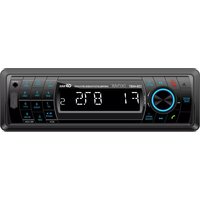
CAT-120 - Car radio DENVER - Free user manual and instructions
Find the device manual for free CAT-120 DENVER in PDF.


Pick your language and provide your email: we'll send you a specifically translated version.
| Product Type | Car Radio |
| Brand | Denver |
| Model | CAT-120 |
| Dimensions (approx.) | 180 x 50 x 160 mm (1-DIN) |
| Weight (approx.) | 0.5 kg |
| Power Supply | 12V DC (negative ground) |
| Radio Tuner | AM/FM with presets |
| Playback Sources | USB, SD card, AUX input |
| Bluetooth | Not included |
| Display | LCD screen |
| Remote Control | Not included |
| Audio Output | 4 x 25W max |
| Equalizer | Preset EQ modes |
| Clock | Yes, with 12/24h format |
| Maintenance | Clean with soft dry cloth |
| Safety Precautions | Do not expose to moisture; use in car only |
| Spare Parts | Contact Denver customer support |
| Reparability | User-serviceable fuses; otherwise seek professional |
| General Information | Designed for standard car dashboards |
Frequently Asked Questions - CAT-120 DENVER
How do I install the Denver CAT-120 car radio?
First, disconnect the car battery. Remove the old radio and connect the wiring harness of the CAT-120 to your car's wires using the color-coded diagram provided in the manual. Slide the radio into the dashboard and secure it with the mounting screws. Reconnect the battery and test the unit.
Will the CAT-120 fit my car?
The CAT-120 is a standard 1-DIN size (180 x 50 mm), so it fits most vehicles with a 1-DIN slot. For European cars, you may need an adapter cage. Check your car's radio specification before purchase.
How do I pair my phone via Bluetooth?
The Denver CAT-120 does not support Bluetooth. Use the AUX input or USB/SD card to play music from your phone.
Why is there no sound?
Check the volume level and ensure the unit is not muted. Verify that the speakers are properly connected to the wiring harness. Also check the fuse (usually 10A) on the back of the radio.
How do I set the clock?
Press and hold the CLK button (or similar) until the time blinks. Use the tune/seek buttons to adjust hours and minutes. Press CLK again to confirm.
Can I use a USB drive with music?
Yes, the CAT-120 supports USB drives formatted in FAT32 with MP3 or WMA files. Plug the drive into the USB port, and the radio will automatically read the files.
The radio displays 'ERROR' what does it mean?
This could indicate a short circuit or incorrect wiring. Check the speaker connections and ensure no wires are touching metal. Also verify the fuse is intact.
How do I clean the CAT-120?
Use a soft, dry cloth to wipe the front panel. Do not use any cleaning agents or water, as they may damage the electronics.
What power supply is required?
The radio operates on 12V DC with a negative ground system, which is standard for most cars. Ensure your car's electrical system matches.
Where can I find spare parts?
Contact Denver customer support through their official website. Provide the model number CAT-120 for assistance with spare parts like knobs, faceplates, or fuses.
User questions about CAT-120 DENVER
0 question about this device. Answer the ones you know or ask your own.
Ask a new question about this device
No questions yet. Be the first to ask one.
Download the instructions for your Car radio in PDF format for free! Find your manual CAT-120 - DENVER and take your electronic device back in hand. On this page are published all the documents necessary for the use of your device. CAT-120 by DENVER.
USER MANUAL CAT-120 DENVER

Manual assistant
Powered by Anthropic
Waiting for your message
Product information
Brand : DENVER
Model : CAT-120
Category : Car radio