CAU-444 - Car radio DENVER - Free user manual and instructions
Find the device manual for free CAU-444 DENVER in PDF.


Pick your language and provide your email: we'll send you a specifically translated version.
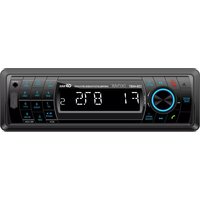
| Product Type | Car Radio / Stereo |
| Brand | Denver |
| Model | CAU-444 |
| Dimensions (W x H x D) | 178 x 50 x 160 mm (1 DIN) |
| Weight | 0.5 kg |
| Power Supply | 12V DC (negative ground) |
| Max Power Output | 4 x 50 Watts (peak) |
| Radio Bands | FM / AM (87.5-108 MHz / 522-1620 kHz) |
| Playback Sources | USB, AUX, FM/AM tuner |
| Bluetooth | Yes, for hands-free calling and audio streaming |
| Equalizer | Preset modes (Rock, Pop, Classic, Flat) |
| Display | LCD with white backlight |
| Front Panel | Detachable (removable for theft prevention) |
| Audio Inputs | 1 x AUX (3.5 mm), 1 x USB (2.0) |
| Audio Outputs | 4 x speaker outputs (RCA not included) |
| Supported USB Formats | MP3, WMA, WAV |
| Power Antenna | Yes (12V output for powered antenna) |
| Fuse Rating | 10A (mini blade) |
| Maintenance | Clean with soft dry cloth; avoid liquids and abrasives |
| Safety | Reverse polarity protection; fuse replacement only with correct rating |
| Spare Parts | Fuse (10A), wiring harness, front panel (if lost) |
| Repairability | Consult qualified technician; no user-serviceable parts inside |
Frequently Asked Questions - CAU-444 DENVER
How do I install the Denver CAU-444 car radio?
Installation requires a 1 DIN slot in your dashboard. Connect the wiring harness according to the color code: yellow (constant 12V), red (switched 12V), black (ground), and speaker wires. Ensure the fuse is intact before powering on.
How do I pair my phone via Bluetooth?
Turn on the radio and press the BT button. Search for 'Denver CAU-444' on your phone and accept the pairing request. Enter 0000 if a PIN is required.
Why is there no sound from the speakers?
Check if the radio is turned on and volume is up. Verify speaker wire connections at the radio and speaker terminals. Ensure the fader/balance settings are centered. If still no sound, test with another speaker or check the fuse.
How do I reset the radio to factory settings?
Press and hold the RST button (or a combination of buttons as per manual) for 5 seconds. Alternatively, disconnect the car battery for 10 minutes to reset the unit.
Can I use a USB drive with this radio?
Yes, insert a USB drive formatted as FAT32 with MP3/WMA/WAV files. The radio will automatically read and play the files. Use a drive up to 32GB for best compatibility.
What do the buttons on the front panel do?
The main buttons include: SRC (select source), VOL knob (volume/push to mute), EQ (equalizer presets), BT (Bluetooth), AMS (auto store radio stations). The manual provides complete details.
How do I set the clock?
Press and hold the DISP button until the hour flashes. Turn the VOL knob to set hours, press again for minutes, and turn to set. Press DISP to confirm.
Is the front panel detachable?
Yes, the front panel is detachable for theft prevention. Press the RELEASE button and slide the panel off. Store it in the provided case.
What are the recommended maintenance steps?
Clean the front panel and display with a soft, dry cloth. Avoid using liquids, alcohol, or abrasive cleaners. Periodically check the fuse and wiring connections.
Where can I find replacement parts?
Replacement fuses (10A) and wiring harnesses can be purchased from electronics stores or online. For a lost front panel, contact Denver support for availability.
User questions about CAU-444 DENVER
0 question about this device. Answer the ones you know or ask your own.
Ask a new question about this device
No questions yet. Be the first to ask one.
Download the instructions for your Car radio in PDF format for free! Find your manual CAU-444 - DENVER and take your electronic device back in hand. On this page are published all the documents necessary for the use of your device. CAU-444 by DENVER.
USER MANUAL CAU-444 DENVER

Manual assistant
Powered by Anthropic
Waiting for your message
Product information
Brand : DENVER
Model : CAU-444
Category : Car radio