USER MANUAL Aspire T28P4A HUSQVARNA
natural_image
Silhouette of a tool or probe with a handle and base, no text or symbols present
Aspire T28-P4A

EN Operator's manual 8-26

natural_image
Three simple line drawings: a battery symbol, a house outline, and a square frame, all without any text or symbols.


natural_image
Line drawing of a shoe handle with a clip and arrow indicating a specific part (no text or symbols present)

natural_image
Diagram of a shoe handle with internal components and directional arrows indicating movement (no text or symbols)
natural_image
Diagram of a shoe's foot and ankle mechanism with directional arrows indicating movement (no text or symbols)

natural_image
Three technical illustrations of industrial components: a spool, a washing machine, and a coiled wire (no text or symbols)

natural_image
Technical line drawing of a mechanical device with a lever and base component, no text or symbols present
natural_image
Technical line drawing of a mechanical device with no visible text or symbols
natural_image
Line drawing of a shoe component with a directional arrow and bracket (no text or symbols)
natural_image
Line drawing of a power saw blade with a curved blade and handle, showing motion direction (no text or symbols)


natural_image
Technical line drawing of a car interior showing a top-down view and internal components (no text or symbols)

natural_image
Diagram of a handheld device with an internal component, showing no text or symbols

natural_image
Diagram of a mechanical clamp or bracket with directional arrows indicating motion (no text or symbols)
natural_image
Technical line drawing of a mechanical clamp or bracket assembly (no text or symbols)
natural_image
Technical line drawing of a mechanical joint or clamp mechanism (no text or symbols)
natural_image
Simple line drawing of a grassy field with a small tool, no text or symbols present

natural_image
Simple line drawing of a grassy field with a small circular object on top, no text or symbols present.
natural_image
Illustration of a person using a mechanical device with motion arrows indicating direction (no text or symbols)

natural_image
Line drawing of a plug connector with arrows indicating internal structure (no text or symbols)
natural_image
Technical line drawing of a mechanical device with no visible text or symbols
natural_image
Line drawing of a vertical mechanical device with attached components (no text or symbols)
Contents
Introduction....8
Safety....9
Assembly.... 16
Operation....16
Maintenance.... 18
Troubleshooting....19
Transportation, storage and disposal.... 20
Technical data.... 21
Accessories.... 22
Declaration of Conformity.... 23
Licenses....25
Appendix ....528
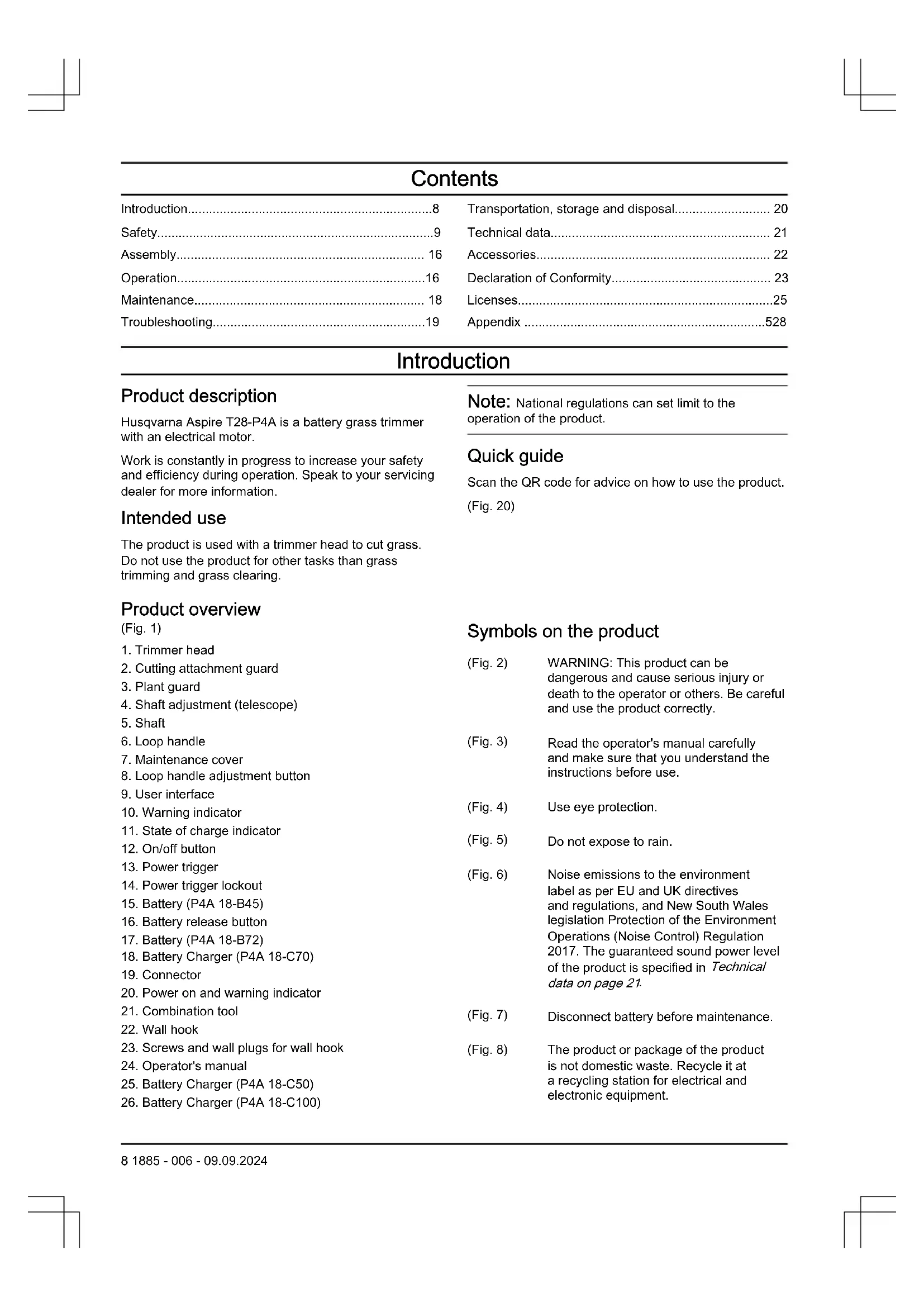
Introduction
Product description
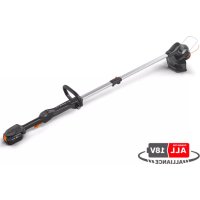
Husqvarna Aspire T28-P4A is a battery grass trimmer with an electrical motor.
Work is constantly in progress to increase your safety and efficiency during operation. Speak to your servicing dealer for more information.
Intended use
The product is used with a trimmer head to cut grass. Do not use the product for other tasks than grass trimming and grass clearing.
Note: National regulations can set limit to the operation of the product.
Quick guide
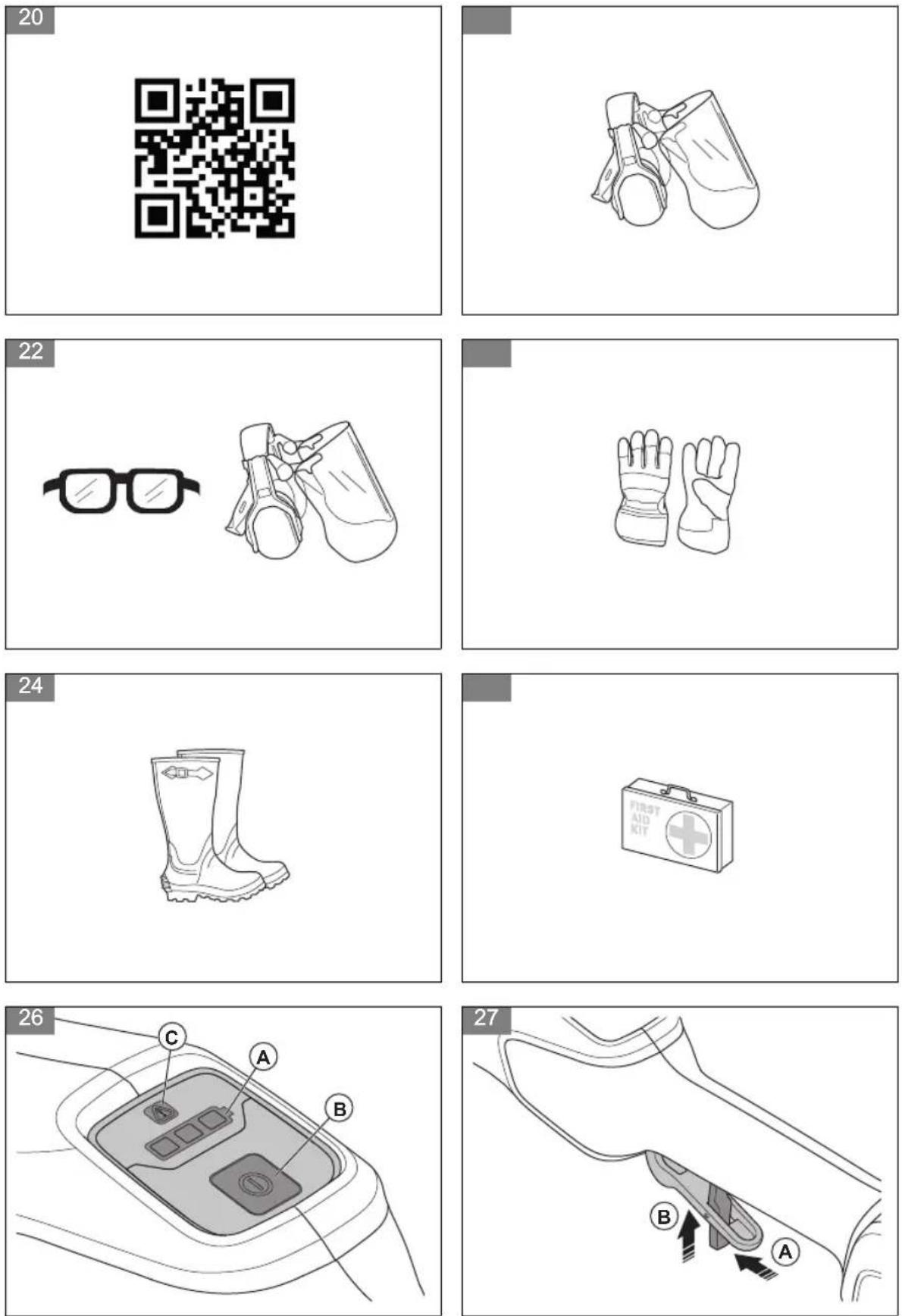
Scan the QR code for advice on how to use the product.
(Fig. 20)
Product overview
(Fig. 1)
- Trimmer head
- Cutting attachment guard
- Plant guard
- Shaft adjustment (telescope)
- Shaft
- Loop handle
- Maintenance cover
- Loop handle adjustment button
- User interface
- Warning indicator
- State of charge indicator
- On/off button
- Power trigger
- Power trigger lockout
- Battery (P4A 18-B45)
- Battery release button
- Battery (P4A 18-B72)
- Battery Charger (P4A 18-C70)
- Connector
- Power on and warning indicator
- Combination tool
- Wall hook
- Screws and wall plugs for wall hook
- Operator's manual
- Battery Charger (P4A 18-C50)
- Battery Charger (P4A 18-C100)
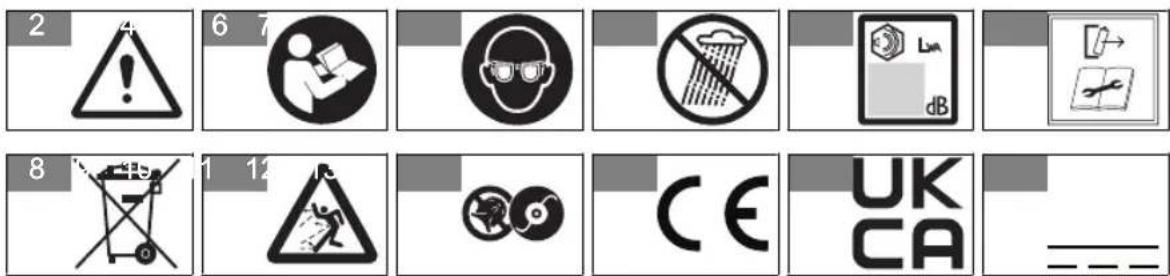
Symbols on the product
(Fig. 2) WARNING: This product can be dangerous and cause serious injury or death to the operator or others. Be careful and use the product correctly.
(Fig. 3) Read the operator's manual carefully and make sure that you understand the instructions before use.
(Fig. 4) Use eye protection.
(Fig. 5) Do not expose to rain.
(Fig. 6) Noise emissions to the environment label as per EU and UK directives and regulations, and New South Wales legislation Protection of the Environment Operations (Noise Control) Regulation 2017. The guaranteed sound power level of the product is specified in Technical data on page 21.
(Fig. 7) Disconnect battery before maintenance.
(Fig. 8) The product or package of the product is not domestic waste. Recycle it at a recycling station for electrical and electronic equipment.
(Fig. 9) Beware of thrown objects.
(Fig. 10) Do not use metal blades.
(Fig. 11) The product agrees with the applicable EU directives.
(Fig. 12) The product conforms to the applicable UK regulations.
(Fig. 13) Direct current.
The distance between the machine and bystanders shall be at least 15 m (50 ft).
yyyywwxxxxx The rating plate or the laser
printing shows the serial number.
yyyy is the production year and
ww is the production week.
Symbols on the battery and/or on the battery charger
(Fig. 18)
Recycle this product at a recycling station for electrical and electronic equipment. (Applies to Europe only)
(Fig. 19) Use the battery on-
ly in products from POWER FOR ALL System partners.
(Fig. 14) Fail-safe transformer.
(Fig. 15) Use and keep the battery charger indoors only.
(Fig. 16) Double insulation.
Product damage
We are not responsible for damages to our product if:
• the product is incorrectly repaired.
- the product is repaired with parts that are not from the manufacturer or not approved by the manufacturer.
- the product has an accessory that is not from the manufacturer or not approved by the manufacturer.
- the product is not repaired at an approved service center or by an approved authority.
Manufacturer
Husqvarna AB
SE-561 82, Huskvarna, Sweden
Safety
Safety definitions
Warnings, cautions and notes are used to point out specially important parts of the manual.

WARNING: Used if there is a risk of injury or death for the operator or bystanders if the instructions in the manual are not obeyed.

CAUTION: Used if there is a risk of damage to the product, other materials or the adjacent area if the instructions in the manual are not obeyed.
Note: Used to give more information that is necessary in a given situation.
General machine safety warnings

WARNING: Read all safety warnings, instructions, illustrations and specifications provided with this power tool. Failure to follow all instructions listed below may result in electric shock, fire and/or serious injury.
Note: The term "machine" in the warnings refers to your mains-operated (corded) machine or battery-operated (cordless) machine.
Check before starting
• Always remove the battery to prevent the product being started by accident. Always remove the battery before any maintenance on the product.
- Before using the product and after any impact, check for signs of wear or damage and repair as necessary.
- Inspect the working area. Remove all loose objects, such as stones, broken glass, nails, steel wire, string
etc. that could be thrown out or become wrapped around the cutter or cutter guard.
- Check the motor for dirt and cracks. Clean off grass and leaves from the motor using a brush. Gloves should be worn when necessary.
- Check that the trimmer head is completely attached to the trimmer.
- Check that the product is in perfect working order. Check that all nuts and screws are tight.
- Check that the trimmer head and trimmer guard are not damaged or cracked. Replace the trimmer head or trimmer guard if they have been exposed to impact or are cracked. Always use the recommended guard for the cutting attachment you are using. See chapter on Technical data.
- The product operator must ensure that no people or animals come closer than 15 meters while working. When several operators are working in the same area the safety distance should be at least 15 meters.
- Carry out an overall inspection of the product before use. See the maintenance schedule.
- National or local regulations may regulate the use. Comply to given regulations.
Work area safety
- Keep work area clean and well lit. Cluttered or dark areas invite accidents.
- Do not operate machine in explosive atmospheres, such as in the presence of flammable liquids, gases or dust. Machines create sparks which may ignite the dust or fumes.
- Keep children and bystanders away while operating a machine. Distractions can cause you to lose control.
Electrical safety
- Machine plugs must match the outlet. Never modify the plug in any way. Do not use any adapter plugs with earthed (grounded) machines. Unmodified plugs and matching outlets will reduce risk of electric shock.
- Avoid body contact with earthed or grounded surfaces, such as pipes, radiators, ranges and refrigerators. There is an increased risk of electric shock if your body is earthed or grounded.
- Do not expose machines to rain or wet conditions. Water entering a machine will increase the risk of electric shock.
- Do not abuse the cord. Never use the cord for carrying, pulling or unplugging the machine. Keep cord away from heat, oil, sharp edges or moving parts. Damaged or entangled cords increase the risk of electric shock.
- When operating a machine outdoors, use an extension cord suitable for outdoor use. Use of a cord suitable for outdoor use reduces the risk of electric shock.
- If operating a machine in a damp location is unavoidable, use a residual current device (RCD) protected supply. Use of a RCD reduces the risk of electric shock.
Personal safety
- Stay alert, watch what you are doing and use common sense when operating a machine. Do not use a machine while you are tired or under the influence of drugs, alcohol or medication. A moment of inattention while operating machines may result in serious personal injury.
- Use personal protective equipment. Always wear eye protection. Protective equipment such as dust mask, non-skid safety shoes, hard hat or hearing protection used for appropriate conditions will reduce personal injuries.
- Prevent unintentional starting. Ensure the switch is in the OFF-position before connecting to a power source and/or battery pack, picking up or carrying the machine. Carrying machines with your finger on the switch or energising machines that have the switch on invites accidents.
- Remove any adjusting key or wrench before turning the machine on. A wrench or a key left attached to a rotating part of the machine may result in personal injury.
- Do not overreach. Keep proper footing and balance at all times. This enables better control of the machine in unexpected situations.
- Dress properly. Do not wear loose clothing or jewellery. Keep your hair and clothing away from moving parts. Loose clothes, jewellery or long hair can be caught in moving parts.
- If devices are provided for the connection of dust extraction and collection facilities, ensure these are connected and properly used. Use of dust collection can reduce dust-related hazards.
- Do not let familiarity gained from frequent use of machines allow you to become complacent and ignore machine safety principles. A careless action can cause severe injury within a fraction of a second.
- The vibration emission during actual use of the machine can differ from the declared total value depending on the ways in which the machine is used. Operators should identify safety measures to protect themselves that are based on an estimation of exposure in the actual conditions of use (taking account of all parts of the operating cycle such as the times when the machine is switched off and when it is running idle in addition to the trigger).
Machine use and care
- Do not force the machine. Use the correct machine for your application. The correct machine will do the job better and safer at the rate for which it was designed.
-
Do not use the machine if the switch does not turn it on and off. Any machine that cannot be controlled with the switch is dangerous and must be repaired.
-
Disconnect the plug from the power source and/or remove the battery pack, if detachable, from the machine before making any adjustments, changing accessories, or storing machines. Such preventive safety measures reduce the risk of starting the machine accidentally.
- Store idle machines out of the reach of children and do not allow persons unfamiliar with the machines or these instructions to operate the machines. Machines are dangerous in the hands of untrained users.
- Maintain machines and accessories. Check for misalignment or binding of moving parts, breakage of parts and any other condition that may affect the machines's operation. If damaged, have the machine repaired before use. Many accidents are caused by poorly maintained machines.
- Keep cutting tools sharp and clean. Properly maintained cutting machines with sharp cutting edges are less likely to bind and are easier to control.
- Use the machine, accessories and bits etc. in accordance with these instructions, taking into account the working conditions and the work to be performed. Use of the machine for operations different from those intended could result in a hazardous situation.
- Keep handles and grasping surfaces dry, clean and free from oil and grease. Slippery handles and grasping surfaces do not allow for safe handling and control of the machine in unexpected situations.
- Recharge only with the charger specified by the manufacturer. A charger that is suitable for one type of battery pack may create a risk of fire when used with another battery pack.
- Use products only with specifically designated battery packs. Use of any other battery packs may create a risk of injury and fire.
- When battery pack is not in use, keep it away from other metal objects, like paper clips, coins, keys, nails, screws or other small metal objects, that can make a connection from one terminal to another. Shorting the battery terminals together may cause burns or a fire.
- Under abusive conditions, liquid may be ejected from the battery; avoid contact. If contact accidentally occurs, flush with water. If liquid contacts eyes, additionally seek medical help. Liquid ejected from the battery may cause irritations or burns.
- Do not use a battery pack or tool that is damaged or modified. Damaged or modified batteries may exhibit unpredictable behavior resulting in fire, explosion or risk of injury.
- Do not expose a battery pack or tool to fire or excessive temperature. Exposure to fire or temperature above 130ircC / 265ircF may cause explosion.
- Follow all charging instructions and do not charge the battery pack or tool outside the temperature range specified in the instructions. Charging improperly or at temperatures outside the specified range may damage the battery and increase the risk of fire.
Service
- Have your machine serviced by a qualified repair person using only identical replacement parts. This will ensure that the safety of the machine is maintained.
- Never service damaged battery packs. Service of battery packs should only be performed by the manufacturer or authorized service providers.
Always use common sense
It is not possible to cover every conceivable situation you can face. Always exercise care and use your common sense. Avoid all situations which you consider to be beyond your capability. If you still feel uncertain about operating procedures after reading these instructions, you should consult an expert before continuing.

WARNING: Never allow children to use or be in the vicinity of the machine. Since the machine is easy to start, children may be able to start it if they are not kept under full surveillance. This can mean a risk of serious personal injury. Therefore disconnect the battery when the machine is not under close supervision.
General safety instructions

WARNING: Read the warning instructions that follow before you use the product.
- Remove the battery to prevent the product from being started by accident.
- This product is a dangerous tool if you are not careful or if you use the product incorrectly. This product can cause serious injury or death to the operator or others.
- Do not use the product if it is changed from its initial specification. Do not change a part of the product without approval from the manufacturer. Only use parts that are approved by the manufacturer. Injury or death is a possible result of incorrect maintenance.
-
Do a check of the product before use. See, Check before starting on page 9 and Before you operate the product on page 16. Do not use a product that is damaged or does not operate correctly. Do the safety checks, maintenance and service instructions described in this manual.
-
Children should be supervised to ensure that they do not play with the product. Never allow children or other persons not trained in the use of the product and/or the battery to use or service it. Local laws may regulate the age of the user.
- Keep the product in a locked area to prevent access for children or persons that are not approved.
- Store the product out of reach of children.
- Under no circumstances may the design of the product be modified without the permission of the manufacturer. Always use original accessories. Non-authorized modifications and/or accessories can result in serious personal injury or the death of the operator and others.
Note: National or Local laws can regulate the use.
Comply to given regulations.
Safety instructions for operation

WARNING: Read the warning instructions that follow before you use the product.
- Do not use the machine in bad weather conditions, especially when there is a risk of lightning. This decreases the risk of being struck by lightning.
- Thoroughly inspect the area for wildlife where the machine is to be used. Wildlife may be injured by the machine during operation.
- Thoroughly inspect the area where the machine is to be used and remove all stones, sticks, wires, bones, and other foreign objects. Thrown objects can cause personal injury.
- Before using the machine, always visually inspect to see that the cutter and the cutter assembly are not damaged. Damaged parts increase the risk of injury.
- Keep guards in place. Guards must be in working order and be properly mounted. A guard that is loose, damaged, or is not functioning correctly may result in personal injury.
- Keep all cooling air inlets clear of debris. Blocked air inlets and debris may result in overheating or risk of fire.
- Wear eye protection and ear protection. Adequate protective equipment will reduce personal injury.
- While operating the machine, always wear non-slip and protective footwear. Do not operate the machine when barefoot or wearing open sandals. This reduces the chance of injury to the feet from contact with the moving cutter.
• Always wear clothing such as trousers that covers the operator's legs while operating the machine. Contact with the moving cutter or line may cause injury.
-
Keep bystanders away while operating the machine. Thrown debris can result in serious personal injury.
-
Do not operate the machine above waist height. This helps prevent unintended cutter contact and enables better control of the machine in unexpected situations.
- Exercise caution when operating the machine in wet grass. Walk, never run. This reduces the risk of slipping and falling which may result in personal injury.
- Do not operate the machine on excessively steep slopes. This reduces the risk of loss of control, slipping and falling which may result in personal injury.
- When working on slopes, always be sure of your footing, always work across the face of slopes, never up or down and exercise extreme caution when changing direction. This reduces the risk of loss of control, slipping and falling which may result in personal injury.
- Keep all power cords and cables away from cutting area. Power cords or cables may be hidden in hedges or bushes and can be accidentally cut or damaged by the line or cutter.
- Keep all parts of the body away from the moving trimmer cutter or line. Do not clear material from the machine until it has been disconnected from the power source. The moving trimmer cutter or line may result in serious personal injury.
- Carry the machine with the machine switched off and away from your body. Proper handling of the machine will reduce the likelihood of accidental contact with a moving trimmer cutter or line.
- Only use replacement cutting heads and trimmer cutters or lines specified by the manufacturer. Do not replace the trimmer cutters or lines with metal wires or blades. Incorrect replacement parts may cause loss of control, breakage and injury.
Personal protective equipment

WARNING: Read the warning instructions that follow before you use the product.
• Always use approved personal protective equipment when you use the product. Personal protective equipment cannot fully prevent injury but it decreases the degree of injury if an accident does occur. Let your dealer help you select the correct equipment.
- Use approved hearing protection.
(Fig. 21)
- Use approved eye protection. If you use a visor, you must also use approved protective goggles. Approved protective goggles must comply with the ANSI Z87.1 standard in the USA or EN 166 in EU countries.
(Fig. 22)
- Use gloves when it is necessary, for example when you attach, examine or clean the cutting equipment.
(Fig. 23)
- Use protective boots with steel toe-cap and non-slip soles.
(Fig. 24)
- Use clothing made of a strong fabric. Always use heavy, long pants and long sleeves. Do not use loose clothing that can catch on twigs and branches. Do not use jewelry, short pants or sandals. Do not go with bare feet. Put your hair up safely above shoulder level.
- Keep first aid equipment near.
(Fig. 25)
Safety devices on the product

WARNING: Read the warning instructions that follow before you use the product.
In this section the product's safety features, its purpose and how checks and maintenance should be carried out to ensure that it operates correctly. See instructions under the heading Introduction on page 8 to find where these parts are located on your product.
The life span of the product can be reduced and the risk of accidents can increase if product maintenance is not carried out correctly and if service and/or repairs are not carried out professionally. If you need further information please contact your nearest servicing dealer.

WARNING: Never use a product with damaged safety components. The product's safety equipment must be inspected and maintained as described in this section. If your product fails any of these checks, contact your service agent to get it repaired.

CAUTION: All servicing and repair work on the machine requires special training. This is especially true of the machine's safety equipment. If your machine fails any of the checks described below you must contact your service agent. When you buy any of our products we guarantee the availability of professional repairs and service. If the retailer who sells your machine is not a servicing dealer, ask him for the address of your nearest service agent.
To do a check of the user interface
The green LEDs (A) show the battery status when the product is on but not in operation.
- Press and hold the on/off button (B). (Fig. 26)
a) The product is on when the green LEDs (A) are on.
b) The product is off when the green LEDs (A) are off.
- Refer to Troubleshooting on page 19 if the warning indicator (C) comes on or flashes.
To do a check of the power trigger lockout
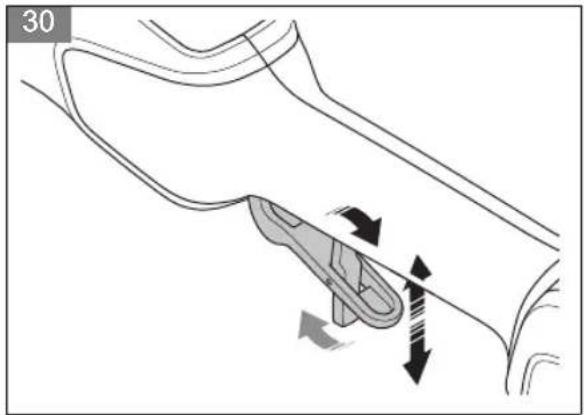
The power trigger lockout prevents accidental start. When you push the power trigger lockout (A), it releases the power trigger (B). When you release the handle, the power trigger and the power trigger lockout move back to their initial positions.
(Fig. 27)
- Make sure that the power trigger is locked when the power trigger lockout is in its initial position. (Fig. 28)
- Push the power trigger and make sure that it moves back to its initial position when you release it. (Fig. 29)
- Make sure that the power trigger and the power trigger lockout moves freely and that the return spring works correctly. (Fig. 30)
- Start the product. Refer to To start the product on page 17.
- Release the power trigger and make sure that the cutting attachment stops fully.
To do a check of the cutting attachment guard

WARNING: Do not use a cutting attachment without an approved and correctly attached cutting attachment guard. Always use the recommended cutting attachment guard for the cutting attachment that you use, see Technical data on page 21. If an incorrect or faulty cutting attachment guard is attached, it can cause serious personal injury.
The cutting attachment guard stops objects that eject in the direction of the operator. The cutting attachment guard also prevents injuries that can occur if you touch the cutting attachment.
- Stop the motor.
- Do a visual check for damages, for example cracks.
- Replace the cutting attachment guard if it is damaged.
Cutting equipment
Select correct cutting equipment and do maintenance on the cutting equipment to:
- Get maximum cutting performance.
- Increase lifetime of the cutting equipment.

WARNING: Only use cutting
attachments with the guards we recommend! See Technical data on page 21. Refer to the instructions for the cutting
attachment to find the correct way to load the trimmer line and the correct trimmer line diameter.

WARNING: A defective cutting attachment may increase the risk of accidents.
Trimmer head

WARNING: Always make sure the trimmer line is wound tightly and evenly around the drum to prevent harmful vibration.
(Fig. 31)
- Only use recommended trimmer heads and trimmer lines.
- Only use recommended cutting attachments.
- Smaller machines requires small trimmer heads and vice versa.
- The length of the trimmer line is important. A longer trimmer line requires greater engine power than a shorter trimmer line of the same diameter.
- Make sure that the cutter on the trimmer guard is intact. This cuts the trimmer line to the correct length.
- Soak the trimmer line in water for a couple of days before use to increase the life length.
Battery safety

WARNING: Read all the safety and general instructions. Failure to observe the safety and general instructions may result in electric shock, fire and / or serious injury. Keep all the safety information and general instructions for future reference.
• These safety instructions apply only to 18V Li-ion rechargeable batteries for the POWER FOR ALL system.
- Use the rechargeable battery only in products from POWER FOR ALL System partners. 18 V rechargeable batteries labelled with POWER FOR ALL are fully compatible with the following products:
- All products of the 18V POWER FOR ALL battery system.
– All 18 V products from POWER FOR ALL System partners.
- Observe the battery recommendations in the operating manual of your product. Only this way can the rechargeable battery and the product be operated without danger and the rechargeable batteries protected from hazardous overloading.
- Only charge the batteries using chargers recommended by the manufacturer or by POWER
FOR ALL system partners. A charger that is suitable for one type of battery may pose a fire risk when used with a different battery.
- The battery is supplied partially charged. To ensure full battery capacity, fully charge the battery in the charger before using your power tool for the first time.
- Keep battery packs out of the reach of children.
- Do not open the battery. There is a risk of shortcircuiting.
- In case of damage and improper use of the battery, vapours may be emitted. The battery can set alight or explode. Ensure the area is well ventilated and seek medical attention should you experience any adverse effects. The vapours may irritate the respiratory system.
- If used incorrectly or if the battery is damaged, flammable liquid may be ejected from the battery. Contact with this liquid should be avoided. If contact accidentally occurs, rinse off with water. If the liquid comes into contact with your eyes, seek additional medical attention. Liquid ejected from the battery may cause irritation or burns.
- If the battery is damaged liquid can be ejected and cover nearby surfaces. Check affected parts. Clean these parts or change them if necessary.
- Do not short-circuit the battery pack. When the battery pack is not in use, keep it away from other metal objects, like paper clips, coins, keys, nails, screws or other small metal objects, that can make a connection from one terminal to another. Shorting the battery terminals together may cause burns or a fire.
- The battery can be damaged by pointed objects such as nails or screwdrivers or by force applied externally. An internal short circuit may occur, causing the battery to burn, smoke, explode or overheat.
- Never service damaged battery packs. Service of battery packs should only be performed by the manufacturer or authorized service providers.
- Protect the battery against heat, e. g. against continuous intense sunlight, fire, dirt, water and moisture. There is a risk of explosion and short-circuiting.
- Use the battery in the product only when the ambient temperature is between -5ircC - 40ircC .
- Only store the battery at an ambient temperature between -20 °C — 50 °C. Do not leave the battery in your car in the summer, for example. At temperatures of < 0 °C some devices may experience a loss of power.
- Only charge the battery at an ambient temperature which is between 0ircC - 35ircC . Charging outside of this temperature range can increase the risk of damage to the battery and pose a fire hazard.
Battery charger safety

WARNING: Read all the safety and general instructions. Failure to observe the safety and general instructions may result in electric shock, fire and / or serious injury. Store these instructions in a safe place. Only use the charger if you can fully evaluate all functions and carry them out without restrictions, or if you have received corresponding instructions.
- This charger is not intended for use by children or persons with physical, sensory or mental limitations or a lack of experience or knowledge. This charger can be used by children aged 8 or older and by persons who have physical, sensory or mental limitations or a lack of experience or knowledge if a person responsible for their safety supervises them or has instructed them in the safe operation of the charger and they understand the associated dangers. Otherwise, there is a risk of operating errors and injuries.
- Supervise children during use, cleaning and maintenance. This will ensure that children do not play with the charger.
- Only charge 18V POWER FOR ALL system batteries with a capacity of 1.5 Ah and above. The battery voltage must match the battery charging voltage of the charger. Do not charge any non-rechargeable batteries. Otherwise there is a risk of fire and explosion.
- Only use the charger in enclosed spaces and do not expose it to wet conditions. Water entering a power tool will increase the risk of electric shock.
- Keep the charger clean. Dirt poses a risk of electric shock.
• Always check the charger, cable and plug before use. Stop using the charger if you discover any damage. Do not open the charger yourself, and have it repaired only by Husqvarna or by an authorised after-sales service centre using only original replacement parts. Damaged chargers, cables and plugs increase the risk of electric shock.
- Do not operate the charger on an easily ignited surface (e. g. paper, textiles, etc.) or in a flammable environment. There is a risk of fire due to the charger heating up during operation.
- Do not cover the ventilation slots of the charger. Otherwise, the charger may overheat and no longer function properly.
- Recharge only with the charger specified by the manufacturer. A charger that is suitable for one type
of battery pack may create a risk of fire when used with another battery pack.
- In case of damage and improper use of the battery, vapours may also be emitted. Ensure the area is well ventilated and seek medical attention should you experience any adverse effects. The vapours may irritate the respiratory system.
- Under abusive conditions, liquid may be ejected from the battery. Contact with this liquid should be avoided. If contact accidentally occurs, rinse off with water. If the liquid comes into contact with your eyes, seek additional medical attention. Liquid ejected from the battery may cause irritation or burns.
- Products sold in GB only: Your product is fitted with an BS 1363/A approved electric plug with internal fuse (ASTA approved to BS 1362). If the plug is not suitable for your socket outlets, it should be cut off and an appropriate plug fitted in its place by an authorised customer service agent. The replacement plug should have the same fuse rating as the original plug. The severed plug must be disposed of to avoid a possible shock hazard and should never be inserted into a mains socket elsewhere.
Safety instructions for maintenance

WARNING: Read the warning instructions that follow before you do maintenance on the product.
- Remove the battery before you do maintenance, other checks or assemble the product.
- The operator must only do the maintenance and servicing shown in this operator's manual. Turn to your servicing dealer for maintenance and servicing of a larger extension.
- Do not clean the battery or the battery charger with water. Strong detergent can cause damage to the plastic.
- If you do not do maintenance, it decreases the life cycle of the product and increases the risk of accidents.
- Special training is necessary for all servicing and repair work, especially for the safety devices on the product. If not all checks in this operator's manual are approved after you have done maintenance, turn to your servicing dealer. We guarantee that there are professional repairs and servicing available for your product.
- Only use original spare parts.
Assembly
Introduction

WARNING: Read and understand the safety chapter before you assemble the product.
To attach the trimmer guard
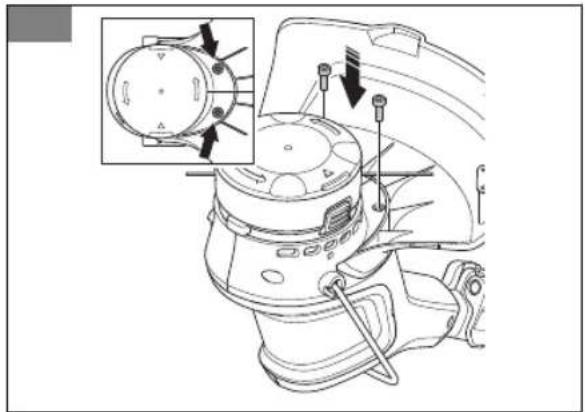
- Put the trimmer guard against the motor housing. (Fig. 32)
- Install the 2 bolts through the motor housing and the trimmer guard. (Fig. 33)
- Tighten the bolts.
To assemble the trimmer head
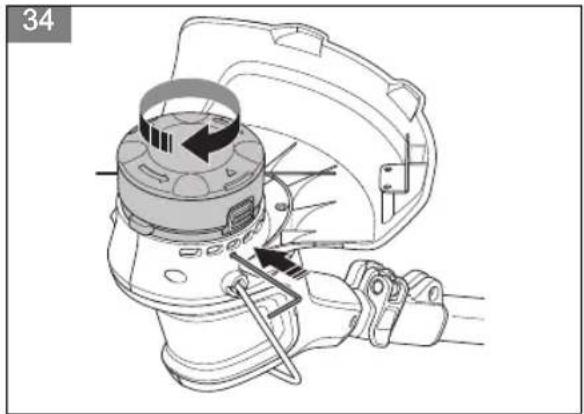
- Turn the output shaft until the hole in the drive disc aligns with the hole in the gear housing.
- Install the combination tool in the hole to lock the shaft.
- Turn the trimmer head clockwise. (Fig. 34)
To install the plant guard
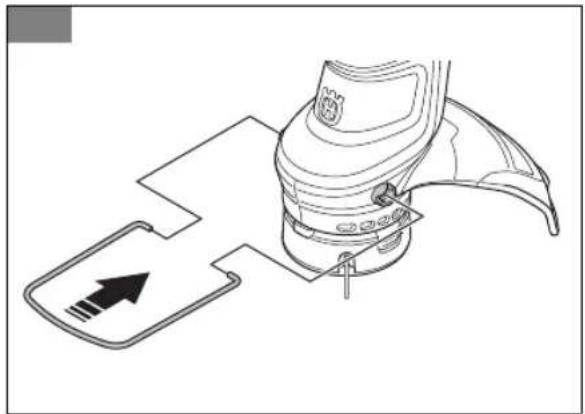
-
Install the plant guard into the holes on the motor housing. (Fig. 35)
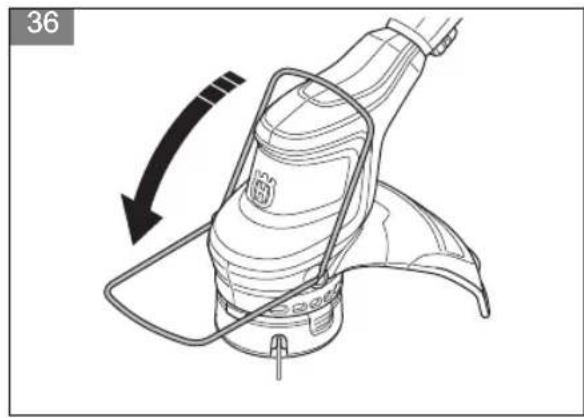
-
Make sure that the plant guard can move forward and rearward freely. (Fig. 36)
To install the hook on the wall
• Install the hook indoors.
- Keep the hook out of sunlight and in ambient temperature of -10ircC to 70ircC .
• Install the hook on a drywall, wood or concrete wall.

CAUTION: Make sure that the wall can hold loads of minimum 30 kg.
• Install the hook on the wall with the 3 screws (A). Use wall plugs (B) if it is necessary. (Fig. 37)

CAUTION: Make sure that the screws are applicable for your wall type.
- Speak to your Husqvarna service agent for information about available storage accessories for your product.
Operation
Introduction

WARNING: Read and understand the safety chapter before you use the product.
Before you operate the product
- Examine the work area to make sure that you know the type of terrain. Examine the slope of the ground and if there are obstacles such as stones, branches and ditches.
- Do a general inspection of the product.
- Do the safety inspections, maintenance and servicing that are given in this manual.
- Examine the motor for dirt or cracks. Use a brush to clean the motor from grass and leaves. Use gloves when it is necessary.
- Examine the trimmer head and cutting attachment guard for damages or cracks. Replace the trimmer head and cutting attachment guard if they are hit or if they have cracks.
- Make sure that all nuts and screws are tight.
- Make sure that all covers, guards, handles and the cutting equipment are correctly attached and not damaged before you start the product.
Battery

WARNING: Before you use the battery, you must read and understand the safety chapter. You must also read and understand the operator's manual for the battery and the battery charger.
Keep the battery and the battery charger in correct ambient temperatures.
| Ambient temperature |
| Operation of the bat-tery in the product | -5 °C — 40 °C |
| Charging of the bat-tery | 0 °C — 35 °C |
To charge the battery
Charge the battery before the first use.
Note: The charging process is only possible when the temperature of the battery is within the permitted charging temperature range (0–35 °C).
- Connect the power cord for the battery charger in a grounded mains.

CAUTION: Make sure that the mains has the correct voltage and frequency.
-
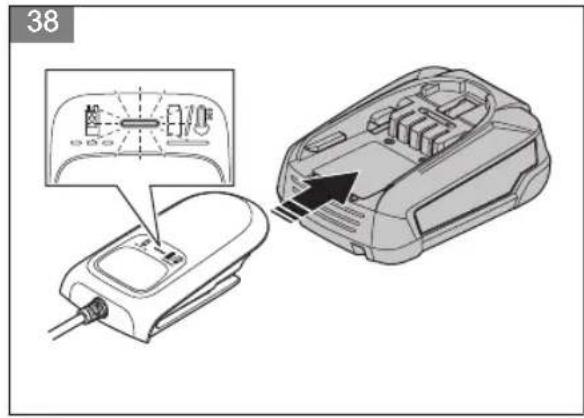
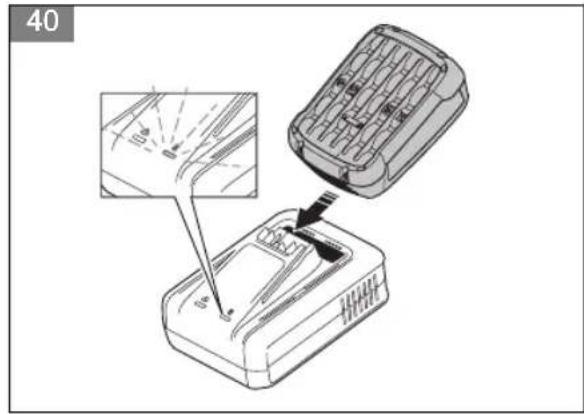
Put the battery in the battery charger. The battery is connected to the battery charger when the green LED flashes. (Fig. 38) (Fig. 39) (Fig. 40)
-
The battery is fully charged when the green LED on the battery charger is on. Charge the battery for maximum 24 hours.
-
Disconnect the battery charger from the mains.

CAUTION: Do not pull the power cord.
- Remove the battery from the battery charger.
Battery status LED on the battery charger
The red LED (A) and the green LED (B) on battery charger show the battery status. Refer to Battery status LED on the product on page 17.
(Fig. 41)
| Battery charger | LED Battery status | |
| P4A 18-C50 | The green LED flashes. | The battery is charging. |
| P4A 18-C70 | The green LED flashes quickly. | The battery is charging. |
| P4A 18-C100 | The green LED flashes slowly. | The battery is 80% charged. |
| P4A 18-C50 | The green LED is on. | The battery is fully charged. |
| P4A 18-C70 |
| P4A 18-C100 |
| P4A 18-C70 | The red LED is on. | Refer to Battery charger on page 20. |
| P4A 18-C100 | The red LED flashes quickly. | Refer to Battery charger on page 20. |
Battery status LED on the product
When the battery is installed in the product, the LEDs on the product show the battery status.
(Fig. 42)
| LED | Battery status |
| LED 1, 2 and 3 are lit. | Fully charged. |
| LED 1 and 2 are lit. | Sufficiently charged |
| LED 1 is lit. The battery power is low. |
| LED 1 flashes. The battery is empty. The battery status indicator flashes.Charge the battery. Refer to To charge the battery on page 16. |
To connect the battery to the product
WARNING: Only use the battery with products of the POWER FOR ALL system 18V.
- Make sure that the battery is fully charged.
- Slide the battery into the battery holder of the product. The battery must slide into the holder easily, if not, it is not installed correctly. (Fig. 43)
- The battery locks into position when you hear a click.
To start the product
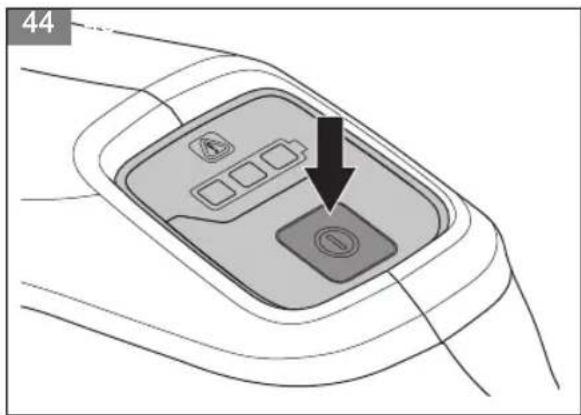
- Push and hold the on/off button until the green LED comes on. (Fig. 44)
- Push the power trigger lockout and the power trigger. The cutting equipment starts to rotate.
To adjust the loop handle and telescopic shaft
- Press the loop handle adjustment button. (Fig. 45)
- Adjust the loop handle to a suitable angle.
- Release the loop handle adjustment button.
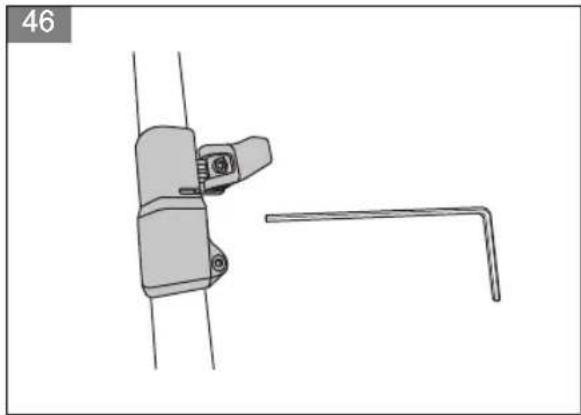
- Loosen the lever on the shaft. (Fig. 46)
- Set the necessary length on the shaft.
- Close the lever and tighten the screw.
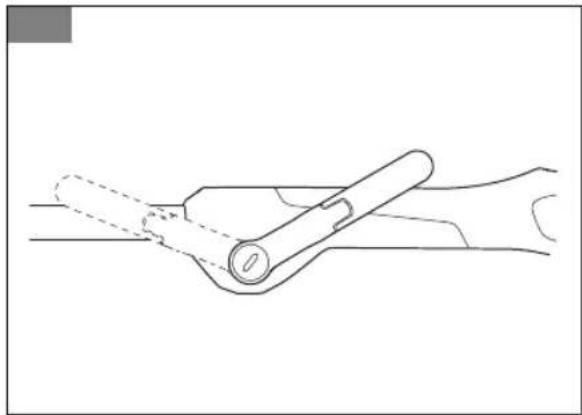
Note: The two loop handle positions in the following illustration are only for transportation and/or storage.
(Fig. 47)
Automatic shutdown function
The product has an automatic shutdown function that stops the product if it is not used. The product shuts down after 3 minutes.
To operate the product
To trim the grass
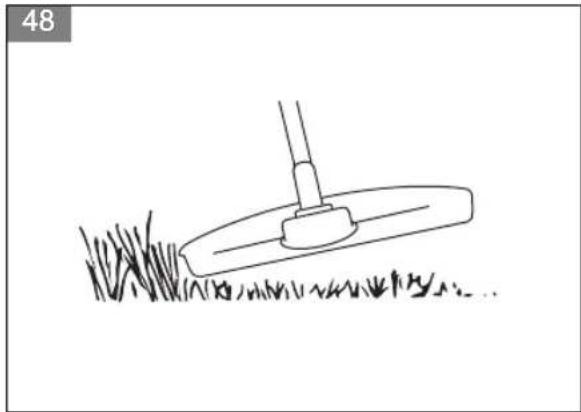
- Hold the trimmer head immediately above the ground at an angle. Do not push the trimmer line into the grass. (Fig. 48)
- Decrease the length of the trimmer line by 8–10 cm/3.15–4 in.
To clear grass
- Keep the trimmer head above the ground.
- Tilt the trimmer head.
- Cut with the end of the trimmer line around objects in the work area.

CAUTION: Cut grass. Other objects that are hit by the trimmer line, increases the wear on the trimmer line.
To cut the grass
- Make sure that the trimmer line is parallel to the ground when you cut the grass. (Fig. 49)
- Do not push the trimmer head to the ground. This can cause damage to the product.
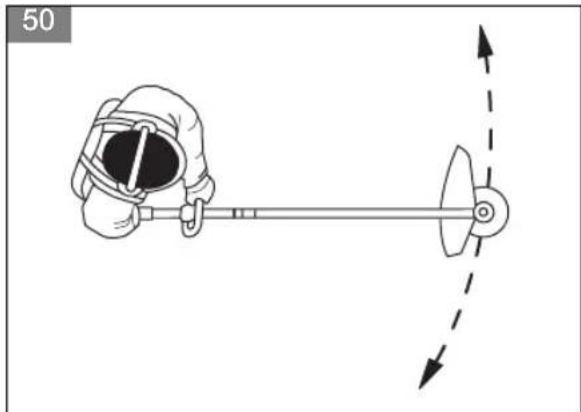
- Move the product from side to side when you cut grass. (Fig. 50)
To sweep the grass
The airflow from the rotating trimmer line can be used to remove cut grass from an area.
- Hold the trimmer head and the trimmer line parallel to the ground and above the ground.
- Move the trimmer head from side to side and sweep the grass.

WARNING: Clean the trimmer head cover each time you assemble new trimmer line to prevent unbalance and vibrations in the handles. Also do a check of the other parts of the trimmer head and clean it if necessary.
To stop the product
- Release the power trigger and the power trigger lockout.
- Push the on/off button until the green LED goes off.
- Push the release button on the battery and remove the battery from the product. (Fig. 51)
To replace trimmer line
Refer to the last page of this operator's manual.
Maintenance
Introduction

WARNING: Read and understand the safety chapter before you do maintenance on the product.
Maintenance schedule

WARNING: Remove the battery before you do maintenance.
The following is a list of the maintenance steps that you must do on the product. See Maintenance on page 18 for more information.
| Maintenance Daily Weekly Monthly | | | |
| Clean the external parts of the product with a dry cloth. Do not use water. X | | | |
| Examine that the start and stop button works correctly and is not damaged. X | | | |
| Make sure that the power trigger and the power trigger lockout function correctly from a safety point of view. | X | | |
| Make sure that all controls work and are not damaged. X | | | |
| Keep the handles dry, clean and free from oil and grease. X | | | |
| Make sure that the cutting attachment is not damaged. Replace the cutting attachment if it is damaged. | X | | |
| Make sure that the cutting attachment guard is not damaged. Replace the cutting attachment guard if it is damaged. | X | | |
| Make sure that the screws and nuts are tight. X | | | |
| Make sure that the battery release buttons on the battery works and locks the battery in the product. | X | | |
| Examine that the battery charger is not damaged and function correctly. X | | | |
| Make sure that the battery is not damaged. X | | | |
| Make sure that the battery is charged. X | | | |
| Make sure that the battery charger is not damaged. X | | | |
| Examine all cables, couplings and connections. Make sure they are not damaged and free from dirt. | | X | |
| Do a check of the connections between the battery and the product. Do a check of the connection between the battery and the battery charger. | | | X |
To examine the battery and the battery charger
- Examine the battery for damages, for example cracks.
- Examine the battery charger for damages, for example cracks.
- Make sure that the connection cord of the battery charger is not damaged and that there are no cracks in it.
To clean the product, the battery and the battery charger
- Clean the product with a dry cloth after use.
-
Clean the battery and battery charger with a dry cloth. Keep the battery guide tracks clean.
-
Make sure that the terminals on the battery and the battery charger are clean before the battery is put in the battery charger or the product.
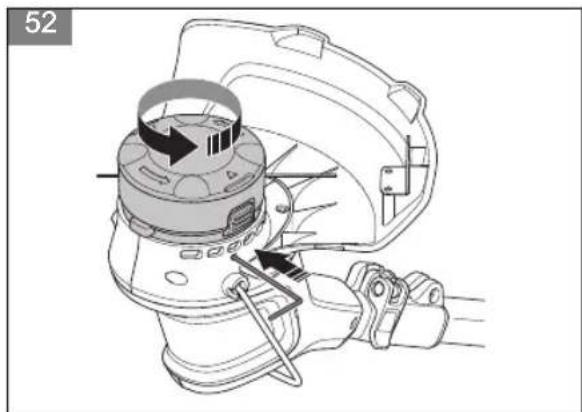
To examine and replace the trimmer head
- Do a check of the trimmer head for damages and cracks.
- Turn the output shaft until the hole in the drive disc aligns with the hole in the gear housing.
- Install the combination tool in the hole to lock the shaft.
- Turn the trimmer head counterclockwise. (Fig. 52)
- Replace the trimmer head.
- Assemble the trimmer head. Refer to To assemble the trimmer head on page 16.
Troubleshooting
User interface
| Problem Possible faults | Possible solution | |
| Green start LED flashes. | Low battery voltage. Charge the battery. | |
| Red error LED flashes. | Overload. The cutting attachment cannot move freely. Release the cutting attachment. |
| Temperature deviation. Let the product become cool. |
| The power trigger and the start button are pushed at the same time. | Release the power trigger and push the start button. |
| Green LED and red LED flash alternately. | Battery is empty. Charge the battery. | |
| Battery is damaged. Speak to your service dealer. | |
Battery charger
| LED on the battery charger | Cause Solution | |
| The green LED is on. (For P4A 18-C50)The green LED is on and the red LED flashes. (For P4A 18-C70 and P4A 18-C100) | The battery is not correctly installed in the battery charger. | Remove the battery from the charger and install the battery in the battery charger again. |
| The battery connectors and the battery charger connectors are dirty. | Clean the battery connectors and the battery charger connectors. For example, insert and remove the battery from the battery charger several times. |
| The battery is damaged. Replace the battery. |
| The charger identifies an internal error. | Make sure that all batteries are fully inserted. Remove the mains plug and reinsert. If the error occurs again, ask an authorized after-sales service center for Husqvarna products to do a check of the battery charger. |
| The green LED is on. (For P4A 18-C50)The red LED is on. (For P4A 18-C70 and P4A 18-C100) | The battery temperature is out of the charging range. | Wait until the battery temperature drops to the permitted charging temperature (0-35 °C). |
| The green LED is off. (For P4A 18-C50)The green LED and the red LED are off. ((For P4A 18-C70 and P4A 18-C100) | The battery charger is not correctly connected to the mains outlet. | Connect the battery charger to a mains outlet. |
| Faulty mains outlet. Connect the battery charger to the voltage and frequency that is specified on the rating plate. |
| The plug socket, mains cable or battery charger is damaged. | Do a check of the mains voltage. If necessary, speak to an approved service agent. |
| Other errors. If other errors occur, make sure that the product is off, remove the battery and speak to an approved service agent. |
Transportation, storage and disposal
Transportation and storage
• The supplied Li-ion batteries obey the Dangerous Goods Legislation requirements.
- Obey the special requirement on package and labels for commercial transportation, including by third parties and forwarding agents.
- Speak to a person with special training in dangerous material before you send the product. Obey all applicable national regulations.
- Use tape on open contacts when you put the battery in a package. Put the battery in the package tightly to prevent movement.
- Remove the battery for storage or transportation.
- Put the battery and the battery charger in a space that is dry and free from moisture and frost.
-
Do not keep the battery in an area where static electricity can occur. Do not keep the battery in a metal box.
-
Put the battery in storage where the temperature is between -20ircC / -4ircF and +50ircC / 122ircF and away from open sunlight.
- Put the battery charger in storage where the temperature is between 5ircC / 41ircF and 45ircC / 113ircF and away from open sunlight.
- Put the product in storage where the temperature is between -40ircC / -40ircF and +60ircC / 140ircF .
- Use the battery charger only when the surrounding temperature is between 0ircC / 32ircF and 35ircC / 95ircF
- Charge the battery 30% to 50% before you put it in storage for long periods.
- Put the battery charger in storage in a space that is closed and dry.
- Keep the battery away from the battery charger during storage. Do not let children and other not approved persons to touch the equipment. Keep the equipment in a space that you can lock.
- Clean the product and do a full servicing before you put the product in storage for a long time.
-
Use the transportation guard on the product to prevent injuries or damage on the product during transportation and storage.
-
Attach the product safely during transportation.
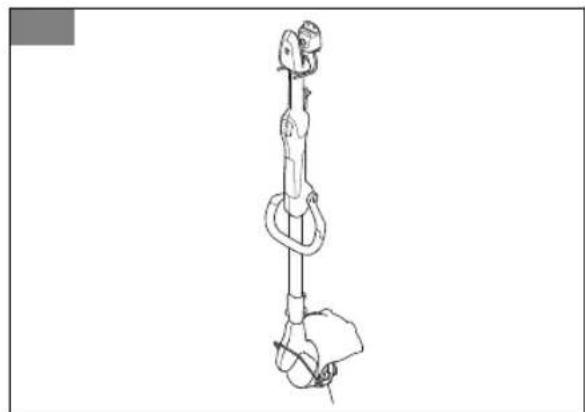
- Keep the product in storage horizontally or hang the product on the supplied hook. Refer to To install the hook on the wall on page 16.
(Fig. 53)
Disposal of the battery, battery charger and product
The symbol below means that the product is not domestic waste. Recycle it at a recycling station for electrical and electronic equipment. This helps to prevent damage to the environment and to persons.
Speak to local authorities, domestic waste service or your dealer for more information.
(Fig. 18)
Note: The symbol shows on the product or package of the product.
Technical data
Technical data
| Aspire T28-P4A |
| Motor |
| Motor type PMDC | |
| Speed of output shaft, rpm 6800 | |
| Cutting width, mm 280 | |
| Weight |
| Weight without battery, kg 2.6 | |
| Weight with battery (P4A 18-B45 / P4A 18-B70), kg 3.0 / 3.3 | |
| Noise emissions 1 |
| Sound power level, measured dB (A) 85 | |
| Sound power level, guaranteed LWA dB (A) 88 | |
| Noise levels 2 |
| Equivalent sound pressure level at the operator's ear, measured according to EN ISO 50636-2-91, dB (A) | 73 |
| Vibration levels3 |
| Vibration levels at handles, measured according to EN50636-2-91, m/s 2 Equipped with trimmer head (original), front / rear. | 2.26/1.61 |
| Battery P4A 18-B45 P4A 18-B72 | | |
| Type Lithium-ion Lithium-ion | | |
| Battery capacity, Ah R | Refer to battery rating decal Refer to battery rating decal |
| Nominal voltage, V 18 | 18 | |
| Weight, kg 0.4 0.7 | | |
Approved battery chargers
| Battery charger | P4A 18-C50 P4A 18-C70 P4A 18-C100 | |
| Input voltage, V Refer to charger rating information. | Refer to charger rating information. | Refer to charger rating information. |
| Frequency, Hz 50–60 50–60 50–60 | | |
| Power, W 50 | 70 | 105 | |
| Output Voltage, V d.c./Amps, A | 14.4-18/2 | 14.4-18/3 | 14.4-18/4.4 |
Accessories
Approved accessories
| Approved accessories | Type | Cutting attachment guard, Art. no. |
| Trimmer head | A15B M5 (∅ 1.6 mm cord) | 536 47 32-01 |
We, Husqvarna AB, SE-561 82 Huskvarna, Sweden, tel: +46-36-146500, declare on our sole responsibility that the product:
| Description Battery grass trimmer |
| Brand Husqvarna | |
| Type / Model Aspire T28-P4A |
| Identification Serial numbers dating from 2023 and onwards |
complies fully with the following EU directives and regulations:
| Directive/ Regulation Description |
| 2006/42/EC "relating to machinery" |
| 2014/30/EU "relating to electromagnetic compatibility" |
| 2000/14/EC "relating to the noise emissions in the environment" |
| 2011/65/EU “on the restriction of the use of certain hazardous substances in electrical and electronic equipment” |
and that the following standards and/or technical specifications are applied: EN 60335-1:2012/A15:2021, EN 50636-2-91:2014, EN IEC 63000:2018, EN IEC 55014-1:2021; EN IEC 55014-2:2021.
Notified body: 0158 DEKRA Testing and Certification GmbH, Handwerkstraße 15, 70565 Stuttgart, Germany has certified conformity with the council's directive 2000/14/EC, conformity assessment procedure: Annex VI.
For information relating to noise emission, refer to Technical data on page 21.
Huskvarna, 2023-12-14
Δdot 2 u
Claes Losdal, R&D Manager, Husqvarna AB
Responsible for technical documentation
CE
We, Husqvarna AB, SE-561 82 Huskvarna, Sweden, tel: +46-36-146500, declare on our sole responsibility that the product:
| Description Battery grass trimmer |
| Brand Husqvarna | |
| Type / Model Aspire T28-P4A |
| Identification Serial numbers dating from 2023 and onwards |
complies fully with the following UK regulations:
| Description |
| The Supply of Machinery (Safety) Regulations 2008 |
| Electromagnetic Compatibility Regulations 2016 |
| The Noise Emission in the Environment by Equipment for use Outdoors Regulations 2001 |
| The Restriction of the Use of Certain Hazardous Substances in Electrical and Electronic Equipment Regulations 2012 |
and that the following standards and/or technical specifications are applied: EN 60335-1:2012/A15:2021, EN 50636-2-91:2014, EN IEC 63000:2018, EN IEC 55014-1:2021; EN IEC 55014-2:2021.
Approved body: 0359 Intertek Testing & Certification Ltd, Academy Place, 1-9 Brook Street, Brentwood, Essex, CM14 5NQ, United Kingdom has carried out certified conformity according to S.I.2001/1701, schedule 9.
For information relating to noise emissions, refer to Technical data on page 21.
Huskvarna, 2023-12-14
Δdot 2 m
Claes Losdal, R&D Manager, Husqvarna AB
Responsible for technical documentation

UK Importer:
Husqvarna UK Ltd
Preston Road, Co. Durham
DL5 6UP
Licenses
Copyright© 2012-2020 STMicroelectronics
The warranty does not cover defects which are the result of normal wear and tear, negligence, defective use, unauthorised repair or the suction apparatus being connected to the incorrect voltage.
All rights reserved.
Redistribution and use in source and binary forms, with or without modification, are permitted provided that the following conditions are met:
- Redistributions of source code must retain the above copyright notice, this list of conditions and the following disclaimer.
- Redistributions in binary form must reproduce the above copyright notice, this list of conditions and the following disclaimer in the documentation and/or other materials provided with the distribution.
- Neither the name of STMicroelectronics nor the names of its contributors may be used to endorse or promote products derived from this software without specific prior written permission.
THIS SOFTWARE IS PROVIDED BY THE COPYRIGHT HOLDERS AND CONTRIBUTORS "AS IS" AND ANY EXPRESS OR IMPLIED WARRANTIES, INCLUDING, BUT NOT LIMITED TO, THE IMPLIED WARRANTIES OF MERCHANTABILITY AND FITNESS FOR A PARTICULAR PURPOSE ARE DISCLAIMED. IN NO EVENT SHALL THE COPYRIGHT OWNER OR CONTRIBUTORS BE LIABLE FOR ANY DIRECT, INDIRECT, INCIDENTAL, SPECIAL, EXEMPLARY, OR CONSEQUENTIAL DAMAGES (INCLUDING, BUT NOT LIMITED TO, PROCUREMENT OF SUBSTITUTE GOODS OR SERVICES; LOSS OF USE, DATA, OR PROFITS; OR BUSINESS INTERRUPTION) HOWEVER CAUSED AND ON ANY THEORY OF LIABILITY, WHETHER IN CONTRACT, STRICT LIABILITY, OR TORT (INCLUDING NEGLIGENCE OR OTHERWISE) ARISING IN ANY WAY OUT OF THE USE OF THIS SOFTWARE, EVEN IF ADVISED OF THE POSSIBILITY OF SUCH DAMAGE.
Apache 2.0 License
Copyright © 2009-2019 Arm Limited. All rights reserved.
Version 2.0, January 2004 http://www.apache.org/licenses/
TERMS AND CONDITIONS FOR USE, REPRODUCTION, AND DISTRIBUTION
- Definitions.
"License" shall mean the terms and conditions for use, reproduction, and distribution as defined by Sections 1 through 9 of this document. "Licensor" shall mean the copyright owner or entity authorized by the copyright owner that is granting the License. "Legal Entity" shall mean the union of the acting entity and all other
entities that control, are controlled by, or are under common control with that entity. For the purposes of this definition, "control" means (i) the power, direct or indirect, to cause the direction or management of such entity, whether by contract or otherwise, or (ii) ownership of fifty percent (50%) or more of the outstanding shares, or (iii) beneficial ownership of such entity. "You" (or "Your") shall mean an individual or Legal Entity exercising permissions granted by this License. "Source" form shall mean the preferred form for making modifications, including but not limited to software source code, documentation source, and configuration files. "Object" form shall mean any form resulting from mechanical transformation or translation of a Source form, including but not limited to compiled object code, generated documentation, and conversions to other media types. "Work" shall mean the work of authorship, whether in Source or Object form, made available under the License, as indicated by a copyright notice that is included in or attached to the work (an example is provided in the Appendix below). "Derivative Works" shall mean any work, whether in Source or Object form, that is based on (or derived from) the Work and for which the editorial revisions, annotations, elaborations, or other modifications represent, as a whole, an original work of authorship. For the purposes of this License, Derivative Works shall not include works that remain separable from, or merely link (or bind by name) to the interfaces of, the Work and Derivative Works thereof. "Contribution" shall mean any work of authorship, including the original version of the Work and any modifications or additions to that Work or Derivative Works thereof, that is intentionally submitted to Licensor for inclusion in the Work by the copyright owner or by an individual or Legal Entity authorized to submit on behalf of the copyright owner. For the purposes of this definition, "submitted" means any form of electronic, verbal, or written communication sent to the Licensor or its representatives, including but not limited to communication on electronic mailing lists, source code control systems, and issue tracking systems that are managed by, or on behalf of, the Licensor for the purpose of discussing and improving the Work, but excluding communication that is conspicuously marked or otherwise designated in writing by the copyright owner as "Not a Contribution." "Contributor" shall mean Licensor and any individual or Legal Entity on behalf of whom a Contribution has been received by Licensor and subsequently incorporated within the Work.
- Grant of Copyright License.
Subject to the terms and conditions of this License, each Contributor hereby grants to You a perpetual, worldwide, non-exclusive, no-charge, royalty-free, irrevocable copyright license to reproduce, prepare Derivative Works of, publicly display, publicly perform, sublicense, and distribute the Work and such Derivative Works in Source or Object form.
3. Grant of Patent License.
Subject to the terms and conditions of this License, each Contributor hereby grants to You a perpetual, worldwide, nonexclusive, no-charge, royalty-free, irrevocable (except as stated in this section) patent license to make, have made, use, offer to sell, sell, import, and otherwise transfer the Work, where such license applies only to those patent claims licensable by such Contributor that are necessarily infringed by their Contribution(s) alone or by combination of their Contribution(s) with the Work to which such Contribution(s) was submitted. If You institute patent litigation against any entity (including a crossclaim or counterclaim in a lawsuit) alleging that the Work or a Contribution incorporated within the Work constitutes direct or contributory patent infringement, then any patent licenses granted to You under this License for that Work shall terminate as of the date such litigation is filed.
4. Redistribution.
You may reproduce and distribute copies of the Work or Derivative Works thereof in any medium, with or without modifications, and in Source or Object form, provided that You meet the following conditions:
- You must give any other recipients of the Work or Derivative Works a copy of this License; and
- You must cause any modified files to carry prominent notices stating that You changed the files; and – You must retain, in the Source form of any Derivative Works that You distribute, all copyright, patent, trademark, and attribution notices from the Source form of the Work, excluding those notices that do not pertain to any part of the Derivative Works; and
- If the Work includes a "NOTICE" text file as part of its distribution, then any Derivative Works that You distribute must include a readable copy of the attribution notices contained within such NOTICE file, excluding those notices that do not pertain to any part of the Derivative Works, in at least one of the following places: within a NOTICE text file distributed as part of the Derivative Works; within the Source form or documentation, if provided along with the Derivative Works; or, within a display generated by the Derivative Works, if and wherever such third-party notices normally appear. The contents of the NOTICE file are for informational purposes only and do not modify the License. You may add Your own attribution notices within Derivative Works that You distribute, alongside or as an addendum to the NOTICE text from the Work, provided that such additional attribution notices cannot be construed as modifying the License. You may add Your own copyright statement to Your modifications and may provide additional or different license terms and conditions for use, reproduction, or distribution of Your modifications, or for any such Derivative Works as a whole, provided Your use, reproduction, and distribution of the Work otherwise complies with the conditions stated in this License.
5. Submission of Contributions.
Unless You explicitly state otherwise, any Contribution intentionally submitted for inclusion in the Work by You to the Licensor shall be under the terms and conditions of this License, without any additional terms or conditions. Notwithstanding the above, nothing herein shall supersede or modify the terms of any separate license agreement you may have executed with Licensor regarding such Contributions.
6. Trademarks.
This License does not grant permission to use the trade names, trademarks, service marks, or product names of the Licensor, except as required for reasonable and customary use in describing the origin of the Work and reproducing the content of the NOTICE file.
7. Disclaimer of Warranty.
Unless required by applicable law or agreed to in writing, Licensor provides the Work (and each Contributor provides its Contributions) on an "AS IS" BASIS, WITHOUT WARRANTIES OR CONDITIONS OF ANY KIND, either express or implied, including, without limitation, any warranties or conditions of TITLE, NON-INFRINGEMENT, MERCHANTABILITY, or FITNESS FOR A PARTICULAR PURPOSE. You are solely responsible for determining the appropriateness of using or redistributing the Work and assume any risks associated with Your exercise of permissions under this License. 8. Limitation of Liability. In no event and under no legal theory, whether in tort (including negligence), contract, or otherwise, unless required by applicable law (such as deliberate and grossly negligent acts) or agreed to in writing, shall any Contributor be liable to You for damages, including any direct, indirect, special, incidental, or consequential damages of any character arising as a result of this License or out of the use or inability to use the Work (including but not limited to damages for loss of goodwill, work stoppage, computer failure or malfunction, or any and all other commercial damages or losses), even if such Contributor has been advised of the possibility of such damages.
9. Accepting Warranty or Additional Liability.
While redistributing the Work or Derivative Works thereof, You may choose to offer, and charge a fee for, acceptance of support, warranty, indemnity, or other liability obligations and/or rights consistent with this License. However, in accepting such obligations, You may act only on Your own behalf and on Your sole responsibility, not on behalf of any other Contributor, and only if You agree to indemnify, defend, and hold each Contributor harmless for any liability incurred by, or claims asserted against, such Contributor by reason of your accepting any such warranty or additional liability. END OF TERMS AND CONDITIONS
Съдържание
Въведение.... 27
Безопасност....28
Монтаж....36
Операция.... 37
Поддръжка....39
Copyright © 2012–2020 STMicroelectronics
Copyright © 2012–2020 STMicroelectronics
Copyright © 2012–2020 STMicroelectronics
Copyright © 2012–2020 STMicroelectronics
Copyright© 2012-2020 STMicroelectronics
ΔJ _ u
Copyright © 2012-2020 STMicroelectronics
Copyright© 2012-2020 STMicroelectronics
Copyright© 2012-2020 STMicroelectronics
Copyright © 2012–2020 STMicroelectronics
Copyright © 2012–2020 STMicroelectronics
Copyright © 2012–2020 STMicroelectronics
Copyright © 2012–2020 STMicroelectronics
Copyright © 2012–2020 STMicroelectronics
Copyright © 2012–2020 STMicroelectronics
Copyright © 2012–2020 STMicroelectronics
Avtorske pravice © 2012–2020 STMicroelectronics
Copyright © 2012–2020 STMicroelectronics
Telif Hakki © 2012–2020 STMicroelectronics
Copyright© 2012-2020 STMicroelectronics
IEC 63000:2018, EN IEC 55014-1:2021; EN IEC
55014-2:2021。
試験機関:0158 DEKRA Testing and Certification GmbH,
Handwerkstraße 15, 70565 Stuttgart, Germany が評議会
Copyright © 2012–2020 STMicroelectronics
All rights reserved.
Copyright © 2009-2019 Arm Limited. All rights reserved.
Original instructions
Оригинални инструкции
Původní pokyny