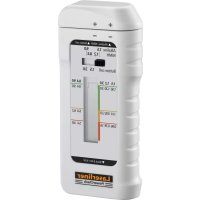
PowerCheck - Battery charger Laserliner - Free user manual and instructions
Find the device manual for free PowerCheck Laserliner in PDF.



| Product type | Battery tester |
| Brand | Laserliner |
| Model | PowerCheck |
| Measuring ranges | 1.2V / 1.5V / 3.0V / 8.4V / 9.0V |
| Testable battery types | Round batteries 1.2V, 1.5V ; button batteries 1.5V, 3.0V ; 9.0V flat batteries |
| Display | Analog LCD dial with three zones (green, orange, red) |
| Device power supply | 1 AAA 1.5V battery |
| Dimensions (L x H x D) | 45 x 107 x 22.5 mm |
| Weight (including battery) | 67 g |
| Main functions | Battery load test ; indication good/low/replace |
| Battery compartments | Three removable compartments for different battery sizes |
| Care and cleaning | Clean with a slightly damp cloth ; avoid cleaning agents and solvents ; remove the battery when storing for long periods |
| Storage | Dry and clean place ; temperature -10°C to 60°C ; max. 80% RH humidity |
| Operating conditions | 0°C to 40°C ; max. 80% RH humidity ; max. altitude 4000 m |
| Safety | Use only for intended purpose ; do not modify ; observe polarity ; keep out of reach of children |
| Compliance | EMC Directive 2014/30/EU ; WEEE directive |
| Repairability / spare parts | Not user-repairable ; no spare parts supplied |
| Warranty | Refer to the booklet "Additional and warranty notes" |
Frequently Asked Questions - PowerCheck Laserliner
User questions about PowerCheck Laserliner
0 question about this device. Answer the ones you know or ask your own.
Ask a new question about this device
Download the instructions for your Battery charger in PDF format for free! Find your manual PowerCheck - Laserliner and take your electronic device back in hand. On this page are published all the documents necessary for the use of your device. PowerCheck by Laserliner.
USER MANUAL PowerCheck Laserliner

Laserliner
| DE | 02 |
| EN | 06 |
| NL | 10 |
| DA | 14 |
| FR | 18 |
| ES | 22 |
| IT | 26 |
| PL | 30 |
| FI | 34 |
| PT | 38 |
| SV | 42 |
| NO | 46 |
| TR | 50 |
| RU | |
| UK | |
| CS | |
| ET | |
| LV | |
| LT | |
| RO | |
| BG | |
| EL | |
| SL | |
| HU | |
| SK |
Laserliner
!
natural_image
Diagram of a device with a vertical black component and coiled cable, no visible text or symbolsLaserliner
Completely read through the operating instructions, the „Warranty and Additional Information“ booklet as well as the latest information under the internet link at the end of these instructions. Follow the instructions they contain. This document must be kept in a safe place and passed on together with the device.
Function / Application
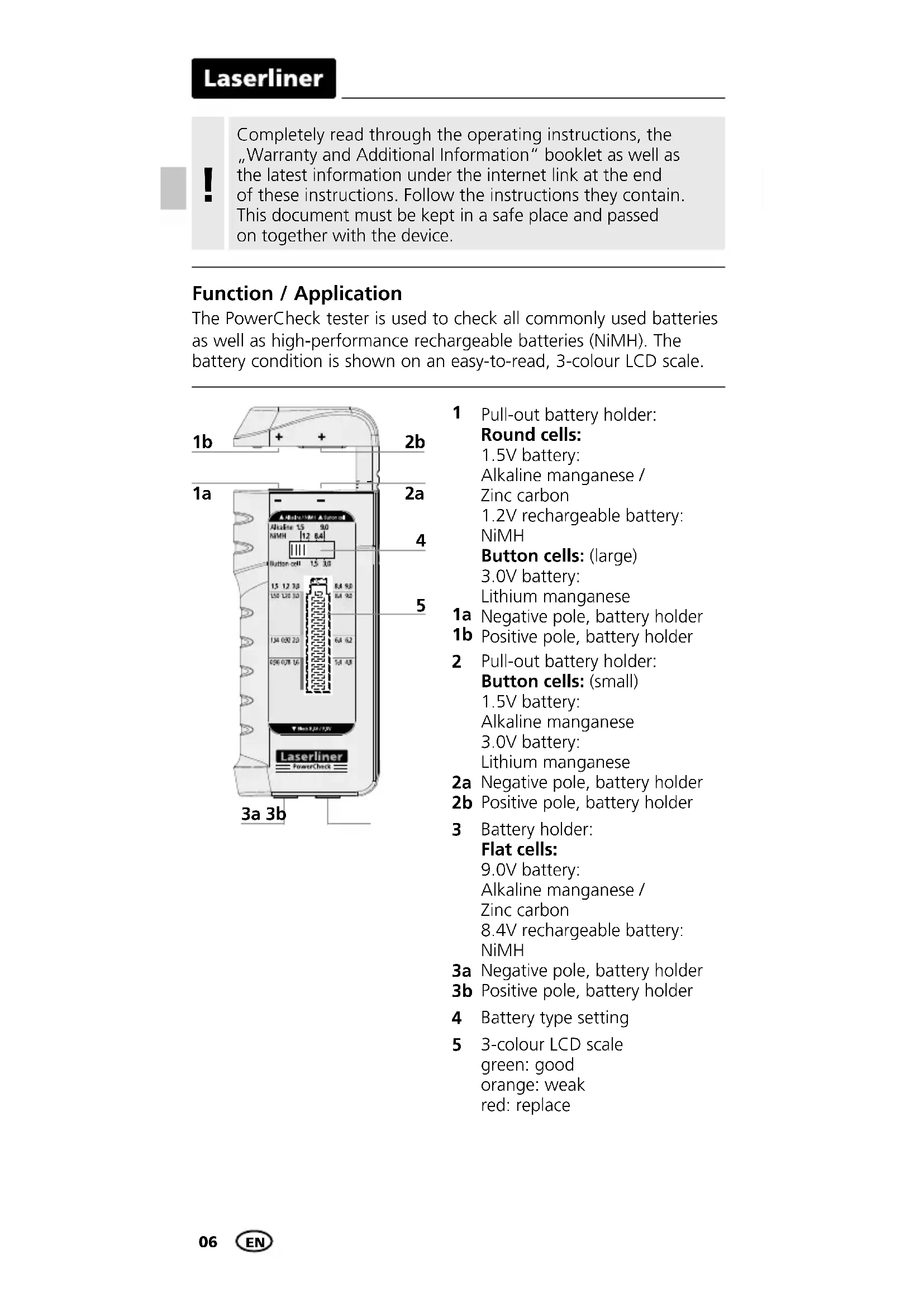
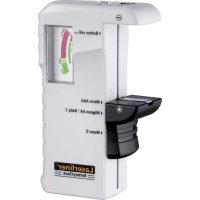
The PowerCheck tester is used to check all commonly used batteries as well as high-performance rechargeable batteries (NiMH). The battery condition is shown on an easy-to-read, 3-colour LCD scale.
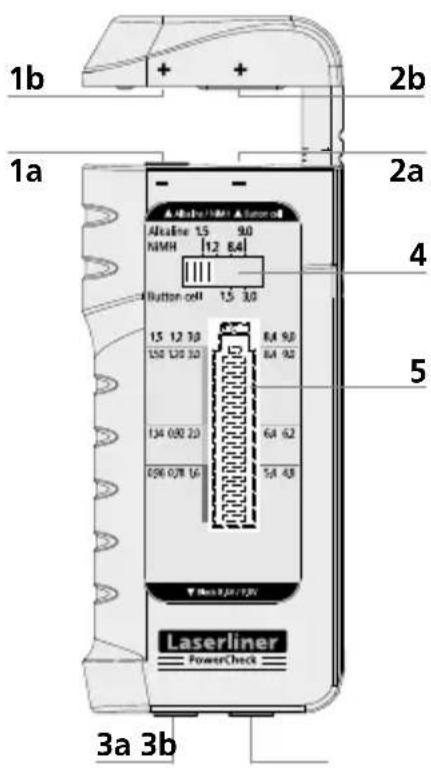
1 Pull-out battery holder:
Round cells:
1.5V battery: Alkaline manganese / Zinc carbon
1.2V rechargeable battery: NiMH
Button cells: (large)
3.0V battery: Lithium manganese
1a Negative pole, battery holder
1b Positive pole, battery holder
2 Pull-out battery holder: Button cells: (small)
1.5V battery: Alkaline manganese 3.0V battery: Lithium manganese
2a Negative pole, battery holder
2b Positive pole, battery holder
3 Battery holder: Flat cells:
9.0V battery: Alkaline manganese / Zinc carbon 8.4V rechargeable battery: NiMH
3a Negative pole, battery holder
3b Positive pole, battery holder
4 Battery type setting
5 3-colour LCD scale green: good orange: weak red: replace
General safety instructions
- The device must only be used in accordance with its intended purpose and within the scope of the specifications.
- The measuring tools and accessories are not toys. Keep out of reach of children.
- The structure of the device must not be modified in any way.
- Do not expose the device to mechanical stress, extreme temperatures or significant vibration.
- The tester operates in the voltage range from 1.2V to 9.0V. Make sure the inserted, correspondingly rated batteries only make contact at the marked contact surfaces.
- Insert the batteries the right way round to ensure correct polarity; polarity reversal can adversely affect operation of the device.
Additional information on use
The scale divides the usability of batteries in mobile devices into „good“, „weak“ and „replace“.
The divisions are based on general average values for constant use and can vary in devices with abnormal current consumption.
Especially in devices with high, temporary current peaks and/or for inferior quality batteries, it may be necessary to change the battery earlier than indicated on the display.
Devices with efficient power management can generally still operate effectively even when the batteries are almost completely discharged.
In such cases, try to interpret the reading on the LC display in terms of the running time of your specific devices/batteries in order to guarantee optimum battery utilisation.
Safety instructions
Dealing with electromagnetic radiation
- The measuring device complies with electromagnetic compatibility regulations and limit values in accordance with EMC-Directive 2014/30/EU.
- Local operating restrictions – for example, in hospitals, aircraft, petrol stations or in the vicinity of people with pacemakers – may apply. Electronic devices can potentially cause hazards or interference or be subject to hazards or interference.
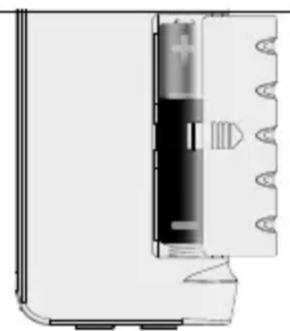
1 Inserting battery
Open the battery compartment and insert battery according to the symbols. Be sure to pay attention to polarity.
natural_image
Diagram of a device with a vertical component and coiled spring, no visible text or symbolsLaserliner
2 To set battery type
The switch (4) must be set to the corresponding position depending on the type of battery.
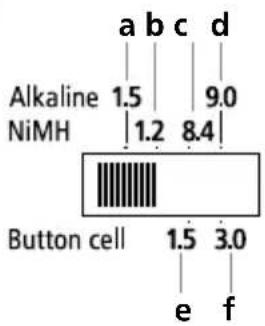
a 1.5V round cells (AA, AAA, C, D)
b 1.2V round cells (NiMH) (AA, AAA, C, D)
c 8.4V flat cells (NiMH) (E-block)
d 9.0V flat cells (E-block)
e 1.5V button cell (small)
f 3.0V button cell (small / large)
B To check battery charge
! Refer to Point 2 „To set battery type“.
Open the battery holder and insert battery corresponding to the +/- symbols or place block batteries on the contacts 3a and 3b. Be sure to pay attention to polarity.
3-colour display scale
Good (green): battery fully charged
Weak (orange): battery is weak and will soon need replacing
Replace (red): battery is flat and should be replaced
![AlkaFine 15 90 N/MH [1.2 84] Button cell 15 30 15 1.2 30 84 90 150 1.20 30 84 90 1.14 0.62 20 64 67 0.96 0.28 16 54 48 Laserliner PowerCheck ▶ No LEV/UV +](/content/2026/04/616018/images/8817792e9e7a05da84b8c558fd5750106a5390bac0e714980359aa9c1f52ce47.jpg)
Information on maintenance and care
Clean all components with a damp cloth and do not use cleaning agents, scouring agents and solvents. Remove the battery(ies) before storing for longer periods. Store the device in a clean and dry place.
| Technical data | |
| Measuring ranges 1.2V / 1 | .5V / 3.0V / 8.4V / 9.0V |
| Battery types | 1.2VAAA, HR03, HR11/45AA, HR6, HR15/51C, HR14, HR26/50D, HR20, HR33/62 |
| 1.5VAAA, SH16, MN2400, LR03, R03AA, HP7, MN1500, UM3, LR6, R6C, HP11, MN1400, SP11,LR14, R14, UM2D, HP2, MN1399, SP2,R20, UM1, LR20LR41, LR43, LR44 | |
| 3.0VCR2016, CR2020, CR2025, CR2032,CR2320, CR2325, CR2330, CR2430,CR1616, CR1620, CR1632 | |
| 8.4V E-block7HR7/42 | |
| 9.0V E-block6LR61, 6F22, 6LF22PP3, MN1604, 6F22, 006P | |
| Power supply 1 x 1.5V Type | AAA |
| Operating conditions | 0°C ... 40°C, Max. humidity 80% rH,no condensation, Max. working altitude4000 m above sea level |
| Storage conditions | -10°C ... 60°C, Max. humidity 80% rH |
| Dimensions (W x H x D) 45 | x 107 x 22,5 mm |
| Weight (incl. battery) 67 g | |
Subject to technical changes without notice. 11.17
EU directives and disposal
This device complies with all necessary standards for the free movement of goods within the EU.
This product is an electric device and must be collected separately for disposal according to the European Directive on waste electrical and electronic equipment.
Further safety and supplementary notices at: http://laserliner.com/info?an=powchk

Laserliner
!
natural_image
Pure diagram of a device with internal components and no visible text or symbolsLaserliner
2 Batterijtype instellen
natural_image
Diagram of a device with a black component and coiled cable, no visible text or symbolsLaserliner
2 Indstilling af batteritype
Alt efter batteritype skal kontakten (4) stilles i den tilsvarende position.
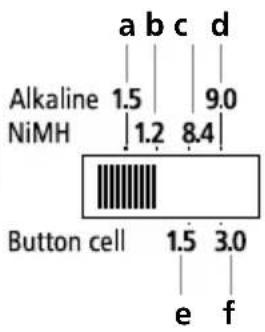
a 1,5V runde celler (AA, AAA, C, D)
b 1,2V runde celler (NiMH) (AA, AAA, C, D)
c 8,4V flade celler (NiMH) (E-blok)
d 9,0V flade celler (E-blok)
e 1,5V knapcelle (lille design)
f 3,0V knapcelle (lille/stort design)
natural_image
Diagram of a device with a vertical black component and coiled wires, no visible text or symbolsLaserliner
other
| Category | Value | |---|---| | a | 1.5 | | b | 1.2 | | c | 8.4 | | d | 9.0 | | e | 3.0 | | f | 1.5 | Button cell (black bar) is visually present.natural_image
Diagram of a device with internal components and a spring-like structure (no text or symbols)Laserliner
natural_image
Diagram of a device with a black component and coiled cable, no visible text or symbolsLaserliner
natural_image
Diagram of a device with a vertical component and coiled cable, no visible text or symbolsLaserliner
natural_image
Diagram of a device with a black component inserted into a rectangular housing, showing internal structure and no visible text or symbols.Laserliner
natural_image
Diagram of a device with a vertical black component and a triangular base, showing internal structure (no text or symbols)Laserliner
2 Ajustar o tipo de pilha
natural_image
Diagram of a device with a vertical black component and coiled spring, no visible text or symbolsLaserliner
d 9,0 Volt platta batterier (E-block)
natural_image
Diagram of a device with a vertical component and coiled cable, no visible text or symbolsLaserliner
natural_image
Diagram of a device with a black internal component and a coiled spring-like structure, no visible text or symbols.Laserliner
2 Pil türünü ayarla
SERVICE

Umarex GmbH & Co. KG
- Laserliner -


- Laserliner
- Function / Application
- Round cells:
- General safety instructions
- Additional information on use
- Safety instructions
- Inserting battery
- To set battery type
- B To check battery charge
- 3-colour display scale
- Information on maintenance and care
- EU directives and disposal
- Batterijtype instellen
- Indstilling af batteritype
- Ajustar o tipo de pilha
- Pil türünü ayarla
Brand : Laserliner
Model : PowerCheck
Category : Battery charger