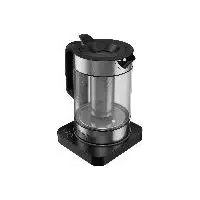
SWS 3000 A1 - Kettle SILVERCREST - Free user manual and instructions
Find the device manual for free SWS 3000 A1 SILVERCREST in PDF.



| Product Type | Smart Wi-Fi Connected Kettle |
| Brand | SilverCrest |
| Model | SWS 3000 A1 |
| Maximum Capacity (water) | 1,7 L |
| Maximum Capacity (tea) | 1,2 L |
| Rated Power | 2520-3000 W |
| Input Voltage | 220-240 V ~, 50-60 Hz |
| Protection Class | I (with grounding) |
| Connectivity | Wi-Fi 2,4 GHz (802.11 b/g/n), Bluetooth 4.2 |
| Required App | Lidl Home (iOS 9.0+ / Android 5.0+) |
| Compatible Voice Control | Google Assistant (subject to availability) |
| Kettle Material | Stainless steel and plastic |
| Smart Functions | Remote on/off, scheduling, keep warm |
| Water Level Indicator | Transparent scale (Min 0,5 L - Max 1,7 L) |
| Included Filter | Removable tea filter, anti-scale filter in spout |
| Safety | Automatic shut-off, overheat protection, non-slip base |
| Cleaning and Descaling | Vinegar solution recommended for descaling |
| Power Cord Length | Approx. 75 cm (winding under base) |
| Weight | Approx. 1,2 kg (reasonable estimate, not specified) |
| Dimensions (L x W x H) | Approx. 22 x 18 x 25 cm (reasonable estimate) |
| Warranty | 3 years (according to LIDL conditions) |
Frequently Asked Questions - SWS 3000 A1 SILVERCREST
User questions about SWS 3000 A1 SILVERCREST
0 question about this device. Answer the ones you know or ask your own.
Ask a new question about this device
Download the instructions for your Kettle in PDF format for free! Find your manual SWS 3000 A1 - SILVERCREST and take your electronic device back in hand. On this page are published all the documents necessary for the use of your device. SWS 3000 A1 by SILVERCREST.
USER MANUAL SWS 3000 A1 SILVERCREST
text_image
PDF ONLINE www.lidl-service.comWLAN-WASSERKOCHER SMART/SMART KETTLE WITH WI-FI/BOUILLOIRE WI-FI SMART SWS 3000 A1
DE AT CH
WLAN-WASSERKOCHER SMART
Kurzanleitung
GB IE
SMART KETTLE WITH WI-FI
Short manual
FR BE
BOUILLOIRE WI-FI SMART
GB/IE Short manual Page 16
Warnings and symbols used Page 17
Short manual.... Page 18
Intended use Page 18
Scope of delivery Page 18
You will need.... Page 18
Description of parts.... Page 19
Technical data Page 20
Safety instructions.... Page 20
Before first use Page 24
Installing the app Page 24
Pairing product and mobile device.... Page 25
Unpairing product from mobile device Page 25
Operation Page 25
Cleaning and care Page 26
Disposal Page 27
Service Page 27
Simplified EU declaration of conformity Page 27
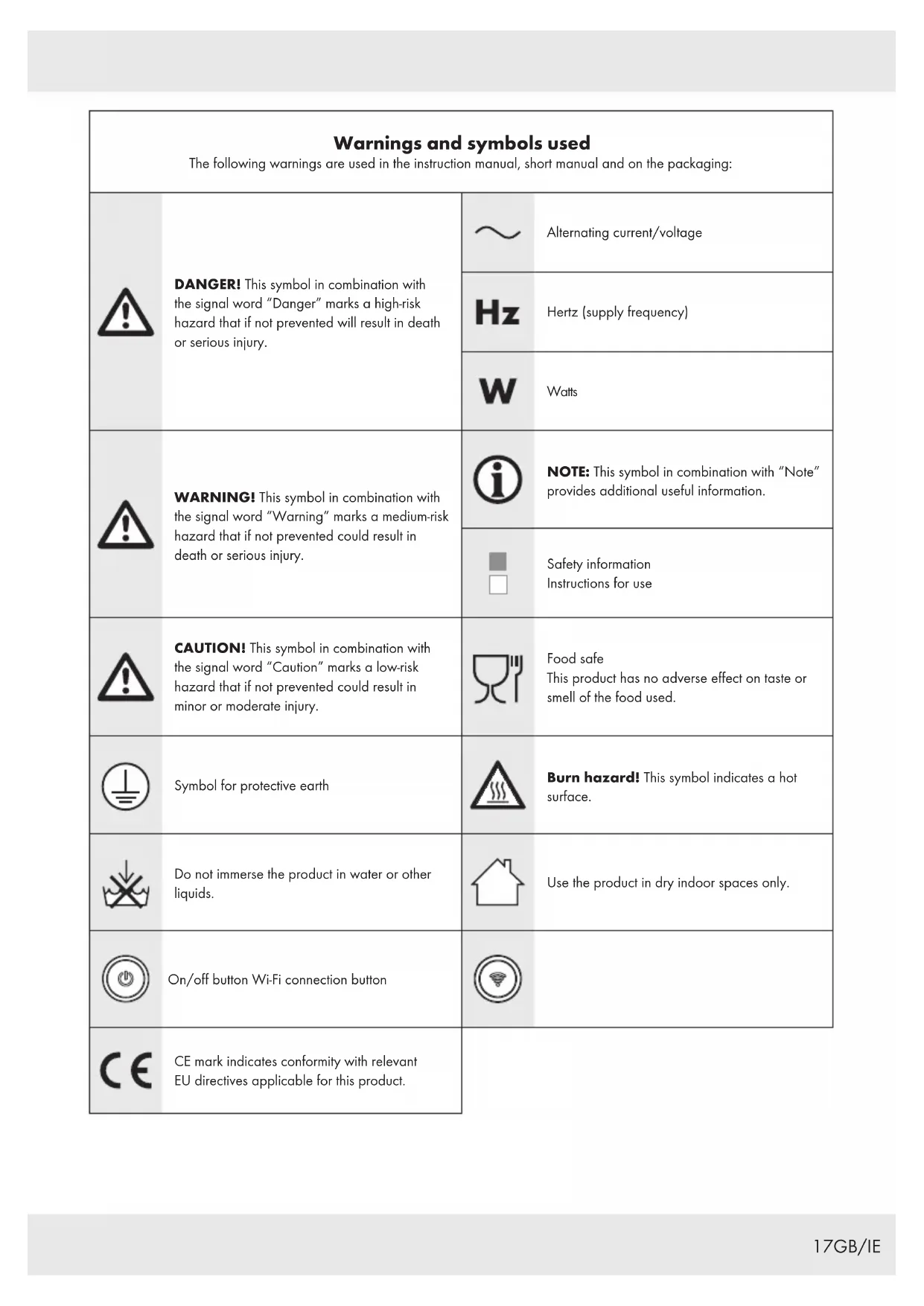
| Warnings and symbols usedThe following warnings are used in the instruction manual, short manual and on the packaging: | |||
 | DANGER! This symbol in combination with the signal word “Danger” marks a high-risk hazard that if not prevented will result in death or serious injury. |  | Alternating current/voltage |
 | Hertz (supply frequency) | ||
 | Watts | ||
 | WARNING! This symbol in combination with the signal word “Warning” marks a medium-risk hazard that if not prevented could result in death or serious injury. |  | NOTE: This symbol in combination with “Note” provides additional useful information. |
| [SDC] | Safety informationInstructions for use | ||
 | CAUTION! This symbol in combination with the signal word “Caution” marks a low-risk hazard that if not prevented could result in minor or moderate injury. |  | Food safeThis product has no adverse effect on taste or smell of the food used. |
 | Symbol for protective earth |  | Burn hazard! This symbol indicates a hot surface. |
 | Do not immerse the product in water or other liquids. |  | Use the product in dry indoor spaces only. |
 | On/off button Wi-Fi connection button |  | |
| [8=20] | CE mark indicates conformity with relevant EU directives applicable for this product. | ||
SMART KETTLE WITH WI-FI
● Short manual
This document is a shorter printed version of the complete instruction manual. By scanning the QR code, you will be taken straight to the LIDL service website (www.lidl-service.com) where you can view and download the complete instruction manual by entering the article number (IAN) 379256_2201.

WARNING! Observe the complete instruction manual and safety notes to prevent personal injury and property damage. The short guide forms an integral part of this product. Prior to using the product, familiarize yourself with all operation and safety notes. Keep the short manual well preserved and if you hand the product on to third parties, all documentation should be passed on as well.
- Intended use
The product is intended only for boiling of fresh water. You can use the tea strainer to prepare tea in the product.
This product is intended to be used in household and similar applications such as:
- staff kitchen areas in shops, offices and other working environments;
- farm houses;
- in hotels, motels and other residential type environments;
- bed and breakfast type environments.
■ The product is not intended for commercial use.
■ Any other use not mentioned in these instructions may cause damage to the product or create a serious risk of injury.
The manufacturer accepts no liability for damages caused by improper use.
The Lidl Home app is required to control and set up the product.
- Scope of delivery
After unpacking the product, check if the delivery is complete and if all parts are in good condition. Remove all packaging materials before use.
Please contact customer service if parts are missing or damaged.
1 Water kettle
1 Lid with filler flap
1 Base
1 Tea strainer
1 Short manual
- You will need
Wi-Fi Router
2,4 GHz, IEEE 802.11b/g/n

Mobile device:
iOS 9.0 or higher
Android 5.0 or higher
● Description of parts
text_image
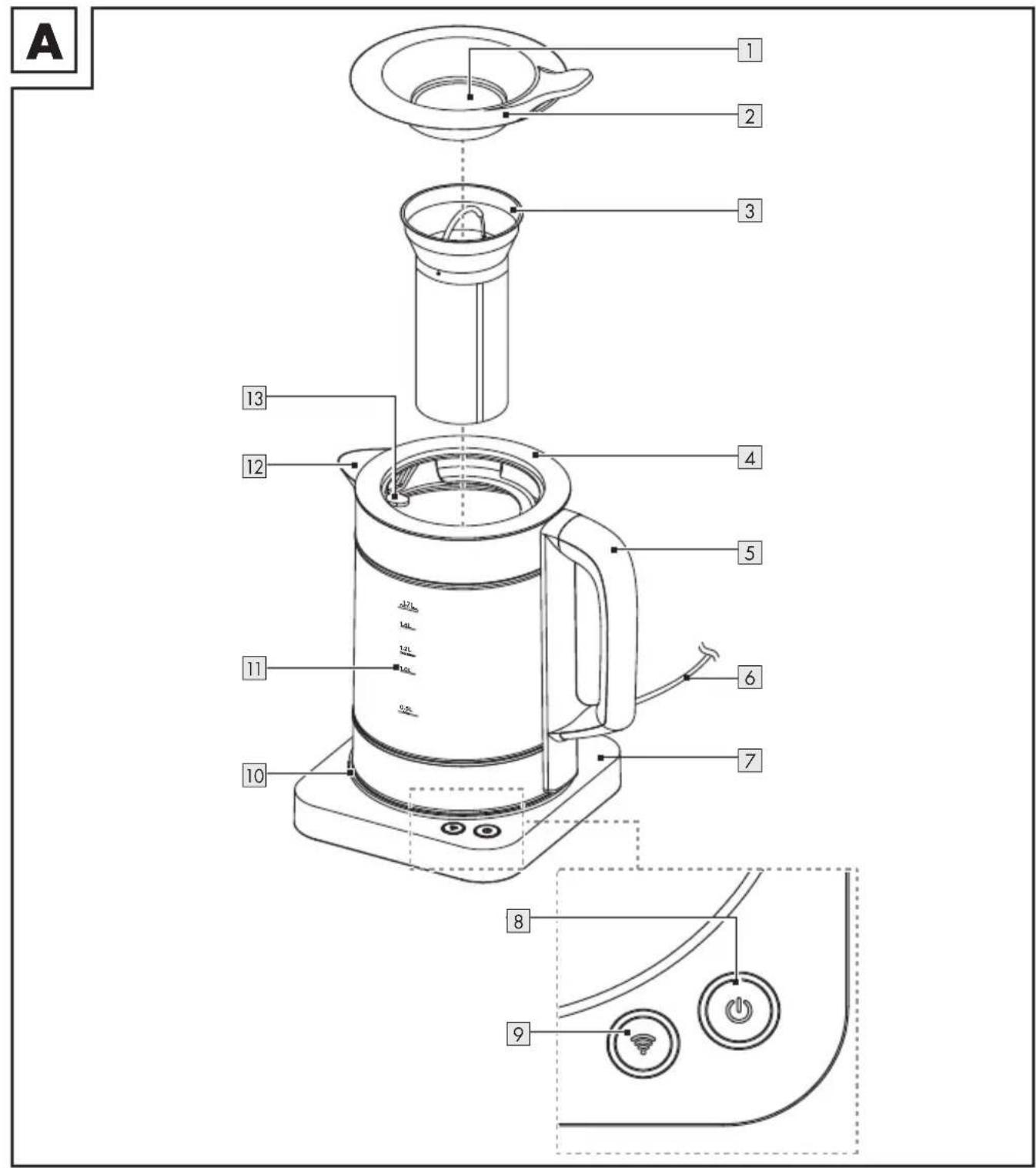
A 1 2 3 4 5 6 7 8 9 10 11 12 131 Filler flap
2Lid
3 Tea strainer with handle
4 Water kettle
5 Handle
6 Mains cord with mains plug
7 Base (with mains cord guide and mains cord storage)
8 button (on/off button with indicator)
9 button (Wi-Fi button with indicator)
10LED ring
11 Water gauge
12Spout
13 Strainer (inside the product)
● Technical data
Input voltage: 220-240 V\~,
50–60 Hz
Power consumption:
HG09434: 2,520-3,000 W
HG09434-BS: 2,520-3,000 W
HG09434-CH: 1,850-2,200 W
Protection class: I
Water kettle capacity:
Water: 1.7 l
Tea: 1.2 l
Certification:
HG09434: GS (TÜV SÜD)
HG09434-CH: -
HG09434-BS: -
Frequency range Wi-Fi: 2.400–2.4835 GHz
RF power: ≤20 dBm (EIRP)
Frequency range BLE: 2.400–2.4835 GHz
RF power: ≤20 dBm (EIRP)
Bluetooth version: 4.2
Wi-Fi: 2.4 GHz
Trademark notices
☐ iOS and Apple are registered trademarks of Apple Inc. in the USA and other countries. App Store is a registered trademark of Apple Inc.
☐ Android, Gmail, Google Play and Google Assistant* are registered trademarks of Google Inc.
☐ The Bluetooth ^® word mark and logos are registered trademarks owned by Bluetooth ^® SIG, Inc. and any use of such marks by OWIM GmbH & Co. KG is under license.
☐ The Silvercrest trademark and trade name is the property of their respective owners.
☐ Any other names and products may be trademarks or registered trademarks of their respective owners.
* Google Assistant is not available in certain languages and countries.

Safety instructions
BEFORE USING THE PRODUCT, FAMILIARISE YOURSELF WITH ALL OF THE SAFETY INFORMATION AND INSTRUCTIONS FOR USE! WHEN PASSING THIS PRODUCT ON TO OTHERS, ALSO INCLUDE ALL THE DOCUMENTS!
In the case of damage resulting from non-compliance with these instructions for use the warranty claim becomes invalid! No liability is accepted for consequential damage! In the case of material damage or personal injury caused by incorrect handling or non-compliance with the safety instructions, no liability is accepted!
Children and persons with disabilities
⚠ WARNING! RISK OF LOSS OF LIFE OR ACCIDENT TO INFANTS AND CHILDREN!
■ Never leave children unsupervised with the packaging material. The packaging material represents a danger of suffocation. Children frequently underestimate the dangers. Keep children away from packaging materials at all times.
This product can be used by children aged from 8 years and above if they have been given supervision or instruction concerning use of the product in a safe way and if they understand the hazards involved.
The product can be used by persons with reduced physical, sensory or mental capabilities or lack of experience and knowledge if they have been given supervision or instruction concerning use of the product in a safe way and understand the hazards involved.
■ Cleaning and user maintenance shall not be made by children unless they are older than 8 and supervised.
- Keep the product and its cord out of reach of children aged less than 8 years.
■ Children shall not play with the product.
⚠ WARNING! Risk of injury due to misuse.
Electrical safety
⚠️ DANGER! Risk of electric shock! Never attempt to repair the product yourself. In case of malfunction, repairs are to be conducted by qualified personnel only.
⚠ WARNING! Risk of electric shock! Avoid spillage on the mains plug and on the base.
⚠ WARNING! Risk of electric shock! Do not immerse the product in water or other liquids.
Never hold the product under running water.
⚠ WARNING! Risk of electric shock! Never use a damaged product. Disconnect the product from the mains supply and consult your retailer if the product is damaged.
⚠ WARNING! Risk of electric shock! Do not set up the product next to a sink or in moist areas.
Before connecting the product to the mains supply, check that the voltage and current rating correspond with the mains supply details shown on the product's rating label.
■ Only connect the product to a grounded mains supply. Make sure the mains plug is connected properly.
To avoid damaging the supply cord, do not squeeze, bend or run it over sharp edges. Keep it away from hot surfaces and open flames as well.
If the supply cord is damaged, it must be replaced by the manufacturer, its service agent or similarly qualified persons in order to avoid a hazard.
Pull the plug and not the cable itself to disconnect the product from the mains supply.
■ Connect the product to an easily reachable electrical outlet so that in case of an emergency the product can be unplugged immediately.
The product must not be placed directly below a power supply.
This product is not intended to be operated by means of an external timer or separate remote-control system.
- Do not operate or touch the product with wet hands.
⚠ WARNING! Do not use the product if the water kettle shows cracks or other signs of damages.
■ The product shall only be used with the supplied base.
If you notice any smoke or unusual noises, immediately disconnect the product from the mains supply. Have the product checked by a specialist before continued use.
■ Always use the product on a flat, stable, clean, heat-resistant and dry surface.
Fire/burn hazard and heat!
Keep children and pets away from the product while it is in operation or cooling down. The accessible parts are hot.
⚠ WARNING! Burn hazard!
The product surface and the handle of the tea strainer are subject to residual heat for some time after use.
⚠ WARNING! Burn hazard!
Do not open the lid while the water is boiling. The product's lid must remain securely closed while the product is in use.
⚠️ CAUTION! The product surface and the handle of the tea strainer are liable to get hot during use.
Do not overfill the product. If the product is overfilled, boiling water may be ejected. Do not operate the product without water. The fill level of the product must be between the Min and Water Max marks on the water gauge.
The product shall not be exposed to any dripping or splashing water.
■ Disconnect the product from the mains supply before cleaning and when not in use.
Do not touch the product's hot surfaces and beware of escaping steam. Hold the product by its handle only.
Cleaning
Refer to the "Cleaning and care" section for instructions on how to clean the product.
Before first use
- Remove the product from the packaging. Remove all packaging materials and protective films.
- Check that all parts are present and that the described scope of delivery is complete (see "Scope of delivery").
- Check that the product and all parts are in good condition. If you find any damage or a defect, proceed as described in the "Warranty" chapter.
- Boil the maximum water volume of 1.7 litres (see "Boiling water (operation without Wi-Fi network)"). After boiling, discard the water to remove any production and transport residues.
i NOTES:
- Disconnect the product from the mains supply when you are away from home. This is to prevent unintentionally switching the product on.
☐ You can operate the product via your home Wi-Fi network or manually without a Wi-Fi network.
☐ The Lidl Home app is required to control and set up the product via your home Wi-Fi network.
☐ The Lidl Home app supports the operating systems iOS 9.0, Android 5.0 or higher.
☐ Lidl Home is available in multiple languages. The language is automatically adjusted to the language settings of your mobile device. English is used if your language is not available.
☐ This product is compatible with other products in the Lidl Smart Home range.
- Installing the app
i NOTES:
☐ Screenshots are from the iOS 13.3 app version (if not otherwise marked). Older iOS versions may have functional limitations.
☐ The Android version of the app follows the same principles as the iOS version; you might encounter discrepancies between the two platforms, such as slightly different on-screen commands or icons.
□ Updating the firmware might result in changes to the app's functionality.
□ Heed the notifications in the app when installing and pairing the product.
☐ An updated instruction manual can be found here:
Me tab: Tap User Manual.
- Download and install the Lidl Home app from the Apple App Store or Google Play Store.
- Open the Lidl Home app.
- Lidl Home may ask for permission to send notifications (i: Optional, depending on the mobile device settings).
- Tap Register
-
Agree to the privacy policy.
-
Tap Register
NOTE: If the preselected country does not match your residence, tap ▶. A list of countries will be displayed. Scroll down the list and tap the name of the country you reside in. To reach the entry faster, type the name of your country in the search box or tap on the initial letter on the right side of the screen.
-
Enter email address.
-
Agree to service agreement and privacy policy (tap small box ☑).
NOTE: The app and the product can only be used if you have fully understood the service agreement and the privacy policy and give your consent.
-
Tap Get Verification Code. You will then receive an email with a verification code.
-
Enter email verification code.
-
To secure your privacy, it is necessary to set a password. Your password must meet the following requirements:
-
10 to 20 characters
- min. 1 upper-case letter
- min. 1 lower-case letter
- min. 1 digit
- min. 1 special character
NOTE: Keep the password in a safe place in case you need it in the future.
-
Tap Done.
-
Lidl Home may ask for permission to access the location when using the app.
NOTE: Optional, depending on the mobile device settings. Permission is required to display weather information in the app.
- The installation is complete.

Having problems with the installation?
Various issues may cause the installation to fail, for example:
□ Settings of the mobile device
☐ Functional limitations of older app versions
For help, consult the "Troubleshooting" section.
● Pairing product and mobile device
NOTE: Make sure that Bluetooth is activated on your mobile device.
- Connect the mains plug 6 to a socket-outlet.
- Press and hold the 🎨 button 9 until it flashes.
- Open the Lidl Home app.
- Home tab:
Tap + (add further devices).
- Device found.
- Tap Go to add.
- Make sure Kettle is ticked ().
- Tap + .
- Choose your Wi-Fi network (SSID - Service set identifier).
- Optional - Change the Wi-Fi network by tapping the symbol.
Enter the Wi-Fi password of your network.
Tap Confirm
- Optional - Naming the product: Tap the edit symbol ↗. Enter the desired name.
- Tap one of the rooms to set the location of the product (selected room is grayed out).
-
Optional - If more than one product is connected: You can rename the product and define its location (for example in the kitchen).
-
Tap SAVE.
- The pairing is completed.
- Return to the home screen:
Tap < (back to home screen).
- The 🎨 button 9 lights up.
● Unpairing product from mobile device
- Open the Lidl Home app.
- Home tab:
Tap Kettle (or previously selected device name).
- Tap the settings symbol ⚙ (top right).
- Tap Remove Device
Select:
- Disconnect
- Disconnect and wipe data
(→see "Additional functions" in the full instruction manual)
- Cancel
- Tap Confirm
- App user interface
NOTE: Once the product is paired with the app, the app's user interface is shown on the app.
□ Tap the product symbol to enter the product's interface.
Operation
WARNING! Risk of burns! The lid 2 must remain closed when pouring hot water. Otherwise, hot water or steam could escape over the rim causing burns.
- Placing the product
- Keep the mains cord 6 as short as possible.
-
Maintain a safe distance to walls and cupboards to avoid damages caused by rising steam.
-
Wrap the excess mains cord onto the mains cord guide at the bottom of the base 7.
- Guide the mains cord through the mains cord guide at the bottom of the base.
- Place the base on an even, stable surface.
Filling quantity
☐ Observe the water gauge 11 regarding the minimum/maximum filling quantity for water and tea.
| Min. Max. | ||
| Water 0.5 | 1.7 | | ||
| Tea 0.5 | 1.2 | | ||
● Cleaning and care
WARNING! The product shall not be immersed in water or other liquids. Do not hold the product under running water.
■ Always disconnect the product from the mains supply before cleaning.
- Check the product prior to each use for visible signs of damage.
Cleaning
Do not use any abrasive, aggressive cleaners or hard brushes to clean the product.
□ Clean the product with a slightly damp cloth. Use a mild detergent, if necessary.
□ Rub all parts dry with a clean cloth.
Care
Removing calcifications
NOTE: Limescale reduces the efficiency of the product and increases energy consumption. Check the product regularly for limescale deposits.
-
Fill the water kettle 4 with a vinegar solution (5 to 15 %).
-
Press the 🎨 button 8. Wait for the product to turn off automatically.
-
Keep the solution in the water kettle overnight. Discard the solution on the next day.
-
Fill the water kettle with clear water up to the Water Max mark on the water gauge [11]. Boil the water.
-
After boiling: Discard the water to remove any remaining scale and vinegar.
-
Rinse the interior of the water kettle thoroughly with tap water.
Cleaning the strainer
text_image
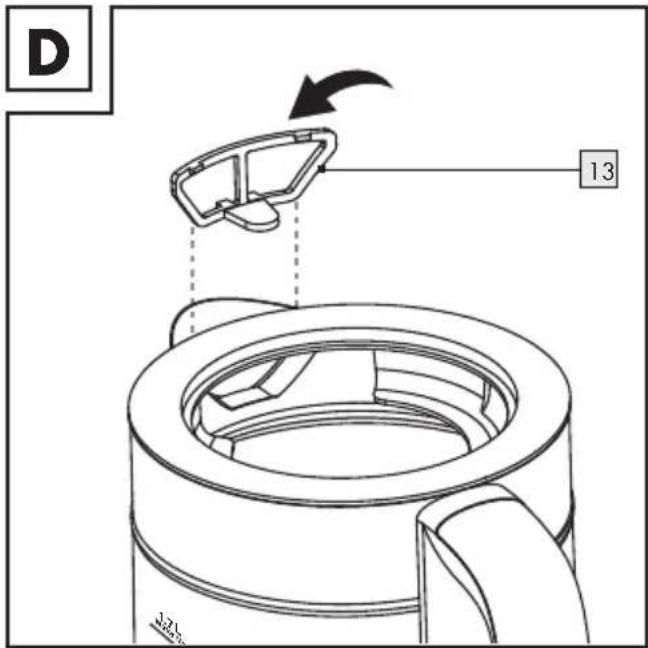
D 13-
Remove the lid 2.
-
Gently pull on the clip of the strainer 13 to release the strainer (Fig. D).
-
Rinse the strainer with fresh water.
NOTE: If scale deposits have set on the strainer, soak the strainer for a few hours in a water-vinegar solution (5 to 15 %).
-
Rinse the strainer with fresh water.
-
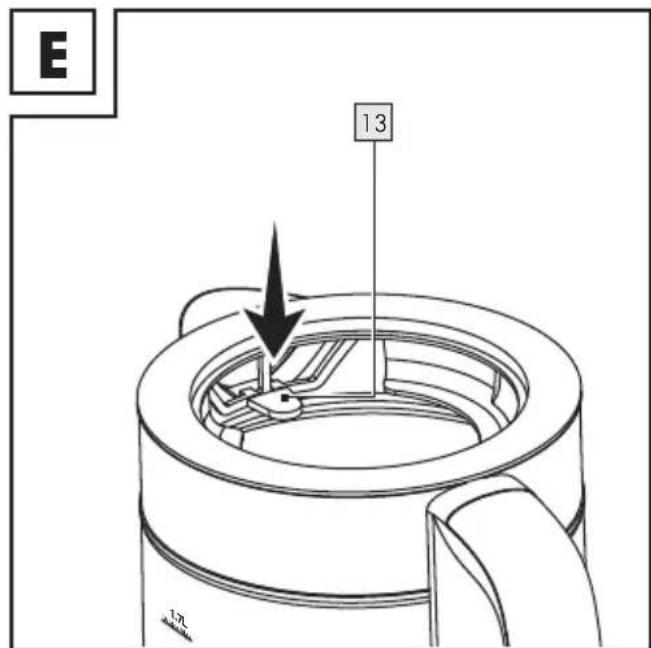
Insert the strainer with its top edge into the upper rim of the water kettle 4.
text_image
E 13- Press the strainer firmly into position (Fig. E).
Cleaning the tea strainer
- Remove the lid 2.
- Take out the tea strainer 3.
- Rinse the tea strainer with fresh water.
- If scale deposits have set on the tea strainer, soak it for a few hours in a water-vinegar solution (5 to 15 %).
- Rinse the tea strainer with fresh water.
- Dry the tea strainer with a cloth.
- Disposal
Before passing on, disposing of or returning the product to the manufacturer, make sure that all data has been deleted from the product and the cloud.
To do this, refer to the chapter:
"Additional functions", menu point:
Disconnect and wipe data
The packaging is made entirely of recyclable materials, which you may dispose of at local recycling facilities.
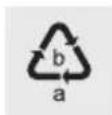
Observe the marking of the packaging materials for waste separation, which are marked with abbreviations (a) and numbers (b) with following meaning: 1-7: plastics/20-22: paper and fibreboard/80-98: composite materials.
Product:
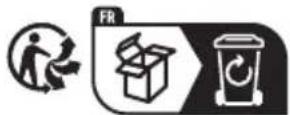
The product and packaging materials are recyclable and are subject to extended producer responsibility.
Dispose them separately, following the illustrated Info-tri (sorting information), for better waste treatment.
The Triman logo is valid in France only.

Contact your local refuse disposal authority for more details of how to dispose of your worn-out product.
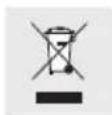
To help protect the environment, please dispose of the product properly when it has reached the end of its useful life and not in the household waste. Information on collection points and their opening hours can be obtained from your local authority.
Service
GB Service Great Britain
Tel.: 0800 0569216
E-Mail: owim@lidl.co.uk
IE Service Ireland
Tel.: 1800 200736
E-Mail: owim@lidl.ie
● Simplified EU declaration of conformity
Hereby, OWIM GmbH & Co. KG, Stiftsbergstraße 1, 74167 Neckarsulm, GERMANY declares that the product SMART KETTLE WITH WI-FI, HG09434 is in compliance with Directive 2014/53/EU and 2011/65/EU.
The full text of the EU declaration of conformity is available at the following internet address: www.owim.com

HG09434-CH:1850-2200 W
HG09434-CH: 1850-2200 W
text_image
E 13 1-7 unitsHG09434-CH: 1850-2200 W
Stopień ochrony: I
Pojemność czajnika:
Woda: 1,71
Herbata: 1,2 l
Certyfikat:
HG09434: GS (TÜV SÜD)
HG09434-CH: -
HG09434-BS: -
HG09434-CH: 1850-2200 W
Ochranná třída: I
HG09434-CH: 1850-2200 W
Trieda ochrany: I
text_image
E 13 1.5 40mm x 10xHG09434-CH: 1850-2200 W
Installation of app Side 112
HG09434-CH: 1850-2200 W
HG09434-CH: 1850-2200 W
text_image
D 13 3.5 LHG09434-CH: 1850-2200 W
Védelmi osztály: I
HG09434-CH: 1850-2200 W
Zaščitni razred: I
Kapaciteta kuhalnika vode:
Voda: 1,71
Čaj: 1,2 l
Certifikat:
HG09434: GS (TÜV SÜD)
HG09434-CH: -
HG09434-BS: -