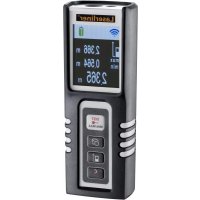
DistanceMaster Compact Pro - Rangefinder Laserliner - Free user manual and instructions
Find the device manual for free DistanceMaster Compact Pro Laserliner in PDF.



| Product type | Laser distance meter |
| Brand / Model | Laserliner DistanceMaster Compact Pro |
| Dimensions (L x H x D) | 43 x 110 x 27 mm |
| Weight (batteries included) | 100 g |
| Power supply | 2 AAA 1.5V LR03 batteries |
| Laser class | 2, < 1 mW, 650 nm (EN 60825-1:2014/AC:2017) |
| Measurement accuracy (typical) | ± 2 mm |
| Measuring range (indoor) | 0.1 m – 50 m |
| Angle measurement | Range ±90°, resolution 0.1°, accuracy 0.1° |
| Main functions | Distance, area, volume, angle measurement (3 modes), continuous min/max measurement, Digital Connection (IEEE 802.15.4), memory, color display, rear/front measuring plane |
| Automatic shutdown | Laser: 30 s, device: 3 min |
| Operating conditions | -10°C to 40°C, max. humidity 80% rH, max. altitude 2000 m |
| Storage conditions | -20°C to 70°C, max. humidity 80% rH |
| Maintenance and cleaning | Clean with a soft, slightly damp cloth; do not use solvents or abrasive products |
| Safety | Laser class 2: do not look into the beam, avoid direct eye exposure, keep out of reach of children |
| Calibration | Recommended once a year |
| Certifications | CE (RED 2014/53/EU), WEEE |
| Wireless interface | Digital Connection (IEEE 802.15.4, ISM band 2.4 GHz, max. range 10 m) |
| Error codes | Err101 (batteries), Err104 (calculation), Err152/153 (temperature), Err154 (out of range), Err155/156 (weak/strong signal), Err157 (measurement error), Err160 (movement too fast) |
Frequently Asked Questions - DistanceMaster Compact Pro Laserliner
User questions about DistanceMaster Compact Pro Laserliner
0 question about this device. Answer the ones you know or ask your own.
Ask a new question about this device
Download the instructions for your Rangefinder in PDF format for free! Find your manual DistanceMaster Compact Pro - Laserliner and take your electronic device back in hand. On this page are published all the documents necessary for the use of your device. DistanceMaster Compact Pro by Laserliner.
USER MANUAL DistanceMaster Compact Pro Laserliner
DistanceMaster Compact Pro
text_image
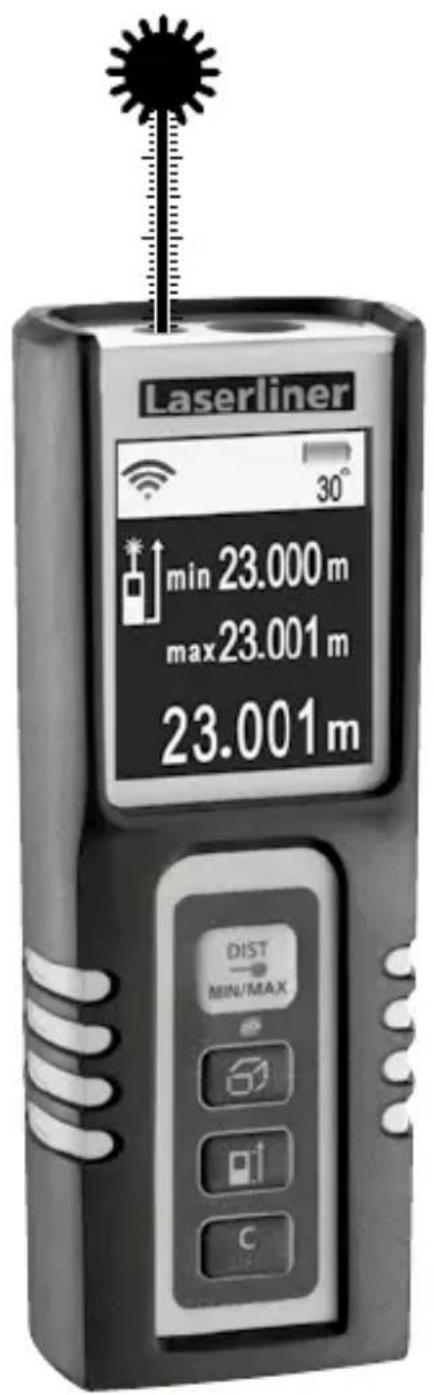
Laserliner min 23.000 m max 23.001 m 23.001 m 30° DIST MIN/MAXLaser
650 nm


| DE 04 |
| EN 12 |
| NL 20 |
| DA 28 |
| FR 36 |
| ES 44 |
| IT 52 |
| PL |
| FI |
| PT |
| SV |
| NO |
| TR |
| RU |
| UK |
| CS |
| ET |
| RO |
| BG |
| EL |
Laserliner
Laserliner
text_image
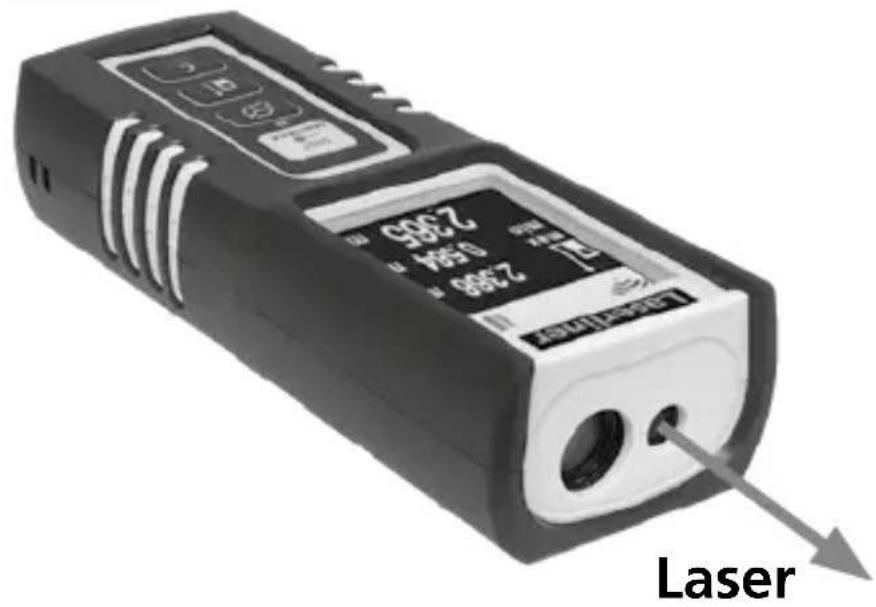
2300 654 2300 2300 2300 11 10 9 8 7 6 5 4 3 2 1 LaserA
text_image
Alkaline 1.5 V 2019 6102 vmd 10x1 A x1 80Vccu EVY2 x Typ AAA / LR03
1,5V / Alkaline
DistanceMaster Compact Pro
natural_image
Architectural perspective diagram showing light paths through a building with stairs and windows (no text or symbols)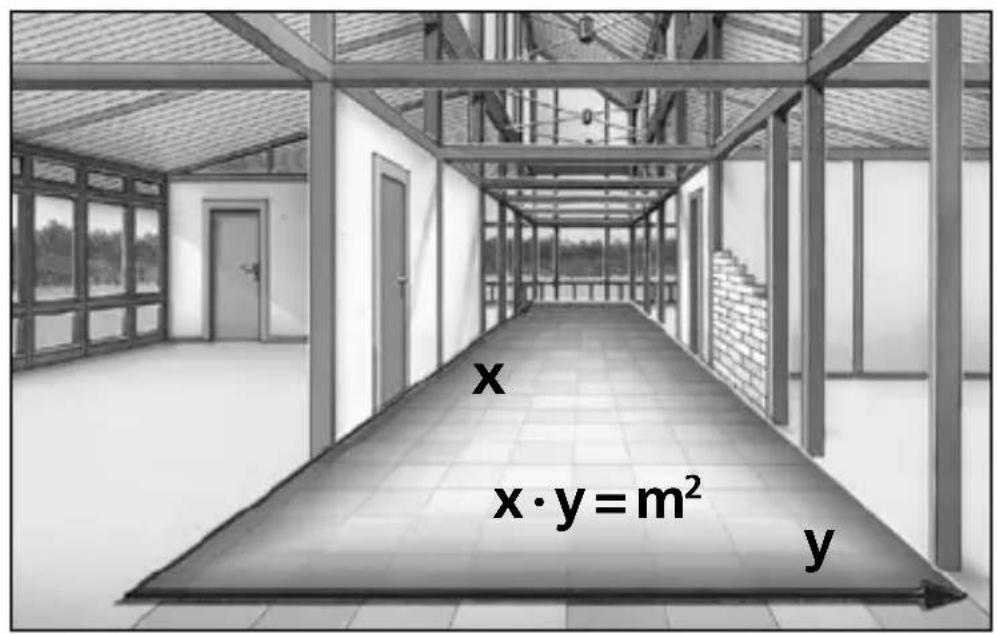
text_image
x x·y=m² y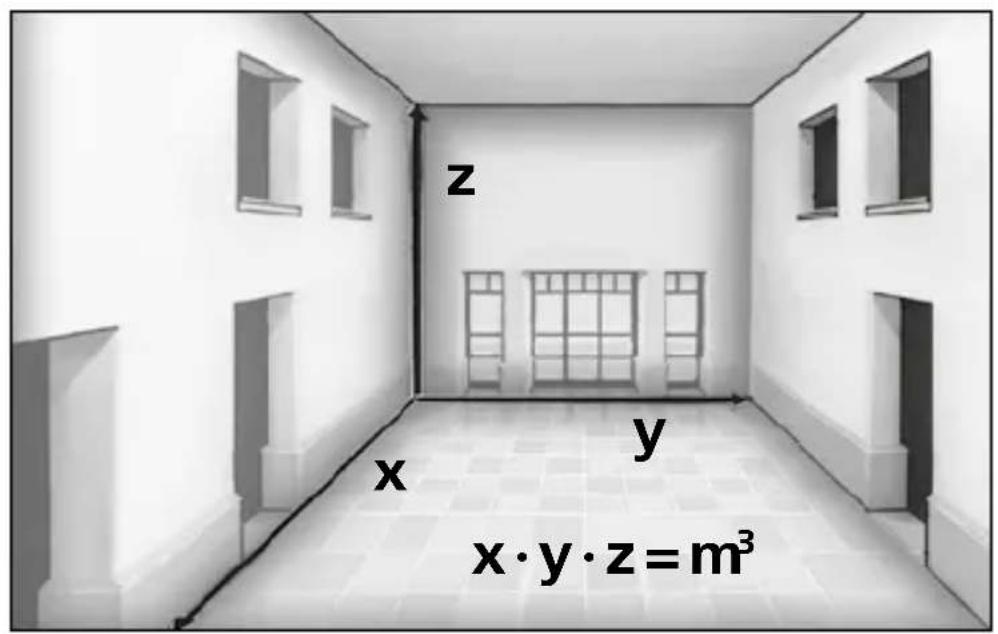
text_image
z x y x·y·z=m³Laserliner
!
natural_image
Warning symbol with a triangular triangle and central starburst (no text or numbers)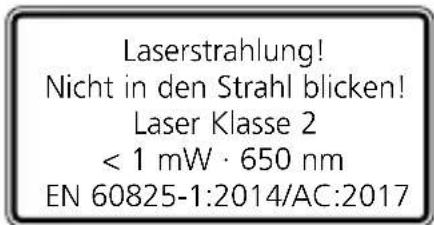
text_image
Download on the App Store
text_image
GET IT ON Google Play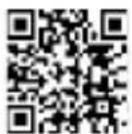

Completely read through the operating instructions, the "Warranty and Additional Information" booklet as well as the latest information under the internet link at the end of these instructions. Follow the instructions they contain. This document must be kept in a safe place and if the laser device is passed on, this document must be passed on with it.
Function / Application
Laser distance meter with colour display
- For measuring length, area and volume
- Digital Connection interface to transfer the measured data
- Function for angle measurement
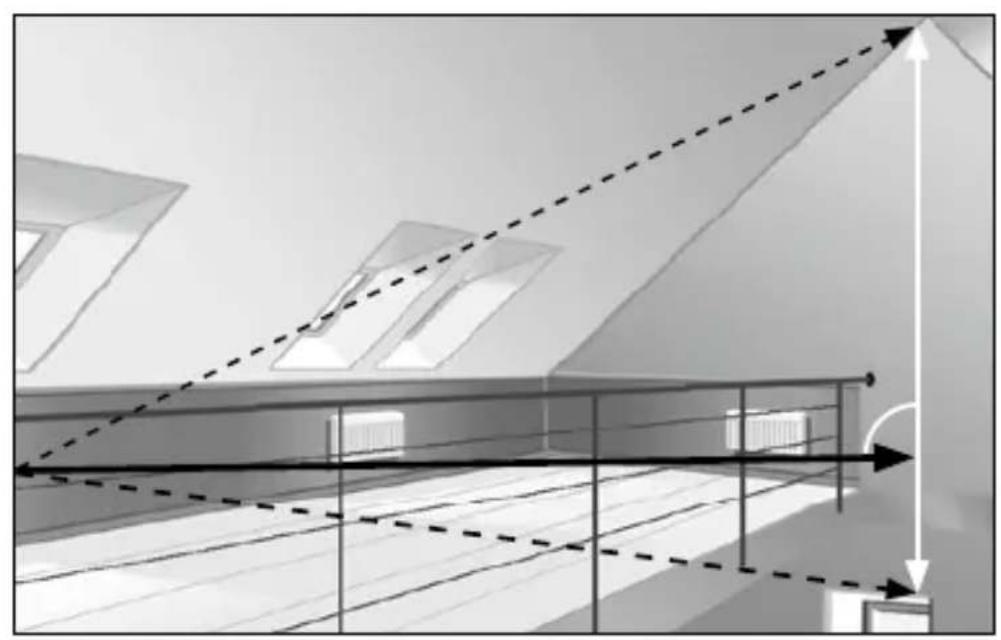
- Min/Max function for determining diagonals, verticals and horizontals
General safety instructions
- The device must only be used in accordance with its intended purpose and within the scope of the specifications.
- The measuring tools and accessories are not toys. Keep out of reach of children.
- Modifications or changes to the device are not permitted, this will otherwise invalidate the approval and safety specifications.
- Do not expose the device to mechanical stress, extreme temperatures, moisture or significant vibration.
- The device must no longer be used if one or more of its functions fail or the battery charge is weak.
- Please ensure compliance with the safety regulations set out by local and national authorities with regard to the correct and proper use of the device.
Safety instructions
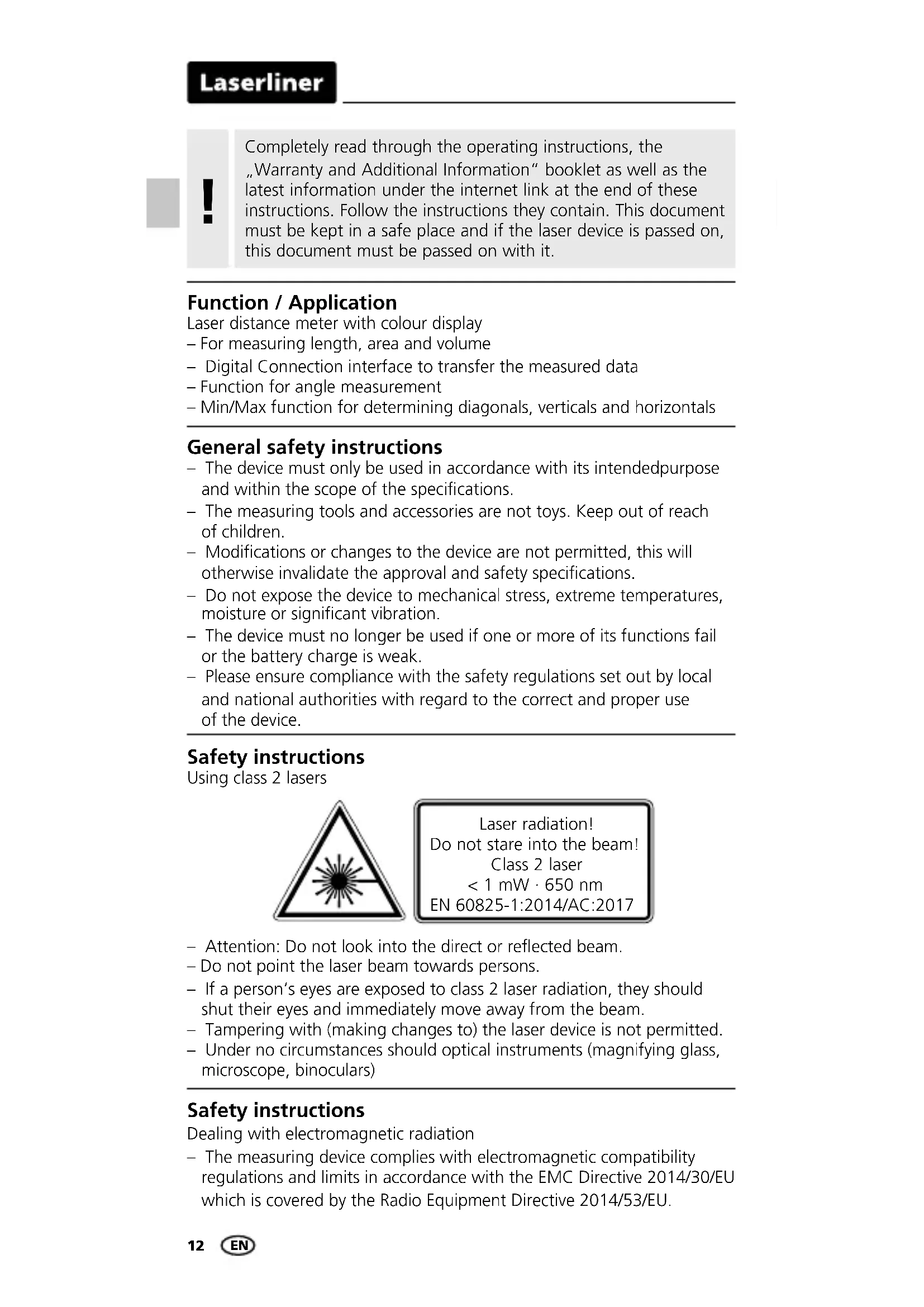
Using class 2 lasers

natural_image
Warning symbol with a triangular triangle and central starburst (no text or numbers)Laser radiation! Do not stare into the beam! Class 2 laser < 1 mW · 650 nm EN 60825-1:2014/AC:2017
- Attention: Do not look into the direct or reflected beam.
- Do not point the laser beam towards persons.
- If a person's eyes are exposed to class 2 laser radiation, they should shut their eyes and immediately move away from the beam.
- Tampering with (making changes to) the laser device is not permitted.
- Under no circumstances should optical instruments (magnifying glass, microscope, binoculars)
Safety instructions
Dealing with electromagnetic radiation
- The measuring device complies with electromagnetic compatibility regulations and limits in accordance with the EMC Directive 2014/30/EU which is covered by the Radio Equipment Directive 2014/53/EU.
- Local operating restrictions – for example, in hospitals, aircraft, petrol stations or in the vicinity of people with pacemakers – may apply. Electronic devices can potentially cause hazards or interference or be subject to hazards or interference.
- The measuring accuracy may be affected when working close to high voltages or high electromagnetic alternating fields.
Safety instructions
Dealing with RF radiation
- The measuring device is equipped with a wireless interface.
- The measuring device complies with electromagnetic compatibility and wireless radiation regulations and limits in accordance with the RED 2014/53/EU.
- Umarex GmbH & Co. KG hereby declares that the DistanceMaster Compact Pro radio equipment complies with the essential requirements and other provisions of the European Radio Equipment Directive 2014/53/EU (RED). The EU Declaration of Conformity can be found in its entirety at the following address: http://laserliner.com/info?an=ACH
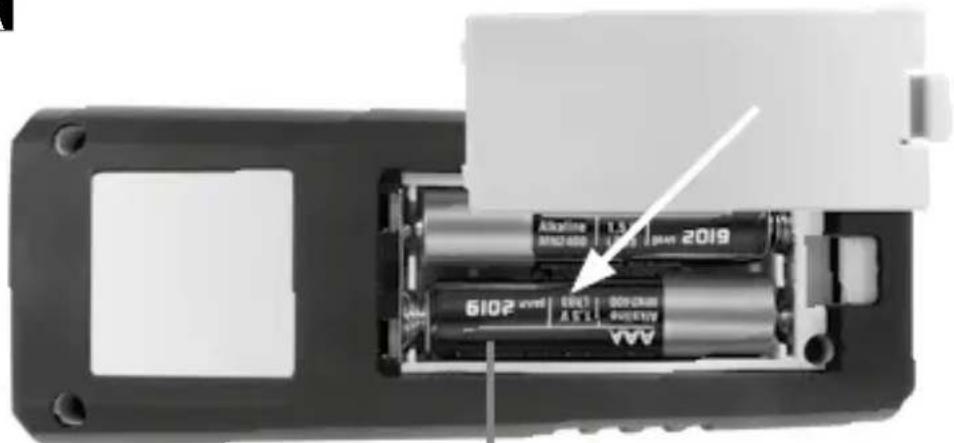
Inserting batteries (see Fig. A)
Open the battery compartment and insert batteries according to the symbols. Be sure to pay attention to polarity.
text_image
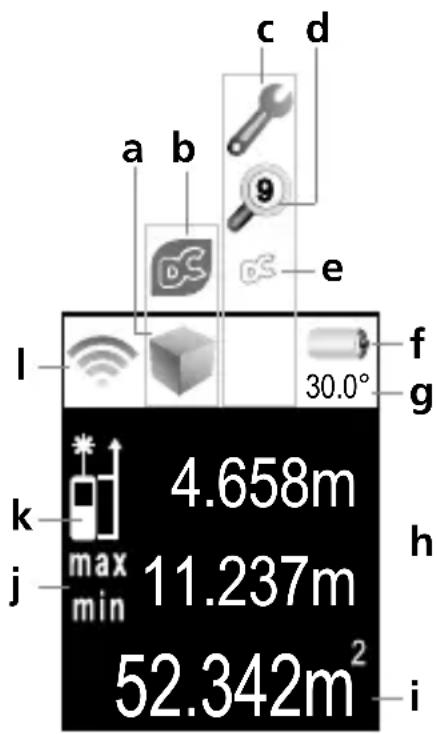
4.658m 11.237m 52.342m² 30.0° h i j k l a b c d e f g min max 30.0°DISPLAY:
a Display length / area / volume / Angle function 1 + 2 + 3
b Digital Connection function
c Malfunction / service required
d Memory
e Digital Connection function activated
f Battery symbol
g Measured value, angle function
h Intermediate values / min/max values
i Measurement values / Measurement results Unit m / ft / inch / _' _"
j min/max continuous measurement
k Measurement point (reference)
rear / front
The bar diagram shows how well suited the reflection surface is for measurement. This is particularly useful for measuring over long distances, dark surfaces or bright ambient light.
Laserliner
1.
text_image
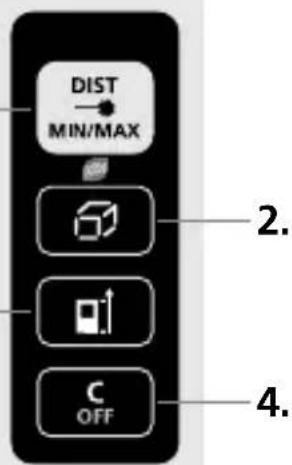
DIST MIN/MAX 2. 4.KEYPAD:
- ON / Measure / min/max continuous measurement
- Length / area / volume / Angle function 1 + 2 + 3 / Digital Connection function / Memory
- Measurement point (reference) rear / front / Unit of measure m / ft / inch / _'_" / enable Digital Connection function
- OFF / delete last measurement values
Switch on, measure and switch off:
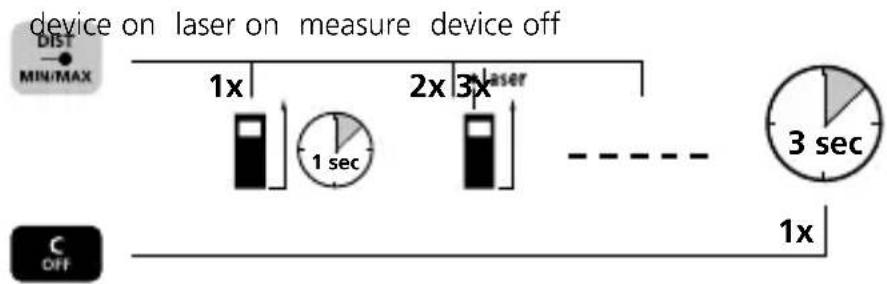
flowchart
graph LR
    A["device on laser on measure device off"] --> B["1x"]
    B --> C["1 sec"]
    C --> D["2x"]
    D --> E["3x"]
    E --> F["3 sec"]
    F --> G["1x"]
    H["MIN/MAX"] --> I["Dist"]
    I --> J["OFF"]
Change unit of measure:
m /ft /inch/_'_"


Delete the last measured value:

Change measurement point (reference):
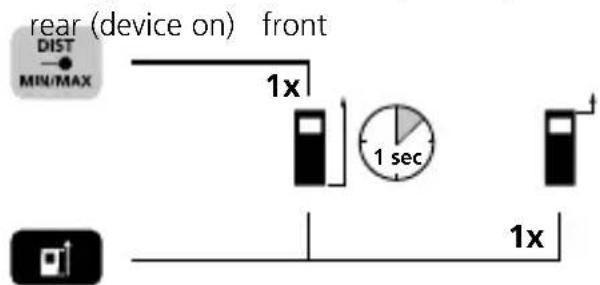
text_image
rear (device on) front DIST MIN/MAX 1x 1 sec 1xChange measurement function:
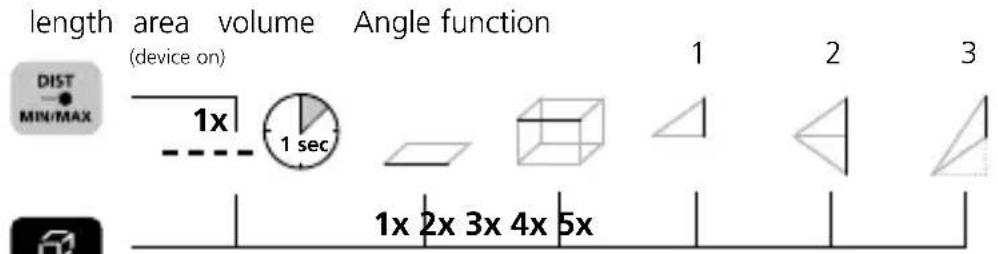
text_image
length area volume Angle function (device on) DIST MIN/MAX 1x 1 sec 1 2 3 1x 2x 3x 4x 5xDistanceMaster Compact Pro
Length measurement:
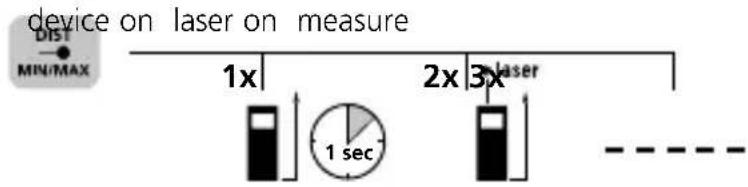
text_image
device on laser on measure DIST MIN/MAX 1x 2x 3x laser 1 sec - - - - - -Area measurement:
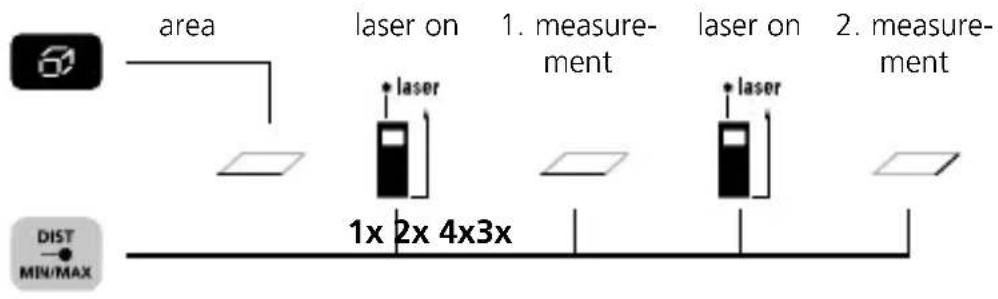
text_image
area laser on 1. measurement laser on 2. measurement 1x 2x 4x3x DIST MIN/MAXVolume measurement:
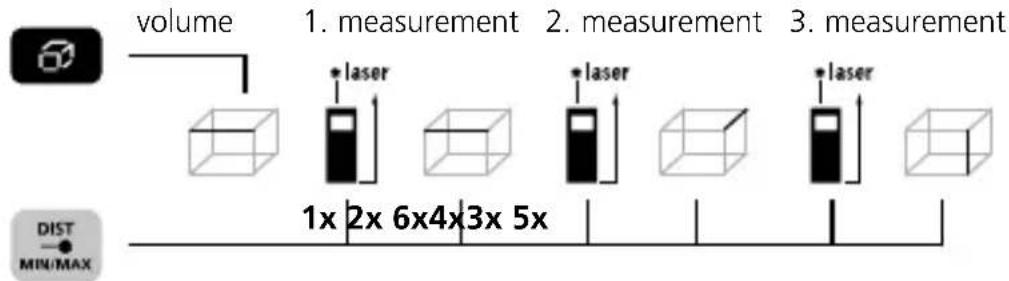
text_image
volume 1. measurement 2. measurement 3. measurement * laser * laser * laser 1x 2x 6x4x3x 5x DIST MIN/MAXAngle function 1:
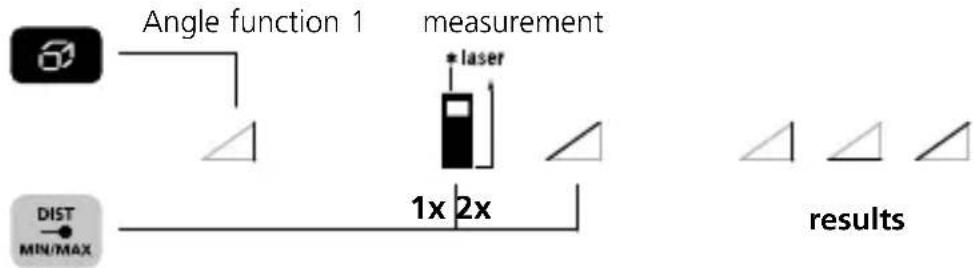
flowchart
graph TD
    A["Angle function 1"] --> B["measurement"]
    C["DIST MIN/MAX"] --> D["1x 2x"]
    D --> E["results"]
The measurement results are determined automatically by the 360° inclination sensor.
Angle function 2:
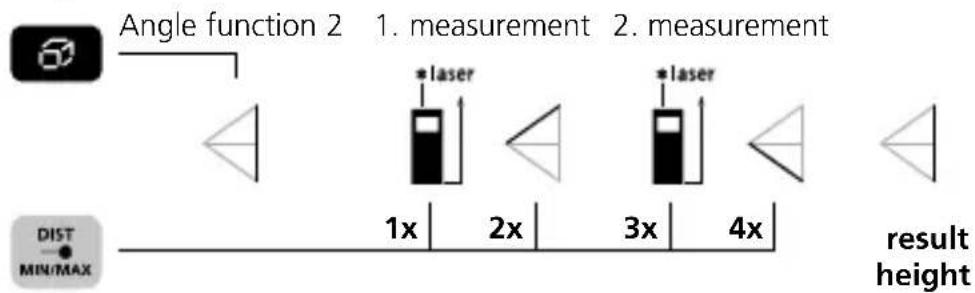
text_image
Angle function 2 1. measurement 2. measurement * laser * laser 1x 2x 3x 4x result height DIST MIN/MAXThe measurement result is determined by the 360^ inclination sensor.
Laserliner
Angle function 3:
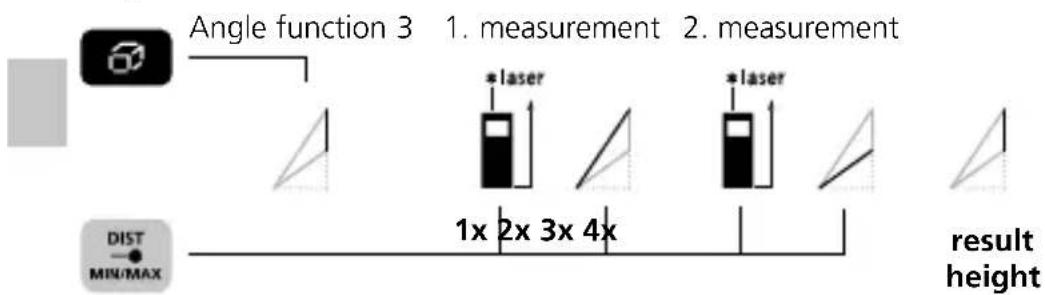
text_image
Angle function 3 1. measurement 2. measurement * laser * laser 1x 2x 3x 4x result height DIST MIN/MAXThe measurement result is determined by the 360^ inclination sensor.

Angle function 1, 2, 3: The back of the device can be used as a reference surface for measuring angles.
min/max continuous measurement:
Press for 3 seconds then release button
stop


The LC display shows the max value, the min value and the current value.
Data transfer
This device has digital connectivity which allows wireless data transfer to mobile devices such as smart phones or tablets with a wireless interface.
The system prerequisites for a digital connection are specified at
http://laserliner.com/info?an=ble
This device can generate a wireless connection to devices which are compatible with the wireless standard IEEE 802.15.4. The wireless standard IEEE 802.15.4 is a transfer protocol for Wireless Personal Area Networks (WPAN). The range is set to a maximum distance of 10 m from the terminal device and greatly depends on the ambient conditions such as the thickness and composition of walls, sources of interference as well as the transmit / receive properties of the terminal device.
Enable / disable Digital Connection:
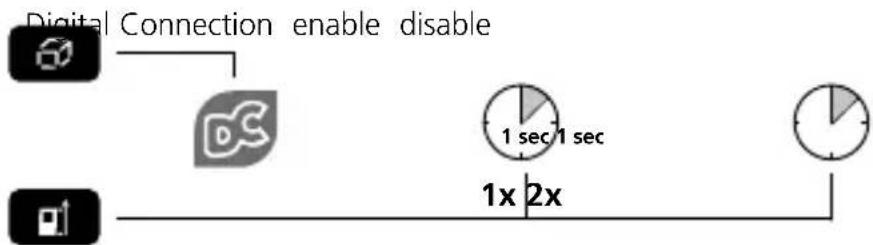
flowchart
graph LR
    A["Digital Connection enable disable"] --> B["DC"]
    B --> C["1 sec 1 sec"]
    C --> D["1x 2x"]
    D --> E["Clock"]
When enabled the Digital CConnection symbol appears on the display (e). When the function is active, a mobile device can connect by means of an app to the measuring device.
DistanceMaster Compact Pro
Application (app)
An app is required to use the digital connection You can download the app from the corresponding stores for the specific type of terminal device:

text_image
Download on the App Store
text_image
GET IT ON Google Play

Make sure that the wireless interface of the mobile device is activated.
After starting the app and activating the digital connection, a connection can be set up between a mobile device and the measuring device. If the app detects several active measuring devices, select the matching device.
This measuring device can be connected automatically the next time it is switched on.
Memory function:




View stored valuesor
Important notices
- The laser points to the location that will be measured.
No objects may get into the laser's line of measurement. - The device compensates the measurement for different room temperatures. Therefore allow the device a brief adaptation period when changing locations with large temperature differences.
- The device is only conditionally useable in outdoor areas and cannot be used in strong sunlight.
- The measurement results of outdoor measurements may be influenced or falsified by rain, fog and snow.
- In unfavourable conditions, e.g. with poorly reflecting surfaces, the maximum deviation may be greater than 3 mm.
- Carpeting, upholstery or curtains will not reflect the laser optimally. Measure to flat surfaces.
- Measurements made through glass (window panes) can falsify measurement results.
- An energy-saving function switches the device off automatically.
- Clean with a soft cloth. Water may not be allowed to penetrate the housing.
Laserliner
Error codes:
Err101: Replace the battery
Err104: Calculation error
Err152: Temperature is too high: > 40°C
Err153: Temperature is too low: < 0°C
Err154: Outside the measuring range
Err155: Received signal too weak
Err156: Received signal too strong
Err157: Incorrect measurement or background is too bright
Err160: The device is moving too much to measure
Information on maintenance and care
Clean all components with a damp cloth and do not use cleaning agents, scouring agents and solvents. Remove the battery(ies) before storing for longer periods. Store the device in a clean and dry place.
Calibration
The meter needs to be calibrated and tested on a regular basis to ensure it produces accurate measurement results. We recommend carrying out calibration once a year. Contact your distributor or the UMAREX-LASERLINER service department.
Technical Data
(Subject to technical changes without notice. Rev21W40)
| Distance measurement | |
| Precision (typical)* ± 2 mm | |
| Inside measurement range** | 0,1 m - 50 m |
| Angle measurement | |
| Measuring range ± 90° | |
| Resolution 0,1° | |
| Precision 0,1° | |
| Laser class 2 / < 1 mW (EN 60825-1:2014/AC:2017) | |
| Laser wavelength 650 nm | |
| Operating conditions | -10°C ... 40°C, max. humidity 80% rH, no condensation, max. working altitude 2000 m above sea level |
| Storage conditions -20°C ... | 70°C, max. humidity 80% rH |
| Radio module operating data | IEEE 802.15.4. LE ≥ 4.x (Digital Connection) interface; Frequency band: ISM band 2400–2483.5 MHz, 40 channels; Transmission power: max. 10 mW; Bandwidth: 2 MHz; Bit rate: 1 Mbit/s; Modulation: GFSK/FHSS |
Technische Daten (Subject to technical changes without notice)
| Automatic switch-off 30 sec | laser / 3 min device |
| Power supply 2 x 1,5V LR03 | (AAA) |
| Dimensions (W x H x D) 43 x | 110 x 27 mm |
| Weight 100 g (incl. batteries) |
* measuring distance up to 10 m with strongly reflective target surface and at room temperature. The measurement deviation may increase by ± 0.2 mm/m for greater distances and under unfavourable measuring conditions such as strong sunlight or weakly reflective target surfaces.
** at max. 5000 lux
EU directives and disposal
This device complies with all necessary standards for the free movement of goods within the EU.
This product is an electric device and must be collected separately for disposal according to the European Directive on waste electrical and electronic equipment.
Further safety and supplementary notices at:
http://laserliner.com/info?an=ACH

text_image
CE UK CALaserliner
!
natural_image
Warning symbol with a triangular triangle and central sunburst pattern (no text)text_image
Download on the App Store
text_image
GET IT ON Google Play

text_image
Diagram showing four icons with labels: a battery, a pie chart labeled '3 sec', and a clock symbol.natural_image
Warning symbol with a triangular triangle and central starburst (no text or numbers)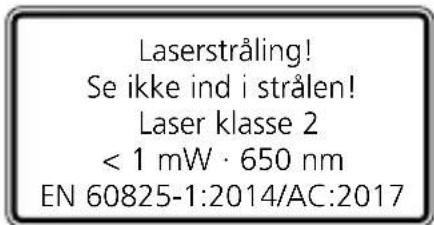
text_image
Laserstråling! Se ikke ind i strålen! Laser klasse 2 < 1 mW · 650 nm EN 60825-1:2014/AC:2017text_image
Download on the App Store
text_image
GET IT ON Google Play

text_image
Warning sign with sunburst symbol inside triangle, commonly used in safety or hazard warningtext_image
Download on the App Store
text_image
GET IT ON Google Play

text_image
Warning sign with sunburst symbol inside triangle, commonly used in safety or hazard warning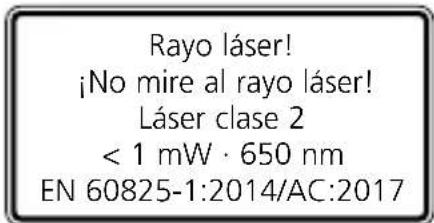
text_image
Download on the App Store
text_image
GET IT ON Google Play

text_image
Warning sign with sunburst symbol inside triangle, commonly used in safety or hazard warningtext_image
Download on the App Store
text_image
GET IT ON Google Play