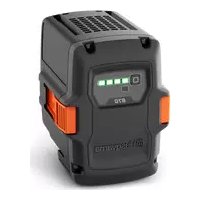
40B70 - Battery HUSQVARNA - Free user manual and instructions
Find the device manual for free 40B70 HUSQVARNA in PDF.
 FR
FR
 BG
BG
 CS
CS
 DA
DA
 DE
DE
 EL
EL
 EN
EN
 ES
ES
 ET
ET
 FI
FI
 HU
HU
 IT
IT
 JA
JA
 KO
KO
 LT
LT
 LV
LV
 NL
NL
 PL
PL
 PT
PT
 RO
RO
 RU
RU
 SK
SK
 SL
SL
 SV
SV
 TR
TR
 UK
UK
 VI
VI
 ZH
ZH
| Product type | Li-ion battery |
| Brand | Husqvarna |
| Model | 40-B70 |
| Rated voltage | 36 V |
| Rated capacity | 4.0 Ah |
| Charge level indicator | 4 LEDs + 1 warning LED |
| Compatible chargers | QC80, QC250, 40-C80, QC330, QC500, 40-C500X, 40-C750X |
| Operating temperature | -10 °C to 40 °C |
| Charging temperature | 5 °C to 40 °C |
| Weight (estimated) | 0.8 kg |
| Dimensions (L x W x H, estimated) | 120 x 80 x 70 mm |
| Connected app | Husqvarna Connect (iOS/Android) |
| Main functions | Powering Husqvarna cordless products, LED charge and error indicator, protection against extreme temperatures |
| Maintenance and cleaning | Keep clean and dry, clean terminals with a dry cloth |
| Safety | Protect from direct sunlight, heat and flames; do not disassemble; do not use if damaged; keep out of reach of children |
| Storage | Temperature 5 °C - 25 °C, charge between 30% and 50%, protected from moisture and light |
| Recycling | Do not dispose of with household waste, take to a recycling center or store |
Frequently Asked Questions - 40B70 HUSQVARNA
User questions about 40B70 HUSQVARNA
0 question about this device. Answer the ones you know or ask your own.
Ask a new question about this device
Download the instructions for your Battery in PDF format for free! Find your manual 40B70 - HUSQVARNA and take your electronic device back in hand. On this page are published all the documents necessary for the use of your device. 40B70 by HUSQVARNA.
USER MANUAL 40B70 HUSQVARNA
EN Operator's manual 2-8
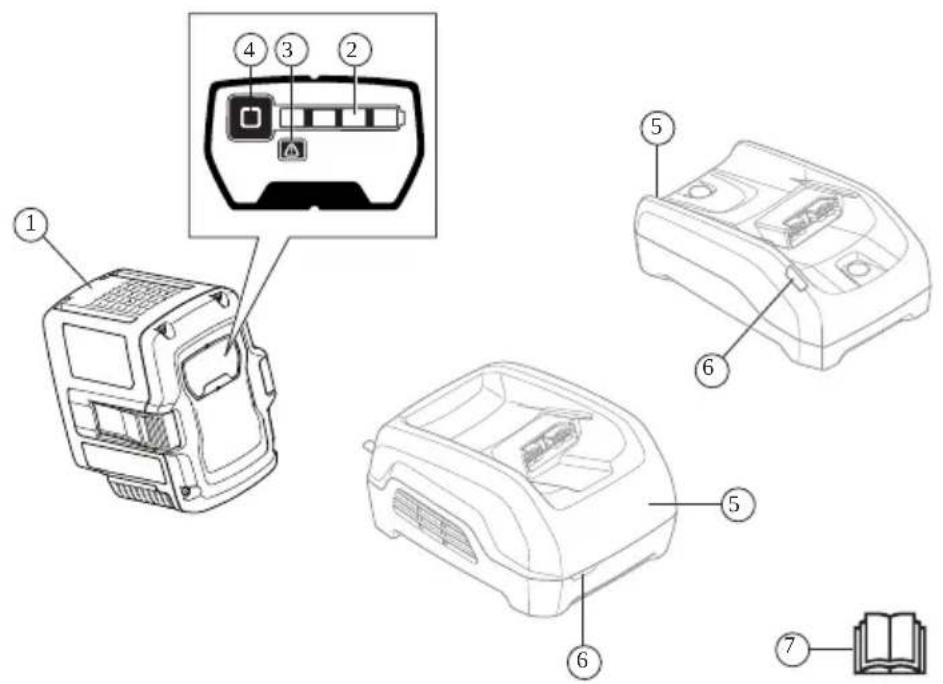
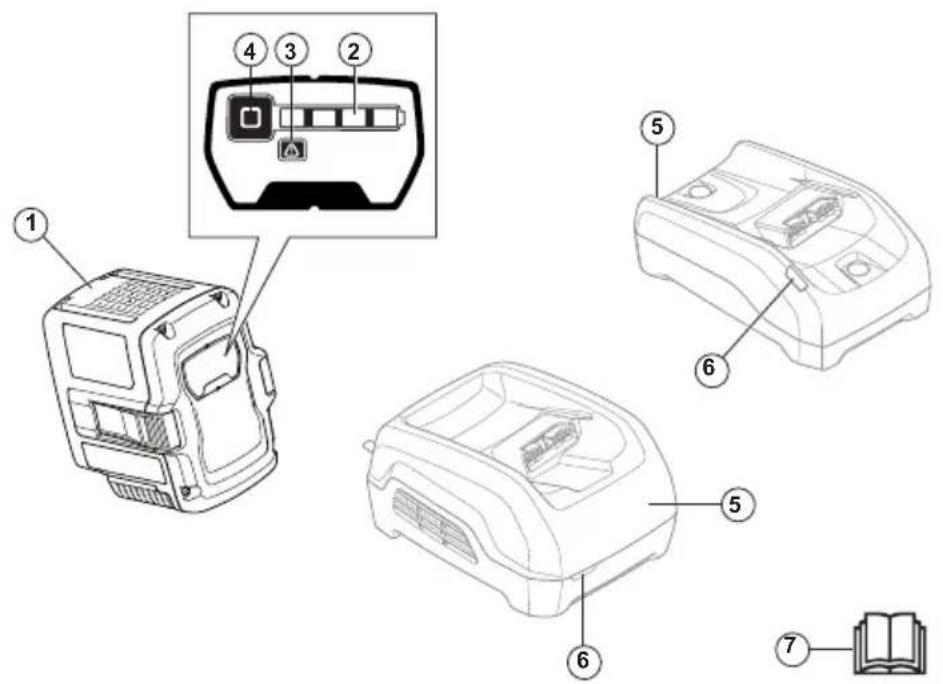
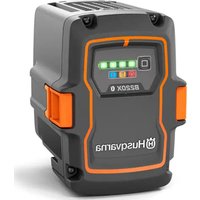
- Battery
- LED indicator for the state of charge
- Warning LED
- State of charge indicator button
- Battery charger (accessory)
- Charging status LED
- Operator's manual
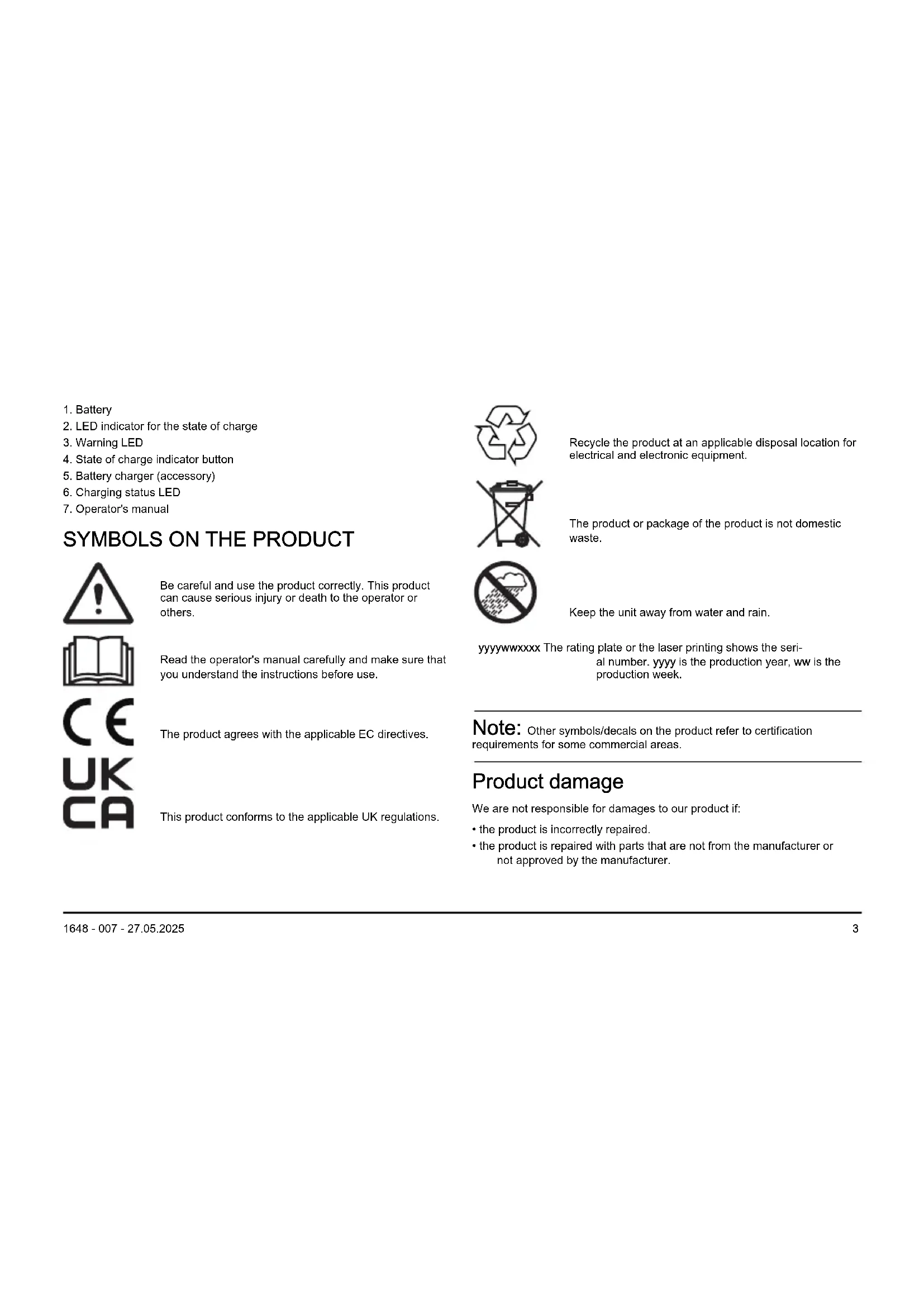
SYMBOLS ON THE PRODUCT

Be careful and use the product correctly. This product can cause serious injury or death to the operator or others.
Read the operator's manual carefully and make sure that you understand the instructions before use.
The product agrees with the applicable EC directives.
This product conforms to the applicable UK regulations.

Recycle the product at an applicable disposal location for electrical and electronic equipment.

The product or package of the product is not domestic waste.

Keep the unit away from water and rain.
yyyywwxxxx The rating plate or the laser printing shows the serial number. yyyy is the production year, ww is the production week.
Note: Other symbols/decals on the product refer to certification requirements for some commercial areas.
Product damage
We are not responsible for damages to our product if:
- the product is incorrectly repaired.
-
the product is repaired with parts that are not from the manufacturer or not approved by the manufacturer.
-
the product has an accessory that is not from the manufacturer or not approved by the manufacturer.
- the product is not repaired at an approved service center or by an approved authority.
Support
For support about the product, go to the Support section on to access instructions, troubleshooting guides, or to use the Husqvarna Self-Service and the Product Assistant (if available in your market). For more support about the product, speak to your Husqvarna servicing dealer.
SAFETY DEFINITIONS
Warnings, cautions and notes are used to point out specially important parts of the manual.

WARNING: Used if there is a risk of injury or death for the operator or bystanders if the instructions in the manual are not obeyed.

CAUTION: Used if there is a risk of damage to the product, other materials or the adjacent area if the instructions in the manual are not obeyed.
Note: Used to give more information that is necessary in a given situation.
IMPORTANT SAFETY INSTRUCTIONS

WARNING: Read all safety warnings and all instructions. Failure to obey the warnings and instructions may result in electrical shock, fire and/or serious injury.
Note: Save all warnings and instructions.
- Only use the battery chargers, QC80QC250 or 40-C80 to charge Husqvarna original batteries. The batteries are software encrypted.
- Only use the 40-B70, 40-B140 batteries as a power supply for the related Husqvarna products. To prevent injury, do not use the battery as a power supply for other devices.
- Do not try to disassemble or repair the battery. All repairs is to be done by an approved dealer only.
- Keep the battery away from sunlight, heat or open flame. The battery can cause burns and/or chemical burns.
- Do not use a damaged battery or battery charger.
- Do not cause mechanical shock to the battery.
- Do not remove the battery from its package until you are to use it.
- Do not let battery acid touch your skin. Battery acid causes injuries to the skin, corrosion and burns. If you get battery acid in your eyes, do not rub but flush with water for a minimum of 15 minutes. If battery acid has touched your skin, you must clean the skin with a large quantity of water and soap. Get medical aid.
- Keep the battery away from children.
- Keep the battery clean and dry.
- Clean the battery terminals with a clean dry cloth if they become dirty.
-
Do not keep the battery in the battery charger when it is fully charged.
-
Remove the battery from the product when you do not use it and during transportation.
- Keep batteries in storage away from metal objects such as nails, screws or jewelry.
OPERATION
- The battery must be charged before you use it for the first time. Always use Husqvarna approved battery chargers. Refer to TECHNICAL DATA on page 8.
- Use the battery only when the ambient temperature is between -10ircC (14°F) and 40ircC (104°F).
- Use the battery charger only when the ambient temperature is between 5ircC (41°F) and 40ircC (104°F).
- The battery will not charge if the battery temperature is more than 50irc C (122° F).
- Push the battery indicator button to get information of the state of charge of the battery.
To charge the battery

CAUTION: Make sure that the battery, the battery charger and the terminals on the battery are clean and dry.
Do not put the battery in the battery charger if it is dirty or wet.
- Connect the battery charger to a power outlet. The charging LED flashes 1 time.

CAUTION: Only connect the battery charger to a power outlet with the voltage and frequency specified on the rating plate.
- Connect the battery to the battery charger. The charging LED comes on.
- Remove the battery from the battery charger when it is fully charged. Push the battery indicator button for battery status. When all the LED indicators come on, the battery is fully charged.
- Pull the power plug to disconnect the battery charger from the power outlet. Do not pull the power cord.
Battery LED indicator
The display shows the state of charge and if there are problems with the battery.
| LED indicator Battery status (state of charge) | |
| 40-B70, 40-B140 | |
| 4 LED lights are on The battery is 76% - 100% charged. | |
| 3 LED lights are on The battery is 51% - 75% charged. | |
| 2 LED lights are on The battery is 26% - 50% charged. | |
| 1 LED light is on The battery is 6% - 25% charged. | |
| 1 LED light flashes The battery is 0% - 5% charged. |
Husqvarna Connect
Husqvarna Connect is a free app for your mobile device. The Husqvarna Connect app gives extended functions for your Husqvarna product.
• Extended product information.
• Information about, and help with, product parts and servicing.
To start to use Husqvarna Connect
-
Download the Husqvarna Connect app on your mobile device.
-
Register in the Husqvarna Connect app.
- Follow the instruction steps in the Husqvarna Connect app to connect and register the product.
Note: Husqvarna Connect app is not available for download in all markets. Speak to your servicing dealer for more information.
TROUBLESHOOTING
| Condition Possible faults Possible procedure | ||
| The battery warning LED flashes. Temperature deviation, the battery is too cold or too hot to use. | Let the battery cool down or move it indoors to warm it up. When the battery has the correct temperature, it can be used again. The battery will not charge if the battery temperature is more than 50 °C (122 °F). | |
| Use the battery in ambient temperatures between -10 °C (14 °F) and 40 °C (104 °F). | ||
| Use the battery charger in ambient temperatures between 5 °C (41 °F) and 40 °C (104 °F). | ||
| The battery is empty. Charge the battery. | ||
| The battery warning LED comes on. Permanent battery error. Speak to your dealer. | ||
TRANSPORTATION AND STORAGE
- The supplied Li-ion batteries obey the Dangerous Goods Legislation requirements.
- Obey the special requirement on package and labels for commercial transportations, also those from third parties and forwarding agents.
- Speak to a person with special training in dangerous material before you send the product. Obey all applicable national regulations.
- Use tape on the contacts when you put the battery in a package. Put the battery in the package tightly to prevent damage and accidents.
-
Do not keep the battery in an area where static electricity can occur. Do not keep the battery in a metal box.
-
Put the battery in a dry, frost free and clean space with correct temperature.
- Put the battery in storage where the temperature is between 5 °C (41 °F) and 25 °C (77 °F). Keep the battery away from sunlight.
- Charge the battery 30% to 50% before you put it in storage for long periods.
- Clean the battery before you put it in storage.
Disposal
The symbol means that the product is not domestic waste. Recycle it through your local collection system for electrical and electronic equipment. This contributes to proper end of life waste management. Contact local
authorities, domestic waste services, your dealer or retailer for information. Incorrect disposal may have potential negative effects on the environment and human health, due to the potential presence of hazardous substances.

Note: The symbol shows on the product or package of the product.
TECHNICAL DATA
For technical data, refer to the rating plate of the battery.
Table 1: Approved battery chargers
| QC330 QC500 | 40-C500X 40 | C750X | ||
| Voltage, V 36 | 36 36 36 | |||
| Input voltage, V | 100-240 100-240 100-240 | |||
| Frequency, Hz | 50-60 50-60 50-60 50-60 | |||
| Power, W 330 | QC330 500 750 | |||
SYMBOLER PÅ PRODUKTET

- Aku
- Laadimisoleku LED-märgutuli
- LED-hoiatustuli
- Aku laetustaseme indikaatori nupp
- Akulaadija (lisatarvik)
- Laadimisoleku LED-märgutuli
- Kasutusjuhend
SÜMBOLID TOOTEL

OLULISED OHUTUSJUHISED

SYMBOLES SUR LE PRODUIT

- Baterija
- LED indikator stanja punjenja
- LED za upozorenje
- Gumb indikatora stanja napunjenosti
- Punjač baterije (dodatna oprema)
- LED indikator stanja napunjenosti
- Korisnički priručnik
SIMBOLI NA PROIZVODU

Budite oprezni i pravilno upotrebljavajte ovaj proizvod. Ovaj proizvod može izazvati teške ozljede ili smrt rukovatelja ili drugih osoba.
VAŽNE SIGURNOSNE UPUTE

UPOZORENJE: Pročitajte sva sigurnosna upozorenja i sve upute. Nepridržavanje upozorenja i uputa može uzrokovati strujni udar, požar i/ili teške ozljede.
Napomena: Spremite sva upozorenja i upute.
- Upotrebljavajte samo punjače baterije, QC80QC250 ili 40-C80 za punjenje originalnih baterija tvrtke Husqvarna. Baterije su softverski kodirane.
- Baterije 40-B70, 40-B140 upotrebljavajte isključivo za napajanje odgovarajućih proizvoda tvrtke Husqvarna. Bateriju nemojte upotrebljavati za napajanje drugih proizvoda jer postoji opasnost od ozljeda.
- Bateriju nemojte rastavljati niti pokušavati popraviti. Sve popravke mora obavljati samo ovlašteni distributer.
- Bateriju zaštitite od sunčeve svjetlosti, vrućine i otvorenog plamena. Baterija može uzrokovati opekline i/ili kemijske opekline.
- Nemojte upotrebljavati oštećenu bateriju ni punjač baterije.
- Bateriju nemojte izlagati mehaničkim udarima.
- Bateriju uklonite iz pakiranja tek neposredno prije nego je kanite upotrijebiti.
- Nemojte dopustiti kontakt baterijske kiseline s kožom. Baterijska kiselina uzrokuje ozljede kože, koroziju i opekline. Ako vam baterijska kiselina uđe u oči, nemojte ih trljati nego barem 15 minuta ispirite oči s puno vode. Ako baterijska kiselina dođe u kontakt s kožom, operite je velikom količinom sapunice. Zatražite medicinsku pomoć.
- Bateriju držite podalje od djece.
-
Bateriju održavajte čistom i suhom.
-
Ako se kontakti baterijskog kompleta zaprljaju, obrišite ih čistom suhom krpom.
- Kad se baterija napuni, uklonite je iz punjača.
- Dok proizvod ne upotrebljavate i tijekom transporta, uklonite bateriju iz njega.
- Baterije skladištite dalje od metalnih predmeta poput čavala, vijaka ili nakita.
RUKOVANJE
- Prije prve upotrebe bateriju morate napuniti. Uvijek upotrebljavajte odobrene punjače baterije tvrtke Husqvarna. Pogledajte TEHNIČKI PODACI na stranici 80.
- Bateriju upotrebljavajte samo pri temperaturama okoline između -10 °C (14 °F) i 40 °C (104 °F).
- Punjač baterije upotrebljavajte samo pri temperaturama okoline između 5 °C (41 °F) i 40 °C (104 °F).
- Baterija se neće puniti ako je njezina temperatura veća od 50 °C (122 °F).
- Pritisnite gumb indikatora baterije da biste saznali stanje napunjenosti baterije.
Zamjena baterije

OPREZ: Pobrinite se za to da baterija, punjač baterije i priključci na bateriji budu čisti i suhi. Ne umećite bateriju u punjač baterije ako je on prljav ili mokar.
| QC330 QC500 | 40-C500X 40- | C750X | ||
| Snaga, W 330 | QC330 500 750 | |||
A TERMÉK ÁTTEKINTÉSE
Dažnis, Hz 50–60 50–60 50–60 50–60
Galia, W 330 QC330 500 750
GAMBARAN KESELURUHAN PRODUK

ARAHAN KESELAMATAN PENTING

- Batteri
- LED-lampe for ladestatus
- Varsellampe
- Indikatorknapp for ladestatus
- Batterilader (tilbehør)
- LED for ladestatus
- Bruksanvisning
SYMBOLER PÅ PRODUKTET

SYMBOLE ZNAJDUJĄCE SIE NA PRODUKCIE

| QC330 QC500 | 40-C500X 40- | C750X | ||
| Frecvență, Hz | 50-60 50-60 50-60 50-60 | |||
| Putere, W 330 | QC330 500 750 | |||
ОБЗОР ИЗДЕЛИЯ
DÔLEŽITÉ BEZPEČNOSTNÉ POKYNY

- Baterija
- LED indikator statusa punjenja
- LED lampica upozorenja
- Dugme indikatora statusa punjenja
- Punjač baterije (oprema)
- LED indikator statusa punjenja
- Korisničko uputstvo
SIMBOLI NA IZDELKU

VAŽNA BEZBEDNOSNA UPUTSTVA

SYMBOLER PÅ PRODUKTEN

TRANSPORT OCH FÖRVARING
Original instructions
Оригинални инструкции
Původní pokyny


- SYMBOLS ON THE PRODUCT
- Product damage
- Support
- SAFETY DEFINITIONS
- IMPORTANT SAFETY INSTRUCTIONS
- OPERATION
- To charge the battery
- Battery LED indicator
- Husqvarna Connect
- To start to use Husqvarna Connect
- TROUBLESHOOTING
- TRANSPORTATION AND STORAGE
- Disposal
- TECHNICAL DATA
- SYMBOLER PÅ PRODUKTET
- SÜMBOLID TOOTEL
- OLULISED OHUTUSJUHISED
- SYMBOLES SUR LE PRODUIT
- SIMBOLI NA PROIZVODU
- VAŽNE SIGURNOSNE UPUTE
- Napomena: Spremite sva upozorenja i upute.
- RUKOVANJE
- Zamjena baterije
- A TERMÉK ÁTTEKINTÉSE
- GAMBARAN KESELURUHAN PRODUK
- ARAHAN KESELAMATAN PENTING
- SYMBOLE ZNAJDUJĄCE SIE NA PRODUKCIE
- ОБЗОР ИЗДЕЛИЯ
- DÔLEŽITÉ BEZPEČNOSTNÉ POKYNY
- SIMBOLI NA IZDELKU
- VAŽNA BEZBEDNOSNA UPUTSTVA
- SYMBOLER PÅ PRODUKTEN
- TRANSPORT OCH FÖRVARING
Brand : HUSQVARNA
Model : 40B70
Category : Battery