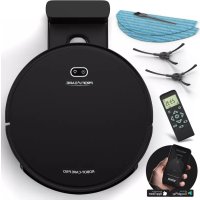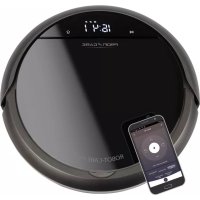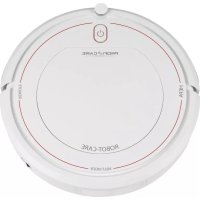
PCBSR 3042 - Robot vacuum ProfiCare - Free user manual and instructions
Find the device manual for free PCBSR 3042 ProfiCare in PDF.



User questions about PCBSR 3042 ProfiCare
0 question about this device. Answer the ones you know or ask your own.
Ask a new question about this device
Download the instructions for your Robot vacuum in PDF format for free! Find your manual PCBSR 3042 - ProfiCare and take your electronic device back in hand. On this page are published all the documents necessary for the use of your device. PCBSR 3042 by ProfiCare.
USER MANUAL PCBSR 3042 ProfiCare
Thank you for choosing our product. We hope you enjoy using the appliance.
Symbols in this Instruction Manual
Important information for your safety is specially marked. It is essential to comply with these instructions in order to avoid accidents and prevent damage to the appliance:

WARNING:
This warns you of dangers to your health and indicates possible injury risks.

CAUTION:
This refers to possible hazards to the appliance or other objects.

NOTE:
This highlights tips and information.
Contents
Overview of the Components. 3
Emptying the Dust Container and Cleaning the Filter ...4
General Notes 41
Special Safety Instructions for this Appliance. 41
Special Safety Information
Concerning the Integrated Rechargeable Battery. 42
Unpacking the Appliance 42
Overview of the Components/ Scope of Delivery. 42
Notes for Use 43
Before Using the Appliance 43
Putting into Service 43
Inserting Batteries into the Remote Control. 43
Mounting the Side Brushes. 43
Charging the Battery 43
Operation 44
Switching the Appliance On/Off 44
Buttons on the Remote Control 44
Using the Appliance 44
Stopping Operation 44
Maintenance and Cleaning 45
Emptying the Dust Container and Cleaning the Filter...45
Cleaning/Replacing the Side Brushes. 45
Storage 45
Troubleshooting 46
Technical Data. 46
Disposal 46
Accumulator/Battery Disposal. 46
Meaning of the "Dustbin" Symbol 46
General Notes
Read the operating instructions carefully before putting the appliance into operation and keep the instructions including the warranty, the receipt and, if possible, the box with the internal packing. If you give this appliance to other people, please also pass on the operating instructions.
- The appliance is designed exclusively for private use and for the envisaged purpose. This appliance is not fit for commercial use.
- The power adapter is only suitable for use in dry rooms.
- Check if the output current, voltage and the polarity of the power adapter match the information on the connected appliance!
- Do not touch the connected power adapter with wet hands!
- If necessary, disconnect the appliance from the power adapter.
- Ensure that the cable of the power adapter does not become kinked, jammed, driven over or come into contact with heat sources.
- Do not use a damaged power adapter.
- Do not repair the appliance yourself, but visit an authorized specialist.
- The appliance and the mains lead have to be checked regularly for signs of damage. If damage is found the appliance must not be used.
- Use only original spare parts.
- In order to ensure your children's safety, please keep all packaging (plastic bags, boxes, polystyrene etc.) out of their reach.

WARNING:
Do not allow small children to play with the foil. There is a danger of suffocation!
Special Safety Instructions for this Appliance
- This appliance can be used by children aged from 8 years and above and persons with reduced physical, sensory or mental capabilities or lack of experience and knowledge if they have been
given supervision or instruction concerning use of the appliance in a safe way and understand the hazards involved.
Children shall not play with the appliance.
- Cleaning and user maintenance shall not be made by children without supervision.
- The appliance is intended for use with safety extra-low voltage. Connect only to a power supply according to the specifications on the rating label.
- If the connection cable of this appliance has been damaged, it must be replaced with a special connection cable available from the manufacturer or its customer service.
- Do not use any power adapter other than the one supplied.
- Do not suck up hot ashes or pointed or sharp objects!
- Do not suck up liquids!
- Do not use the appliance in damp rooms!
- Never vacuum-clean without the dust container and filter in place.
Special Safety Information Concerning the Integrated Rechargeable Battery
- Do not expose the integrated rechargeable battery to hard impacts or pressure.
- Do not drop the appliance.
- Do not place heavy objects on top of the appliance.
- Keep the appliance away from direct sunlight, heat and open flames.
- The rechargeable battery may not be taken apart, thrown into fire, immersed in liquids or short-circuited.
- If the rechargeable battery shows any leakage, prevent the battery acid of coming into contact with skin, eyes and mucous membranes. In case of contact with battery acid, immediately rinse the affected area with plenty of clear water and seek medical attention immediately.
Unpacking the Appliance
- Remove the appliance from its packaging.
- Remove all packaging material such as plastic films, filler material, cable ties and cardboard packaging.
-
Check the content for any missing parts.
-
In the event that the packaging content should be incomplete or if damages are noticeable, do not operate the appliance. Return it to the dealer immediately.
Overview of the Components / Scope of Delivery
Top Side (Figure A)
1 Pressure plate to open the dust container compartment
2 Dust container compartment
3 Infrared receiver for the remote control
4 Button (start/pause) with charge/power indicator light
5 Shock absorber
6 Connection socket for power adapter
7 Main switch On/off)
8 Air outlet
9 Power adapter
Bottom Side (Figure B)
10 Side brush (right)
11 Front wheel
12 Stairway detection sensor
13 Battery compartment cover
14 Side brush (left)
15 Stairway detection sensor
16 Drive wheel (left)
17 Air intake duct
18 Rubber lips
19 Drive wheel (right)
20 Stairway detection sensor
Remote Control (Figure C)
1 RESPOND button
2 START/PAUSE button
3 RANDOM button
4 AUTO button
5 FOCUS button
6 Direction buttons
Not Illustrated
Filter insert with mesh filter and HEPA filter
Notes for Use
- The appliance is operated via charged battery. Charge the battery using the power adapter provided. Direct power supply via power adapter is not possible.
- The appliance sucks up loose dirt through the nozzle. For more efficient cleaning, the appliance is equipped with a rubber lip.
- Do not use the appliance to vacuum building rubble.
- Dirty filters reduce the suction power of the appliance, hence we recommend cleaning the dust container and filters after each use.
- When the appliance hits a wall or other obstacles during operation, it will change its driving direction.
- The appliance also cleans underneath furniture if they have a ground clearance of at least 80mm . If the appliance gets stuck under a piece of furniture, a beep will sound and the robot vacuum cleaner switches itself off.
- If the appliance is lifted during operation, it will emit a beep and the power indicator light flashes red. The appliance will then switch off.
- Due to its design, the cleaning of carpets and the driving over edges is only possible to a limited extent. Short-pile carpets with low edges can be surmounted. For long-pile carpets, please use a conventional 230 V floor vacuum cleaner.
- The sensors at the bottom of the appliance detect steps and other dips, so that it can not drop down.
CAUTION:
Prior to each use, ensure the sensors are clean, or else the appliance may crash.
Depending on the condition of the step (colour scheme, design, etc.), it may happen that the sensors can still not detect the landing. Especially near a stairway, please do not leave the appliance unattended.
Before Using the Appliance
- Clear the floor of any objects lying around that could obstruct the side brushes, get caught in the nozzle or stop the appliance from cleaning.
- Remove any objects that could be knocked over (such as vases, small lamps, decorative items, etc.).
- Make sure that no cables, cords or fringes, e.g. of curtains, table cloths or carpets can be accessed. If necessary, fold the edges with its fringes under the carpet. The appliance may otherwise get entangled in it.
Putting into Service
Inserting Batteries into the Remote Control
(Batteries are not included in the scope of delivery)
- Open the battery compartment cover on the back of the remote control.
- Insert 2 batteries of type R03 "AAA" 1.5 V, observing the correct polarity (see markings on the bottom of the compartment)!
- Close the battery compartment cover.
WARNING:
Do not expose batteries to excessive heat such as sunlight, fire or similar. There is a risk of explosion!
CAUTION:
- Batteries may leak and lose battery acid. Remove the batteries if the remote control is not being used for an extended period of time.
- Different battery types or new and used batteries must not be used together.
- Do not dispose of batteries along with domestic waste. Return used batteries to the relevant collection facilities or your retailer.
Mounting the Side Brushes
Please refer to figure B on page 3.
- Plug the side brush (10) with the imprint R into the appliance at the inscription R below. It must engage with a click sound.
- Plug the side brush (14) with the imprint L into the appliance at the inscription L below. It must engage with a click sound.
Charging the Battery
Before you can use the appliance, you must first charge the integrated rechargeable battery.
- Plug the power adapter into a properly installed shockproof socket.
- Make sure the appliance is switched off. (Main switch in position 0)
- Connect the appliance with the plug-in power adapter by inserting the plug into the socket (6).
The charge control lamp on the button indicates the charging process:
Flashes green = the rechargeable battery is charging.
Lights up green = the rechargeable battery is fully charged.
- Prior to first use, charge the appliance for at least 6 hours.
- After a maximum of 6 hours or as soon as the indicator light stays on permanently, the charging process needs to be stopped.
CAUTION:
- Route the cable of the power adapter in such a way that nobody can trip over it.
- Do not charge the rechargeable battery unsupervised.
- Always remove the mains plug from the power outlet after charging is complete.
NOTE:
- Once the rechargeable battery is almost empty, you will hear a beep. The power indicator light on the button flashes red and the appliance switches off. The power indicator light goes out after around 60 seconds.
- Even when switched off, the rechargeable battery discharges continuously. If the appliance is out of use for a longer period of time, charge the rechargeable battery at least once every 4 to 6 weeks.
Operation
Switching the Appliance On/Off
- The appliance is switched on when the main switch 1/0 is set to position.
- Switch off the appliance by setting the main switch to position 0.
Buttons on the Remote Control
The appliance is mainly operated via the remote control buttons. The remote control signals are transmitted to the appliance via infrared light. To operate the appliance with the remote control, it must be within sight. Point the remote control at the infrared receiver.
- RESPOND
In standby or during operation, the appliance will emit a beeping sound.
START/PAUSE
Switches the appliance on or into standby.
- RANDOM
The appliance is operating in "Random" mode. Based on the room, the appliance automatically opts for the best travel route.
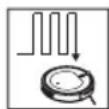
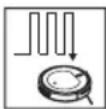
- AUTO
The appliance is operating in "Systematic" mode. It will zigzag between two obstacles as shown in the adjacent illustration.
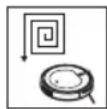
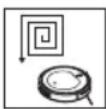
FOCUS
The appliance is operating in "Spot" mode. It moves, as shown in the adjacent illustration, from the centre of an area in an ever-growing circle.
#
The appliance moves forward, to the right, backwards and to the left. While in standby, these buttons are without any function.
Using the Appliance
WARNING:
- Pay particular attention to the safety of babies, young children and the elderly while the appliance is in operation. Make sure that no one stumbles over the appliance.
- Do not touch the wheels and side brushes with your hands during operation.
CAUTION:
- Do not leave the appliance switched on unattended, so that you are able to intervene if it is handicapped by furniture/objects.
-
If anything gets stuck in the nozzle and obstructs the appliance during operation, switch it off immediately and remove the obstacle.
-
Prior to each use, ensure that the dust container and filters are in place, empty and cleaned.
- Place the appliance in the middle of the room to be cleaned.
- Switch on the appliance with the main switch. The appliance is now in standby mode.
- Press the START / PAUSE button. The operation indicator lights up orange. The appliance starts cleaning the floor in RANDOM mode.
- If desired, select another cleaning mode (AUTO, RANDOM or FOCUS).

NOTE:
Should the appliance encounter too many obstacles while operating in FOCUS or AUTO mode it will automatically switch to RANDOM mode.
- The appliance cleans the floor until the battery is empty or it is switched off manually.
Stopping Operation
- Stop the appliance by pressing the START / PAUSE button.
- Bring the main switch into position 0 to switch off the appliance.
- Empty the dust container and clean the filters and sensors as described under "Maintenance and Cleaning".
Maintenance and Cleaning

WARNING:
- Always switch off the appliance before servicing or cleaning and disconnect it from the power adapter!
- Under no circumstances should you immerse the appliance in water for cleaning purposes. Otherwise this might result in an electric shock or fire.

CAUTION:
- Do not use a wire brush or any abrasive items.
- Do not use any acidic or abrasive detergents.

NOTE:
Do not attempt to lubricate the rollers with lubricants or oil. Ignoring this would cause significantly more dust or dirt to adhere to the rollers.
- Clean the housing with a soft, dry cloth without additives.
- Use a soft cloth to gently clean the sensors (12/15/20).

CAUTION:
Prior to and after each use, check that the sensors are clean. Otherwise, the appliance may tumble down a staircase.
- Prior to and after each use, make sure that the nozzle and vents are clear.
- For optimum performance of the appliance, you should empty the dust container and clean the filters after each use.
Emptying the Dust Container and Cleaning the Filter

CAUTION:
Never wash the filters under any circumstances.
Please refer to the images on page 4.
- Press the corresponding surface to open the dust container compartment.
- Fold the handle upwards and remove the dust container from the appliance.
- Pull the HEPA filter out of the dust container. There is still a rubber holder around the HEPA filter. Clean the HEPA filter by tapping the dust out of it.
We recommend replacing the HEPA filter once a year.

CAUTION:
Do not use a brush to clean the HEPA filter. Using a brush may damage the filter material.
-
Fold the cover of the dust container upwards. Then remove the mesh filter from the dust container.
-
Empty the dust container while holding it over a garbage can.
- You can clean the dust container under running water. To clean the mesh filter, use a soft paintbrush.

CAUTION:
- Allow the dust container to air dry. Do not, however, expose it to direct sunlight.
-
Only re-insert the filters into the dust container once it is completely dry!
-
Reinsert the filters into the dust container. Make sure that both the HEPA filter and the mesh filter are installed properly.
Cleaning / Replacing the Side Brushes
If the side brushes are dirty, you may clean them with clean water. Do not use any additional cleaning agents.
If the side brushes are worn or defective, replace them with new ones.
- The side brushes can be easily removed by pulling them upwards.
- When attaching the side brushes, pay attention to the right (R) and left (L) markings. You will find these markings on both the appliance and on the side brush.
Storage
- Clean the appliance as described and allow it to dry.
- We recommend that you keep the appliance in the original packaging if it will not be used for long periods.
Always store the appliance out of the reach of children in a dry, well ventilated place. The storage temperature should be between 0 and 40^ .
Troubleshooting
| Problem Possible cause Remedy | ||
| The appliance does not function. | The rechargeable battery is empty. | Charge the battery. |
| The rechargeable battery is defect. | Contact our service or your dealer. | |
| Weak suction power. The battery is nearly discharged. | Charge the battery. | |
| The dust container is full. Empty the dust container. | ||
| The filters are soiled. Clean the filters. | ||
| The nozzle is blocked. Clean the nozzle. | ||
| The rechargeable battery does not keep the charge. | The rechargeable battery has reached the end of its life. | Contact our service or your dealer. |
| The indicator light flashes orange for about 60 seconds and over a period of 10 seconds a beep sounds. | ||
| During operation, the operation indicator light alternately flashes green and orange. | Shock absorber faulty. Check whether the shock absorber is jammed. | |
| During operation, the operation indicator light alternately flashes red and orange. In addition, a beep is emitted. | Blockage on the drive wheel. Check the drive wheels. | |
| The operation indicator light flashes green during operation. In addition, a beep is emitted. | The side brushes can not move freely. | Check the side brushes. |
Technical Data
Model: PC-BSR 3042
Net weight: approx. 1.9 kg
Power adapter
Protection class: II
Input: AC 100-240 V, 50/60 Hz, 0.4 A MAX
Output: DC 24V,600mA
Polarity:
Rechargeable battery: 12x1.2V, 1500mAh Ni-MH
Operating time: approx. 2 hours
Charging time: approx. 6 hours
The right to make technical and design modifications in the course of continuous product development remains reserved.
This appliance has been tested according to all relevant current CE guidelines, such as electromagnetic compatibility and low voltage directives, and has been constructed in accordance with the latest safety regulations.
Disposal
Accumulator/Battery Disposal

The appliance contains a rechargeable battery. Used batteries/accumulators (rechargeable batteries) do not belong in household waste.
The battery must be removed before the product is recycled.
- Ensure the appliance has been switched off via the main switch (O).
- Remove the two screws on the battery compartment cover.
- Remove the rechargeable battery pack and disconnect the plug connection.
Information, where batteries /accumulators are to be disposed of can be obtained from your local or municipal authorities.
Meaning of the "Dustbin" Symbol
Protect our environment: do not dispose of electrical equipment in the domestic waste.
Please return any electrical equipment that you will no longer use to the collection points provided for their disposal.
This helps avoid the potential effects of incorrect disposal on the environment and human health.
This will contribute to the recycling and other forms of re-utilisation of electrical and electronic equipment.
Information concerning where the equipment can be disposed of can be obtained from your local authority.
Instrukcja obslugi
Cnmbonbl npmeHemble B daHHOM pyKOBOCTBe noJIb3OBaTeIa
BaxhIbe pekomehdaun nOObecneueHnae 6e3- onachoctn o6o3hauehbl no oc06ehHom. O6a3aTeNbHO cNeyIte 3TNM pekomehdaunm, YTObI ppeoTbpaNTb HechacThb cnUayn nnnoNOMky n3dennr:

PENEYIPPEXDEHNE:
PpeDynpexKaet o6 onaChocTn dIra 3IopOBbI N BO3MOK-HOM PNCKe IOnyueHn TpaBMbl.

BHIMAHNE:
Yka3bIbaeHa BO3MOxHyO ONaCHOCTb IIN3dJIIMN IN dpynx OKpyxaIOxN ppeDMTOB.

ПИМЕЧАнЯ:
Jaet COBtI INHOpMaIIO.
CoapedkaHne
O63op detae np6opa. 3
OnopoxHHeNe KOHTeHepa dIra c6opa
Ibnnn OuchTka qniltpa. 4
Omba HOpMa. 60
CneuaNbHbIe yka3aHnno 6e3onacHocTu
Tn 3ToRo np6opa. 61
CneuaNbHbIe yka3aHnno 6e3onacHocTn, kacaOnueceBCTpoEHHOaKKyMnyTopHO6aTapen 62
PacnaKobka yctpoiCTBa. 62
063op detae npnbopa / komnneKT nocTaBkn. 62
PpmeuHnno nncnoB3OBAHn 62
Ipeep nCnoB3OBAHnem npi6opa.. 63
IoproToBka np6opa Ka pa6ote 63
BCTaBaKa 6aTapeeK B nIbT dNCTaHcIOHHOуnpabJeHn. 63
UcTaHObKa 6OKOBbIX UeTOK 63
3apka 6atapen. 63
Pa6ota. 63
BkIouHe/ByIKIOueHne np6opa. 63
KhoNkHa npIbTe nctaHIOHO ynpAbeHnra.63
PpimmeHne npibopa. 64
OctahOBka pa6Obl yCtpoIcTba 64
06cnykubHne n uNcTka. 64
OnopoxKHeHne KOHTeHepa dIa c6opa nJIIN OCHCTKa fNtBtpa. 65
OuICTka / 3aMeHa 6OKOBbIX UeTOK .65
Xpahene 65
Ponck yctpaHHe HncnpaBHOtei 65
TexHHueckne daHbIe 66
YTNIN3aun 66
Yttnn3aun6bataepa/akymyIantOpnbix 6batapeek.....66
3HaueHne CmBbOla «KOp3nHa» 66
067aHΦopMaζη
Ipeed hauanom 3KcNpyataun np6opbaBnmaTeIbHO npouHTaTe npnaaraemyu HNCTpykTuNO no 3KcNpyataun m coxpaHNTe ee B HAdexHOM MeCTe, BMeCTe C rapaHTnHBIM TaIOHOM, KaccOBbIM YekOM N, NO BO3MOXHOCTN, KAPTOHHO KOp6KO C yNAKOBOUHbIM MaTePnAion. EcIn daTe KOmy-Ni6o IOnNoB3OBAtbc np6obpOM, O8raTeNbHO daJIte B pNiDaay DaHHy INCHpykTuNO n 3KcNpyataun.
-Повьтугсь пибором только чатным образим и по наз nauseю. Пибор не пedingондя КOMМерчесКOrO ИСпльвоганя.
- CeteB0n aadTep npiroDENI INCNOJB3OBAHNTOJbKO B CyNX NOMEUHINX.
- PpOBePbTe CoIlaCoBaHHOCTb BbIXoIHorO ToKa, HAprrJxHnI N pIoIpaHocTc CeTeBOrO aAnITePa C INHOpMaUeN Ha IIOKnIIOuHaEMOM pnp6ope!
He npikacaiTecb K ceTeBOMy aanTepy BnaXhIMpykam!
Korda Heo6xoDIma YnCTka,OTKnHouHTe np6op ot ceteBoro aanTepa.
- Y6eIntecb,уTO Ka6eJIb ceTeBOrO aIaIInTepa He n30rHyT, He nepeKaat, He HaTAYHt N He KacaetcN ICTOCHNKOB Tennla.
- He npimehyTe NOBpeKdEHbI cTeBoa aDantep.
He nItaTeCb camoCTeJIbHo peMOHTnpOBaTb np6op o6paTneTecb K yONHOMOeHHOMy Ha 3TO cNeuaJIncTy.
- Pnp60 np Ka6eJIb cTeBOro nITaHnI HeO6xOdIMOp peryIpaH O6cneIobaTb Ha HauNue CneIOB NOBpeKDeHn. PnO6hApUkeHn IOBpeXDeHn POJIb3OBaTbcr np60pom 3anpeuTaBCr.
IcnoJb3yUteToJIbKOOpnHaHaJIbHbe3aHaCTN.
-13 coo6paKeHn 6e0NaChOcTn IaI DaTeH He octaBnIyIe NExKaTb yNakOBky (PiactNKOBbIe MeWKn, KapTOH, NeHONJAcT n T.D.) 6e3 npncMOTpa.

IPEDYIPPEXDEHNE:
He no3B0JnTe DeTm nIpaTb c noIINaTIneHOBOI nIeHko. OnachocTb yduyba!
CneuNbHbIe yka3aHnNo 6e3oNaChOCTn IJy 3TOrO npnbopa
- ΘТИМ пибором могут пользоватбя DeTeN CTapшe 8 Лет и Лиca C ор<aHcHbIMn ФиЗИчЕСКИМN, OсЯЗaTeЛьнБIMN I NCxHcHcKIMN cNoCo6HocTЯМ NЛН He ИмeJOUne ONbIa NЛN 3HaHIn, EСЛN OHN HaxOДЯТСЯ ПОД НaДЗОРOM NЛN ПоПИHCTpyKТИрOBaHbI B OTHOSeHIN 6e3ONaCHOrO ПОЛьзованя пиборOM N 3HaIOT O CBЯЗAHbIX C ὄТИМ OnaCHOCTЯX.
He n03B0JNe Te DeTm IrgaTb C npnbopom.
-ЧИстka и ухов за прибором не дожны проворпся DeТьМи 6e3 надзopa. - UcTpoIcTBo IpeDHa3NaUeH O nIpa6Otbl OT 6e30nacHOro Hn3-Koro HapRjaKeHn. PoIKnIOuAaTe K NCTOChNkY PNTaHnycorlaCHO IHOpMaaHn Ha IHOpMaaOnHOH T6JIuYe.
- Ecπi coeHInTeIbHbI Ka6eIb yCTpoIcTba NOBpeJdeH, eTo Heo6xOIMO 3aMeHnTb Ha CneuaJIbHbI COeINHTeJIbHbI Ka6eIb, NoCTaBIAReMbI N3rTOBInTeIeM I cLyX60J KJIHeNTcKoI PoIdEprKKn.
He nCnoJIb3yIte npYrIe cTeBbIe aIaITePbI, KpOme aIaITePa I3 KOMnJIeKTA NOCTaBKn.
He BcacbBaIte ropaHn pepeH nn octpOKoHeHbIe nn octpbIe npedMeTb!
He BCacbBaIte XnIDKOCTN!
He nCnoJIb3yIe yCTpoIcTBO B cBipbIX NOMeUeHnX! - HNKoRda He npOn3BODnTe y6OpKy nbIeCocOM 6e3 KOHTeHepa dIy c6opa nbIIN nΦnIbTpa, HaxOJaXxCra Ha CBOx MeCTax.
CneuaJIbHbIe yka3aHnnaNo 6e3oNaChocTn, kacaUncnecBCTpoEHNO aKKyMylrTopHo 6aTapeu
3anpeaaetcnoBepraT BCTpoEHnyo akkymyaTOPHy6batae BO3deCTBIO CnIbHbIX ydapOB NnINDaBJIeHHJ.
-Брocatbnpi6bp3anpeuHc。
3aPpeaaetcCTaBnTb TaeIbe npEmdTeHa BepxHIO NOBepxHOctb np6opa.
XpaHnTe npin6op BdaIOn OT BOaDeIcTBnI npAmbIX cJIHeuHbIX Lyuei, Xapbl NOTKpbITOrO pIameH.
AkkymyIaTOpHyo 6aTaapeo 3aPeueHOb pa3bnpaTb, 6pocatb B OROhB, nOpykaTb B KxNkoCTn 3aMbikatb HAKOPOTKO.
EcnB aKKymyIaTOPHO6aTapee 6bHapyuKeHa yTeuKa, He dOnyckaiTe nOnaHaHH aKKMyIaTOPHO KNCIoTbI HaKoKy, B rna3a Hn cIn3NcTbe 0bONoKn. B cnyae KOHTaKTa C aKKymyIaTOPHO KNCIoTOH HEmeDneHNO npOMOIte NopaxEHHy 3OHy 6OBJbWM KOnIYeCTBOM YNCTO BODI IN cpa3y JKe o6paTntEc 3a MeNiunHCKO I NOMUJIbIO.
PacnaKOBka yctpoNCTBa
- N3BNEKNTe yCTPOINCTBO n3 efo yNAKOKN.
- ydaJInte BCE ynaKOBOHyIbe MaTePnAJIbI, TaKHe KaK PIIaCTIKOBaI IJIeHka, HAnONHITeIIN, CKpyTKN IN KAPTOHHaYnaKOBKa.
- Y6eIntecb B HAnHnB CEx KOMIOHeHTOB.
- B cnyae ecn noepxHMOe ynaKOBKn HeNoJIHOe nIN o6hApUKeHbIOBpeXKeHnHa, He paBoTaIe C npIbOpom. HEmdneHNO BepHnte erO dInepy.
O63op DeTalei npnbopa / KOMJIeKT NOCTaBKN
BepxHra CTopoha (PncyHok A)
1 HaxmHOn DNCK DnI OTKpbITnI OTCeKa KOHTeHepa dnnc6opapbln
2OTcEK KOHTeHepa dIa c6pa IbIIN
3 INHΦpaKpachbI npMeMHk dIyIbTa InCTaHIOHO HOrO ynpabBneHnA
4 KhoNka (ctapT / nay3a) cnHnKaTopom 3apAkn/ nHTAH
5 AmOpTu3aTop
6 CoeINHInbHbI pa3bEm IJIe 3JIeKTPoNTaHnI
7IaBbIy BbIKIOHaTeJIb VKn./OTKn.)
8 Bo3dyXOBbInyckHoe OTBepCTne
9 BLOK NITAHIN
HxHHCTOPoHa(PucyHOKB)
10 Bokobaru ta (npabaa)
11 Peredhee Koleco
12 DaTnK o6hApxKeHn IeCTnIbI
13 Kpbiika 6aTaapeHoro OTecka
14 Bokobar 电Tka (IeBa)
15 DaTnK oBnApxKeHnI neCTnIbI
16 PnBODHoe KOleco (neBoe)
17 KaHaI Bo3DyO3a6OpHnka
18 Pe3nHOBbIe KpOMKn
19 PnBODHoe KOJECO (npaBOe)
20 DaTnIK o6HapyKeHnI neCTHnIbI
IyblT dncTaHnOHHO ynpaBneHn (Pcynok C)
1 Khonka RESPOND
2 KhoNka START / PAUSE
3 Khonka RANDOM
4 Khoika AUTO
5 KhoNka FOCUS
6 KhoNKn HanpaBneHnA ▲,
Het n3o6paXeHnA
ΦNJIbTpIoum 3IeMeHT C cetTaBIM ΦJIbTpOM N ΦJIbTpOM HEPA
PpimcuaHn no nCnoJb3ObaHn
- Pπi6op pa6oTaet ot 3apra daakymyIaTopa. 3apdnte aKKymyIaTOp, nCpOJIb3yA aIaIaTeP pIITaHnB, BXOJaIuB V KOMIIeK T NOCTaBKn. IprMoE POkJIIOUeHne K JIeKTPNueCKO CETNI NOMEUeHnHEBO3MOXHO.
- Pn60b BCacbBaet cop uepe3 fopcyHky.ДЯ 6OJIeE 3ΦΦeKTHBHOY y6OpKn Pn60p cHa6XeH pe3HOBOy KpOMKO.
- He nClojB3yIte np6op dIy y6opKn cTpoNTbHorO mycopa.
3aPra3HeHHbIe fNtBtpbl CHNkaOT MOUHOCb BCacBaHn npu6opa,poTOMy peKOMeHnyETcnoCte KaJDoRoNCpOJIb3OBaHn OOnuTaB KOHTeHep dJa C6opa Nbln I FnIbTpbl.
Korda np6op BO Bpempa60tby CTaKNBaETc8 COCTeHOI INI DpyTMMnpenrTCTBnMn, OH MeHReT HAnpabHeHne DBNKeHn.
-ПиборТаКе OсуцEcTBЯET y6bOKу NOД Me6eNbIO, ecn paCToRHe OE T NOBepxHocT N ONa COCTaBJIeT He MeHee 80 MM. Ecn np6Op 3acTeBaeT NOd Me6eNbIO, pa3daeTcR 3ByKOBo CnHaN I p6Ot-NblneCoc ABTomaTHeCKN OTKnIOuHaeTCr. - EcIn noDnHrTb npi6op BO Bpempa60tbl, OH n3daet 3ByKOBoI CNHAn I INHdNkATOp NITaHnHaET MIRatb KpachbIM. B 3Tom cnyuae npi6op aBTOMaTHueckn BbIKIOUaEcTcR.
B Cb3n C KOHCTpyKTHBbIMN O06eHHoCTaM NpIbopa OuNTKa KOBPOB N IepexoJ Upe3 Kpa8 Bo3MOXhbl NlUb B OnpedEnHbIX PpeJax. Pnp6op MoKet PpeOdoJIeTb KOPOTKOBOPCOBbie KOBpI C H3KIMN KpaAMN. B Cnyuae DInHHOBOPCOBIX KOBPOB CneDuYt NCNo1b3oBaTb TpaunOnHbI PbIeococ nla 230 B. - DAtuHKn Ha Ine npi6opa cnocO6HbI o6HapyKntb CTyIeHbKn I dpyrIe nepenadbl BbICOTbl, YTo6bl He DonycTtB ero naDeHn.

BHIMAHNE:
IpeJkKaJbIM NcONb3OBAHnEM y6eJntEcB TOM, YTO DaTUnKu NCTbIe, B IpOTNBOM Cnyuae np6Op MoKeT pa3bTbcR.
B 3aBcHMoCTn OT COCTOHHN CTyIeHbKn (UBeTobA cxema, KOHCTpyKmra N T.D.) 6bIbaet, YTO daTchKn He mOryT obHapyKntb MeTo cnycka. Ecnn npBop hao-dITcR pIaOM C neCTHnuei, eRo H cIeNyET OCTaBnrtb 6e3 npCmOTpa.
Ipeep nCnoJb3OBAHnem np6opa
- Y6epnte c nola BCE lekaune Ha HEM npedMeTbI, cnocobhie 3aboknpoBaTb 60kOBblte TKN, 3aCTpTb B opcyHke nn CO3daTb npenrTCTBne dny6opkn.
- YdaHnTe Bce npEdmTbI, KOtOpbIe MOrYr OnpOKnHyTbcR (HaPnIMep, Ba3bl, He6OJIbUne IaMnbl, DeKopatNBhIE n3dEINRA N T.D.).
- PpOBepbTe, YTO6bI Ha Nytu y pnp6opA He 6blIO Ka6e nei, UHypOB n 6axpOMbI, HApPIMep, OT 3aHaBecOK, cKaTePeTne nn KOBpO. Ipn Heo6xOumocTn 3aBepHnTe kpar C 6axpOMoN oD KOBep. B npOTNBom cnyae np6Op MoXeT TaM 3anyTaTbcra.
IoproToBka npnbopa KaaboTe
Bctabka 6aTapeek B nyIbT dNCTaHcNoHHoro ynpabJIeHnA
(BaTapeKn He BxOaT B KOMnJIeK T NoCTaBKn)
- OtkpoIte 6atapeHbIOTcECh3y nyIbTa DY.
- Bctabte 2 6aTapeKn TnA R03 «AAA» 1,5B, co6IIO-da nOJIpaHocTb (CMOTpn o6o3NaeHnHa dHe OTeKeA)!
- 3akpoTe KpbIuKy 6aTapeiHoro OTCeka.

PENEYIPPEXDEHNE:
He noDBepraIte 6aTapeKIN BO3dEiCTBnIO CINbHoro Tenna, KaK HApIMep, COJIHeuHbIe JyUH, OROH N.T.D. Puck B3pbIb!

BHIMAHNE:
-БатAPEКМORYT npoTeKaTb N TepeTb aKKMyJrTOpHNYKNCNOTy.Ecnn NyIbT DnCTaHcNoHHOrO ynpabNeHnHe HcONb3yETcR dNITeJIbHOe BpeM, BbITaUHTe6BaTapeKn.
He nCnoJIb3yIte 6aTapeKn pa3HbIX TINOB IIN HOBbie n CTapIe 6aTapeKn BmecTe.
He Bb6paBbAaTe NcNoB3oBaHHbIe 6aTapeKn BMeCTe C 6bITOBbIM MycOpOM. OTaIte INX B CpeUaJIbHbI NyHKT c6opa.
YcTaHOBka 60KOBbIX uTeTOK
Cm.pncyHOKBnacTpaHnCe3.
BCTABbTe 60KOByU 5eTKy (10) C OTTnCKOM R B npi6op y paCNoIoxKeHHo HnKe HaDnCn R.3auePneHne npocXoJNT CO UeJIuKOM.
BCTABTe 6OKOBYU 5eKU (14) C OTTnCKOM L B npIbOp y paCnoJoxKeHHo HNKe HaDnCi N. 3aueJIeHne npOnCxOJNT CO UeNtKOM.
3apdka 6atapeu
IpeepTeKAKNCN0b3oBaTbycTpOncTBO,Heo6xOIMO 3apdntBCTpoEHHyOaKMyIaTOpHy6atapeio.
1.ПодкночиTe 6лOK птаньк правильно установпенйудапорpoчнoi розтke.
2. 6eIntecb, yTO np6op BbIKIOueH. (TnaBbI BbIKIO-ateJIb NIOJOKeHH O)
3. CoeHInHe np6op c NOKJIIOUaEMbIM 6NOKOM NITAHNA, BCTaINB WTeKeP B pa3bEm (6).
JaMnOuKa KOHTpOra 3aprAn Ha KHOJKe yKa3bIBaET Ha npOeCC 3aprAn:
Miraet 3eenebim = AkkymnyTopna 6aTape 3apxkaetc.
Tognt 3eenebIM = aKKyMyIaTOpHa8 bTaape nOJIHOCTbIO 3apJKeHa.
-Передпервимиюльбогаимзарякайтepибор He MeHee6yacOB.
- Makcimym Upe3 6 yacob nnn KaK TOnbKO INdkaTOp NaHHeT NocToHnO ropeTb, Heo6xoDnMo OctaHOBtB npOceC 3apJKn.

BHIMAHINE:
- PpoklaIbIaIte Ka6eJIb IcTOUHnka IITAHn TaK, YTO6bl HIKTo He MoR o6 Hero CNOTKHytbcra.
He 3apkaTe aKkyMaTOpHyIO 6aTapeIO 6e3 npn-CMOtpa. - No 3aBepueHn 3apAKn 6o8aTeJbHo n3BneKeTte WTeNCeNb n3 pO3eTKN.

ПРIMЕЧИЗ:
Korda aKKyMylTopHna 6aTape8 6yET noTu nONHOCTbIO pa3pJKeHa, pa3dAcTc8 3ByKOBoi CnHaJI. HndIkatop NtAHnHa Na KhoNke Mmraet KpaChbIM, np6Op OTKIooaETc8. HndIkatop NtAHHa NorachET npImepHo Upe3 60 ckyHd.
Дахе пи ВькюнHom риборе Akkymлтог纳 6атaperя постогно раэржаetс.Есп пибор He nCNoIb3yETcB TeueHne ДЛТьнгОп epnoDA bpe- meHn,Заржaite Akkymлтогу 6batapeio He pexke,Чem pa3В4-6 HeDeJIb.
Pa6ota
BkIIOueHne / BbIKIOueHne np6opa
- Pπb6op BKNIOUaTeC, KOrda rnaBbHbBbIKIOUaTeNb I/O yCTaHOBJEN B NOJOKeHne I.
OTKJIOHTe np6op, yCTAHOBINB rIaBBbIM BKIOUaTeIb B noIOKeHne O
KhoNnHa npbTe dntaHNOHOro ynpaBHeHH
B OCHOBHOM npn6op ynpabJraTc nocpeCTBOM KHOIOK Ha nyIbTe DnCTaHcNOHOrO ynpaBJeHH. CnHaNb c NyIbTa
HnCTaHnOHHo ynpaBHeHnepeaOTcHa np6Op c nOMoubIO IHpapKpaCHOrO CBeta. Iy npabHeHn pIbopom C nyIbTa DnCTaHnOHHoYnpaBHeHn OH DoJIkeH haoNTbc B npedeJax BVIMocTn. HnPaBbTe npblT DA tAHnOHHo ynpaBHeHn Ha IHpapKpaChbI pnemHnik.
- RESPOND
B pexime oKuaHnI IIN BO BpeM pa60tbI np6op n3daCT 3ByKOBo CnHaI.
START/PAUSE
BkIkuyaet npnbop nnn nepeboint ero B peKIM OxndaHna.
- RANDOM
Pa6ota npin6opa B «PpOIN3BOINbHOM» peXIMe. B 3aBnCmOCTN OT KOMHaTbI npin6op aTOMaTneCKN Bbl6npaTe HaunyUwM MapwpyT.
- AUTO
Pa6ota np6bopa B《CnCTeMaTueckOM' pekime. Pnp6op DnKkETc8 3nR3arom Mekdy DByma npeyTCTBnMn, KaK noka3aHO Ha npBedeHNO prdOM NJIIO- cTaun.
FOCUS
Pa6ota npi6opa B pexime «IYTHa». OH DBnKetcra, KaK IOKa3aHO Ha npBVeDeHHo prdOM nJIIOCTpaUH: n3 ceHTpa 3OHbI no NOCTOHH yBEnuNbAioUeJeCRA OKpyxHoCTN.


Pnp6op DvIXeTcBnepeD, BnpaBO, Ha3aN BnEBO.
PnHAXOKeHmBpeKIMeOxuHaHn3Tn KHOKNHe BbIIOJIHHOTKaKx-Jn60 cyHKn.
PpIMMeHHe np6opa

IPIEpyIPEXDEHNE:
BoBpempa60bI np6oopa Heo6xOIMO yJeNTb Oc6oe BnMaHne 6e3oNaChocTm MnaDeHceB, MaJIeHbKnx DetEi N ToKnblix IIOeI. CneDnte 3a TeM, YTO6bI HIKTo He cNOTKnHcy o np6op.

PENEYIPPEXDEHNE:
BoBpempa6oTbI np6opa He npKacauTecb pykamn K KOJecAM N 60KOBbIM UeTKaM.

BHIMAHNE:
He octabnIte np6op BKNIOUeHHbIM 6e3 npuCMOTpa, YTObI Bbl MOITIN BMeaTbcra B CNYae, ecNI emy Meaaet Me6elb /npedMetbl.
- Ecni BO Bpemra pa6oTbI kaKoi-Ni6o npedMeT 3acTpHnetBΦopcyHke N3a6nokpye Tnp6Op, HemeJeHHO erO OTKIOUHTe N yCTpaHNTe npenTCTBHe.
1.ПepeK kaxkIbIM nCnOJIb3OBAHHeM Heo6xOaIMo npOBepuTb,уTO6bI KOHTeHepДЯсбОапblИиФЛBJtpbl6blIHa MecTe,ONOPOXHeHbI OUYUeHbI.
2. NocTabbTe npnbop B cHtp ybpaemoro nomeueneHa.
3. BkIIOHTe yCTPOCTBO C NOMOsbTO rIaBHOro BbIKIOHaTeTn. Tenepb np60b HaxoDntcB pexKIme OxuHaHn.
4. Haxmte Ha KhoNky START / PAUSE. INHdkaToppa60bI 3aropaeTcOpaHKeBbIM. Pnp6op HauHnaety60pky nOla B peKmme RANDOM.
5. Пин Нeo6хоДиМОСТи ВьБeрИTe ДPyгOrpeжIM yборКIN (AUTO, RANDOM ИПИ FOCUS).

ПРИМЕЧАнЯ:
Ecn np6op ctaKnBaetc co CnHkOM 60IbHIM KOJIueCTBOM npeTCTBn npn paBoTe B peXIme FOCUS mN AUTO, OH aBTOMaTneCKn nepeKJIOHa-etcB pexm RANDOM.
- Пибор ппоьдуборку поа, поka He pa3рдся akkymлтор пон рoka on He bydET BbyKlnOchEN BpyHHyI.
OctahOBka pa6oTbI yctpoiCTBa
- OctaHOBIne npinbOp, HaxKaB Ha KhoNky START / PAUSE.
YTO6bI OTKIOUHTb npi6Op, npeBEdnte rnaBHy BblKnHOaTeJb B NOIOXKeHne O. - Onopoxhnte kohteHep dIra c6opa nbIIN oOncntte fIbtpbl n daTmKn, KaK OnncaHO B pa3dJe «O6cnyXuBaHne uNCTka».
HnKoIa n Hn npn KaNX o6ToTbCTBax He MoIte fNlbtpbl.
Cm. n3o6paXeHnHa cTpaHnCe 4.
- HaxMMte Ha COOTBetCTBHyOuIyIO NobepxHocTb, yTO6bl OTKpbITb OTCEK KOHTeHepa dIra c6opa IIIN.
- Повернite руку вевхи удалпге n3 пибopa контейнел дя сбoga nbЛи.
3.ИЗВЕКЛТЕФИЛБТРHEPAи3KоHTeHepaДЯсбopa nbln.BokpyrФИЛБТраHEPAocTaETcpe3INHOblI depXaTeJIb.OuNCTITEФИЛБТРHEPA,Bbl6NBИнero IIbIb.
MbpeKomeHdyem 3aemeHrtb fNtbp HEPA pa3B ro.

BHIMAHHE:
He nCnoJIb3yIte 5eTKy dIra YIcTkn fIInIbTpA HEPA. IcNoJIb3OBAHHe 5eTKn MOKeT NOBpeINb fIInIbTpYIO- mATEpHaI.
4.ПовернITE Кршky Контейнера сбoga nbinn BBepx.3aTeM удалпге ИЗ контейнера сбoga nbinn cetчatabи Фильт.
5. Onopokhnte KOHTeHep IJIa c6opa IIIIN, depka ero HAD MycOPbIM 6aKOM.
6. KonteHep dIg c6opa nbIIM MOKHO YICTNTb IIOI npOTouHO BOIOI. IIN OYNCTKCetTuTOrO fNtpa nCNOJb3yIte MRAkyo KNTb.

BHIMAHINE:
ДаTe KOHTeHepy dIg c6opa nbIIN npocoxHyb Ha BO3dyxe.Пи 3tOM He noDBepraTe erO DeiCTBIO npMbIX COJIHeuHbIX nyueH.
3aHOBOBCTABNITeΦnIbTpblB KOHTeHep dIpa 60pa nIINTOJbKO NocNE TORO, KAK OH NOHOCbIO npocoxnet!
- 3aHOBO BCTaBbTeФnIbTpbl KoHTeHep dIra c6opa nblIN.Y6eINTecbBTOM,yTOФnIbTpHEPAu cetvaTbIΦnIbTp npabNtbo yctaHOBHebl.
OuNCTka / 3aMeHa 6OKOBbIX ΜETOK
Pn3aqr3HEn H60KOBbIX UcTOK IX MOxHO npOMbITb YNCTO BDOJ. He nCNOJIb3yIte DOnOIHTeJIbHbIe YNCTAIIue CpeDCTBa.
EcnB6OKOBIe 3HOHeHbI NIN NOBpeKDeHbI,3aMeHnTe IN HA HOBIE.
1.Бokobblie ueKn IeKo ydAnITb,NotaHyB BBepx.
2. YctahabnBaB6OKOBbie uETK, o6paTne BHNMaHHe Ha MapKnpoBky npaBoi (R) n neBoi (L) uTeok. 3Ta MapKnpoBka NMeTcKa KaHa npuBope, TaK n Ha 6OKoBoi uTeKe.
XpaHeHne
-Почистуе устюк описно в ркуковдостve, И дайемолногьовьбхут.
- PekomeHnyetc xpaHnTb yctpoiCTBO B erO opuHnaJIbHOI yNaKOBKe, ecn OHO He IcNoB3yeTcR dNITeNbHoeBpeM.
Bcerda xpaHnte yctpoCTBO B cyXOM, xopoio BeHTnIpyemom MeCTe, HeIOCTyINHom IJRA TeTei. TempepatypxaHeHna DOJIKHa 6bITb B Duaa3OHe O 0do 40^
Ponck uyctpaehne HeucnpabHocTe
BxOД:......IpeM.TOK(AC)100-240B,50/60TgU,0,4AMaKc BbIXoD:......IocT.TOK(DC)24B,600MA
PonpaHocTb:
AkkymyTopna: 12x1,2B,1500MA-ac NiMH Bpempa6Obl: npn6n.2 cacob Bpem3apAn: npn6n.6 cacob
CoxpaHeNo npaBo Ha TexHnueckne I KOHcTpyKuOHHbIe H3MeHeHnB paMKax npoDoJIkaUoSeIcra pa3pa60TKn npoDyKTA.
3To n3dJIne npOJIIO BCE Heo6XODIMbIe n AKTyaJIbHbIE npOBepKIN, npEINcAHbIe DnpeKTINBOI CE, K npIM. Ha 3JIeKTPOMaHNTHyIO COBMECTNMOCTb I COOTBeTcTBNE Tpe6OBaHnM K Hn3KOBoJbTHOH TEXHnke, OHO bJIIO TAKKe COKHCTpyuPObaHO INOCPToeHO C yYeTOM NocJeDnIX Tpe6OBaHnI NO TEXHnke Be3OpNaChOCTn.
Ytlln3aun
YtIIN3aun6aTapei/AkkymyIaTOpHbIX 6aTapeek
Ipi6op coepKtAkkymyTOpHyo 6atapeky. IcnoIb3ObaHbIe 6atapeyn/AkkymyJnTOpbl (nepe3apXaembIe 6atapeyn) He OTHOCTCA K 6bITOBbIM OTXODAM.
BatapeKa DOnKHa 6bTb n3BneHa nepeD ytnn3auee np60pa.
1.Поверпг,чTo np6op 6blT OTKIQUHc nOMOьho TnaBHorO BbIKJIQUaTeTЯ (O).
- YdaIe IBa BnHTa C KpbIuKm 6aTapeHoro OTeKa.
- YdaJInte KOMPNeKT aKkMyIaTOpHbIX 6aTapeN N BbIHbTe BnIKy n3 po3ETKn.
HΦopMaIIO O MeCTax yTIN3aIIN 6aTapeEK / aKKyMnyA-TOPOB MOXHO NONYHTb B MecTHbIX IIN MyHUNaIbHbIX OPraHAX BnactN.
3haueHne cIMBOJaKo3Ha
3aunTa OKpykaHoueI cpebl: He donyckaetc yTnIn3aun 3JeKTPoPnp6OpOB BMeCTe C bI-TOBbIMN OTXoDAMN.

Yttnn3auny yctapeBwei TexHnKn HncnnpabHBix 3neKtpoPnp6opOB npOn3BODITcB rOpOdCKNX npEeMHbIX NyHKtax.
He donyckaIte He npabInbHoi yTnIn3aun OTxoOB. 3To HAnocNT Bpe OkpykaUoSe CpeDe N OkazbIbAeT HeratNBHOe Bo3deJCTBHe Na 3DopOBBe IIOei.
Oka3bIbaIte codeeCTBne nporpamme yTNn3aun n dpyTm foPmam nepepa60TKn 3NeKtpoHHoN n 3NeKtpueckoTExHNKn.
INHopMaIIO OnyHKtax yTNIM3aIIN 6bITOBOy TEXHNKMOXHO NOJTyuHTB MECTHBIX OPraHAX BnactN.
Ytun3aun6atapei/AkkymyIaTOpHbIX 6atapeek
Ipi6op coepKNT aKKymJrTopHyo 6aTapeKy. IcNoJIb3ObaHbIe 6aTaapeKn / aKKymJrTopbl (nepe3apXkaembIe 6aTaapeKn) He OTHOCTCR K 6bITOBbIM OTXODAM.
BatapeKa DOnKHa 6bTb n3BneHa nepeD ytnn3auee np60pa.
GARANTIEKARTE
warranty card · garantiekaart · carte de garantie · scheda di garanzia · tarjeta de garantia · cartao de garantia · garantikort · karta gwarancyjna · zaru.cnli list · kartica jamstva · carte de garantie · fapaunnoHa Kapta · zaru.cnly list · garancijski list · garanciajegy · rapaHTiHmΦOpMynap · fapaHTnHbTanoH
PC-BSR 3042
24 Monate Garantie gemäß Garantieerklarung - 24 months warranty according to warranty declaration - 24 maanden garantie volgens garantieverklaring - 24 mois de garantie selon la déclaration de garantie - 24 messi de garanzia seconde la dichiarazione di garanzia - 24 meses de garantia de acuerdo con la déclaration de garantia - 24 meneds garanti i henhold til garantibetingelsene - 24 misiezace gwarancjna podastawie owiadczenia gwarancjnego - záruka 24 mésicó podle prohläsen o zárune - 24 mjesećno jamstvo u skladu s jamstvenom declaraciçojm - 24 luni garantie conform déclaratie de garanjie - 24 meça rapanjua a cboTetBcne r copaHouHnara dekpauza - 24-mesačna záruka podla vhylasenia o zárune - 24-mesečna garancjna, skladno z garancjsko izjavo - 24 honap garancia a garanciaféltetelekben leirakt szerint - rapaHTN ha 24 MCHI BIDNOIDHO npo rapaHTIO - rapaHTN 24 Meça cornaccho zarrneHHBM rapaHTNHIM npAraBnAM - S###
Kaufdatum, Handlsterpmel, Unterschied - date of purchase, dealer stamp, signature - aankoepdatum, dealtempel, handbekening - date d'achat, tampon du concessionaire, signature - data di acquito, timbre di rienditone, firma - fecha de compra, sellio del distribuiator, forn - data de compra, carimbo do distribuiador, assinatura - kipsopatro, forhandlstempel, signatur - data zakupu, pieczec spradewie, podisp - datum zakupeni, radlo prodede, podisp - datum koupivne, zig trovocpu, potap - data d'achitejie, stamplia furnizatori, semnatura - Dara na noyikana, neurat na Ptopeyava, Ptopey - datum nikuku, pecliatka obchodnica/ predaje, podisp - datum nikuku, zig trovocpu, podisp - visilaris datuma, kereskedé belyegreje, alárikas - data prnoDanika, nevata npoDanika, pnync - Data npoOpetenji, ilamrnpoJana, pnoNchka
PROFI CARE.
www.proficare-germany.de
PROFI CARE.
Internet: www.proficare-germany.de
Made in P.R.C.