PC-BS3148A - Vacuum Cleaner ProfiCare - Free user manual and instructions
Find the device manual for free PC-BS3148A ProfiCare in PDF.


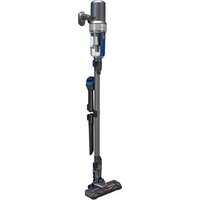
| Device Type | Cordless Vacuum Cleaner |
| Brand | ProfiCare |
| Model | PC-BS3148A |
| Battery Type | Lithium-Ion 22.2 V, 2200 mAh |
| Charger | 27 V DC, 0.5 A (model BZ015-270050-AG) |
| Charger Input Voltage | 100-240 V ~ 50/60 Hz |
| Net Weight (with hose and floor nozzle) | Approximately 2.4 kg |
| Power Levels | 3 (low, medium, maximum) |
| Filters | Fine filter (HEPA) + coarse filter + motor filter support |
| Dust Container Capacity | Not specified |
| Included Accessories | Suction hose, floor nozzle, extra-long crevice tool, built-in brush nozzle, wall mount, power supply |
| Specific Functions | LED lighting on floor nozzle, charge indicator in %, automatic shutdown in case of blockage |
| Safety | Disconnect the battery before cleaning; do not immerse the motor housing |
| Regular Maintenance | Empty the dust container, clean the filters and the brush roller |
| Storage | Wall mount, temperature between 10 and 20 °C, recharge every 4 to 6 weeks if unused |
Frequently Asked Questions - PC-BS3148A ProfiCare
User questions about PC-BS3148A ProfiCare
0 question about this device. Answer the ones you know or ask your own.
Ask a new question about this device
Download the instructions for your Vacuum Cleaner in PDF format for free! Find your manual PC-BS3148A - ProfiCare and take your electronic device back in hand. On this page are published all the documents necessary for the use of your device. PC-BS3148A by ProfiCare.
USER MANUAL PC-BS3148A ProfiCare
natural_image
Purple handheld vacuum cleaner with black handle and red buttons, mounted on a gray base (no visible text or symbols)natural_image
Technical line drawing of a handheld device with a close-up view of its internal components (no text or symbols)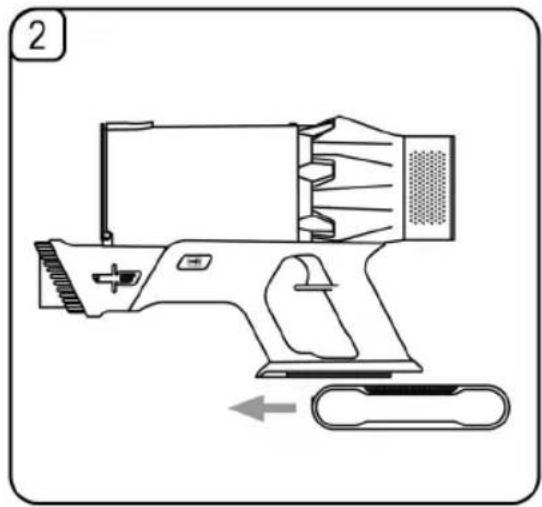
natural_image
Technical line drawing of a handheld device with internal components and a pull-up arrow (no text or symbols)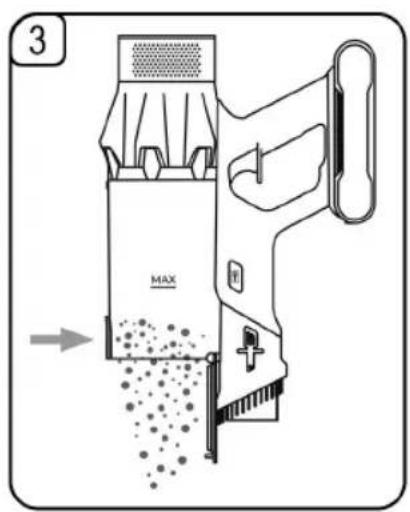
natural_image
Illustration of a hand holding a handgun with a device and a device being inserted (no text or symbols present)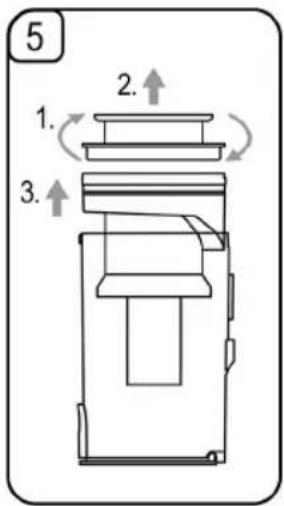

flowchart
graph TD
    A["Valve with Sensor"] --> B["Link to Control Unit"]
    C["Sensor with Sensor"] --> B
    D["Control Unit"] --> E["Link to Safety Component"]
    F["Sensor with Sensor"] --> E
    G["Control Unit"] --> H["Link to Safety Component"]
WICHTIG:
Be sure to read the separately enclosed safety instructions first.
Instruction Manual
Thank you for choosing our product. We hope you will enjoy using the appliance.
Read the instruction manual and the separately enclosed safety instructions very carefully before using this appliance.
Keep these documents, including the warranty certificate, receipt and, if possible, the box with the inner packaging in a safe place. If you pass the appliance on to a third party, always include all the relevant documents.
Symbols in this Instruction Manual
Important information for your safety is specially marked. It is essential to comply with these instructions in order to avoid accidents and prevent damage to the appliance:

WARNING:
This warns you of dangers to your health and indicates possible injury risks.

CAUTION:
This refers to possible hazards to the appliance or other objects.
Content
Overview of the Components....3
Illustrations....4
Unpacking the Appliance....12
Overview of the Components / Scope of Delivery......12
Warnings for the Use of the Appliance ....13
Handling the Battery Pack....13
Notes for Use....13
Switching the Appliance On/Off 13
Selecting the Power Level 13
Start-Up....14
Suction Pipe 14
Install Accessories....14
Inserting/Removing the Battery Pack 14
Assembly the Wall Holder....14
Charging the Battery Pack....14
Using the Appliance 14
End of Operation....15
Maintenance....15
Emptying the Dust Container....15
The Filter System....15
Cleaning....16
Floor Nozzle 16
Dust Container with Filter Unit 16
Storage....16
Troubleshooting....17
Technical Data....17
Product Specifications in Accordance with Regulation (EU) 2019/1782 Power Supplies......17
Disposal 18
Accumulator/Battery Disposal....18
Meaning of the "Dustbin" Symbol ....18
Unpacking the Appliance
- Remove the appliance from its packaging.
- Remove all packaging material, such as foils, filling material, cable ties and cardboard packaging.
- Check the scope of delivery for completeness.
- If the contents of the packaging are incomplete or if damage can be detected, do not operate the appliance. Return it to the dealer immediately.
Overview of the Components / Scope of Delivery
1 Control panel
a Charge level indicator in per cent
b Colour ring for the power level
c Power level indicator
d Symbol for blocked suction pipe (U
e Select power level (©)
f Symbol for blocked floor nozzle ( ☐)
2 Air outlet openings / removable motor filter holder
3 Release for the battery pack
4 Battery pack (removable)
5 Handle
6 Charging indicator light
7 On / off switch (⊕)
8 Connection socket for the power supply unit
9 Release / locking the dust container (→)
10 Release / locking the integrated brush nozzle
11 Integrated brush nozzle
12 Release for the suction pipe
13 Suction pipe
14 Release / connection for floor nozzle or nozzle attachments
15 Floor nozzle
16 LED lighting
17 Base plate of the dust container
18 Release / locking the base plate of the dust container
19 Dust container with filter system and HEPA filter
20 Motor housing / hand-held unit
21 Extra-long crevice nozzle
22 Release / locking the extra-long crevice nozzle
23 Wall bracket
24 Clamping device for the motor housing / hand-held device
25 Attachment device for the extra-long crevice nozzle
Without Illustration
1 × Power supply unit
2×Wall plug
2×Screw
Warnings for the Use of the Appliance

Read the instructions!

Only use with "BZ015-270050-AG" power supply unit! For the purpose of recharging the battery, only use the detachable supply unit provided with this appliance.

Do not use power supply with damaged plug! If the pins of the plug part are damaged, the plug-in power supply shall be scrapped.

CAUTION:
- Do not vacuum anything flammable or liquids!
- Never vacuum without the filter unit and without the fine filter (HEPA filter).
- The air outlet openings must be free of blockages at all times. Blockages lead to overheating and damage to the motor.
- Do not charge the rechargeable battery unattended.
- Always disconnect the mains plug from the socket after charging.

CAUTION: Assembly the Wall Holder
- Mount the wall bracket so that the appliance is not exposed to direct sunlight or other sources of heat.
- Make sure beforehand that there are no cables in the wall. You could damage them!
Handling the Battery Pack
- Do not dismantle or break open the battery pack!
- Do not short-circuit the battery pack contacts!
- Risk of explosion! Do not expose the battery pack to high temperatures, e. g. sunshine, fire or similar.
- A used battery pack must be removed from the appliance and disposed of safely. Batteries / rechargeable batteries do not belong in household waste. Dispose of used batteries / rechargeable batteries at the appropriate collection point or at the dealer.
- The battery pack can be easily replaced. Replace only with the same type of battery pack.
- Batteries / rechargeable batteries can leak and lose battery acid. If the appliance will not be used for a longer period of time, remove the battery pack.
- If a battery leaks, do not rub the liquid into the eyes or mucous membranes. In case of contact, wash hands, rinse eyes with clean water. Seek medical attention if any discomfort persists.
Notes for Use
- The appliance is especially suitable for quickly vacuuming small amounts of dry dirt or dust.
- The appliance is operated using the charged battery pack. Charging is carried out using the supplied power supply unit. Direct mains operation with the power supply unit is not possible.
- Place the appliance in the wall bracket included in the scope of delivery when you are not using it.

CAUTION:
The appliance cannot be free-standing. If you are not using the wall bracket, place the appliance carefully on the floor. This prevents the appliance from accidentally tipping over, which can otherwise lead to damage to the appliance and technical defects.
- This rechargeable battery vacuum cleaner is no adequate replacement for a conventional floor vacuum cleaner. Especially on shag-pile carpet, the cleaning performance is not sufficient owing to its design.
- Contaminated filters reduce the suction power of the vacuum cleaner. Therefore, we recommend regular cleaning of the existing dirt filters.
- Ideally, clean the filters whenever they have been subject to a prolonged use.
- Please regularly check and clean the electric floor nozzle.
- If necessary, clean heavily soiled floors multiple times and / or use a conventional 230 V\~ floor vacuum cleaner.
Switching the Appliance On/Off
- Use the button ⏻ on the handle to switch the appliance on and off.
- The appliance always starts at the middle power level.
Selecting the Power Level
You can set the power levels with the button◎ on the control panel.
= Low power level
= Medium power level
= Highest power level
- The colour ring around the control panel also indicates the power level by changing colour.
Start-Up
Assemble the appliance as described below depending on the desired use. See also illustration 6 on page 4.
Suction Pipe
- Insert the suction pipe with the two contact pins into the connection on the hand appliance. It must audibly engage.
- To disconnect the suction pipe, press the release (12) and pull out the pipe at the same time.
Install Accessories
The accessories can be attached directly to the hand-held device or to the already installed suction pipe.
Floor Nozzle with LED Lighting
- The floor nozzle is suitable for all floor coverings except for shag-pile carpets.
- During operation, the LEDs on the floor nozzle light up for better visibility in dark areas.

CAUTION:
You cannot replace the LEDs.
- Attach the floor nozzle either to the end of the suction pipe or directly to the connection on the hand-held device. The floor nozzle must click into place audibly.
- To release the floor nozzle, press the release button (14) and pull out the floor nozzle at the same time.
Extra-long Crevice Nozzle
For vacuuming dirt from corners, joints and small gaps.
- Attach the crevice nozzle either to the end of the suction pipe or directly to the connection on the hand-held device. The crevice nozzle must click into place audibly.
- To release the crevice nozzle, press the release button (22) and pull out the crevice nozzle at the same time.
Integrated Brush Nozzle
This nozzle is suitable for removing dust from smaller surfaces such as upholstery, furniture or curtains. To do this, extend the integrated brush nozzle.
- Press the release button (10) on both sides and push the brush nozzle forward. It must audibly engage.
- To release the brush lock, press the buttons again. Push the brush up until you hear it click into place.
Inserting / Removing the Battery Pack
The battery pack has been packed separately for transport and must be inserted into the appliance.
- Slide the battery pack into the holder on the hand-held device. The battery pack must engage audibly.
- If you want to remove the battery pack, press and hold the release button (3). At the same time, pull the battery pack out of the hand-held device.
Assembly the Wall Holder
The wall bracket is only used to secure the vacuum cleaner. The appliance cannot be hung from it.
- Place the hand-held appliance with the battery pack in the centre of the wall bracket (see illustration 1 on page 4). Place the vacuum cleaner against the wall when it is fully assembled with the suction pipe and floor nozzle.
- Hold the wall bracket against the wall. Mark 2 drill holes.
- Drill the holes and insert the wall plugs into the wall.
- Insert the screws through the holes of the wall holder.
- Tighten the screws with a screwdriver hand-tight.
Charging the Battery Pack
- Fully charge the battery pack to 100 % before using it for the first time.
- The battery pack can be mounted on the hand-held device or charged separately after removal.
-
It is normal for the battery pack to become warm during charging.
-
Switch off the appliance.
- Plug the charging cable connector into the socket (8) on the battery pack.
- Connect the power supply unit to a tested socket. The charge indicator light on the battery pack is flashing. Charge the battery pack to 100 %.
- The charge level indicator shows the current charge level of the battery pack in per cent.
-
When the battery pack is fully charged, the charge indicator light illuminates and 100 % is displayed.
-
Always disconnect the mains plug from the socket after charging.
Using the Appliance
You can use the appliance as a floor vacuum cleaner or as a hand-held and upright vacuum cleaner (basic appliance).
- Remove the appliance from the wall bracket.
- Switch the appliance on.
- Select the desired power level.
-
Now vacuum with a steady speed. Pressing is not necessary.
-
During operation, the charge level is displayed as a percentage. The symbol for the selected power level and the coloured ring also light up.
- We recommend recharging the battery pack when the charge level shows only 25 % capacity.
- When the charge capacity is only 10 %, the battery symbol flashes red on the display. Charge the battery pack.

CAUTION:
- If the brush roller in the floor nozzle no longer rotates, it may be blocked by a foreign object. This is indicated on the display by the symbol 📋. The appliance switches off automatically. In this case, remove the blockage as described in the chapter "Cleaning" → "Floor Nozzle". You can then resume operation.
- If the suction power is suddenly weaker, the suction pipe may be blocked by a foreign object. The UV symbol flashes on the display and the appliance switches off automatically. In this case, remove the blockage. You can then resume operation.
End of Operation
- Turn off the appliance.
- Place the appliance in the wall bracket. This prevents the appliance from accidentally falling over, which could otherwise cause damage to the appliance, as well as technical problems.
Maintenance
Important! Always clean the dust container and the filter system as described hereinafter. Dirty filters can significantly reduce the suction power.
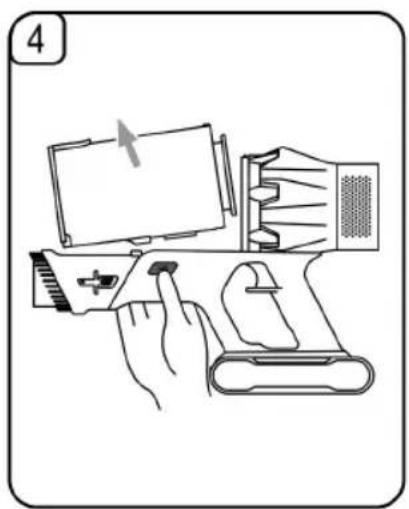
Please also note illustrations 3 to 5 on page 4.
Emptying the Dust Container
- Switch the appliance off.
- If necessary, remove the suction pipe or the nozzle attachment from the appliance.
- Hold the appliance with the opening flap over a dustbin.
- Empty the contents of the dust container. Then press the latch (18) on the dust container to open the flap.
- Close the flap again. The lock on the dust container must engage.
The Filter System
The appliance has a total of 3 filters, 1 of which is permanently installed and can only be knocked off. The common dust bag system has been replaced by a transparent dust container. The higher flow speed of the container allows for heavy dirt and smallest floating particles to be separated from the "sucked-in air".
It is thus not necessary to buy dust bags.
The filters must be cleaned periodically.

CAUTION:
- Never wash the filter in the washing machine.
- Never immerse the dust container in water. Do not rinse it out with water either. This could destroy the electronics.
• Do not use a hair-dryer for drying.

CAUTION:
- Only put the appliance back into operation when all filters are completely dry and correctly assembled.
The Filter Unit
The filter unit is located in the dust container and consists of:
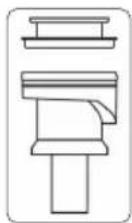
- Fine filter (HEPA filter)
- Coarse filter
Proceed as follows to clean the filter unit:
- Empty the dust container as described above.
2. Disassembly of the Filter Unit
2.1 Unlock the dust container using the buttons ☐ on both sides of the hand-held device.
2.2 Pull the dust container out upwards.
2.3 Turn the fine filter clockwise slightly and pull it out.
2.4 Pull the coarse filter out of the dust container.
3. Removing the Motor Filter Holder
The motor filter holder can be removed from the hand-held device. Observe the symbols on the motor filter holder and on the motor housing.
3.1 Turn the motor filter holder to the right until the symbol ▲ is under the arrow ▼
3.2 Pull the holder off the hand-held device.
4. Cleaning the Filters
4.1 Tap the filters over a waste bin. You can also brush off the fine filter. In case of heavy staining, clean the filters under running water.
4.2 Allow the filters to air dry for approx. 24 hours until they are completely dry. Do not reinsert the filters until they are completely dry!
4.3 Wipe the dust container with a damp cloth and then wipe it dry.
5. Installing the Motor Filter Holder
5.1 Position the motor filter holder with the symbol at arrow ▼
5.2 Turn the motor filter holder to the left until the symbol 🔒 is under the arrow ▼
6. Assembly of the Filter Unit
6.1 Place the coarse filter in the dust container.
6.2 Put the fine filter back on the coarse filter and secure it by turning it counter-clockwise a few times.
6.3 Then reattach the dust container to the handset. First place the dust container on the motor housing before snapping the front part back into place. The connection must engage audibly.
- The rotating brush roller must also be cleaned regularly. ( "Cleaning" / "Floor Nozzle") A dirty brush roller can
reduce the suction power and increase the rechargeable battery consumption.
Cleaning

WARNING:
- Remove the battery pack before cleaning to avoid accidental switch-on!
- Under no circumstances should you immerse the motor housing in water in order to clean it. Otherwise this might result in an electric shock or fire.

CAUTION:
- Do not use a wire brush or other abrasive objects.
- Do not use harsh or abrasive cleaning agents.
-
The individual components are not suitable for cleaning in the dishwasher.
-
The casing of the appliance and the accessories can be wiped with a slightly damp cloth.
• The power supply unit can be wiped with a dry cloth.
Floor Nozzle
- Remove the floor nozzle from the suction pipe or handheld device.
-
Turn the floor nozzle around, so that you see the lower side.
-
Push the lock outwards.
-
Pull out the brush roller.
-
Remove threads and hair wound to the brush. Use scissors, if required.
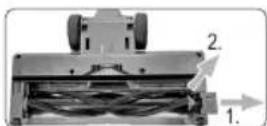
6. Assembly:
6.1 Reinsert the brush roller, with its star-shaped recess first, into the compartment.
6.2 Insert the other end of the brush roller into the recess under the lock.
- Close the lock of the brush roller. The lock must engage audibly. Make sure the brush roller is properly placed before using the floor nozzle again.
Dust Container with Filter Unit
Please read the chapter "Maintenance" for cleaning of these components.
Storage
- Clean the appliance as described and allow it to dry.
-
Use the previously mounted wall bracket for storage.
• We recommend storing the appliance in its original packaging if you do not intend to use it for a longer period of time. -
Battery pack service life: Even when switched off, the battery pack is constantly discharging. If you do not use the appliance for a long time, recharge the battery pack at least every 4 to 6 weeks.
- Always store the appliance out of the reach of children in a well-ventilated and dry place.
- The storage temperature should be between 10 °C and 20 °C.
Troubleshooting
| Problem Possible Cause Remedy | ||
| The appliance has no function. | The power supply unit is connected. | Disconnect the appliance from the power supply unit. |
| The battery pack is empty. Charge the battery pack. | ||
| The battery pack is defective. Contact our service centre or your dealer. | ||
| The appliance is defective. Contact our service or a specialist. | ||
| Weak suction power. | The battery pack is almost empty. | Charge the battery pack. |
| The dust container is full. Empty the dust container. | ||
| The filters are dirty. Clean the filters as described under “Maintenance”. | ||
| Noises during operation. A foreign object has been sucked into the floor nozzle. | Remove the foreign object. If necessary, disconnect the floor nozzle from the suction pipe. | |
| The symbol ⇌ flashes on the display. | The brush roller is blocked with dirt. | Clean the floor nozzle as described under “Cleaning”. |
| The symbol √ flashes on the display. | A foreign object has been sucked into the suction pipe. | Check the suction pipe for foreign objects. |
| The floor nozzle does not work. | The suction pipe and/or the floor nozzle are not fitted correctly. | Check the assembly. |
| The floor nozzle is dirty. | Clean the floor nozzle as described under “Cleaning”. | |
| The rechargeable battery does not hold a charge. | The rechargeable battery has reached the end of its service life. | Contact our service centre or your dealer. |
Technical Data
Model: PC-BS 3148 A
Net weight (hand-held appliance with
suction pipe and floor nozzle):...... approx. 2.4 kg
Protection class (appliance):......III
Protection class (power supply unit):......II
Battery presence and power level detector after completion of battery charging: ....≤0.3W
Battery pack: 22.2 V, 2200 mAh, Li-Ion
The right to make technical and design modifications in the course of continuous product development remains reserved.
This appliance has been tested according to all applicable, current CE directives and built according to the latest safety regulations.
Product Specifications in Accordance with Regulation (EU) 2019/1782 Power Supplies
| Information about the Power Supply Used | Value | Unit |
| DistributorClatronic International GmbHCommercial register number HRB 9158Industriering Ost 40, 47906 Kempen, Germany | ||
| Model identifier | BZ015-270050-AG | |
| Input voltage | 100–240 | V~ |
| Input alternating current frequency | 50/60 | Hz |
| Output voltage AC / DC | 27.0 | V DC |
| Output current | 0.5 | A |
| Output power | 13.5 | W |
| Average efficiency in operation | 86.13 | % |
| Low load efficiency (10%) | 78.82 | % |
| No-load power consumption 0.08 | W | |
The relevant load conditions are as follows:
Percentage of nameplate output current
| Load condition 1 100 % | ±2% |
| Load condition 2 75 % | ±2% |
| Load condition 3 50 % | ±2% |
| Load condition 4 25 % | ±2% |
| Load condition 5 10 % | ±1% |
| Load condition 6 0 % (no-load condition) | |
Disposal
Accumulator/Battery Disposal
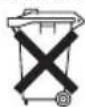
The appliance contains a rechargeable battery pack. Used batteries / rechargeable batteries should not be disposed of with household waste.
The battery pack must be removed before the product is disposed of.
- Press and hold the release button (3). At the same time, pull the battery pack out of the handset.
Information, where batteries / accumulators are to be disposed of can be obtained from your local or municipal authorities.
Meaning of the "Dustbin" Symbol
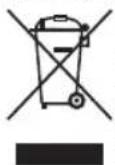
Protect our environment: do not dispose of electrical equipment in the domestic waste.
Please return any electrical equipment that you will no longer use to the collection points provided for their disposal.
This helps avoid the potential effects of incorrect disposal on the environment and human health.
This will contribute to the recycling and other forms of re-utilisation of electrical and electronic equipment.
Information concerning where the equipment can be disposed of can be obtained from your local authority. Your dealer and contractual partner is also obliged to take back the old appliance free of charge.
BELANGRIJK:
Productspecificaties in overeenstemming
- Fijne filter (HEPA-filter)
- Groffilter
CTC Clatronic Sp. z o.o
Ul. Brzeska 1
45-960 Opole