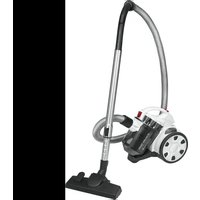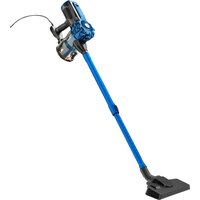
PC-BS 3133 - Vacuum Cleaner ProfiCare - Free user manual and instructions
Find the device manual for free PC-BS 3133 ProfiCare in PDF.


| Product type | Bagless vacuum cleaner |
| Brand | ProfiCare |
| Model | PC-BS 3133 |
| Power supply | 220–240 V~, 50/60 Hz |
| Rated power input | 600 W |
| Protection class | II |
| Net weight | approx. 2.3 kg |
| Filtration system | Cyclonic with HEPA filter |
| Number of filters | 3 (HEPA, coarse, exhaust) |
| Floor nozzle | Yes, with retractable brushes |
| Hard floor brush | Yes |
| Combined nozzle (brush/flat) | Yes |
| Telescopic suction tube | Yes, adjustable |
| Wall mount | Included (with dowels and screws) |
| Suction type | Dry |
| Use | Hard floors and carpets |
Frequently Asked Questions - PC-BS 3133 ProfiCare
User questions about PC-BS 3133 ProfiCare
0 question about this device. Answer the ones you know or ask your own.
Ask a new question about this device
Download the instructions for your Vacuum Cleaner in PDF format for free! Find your manual PC-BS 3133 - ProfiCare and take your electronic device back in hand. On this page are published all the documents necessary for the use of your device. PC-BS 3133 by ProfiCare.
USER MANUAL PC-BS 3133 ProfiCare
natural_image
Blue and black vacuum cleaner with handle and mounting base (no visible text or symbols)WICHTIG:
natural_image
Technical line drawing of two cylindrical mechanical components with ribbed top and mesh base (no text or symbols)Be sure to read the separately enclosed safety instructions first.
Instruction Manual
Thank you for choosing our product. We hope you will enjoy using the appliance.
Read the instruction manual and the separately enclosed safety instructions very carefully before using this appliance. Keep these documents, including the warranty certificate, receipt and, if possible, the box with the inner packaging in a safe place. If you pass the appliance on to a third party, always include all the relevant documents.
Symbols in this Instruction Manual
Important information for your safety is specially marked. It is essential to comply with these instructions in order to avoid accidents and prevent damage to the appliance:

WARNING:
This warns you of dangers to your health and indicates possible injury risks.

CAUTION:
This refers to possible hazards to the appliance or other objects.
Content
Overview of the Components....3
Unpacking the Appliance....8
Overview of the Components / Scope of Delivery......8
Warnings for the Use of the Appliance ....8
Notes for Use....9
Floor Nozzle 9
Hard Floor Brush....9
Combined Crevice Nozzle and Brush Nozzle ......9
Telescopic Suction Tube 9
Electrical Connection 9
Switching the Appliance On/Off 9
Mounting the Wall Bracket....9
Operation 9
End Operation....9
Maintenance ....10
Emptying the Dust Container....10
The Filter System....10
Cleaning....10
Storage....10
Troubleshooting....11
Technical Data....11
Disposal 11
Meaning of the "Dustbin" Symbol 11
Unpacking the Appliance
- Remove the appliance from its packaging.
- Remove all packaging material, such as foils, filling material, cable ties and cardboard packaging.
- Check the scope of delivery for completeness.
- If the contents of the packaging are incomplete or if damage can be detected, do not operate the appliance. Return it to the dealer immediately.
Overview of the Components / Scope of Delivery
1 On/off switch (I/O)
2 Cover for outlet filter
3 Mains cable
4 Handle
5 Hook for wall bracket
6 Base plate of dust container
7 Dust container with HEPA filter
8 Unlocking / locking the dust container
9 Telescopic suction tube
10 Lever for extending and retracting the brush
11 Floor nozzle
12 Slider for telescopic suction tube
13 Connection for suction tube or nozzle attachments
14 Combined crevice nozzle and brush nozzle
15 Hard floor brush
Without Illustration
1× Wallbracket
3×Wall plug
3×Screw
Warnings for the Use of the Appliance
CAUTION:
- Do not vacuum anything flammable or liquid!
- Never vacuum without the filter unit and without the filters.
- When vacuuming smooth floors such as laminate, parquet, etc. with the floor nozzle (11), be sure to use it with the brushes extended to avoid damaging the floor.
Notes for Use
- Dirty filters reduce the suction power of the appliance, therefore we recommend cleaning the dust container and the filters after each use.
- You can attach the nozzle attachments directly to the connection on the appliance or to the suction tube that is already mounted.
- To detach the nozzle attachments, pull them off with a slight twist.
Floor Nozzle
You can clean smooth surfaces and carpets with the floor nozzle. It is equipped with rollers to make it easier to guide.
- With the lever, you can move the brushes outwards or inwards.
The optimal use depends on the condition of the floor. We recommend the following use:
- Use without brushes:
For vacuuming carpeted floors. - Use with brushes:
For vacuuming smooth floors.
Hard Floor Brush
For gentle cleaning of hard floors such as parquet, laminate, tiles, etc.
Combined Crevice Nozzle and Brush Nozzle
When folded, you can use this as a crevice nozzle. If you want to use the brush nozzle, pull the brush part in the direction of the arrow until it engages mechanically.
- Crevice Nozzle:
Use this to vacuum dirt from corners, joints and small gaps. - Brush Nozzle:
Gently removes dirt from slits in upholstery and mattresses. Also suitable for picking up dust on sensitive surfaces such as furniture or curtains.
Telescopic Suction Tube
You can adjust the length of the telescopic suction tube individually:
- Attach the telescopic suction tube to the connection on the appliance by turning it slightly.
- Release the lock by pushing and holding the slider (12) in the direction of the arrow.
- Pull one tube out of the other to the desired length.
- Release the button to lock the connection.
- Fit the floor nozzle or accessories.
Electrical Connection
- Before inserting the mains plug into the socket, check that the mains voltage is correct. You will find the details of the appliance on the type plate.
- Only connect the appliance to an approved socket.
Switching the Appliance On/Off
- The appliance is switched off when the switch is in the O position.
- Set the switch to position I to switch on the appliance.
Mounting the Wall Bracket
CAUTION:
Make sure beforehand that there are no hidden cables in the wall that could damage you!
- Measure the height for the wall bracket. Hold the appliance against the wall when it is mounted with the telescopic suction tube and floor nozzle.
- Hold the wall bracket against the wall so that the opening points upwards. Mark 3 holes.
- Drill the holes and place the plugs in the wall.
- Insert the screws through the holes in the wall bracket. Screw the screws into the plugs.
- Hand-tighten the screws with a suitable screwdriver.
Operation
- Unwind the mains cable completely.
- Insert the mains plug into a properly installed protective contact socket.
- Switch the appliance on with the on / off switch.
- Tilt the lever to "brushes extended" or "brushes retracted" depending on the floor covering.
- Now vacuum with even speed. It is not necessary to press down.
- Be aware of the limited range due to the length of the cable!
End Operation
- Switch off the appliance. Then pull the mains plug out of the socket.
- Let the appliance cool down completely.
- If you have previously mounted the wall bracket, hang the appliance in it.
- Loosely roll up the mains cable. You can use the hook-and-loop tape on the mains cable to secure the cable.
Maintenance
Pull the mains plug out of the socket before cleaning or maintaining the appliance.
Emptying the Dust Container
- Pull the mains plug out of the socket.
- If necessary, detach the suction tube or nozzle attachment from the appliance.
- Hold the appliance with the base plate of the dust container over a dustbin.
- Empty the contents of the dust container. To do this, press the button (8) to open the base plate.
- Close the base plate again. The lock on the dust container must engage.
The Filter System
Your appliance has 3 filters. The conventional dust bag system has been replaced by a transparent dust container. In it, coarse dirt and the smallest suspended particles are whirled out of the "suction air" by the high flow speed.
There is no need to buy dust bags.
The filters must be cleaned regularly.

CAUTION:
- Never wash the filters in the washing machine.
• Do not use a hair dryer to dry them. - Only put the appliance back into operation when all filters are completely dry and correctly fitted.
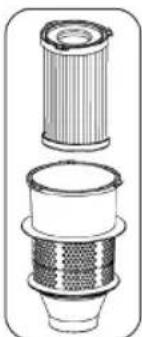
The Filter Unit
natural_image
Technical line drawing of a mechanical component with three views (top, middle, bottom), showing internal structure without any text or symbols.The filter unit is composed of:
- HEPA filter
- Coarse filter
To clean the filter unit, proceed as follows:
- Empty the dust container as previously described.
- Dismantling the filter unit
2.1 Turn the coarse filter counter-clockwise from the guide rails. Pull the coarse filter from the dust collector.
2.2 Turn the HEPA filter counter-clockwise from the guide rails. Pull the HEPA filter from the dust collector.
- You can brush out the HEPA filter. For heavier soiling, clean the filters under running water.
-
Let the filters air dry completely before reinserting them!
-
You can wipe out the dust container with a damp cloth. Dry it afterwards.
- Discolouration / matting of the dust container due to use is normal and does not constitute a defect.
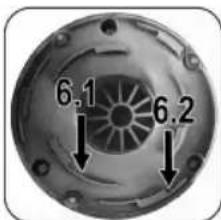
6. Assembly of the filter unit
Refer to the adjacent figure.
6.1 Set the HEPA filter with its 3 guides to the inner circle. Tighten the filter clockwise.
6.2 Set the coarse filter over the HEPA filter with its 3 guides in the outer circle. Tighten the coarse filter clockwise.
- If the filters are not inserted, dirt will get into the motor. This can damage the motor.
- Close the bottom plate.
Outlet Filter
Your appliance also has an outlet filter. The filter cover is located on the back of the appliance.
- Unscrew the cover (2) anti-clockwise.
- Remove the filter fleece and wash it out.
- Allow the filter fleece to dry completely in the air before reinserting it into the appliance.
- Replace the cover over the filter.
- Close the outlet filter with the cover.
Cleaning

WARNING:
- Pull the mains plug out of the socket before cleaning or maintaining the appliance.
- Never immerse the appliance in water to clean it. It could cause an electric shock or fire.

CAUTION:
- Do not use a wire brush or other abrasive objects.
- Do not use harsh or abrasive cleaners.
- Clean the housing with a soft, dry cloth without any additives.
- For cleaning the filters, please read the chapter "Maintenance".
Storage
- Clean the appliance as described. Allow the accessories to dry completely.
- Use the previously mounted wall bracket for storage.
• We recommend storing the appliance in its original packaging if you do not intend to use it for a longer period of time.
• Always store the appliance out of the reach of children in a well-ventilated and dry place.
Troubleshooting
| Problem Possible Cause | Remedy | |
| The appliance has no function. | The appliance has no power supply. Check the power socket with another appliance. | |
| The appliance is defective. Contact our service or a specialist. | ||
| Weak suction power. The dust container is full. Empty the dust container. | ||
Technical Data
Model: PC-BS 3133
Power supply: 220–240 V\~, 50/60 Hz
Power consumption: 600 W
Protection class:....II
Net weight: .... approx. 2.3 kg
The right to make technical and design modifications in the course of continuous product development remains reserved.
This appliance has been tested according to all applicable, current CE directives and built according to the latest safety regulations.
Disposal
Meaning of the "Dustbin" Symbol
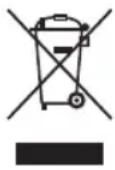
Protect our environment: do not dispose of electrical equipment in the domestic waste.
Please return any electrical equipment that you will no longer use to the collection points provided for their disposal.
This helps avoid the potential effects of incorrect disposal on the environment and human health.
This will contribute to the recycling and other forms of re-utilisation of electrical and electronic equipment.
Information concerning where the equipment can be disposed of can be obtained from your local authority. Your dealer and contractual partner is also obliged to take back the old appliance free of charge.
BELANGRIJK:
natural_image
Technical line drawing of a mechanical component with layered structure (no text or symbols)natural_image
Technical line drawing of two cylindrical mechanical components with internal mesh structures (no text or symbols)natural_image
Technical line drawing of two cylindrical mechanical components with internal mesh structures (no text or symbols)natural_image
Technical line drawing of two cylindrical mechanical components with internal threading (no text or symbols)natural_image
Technical line drawing of a mechanical component with layered structure (no text or symbols)CTC Clatronic Sp. z o.o
Ul. Brzeska 1
45-960 Opole