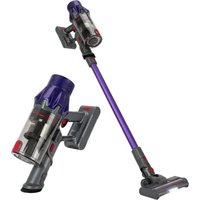
PC-BS 3085 A - Vacuum Cleaner ProfiCare - Free user manual and instructions
Find the device manual for free PC-BS 3085 A ProfiCare in PDF.


| Product type | Cordless stick vacuum |
| Brand | ProfiCare |
| Model | PC-BS 3085 A |
| Net weight (appliance with hose and nozzle) | Approx. 2.0 kg |
| Battery type | Rechargeable Li-ion 25.9 V, 2200 mAh |
| Charging time | Approx. 4.5 hours |
| Maximum runtime | 40 minutes |
| Battery charger | AC input 100-240 V, 50/60 Hz, 0.5 A; DC output 31.5 V, 500 mA |
| Charger protection class | II |
| Power modes | ECO (low) and high power |
| Dust container capacity | Not explicitly specified (transparent container) |
| Filtration system | HEPA filter + coarse filter (washable) |
| Floor nozzle | With turbo brush and integrated LED lighting |
| Included accessories | Floor nozzle with turbo brush, crevice tool, upholstery nozzle and brush combination tool, flexible suction hose, wall mount with dowels and screws |
| Wall mounting | Wall mount also serves as charging station |
| Filter maintenance | Regular cleaning by tapping or brushing, washable in water, complete drying before reinstallation |
| Safety | Power adapter for dry rooms, battery overcharge protection, automatic shut-off when battery is low |
Frequently Asked Questions - PC-BS 3085 A ProfiCare
User questions about PC-BS 3085 A ProfiCare
0 question about this device. Answer the ones you know or ask your own.
Ask a new question about this device
Download the instructions for your Vacuum Cleaner in PDF format for free! Find your manual PC-BS 3085 A - ProfiCare and take your electronic device back in hand. On this page are published all the documents necessary for the use of your device. PC-BS 3085 A by ProfiCare.
USER MANUAL PC-BS 3085 A ProfiCare
natural_image
Exterior view of a vacuum cleaner with gray and blue components (no text or symbols visible)Bedienungsanleitung
natural_image
Line drawing of a handheld device with a handle and arrow indicator (no text or symbols)Das Filtersystem
natural_image
Close-up of a black mechanical component with a curved internal structure and an arrow indicating direction (no visible text or symbols)natural_image
Line drawing of a mechanical device with a handle and lever (no text or symbols)Het filtersysteem
natural_image
Close-up of a black mechanical component with a curved internal structure and an arrow indicating direction (no visible text or symbols)Batteries au lithium-ion rechargeables (Li-ion)......22
Batteries au lithium-ion rechargeables (Li-ion)
natural_image
Technical line drawing of a mechanical device with no visible text or symbolsnatural_image
Close-up of a black mechanical device with a curved internal component and an arrow indicating direction (no text or symbols visible)natural_image
Line drawing of a mechanical device with a handle and arrow indicator (no text or symbols)Sistema de filtro
natural_image
Close-up of a black mechanical component with a curved internal structure and an arrow indicating direction (no visible text or symbols)natural_image
Technical line drawing of a mechanical device with no visible text or symbolsnatural_image
Close-up of a black mechanical component with a curved internal structure and an arrow indicating direction (no visible text or symbols)Thank you for choosing our product. We hope you will enjoy using the appliance.
Symbols in this Instruction Manual
Important information for your safety is specially marked. It is essential to comply with these instructions in order to avoid accidents and prevent damage to the appliance:

WARNING:
This warns you of dangers to your health and indicates possible injury risks.

CAUTION:
This refers to possible hazards to the appliance or other objects.

NOTE:
This highlights tips and information.
Contents
Overview of the Components....3
General Notes......45
Special Safety Precautions for this Appliance....45
Rechargeable Lithium-Ion Batteries (Li-Ion) .....46
Safe Handling of Rechargeable Lithium-Ion Batteries ..46
Extending the Life of the Rechargeable Li-Ion Battery..46
Unpacking the Appliance....47
Overview of the Components/Scope of Delivery......47
Notes for Use....47
Switching the Appliance On / Off 47
Start-Up 47
Suction Pipe 47
Floor Nozzle with Turbo Brush....47
Flexible Suction Hose 48
Nozzle Attachments 48
Assembly the Wall Holder....48
Charging the Rechargeable Battery ....48
Using the Appliance 49
End of Operation....49
Maintenance 49
Emptying the Dust Container....49
The Filter System....49
Cleaning 50
Floor Nozzle 50
Dust Container with Filter Unit 50
Storage....50
Troubleshooting....51
Technical Data....51
Disposal 51
Accumulator/Battery Disposal....51
Meaning of the "Dustbin" Symbol 51
General Notes
Read the operating instructions carefully before putting the appliance into operation and keep the instructions including the warranty, the receipt and, if possible, the box with the internal packing. If you give this appliance to other people, please also pass on the operating instructions.
- The appliance is designed exclusively for private use and for the envisaged purpose. This appliance is not fit for commercial use.
- The power adapter is only suitable for use in dry rooms.
- Check if the output current, voltage and the polarity of the power adapter match the information on the connected appliance!
- Do not touch the connected power adapter with wet hands!
- If necessary, disconnect the appliance from the power adapter.
- Ensure that the cable of the power adapter does not become kinked, jammed, driven over or come into contact with heat sources.
- Do not use a damaged power adapter.
- Do not repair the appliance yourself, but visit an authorized specialist.
- The appliance and the mains lead have to be checked regularly for signs of damage. If damage is found the appliance must not be used.
- Use only original spare parts.
- In order to ensure your children's safety, please keep all packaging (plastic bags, boxes, polystyrene etc.) out of their reach.

WARNING:
Do not allow small children to play with the plastic foil.
There is a danger of suffocation!
Special Safety Precautions for this Appliance
- This appliance can be used by children aged from 8 years and above and persons with reduced physical, sensory or mental capabilities or lack of experience and knowledge if they have been
given supervision or instruction concerning use of the appliance in a safe way and understand the hazards involved.
• Children shall not play with the appliance.
- Cleaning and user maintenance shall not be made by children without supervision.
- The appliance is intended for use with safety extra-low voltage. Connect only to a power supply according to the specifications on the rating label.
- If the connection cable of this appliance has been damaged, it must be replaced with a special connection cable available from the manufacturer or its customer service.
- Use only the power adapter included in the scope of deliveries.
- Do not suck in combustible substances or liquids!
- Do not use this appliance to remove toner particles from a laser printer or copier to prevent fire or explosion.
- Do not suck up hot ashes or pointed or sharp objects!
- Never vacuum without the filter installed.
Rechargeable Lithium-Ion Batteries (Li-Ion)
The appliance is equipped with rechargeable Li-ion batteries. This results in numerous advantages compared to other batteries and accumulators:
• A high cell voltage (more volts)
- No memory effect
- A low self-discharge
Safe Handling of Rechargeable Lithium-Ion Batteries
In general, Li-ion batteries are considered safe. Nevertheless, hazards may result from mechanical damage, electrical faults and thermal effects.
Mechanical damage may result in the leakage of gaseous or liquid substances that can be highly irritating, flammable or even toxic.
An electrical fault, such as a short circuit, may lead to overheating and cause a fire.
Even the heating of the outer shell of a Li-ion battery, e. g. due to sunlight or a heating element, may lead to fire or an explosion.
However, Li-ion batteries are safe when handled properly. Only if used or stored improperly they may become dangerous. Therefore:
- Avoid temperatures above 40^ and below 0^ .
- Do not drop the appliance or the rechargeable battery.
- In case the Li-lon battery has been dropped and is now damaged, stop using it.
- When storing or disposing of the appliance, mask the terminals to prevent short circuits.
- Dispose of old accumulators properly in collecting containers at the trader or at municipal collection points.
Extending the Life of the Rechargeable Li-Ion Battery
For Li-ion batteries, even more than with other accumulators, their life can be extended by treating them properly. The following simple rules for charging and storing help you keep the capacity of the battery:
- Temperature: The ideal temperature for these batteries ranges from 10 - 25 °C. Temperatures above may lead to premature aging.
- Charging and discharging: During charging cycles, both full charge and deep discharge should be avoided.
When the charging process of the battery is completed, you should disconnect the charger immediately. A charge up to 90 % is considered best.
Conversely, it is also preserving the battery more when it is not discharged to 0%. If the possibility arises, you should already recharge the battery when it is reaching a charge state of 30%.
- Storage: Always store batteries in a dry place and at moderate temperatures between 10 °C and 20 °C. Also consider the effect of self-discharge! When the accumulator is already empty, this effect may lead to a deep discharge resulting in damaging the battery. If you intend to store the battery for an extended period of time, you can counteract this effect. We then recommend charging the battery to approx. 40 % before storage. You should check the state of charge after not more than a month.
Unpacking the Appliance
- Remove the appliance from its packaging.
- Check the delivery scope for completeness.
- Check the appliance for any transport damage, in order to prevent hazards.

NOTE:
In case of any transport damage, contact your dealer immediately. Do not use a damaged appliance!
Overview of the Components / Scope of Delivery
1 Indicator lights
2 ECO button
3 Power supply connection socket
4 Carrying handle
5 On / off button
6 Dust container
7 Opening flap
8 Suction pipe release
9 Combined upholstery / brush nozzle
10 Upholstery / brush nozzle release
11 Joint nozzle release
12 Crevice nozzle
13 Floor nozzle release
14 Floor nozzle with turbo brush
15 Suction pipe
16 Accessory holder
17 Opener / locking of the flap
18 Dust container release
19 Motor housing / hand set
Not Shown
1×Suction hose
1×Poweradapter
1×Wallholder
2×Wallplug
2×Screw
Notes for Use
- The appliance is especially suitable for quickly vacuuming small amounts of dry dirt or dust.
- The appliance is operated via charged battery. Charging is done via the supplied power adapter.
- Direct power supply via power adapter is not possible.
- Hang the appliance onto the supplied wall mount when not in use. It also serves as a charging station.

CAUTION:
The appliance can not stand upright on its own. If you are not using the wall mount, gently place the vacuum cleaner on the floor.
- This rechargeable battery vacuum cleaner is no adequate replacement for a conventional floor vacuum cleaner. Especially on shag-pile carpet, the cleaning performance is not sufficient owing to its design.
- Contaminated filters reduce the suction power of the vacuum cleaner. Therefore, we recommend regular cleaning of the existing dirt filters.
- Ideally, clean the filters whenever they have been subject to a prolonged use.
- Please regularly check and clean the electric floor nozzle.
- If necessary, clean heavily soiled floors multiple times and / or use a conventional 230 V\~ floor vacuum cleaner.
Switching the Appliance On/Off
- The button (5) turns the appliance on and off. Only press the button briefly. You do not have to press and hold the button.
• The appliance starts at high power level. - Press the ECO button to toggle between low and high power levels. In ECO mode, you can extend the life cycle of the rechargeable battery.
Start-Up
Suction Pipe
- Insert the suction pipe with the two contact pins into the connection on the hand appliance. It must audibly engage.
- To disconnect the suction pipe, press the release (8) and pull out the pipe at the same time.
- Use the bracket to attach the upholstery / brush nozzle and the crevice nozzle to the suction tube. This way, you always have the accessories at hand.
Floor Nozzle with Turbo Brush
- The floor nozzle is suitable for all floor coverings except for shag-pile carpets.
- During operation, the LEDs on the floor nozzle light up for better visibility in dark areas.

CAUTION:
You cannot replace the LEDs.
- Stick the lower end of the suction pipe onto the connector on the floor nozzle. Note the contact pins on the floor nozzle. The suction pipe must audibly snap into place.
- To disconnect the suction pipe, press the release (13) and pull out the pipe at the same time.
Flexible Suction Hose
Thanks to this expandable suction hose, you will be able to reach any hard-to-reach area.
- Insert the end of the suction hose, where the release is located, into the connection on the handset. Note the recess for the release on the handset. The connection must audibly engage.
- In order to disconnect the suction hose, press the release on the suction hose and pull it off simultaneously.
Nozzle Attachments
There are three different ways to connect these nozzles to the appliance:
Connection at the Hand Unit
- Plug one of the nozzles into the port on the handset. Note the recess for the release on the handset. The connection must audibly engage.
- In order to release the respective nozzle, press the release (10 or 11) while simultaneously pulling it off.
Connection to the Suction Pipe
At the lower end of the suction pipe, you will find the same plug connection as on the handset. Mount / dismount the nozzle as described above.
Connection to the Flexible Suction Hose
- Note the recess with the guide lug on the connection of the suction hose.
- Take one nozzle and plug it onto the suction hose. The connection must audibly engage.
- In order to release the respective nozzle, press the release (10 or 11) while simultaneously pulling it off.
Crevice Nozzle
For vacuuming dirt from corners, joints and small gaps.
Combined Upholstery / Brush Nozzle
This nozzle is suitable for removing dust from smaller surfaces such as upholstery, furniture or curtains. Use the nozzle with locked brush to prevent scratching of the surface to be cleaned.
- For this, press the button and push the brush to the end of the nozzle. It must engage.
- Press the button again to unlock the brush.
Assembly the Wall Holder

WARNING:
Make sure beforehand whether there are cables in the wall which could be damaged!

CAUTION:
Place the wall holder so that the appliance is not exposed to direct sunlight or other heat sources.

NOTE:
If you would like to simultaneously use the wall mount as a charging station, there must be a power outlet nearby.
- Measure the height for the wall holder. Hold the vacuum cleaner against the wall with the suction pipe and the floor nozzle installed.
- Measure the distance between the two oblong holes of the bracket and drill two holes in the wall while maintaining this distance.
- Insert the dowels into the wall.
- Use a screwdriver to screw the screws into the dowels and make sure they protrude around 3 - 4 mm.
- Use the screws to hang the bracket against the wall.
Charging the Rechargeable Battery

CAUTION:
Do not charge the rechargeable battery unsupervised.
- Turn off the appliance.
- Connect the power supply plug to one of the sockets listed below.
- A connection socket (3) is located directly on the appliance.
-
If you have already mounted the wall bracket, use the connection socket on the bottom of the wall bracket. Hang the appliance in the wall bracket. Always attach it to the top of the latch first. The connection must audibly engage.
-
Connect the power adapter to a certified wall socket. Charge the appliance for approx. 4,5 hours before first-time use.

NOTE:
- The indicator lights show the state of charge of the rechargeable battery. (25 %, 50 %, 75 %, 100 %)
- The appliance has electronic charge control, which prevents overcharging.
- Charging is completed when all 4 indicator lights are lit.
- Once the appliance is disconnected from the power adapter, the indicator lights go out.
-
It is normal for the appliance to heat up during charging.
-
Disconnect the power adapter from the outlet once the rechargeable battery has been charged completely.

NOTE:
Even when switched off, the rechargeable battery discharges continuously. If the appliance is out of use for a longer period of time, charge the rechargeable battery at least once every 4 to 6 weeks.
Using the Appliance
You can use the appliance as a floor vacuum cleaner or as a handheld and upright vacuum cleaner (basic appliance).
- Disconnect the appliance from the power adapter.
- To remove the appliance from the wall bracket, hold its housing with one hand while using the other hand to slide the latch on the wall bracket upward.
- Turn on the appliance.

CAUTION:
- The suction opening must be free of blockages at all times. Blockages will cause overheating and damage to the motor.
- If the brush roller in the floor nozzle no longer rotates, it may be blocked by a foreign object. In this case, remove the blockage as described in chapter "Cleaning" → Floor Nozzle". You may then continue the operation.

NOTE:
- We recommend the higher power level for using the appliance with the floor nozzle.
- During operation, depending on the charging capacity of the rechargeable battery, 1 to 4 indicator are lit.
- We recommend recharging the battery once the indicator lights show a remaining capacity of only 25 %.
- Once the rechargeable battery is almost out of power, the last indicator light will start flashing for a few seconds. To avoid a complete discharge of the rechargeable battery, the electronics will switch off the motor automatically. Recharge the battery.
End of Operation
- Turn off the appliance.
- If you have already installed the wall holder, hang up the vacuum cleaner.
Maintenance
Emptying the Dust Container
- Disconnect the appliance from the power adapter.
- If necessary, remove the suction tube or the nozzle attachment from the appliance.
-
Hold the appliance with the opening flap over a dustbin.
-
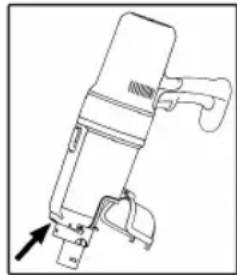
Empty the contents of the dust container. Then press the
latch (17) on the dust container to open the flap.
- Close the flap again. The lock on the dust container must engage.
natural_image
Technical line drawing of a mechanical device with no visible text or symbolsThe Filter System
Your appliance features 2 filters.
The common dust bag system
has been replaced by a transparent dust container. The higher flow speed of the container allows for heavy dirt and smallest floating particles to be separated from the "sucked-in air".
It is thus not necessary to buy dust bags.
The filters must be cleaned periodically.

CAUTION:
- Never wash the filter in the washing machine.
- Never immerse the dust container in water. Do not rinse it out with water either. This could destroy the electronics.
- Do not use a hair-dryer for drying.
- Only put the appliance back into operation when all filters are completely dry and correctly assembled.
The Filter Unit
The filter unit is located in the dust container and consists of:
- HEPA-filter
- Coarse filter
Proceed as follows to clean the filter unit:
- Empty the dust container as described above. (Steps 1-5)
2. Disassembly of the Filter Unit
2.1 Hold the appliance by the handle with your left hand. Note the symbols (three dots) on the appliance. Slide the dust container release (18) and simultaneously turn the dust container to the left. The symbol on the dust container is now located below the left symbol on the handset. The dust container can now be separated from the housing.
2.2 Remove the HEPA filter by pulling the "UP" flag.
2.3 Pull the coarse filter out of the dust container using the handle. The grip of the handle is located on the side of the release (18).
3. Cleaning the Filters
3.1 Hold both filters over a garbage can and tap out the dust. You may also brush out the HEPA filter. In case of heavy staining, clean the filters under running water.
3.2 Let the filters air-dry completely before refitting them!
3.3 Wipe the dust container with a damp cloth and then wipe it dry.
4. Assembly of the Filter Unit
4.1 Place the coarse filter in the dust container. Note the recesses in the dust container. Do not apply too much force when inserting the coarse filter, otherwise it will be difficult to remove.
4.2 Place the HEPA filter back into the coarse filter. The "UP" flag must point upwards.
4.3 Then reattach the dust container to the handset. Attach the dust container to the handset with the symbol on the dust container positioned below the left symbol on the handset. Then turn the dust container to the right up to the stop. The symbol on the dust container now has to be located below the right symbol on the handset. The connection must audibly engage.
Cleaning

WARNING:
• Always disconnect the appliance from the power adapter before cleaning!
- Under no circumstances should you immerse the motor housing in water in order to clean it. Otherwise this might result in an electric shock or fire.

CAUTION:
- Do not use a wire brush or any abrasive items.
-
Do not use any acidic or abrasive detergents.
• The single components are not dishwasher-safe. -
Wipe the casing with a damp cloth.
- You can wipe the power adapter appliance with a dry cloth.
Floor Nozzle
natural_image
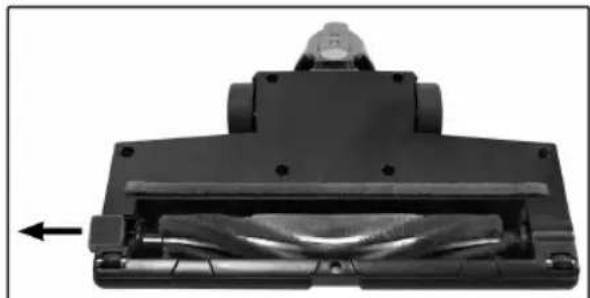
Mechanical component with a cylindrical assembly and an arrow indicating direction (no visible text or symbols)- Disconnect the floor nozzle from the suction pipe.
- Turn the floor nozzle around, so that you see the lower side. Push the lock outwards as far as it will go.
- Pull out the brush roller.
- Remove threads and hair wound to the brush. Use scissors, if required.
5. Assembly:
5.1 Reinsert the brush roller, with its triangular recess first, into the compartment.
5.2 Insert the other end of the brush roller with the square bearing into the recess underneath the closure.
- Close the lock of the brush roller. Make sure the brush roller is properly placed before using the floor nozzle again.
Dust Container with Filter Unit
Please read the chapter "Maintenance" for cleaning of these components.
Storage
- Clean the appliance as described and allow it to dry.
- You can use the previously installed wall holder for storage.
• We recommend that you keep the appliance in the original packaging if it will not be used for long periods.

NOTE concerning the life of the rechargeable ttery:
Even when switched off, the rechargeable battery discharges continuously. When the appliance is out of use for a longer period of time, charge the rechargeable battery at least once every 4 to 6 weeks.
• Always store the appliance out of the reach of children in a dry, well ventilated place.
- The storage temperature should be between 0 and 40^ .
Troubleshooting
| Problem Possible cause | Remedy | |
| The appliance does not function. | The power adapter is connected. | Disconnect the appliance from the power adapter. |
| The rechargeable battery is empty. | Charge the rechargeable battery. | |
| The rechargeable battery is defect. | Contact our service or your dealer. | |
| A single control lamp will flash. The electronics will then switch off the motor. | The rechargeable battery is empty. | Charge the rechargeable battery. |
| Weak suction power. The | rechargeable battery is nearly discharged. | Charge the rechargeable battery. |
| The dust container is full. Empty the | dust container. | |
| The filters are dirty. | Clean the filters as described under “Maintenance”. | |
| △ CAUTION: Restart operation only with dry filters. | ||
| Noise during operation. A | foreign body has been sucked into the floor nozzle. | Remove the foreign body. If required, disconnect the floor nozzle from the suction pipe. |
| The floor nozzle with turbo brush is not operating. | The brush roller is blocked by dirt. | Clean the floor nozzle as described under “Cleaning”. |
| Incorrect assembly of suction pipe and /or floor nozzle. | Check the assembling of the parts. | |
| The rechargeable battery does not keep the charge. | The rechargeable battery has reached the end of its life. | Contact our service or your dealer. |
Technical Data
Model: PC-BS 3085 A
Net weight (Handset with suction
pipe and floor nozzle):...... approx. 2.0 kg
Power Adapter
Protection class:....II
Input: AC 100-240 V, 50/60 Hz, 0.5 A MAX
Output: DC 31.5 V, 500 mA
Polarity:
Rechargeable Battery: 25.9 V, 2200 mAh Li-Ion
Operating time: 40 minutes maximum
Charging time:......approx. 4.5 hours
The right to make technical and design modifications in the course of continuous product development remains reserved.
This appliance has been tested according to all relevant current CE guidelines, such as electromagnetic compatibility and low voltage directives, and is manufactured according to the latest safety regulations.
Disposal
Accumulator/Battery Disposal
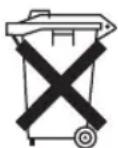
The appliance contains a rechargeable battery. Used batteries/ accumulators (rechargeable batteries) do not belong in household waste.
The battery must be removed before the product is recycled.
WARNING:
- Disconnect the appliance from the power adapter before removing the rechargeable battery!
- Remove the rechargeable battery only when it is discharged.
- In order to remove the battery pack, you need to remove a total of 12 Phillips screws and then disassemble the appliance.
Information, where batteries/accumulators are to be disposed of can be obtained from your local or municipal authorities.
Meaning of the "Dustbin" Symbol
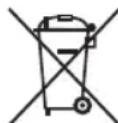
Protect our environment: do not dispose of electrical equipment in the domestic waste.
Please return any electrical equipment that you will no longer use to the collection points provided for their disposal.
This helps avoid the potential effects of incorrect disposal on the environment and human health.
This will contribute to the recycling and other forms of re-utilisation of electrical and electronic equipment.
Information concerning where the equipment can be disposed of can be obtained from your local authority.
Instrukcja obsługi
natural_image
Technical line drawing of a mechanical device with no visible text or symbolsnatural_image
Close-up of a black mechanical component with a curved internal structure and an arrow indicating direction (no visible text or symbols)CTC Clatronic Sp. z o.o
Ul. Brzeska 1
45-960 Opole