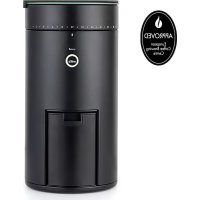
UNIFORM WSFBS200B - Coffee grinder WILFA - Free user manual and instructions
Find the device manual for free UNIFORM WSFBS200B WILFA in PDF.



| Product type | Conical burr coffee grinder with built-in scale |
| Brand | Wilfa |
| Model | UNIFORM WSFBS200B |
| Category | Coffee grinder |
| Number of grind settings | 41 settings (from 3 to 41) |
| Compatible brewing methods | Espresso, Aeropress, Pour-over, Drip, French press, Cold brew |
| Built-in scale | Yes, with tare function, timer, and weight display in g/oz |
| Connectivity | Bluetooth® via Wilfa SVART app (iOS and Android) |
| Grinder power supply | Mains (power cord) |
| Scale power supply | Rechargeable battery via USB port (cable included) |
| Automatic shut-off | Yes, after 10 minutes of inactivity (scale) |
| Overload protection | Yes, warning display (max 2000 g) |
| Heat-resistant silicone pad | Included for precise measurement of hot liquids |
| Cleaning brush | Included |
| Care and cleaning | Clean with a dry or slightly damp cloth. Do not immerse in water. |
| Safety | Unplug before maintenance. Keep out of reach of children. |
| Warranty | 5 years (household use only) |
| Country of origin | Norway (brand) |
Frequently Asked Questions - UNIFORM WSFBS200B WILFA
User questions about UNIFORM WSFBS200B WILFA
0 question about this device. Answer the ones you know or ask your own.
Ask a new question about this device
Download the instructions for your Coffee grinder in PDF format for free! Find your manual UNIFORM WSFBS200B - WILFA and take your electronic device back in hand. On this page are published all the documents necessary for the use of your device. UNIFORM WSFBS200B by WILFA.
USER MANUAL UNIFORM WSFBS200B WILFA
UNIFORM
COFFE GRINDER AND PRECISION SCALE WSFBS-200B
EN · Instruction manual
NO · Bruksanvisning
SE · Bruksanvisning
IMPORTANT SAFETY INSTRUCTIONS
- Read this manual thoroughly before using and save it for future reference.
- This product should be used and stored by adults.
- If the supply cord is damaged, it must be replaced by the manufacturer, its service agent or similarly qualified persons in order to avoid a hazard.
- Always disconnect the appliance from the supply if it is left unattended and before assembling, disassembling or cleaning.
- This appliance shall not be used by children. Keep the appliance and its cord out of reach of children.
- Appliances can be used by persons with reduced physical, sensory or mental capabilities or lack of experience and knowledge if they have been given supervision or instruction concerning use of the appliance in a safe way and if they understand the hazards involved.
• Children shall not play with the appliance. -
When disconnecting the unit from the power supply, your grip should be on the plug and not the power cord. Keep it well away from hot and damp places.
-
Do not place the product on or close to hot objects or surfaces.
- Keep the power cord away from hot objects.
- Do not insert or pull out the plug with wet hands.
- The appliance is not intended to be operated by means of an external timer or separate remote-control system.
- Regular empty the appliance for coffee bean residue.
- Always place the object to be weight at the center of the kitchen scale.
- Do not place any object on top of the scale before switching the appliance on.
- Remove the batteries if the scale is not being used for a long period.
- Clean the scale with a slightly damp cloth. Do not use chemical/abrasive cleaning agents.
- Never immerse the appliance into water or any other liquid.
- Keep the scale in a cool dry area.
EN
- The appliance is only intended for the purpose described in user manual. Do not use appliance or any part of the appliance out of the intended use to avoid risk.
- Store the unit in a dry place out of the reach of children, and avoid direct sunlight.
- If the appliance breaks down or is dropped or damaged, stop using it immediately.
- Do not open the product, as this will invalidate the purchase warranty.
PRODUCT OVERVIEW
EN
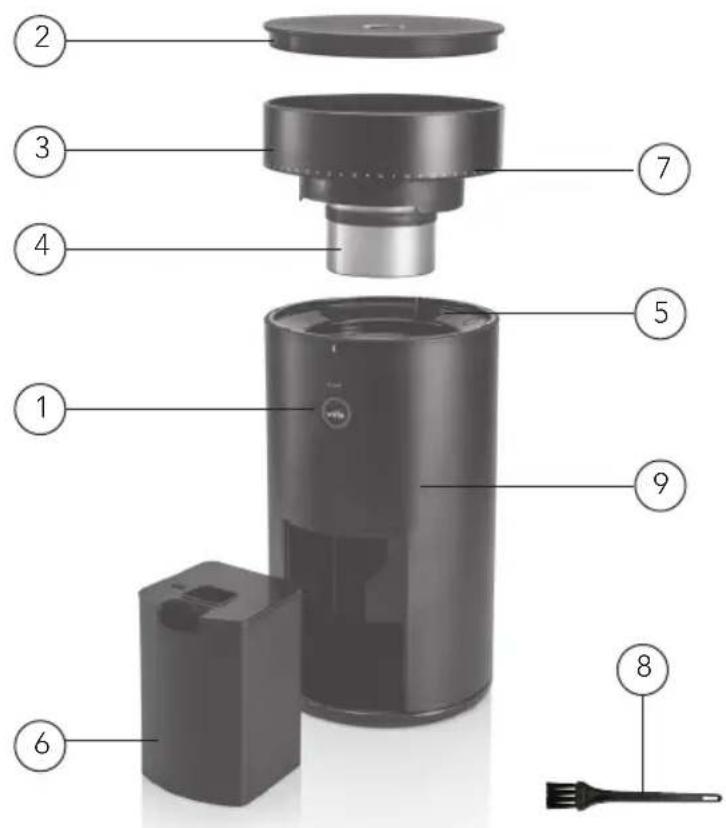
- On/Off switch
- Scale
- Bean hopper
- Grinder disc
- Burr
- Coffee ground container
-
Grind size settings
-
Cleaning brush
-
Casing
EN
SELECTING YOUR GRIND SIZE
For each coffee style, Espresso, Percolator, Filter, French Press and Steep, the grind size will differ. Within each coffee style there is a range of settings. Experiment with different grind settings to achieve the brew that best suits your taste. As a start we recommend you to use the grind size setting listed in the chart below. This chart is also a guide to find right ratio of coffee to water.
Before use rotate the bean hopper (3) to desired grind size position. Weigh the coffee beans based on your desired brew volume.
Note: There are 41 grind size setting for different coffee styles – Espresso, Aeropress, Filter, French Press and Steep.
Note: Please note that every grinder will vary slightly in calibration. For espresso we recommend using grind setting 5 as a starting point. Adjust the grind setting up or down according to your personal preference.
| Brew method | Espresso Aeropress Pour over Filter French press Steap |
| Grind setting | 3-7 14-26 14-28 22-32 30-38 39-41 |
Note: Brewing time for each type of brew will differ. It will also vary based on grind size. Please experiment to find what is suitable for you. As a guideline please look at the below.
| Brew method | Espresso Filter French press Steap |
Normal brewing time 20 seconds 4-6 min. 6 min
8min.
- Press and release the start button (1).
- The button light glow white.
- The grinder will automatically stop after end of grinding, white light pulsing (3 times, 2 sec on, 2 sec off).
- Complete the grinding job, then the light will turn off.
CANCEL
- Press and release the start button (1).
- The light will turn off and stop grinding.
MAINTENANCE AND CLEANING
- When using espresso at the finest setting, the device may stop at some occasions. If this happen, grind coffee with a coarser setting such as #25 and let the burrs grind out the remaining coffee residue that blocks the grinder house. It is then ready for use again.
- Do not immerse the unit into liquid/water or put it in a dishwasher.
- Clean the scale with a slightly damp cloth. Do not use chemical/abrasive cleaning agents.
- Do not clean or perform maintenance on the unit while the plug is connected to the main supply.
- Clean the casing (9), the lid of the coffee bean cup /scale, the coffee bean cup and coffee with a dry cloth. Never use a wet or heavily chemical cleaning agent.
- Do not open the product, as this will invalidate the purchase warranty.
TROUBLESHOOTING
Problem Possible causes Solution
| Coffee grinder does not start | Power cord is not plugged in Plug into power socket | |
| Bean hopper is not in correct position | Rotate the bean hopper properly into locked position. | |
| Coffee grinder clogs | Using setting 1-4 might clog the burrs. | Set grinder to 25 and gradually adjust back to the wanted setting while the motor is running with beans in the hopper. This will remove clogging of the burrs.Depending on type of beans, wear and factory calibration the machine might clog at the finest settings.To find the finest setting before clogging: Lower setting gradually until the burrs clog. If it clogs at setting 3 then setting 4 should be considered as finest setting. |
| Coffee grinder grinds to coarse even at finest settings | Bean hopper not fully rotated in place. | If the beans are grinded coarse even on the finer settings the head might not be in place. Try to rotate the bean hopper one more revolution. |
| It's hard to adjust to finer settings | Grinded beans might stuck between the burrs. | Let the motor run while adjusting to a finer setting. |
SCALE FUNCTION DESCRIPTION
HEAT RESISTANT SILICON PAD
Sudden rise in temperature might affect the accuracy of the scale. We therefore recommend using the heat resistant silicon pad for optimum accuracy during brewing and measurements of hot liquid.
The pad is also intended to be used to protect the scale during measurements and as a support when measuring directly into a portafilter.
FULL DISPLAY LAYOUT

TURN ON SCALE
- Make sure the power switch on the back is set to on position.
- Then short press the power button on the display to turn the scale on.
- The timer and scale button fades in, and the scale is ready to use.
TARE FUNCTION
- The scale tares automatically when it starts.
- Place the coffee container on top of the scale, press the scale button to tare the weight of the container, and the scale will show 0.0g/oz. The scale is now ready to measure any additional weight.
- Remember to use the heat resistant silicone pad if you are brewing or weighing any hot liquids.
CHANGE WEIGHT UNIT
Long press the scale button for 3 seconds to switch between grams (g) and ounces (oz).
TIMER
- The timer does not show when starting the scale. Short press the clock-button to show the timer.
- Short press the clock-button again to start the timer. To pause the timer, short press the clock-button and the time will freeze.
- To reset the timer long press the button for 1 second.
AUTO OFF
If you stop adding weight to the scale, it will automatically shut off after 10 minutes.
EN
INSTRUCTION MANUAL · UNIFORM
TROUBLESHOOTING
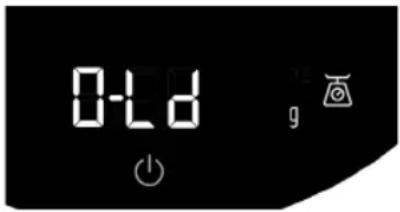
OVERLOAD WARNING
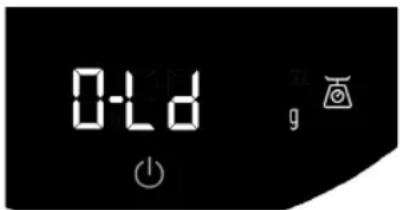
The scale is overloaded, remove weight from the scale (maximum weight is 2000g).
UNSTABLE WARNING
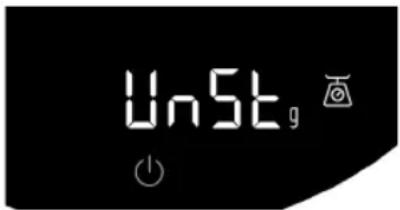
Unable to activate the scale because the scale is unstable. Place the scale on a flat and level surface.
BATTERY STATUS
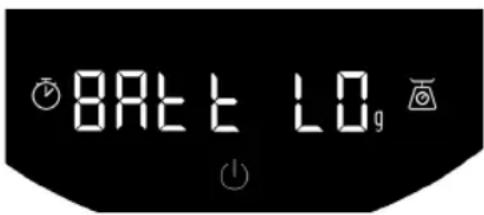
- If the battery is 10% or lower when the user is turning on the scale this warning shows on the display. The warning is visible for 2 seconds before the scale turns on.
- To show battery status, long press the on/off button for three seconds, and the battery percent will show before the scale turns on/off.
CHARGING
To charge the scale, plug the USB-C cable into the USB port located at the back of the scale. When charging, the display only shows the battery percent.
CLEANING
Clean the scale with a soft slightly damp cloth. Never use hot water or any harsh chemicals.
STORAGE
- Turn the power switch off.
- Ensure that there is nothing on the scale when it is not being used.
- The scale should not be stored standing on its side
- Never attempt to open the scale and tamper with its mechanism or circuitry
BLUETOOTH
The scale comes with a built in Bluetooth® device. This feature gives the user the possibility to read and control the scale from a smartphone device (iOS or Android). If a Bluetooth connection is made, the B lights up on the display.
Follow these steps to connect your smartphone to the scale.
- Download the "Wilfa SVART" app from App Store® or Google Play™.
- Turn on the scale by pressing the power button
- Open the app on your smartphone device and click on the Bluetooth icon in the upper right corner.
- Select the "Wilfa SVART scale" and press connect.
TIPS AND TRICKS
- This scale can be used as a lid for the Uniform coffee grinder.
- Short pressing the power button taring the scale and zeros the timer at the same time.

GUARANTEE
Wilfa issues a 5 year guarantee on this product from the day of purchase is done. The guarantee covers production failure or defects that arise during the guarantee period. Your purchase receipt works as proof towards retailer if claiming your guarantee.
The guarantee is valid only for products that are bought and used in private households. The guarantee is not valid if the product is used commercially. The guarantee is not valid if the product is misused, used by negligence, if not following instructions given by Wilfa, if modified or if unauthorized reparation is done. The guarantee is also not valid for normal wear of the product, misuse, lack of maintenance, use of wrong electrical voltage or:
• Overloading of product
• Parts which are normally worn down
- Parts you can expect being replaced regularly (e.g. filter, battery etc.)
PRODUCT SPECIFICATIONS
Rechargeable Lithium Battery (3,7v / 1200 mAh)
220V\~240V\~50Hz, 80 W
SUPPORT AND SPARE PARTS
For support please visit us at wilfa.com, and see our customer service/support page. Here you will find frequently asked questions, spare parts, tips and tricks and all our contact information.
RECYCLABILITY
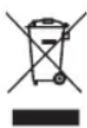
This marking indicates that this product should not be disposed with other household wastes throughout the EU. To prevent possible harm to the environment or human health from uncontrolled waste disposal, recycle it responsibly to promote the sustainable reuse of material resources. To return your used device, please use the return and
collection systems or contact the retailer where the product was purchased.
They can take this product for environmentally safe recycling free of charge.
NO
NO
INNHOLD
18 VIKTIG SIKKERHETSVEILEDNING
21 PRODUKTOVERSIKT
22 VELG KVERNEINNSTILLING
23 SLIK BRUKER DU KAFFEKVERNEN
23 VEDLIKEHOLD OG RENGJ∅RING
24 FEILS∅KING
25 BESKRIVELSE AV VEKTFUNKSJON
28 GARANTI
29 PRODUKTSPESIFIKASJONER
29 SUPPORT OG RESERVEDELER
29 GJENVINNING
NO
VIKTIG SIKKERHETSVEILEDNING
NO
Malingsgrad 3–7 14–26 14–28 22–32 30–38 39–41

DK
Kværne-indstilling 3–7 14–26 14–28 22–32 30–38 39–41

| Jauhatus-asetus | 3–7 | 14–26 | 14–28 | 22–32 | 30–38 | 39–41 |
DE
Mahlgrad 3–7 14–26 14–28 22–32 30–38 39–41

Maal-instelling 3–7 14–26 14–28 22–32 30–38 39–41
WAARSCHUWING OVERBELASTING
PL
FR
CARACTÉRISTIQUES DU PRODUIT
Batterie lithium rechargeable (3,7 V/1 200 mAh)
220V\~240V\~50Hz, 80 W
ASSISTANCE ET PIÈCES DÉTACHÉES
WSFBS-200B_20_01


- UNIFORM
- IMPORTANT SAFETY INSTRUCTIONS
- EN
- PRODUCT OVERVIEW
- SELECTING YOUR GRIND SIZE
- CANCEL
- MAINTENANCE AND CLEANING
- TROUBLESHOOTING
- SCALE FUNCTION DESCRIPTION
- HEAT RESISTANT SILICON PAD
- FULL DISPLAY LAYOUT
- TURN ON SCALE
- TARE FUNCTION
- CHANGE WEIGHT UNIT
- TIMER
- AUTO OFF
- CHARGING
- CLEANING
- STORAGE
- BLUETOOTH
- TIPS AND TRICKS
- GUARANTEE
- PRODUCT SPECIFICATIONS
- SUPPORT AND SPARE PARTS
- RECYCLABILITY
- INNHOLD
- NO
- VIKTIG SIKKERHETSVEILEDNING
- CARACTÉRISTIQUES DU PRODUIT
- ASSISTANCE ET PIÈCES DÉTACHÉES
Brand : WILFA
Model : UNIFORM WSFBS200B
Category : Coffee grinder