ORC 130B - Radio OK - Free user manual and instructions
Find the device manual for free ORC 130B OK in PDF.



| Brand | OK |
| Model | ORC 130B |
| Product type | Radio CD with FM tuner |
| Mains power supply | 100-240 V, 50/60 Hz, 10 W |
| Battery power supply | 6 x 1.5 V type C/R14 batteries (not included) |
| Radio frequencies | FM 87.5 - 108 MHz |
| Disc playback | CD, CD-R/RW, MP3-CD |
| Number of presets | Up to 30 |
| Track programming | Up to 20 tracks |
| Playback modes | Normal, repeat (1 or all), random |
| Auxiliary input | AUX-IN 3.5 mm jack |
| Antenna | Telescopic antenna |
| Speakers | 2 built-in speakers |
| Display | LCD screen |
| Maintenance | Clean with a soft, slightly damp cloth |
| Safety | Instructions: do not open, do not expose to water, disconnect from mains before cleaning |
| Declaration of conformity | Compliant with Directive 2014/53/EU |
Frequently Asked Questions - ORC 130B OK
User questions about ORC 130B OK
0 question about this device. Answer the ones you know or ask your own.
Ask a new question about this device
Download the instructions for your Radio in PDF format for free! Find your manual ORC 130B - OK and take your electronic device back in hand. On this page are published all the documents necessary for the use of your device. ORC 130B by OK.
USER MANUAL ORC 130B OK
CLASSI LASER PRODUCT
Thanks for your purchase of this ok. product.
IMPORTANT SAFETY INSTRUCTIONS. READ CAREFULLY AND KEEP FOR FUTURE REFERENCE.
- Observe all safety instructions to avoid damage through improper use! Follow all safety warnings on the product and in this instruction manual.
- Keep this instruction manual for future use. Should this product be passed on to a third party, then this instruction manual must be included.
- No liability will be accepted for damage resulting from improper use or non-compliance with these instructions.
- Only use this product for its intended use. The product is not suitable for commercial use. This product is only suitable for indoor and household use.
- Before connecting the product to the power supply, check that the power supply voltage and current rating corresponds with the power supply details shown on the product rating label.
- Do not attempt to repair the product yourself. In case of malfunction, repairs are to be conducted by qualified personnel only.
- Warning! During cleaning or operation do not immerse the electrical parts of the product in water or other liquids. Never hold the product under running water.
- Do not open the product casing under any circumstances. Do not insert any foreign objects into the inside of the casing.
- Connect the power plug to an easily reachable electrical outlet so that in case of an emergency the product can be unplugged immediately. Pull the power plug out of the electrical outlet to completely switch off the product. Use the power plug as the disconnection device.
- Regularly check the power plug and power cord for damage. If the supply cord is damaged, it must be replaced by a special cord or assembly available from the manufacturer or its service agent.
- To avoid damaging the cord, do not squeeze, bend or chafe it on sharp edges. Keep it away from hot surfaces and open flames as well.
- Lay out the cord in such a way that no unintentional pulling or tripping over it is possible. Keep the product and its cord out of reach of children.
- Never use accessories which are not recommended by the manufacturer. They could pose a safety risk to the user and might damage the product. Only use original parts and accessories.
- Do not place heavy objects on top of the product. Do not place objects with open flames, e.g. candles, on top of or beside the product. Do not place objects filled with water, e.g. vases, on or near the product.
- Keep the product away from any hot surfaces and open flames. Always operate the product on a level, stable, clean and dry surface. Protect the product against heat and cold, dust, direct sunlight, moisture, dripping and splashing water.
- Do not cover the product's air vents. Ensure that there is sufficient ventilation. Keep a minimum distance of 10cm between the product and other objects or walls.
- The ventilation should not be impeded by covering the ventilation openings with items, such as newspapers, table-cloths, curtains, etc.
- The product is only suitable for use at moderate degrees of latitude. Do not use it in the tropics or in particularly humid climates.
- Attention! In the event of a malfunction as a result of electrostatic discharge and momentary electrical surges, unplug the product and plug it in again.
- Caution! Danger of explosion if battery is incorrectly replaced. Replace only with the same or equivalent type.
- Batteries shall not be exposed to excessive heat such as sunshine, fire or the like.
- Always insert batteries correctly with regard to the polarities (+ and -) marked on the battery and the battery compartment.
- Do not allow children to replace batteries without adult supervision.
- Remove the batteries if you will not be using the product for an extended period of time.
- Exhausted batteries should be immediately removed from equipment and properly disposed of.
- Please refer to the safety instructions provided by the battery manufacturer.
-
This product is not a toy and should not be used by children.
-
The information on the compact disc is read by a laser through an optical lens (do not touch). If you take the product from a cold to a warm room, moisture may condense on the lens, and the playback may be hampered. In this case leave the product for one hour at room temperature before use. Take the disc out of the product. Should the problem persist, have the product checked by qualified personnel.
CLASSI LASER PRODUCT
This label on the product informs the user that this is a class 1 laser product containing a laser component.
Do not touch the lens inside the disc compartment.
CAUTION! Use of controls or adjustments of procedures other than those specified herein may result in hazardous radiation exposure.

DANGER! Invisible laser radiation when open and safety interlock failed or defeated. Avoid direct exposure to the beam. Do not touch the lens.

CAUTION
RISK OF ELECTRIC SHOCK DO NOT OPEN

WARNING: SHOCK HAZARD - DO NOT OPEN AVIS: RISQUE DE CHOC ELECTRIQUE-NE PAS OUVRIR

The lightning flash with arrowhead within an equilateral triangle is intended to alert the user to the presence of uninsulated "dangerous voltage" inside the enclosure of this product, which may be of sufficient magnitude to constitute a risk of electric shock to persons and animals.

The exclamation point within an equilateral triangle is intended to alert the user to the presence of important operating and maintenance instructions in the literature accompanying this product.
INTENDED USE
This product is only intended for audio entertainment. This product is only suitable for private household use and it is not designed for commercial purpose. Every other type of use can lead to damage to the product or injury.
The Imtron GmbH assumes no liability for damage to the product, for property damage or for personal injury due to careless or improper usage of the product, or usage of product which does not meet the manufacturer's specified purpose.
BEFORE FIRST TIME USE
- Remove all packaging materials.
- Check for completeness and transport damage. In case of damages or incomplete delivery please contact your dealer.
Clean the product Cleaning and care). - Important! Before first use, remove the protective sheet from the disc compartment.
EN
12
COMPONENTS
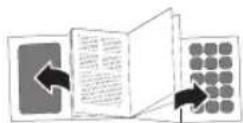
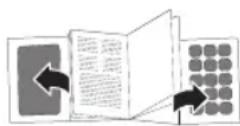
Fold out front and rear page for product illustrations.
A. Telescopic antenna
B. AC-socket
C. CD-compartment lid
D. Handle
E. CD-compartment opener
F. Display
G. (1) / On/Off button
H. MODE button
1. Speaker
J.M+/ /M- button
K. SKIP-/blutton
L. AUX-IN-jack
M. Power cable with plug
N. Battery compartment
O. SKIP+/beta
P. ST/SEARCH button
Q. Speaker
R. Volume
S. Volume
POWER SUPPLY
AC supply
Attention!
- Do not use this product with AC supply and battery operation simultaneously.
- Remove all of the batteries when operating this product via power supply.
- Disconnect the product before insert batteries.
1 Connect the power cable to the AC socket.
2 Connect the power plug to a suitable electrical outlet.
Note: Alternative you can use the product with batteries.
Battery operated
Attention!
- Do not use this product with AC supply and battery operation simultaneously.
Unplug the product before inserting batteries.
3 Remove the battery compartment cover.
4 Insert 6 batteries (Type C / R14, 1.5 V = not included) in the battery compartment. Match the polarities + and -, as indicated on the batteries.
5 Close the battery compartment cover.
OPERATION

Switching on and off
Press the button to turn on the radio. To turn off the radio press and hold the buttton approx. 3 seconds.

Mode selection
Press the 12 button to select a mode in following order FM > AUX > CD.

Volume control
The volume can be easily controlled by pressing the buttons or The volume will be shown on display for a moment.
RADIO MODE

Tuning
-
Select radio mode. Press SEARCH button to search the whole frequency band.
-
For fine tuning, press the SKIP-/+ button shortly to change the frequency in steps of ± 0.05MHz

Memory preset
30 radio stations can be preset to program list.
- Select radio mode. Set a station by tuning according to chapter Tuning.
- Press the MODE button to start the presetting process. Display will show "P01" flashing,
- Press the SKIP -/+ button to select the desired preset station number.
- Press the MODE button again to save the actual station to the desired preset station number.
- Once all stations are preset, press M + / M - button to select your desired stations.
Notes:
For better FM reception: Fully extend the antenna.
CD MODE

Press to turn on the product. Press until appears on the display.

Open the CD compartment door and insert a CD with the label facing up.

Close the CD compartment door.
Note: If no CD is inserted, the display shows "no".
EN
14
CD PLAYBACK

- Start or pause playback: Press . Ippause mode, track number will flash on the display.
- Stop playback: Press STOP. In stop mode, total number of tracks will appear on the display.
- Skip to next track: Press . Press and hold to fast forward.
- Skip to previous track: Press . Press and hold to fast reverse.
- During playback, press MODE repeatedly to switch the playback modes as follows:
Press Display Result
1x REP Repeat one track. REP flashing in display
2x REP ALL Repeat all tracks
3x RAND Play a track randomly.
4x - Normal playback.
Notes:
This product reads CD and CD-R/-RW discs. Other discs are not supported.
- When playing CD-R/RW discs the playback quality might be influenced by the quality of the burned disc. When burning CD-R/RW disks with audio files we recommend using the slowest burning speed.
PROGRAM PLAYBACK
Notes:
- Up to 20 CD tracks can be programmed for a playback in any desired order.
- Programmed playback can only be made from one single source.

- Stop playback: Press STOP.
- Enter program settings: Press MODE.PROG and P01 will flash on the display.
- Select desired track: Press o▶I
- Store selected track into the program memory: Press MODE again. P02 will now flashing on the display.
- Repeat step 3 and 4 to program additional tracks.
- After programming all the desired tracks, press tBart program playback.PROG appears on the display.
- Stop playback: Press 1x STOP.
- Cancel program playback: Press 2x STOP.PROG disappears from the display.
AUXILIARY (AUX) PLAYBACK
Warning!
Observe the relevant safety information for use with other devices when connecting an external device.
Press button to turn on the product. Press until "AUX" appears on the display.
17 Connect auxiliary device to the AUX-IN socket using 3.5mm jack audio cable (not included).
If an auxiliary device is connected, all playback functions of this device need to be used.
COMPATIBLE CDs
Only use CD compact discs with digital audio signals.
- The making of unauthorized copies of copyright-protected material, including computer programs, files, broadcasts and sound recordings, may be an infringement of copyrights and constitute a criminal offence under your national law. This equipment should not be used for such purposes.
TROUBLESHOOTING
If there are any problems during operation, please refer to the following table. If problems cannot be solved as indicated under Solution, please contact your retailer.
| Problem Possible causes Solution | ||
| Product does not function · | Interrupted power supply Due to electrostatic discharge | Check the power supply Unplug and plug it in again after a while |
| Poor Audio quality | CD is scratched | Insert a new CD |
| NO appears on display | CD not correctly inserted | Re-insert the CD |
| No radio reception | Poor radio reception | Place the product to another place and adjust the antenna again |
EN
CLEANING AND CARE
WARNING! Before cleaning, always switch off the product and disconnect the plug from power.
- Never immerse the product in water or other liquids.
- Clean the product with a soft, slightly damp cloth. Make sure that no moisture is entering the product during cleaning.
- Never use corrosive detergents, wire brushes, abrasive scourers, metal or sharp implements to clean your product.
Dry the product thoroughly after cleaning.
- Store the product in a cool, dry location, away from children and pets.
CD MAINTENANCE
- Small amount of dust or scratches will usually not have an impact on the quality of a disc. The discs should, however, be treated with care.
- Protect your compact discs from dust and scratches.
- Store your compact discs in their covers when not in use.
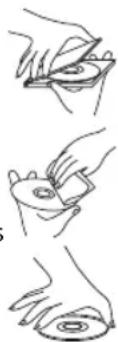
- To maintain the original quality of sound, you should occasionally wipe your compact discs with a soft cloth, from the centre to the edge (not with circular movements). Never use gasoline or other solvents for cleaning.
Only hold a compact disc by its edges!
SPECIFICATIONS
Rated voltage: 100 - 240V ,50 / 60Hz
Rated power: 10 W
Battery: 9V = = =,6× 1.5V = (type C/R14) (not supplied)
Radio frequency band: 87.5 - 108 MHz (FM)
DECLARATION OF CONFORMITY
Hereby, [Imtron GmbH] declares that the radio equipment type [ORC 130-B / ORC 133-W / ORC 133-R / ORC 133-BL / ORC 133-PK / ORC 133-GR] is in compliance with Directive 2014/53/EU. The full text of the EU declaration of conformity is available at the following internet address:
The crossed-out wheeled bin logo requires the separate collection of waste electric and electronic equipment (WEEE). Electric and electronic equipment may contain dangerous and hazardous substances. Do not dispose of this product as unsorted municipal waste. Return it to a designated collection point for the recycling of WEEE. By doing so, you will help to conserve resources and protect the environment. Contact your retailer or local authorities for more information.

Please dispose of batteries in an environmentally friendly manner. Do not put batteries into the household waste. Please use the return and collection systems in your community or contact the dealer where you purchased the product.
FELICIDADES
CLASSI LASER PRODUCT
CLASS I LASER PRODUCT
CLASSI LASER PRODUCT
Autn n etiketa oTo npoiov evnuepwei to xphotn 0ti auto eivai eva npoiov katnyopiac 1 Nou nepiexI Otoixioeip
Mny ayyiTeTo qako eowtepiKo Tnc oHKnc 6iaokou.
IPOEOXH! H xphon XeipiouW n npooapouwv diadikaowv EKTOC EKEVW NOU avapepovtai oTo napov EYxEipio ITOpeI va kataaHcouv O EKeOeON eNikivDuvn akTivoBolia.

KINADNOE! Ynapexi aopatn
aktroboia IeIep, otav exi
napaiaotei n dev exie aqpaiaoei o
unxaviooc aoqaiionc. Anovyete
tnv aeon ekteon stn deo. Mny
ayicTe Touc qakouc.

CAUTION
RISK OF ELECTRIC SHOCK DO NOT OPEN

WARNING: SHOCK HAZARD - DO NOT OPEN Avis: RISQUE DE CHOC ELECTRIQUE-NE PAS OUVRIR

O Kepauvoc TO o c a Ioanleurop Tpiywvo exeI OKOIOva npoeioloioeTo xnoTn yia Tnv napouia m uovwEvnc ENIKivduvn taon> OTO EOWTEPIKO Tou nepiAlnmuoc TNC ouokevunc, O onoioc mnpei va eivai neyEouc tetoiou wote va npokaAoei nAektpoanlNlaoc 6 avpwnouc kai zwa.

To Tauaotko eoa eva ioanleupo
tpiywovexo kono va npoeidoonoioei
to xnoT yia tnv napoua
oynavtkov odnyuw leitoupyiac ka
ouvtnpoc otn Blioypaia nou
ouvoidei tn ouokeun.
IPOOPIZOMENH XPHSE
Autn n ouakeun npoopicietai mno yia tn anolauon nxntikou nepiexoevou. Autn n ouakeun eivai katalnnmno mvio yia idiwtkn oikiaekxphon kai dve xei oxediaotei yia eumopikxphon. Ooiadhnote aanxphon unopei va npokaleoie alaBn otn ouakeun n tpauaatiou.
E. Koumi avoiymuatoc yia to diaepioua CD
F.Oθóvŋ
G. Koupié evpyoioinoc/ anevpyoioinoc
CLASSI LASER PRODUCT
CLASS I LASER PRODUCT
CLASS I LASER PRODUCT
CLASSI LASER PRODUCT
CLASS I LASER PRODUCT
KJIACCI JIA3EPHOE YCTPOICTBO
Данная зтуке Ка Нприборе-coobcaet,чTo эTO na3ephoe yctpoiCTBO Knacca 1 copejxnt Na3ep.
He kacaTecb IINH3bl, pacnoIooxeHHoB BHyTpN OTceKa dIa DNCKOB.
BHUMAHNE!IcnoB3ObaHne cpeiCTB ynpabLeHnna IINI npoceDyp peryInpOBKn, OTIIuauOuXxCR OT YKa3aHHbIX B HactoIeM pyKOBOdCTBe,MOKeT PnUBeCTN K ONaCHOMY n3JIyueHIO.

ONACHOCTb! HeBnDmoe Ia3epHoe n3JyueHne npo OTkpItn OTceKa B cIyuae HncnPpABHOCTn NIN OTka3a 6JokupOBouHoro nepeKliuOaTeJI.
CneInte 3a Tem, yTo6bl nasepHbI nyu He nonaadn HEnocpeCTBeHHo Ha IIOJe. He KacaiTecb IINHbI.

CAUTION
RISK OF ELECTRIC SHOCK DO NOT OPEN

WARNING: SHOCK HAZARD - DO NOT OPEN Avis: RISQUE DE CHOC ELECTRIQUE-NE PAS OUVRIR

CIMBOL MOJHIN CO CTpeKoB B paBHOCTOPOHHe TpeyroJIbHnKe yBeOMIaTeT NOIb3OBAteJe O DeTaIAX, HxOJaUxxCs BHyTpN KOpNyCa DaHHOro N3DeJIa NOD «OnaChbIM HaPjaXeHnEm», KOTOpoe MoXeT PnIBCeTNI K PNCy IopaXeHnI 3JIeKTpUYeCKM TOKOM IIOdeN JKNBOTHbIX.

BocknuataTeNbHbI 3HaK B TpeyroIbHnKe yBeDomJIeT NOIb3OBATeNe O BaXhblIX HNCTpykUnx PO NcNoIb3OBAHnIO I O6CnyJbAHnIO B DOKymEHTaUN, npInaragEmoK K TOMy npOdykTy.
NCIOJIb3OBAHNE IO HA3HAUYHIO
3TOT npi6op npedHa3HaueH ncklouHTeIbHO nla BocpOn3BeDeHnaydno3aHncE. YcToPoiCTBO npedHa3HaueHo TObko IJRA NHyHO rCNoJIb3OBAHnB N OmeJeHNx H He DOnJXHO pImMeHrTbcB KOMMepuecknx cIeJx. IIO6oe INHO eCNoJIb3OBAHnE MOKeT Bbl3BaTb NOBpeJdeHne n3dennn nn TpaBMbl.
Kompania Imtron GmbH He 6epet Ha ce6a OTBeTCTBHeHocb 3a noBpeXeHne n3dienra, yuep6 mUyecBy nIIN TpaBmbl, IOnyueHHbIe B pe3yIbTaTe He6peXHoro nIIN HnPaBnHoro nCNOJb3OBaHn n3dienra, nIIN nCNoJIb3OBAHn B cIeX,OTIIuHbIX OYka3aHHbx npoN3BOJnteIem.
NEPEI NEPBbIM IcIOJIb3OBAHHeM
- CHIMITE BCE ynaKOBOHyIe MaTePnaJIbl.
- PpOBepbTe KOMnJIeKTHOcTb NocTaBKN I BO3MOxHbIe NOBpeXeHnI pIu TpaHCnOpTnIpOBke. B Cnyae NOBpeXeHn IIN HeKOMnJIeKTHOcTb NocTaBKN O6paNTeCb K DnIepy.
OuHCTnTE H3dJIeNHe( YIcTka n 06CJyKJBaHne).
Baxho!peepnepbIMNCNoIb3OBaHHeMCHIMITE3aunTHyIO NOLOCKyCOTcKaJIAKOMNaKT-DNCKOB.
KOMNOHEThbI
Pa3BepHnTe nepeDHOIO n oocJeHIOIO cTpaHNUy IJI npOCMOtpa pncyHKOB C npOdyKToM.
A. Teleckonniueckaia aHTehna
B. Ceteboi pa3bem
C. Kpbioka oTecka ДЯКOMMaKT-DnCKa
D. Pучka
E. MecTo IaI OTKpbIbAHnO TceKa IJI KOMNaKT-DnCKa
F. Dicnnei
G. /KHOJIKA BKNIOUeHnI N BbIKNIOUeHnI
H. Khonka MODE
I.ДиHamNK
J.Khonka M+/ /M-
K. Khonka SKIP-/
L. Pa3bem AUX-IN
M. CeteboKa6ebcBniko
N. OTeck dIa 6atapeek
O. Khonka SKIP+/
P. KhoNka ST/II SEARCH
Q.ДиHamNK
R. rpoMkoctb
S.ΓpOMKoCTb
POWER SUPPLY
AC supply
Attention!
He nCnoB3yIte 3To N3dJIne OJHOBpeMeHHO C nITaHnEM OT 6aTapeek N nCToUHnKa IpeMeHHoro TOka.
- Ppi nCnObl3OBaHm DaHHoro n3dEInra OT cETn 3neKtpoCha6xeHn H3BbKeNte n3 Hero 6aTapeiKn.
1 PoiKJIIOUHTe CeTeBOI UHyp K pa3bEme nepMeHHoro ToKa.
2 POncoeunHnTe BUNKy ceTeBOrO shypa K noXoJauei po3eTke ceTn 3neKTPoCah6KeHHA.
PnmeHne: N3denn TaKKe MoKHO nCNoB3OBaTc nNTaHMeOT 6aTaapeek.
Pa6otaHa 6aTaepKax
BHMMaHne!
He nCnoB3yIe 3TO n3dJIe OndHOBpeMeHHO C nITaHnEM OT 6aTapeek N nCToUHnKa nepemEHHO ToKa.
- Ipeen yctaHOBKo 6aTapeek OTcoeHNHTe npu6op ot cetn 3neKTpOHTaHnA.
3 CHIMnTe KpbIuKy OTeKa dJa 6aTaapeek.
BCTaBbTe 6 6aTapeeK (TnC / R14, 1.5 B---, He BXoJAT B KOMPJIeKT NOCTaBKN) B OTcEK dJa 6aTapeek. Co6NIOdaIte nOIApHocTb + n -, yKa3aHHy O Ha 6aTapeiKaX.
5 3akpoTe Kpbilkny OTecka dJa 6aTaapeek.
RU
76
NCIOJIb3OBAHNE
6
BkIOUeHne n BBKIOUeHne
YTo6bI BKNIOHTb paINO, HaxMnte Ha KONky //... . YTo6bI BbIKIOHTb paINO, HaxMnte KONky //... n ydepKINBaIte ee HaxaTOn B TeueHne npImepHO 3 cekyHd.
7
Bb6op pexnma
Bb6epnte pexn m pa6oTbI c nOmoIbIO KHOIIKu 1/00. Iopraok INHnkaun peXmOB: FM >AUX>CD.
8
PEYJINPOBAHNE TPGMKOCTN
PerynipoBaanHe rpoMkoCTN BbINONHReTc C NOMOaBIO KHONoK 3HaueHne rpoMKoCTn 6ydt nokaaho Ha dncnlee Ha KOpOTKoe Bpem.
PEXIM PADI NO
9
Hactpoika
- BbI6epnte pexm paNo. HaxMnte KhoNky SEARCH nla noncKa BO Bcem YacToTHOM dnaana3OHe.
2.ДЯTOUHOH HAcTPOIKNHaKmTe Ha KOpOTKoe BpeMa KHONky SKIP-/+ДЯИЗMeHeHnY aactotbC WArOM ±0,05 MfU.
10
PamrbaPnOCTaHm
B cnncke nporpaMM moXHO ppeBaPteIbHo yctaHOBTb 30 paAnocTaHcN.
- Bb6epnte pexn m paio. HactpoTecb Ha cTaHcNIO B COOTBeTCTBnn C yKa3aHnMn B pa3dene «HaCtpoiKa».
- Haxmnte KhoNky MODE nHaayana npouecca npedBapntbHoi yctaHOBKn. Ha dincnnee MrraeT «P01».
- C nOMOuBIO KHOHKn SKIP-/+ BBb6epnte Homep dna coXpaHeHHo paAnocTaHnN.
- Haxmnte KhoNky MODE eue pa3, yTo6bI coXpaHnTB TeKyuIO CTaHcNIO C Bbl6paHHbIM HOMEpOM.
- Nocne Hactpoikn Bcex cTaHcui n CnOmoIbK hONk M+/M- Bbl6epnte HyKHyIO CTaHcuiIO.
PnmueyaHn:
ДяболесуверенHoropnemaFM-CTaHcN:ПОннOCbIO BbITAHHTe aHTeHHy.
PEKIM IPOUNPbIBAHN KOMNAKT-ДИCKOB
13
11
HaKMTe KONky BkIOuHTb yCTpOietBO.HaKMaTe Ha KHONKy ,nokaH DUCNJIee He NOBUTCA 一 - 一
12
OTKpoIe OTceK dIa KOMNaKT-DnCKOB N BCTaBbTe KOMNaKT-DnCK 3TKeTKoB BBepK.
3aKpOTe OTEcKДЯ KOMnAKeT-DnCKOB.
PnmeaHne: Ecn B OTCKe OEYCTByET KOMNaKT-DnCK, Ha 3KpaHe NOBNTcHaDnncb"no".
BOCIPON3BEDEHNE CD
14
- 3anyck nni nay3a Bocnpoun3BeDeHnra: HaxmTe KhoNky .BpeXmte na3bHa dnCnnee Muraet Homep 3aHncn.
- OctaHOBKa BOCPON3BeHeHn: HaxMnte STOP.BpeXmte ocTaHOBa Ha nCnnee oTo6paXkaTe 06uee KOnuYeCTBO 3anCei.
- NepexoK CneIyUeJ 3aIncu: HaxMITE .HxMITE u ydepxnBaTe HaxaToi dJa 6bictpo nepemOTKn Bnpepd.
- NepexoK npebdyuee 3anucn: HaxMITE .HxMITE u ydepXuBaTe HaxaToi dna 6bictpoi nepemOTkn Ha3a.i.
5.BoBpMa BocPon3BeHeHn HaXmMaTe KHOkky MODE HeckoIbKO pa3 nIpeKJIoueHn peXmMa BocPon3BeHeHn:
HaxkTne Dncnne PezynbTa
1x REP NOBTOP BOCPON3BeHnOdHOJ 3aNNcN.
2x REP ALL NobTop Bex 3auncei.
3x RAND Bocnpoun3BeDHeB npoun3BohHom npaKe.
4x-06buiHoe BocnpoN3BeDeHne.
Приимechanical:
JaHbI np6op noepxnae TnCKn CD, CD-R/-RW. NcKn B pyrnx fOpMaTAX He noepxBaOTCA.
- PnBOCnpOu3BeHEnn DnCKOB CD-R/RW Ha KaueCTBO BOCnpOu3BeHEnn MoKeT BnIaTB KaueCTBO 3aIncAHNO DnCKA. Pn 3aIncn Ha DnCKn CD-R/RW ayDnOpaIIOB peKomeHnyet nCnoIb3oBaT MHNImaJIbHyIO CKOpOCTb 3aIncn.
BOCIPPOU3BEDEHNE IO NPOPTPAMME
PpimeyaHn:
BbMOXeTe 3aIPOrpaMMnPoBaTcNcOK TpeKOB KOMNaKT-DnCKa (20) IIN BOCIpOn3BeHnBJIIO6OM npAKe.
Bocippon3BeHeHne no nporpaMMe MoKeT BbINOHrTbCToIbKO C OdHOrO KOMNaKT-DnCKa.
15
- OctaHOBka BOCnpoIN3BeHnHaXmTe STOP.
2.ПepeKIOUHTecbBpeKIMHACTPOIKNpOprpaMMbI:HaKMITE MODE.HaIucnnee OTo6paXaIOTcCOo6ueHnRA PROG nP01. - Bb6epnte Tpe6yemyu 3auncb: Haxmnte
- CoxpaHnTe BbI6paHHyO 3aNNcB namrtn nporpaMMbl: Haxmnte eue pa3 MODE. Ha nncnnee oTo6paxaetcP02.
- NOBTOPte 3arn 3-4 nprpammmpoBaHn dpynx 3anice.
- Iocne nporpaMMPOBaHnBcEx 3aHncE HaxMNTe KHOIky BOCpOu3BeDeHn nporpaMMbl.Ha nucnlee oTo6paXaetcra PROG.
- OctaHOBka Bocnpoun3BeHnHa: HaxMnte KhoNkY STOP.
- OTMeHa Bocnpoun3BeHnA nporpaMMbl: HaxMnte 2 pa3a KhoNky STOP. Coo6ueHne PROG nCHe3aET C DCnCnIe.
RU
78
BOCIPON3BEDEHNE C BCNOMOTATEHBHORO (AUX) BXODA
PpeoctepexeHne!
Pn npokHeHn BHeHrO yctpoCTBa co6IOdaIte COOTBeTcByIOune npaBnA TeHNK 6e3onacnoctn npn EKnpyataun Cdpyumu yctpoCTBaMn.
16 HaxMMTe KONky LbBkHIOHTb yCTpOietBO.HaxMaIte Ha KHONky ,nokaHa. DnCnJee He NOBNTcAUX
17 POnKJIIOHTe BHeHHee ycIpoNCTBO K pa3bemy AUX-IN c nOmoU bIo aydno-Ka6eJc 3,5-MM uTeKepaMn (He BXoIN T B KOMPNeKT NOCTaBKn).
Iocne noiklueyn BHeHero yctpojCTBa nCNoB3yTe KHONKHa 3OM yctpojCTBe dnynpablen HBOcnpoN3BeDeHem.
COBMECTUMbIE UNCKN CD
Icnoj3yIe ToIbKO KOMnAaKT-DnCKn CD CUnΦpOBoIMN 3ByKOBbIMN cHHaJaAM.
- HecaHKUHOHPOBAHHe KOINPOBAHne OxpaHReMbIX ABTopCKMm IpabAMMaTePnAIOB, BKIOUaY KOMNbIOTepHbIe nporpaMMbl, faiJIbl, TB-apeDaUN 3ByKOBbIe 3aNcN, MoryT hapyHaTB abTOPCKNe npaba N IpeDCTaBnTb co6oH hapyuEHHe HaOnHOhBO HorO KpIMNuHaNbHorO npaba. 3aIpeuaetc INCNoJb3OBA Tb np6Op B TAKNX cenX.
DAHHTNKA
Ecn npa6oTe n3dJIeNIOBbIOTcnp6IeMbI, oBaauTecb K Hnke npBBeHHO Ta6NIue. Ecn npo6IeMy He ydaetcpeuNTb, KaK yKa3aHO B KOLOHKe YcTaPaeHne, oBaauTecb K N3rTOBtEnIO.
DEKJIAPAUCA COOTBETCTBNA
Kompania [Imtron GmbH] hactoian 3aBnT, TTO paNoo6OpyObaHne Tuna [ORC 130-B / ORC 133-W / ORC 133-R / ORC 133-BL / ORC 133-PK / ORC 133-GR] oTbeaet Tpe6oBaHmДиpeKTHb2 2014/53/EU.Польний TeKT DeКларaun COOTBeTcBna ECdoCTypeH BИntepHete no CneIyIoJe cBInke: http://de.ok-online.com/nc/de/suche.html
YTNIN3AUIN
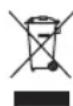
CnBON nepeepKHyToI TeJekKn O3HaayeT OTeJeBHyU yTuNl3aunIO OTxOOB 3NeKTPoHNO I 3NeKTPnuEckOrO 6OpudOBAHnA (WEEE). 3NeKTPnuEckoe n 3NeKTPoHNOE 6OpudOBAHne MoXET coepKaTb BpeHbIe N OAnchblte BeueCTBa. He Bbl6paCbBAIte NcNoJIb3OBaHNOe N3dEnne BMeCTc C MyHnUInaJIbHbIM Mycopom. OTnpabBe erO Ha npEHa3NaueHHbI dIg 3TOrO pYHK T c6op a Dny tynu3aunn 3NeKTPnuEckx N 3NeKTPoHbIX N3denn. TaKIM NyTEM Bbl 6yDte cnoc6ctBOBaTb 3KohOMnI recypcoB IN 3aUnTe OkpykaIoSe cpebl. lIg nonyehnI 6OJIe NOpO6HOIN HOFMaunn O6paauTecB BAUy TOPROByIO opraHn3aunIO K MeCThblm BlaCTM.

I36abTnTeB O7bapeek 6e3BpeHbIM IJRA OKpykaUeI Cpebl cnoCo6OM. He BbI6paCbBaIte 6bapeKIN BmecTe C DOMaunHM Mycopom. IJI RA Bo3BpaUeHN CBOero NcNoIb3OBAHHORo N3dEINr NCNoIb3yIte CnCTeMb BO3BpaUeHN Ic6opA pecypcoB IIN ObpaauTecb K ToproBoi opraHn3aUN, y KOTOpO Bbl npio6peNn 3dEInne.
SE
80
GRATULERAR
Tack forditt kop avenna ok.produkt.
VIKTIGA SAKERHETSFÖRESKRIFTER. LÄS NOGGRANT OCH SPARA FÖR FRAMTIDA BRUK.
CLASSI LASER PRODUCT
CLASSI LASER PRODUCT

- CLASSI LASER PRODUCT
- IMPORTANT SAFETY INSTRUCTIONS. READ CAREFULLY AND KEEP FOR FUTURE REFERENCE.
- CAUTION
- INTENDED USE
- BEFORE FIRST TIME USE
- EN
- COMPONENTS
- POWER SUPPLY
- AC supply
- Attention!
- Battery operated
- OPERATION
- Switching on and off
- Mode selection
- Volume control
- RADIO MODE
- Tuning
- Memory preset
- Notes:
- CD MODE
- CD PLAYBACK
- Press Display Result
- PROGRAM PLAYBACK
- AUXILIARY (AUX) PLAYBACK
- Warning!
- COMPATIBLE CDs
- TROUBLESHOOTING
- CLEANING AND CARE
- CD MAINTENANCE
- SPECIFICATIONS
- DECLARATION OF CONFORMITY
- FELICIDADES
- CLASS I LASER PRODUCT
- IPOOPIZOMENH XPHSE
- KJIACCI JIA3EPHOE YCTPOICTBO
- NCIOJIb3OBAHNE IO HA3HAUYHIO
- NEPEI NEPBbIM IcIOJIb3OBAHHeM
- KOMNOHEThbI
- Pa6otaHa 6aTaepKax
- BHMMaHne!
- RU
- NCIOJIb3OBAHNE
- BkIOUeHne n BBKIOUeHne
- Bb6op pexnma
- PEYJINPOBAHNE TPGMKOCTN
- PEXIM PADI NO
- Hactpoika
- PamrbaPnOCTaHm
- PnmueyaHn:
- PEKIM IPOUNPbIBAHN KOMNAKT-ДИCKOB
- BOCIPON3BEDEHNE CD
- HaxkTne Dncnne PezynbTa
- Приимechanical:
- BOCIPPOU3BEDEHNE IO NPOPTPAMME
- PpimeyaHn:
- BOCIPON3BEDEHNE C BCNOMOTATEHBHORO (AUX) BXODA
- PpeoctepexeHne!
- COBMECTUMbIE UNCKN CD
- DAHHTNKA
- DEKJIAPAUCA COOTBETCTBNA
- YTNIN3AUIN
- SE
- GRATULERAR
- VIKTIGA SAKERHETSFÖRESKRIFTER. LÄS NOGGRANT OCH SPARA FÖR FRAMTIDA BRUK.
Brand : OK
Model : ORC 130B
Category : Radio