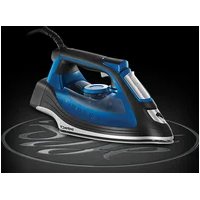
2465056 - Iron RUSSELL HOBBS - Free user manual and instructions
Find the device manual for free 2465056 RUSSELL HOBBS in PDF.



| Product type | Clothes iron |
| Brand | Russell Hobbs |
| Model | 2465056 |
| Dimensions (approx.) | 28 x 12 x 15 cm |
| Weight (approx.) | 1.3 kg |
| Power supply | 220-240 V ~ 50/60 Hz, 2000-2400 W |
| Water tank capacity | 300 ml |
| Soleplate | Stainless steel soleplate |
| Main functions | Continuous steam, steam burst, spray, dry ironing, vertical steam |
| Auto shut-off | Yes (30 s on the soleplate, 8 min on the heel) |
| Anti-scale system | Yes, built-in (do not use descaling liquid) |
| Self-cleaning | Yes, recommended once a month (more often in hard water) |
| Care and cleaning | Clean the exterior with a damp cloth; descale with the self-cleaning function |
| Safety | Auto shut-off, overheat protection, do not immerse |
| Repairability | Cable replaceable by an approved professional |
| Use | Household only |
Frequently Asked Questions - 2465056 RUSSELL HOBBS
User questions about 2465056 RUSSELL HOBBS
0 question about this device. Answer the ones you know or ask your own.
Ask a new question about this device
Download the instructions for your Iron in PDF format for free! Find your manual 2465056 - RUSSELL HOBBS and take your electronic device back in hand. On this page are published all the documents necessary for the use of your device. 2465056 by RUSSELL HOBBS.
USER MANUAL 2465056 RUSSELL HOBBS
HHCTpyKcnn (BbIrapckn) 74
78
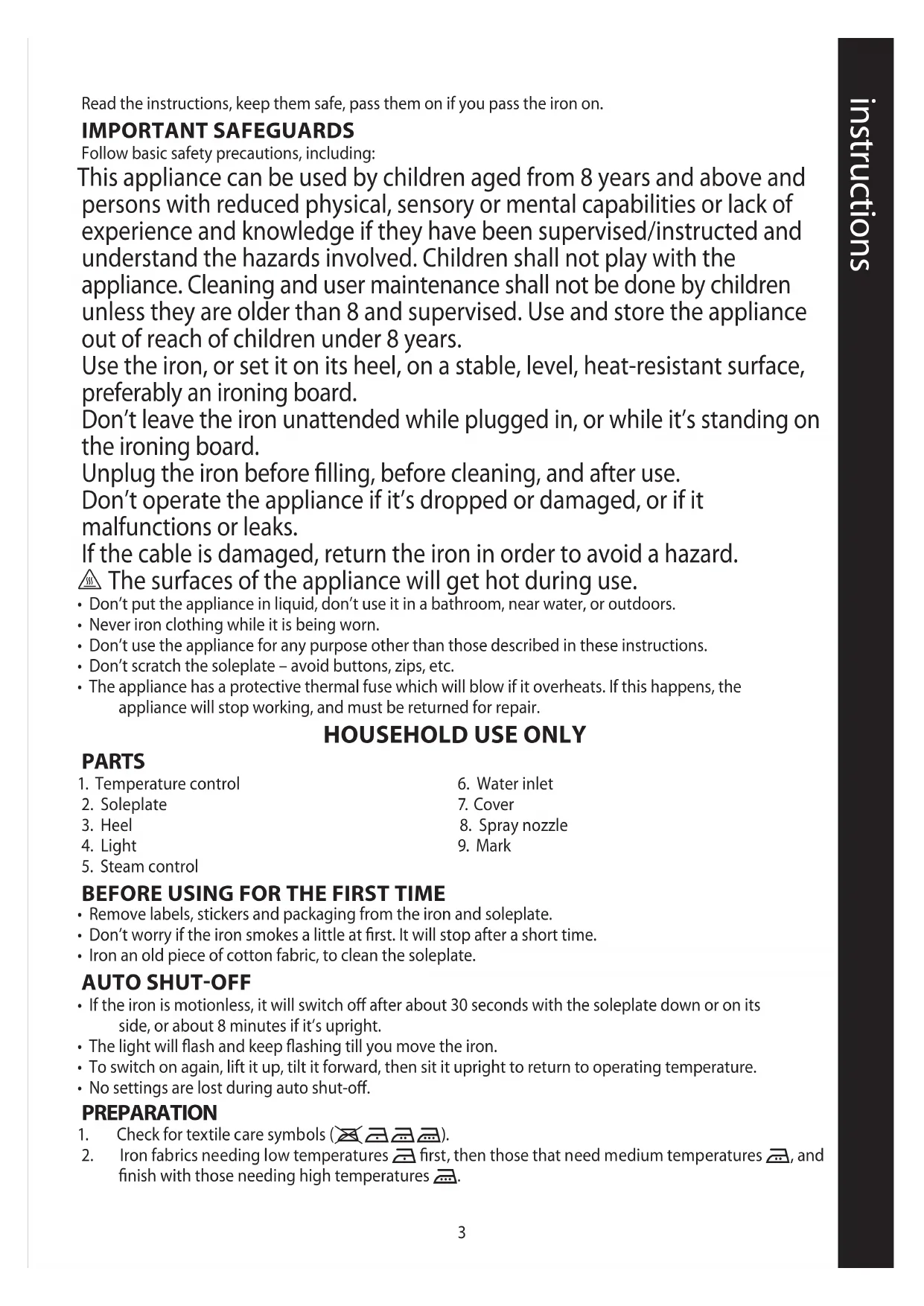
Read the instructions, keep them safe, pass them on if you pass the iron on.
IMPORTANT SAFEGUARDS
Follow basic safety precautions, including:
This appliance can be used by children aged from 8 years and above and persons with reduced physical, sensory or mental capabilities or lack of experience and knowledge if they have been supervised/instructed and understand the hazards involved. Children shall not play with the appliance. Cleaning and user maintenance shall not be done by children unless they are older than 8 and supervised. Use and store the appliance out of reach of children under 8 years.
Use the iron, or set it on its heel, on a stable, level, heat-resistant surface, preferably an ironing board.
Don't leave the iron unattended while plugged in, or while it's standing on the ironing board.
Unplug the iron before filling, before cleaning, and after use.
Don't operate the appliance if it's dropped or damaged, or if it malfunctions or leaks.
If the cable is damaged, return the iron in order to avoid a hazard.
The surfaces of the appliance will get hot during use.
- Don't put the appliance in liquid, don't use it in a bathroom, near water, or outdoors.
- Never iron clothing while it is being worn.
- Don't use the appliance for any purpose other than those described in these instructions.
- Don't scratch the soleplate - avoid buttons, zips, etc.
- The appliance has a protective thermal fuse which will blow if it overheats. If this happens, the appliance will stop working, and must be returned for repair.
HOUSEHOLD USE ONLY
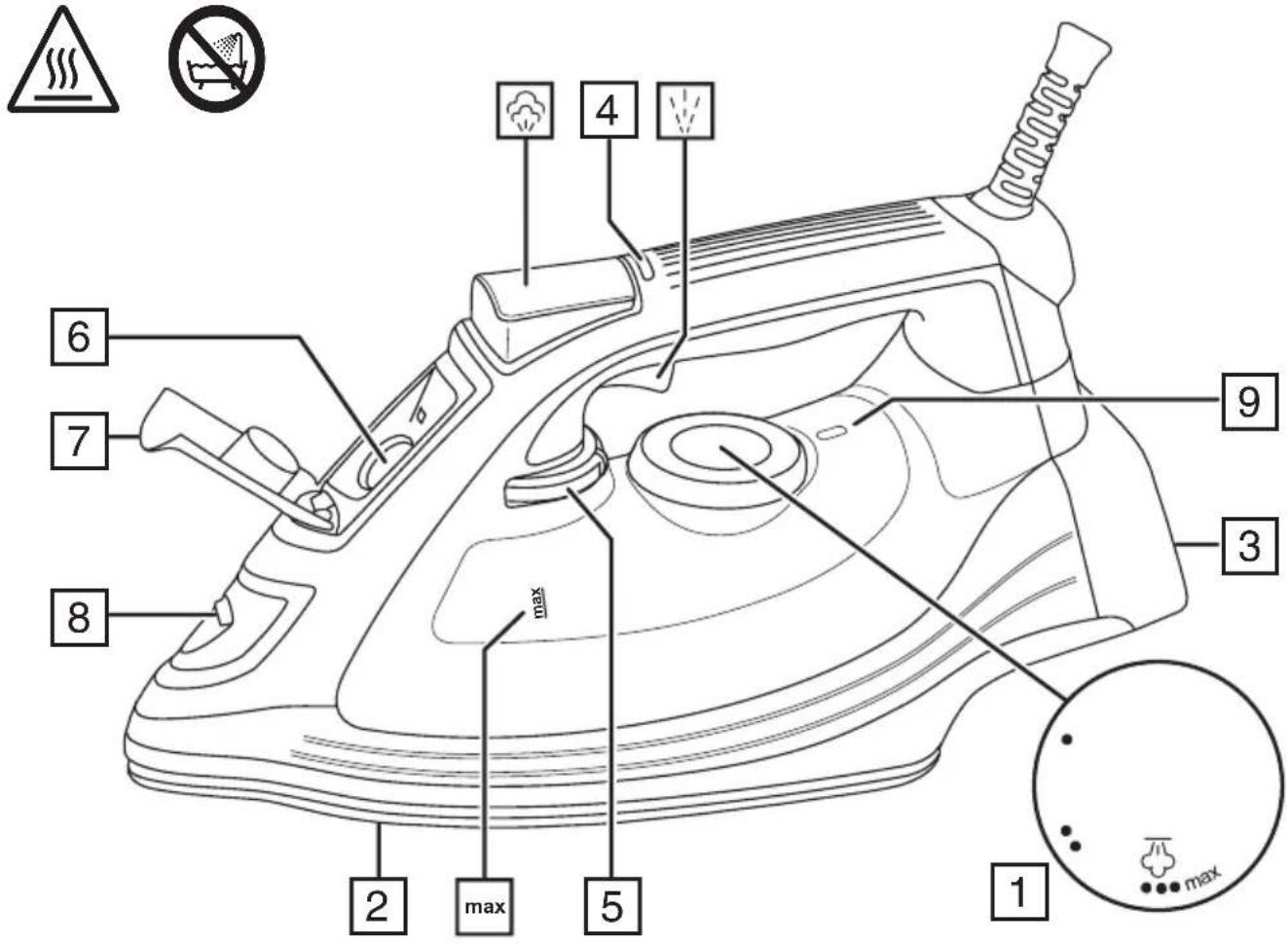
PARTS
- Temperature control
- Soleplate
- Heel
- Light
-
Steam control
-
Water inlet
- Cover
- Spray nozzle
- Mark
BEFORE USING FOR THE FIRST TIME
- Remove labels, stickers and packaging from the iron and soleplate.
- Don't worry if the iron smokes a little at first. It will stop after a short time.
- Iron an old piece of cotton fabric, to clean the soleplate.
AUTO SHUT-OFF
- If the iron is motionless, it will switch off after about 30 seconds with the soleplate down or on its side, or about 8 minutes if it's upright.
- The light will flash and keep flashing till you move the iron.
- To switch on again, lift it up, tilt it forward, then sit it upright to return to operating temperature.
- No settings are lost during auto shut-off.
PREPARATION
- Check for textile care symbols (Aa).
- Iron fabrics needing low temperatures first, then those that need medium temperatures and finish with those needing high temperatures
TEMPERATURE SETTING GUIDE
| Label marking Dot setting | |
| cool – nylon, acrylics, polyester | ● |
| warm – wool, polyester mixtures | ●● |
| hot – cotton, linen | ●●● |
| Max – denim max | |
| do not iron | - |
If the instructions on the fabric label differ from this guide, follow the instructions on the label.
FILLING
You may use the iron with tap-water, but if you live in a hard water area, you should use distilled water (not chemically descaled or softened water).
If you buy distilled water, check that it's suitable for use in irons.
- Set the temperature control to and set the steam control to
- Unplug the iron.
- Hold the iron with the front raised.
- Open the water inlet cover.
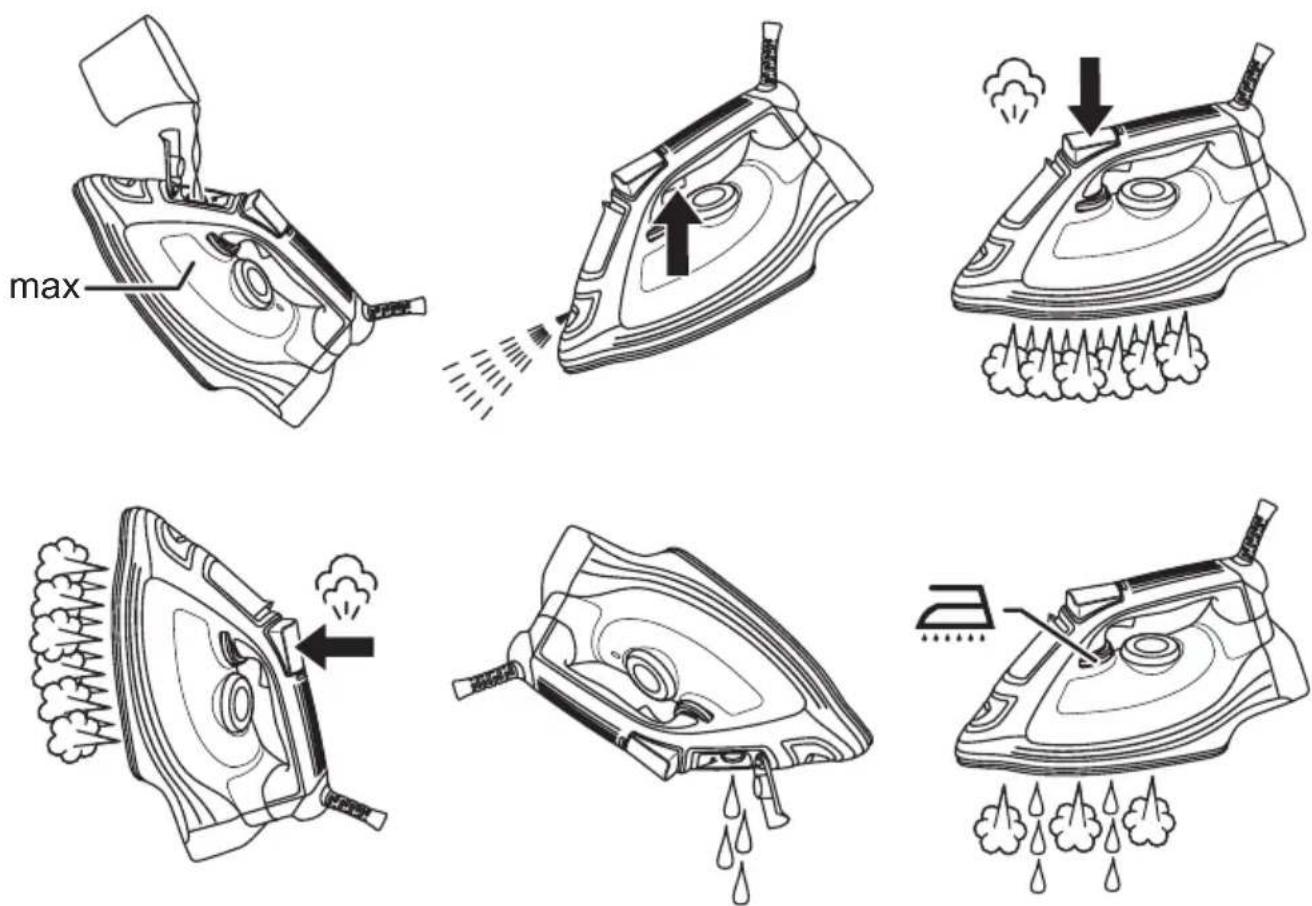
- Pour slowly, to let the air in the reservoir escape, otherwise you'll cause an air lock and the water will overflow.
- Don't fill past the max marking or water will escape in use.
- Wipe up any spillage.
SWITCH ON
- Set the temperature control to and set the steam control to
- Stand the iron on its heel.
- Put the plug into the power socket (switch the socket on, if it's switchable).
- Turn the temperature control to bring the setting you want next to the marker. The light will come on.
- When the iron reaches the temperature you set, the light will go out. It'll then cycle on and off as the thermostat operates to maintain the temperature.
STEAM IRONING
- To steam iron, set the temperature control to or higher.
- Set the steam control to the setting you want, = no steam, = high steam.
- Wait till the light goes out, then start ironing.
SPRAY
Water spotting affects some fabrics. Test this out on a hidden part of the fabric.
- Lift the iron off the fabric.
- Aim the spray nozzle at the fabric.
- Press the ^ button. You may have to press it 2 or 3 times to pump water through the system.
SHOT OF STEAM
- Check that the temperature control is at or higher.
- Lift the iron off the fabric.
- Press the button.
- Leave 4 seconds between shots to let the temperature build up.
DRY IRONING
- If you're going to be dry ironing for 20 minutes or more, empty the reservoir first to avoid spontaneous bursts of steam.
- Set the steam control to
- Set the desired temperature.
- Wait till the light goes out, then start ironing.
VERTICAL STEAMING
Remove wrinkles from hanging clothes, hanging curtains, and furnishing fabrics.
-
Check that there's adequate ventilation behind the fabric, otherwise moisture may build up, causing mildew.
-
Check that there's nothing behind the fabric that may be damaged by the steam.
-
Check that pockets, turn-ups, and cuffs are empty.
-
Check that there's water in the reservoir.
-
Set the temperature control to max and set the steam control to
-
Hold the iron close to (but not touching) the fabric.
-
Press the button.
-
Leave 4 seconds between shots, to let the temperature build up.
AFTERUSE
- Set the temperature control to and set the steam control to
- Unplug the iron.
- Open the water inlet cover.
- Hold the iron over a sink, turn it upside down and drain the water from the reservoir.
- Close the cover.
- Sit the iron on its heel. Leave it to cool down completely.
- When it's cold, wipe off any moisture, and wind the cable round the heel.
- Clean the outside surfaces of the appliance with a damp cloth.
- Remove spots from the soleplate with a little vinegar.
- Store the iron on its heel, to avoid corrosion and damage to the soleplate.
SELF CLEAN
To avoid scale build up, use the self clean function at least monthly in normal water areas, more often in hard water areas.
You'll need a basin or a large bowl to catch the water coming out of the soleplate.
- Fill the reservoir to the max mark.
- Set the temperature control to max and set the steam control to
- Stand the iron on its heel.
- Put the plug into the power socket and wait till the light goes out.
- Hold the iron over the basin or bowl, with the soleplate down.
- Move the steam control past to and hold it there.
- Gently move the iron to and fro, over the basin or bowl.
- Water and steam will wash scale and dust through the soleplate, and into the sink.
- When water and steam stop coming from the soleplate, release the steam control.
ANTI-SCALE
The anti-scale agent incorporated in the iron helps prevent the build-up of scale. Don't use a descending solution, or you'll destroy the anti-scale agent.

ENVIRONMENTAL PROTECTION
To avoid environmental and health problems due to hazardous substances in electrical and electronic goods, appliances marked with this symbol mustn't be disposed of with unsorted municipal waste, but recovered, reused, or recycled.
FONCTION ANTI-CALCAIRE
APENAS PARA USO DOMÉSTICO
ESQUEMAS
CneyuTe OCHOBHbIM HNCTpyKcIaM No 6e3ONaCHOCTN, BKNIOUaY CneyuOuJe:
IcnoIb3OBAHne daHHoro yCTpoiCTBa DeTbMn CTapwe 8 let, IuIaMn C OrpaHnueHHbIMN fN3NueCKmN, CeHCOPHBIMN IIN YMCTBeHHbIMN CNoOC6HOCTaMn, HeIOCTaTKOM ONbITa IIN 3HaHn JOnyCKaETcR npN UcNOBnKoHTPOJIa IIN INCTpyKTaxKa I OCO3HaHnC B83aHHbIX PNUCKOB. JeTAM 3aIppeSeHo IrgpaTb C yCTPOiCTBOM.
OuNTky n 06cIyXnBaHne yCTpoIcTba MOryt BbIIOJIrTaTeN cTapWe 8 IET npYcIIOBn Ha6JIoJEdHn B3PocIbIMn.
Icnoj3yute xpaHnte np6op B MeCTax HeoctynbIX dJeTei.
Korda He nCnoJb3yeTe yTOr, CTaBbTe erO Ha 3aHIO IOBepXHOCTb Ha yCToUHBOI, POBHOI, JapocToIKoI NOBepXHOCTN, IpeIPOuTITeJIbHO Ha rJaDnIbHOI DOKe.
He octablaye ythor 6e3 npncmOTpa, eCNI OH BKJIIOueH B CeTb IIN KOrda OH CTONT Ha rlaIbHOJ DOCKe.
OTKIIouaTe yTIOr OT cETn nepei HaONHeHneM, uNCTKOI n NocJe NCNOlb3OBAHnIa.
He nCnoIb3yIte np6Op, ecn OH naIaI nn 6bl NOBpeJdeH nn ecn OH pa6OtaET c nepe6oAMn nn npOnyckaet BODy.
Ecn Ka6eIb NOBpeKJeH, OH DoJKeH 6bITb 3aMeHeH npOn3BOJnteIeM, cepBnCHbIM aReHTOM IIN dpyrIM KBaJIuΦNcIPOBaHHbIM JInc0m IJI npEdOTBpaUeHn ONaCHOCTn.
IobepxHOCTn yctpoiCTBa HarpeBaIOTcra - He npKacaiTecb K Hm.
He norpykaTe np6Op B kaKyio-Jn6o XnKocTb; He nCnoJb3yIe erO B BaHHo KOMHaTe, OKOIO BOdbi nnBHe NOMEueHIn.
- He rnaIbTe Ondexy Ha ueJIOBeKe - 3To npUBeTKe K erO TpaBMnpoBaHnIO.
- Pp60p He MoKet pa60TaB OT BHeHrero TaMepa UIN DnCTaHcNtOHHO CnCTeMbI ynpabLeHnA.
He npapanate nooowby yTora -n36eraTe rnaKeHnK HONOK, 3aCTeK eN T.D.
- Пибор Имeel 3auntbI TepmoctoKn npedoxpaHnteB, KOTOpB I neperopit npi neperpeBe. EcIn 3To npOn3oJdt, npi6op nepctaHet pa60taTb n erO Heo6xOdmo 6ydet BepHyTb dIpeMOHa.
TOIbKOДЯБblTOBOrOИСПОЛь3OBAHNIA
NJIIOCTPAUIN
- Perylntop temnepatypbI
- NdoosBa
- 3aHnra NOBepxHocTb
4.ИнданkaTOp -
Puyka perynipobkn napa
-
Bódo3a6bOpHoe OTBepCTne
7.Kpbioka BOIO3a6OpHoro OTBepCTnA - PacnbInnteNb
9.CnMBoN
NEPEI INPBBIM NcIOJIb3OBAHnEM PUNBOPA
- ydaJInte BCE leIe6bl, CTnKepeI nn nn ynaKOBky cyTIOra n NOIOuBbl.
He 6ecnokoTecb, ecnn cnaa yTIOI NCnyckaet IbIM, 3TO npeKpaNTcra, KOrda 3IeMeHT tepmoctabunu3npyETcra. - PpOrraIbTe Kycok CTapoi XlonuaTo6yMaXHOi TkaHn IJra TORO, UTObI OUHCTNtB NIOoWBy.
ABTOMATNUECKOE OTKJIIOUYEHNE
- Ecn yTOr 6yIeT HeNoBnHexeB Ropn3oHTaIbHOM NoOxHeHn npn6n3nteJbHo 30 cekyH, nIIN BVEPTKcAIBHom NOIOXeHn B TeueHne 8 MHyT, OH OTKnIOuHTcR.
- INHnKaTOp HauHET N 6yIeT npoDOnJkaTb MInaTb, Noka Bbl He CdbuHete YTOI.
- YTO6bI CHOBA BKJIOUHTb yTHOr, NOdHIMNTE erO, HAKJOHnTe Bnepei, NocJe Yero NoCTaBbTe BEPTKcJIbHO, YTO6bI BEPHyTbC K pa6ooye TEMnepaType.
ПОДГOTOBKA
- PpOBepbTe CmBOLbl TkaHn (
- Chayana rnaIbTe MaTePnAbI, npedHa3HaueHHbIe Ira rnaKn Ha Hn3KoTtempeType 3aTeM Te, TTO npedHa3HaueHbI dIg CpeHHe TEmpePaTypbI , n 3aKOHHTe TEM, KOToBle npedHa3HaueHbI DnBbICOKHX TempepaTyp
HANOJIHEHNE
YTOI MOKHO NcnoB3OBaTb C BOION 13-NOKpaHa, HO ECIN B BaWeJ MeCTHOCTN JXeCTKaB ODa, NCNoB3yUte DnCTUNLNPoBAHHyO BODV (He XUMueCKN OUYUEHHYIO).
EcnBbI NOkynaeTe INCTINNIPOBAHHyBOy, nPOBepbTe, yTO6bI OHa NODXODnla dYyTIOROB. He doabnne Hneryo BBOy - 3TO NOBpeNTyTOr.
- Otklouchte np6op ot 3neKtpocetn.
- YctaHOBtpe peryrIaTOp TEMnepaTpybHa YcTaHOBtpe pyuKy perylnpOBKn npa Ha
- OTPoIe KpbIshky BOJ03a6OpHOrO OTBepCTnA
- HaniBaIte MeIeHNO, YTO6bI BO3dYx MOr BbIITn I3 pe3epByapa n He o6pa3OBaIocb BO3dyuHOn npo6Kn.
5.He hauBaTe BDOy Bbiwe CmBOJa max Ha pe3epByape, HnAue OHa 6ydt BblnBaTbc npNcNoB3OBaHn. - 3akpoTe KpbuKy BOo3a6OpHOrO OTBepCTn. BbITpuTe npolntyIO Bovy.
BKJIIOUYEHNE
- YctaHOBtpe peryIaTOp TemnepaTypbHa UcTaHOBtpe pyUkpy peryIuPOBKn npa Ha
- IocTaBbTe yTIO Ha 3aIHIO NOBepxHOCTb.
3.BCTaBbTe BUNIKY BPO3eTKY. - NObepHnTe peryIaTOp TempeAtpbI TaK, YTo6bl JKeJaemay UCTaHOBKa HaxOJIJaCb BO3JIe Vka3aTeJIa.
- Korda yTbIpa3orpeetcdo yctaHOBHeHHoTempeatpybl, lamnoka norachet. 3aTeM lamnocka nooepedHO BkIOUaETcR N BbIKIOUaETcR BO BpEm IOpDepKaHnTepMOCTaTOM HxKHOI TEMpeatpybl.
PYKOBODCTBO NO YCTAHOBKE TEMNEPATYPbI
He noIb3yItecb paCTBOPOM dIy ydaJIeHnHaKUnn, Bbl MoXeTe pa3pyuHTb cpeCTBO dI pyedOTBpaIeHnHaKUnn.

IPIN ANO THN INPQTH XPHSEH
IounCTBaHeTo n noDpBkKaTa He Tp8Ba Da ce n3BbPwBaT OT Deca, OCBeH aKO Te He ca HaN 8-roDnSha Bb3paCT N HAKO rN HaRleJda.
I3noJ3BaIte n cBxpaHЯBaIte ypeDa daJeu OT DoCTbN Ha no8 roDInn.
I3PON3BaITe IOTnTa NIIЯ NOCTaBJaTe Ha NeTaTa Bbpxy Cta6uINH, paBHN, TOnIOyCToUHBN IOBbPxHOCTN, 3a PpeDNoHTaHe Ha DbCKa 3a rJaDeHe.
He octabraye IOTnra 6e3 Ha3Op, DOkato e BKJIouyeHa B 3axpaHbaHeTo nIIN DOkato e N3npaBeHa Bbpxy DbCKata.
I3KIIIOUBAIte IOTnIa OT 3axpaHbAHeTo IpeDN daЯ nbHNITE, NOuNCTBaTe n cIeD yNoTpe6a.
He n3noJ3BaIte ypeDa, aKO 6bJe n3nycHaT nn nobpeDeH, nn aKO nMa Hen3npaBHOCTn nn TeOBe.
Ako Ka6eIbTe e nobpeH, ToT Tp8Ba Da ce NODMeHn OT npOn3BOJNTeJI, HerOB ppeCTaBHTeL 3a cepBn3HO 6cnyKbaHe nII dpyro KBaJIuΦnUpaHO 3a Ta3n ZeI Lnue, 3a Da ce n36erHe BCaKaKbB pNCK.
ПовьхноTe Ha урета ce Haropeшьat no Врeme Ha ynotpe6a - He ГИ ДOKOCBAITE.
He noctabraye ypea B TeuHocT, He ro n3non3BaTe B 6aHa, B 6n3OCT DO BODa nn Ha OTKpHTo.
- He rnaTe npexn,doKaTo ca o6neHn - ige HapaHnTe IuIeTo, KoTo rHocn.
He n3noJ3BaIte ypeJa 3a npuT neJn, OCBeH Te3n, ONncAHn B HAcToJUTe NHCTpyKun.
He npackaTe nIOyata-n36yBaIte KOnyeTa, uINOBe n dp.
- YpeBbT nMa TePmOppeIa3nTeI, KoTo Ie n3rOpN, aKO ToI npErpee. AKO TOBa ce cIyuN, ypeBbT Ie npecTaHe da pa60Tu n Tp86Ba Da 6bDe BbPhaT 3a peMOHT.
CAMO 3A DOMAùHÀ UYNOTPEBA
NJIIOCTPAUIN
- PerynaTop Ha TemnepaTypata
2.ПLOUa
3.ДолначаT
4.ламнчka - Kontrpon Ha napata
6.Отделенезвога
7. Kanache 3a Boda
8.Дюза зпьсканe
9. Mapknipobka
alall caiy gaa - clll 1
2
aegll jilii jil jall gag gall ggal
alai 1iie aill yjy jll 5 5.5
山
1
.2
3
4
.5
6
1
.1
2
3
.4
.5
a