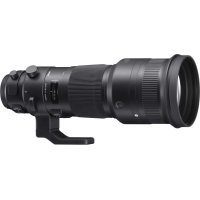
Sports 500mm F4 DG OS HSM - Lens SIGMA - Free user manual and instructions
Find the device manual for free Sports 500mm F4 DG OS HSM SIGMA in PDF.


| Product type | Super telephoto lens |
| Brand | SIGMA |
| Model | Sports 500mm F4 DG OS HSM |
| Focal length | 500 mm |
| Maximum aperture | F4 |
| Minimum aperture | F32 |
| Optical construction | 16 elements in 11 groups |
| Angle of view | 5° |
| Minimum focusing distance | 3.5 m |
| Maximum reproduction ratio | 1:6.5 |
| Filter diameter | 46 mm (rear filter) |
| Dimensions (Diameter x Length) | 144.8 x 380.3 mm |
| Weight | 3,310 g |
| Image stabilization | OS (Optical Stabilizer) – Modes 1 and 2 |
| Focus modes | AF, MF, MO (Manual Override) |
| Special functions | Focus preset, focus limiter, customization via USB dock |
| Lens hood | Included, removable |
| Tripod collar | Rotating with click lock, Arca Swiss compatible (option TS-81) |
| Weather resistance | Dust and splash resistant |
| Compatible accessories | TC-1401 (x1.4) and TC-2001 (x2) teleconverters |
| Power supply | Via camera body |
| Maintenance and cleaning | Use a soft, dry cloth. Do not use organic solvents. |
| Safety | Never look at the sun through the lens – risk of blindness. |
| Repairability | Repairs must be carried out by an authorized SIGMA service center. The USB dock allows firmware updates. |
Frequently Asked Questions - Sports 500mm F4 DG OS HSM SIGMA
User questions about Sports 500mm F4 DG OS HSM SIGMA
0 question about this device. Answer the ones you know or ask your own.
Ask a new question about this device
Download the instructions for your Lens in PDF format for free! Find your manual Sports 500mm F4 DG OS HSM - SIGMA and take your electronic device back in hand. On this page are published all the documents necessary for the use of your device. Sports 500mm F4 DG OS HSM by SIGMA.
USER MANUAL Sports 500mm F4 DG OS HSM SIGMA
| ③ | SIGMA | AFL |
| CANON | STOP | |
| NIKON | AF-L |
力一力斯特()機能
This is the last version of this document.
Thank you very much for purchasing a Sigma Lens. In order to get the maximum performance and enjoyment out of your Sigma lens, please read this instruction booklet thoroughly before you start to use the lens.
SAFETY PRECAUTIONS
After attaching a lens, do not look directly at the sun, through the viewfinder. Doing so can cause damage to the eye or loss of eyesight.
- Do not look at the sun with the lens of your camera; otherwise you can lose your eyesight.
- Do not look at the sun through the lens. If strong direct sunlight enters the lens, the concentration of light could cause a fire.
The mount part of the lens is complicated. Improper usage may cause injury.
- Please select a sturdy tripod that is capable of supporting this lens. If the tripod is not sturdy enough, it may cause the lens to fall.
DESCRIPTION OF THE PARTS (P.2)
① AF Function button
② BEEP switch
③ AF Function Setting switch
④ Focus Preset button (NIKON: Memory Set button)
⑤ Focus Ring
⑥ Distance Scale
⑦ Focus Index Line
⑧ Mount
⑨ Focus Mode Switch
10 Focus Limiter Switch
⑪ OS Switch
⑫ Custom Mode Switch
⑬ Tripod Socket
14 Click Stop On/off Switch
15 Filter Holder
Lens Hood
FOR NIKON MOUNT
This lens includes an electromagnetic diaphragm mechanism, the same specifications as the E-type mechanism in Nikon AF lenses. The lens is compatible with the cameras listed in Table (A). (The models with the mark require the latest version of the camera firmware to ensure compatibility.)
It is not compatible with film single-lens reflex cameras.
It is not possible to use the lens with the cameras in Table (B).
For models not listed in Table (A) or Table (B), please
refer to the camera's instruction manual to check for compatibility of E-type lenses.
(A)
D5, D4S, Df, D810, D810A, D750, D610, D500, D7200, D7100, D5500, D5300, D5200, D5100, D5000, D3400, D3300, D3200, D3100
★ D4, D3X, D3S, D3, D800, D800E, D700, D600, D300S, D300, D7000
(B)
D2XS, D2X, D2HS, D2H, D1X, D1H, D1, D200, D100, D90, D80, D70S, D70, D60, D50, D40X, D40, D3000
ATTACHING TO THE CAMERA BODY
When this lens is attached to the camera body it will automatically function in the same way as the camera manufacturer's lens. Please refer to the instruction booklet for your camera body.
- On the lens mount surface, there are a number of couplers and electrical contacts. Please keep them clean to ensure proper connection. While changing the lens, be sure to place it front end down to avoid damaging the rear mount.
SETTING THE EXPOSURE MODE
The Sigma lens functions automatically once attached to the camera. Please refer to the camera instruction book.
FOCUSING
For autofocus operation, set the focus mode switch on the lens to the "AF" position. P.3-(1)
If you wish to focus manually, set the focus mode switch on the lens to the "M" position. You can adjust the focus by turning the focus ring. P.3-(2)
- Please refer to camera's instruction manual for details on changing the camera's focusing mode.
- When operating this lens in manual focus mode, it is recommended that correct focus be confirmed visually in the viewfinder rather than relying on the distance scale. This is due to possible focus shift resulting from extreme changes in temperature which cause various components in the lens to expand and contract. Special allowance is made for this at the infinity setting.
This lens also permits manual focusing even in the autofocus mode. With the camera set to the One-Shot AF (AF-S) mode, it is possible to manually override the autofocus while the shutter release button is pressed halfway.
Also, this lens can offer [Full-time MF function] (Manual Override) by rotating the focus ring of the lens while auto
focusing is in operation. For For Full-time MF, set the focus mode switch on the lens to the "MO" position. P.3-(3)
- When using USB DOCK (sold separately) and its dedicated software, "SIGMA Optimization Pro", it is possible to select Full-time MF function ON / OFF, You can also adjust the amount of ring rotation to operate Full-time MF function. For further information, please refer to the SIGMA Optimization Pro "Help" menu.
FOCUS LIMITER SWITCH
This lens is equipped with the focus limiter switch, which enables a limit of the AF range. It is possible to switch to the following three modes. P.3-(4)
- FULL (3.5m ) (11.5ft
- 10m (32.8ft )
- 3.5m 10m (11.5ft ~ 32.8ft)
SETTINGS THE AF FUNCTION
Depending on the position of the AF Function Setting switch ③, the functionality of the AF Function button ① can change.
① AF Function button
② BEEP switch
③ AF Function Setting switch
④ Focus Preset button (NIKON: Memory Set button)
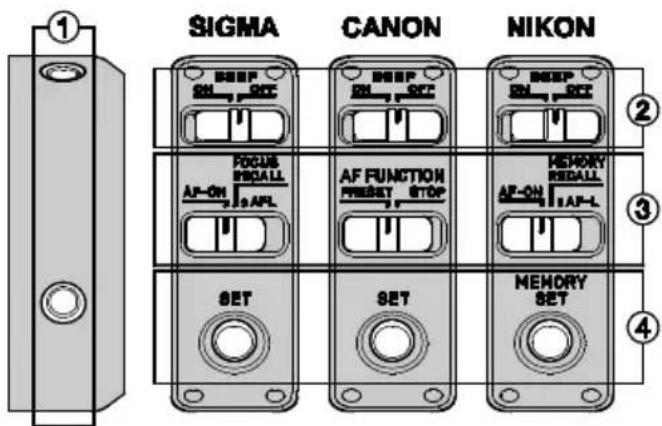
AF-ON FUNCTION (only for SIGMA and NIKON)
It is possible to operate autofocus by pressing the AF Function button when then AF Function Setting switch is set as follows:
| ③ | SIGMA | AF-ON |
| NIKON | AF-ON |
AF LOCK (AF STOP) FUNCTION
It is possible to cancel autofocus by pressing the AF Function button while the AF is operating, when then AF Function Setting switch is set as follows:
| ③ | SIGMA | AFL |
| CANON | STOP | |
| NIKON | AF-L |
FOCUS PRESET (MEMORY RECALL) FUNCTION
With this function, it is possible to recall the focus position that has been previously set. This enables photographers to return to a fixed focus position instantly.
| ③ | SIGMA | FOCUS RECALL |
| CANON | PRESET | |
| NIKON | MEMORY RECALL |
PRESET FOCUS POSITION
Set the focus point at the desired position and press the Focus Preset (Memory Set) button.
It is possible to set the focus point irrespective of the AF Function Setting switch position.
- When the Beep switch ② is ON, the lens will emit a single beep.
RECALL FOCUS POSITION
It is possible to return to the fixed focus position by pressing the AF Function Button.
- When the Beep switch ② is ON, the lens will emit a double beep.
ABOUT OS (OPTICAL STABILIZER) FEATURES
This OS (Optical Stabilizer) lens effectively compensates for image blurring caused by camera shake.
Set the OS (Optical Stabilizer) switch to Mode 1. P.3-(5)
Press the shutter button halfway down, confirm the image
in the viewfinder is stable then take the picture. (It takes approximately 1 second to produce a stable image, after pressing the shutter button halfway).
Mode 2 detects the vertical camera shake, and overcomes blurring. It is effective on subjects moving horizontal to the camera.
- The blurring compensation function of Optical Stabilizer is effective for hand-held shooting. In the following conditions, Optical Stabilizer may not function properly.
- Shots from the a moving vehicle.
- If there is a considerable camera motion or shake.
- Please do not use Optical Stabilizer in the following situations.
- When the lens is mounted on a tripod.
- Bulb (long time exposure).
- Optical Stabilizer function is powered from the camera. If the OS lens is attached to your camera and activated, shooting capacity of your camera will be lower than with conventional lenses used with the same camera. If you are not using Optical Stabilizer, please turn OFF the OS switch, in order to prevent consumption of a battery.
- Be sure to turn of OS switch to OFF position, before attaching or detaching the lens to the camera.
-
The Optical Stabilizer continues to operate after you release your finger from the shutter button, as long as the exposure meter displays the exposure value. Never remove the lens or remove the camera's battery while the image stabilizer is operating, you could damage the lens.
-
If the camera power is turned off or lens is detached while the Optical Stabilizer function is in operation, the lens may emit a chattering noise, but this is not a malfunction.
CUSTOM MODE SWITCH
By using USB DOCK (sold separately) and its dedicated software, SIGMA Optimization Pro, it is possible to customize the AF speed, OS effect and range of Focus Limiter of the lens, and the setting can be saved with the Custom Mode Switch. For further information, please refer to the SIGMA Optimization Pro "Help" menu.
- For your regular use, please turn off the Custom Mode Switch. The Focus Limiter Switch does not function when the custom mode is ON and set as C1 or C2. P.3-(6)
- USB DOCK is dedicated for each mount. Please use a USB DOCK which corresponds to your lens mount. USB DOCK for different mounts cannot be used.
- SIGMA Optimization Pro can be downloaded free of charge from the following website: http://www.sigma-global.com/download/
TRIPOD SOCKET AND COLLAR
This lens is equipped with a tripod socket. When you loosen the locking knob on the collar, the lens and camera can rotate freely to easily position the camera horizontally
or vertically. P.3-(7)
CLICK STOP ON/OFF SWITCH
Depending on the shooting conditions, it is possible to turn the click stop ON or OFF.
P.4-(8) ON - using Click stop OFF - not using Click Stop
- An optional lens foot, TRIPOD SOCKET TS-81, makes the lens compatible with the Arca Swiss quick release plate and clamp.
ABOUT TELE CONVERTERS
This lens can be used as a 1.4x (700mm F5.6 AF) or a 2x (1000mm F8 MF) hyper-telephoto lens by attaching SIGMA TELE CONVERTER TC-1401 or SIGMA TELE CONVERTER TC-2001 respectively.
- Do not use other manufacturers 'teleconverter's, only those listed above are compatible.
- When SIGMA TELE CONVERTER TC-2001 is attached to cameras that are compatible with AF at F8, it is possible to shoot with AF. For details, please refer to user manual of camera body.
It is possible to use auto focus in Live View if the camera is in "contrast detect" AF mode.
LENS HOOD
A detachable hood is provided with the lens. This lens
hood helps to prevent flare and ghosted images caused by bright illumination from outside the picture area. Attach the hood and lock the knob to fix the hood in place. P.4-(9)
- In order to place the lens and hood into the storage case, you must first remove the hood, then replace it on the lens in the reverse position.
SHOULDER STRAP
Please attach the shoulder strap to the two slings as described in figure P4-10.
FILTER
It is not possible to attach conventional filters to the front of the lens body. It is necessary to use the dedicated Filter Holder and 46mm Filter.
REMOVING THE FILTER
The WR-PROTECTOR is set inside the filter holder as standard. In order to remove the filter from the filter holder, turn the filter holder fixing knob counterclockwise and pull the filter holder out. Then, rotate the filter counterclockwise. P.4-(11)
ATTACHING THE FILTER
Rotate the fixing knob of the filter holder clockwise, and insert the filter holder. P.4-(12)
- This lens has been designed to deliver optimum
performance with a filter installed in the lens assembly. The quality of the picture decreases if the filter is not installed inside the lens. Please always use a filter inside the lens assembly.
- It is possible to use any other 46mm filters. However, if the filters have the thickness of more than 5.5mm (screw thread excluded) or diameter of more than 49mm , they cannot be attached.
- If you wish to use a polarizing filter, the WR-CIRCULAR PL RCP-11 is available as an optional accessory.
- For protection of the front lens element, the WR-PROTECTOR LPT-11 is available as an optional accessory.
BASIC CARE AND STORAGE
- Avoid any shocks or exposure to extreme high or low temperatures or to humidity. For extended storage, choose a cool and dry place, preferably with good ventilation. To avoid damage to the lens coating, keep away from mothballs or naphthalene gas.
- Do not use thinner, benzine or other organic cleaning agents to remove dirt or finger prints from the lens elements. Clean by using a soft, moistened lens cloth or lens tissue.
- This lens benefits from a dust and splash proof construction. Although this construction enables the lens to be used under light rain, it is not the same as being water proof. Please pay attention to prevent a
large amount of water from splashing on the lens, especially when using it by a waterside. It is often impractical to repair the internal mechanism, lens elements and electric components if damaged by water.
- Sudden temperature changes may cause condensation or fog to appear on the surface of the lens. When entering a warm room from the cold outdoors, it is advisable to keep the lens in the case until the temperature of the lens approaches room temperature.
SAFETY PRECAUTIONS
| Lens construction | 11 - 16 |
| Angle of View | 5° |
| Minimum Aperture | 32 |
| Minimum Focusing Distance | 3.5m (11.5ft) |
| Magnification | 1:6.5 |
| Filter Size | 46mm |
| Dimensions (Dia.xLength) | 144.8 x 380.3mm (5.7x14.97in) |
| Weight | 3310g (116.8oz) |
Dimensions and weight include the SIGMA mount.
- APO lenses use Special Low Dispersion glass. This special glass normally has some tiny air bubbles but it does not affect the optical performance.
- The glass materials used in the lens do not contain environmentally hazardous lead and arsenic.

This device complies with Part 15 of the FCC Rules. Operation is subject to the following two conditions: (1) this device may not cause harmful interference, and (2) this device must accept any interference received, including interference that may cause undesired operation.


The CE Mark is a Directive conformity mark of the European Community (EC).
SIGMA (Deutschland) GmbH
Carl Zeiss Str. 10/2, D 63322 Roedermark, Germany
Verkauf:01805-90 90 85-0
Service:01805-90 90 85-85 Fax(Service):01805-90 90 85-35
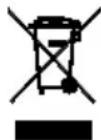
Disposal of Electric and Electronic Equipment in Private Households
Disposal of used Electrical & Electronic Equipment (Applicable in the European Union and other European countries with separate collection systems)
This symbol on the product, in the manual/warranty, and/or on the packaging indicates that this product must not be treated as household waste. Instead it should be handed over to the appropriate collection point for the recycling of electrical and electronic equipment. If your equipment contains easy removable batteries, please dispose of these separately according to your local legislation. It is your responsibility to ensure that this product is recycled correctly. In doing so you will help conserve natural resources, protect the environment and human health. For more detailed information about recycling this product, please contact your local city office, your household waste disposal service or the shop where you purchased the product.
DEUTSCH
★ D4, D3X, D3S, D3, D800, D800E, D700, D600, D300S, D300, D7000
(B)
D2XS, D2X, D2HS, D2H, D1X, D1H, D1, D200, D100, D90, D80, D70S, D70, D60, D50, D40X, D40, D3000
| ③ | SIGMA | AFL |
| CANON | STOP | |
| NIKON | AF-L |
DESCRIPTION OF THE PARTS (P.2)
★ D4, D3X, D3S, D3, D800, D800E, D700, D600, D300S, D300, D7000
(B)
D2XS, D2X, D2HS, D2H, D1X, D1H, D1, D200, D100, D90, D80, D70S, D70, D60, D50, D40X, D40, D3000
FIXATION SUR L'APPAREIL
- FULL (3.5m~∞) 10m~∞ 3.5m~10m
PARAMÉTRAGES DE LA FONCTION AF
| ③ | SIGMA | AFL |
| CANON | STOP | |
| NIKON | AF-L |
FONCTION DE PRÉRÉGLAGE DE MISE AU POINT (MÉMORISATION)
VOORZORGSGMAATREGELEN
DESCRIPTION OF THE PARTS (P.2)
AF (AF STOP) VERGRENDELINGSFUNCTIE
| ③ | SIGMA | AFL |
| CANON | STOP | |
| NIKON | AF-L |
FOCUS PRESET (GEHEUGEN HERINNERING) FUNC TIE
DESCRIPTION OF THE PARTS (P.2)
★ D4, D3X, D3S, D3, D800, D800E, D700, D600, D300S, D300, D7000
(B)
D2XS, D2X, D2HS, D2H, D1X, D1H, D1, D200, D100, D90, D80, D70S, D70, D60, D50, D40X, D40, D3000
CONEXION AL CUERPO DE CAMERA
| ③ | SIGMA | AFL |
| CANON | STOP | |
| NIKON | AF-L |
FUNCION ENFOQUE REFIJADO (MEMORIA)
APPLICAZIONE SUL CORPO MACCHINA
| ③ | SIGMA | AFL |
| CANON | STOP | |
| NIKON | AF-L |
★ D4, D3X, D3S, D3, D800, D800E, D700, D600, D300S, D300, D7000
(B)
D2XS, D2X, D2HS, D2H, D1X, D1H, D1, D200, D100, D90, D80, D70S, D70, D60, D50, D40X, D40, D3000
MONTERING PÅ KAMERAN
| ③ | SIGMA | AFL |
| CANON | STOP | |
| NIKON | AF-L |
FORINSTÄLLT FOKUSAVSTÄND (MINNESFUNKTION)
KLICKSTOPP ON/OFF-VRED
★ D4, D3X, D3S, D3, D800, D800E, D700, D600, D300S, D300, D7000
(B)
D2XS, D2X, D2HS, D2H, D1X, D1H, D1, D200, D100, D90, D80, D70S, D70, D60, D50, D40X, D40, D3000
MONTERING PÄ KAMERAHUSET
| ③ | SIGMA | AFL |
| CANON | STOP | |
| NIKON | AF-L |
FORUDINDSTILLET AF/AF HUKOMMELSES FUNKTION
CLICK STOP ON/OFF KNAP
★ D4, D3X, D3S, D3, D800, D800E, D700, D600, D300S, D300, D7000
(B)
D2XS, D2X, D2HS, D2H, D1X, D1H, D1, D200, D100, D90, D80, D70S, D70, D60, D50, D40X, D40, D3000
安裝鏡頭
| ③ | SIGMA | AFL |
| CANON | STOP | |
| NIKON | AF-L |
預設對焦(召回記憶)功能
★ D4, D3X, D3S, D3, D800, D800E, D700, D600, D300S, D300, D7000
(B)
D2XS, D2X, D2HS, D2H, D1X, D1H, D1, D200, D100, D90, D80, D70S, D70, D60, D50, D40X, D40, D3000
LanZs的当阶范
Ie RnEsN AF eelgeyEg Ee Ee Ee Ee Ee Ee Ee Ee Ee Ee Ee Ee Ee Ee Ee Ee Ee Ee Ee Ee Ee Ee Ee Ee Ee Ee Ee Ee Ee Ee Ee Ee Ee Ee Ee Ee Ee Ee Ee Ee Ee Ee Ee Ee Ee Ee Ee Ee Ee Ee Eee
| ③ | SIGMA | AFL |
| CANON | STOP | |
| NIKON | AF-L |
主格PfIi(eMoI 责
Ie RnSIGMA Tc-1401 1.4(700mm F5.6 AF)2(1000mm F8 MF)的
GBAHJFJFJFJFJFJFJFJFJFJFJFJFJFJFJFJFJFJFJFJFJFJFJFJFJFJFJFJFJFJFJFJFJFJFJFJ
★ D4, D3X, D3S, D3, D800, D800E, D700, D600, D300S, D300, D7000
(B)
D2XS, D2X, D2HS, D2H, D1X, D1H, D1, D200, D100, D90, D80, D70S, D70, D60, D50, D40X, D40, D3000
KPEJIENHEK KAMEPE
Korda obkeTNB Sigma yctahOBnEH Ha kamepe, OH ABTomatUeCKn HauHnaet pa60TaTb kak obuHbI/ pOHO (WtATHB) obkeTNB.
Ha NOBepxHocTn 6aHOHeTa HaxOJaTCMEXaHN3MbI N 3NeKtpuYeCKne KOHTaKtbl. Ipocm BAC copejKaTb INB YNCTOTE, Yo6bl 6blb yBepeHHbIMN B npaBnBHoJ pa6ote o6beKtNaBa. Bo n36eXaHne NobpeXdEHN MEXaHN3MOB N KOHTA KTOB, pOBepaYTe, YTO Bbl CTaBNTe O6BeKtNB eO IpeDHM KOHcOM BHN3, BO Bpemr CMeHbIO6BeKtNaBa.
YCTAHOBKA PEXKIMA OTPAEBOTKN 3KCI03nIIN
Korda obkeTnB Sigma yctaHOBlen Ha kamepe, OH ABTomatnueckn HauHnaet pa6oTaB kaK o6bUHb/ pOHOH (WtAthb) obekTnB (CM. nHCTpykUIO K kamepe).
ΦOKYCnPOBKA
YTo6bI pa6oTaB b peKIMe aBTOΦOKCnPOBKn, yCTaHOBnTe nepeKIOuAteIb peKIMOB φokcnpOBKn B noIOXKeHne AF. cTp.3-(1)
ДлгфokycnpoBKN bpyHOM pexKIMe -пepeDbHbTe nepeKIOUHTeNB pexKIMOBФokycnpOBKn B nOIOKeHne M. TeNepb Bbl MOKeTeФokycnpOBaTbcra, BpauaqanФokycnpOBoHoe KOJIbIc. cTp.3-(2)
3a 6oJee noHOn HnΦopMauné o6paTntecb K nHCTpyKcnn K BaWe Kamepe.
Bo n36eXaHne nONOMOK MexaHn3Ma aBtOMaTnueckOJokycnpoBKN, He BpaUaIte KOJIbIo φokycnpoBKn npPa6oTe B peKIme aBtOMaTnueckOJokycnpoBKn.
3TOT o6bektnb TaKke no3BOJnre fokycnpoBaTcB BpyHyIO B pexmme AF .Ira 3TORO kamepa DOnxHa HaxODNTCB B pexmte OndHOKaPBOB CbEMKn. YTo6bl C0fokycnpoBaTcB BpyHyIO HADo DOXkDaTbcr Noka 3aKOHHTbcr npouecc aBTOfOkycnpoBKn, B MOMENT NONY npnxKaTn KHONKn cnYcka 3aTBopa.
Takke obkntb Hmeet cyHKnIO NOCToHHoro DOctyNA K pyHoi oKocnpOBKe [Full-time MF function] (Manual Override), BpaueHnEM KOJIba cokcynpOBKn B pexnme abToOkyca. Ira nOnyuHnI HepepbIBHO DOcTyNa K pyHoi oKocnpOBKn yCTaHOBtne nepeKnUcTeNB Ha Kopnyce obkntBa B noJoxeHne "MO". ctp.3-(3)
BbMOKeTe cAmOCToTEnbHO BKJIIOHTb/BbIKIIOHTb peKIM Full-time MF, a TAKKe OTperyJINpOBaTB BeNHy XoJa KOnbua φOKcUPOBKn C NOMOuBu USB-DOK CTAnu (NoCTaBnAeTcA OTeJIbHo) n nporpaMMHOrO oBeCneueHnra "SIGMA Optimization Pro". 3a DonoHNHTeNbHO INΦopMaunén o6paTntecb K nyHKTe «POMOuB» nporpaMMbI "SIGMA Optimization Pro".
OgPAHnHTeIb INCtAHcIN ΦOKYCnPOBKn
O6bektnbchab6eHOrpaHHTeJemDnCTaHmNΦOKCNPOBKn, KOTOpBnNo3BOJIeT JIMMHTnpoBaTb Dnana3OHΦOKCNPOBKn B aBTOΦOKyCHOM pexnme.Bo3MOKeH Bbl6op TpEx pexnMoB. cTp.3-(4)
-ПОЛНь(FULL) (3.5M ~ ∞) -10M ~ ∞ -3.5 ~ 10M
HACTPOIKA KHONK INPEXIMMOB ABTOΦOKYCA
IpeekHouatelem ③ MOxHO MeHrTb yHKUHOHaJIbHOCTb KhoNk AF ①.
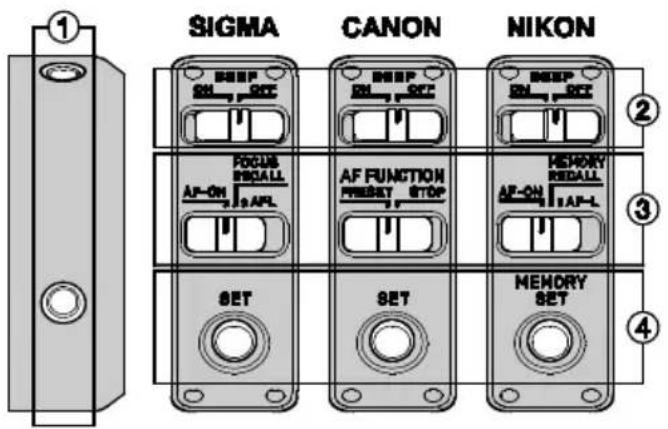
① KhoNkapeXMMOB AF
② BkIIOUeHHe 3ByKOBOrO cHHa
③пеклочателpeхиMOB AF
④ PpeDyuctaHOBNEHHbI ΦOKyc (NIKON: KhoNka naMaTn AF)
PEKIM AF-ON (ToIbKO dIg SIGMA u NIKON)
Moxho ynpabTb aTOofoKycOM, ecn nepeknoateIb peKMOB AF yctahOBHeB nOIOKeHne:
| ③ | SIGMA | AF-ON |
| NIKON | AF-ON |
БЛOKИРОВКА АВTOФOKУСПОВКИ AF LOCK (AF STOP)
Moxho 6pcntb 3aΦnKcnpoBaHHbI cnCTeMoI
ABTOPOkya TOky POKycpOBKn HAXKaTneM KHONK ①,
ecnnepekeKIOHuaTeIb ③ HAXOHTC8B NIOXKeHN:
| ③ | SIGMA | AFL |
| CANON | STOP | |
| NIKON | AF-L |
IPEyCTAHOBJIeHHbIΦOKYC(BbI3OBIN3NAMrT)
MoxHo BepHyb paHee 3aΦnKcnpoBaHHyTo TORY KOKycnpoBKn.
3TO Daet FOtorpaFy Bo3MOxHocTb MRHOBeHHO
BepHybcrK 3aONmHeHHo paHee ToKe KOKycnpoBKn.
| ③ | SIGMA | FOCUS RECALL |
| CANON | PRESET | |
| NIKON | MEMORY RECALL |
NOJIOXEHNE KHONIK ④
Bb6epTe JKeJaemyToKHy 0KOpBKN HaKMnTe KHOHkY ④.
-ПОLOXGEHNE TOOKI ФОКСИРOBК MОЖHO BыбираТБ He3aBUCIMO OT ПОLOXGEHNA NPEKJIQUaTeJI ③
- Ecπn BκηIoUeH 3ByKOBoI CnRHaJI ②, To nocIbIuNTbcra NoTBePckJaIoUm 3ByK.
BbI3OB TOUKNΦOKYCINPOBKN N3 NAMRTN
Haxmnte KhoNky ①.
- Ecnn BKNIOUeH 3ByKOBO CNrHaJI ② TO nocnbluNTbcra DBOHOI NOITBepKDaIOUIN 3BYK.
BO3MOXHOCTHNONTNUECKOFOCTABUNN3ATOPA(OS)
ObekTNB cha6xeh OntuuecknM Ctaunin3aTopom (OS) nna
3ΦΦEKTINBHOYcTpaHHeN CMA3bBaHnN 306paKeHn, BO3HNKaIOUeRO BCNeDCTBne COTPaCeHn KaMepbl. YCTaHOBNTepeKlnOuataIbpeXmMa cTa6NJIn3aunn (OS) B noJIOKeHne "Mode 1". cTp.3-(5)
Haxmnte KhONky cnycka 3aTbopa HanoJIOBHy n y6eJNTecb B TOM, yTO N3o6paXeHne Cta6nJIN3npOBAIocb, 3aTeM Haxmnte KhONky cnYcKa 3aTbopa. (OKOHateJIbHa r Cta6nJIN3aCInr N3o6paXeHn 3aHMaet np6nJN3ntEJIbHO 1 cekHy nocNe HaxaTN KhONKn Cnycka 3aTbopa HanoJIOBHy).
B pexkme ctabnnaaun "Mode 2", onpeenraotc n KOMIeHcnpyOTc BepTKaJIbHbIe cotpceHnKamepbl. 3TOT peKIM 3oΦeKTHBeH dIra CbEKMn O6beKTOB, DBNRAUxxCr Ropu3OHTaJIbHO NIOCKOCTN OTHCOTJIbHO KaMepbl.
KOMNEHCAUcNcBnROKaMepbOnTneckm ctabNJn3atopom 3oΦeKTnBHa npn CbEMeCpyk. B cHTyaqnx ONncaHHbIX HnKe paBoTa ONTNueCKORO cTabNJn3atopa MoKeT 6bIb HeyDoBJIeTBOpntBJHOH.
CbEMKa cTpaHcnpTHOro cpeDCTBa (HaNPmep ABTomO6nna)
B cnyae 3haunTeIbHbIX cotpceHn nn CdBuroB kamepb.
He nCnoIb3yIte ONTnueckyIO Cta6nN3aUIO B CneDyUOux cnyuayx.
- Ecnn obBeKTHB 3aKepeHnHa WtTaTneB.
- Pnp dnnnHbIX Bbldepkax.
OnTnueckn Cta6nn3atop nntaetc0r kamepbI. PnpncnoJIb3ObaHHKamepbI,Ha KOTopyo yCTaHOBneHobekTNBCBNIUeHHbIM ONTnueckm Cta6nn3atOpom, Bpempa60tbyMeHbwaetcEcnCpaBHNaTb pa60Ty ToJKe KamepbICobuHbIMObekTubOM.EcnHET
Heo6xOaMocTn HcNoIb30BaTb ONTueckn Cta6uNIm3atOp, nepemecnte nepeKIOUaTeB peKIMa cTa6uIN3aCmB noJooKeHne "OFF" (BbIKIOueH), yTO nO3BOJNT u36ExKaTb u3JInuHero pacxoJa 3Heprnn 6aTapei.
- Ppi ycTaHOBKe NIN CHaTmN O6bekTNBa C KaMepbl, y6eInTeCb, YTO nepeKNIuOaTeJIb peKIMa Cta6nIN3aUNn HaxoDNTcB NonoJKeHne "OFF".
- EcIn Bbl npekpatnIn ydepknBaTb KOnky cnycka 3aTBopaB NOnyhaxaTom NNoXKeHH, ONTNueckn Cta6nn3atop npoDOnkAet cBOIO pa6Oy Do Tex nop, NOKa DnCnneF pOToKamepbI OTObpaKaET 3NaeHN 3Kcno3nHn.Bo n36ekAHn NOBpeKdEHH oBeektuBa He n3BNeKaIte 6aTaapeN 3 KaMepbI H He CHImaIte C Hee o6bKeTb, ecIn ONTNueckn Cta6nn3atop HaxoNTcB Pa6OHe m peKIMe.
EcIn nntaHne kamepbI 6blIO BbIKnOyeHO nn OBeKTNB 6bl ChrT C KamepbI BO BpeMpa60tI ONTuYeCKORo CTabnn3atopa,ObekTNB MoKeT N3daBaTb Dpe6e3KaUIN 3Byk.3TOT 3Byk He ABnreTc CNHaON HncnPpABHOCTN.
NEPEKJIIOUATEJIb NOJIb3OBATEJIbCKNX PEXIMOB
IcnoB3yra USB-dk cTahnIO (npoDAeTcO TdEhHO) nporpamMHO o6ecneHHe SIGMA Optimization Pro Bb moKete camocToTeJbHO OcyueCTBnTb HAcTpOKn CKOpOCTn ABTOfOKyca, OrpaHnHTeJIa 30HbI fokycuPobKn (focus limiter) nontueckoro cTaNJIn3aTopa n3o6paKeHn (OS).HacTpOKn o6BeKTnBa coxpanHOTc nepeKIOUaTeJeM noJb3OBaTeJIbcknx peKIMOB (Custom Mode Switch).
NOnyehn HOpMaun O NODKIOHeHn CTaHmK KOMbIOTepy N BInONHeHn HaCTpoE kObekTNaBa o6paauTeCb B pa3en «CnpabKa» nporpammbi SIGMA Optimization Pro.
- Ppi NOBCEHOBHOM NCIOJIb3OBAHIN O6beKTHBa
dePKNTE NepeKNIQUaTeJIb NOJIb3OBATeJIbCKNX peKIMOB
BbIKIIOUeHHbIM. NepeKNIQUaTeJIb ORpaHmHTeJIa 30HbI
ΦOKcIPOBKN He ΦYHKIIIOHOpyET ECNI NOJIb3OBATeJIbCKN
peKIM BKNIOUeHN yCTaHOBNeH C1 NIN C2. cTp.3-(6)
USB-DOK cTahnca COBmecTbMa TOnbKo C onpeDeHbIM 6aNoHETOM oBeKTbBa. IoxaanyIcTa, INcNoIb3yIte CTaHcIO dIra HAcTpoiKn TOnbKO Tex OBeKTuBOB, dIra KOTopbIX OHa npEHa3HaueHa (HanpImep, ObekTbBlc 6aNoHETOM Canon, Nikon, Sigma n T.d.) - Поррамmy SIGMA Optimization Pro мохно 6ecплatho 3агузит b с Beб-cаитa: http://www_sigma-global.com/download/
WTATNBHAR NLOUaDKA IN KPEJIeHNE
06beKTHB ChA6XeH WtATnHBbIM KpeIeHneM. Ipn OCbo60xJdeHN 6IOknpyUoIero BNHTa Ha KpeIeHN, 06beKTHB C KaMePO MoKeT 6bITb NOBepHyT dJa rOpu3OHTaNbHO H BepTuKaNbHO OpNEHTaUN KaJa pa cTp.3-(7).
NEPEKIIIOYATEJIb 3AUJENK KPOHHTEINHA JIKA KPNJIENHIA WITATNBA
B 3aBnCmOCTN OT yCJIOBn CbEMKn MOXHO yCTaHOBNTb nepeKJIouaTeJIb B noJoxeHne ON nnn OFF. ctp.4-(8)
ON-KpoHHTeH 3aUeJKNBaETCa Ha o6BeKtNBc WaROM OFF-06bekTNMOXHO BpaataB BHyTpN KoHHTeHa CBO6oHNo.
- DonohntbHbKpoHtTeH TS-81 no3BONrT 3aKpENnTb
06bekTNb Ha uTaNbax C nIooaKn oTnArca Swiss.
ΦOTOPAΦIPOBAHNE C KOHBEPTEPAMN
Пи установке и снользовahltenеukoнверпов SIGMA TELE CONVERTER TC-1401 or SIGMA TELE CONVERTER TC-2001 Фокунhoe paцтогене obъektiva ybeлчимаетсьВ 1.4х ра3a (700mm F5.6 AF) ИлиВ 2х ра3a (1000mm F8 MF) cootbetCTbeHHO.
He nCnoJb3yIte TeJeKoHBePTepbI CTOpOHnIX npOn3BOJnteJIe, DaHHbI OBeKtINB COBMeCTIM TOJbKO COpUHaJIbHbIMu TeJeKoHBePTepaMn Sigma.
Ecnn TenekoHBepTep SIGMA TELE CONVERTER TC-2001 yctaHOBJeH Ha KaMepy, noDpeKnBaHOuyo ABTOfOKcUPOBky npF8, TO BO3MOxHa fOToCbEmKa C ABTOfOKcUPOBKOJ. O6paNTecb K HHTpyKuNN KaMepbl DnI NOyueHnnoDpo6HoHnΦopMaun.
BpeKmE XnBOrnpocMOTpa (Live View) BO3MOXHO nCNoJIb3OBAHHe aBTOΦOKyCnPOBKn,ecNn KaMepa HaxoJITcR B peKmE aBTOΦOKyCnPOBKn NO MeToDy KOHTpactHOI DeTeKuIN.
BJIENDA
B KOMnneKeTe NoCTaBKn OBeKtNbA ecTb 6JIeHda,
npeHa3HaueHHa dny yctpaHeHH 3acBetOK n nepeoTpaxeHn npknx o6bekTOB 3a npdeIamn CHIMka. YcTahOBNTe 6IeHdy Ha nepeHIOO IIN3y O6bekTNBa n 3akpyTnte cTOnOpHbI BnHT Ctp.4-(9).
-Дяханеньл endу moKHO nepeBepHyTb.
HANJIeUhBiI PEMEhb
PnncoeDHHte pemeHb DJIpepeHoCKN K XOMyTaM KaK nokaHa Ho pucyHke cTp.4-(10).
CBETOΦNJIbTP
Ha nepeHIOIO IIN3y OBeKTHBA yCTaHOBt b KpyIbI CBETOΦNtBt PHeBO3MOxHO. Heo6xoJIMo NcNoJIb3OBA t DepxKaTeNbΦNtBtp, paCNOJoxKeHHbI B XBOCTOBO YactTM OBeKTHBa, nΦnItp DnAmETPOM 46MM.
CMEHAΦNJIbTPA
B DepxkateJe fNbtpa yctahOBnHe KAc CTaHapThbIe fNtbp WR-PROTECTOR. Yto6bi erO 3aMeHHTb BbInhTe depKataIb n3 oBeKTHBa, CdBHyB naJIbCeM fNKcatOp npOTNB YacOBoC TpeJKN. 3aTe M BBiBepHIne fNtbp, BpaAraerpoTINb YacOBoC TpeJKN. cTp.4-(11)
YCTAHOBKAФЛьТРА
CdbnHbTe npIbem fKcTOp no yacOBn cTpke n BCTaBbTe depKaTeNb CfNbTpom. ctp.4-(12)
OnTnueckne xapaKTeepntKN o6BeKTbPa paccHTaHbIC yETOM nCnOJIb3OBAHn qINbTpA, N03TOMy KaueCTBO n3o6paKeHHn CHn3NTcR, ECn nINbTp He yCTaHaBnBaTb. IoxKaanyIcTa, dEpxNtE Bcerda qINbTp yCTaHOBHeHHbIM B o6BeKTNB.
Bo3MOxHO HcNoB3OBaHHe IIO6bIXpyrIXΦnIbTpOB Cpe3b60i 46MM.Ho,HEKOTOpBEΦnIbTpbl,IMeHOUne WnpHy OnpabBi 6Oone 5.5MM,NIN DNAmETp OnpabBi 6Oone 49MM,HE MOrYT 6bITb HcNoB3OBaHBI C DaHHbIM 06bekTNBOM.
-Погизационьй сильст SIGMA WR-CIRCULAR PL RCP-11 можно пиобразд долнпелбho.
-Дязашипьпегденлнзbl pekomehdyeem npnoobpectn
фильт SigMA WR-PROTECTOR LPT-11.
YXOДИ XPAHEHNE.
He noBBepraTe 06bKeTnB pe3KIM BCTpIckAm,pe3KOMy nepenady TemepaTyp n BO3dEInCTBnHO IOBbIweHHoB BnaXHOCTN.
-Дястационарнохрааньинсплььутпрoxладhoe cyхоe место,прдочтiteлбсхоршь BEHTINЯци.Bo n36жане noBPexdHnnpocBETneHnJINH3 obkeTNBA xpaHNTe erO BdaJIn OT HaФТaJIINA nДp. aHTIMOJIe.
He nCnoJb3yIte pactBOpntJIb, 6eH3nH nDpyrne opraHueckne YNCTaIe BeIeCTBa, yTO6bl ONUCTNTb IINH3OBBie 3JeMeHTbl. NcNoJb3yIte MmKyo BIAxHyIO TKAHb DnONtIKN.
- KoHCTpyKUINo6BeKTnBa NMeET NbIe-NBlaRo3aUNrY. OdHaKO 3TO He O3NaayeT NOHHyO BOHOENPOHuaEMOCtB. IOnKaanyIcTa, o6eperaIte 06BeKTNB OT nonaHaHN Ha Hero CnIbHbIX NOTOKOB BObl. BocCTaHOBJIeHne HopMaIbHOI pa6OtBI 06BeKTnBA UIN erO peMOHT nocJe nonaDaHNBObl BO BHyTpEHNI MExAHN3M, 3JIeKTPnueckNe IN ONTNueckNe 3JIeMeHTbl IpaKTHueckN HeBO3MOXHbl.
- Pe3kne nepenabI TeMnepaTyp MoryT Bbl3BaTb 6pb3OBAHHe TymAHHO NEneHb Ha nepeDHe JINH3e 6bEKnBa. I0rToMy, BXoJr B TcNIOe NOMEueHne C xOIOHN yNtBu, cpa3y He DoCTabaTe 6bEKnB n3 qExna, NOKa OH He DOCTnIHET TempeaTypb I NOMEueHn.
TEXHNUECKNEXAPAKTEPNCNTIKN
DESCRIPTION OF THE PARTS (P.2)
★ D4, D3X, D3S, D3, D800, D800E, D700, D600, D300S, D300, D7000
(B)
D2XS, D2X, D2HS, D2H, D1X, D1H, D1, D200, D100, D90, D80, D70S, D70, D60, D50, D40X, D40, D3000
COMO PRENDERA OBJECTIVA AO CORPO DA CÁMARA
FUNCAO AF LOCK (AF STOP)
| ③ | SIGMA | AFL |
| CANON | STOP | |
| NIKON | AF-L |
FUNÇA O PRE FOCAGEM (PONTO DE FOCAGEM EM MEMORIA)
P.4-(8) ON - Usar Click Stop OFF - Desligar Click STOP