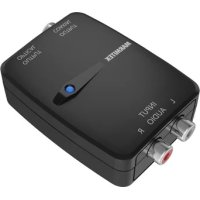
Connect AD12 - Audio/video converter MARMITEK - Free user manual and instructions
Find the device manual for free Connect AD12 MARMITEK in PDF.



| Product Type | Audio/Video Converter |
| Brand | Marmitek |
| Model | Connect AD12 |
| Dimensions (H x W x D) | 23 x 51 x 80 mm |
| Weight | 45 g |
| Power Supply | 100-240 VAC, 50/60 Hz, 5 VDC adapter |
| Audio Inputs | 2 x RCA (L/R) analog |
| Digital Audio Outputs | 1 x Toslink (optical), 1 x coaxial (RCA) |
| Sampling Rate | 48 kHz, 24 bits |
| Supported Audio Formats | Uncompressed 2CH stereo PCM |
| Signal-to-Noise Ratio | ≥ 80 dB |
| Bandwidth | 20 Hz - 20 kHz ± 3 dB |
| Usage | Indoor use only |
| Safety Instructions | Read the manual before use, do not open, keep out of reach of children |
| Care and Cleaning | Clean with a soft, dry cloth |
| Repairability | Entrust repairs to qualified personnel |
| Compliance | Directives 2014/30/EU, 2014/35/EU, 2017/2102, 2009/125/EC |
| Included Accessories | Power adapter |
| Main Function | Analog audio signal (RCA) to digital (optical/coaxial) conversion |
Frequently Asked Questions - Connect AD12 MARMITEK
User questions about Connect AD12 MARMITEK
0 question about this device. Answer the ones you know or ask your own.
Ask a new question about this device
Download the instructions for your Audio/video converter in PDF format for free! Find your manual Connect AD12 - MARMITEK and take your electronic device back in hand. On this page are published all the documents necessary for the use of your device. Connect AD12 by MARMITEK.
USER MANUAL Connect AD12 MARMITEK
Convert your analogue stereo signal into a digital audio signal
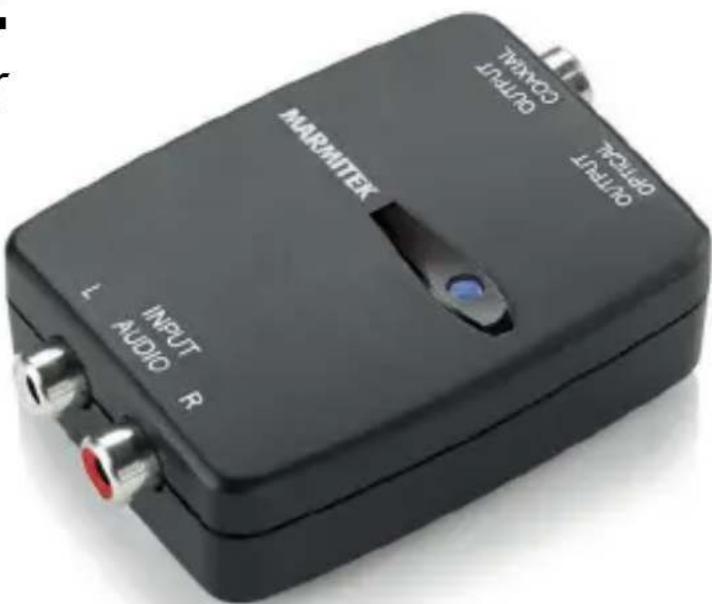
Package content
1x Audio converter
1x RCA (cinch) audio cable, 90 cm
1x 5V USB-A Power adapter
1x Power cable, black, 100 cm
1x Quick guide
Safety instructions
Please read these instructions thoroughly before you use the device and keep them for future reference.
- Only for indoor use.
- Do not expose the product to extremely high or low temperatures, strong light sources or direct sunlight.
- This product is not a toy. Keep out of reach of children.
- Connect the adapter to the mains only after you have verified that the line voltage corresponds to the value specified on the type plates.
- Never connect a power adapter if it's damaged. In such cases, please contact your supplier.
- Disconnect the AC/DC power adapter from the mains when this device is not in use for prolonged time.
- Never open the product: the device may contain parts with deadly voltage.
- Repairs or service should only be performed by qualified personnel.
- Record players need special phono pre-amplification to make vinyl records sound right. Many turntables have this built in, some do not. This product does not have a built-in phono preamp.
Installation
- We recommend that you switch off your equipment before connecting cables in order to prevent any of the devices being damaged.
- At all times, avoid bending the optical (Toslink) cable as it is very delicate.
- Connect the Audio Source to the analog input[1] on the Connect AD12™ using the RCA audio cable.
- Connect the Audio Amplifier to the digital audio output [2] on the Connect AD12 TM using a Coaxial or Optical audio cable.
- Connect the power adapter [3] and plug into the electrical socket.
- Set the switch [4] in the ON position and check that the audio connection works.
![Audio Source [1] [3] [4] AUDIO NIMINER OUTPUT COX26L OUTPUT OUT [2] *Audio amplifier, soundbar or active speakers](/content/2026/03/574768/images/339862febad6e02ff9800d5bab853d8067f97cc7a842e23a76fc79f5642a280e.jpg)
Usage
If the audio connection does not work (properly), consult the instructions for the Audio Source and/or the Audio Amplifier for the correct settings.
Frequently asked questions (FAQs)
Please go to www.marmitek.com if you have any questions.
Technical specifications
Inputs and outputs
Audio input: 1x left/right stereo (RCA)
Input level: 2 V (Vrms) Typ.
Frequency response: 20-20 kHz, +/- 3 dB
ADC SNR: ≥ 80 dB
Audio output 1: 1x S/PDIF optical (Toslink)
Audio output 2: 1x S/PDIF coaxial
Supported Audio Format: LPCM 44.1 KHz
Housing
Dimensions (H x W x D): 80 x 51 x 23mm
Weight: 45 g
Power
External Power adapter: 100-240VAC @ 50-60Hz
Input: 5VDC @ 600mA
Dissipation Current @5V: Max. 120 mA
Declaration of Conformity
CE Hereby, Marmitek BV, declares that this Connect AD12™ is in compliance with the essential requirements of the 2014/30/EU, 2014/35/EU, 2017/2102 and 2009/125/EC: 2019/1782 Directives. Full Declaration of Conformity is available at www.marmitek.com/en/declarations-of-conformity/ More detailed user guide and instructions are available on our website at www.marmitek.com
Sicherheitshinweise
www.marmitek.com/en/declarations-of-conformity/
[2]
Samplefrequentie 48 kHz, 24 bit
www.marmitek.com/en/declarations-of-conformity/
Wymiary (h x w x d) 23 x 51 x 80 mm
Waga 45 gramów
Zasilanie 100 - 240 VAC 50/60 Hz,
zasilacz 5 VDC
Samplerate 48 kHz, 24 bit
Lydformater ukomprimeret 2CH PCM stereo
connect
20763/20220223 | Connect AD12™
all rights reserved © MARMITEK
stay connected marmitek.com


- PACKAGE CONTENT
- SAFETY INSTRUCTIONS
- PLEASE READ THESE INSTRUCTIONS THOROUGHLY BEFORE YOU USE THE DEVICE AND KEEP THEM FOR FUTURE REFERENCE
- INSTALLATION
- USAGE
- FREQUENTLY ASKED QUESTIONS (FAQS)
- TECHNICAL SPECIFICATIONS
- INPUTS AND OUTPUTS
- HOUSING
- POWER
- DECLARATION OF CONFORMITY
- SICHERHEITSHINWEISE
- [2]
- CONNECT
Brand : MARMITEK
Model : Connect AD12
Category : Audio/video converter