
Connect DA21 - Audio/video converter MARMITEK - Free user manual and instructions
Find the device manual for free Connect DA21 MARMITEK in PDF.


| Product type | Audio/video converter |
| Brand | Marmitek |
| Model | Connect DA21 |
| Dimensions (L x W x H) | Approx. 80 x 60 x 25 mm |
| Weight | Approx. 80 g |
| Power supply | 5V DC, 1A power adapter (included) |
| Power consumption | Max 2.5 W |
| Video input | HDMI (female) |
| Video output | Composite CVBS (RCA female) |
| Audio input | HDMI (integrated) |
| Audio output | Stereo RCA (female) |
| Maximum resolution | 720p / 1080i |
| Supported audio formats | PCM 2.0 |
| Included cable | HDMI male to HDMI female cable, RCA cable |
| Operating temperature | 0°C to 40°C |
| Maintenance | Clean with a dry, soft cloth. Do not use solvents. |
| Safety | Do not expose to humidity or extreme temperatures. |
| Spare parts and repairability | Contact Marmitek customer service for any repairs. |
| Warranty | 2 years |
Frequently Asked Questions - Connect DA21 MARMITEK
User questions about Connect DA21 MARMITEK
0 question about this device. Answer the ones you know or ask your own.
Ask a new question about this device
Download the instructions for your Audio/video converter in PDF format for free! Find your manual Connect DA21 - MARMITEK and take your electronic device back in hand. On this page are published all the documents necessary for the use of your device. Connect DA21 by MARMITEK.
USER MANUAL Connect DA21 MARMITEK
ALL RIGHTS RESERVED MARMITEK ©
MARMITEK®
SAFETY WARNINGS
- To prevent short circuits, this product should only be used inside and only in dry spaces. Do not expose the components to rain or moisture. Do not use the product close to a bath, swimming pool etc.
- Do not expose the components of your systems to extremely high temperatures or bright light sources.
- In case of improper usage or if you have altered and repaired the product yourself, all guarantees expire. Marmitek does not accept responsibility in the case of improper usage of the product or when the product is used for purposes other than specified. Marmitek does not accept responsibility for additional damage other than covered by the legal product responsibility.
- This product is not a toy. Keep out of reach of children.
- Do not open the product (battery panel excepted): the device may contain live parts. The product should only be repaired or serviced by a qualified expert.
- Keep batteries out of the reach of children. Dispose of batteries as chemical waste. Never use old and new batteries or different types of batteries together. Remove the batteries when you are not using the system for a longer period of time. Check the polarity (+/-) of the batteries when inserting them in the product. Wrong positioning can cause an explosion.
- Only connect the adapter to the mains after checking whether the mains voltage is the same as the values on the identification tags. Never connect an adapter or power cord when it is damaged. In that case, contact your supplier.
INTRODUCTION
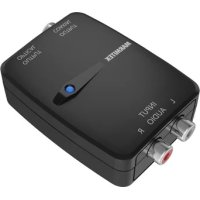
Congratulations on the purchase of your Marmitek Connect DA21™! This converter changes a digital Toslink or Coaxial signal into a left/right stereo signal. Easily and quickly connect your Audio Source to your Audio Amplifier.
Marmitek products are manufactured with the utmost care and are exceptionally high quality. Please read this manual carefully and follow the instructions in order to get the best from this product.
SET CONTENTS
1x Connect DA21 TM audio converter
1x RCA audio cable
1x Power adapter
1x Instructions
ADVANTAGES
- Convert your digital audio signals (Toslink or Coaxial) to a left/right stereo audio signal.
- Perfect if your Audio Amplifier has too few or no digital audio inputs.
- With improved 192kHz sample rate for the best sound reproduction.
• Supports uncompressed digital stereo signals.
• Supports 16 or 24bit; 8, 32, 44.1, 48, 96, 176.4 and 192kHz sample frequencies.
INSTALLATION
Note:
- We recommend that you switch off your equipment before connecting cables in order to prevent any of the devices being damaged.
- At all times, avoid bending the optical (Toslink) cable as it is very delicate.
![Audio Source Audio Amplifier CDAXIAL OPTICAL O DCSV [2] [4][3]](/content/2026/06/1263365/images/a63bf8276b01e844f291be1215e24d9324613820eafefb857b3a8762094f8c80.jpg)
- Connect the Audio Source to one of the digital audio inputs [1] on the Connect DA21™ using the optical or coaxial audio cable.
- Connect the Audio Amplifier to the stereo audio outputs [2] on the Connect DA21™ using the (supplied) RCA stereo audio cable.
- Connect the power adapter [3] and plug into the electrical socket.
- Use the switch [4] to select which digital audio input (Coaxial or Optical) is connected to the Connect DA21™.
- Switch your device on and check that the audio connection works.
USAGE
If the audio connection does not work (properly), consult the instructions for the Audio Source and/or the Audio Amplifier for the correct settings.
FREQUENTLY ASKED QUESTIONS
Please go to www.marmitek.com if you have any questions.
TECHNICAL DATA
Inputs and outputs
Audio input 1x optical (Toslink), 1x coaxial (RCA)
Audio output 1x left/right stereo (RCA)
Supported Audio Format 2CH, LPCM
Housing
Dimensions (H x W x D) 80 x 51 x 23mm
Weight 45 g
Power
External Power adapter Input 100-240VAC @ 50-60Hz
Output 5VDC @ 600mA
Specifications may be modified without prior notice.

Environmental Information for Customers in the European Union
European Directive 2002/96/EC requires that the equipment bearing this symbol on the product and/or its packaging must not be disposed of with unsorted municipal waste. The symbol indicates that this product should be disposed of separately from regular household waste streams. It is your responsibility to dispose of this and other electric and electronic equipment via designated collection facilities appointed by the government or local authorities. Correct disposal and recycling will help prevent potential negative consequences to the environment and human health. For more detailed information about the disposal of your old equipment, please contact your local authorities, waste disposal service, or the shop where you purchased the product.
SICHERHEITSHINWEISE
[4][3]
VEILIGHEIDSWAARSCHUWINGEN
Marmitek is a trademark of Pattitude B.V. Connect DA21™ is a trademark of Marmitek B.V. All rights reserved. Copyright and all other proprietary rights in the content (including but not limited to model numbers, software, audio, video, text and photographs) rests with Marmitek B.V. Any use of the Content, but without limitation, distribution, reproduction, modification, display or transmission without the prior written consent of Marmitek is strictly prohibited. All copyright and other proprietary notices shall be retained on all reproductions.
DECLARATION OF CONFORMITY
Hereby, Marmitek BV, declares that this Connect DA21™ is in compliance with the essential requirements and other relevant provisions of the following Directives:
DIRECTIVE 2004/108/EC OF THE EUROPEAN PARLIAMENT AND OF THE COUNCIL of 15 December 2004 on the approximation of the laws of the Member States relating to electromagnetic compatibility
Directive 2006/95/EC of the European Parliament and of the Council of 12 December 2006 on the harmonisation of the laws of Member States relating to electrical equipment designed for use within certain voltage limits
Directive 2002/95/EC of the European Parliament and of the Council of 27 January 2003 on the restriction of the use of certain hazardous substances in electrical and electronic equipment


Brand : MARMITEK
Model : Connect DA21
Category : Audio/video converter