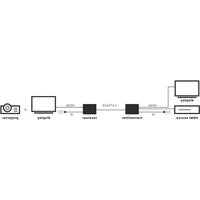
MegaView 251 Pro - Audio/video converter MARMITEK - Free user manual and instructions
Find the device manual for free MegaView 251 Pro MARMITEK in PDF.



| Product type | HDBaseT audio/video converter with transmitter and receiver |
| Brand | Marmitek |
| Model | MegaView 251 Pro |
| Dimensions (transmitter & receiver) | 140 × 65 × 18 mm |
| Weight (transmitter) | 160 g |
| Weight (receiver) | 155 g |
| Power supply | External adapter 100-240 V ~ 50/60 Hz, output 24 V DC 1 A; bidirectional Power over Cable (PoC) |
| Power consumption | 9.36 W |
| Supported video resolutions | 4K60 Hz, 1080p, 1080i, 720p, 576p, 480p |
| HDMI standards | HDMI 2.0b, HDR, DVI, EDID, CEC, HDCP 1.4/2.2 |
| Bandwidth | 18 Gbps (HDBaseT) |
| Supported HDMI audio formats | DTS-HD Master Audio, DTS:X, Dolby TrueHD, Dolby Atmos, Dolby Digital/AC3, LPCM 7.1, PCM 2.0 |
| Supported analog audio formats | PCM 2.0 (via 3.5 mm mini-jack output) |
| Main functions | HDMI extension over CAT5e/6 up to 100 m, bidirectional IR return, analog audio breakout, RS-232 transmission |
| Transmitter ports | 1 HDMI input, 1 HDMI output (local loop), 1 IR in, 1 IR out, 1 CAT5e/6 RJ45, 1 RS-232 (3-pin Phoenix), 1 DC 24 V power |
| Receiver ports | 1 CAT5e/6 RJ45 input, 1 HDMI output, 1 IR in, 1 IR out, 1 analog audio output 3.5 mm, 1 RS-232 (3-pin Phoenix), 1 DC 24 V power |
| IR return function | Bidirectional, frequency band 20 ~ 60 KHz, IR receiver range up to 8 m |
| Operating temperature | 0 °C to +40 °C |
| Ambient humidity | 20 % to 90 % |
| Maintenance and cleaning | Use a dry, soft cloth; do not use abrasive or solvent-based products |
| Safety | Use only indoors in dry locations; do not open; ensure adequate ventilation; keep out of reach of children |
| Spare parts and repairability | Repairs must be carried out by qualified personnel; contact the supplier for any spare parts |
| General information | Warranty valid only for proper use; declaration of conformity available at www.marmitek.com |
Frequently Asked Questions - MegaView 251 Pro MARMITEK
User questions about MegaView 251 Pro MARMITEK
0 question about this device. Answer the ones you know or ask your own.
Ask a new question about this device
Download the instructions for your Audio/video converter in PDF format for free! Find your manual MegaView 251 Pro - MARMITEK and take your electronic device back in hand. On this page are published all the documents necessary for the use of your device. MegaView 251 Pro by MARMITEK.
USER MANUAL MegaView 251 Pro MARMITEK
1x 4K transmitter
1x4K receiver
1x power adapter
1xIRreceiver
1x IR emitter
2x mounting brackets
2x Phoenix adapter
1x user guide

TV & Video

Multi language user guide
Table of Contents
1 Safety instructions 3
2 Getting started. 4
2.1 Installation tips 4
2.2 Connecting the transmitter and receiver 4
2.3 Using the infrared return function 5
2.4 Connecting analogue audio 5
2.5 Using the product 5
2.6 RS-232 port 6
3 Frequently asked questions 6
4 Technical information. 7
5 Declaration of conformity 8
1 Safety instructions
Please read these instructions thoroughly before you use the device and keep them for future reference.
- Only for indoor use.
- Do not use the product in a damp environment or near water.
- Do not expose the product to extremely high or low temperatures, strong light sources or direct sunlight.
- This product is not a toy. Keep out of reach of children.
- Do not open the product (battery panel is an exception): the device may contain live parts.
- Connect the adapter to the mains only after you have verified that the line voltage corresponds to the value specified on the type plates.
- Never connect a power adapter if it's damaged. In such cases, please contact your supplier.
- Repairs or service should only be performed by qualified personnel.
- Disconnect the power adapter from the mains when this device is not in use for prolonged time.
- Improper use, self-installed modifications or repairs will void any and all warranties.
- Marmitek does not accept any product responsibility for incorrect use of the product or use other than for which the product is intended.
- Marmitek does not accept liability for any consequential damage other than the legal product responsibility.
2 Getting started
2.1 Installation tips
- First switch off all devices (TV and HDMI sources) before connecting them to the MegaView 251 Pro. If a device cannot be turned off, please remove its plug from the wall socket.
- For the best picture and sound quality, only use High Speed HDMI® certified cables.
2.2 Connecting the transmitter and receiver
In order to check proper functioning of the system, it is advisable to test the set-up first using a short CAT5e/6 cable.
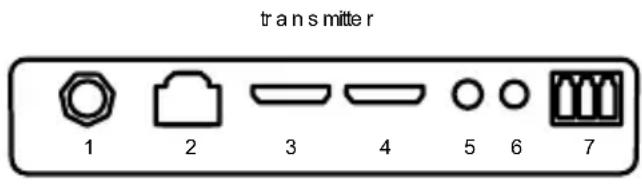
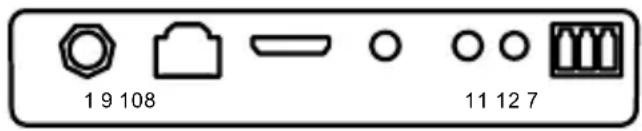
reciever
- Connect the HDMI source to the MegaView 251 Pro transmitter [4], using a High Speed HDMI® certified cable.
- Optional: To continue viewing the HDMI feed in this room as well, use a High Speed HDMI® certified cable to connect a display to the HDMI port marked "HDMI OUT"[3]on the transmitter.
- Connect the MegaView 251 Pro receiver to the display or projector [9] using a High Speed HDMI® certified cable.
- Use one CAT5e/6 Ethernet cable to connect the MegaView 251 Pro transmitter[2] to the receiver [8].
Please note: The MegaView 251 Pro cannot be connected to an existing home network (LAN), this may cause damage to the device.
- Connect the power adapter [?] to the 'DC 24V' connection on the MegaView 251 Pro and plug the adapter into a power socket. The MegaView 251 Pro supports bi-directional Power-over-Cable (PoC). This means that you can either connect the power adapter to the transmitter or to the receiver. This eliminates the need for two power adapters.
Please note: Do not place the MegaView 251 Pro transmitter or receiver in an enclosed space, such as a TV cabinet or equivalent. Provide adequate ventilation to ensure that the product is functioning properly and to protect against overheating.
2.3 Using the infrared return function
The MegaView 251 Pro has a built-in "infrared return channel", which allows you to operate the connected source device from another room where the display is located.
- Connect the IR receiver to the MegaView 251 Pro receiver [11].
- Position the IR receiver in such a way it is visible to your infrared remote control, allowing it to receive the transmitted commands (up to 8 metres).
- Experiment to find the right position before definitive attachment of the IR receiver.
- Connect the IR extender cable to the MegaView 251 Pro transmitter [6].
- Ensure that the IR extender cable's LED is stuck precisely on the A/V device's infrared sensor (this can be extremely accurate on some devices). The exact position can easily be located by shining a torch on the front panel and looking for the IR sensor window.
- Experiment to find the right position before definitive attachment of the IR receiver.
Please note: The adhesive strips may cause discoloration on certain surfaces or may leave adhesive residue when removed.
The MegaView 251 Pro supports two-way IR passthrough. This feature allows you to also operate an IR device on the receiver side.
- Connect the IR receiver to the MegaView 251 Pro transmitter [5].
- Connect the IR extender cable to the MegaView 251 Pro receiver [12].
- Ensure that the IR extender cable LED is stuck precisely on the A/V device's infrared sensor (this can be extremely accurate on some devices). The exact position can easily be located by shining a torch on the front panel and looking for the IR sensor window.
2.4 Connecting analogue audio
The build-in audio de-embedder can be used to connect the MegaView 251 Pro to a separate analogue audio system. Use a 3.5mm stereo mini-jack cable to connect the MegaView 251 Pro receiver audio port [?] to the analogue audio system.
Please note: to use the audio de-embedder function, the audio output format on the HDMI source device must be set to PCM.
2.5 Using the product
- Switch on the HDMI source device connected to the MegaView 251 Pro transmitter.
- Switch on the display device and select the input connected to the MegaView 251 Pro receiver.
- You will now receive the video from the connected A/V device.
- Using the infrared return function, you can operate the HDMI source device.
2.6 RS-232 port
The MegaView 251 Pro supports bi-directional RS-232 passthrough. With this passthrough function, RS-232 commands can be sent from the transmitter to the receiver, or from the receiver to the transmitter.
RS-232 devices can be connected to the MegaView 251 Pro with the included 3-pin phoenix adapters.
3 Frequently asked questions
In order to check proper functioning of the system, it is advisable to test the set-up first using a short CAT5e/6 cable.
Bad (or no) image and sound
- Check if the A/V device is switched on.
- For the best picture and sound quality, only use High Speed HDMI® certified cables.
- Check that your HDMI sources and TV or projector support HDCP 2.2 (High Bandwidth Digital Content Protection) copy protection.
- Check if the CAT5e/6 cable provides a solid connection (no cable faults).
Check if the RJ-45 has been connected according to the EIA/TIA T568B standard. - Please ensure that the maximum cable length is not exceeded.
Install your system as far away from any RF sources (wireless devices) as possible.
The IR return function is not working
- Ensure that the IR LED is properly plugged in.
Experiment with the location of the IR receiver and IR led cable. - The IR receiver has a reception sensitivity of max. 8 metres.
- The range is also dependent on the remote control used.
Do you have any questions that are not answered above?
Please check www.marmitek.com.
4 Technical information
Connections transmitter
Input 1x HDMI
1x IR in
Output 1x HDMI
1x 3,5mm audio out
1x IR out
1x CAT5e/6,RJ45
1x RS-232
Connections receiver
Input 1x CAT5e/6, RJ45
1x IR in
Output 1x HDMI
1x IR out
1x RS-232
Video
Supported resolutions 4K60 hz, 1080p, 1080i, 720p, 576p, 480p
Data transfer HDBaseT
Bandwidth 18 Gbps
HDMI standards HDMI 2.0b, HDR, DVI, EDID, CEC and HDCP
1.4/2.2
Colour formats RGB and YCbCr 4:4:4
Audio
Supported HDMI audio formats DTS-HD Master Audio, DTS:X, Dolby TrueHD,
Dolby Atmos, Dolby Digital/AC3, LPCM7.1 and
PCM 2.0CH
Supported analogue audio PCM 2.0CH
formatst
Infrared return function
Frequency range 20~60 KHz
IR reception range 8 metres
Housing and environment
Dimensions 140× 65× 18mm (both TX and RX)
Weight TX: 160 grams; RX: 155 grams
Ambient temperature 0 to +40^ C
Humidity 20% to 90%
Power supply
External power adapter 100-240V@50-60Hz, 24VDC @ 1A
Power consumption 9,36 W
Specifications may change without prior notice.
5 Declaration of conformity

Hereby, Marmitek BV declares that this MegaView 251 Pro™ is in compliance with the essential requirements and other relevant provisions of the following Directives:
Directive 2014/30/EU of the European Parliament and of the Council of 26 February 2014 on the harmonisation of the laws of the Member States relating to electromagnetic compatibility (recast)
Directive 2014/35/EU of the European Parliament and of the Council of 26 February 2014 on the harmonisation of the laws of the Member States relating to the making available on the market of electrical equipment designed for use within certain voltage limits.
Directive 2011/65/EU of the European Parliament and of the Council of 15 November 2017 amending Directive 2011/65/EU on the restriction of the use of certain hazardous substances in electrical and electronic equipment.
Commission Regulation (EU) 2019/1782 of 1 October 2019 laying down Ecodesign requirements for external power supplies pursuant to Directive 2009/125/EC of the European Parliament and of the Council and repealing Commission Regulation (EC) No 278/2009.
You can read the full Declaration of Conformity at http://www.marmitek.com
Table of Contents
4K60hz,1080p,1080i,720p,576p,480p
HDMI 2.0b, HDR, DVI, EDID, CEC and HDCP 1.4/2.2
Portee de reception IR 8 metres
Hereby, Marmitek BV declares that this MegaView 251 Pro™ is in compliance with the essential requirements and other relevant provisions of the following Directives:
Directive 2014/30/EU of the European Parliament and of the Council of 26 February 2014 on the harmonisation of the laws of the Member States relating to electromagnetic compatibility (recast)
Directive 2014/35/EU of the European Parliament and of the Council of 26 February 2014 on the harmonisation of the laws of the Member States relating to the making available on the market of electrical equipment designed for use within certain voltage limits.
Directive 2011/65/EU of the European Parliament and of the Council of 15 November 2017 amending Directive 2011/65/EU on the restriction of the use of certain hazardous substances in electrical and electronic equipment.
Commission Regulation (EU) 2019/1782 of 1 October 2019 laying down Ecodesign requirements for external power supplies pursuant to Directive 2009/125/EC of the European Parliament and of the Council and repealing Commission Regulation (EC) No 278/2009.
You can read the full Declaration of Conformity at http://www.marmitek.com
Marmitek BV - PO Box 4257 - 5604 EG Eindhoven Paesi Bassi
Table of Contents
25020692/20221206 | MegaView 251 Pro™ all rights reserved © MARMITEK
stay connected marmitek.com


- Table of Contents
- Safety instructions
- Please read these instructions thoroughly before you use the device and keep them for future reference.
- Getting started
- Installation tips
- Connecting the transmitter and receiver
- Using the infrared return function
- Connecting analogue audio
- Using the product
- RS-232 port
- Frequently asked questions
- Bad (or no) image and sound
- The IR return function is not working
- Technical information
- Connections transmitter
- Connections receiver
- Video
- Audio
- Infrared return function
- Housing and environment
- Power supply
- Declaration of conformity
Brand : MARMITEK
Model : MegaView 251 Pro
Category : Audio/video converter