
Audio Anywhere 725 - Audio/video converter MARMITEK - Free user manual and instructions
Find the device manual for free Audio Anywhere 725 MARMITEK in PDF.


| Product Type | Wireless audio/video converter |
| Brand | Marmitek |
| Model | Audio Anywhere 725 |
| Transmitter dimensions (L x W x H) | 65 x 55 x 25 mm |
| Receiver dimensions (L x W x H) | 80 x 30 x 20 mm (with clip) |
| Transmitter weight | 60 g |
| Receiver weight | 30 g |
| Transmitter power supply | 5V DC via micro USB, 100-240V AC power adapter included |
| Receiver power supply | 5V DC via micro USB or built-in Li-ion 3.7V 545mAh battery |
| Receiver battery life | Up to 8 hours of operation, 280 hours in standby |
| Battery charging time | About 2 hours |
| Wireless range | Up to 40 m in open field, up to 10 m through walls and ceilings |
| Operating frequency | 2.4 GHz |
| Transmitter audio inputs | Analog (3.5 mm jack), digital Toslink, stereo USB |
| Receiver audio output | 3.5 mm stereo jack |
| Maximum number of receivers per transmitter | 16 |
| Main features | Wireless HD audio transmission, volume control, secure pairing, multipoint mode, built-in rechargeable battery |
| Care and cleaning | Wipe with a dry, soft cloth. Do not use abrasive products or solvents. |
| Safety | Indoor use only. Do not expose to moisture, extreme temperatures, or direct sunlight. Keep out of reach of children. |
| Spare parts and repairability | Repairs must be carried out by qualified personnel. The warranty is void if unauthorized opening occurs. |
| General information | Package contents: 1 transmitter, 1 receiver, 2 micro USB cables, 2 USB power adapters, 1 mini-jack cable, 1 user manual. |
Frequently Asked Questions - Audio Anywhere 725 MARMITEK
User questions about Audio Anywhere 725 MARMITEK
0 question about this device. Answer the ones you know or ask your own.
Ask a new question about this device
Download the instructions for your Audio/video converter in PDF format for free! Find your manual Audio Anywhere 725 - MARMITEK and take your electronic device back in hand. On this page are published all the documents necessary for the use of your device. Audio Anywhere 725 by MARMITEK.
USER MANUAL Audio Anywhere 725 MARMITEK
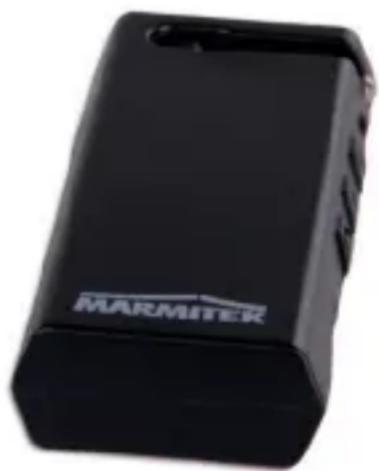
USER MANUAL 3
3.4.1 Transmitter LED status 8
3.4.2 Receiver LED status, battery power 8
3.4.3 Receiver LED status, USB power 8
4 Getting started 9
4.1 First use....9
4.2 Installing the transmitter 9
4.3 Installing the receiver 9
4.4 Pairing the transmitter and receiver.... 10
4.5 Setting the volume 10
5 Connection options transmitter.... 11
5.1 Analogue input.... 11
5.2 Digital Toslink input.... 11
5.3 USB input 11
6 Additional receiver 11
7 Signal booster.... 11
8 Technical specifications .... 12
9 Frequently asked questions (FAQs).... 15
10 Notification.... 16
10.1 Declaration of Conformity.... 16
10.2 Recycling 17
10.3 Copyrights ...... 17
2 Safety instructions
Please read these instructions thoroughly before you use the device and keep them for future reference.
- Only for indoor use.
- Do not use the product in a damp environment or near water.
- Do not expose the product to extremely high or low temperatures, strong light sources or direct sunlight.
- This product is not a toy. Keep out of reach of children.
- Connect the adapter to the mains only after you have verified that the line voltage corresponds to the value specified on the type plates.
- Never connect a power adapter if it's damaged. In such cases, please contact your supplier.
- Disconnect the AC/DC power adapter from the mains when this device is not in use for prolonged time.
- Never open the product: the device may contain parts with deadly voltage.
- Repairs or service should only be performed by qualified personnel.
- Improper use, self-installed modifications or repairs will void any and all warranties.
- Marmitek does not accept any product responsibility for incorrect use of the product or use other than for which the product is intended.
- Marmitek does not accept liability for any consequential damage other than the legal product responsibility.
3 Your product
3.1 Introduction
Congratulations on your purchase of the Marmitek
Audio Anywhere 725. The Audio Anywhere 725 consists of a transmitter and a receiver. The signal is transmitted at 2.4GHz and can therefore go through walls and ceilings.
The transmitter/receiver can be used to transmit (stereo) audio signals wirelessly.
• Digital Wireless Audio sender
- Wirelessly enjoy music and TV audio.
- Wirelessly send your TV's or computer's audio to your stereo system, speakers or headphones.
- Listen to the music you are playing in the living room and in other rooms (e.g. kitchen/conservatory) simultaneously.
- Digital audio transmission in HD quality via improved 2.4GHz interference-free technology.
- Ideal as a portable solution due to the receiver's built-in battery and dedicated volume control.
- Multiple receivers can be connected to one transmitter.
- Use secured pairing to use multiple sets (up to 6) in the same surroundings.
Via the Audio Anywhere 725, you can playback TV audio or music on your audio system, without using cables to connect your audio source to the audio system. The audio source could, for example, be a PC or laptop, or a TV. You can then use the audio source to select the music and adjust the volume on the transmitter or receiver, without having to walk to your audio system.
The receiver has a built-in battery, so you can, for example, also make your wired headphones or active speakers wireless.
The Audio Anywhere 725 has a range of approx. 40 metres, enabling you to enjoy your audio in the same or adjoining room without limitations.
3.2 Package contents
A. 1 x Audio Anywhere 725 transmitter.
B. 1 x Audio Anywhere 725 receiver.
C. 2 × Micro USB cable.
D. 2 × USB power adapter.
E. 1 x Mini-jack cable.
F. 1 x User Manual.
3.3 Product overview

Transmitter
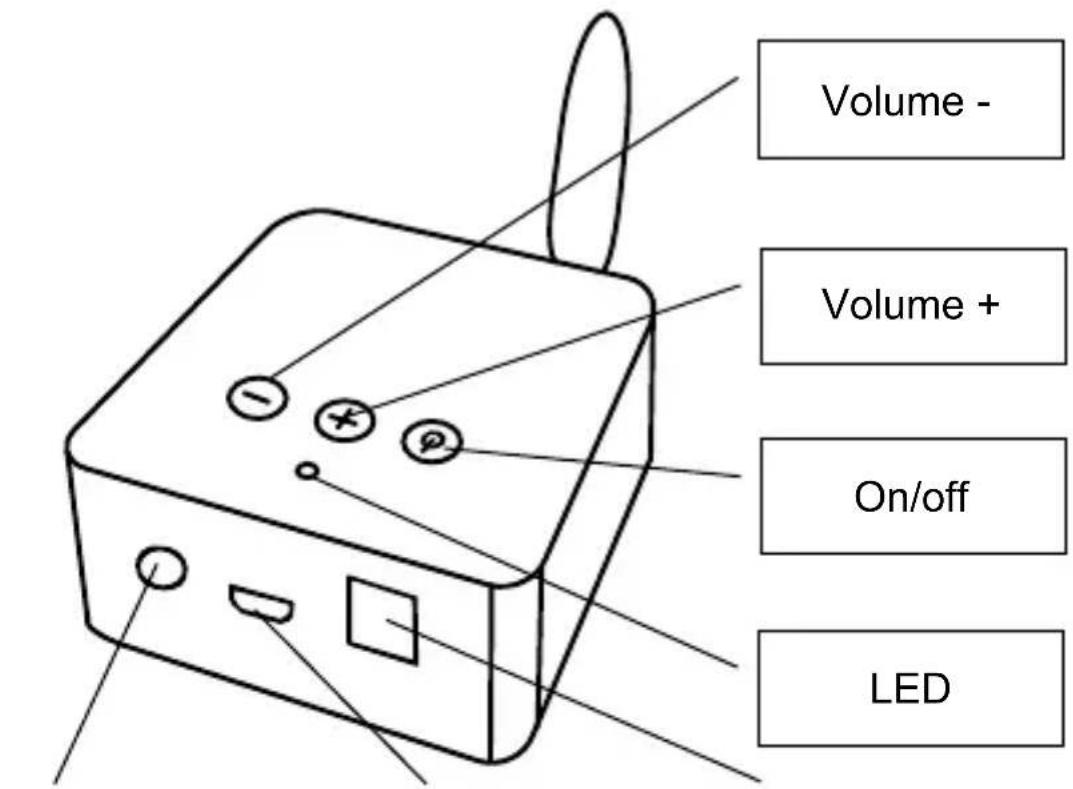
Aux in
Micro USB jack
Toslink input

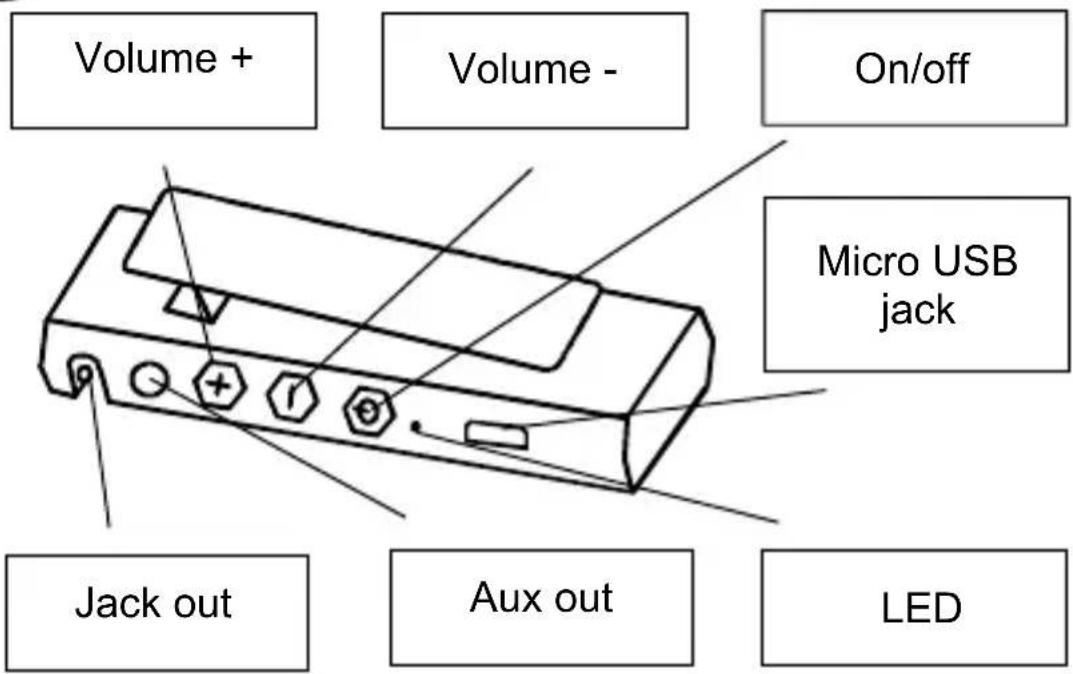
Receiver


Micro USB power cable
This cable enables you to power the Audio Anywhere 725.
USB power adapter
Connect D to C and power the Audio Anywhere 725.


Mini jack cable
This cable connects to the audio input of the Audio Anywhere transmitter.
3.4 LED status
3.4.1 Transmitter LED status
The LED can be red (R) or blue (B). The speed and sequence of flashes indicate the status.
3.4.2 Receiver LED status, battery power
3.4.3 Receiver LED status, USB power
| LED status Description | ||||||||
| Off, battery charged | ||||||||
| R | Off, battery charging | |||||||
| R | B | R | B | R | B | Pairing | ||
| B | B | R | Waiting for connection, battery charging | |||||
| B | B | Waiting for connection, battery charged | ||||||
| B | B | B | B | B | B | Connected, battery charging | ||
| B | B | B | B | B | B | Connected, battery charged | ||
4 Getting started
Please take the following steps before using the product:
• Installing the transmitter.
- Installing the receiver.
- Connecting the transmitter and receiver.
- Setting the volume.
- Enjoy!
We will now explain this step by step.
4.1 First use
The Audio Anywhere 725 receiver has a built-in rechargeable battery.
Upon first use, we recommend that you fully charge the battery first. To do this, use the included USB cable and connect it to the supplied adapter. During charging, the red LED will flash slowly. It is normal for the first charge to take about 2 hours. Once the battery of the Audio Anywhere 725 receiver is fully charged, the red LED will switch off.
4.2 Installing the transmitter
Any audio source can be connected to the transmitter such as a TV, computer or audio system.
Connect the mini jack plug to, for example, the headphones jack of your TV, smartphone or radio/CD player.
- Connect the adapter to the micro USB port and plug the adapter into the wall socket.
- Press the on/off button. The blue LED will now start to flash slowly.
- Let your audio source produce sound.
4.3 Installing the receiver
-
Connect the mini jack plug (jack out) to, for example, the AUX IN of an active speaker, headphones or a radio/CD player.
-
Connect the adapter to the micro USB port and plug the adapter into the wall socket. The red LED flashes slowly when the battery is charging.
- Press the on/off button. The Audio Anywhere 725 receiver will now switch on and the blue LED will flash slowly. (The red LED flashes occasionally when the battery is still charging.)
4.4 Pairing the transmitter and receiver
Upon first use, the receiver must be paired with the transmitter.
Make sure the transmitter and receiver are switched off.
- Press and hold the transmitter's on/off button for 2 seconds. The red/blue LED will now start to flash. The transmitter is now in pairing mode for 20 seconds.
- Shortly press the receiver's on/off button. The red/blue LED will now start to flash, after which the blue LEDs on the transmitter and receiver will light up continuously to indicate successful pairing. (If the LEDs continue to flash rapidly, the transmitter was probably in pairing mode for more than 20 seconds, cancelling the pairing. You will then need to put the transmitter into pairing mode again and re-try pairing the transmitter and receiver.)
4.5 Setting the volume
On the transmitter, you can adjust the volume to all receivers using the + and - buttons.
On the receiver, you can adjust the volume per receiver.
5 Connection options transmitter
The transmitter features the following connection options:
5.1 Analogue input
Used to connect any analogue output such as an MP3 player, smartphone, TV or audio system.
5.2 Digital Toslink input
Used to connect the Toslink output of your audio system or TV. Make sure that the Toslink setting on your audio system or TV is set to stereo.
5.3 USB input
Used to connect your PC's USB connection, in order to use it as an audio output.
6 Additional receiver
Additional receiver for your Audio Anywhere 725.
An additional receiver allows you to receive the transmitter's signal at multiple locations in the home.
You can connect up to 16 receivers to 1 transmitter.
Follow the instructions in chapter 4.4 to add an additional receiver.
7 Signal booster
The transmitter and receiver have an indoor range of about 10 metres, through walls and ceilings.
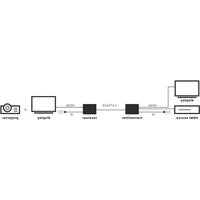
If that is insufficient, you can purchase an additional set and connect the receiver to the transmitter to act as a signal booster. In this situation, you connect the first transmitter to the first receiver. Connect the audio output of the first receiver to the audio input of the second transmitter, and connect the second transmitter to the second receiver. You now have a range of 20 metres. You can repeat this as many times as necessary to cover the required distance.
8 Technical specifications
Transmitter
Power supply 100-240 VAC 50/60 Hz, 5V DC adapter
DC Power 5V, trough Micro USB
Power Consumption < 0.2W
Linking (pairing) Automatic Pairing and connection
-Frequency Response 10Hz to 22kHz.
Total audio delay 16 ms
Support Multipair party mode Up to 16 devices simultaneously.
Electric performance RF
Audio transfer method Digital
Pairing Automatically
Data transfer speed Up to 2 Mbps, GFSK modulation
Transmitter frequency 2.4 GHz
Frequency Hopping Triple carrier hopping
Channels 79 channels
Transmit Power (Class 2) 10 dBm
Operating range Up to 40 m free field, up to 10 m through walls and ceilings
Input
Interface audio Input 3.5 mm stereo jack USB digital stereo Toslink digital stereo
Audio
Audio Input Level (Max) 1.2V (RMS)
Audio Frequency Range 20Hz \~ 22kHz
Dynamic Range Typ. 95 dBA
Channel separation ≥ 85 dB
Signal to noise ratio ≥ 80dB.
Total Harmonic Distortion 1.5% DAC DSP Co-Processor 16-bit Internal
Sample Rate 48 kHz / 16 bits
Physical
Audio Functions Volume+, Volume-, Power LEDs Power, Link
Antenna Extern, omnidirectional
Antenna Gain 2 dBi
Antenna Port Impedance 50 ohm
Dimension 65 x 55 x 25 mm
Weight 60 grams.
Operation Temperature 0 \~ +50°C
Receiver
Power supply 100-240 VAC 50/60 Hz, 5VDC via
Micro USB
DC Power 5V, via Micro USB
Power Consumption < 0.1W standby
< 3W operation
1.5W for charging
Power Micro USB or battery
Power Consumption < 0.2W
Battery Li-ion 3.7 V
- Battery Charging Voltage 5 V
- Battery Capacity 545mAh
-Stand-by Time Up to 280 hours
- Battery working time 8 hours
-Charging Time 2 hours
-Working Current 65 mA
Automatic shutdown 10 minutes
Control Auto Pairing and connection
Electric performance RF
AV RF transmission digital
Pairing Automatically
RF Data Rate Up to 2 Mbps, GFSK modulation
RF Frequency 2.4 GHz
Frequency 2402\~2480 MHz
Frequency Hopping 500 hops/seconds
Channels 79 channels
Transmit Power (Class 2) 4 dBm (Max)
Transmission Range Up to 40 m free field, up to 10 m
through walls and ceilings
Output
Interface audio output 3.5 mm stereo jack
Output Power 20 mW RMS
Audio Output Level (Max) 1,2V ( RMS )
Frequency characteristic 20Hz \~ 22kHz
Dynamic Range Typ. 95 dBA
Channel Separation Audio R/L ≥ 85 dB
Signal to noise ratio ≥ 80dB.
Total harmonic distortion 0.05%
DAC DSP Co-Processor 16-bit Internal
Stereo CODEC with -95dB SNR.
Sample Rate Up to 44,1 kHz
Sample Rate 48kHz / 16 bits
Physical
Audio Functions Volume+, Volume-, Power
LEDs Power, Link
Antenna Internal, omnidirectional
Antenna Gain 2 dBi
Dimension 80 x 30 x 20 mm with clip
Weight 30 grams.
Ambient temperature 0 \~ +50°C
In order to continue improving the product, Marmitek reserves the right to change specifications and/or designs without prior notice.
9 Frequently asked questions (FAQs)
I cannot pair my Audio Anywhere 725.
Please check the following:
- Ensure that the mains adapter is connected and the LED is lit or flashing.
- Make sure that the distance between the transmitter and receiver does not exceed 10 metres and there are no major obstacles between them.
There is no sound coming from my audio system
- Make sure that the audio cable is connected properly (AUX IN), the correct input is selected on your audio system and the volume of your audio system is set to the desired level.
- Check that the volume on the transmitter or receiver is not set to low.
I have paired my TV's audio wirelessly with my audio system, but the sound is not in sync with the video.
For best results, connect the Audio Anywhere 725 transmitter to your TV's audio output, instead of the audio output of your set-top box or satellite receiver.
Connecting the transmitter to the headphone output turns off your TV speakers and allows you to continue using your TV's remote control to control the volume through the Audio Anywhere 725.
Can I connect my speakers to the receiver directly?
In order to hear sound or music, connect the receiver to an amplifier with separate (built-in) speakers or so-called active speakers (with built-in amplifier). You cannot connect passive speakers directly to the receiver. You can, however, connect passive headphones to the receiver.
Can I also connect my transmitter/receiver's USB cable to a USB connector of, for example, my amplifier or TV?
Yes, you can. The transmitter will then automatically switch on and off, in line with the amplifier or TV. (auto power on)
Do you have any other questions that have not been resolved by the above information? Please go to http://www.marmitek.com.
10 Notification
10.1 Declaration of Conformity
CE Hereby, Marmitek BV, declares that this Audio Anywhere 725 TM is in compliance with the essential requirements and other relevant provisions of the following Directives:
Directive 2014/53/EU of the European Parliament and of the Council of 16 April 2014 on the harmonisation of the laws of the Member States relating to the making available on the market of radio equipment and repealing Directive 1999/5/EC.
Directive 2011/65/eu of the European parliament and of the council of 8 June 2011 on the restriction of the use of certain hazardous substances in electrical and electronic equipment.
Commission Regulation (EC) No 278/2009 of 6 April 2009 implementing Directive 2005/32/EC of the European Parliament and of the Council with regard to eco-design requirements for no-load condition electric power consumption and average active efficiency of external power supplies.
You can read the full Declaration of Conformity at http://www.marmitek.com
10.2 Recycling

Environmental Information for Customers in the European Union and other European countries with separate collection systems.
This symbol on the product or on its packaging indicates that this product shall not be treated as household waste. Instead it shall be handed over to the applicable collection point for the recycling of electrical and electronic equipment. It is your responsibility to dispose of this and other electric and electronic equipment via designated collection facilities appointed by the government or local authorities. Correct disposal and recycling will help prevent potential negative consequences to the environment and human health. For more detailed information about the disposal of your old equipment, please contact your local authorities, waste disposal service, or the shop where you purchased the product.
10.3 Copyrights
Marmitek is a trademark of Germatron B.V.
Audio Anywhere 725 TM is a trademark of Marmitek B.V.
All rights reserved. Every effort has been made to ensure that the information in this manual is accurate. Marmitek is not responsible for printing or clerical errors. Copyright and all other proprietary rights in the content (including but not limited to model numbers, software, audio, video, text and photographs) rests with Marmitek B.V. Any use of the Content, but without limitation, distribution, reproduction, modification, display or transmission without the prior written consent of Marmitek is strictly prohibited. All copyright and other proprietary notices shall be retained on all reproductions. Other company and product names mentioned herein may be trademarks of their respective companies. Mention of third-party products is for informational purposes only and constitutes neither an endorsement nor a recommendation. Marmitek assumes no responsibility with regard to the performance or use of these products.
Marmitek BV - PO Box 4257 - 5604 EG Eindhoven The Netherlands
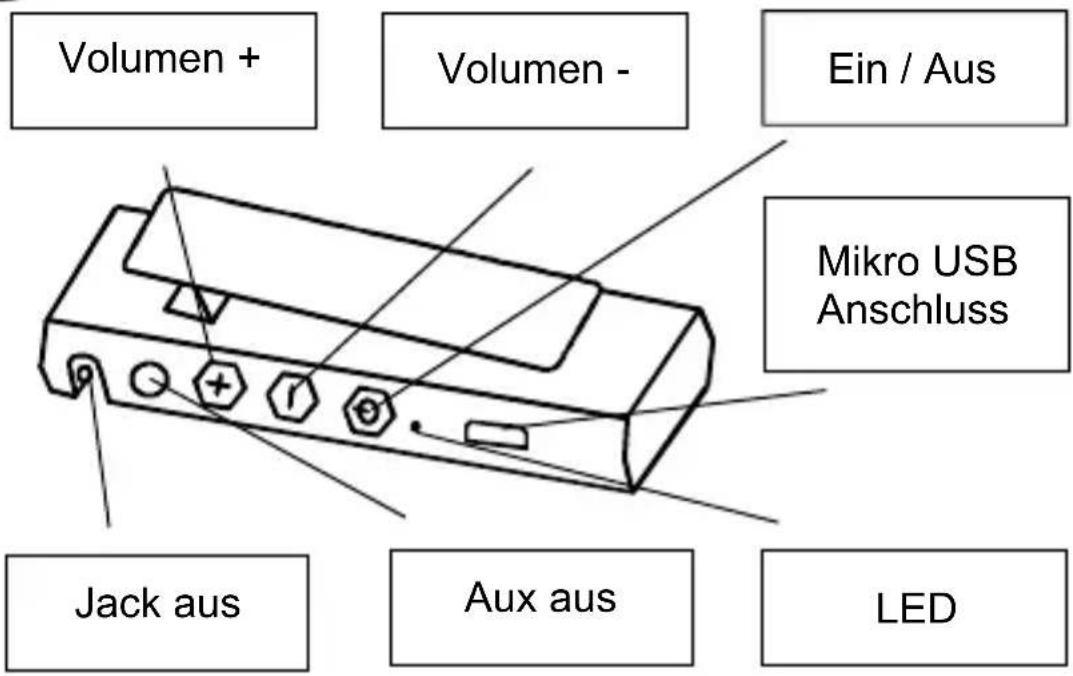
Volumen -
Volumen +
Ein/Aus
LED
Aux ein
Mikro USB Anschluss
Toslink Eingang
Empfänger


DAC DSP Co-Processor 16-bit Internal
Stereo CODEC with -95dB SNR.
DAC DSP Co-Processor 16-bit Internal
Stereo CODEC with -95dB SNR.

Câble mini-jack
Distorsion Harmonique Totale (Total Harmonic Distortion, THD)
1,50%

Cable mini-jack
DAC DSP Co-Processor 16-bit Internal
Stereo CODEC con -95dB SNR.
DAC DSP Co-Processor 16-bit Internal
Stereo CODEC con -95dB SNR.


Cavo Mini-jack
Frequency Hopping Triple carrier hopping
Canali 79 canali
DSP Co-Processor 16-bit Internal
Stereo CODEC con -95dB SNR.
DAC DSP Co-Processor 16-bit Internal
Stereo CODEC con -95dB SNR.
Micro USB voedingskabel


Mini-jack kabel
DC Voeding 5 V, via micro USB
Frequency Hopping Triple carrier hopping
Kanalen 79 kanalen
Zendvermogen (klasse 2) 10 dBm
Stereo CODEC with -95 dB SNR.
sampling rate 48 kHz / 16 bits
Fysiek
DC Voeding 5 V, via Micro USB
DSP Co-Processor 16-bit Internal
Stereo CODEC with -95dB SNR.
Sample rate tot 44,1 kHz
Sampling rate 48 kHz / 16 bits
Fysiek


- 2 SAFETY INSTRUCTIONS
- 3 YOUR PRODUCT
- 3.1 INTRODUCTION
- 3.2 PACKAGE CONTENTS
- 3.3 PRODUCT OVERVIEW
- TRANSMITTER
- RECEIVER
- MICRO USB POWER CABLE
- USB POWER ADAPTER
- MINI JACK CABLE
- 3.4 LED STATUS
- 3.4.1 TRANSMITTER LED STATUS
- 3.4.2 RECEIVER LED STATUS, BATTERY POWER
- 3.4.3 RECEIVER LED STATUS, USB POWER
- 4 GETTING STARTED
- 4.1 FIRST USE
- 4.2 INSTALLING THE TRANSMITTER
- 4.3 INSTALLING THE RECEIVER
- 4.4 PAIRING THE TRANSMITTER AND RECEIVER
- 4.5 SETTING THE VOLUME
- 5 CONNECTION OPTIONS TRANSMITTER
- 5.1 ANALOGUE INPUT
- 5.2 DIGITAL TOSLINK INPUT
- 5.3 USB INPUT
- 6 ADDITIONAL RECEIVER
- 7 SIGNAL BOOSTER
- 8 TECHNICAL SPECIFICATIONS
- ELECTRIC PERFORMANCE RF
- INPUT
- AUDIO
- PHYSICAL
- OUTPUT
- 9 FREQUENTLY ASKED QUESTIONS (FAQS)
- THERE IS NO SOUND COMING FROM MY AUDIO SYSTEM
- I HAVE PAIRED MY TV'S AUDIO WIRELESSLY WITH MY AUDIO SYSTEM, BUT THE SOUND IS NOT IN SYNC WITH THE VIDEO
- CAN I CONNECT MY SPEAKERS TO THE RECEIVER DIRECTLY
- CAN I ALSO CONNECT MY TRANSMITTER/RECEIVER'S USB CABLE TO A USB CONNECTOR OF, FOR EXAMPLE, MY AMPLIFIER OR TV
- 10 NOTIFICATION
- 10.1 DECLARATION OF CONFORMITY
- 10.2 RECYCLING
- ENVIRONMENTAL INFORMATION FOR CUSTOMERS IN THE EUROPEAN UNION AND OTHER EUROPEAN COUNTRIES WITH SEPARATE COLLECTION SYSTEMS
- 10.3 COPYRIGHTS
- EMPFÄNGER
- CÂBLE MINI-JACK
- CABLE MINI-JACK
- CAVO MINI-JACK
- MICRO USB VOEDINGSKABEL
- MINI-JACK KABEL
- FYSIEK
Brand : MARMITEK
Model : Audio Anywhere 725
Category : Audio/video converter